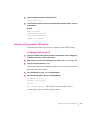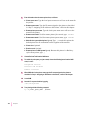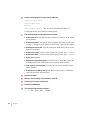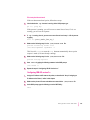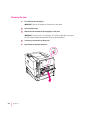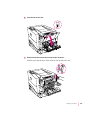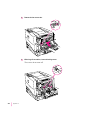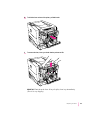
1
Apple ColorLaserWriter 12/600PS Setting up, connecting, and using your printer K Apple Computer, Inc. © 1995 Apple Computer, Inc. All rights reserved. Under the copyright laws, this manual may not be copied, in whole or in part, without the written consent of Apple. Your rights to the software are governed by the accompanying software license agreement. The Apple logo is a trademark of Apple Computer, Inc., registered in the U.S. and other countries. Use of the “keyboard” Apple logo (Option-Shift-K) for commercial purposes without the prior written consent of Apple may constitute trademark infringement and unfair competition in violation of federal and state laws. Every effort has been made to ensure that the information in this manual is accurate. Apple is not responsible for printing or clerical errors. Apple Computer, Inc. 1 Infinite Loop Cupertino, CA 95014-2084 (408) 996-1010 Apple, the Apple logo, AppleTalk, A/UX, ColorSync, EtherTalk, LaserWriter, LocalTalk, Macintosh, PowerBook, QuickTime, and TrueType are trademarks of Apple Computer, Inc., registered in the U.S. and other countries. Finder, QuickDraw, and QuickTake are trademarks of Apple Computer, Inc. Adobe, Adobe Illustrator, Adobe Photoshop, Adobe Type Manager, and PostScript are trademarks of Adobe Systems Incorporated, which may be registered in certain jurisdictions. AIX and IBM are registered trademarks of International Business Machines Corporation. Classic is a registered trademark licensed to apple Computer, Inc. Helvetica, Palatino, and Times are registered trademarks of Linotype-Hell AG and/or its subsidiaries. ExposurePro is a registered trademark of Baseline Publishing. ITC Avant Garde, ITC Bookman, ITC Zapf Chancery, and ITC Zapf Dingbats are registered trademarks of International Typeface Corporation. Lucida is a registered trademark of Bigelow and Holmes. MS-DOS is a registered trademark and Windows is a trademark of Microsoft Corporation. NetWare is a registered trademark of Novell, Inc. QuarkXPress is a registered trademark of Quark, Inc. Sun is a trademark of Sun Microsystems, Inc. SuperPaint is a trademark of Aldus Corporation, a subsidiary of Adobe Systems Incorporated, which may be registered in certain jurisdictions. Ultrix is a trademark of Digital Equipment Corporation. UNIX is a registered trademark of Novell, Inc., in the U.S. and other countries, licensed exclusively through X/Open Company, Ltd. Simultaneously published in the United States and Canada. Mention of third-party products is for informational purposes only and constitutes neither an endorsement nor a recommendation. Apple assumes no responsibility with regard to the performance or use of these products. Contents Overview Preface How Much of This Book Do I Have to Read? xix Part I Guide for Printer Administrators 1 Setting Up the Color LaserWriter 12/600 PS 1 2 Setting Up the Printer for Macintosh Users 43 3 Setting Up the Printer for Windows and NetWare Users 4 Setting Up the Printer for UNIX Users 5 Installing Options 77 111 129 Part II Guide for Users 6 Macintosh Users 155 7 Windows and DOS Users 8 UNIX Users 9 Loading Paper 173 201 203 iii 10 Maintenance 215 11 Clearing Paper Jams 227 12 Fixing Image Problems 13 Troubleshooting 237 243 Part III Appendixes A Technical Information and Printer Supplies 257 B Setting Up the Printer as an ATPS Remote Printer C Using Fonts With the Printer D Working With ColorSync 277 291 E Packing and Moving the Printer F Replacing the Fuser 295 303 G Diagnosing Problems for Service 323 H Removing the Macintosh Desktop Printing Software Index iv Contents 339 269 335 Detailed Contents Communications regulation information Laser information xvii xviii Preface How Much of This Book Do I Have to Read? xix Printer administrators and users: Who does what xix What the printer administrator should know Getting new users started xx xx Which chapters should I read? xxi Part I Guide for Printer Administrators 1 Setting Up the Color LaserWriter 12/600 PS Main features of the Color LaserWriter 12/600 PS Anatomy of the printer 1 2 Choosing a place for the printer Important safety instructions Unpacking the printer 1 3 4 6 Installing the quick reference booklet Installing the fuser oil bottle 9 10 Installing the photoconductor cartridge and toner disposal box Installing the toner cartridges 12 19 v Wait to install the printer options 24 Loading paper into the paper cassette Connecting the printer 25 29 Connecting to an Ethernet network 30 Connecting to a LocalTalk network 32 Connecting directly to a single Macintosh 34 Connecting to an IBM PC or compatible with a parallel cable Connecting the power and turning on the printer Saving energy 37 39 Adjusting communication settings 40 Why customize communication settings? 41 How to customize communication settings How to return to the default settings What to do next 41 42 42 2 Setting Up the Printer for Macintosh Users Before you begin 43 44 Initial AppleTalk setup 44 Step 1: Installing the software the printer administrator needs Step 2: Choosing the printer on the administrator’s computer Step 3: Making sure everything is working What to do next 48 48 Changing printer settings with the Apple Printer Utility Opening the Apple Printer Utility Viewing printer information Naming the printer 51 53 53 Identifying the printer’s physical location Sending fonts to the printer vi Contents 35 55 54 49 45 47 Removing fonts 57 Printing font samples 57 Initializing a hard disk connected to the printer Turning the startup pages on or off Conserving energy 59 60 Setting paper-handling options Setting up job handling 61 62 Setting the printer’s error timeout 63 Setting the printer’s network zones Viewing the Ethernet address 64 65 Working with a NetWare network 66 Changing TCP/IP configurations 68 Viewing and changing communication settings Sending PostScript files to the printer Restarting the printer 70 72 72 Getting Macintosh users started using the printer Instructions for users Software for users 58 73 73 73 Preparing a server so users can install over a network Installing the printer software from the server What to do next 74 75 76 Contents vii 3 Setting Up the Printer for Windows and NetWare Users System requirements Before you begin 77 77 78 Installing the software the printer administratror needs Installing software for Windows NT Using Apple Print Monitor 81 81 Initial Apple Print Monitor for Windows setup Making sure everything is working Initial Novell NetWare setup 82 83 83 Step 1: Choosing an operating mode What to do next 78 84 85 Using PCONSOLE 86 Step 2, option A: Setting up the printer as a print server (using PCONSOLE) 87 Step 2, option B: Setting up the printer as a remote printer (RPRINTER mode) 92 Step 3: Assigning a password for the print server (optional) 97 Step 4: Setting up the PostScript printer driver for NetWare 98 Step 5: Making sure everything is working 98 Step 6: Setting up client computers for network printing What to do next 98 98 Setting additional printer parameters with the Apple Printer Utility for Windows 99 Installing the Apple Printer Utility for Windows Opening and quitting the Apple Printer Utility Selecting the printer 101 Viewing printer information 101 Giving the printer an AppleTalk name Identifying the printer’s physical location Printing font samples viii Contents 102 101 102 100 100 Turning the startup pages on or off Conserving energy 102 103 Setting paper-handling options Setting up job handling 103 104 Viewing the Ethernet address 104 Working with a NetWare network Changing TCP/IP configurations 105 106 Viewing and changing communication settings Sending PostScript files to the printer Restarting the printer Banner pages and NetWare 107 108 108 109 Installed Type 1 fonts and Adobe Type Manager Installing Type 1 fonts 109 Removing Type 1 fonts 110 Changing the size of the ATM font cache Turning ATM off or on What to do next 109 110 110 110 4 Setting Up the Printer for UNIX Users Before you begin Initial TCP/IP setup 111 111 112 Will these instructions work for my flavor of UNIX? Background information Security 112 112 112 Step 1: Installing the software the printer administrator needs Step 2: Obtaining an IP address for the printer Step 3: Assigning an IP address to the printer Step 4: Making sure everything is working What to do next 112 113 113 117 119 Contents ix Configuring the printer 119 Getting UNIX users started using the printer 119 Notes on configuring specific UNIX systems 121 Configuring HP-UX version 8.07 121 Configuring HP-UX version 9.xx 123 Configuring IBM AIX version 3.x 125 Configuring Sun OS version 4.1, Ultrix version 4.2, or other BSD systems 127 What to do next 5 Installing Options 128 129 Installing the optional 250-sheet feeder Adjusting the side margin 135 Installing the 250-sheet universal cassette Adding hard disks 130 136 137 Connecting a previously used hard disk Connecting external hard disks Adding an internal hard disk Initializing hard disks 137 137 140 143 Using external hard disks from manufacturers other than Apple Increasing the printer RAM Installing RAM 144 145 Configuring your software for new printer options Configuring the Macintosh printer software 150 150 Configuring the printer from an IBM PC or compatible x Contents 152 144 Part II Guide for Users 6 Macintosh Users System requirements 155 156 Installing the printer software 156 More information about the Installer program Selecting and setting up the printer 158 159 Creating, throwing away, and manipulating desktop printer icons Determining the status of a printer by looking at its icon Switching between printers 160 161 Drag the document you want to print to a desktop printer icon Select the printer using its desktop printer icon Select a new printer using the Chooser Printing 160 161 161 162 162 Selecting page setup options Printing documents 162 164 Printing a cover page automatically 165 Printing color and grayscale documents Reporting printing errors 167 Turning tray switching on or off Printing transparencies 166 168 169 Changing the Print Quality mode 169 Printing while using the computer for other work Monitoring and controlling background printing Using the Apple Printer Utility 170 171 172 Contents xi 7 Windows and DOS Users System requirements 173 173 Installing the Windows printer software What to do next 174 177 Installing software for Windows NT 177 Printing from Windows applications 178 Setting printer driver options 178 Opening the printer Setup dialog box from the Control Panel Opening the printer setup dialog box from your application 179 179 Opening the printer Setup dialog box from the Print Manager Selecting printer options in the Setup dialog box Additional printer options PostScript Fonts 180 181 182 184 Features 186 Job Control 187 Watermark 188 Downloading fonts 190 Downloading fonts manually to RAM or to the hard disk Using a hard disk 193 Adding a hard disk to the device list Initializing the hard disk 195 Printing to a PostScript file 196 193 Using the driver to print a PostScript file DOS notes 199 Using the Apple Printer Utility for Windows xii Contents 197 199 191 179 8 UNIX Users 201 Printing from a UNIX workstation to the printer 9 Loading Paper 202 203 Choosing paper 204 Automatic or manual printing with the printer Using the standard paper cassette Using the multipurpose tray 204 205 206 Opening the multipurpose tray 206 Placing paper and transparencies in the multipurpose tray Loading the optional 250-sheet universal cassette 10 Maintenance Safety first 207 211 215 216 Precautions during maintenance Regular maintenance Low toner Low fuser oil 217 218 218 219 Toner disposal box is full 220 Photoconductor cartridge is wearing out Fuser needs replacement Cleaning the exterior 221 222 222 Cleaning the density sensor and separation discharger wire Cleaning the paper pickup area 223 226 Contents xiii 11 Clearing Paper Jams 227 Checking the indicator lights for paper jams Checking for and clearing paper jams 228 229 Clearing paper from the paper pickup area Clearing paper from the transfer drum Clearing paper from the fuser 233 234 Clearing paper from the optional feeder 12 Fixing Image Problems Color print quality problems 237 241 243 Problems covered in other places 243 Can’t communicate with the printer Can’t close the printer’s door 244 Can’t turn the toner carousel 245 Macintosh troubleshooting 244 245 IBM PC or compatible troubleshooting Novell NetWare troubleshooting UNIX troubleshooting Density control panel xiv Contents 236 237 General print quality problems 13 Troubleshooting 230 251 254 251 249 Part III Appendixes A Technical Information and Printer Supplies Specifications 257 257 About PostScript Printer Description (PPD) files RAM Upgrade Specifications Ozone emission Supplies 265 265 Communication settings Accessories 263 266 267 268 B Setting Up the Printer as an ATPS Remote Printer 269 Configuring ATPS for the first time on a NetWare 4 server Configuring ATPS for the first time on a NetWare 3.x server 270 272 Modifying an existing ATPS configuration on a NetWare 3.x server C Using Fonts With the Printer Kinds of fonts 277 277 Bitmapped fonts 278 PostScript fonts 279 TrueType fonts 280 QuickDraw GX imaging technology 281 How TrueType fonts work with other kinds of fonts TrueType and bitmapped fonts 281 TrueType and PostScript fonts 283 How the Macintosh looks for fonts Where fonts are stored Suitcases Styled fonts 274 281 283 284 285 287 Common questions about fonts 288 Contents xv D Working With ColorSync 291 The problem that ColorSync solves About ColorSync 291 292 How ColorSync works Using ColorSync 292 293 E Packing and Moving the Printer F Replacing the Fuser Replacing the fuser 295 303 304 Replacing the transfer drum cleaning unit Replacing the air and ozone filters 311 317 Replacing the separation discharger unit G Diagnosing Problems for Service 320 323 Normal power-on status panel behavior Paper Out and Paper Jam lights both flash 324 325 Two hardware problems you may be able to fix Out of paper Paper jams 325 326 327 Regular maintenance Low toner Low fuser oil 328 328 329 Toner disposal box is full 330 Photoconductor cartridge is wearing out Fuser needs replacement 331 332 Problem with internal random-access memory (RAM) Problem with the toner carousel 333 334 H Removing the Macintosh Desktop Printing Software 335 Monitoring and controlling print requests without desktop printers Index xvi Contents 339 337 Communications regulation information FCC statement This equipment has been tested and found to comply with the limits for a Class B digital device in accordance with the specifications in Part 15 of FCC rules. See instructions if interference to radio or television reception is suspected. Radio and television interference The equipment described in this manual generates, uses, and can radiate radio-frequency energy. If it is not installed and used properly—that is, in strict accordance with Apple’s instructions—it may cause interference with radio and television reception. This equipment has been tested and found to comply with the limits for a Class B digital device in accordance with the specifications in Part 15 of FCC rules. These specifications are designed to provide reasonable protection against such interference in a residential installation. However, there is no guarantee that interference will not occur in a particular installation. You can determine whether your computer system is causing interference by turning it off. If the interference stops, it was probably caused by the computer or one of the peripheral devices. If your computer system does cause interference to radio or television reception, try to correct the interference by using one or more of the following measures: m Turn the television or radio antenna until the interference stops. m Move the computer to one side or the other of the television or radio. m Move the computer farther away from the television or radio. m Plug the computer into an outlet that is on a different circuit from the television or radio. (That is, make certain the computer and the television or radio are on circuits controlled by different circuit breakers or fuses.) If necessary, consult an Apple-authorized service provider or Apple. See the service and support information that came with your Apple product. Or, consult an experienced radio/television technician for additional suggestions. You may find the following booklet helpful: Interference Handbook (stock number 004-000-00493-1). This booklet, prepared by the Federal Communications Commission, is available from the U.S. Government Printing Office, Washington, DC 20402. IMPORTANT Changes or modifications to this product not authorized by Apple Computer, Inc., could void the FCC Certification and negate your authority to operate the product. This product was tested for FCC compliance under conditions that included the use of Apple peripheral devices and Apple shielded cables and connectors between system components. It is important that you use Apple peripheral devices and shielded cables and connectors between system components to reduce the possibility of causing interference to radios, television sets, and other electronic devices. You can obtain Apple peripheral devices and the proper shielded cables and connectors through an Apple-authorized dealer. For non-Apple peripheral devices, contact the manufacturer or dealer for assistance. Communications Regulation Information xvii DOC statement DOC Class B Compliance This digital apparatus does not exceed the Class B limits for radio noise emissions from digital apparatus as set out in the interference-causing equipment standard entitled “Digital Apparatus,” ICES-003 of the Department of Communications. Observation des normes—Classe B Cet appareil numérique respecte les limites de bruits radioélectriques applicables aux appareils numériques de Classe B prescrites dans la norme sur le matériel brouilleur : “Appareils Numériques”, NMB-003 édictée par le ministre des Communications. VCCI statement Laser information WARNING Making adjustments or performing procedures other than those specified in your equipment’s manual may result in hazardous exposure. WARNING Do not attempt to disassemble the cabinet containing the laser. The laser beam used in this product is harmful to the eyes. The use of optical instruments, such as magnifying lenses, with this product increases the potential hazard to your eyes. For your safety, have this equipment serviced only by an Apple-authorized service provider. Your printer is a Class 1 laser product. The Class 1 label, located at the back of the printer, indicates that the printer meets minimum safety requirements. A service warning label is located inside the printer. CLASS 1 LASER PRODUCT LASER KLASSE 1 APPAREIL A RAYONNEMENT LASER DE CLASSE 1 APPARECCHIO LASER DI CLASSE 1 PRODUCTO LASER DE CLASE 1 APARELHO A LASER DE CLASSE 1 EN60825:1991 Class 1 label Service warning label xviii Laser Information How Much of This Book Do I Have to Read? The manual contains all the information you need for the Color LaserWriter 12/600 PS printer, whether you’re the printer administrator who sets it up or a user who wants to print some transparencies for a meeting. This preface directs you to specific chapters depending on what kind of network you have. Printer administrators and users: Who does what The printer is usually set up and maintained by a printer administrator and shared by a number of users. This book is organized accordingly: Part I contains setup information for the printer administrator, and Part II contains setup and usage information for users. Depending on the type of problem, troubleshooting can be handled by the administrator or by users. The appendixes in Part III contain additional information that administrators and users might need. Hint: When you set up the printer, be sure to hang the quick reference booklet inside the printer’s door. That way users have easy access to helpful problem-solving information. xix What the printer administrator should know The printer administrator sets up the hardware, installs any options, installs the printer on the network, and helps new users get started. To accomplish these tasks, printer administrators must m be familiar with the network connections and topology m have access to and knowledge of the special tools required by their networks: m for AppleTalk networks, no special tools required m for Novell NetWare networks, administrative privileges and familiarity with programs like PCONSOLE m for TCP/IP networks with UNIX® workstations, superuser privileges and knowledge of their UNIX system’s printing architecture Getting new users started In almost every case—regardless of the operating system—the printer administrator is responsible for initial setup of the hardware and the network. There is a great variety, however, in how different groups get new users started. Here are the assumptions this book makes: m Macintosh and Windows users install their own printer software. m UNIX users have their workstations prepared for printing by the printer administrator. xx Preface Which chapters should I read? There are five main steps to preparing the Color LaserWriter 12/600 PS it so any user can print on it. Although you could do some steps in a different order, these steps are organized to simplify troubleshooting. Step 1: Set up the hardware and connect the printer. Chapter 1 explains how to unpack the printer, install everything you need (toner cartridges, photoconductor, toner disposal box, and fuser oil), load paper, and connect the printer to your network. At the end of the chapter, you turn on the printer and it prints a startup page, assuring you that the printer engine and controller board work correctly. Step 2: Configure the printer for a network connection or for a direct connection. The next three chapters (plus Appendix B) explain how to configure the printer on different networks or set it up by a direct connection: Chapter Computer Network interface and cable Chapter 2 Macintosh AppleTalk on LocalTalk cables AppleTalk on Ethernet cables (EtherTalk) Chapter 3 DOS and Windows Apple Print Monitor for Windows or Novell NetWare on Ethernet cables DOS and Windows Direct connection by a parallel cable Chapter 4 UNIX TCP/IP on Ethernet cables Appendix B Macintosh ATPS, NetWare for Macintosh on LocalTalk or Ethernet cables How Much of This Book Do I Have to Read? xxi Step 3: Set additional printer parameters. The administrative tools provided with the printer are described in detail in Chapters 2 and 3: Chapter Computer Utility name Chapter 2 Macintosh Apple Printer Utility Chapter 3 Windows Apple Printer Utility for Windows Though the Apple Printer Utility runs on Macintosh computers and the Apple Printer Utility for Windows runs on Windows computers, both utilities can be used to set additional printer parameters that affect all users. Step 4: Add any hardware options. Chapter 5 explains how to add any of the hardware options you may have purchased for the printer, including m internal or external hard disks, for storing Macintosh and Windows downloadable fonts m extra memory, for printing documents that contain many fonts more quickly m paper-handling options (the 250-sheet feeder with universal cassette) xxii Preface Step 5: Help new users get started. Part II of the manual contains information for people who plan to use (as opposed to administer) the printer. Information about the administrator’s responsibilities is in Part I. User’s computer Where to find information Macintosh Chapter 2 explains the administrator’s responsibilities. Chapter 6 explains how the user gets started and how to print. Chapter 9 explains how to load paper. Chapter 10 explains routine maintenance. Chapters 11, 12, and 13 explain how to fix problems with the printer. Windows or DOS Chapter 3 explains the administrator’s responsibilities. Chapter 7 explains how the user gets started and how to print. Chapter 9 explains how to load paper. Chapter 10 explains routine maintenance. Chapters 11, 12, and 13 explain how to fix problems with the printer. UNIX Chapter 4 explains the administrator’s responsibilities. Chapter 8 explains how the user gets started and how to print. Chapter 9 explains how to load paper. Chapter 10 explains routine maintenance. Chapters 11, 12, and 13 explain how to fix problems with the printer. Solving problems m For paper jam problems, see Chapter 11. m For image problems, see Chapter 12. m For other troubleshooting, see Chapter 13 and Appendix G. How Much of This Book Do I Have to Read? xxiii Guide for Printer Administrators Chapter 1 Chapter 2 Chapter 2 Chapter 3 Setting Up the Color LaserWriter 12/600 PS Health and Safety Information Setting Up the Printer for Learning toUsers Use Your Computer Macintosh Chapter 34 Chapter Basic Skills Setting Up the Printer for Windows and NetWare Users Part I of this book provides the information you need Chapter 4 Setting Up the Printer for to set up and UNIX lean about Usersyour Macintosh. It includes instructions Chapter 5 forInstalling Options m setting up the computer and turning it on Part I of this book provides m using the computer safelythe information you need to set up the printer for your workgroup. m learning basic Macintosh skills If you want to use a printer that has already been set If you are new to the Macintosh, go through all the up, see Part II. chapters in this section. You’ll find a tutorial in Chapter 3 that will acquaint you with Macintosh skills. If you’re an experienced Macintosh user, go through the setup instructions in Chapter 1 and read the health and safety information in Chapter 2, then proceed to Part II, “More About Your Macintosh.” I part 1 Setting Up the Color LaserWriter 12/600 PS Main features of the Color LaserWriter 12/600 PS m Print quality The printer has a resolution of 600 x 600 dots per inch, with color PhotoGrade. m Speed The printer prints up to 12 pages per minute in black, cyan, magenta, or yellow; 3 pages per minute in two or more colors; and 1 transparency per minute. m Multiplatform support You can connect the printer to Macintosh, Windows, DOS, and UNIX computers. m Connectivity The printer offers LocalTalk, Ethernet, and parallel connections. m Automatic traffic control Without any user intervention, the printer can accept jobs simultaneously from AppleTalk, TCP/IP, and NetWare networks and from the parallel port. m Fonts The printer supports both TrueType and PostScript™ fonts. The printer has 39 built-in PostScript fonts. m Energy savings The printer can automatically lower its power consumption when it’s not being used. m Hard disk option You can install an internal hard disk or attach up to six external hard disks to store downloadable fonts. m Flexible paper handling You can print up to 350 sheets (250 in the standard paper cassette plus 100 in the multipurpose tray) without changing paper. You can also add a 250-sheet feeder. 1 Anatomy of the printer Front view Top cover access door Face-down output tray Fuser oil compartment Fuser access door Quick reference Toner cartridge carousel knob Standard paper cassette Back view Toner disposal box cover Density control panel Transfer drum lever Parallel port Power switch Paper pickup access door Ethernet port LocalTalk port SCSI port Multipurpose tray access door Face-up output tray access door Power cord receptacle 2 Chapter 1 Configuration switch Choosing a place for the printer Choose a flat, stable area with adequate room around the printer. The area should be well ventilated and away from direct sunlight or sources of heat, cold, or humidity. (Abrupt changes in temperature and extremely high or low humidity can adversely affect print quality.) Don’t put the printer near devices that produce magnetic fields. Don’t use ammonia-based cleaners, which can react chemically with the toner and the plastic, on or around the printer. (For instructions on cleaning the printer, see Chapter 10.) IMPORTANT The printer weighs approximately 110 pounds (approximately 50 kilograms). Make sure you place it on a desk or table that’s strong enough to hold the weight. Don’t lift the printer by yourself. Have at least one other person assist you. Allow space to open the top for clearing paper jams. Allow space for air flow around the fan. Allow enough space to open the door. The Apple logo marks the front of the printer. Make sure you have enough space to open the paper cassette. See Appendix A for more information about the physical requirements of the printer. Setting Up the Color LaserWriter 12/600 PS 3 Important safety instructions Before you plug in your printer, read these important safety instructions. WARNING This equipment is intended to be electrically grounded. Your printer is equipped with a three-wire grounding plug—a plug that has a third (grounding) pin. This plug will fit only a grounded AC outlet. This is a safety feature. If you are unable to insert the plug into the outlet, contact a licensed electrician to replace the outlet with a properly grounded outlet. Do not defeat the purpose of the grounding plug! For your own safety and that of your equipment, always take the following precautions. If any of the following conditions exists, disconnect the power plug (by pulling the plug, not the cord): m the power cord or plug becomes frayed or otherwise damaged m you spill something into the case m your printer is exposed to rain or any other excess moisture m your printer has been dropped or the case has been otherwise damaged m you suspect that your printer needs service or repair m you want to clean the case (use only the recommended procedure described in Chapter 10) 4 Chapter 1 Be sure that you always do the following: m Keep your printer away from sources of liquids, such as wash basins, bathtubs, shower stalls, and so on. m Protect your printer from dampness or wet weather, such as rain, snow, and so on. m Do not allow children access to the fuser oil bottle, toner cartridges, or used toner disposal boxes. m Read all the installation instructions carefully before you plug your printer into a wall socket. m Keep these instructions handy for reference by you and others. m Follow all instructions and warnings dealing with your system. WARNING Electrical equipment may be hazardous if misused. Operation of this product, or similar products, must always be supervised by an adult. Do not allow children access to the interior of any electrical product and do not permit them to handle any cables. Setting Up the Color LaserWriter 12/600 PS 5 Unpacking the printer IMPORTANT The printer weighs approximately 110 pounds (approximately 50 kilograms). Don’t lift it by yourself. 1 Undo the clips on the outside of the printer box. 2 Lift the box, uncovering the printer. If possible, get another person to help you. 3 With another person, remove the plastic bag, then lift the printer and place it in the location you’ve chosen. IMPORTANT This side of the printer is heavier than the other side. IMPORTANT Do not plug in the printer or turn it on until you’ve completed setup, including all the network connections, as explained later in this chapter. Be sure to remove all the packing materials from inside the printer. 6 Chapter 1 4 Remove the packing tape from the outside of the printer. There are five pieces of tape attached at various points on the printer. 5 Open the fuser access door and remove the two orange spacers from inside. 6 Open the paper cassette and remove the cardboard packing material. Setting Up the Color LaserWriter 12/600 PS 7 7 Slide the paper cassette back into the printer. 8 Open the front door and remove the shipping screw. The screw is encased in an orange plastic sheath. Turn the screw, using a coin or Phillips screwdriver, and pull it out. Put the shipping screw in a safe place in case you ever need to ship the printer to a new location. Leave the printer’s door open. The next few sections contain instructions on installing other items from the printer setup kit. It’s a good idea to save the shipping carton and other packing materials in case you need to transport the printer at some time. 8 Chapter 1 Installing the quick reference booklet The quick reference booklet helps users solve some problems with the printer. For example, the quick reference tells users how to clear a paper jam and load paper into the paper cassette. It should always be inside the printer, available to users who don’t have this manual. Take the quick reference out of the printer setup kit and hang it inside the printer door. Hang the quick reference on the hooks inside the printer’s door. (Be sure to let other users know it’s there.) Setting Up the Color LaserWriter 12/600 PS 9 Installing the fuser oil bottle 1 Take the bottle of fuser oil out of the printer setup kit. 2 To remove the seal from the bottle, pull the orange tab. 3 Open the cover of the fuser oil compartment. Open the cover. 10 Chapter 1 4 Install the oil bottle. Gently tip the bottle upside down and slide it into the compartment. Press the bottle down. (This opens the mechanism in the lid so the oil can flow into the compartment.) IMPORTANT If any fuser oil spills on the floor, clean it up immediately with paper towels. The oil is very slippery. 5 Close the cover over the fuser oil bottle. Setting Up the Color LaserWriter 12/600 PS 11 Installing the photoconductor cartridge and toner disposal box The photoconductor is a photosensitive device that captures an image in toner and transfers it to the paper. The toner disposal box is where the printer deposits any excess toner powder. You’ll find a photoconductor cartridge and two toner disposal boxes in the printer setup kit. IMPORTANT The photoconductor is sensitive to light. Do not open the package until you are ready to install the photoconductor cartridge. Inside the foil bag, the photoconductor cartridge sits in an orange protective tray designed to make installation easy and to protect the photoconductor from being touched or exposed to light. Do not take the photoconductor cartridge out of the tray. If you scratch the photoconductor, the marks can appear on every page you print (until you replace the photoconductor cartridge). Prolonged exposure to light shortens the life of the photoconductor. 1 Push the transfer drum lever down and to the right. This releases a locking mechanism. Push the transfer drum lever to the right. 12 Chapter 1 2 Open the disposal box cover. Move the disposal box cover to the left. The photoconductor cartridge goes here. Setting Up the Color LaserWriter 12/600 PS 13 3 Holding the orange tray, line up the top of the photoconductor cartridge with the tracks at the top of the opening in the printer. Line up the arrow on the photoconductor cartridge with the arrow above the compartment opening. 14 Chapter 1 The top of the photoconductor cartridge slides on these tracks. 4 Slide the photoconductor cartridge all the way into the receptacle. When the photoconductor cartridge is most of the way in, you can remove the orange tray. Save the orange tray in case you ever need to remove the photoconductor for troubleshooting. Setting Up the Color LaserWriter 12/600 PS 15 5 Make sure the photoconductor cartridge latch is in the locked position. Push the photoconductor cartridge until this latch is in the locked position. 16 Chapter 1 6 Slide the toner disposal box into place. The opening in the top of the box fits here. Setting Up the Color LaserWriter 12/600 PS 17 7 Raise the transfer drum lever to lock the photoconductor cartridge in place. 8 Close the disposal box cover. Disposal box cover Now go on to install the toner cartridges. 18 Chapter 1 Installing the toner cartridges You’ll find four toner cartridges in the bottom of the printer setup kit. Each toner cartridge contains the dry plastic powder that the printer uses instead of ink. The first time you install the toner cartridges, follow the steps given here. After that, each time you install a cartridge, follow the instructions in Chapter 10. (Instructions also come with replacement toner cartridges.) Cartridge life varies, depending on the kind of printing you do. If you use the printer to produce more graphic images than text, you may need to change cartridges more often. (For product specifications, see Appendix A.) 1 Before you do anything, notice some important features on the toner cartridge carousel. You use this knob to turn the carousel. Notice the arrows that show the direction to turn the knob. You insert a toner cartridge into this opening. Colored tabs show which color toner cartridge belongs in each position. Release lever IMPORTANT The toner cartridge carousel inside the printer has a specific place for each color. You cannot place colors in the wrong location. Setting Up the Color LaserWriter 12/600 PS 19 2 Press the knob that rotates the carousel and turn the knob clockwise. Pressing the knob releases the locking mechanism so the carousel can turn. Press the knob firmly, then begin turning it clockwise. As you turn the knob, the carousel turns. Problem? If you try to turn the knob, but it won’t turn, you haven’t pressed the knob far enough to release the carousel. As soon as the carousel starts to turn, you can stop pressing on the knob. Release the pressure and continue turning. 20 Chapter 1 3 Turn gently until the carousel locks into a new position. Notice that the color of the tabs has changed. As you rotate the carousel through all four positions, the tab colors cycle from magenta (pink) to cyan (blue) to yellow to black. Cartridge carousel cycle Yellow Cyan Black Magenta Setting Up the Color LaserWriter 12/600 PS 21 4 Take the toner cartridge out of its packaging and remove the two pieces of packing tape. Choose the toner color that matches the colored tabs beside the opening in the carousel. Notice the arrow embossed on the toner cartridge. The color of the toner inside should show through this small window in the top of the toner cartridge. 5 Distribute the toner powder. Gently rock the toner cartridge back and forth. 22 Chapter 1 6 To remove the sealing tape, grasp the orange plastic tab and pull it away from the cartridge. Pull the tape completely out. 7 Insert the toner cartridge into the carousel. Align the arrow on the toner cartridge with the arrow on the carousel. Then slide the toner cartridge into the printer. Setting Up the Color LaserWriter 12/600 PS 23 8 After you insert the toner cartridge all the way, push firmly to lock it in place. If you don’t press firmly enough to install the cartridge correctly, you won’t be able to rotate the carousel and install another cartridge. Press the toner cartridge until it snaps into place. 9 Repeat steps 2 through 8 until you’ve installed all four toner cartridges. The process is essentially the same for each cartridge. Wait to install the printer options If you purchased any of the following options, wait to install them until you’ve connected the printer to your network: m internal or external hard disks m memory m 250-sheet feeder By waiting, you can ensure the printer is working correctly (thus simplifying troubleshooting) before you add the options. 24 Chapter 1 Loading paper into the paper cassette You can load paper into the paper cassette or the multipurpose tray, or both. For instructions on using the multipurpose tray, see Chapter 9. The multipurpose tray holds up to 100 sheets of paper or 50 transparencies. The paper cassette holds up to 250 sheets of paper. With the optional universal cassette, you can load U.S. letter, A4, B5, or legal-size paper. You can also use the tray for manual feed printing. You can expect excellent printing results from photocopier paper. For best results, use paper labeled “laser-quality.” (For paper specifications, see Appendix A.) Setting Up the Color LaserWriter 12/600 PS 25 1 Slide the paper cassette out of the printer. Grasp the handle, squeeze to release the latch, lift and pull the cassette out. 2 Prepare a stack of paper. You can load up to 250 sheets of 20-pound photocopier paper. Make sure the edges are even on all sides before inserting the stack of paper. 3 Slide the stack into the cassette. Slide paper under the retainers. 26 Chapter 1 Do not stack paper higher than this point. 4 Slide the paper under the bracket at the front of the cassette. Load three-hole punched paper with the holes toward the back of the cassette. Load letterhead paper face up. AB C Make sure paper fits under these corner brackets. You can push the paper down, but don’t overload the cassette. WARNING Never load a cassette with paper of the wrong size or type. Doing so may cause a paper jam, damage the printer drum, or use toner unnecessarily. Setting Up the Color LaserWriter 12/600 PS 27 5 Slide the cassette into the printer. Push the cassette in all the way. It should be flush with the printer. Full Paper level indicator 28 Chapter 1 Empty Connecting the printer You can connect the printer to a number of computers and a variety networks using the printer’s LocalTalk, Ethernet, and parallel ports. The printer prints only one user’s job at a time, but it manages incoming print jobs from all ports so that no printing conflicts or problems occur. ˆ LocalTalk port g SCSI port G Ethernet port Parallel port Configuration switch Port Network interface Computer LocalTalk AppleTalk Macintosh Ethernet AppleTalk (EtherTalk) Macintosh Novell NetWare DOS and Windows Novell ATPS Macintosh TCP/IP Macintosh DOS and Windows UNIX IEEE 1284 ECP DOS and Windows Parallel Setting Up the Color LaserWriter 12/600 PS 29 Connecting to an Ethernet network A single Ethernet cable can carry a number of network protocols, including AppleTalk (sometimes called EtherTalk when it’s on an Ethernet network), Novell NetWare, and TCP/IP. To connect the printer to an Ethernet network running any combination of these protocols, follow these steps: 1 Obtain an Ethernet transceiver and a length of Ethernet cable appropriate for your network’s media type—thin, AUI, or twisted pair. Apple Ethernet thin coaxial transceiver Apple Ethernet AUI adapter Apple Ethernet twisted-pair transceiver Note: These Apple transceivers are self-terminating. Do not add a terminator to the end of the network. If you’re not using Apple network devices, check the instructions that came with the transceivers you are using. 2 30 Chapter 1 Plug the short cable from the transceiver into the Ethernet port (G) on the printer. 3 Connect the printer to the Ethernet network in one of these three ways: m To connect the printer to the end of an Ethernet network, use the Ethernet cable to connect the empty socket of the nearest device’s transceiver to the printer’s transceiver, as shown here. m To connect the printer between two devices on an Ethernet network, disconnect one Ethernet cable from the transceiver of the device immediately to the left or right of the printer and plug it into the new printer’s transceiver. Then use the new Ethernet cable to connect the free socket on the printer’s transceiver to the socket you freed on the other device’s transceiver. m To connect the printer to an Ethernet hub, see the documentation that came with the Ethernet hub. Setting Up the Color LaserWriter 12/600 PS 31 What to do after connecting to an Ethernet network m If you wish to connect the printer to other networks, or to connect the printer directly to a single Macintosh or to an IBM PC or compatible, see the appropriate sections later in this chapter. m If you’re finished connecting the printer, skip to “Adjusting Communication Settings,” later in this chapter. For more information about setting up the printer for different network interfaces, see Chapters 2, 3, and 4. Connecting to a LocalTalk network If you have an existing LocalTalk network, here’s how to add the printer to it. 1 Obtain a LocalTalk connecting kit. Connector box LocalTalk cable LocalTalk connecting kits come in many varieties. Yours may look different. The kit illustrated above is an Apple product (part number M1657Z/A) and comes with RJ-11 connectors. Apple also produces another LocalTalk kit with different connectors (part number M2068LL/B). 2 32 Chapter 1 Plug the connector box into the LocalTalk port (ˆ) on the printer. 3 Connect the printer to the network in one of these two ways: m To connect the printer to the end of a LocalTalk network, use the LocalTalk cable to connect the empty socket of the nearest device’s connector box to the printer’s connector box. m To connect the printer between two devices on a LocalTalk network, disconnect one LocalTalk cable from the connector box of the device immediately to the left or right of the printer and plug it into the new printer’s connector box. Then use the new LocalTalk cable to connect the free socket on the printer’s connector box to the socket you freed on the other device’s connector box. What to do after connecting to a LocalTalk network m To connect the printer directly to a single Macintosh or to an IBM PC or compatible computer, see the appropriate sections later in this chapter. m If you’re finished connecting the printer, skip to “Adjusting Communication Settings,” later in this chapter. For more information about setting up the printer on a LocalTalk network, see Chapter 2. For information about setting up the printer on a Novell network running ATPS, see Appendix B. Setting Up the Color LaserWriter 12/600 PS 33 Connecting directly to a single Macintosh Use this method to connect a single Macintosh to the printer. 1 Obtain two LocalTalk Kits. 2 Plug one LocalTalk connector into the computer’s printer ([) port. 3 Plug one end of the cable into the LocalTalk connector on the computer. 4 Plug the second LocalTalk connector into the printer’s LocalTalk (ˆ) port. 5 Plug the other end of the cable into the LocalTalk connector on the printer. Printer port ˆ LocalTalk port Note: You can use Ethernet transceivers (instead of LocalTalk connectors) to connect a Macintosh directly to the printer. 34 Chapter 1 What to do after connecting to a single Macintosh m If you wish to connect the printer to other networks, or to connect the printer directly to an IBM PC or compatible computer, see the appropriate sections later in this chapter. m If you’re finished connecting the printer, skip to “Adjusting Communication Settings,” later in this chapter. See Chapter 2 for more information about setting up the printer on a LocalTalk network or Appendix B for information about setting up the printer on a Novell network running ATPS. Connecting to an IBM PC or compatible with a parallel cable 1 Obtain a parallel interface cable like this one. IMPORTANT You must purchase this cable, part number M4235ZM/A, designed for the parallel port on the Color LaserWriter 12/600 PS. If you try to use any other cable, you may damage the printer’s parallel port. 25-pin connector Mini 25-pin connector Setting Up the Color LaserWriter 12/600 PS 35 2 Use the parallel cable to connect the computer to the printer. Attach the cable’s smaller connector to this port on the printer. Attach the cable to the parallel port on your computer. (Your computer’s parallel port may be in a different location.) Parallel interface cable 3 Check to make sure the port selected in the dialog box matches the one you connected the printer to. Open the Control Panels, then open the Printers control panel and check the settings in the Setup Printer dialog. (LPT1 is the recommended setting.) What to do after connecting directly to an IBM PC or compatible Connect the power cable and turn on the printer, as explained later in this chapter. For more information about setting up the printer, see Chapter 3. 36 Chapter 1 Connecting the power and turning on the printer Once you’ve connected the printer to your networks, you’re ready to start up the printer. Follow these steps to make sure everything is working correctly. 1 Make sure the printer is turned off. If you can’t tell whether the switch is in or out, press and release it once or twice until you’re sure the switch is out and the printer is off. 2 Off position On position Plug in the printer. Insert the socket end of the power cord into the receptacle on the back of the printer. Plug the other end into a grounded (three-hole) AC outlet. Power cord receptacle Setting Up the Color LaserWriter 12/600 PS 37 3 Press the power switch to turn the printer on. The printer takes about 3 minutes to warm up. During warm-up, various status lights flash, and the printer performs an autocalibration procedure, ensuring good color printing quality. On position 4 Save the startup page. It contains information you may need to complete network setup. The Ready/In Use light should glow steadily. If it doesn’t, or if different lights come on, see Appendix G for information about status lights. Every time you restart the printer, it automatically prints a startup page and a demonstration page unless you turn either or both of the pages off using the Apple Printer Utility (described in Chapter 2) or the Apple Printer Utility for Windows (described in Chapter 3). The startup page shows how the printer is set up, including the network connection types and what options are attached to the printer. Both pages should look clean and sharp. If they are spotty, too light or too dark, or otherwise unclear, switch the printer off and on to print the pages a second time. Try this two or three times if necessary. If the output doesn’t improve, or if the printer won’t print the pages, refer to Chapter 12, “Fixing Image Problems.” 38 Chapter 1 5 Check the status lights. After the startup and demonstration pages are printed, the Ready/In Use light glows steadily. All other lights should be off. If any other lights are on, see Appendix G. Toner Low lights M C Bk Y Maintenance lights ! Ready/In Use light Paper Jam light Alert light Paper Out light Saving energy Your Color LaserWriter 12/600 PS meets Energy Star guidelines for saving energy. By default, the printer enters an energy-saving mode after it’s been idle for 60 minutes. You can adjust the idle delay by using the Apple Printer Utility on the Macintosh or the Apple Printer Utility for Windows. You can also save energy on the Color LaserWriter 12/600 PS, as well as on all other printers (including those without energy-saving features), by taking these steps: m Use the page preview feature provided in many programs to check page layout rather than printing a draft. m If you know you won’t be using the printer for a while—say, a three-day weekend—turn it off. Setting Up the Color LaserWriter 12/600 PS 39 Adjusting communication settings Though you can adjust many of the Color LaserWriter 12/600 PS communication settings, the standard (factory default) settings work for most environments. Configuration switch Standard (factory default) settings for the parallel port Port Mode Data Protocol Parallel On AutoSelect TBCP Standard (factory default) settings for the other ports 40 Chapter 1 Port Interface Mode LocalTalk LocalTalk On Ethernet EtherTalk On NetWare On TCP/IP On If you have changed any of the settings and want to reset the printer to the standard settings, move the configuration switch on the printer to the lefthand position. Then restart the printer (using the Restart Printer command from the Apple Printer Utility or by turning the printer off and then on). Finally, return the switch to the right-hand position. Why customize communication settings? Though the standard communication settings work well for most environments, you might want to customize communication settings to turn off network interfaces you don’t need. For example, if you know the printer will never receive a NetWare message over the network, you can turn off the interface and stop the printer from sending out unnecessary NetWare packets. How to customize communication settings Change the settings with either of the following two programs: m Apple Printer Utility on the Macintosh (see Chapter 2 for details on how to install and use the program) m Apple Printer Utility for Windows (see Chapter 3 for details on how to install and use the program) Custom settings for the parallel port Port Mode Data Protocol Parallel On AutoSelect, Normal, Raw, TBCP Compatibility, IDP Custom settings for the other ports Port Interface Mode Possible Values LocalTalk LocalTalk On Ethernet EtherTalk On or Off NetWare On or Off TCP/IP On or Off Setting Up the Color LaserWriter 12/600 PS 41 How to return to the default settings To return to the factory default settings, move the configuration switch to the left-hand position and restart the printer. Choose Restart Printer from the Utilities menu (in the Apple Printer Utility) or turn the printer off and on. Finally, be sure to return the switch to the right-hand position. What to do next Finish preparing the printer and completing the network connections by reading one or more of the following chapters: m Chapter 2 explains how to administer the printer on an AppleTalk network and how to help Macintosh users start using the printer. m Chapter 3 explains how to administer the printer on an Ethernet network and how to help Windows and NetWare users get started using the printer. It also explains how to set up a direct connection to an IBM PC or compatible computer. m Chapter 4 explains how to set up the printer on a TCP/IP network and how to help UNIX users get started using the printer. 42 Chapter 1 2 Setting Up the Printer for Macintosh Users This chapter explains how to prepare the Color LaserWriter 12/600 PS for use on an AppleTalk network, configure the printer using the Apple Printer Utility, and prepare users’ Macintosh computers to print on the printer. Note: For instructions on setting up the printer for access by Macintosh client computers on a NetWare network, see Appendix B. 43 Before you begin Before you begin, make sure you have m set up the printer as described in Chapter 1 m connected the printer to your network m made backup copies of the printer disks IMPORTANT To use the printer software, you need a Macintosh with a 68020 or higher central processing unit (any Macintosh except a Macintosh Plus, SE, Classic®, Portable, or PowerBook 100). Your Macintosh must have system software version 7.1 or later and at least 4 megabytes (MB) of memory. If your system software is an earlier version, you should obtain a system software upgrade from an Apple-authorized dealer. (You must upgrade every user on the network who doesn’t have system software version 7.1 or later.) Installing all the printer software and fonts for the Macintosh requires approximately 7.5 MB of free space on your hard disk. Initial AppleTalk setup Before Macintosh users can print with the Color LaserWriter 12/600 PS, the printer administrator must install the printer software and fonts and configure the printer. 44 Chapter 2 Step 1: Installing the software the printer administrator needs To install the printer software on a Macintosh computer, follow these steps: IMPORTANT Do not “drag install” the printer software. If you do, the files won’t be properly decompressed and won’t work. 1 Turn off any automatic virus-detection programs you have on your Macintosh computer. If you don’t, problems may occur during the installation. After installation is complete, you can turn the virus-detection programs back on. (For instructions on turning off each virus-detection program, see the manual that came with the program, or telephone the manufacturer of the program.) 2 Press and hold down the Shift key, then choose Restart from the Special menu. When a message on the screen tells you that the extensions are off, you can release the Shift key. Your extensions have been turned off. When you restart the Macintosh after software installation, the extensions will turn on again. 3 Make sure the printer software disks are locked. 4 Insert Printer Disk 1 for Macintosh into a disk drive. If necessary, open the disk icon. 5 To start the Installer program, double-click its icon. 6 In the Welcome dialog box that appears, click Continue. After a moment, the Install dialog box appears. At the top of the dialog box is a pop-up menu set to allow you to perform an Easy install. IMPORTANT The Installer checks to make sure you have what you need to use the printer software. If you’re missing anything, a message tells you what you need. You won’t be able to install the printer software until you correct the problem. If a dialog box says you don’t have the correct system software, you can purchase a new version from an Apple-authorized dealer. Setting Up the Printer for Macintosh Users 45 7 In the Installer dialog box, click the Install button. Make sure the disk named here is the one on which you want to install the printer software. When you’re ready to begin, click Install. The Installer takes a few moments to calculate what needs to be done and then begins to install files. 8 Follow the instructions on the screen until the installation is complete. 9 When you see a message reporting that installation was successful, click Restart. The Installer restarts your Macintosh. The software is now installed on the hard disk. If you turned off any automatic virus-detection programs on your Macintosh, turn them on again. Note: If installation is not successful, see Chapter 13 for suggestions. More information about the Installer program In the procedure just described, the Installer places all the software you need on your hard disk. In rare circumstances, you many want to install only a subset of the software. In that case, choose Custom Install from the pop-up menu in the Installer. A list of choices appears. To install something from the list, click to select it, then click the Install button. (There is also a Custom Remove feature.) 46 Chapter 2 Step 2: Choosing the printer on the administrator’s computer Before you can use the printer, you must use the Chooser to select the printer and set up the printer software. You only have to set up the printer software once, when you first select it. Once you select the printer in the Chooser, you won’t need to repeat this step unless you change printers or change the way your printer is connected. 1 Choose the Chooser from the Apple (K) menu. 2 In the Chooser dialog box, click items to select them. First, click this icon. (If necessary, use the scroll bar and arrows to find the icon.) Third, click the name of the printer you want to use. (An icon beside a printer name means the printer software has already been set up.) Second, if the network has zones, click one to select it. Finally, click Setup. (Or double-click the printer name—a shortcut.) The Chooser identifies the type of printer and automatically sets up the printer software. A small printer icon appears beside the printer name. After you close the Chooser, an icon representing the printer appears on the desktop. If you want, you can repeat step 2, selecting and setting up other printers so all their icons appear on your desktop for easy access. 3 Close the Chooser. Anyone who wants to use the printer must follow this procedure at least once. Setting Up the Printer for Macintosh Users 47 Step 3: Making sure everything is working The best way to make sure everything is set up correctly is to print something. As a simple test, open and print the Read Me file that is in the Apple LaserWriter Software folder. 1 Locate the Read Me file in the Apple LaserWriter Software folder. 2 Click the Read Me file to select it, and choose Print from the File menu (or drag the Read Me file to the desktop printer icon and drop it on the printer). The Print dialog box appears listing the Color LaserWriter 12/600 PS printer as the selected printer. If the printer’s name does not appear in the dialog box, see “Step 2: Choosing the Printer on the Administrator’s Computer.” 3 Click Print. If the document doesn’t print, check the steps you followed in Chapter 1 for connecting and turning on the printer. Make sure that you have installed the toner cartridges and loaded paper into the paper cassette. Check that no packing material or paper has caused a jam in the printer. Also check that you have followed all the software installation steps presented in this chapter. If the printer still won’t print, indicator lights on the printer’s status panel blink to signal different errors and printing conditions. Check the lights and refer to Appendix G for their meaning. You can also check the status messages that appear in the PrintMonitor (during background printing) to see if error messages appear that might help you identify the problem. What to do next You may change some of the printer’s default settings using the Apple Printer Utility as explained in the next section. Then you can set up users’ computers as explained in “Getting Macintosh Users Started Using the Printer,” later in this chapter. If you want to install any hardware options, see Chapter 5. 48 Chapter 2 Changing printer settings with the Apple Printer Utility Though the printer itself has no control panel, you can change some settings on the printer by using programs on computers connected to it: m On Macintosh computers, use the Apple Printer Utility, described in this chapter. m On IBM PC and compatible computers, use the Apple Printer Utility for Windows, described in Chapter 3. The Apple Printer Utility program lets you change the default settings that control how various aspects of the Color LaserWriter 12/600 PS work. The utility is placed in the Apple LaserWriter Software folder when the printer software is installed. Use it to choose the basic printer settings that you want to use for all documents. You can use the Print and Page Setup dialog boxes to change some other printer settings without changing the printer’s basic defaults. IMPORTANT Changes you make with the Apple Printer Utility affect everyone who uses the printer. Setting Up the Printer for Macintosh Users 49 Use the Apple Printer Utility to m view information about the printer, such as the AppleTalk printer name and the total number of pages the Color LaserWriter 12/600 PS has printed m name the printer on AppleTalk networks m identify the printer’s physical location m download fonts to the printer or attached hard disks m remove fonts m print font samples m initialize internal or external hard disks connected to the printer m turn printing of the startup page on or off m turn printing of the demonstration page on or off m conserve power consumption by setting the energy-saving delay m set paper-handling options m set when the printer closes print jobs to provide faster throughput m set the printer’s error timeout m set the printer’s AppleTalk zone m view the printer’s Ethernet address m set the NetWare configuration m set the TCP/IP configuration m view and configure the printer’s communication settings m send PostScript files to the printer m restart the printer 50 Chapter 2 Opening the Apple Printer Utility The Apple Printer Utility has two windows: the Printer Selector window, which is similar to the Chooser, and the printer features window, which you use to view or change the printer’s settings. 1 Double-click the Apple Printer Utility. The Installer puts the Apple Printer Utility in the Apple LaserWriter Software folder. You can move it wherever you like. 2 In the Printer Selector window that appears, select and open the printer you want. If the network has zones, click a zone to select it. Printers in that zone are listed here. Click the name of the printer you want. 3 Click Open Printer. The printer features window appears. Setting Up the Printer for Macintosh Users 51 4 To open a category and display its information and options, click the arrow beside the category name. This category tells you about the printer you selected. To verify that the printer received the changes you sent, click this button. You can change some settings in these categories. To restore the original software settings, click Set Defaults. Additional options may appear that you can also open and work with. When you are finished changing options in a particular category, you can click the arrow again to collapse the options. 5 After viewing the information and making changes, click the Send button to send your changes to the printer. 6 When you are finished making changes, click the close box to close the window. The next sections describe configuration procedures that you can perform with the Apple Printer Utility. First select and open the printer in the Printer Selector window. The information and procedures described in each section then present how to work with the printer features window of the utility. Quitting the Apple Printer Utility To quit the Apple Printer Utility: m Choose Quit from the File menu. 52 Chapter 2 Viewing printer information You can view information about your Color LaserWriter 12/600 PS by displaying the printer information in the printer features window. m Open the Printer Information category. To change the printer’s AppleTalk name, see the next section, “Naming the Printer.” You cannot change the other settings shown here. You see a list of printer information. Naming the printer To help users easily select the Color LaserWriter 12/600 PS printer from their computers, give the printer a unique name based, for example, on its location or the group of users who commonly share it. You can name or rename any laser printer on the AppleTalk network. IMPORTANT Be sure to tell users what the printer name is and what zone it’s located in when you install the printer software on their computers or instruct them to do so. 1 Open the Printer Preferences category. You see a list of preferences. 2 Open the Name category. Setting Up the Printer for Macintosh Users 53 3 In the panel that appears, type a new name. When the panel opens, it shows the selected printer’s current name. Type a new name here. 4 To send the new name setting to the printer, click Send. Identifying the printer’s physical location You can type a description of the printer’s location. 1 Open the Printer Preferences category. You see a list of preferences. 2 Open the Location category. 3 In the panel that appears, type a description of the printer’s location. Type here. 4 54 Chapter 2 Click Send. Sending fonts to the printer You can send additional fonts (sometimes called downloading fonts) to the printer’s RAM or to the printer’s optional hard disk. You do not have to download fonts to use them in printed documents, but doing so can make your documents print more quickly. 1 Open the Printer Preferences category. You see a list of preferences. 2 Open the Fonts category. The Fonts panel appears. The icons in the Location column show where fonts are stored—in the printer’s ROM or RAM, or on a SCSI hard disk. The list shows fonts already available to the printer. If you see a font here, you don’t need to add it. 3 Click Add. Setting Up the Printer for Macintosh Users 55 4 In the dialog box that appears, click a font to select it, then click Add. The Fonts folder (inside the System Folder) is one place to find fonts. Click a font, then click Add. (Or double-click the font.) Fonts you add are gathered here until you click Send. If you change your mind, you can select fonts and click Remove. (Or click Remove All and start over.) 5 Use the Destination pop-up menu to choose a destination for the fonts. You can send fonts to the printer’s RAM. If you have installed an internal hard disk, its SCSI ID is 0 (zero). You can choose 0 and send fonts to the internal hard disk. If you have an external hard disk connected to the printer, you can choose its SCSI ID and send fonts to the hard disk. Fonts you send to the printer’s RAM are lost whenever the printer is turned off, whereas fonts sent to the printer’s hard disk are not lost when the printer is turned off. 6 56 Chapter 2 Click Send. Removing fonts When you no longer need them, you can remove fonts from the printer’s memory or a hard disk connected to the printer. 1 Open the Printer Preferences category. You see a list of preferences. 2 Open the Fonts category. 3 In the Fonts panel that appears, select the fonts you want to remove. The icons in the Location column show where fonts are stored—in the printer’s ROM or RAM, or on a SCSI hard disk. You cannot remove fonts from the printer’s ROM. Click a font to select it. 4 Click Remove. Printing font samples You can print a list of the fonts currently stored in the printer’s memory (both RAM and ROM) and on optional hard disks attached to the printer. m Choose Print Font Samples from the File menu. Setting Up the Printer for Macintosh Users 57 Initializing a hard disk connected to the printer If you connect an internal or external hard disk to the printer, you need to initialize the disk before you can download fonts to it. (See Chapter 5 for information about connecting hard disks to the printer.) The Color LaserWriter 12/600 PS printer recognizes disks formatted for use with the Macintosh hierarchical file system (HFS) format. The printer will not recognize disks using other formats. If you connect a disk that is not formatted for HFS, you will need to reinitialize the disk and then reload any fonts from your computer. IMPORTANT Reinitializing erases all fonts previously stored on the disk. 1 Open the Printer Preferences category. 2 Open the Disks category. 3 In the panel that appears, select the disk you want to initialize and click Initialize. If you turn on a disk after you turn on the printer, the disk appears as “unmounted.” (To mount the disk properly, you must restart the printer.) If you don’t turn on a disk, it won’t appear in this panel. Select the disk you want to initialize. A message warns that initializing erases the entire contents of the disk— including any fonts. 4 Click Initialize to proceed. It takes some time to complete the initialization process. The printer won’t be available for printing until the hard disk is initialized. 58 Chapter 2 Turning the startup pages on or off The Color LaserWriter 12/600 PS normally prints a startup page and a demonstration page when you turn the printer on. The startup page shows the printer’s name, the total number of pages printed, the amount of memory, installed options, and communication settings. You can turn this feature off if you wish. 1 Open the Printer Preferences category. You see a list of preferences. 2 Open the Startup Pages category. 3 In the panel that appears, click the checkboxes to turn either the startup page or the demonstration page (or both) on or off. The X means the printer is set to print the startup page and the demonstration page. 4 To send the startup page setting to the printer, click Send. Setting Up the Printer for Macintosh Users 59 Conserving energy Your Color LaserWriter 12/600 PS automatically reduces its power consumption after 60 minutes of inactivity. You can lengthen or shorten the time that the printer remains idle before it reduces its power consumption. Once the printer turns down its power, it will need to warm up again before printing the next document. You or other network users may experience a small delay (3 minutes) in printing. 1 Open the Printer Preferences category. You see a list of preferences. 2 Open the Energy Saving Delay category. 3 In the panel that appears, choose a time interval from the pop-up menu. Choose a time interval from this pop-up menu. 4 60 Chapter 2 To send the energy-saving delay setting to the printer, click Send. Setting paper-handling options When the standard paper cassette runs out of paper, the Color LaserWriter 12/600 PS can automatically switch and use paper from another paper source, such as the multipurpose tray (if you tell the printer that the tray contains the same size paper). This lets you continue printing without reloading paper. If you have the optional 250-sheet feeder, and it contains the same size paper, automatic tray switching includes it as a paper source. Combining all three paper sources lets you print up to 600 sheets without reloading paper. 1 Open the Job Defaults category. You see a list of job default categories. 2 Open the Paper Handling category. 3 In the panel that appears, click the checkbox to turn Automatic Tray Switching on or off. An X means the printer looks for paper in any available paper source (including the multipurpose tray when the paper size matches). 4 Choose the size of paper in the multipurpose tray. (If you print jobs that use a different size paper, the printer avoids the multipurpose tray.) Use the pop-up menu to choose a default paper size for the multipurpose tray. If you turn on the automatic tray switching feature (in step 3), the printer draws paper from any paper source that holds the correct size paper. However, the printer is not able to detect the size of paper you may have placed in the multipurpose tray, so you must tell it. If the paper size for the multipurpose tray is the same as the paper in the standard paper cassette (and automatic tray switching is turned on), the printer automatically uses the multipurpose tray as a paper source. 5 To send the paper-handling settings to the printer, click Send. Setting Up the Printer for Macintosh Users 61 Setting up job handling You can set job handling for individual network protocols that you use. If you need to shut down the printer in the middle of printing a document, you can use this panel to make sure the printer finishes the job before closing the connection. 1 Open the Job Defaults category. You see a list of network options. 2 Open the Job Handling Configuration category. 3 Click the checkboxes next to the network types to specify when the connection with the computer should be broken. With this feature on, the printer keeps the connection open until the last page of a job has printed. That way, if a problem develops at the end of the print job, the printer can send error messages to alert users to the problem. Turning the feature on does make the total print time for the job somewhat longer, and the printer prints jobs serially. An X in a checkbox means the printer prints all pages in a job before closing the connection with the computer that requested the print job. 4 62 Chapter 2 To send the job-handling configuration settings to the printer, click Send. Setting the printer’s error timeout Occasionally, a user may send a job to the printer, then experience a computer problem, such as a power failure. Other users with print jobs in the queue must wait until the printer cancels the problem job. Use the I/O Error Timeout panel to tell the printer how long to wait before going on to print the next job in the queue. 1 Open the Communication Configuration category. You see a list of communication settings options. 2 Open the I/O Error Timeout category. 3 In the panel that appears, choose the time you want the printer to wait. Choose a time interval from the pop-up menu. Select a time for each interface you use with the printer. 4 To send the settings to the printer, click Send. Setting Up the Printer for Macintosh Users 63 Setting the printer’s network zones You can specify the AppleTalk network zone that the printer will be accessible in. 1 Open the Communication Configuration category. You see a list of communication settings options. 2 Open the Printer’s Zone category. 3 In the panel that appears, select the zone you want the printer to appear in. Select the zone you want. 4 64 Chapter 2 To send the zone setting to the printer, click Send. Viewing the Ethernet address You can view the printer’s Ethernet address when needed. 1 Open the Communication Configuration category. You see a list of communication settings options. 2 Open the Ethernet Address category. The printer’s Ethernet address appears. Setting Up the Printer for Macintosh Users 65 Working with a NetWare network If the Color LaserWriter 12/600 PS is connected to a NetWare network, you can use the Apple Printer Utility on a Macintosh to configure NetWare settings in the printer. 1 Open the Communication Configuration category. You see a list of communication settings options. 2 Open the NetWare Configuration category. What you see in the panel depends on whether you have set up the printer as a remote printer (RPrinter) or a print server (PServer) in NetWare. When you set up the printer as a remote printer, the panel below appears. If the printer is a remote printer on the NetWare network, click RPrinter. Type the printer’s name here. If you choose RPrinter, this area of the panel is dimmed. 66 Chapter 2 When you set up the printer as a print server, the panel below appears. If the printer is a print server on the NetWare network, click PServer. Type the printer’s name here. Type the PServer printer password here. (It must match the password you assigned in the NetWare setup procedure.) NetWare print servers that have access to the printer appear here. To determine how often the printer checks print queues for print jobs, use this pop-up menu. 3 To remove a print server from the access list, click its name, then click Remove. To add a print server to the access list, click Add. In the dialog box that appears, type the print server’s name and click Send. To send the changes to the printer, click Send. Setting Up the Printer for Macintosh Users 67 Changing TCP/IP configurations You can specify the IP address of the printer. For information about determining the printer’s IP address and setting up the printer on a TCP/IP network, see Chapter 4. 1 Open the Communication Configuration category. You see a list of communication settings options. 2 Open the TCP/IP Configuration category. 3 In the panel that appears, make the changes you want. Drag the slider to change the printer’s subnet mask. Type the IP address here. IP address of the default gateway used for sending packets off the local network The IP address and subnet mask of hosts that have access to this printer appear here. (No more than 16 in the list.) To remove a host or network of hosts from the access list, click its name, then click Remove. 68 Chapter 2 To add to the list, click Add. For information about the dialog box that appears, see the next page. When you click the Add button in the TCP/IP Configuration panel, this dialog box appears: When you’ve made the changes you want, click Send. The changes are sent immediately. m To allow printing from all hosts on the same subnet as the printer, choose Local and specify the printer’s subnet mask. m To add a particular host to the list, choose Individual and type the host’s IP address. m To allow printing from all hosts on a different subnet, choose Group. Then type the IP address of a host on that subnet and move the slider to specify the group’s subnet mask. 4 To send the changes to the printer, click Send. Setting Up the Printer for Macintosh Users 69 Viewing and changing communication settings If you don’t need all of the printer’s communication settings for your network environment, you can turn unnecessary settings off with the Apple Printer Utility. For more information about connecting the printer to LocalTalk, Ethernet, and parallel ports, see “Connecting the Printer” in Chapter 1. 1 On the printer, make sure the configuration switch is in the right-hand position. This is the normal setting and prepares the printer to accept the changes you send. You should leave the switch in the right-hand position unless you need to reset the ports and cannot use the Apple Printer Utility to do it. (For example, if you inadvertently turn off communication to all ports.) Configuration switch 2 On your Macintosh, open the Apple Printer Utility. 3 Open the Communication Configuration category. You see a list of communication settings options. 4 70 Chapter 2 Open the Port Configuration category. 5 In the panel that appears, you can change settings if you need to. For example, if you know that the printer will never receive a NetWare message over the network, you can turn off the NetWare interface and stop the printer from sending out unnecessary NetWare packets. To see the original settings, click Default. Then, if you want to reset the ports to the original settings, click Send. You cannot change the LocalTalk setting. To change the settings for these ports, use the pop-up menus. You can leave these ports on (the default) or turn them off. If you use Apple Print Monitor for Windows and the PostScript LaserWriter Driver 3.0 together over the parallel port, make sure Data is set to AutoSelect. 6 To send the changes to the printer, click Send. This implements the new settings. You can alert users about the changes. IMPORTANT As long as you leave the printer’s configuration switch in the right-hand position, the printer uses the settings in this panel. If for any reason you need to return to the original, default settings, click the Default button. If you cannot use the Apple Printer Utility to reset the ports, flip the configuration switch to the left-hand position. Then restart the printer and return the switch to the right-hand position. Setting Up the Printer for Macintosh Users 71 Sending PostScript files to the printer You can download PostScript files to the printer to print a PostScript program or Encapsulated PostScript (EPS) file, or to run a PostScript program to change the internal settings of the printer. You can create a PostScript file in a variety of text-editing programs or by printing any document to a file (just click the File button in the Print dialog box). 1 Choose Send File from the File menu. 2 In the Send File dialog box, select the PostScript file that you want to send to the printer. 3 Click Add. 4 Click Send. Restarting the printer If you have any problems printing, you may need to restart the printer to clear its memory. 1 Choose Restart Printer from the Utilities menu. If you have changes you haven’t sent to the printer, a dialog box appears warning that any fonts that have been downloaded to the printer’s memory will be lost. 2 To confirm that you want to restart the printer, click Restart. When the printer lights stop blinking, the printer is ready to print. You can achieve the same effect by physically turning the printer on and off again. IMPORTANT If the printer is on a network, make sure no one is attempting to use the printer when you restart it. If someone’s printing job is canceled, they must resubmit it. 72 Chapter 2 Getting Macintosh users started using the printer As soon as you connect the printer to the network, it’s ready to use. In preparing to print on it, Macintosh users follow the same basic steps that you did to install the software and set up the printer. Each user m installs the printer software and fonts on the Macintosh m selects and sets up the printer from the Chooser Instructions for users Chapter 6 explains to users how to install the software from the disks that came with the printer. In addition, you’ll need to give users information specific to your network: m the name of the AppleTalk zone on which the printer is located m the name you gave the printer if you renamed it with the Apple Printer Utility Software for users If you’d prefer not to pass around the software disks, you can place the software on a server, as explained in the next section. If you prefer, you can of course install the software on each user’s computer yourself. Setting Up the Printer for Macintosh Users 73 Preparing a server so users can install over a network If you want users to install their software from a network server rather than pass around the original Macintosh floppy disks, you must copy the disks to a server as follows: 1 Create a new folder on the server and name it (for example, Network Install). 2 Insert Printer Disk 1 for Macintosh. 3 Drag the Printer Disk 1 icon onto the icon of the folder. IMPORTANT You must drag the disk icon rather than copying the contents of the disk directly. 4 Repeat steps 2 and 3 for each Macintosh printer disk. 5 Open the folder you created in step 1. The contents of each disk are contained in a folder named for that disk. 6 Open the Printer Disk 1 folder. 7 Click to select the Installer and Installer Script icons and drag the icons from the Printer Disk 1 folder to the folder you created in step 1. The Installer and the Installer Script need to be in the same window as the folders for the disks you copied. IMPORTANT Be sure to tell the users in your group where to find the software and the name of the folder to look for on the server. 74 Chapter 2 Installing the printer software from the server After you’ve copied the software to the server as described in “Preparing a Server so Users Can Install Over a Network” earlier in this chapter, users can install the software on their own computers by following these steps: 1 Turn off any automatic virus-detection programs on your Macintosh before installing the software. If you don’t, problems may occur during the installation. After installation is complete, you can turn the virus-detection programs back on. (For instructions on turning off each virus-detection program, see the manual that came with the program, or telephone the manufacturer of the program.) 2 Log on to the server from the computer where you want to install the software. 3 Open the folder that contains the printer software. 4 Double-click the Installer icon. A dialog box opens to describe the installation. 5 Click the Continue button to close the dialog box. 6 Click the Install button. The Installer takes a few moments to calculate what needs to be done and then begins to install files. 7 Follow the instructions on the screen until the installation is complete. After the installation, the Installer tells you to restart your computer. 8 Click the Restart button. The software is now installed and the printer is ready for use. If you turned off any automatic virus-detection programs on your Macintosh, turn them back on now. After installing the printer software, you need to set it up to use the printer. See “Selecting and Setting Up the Printer” in Chapter 6. Setting Up the Printer for Macintosh Users 75 What to do next The printer is now set up on your AppleTalk network. If you want to install any options, see Chapter 5. To learn how to print from a Macintosh computer, see Chapter 6. To set up the printer for Windows users, see Chapter 3. To set up the printer for UNIX users, see Chapter 4. 76 Chapter 2 3 Setting Up the Printer for Windows and NetWare Users This chapter describes how to set up the Color LaserWriter 12/600 PS for use with IBM PCs or compatible computers running Windows or DOS. It provides detailed procedures for setting up the printer for use on a Novell NetWare network and instructions for installing and using Apple Print Monitor for Windows and the Apple Printer Utility for Windows, provided with your printer. System requirements To use the printer, your computer system must meet these requirements: m IBM PC or compatible, with an 80386 or higher CPU m hard disk drive m at least 4 megabytes (MB) of random-access memory (RAM) m Microsoft Windows 3.1 or higher or Windows for Workgroups 3.11 or higher m MS-DOS version 3.3 or higher (5.0 or higher recommended) m 3.5-inch floppy disk drive that reads 1.44 MB disks m NetWare requires an 80386 CPU with NetWare version 3.0 or higher m each user of the Apple Printer Utility or Apple Print Monitor must have NetWare Client Software for Windows 3.12 or 4.x installed Installing all the printer software for the IBM PC or compatible computer requires approximately 3.5 MB of free space on your hard disk. 77 Before you begin Set up the printer as described in Chapter 1, remembering to m unpack and prepare the printer m connect the printer to your NetWare network using Ethernet cables or through a direct parallel connection to a PC (To connect the printer directly to your IBM PC or compatible computer, you must use a special parallel interface cable, part number M4235ZM/A, available separately from your Apple dealer.) m plug in and turn on the printer (Keep the startup page that automatically prints out. It provides the default printer name you need for setup.) Installing the software the printer administrator needs As the printer administrator, you must install the printer software on each computer that will print to the Color LaserWriter 12/600 PS. To do this, use the installation program that comes on the software disks included with the printer. The instructions that follow assume that you have a mouse or similar pointing device. 1 Find the Windows disks that came with the printer and make sure they’re writeprotected. Slide up the write-protection tab in one corner of the floppy disk so that you can see through the hole. 2 Start Windows. Before installing the software, make sure the Windows Control Panel and Printers control panel are closed. 3 78 Chapter 3 Insert Printer Disk 1 for Windows into a floppy disk drive. 4 Read the README.TXT file on this disk to check for late-breaking news. You can do this with Windows Notepad or another word processor. 5 From the Windows Program Manager, choose Run from the File menu. 6 Type a:\setup or b:\setup (depending on which drive holds your installation disk) in the command line field and click OK. After a few moments, a welcome message is displayed that allows you to select Express Installation, Custom Installation, or De-Install. Express Installation installs all the software you need. It creates the Apple LaserWriter Software program group and installs within it the ReadMe file, Apple Print Monitor for Windows and the Apple Printer Utility for Windows, which you use to name the printer and perform various printer administrative functions. It also installs Adobe Type Manager™ with Type 1 fonts corresponding to the fonts in the printer’s ROM. Custom Installation lets you specify what portions of the software you would like to install. De-Install lets you remove previously installed LaserWriter software. 7 Click Express Installation. A window appears that keeps you informed as file decompression proceeds. Insert other printer disks (and click OK) as the program asks for them. Instructions appear describing the next three steps in the installation procedure. Take a moment to read them. 8 Click Continue. The Adobe Printers control panel appears. 9 Select the Color LaserWriter 12/600 PS and click OK. The PostScript Printer Driver files and other software are installed on the hard disk. A message appears telling you that the driver software was successfully installed. 10 Click OK to dismiss the message. Setting Up the Printer for Windows and NetWare Users 79 11 Select another Color LaserWriter 12/600 PS printer, if any, and click OK to install. Repeat for each printer you want to install. 12 When you’re done, click Close. A message appears telling you to use the Printers control panel to connect and set up the printers you’ve installed. By default, each printer uses LPT1. The Printers control panel Setup dialog lets you specify a different port, for example, LPT2, or a NetWare queue. 13 Click OK to clear the message. Another message tells you that installation is complete. 14 Click Restart Windows to have the changes take effect. The Apple LaserWriter Software program group now appears on your Windows Program Manager screen. Contained within the program group are the ReadMe file, Apple Print Monitor for Windows, and the Apple Printer Utility for Windows. 15 Choose how to proceed: For users connected via the parallel cable, the default printer driver settings should suffice. You can monitor your printer software with Apple Print Monitor for Windows; see the section “Initial Apple Print Monitor for Windows Setup,” later in this chapter. For instructions on using the Apple Printer Utility for Windows, see “Setting Additional Parameters With the Apple Printer Utility for Windows,” later in this chapter. To configure your printer software with NetWare, see “Initial Novell NetWare Setup,” later in this chapter. 80 Chapter 3 Installing software for Windows NT The steps to install the PostScript Printer Description (PPD) file for the Color LaserWriter 12/600 PS (or other Apple printer) on a Windows NT system are similar to those in the previous section, except that you select Custom Install (step 7) and click “Windows NT Printer Software.” Make sure the other checkboxes are deselected, then follow these steps: 1 Click Install. Instructions for installing the WIndows NT software appear. 2 Click Continue. The Print Manager appears. 3 Choose Create Printer from the Print Manager’s Printer menu. The Create Printer dialog box appears. 4 Select Other (at the bottom of the list) in the Driver Combo box. 5 Insert Printer Disk 3 for Windows in the floppy disk drive. 6 Make sure the correct floppy disk drive is indicated in the Install Driver dialog box and click OK. A list of printer drivers appears. 7 Select the printer driver that corresponds to your printer and click OK. 8 Follow the instructions on the screen, and click Continue and OK to complete the installation. Using Apple Print Monitor You can monitor your print jobs on an Ethernet network with Apple Print Monitor for Windows. Here are a few points to note: m Apple Print Monitor for Windows lets print jobs be sent directly to the printer over the network. Apple Print Monitor is easy to use and makes a NetWare print server (but not a NetWare file server) unnecessary. m Apple Print Monitor can be used only on systems with Windows 3.1 or 3.11 (or Windows for Workgroups 3.1 or 3.11). m Apple Print Monitor coexists with NetWare. You can also monitor your print jobs over a direct parallel connection with Apple Print Monitor; see the instructions in the next section. If you want to use NetWare, see “Initial Novell NetWare Setup,” later in this chapter. Setting Up the Printer for Windows and NetWare Users 81 Initial Apple Print Monitor for Windows setup This section provides instructions on using Apple Print Monitor on an Ethernet network or with a parallel connection. 1 Double-click the Apple Print Monitor icon located in the Apple LaserWriter Software program group. 2 In the Apple Print Monitor window, click Select Printer. 3 In the Select Printer window that appears, make sure the Network button is selected. Or, if you connected the printer to your computer via the parallel port, click the Parallel Port button. 4 In the list of printers that appears in the bottom of the window, click the Color LaserWriter 12/600 PS printer you want to use. 5 Click OK. Apple Print Monitor is now monitoring your print jobs to the printer. 6 In the Apple Print Monitor window, click the Monitor Options button. The button appears on the right side of the window. 7 In the Options window that appears, make the selections you want. To be notified when one of your documents starts to print and finishes printing, check this box. If you want a status window to open automatically whenever there’s a printing problem, check this box. To be alerted by a beep when there’s a printing problem, check this box. 82 Chapter 3 8 Click OK and return to the Apple Print Monitor window. 9 Click the Minimize button in the Apple Print Monitor window. Clicking this button shrinks the window to an icon, leaving Apple Print Monitor running in memory. To set some additional features of the printer software, see “Setting Additional Printer Parameters With the Apple Printer Utility for Windows,” later in this chapter. Repeat these steps on each client computer that will be using Apple Print Monitor. Making sure everything is working After you’ve configured Apple Print Monitor for Windows, open a Windows application (Notepad, for example) and print a document (such as the ReadMe file) to verify that you can print to the Color LaserWriter 12/600 PS. Initial Novell NetWare setup This section provides instructions on setting up the Color LaserWriter 12/600 PS for operation on a Novell NetWare network. Make sure that the NetWare network is set up and operating according to the instructions in the Novell NetWare documentation. You should have access to the NetWare Printer Console utility, PCONSOLE, on the PC from which you will be setting up the printer and have the administrative privileges necessary to make changes to the network. Note: The Color LaserWriter 12/600 PS automatically determines the Ethernet frame type used by NetWare for network communications. You do not need to configure frame type when setting up the printer. Setting Up the Printer for Windows and NetWare Users 83 IMPORTANT The Color LaserWriter 12/600 PS is a PostScript printer only. If you are using NetWare 4.x, use PostScript banner pages only. If you use another type of banner page, the banner will not print. Do not use banner pages at all with NetWare 3.x. If you do, the banner will not print. Step 1: Choosing an operating mode When setting up your printer for a NetWare network, you have a choice of three operating modes: m PSERVER mode, in which the printer emulates NetWare’s PSERVER software and functions as a dedicated print server m RPRINTER mode, in which the printer functions as a remote printer m ATPS (AppleTalk Print Spooler) mode, in which the printer functions as a remote AppleTalk printer In PSERVER mode, the factory default, print jobs are stored in a queue on a specified file server and retrieved by the printer. In RPRINTER mode, the printer depends on the NetWare print server software—either a NetWare Loadable Module (NLM), an RPRINTER.EXE executable file, or a value-added process (VAP) running on top of the operating system—to manage printing. Print jobs are stored in a queue on a specified file server. When the printer is ready to print the job, the NetWare print server software copies the job to the printer. In ATPS mode, the printer uses its AppleTalk protocol support to communicate with the Novell ATPS NetWare Loadable Module (NLM). The NLM (included in the NetWare for Macintosh package from Novell) extends full queue and spooling services to Macintosh clients from a server-based software process. There are advantages to each type of operating mode. Your choice will depend on your networking environment and the types of jobs you will be printing. Regardless of your choice, you can locate the printer anywhere on the network. 84 Chapter 3 What to do next Once you decide how you want to set up the printer, proceed as follows: m PSERVER To set up the printer as a print server, read about how to use PCONSOLE in the next section, then m if you want a simple setup, read “Step 2, Option A: Setting Up the Printer as a Print Server (Using PCONSOLE),” later in this chapter. m if you want to assign a password, read “Step 3: Assigning a Password for the Print Server (Optional),” later in this chapter. m RPRINTER To set up the printer as a remote printer, read about how to use PCONSOLE in the next section, then skip to “Step 2, Option B: Setting Up the Printer as a Remote Printer (RPRINTER Mode),” later in this chapter. For both PSERVER and RPRINTER, you must also follow the instructions in “Step 4: Setting Up the PostScript Printer Driver for NetWare,” later in this chapter. For more information about using the Apple Printer Utility, read “Setting Additional Parameters With the Apple Printer Utility for Windows,” later in this chapter. For instructions on setting up the printer for access by Macintosh clients on a NetWare network, see Appendix B. Setting Up the Printer for Windows and NetWare Users 85 Using PCONSOLE PCONSOLE is a DOS-based utility for configuring printers on a NetWare network. This chapter provides information on the set of basic PCONSOLE operations required to set up the Color LaserWriter 12/600 PS. PCONSOLE is not provided with the printer. It comes with your NetWare software. Detailed information about PCONSOLE can be found in your NetWare documentation. The descriptions of PCONSOLE in this guide assume the use of keyboard commands to navigate through the program and perform operations. With the installation of a DOS mouse driver, you can also use a mouse to make selections and choose options. The table below lists some basic PCONSOLE key commands. 86 Chapter 3 Command key Description Esc (Escape) Returns to the previous level Del (Delete) Deletes a selected item F7 Cancels changes Alt-F10 Exits the program Ins (Insert) Inserts a new item for a list F1 Displays online help Arrow keys Cycle through menu selections or entry fields Step 2, option A: Setting up the printer as a print server (using PCONSOLE) To set up your printer as a print server you must run PCONSOLE under DOS to specify the print server (PSERVER mode) and create a print queue. IMPORTANT The procedures in this section are specific for a version of PCONSOLE running under NetWare 4.02. If you are running PCONSOLE under NetWare 4.1 or NetWare 3.x, the menus and commands will differ somewhat. Specifying a print server Your first task is to start PCONSOLE and specify the Color LaserWriter 12/600 PS as the print server. 1 Log in to a file server from DOS on a client computer. IMPORTANT You must have supervisor or equivalent privileges to create a print server. 2 At the DOS prompt, type PCONSOLE and press Enter. The utility starts. 3 Press F4. This changes PCONSOLE to bindery mode, and the Available Options menu appears, displaying printer console options. Print Queues Print Servers Quick Setup Change Current NetWare Server Setting Up the Printer for Windows and NetWare Users 87 4 Use the arrow keys to highlight Print Servers in the menu, and press Enter. If available, a list of print servers appears. Example APPLE_LW6C4B3D APPLE_LWF40B99 APPLE_LWF40B8D APPLE_LWF40BE9 5 Press Ins, then type the NetWare printer name (provided on the printer’s startup page) and press Enter. The last six digits in the NetWare printer name are from the printer’s Ethernet address. The new name now appears in the list of available print servers. IMPORTANT If multiple file servers are to be serviced by a single printer, this name must be the same on each file server. Assigning the operating mode Now that you’ve named the printer in PCONSOLE, you assign PSERVER mode to the printer by specifying the mode and the name you want to assign to the printer for notification purposes. 1 If it is not already selected, select the name of the print server you specified in the previous procedure and press Enter. The Print Server Information menu appears, listing options for specifying the printer. Printers Information and Status Users Operators Serviced NetWare Servers Description Password Audit 88 Chapter 3 2 Select Printers and press Enter. The Defined Printers list appears. 3 Press Ins, then type a name for the printer and press Enter. Choose a useful name associated with the printer’s location or other identifying feature. 4 Select the printer you just named and press Enter. The Printer Configuration menu for your printer appears. 5 Select “Printer type” and press Enter. The “Printer type” list appears. 6 Choose Other/Unknown from the list, and press Enter. Ethernet falls into the Other/Unknown category. 7 If you are using NetWare 4.x, select Banner Type and press Enter. When the Banner Type list appears, select PostScript and press Enter. 8 To save the changes, press Esc once, then press Enter. 9 Press Esc three times to return to the Available Options menu. Now that the print server is specified and an operating mode is selected, you need to create a print queue and associate it with the print server, as described in the next section. Creating a print queue and associating it with the print server In this section you will create a print queue to associate with the printer. 1 In the Available Options menu, select Print Queues and press Enter. The Print Queues window appears, listing currently existing queues (if any exist). 2 Press Ins to create a new print queue. 3 At the prompt, type the new queue name and press Enter. The new queue name now appears in the list of print queues. Setting Up the Printer for Windows and NetWare Users 89 4 If the new queue name is not already selected, use the arrow keys to highlight the queue name and press Enter. The Print Queue Information menu appears, displaying options for managing the print queue. Print Jobs Status Attached Print Servers Information Users Operators Print Servers 5 In the Print Queue Information menu, select Print Servers and press Enter. The Print Servers window appears. Because you have not yet assigned a server to the queue, the listing should be empty. 6 Press Ins to view a list of available queue servers. The Print Server Candidates menu appears, listing candidates for queue servers. 7 Select the name of the print server you created earlier and press Enter. The selected server now appears in the Print Servers window, indicating that the queue is now associated with that server. 8 Press Esc until PCONSOLE quits. You will be asked to confirm your exit from PCONSOLE by pressing Enter. 9 90 Chapter 3 Turn the printer off and then back on. Completing the PSERVER configuration with the Apple Printer Utility 1 Start Windows, if it’s not already running. 2 In the Program Manager window, open the Apple LaserWriter Software program group and double-click the Apple Printer Utility icon. 3 Click Network. 4 Select the Color LaserWriter 12/600 PS printer you want, then click Open Printer. 5 Select Communication Configuration. 6 Select NetWare Configuration. 7 Enter the PSERVER name (the same printer name you used in PCONSOLE, if you are not using the default name). 8 Click the Rescan button. Rescan sends the new settings to the printer and causes it to renew its communications with the NetWare file server. The Color LaserWriter 12/600 PS is now ready to function as a print server on the NetWare network. What to do next: The next section covers setting up the printer as a remote printer. If you want to assign a password on the server, skip to “Step 3: Assigning a Password for the Print Server (Optional).” Otherwise, skip to “Step 4: Setting Up the PostScript Printer Driver for NetWare.” Setting Up the Printer for Windows and NetWare Users 91 Step 2, option B: Setting up the printer as a remote printer (RPRINTER mode) To configure your printer as a remote printer, you must use PCONSOLE to specify the print server that will provide service to your printer, create a print queue (if necessary), and associate a print queue with the print server. You must also use the Apple Printer Utility to set up the printer as a remote printer. IMPORTANT The procedures in this section are specific for a version of PCONSOLE running under NetWare 4.02. If you are running PCONSOLE under NetWare 4.1 or NetWare 3.x, the menus and commands will differ slightly. Specifying a print server 1 Log in to a file server from a DOS client PC. IMPORTANT You must have supervisor or equivalent privileges to select a print server. 2 At the DOS prompt, type PCONSOLE and press Enter. The utility starts and the Available Options menu appears, displaying printer console options. Print Queues Printers Print Servers Quick Setup Change Context 3 Use the arrow keys to highlight Print Servers in the menu and press Enter. If available, a list of available print servers appears. 4 Select a print server or, if the print server does not yet exist, press Ins, type the print server name, and press Enter. IMPORTANT The print server name you enter in PCONSOLE must match a print server NLM, VAP, or a RPRINTER.EXE stored on a dedicated computer. 92 Chapter 3 5 In the Print Server menu, select the print server you want to use and press Enter. The Print Server Information menu appears. Printers Information and Status Users Operators Description Password Audit 6 Select Printers and press Enter. The Defined Printers menu appears, displaying options for configuring the print server. 7 Select a printer or, if there is no defined printer, press Ins, type the printer’s name, and press Enter. 8 Select a printer and press Enter. A configuration window for the selected printer appears. 10 If necessary, type an unassigned printer number for your printer and press Enter. A Configuration window appears for the selected printer. 11 Press the down arrow key to move to the “Printer type” field and press Enter. A menu of printer types appears. 12 From the list of printer types, select Other/Unknown and press Enter. Other/Unknown now appears in the Type field of the Configuration window. 13 Press the down arrow key to move to the “Banner type” field and press Enter. 14 From the list of Available Banner Types, select Postscript and press Enter. IMPORTANT If you are running PCONSOLE under NetWare 3.x, you must disable banners, or the print job will not print. See “Banner Pages and NetWare,” near the end of this chapter. Setting Up the Printer for Windows and NetWare Users 93 15 Press Esc once to save the configuration. PCONSOLE asks you to confirm the new configuration. 16 Select Yes and press Enter to confirm the changes. The newly defined printer now appears in the list of configured printers. 17 Press Esc until you return to the Print Servers menu. Now that the print server is specified, you need to create a print queue to associate with the print server. Creating a print queue 1 In the Available Options menu of PCONSOLE, select Print Queues and press Enter. The Print Queues window appears, listing the names of existing print queues. 2 Press Ins to create a new print queue. 3 At the prompt, type a new queue name and press Enter. The new print queue now appears in the list. 4 With the new queue name selected, press Enter. The Print Queue Information menu appears. 5 In the Print Queue Information menu, select Print Servers and press Enter. A list of queue servers appears. 6 Press Ins to view a list of queue server candidates. 7 Select the name of the logical print server that was specified earlier (“Specifying a Print Server”) and press Enter. The name of the server now appears in the Print Servers list. 8 Press Esc until you return to the Available Options menu. Now that the print queue exists, you must associate it with the print server you specified earlier. 94 Chapter 3 Associating a print server with the print queue After you’ve created a new print queue, you need to associate the print server with the queue. 1 In the Available Options menu of PCONSOLE, select Printers and press Enter. The Print Servers menu appears, displaying the names of existing print servers. 2 Select the printer you defined earlier and press Enter. A window appears, showing the printer configuration. 3 Select Print Queues Assigned and press Enter. The NetWare Server/Print Queue appears. It should list the printer number you specified in an earlier procedure. 4 Press Ins to view a list of available queues. 5 Select the queue you created in the earlier procedure and press Enter. The Priority dialog box appears, prompting you to enter a priority number for the queue. 6 Type a priority number between 1 and 10 in the provided field and press Enter. PCONSOLE identifies the file server, the queue associated with the print server, and the queue’s priority number. 7 Press Esc until PCONSOLE prompts you to press Enter to quit; then press Enter. You must now reload the PSERVER software (if it previously existed) from the file server console so that the updated configuration is available to the network. (If no PSERVER software was previously loaded, skip to step 9.) 8 At the server prompt, type unload pserver print_server and press Enter. Example unload pserver PS_486 Now that the PSERVER software is unloaded, you can reload it with the new settings. Setting Up the Printer for Windows and NetWare Users 95 9 Type load pserver print_server and press Enter. Example load pserver PS_486 10 Restart the printer (by turning it off and on or using the Apple Printer Utility). Next, you’ll use the Apple Printer Utility to complete the configuration. Completing the RPRINTER configuration with the Apple Printer Utility 1 Start Windows, if it’s not already running. 2 In the Program Manager window, open the Apple LaserWriter Software program group and double-click the Apple Printer Utility icon. 3 Click Network. 4 Click the Color LaserWriter 12/600 PS printer you want, then click Open Printer. 5 Select Communication Configuration. 6 Select NetWare Configuration. 7 Select RPRINTER. 8 Enter the name of the print server NLM in the Connect Print Server Name field. 9 Click Send. The printer is ready to function as a remote printer on the NetWare network. What to do next: If you want to assign a password on the server, go to “Step 3: Assigning a Password for the Print Server (Optional).” Otherwise, skip to “Step 4: Setting Up the PostScript Printer Driver for NetWare.” 96 Chapter 3 Step 3: Assigning a password for the print server (optional) You can use PCONSOLE to assign a password for printing privileges. However, if you assign a password in PCONSOLE, you must also use the Apple Printer Utility for Windows to specify the same password, as described in “Setting Additional Parameters With the Apple Printer Utility for Windows,” later in this chapter. (The password specified in PCONSOLE tells the file server what to expect; the password specified with the Apple Printer Utility tells the printer what to send.) 1 Select Print Servers from the Available Options menu in PCONSOLE and press Enter. The list of print servers appears. 2 Select the name of the print server for which you want to assign a password and press Enter. The Print Server Information menu appears. Printers Information and Status Users Operators Serviced Netware Servers Description Password Audit 3 Select Password and press Enter. 4 At the prompt, type the password and press Enter. PCONSOLE asks you to retype the password. (The characters are not displayed as you type.) 5 Retype the password and press Enter. IMPORTANT Record the password for later use. If multiple file servers will be served by the same printer, the same password must be used on each server. 6 Press Esc once, then to save the change, press Enter. 7 To return to the Available Options menu, press Esc three times. Setting Up the Printer for Windows and NetWare Users 97 Step 4: Setting up the PostScript printer driver for NetWare 1 In Windows, double-click Control Panel. 2 Double-click Printers. 3 Click Connect. The Connect dialog box opens. 4 Click Network. The NetWare Printer Connections dialog box opens. 5 Select the queue and the port the printer is assigned to. 6 Click Capture, then click Close to close the dialog box. 7 Select the port and queue combination you specified in step 5 and click OK. 8 In the Printer control panel, select the Color LaserWriter 12/600 PS as the default printer and click Close. Step 5: Making sure everything is working After you’ve used PCONSOLE to configure your printer as a dedicated print server or a remote printer, you can print, from a Windows application, a document such as the ReadMe file to verify that you can print to the Color LaserWriter 12/600 PS. Step 6: Setting up client computers for network printing After the Color LaserWriter 12/600 PS is set up as a print server or remote printer on a NetWare network, the client computers must be set up for printing. You can find detailed installation instructions in Chapter 7. You can set up all the client computers yourself or give the users the instructions from Chapter 7. If you ask the users to set up their own computers, be sure you give them all the information they need, such as the printer’s queue names and what options are installed. What to do next You can set additional printer features as explained in the section “Setting Additional Parameters With the Apple Printer Utility for Windows,” next. 98 Chapter 3 Setting additional parameters with the Apple Printer Utility for Windows The printer has default settings for both parallel and Ethernet physical configurations. If you want to view the printer’s configuration information or change any of the settings, you must use the Apple Printer Utility. The printer itself has no control panel, but you can set features on it remotely by using programs on computers that can communicate with the printer: m On Macintosh computers, use the Apple Printer Utility and the Chooser’s setup function, which are described in Chapter 2. m On IBM PC and compatible computers, use the Apple Printer Utility for Windows, described in this chapter. The Apple Printer Utility program lets you change the default settings that control how various aspects of the printer work. The utility is placed in the Apple LaserWriter Software program group when the printer software is installed. Use it to set optional printer parameters that you want to use for all documents. To change printer settings for a specific document (without changing the printer’s basic defaults), use the Print and Print Setup dialog boxes. Network users should use the Print and Print Setup dialog boxes to choose the individual settings for their documents. Use the Apple Printer Utility to m view information about the printer, such as the AppleTalk printer name and the total number of pages printed m give the printer an AppleTalk name m identify the printer’s location m print font samples m turn printing of the startup page or the demonstration page on or off m conserve power consumption by setting the energy-saving delay m set paper-handling options m set when the printer closes print jobs to provide faster throughput m view the Ethernet address Setting Up the Printer for Windows and NetWare Users 99 m name the printer on NetWare networks by assigning it a PSERVER or RPRINTER name m assign a password for NetWare networks m create an access list for TCP/IP and NetWare networks m view and set the IP address m view and configure the printer’s communication settings m send PostScript files to the printer m restart the printer IMPORTANT The Apple Printer Utility for Windows works only with the Color LaserWriter 12/600 PS. When you use the utility to set a parameter, the setting is stored in the printer and affects all Macintosh, Windows, and UNIX computers on the network. Installing the Apple Printer Utility for Windows The Apple Printer Utility is automatically installed when you do an Express installation, as described earlier in this chapter. Opening and quitting the Apple Printer Utility 1 Start Windows, if it’s not already running. 2 Go to the Program Manager window. 3 Open the Apple LaserWriter Software program group. 4 Double-click the Apple Printer Utility icon. The utility displays the Printer Selector window, listing the printers whose features you can set. 100 Chapter 3 5 Select New. 6 Select the connection type and the printer you want to work with. 7 When you’re finished using the utility, choose Exit from the File menu. Selecting the printer Before you can use the Apple Printer Utility to perform operations on a printer, you must: m Select the connection type. m Select the Color LaserWriter 12/600 PS printer you want, then click Open Printer. Viewing printer information You can view information about your printer: m In the Apple Printer Utility program, click the triangle for the Printer Information category to open it, displaying a list of printer information. IMPORTANT Triangles point down when a category is open, displaying the options in the category. Click the triangle (and not the category name) to open or close a category. Giving the printer an AppleTalk name Each Color LaserWriter 12/600 PS can be given an individual name, used for both AppleTalk and Novell networks. Use the following procedure to give the printer a new AppleTalk name. IMPORTANT Be sure to tell users what the printer’s name is. 1 Click the triangle for the Printer Preferences category to open it. The printer preferences list appears. 2 Open the Name category. 3 In the panel that appears, type the new name. 4 To send the new name setting to the printer, click Send. Setting Up the Printer for Windows and NetWare Users 101 Identifying the printer’s physical location You can type a description of the printer’s location. 1 Click the triangle for the Printer Preferences category. You see a list of preferences. 2 Open the Location category. 3 In the panel that appears, type a description of the printer’s location. 4 To send the setting to the printer, click Send. Printing font samples You can print samples of the PostScript fonts currently stored in the printer’s memory (both RAM and ROM) and on optional hard disks attached to the printer. m Choose Print Font Samples from the File menu. Turning the startup pages on or off The Color LaserWriter 12/600 PS normally prints a startup page and a demonstration page when you turn the printer on. The startup page shows the printer’s name(s), the total number of pages printed, the amount of memory, and communication settings. You can turn either or both pages off if you wish. 1 Click on the triangle for the Printer Preferences category. You see a list of preferences. 2 Open the Startup Pages category. 3 In the panel that appears, click the checkboxes to turn the startup page and demonstration page on or off. An X in a checkbox means the printer is set to print the page. 4 102 Chapter 3 To send the setting to the printer, click Send. Conserving energy The Color LaserWriter 12/600 PS automatically reduces its power consumption after 60 minutes of inactivity. You can lengthen or shorten the time that the printer remains idle before it reduces its power consumption. Once the printer turns down its power, it will need to warm up again before printing the next document. Network users may experience a delay of up to 3 minutes in printing. 1 Open the Printer Preferences category. You see a list of preferences. 2 Open the Energy Saving Delay category. 3 In the panel that appears, select a delay time from the list box. 4 To send the setting to the printer, click Send. Setting paper-handling options When the printer runs out of paper in one tray, it can automatically switch and use paper from the paper cassette or multipurpose tray. By using automatic tray switching between the 250-sheet paper cassette and the 100sheet multipurpose tray, you can print 350 sheets without reloading paper. You can also tell the printer what size paper is in the multipurpose tray. Then, if you print a job that uses a different size paper, the printer will not use this tray. 1 Open the Job Defaults category. You see a list of preferences. 2 Open the Paper Handling category. 3 In the panel that appears, click the checkbox to turn Automatic Tray Switching on or off. An X in the checkbox means the printer looks for paper in the multipurpose tray when other paper sources are empty. Setting Up the Printer for Windows and NetWare Users 103 4 Use the list box to choose a default paper size for the multipurpose tray. If you turn on the automatic tray switching feature, the printer draws paper from any paper source that holds the correct size paper. However, the printer can’t tell what size paper is in the multipurpose tray, so you must tell it. If the paper size for the multipurpose tray is the same as the paper in the standard paper cassette (and automatic tray switching is turned on), the printer automatically uses the multipurpose tray as a paper source. 5 To send the paper-handling settings to the printer, click Send. Setting up job handling You can set job handling for individual network protocols that you use. If you need to stop the printer in the middle of printing a document, you can use this feature to make sure the printer finishes the job before closing the connection. 1 Open the Job Defaults category. You see a list of preferences. 2 Open the Job Handling Configuration category. 3 In the panel that appears, click the checkboxes next to network types to specify when the connection with the computer should be broken. With this feature on, the printer keeps the connection open until the last page of a job has printed. That way, if a problem develops at the end of the print job, the printer can send error messages to alert users to the problem. Turning the feature on does make the total print time for the job somewhat longer. Also, jobs are not overlapped; that is, multiple jobs are printed serially. 4 To send the settings to the printer, click Send. Viewing the Ethernet address You can view the printer’s Ethernet address when needed. 1 Open the Communication Configuration category. You see a list of communication settings options. 2 Open the Ethernet Address category. The printer’s Ethernet address appears. 104 Chapter 3 Working with a NetWare network If the Color LaserWriter 12/600 PS is connected to a NetWare network, you can use the Apple Printer Utility for Windows to configure NetWare settings in the printer. 1 Open the Communication Configuration category. You see a list of communication settings options. 2 Open the NetWare Configuration category. What you see in the panel depends on whether you have set up the printer as a remote printer (RPRINTER) or a print server (PSERVER) in NetWare. 3 For the NetWare RPRINTER setup: m Click the RPRINTER checkbox. m Type the printer’s name. m Click Send to send the changes to the printer. For the NetWare PSERVER setup: m Click the PSERVER checkbox. m Type the printer’s name and PSERVER password (as assigned in NetWare setup). m Add print servers to the access list displayed, or remove them, as desired. m If you like, use the Queue Scan Time text box to change how often the printer checks print queues for print jobs. m Click the Rescan button to send the new settings to the printer and to have it renew its communications with the NetWare file server. Setting Up the Printer for Windows and NetWare Users 105 Changing TCP/IP configurations You can specify the IP address of the printer. For information about determining the printer’s IP address and setting up the printer on a TCP/IP network, see Chapter 4. 1 Open the Communication Configuration category. You see a list of communication settings options. 2 Open the TCP/IP category. 3 In the panel that appears, make the changes you want. m Type in the printer’s IP address. m Drag the slider control to specify the printer’s subnet mask. m Specify the default gateway address, that is, the IP address of the default gateway used for sending packets off the local network. m To add to the list of hosts that have acccess to this printer, click Add and choose Local, Individual, or Group in the dialog box that appears. m Choose Local to allow printing from all hosts on the same subnet as the printer. m Choose Individual to allow printing from a particular host, and specify the host’s address. m Choose Group to allow printing from all hosts on a different subnet, and indicate the group’s subnet mask. m Click Send to send the changes to the printer. m To remove a printer from the list of hosts that have acccess to this printer, click Remove. 4 106 Chapter 3 To send the changes to the printer, click Send. Viewing and changing communication settings If you don’t need all of the printer’s communication settings for your network environment, you can turn unnecessary settings off with the Apple Printer Utility. 1 On the printer, make sure the configuration switch is in the right-hand (M) position. 2 On the computer, open the Apple Printer Utility. Configuration switch 3 Click the triangle to open the Communication Configuration category. You see a list of communication settings options. 4 Open the Port Configuration category. 5 In the panel that appears, turn off settings you don’t use. For example, if you know that the printer will never receive an AppleTalk message over the network, you can turn off the AppleTalk interface and stop the printer from sending out unnecessary AppleTalk packets. 6 To send the changes to the printer, click Send. This implements the new settings. You can alert users about the changes. Setting Up the Printer for Windows and NetWare Users 107 As long as you leave the configuration switch on the printer in the right-hand position, the printer uses these settings. If for any reason you need to return to the original, standard settings, flip the switch back to the left-hand position and restart the printer. Then, after the printer has powered up, return the switch to the right-hand position. Sending PostScript files to the printer You can download PostScript files to the printer to print a PostScript program or Encapsulated PostScript (EPS) file, or to run a PostScript program to change the printer’s internal settings. You can create a PostScript file in a variety of text-editing programs or by printing any document to a file. 1 In the Apple Printer Utility program, choose Send PostScript File from the File menu. A dialog box appears. 2 In the Send File dialog box, select the PostScript file you want to send to the printer. 3 Click Send. Restarting the printer If you have any problems printing, you may need to restart the printer to clear its memory. 1 Choose Restart Printer from the Utilities menu. If you have changes you haven’t sent to the printer, a dialog box appears, asking whether you want to send the changes now. 2 To confirm that you want to restart the printer, click Restart. When the printer lights stop blinking, the printer is ready to print. You can achieve the same effect by turning the printer off and then on again. IMPORTANT If the printer is on a network shared by other users, make sure no one is attempting to use the printer before you restart it. Any print jobs that are canceled must be resubmitted. 108 Chapter 3 Banner pages and NetWare The Color LaserWriter 12/600 PS is a PostScript printer only. If you are using NetWare 4.x, use PostScript banner pages only. If you use another type of banner page, the banner will not print. Do not use banner pages at all with NetWare 3.x. If you do, the banner will not print. Installed Type 1 fonts and Adobe Type Manager Among the files installed during an Express Installation (or a Fonts Custom Install) are the Type 1 font outline (.PFB) files and the Type 1 font metrics (.PFM) files corresponding to the fonts resident in the printer’s ROM. Also installed (in the Main program group) is Adobe Type Manager (ATM) and, within it, the fonts resident in the printer. You can use the ATM control panel to: m install and remove additional Type 1 fonts m change the size of the ATM font cache m turn ATM off and on Installing Type 1 fonts To add Type 1 fonts to your system: 1 Double-click the ATM icon (in the Main program group) to open the ATM control panel. 2 Choose Add to display the Add ATM Fonts dialog box. 3 If you are installing fonts from a floppy disk, insert the disk containing the fonts. 4 In the Directories list box, double-click the drive or directory containing the fonts. The font names appear in the Available Fonts list. 5 In the Target Directory box for PostScript outline fonts, accept the default directory, c:\windows\psfonts, or type the name of the directory into which you want to copy the font files. Any directory name you type will appear in the box labeled “Target Directory for Font Metrics Files.” 6 Select the fonts you want to add and click Add. Click Exit when you are done. Setting Up the Printer for Windows and NetWare Users 109 Removing Type 1 fonts 1 In the ATM control panel, select the fonts to be removed. 2 Click Remove. Changing the size of the ATM font cache The size of the ATM font cache determines how much system memory is available to store font information. The default setting is 256K. If you are using many typefaces or sizes, you may want to increase the font cache size to improve performance. To do this: 1 Open the ATM control panel. 2 Click the up arrow in the Font Cache box to increase the size, or click the down arrow to decrease the size. Turning ATM off or on ATM is turned on automatically when installed. When it is on, your screen display uses Type 1 fonts. When it is off, your display uses TrueType fonts. However, Type 1 fonts print correctly whether or not ATM is on. To turn ATM on or off, open the ATM control panel and select On or Off. Then click Exit. Then restart Windows, as prompted, for the change to take effect. What to do next The printer is now set up for Windows and DOS computers. If you want to install any options, see Chapter 5. To learn how to print from Windows or DOS computers, see Chapter 7. To set up the printer for UNIX users, see Chapter 4. 110 Chapter 3 4 Setting Up the Printer for UNIX Users This chapter explains how to prepare the printer for UNIX users. Users’ computers must be connected to the printer by an Ethernet network using TCP/IP (Transmission Control Protocol/Internet Protocol). Before you begin Set up the printer as described in Chapter 1, remembering to m unpack and prepare the printer m connect the printer to your TCP/IP network using Ethernet cables m plug in and turn on the printer (Keep the startup page that automatically prints out. It contains information you’ll need.) 111 Initial TCP/IP setup Before UNIX users can use the printer, the printer administrator must assign an IP address for the printer, as described in the following sections. Will these instructions work for my flavor of UNIX? The instructions in this section describe how to perform the initial TCP/IP setup for most flavors of UNIX that use the Remote Line Printer Daemon (lpd) protocol. These include almost all versions of UNIX based on the Berkeley Software Distribution (BSD), including Apple’s own UNIX implementation, A/UX. For information on other systems, see “Notes on Configuring Specific UNIX Systems,” later in this chapter. Background information TCP/IP is a protocol commonly used to connect UNIX systems over Ethernet networks. Every TCP/IP device must have a unique IP address. Much of the initial work the printer administrator must do is related to assigning an IP address (and a number of associated aliases) to the printer. Security You can limit printer access to hosts (and networks of hosts) that you specify. See “Changing TCP/IP Configurations” in Chapter 2, if you’re using the Apple Printer Utility on a Macintosh, or Chapter 3 if you’re using the Apple Printer Utility for Windows. Step 1: Installing the software the printer administrator needs You don’t need to install any special UNIX software to administer the printer. To control printer features, you can use the Apple Printer Utility program on Macintosh computers (see Chapter 2) or Apple Printer Utility for Windows (see Chapter 3) on IBM PC or compatible computers. 112 Chapter 4 Step 2: Obtaining an IP address for the printer To be recognized on your TCP/IP network, your printer must be assigned an IP address. Part of the address identifies your site; the other part uniquely identifies the device. Most sites have a network administrator who dispenses IP addresses for all new network devices. Contact your network administrator for an IP address for the printer. WARNING If your TCP/IP network contains devices with duplicate or incorrect IP addresses, you may experience unpredictable network behavior, or your network may cease to function. Make sure you obtain a valid and unique IP address for the printer. Step 3: Assigning an IP address to the printer When you unpack the printer, it has a unique permanent factory-assigned Ethernet address, but no IP address. To assign an IP address to the printer, you can use any one of the following methods, which are described more fully in the sections that follow: m Ping assignment Any printer administrator with superuser privileges can use this method, which is sometimes called “gleaning.” If your network has neither BOOTP nor RARP services, and you have no access to Windows or Macintosh computers, you must use this method. m Macintosh Apple Printer Utility and Apple Printer Utility for Windows If your network includes a Macintosh computer or Windows computer, you can use one of these utility programs to set the printer’s IP address. m BOOTP (Bootstrap Protocol) If your network has a BOOTP server, you can use this method. m RARP (Remote Address Resolution Protocol) If your network has a RARP server, you can use this method. These methods are described in the next three sections. Choose which section applies to you, and skip the others. Setting Up the Printer for UNIX Users 113 Printer IP address assignment, option A: Using ping assignment Any printer administrator with superuser privileges can use the ping assignment method to assign the printer’s IP address and store it in the printer’s nonvolatile memory (so it remembers the address even when the printer is turned off). Note: This method works only when the printer has no IP address. If you’ve already set the printer’s IP address, you cannot change it by using this method. 1 Turn on the printer and save the startup page that prints out. 2 Log in as root to any UNIX workstation on the same subnet as the printer. 3 Add the following line to the /etc/hosts table on your workstation: printer_IP_address printer_IP_name You obtain the printer IP address from your network administrator. You choose the printer IP name yourself (if it was not assigned by the network administrator). It must follow the naming convention of your system, which generally means it must contain fewer than 32 characters. Example 80.20.0.0 4 LaserWriterFloor2 Type the following command to force an entry into your system’s arp table: arp -s printer_IP_name printer_Ethernet_address The printer IP name is the same name you used in step 3. You obtain the Ethernet address from the startup page that prints automatically when you turn on the printer. The address appears next to the top icon on the page. Example If your startup page showed that your Ethernet address was 08:00:07:2b:48:fb, you would type arp -s LaserWriterFloor2 114 Chapter 4 08:00:07:2b:48:fb 5 Type the following ping command to store the Printer IP Address in the printer’s memory: ping printer_IP_name The printer IP name is the same name you used in steps 3 and 4. Example ping LaserWriterFloor2 The ping command results in a message telling you the printer is alive on the network. The address is now stored in the printer’s memory, and you’re ready to test whether the printer is working. 6 To test the connection, once again type the ping command from a workstation on the same subnet as the printer: ping printer_IP_name If the ping command responds by telling you that the printer is alive on the network, the address assignment was successful. If the ping command does not respond, or tells you the printer was not found, then the address assignment failed. Try the steps in this procedure again, making sure you type the printer’s Ethernet address exactly as it appears on the startup page. If it still doesn’t work, see the troubleshooting suggestions in Chapter 13. 7 Skip to “Step 4: Making Sure Everything Is Working,” later in this chapter. Printer IP address assignment, option B: Using Macintosh or Windows utilities If you have a Macintosh computer connected to the printer, you can use the Apple Printer Utility to assign the printer’s IP address, as described in Chapter 2. If you have a Windows computer connected to the printer, you can use the Apple Printer Utility for Windows to assign the printer’s IP address, as described in Chapter 3. After you have assigned the printer’s IP address, skip to “Step 4: Making Sure Everything Is Working,” later in this chapter. Setting Up the Printer for UNIX Users 115 Printer IP address assignment, option C: Using a BOOTP or RARP server Note: This method works only if the printer has not been assigned an IP address. If your network has a BOOTP server or RARP server on the same subnet as the printer, you can use it to assign the IP address to the printer. Each time the printer is turned on, it will automatically broadcast requests to BOOTP and RARP servers, which will search a configuration file that maps the printer’s built-in Ethernet address to the IP address that you assign. IMPORTANT When you use BOOTP or RARP to assign the printer’s IP address, the address is stored permanently in the printer. The printer uses this stored address only if the BOOTP or RARP server is not available at a subsequent boot. Otherwise, each time you turn on the printer it gets its IP address from the server. If you use the Apple Printer Utility, PostScript, or ping to set the IP address manually, and later you want to assign the printer’s IP address using a BOOTP or RARP server, you must first use the Apple Printer Utility to reset the printer’s IP address to the factory default (0.0.0.0). If you have a Macintosh computer connected to the printer, you can use the Apple Printer Utility to assign the printer’s IP address, as described in Chapter 2. If you have a Windows computer connected to the printer, you can use the Apple Printer Utility for Windows to assign the printer’s IP address, as described in Chapter 3. Your network documentation explains how to add the printer’s information to the BOOTP or RARP configuration file. For troubleshooting information about BOOTP or RARP, see Chapter 13. 116 Chapter 4 Step 4: Making sure everything is working The best way to make sure everything is set up correctly is to print something. Before you can do that, you must set up your own workstation for printing, as described in the steps that follow. The procedure described here is intended to prepare for printing a sample page as quickly as possible; for more complete instructions, see “Getting UNIX Users Started Using the Printer,” later in this chapter. Preparing your own workstation for printing 1 Add the printer’s IP address and the printer’s IP name to your /etc/hosts file (if you haven’t already done so). Use the same IP address and IP name that you assigned to the printer in the previous section. 2 Add the printer to your /etc/printcap file as a remote printer. You can add printcap options as you like. (To see the available options, look at your UNIX system’s man page for printcap.) Your entry should be similar to the following: AppleLWTest|[LaserWriter_12_600_PS]:\ :lp=:mx#0:rm=printer_IP_name:\ :rp=printer_queue_name:\ :sd=path_to_this_queue’s_spool_directory:\ :lf=path_to_this_queue’s_log_file Replace printer_IP_name with the IP name you assigned to the printer. Replace path_to_this_queue’s_spool_directory with the pathname of the unique directory created for this queue. Replace path_to_this_queue’s_log_file with the unique pathname of the file where error information from the lpd command will be logged. Setting Up the Printer for UNIX Users 117 Example AppleLWTest|[LaserWriter_12_600_PS]:\ :lp=:mx#0:rm=LaserWriterFloor2:\ :rp=AppleLWTest:\ :sd=/usr/spool/lpd/AppleLWTest:\ :lf=/usr/spool/lpd/printerlog Note: For a description of some of the parameters in this printcap entry, see “Getting UNIX Users Started Using the Printer,” later in this chapter. 3 Create and set the privileges for the spool directory specified in step 2. Example mkdir chown chgrp chmod /usr/spool/lpd/AppleLWTest daemon /usr/spool/lpd/AppleLWTest daemon /usr/spool/lpd/AppleLWTest 775 /usr/spool/lpd/AppleLWTest Printing a test page Use any PostScript file as a test page. Most UNIX systems use either the lpr or lp command to print documents over a TCP/IP network. The following commands show examples of how to print a file named file.postscript to the printer: Example lpr -PAppleLWTest file.postscript If everything is working, the Ready/In Use light on the printer (leftmost of the indicator lights) will blink, then the pages will print. If there’s a problem, see Chapter 13 for troubleshooting tips. Cleaning up the printcap file after testing the printer You may want to delete the test entry you made in your /etc/printcap file and instead create a new one as described in “Getting UNIX Users Started Using the Printer,” later in this chapter. 118 Chapter 4 What to do next You may configure the printer as explained in the next major section. After the printer is configured, you can set up users’ workstations as explained in “Getting UNIX Users Started Using the Printer,” later in this chapter. Configuring the printer Though the printer itself has no control panel, you can configure it by using programs on computers connected to the printer: m On Macintosh computers, use the Apple Printer Utility and the Chooser’s setup function, described in Chapter 2. m On IBM PC or compatible computers, use the Apple Printer Utility for Windows, described in Chapter 3. Getting UNIX users started using the printer As in “Initial TCP/IP Setup,” earlier in this chapter, the instructions in this section describe how to set up workstations for most flavors of UNIX that use the Remote Line Printer Daemon (lpd) protocol. These include almost all versions of UNIX based on the Berkeley Software Distribution (BSD), including Apple’s own UNIX implementation, A/UX. For information on other systems, see “Notes on Configuring Specific UNIX Systems,” later in this chapter. Commonly, printer administrators make entries in the /etc/hosts and /etc/printcap files on each user’s workstation to enable them to use the printer: The /etc/hosts entry identifies the printer’s IP name and address. The /etc/printcap file identifies different printing parameters. IMPORTANT This is a PostScript-only printer. If you want to print text files, you must send them through a PostScript filter such as “enscript” before printing them. 1 Add the printer’s IP name and IP address to each user’s /etc/hosts file. Use the same IP address and IP name that you assigned to the printer in “Step 3: Assigning an IP Address to the Printer,” earlier in this chapter. Setting Up the Printer for UNIX Users 119 2 Make an entry to each user’s /etc/printcap file. You can add printcap options as you like. (To see the available options, look at your system’s man page for printcap.) Each entry should be similar in form to the following: local_print_queue_name|[description_of_printer]:\ :lp=:mx#0:rm=printer_IP_name:\ :rp=rlocal_print_queue_name:\ :sd=path_to_this_queue’s_spool_directory:\ :lf=path_to_this_queue’s_log_file: Fill in the parameters in italics as follows: m Replace local_print_queue_name with the queue name the user should use to reference the printer. Typically, queue names indicate the location of the printer and what sort of files it should be used for. m Replace description_of_printer with a comment describing the printer. m Replace printer_IP_name with the IP name you assigned to the printer in “Step 3: Assigning an IP Address to the Printer,” earlier in this chapter. m Replace rlocal_print_queue_name with the queue name the user should use to reference the local printer. m Replace path_to_this_queue’s_spool_directory with the pathname of the unique directory created for this queue. m Replace path_to_this_queue’s_log_file with the unique pathname of the file where error information from the lpd command will be logged. Here’s an example of a printcap entry that allow users to print both text and other files to the same printer: Example KeithsLW|[LaserWriter_12_600_PS]:\ :lp=:mx#0:rm=LaserWriterFloor2:\ :rp=raw:\ :sd=/usr/spool/lpd/KeithsLW:\ :lf=/usr/spool/lpd/printerlog 120 Chapter 4 3 Type the following command to change directories: cd /usr/spool/lpd 4 Create and set the privileges for the two spool directories specified in step 2, as shown in this example: Example mkdir chown chgrp chmod KeithsLW daemon KeithsLW daemon KeithsLW 775 KeithsLW Notes on configuring specific UNIX systems The following sections describe how to configure certain UNIX systems. Configuring HP-UX version 8.07 1 Assign an IP address and IP name to the printer, as described in “Step 3: Assigning an IP Address to the Printer,” earlier in this chapter. 2 Make sure the printer’s IP name and IP address are entered in the /etc/hosts file. 3 Log in to the system console as root. The System Administration Manager (SAM) uses a screen-oriented interface that works best at the console. 4 Run the SAM utility by typing sam at the UNIX prompt. 5 Select the following options, in order, from the SAM menu: Peripheral devices Printers and Plotters Actions Add a Remote Printer (Do not select “Add a Network Printer.”) A form appears for you to define a remote printer. Setting Up the Printer for UNIX Users 121 6 Enter information into the remote printer form, as follows: m Printer queue name Type the local queue name users will use as the name for the printer. m Remote system name Type the IP name assigned to the printer as described in “Step 3: Assigning an IP Address to the Printer,” earlier in this chapter. m Remote printer queue name Type the local queue name users will use as the name for the printer. m Remote cancel model Used for remote printer job removal; type rcmodel m Remote status model Used for remote printer queue status; type rsmodel m Make this the system default printer? (y or n) Type y to make this printer the default printer for all workstations on this segment of the network. m Printer class Optional m Restrict cancel Optional m Remote printer on a BSD system? (y or n) Because this printer is a Berkeleystyle remote printer, type y 7 Choose Perform Task from the SAM menu. 8 To enable the print queue you just created, choose the following items from the SAM menu, in order: Peripheral Devices Printers and Plotters Enable a Printer 9 When SAM asks for the printer name, type the IP name assigned to the printer as described in “Step 3: Assigning an IP Address to the Printer,” earlier in this chapter. 10 Leave SAM. 11 Start the LP request scheduler by typing /usr/lib/lpsched 12 Test printing with the following command: lp -d printer_queue_name 122 Chapter 4 filename If the test print doesn’t work If the test document doesn’t print, follow these steps: 1 Check whether the rlp daemon is running. At the UNIX prompt, type ps -e | grep rlp If the process is running, you will see one or more lines of text; if it is not running, you will see no response. 2 If rlp is running—that is, you saw one or more lines of text in step 1— kill the process by typing kill -15 process_number_from_step_1 3 Make sure the following entry is in the /etc/inetd.conf file: printer stream tcp nowait root /usr/lib/rlpdaemon rlpdaemon -i This line tells inetd to start the rlp daemon automatically when a print request is made (if it’s not already running). 4 Make sure the following entry is in the /etc/services file: printer 515/tcp spooler 5 Start inetd by typing the following command at the UNIX prompt: /etc/inetd -c 6 Repeat the steps in “Configuring HP-UX Version 8.07.” Configuring HP-UX version 9.xx 1 Assign an IP address and IP name to the printer, as described in “Step 3: Assigning an IP Address to the Printer,” earlier in this chapter. 2 Make sure the printer’s IP name and IP address are entered in the /etc/hosts file. 3 Log in to the system console as root. The System Administration Manager (SAM) uses a screen-oriented interface that works best at the console. 4 Run the SAM utility by typing sam at the UNIX prompt. Setting Up the Printer for UNIX Users 123 5 Select the following options, in order, from the SAM menu: Printers and Plotters Printers/Plotters Actions Add a Remote Printer (Do not select “Add a Network Printer.”) A form appears for you to define a remote printer. 6 Enter information into the remote printer form as follows: m Printer queue name Type the local queue name users will use as the name for the printer. m Remote system name Type the IP name assigned to the printer as described in “Step 3: Assigning an IP Address to the Printer,” earlier in this chapter. m Remote printer queue name Type the local queue name users will use as the name for the printer. m Remote cancel model Used for remote printer job removal; type rcmodel m Remote status model Used for remote printer queue status; type rsmodel m Printer class Optional m Make this the system default printer? Check the box to make this printer the default printer for all workstations on this segment of the network. m Allow anyone to cancel requests Check this box if anyone should be able to cancel requests. m Remote printer on a BSD system? (y or n) Because this printer is a Berkeleystyle remote printer, check this box. 7 Select the OK button. 8 When you see the message “Task completed,” select OK. 9 Pull down the Lists menu and select Exit. 10 Select the Exit SAM button. 11 Test printing with the following command: lp -d printer_queue_name 124 Chapter 4 filename If the test print doesn’t work If the test document doesn’t print, follow these steps: 1 Check whether the rlp daemon is running. At the UNIX prompt, type ps -e | grep rlp If the process is running, you will see one or more lines of text; if it is not running, you will see no response. 2 If rlp is running—that is, you saw one or more lines of text in step 1— kill the process by typing kill -15 process_number_from_step_1 3 Make sure the following entry is in the /etc/inetd.conf file: printer stream tcp nowait root /usr/lib/rlpdaemon rlpdaemon -i This line tells inetd to start the rlp daemon automatically when a print request is made (if it’s not already running). 4 Make sure the following entry is in the /etc/services file: printer 515/tcp spooler 5 Start inetd by typing the following command at the UNIX prompt: /etc/inetd -c 6 Repeat the steps in “Configuring HP-UX Version 9.xx.” Configuring IBM AIX version 3.x 1 Assign an IP address and IP name to the printer, as described in “Step 3: Assigning an IP Address to the Printer,” earlier in this chapter. 2 Make sure the printer’s IP name and address are entered in the /etc/hosts file. 3 At the UNIX prompt, type the following to run the SMIT utility: smit Setting Up the Printer for UNIX Users 125 4 To add a remote queue, choose the following items from the SMIT menu: Spooler (Print Jobs and Printers) Manage Remote Printer Subsystem Client Services Remote Printer Queues Add a Remote Queue A form appears for you to define a remote printer. 5 Enter information into the remote printer form, as follows: m Name of queue to add Type the local queue name users will use as the name for the printer. m Designation host for remote jobs Type the printer IP name assigned to the printer as described in “Step 3: Assigning an IP Address to the Printer,” earlier in this chapter. m Name of queue on remote printer Type the local queue name users will use as the name for the printer m Name of device to add Type any name, up to 7 characters. The name is required but has no effect on the print service. 6 To start the lpd subsystem, choose the following items from the SMIT menu: Spooler (Print Jobs and Printers) Manage Remote Printer Subsystem Server Services lpd Remote Printer Subsystem Start Using the lpd Subsystem Start BOTH Now and at System Restart 7 At the UNIX prompt, start the qdaemon by typing startsrc -s qdaemon 8 Try printing by using this command: lpr -Pprinter_queue_name filename Note that there’s no space between -P and printer_queue_name. 126 Chapter 4 Configuring Sun OS version 4.1, Ultrix version 4.2, or other BSD systems 1 Log in as root. 2 Assign an IP address and IP name to the printer, as described in “Step 3: Assigning an IP Address to the Printer,” earlier in this chapter. 3 Make sure the printer’s IP name and address are entered in the /etc/hosts file. If you’re using Network Information Service (NIS), please see the NIS manual for instructions on setting up an IP name and address. 4 Make sure the lpd daemon is running on the Sun OS or Ultrix system by typing the following command at the UNIX prompt: ps aux | grep lpd If the lpd daemon is running, you should see output similar to root 135 0.0 0.0 52 0 ? IW Oct 17 0:01 /usr/lib/lpr and you should skip to step 5. If the lpd daemon is not running, you will not see any output, and you should start the daemon by logging in as root and typing this command at the UNIX prompt: /usr/lib/lpd You can verify that the daemon is running by using the ps command described in this step. Note: To start the lpd daemon automatically when the system boots, make sure that lines similar to the following exist in the /etc/rc file: if [ -f /usr/lib/lpd ] ; then rm -f /dev/printer /var/spool/lpd.lock /usr/lib/lpd;echo -n ' printer' fi Setting Up the Printer for UNIX Users 127 5 Add the following entry to the /etc/printcap file: local_print_queue_name|[description_of_printer]:\ :lp=:mx#0:rm=printer_IP_name:\ :rp=remote_print_queue_name:\ :sd=path_to_this_queue’s_spool_directory:\ :lf=path_to_this_queue’s_log_file: For a description of these parameters, see “Getting UNIX Users Started Using the Printer,” earlier in this chapter. 6 Create the spool directory that you specified in step 5: mkdir path_to_this_queue’s_spool_directory chmod 775 path_to_this_queue’s_spool_directory 7 Try printing by using this command: lpr -Pprinter_queue_name filename Note that there’s no space between -P and printer_queue_name. What to do next The printer is now set up on your TCP/IP network. If you want to install any options, see Chapter 5. 128 Chapter 4 5 Installing Options The Color LaserWriter 12/600 PS has several user-installable printer options. You can add a 250-sheet feeder (containing a universal cassette), a 250-sheet universal cassette, and external hard disks or an internal hard disk for font management. You can also increase the printer’s random-access memory (RAM). This chapter provides instructions for installing these options. WARNING When installing any of the options described in this chapter, be sure the printer is turned off. 129 Installing the optional 250-sheet feeder Follow these instructions for installing the 250-sheet feeder. For instructions on loading the feeder with paper, see “Loading the Optional 250-Sheet Universal Cassette” in Chapter 9. WARNING To install the 250-sheet feeder, you must place the Color LaserWriter 12/600 PS on top of the cassette base. Because of the printer’s weight, it’s recommended that you have two people lift the printer. Aligning the printer on the 250-sheet feeder base is easier when two people are lifting the printer. The cassette base adds approximately 4 inches to the height of the Color LaserWriter 12/600 PS. Begin by selecting a location for the printer that provides enough room to accommodate the increased height of the printer. If you intend to keep the printer in its current location, make sure that adequate room will be available for opening the top cover, loading paper, and maintaining the printer. You will also need to move the printer temporarily from its current location to place the cassette base in its place. When moving the printer, be sure to place it on a strong, stable surface that can support its weight. 1 Turn off and unplug the printer. Also, make sure the printer is disconnected from your computer or network. 2 130 Chapter 5 Unpack the 250-sheet feeder and remove any packing materials within the base and paper cassette. 3 Remove the universal paper cassette from the feeder. Squeeze the handle, lift slightly, and pull the cassette out. You don’t need to fill the cassette with paper at this time. 4 Place the feeder base where you want the printer to be located. Orient the base so that its paper cassette and the printer’s paper cassette will be on the front side when the printer is on the feeder base. 5 Remove the paper cassette from the printer. Installing Options 131 6 With another person, lift the printer, position it directly over the feeder base, and gently lower the printer until it sits evenly on the feeder. Notice the three locator points that protrude from the feeder. The printer fits over these. As you lower the printer, align the corners of the printer directly over those of the base. 132 Chapter 5 7 Insert the locking connectors. The locking connectors secure the printer to the feeder. Insert the straight end of a locking connector through the foot of the printer, securing it to the locator point. 8 Replace both paper cassettes (one goes inside the printer, the other inside the feeder). 9 Connect the feeder’s short power cable to the printer. Installing Options 133 10 Connect the longer power cable (the one previously used for the printer) between the optional feeder and a grounded electrical outlet. 11 Turn on the printer. 12 Configure your printer software to use the 250-sheet feeder. Next you must configure the printer software on your computer to use the new paper option. For instructions, see “Configuring Your Software for New Printer Options,” later in this chapter. For instructions on loading paper into the feeder, see “Loading the Optional 250-Sheet Universal Cassette” in Chapter 9. For information about printing options with a Macintosh computer, see Chapter 6. For information about printing options with an IBM PC or compatible computer, see Chapter 7. 134 Chapter 5 Adjusting the side margin Once you’ve installed the optional sheet feeder, you can check its left margin setting. If necessary, you can adjust the setting so that the left margins match on pages printed from both paper cassettes. 1 Turn on the printer. 2 Load paper into the universal paper cassette in the feeder. For instructions, see Chapter 9. 3 Print anything that you’ve already printed from the standard cassette (for comparison). 4 In the Print dialog box, choose Lower Cassette from the Paper Source pop-up menu. 5 Compare the left margins on the pages printed from the different paper cassettes. If the margins are the same, no adjustment is necessary. If the margins don’t match, change the adjustment on the optional feeder. To increase the margin, turn the adjustment dial to a higher number. To decrease the margin, turn the dial to a lower number. The margin dial is located on the side of the optional sheet feeder. 6 Repeat steps 3-5 until the margin is what you want on pages printed from the optional feeder. Installing Options 135 Installing the 250-sheet universal cassette To install the 250-sheet universal cassette in the printer, follow these steps. 1 Unpack the cassette and remove any packing materials within the cassette. 2 Slide the standard paper cassette out of the printer. 3 Slide the 250-sheet universal cassette into the printer. To load paper, see “Loading the Optional 250-Sheet Universal Cassette” in Chapter 9. You’ve now completed installing the 250-sheet universal cassette. For information about printing options, see Chapter 6 if you are using a Macintosh computer or Chapter 7 if you are using an IBM PC or compatible computer. 136 Chapter 5 Adding hard disks You can install an internal hard disk and attach up to six external SCSI 40 MB (or larger) hard disks to the Color LaserWriter 12/600 PS. The hard disk provides space for font storage. When you connect one or more hard disks to your printer to store fonts, documents will print faster because your computer will rarely need to download a font to the printer. You’ll also improve network performance because less information is transferred over network cables. When you do download a font, you can choose to download it either to a hard disk or to the printer’s RAM. Downloading it to a disk stores it there permanently (or until you remove it). If you have a Macintosh, you can initialize the disks and download fonts to them by using the Apple Printer Utility program (see “Sending Fonts to the Printer” in Chapter 2). If you have an IBM PC or compatible computer, you can initialize the disks and download fonts to them by using the Font Downloader in the Printer Setup dialog box (see “Downloading Fonts” in Chapter 7). Connecting a previously used hard disk The Color LaserWriter 12/600 PS recognizes disks formatted for use with the Macintosh HFS format. However, the printer will not recognize disks using other formats. If you attach such a disk to the printer, you will need to reinitialize the disk before you can use it and then reload any fonts from your computer. Reinitializing erases everything, including all fonts previously stored on the disk. Connecting external hard disks You must use an HDI-30 SCSI System cable to connect the first external hard disk to the external SCSI port. For each additional hard disk you connect to the Color LaserWriter 12/600 PS, you will need a SCSI peripheral cable, which links two SCSI devices. You’ll also need a SCSI terminator connected to the last device in the SCSI chain. Installing Options 137 IMPORTANT The external hard disk you connect to the Color LaserWriter 12/600 PS printer must supply 5 volts DC to the SCSI bus to work properly. Check the documentation that came with the hard disk for information about SCSI voltage. The kind of SCSI cable terminator to use with disks connected to the printer can be black or gray. To purchase terminators, contact an Apple-authorized dealer. Before you connect your external hard disks, make sure that each one has a unique SCSI ID number. Do not turn on or attempt to use the printer or any attached hard disk until each disk has been assigned its own number. Do not use SCSI ID #7; it is reserved for the printer’s CPU. SCSI ID #0 is used by an internal hard drive, if one is installed. Setting the SCSI ID number Each SCSI device attached to the printer must have a unique ID number. You assign a SCSI ID number by setting the SCSI ID switch on the back panel of the disk. Follow these steps. 1 Make sure the hard disk and printer are turned off. 2 Set the SCSI ID according to the hard disk manufacturer’s specifications. IMPORTANT Before you turn on the printer, be sure to turn on any external hard disks attached. If you turn on the printer first, it may not recognize some attached external hard disks. When this happens, the printer may not start up properly, and you won’t be able to print anything. To fix this problem, make sure all the hard disks are turned on, then restart the printer. 138 Chapter 5 Connecting a single external hard disk 1 Turn off the printer. 2 Attach the HDI-30 SCSI System cable to the SCSI port on the printer. 3 Attach the other end of the HDI-30 SCSI System cable to either SCSI port on the hard disk. 4 Attach a cable terminator to the other SCSI port on the hard disk. The printer recognizes disks formatted for use with the Macintosh hierarchical file system (HFS) format. However, the printer will not recognize disks using other formats, and the printer’s startup page will not indicate that the hard disk is installed until after you initialize the disk. See “Initializing Hard Disks,” later in this chapter, for more information. Connecting multiple external hard disks 1 Turn off the printer and all hard disks connected to it. 2 Attach the HDI-30 SCSI System cable to the SCSI port on the printer. 3 Attach the other end of the cable to the SCSI port on the first hard disk. 4 Attach a peripheral cable to the other SCSI port on the first hard disk. 5 Attach the other end of the peripheral cable to either SCSI port on the next hard disk. 6 Repeat steps 4 and 5 for each additional hard disk. 7 Attach a cable terminator to the unused SCSI port on the last hard disk. Installing Options 139 Adding an internal hard disk To create additional space to store fonts in your Color LaserWriter 12/600 PS, you can purchase an internal hard disk. To install the internal hard disk, you remove the controller board from the printer, connect the hard disk to the board, and replace the board in the printer. Be sure to wear a grounding wrist strap when working on the controller board. If you can’t find the grounding wrist strap that comes with the internal hard disk, you can purchase one from a computer dealer. IMPORTANT These instructions explain how to install an internal hard disk yourself. You can also contact an Apple-authorized dealer who can install your internal hard disk for a service fee. WARNING Make sure the printer is turned off and plugged in (for grounding). 1 If necessary, turn the printer so that the rear (opposite the side with the Apple logo and printer’s name) is accessible. Get help moving the printer. It takes at least two people to move it safely. 2 Remove the two screws that hold the controller board in place. WARNING When installing the hard drive, avoid touching the surface of the printer’s controller board with hands or tools to avoid damaging or scratching the printed circuits. 140 Chapter 5 3 Grasp the metal frame of the controller board and slide it out of the printer. Place the board next to the printer. (When you put on the grounding wrist strap, you want to be able to reach the controller board easily.) IMPORTANT Be sure to put on the grounding wrist strap before handling the hard disk or any internal printer parts. The strap grounds you to the printer, preventing any static discharge that might harm the controller board or printer. Wearing the strap cannot harm you. If you can’t find the grounding wrist strap that comes with the internal hard disk, you can purchase one from a computer dealer. 4 Wrap the end of the grounding strap that does not have copper foil on it around your wrist. The strap’s light adhesive coating keeps it attached to your wrist, while allowing for easy removal. 5 Remove the backing from the piece of copper foil at the other end of the strap. 6 Attach the copper-foil end of the strap to the metal surface on the inside of the printer by pressing the adhesive backing against the metal. Copper-foil end Metal surface Installing Options 141 7 Remove the three screws from the controller board and discard them. 8 Attach the hard drive cable to the controller board. Attach the cable here. 9 Secure the brackets on the hard disk to the controller board with the three screws that came in the package with the hard disk. 10 Remove and discard the grounding wrist strap. You’ve now installed the hard disk. You need only replace the controller board to complete the installation. 11 142 Chapter 5 Grasp the controller board by its metal frame and slide it back into the printer. 12 Replace the two screws that hold the controller board in place. You’ve completed installing a hard disk in the printer. Next you must initialize the hard disk before you can use it. Initializing hard disks After connecting an external or internal hard disk to the printer, you must initialize the disk before you can use it. Macintosh external hard disks already initialized in the HFS format can be used as is with the printer. If you have a Macintosh, you can use the Apple Printer Utility to initialize a hard disk connected to the Color LaserWriter 12/600 PS. See “Initializing a Hard Disk Connected to the Printer” in Chapter 2. If you use an IBM PC or compatible computer, use the Font Downloader in the Windows Setup dialog box to initialize a hard disk. See Chapter 7 for more information about initializing disks and downloading fonts. IMPORTANT Initialize a hard disk only once from a Macintosh or from an IBM PC or compatible computer. After you initialize the disk, it will be able to store font information from Macintosh computers and from IBM PC or compatible computers. Initializing the disk again from either a Macintosh or IBM PC or compatible will erase any font information stored there. Your printer’s startup page will not show that a hard disk is installed until you initialize the hard disk. Installing Options 143 Using external hard disks from manufacturers other than Apple IMPORTANT Some older model hard disk drives may not be compatible with the Color LaserWriter 12/600 PS. If you are considering connecting external hard disks to your printer, keep these points in mind: m The printer requires SCSI 40 MB (or larger) hard disks. m The printer must be able to tell how much storage space is available on the disk. This is not possible with some hard disks from manufacturers other than Apple. You cannot use these disks with the printer. m Some non-Apple disks have internal SCSI terminators. There should be no more than one terminator in addition to the one on the printer’s controller board (one on the first device in the chain and one on the last device). m The hard disk must be able to deliver at least 5 volts of termination power. Increasing the printer RAM The printer comes with 8 MB of RAM soldered on the controller board and a 4 MB SIMM in one of the two slots on the board. You can increase the memory size to a total of 40 MB (maximum) by installing up to 32 additional MB of RAM in the printer. Adding RAM improves performance; allows more fonts to be downloaded to the printer at one time; provides more space to store the calculations needed for large or complex images; and increases the space available for font caching, or maintaining recently used fonts in memory for faster access the next time they are needed. Additional RAM also improves the image quality of documents printed on legal-size paper. IMPORTANT The instructions provided here explain how to install added memory in your printer yourself. If you wish, you can also contact an Appleauthorized dealer to install more memory for a service fee. 144 Chapter 5 You can purchase additional RAM for the printer in units of 1, 4, and 16 MB SIMMs. You can also purchase RAM expansion kits from many electronics and computer outlets. For information about the RAM specifications required to expand your printer’s memory, see Appendix A. IMPORTANT The RAM used in the Color LaserWriter 12/600 PS is not the same type of RAM used in earlier LaserWriter II printers. The two are not interchangeable. WARNING Refrain from handling the memory until you have put on a grounding wrist strap. Handling the memory without wearing a grounding strap may allow static electricity to be discharged into the memory and damage it. If you don’t have a grounding wrist strap, be sure to purchase one from a computer dealer. Installing RAM The printer’s controller board has two slots, marked J10 and J11, for installing additional memory. RAM is provided on SIMMs (Single Inline Memory Modules) that you insert into the slots. Your printer comes with 8 MB of RAM soldered on the main board and 4 MB inserted into slot J10. You must have at least 12 MB of RAM in the printer, and you can increase the total to as much as 40 MB. For example, to increase the memory size to 16 MB, install a single 4 MB SIMM in slot J11. To increase the memory size to 24 or 40 MB, install one or two 16 MB SIMMs in slots J10 and J11 (16 + 8 = 24; 16 + 16 + 8 = 40). Installing Options 145 The table below lists RAM configurations you can use. Remember, the total amount of memory (shown in the first column) includes the 8 MB of RAM soldered on the controller board. Amount of memory (megabytes) Slot J10 Slot J11 12 MB (standard) 0 MB 4 MB 13 MB 4 MB 1 MB 16 MB 4 MB 4 MB 24 MB 16 MB 0 MB 25 MB 16 MB 1 MB 28 MB 4 MB 16 MB 40 MB 16 MB 16 MB IMPORTANT The printer requires 12 MB RAM and won’t work with less. A total of 16 MB of RAM gives you improved print quality in legal-sized documents. WARNING Make sure the printer is turned off and plugged in (for grounding). 1 If necessary, turn the printer so that the rear (opposite the side with the Apple logo and printer’s name) is accessible. Get help moving the printer. It takes at least two people to move it safely. 2 146 Chapter 5 Remove the two screws that hold the controller board in place. WARNING Avoid touching the surface of the printer’s controller board with hands or tools to avoid damaging or scratching the printed circuits. 3 Grasp the metal frame of the controller board and slide it out of the printer. Place the board next to the printer. (When you put on the grounding wrist strap, you want to be able to reach the controller board easily.) IMPORTANT Put on a grounding wrist strap before handling the SIMM or any internal printer parts. The strap grounds you to the printer, preventing any static discharge that might harm the board or printer. Wearing the strap cannot harm you. If you haven’t got a grounding wrist strap, you can purchase one from a computer dealer. 4 Wrap the end of the grounding strap that does not have copper foil on it around your wrist. The strap’s light adhesive coating keeps it attached to your wrist, while allowing for easy removal. 5 Remove the backing from the piece of copper foil at the other end of the strap. 6 Attach the copper-foil end of the strap to the metal surface on the inside of the printer by pressing the adhesive backing against the metal. Copper-foil end Metal surface Installing Options 147 7 Insert the SIMM into the connector at an angle and press the SIMM into the retaining clips on each end of the connector until the clips snap and fasten the SIMM in place. Hold the SIMM over the slot, aligning the connectors and notches with the controller board’s connector. Notice that one edge of the SIMM has a distinctive notch that you can use to judge the orientation and alignment of the SIMM with the connector. This notch, on the bottom edge of the SIMM, should be down as you install the SIMM. WARNING To avoid damaging or scratching the printed circuits when installing a SIMM, don’t touch the controller board with hands or tools. J10 J11 If you are installing two SIMMs, install one in slot J10 first. (This makes access to the J11 slot easier.) Insert the SIMM at an angle. Rotate the SIMM until the retaining clips snap into place. Depending on the amount of memory you’re installing, you may need to install one or two SIMMs, and perhaps remove a SIMM from a slot in order to insert one that has more memory. For example, when installing two 16 MB SIMMs, you must remove the 4 MB SIMM from the J11 slot. To remove a SIMM, carefully spread the retaining clips at the base of the installed SIMM, then rotate the SIMM until it can be pulled free of the slot. 148 Chapter 5 8 Repeat step 7 to install the second SIMM if necessary. 9 Remove the grounding wrist strap. 10 Slide the controller board back into the printer. 11 Replace the two screws that hold the controller board in place. 12 Turn on the printer. The printer does self-diagnostic tests each time it is turned on. During this testing, the printer verifies the amount of memory installed. If the test determines that a SIMM is faulty, specific status panel lights come on. Try reinstalling the SIMMs, following the instructions earlier in this chapter. If this does not resolve the problem, contact an Apple-authorized dealer. (For more information about diagnostic tests and status lights, see Appendix G.) One light on means the SIMM in J11 is faulty. Two lights means the SIMM in J10 is faulty. Cyan toner light on M C Bk Y ! Paper Out and Paper Jam lights blinking Installing Options 149 13 Check the startup page to see that the new memory is listed there. If the startup page has been turned off, use the Apple Printer Utility to print the startup page. (For details, see “Turning the Startup Pages On or Off” in Chapter 2 for Macintosh computers, or Chapter 3 for Windows computers.) 14 Next, configure the printer software to use the additional memory. For configuration instructions, see “Configuring Your Software for New Printer Options,” next. Configuring your software for new printer options After installing more memory or a 250-sheet feeder, the administrator or the user needs to update the printer software on each computer connected to the network. You can reconfigure the printer software using the Chooser on Macintosh computers or the Windows Setup dialog box on IBM PC or compatible computers. Configuring the Macintosh printer software 1 Choose the Chooser from the File menu. The Chooser dialog box appears. 2 Click the LaserWriter 8 icon. 3 If your network has zones, click the printer’s zone to select it. If your network doesn’t have zones, skip to step 4. 4 Double-click the printer name. The printer software automatically checks the printer’s options and selects the correct settings. 5 150 Chapter 5 Close the Chooser. Designating the 250-sheet feeder as the preferred paper source You can tell the printer to use the optional feeder as the preferred paper source. If you do, and you choose Auto Select in the Print dialog box, the printer looks first in the 250-sheet feeder for paper. If it’s out of paper, the printer looks in the standard cassette. For more information about how the printer uses paper sources, see “Setting Paper-Handling Options” in Chapter 2 if you have a Macintosh, or in Chapter 3 if you have a Windows computer. 1 Choose the Chooser from the File menu. 2 In the Chooser dialog box, click the LaserWriter 8 icon. 3 If your network has zones, click the printer’s zone to select it. If your network doesn’t have zones, skip to step 4. 4 Click the printer’s name. 5 Click Setup. The Printer Setup dialog box appears. 6 Click Configure. Installing Options 151 7 In the dialog box that appears, choose Installed or Installed and Preferred from the Cassette pop-up menu. 8 Click OK. 9 In the Printer Setup dialog box that appears, click OK. Now the printer recognizes that the optional feeder has been installed. If you chose Installed and Preferred, the printer knows that the optional feeder is the preferred paper source for Auto Select (a choice in the Print dialog box). Configuring the printer from an IBM PC or compatible You must have Windows running on your computer to use this procedure. 1 From the Program Manager, double-click the Control Panels, then double-click the Printers Control Panel icon to display the Printer Setup dialog box. 2 Select the Color LaserWriter 12/600 PS from the list of Printers. 3 Choose the Setup command from the Options menu to display the Setup dialog box for your printer. The Setup dialog box contains buttons that display other dialog boxes containing additional printer settings. 4 In the Setup dialog box, click the Features button. The Features dialog box appears. 152 Chapter 5 5 In the Features dialog box, use the controls to set up the optional features that you have installed on your printer. 6 Click OK to close the Features dialog box. 7 Click Close to close the Setup dialog box. Guide for Users Chapter 6 Macintosh Users Chapter 7 Windows and DOS Users Chapter 8 UNIX Users Chapter 9 Loading Paper Chapter 10 Maintenance Chapter 11 Clearing Paper Jams Chapter 12 Fixing Image Problems Chapter 13 Troubleshooting Part II contains information you need to use a printer that has already been set up. You can find setup instructions in Part I. II part 6 Macintosh Users The Color LaserWriter 12/600 PS comes with software and fonts for use with Macintosh computers. This chapter describes the system requirements and the procedures for installing the printer software and fonts on a Macintosh. You’ll also find explanations for using the standard printing and page setup options of the LaserWriter 8 printer driver software supplied with your printer. 155 System requirements To use the printer software, you need a Macintosh with a 68020 or higher central processing unit (any Macintosh except a Macintosh Plus, SE, Classic, Portable, or PowerBook 100). Your Macintosh must have system software version 7.1 or later and at least 4 megabytes (MB) of memory. If your system software is an earlier version, you need to obtain a system software upgrade from your computer or software dealer. Installing all the printer software and fonts for the Macintosh requires approximately 7.5 MB of free space on your hard disk. Installing the printer software To install the printer software on a Macintosh computer, follow these steps: IMPORTANT Do not “drag install” the printer software. If you do, the files won’t be properly decompressed and won’t work. 1 Turn off any automatic virus-detection programs you have on your Macintosh computer. If you don’t, problems may occur during the installation. After installation is complete, you can turn the virus-detection programs back on. (For instructions on turning off each virus-detection program, see the manual that came with the program, or telephone the manufacturer of the program.) 2 Press and hold down the Shift key, then choose Restart from the Special menu. When a message on the screen tells you that the extensions are off, you can release the Shift key. Your extensions have been turned off. When you restart the Macintosh after a successful installation, the extensions will turn on again. 3 Make sure the printer software disks are locked. 4 Insert Printer Disk 1 for Macintosh into a disk drive. If necessary, open the disk icon. 156 Chapter 6 5 To start the Installer program, double-click its icon. 6 In the Welcome dialog box that appears, click Continue. After a moment, the Install dialog box appears. At the top of the dialog box is a pop-up menu set to allow you to perform an Easy install. IMPORTANT The Installer checks to make sure you have what you need to use the printer software. If you’re missing anything, a message tells you what you need. You won’t be able to install the printer software until you correct the problem. If a dialog box says you don’t have the correct system software, you can purchase a new version from an Apple-authorized dealer. 7 In the Installer dialog box, click the Install button. Make sure the disk named here is the one on which you want to install the printer software. When you’re ready to begin, click Install. The Installer takes a few moments to calculate what needs to be done and then begins to copy files. Macintosh Users 157 8 Follow the instructions on the screen until the installation is complete. The Installer ejects disks and asks you to insert others. Keep following the instructions on the screen until the installation is complete. 9 When you see a message reporting that installation was successful, click Restart. The Installer restarts your Macintosh. The software is now installed on the hard disk. If you turned off any automatic virus-detection programs on your Macintosh, turn them on again. Note: If installation is not successful, see Chapter 13 for suggestions. More information about the Installer program In the procedure just described, the Installer places all the software you need on your hard disk. In rare circumstances, you many want to install only a subset of the software. In that case, choose Custom Install from the pop-up menu in the Installer. A list of choices appears. To install something from the list, click to select it, then click the Install button. 158 Chapter 6 Selecting and setting up the printer Before using your printer for the first time, you must select it in the Chooser. Once you select the printer in the Chooser, you won’t need to repeat this step unless you change printers or change the way your printer is connected. 1 Choose the Chooser from the Apple (K) menu. 2 In the Chooser dialog box, click items to select them. First, click this icon. (If necessary, use the scroll bar and arrows to find the icon.) Third, click the name of the printer you want to use. If an icon appears beside the printer name, the printer software has already been set up. Second, if the network has zones, click one to select it. Finally, click Setup. (Or double-click the printer name—a shortcut.) The Chooser identifies the type of printer and automatically sets up the printer software. A small printer icon appears beside the printer name. 3 Close the Chooser. After you close the Chooser, a desktop printer icon for the Color LaserWriter 12/600 PS appears on the desktop. (If you don’t close the Chooser, the desktop printer won’t be created.) If you want, you can repeat steps 1 through 3, selecting and setting up other printers on your desktop for easy access. The last desktop printer you create becomes the default printer. (Its icon has a bold outline.) A desktop printer icon cannot be moved off the desktop (unless you throw it away); however, you can move it anywhere on the desktop that you like. Macintosh Users 159 Creating, throwing away, and manipulating desktop printer icons To create a desktop printer, select the printer using the Chooser. After you close the Chooser, the icon will appear on your desktop. See “Selecting and Setting Up the Printer,” earlier in this chapter. You may also do the following with desktop printer icons: m Throw away the icon Drag the icon to the Trash. You can’t throw away a desktop printer icon while the printer is printing a document. (You can create another desktop printer icon for that printer whenever you like.) Note: You must always have at least one printer icon on your desktop. If you throw away the last icon, it will immediately be created again. m Rename the icon Rename the icon as you would any other Finder icon. Click the name to highlight it, then type the new name. This changes the name of the icon, not the name of the printer. m Move the icon You may drag the icon anywhere you like on the desktop. However, you may not move it off the desktop. m Create an alias for the icon You may create an alias for the icon as you would any Finder icon, by selecting the icon and choosing the Make Alias command from the File menu. The alias may be moved anywhere on or off the desktop. Determining the status of a printer by looking at its icon You can tell the status of a printer by looking at its desktop icon: 160 Chapter 6 Plain icon indicates a printer that is not currently chosen for printing. Stopped icon indicates you have stopped the print queue. Default icon indicates the printer you have currently chosen to print on. Error icon indicates there is an error on this printer. Double-click the icon to see a message. Printing icon indicates a document is printing on this printer. Disabled icon indicates this desktop printer is not available. See Chapter 13. Switching between printers If you have more than one printer available, you must select which printer you want to use. The printer you select is called the default printer. A bold outline around the desktop printer icon indicates that this is the default printer, where all your documents will print, until you indicate otherwise. A plain outline around the desktop printer icon indicates that this is not the default printer. To change the default printer, use one of these three methods, as described in the next sections. m Drag the document you want to print to a desktop printer icon, and that printer automatically becomes the default printer. m Select the desktop printer icon and choose Set Default Printer from the Printing menu. m Select a new printer using the Chooser. Note: Switching between printers may change how much information you can fit on a page. It’s best to choose a printer before you spend much time paginating the document. Drag the document you want to print to a desktop printer icon You can switch to a new default printer by dragging the icon of any document you want to print to the icon of the printer you want to use. Select the printer using its desktop printer icon If you already have a desktop printer icon for the printer you want to use, follow these steps to select a new default printer without immediately printing anything on it: 1 Click the icon of the desktop printer you want to use. A Printing menu appears on the menu bar at the top of the screen. 2 Choose the Set Default Printer command from the Printing menu. Until you choose another printer, the Print command will send your documents to this printer. Macintosh Users 161 Select a new printer using the Chooser If you don’t have a desktop printer icon for the printer you want to use, you must select the printer using the Chooser. The Chooser will then create a desktop printer icon for the printer that you select and make it the default printer. 1 Choose the Chooser from the Apple menu. 2 Select the printer that you want. 3 Close the Chooser by choosing Close from the File menu. When you close the Chooser, it creates a desktop printer icon for the printer you selected. Printing On a Macintosh, printing functions are controlled through the Page Setup and Print dialog boxes, which are accessed through the File menu. Most Macintosh application programs use a version of the standard Page Setup and Print dialog boxes, although the exact options presented vary among programs. (See the manuals that came with your program for details about specific options.) The printer administrator can use the Apple Printer Utility to change default settings the printer uses for all documents. For more information about the Apple Printer Utility, see Chapter 2. Selecting page setup options The Macintosh Page Setup dialog box allows you to specify certain aspects of your document, such as its page size, format, and orientation, as well as the settings for several print effects. You can change these settings for every document you create. It’s recommended that you set your page setup options when you first create a document. Then, as you view and format the document it will closely resemble its final printed form. 1 Choose Page Setup from the File menu. The Page Setup dialog box appears. 162 Chapter 6 2 In the dialog box that appears, select the page setup options you want. Most Macintosh programs use a dialog box similar to the one shown below, although the exact features may vary. Use this pop-up menu to indentify the paper size you are using. Use the Layout pop-up menu to choose 1, 2, or 4 pages per sheet. (The printer reduces or enlarges pages to fit the layout.) When the selections are set the way you want, click OK. For the dimensions of the paper currently selected, click here. (To return to the picture, click again.) To see a dialog box that lets you select enhancements to the printed image, click Options. This picture illustrates your choice of paper, layout, and orientation, and it reflects changes as you make them. 3 When you’ve made your choices, click OK. To make the printer’s current page setup settings the default software settings, hold down Option and click OK. (Some programs may not support this method of setting defaults.) Macintosh Users 163 Printing documents Most programs on the Macintosh use a Print dialog box similar to the one shown below, although the exact features may vary. You can use the dialog box to specify print options such as the number of copies you want printed. Some programs add more choices to the Print dialog box. For information about such options, refer to the documentation that came with the program. 1 Choose Print from the File menu (or drag the document to the desktop printer icon and drop it on the printer). 2 In the dialog box that appears, select the options you want. To define a single paper source, click All. Then choose a paper source from the pop-up menu. To print a transparency or sheet of paper that you feed by hand, select Manual Feed as the paper source. To print the document on paper, click Printer. To save it as a PostScript or EPS file, click File. To define multiple paper sources, click “First from.” Then choose one paper source from each of the pop-up menus. IMPORTANT The paper source menus vary according to the paper sources of your printer and paper sizes you choose in the Page Setup dialog box. For paper-loading instructions, see Chapter 9. 3 164 Chapter 6 When the selections are what you want, click Print (or Save, if the destination is not a printer). Printing a cover page automatically You can choose to print a cover page that provides information about the printed document, such as the document’s name and the date and time of printing. 1 Choose Print from the File menu. The Print dialog box appears. 2 In the Print dialog box, make the selections you want. 3 Click Options. 4 In the Print Options dialog box, make the selections you want. For a cover page that appears at the front or at the end of the document, click Before or After Document. To print the document without a cover page, click None. 5 Click OK. 6 In the Print dialog box, click Print. The cover page will print each time you print your document. Macintosh Users 165 Printing color and grayscale documents When you print a document containing colors or shades of gray, you can choose to maximize either image quality or speed. 1 Choose Print from the File menu (or drag the document to the desktop printer icon and drop it on the printer). 2 In the Print dialog box, make the selections you want. 3 Click Options. 4 In the Print Options dialog box, choose what you want from the Print pop-up menu. m For the fastest printing, choose Black and White. (The image quality won’t be as good, especially if the original image is in color.) m If you’re using a customized color-matching method or printer profile, choose ColorSync Color Matching. Printing with ColorSync Color Matching, the computer does the work, matching the RGB colors on your monitor and the printer’s profile and sending the correct CMYK information to the printer. Be sure to set the ColorSync system profile to match your monitor. (See Appendix D.) m If your print job contains JPEG compressed images (such as QuickTime or QuickTake 100 images) choose PostScript Color Matching. Printing with PostScript Color Matching, more color matching is done on the printer. 166 Chapter 6 5 Click OK. 6 In the Print dialog box, click Print. Reporting printing errors You can specify how printing errors are reported when they occur. You can have the printer provide no special reporting, provide a summary of the print error on your Macintosh screen (when using foreground printing), or print a page reporting the error. 1 Choose Print from the File menu (or drag the document to the desktop printer icon and drop it on the printer). The Print dialog box appears. 2 In the Print dialog box, make the selections you want. 3 Click Options. 4 In the Print Options dialog box, choose what you want. Choose the reporting method you want from this pop-up menu. 5 Click OK. 6 Click Print in the Print dialog box. Macintosh Users 167 Turning tray switching on or off Tray switching lets you switch automatically between the paper cassette and the multipurpose tray (or other optional paper source) without reloading paper when one paper source runs out of paper. IMPORTANT If you have the same size paper in your paper cassettes and multipurpose tray and have tray switching turned on, the printer may draw paper from any paper source that has the correct size paper (even if you select a specific paper source from the Print dialog box). If you want to print from a specific paper source only, turn automatic tray switching off. 1 Choose Print from the File menu (or drag the document to the desktop printer icon and drop it on the printer). 2 In the Print dialog box, make the selections you want. 3 Click Options. 4 In the Print Options dialog box, choose On, Off, or Printer’s default from the Tray Switch pop-up menu. Choose On, Off, or Printer’s Default. (You select the default—automatic tray switching on or off—in the Apple Printer Utility. 168 Chapter 6 To save your Tray Switch setting as the printer’s default setting, click Save. Printing transparencies When you want to print transparencies, choose the Print command and click the Options button in the Print dialog box. Then choose Transparency from the Paper Type menu in the Print Options dialog box. A page you print as a transparency looks different from the same page printed on paper. You can see bigger dots of color on the transparency film. This kind of printed image looks best when projected on a screen. Changing the Print Quality mode The Print Quality pop-up menu offers these choices: m Normal for speed and good quality for most purposes m Best for improved registration (needed only for special printing jobs) m Printer’s Default for when you use the Apple Printer Utility (in the Job Defaults category, Imaging Options panel) to make the choice 1 Choose Print from the File menu (or drag the document to the desktop printer icon and drop it on the printer). 2 In the Print dialog box, make the selections you want. 3 Click Options. 4 In the Print Options dialog box, choose Normal, Best, or Printer’s Default from the Tray Switch pop-up menu. Choose Fastest, Best, or Printer’s Default. (You select the default—automatic tray switching on or off—in the Apple Printer Utility. To save your Print Quality Mode setting as the printer’s default setting, click Save. Macintosh Users 169 Printing while using the computer for other work With background printing turned on, you can use your Macintosh for other work while you’re printing. To turn background printing on, follow these steps: 1 Select Chooser from the Apple menu. 2 In the Chooser dialog box, click the LaserWriter 8 icon. 3 Click to turn background printing on or off. Click On or Off. 4 Close the Chooser. Once background printing is turned on, it is in effect whenever you print, until you turn it off. When you click Print in the Print dialog box, a message appears for a moment to tell you the document is being prepared. Once the message disappears, you can continue other work. Your computer may pause occasionally while it processes the document for printing. See “Monitoring and Controlling Background Printing,” next, for more information. 170 Chapter 6 Monitoring and controlling background printing If you are using background printing, you can use the desktop printer features to monitor and control the documents that are waiting to print. To learn how to turn background printing on and off, see the previous section, “Printing While Using the Computer for Other Work.” To monitor or control a print request, follow these steps: 1 Double-click the desktop printer icon you’re interested in. A window opens listing the documents that are printing or waiting to print: Column titles (click to sort) Documents currently printing Documents waiting to print Watching the status messages can be helpful when troubleshooting printing problems. When more than one job is waiting to be printed, a list of print jobs appears in the waiting list. When you sort the list by Print Time, it shows the order in which they will be printed. 2 Choose what you’d like to do. m To delete a print request, select its title or icon (by clicking it), then click the Remove button. (You can select more than one item at a time by holding down the Shift key while clicking.) You can also drag the icon for the print request to the Trash. Note that these methods delete only the print job (also known as the spool file), not the document itself. m To put a print request on hold, click its title or icon to select it, then click the Hold button. The print request stays on hold until you select its title again and click the Resume button. You can also put the document that’s currently printing on hold by dragging it to the list of documents waiting to print. Macintosh Users 171 m To indicate that a print request is urgent, select its title or icon (by clicking it), then choose Set Print Time from the Printing menu. In the dialog box that opens, click Urgent. This moves the print request to the top of your list. m To indicate that a print request should not print until a future time, select its title or icon (by clicking it), then choose Set Print Time from the Printing menu. In the dialog box that opens, click At Time, then set the time you want. m To change the order of the items waiting to print, move their place in the list by dragging their titles up or down in the list. m To sort the list of documents waiting to print, click the title of the column you want to sort by. For example, to sort by the name of the document, click Document Name. (You can also sort by choosing the commands in the View menu.) The column title you sorted by is underlined. Sorting the items does not change the order in which they will print. To see that order, sort by Print Time. m To temporarily stop all documents from printing on this printer, choose Stop Print Queue from the Printing menu. To resume using the printer, choose Start Print Queue from the Printing menu. If you’re using a PowerBook, this can be a good way to save print requests while you’re on the road until you get back to your printer. Shortcut: If you click the printer’s desktop icon to select it, you can choose the commands that start and stop the print queue from the Printing menu without opening the window for the printer. m To move a print request from one printer to another printer of the same type, drag the icon for the print request (spool file) to the icon of the printer where you want to move it. If you’re not sure whether the two printers are of the same type, try moving the print request anyway—the printer software won’t let you move a print request to an incompatible printer. 3 To continue working while documents print, click on a desktop window or your desktop. Using the Apple Printer Utility The Apple Printer Utility program supplied with the printer software allows the printer administrator to control various aspects of how the printer works. For information about using the Apple Printer Utility, see Chapter 2. 172 Chapter 6 7 Windows and DOS Users The Color LaserWriter 12/600 PS comes with software for IBM PC or compatible computers using Windows 3.1. This chapter describes how to install and use the PostScript Printer Driver and other printer software. Note for Windows NT users: See “Installing Software for Windows NT” (later in this chapter) for installation instructions. Refer to your Windows NT manual for instructions about printing. System requirements To use the printer, your computer system must meet these requirements: m IBM PC or compatible, with an 80386 or higher CPU m hard disk drive m at least 4 megabytes (MB) of random-access memory (RAM) m Microsoft Windows 3.1 or 3.1x or Windows for Workgroups 3.11 or 3.1x m MS-DOS version 3.3 or higher (5.0 or higher recommended) m 3.5-inch floppy disk drive that reads 1.44 MB disks m NetWare requires an 80386 CPU with NetWare version 3.0 or higher m each user of the Apple Printer Utility or Apple Print Monitor must have NetWare Client Software for Windows 3.12 or 4.x installed Installing all the printer software for the IBM PC or compatible computer requires approximately 3.5 MB of free space on your hard disk. 173 Installing the Windows printer software To install the Windows printer software (if not already installed by your system administrator), follow these steps. These instructions assume that you have a mouse or similar pointing device. 1 Find the Windows disks that came with the printer and make sure they’re locked. You lock a disk by sliding up its write-protection tab. The disk is locked when you can see through the hole. 2 Start Windows. Before installing the software, make sure the Windows Control Panel and Printers control panel are closed. 3 Insert Printer Disk 1 for Windows into a floppy disk drive. 4 Read the README.TXT file on Printer Disk 1 for Windows to check for late-breaking news. You can do this with Windows Notepad or another word processor. 5 From the Windows Program Manager, choose Run from the File menu. 6 Type a:\setup or b:\setup (depending on which drive holds your installation disk) in the command line field and click OK. After a few moments, a welcome message is displayed that allows you to select Express Installation or Custom Installation, or De-Install. Express Installation installs all the software you need to print with your Color LaserWriter 12/600 PS. It creates the Apple LaserWriter Software program group and installs within it the ReadMe file, Apple Print Monitor for Windows, and the Apple Printer Utility for Windows, used to name the printer and perform various printer administrative functions. Custom Installation lets you specify what portions of the software you would like to install. De-Install lets you remove previously installed LaserWriter software. 174 Chapter 7 7 Click Express Installation. A window appears that keeps you informed as file decompression proceeds. Insert other printer disks (and click OK) as the program asks for them. Instructions appear describing the next three steps in the installation procedure. Take a moment to read them. 8 Click Continue. The Adobe Printers control panel appears. 9 Select the Color LaserWriter 12/600 PS and click OK. The PostScript Printer Driver files, Apple Print Monitor for Windows, and the Apple Printer Utility for Windows are installed on the hard disk. A message appears telling you that the driver software was successfully installed. 10 Click OK to dismiss the message. 11 Select another printer, if any, and click OK to install. Repeat for each printer you want to install. 12 When you’re done, click Close. A message appears telling you to use the Printers control panel to connect and set up the printers you’ve installed. By default, each printer uses LPT1. The Printers control panel Setup dialog box lets you specify a different port, for example, LPT2 or a NetWare queue. 13 Click OK to clear the message. Another message tells you that installation is complete. 14 Click Restart Windows to have the changes take effect. The Apple LaserWriter Software program group now appears on your Windows Program Manager screen. Contained within the program group are the ReadMe file, Apple Print Monitor for Windows, and the Apple Printer Utility for Windows. Windows and DOS Users 175 15 Choose how to proceed: For most users connected via the parallel cable, the default printer driver settings should suffice. You can monitor your printer software with Apple Print Monitor for Windows; see the section “Initial Apple Print Monitor for Windows Setup,” in Chapter 3. For instructions on using the Apple Printer Utility for Windows, see “Setting Additional Parameters with the Apple Printer Utility for Windows,” in Chapter 3. To configure your printer software with NetWare, see “Initial Novell NetWare Setup,” in Chapter 3. For instructions on using Adobe Type Manager, for example to install or remove Type 1 fonts, see “Installed Type 1 Fonts and Adobe Type Manager,” in Chapter 3. 16 Exit from the installer. If you’re not going to use NetWare or your computer is connected directly to the printer by a parallel cable, click Close. If your computer is connected to the printer over a NetWare network, follow these steps: m From Windows, click Control Panel. m Click Printers. m Click Connect. The Connect dialog box opens. m Click Network. The NetWare Printer Connections dialog box opens. m Select the queue and the port the printer is assigned to. m Click Capture and click Close to close the dialog box. m Highlight the queue and port combination you specified earlier and click OK. m In the Printers control panel, set the Color LaserWriter 12/600 PS printer as the default printer and click Close. Note: If you don’t already have your NetWare queues set up, go to “Initial Novell NetWare Setup,” in Chapter 3, when you finish installing the software. 176 Chapter 7 What to do next The PostScript Printer Driver and other software are now installed. To learn to use the PostScript Printer Driver, turn to “Printing From Windows Applications,” later in this chapter. Installing software for Windows NT The steps to install the PostScript Printer Description (PPD) file for the Color LaserWriter 12/600 PS (or other Apple printer) on a Windows NT system are similar to those in the previous section, except that you select Custom Install (step 7) and click “Windows NT Printer Software.” Make sure the other checkboxes are deselected, then follow these steps: 1 Click Install. Instructions for installing the WIndows NT software appear. 2 Click Continue. The Print Manager appears. 3 Select Create Printer from the Print Manager’s Printer menu. The Create Printer dialog box appears. 4 Select Other (at the bottom of the list) in the Driver Combo box. 5 Insert Printer Disk 3 for Windows in the floppy disk drive. 6 Make sure the correct floppy disk drive is indicated in the Install Driver dialog box and click OK. A list of printer drivers appears. 7 Select the printer driver that corresponds to your printer and click OK. 8 Follow the instructions on the screen, and click Continue and OK to complete the installation. Windows and DOS Users 177 Printing from Windows applications After you have connected the printer to your computer and installed and set up the printer software, you’re ready to start printing. This section explains the basic steps required to print a document, though the details can vary from one program to another. To find out more about printing from your programs, read the documentation that came with them. If you have Windows NT, print using the TCP/IP protocol or using AppleTalk protocol. See your Windows NT manual for information on configuring. To print a document from a Windows program, the program must be open and the document window must be active. 1 Choose Print from the File menu. In most cases a Print dialog box appears in which you can select options, including the number of copies and the pages to print. Depending on your program, the Print dialog box may offer other options. 2 Select the options you want and click Print. A message appears while the document is queued to the Print Manager. After the message disappears, you can go on with your work while your document is being printed. Setting printer driver options You can change the PostScript Printer Driver default options. For example, you can change the preset paper orientation to Portrait or Landscape. You set printer options in the printer driver Setup dialog box, which you can open in three ways, as explained in the sections that follow: m from the Control Panel m from your application m from the Print Manager Note: When changing options to print a specific document, it’s preferable to change the options from within the application. Settings you change from within an application will affect that document only and not all documents printed afterward. Settings you change in an application’s Print dialog box override print options you set in the Setup dialog box. 178 Chapter 7 Opening the printer Setup dialog box from the Control Panel 1 From the Program Manager, double-click the Control Panel icon to display the Control Panel. 2 Double-click the Printers icon to display the Printers dialog box. 3 Select the printer you want to set up from the List of Installed Printers. 4 Choose Setup to display the Setup dialog box for the printer. You can also use the Printers dialog box to select a default printer, to switch the Print Manager on and off, and to connect your printer to a different port. Opening the printer setup dialog box from your application Most applications have a Print Setup command in their File menus. 1 Choose the Print Setup command from the File menu. This command usually displays the Print Setup dialog box. 2 If you are using more than one printer, select the printer you want to set up. 3 Click the Options (or Setup) button to display the Setup dialog box. Note: The names of the commands and buttons used to display the printer Setup dialog box vary from program to program. See your program’s documentation for the precise command and button names it uses. Opening the printer Setup dialog box from the Print Manager 1 From the Program Manager, double-click the Print Manager icon to display the Print Manager. 2 Select the printer you want to set up from the list of Printers. 3 Choose the Setup or Printer Setup command from the Options menu to display the Setup dialog box for your printer. Windows and DOS Users 179 Selecting printer options in the Setup dialog box You can change the most commonly used printer settings from the Setup dialog box. (The tabs in the dialog box also give you access to additional printer settings. For information about these settings, see “Additional Printer Options,” next.) The previous sections explain how to open the Setup dialog box. The Paper tab dialog box is displayed first: m Output Format Selects either PostScript or Encapsulated PostScript. Use PostScript for normal printing. Use Encapsulated PostScript to create a file that can be placed in a document of a program that accepts Encapsulated PostScript images. m Paper Source Selects which paper cassette or multipurpose tray to use as the paper source. m Paper Size Specifies the paper size. Select the size that matches the paper in the current paper source. m Orientation Selects the orientation of the printed page. You can select Portrait (tall), Landscape (wide), or Rotated Landscape (which prints text and images in landscape orientation, but reverses the top and bottom of the page, most useful when you’re printing with three-hole punched paper). 180 Chapter 7 m Scaling Shrinks or enlarges the print image by a percentage you specify. You can scale the image from 10 percent to 400 percent. m Copies Specifies the number of copies of each document page to print. m Watermarks Specifies which watermark to use. m Layout Specifies the number of pages to print on each sheet of paper. m Preview Screen Shows changes you make in the driver settings. Note: To print on transparencies, you must select Transparency using the Paper Type option in the Features tab dialog box. Additional printer options In addition to the Paper tab, other tabs display settings for: m PostScript m Fonts m Features m Job control m Watermark Windows and DOS Users 181 PostScript Click the PostScript tab to display the PostScript tab dialog box, which controls color printing, the communication protocol, and PostScript Level 2 features. The PostScript tab dialog box lets you set the following options: m Use PostScript Level 2 features Tells the driver to use PostScript Level 2 features when printing documents. Use the Level 2 features to speed printing. m Send Data in Binary Tells the driver to send data to the printer in a binary format. Sending data in binary format may improve the printer’s performance when printing images or documents containing many downloadable fonts. The Color LaserWriter 12/600 PS printer can always receive data in either ASCII or binary format. m Send Full Color Data Tells the driver to print colors on a color printer. Usually it is best to select this option even when printing to a non-color printer. Colors print in finer shades of gray. m Match Colors Across Printers Tells the driver to save color-matching information with the data for use later when the document is saved to a file for printing on a different PostScript Level 2 printer. 182 Chapter 7 m Job Timeout Sets the maximum number of seconds that the printer will spend trying to print a document before canceling the print job. A value of zero means that the job is never canceled. m Wait Timeout Sets the maximum number of seconds that the printer will wait for Windows to send data before canceling the print job. A value of zero means that the job is never canceled. m Margins Changes the way the printer driver reports the printable area to the applications you use. The Default option tells the driver to report the printable area accurately to the applications. The None option tells the driver to report the dimensions of the paper as the printable area. m Protocol Options Tells the print driver whether to begin and end print jobs with Ctrl-D. Default means it will begin and end jobs with a Ctrl-D, and None means it won’t. If the printer is connected to your computer or network by its parallel port, click Default; if it’s connected by its Ethernet port, click None. m PostScript Performance Tells the driver to build PostScript document descriptions that print as fast as possible when Optimize for Speed is selected. Such document descriptions might not print successfully on printers with limited memory. Select “Optimize for Portability” to tell the driver to build PostScript document descriptions that print successfully on many different printers. Windows and DOS Users 183 Fonts Click the Fonts tab to display the Fonts tab dialog box. Parameters in this dialog box control the way the driver prints TrueType fonts used in your documents. The driver can download available TrueType fonts as TrueType fonts (Type 42); substitute available PostScript fonts for TrueType fonts; or automatically create PostScript versions of TrueType fonts and download them to the printer when you print. The TrueType Fonts tab dialog box lets you set the following options: m Send TrueType Fonts to This Printer as Tells the driver what kind of PostScript fonts to create for TrueType fonts. Select one of these options: m Type 1 to synthesize outline PostScript fonts. m Type 3 to synthesize bitmapped PostScript fonts. m Type 42 to package TrueType fonts for the PostScript printer. m Don’t Send to use TrueType fonts that are resident in the printer or are supplied by print-manager software. (No TrueType fonts are resident on the printer as it is shipped from the factory.) 184 Chapter 7 m Substitute PostScript Fonts for TrueType Fonts on This Printer When checked, tells the driver to substitute PostScript fonts available to the printer for TrueType fonts. The driver uses the TrueType Substitutions table to determine which PostScript font to use for each TrueType font installed on your system. Substituting PostScript fonts for TrueType fonts speeds printing (especially when the PostScript fonts are resident in the printer). m TrueType Substitutions for All Printers Lists all the TrueType fonts installed on your system, and for each TrueType font, shows which PostScript font is substituted for a TrueType font. This table is used only when you select the “Substitute PostScript Fonts for TrueType Fonts on This Printer” option. m For This TrueType Font Shows a list of all the TrueType fonts installed on your system. m Substitute This Font Lets you select how font substitution is done. Shows a list of the PostScript fonts that are substituted for the TrueType fonts. Each list box lists all the PostScript fonts available to the printer. PostScript fonts available to the printer include all the fonts resident in the printer’s ROM, as well as all the Type 1 fonts that you have downloaded to the printer’s RAM or hard disks. Each list box also contains a Send As Type 1 option, which converts the TrueType font to a Type 1 font. The Use Defaults button restores the original PostScript font substitutions. IMPORTANT For information about using Font Downloader, see “Downloading Fonts,” later in this chapter. Windows and DOS Users 185 Features Click the Features tab to display the Features tab dialog box, which lets you configure the printer software to use optional printing features that you install on the Color LaserWriter 12/600 PS. Use this dialog box to set up any optional features you may purchase, such as additional memory or the 250sheet feeder. The Features tab dialog box lets you configure the printer to use the following options: m Memory Configuration The amount of RAM installed in the printer. m Cassette Indicates whether you have installed the optional 250-sheet feeder. m Tray Switch Turns tray switching on or off. m Paper Type Plain or Transparency. m Print Quality Mode Normal (fastest print speed) or Best (slower print speed). 186 Chapter 7 Job Control Click the Job Control tab to display the Job Control tab dialog box, which controls such options as when the PostScript header and the PostScript error handler are sent to your printer. The following list describes the printer settings in the Job Control tab dialog box. m Printer Mode By default, the printer is set up to receive data in either binary or ASCII format. There is no need to switch between these manually. m PostScript Header The PostScript header contains instructions that a PostScript printer needs to print documents created by the driver. If your printer is connected directly to your computer only, you can save time by choosing the Download button to send the PostScript header only once— when you switch on your printer. Download Each Job tells the driver to send the PostScript header with every document. Already Downloaded tells the driver not to send the PostScript header with documents. Download tells the driver to send the header when you choose the Download button. m Error Handler Tells the driver to send a special PostScript error handler with every document you print. The error handler prints a page with a PostScript error message when a document fails to print correctly. You can use this option as an aid in troubleshooting print job problems. m Font Control This advanced feature tells the driver not to download fonts when printing documents. Use this option if you know that the fonts you use in your documents are always available to the printer. Windows and DOS Users 187 Watermark Click the Watermark tab to display the Watermark tab dialog box, which contains options for defining, editing, and deleting watermarks. Display area The following list describes the settings in the Watermark tab dialog box. m Select a Watermark Lists available watermark definitions, which can be selected and edited or deleted. m Edit Displays the Edit Watermark dialog box, summarized below. m Add Displays the Add Watermark dialog box, which has the same features as the Edit Watermark dialog box, summarized below. m Delete Deletes the selected watermark definition. m Display area A bitmap area that displays a portrait image of what the page will look like when printed. 188 Chapter 7 Edit Watermark Choose the Edit button in the Watermark tab dialog box to display the Edit Watermark dialog box. The following settings are available in the Edit Watermark dialog box: m Text Displays the text of the selected watermark for editing. m Font Lists all TrueType and ATM fonts and the 13 base PostScript fonts that either reside in the printer or can be downloaded to the printer. m Size Lets you specify a font size between 7 and 600 points. m Style Lets you specify a font style: Regular, Bold, Italic, and Bold Italic, as available. m Print in Foreground Tells the printer to print the watermark in the foreground rather than in the background (the default). Choose this setting if you cannot see the watermark on the printed page. m Print Outline Only Tells the printer to print only the outline of the watermark. Choose this setting if the watermark is covering graphic images in the document. m Angle Lets you specify the angle at which the watermark will display on the page. Windows and DOS Users 189 m Color Lets you specify red, green, and blue values for the color in which the watermark is printed. As an alternative, Choose Color brings up a Color dialog box that lets you view and select a color for the watermark. m Position/Automatically Center Watermark/Position Relative to Center Tells the driver how to position the watermark. Automatically Center Watermark centers the watermark on the page. Position Relative to Center lets you specify x and y coordinates for the watermark relative to the center. Downloading fonts The Color LaserWriter 12/600 PS uses downloadable PostScript fonts, which are a type of soft font. The PostScript Printer Driver automatically downloads any Type 1 fonts from your computer’s hard disk to the printer’s memory as needed for each document that you print. You can also use the driver to manually download fonts to the printer’s memory or to a hard disk installed or connected to the printer when you don’t want to download fonts for each document. Manually downloading fonts can speed printing. Note: The Color LaserWriter 12/600 PS has a set of built-in fonts that do not need to be downloaded. These fonts are listed in Appendix A. Whether it is better to let Windows download fonts automatically or to manually download fonts yourself depends on the number and frequency with which fonts are used in a document and the size of your printer’s memory or hard disk. Downloading a Type 1 font to a PostScript printer usually takes from 15 to 20 seconds. When a program prints a document containing a font that is not resident in your printer, Windows automatically downloads the font with the document. However, after the document prints, any fonts that have been downloaded with the document are cleared from the printer’s memory. This means that each time you print a document that contains fonts not resident in the printer, the fonts must be downloaded. 190 Chapter 7 By contrast, when you manually download a Type 1 font with the Font Downloader, the font remains in printer memory (RAM) until you switch off or restart the printer or when memory limitations are exceeded. Manually downloading frequently used fonts therefore reduces printing time because the fonts do not have to be sent to the printer each time they are used. Keep in mind, however, that fonts manually downloaded to RAM reduce the overall amount of memory available for printing and so may affect the printing of documents that do not contain the downloaded fonts. When you manually download a Type 1 font to a hard disk attached to the printer, the font is available to the printer and no longer has to be downloaded. This can speed up printing. In addition to downloading fonts, you can also use the Font Downloader to perform various printer management tasks, such as listing and removing downloaded fonts, manually downloading PostScript language files, clearing the printer font cache, and resynchronizing your printer with the Windows driver. See your network administrator for more information about performing these tasks on your network, or choose the Help button in the Font Downloader dialog box to see instructions for these tasks. Downloading fonts manually to RAM or to the hard disk Fonts need to be downloaded only once. Users who want to use fonts that have already been downloaded should use the Job Control tab dialog box (described later in this chapter) to turn on Do Not Download Fonts. Otherwise, the fonts will be downloaded again, wasting time and system resources. Before you begin If you are downloading fonts to a hard disk, you must add the hard disk to the device list (and initialize it if necessary), as explained later in this chapter. 1 From the Program Manager, open the Control Panel. 2 Double-click the Printers icon. The Printers dialog box appears. Windows and DOS Users 191 3 If it is not already selected, select the Color LaserWriter 12/600 PS from the Installed Printers list. 4 Click Setup. The Setup dialog box appears. Note: You can also open the Setup dialog box from within many Windows programs. Check your program documentation to see if you can change your printer setup from within your program. 5 Click Fonts. 6 Click Font Downloader. The Font Downloader dialog box appears. 7 Select the destination device from the list box. To download to RAM, choose “memory,” or to download to a hard disk, choose the name of the hard disk. 8 Select the fonts you want to download from the Fonts Available list. Fonts that are already present in the printer’s ROM do not need to be downloaded. For a list of these fonts, see Appendix A or print a list of font samples by choosing Print Font Samples in the Apple Printer Utility for Windows. 9 Click Download. The Downloader informs you of its progress as it downloads fonts. Note: While downloading, you can use other programs, but you can’t print. 10 After you are finished downloading fonts, click Exit. You are returned to the Setup dialog box. 11 Click OK to close the Setup dialog box. 12 Click Close to close the Printers dialog box. 13 Choose Exit from the Settings menu to close the Control Panel. You can confirm that the fonts were downloaded by printing a list of font samples with the Apple Printer Utility for Windows. 192 Chapter 7 Using a hard disk You can add an internal or external hard disk to the Color LaserWriter 12/600 PS. A hard disk can store many soft fonts so they don’t need to be downloaded each time you use them, thus expediting your printing. Chapter 5 explains how to install a hard disk. After the hard disk is installed, you must add it to the device list and initialize it, as explained in the next two sections. Adding a hard disk to the device list 1 From the Program Manager, open the Control Panel. 2 Double-click the Printers icon. The Printers dialog box appears. 3 If it is not already selected, select the Color LaserWriter 12/600 PS from the Installed Printers list. 4 Click Setup. The Setup dialog box appears. Note: You can also open the Setup dialog box from within many Windows programs. Check your program documentation to see if you can change your printer setup from within your program. 5 Click Fonts. 6 Click Font Downloader. The Font Downloader dialog box appears. 7 Click Device Installer. A dialog box opens. Windows and DOS Users 193 8 Click Add New. Another dialog box opens. 9 Make sure “Magnetic disk” is selected, then click Add. 10 Complete the dialog box as follows: m Fill in the Available Memory box with the number of kilobytes your hard disk can store. m If you have Font Metrics files for the fonts, you can check the Read Font Metrics Files checkbox. m Make sure the Volatile checkbox is not checked. m Make sure the Writable checkbox is checked. 11 Click Add. A dialog box opens. 12 Type a name for the hard disk. 13 Click a button to indicate which SCSI number the hard disk has. If it’s an internal hard disk, the SCSI number is 0. 14 Click OK. You return to the Device Installer dialog box. 15 Click Close. If the hard disk installed is already initialized in Apple HFS format, you can now download fonts. If not, go on to initialize the hard disk. 194 Chapter 7 Initializing the hard disk If you attach a hard disk to the printer to store fonts, you must initialize it (if it is not already in Apple HFS format) before you can use it. You can do so by following the steps below. WARNING Initializing the hard disk erases all the data on it. Initialize the hard disk only if you’re sure it’s new or if it’s OK to erase it. 1 From the Program Manager, open the Control Panel. 2 Double-click the Printers icon to display the Printers dialog box. 3 If it’s not already selected, select the Color LaserWriter 12/600 PS from the Installed Printers list. 4 Click Setup. The Setup dialog box appears. Note: You can also open the Setup dialog box from within many Windows programs. Check your program documentation to see if you can change your printer setup from within your program. 5 Click the Fonts tab. 6 Click Font Downloader. The Font Downloader dialog box appears. 7 Click Other. A dialog box opens. 8 Click the Format Device button, then click OK. 9 Select the disk name and click OK. Initializing the hard disk takes a few minutes. The Ready/In Use light on the printer blinks until initialization is complete. Windows and DOS Users 195 Printing to a PostScript file As an alternative to printing your document on the printer, you can save a PostScript language description of your document as a disk file. PostScript language descriptions of documents can be useful for m creating document archives m printing documents without using the program that created them (at a service bureau, for example) m diagnosing printing problems You may also want to print an Encapsulated PostScript (EPS) file. You can use EPS files to export single pages from one program to another. EPS files can include any combination of text, graphics, and images, but they do not describe complete documents. For example, by saving an EPS file, you can insert a page of a document created with one program as an illustration in a document created by another program. Note: PostScript files are normally ASCII text files that can be opened with any word processing program. However, if you select the Send Data in Binary option in the PostScript Options dialog box, the PostScript files may include binary characters that make them unsuitable for use with a word processor. You can use either of two methods to create PostScript files. If your program’s Print dialog box has a Print to File checkbox, you can use this checkbox to create a PostScript file; this is the preferred method. Refer to your program documentation for information. If your program’s Print dialog box does not have a Print to File checkbox, however, you need to make temporary changes to your printer setup to create a PostScript file, as described next. 196 Chapter 7 Using the driver to print to a PostScript file Using the driver to print to a PostScript file is a three-step process. First, change your printer setup, then use your program to create the file, and finally reset your printer setup for normal printing. Step 1: Changing your printer setup to print to a PostScript file 1 From the Program Manager, open the Control Panel and double-click the Printers icon. The Printers dialog box appears. 2 If it is not already selected, select the name of the PostScript printer that you are using from the Installed Printers list. 3 Select Connect. The Connect dialog box appears. 4 Select FILE from the Ports list box. You may have to scroll through the list to find this selection. 5 Choose OK to close the Connect dialog box and return to the Printers dialog box. 6 Choose Setup. The driver Setup dialog box appears. 7 After changing (or confirming) your printer settings, choose OK to close the dialog box. Note: Choose settings in the PostScript Options dialog box that will produce a file that prints correctly on the destination printer. For example, select the “Use PostScript Level 2 Features” option if you are sure that you will be printing the file only on Level 2 printers, such as the Color LaserWriter 12/600 PS. If you plan to use a printer that does not support binary communication, disable the “Send Data in Binary” option. Selecting the “Optimize for Portability” option creates PostScript files that print successfully from different programs on a wide variety of printers and imaging devices; it is recommended that you enable this option. 8 Choose Close to close the Printers dialog box. 9 Choose Exit from the Settings menu to close the Control Panel. Your computer is now set up to create PostScript files when you choose the Print command from a Windows program. Windows and DOS Users 197 Step 2: Printing to a PostScript file 1 Start the program and open the document for which you want to create a PostScript file. 2 If necessary, select the Print Setup command from the File menu, change the settings as appropriate, and select OK. 3 Select the Print command from the File menu. Your program’s Print dialog box appears. 4 Choose OK. A dialog box appears that asks you to name the file. 5 Enter a pathname and filename for the file. If you don’t specify a pathname, the PostScript file is placed in your program’s default directory. 6 Choose OK. The PostScript file is created, and you are returned to your program. Step 3: Restoring your printer setup options After creating PostScript files, you need to restore your original printer setup options before you can use your printer again. 1 From the Program Manager, open the Control Panel. 2 Double-click the Printers icon. The Printers dialog box appears. 3 If it is not already selected, select the printer model from the Installed Printers list. 4 Choose Connect. The Connect dialog box appears. 5 In the Ports list box, select the port to which your PostScript printer is connected. 6 Choose OK. The Connect dialog box closes, and you are returned to the Printers dialog box. 198 Chapter 7 7 If you changed any printer settings to print to file, choose Setup to display the Setup dialog box. Undo any changes you made and then choose OK. The Printers dialog box appears. 8 Select OK to close the Printers dialog box. 9 Choose Exit from the Settings menu to close the Control Panel. DOS notes If you are using DOS programs, refer to the manual that came with your program and follow the instructions for using a PostScript printer. Most DOS programs are PostScript compatible. Capturing a print queue for DOS printing From DOS, you can use the NetWare CAPTURE command to map the parallel port to a print queue. m Log in to the NetWare network and enter the CAPTURE Command, using the following syntax: CAPTURE /q=queue_name local=lptnumber server=server_name job=new Unless you specify otherwise, the command assumes that you are mapping the LPT1 port to a queue. Using the Apple Printer Utility for Windows The Apple Printer Utility program supplied with the printer software lets the printer administrator control various aspects of how the printer works. For information about installing and using the Apple Printer Utility for Windows, see Chapter 3. Windows and DOS Users 199 8 UNIX Users The details of setting up your UNIX workstation depend on which type of UNIX you’re running. In most cases, the setup requires superuser privileges and knowledge of the /etc/hosts and /etc/printcap files and should be done by your local network or printer administrator, as described in Chapter 4. Once this setup is complete, your network or printer administrator will tell you the name of the printer’s local print queues and what sort of documents should be sent to which queue. 201 Printing from a UNIX workstation to the printer You don’t need any special software to use the printer. On most UNIX systems, you use either the lpr or lp command to print documents over a TCP/IP network to the printer. (The documents must be in PostScript format.) Example for lpr lpr -PKeithsLW file.ps Example for lp lp -d KeithsLW file.ps The way you print and choose printing options can differ from one application program to another. To find out more about printing from your application programs, read the documentation that came with the programs. 202 Chapter 8 9 Loading Paper This chapter describes how to load the standard paper cassette and the multipurpose tray with paper. It describes how to load plain paper, letterhead, three-hole punched paper, and transparencies for printing. You can purchase additional printing options for use with your Color LaserWriter 12/600 PS, including a 250-sheet feeder, which contains a universal cassette. (You can also buy the universal cassette as a separate optional item and use it instead of the standard paper cassette that came with the printer.) For instructions on attaching options, see Chapter 5. The way you control the printer from your computer depends on the type of computer and program you are using. For general information about printing with a Macintosh, see Chapter 6. For information about printing with an IBM PC or compatible computer using Microsoft Windows, see Chapter 7. For specific information about printing with a particular program, refer to the documentation that came with the program. WARNING The Color LaserWriter 12/600 PS is not designed to handle printing on envelopes or labels. Those materials could cause damage to the printer. 203 Choosing paper The Color LaserWriter 12/600 PS produces the best results on paper labeled “laser-quality” (16- to 24-pound stock). The printer can accept stock of up to 28 pounds from the multipurpose tray. To avoid paper problems, keep the following potential trouble sources in mind: m Temperature Some letterheads are printed with low-temperature dyes that vaporize and smear at the temperatures inside the printer. Some glossy, coated letterheads may lose their coating in the printer. Using high-quality stationery should ensure satisfactory results. m Paper texture The printer may not print well on rough or highly textured paper. Try a few sheets to test the quality. m Paper finish The printer may not print well on some papers with a glossy finish. Again, test a few sheets of any unusual paper stock you wish to use. m Paper color The printer expects white paper and prints colors based on that assumption. If you use colored paper, you should expect peculiar results. It is always best to use off-the-shelf paper products rather than unusual types of paper. The Color LaserWriter 12/600 PS produces high-quality transparencies for overhead projection. If you experience difficulties when attempting to print transparencies with automatic feed, use manual feed instead. Automatic or manual printing with the printer You can automatically print using paper from the paper cassette or using paper or transparencies stacked in the multipurpose tray. You can also manually feed paper and transparencies into the printer using the multipurpose tray. For information about selecting automatic or manual paper feeding, or selecting the cassette or multipurpose tray to print from: m If you have a Macintosh, see “Printing” in Chapter 6. m If you have an IBM PC or compatible computer using Microsoft Windows, see “Printing from Windows Applications” in Chapter 7. 204 Chapter 9 Using the standard paper cassette The standard paper cassette holds up to 250 sheets of paper. You can fill the cassette with U.S. letter-size paper (or A4 paper, depending on the type of paper cassette you have). You can use plain paper, letterhead paper, or threehole punched paper. To refill the paper cassette, insert paper as shown in the following illustrations. Do not stack paper higher than this point. Slide paper under the retainers. Load three-hole punched paper with the holes toward the back of the cassette. Load letterhead paper face up. C AB Make sure paper fits under these corner brackets. You can push the paper down, but don’t overload the cassette. Loading Paper 205 Using the multipurpose tray The multipurpose tray is built into the printer. You can use the multipurpose tray for automatic and manual feed printing. Opening the multipurpose tray To use the multipurpose tray you must first open it. Pull on the latch at the top of the tray and then lower the tray slowly. Pull open the extension to adjust the tray so that your paper does not extend over the edge. Pull the extension all the way out, then press gently to lock it in place. The extension can support a stack of up to 100 sheets of paper or 50 transparencies. The multipurpose tray flips down. The guides slide to rest against paper or transparencies. 206 Chapter 9 Placing paper and transparencies in the multipurpose tray You can use the multipurpose tray for all your printing jobs. You can keep a small stack of paper in the tray and let the printer feed the paper automatically, or you can use the multipurpose tray for manual feed printing. With the Auto Select feature on in the Print dialog box, the printer draws paper automatically from any source that holds the correct size paper. To tell the printer the size of paper in the multipurpose tray, use the Apple Printer Utility. The printer software can then determine correctly when to draw paper automatically from the multipurpose tray. For more information about defining the size of paper in the multipurpose tray, see Chapter 2 if you have a Macintosh, or Chapter 3 if you have an IBM PC or compatible computer. Do not stack paper higher than this line. Slide the width guides so they rest against the paper. If the paper bows out even slightly, the guides are too tight. Insert the paper, top first, face down, as far as it can go inside the printer. For manual-feed printing, place a single sheet of paper or transparency film in the multipurpose tray. The multipurpose tray holds up to 100 sheets of paper. When the printer expects to find paper in the tray (for example, during a manual feed print job), the Paper Out light comes on to let you know that you should put paper in the tray. By the way: You can have the Color LaserWriter 12/600 PS print using a first sheet from the multipurpose tray and remaining sheets from a paper cassette (or vice versa.) For example, you can place letterhead paper in the multipurpose tray and use it for printing the first page of a letter, and print all following pages on plain paper from the standard paper cassette (or the optional feeder, if you have one installed). Loading Paper 207 For more information about selecting paper trays for printing, see Chapter 6 if you use a Macintosh or Chapter 7 if you use an IBM PC or compatible computer. Tips for avoiding problems Here are some suggestions to help you avoid problems with paper jams: m Make sure the paper lines up straight and doesn’t enter the printer skewed at an angle. m Make sure the paper guides keep the paper evenly aligned, but don’t set the guides so tight that the paper stack bulges. m Make sure the paper is as flat as possible; if the leading edge is curled, straighten it out before you put it in the multipurpose tray. Loading three-hole punched paper in the multipurpose tray You can load a stack of three-hole punched paper in the multipurpose tray for automatic printing. You can also print on three-hole punched paper manually by feeding one sheet at a time. This illustration shows how to load a stack of three-hole punched paper in the multipurpose tray. Place three-hole punched paper so the holes line up along this edge of the tray. Slide the width guides so they rest against the paper. If the paper bows out even slightly, the guides are too tight. 208 Chapter 9 Loading letterhead paper in the multipurpose tray You can load a stack of letterhead in the multipurpose tray for automatic printing. You can also print letterhead manually by feeding one sheet at a time. This illustration shows how to load a stack of letterhead in the multipurpose tray. C BA Place letterhead paper face down in the tray, with the top of the paper “in” (closest to the printer). Slide the width guides so they rest against the paper. If the paper bows out even slightly, the guides are too tight. Loading Paper 209 Loading transparencies in the multipurpose tray You can load one transparency at a time into the multipurpose tray for manual printing, or you can place a stack of about 50 transparencies in the tray for automatic feed. IMPORTANT When you print overhead transparencies, use the multipurpose tray. (This helps avoid paper jams.) Use only Color LaserWriter 12/600 PS Transparencies Letter or Color LaserWriter 12/600 PS Transparencies A4 with this printer. (See Appendix A for information about ordering these products.) The printer may not print on other types of transparencies, and quality will suffer. Use the face-down tray (on top of the printer) for delivering printed transparencies. If you use the face-up tray, be sure to remove each printed transparency from the face-up tray before you print another one. To make sure the edges are aligned, gently tap the stack of transparencies on a flat surface. Fan the edges of the stack before you insert it. To avoid leaving fingerprints (and ensure the best image quality), handle transparencies by their edges. 210 Chapter 9 IMPORTANT Insert transparencies so the white strip goes into the printer first. Some transparencies have short strips that don’t extend fully across the page. Align these transparencies with the short strip on the left-hand side of the stack. Inserting transparencies incorrectly causes them to jam. Slide the width guides so they rest against the transparencies. If the transparencies bow out even slightly, the guides are too tight. Load transparencies so the white strip goes into the printer first. If a transparency has a partial strip, align the strip on the left as it goes into the printer. Use only transparencies recommended for use in the Color LaserWriter 12/600 PS. If a transparency has a full-width paper strip, make sure the paper side is up as it goes into the printer. Loading Paper 211 Loading the optional 250-sheet universal cassette 1 Slide the cassette out of the printer. (It may be in the optional sheet feeder.) 2 Set the width guide to match your paper’s width. The cassette is marked with positions for paper of U.S. letter, A4, B5, and legal sizes. 3 Set the length guide to match your paper’s length. L LG A4 R LT 212 Chapter 9 4 Insert your paper within the guides. Load three-hole punched paper with the holes toward the back of the cassette. Do not stack paper higher than this point. Load letterhead paper face up. AB C 5 Make sure paper fits under these corner brackets. Set the size guide on the front to match your paper’s size. LGL A4 LTR B5 Size guide Setting this guide indicates to the printer the size of the paper in the cassette. 6 Insert the paper cassette into the printer (or into the 250-sheet feeder). Loading Paper 213 10 Maintenance The Color LaserWriter 12/600 PS is designed for trouble-free service. Maintenance involves putting in a new toner cartridge when a color runs out, replacing the bottle containing fuser oil, and replacing the photoconductor cartridge and toner disposal box. In addition, there are a few minor cleaning tasks you may want to perform. The recommended service interval is 60,000 pages to check any service wear on the fuser and associated parts. This service can be arranged through an Apple-authorized service provider, or you can replace the fuser yourself. For instructions on replacing the fuser, see Appendix F. IMPORTANT You’ll find instructions for replacing toner cartridges, fuser oil, and the photoconductor cartridge and toner disposal box in the packages that contain the replacement items. 215 Safety first The fuser assembly in the Color LaserWriter 12/600 PS operates at very high temperatures—around 400° F (204° C). Allow the rollers to cool 30 minutes before performing maintenance and troubleshooting. This area gets hot. 216 Chapter 10 Precautions during maintenance To prevent damage to the printer while performing maintenance, observe the following precautions. m Don’t lubricate the printer. m Don’t attempt to disassemble the printer. m Don’t place anything on top of the printer. These areas get hot. Don’t touch the roller. Maintenance 217 Regular maintenance You can perform most regular maintenance tasks, replacing toner cartridges, fuser oil, the photoconductor cartridge, and toner disposal boxes. In addition, when the fuser wears out, you can replace it yourself, following the instructions in Appendix F (or call an Apple-authorized service provider to do it for you). For information about ordering the replacement supplies, see Appendix A. Low toner The toner cartridges hold the toner powder that forms the printed images. Each cartridge should yield about 4,000 pages. If you print many graphic images, you may need to change cartridges more often. If your pages start to look too light, or if you see thin vertical white lines in dark images, it may be time to change the cartridge. Also, the status panel lets you know when toner is low. A light indicates which color is low. M C Bk Y ! When toner is low, the Alert light glows and a toner light comes on. When you see these lights, it can mean one of two things: m The toner powder needs to be redistributed inside the toner cartridge. m The cartridge needs to be replaced. If the lights come on in the middle of a printing job, and the output is still satisfactory, continue printing if you wish. You won’t harm the printer by doing so. 218 Chapter 10 Check the status panel to see which toner color is running low. Then take that cartridge out, rock it gently back and forth a few times (as described in the cartridge installation procedure) to redistribute the toner, and reinsert the cartridge. If the light goes out, you can continue to use the same cartridge. It’s probably a good idea, however, to order or purchase a replacement cartridge after this kind of early warning. If the light stays on, change the cartridge. Instructions for replacing a cartridge come in the package with the new cartridge. IMPORTANT Use only an Apple Color LaserWriter Toner Cartridge with the Color LaserWriter 12/600 PS. Note: Don’t throw away used toner cartridges. See the instructions that come with your new cartridge for information on how to return the used cartridge to the manufacturer. By returning used cartridges, you help reduce waste and preserve the environment. Low fuser oil When the bottle containing fuser oil is nearly empty, the Alert and fuser oil lights glow. (When the fuser oil compartment is empty, the printer stops working until you replace the oil.) M C Bk Y ! When fuser oil is low, the Alert and fuser oil lights glow. Fuser oil For information about ordering the replacement supplies, see Appendix A. Instructions for replacing the fuser oil come in the package with the new bottle of fuser oil. Maintenance 219 Toner disposal box is full When the toner disposal box is full, the Alert and toner disposal lights blink (and the printer stops working). For information about ordering the replacement supplies, see Appendix A. Toner disposal box M C Bk Y ! When the toner disposal box is full, the Alert and toner disposal box lights blink. Instructions for replacing the toner disposal box come in the package with the photoconductor cartridge and two toner disposal boxes. (You use two toner disposal boxes during the lifetime of one photoconductor cartridge. When you replace a photoconductor cartridge, you also replace the toner disposal box. Periodically, however, you must replace a toner disposal box without also replacing the photoconductor.) Note: Don’t throw away used toner disposal boxes. See the instructions that come with the photoconductor cartridge for information on how to return used toner disposal boxes to the manufacturer. By returning used toner disposal boxes, you help reduce waste and preserve the environment. 220 Chapter 10 Photoconductor cartridge is wearing out When the photoconductor cartridge is near the end of its life, the Alert and photoconductor cartridge lights glow. When the photoconductor is completely worn out, the printer stops working until you replace the photoconductor cartridge. For information about ordering the replacement supplies, see Appendix A. M C Bk Y ! When the photoconductor is wearing out, the Alert and photoconductor lights glow. Photoconductor cartridge Instructions for replacing the photoconductor cartridge come in the package with the new photoconductor and two toner disposal boxes. (You use two toner disposal boxes during the lifetime of one photoconductor cartridge.) If the light comes on in the middle of a printing job, and the output is still satisfactory, continue printing if you wish. You won’t harm the printer by doing so. The printer stops automatically if there is chance it could be damaged. Note: Don’t throw away the used photoconductor cartridge. See the instructions that come with the new photoconductor for information on how to return the used photoconductor to the manufacturer. By returning the used photoconductor cartridge, you help reduce waste and preserve the environment. Maintenance 221 Fuser needs replacement When the fuser is worn out, the Alert and fuser lights glow. As the fuser approaches the end of its life, the status panel shows a warning, prompting you to order a replacement kit. When the fuser is completely worn out, the printer stops working. For information about ordering replacement supplies, see Appendix A. Fuser M C Bk Y ! When the fuser is wearing out, the Alert and fuser lights glow. In Appendix F you’ll find instructions for replacing the fuser, together with a transfer drum cleaning unit, a separation discharger, an ozone filter, and an air filter. Cleaning the exterior Unplug the power cord and then wipe the exterior of the printer with a clean, dry towel or lint-free paper. Don’t allow lint or foreign liquids inside the printer. Use a mild soap or detergent if necessary, but never use an ammonia-based cleaner. Be careful not to get any liquid in the power cord port or anywhere inside the printer. WARNING Never use ammonia-based cleaners on or around the Color LaserWriter 12/600 PS. They may react chemically with the toner and with the printer’s plastic case. 222 Chapter 10 Cleaning the density sensor and separation discharger wire Clean the density sensor and separation discharger wire regularly to keep the printer running smoothly. 1 Open the printer’s door and top cover and remove the cleaning tool from its clips. Cleaning brush Maintenance 223 2 224 Chapter 10 Lightly brush off any dust that may have settled on the sensors. 3 Position the felt tips on either side of the separation discharger wire and run the tool along the wire once or twice. 4 Replace the tool in its clips, close the top cover, and close the printer’s door. Maintenance 225 Cleaning the paper pickup area The paper pickup mechanism handles a lot of paper. Dust from the paper can accumulate on the rollers and on the mechanism. It’s important not to let lint or dust interfere with the operation of the printer. Take time to clean the paper pickup area occasionally. Wipe the area with a clean, dry, lint-free cloth. 226 Chapter 10 11 Clearing Paper jams This chapter provides solutions to problems you may encounter with paper jams while using your Color LaserWriter 12/600 PS. The first section discusses how to read the printer’s indicator lights to help you identify the approximate locations of paper jams. The second section shows the steps for clearing paper jams. 227 Checking the indicator lights for paper jams When paper is jammed somewhere in the printer, the Paper Jam light glows orange, and lights on the status panel indicate the location of access doors near the paper jam. M C Y ! The lights on this diagram identify the access doors nearest the paper jam. Paper Jam light If you see other lights flashing, see Chapter 10 or Appendix G for information about the status panel. m If you have connected an external hard disk, make sure it’s turned on. m Check the technical specifications of the hard disk to make sure it supplies at least 5 volts of termination power. 228 Chapter 11 Checking for and clearing paper jams Paper jams can occur in three areas in the printer: m where paper goes into the printer (pickup area and paper cassette) m where printing happens (transfer drum) m where paper comes out of the printer (fuser and output trays) Face-down output tray Printing and transfer area Fuser Face-up output tray Multipurpose tray Standard paper cassette Optional 250-sheet feeder (with universal paper cassette) Paper pickup access door Paper pickup access door on optional 250-sheet feeder IMPORTANT If you experience paper jams after you first set up the printer, check all areas of the printer to make sure that the cardboard and orange plastic packing materials have been removed. Clearing Paper Jams 229 Clearing paper from the paper pickup area Make sure the multipurpose tray is closed before you open the door to the paper pickup area. The paper jam is in the paper pickup area. M C Bk Y ! Gently remove the jammed paper. 230 Chapter 11 If you can’t see or reach the jammed paper, pull the mechanism out for easier access. After you remove the paper, slide the mechanism back into the printer. IMPORTANT After you remove the paper, wipe off the rollers with a clean, dry, lint-free cloth. (This keeps paper dust from accumulating.) Clearing Paper Jams 231 If you still can’t find the problem in any of the places identified on the status panel, the paper jam may be inside the paper cassette. (Sometimes a sheet of paper gets tangled while still in the cassette.) Slide the paper cassette out of the printer. Inspect the stack of paper, and remove any paper that is misaligned. Check both paper cassettes and remove any paper that is misaligned. Standard paper cassette Universal paper cassette If you have installed an optional 250-sheet feeder, see “Clearing Paper from the Optional Feeder,” later in this chapter. 232 Chapter 11 Clearing paper from the transfer drum M C Bk Y ! The paper jam is in the transfer drum area. You must open the front door and the top cover. To unlock the transfer drum, push this lever. If you need to rotate the drum to release the jammed paper, turn this knob. Note: Don’t let loose toner get on the window of the density sensor. 3 2 Gently remove the jammed paper. You may have to pull it loose from the small clips on the drum. Pull the paper at a slight angle (not straight up). 1 Clearing Paper Jams 233 If you can’t see the paper when you rotate the transfer drum, close the locking lever, close the top cover, and close the printer’s door. Then open the access door to the paper pickup area and look for the paper jam there. Clearing paper from the fuser M C Bk Y ! The paper jam is in the fuser area. 1 234 Chapter 11 If it’s open, close the face-up output tray. 2 Open the fuser access door. To move the paper toward you, press and release this lever. Repeat until the paper is completely out. Don’t pull the paper too hard. If the paper tears, it is more difficult to remove. 3 Remove the jammed paper. If the paper is hard to see or reach, you can open the guide cover for easier access. Open the guide cover. Press the release lever. Don’t pull the paper too hard. If the paper tears, it is more difficult to remove. 4 Close the fuser access door and resume printing. Clearing Paper Jams 235 Clearing paper from the optional feeder The optional 250-sheet feeder has its own paper pickup area where paper may get jammed. M C Bk Y ! The paper jam is in the paper pickup area on the optional 250-sheet feeder. If you can’t find the paper jam, close the access door and open the paper cassette. (Paper might get caught just as it’s leaving the paper cassette.) Slide the paper cassette out of the printer. Inspect the stack of paper, and remove any paper that is misaligned. 236 Chapter 11 12 Fixing Image Problems This chapter suggests ways you can improve the quality of images printed on your Color LaserWriter 12/600 PS. m The first section describes general problems with print quality. m The second section deals with problems printing in color. General print quality problems Print is faded. If areas of your printed page are too light or colors are missing, try these steps: m Redistribute toner in the related toner cartridge. Remove the cartridge from the printer and shake it gently. m If the toner cartridge is empty, replace it. m Clean the density sensor with the brush. (For instructions, see Chapter 10.) m Try printing on a high-quality paper to see if that helps. 237 Spots or blotches appear on printed pages. Try these steps: m Try printing on a high-quality paper to see if that helps. m Make sure you’re printing the image on the correct side of the paper. m Replace the toner cartridge containing the relevant color. m Clean the inside of the printer to remove paper dust and toner particles. (See “Cleaning the Paper Pickup Rollers” in Chapter 10 for instructions.) m Replace the photoconductor cartridge. Vertical lines (black or blank) appear on consecutive pages. Try these steps: m Replace the toner cartridge containing the relevant color. m Replace the photoconductor cartridge. m Clean the rollers inside the printer. (For instructions, see Chapter 10.) Spots, blotches, or blank areas appear on consecutive pages. Try these steps: m Try printing on a high-quality paper to see if that helps. m Replace the toner cartridge containing the relevant color. m Replace the photoconductor cartridge. m Clean the separation discharger wire. (For instructions, see Chapter 10.) Blank areas appear in an area that should be printed. Try these steps: m Replace the toner cartridge containing the relevant color. m Try printing on a high-quality paper to see if that helps. m Make sure you’re printing the image on the correct side of the paper. m Replace the photoconductor cartridge. 238 Chapter 12 A page prints completely black. Try these steps: m Make sure the photoconductor cartridge is properly installed. (For instructions, see Chapter 1.) m Replace the photoconductor cartridge. m Call an Apple-authorized service provider. A page prints completely blank. Try these steps: m Make sure the sealing tape has been removed from the toner cartridge. (For instructions, see Chapter 1.) m Replace the toner cartridge. m The printer may have picked up two sheets of paper and printed on one but not the other. m Call an Apple-authorized service provider. Some printed segments in a page appear faded. Try these steps: m Make sure the paper is not damp. m Try printing on a high-quality paper to see if that helps. Fixing Image Problems 239 Stains appear on the back of a printed page. Try these steps: m Clean the separation discharger wire. (For instructions, see Chapter 10.) m Clean the density sensor. (For instructions, see Chapter 10.) m Try printing on a high-quality paper to see if that helps. m The transfer cleaning brush may need to be replaced. Call an Appleauthorized service provider. Flakes of toner come off the printed page. Try these steps: m Make sure you removed the two orange spacers from the fuser area when you unpacked and set up the printer. (For instructions, see Chapter 1.) m Try printing on a high-quality paper to see if that helps. m Replace the photoconductor cartridge. m Call an Apple-authorized service provider. 240 Chapter 12 Color print quality problems Horizontal bands appear on the printed page. When you print solid color images you can expect some horizontal banding (fine horizontal lines that are more obvious in solid color areas). To minimize banding, try these steps: m Banding is more likely with 30 to 60 percent print coverage. Try a different pattern with more white space or more coverage. m Use light background color, rather than dark. m Replace the toner cartridge containing the associated color. m Replace the photoconductor cartridge. You cannot get smooth color gradients in printed pages. Try these steps: m Make sure the application program you’re using lets you print the colors you want. m Replace the toner cartridge containing the associated color. m Replace the photoconductor cartridge. White gap appears between adjacent color. m From the Print Quality pop-up menu (in the Print Options dialog box), choose Best. m Change the colors. Choose colors that are closer to each other in the spectrum. (For example, with red and green, there’s more white gap; with blue and green, the white gap is reduced.) Fixing Image Problems 241 Text or objects on the page are blurry. The Color LaserWriter 12/600 PS uses a compression scheme to provide 600 dpi, nearly continuous-tone color printing using as little as 12 MB of RAM. Because of the compression, some details and fine lines in colored objects can appear blurred. Try these steps: m Add more RAM. If you’re printing legal-sized pages on a Color LaserWriter 12/600 PS with 12 MB of RAM, the printer uses a different compression scheme. If you increase RAM to 16 MB or more, the print quality of legal-size pages improves. m Use thicker lines or fewer colors. Solid colors such as black, cyan, magenta, yellow, red, blue, or green look best. m Use a different program. Image-manipulation programs may cause text and fine lines to look blurry when printed. Use a word-processing, desktop publishing, or illustration program. “Drop-outs” appear on legal-size paper. If you’re printing legal-sized pages on a Color LaserWriter 12/600 PS with 12 MB of RAM, the printer uses a different compression scheme. Small areas of a legal-size document may not print because information has been lost during decompression. If you increase RAM to 16 MB or more, the print quality of legal-size pages improves. 242 Chapter 12 13 Troubleshooting This chapter provides solutions to problems you may have printing with the Color LaserWriter 12/600 PS from Macintosh, Windows, DOS, and UNIX computers. Note: For easier troubleshooting, it’s a good idea to turn off background printing. Problems covered in other places For help in clearing a paper jam, see Chapter 11. For suggestions to improve the print quality of documents you’ve printed, see Chapter 12. To diagnose and fix problems identified by the status panel on the printer, see Chapter 10 or Appendix G. 243 Can’t communicate with the printer If you cannot use the Apple Printer Utility to communicate with the printer (for example, if you inadvertently turn off communication to all ports), you must reset the configuration switch on the back of the printer. Flip the switch to the left-hand position. Then restart the printer and return the switch to the right-hand position. Can’t close the printer’s door If something prevents you from closing the door, try these steps: m Make sure the transfer drum lever is closed correctly. (See the illustration “Anatomy of the Printer” that appears at the beginning of Chapter 1.) m Make sure the fuser oil cover is closed. m Make sure the top cover of the printer is closed. m Make sure the disposal box cover is closed. 244 Chapter 13 Can’t turn the toner carousel If you press and turn the knob, but the carousel won’t turn, press the toner cartridge firmly to make sure it is installed all the way. Macintosh troubleshooting If you are using the printer from a Macintosh computer, use this section for troubleshooting tips. The Chooser does not appear in the Apple (K) menu. If the Chooser isn’t listed in the Apple menu, the System file on your startup disk may be outdated, or you may have removed the Chooser from the Apple Menu Items folder in the System Folder on your startup disk. You can obtain the current system software from an Apple-authorized dealer. Make sure that you have only one System Folder on your startup disk. Can’t find the printer driver icon in the Chooser. Make sure that the LaserWriter 8 printer driver is properly installed. The printer driver may be on your startup disk but may have been moved to the wrong location. If necessary, drag the driver into the Extensions folder inside the System Folder. Also make sure that you have only one System Folder on your startup disk. Refer to the information that came with your Macintosh. The printer is not listed in the Chooser. If you’ve selected the LaserWriter 8 icon but your Color LaserWriter 12/600 PS is not named in the list of printers, one of the following may be the cause: m The printer has been turned off. Make sure it is plugged in and turned on, and wait for the startup page to print. m The communication settings are not set correctly. See “Adjusting Communication Settings” in Chapter 1 and “Viewing and Changing Communication Settings” in Chapter 2. See “Can’t Communicate With the Printer,” earlier in this chapter. Troubleshooting 245 m Someone may have renamed the printer. (Check the startup page for the printer’s name.) m If you are using an AppleTalk network that contains zones, you may not have selected the correct zone for the printer. m There’s a problem in the network cable system somewhere between your computer and the printer you want to use. Make sure that all the cables are properly connected. If you still can’t resolve the problem, the printer’s electronics or the network connector boxes may not be functioning properly. Call an Apple-authorized dealer. m The printer has the same name as other printers on the network. If that’s the case, the printer automatically appends a number to the end of its name when it’s turned on. The number may change each time you turn on the printer. The printer administrator can change the name using the Apple Printer Utility, as described in Chapter 2, or the Apple Printer Utility for Windows, as described in Chapter 3. m Check the Network control panel to make sure the correct network is selected. A desktop printer icon appears again as soon as you drag it to the trash. You must always have at least one desktop printer icon. If you drag your last desktop printer to the Trash, the computer instantly creates another one just like it. An X appears over the desktop printer icon. The X indicates that the desktop printing software is not working. m You may have started the computer using a different startup disk or temporarily turned off all the software extensions. When you restart the computer as usual, the icons will return to normal. m You may have removed the desktop printing software that created the printer icons. If you meant to do so, you can drag the icons to the Trash. If not, you can reinstall the software as explained in Chapter 2. 246 Chapter 13 Apple Printer Utility can’t find an external hard disk. You’ve attached an external hard disk to the printer. The Apple Printer Utility can’t recognize an external hard disk if m the disk has not been initialized m you turned the disk on after turning on the printer An “out of memory” message appears when you try to print. The printer may have insufficient memory to print if m the document contains too many fonts that need to be downloaded from your computer to the printer m the document contains complex images m you use a lot of fonts in your document but have not selected Unlimited Downloadable Fonts in the Page Setup Options dialog box If a page contains very complex images, try to remove some of the complex detail from that page (or spread the information over two pages) and try again to print it. If you encounter the “out of memory” message frequently, you can remedy this by increasing the amount of memory in the printer or installing a hard disk. See Chapter 5. Options don’t appear in the Print dialog box. Make sure the hardware options are properly installed in the printer, as described in Chapter 5. Open the Chooser and click the LaserWriter 8 icon. Click the Setup button, then click Auto Setup in the dialog box that appears. Background printing is disabled If the Chooser shows background printing turned off, and the buttons are dimmed so you can’t turn it on again, PrintMonitor has probably been removed from the Extensions folder. On the disks that came with your Macintosh, find the PrintMonitor and drag it to the System Folder on your computer. (You need the original PrintMonitor along with Desktop PrintMonitor in the Extensions folder.) Troubleshooting 247 Nothing is printed; no paper comes out of the printer. Try the following steps: m Make sure the printer is turned on. m If you are using background printing, check for error messages. (Double-click the desktop icon for the printer you’re using.) m If you have several printer icons on your desktop, make sure the one you printed to is the same as the one where you’re looking for the printed document. m Try printing again, but select the Print Detailed Report option. (Choose the Print command, click the Options button, then choose the Print Detailed Report from the PostScript Errors pop-up menu.) m Check the Chooser to be sure the printer is selected. Be sure to select the printer’s name, as well as the LaserWriter 8 icon and, if necessary, the AppleTalk network zone. m Check the Paper Out light. If it is on, add paper and replace the paper cassette. If it is blinking, make sure the paper cassette is securely in place. m Check for a paper jam as described in Chapter 11. m Check the network cables. m Turn the printer off and back on. Check the startup page. m Reinstall the printer software on your computer’s startup disk. A message on the screen says the printer can’t print. Try these steps: m Make sure that the printer is turned on. m Check the network cables. m Make sure your startup disk has the LaserWriter 8 printer driver in the Extensions folder, which is inside the System Folder. m Make sure the printer is selected in the Chooser. Be sure to select the printer’s name as well as the LaserWriter 8 icon and, if your network has zones, the correct AppleTalk network zone. m Make sure that the printer has paper correctly installed. 248 Chapter 13 Sometimes printing the first page takes longer than I expect. The printer automatically goes into an energy-saving mode after it’s been idle for a while. When you print while it’s in this mode, the printer takes about three minutes to warm up before it can print the first page. The printer administrator can adjust this feature by using the Apple Printer Utility on a Macintosh computer (see Chapter 2) or the Apple Printer Utility for Windows on a Windows computer (see Chapter 3). IBM PC or compatible troubleshooting If you are using the printer from an IBM PC or compatible computer, use this section for troubleshooting tips. A message on the screen says the printer can’t print. Try the following steps: m Make sure that the printer is turned on. m Check the network or parallel cables. m Make sure that the PostScript Printer Driver has been installed as described in Chapter 7. m You must send PostScript to the printer. PCL won’t work, and nothing prints. Nothing is printed; no paper comes out of the printer. Try the following steps: m Make sure the printer is turned on. m If you’re using Novell NetWare 3.x, make sure banner pages are disabled. m Send only PostScript files to the printer; do not send straight text or PCL files. m Check the “List of Printers” box to see that your printer is selected. See Chapter 7 for details about installing and selecting the printer driver. m Try printing the document again, but choose Download PostScript Error Handling in the Printer Setup PostScript Options dialog box. Troubleshooting 249 m Check the Paper Out light. If it is on, add paper and replace the paper cassette. m Check for a paper jam as described in Chapter 11. m Check the printer cables. m Check the position of the port configuration switch as described in “Adjusting Communication Settings” in Chapter 1. m Turn the printer off and back on. Check the startup page. m Check the Protocol options on the PostScript tab dialog box. Choose Serial/Parallel for a parallel connection, None for Ethernet. If you are using a parallel connection, make sure Send Data in Binary is not selected. m Reinstall the printer driver. See Chapter 7 for details about installing the printer driver. m Increase timeout values in the PostScript printer options tab dialog box. m Check your NetWare configuration. Make sure the queue is set up and captured. For RPRINTER, make sure that the dedicated print server is running and connected. Make sure your Apple Printer Utility and NetWare file server configurations match. m In the Job Control dialog box, select Send Error Handler. Then try again to print the job. If there’s a problem with the job, an error page is printed. This lets you know that the printer’s working, but something’s wrong with the job. Sometimes printing the first page takes longer than I expect. The printer automatically goes into an energy-saving mode after it’s been idle for a while. When you print while it’s in this mode, the printer takes about a minute to warm up before it can print the first page. The printer administrator can adjust this feature by using the Apple Printer Utility on a Macintosh computer (see Chapter 2) or the Apple Printer Utility for Windows on a Windows computer (see Chapter 3). My printer driver settings are ignored. Some applications have built-in options such as orientation, scaling, and number of copies that supersede those in the printer driver. See the application’s manual to determine whether such options exist. If they do, they override the printer driver settings. Consult the Read Me file that came with your Color LaserWriter 12/600 PS for specific application incompatibilities. 250 Chapter 13 My printer won’t draw paper from the multipurpose tray. You must use the Apple Printer Utility to tell the printer what paper size is available in the multipurpose tray. Otherwise, the printer draws paper from the paper cassette instead. When I print a document in multipage layout, an error page is the only thing printed. In the Job Control tab dialog box, select PostScript Header: Download Each Job. The job should print properly. Do not click the Download Now button or the problem may happen again. Novell NetWare troubleshooting My text documents print fine, but I have problems with spreadsheets and graphics. If you’re using NetWare 3.x, make sure banner pages are disabled. Try removing the banner page, auto-end capping, tabs expansion, and form feeds. Use the DOS CAPTURE command to set the following printing options: /nb /na /nff /nt /ti=30 If you’re using NetWare 4.x, banner pages must be PostScript. UNIX troubleshooting If you are using the printer from a UNIX workstation, use this section for troubleshooting tips. When I print a text file, the lines stairstep off the page. You need to use a print queue that adds a carriage return at the end of each line. To set up the print queue, the printer administrator follows the instructions in “Getting UNIX Users Started Using the Printer” in Chapter 4. To learn the names of your local print queues, see your printer administrator, or look in your /etc/printcap file. The document generates PostScript errors. The Color LaserWriter 12/600 PS is a PostScript-only printer. Before you can print ASCII files, you must filter them into PostScript. The banner page prints only the system and remote printer names. The lpd printing protocol does not provide the user name or filename in a way that can be included in the banner page. Troubleshooting 251 Sometimes printing the first page takes longer than I expect. The printer automatically goes into an energy-saving mode after it’s been idle for a while. When you print while it’s in this mode, the printer takes about three minutes to warm up before it can print the first page. The printer administrator can adjust this feature by using the Apple Printer Utility on a Macintosh computer (see Chapter 2) or the Apple Printer Utility for Windows on a Windows computer (see Chapter 3). I can’t ping the printer by IP name or IP address. Follow these steps: 1. Try to ping yourself or another host. If this ping fails, your IP software is not running, or your network is down. 2. Turn the printer off and then back on. This sometimes fixes the problem itself, and it also causes the startup page to print. Use the startup page to verify the printer’s IP address. 3. Verify that the IP address on the configuration page is identical to the IP address in the /etc/hosts file. 4. Check the network cabling to make sure the printer is physically connected to the network. 5. Make sure that the IP address is not a duplicate of one already in use on the network. 252 Chapter 13 The BOOTP server is not responding. If you chose to use a BOOTP server to assign the printer’s IP address while setting up the printer, but the server is not responding, follow these steps: 1. Check the /etc/bootptab file to verify m that the lp entry is a valid IP address and that it matches the address in the /etc/hosts file m the ha entry is the correct Ethernet address (found on the printer’s startup page) with no colons separating the bytes m the ht entry is either ether or ethernet 2. Turn the printer on and off and immediately verify that the bootpd is running. On many UNIX systems, you can accomplish this by typing ps -e or ps -ax at the UNIX prompt on the server. If the daemon is not running, type bootpd -t15 or consult the UNIX man page on bootpd. 3. Turn the printer off and then back on. The RARP server is not responding. If you chose to use a RARP server to assign the printer’s IP address while setting up the printer, but the server is not responding, follow these steps: 1. Make sure that the server running RARP is on the same subnet as the printer. 2. Check the /etc/ethers file to verify that it contains the correct Ethernet address and hostname. 3. Check the /etc/hosts file to verify that it contains a valid IP address and the same hostname as in the /etc/ethers file. 4. Verify that the rarpd daemon is running on the server. On many UNIX systems, you can accomplish this by typing ps -e or ps -ax at the UNIX prompt on the server. If the daemon isn’t running, type /usr/etc/rarpd -a. 5. Turn the printer off and then back on. Troubleshooting 253 Density control panel The printer has been adjusted at the factory to produce the best possible image quality. All Color LaserWriter 12/600 PS printers come with these default settings in effect. There are always small variations in color between different printers. If you have two Color LaserWriter printers on the same network, you can use the density control panel to make subtle changes to match the two printers. Because the color-matching methods assume the printer is in the default condition, changing the settings may produce images of an inferior quality. If you want to perform your own color correction, however, you can use the controls on the panel to adjust the color balance of each color. 1 Press the Color Select button to select the color you want to change. M COLOR SELECT 2 C Y DEFAULT Bk ENTER TEST PRINT To increase the density of the color, press the + button; to decrease the density, press the – button. The indicators light up to show progress toward increased or decreased color density. 3 Press the Color Select button to select the color you want to change. 4 Repeat steps 1 through 3 for each color you want to change. 5 When you are finished changing color density, press Enter. 6 Press Test Print to verify that the new settings are what you want. These changes affect all print jobs from now on. 7 254 Chapter 13 To return to the default setting for a color, select the color and press the + and – buttons together. Appendixes Appendix A Technical Information and Printer Supplies Appendix B Setting Up the Printer as an ATPS Remote Printer Appendix C Using Fonts With the Printer Appendix D Working With ColorSync Appendix E Packing and Moving the Printer Appendix F Replacing the Fuser Appendix G Diagnosing Problems for Service Appendix H Removing the Macintosh Desktop Printing Software III part Appendix A Technical Information and Printer Supplies Specifications Marking engine m Canon HX LBP print engine m 3 ppm in color 12 ppm in black, cyan, magenta, or yellow 1 ppm for a transparency m 600 x 600 dpi with Color PhotoGrade m Enhanced 600 dpi grayscale imaging (effective 200-line screen halftone, 122 gray levels) Laser m Type: Semiconductor laser GaAlAs m Wavelength: 780 nm m Output power: 1 mW 257 Controller m AMD Am29030 25-MHz microprocessor m 8 MB of ROM (including 39 Type 1 fonts) m 12 MB of RAM (expandable to 40 MB) m 128 KB parameter SRAM m SCSI interface for internal/external hard disk(s) m LocalTalk interface m High-speed parallel interface (IEEE P1284 ECP, bidirectional) m Ethernet interface with three protocols: EtherTalk Novell NetWare IPX (PSERVER or RPRINTER) TCP/IP (BSD lpd) m External Ethernet transceivers available for: Thin Coaxial Twisted Pair (10Base-T) Thick Coaxial (IEEE 802.3 AUI) m Two-position communication configuration switch m All ports/protocols simultaneously active m Color-rendering acceleration m Data compression/decompression system m Forgery tracking system m Adobe PostScript Level 2 (version 2014) Theory of operation Here is an abbreviated summary of how the printer operates: m Controller sends a compressed page to the video ASIC (application-specific integrated circuit), which decompresses the page at once and sends it to the laser circuitry in the engine. m The laser, on a scan-line-by-scan-line basis, pulses color by color and paints each successive layer of the image on the photoconductor drum. The color order is magenta-cyan-yellow-black. Laser light hits the photoconductor on all the dots where toner should appear. 258 Appendix A m The toner carousel rotates to bring the appropriate color toner cartridge into contact with the photoconductor. (This contact is between the toner developer rollers and the photoconductor.) Toner jumps from the toner charge to the photoconductor. m At the same time, paper enters the system from the paper cassette and wraps around the transfer drum. The paper is clipped onto the transfer drum at one end and held around the drum by an electrostatic charge. m When all applicable colors have been applied, the paper, released from the transfer drum, exits through the hot fixing assembly rollers and out to the top tray or face-up tray. True 600 dpi printer The Color LaserWriter 12/600 PS is a true 600 dpi printer because every aspect of its architecture is designed to a 600 dpi specification. In addition, its multilevel capability can assign levels of color or gray (rather than simply on or off) to each pixel, thereby further enhancing print quality. Printer fonts The following fonts are resident in the printer ROM: m AvantGarde Book, AvantGarde BookOblique, AvantGarde Demi, AvantGarde DemiOblique m Bookman Demi, Bookman DemiItalic, Bookman Light, Bookman LightItalic m Courier, Courier Bold, Courier BoldOblique, Courier Oblique m Helvetica, Helvetica Bold, Helvetica BoldOblique, Helvetica Narrow, Helvetica Narrow Bold, Helvetica Narrow BoldOblique, Helvetica Narrow Oblique, Helvetica Oblique m Helvetica Condensed, Helvetica Condensed Bold, Helvetica Condensed BoldOblique, Helvetica Condensed Oblique m NewCentury Schoolbook Bold, NewCentury Schoolbook BoldItalic, NewCentury Schoolbook Italic, NewCentury Schoolbook Roman m Palatino Bold, Palatino BoldItalic, Palatino Italic, Palatino Roman m Symbol Technical Information and Printer Supplies 259 m Times Bold, Times BoldItalic, Times Italic, Times Roman m Zapf Chancery MediumItalic m Zapf Dingbats Speed m Prints 12 pages per minute maximum in black, magenta, cyan, or yellow; 3 pages per minute maximum in 2 or more colors using letter-size paper; and 1 transparency per minute. Actual speed depends on the images printed. Printer life expectancy m Minimum life expectancy is 5 years or 300,000 pages in black and white or 150,000 color pages, with no monthly page limit. Recommended maintenance interval is 60,000 pages due to wear on fuser and rollers. Toner cartridge life expectancy m 4,000 pages per color when printing documents with average page coverage of 5% Photoconductor cartridge life expectancy m 40,000 pages in black and white or 10,000 pages in color, continuous printing m 13,000 pages in black and white or 6,500 pages in color, intermittent printing (that is, printing only single-page documents, an unlikely sitution) Fuser oil life expectancy m 10,000 pages Fuser assembly life expectancy m 60,000 pages Transfer drum cleaner life expectancy m 60,000 pages Printing materials Uses 16- to 28-pound laser-quality bond (60 to 90 g/m2). Accepts most textured and colored stock. Accepts Color LaserWriter 12/600 PS A4 and Color LaserWriter 12/600 PS Letter transparencies. The paper used should not scorch, melt, transfer material, or release hazardous emissions when heated to 200° C (392° F) for 0.1 seconds. 260 Appendix A Paper sizes and capacity Supports U.S. letter and A4 in the standard paper cassette. The paper cassette holds 250 sheets of 20-pound (75 g/m2) paper. The multipurpose tray can hold up to 100 sheets of standard U.S. letter paper, and other paper sizes up to U.S. legal. Optional 250-sheet universal cassettes are available that support letter, A4, B5, and U.S. legal paper sizes. Suggested paper brands Apple has tested the following papers and found them to be acceptable. m Aussydat-lay (A4, France) 100 g/m2 m Boise Cascade Laser, 20 and 24 pound m Classic Crest, 24 pound m Hammermill Laser Print, 24 pound m Legacy Laser Paper, 24 pound m Nekoosa Laser 1000, 24 pound m Neusiedler (A4, Austria) 100 g/m2 m Xerox 4024 (LTR and A4), 20, 24, and 28 pound m Nekoosa Laser 1000, 24 pound Recycled paper is not recommended. It tends to produce more paper dust, degrading image quality and causing more frequent replacement of the fuser. Transparencies Use only Apple Color LaserWriter 12/600 PS Transparencies A4 or Letter. Dimensions m Height 18 in. (46 cm) m Width 21 in. (54 cm) m Depth 23 in. (58 cm) Technical Information and Printer Supplies 261 Space requirements 6" 30" 12" 44" Top view 16" Side view 20" Weight (printer body only) m Approximately 110 lb. (50 kg) Environmental information Operating m Temperature 50° to 86° F (10° to 30° C) m Humidity 20 to 80 percent RH non-condensing (for optimum print quality, operate at 35 to 70 percent RH) Storage (toner cartridge and printer) m Temperature –4° to 104° F (–20° to 40° C) m Humidity 10 to 95 percent RH non-condensing Acoustic noise m Standby, less than 45 dB m Printing, less than 55 dB Wait times m Either 120 or 240 V, 3.5 minutes maximum m Either 100 or 220 V, 4.5 minutes maximum 262 Appendix A Voltage requirements m 100 to 120 V (50/60 Hz) m 220 to 240 V (50 Hz) m Voltage tolerance ± 10% Power consumption Energy-saving mode m Approximately 42 W (meets EPA Energy Star) Standby average m 100/120 V, approximately 215 W m 220/240 V, approximately 238 W Operating average m 100/120 V, approximately 535 W m 220/240 V, approximately 524 W Maximum power consumption m 100/120 V, approximately 1.1 KW m 220/240 V, approximately 1.0 KW About PostScript Printer Description (PPD) files Installing the Macintosh printer software also installs PPD files to support the following Apple LaserWriter printers: m LaserWriter m LaserWriter Plus m Personal LaserWriter NT m Personal LaserWriter NTR m Personal LaserWriter 320 m LaserWriter II NT m LaserWriter II NTX Technical Information and Printer Supplies 263 m LaserWriter II NTXJ m LaserWriter IIf m LaserWriter IIg m LaserWriter Select 360 m LaserWriter Select 360f m LaserWriter Select 610 m LaserWriter Pro 400 m LaserWriter Pro 405 m LaserWriter Pro 600 m LaserWriter Pro 630 m LaserWriter Pro 810 m LaserWriter Pro 810f m LaserWriter 16/600 PS m LaserWriter 16/600 PS Fax m LaserWriter 16/600 PSJ m LaserWriter 4/600 PS m Color LaserWriter 12/600 PS You can optionally install the Windows PPD files for these Apple LaserWriter printers: m LaserWriter Select 360 m LaserWriter Pro 600 m LaserWriter Pro 630 m LaserWriter 16/600 PS 264 Appendix A RAM upgrade specifications To increase the printer’s RAM, purchase SIMMs with the following specifications: SIMM dimensions m Length: 107.95 mm +/- 0.20 mm (4.25 in. +/- .008) m Height: 25.4 mm (1.0 in.) maximum SIMM sizes and speeds Size Configuration Speed Connector type 1 MB SIMM 256 Kbit x 32 bit 60 ns or less 72-pin 8 MB SIMM 1 Mbit x 32 bit 60 ns or less 72-pin 16 MB SIMM 4 Mbit x 32 bit 60 ns or less 72-pin Ozone emission Ozone gas is emitted by almost all laser printers and photocopiers. Because ozone can be an irritant, various regulatory agencies have established limits regarding the amount of ozone to which employees may be exposed. The current OSHA permissible limit for ozone is 0.1 parts of ozone per million parts of air (ppm). The Color LaserWriter 12/600 PS printer produces quantities of ozone far below the current limit specified by OSHA. To minimize ozone exposure, install the LaserWriter in a well-ventilated area. If there are other laser printers or photocopy machines in the same area, additional air circulation may be required. Do not place the LaserWriter in a small, enclosed space that lacks adequate ventilation. Position the printer so that the fan exhaust does not blow directly into anyone’s face. Technical Information and Printer Supplies 265 Communication settings The following table shows the default communication settings. For information about using the configuration switch to adjust communications settings, see “Adjusting Communication Settings” in Chapter 1. To change or view the current communication settings, use the Apple Printer Utility on the Macintosh (see Chapter 2 for details) or the Apple Printer Utility for Windows on an IBM PC or compatible computer (see Chapter 3 for details). Right switch position These are the factory default settings: Port Mode Data Protocol Parallel On AutoSelect TBCP Port Interface Mode LocalTalk LocalTalk On Ethernet EtherTalk On Netware On TCP/IP On Parallel 266 Appendix A Accessories The following list includes both standard and optional parts. Item Part number Color LaserWriter 12/600 PS Setup Kit M3753G/A Color LaserWriter Toner Cartridge, Cyan M3757G/A Color LaserWriter Toner Cartridge, Magenta M3760G/A Color LaserWriter Toner Cartridge, Yellow M3758G/A Color LaserWriter Toner Cartridge, Black M3756G/A Color LaserWriter 12/600 PS 250-Sheet Feeder M3762G/A Color LaserWriter 12/600 PS Universal Cassette M3874G/A Color LaserWriter 12/600 PS Internal Hard Disk Drive M3875G/A Color LaserWriter Photoconductor Replacement Kit M3761G/A 110 V Color LaserWriter Fuser Replacement Kit M3867G/A 220 V Color LaserWriter Fuser Replacement Kit M4234G/A Color LaserWriter Fuser Oil M3755G/A Color LaserWriter Transparencies A4 M3877G/A Color LaserWriter Transparencies Letter M3876G/A Apple HDI-30 SCSI Cable M2538LL/A Apple Ethernet Thin Coax Transceiver M0329LL/A Apple Ethernet Twisted Pair Transceiver M0437LL/A Apple Ethernet AUI Adapter M0432LL/A Apple IEEE-1284 Parallel Cable M4235ZM/A Apple SCSI Cable Extender M0208 Apple SCSI Cable Terminator II (Black) M5871G/A Technical Information and Printer Supplies 267 Supplies In the U.S.A., for Color LaserWriter supplies direct from Apple, call 1-800-600-7805. For your reference, the product reorder numbers are listed below. In the U.S.A., to locate your local Apple-authorized reseller, call 1-800-538-9696 and ask for extension 525. For optimal print quality, use Apple printer supplies. 268 Appendix A Item Reorder number Color LaserWriter Toner Cartridge, Cyan M3757G/A Color LaserWriter Toner Cartridge, Magenta M3760G/A Color LaserWriter Toner Cartridge, Yellow M3758G/A Color LaserWriter Toner Cartridge, Black M3756G/A Color LaserWriter Photoconductor Cartridge Replacement Kit (includes 2 toner disposal boxes) M3761G/A 110 V Color LaserWriter Fuser Replacement Kit M3867G/A 220 V Color LaserWriter Fuser Replacement Kit M4234G/A Color LaserWriter Fuser Oil M3755G/A Color LaserWriter Transparencies (Letter Size) M3876G/A Color LaserWriter Transparencies (A4 Size) M3877G/A Appendix B Setting Up the Printer as an ATPS Remote Printer Setting up your Color LaserWriter 12/600 PS printer as a remote ATPS (AppleTalk Print Spooler) printer on a NetWare network requires minimal configuration; most of the network printing capability is built into every Macintosh computer. With the proper software and physical connections, a Macintosh on a NetWare network can print to a NetWare-managed printing queue that can be selected from the Macintosh Chooser. IMPORTANT ATPS is a part of Novell’s NetWare for Macintosh NetWare Loadable Module (NLM), which must be loaded and configured on your NetWare server. The configurations described in this appendix can be performed only after the Macintosh NLM has been installed. 269 Configuring ATPS for the first time on a NetWare 4 server If you are setting up the printer for access by Macintosh computers on a NetWare 4 network and this is the first time you are configuring ATPS, follow these instructions. You can configure ATPS from the server console or by running RCONSOLE (remote console) from a client PC. 1 At the console prompt, type load install The Install utility starts, and a list of Installation Options appears. 2 Select the Maintenance/Selective Install option and press Enter. An additional list of options appears. 3 Select Product Options from the list and press Enter. A list of product options appears. If the Macintosh NLM is installed and operating, a NW-MAC option will be available. 4 Select the NW-MAC option and press Enter. A list of configuration options appears. 5 Select Configure Print Services and press Enter. A list of print service configuration options appears. 6 Select Quick Configuration and press Enter. A list of lookup parameter options appears. 7 Select the Printer Model entry and press Enter. A list of printer types appears. 8 Select the LaserWriter Pro 630 option and press Enter. This selection provides a printer type similar to the Color LaserWriter 12/600 PS. 9 270 Appendix B In the lookup parameter list, change the zone name to the zone in which the printer is currently located. 10 Select the Perform Lookup option and press Enter. 11 In the list of installed printers, locate and select the newly installed printer from the list. (It should be identified as “Color LaserWriter 12/600 PS.”) 12 If necessary, edit the Spooler’s AppleTalk Name field and press Esc to complete the setup. Note: You can also edit information about the print server or spooler. See the documentation provided with NetWare for more information. 13 Press Esc to exit the utility. The NetWare for Macintosh Configuration screen appears. 14 Select Edit SYS:\SYSTEM\AUTOEXEC.BAT from the list of options and press Enter. A window appears, displaying the file’s contents. 15 Insert the following line after the load afp statement: load atps This command instructs the NetWare server to load the ATPS service automatically at startup time. 16 Press Esc until the Install utility quits. 17 At the system console prompt, type load atps and press Enter. The service is loaded and immediately becomes available to network users. A message appears confirming the loading, and the console returns to the command line prompt. Setting up the Printer as an ATPS Remote Printer 271 Configuring ATPS for the first time on a NetWare 3.x server If you are setting up the printer for access by Macintosh computers on a NetWare 3.x network and this is the first time you are configuring ATPS, follow these instructions. You can configure ATPS from the server console or by running RCONSOLE (remote console) from a client computer. 1 At the console prompt, type load install The Install utility starts, and a list of Installation Options appears. 2 Select Product Options from the list and press Enter. A list of product options appears. If the Macintosh NLM is installed and operating properly, a NW-MAC option will be available. 3 Select the NW-MAC option and press Enter. A list of configuration files appears. 4 From the list, select the file SYS:\SYSTEM\ATPS.CFG and press Enter. A prompt appears, asking if you want to create a new file. 5 Type y and press Enter. An empty window appears, providing an area in which to enter configuration information. 272 Appendix B 6 Enter a line of configuration information for each Color LaserWriter 12/600 PS printer. (Enclose the printer name and zone in quotation marks.) Example “Sales Printer:Ethernet Zone” This example identifies the printer “Sales Printer” located in the zone “Ethernet Zone.” You can include a -h option at the end of the line to instruct ATPS to make the printer unavailable for direct Macintosh printing; that is, the printer will be accessible only through ATPS queues. Example “Sales Printer:Ethernet Zone” -h Note: Other ATPS options are available for configuring the printer. See Novell’s NetWare for Macintosh documentation for more information on these options. 7 Press Esc to quit editing. A prompt appears, asking if you want to save your changes. 8 Type y and press Enter. The list of configuration files reappears. 9 Select the SYS:\SYSTEM\AUTOEXEC.NCF file and press Enter. A window appears, displaying the file’s contents. 10 Insert the following line after the load afp statement: load atps This command instructs the NetWare server to automatically load the ATPS service at startup time. 11 Press Esc to exit the editor, then type y and press Enter to confirm the changes. 12 Press Esc three times to exit the Install utility. 13 At the system console prompt, type load atps and press Enter. The service is loaded and immediately becomes available to network users. A message appears confirming the load, and the console displays its prompt. Setting up the Printer as an ATPS Remote Printer 273 Modifying an existing ATPS configuration on a NetWare 3.x server The procedure for modifying an existing ATPS configuration is similar to the procedure for creating a new configuration. The primary difference is that you are modifying an existing AUTOEXEC.NCF file instead of creating a new one. 1 At the console prompt, type load install The Install utility starts, and a list of Installation Options appears. 2 Select Product Options from the list and press Enter. A list of product options appears. If the Macintosh NLM is installed and operating properly, a NW-MAC option will be available. 3 Select the NW-MAC option and press Enter. A list of configuration files appears. 4 From the list, select the file SYS:\SYSTEM\ATPS.CFG and press Enter. A prompt appears, asking if you want to create a new file. 5 Type y and press Enter. An empty window appears, providing an area for entering configuration information. 274 Appendix B 6 Enter a line of configuration information for each Color LaserWriter 12/600 PS printer. (Enclose the printer name and zone name in quotation marks.) Example “Sales Printer:Ethernet Zone” This example identifies the printer “Sales Printer” located in the zone “Ethernet Zone.” You can include a -h option at the end of the line to instruct ATPS to make the printer unavailable for direct Macintosh printing; this makes the printer accessible only through ATPS queues. Example “Sales Printer:Ethernet Zone” -h Note: Other ATPS options are available for configuring the printer. See the NetWare for Macintosh documentation for more information on these options. 7 Press Esc to quit editing. A prompt appears, asking if you want to save your changes. 8 Type y and press Enter. The list of configuration files reappears. 9 Press Esc until the Install utility exits. 10 At the system console prompt, type unload atps and press Enter. This command unloads the previous version of ATPS configuration. Now you you can reload ATPS using the modified configuration. 11 At the system console prompt, type load atps and press Enter. The new configuration is immediately available. Setting up the Printer as an ATPS Remote Printer 275 Appendix C Using Fonts With the Printer A font is a collection of letters, numbers, and symbols in a distinctive typographic design. Your Macintosh computer and Color LaserWriter 12/600 PS printer come with a variety of fonts that look great both on your monitor and on paper. Fonts come in such a variety of formats that problems can sometimes arise. This appendix provides the information you need to avoid such problems and to solve them if they come up. Kinds of fonts The Macintosh works with three main kinds of fonts: bitmapped, PostScript, and TrueType fonts. Apple provides two kinds of fonts with your Macintosh and the Color LaserWriter 12/600 PS printer, bitmapped and TrueType. However, your system can use PostScript fonts as well when it has the proper software installed. 277 Bitmapped fonts Bitmapped fonts consist of “pictures” of a typeface at specific sizes. For example, you might have bitmapped fonts at 10-, 12-, and 18-point sizes installed in your Macintosh computer. For best results you need a separate font file for each size of character you want to use. The icon of a bitmapped font (also called a fixed-size font or screen font) has the single letter A on it. The font’s point size appears at the end of its name. When you request a bitmapped character, your Macintosh looks for an installed bitmapped font in the size you specified. (See “How the Macintosh Looks for Fonts,” later in this appendix.) If it can’t find that font, your Macintosh tries to construct one by scaling a size that it does find. In most cases, scaled bitmapped fonts don’t look nearly as good as preinstalled ones. Such scaling is one reason for the jagged edges (sometimes called “jaggies”) you’ll see on your screen or in a printed document when you request an uninstalled size (for example, 17-point Geneva). Bitmapped fonts are designed on grids of 72 dots per inch (dpi)—the standard Macintosh screen resolution. Because of their correspondence to the standard screen resolution, bitmapped fonts in preinstalled sizes always look great on your display. When you print a bitmapped font, it prints at a resolution of 72 dpi. Because most modern printers can print at resolutions far better than this (your Color LaserWriter 12/600 PS prints at 600 dpi), printed bitmapped fonts almost always have jagged edges or stairstep sides. Fortunately, the Macintosh can use bitmapped fonts in combination with other font formats, reserving bitmaps for the screen and other kinds of fonts for the printer. 278 Appendix C PostScript fonts PostScript is a page-description language that defines the characters, symbols, and images that appear on each page of a document. A PostScript font comes as a pair of fonts: an outline font for the printer and a corresponding bitmapped font for displaying type on your screen. No bitmapped font, no menu entry: If your system doesn’t have the bitmapped font, the PostScript font name won’t appear in your font menu. The Color LaserWriter 12/600 PS is designed specifically to work with PostScript fonts. Even printers that are not PostScript printers can use PostScript fonts if you have Adobe Type Manager software installed. Adobe Type Manager uses printer fonts to generate clean-looking screen text at any size. (Adobe Type Manager is included with your Color LaserWriter 12/600 PS software.) IMPORTANT Adobe Type Manager is not an Apple product. It is made and supported by Adobe Systems Incorporated. Only the version that comes with Apple Macintosh system software version 7.5 is supported by Apple. PostScript printer fonts have no numbers associated with their names, because a single font can be scaled to any size. Many companies make PostScript fonts; the following illustration shows icons for Adobe, Bitstream, and Fontek PostScript fonts, plus a generic PostScript font icon. Using Fonts With the Printer 279 TrueType fonts A TrueType font is scalable, describing a typeface without rigidly specifying a size. So it looks good whatever size you choose. TrueType fonts provide sharp text at any size on screen or on paper. You can mix and match TrueType fonts from various font vendors. TrueType fonts store individual text characters as mathematical descriptions of lines and curves, rather than as groups of pixels (a bitmap). When a program asks for a character in a particular size, such as 33 points, the Macintosh uses mathematical calculations to enlarge the character’s outline to 33 points and fill in the dots for the monitor or printer output. Sometimes you’ll still get jagged edges when you print a document, even when you use a TrueType font. In nearly all cases, this is because there isn’t enough memory available to scale the font properly for printing. Because you don’t need a separate font for each character size in order for your printing to look good (as you do with bitmapped fonts), TrueType font names don’t have numbers in them. How does a font look? To see a TrueType or bitmapped font on your screen, double-click the font’s icon to open it. A sample of that font appears (in three sizes for TrueType fonts and in the size you opened for bitmapped fonts). You can also use the Key Caps desk accessory to examine fonts. See the documentation that came with your computer for instructions. 280 Appendix C QuickDraw GX imaging technology A QuickDraw GX font is a TrueType or PostScript font with an additional set of sophisticated features. These features include extremely accurate typographic elements such as ligatures and kerning, plus the ability to skew, rotate, and add perspective to text in extremely flexible ways. QuickDraw GX is more than a font format; it’s a sophisticated printing and display technology that supports complex graphics and advanced typography. How TrueType fonts work with other kinds of fonts Although TrueType fonts offer distinct advantages, your Color LaserWriter 12/600 PS printer can also use other kinds of fonts. TrueType and bitmapped fonts Macintosh computers running System 7 come with both bitmapped (screen) fonts and TrueType fonts installed. This maintains consistency with documents created on Macintosh systems that don’t have TrueType fonts. If both a TrueType and bitmapped version of the same font are available, the Macintosh uses the bitmapped font (providing that the stipulated point size is present). If you want the Macintosh to use the TrueType font, you need to remove the bitmapped font from your system. Using Fonts With the Printer 281 For example, if a document uses 12-point Times, available in that size as a bitmapped font and as a TrueType font, the system uses the bitmapped font. If a document uses 4-point Times, the system scales the TrueType font to that size, because a bitmapped version isn’t available. Using only TrueType fonts produces a closer match between the appearance of type on the screen and on paper. However, a document you’ve already created with bitmapped fonts will be reformatted with the corresponding TrueType fonts, and line breaks in the document may change. Similarly, if a document is created on a system that has TrueType fonts or Adobe Type Manager software installed, it may have different spacing, kerning, and so on, when opened on a system that doesn’t have TrueType fonts or Adobe Type Manager software. Keeping two font versions available If you have a TrueType version of a font, you don’t need a bitmapped version. However, although keeping both versions of a font takes up more disk space, there are several advantages to doing so. Bitmapped fonts are hand-designed: a graphic artist planned each character in each font to look good on a screen. TrueType fonts are scaled by the computer to match what you request. At smaller point sizes, the bitmaps may appear sharper. Additionally, scaling fonts takes time—sometimes up to several seconds in slower Macintosh computers; but all Macintosh computers can display a bitmapped font instantly. 282 Appendix C TrueType and PostScript fonts PostScript fonts were designed as fonts for PostScript printers. However, if you have Adobe Type Manager software installed, your computer can both display and print PostScript fonts. Use different names: To avoid confusing the printer software, be sure that you don’t install both TrueType and PostScript versions of the same font. For example, do not have a PostScript font file called Times and a TrueType font file called Times installed in your system at the same time. How the Macintosh looks for fonts Here’s the search order your Macintosh uses to determine which font to display on your screen when you choose a specific size: 1. an installed bitmapped font in that size, if one exists 2. a scaled TrueType font, if no bitmapped font exists 3. an Adobe Type Manager (ATM) version of a PostScript font, if ATM is installed and if no TrueType version exists 4. a scaled bitmap if no ATM font exists Here’s the search order it uses to determine which font to print on your Color LaserWriter 12/600 PS (or any PostScript printer): 1. the printer’s ROM 2. the printer’s RAM 3. the printer’s hard disk 4. the System Folder where it looks first for a PostScript version of the font, then TrueType, and finally a bitmap version. Using Fonts With the Printer 283 Where fonts are stored All fonts for your Color LaserWriter 12/600 PS printer reside in special places within the System Folder. To install fonts in System 7, you drag them to the System Folder. Your Macintosh will automatically put them where they belong. In system software versions 7.1 and 7.5, all the fonts are installed in the Fonts folder within the System Folder. The Fonts folder can contain a total of 128 font suitcases (described in the next section), plus any number of PostScript fonts, up to the available storage capacity of your hard disk. IMPORTANT Fonts installed in other folders or in the top level of the System Folder may not work correctly. Additionally, bitmapped and TrueType fonts stored outside of suitcases may not work correctly. 284 Appendix C Suitcases A font suitcase is a special folder for collections of fonts. Suitcases provide a convenient way to organize fonts in the same font family. For example, it’s a good idea to use a single suitcase (called Courier) for all fonts in the Courier font family—all Courier roman fonts as well as fonts with names like Courier Bold and Courier Oblique. Note: PostScript fonts won’t go into suitcases; you can, however, organize TrueType fonts in suitcases. Using Fonts With the Printer 285 Combining suitcases: To merge all the fonts from one suitcase with another, drag one suitcase on top of the other. All the fonts from the dragged suitcase will go into the other, and the dragged suitcase will disappear. A suitcase can also contain fonts from different font families, although you should keep all fonts of the same family in the same suitcase. All the fonts will still appear in menus with their proper names. You treat a suitcase as you would a folder. To open a suitcase, you doubleclick it. To add a font, you drag the font’s icon to the suitcase and drop it in. To remove a font, you drag its icon out of the suitcase. To create a font suitcase, duplicate an existing one and throw away its contents. Then rename the suitcase as appropriate and drag whatever fonts you want into it. You cannot have more than 128 font suitcases in the Fonts folder. Size limits for suitcases: No matter how many fonts you have in a single suitcase, the Fonts folder counts the suitcase as a single unit. There’s no limit to the number of fonts in a single suitcase, but the suitcase cannot be larger than 16 megabytes. IMPORTANT PostScript fonts cannot be placed in suitcases; they appear as individual files, loose inside the Fonts folder. Other than the limit imposed by your system’s memory (RAM), there’s no limit on the number of PostScript fonts you can have. 286 Appendix C Styled fonts Most fonts that come with your Color LaserWriter 12/600 PS printer have defined styles. For example, if you open the Bookman font suitcase, you see files for bold and italic versions of the font. But fonts such as Chicago, Geneva, Monaco, and New York do not come with defined styles. If you open the Chicago font (contained in a suitcase in the Fonts folder, which is inside your System Folder), you see only one file. You can apply a style to a font like this by making a choice from the appropriate menu (Fonts, Style, Format, or some similar menu, depending on the application program). A font predesigned with a given style nearly always looks better than a font with a computer-generated “derived” style. About style names: Predesigned styled fonts sometimes have names you may not be familiar with. For example, roman refers to a font without styling, or plain. Oblique is similar to italic. Light, demi, and extra are different states of bold. Using Fonts With the Printer 287 Common questions about fonts Here are some questions that often come up about fonts. What kind of fonts should I buy? Bitmapped fonts are best for screen display but don’t look as good when you print them. PostScript fonts look great on paper if you have a PostScript printer or Adobe Type Manager. TrueType fonts are the best all-purpose fonts to use for your Macintosh monitor and non-PostScript printers. If you need to display fonts with extremely accurate typographic features such as ligatures and kerning, install QuickDraw GX on your system and buy QuickDraw GX TrueType fonts. Why don’t all of my fonts appear in the Fonts menu? You may not have all of your fonts placed correctly. In system software versions 7.1 and 7.5, all the fonts should be installed in the Fonts folder in the System Folder. Additionally, some application programs let the user decide which fonts should appear in the Fonts menu. Check the manuals that came with your programs. Why can’t I see my Monaco 9, Geneva 9 and 12, and Chicago 12 bitmapped fonts? These fonts are used by your Macintosh to display information correctly. Because the Macintosh needs these fonts, the Finder makes them invisible to prevent users from removing them. 288 Appendix C What does the term Apple classic fonts mean? The Apple classic fonts are the original ten bitmapped fonts that came with the first Macintosh in 1984. These fonts, which all have city names, include Athens, Cairo (a picture font), Chicago, Geneva, London, Los Angeles, Monaco, New York, San Francisco, and Venice. Several of the fonts (Athens, Cairo, London, and San Francisco) came in only one size—18 points. . Chicago, Geneva, Monaco, and New York are currently available in TrueType versions. The other classic fonts are still only available in bitmapped versions. Why do I sometimes get Geneva or Courier in my printed documents when I have specified other fonts? Geneva often appears when you’re trying to use a TrueType font but don’t have enough memory for scaling to operate properly. Substitute fonts can also appear in a document composed on one Macintosh that has a particular set of fonts but printed on another Macintosh that doesn’t have those fonts. Why does a document written entirely in Times look different on different Macintosh computers? Times, an extremely popular font, is manufactured and sold by more than one company. Such fonts usually have small differences, even though they have the same name. For example, the Times font manufactured by Adobe Systems Incorporated has different letterspacing than does the Times font from Apple Computer. Using Fonts With the Printer 289 What is font substitution? Font Substitution is an option in the Page Setup dialog box for certain PostScript printers. When font substitution is turned on, these printers will use their built-in equivalents for three bitmapped fonts (Times for New York, Helvetica for Geneva, and Courier for Monaco). What’s a downloadable font? A downloadable font is a TrueType or PostScript font sent to an “intelligent” printer by your system software. (An intelligent printer is one that has a microprocessor built into it.) The printer then uses the font to print your document. If a printer has sufficient memory, it can hold more than one downloaded font; otherwise, it must request the fonts it needs as necessary. This can be a time-consuming process. Some printers have hard disks attached to them for holding downloaded fonts. A printer can get the fonts from its hard disk more quickly than it can download them from the computer’s hard disk. Your Color LaserWriter 12/600 PS printer can receive downloaded fonts. 290 Appendix C Appendix D Working With ColorSync The Macintosh does a lot of work to make sure that the colors you see on your monitor closely match the colors you get on your printers, scanners, and other devices. The software that does this work is called ColorSync. Because ColorSync does its work behind the scenes, you don’t have to know anything about it. But if you’re curious, this appendix explains how ColorSync works and how you can benefit from using it. The problem that ColorSync solves Providing consistent color with desktop computers is a technical challenge. Reproducing colors consistently from device to device is difficult because colored light on your monitor is very different from printed ink. Different color devices use different methods for representing color information and produce different ranges of colors. Monitors (and most scanners) produce colors by mixing red, green, and blue light–called RGB color. Most printers produce colors by mixing cyan (a shade of blue), magenta (a bright pink), yellow, and black ink–called CMYK color. Since monitors and printers have different color capabilities, they cannot reproduce each other’s colors exactly. In addition, no two monitors or printers produce exactly the same colors. (You can see an example of the differences among television sets at a consumer electronics store.) 291 About ColorSync ColorSync is a system extension that provides color-conversion capabilities and improves color consistency. ColorSync “translates” the colors used on one device so that they match the colors displayed or printed on another device. ColorSync color conversion is a central part of Macintosh computing, ensuring that programs, monitors, printers, scanners, and digital cameras use the same scheme for color conversion. This means you can scan an image, display it on your monitor, and print it—with visually matching colors every step of the way. How ColorSync works ColorSync does not convert colors directly from one device to another. Instead, ColorSync takes information about each device’s color capabilities and compares it to an independent color standard. In this way, it converts the colors produced on one device to closely matching colors that can be reproduced on another device. Monitor ColorSync profile CIE color standard ColorSync profile 1 ColorSync checks a device’s ColorSync profile for the device’s color capabilities. 2 ColorSync translates device-specific colors to standard colors, which are not limited by the color capabilities of any device. 3 If a device can’t reproduce a standard color, ColorSync chooses the device’s closest match. Printer ColorSync defines the colors a monitor, printer, scanner, or digital camera can reproduce in a ColorSync profile. ColorSync profiles are compatible with the profile specifications of the International Color Consortium (ICC). Next, ColorSync converts device-specific colors into standard colors. The CIE color standard describes colors in terms of how they are perceived by the human eye under standardized lighting conditions. (CIE stands for the Commission International de l’Eclairage, the International Commission on Illumination, which founded the standard in 1931.) 292 Appendix D To maintain consistency, ColorSync previews a device’s color capabilities (in the ColorSync profile) and–where necessary–converts standard colors to closely matching colors that the device can reproduce. For example, your monitor may be able to display a vivid red, but your printer inks may not be able to produce that color. ColorSync determines the “next best” color for your printer to use. Using ColorSync The ColorSync profile for a device is automatically installed as part of the device’s software. To get the best visual color matching on your system, make sure the following monitor settings are selected: m For the best color match when printing, select the “page-white” or “D50” system profile for your type of monitor in the ColorSync System Profile control panel. m For the best visual match between the colors on your monitor and printed colors, select the Page-White Gamma option in the Monitors control panel. To select a gamma option, open the Monitors control panel, then hold down the Option key while you click the Options button. In the Options window, click the Use Special Gamma checkbox to put a check in it. Then choose Page-White Gamma from the menu. m On a multiscan monitor, make sure that the color temperature, or intensity, is set to 9300 K (the default setting). See the monitor manual for instructions. If the Page-White Gamma option is selected with a color temperature other than 9300K, your monitor colors could look too red or too blue compared to printed colors. Some color devices allow you to set additional color options that affect the way ColorSync converts colors. See the device manual for more information about using ColorSync with the device. Working With ColorSync 293 Appendix E Packing and Moving the Printer If you need to move your printer a long distance, follow these steps. 1 Turn off the printer and unplug it. 2 Remove any paper from the paper cassette amd multipurpose tray. 3 Remove the power cord and any cables connected to the printer’s ports. 4 Open the printer’s door. 5 Remove all four toner cartridges. 6 Put each cartridge into its original wrapping, or put it into a resealable plastic bag and seal the bag. 295 7 Move the transfer drum lever to the right. Push the transfer drum lever to the right. 8 296 Appendix E Open the disposal box cover. 9 Tap the toner disposal box to settle the toner. 10 Remove the toner disposal box. 11 Put the plug into the opening in the toner disposal box. The plug prevents loose toner from leaking out of the box. The stopper is stored here. Pull it loose and use it to plug the opening. 12 Put the toner disposal box into a resealable plastic bag and seal the bag. Packing and Moving the Printer 297 13 Remove the photoconductor cartridge. Press the latch to release the photoconductor. Pull the photoconductor out of the printer. Squeeze the small latch and slide the photoconductor out of the printer. 14 Place the photoconductor in its orange tray and its original wrapping. If you don’t have the original packaging, put the photoconductor into a black plastic bag to protect it from exposure to light and contact with any abrasive surface or lint. 298 Appendix E 15 Remove the fuser oil bottle. Place the bottle in a resealable plastic bag and seal the bag. Packing and Moving the Printer 299 16 Remove all the fuser oil from inside the printer. First, use a lever inside the fuser access door to pump fuser oil from inside the printer back into the fuser oil compartment. Then insert a turkey baster or other blunt syringe into the fuser oil compartment and withdraw the oil. To force fuser oil out of the printer and back into the fuser oil compartment, press and release this lever 50 times (or more, if necessary). IMPORTANT Do not use paper towels, tissues, or anything that leaves lint or debris. It’s better to leave a small amount of oil than to get foreign matter into the compartment. If you leave oil in the printer, spots may appear on the first 20 to 50 pages you print after the move. 300 Appendix E 17 Insert the shipping screw into the printer. The screw is encased in a sheath. Insert the sheath and turn the screw with a coin until it is tight. 18 Close the printer’s door. 19 Repack the printer in its original packing material. When the printer arrives at its new location, unpack it and set it up as described in Chapter 1. Packing and Moving the Printer 301 Appendix F Replacing the Fuser When the fuser is near the end of its life, the Alert light and fuser indicator on the status panel flash to notify you. (When the fuser is completely worn out, the printer stops working.) You can purchase a Color LaserWriter Fuser Replacement Kit from an Apple-authorized reseller and follow the instructions in this appendix to replace the fuser yourself. Or you may prefer to contact an Apple-authorized service provider to replace the fuser for you. Fuser M C Bk Y ! Alert light Fuser access door Note: When you replace the fuser, you also replace the air filter, ozone filter, the separation discharger unit, and the transfer drum cleaning unit. All these items are included in the Color LaserWriter 12/600 PS Fuser Replacement Kit. 303 Replacing the fuser 1 Turn off the printer and unplug it. IMPORTANT Wait 10-15 minutes to let the fuser cool down. 2 Open the printer’s door. 3 Remove the fuser oil bottle and put it (upright) in a safe place. IMPORTANT The fuser oil is very slippery. If it spills on the floor, use paper towels or other absorbent material to clean it up immediately. 304 Appendix F 4 If necessary, close the face-up delivery tray. 5 Open the door to the paper pickup area. 6 Open the fuser access door. 7 Remove the tab that connects the fuser door strap to the printer. Pull the top of the tab loose. Then slide the rest up and pull it out. Replacing the Fuser 305 8 Remove the fuser access door. 9 With a large flat screwdriver, loosen the locking screws. The screws do not come off. 306 Appendix F 10 To slide the fuser unit out of the printer, pull both knobs. 11 To remove the fuser, insert your hands into the pockets and lift. IMPORTANT Don’t drop the fuser. If any oil spills, clean it up immediately. (The oil is very slippery.) Replacing the Fuser 307 12 Unpack the new fuser and remove all the packing materials. 13 Lower the new fuser into place in the printer. 14 Push the fuser back into the printer. Push firmly. If the fuser isn’t all the way in, you won’t be able to tighten the two locking screws. 308 Appendix F 15 With the screwdriver, tighten the two locking screws. If the screws won’t tighten and lock, the fuser isn’t in far enough. Push it firmly. Replacing the Fuser 309 310 Appendix F 16 Reattach the fuser access door. 17 Reattach the fuser door strap. 18 Close the fuser access door and the paper pickup access door. 19 Replace the fuser oil bottle. Close the cover. 20 Close the printer’s door. Replacing the transfer drum cleaning unit 1 If necessary, close the multipurpose tray. 2 Open the door to the paper pickup area. Replacing the Fuser 311 312 Appendix F 3 Pull the paper pickup unit out. 4 Remove the connector cover. 5 Unplug the cable connector. 6 Unlock the lever so you can remove the unit. Replacing the Fuser 313 314 Appendix F 7 Slide the unit to the left, then pull it out of the printer. 8 Insert the new cleaning unit. 9 Lower the lever to a vertical position and snap it into place. 10 Plug in the cable connector. Replacing the Fuser 315 316 Appendix F 11 Replace the connector cover. 12 Push the paper pickup unit back into the printer and close the door. Replacing the air and ozone filters 1 Remove the cover. 2 Unlock and remove the used air filter. To unlock it, slide the air filter in the direction of the arrow. Then lift it off the cover. Replacing the Fuser 317 3 Insert the new air filter and lock it in place. Align the slots with the tabs, then slide the new filter in the direction of the arrow to lock it in place. 4 318 Appendix F Grasp the tab on the used ozone filter and remove the filter from its slot. 5 Place a new ozone filter in the slot. 6 Replace the cover over both filters. Replacing the Fuser 319 Replacing the separation discharger unit 1 Open the printer’s door. 2 Open the top cover. 3 Remove the used separation discharge unit. IMPORTANT Avoid getting loose toner on the density sensor window. 320 Appendix F 5 Insert the new separation discharger unit. 6 Slide the separation discharger unit to the left to lock it in place. Replacing the Fuser 321 322 Appendix F 7 Clean the density sensor. 8 Close the top cover. 9 Close the printer’s door. Appendix G Diagnosing Problems for Service This appendix shows how the status panel behaves when the printer is out of paper, when there’s a paper jam, and when it’s time for routine maintenance. Occasionally the printer may have a serious problem that cannot be fixed with routine maintenance procedures. When such a problem occurs, the printer will stop working, and the lights on the status panel will blink in patterns that are meaningful to trained service personnel. If you take time to notice which lights are on and report this on the telephone to an Apple-authorized service provider, it will assist him or her in diagnosing and fixing the problem. 323 Normal power-on status panel behavior Every time you turn on the printer, the lights on the status panel reflect the results of diagnostic tests the printer performs on itself. When everything’s normal, the four main lights are on at first. Then they go out, one by one, left to right. M C Bk Y ! Finally, the Paper Jam light (‘) goes out. First, the Ready/In use light (U) goes out. Second, the Alert light (±) goes out. Third, the Paper Out light ( «) goes out. As soon as they all go out, the printer has passed the tests. The green Ready/In Use light (U) blinks for about two minutes during warmup, and then it should glow steadily. If the status lights do not behave this way, the printer needs attention. The rest of this appendix explains what different lights tell you about the condition of the printer. 324 Appendix G Paper Out and Paper Jam lights both flash If the Paper Out and Paper Jam lights begin flashing, it indicates a hardware failure. This is an uncommon event, but if it happens, contact your Appleauthorized service provider and report the problem. To help service personnel diagnose the problem, give them detailed information about the behavior of the status panel. The illustration below shows you what to report. If the Paper Out and Paper Jam lights blink, the printer has a problem. M C Bk Y ! Report which lights (if any) are on in this area of the panel. Report how many lights (if any) are on in this area of the panel. Two hardware problems you may be able to fix If you’ve recently installed memory in the printer, the SIMMs may be the source of the problem. For information about diagnosing faulty SIMMs, see “Problem With Internal Random-Access Memory (RAM),” later in this appendix. If you’ve recently installed a toner cartridge, you may not have seated the cartridge properly. For information about diagnosing this problem, see “Problem With the Toner Carousel,” later in this appendix. Diagnosing Problems for Service 325 Out of paper If the printer cannot find paper, the Paper Out light glows steadily. Lights on the small printer diagram show which paper cassette needs to be refilled. M C Bk Y ! Paper Out light When the Paper Out light blinks, the printer is ready for you to feed paper manually. For instructions on loading paper, see Chapter 9 (or the quick reference booklet that hangs inside the printer’s door). For information about recommended papers, see Appendix A. 326 Appendix G Paper jams If paper is jammed inside the printer, the Paper Jam light glows steadily. Lights on the small printer diagram show which doors provide access to the paper jam. M C Y ! The lights on this diagram identify the access doors nearest the paper jam. Paper Jam light For instructions on clearing paper jams, see Chapter 11 (or the quick reference booklet that hangs inside the printer’s door). For information about recommended papers, see Appendix A. Diagnosing Problems for Service 327 Regular maintenance For information about ordering replacement supplies, see Appendix A. Low toner If a toner cartridge is low or empty, the printer keeps working but print quality suffers. A light indicates which color is low. M C Bk Y ! When toner is low, the Alert light glows and a toner light comes on. When you see these lights, it can mean one of two things: m The toner powder needs to be redistributed inside the toner cartridge. For instructions, see Chapter 10. m The cartridge needs to be replaced. Instructions for replacing a toner cartridge come in the package with the new cartridge. If the light comes on in the middle of a printing job, and the output is still satisfactory, continue printing if you wish. You won’t harm the printer by doing so. 328 Appendix G Low fuser oil When the bottle containing fuser oil is nearly empty, the Alert light glows. When the fuser oil compartment is empty, the printer stops working until you replace the oil. For information about ordering replacement supplies, see Appendix A. Instructions for replacing the fuser oil come in the package with the new bottle of fuser oil. M C Bk Y ! When fuser oil is low, the Alert and fuser oil lights glow. Fuser oil Diagnosing Problems for Service 329 Toner disposal box is full When the toner disposal box is full, the Alert and toner disposal lights blink. For information about ordering replacement supplies, see Appendix A. Toner disposal box M C Bk Y ! When the toner disposal box is full, the Alert and toner disposal box lights blink. Instructions for replacing the toner disposal box come in the package with the photoconductor cartridge and two toner disposal boxes. Or you can follow the intructions in Chapter 1 for installing a toner disposal box. Note: Don’t throw away used toner disposal boxes. For information on how to return the used toner disposal box to the manufacturer, see the instructions that come in the package with the photoconductor and new toner disposal boxes. By returning used toner disposal boxes, you help reduce waste and preserve the environment. 330 Appendix G Photoconductor cartridge is wearing out When the photoconductor cartridge is near the end of its life, the Alert and photoconductor lights glow. When the photoconductor is completely worn out, the printer stops working until you replace the photoconductor cartridge. For information about ordering replacement supplies, see Appendix A. M C Bk Y ! When the photoconductor is wearing out, the Alert and photoconductor lights glow. Photoconductor cartridge Instructions for replacing the photoconductor cartridge come in the package with the new photoconductor and two toner disposal boxes. (You use two toner disposal boxes during the lifetime of one photoconductor cartridge.) If the light comes on in the middle of a printing job, and the output is still satisfactory, continue printing if you wish. You won’t harm the printer by doing so. Note: Don’t throw away the used photoconductor cartridge. For information on how to return the used photoconductor to the manufacturer, see the instructions that come with the new photoconductor. By returning the used photoconductor cartridge, you help reduce waste and preserve the environment. Diagnosing Problems for Service 331 Fuser needs replacement When the fuser is wearing out, the Alert and fuser lights glow. As the fuser approaches the end of its life, the status panel shows a warning, prompting you to order a replacement kit. After printing approximately 500 more pages, when the fuser is completely worn out, the printer stops working. For information about ordering replacement supplies, see Appendix A. Fuser M C Bk Y ! When the fuser is wearing out, the Alert and fuser lights glow. Instructions for replacing the fuser come in the package with the new fuser, together with a transfer drum cleaning unit, a separation discharger, an ozone filter, and an air filter. 332 Appendix G Problem with internal random-access memory (RAM) The printer does self-diagnostic tests each time it is turned on. During this testing, the printer verifies the amount of memory installed. If the test determines that a SIMM is faulty, specific status panel lights come on. One light on means the SIMM in J11 is faulty. Two lights means the SIMM in J10 is faulty. Cyan toner light on M C Bk Y ! Paper Out and Paper Jam lights blinking If you have just installed additional RAM, open the printer and make sure the SIMMs are fully seated in the correct sockets that match one of the supported configurations listed in Chapter 5 (and in Appendix A). Try reinstalling the SIMMs, following the instructions in Chapter 5. If this does not resolve the problem, contact an Apple-authorized service provider. Diagnosing Problems for Service 333 Problem with the toner carousel If you’ve just installed a toner cartridge but haven’t seated it properly in the toner carousel, specific status panel lights come on. Two lights on in this area M C Bk Y ! Black toner light on Paper Out and Paper Jam lights blinking To fix the problem, open the printer’s door. Locate the toner cartridge you just installed and press firmly to secure it. If this does not resolve the problem, contact an Apple-authorized service provider. 334 Appendix G Appendix H Removing the Macintosh Desktop Printing Software IMPORTANT If you are using QuickDraw GX on your computer, you cannot remove the desktop printer software as described in this appendix. The printing software you installed on your Macintosh requires at least one printer icon on your desktop and uses from 300 to 500K of your computer’s random-access memory (RAM). If you use programs that take up large amounts of memory, and available RAM is low, you can remove the desktop printer software. When you remove the software, your computer uses the original PrintMonitor supplied with your system software. To remove the desktop printer software, follow the instructions below. 1 Quit any programs you are running. 2 While holding down the Shift key, choose Restart from the Special menu. Hold the Shift key down until you see the “Extensions off” message on your screen or until your normal desktop appears. When the Macintosh desktop appears, an X appears through your desktop printer icons. 3 Drag the desktop printer icons into the Trash. 4 Open the System Folder and find the PrintMonitor Documents folder. 5 Open the PrintMonitor Documents folder and drag to the Trash any files you find. 335 6 Close the PrintMonitor Documents folder. 7 Open the Extensions folder in the System Folder. 8 Drag the three files—Desktop Printer Extension, Desktop PrintMonitor, and Desktop Printer Spooler—from the Extensions folder into another folder on your hard disk. 9 Choose Restart from the Special menu to restart your computer. When you print documents now, your Macintosh uses the PrintMonitor software. For more information about using PrintMonitor, see the next section. In the future, if you want to use the desktop printer software again, you can restart your computer with the extensions off (see step 2 of these instructions), drag the three desktop printer files (listed in step 8) into your Extensions folder, and restart the computer. You can also use the installation disks that came with your printer to reinstall the desktop printer software. 336 Appendix H Monitoring and controlling print requests without desktop printers If you don’t have desktop printers, you must use the PrintMonitor program to monitor and control control background printing. 1 While your document is printing, choose PrintMonitor from the Application menu at the far right of the menu bar. PrintMonitor is available only when background printing is on. If you turn off background printing, messages on your screen keep you informed of printing status. 2 In the PrintMonitor dialog box, review the status of documents that are printing (and make any changes you want). The document that’s currently printing appears here. Documents that are waiting to print are listed here. To cancel the current print request, click here. To schedule a specific time for a document to print, click its name in the list, then click Set Print Time. Comments about the status of the document being printed appear here. 3 When you finish, click the close box. Removing the Macintosh Desktop Printing Software 337 Index A A4-size paper 25, 205, 211–213, 261 accessory and part number list 267 acoustic noise specifications 262 Adobe Type Manager (ATM). See also fonts changing size of the font cache 110 installing/removing Type 1 fonts, Windows 109–110 installing, Windows 79 PostScript fonts and 279 turning on or off 110 air and ozone filters, replacing 317–319 Alert light 39, 218–222, 324, 328–332 aliases for desktop printer icons 160 ammonia-based cleaners 3, 222 Apple-authorized service provider/dealer diagnosing problems from lights on status panel 323 hardware failures 325 installing additional RAM 144, 149 installing an internal hard disk 140 interference with television or radio reception xvii print quality problems 239, 240 purchasing terminators 138 replacing the fuser 215, 218, 303 system software upgrades 44, 45, 157, 245 Apple classic fonts 289 Apple LaserWriter Software folder, Macintosh 48, 49, 51 Apple LaserWriter Software program group, Windows 79, 82, 99, 175 Apple Printer Utility for Windows. See also IBM PC or compatible computers; Windows changing the energy-saving delay 103, 250 completing NetWare PSERVER configuration 91 completing NetWare RPRINTER configuration 96 configuring NetWare settings 105 configuring TCP/IP settings 106 downloading PostScript files to the printer 108 identifying the printer location 102 installing 79, 175 job handling configuration network option 104 naming the printer 101 opening 100 overview 99–100 preventing print job interrupts 104 printing font samples 102 quitting 100 339 restarting the printer 108 setting the printer IP address 106, 113 specifying a password for the print server 97 turning automatic tray switching on or off 103–104 turning startup pages on or off 102 viewing and changing communication settings 107–108 viewing printer information 101 viewing the Ethernet address 104 Apple Printer Utility, Macintosh changing the energy-saving delay 60, 249 configuring NetWare settings 66–67 configuring TCP/IP settings 68–69 downloading fonts to the printer 55–56 downloading PostScript files to the printer 72 identifying printer location 54 initializing a hard disk connected to the printer 58, 143 job-handling configuration network option 62 naming the printer 53–54 preventing print job interrupts 62 removing fonts 57 restarting the printer 72 setting AppleTalk network zone 64 setting error timeout 63 setting printer IP address 68–69, 113 turning automatic tray switching on or off 61 turning startup pages on or off 59 using the printer features window 51–53 using the Printer Selector window 51, 52 340 Index viewing and changing communication settings 70–71 viewing printer information 53 viewing the Ethernet address 65 Apple Print Monitor for Windows 79, 81–83, 175 AppleTalk (EtherTalk) network 29, 30 AppleTalk network zone. See network zones ATPS (AppleTalk Print Spooler) operating mode 84, 270–275 automatic tray switching feature Macintosh 61 Windows 103–104 automatic vs. manual printing 204 A/UX UNIX implementation 112, 119 B B5-size paper 25, 211–213, 261 background printing 170–172, 243, 247 backup copies of printer disks 44 banner pages NetWare and 84, 93, 109, 251 UNIX and 251 Berkeley Software Distribution (BSD), UNIX 112, 119 configuring BSD systems 127–128 binary format, sending Windows data in 182, 187, 196 bitmapped fonts 278, 281–282 blank areas on printed pages 238–239 blotches or spots on printed pages 238 blurry print quality 242 BOOTP (Bootstrap Protocol) method for assigning an IP address to the printer, UNIX 113, 116, 253 BSD UNIX systems, configuring 127–128 C cable connector in paper pickup area 313, 315 cables attaching hard drive cable to the controller board 142 connection problems, Macintosh 246 Ethernet 30–31 HDI-30 System 137, 139 LocalTalk 32–33, 34 parallel interface 35–36 SCSI peripheral 137, 139 sheet feeder 133–134 cartridges. See toner cartridges Chooser, Macintosh configuring printer software for new options 150–152 selecting the printer 47, 159 troubleshooting 245–246 turning on background printing 170 CIE color standard 292 cleaning. See also maintenance density sensor and separation discharger wire 223–225, 237, 238, 240 exterior of the printer 222 paper pickup rollers 226, 238 client computers, setting up for network printing 98 CMYK color 291 color conversion using ColorSync 292–293 color density, changing 254 color documents, printing Macintosh 166 Windows 182 color for watermarks, Windows 190 color gradients are not smooth on printed pages 241 Color LaserWriter Fuser Replacement Kit, purchasing 303 color-matching information, Windows 182 color print quality problems 241–242 ColorSync 166, 291–293 Communication Configuration category settings Apple Printer Utility for Windows 105–108 Apple Printer Utility, Macintosh 66–71 communication settings adjusting/customizing 40–42 Macintosh 70–71 Windows 107–108 factory default settings 266 configuration switch changing communication settings Macintosh 70 Windows 107 illustration 2, 29 resetting after communication was turned off 244 resetting to standard communication settings 41, 42 configuring specific UNIX systems 121–128 configuring the printer. See Apple Printer Utility for Windows; Apple Printer Utility, Macintosh; ATPS operating mode; TCP/IP network Connect dialog box, Windows 197–199 connecting hard disks 137–144 connecting the printer to a LocalTalk network 32–33 to an Ethernet network 30–32 to an IBM PC or compatible computer 35–36 to a single Macintosh 34–35 ports and 29 turning on the power 37–39 conserving energy 39. See also energy-saving mode controller board, removing/replacing 140–143, 145–149 controller specifications 258 Index 341 copies, specifying number to print Macintosh 164 Windows 181 cover page, printing, Macintosh 165 Custom Installation of printer software, Windows 79, 81, 174, 177 Custom Install of printer software, Macintosh 46, 158 customizing communication settings 41 D default communication settings, resetting 41, 42 default printer, changing 161 De-Install of printer software, Windows 79, 174 demonstration page, turning on or off Macintosh 59 Windows 102 density control panel 254 density sensor, cleaning 223–225, 237, 240 desktop printer icons, Macintosh 159–161, 171, 246 desktop printer software, removing, Macintosh 335–337 device list for Windows, adding a hard disk to 193–194 diagnosing problems from the status panel 323–334 dialog boxes, Macintosh Page Setup 162–163 Print 164 Print Options 165–169 dialog boxes, Windows NetWare Printer Connections 176 printer Connect 197–199 printer Setup 80, 175, 178–179 Features 186 Fonts 184–185 Job Control 187 Paper 180–181 PostScript 182–183, 197 Watermark 188–190 342 Index dimensions of the printer 261 disks backup copies of 44 write-protecting 78, 174 disposal box cover 13, 18, 296 disposing of used components photoconductor cartridges 221, 331 toner cartridges 219 toner disposal boxes 220, 330 DOS notes for mapping to a print queue 199 DOS/Windows computers. See Apple Printer Utility for Windows; IBM PC or compatible computers; Windows downloadable fonts 290 downloading fonts to a hard disk 137 Macintosh 55–56 Windows 109–110, 187, 190–192 downloading PostScript files Macintosh 72 Windows 108 E Easy Install of printer software, Macintosh 45–46, 157–158 Encapsulated PostScript files. See EPS files energy-saving mode, adjusting the idle delay 39 Macintosh 60, 249 UNIX 252 Windows 103, 250 environmental information about the printer 262 EPS files printing Macintosh 72 Windows 108, 196 saving documents as, Macintosh 164 error handler, sending with a Windows document 187 errors, reporting printing errors, Macintosh 167 error timeout setting, Macintosh 63 /etc/hosts UNIX file 119 /etc/printcap UNIX file 118, 119, 120 Ethernet address, viewing Macintosh 65 Windows 104 Ethernet network connecting to 30–32 initial TCP/IP setup for UNIX 112–118 setting up Apple Print Monitor, Windows 82–83 Ethernet port 2, 29 communication settings for 40, 41 Ethernet transceivers 30, 31, 34 EtherTalk. See AppleTalk Express Installation of printer software, Windows 79, 174, 175 extensions, turning off, Macintosh 45, 156 external hard disks connecting 137–139 downloading/removing fonts, Macintosh 55–57 from manufacturers other than Apple 144 not recognized 247 F face-down and face-up output trays 2, 210, 229 faded print 237, 239 feature list of the printer 1 Features dialog box, Windows printer Setup 186 feeder. See sheet feeder feeder base, positioning 131–132 filters, replacing air and ozone filters 317–319 fixed-size fonts. See bitmapped fonts Font Downloader, Windows 191–192, 193, 195 font handling adding hard disks and 137 adding RAM and 144 fonts. See also Adobe Type Manager (ATM) Apple classic fonts 289 bitmapped 278, 281–282 downloadable 290 downloading to a hard disk 137 Macintosh 55–56 Windows 109–110, 187, 190–192 examining on screen 280 installing/removing ATM Type 1 fonts, Windows 109–110 Macintosh search order 283 not all Macintosh fonts appear in the Fonts menu 288 organizing in suitcases 285–286 PostScript 184–185, 190–192, 279, 283 preventing downloading, Windows 187 questions and answers 288–290 QuickDraw GX font format 281 removing, Macintosh 57 resident in ROM 259–260 styled 287 substitution in printed documents 289, 290 TrueType 110, 184–185, 280–283 types to buy 288 for watermarks 189 where they are stored, Macintosh 284–286 font samples, printing Macintosh 57 Windows 102 Fonts dialog box, Windows printer Setup 184–185 Fonts folder, Macintosh 284 Index 343 font substitution 289, 290 font suitcases 285–286 fuser clearing paper jams from 229, 234–235 life expectancy of 260 removing 307 replacing 222, 303–311, 332 fuser access door opening/closing 235, 305, 311 reattaching 310 removing 305–306 unpacking 7 fuser door strap 305, 310 fuser light on status panel 222, 303, 332 fuser oil cleaning spills 304 life expectancy of 260 removing from inside the printer 300 replacing 219 fuser oil bottle installing 10–11 removing 299, 304 replacing 311 fuser oil compartment 2, 10–11 fuser oil light on status panel 219, 329 G grayscale documents, printing, Macintosh 166 grounding the printer 4 grounding wrist strap 140, 141, 145, 147 344 Index H hard disks adding to the Windows device list 193–194 connecting 137–144 downloading fonts to Macintosh 56–57 Windows 191–192 font handling and network performance with 137 initializing a hard disk connected to the printer Macintosh 58, 143 Windows 195 reinitializing when previously used 137 space requirements IBM PC or compatible 77, 173 Macintosh 44, 156 hardware requirements IBM PC or compatible 77, 173 Macintosh 44, 156 NetWare 77 HDI-30 SCSI System cable 137, 139 hierarchical file system (HFS) format 58, 143, 195 horizontal bands appear on the printed page 241 host access to printer, TCP/IP configuration Macintosh 68–69 Windows 106 HP-UX version 8.07, configuring 121–123 HP-UX version 9.xx, configuring 123–125 humidity requirements for the printer 3, 262 I IBM AIX version 3.x, configuring 125–126 IBM PC or compatible computers. See also Apple Printer Utility for Windows; Windows configuring printer software for new options 150, 152 configuring the printer 99–110 connecting the printer to 35–36 initial Novell NetWare setup 83–98 installing printer software for 78–81, 174–176 setting printer options 178–190 system requirements 77, 173 troubleshooting 249–251 icons, Macintosh desktop printer 159–161, 171, 246 indicator lights. See status panel lights initializing a hard disk connected to the printer Macintosh 58, 143 Windows 143 Installer program, Macintosh 45–46, 74, 75, 157–158 installing additional RAM 145–149 ATM Type 1 fonts, Windows 109 external hard disks 137–139 fuser oil bottle 10–11 an internal hard disk 140–143 the optional 250-sheet feeder 130–135 the optional 250-sheet universal cassette 136 photoconductor cartridge 12–18 the printer as an ATPS remote printer 269–275 printer software Macintosh 44–48, 156–158 Windows 78–81, 174–176 quick reference booklet 9 SIMMs 145–149 toner cartridges, for the first time 19–24 toner disposal box 12, 17–18 Install utility for ATPS NetWare remote printer configuration 270–275 interference with radio or television reception xvii internal hard disk downloading/removing fonts 56–57 installing 140–143 International Color Consortium (ICC), color profile standards 292 IP address of the printer, specifying Macintosh 68–69 UNIX 112–116, 117, 119, 252–253 Windows 106 J, K jagged edges (“jaggies”) 278, 280 jammed paper. See paper jams Job Control dialog box, Windows printer Setup 187 Job Defaults category settings Apple Printer Utility for Windows 103–104 Apple Printer Utility, Macintosh 61–62 job-handling network option Macintosh 62 Windows 104 job timeout setting, Windows 183 JPEG compressed images 166 Index 345 346 Index L M landscape orientation 180 laser specifications 257 layout, specifying Macintosh 163 Windows 181 legal-size paper 25, 242, 261 length guide on universal cassette 212 letterhead paper, loading in the multipurpose tray 209 in the standard paper cassette 27, 205 in the universal cassette 212 life expectancy of printer and major components 260 lights on status panel. See status panel lights lines on printed pages 238 LocalTalk connecting kits 32, 34 LocalTalk network, connecting to 29, 32–33 LocalTalk port 2, 29, 32, 34 communication settings for 40, 41 location of the printer choosing 3, 189 identifying Macintosh 54 Windows 102 locked disks 78, 156, 174 locking connectors, inserting 133 locking screws on fuser unit 306, 309 low fuser oil light on status panel 219, 329 low toner lights on status panel 218, 328 lpr or lp command, UNIX 202 Macintosh computers. See also Apple Printer Utility, Macintosh background printing 170–172 changing default printer 161 changing settings 49–72 configuring printer software for new options 150–152 connecting the printer to 34–35 determining printer status 160 getting users started using the printer 73–75 installing printer software for 44–48, 74–75, 156–158 page setup options 162–163 printing documents 164–167 printing transparencies 164, 169 print quality modes 169 print queue functions 171–172 Read Me file 48 removing desktop printer software 335–337 selecting with the Chooser 47, 159 switching between printers 161–162 system requirements 44, 156 tray switching 168 troubleshooting 245–249 working with desktop printer icons 159–161, 171, 246 Macintosh hierarchical file system (HFS) format hard disks 137, 139, 143 magnetic fields, location of printer and 3 maintenance. See also Apple-authorized service provider/dealer; safety instructions precautions 216–217 recommended service interval 215, 260 replacing the air and ozone filters 317–319 replacing the fuser 303–311 replacing the separation discharger unit 320–321 replacing the transfer drum cleaning unit 311–316 routine procedures 218–226 Maintenance lights 39 manual vs. automatic printing 204 margin dial on optional sheet feeder 135 margins adjusting the left margin setting for the optional sheet feeder 135 for printable area, Windows 183 marking engine specifications 257 memory requirements. See also RAM IBM PC or compatible 77, 173 Macintosh 44, 156 “out of memory” message, Macintosh 247 printer 144–146 misaligned paper. See paper jams moving desktop printer icons 160 moving the printer, preparations for 295–301 multipurpose tray access door 2, 206–209, 211 capacity of 25, 207, 261 loading 207–211 opening 206 paper jams and 229 printer won’t draw paper from 251 switching to automatically Macintosh 61 Windows 103–104 using transparencies 207, 210–211 using with paper cassette for same print job 207 N naming desktop printer icons 160 naming the printer Macintosh 53–54, 246 PCONSOLE 88 Windows 101 NetWare ATPS operating mode 84, 269–275 banner pages and 84, 93, 109, 251 configuring settings Macintosh 66–67 Windows 105 connecting the printer to 29, 30 initial setup, Windows 83–98 mapping to a print queue from DOS 199 PCONSOLE utility 86–97 problems printing spreadsheets or graphics 251 PSERVER operating mode 84, 95, 97–91 RPRINTER operating mode 84, 92–96 selecting the queue and port assigned to the printer, Windows 176 setting up client computers for network printing 98 setting up the PostScript printer driver 98 verifying the printer installation 98 NetWare Loadable Module (NLM) 269 NetWare Printer Connections dialog box, Windows 176 network performance, adding hard disks and 137 network printing options, job handling Macintosh 62 Windows 104 networks. See also NetWare; TCP/IP network connecting the printer to 29–33 having Macintosh users install printer software from 74–75 Index 347 network zones, Macintosh selecting 150, 151, 159 setting 64 troubleshooting 246 Novell NetWare. See NetWare number of copies to print, specifying Macintosh 164 Windows 181 O operating modes for NetWare ATPS 84, 270–275 PSERVER 84, 87–91, 95 RPRINTER 84, 92–96 operation summary of the printer 258–259 optional 250-sheet feeder. See sheet feeder optional 250-sheet universal cassette. See universal cassette ordering replacement supplies 268 orientation, selecting Macintosh 163 Windows 180 out of paper 326 output trays 2, 210, 229 ozone and air filters, replacing 317–319 ozone emission specifications 265 P packing the printer to move it 295–301 Page Setup dialog box, Macintosh 162–163 page setup options, selecting Macintosh 162–163 Windows 180–181 348 Index paper A4-size 25, 205, 211–213, 261 B5-size 25, 211–213, 261 choosing stock 204 legal-size 242, 261 letterhead 27, 205, 209, 212 loading into the multipurpose tray 207–211 loading into the standard paper cassette 25–28 loading into the universal cassette 211–213 photocopier 25, 26 potential problems with 204 three-hole punched 27, 205, 208, 212 types and sizes supported 25, 260–261 U.S. letter-size 25, 205, 211–213, 261 paper cassette. See standard paper cassette Paper dialog box, Windows printer Setup 180–181 paper-handling options, turning on or off Macintosh 61 Windows 103–104 Paper Jam light 39, 228, 324, 327 flashing with Paper Out light 325, 333–334 paper jams avoiding 208 diagnosing 327 locating and clearing 228–236 paper level indicator on paper cassette 28 Paper Out light 39, 324, 326 flashing with Paper Jam light 325, 333–334 paper pickup area, clearing paper jams in 229–232 paper pickup rollers, cleaning 226 paper pickup unit, pulling out of the printer 312, 316 paper size, specifying Macintosh 163 Windows 180 paper source, selecting Macintosh 164 Windows 180 paper type, configuring the printer for, Windows 186 parallel interface cable 35–36, 78 parallel port 2, 29, 36 communication settings for 40, 41 part numbers for standard and optional parts 267 password 97 PCONSOLE NetWare utility assigning a password for the print server 97 basic key commands 86 creating a print queue 89–90, 94–96 setting up the printer as a print server 87–90 setting up the printer as a remote printer 92–96 performance adding hard disks and 137 adding RAM and 144 photoconductor cartridge installing 12–18 life expectancy of 260 removing when moving the printer 298 replacing 221, 238–241, 331 toner disposal boxes and 220 photoconductor light on status panel 221, 331 photocopier paper 25, 26 ping command, UNIX 113, 114–115, 252 plugging in the printer 37 portrait orientation 180 ports communication settings for 40, 41 Ethernet 2, 29 LocalTalk 2, 29, 32, 34 parallel 2, 29, 36 SCSI 2, 29 specifying a different port, Windows 80, 175 PostScript Color Matching, Macintosh 166 PostScript dialog box, Windows printer Setup 182–183, 197 PostScript error handler, sending with a Windows document 187 PostScript files downloading to the printer Macintosh 72 Windows 108 printing to, Windows 196–199 saving documents as, Macintosh 164 PostScript fonts described 279 TrueType fonts and 283 Windows and 184, 185, 190–192 PostScript header, sending, Windows 187 PostScript Level 2 features, setting, Windows 182, 197 PostScript performance settings, Windows 183 PostScript Printer Description (PPD) files installing on a Windows NT system 81, 177 LaserWriter printers supported 263–264 PostScript printer driver changing default options, Windows 178–190 downloading fonts, Windows 190 installing for Windows 79, 175 setting up for NetWare 98 power consumption specifications 263 Index 349 power cord receptacle 2, 37 power switch 2 precautions. See safety instructions preview screen, Windows 181 printable area, changing settings, Windows 183 printcap options, UNIX 117, 120 Print dialog box, Macintosh 164 printer administrator adjusting communication settings 40–42 configuring the printer for IBM PC or compatible computers 99–110 getting started, Macintosh 73–75 initial TCP/IP setup for UNIX 112–118 installing hardware options 129–152 installing software, fonts, and configuring the printer, Macintosh 44–72 installing software for IBM PC or compatible computers 78–83 overview of responsibilities xx-xxiii setting up and connecting the printer 3–42 setting up the printer for a Novell NetWare network 83–98 printer Connect dialog box, Windows 197–199 printer driver Macintosh installation problems 245–246 settings are ignored on an IBM PC or compatible 250 setting options, Windows 178–179 printer features window, Apple Printer Utility, Macintosh 51–53 Printer Information category settings, Apple Printer Utility, Macintosh 53 350 Index printer information, viewing Macintosh 53 Windows 101 printer location, identifying Macintosh 54 Windows 102 printer mode for receiving data, Windows 187 printer output format, Windows 180 Printer Preferences category settings Apple Printer Utility for Windows 101–103 Apple Printer Utility, Macintosh 53–60 Printer Selector window, Apple Printer Utility, Macintosh 51, 52 printer Setup dialog box, Windows Features settings 186 Fonts settings 184 Job Control settings 187 opening 178–179 Paper settings 180–181 PostScript settings 182–183, 197 specifying a different port 80, 175 Watermark settings 188–190 printer setup kit, installing items from 8–24 printer software configuring after adding memory Macintosh 150 Windows 150, 152, 186 configuring for optional sheet feeder 150–152 installing Macintosh 44–48, 74–75, 156–158 Windows 78–81, 174–176 removing desktop printer software, Macintosh 335–337 printing to a PostScript file, Windows 196–199 from a UNIX workstation 202 automatic vs. manual 204 color and grayscale documents, Macintosh 166 cover page, Macintosh 165 DOS notes for 199 finishing before closing the network connection Macintosh 62 Windows 104 font samples Macintosh 57 Windows 102 lines stairstep off the page, UNIX 251 monitoring with PrintMonitor 337 no paper comes out of the printer IBM-PC or compatible 249–250 Macintosh 248 “printer can’t print” message IBM PC or compatible 249 Macintosh 248 print queue functions, Macintosh 171–172 ReadMe file, Macintosh 48 startup pages Macintosh 59 Windows 102 switching between printers, Macintosh 161–162 test page, UNIX 118 transparencies 164, 169 troubleshooting 247–252 turning tray switching on or off Macintosh 168 Windows 186 UNIX document generates PostScript errors 251 using automatic tray switching Macintosh 61 Windows 103–104 using Macintosh desktop printer icon functions 161 watermarks, Windows 188–190 printing and transfer area, paper jams and 229 printing errors, reporting, Macintosh 167 printing materials. See paper; transparencies print job interrupts, preventing Macintosh 62 Windows 104 print jobs, Windows protocol options to begin and end 183 PrintMonitor 335–337 Print Options dialog box, Macintosh 165–169 print quality resolution specifications 259 troubleshooting 237–242 print quality modes Macintosh 169 Windows 186 print queue capturing for DOS printing 199 creating using NetWare 89–90, 94–96 monitoring and controlling on a Macintosh 171–172 sending UNIX documents to 201 print requests, monitoring and controlling 171–172, 337 print server assigning a password for 97 NetWare network setting Macintosh 67 Windows 105 setting up the printer as in NetWare 87–90 protocol options to begin and end Windows print jobs 183 PSERVER operating mode, NetWare 84, 87–91, 95, 105 Index 351 Q queue. See print queue QuickDraw GX, removing desktop printer software and 335 QuickDraw GX font format 281 quick reference booklet, storing 2, 9 R radio or television reception, interference with xvii RAM. See also memory requirements configuring printer software after adding Macintosh 150 Windows 150, 152, 186 downloading fonts to, Windows 191–192 downloading/removing fonts, Macintosh 56–57 faulty SIMM indicator on status panel 149, 333 installing SIMMs 145–149 “out of memory” message, Macintosh 247 performance improvements after adding 144, 242 possible configurations 146 printer requirements 144–146 upgrade specifications 265 RAM expansion kits 145 RARP (Remote Address Resolution Protocol) method for assigning an IP address to the printer, UNIX 113, 116, 253 352 Index Read Me file, Macintosh 48 README.TXT file, Windows 79, 174 Ready/In Use light 39, 324 reinitializing a previously used hard disk 137 Remote Line Printer Daemon (lpd) protocol, UNIX 112, 119 remote printer NetWare network setting Macintosh 66 Windows 105 setting up the printer as ATPS 270–275 NetWare 92–96 UNIX 117–118 removing desktop printer software, Macintosh 335–337 fonts, Macintosh 57 SIMMs 148 renaming desktop printer icons 160 reorder numbers for Apple printer supplies 268 reporting method for Macintosh printing errors 167 resolution specifications 259 restarting the Macintosh 46, 158 restarting the printer Macintosh 72 Windows 108 retaining clips on connector 148 RGB color 291 rotated landscape orientation 180 RPRINTER operating mode, NetWare 84, 92–96, 105 S safety instructions. See also Appleauthorized service provider; maintenance cleaning interior parts of the printer 223–226 cleaning the exterior of the printer 222 cleaning up spilled fuser oil 304 conditions that warrant disconnecting the printer 4 fuser oil spills 11 general precautions 5, 217 grounding wrist strap 140, 141, 145, 147 handling the photoconductor 12 installing additional RAM 145, 147, 148 installing an internal hard disk 140, 141 laser information xviii lifting the printer 130, 132 moving the printer 295–301 preventing damage to the printer drum 27 preventing paper jams 27 removing fuser oil from inside the printer 300 removing the controller board 140, 141 unpacking the printer 6 working in the fuser area 216–217 saving documents as PostScript or EPS files, Macintosh 164 saving energy 39. See also energy-saving mode scaling, specifying, Windows 181 screen fonts. See bitmapped fonts SCSI ID number, setting 138 SCSI peripheral cable 137, 139 SCSI port 2, 29, 139 SCSI terminators 137, 138, 139, 144 SCSI voltage 138 security, limiting printer access to hosts Macintosh 68–69 Windows 106 separation discharger unit, replacing 320–321 separation discharger wire, cleaning 40, 223–225, 238, 240 server. See also networks installing printer software from, Macintosh 74–75 servicing the printer. See Apple-authorized service provider/dealer; maintenance; safety instructions Setup dialog box. See printer Setup dialog box, Windows sheet feeder clearing paper jams 229, 236 configuring printer software for Macintosh 150–152 Windows 150, 152, 186 installing 130–135 shipping screw 8, 301 SIMMs faulty indicators 149, 333 inserting 145, 148–149 upgrade specifications 265 Single Inline Memory Modules. See SIMMs size (dimensions) of the printer 261 size guide on universal cassette 213 slots on controller board for inserting SIMMs 145, 148 software requirements Macintosh 44, 156 NetWare 77 Windows/DOS 77, 173 space requirements of the printer 262 Index 353 specifications acoustic noise 262 controller 258 environmental 262 laser 257 life expectancy of components 260 marking engine 257 ozone emissions 265 paper 260–261 power consumption 263 print resolution 259 RAM (SIMM) upgrades 265 wait time 262 speed of printer 260 spool directory in UNIX, privileges for 118, 121 spots or blotches on printed pages 238 stains on a printed page 240 standard paper cassette avoiding paper jams 208 capacity of 25, 26, 205, 261 clearing paper jams 229, 232, 236 illustration 2, 205 loading 25–28, 205 unpacking 7 using transparencies 204 using with multipurpose tray for same print job 207 startup pages checking 38, 150 turning on or off Macintosh 59 Windows 102 static discharge, preventing 141, 145 status of printer, determining 160 status panel lights Alert 39, 218–222, 324, 328–332 diagnosing problems from 323–334 faulty SIMM 149, 333 fuser 222, 303, 332 illustration 39 low fuser oil 219, 329 low toner 218, 328 Paper Jam 39, 228, 324, 327 354 Index Paper Jam/Paper Out flash together 325, 333–334 Paper Out 39, 324, 326 photoconductor cartridge 221, 331 Ready/In Use 39, 324 toner carousel problem 334 toner disposal box 220, 330 styled fonts 287 subnet mask, TCP/IP configuration Macintosh 68–69 Windows 106 suitcases for fonts 285–286 Sun OS version 4.1, configuring 127–128 supplies, reorder numbers for 268 system requirements IBM PC or compatible 77, 173 Macintosh 44, 156 T TCP/IP network changing configurations Macintosh 68–69 Windows 106 connecting to 29, 30 initial UNIX setup 112–118 printing from UNIX 202 technical specifications of the printer 257–262 television or radio reception, interference with xvii temperature requirements for the printer 3, 262 terminators, SCSI 137, 138, 139, 144 test page, printing in UNIX 118 three-hole punched paper loading into the multipurpose tray 208 loading into the paper cassette 27, 205 loading into the universal cassette 212 throwing away desktop printer icons 160 timeout settings, Windows 183 toner cartridge carousel illustration 2, 19–24 rotating 21 seated improperly 334 won’t turn 245 toner cartridges installing 19–24 life expectancy of 260 redistributing the toner powder 219, 237 removing when moving the printer 295 when to replace 218–219, 237–239, 241, 328 toner disposal box illustration 2 installing 12, 17–18 removing when moving the printer 296–297 replacing when full 220, 330 toner disposal box light on status panel 220, 330 toner flakes off the printed page 240 toner lights on status panel 39, 218, 328 toner powder, distributing 22, 219, 237 top cover access door, illustration 2 transceivers, Ethernet 30, 31, 34 transfer drum clearing paper jams from 233–234 life expectancy of 260 transfer drum cleaning unit, removing/replacing 311–316 transfer drum lever 12, 18, 233, 296 Transmission Control Protocol/Internet Protocol. See TCP/IP network transparencies loading into the multipurpose tray 25, 207, 210–211 printing automatic vs. manual 204 Macintosh 164, 169 Windows 181, 186 types to use 210, 261 tray switching, turning on or off Macintosh 168 Windows 186 troubleshooting background printing 243, 247 banner pages, UNIX 251 blank areas, blotches, or spots on printed pages 238–239, 240 blurry or faded print 237, 239, 242 BOOTP or RARP server doesn’t respond, UNIX 253 cable connections, Macintosh 246 can’t communicate with the printer 244 can’t ping the printer by IP name or IP address, UNIX 252 changing color density 254 Chooser problems, Macintosh 245–246 color print quality problems 241–242 document doesn’t print, Macintosh 48 document generates PostScript errors, UNIX 251 “drop-outs” appear on legal-size paper 242 external hard disk isn’t recognized, Macintosh 247 flakes of toner come off the printed page 240 fonts questions and answers 288–290 hardware options don’t appear in Print dialog box, Macintosh 247 horizontal bands appear on the printed page 241 interpreting lights on the status panel 149, 218–222, 323–334 lines stairstep off the page, UNIX 251 network zone selection, Macintosh 246 no paper comes out of the printer IBM PC or compatible 249–250 Macintosh 248 “out of memory” message, Macintosh 247 Index 355 paper problems 204 PostScript errors generated by UNIX documents 251 “printer can’t print” message IBM PC or compatible 249 Macintosh 248 printer door won’t close 244 printer driver installation problems, Macintosh 245–246 printer driver settings are ignored, IBM PC or compatible 250 printer naming problems, Macintosh 246 printer won’t draw paper from the multipurpose tray, IBM PC or compatible 251 printing spreadsheets or graphics using Novell NetWare, IBM PC or compatible 251 printing the first page takes a long time IBM PC or compatible 250 Macintosh 249 UNIX 252 print quality problems 237–242 toner cartridge carousel knob doesn’t turn 20, 245 vertical lines on printed pages 238 working with desktop printer icons, Macintosh 246 TrueType fonts Adobe Type Manager (ATM) and 110, 282, 283 creating or substituting PostScript fonts for, Windows 184–185 described 280 working with other types of fonts 281–283 turning on or off Adobe Type Manager (ATM) 110 automatic tray switching Macintosh 61 Windows 103–104 356 Index background printing, Macintosh 170 demonstration page Macintosh 59 Windows 102 extensions, Macintosh 45, 156 paper-handling options Macintosh 61 Windows 103–104 the printer 37–38 250-sheet feeder. See sheet feeder 250-sheet universal cassette. See universal cassette Type 1 fonts 109–110, 184, 190–191 Type 3 fonts 184 Type 42 fonts 184 U Ultrix version 4.2, configuring 127–128 U.S. letter-size paper 25, 205, 211–213, 261 universal cassette clearing paper jams 229, 232 installing 136 loading 211–213 removing 131 types and sizes of paper supported 25, 261 UNIX assigning an IP address to the printer 113–116, 117, 119 getting users started using the printer 119–120 HP-UX version 8.07, configuring 121–123 HP-UX version 9.xx, configuring 123–125 IBM AIX version 3.x, configuring 125–126 initial TCP/IP setup 112–118 lpr or lp command 202 printing from 202 setting up the printer as a remote printer 117–118 Sun OS version 4.1, Ultrix version 4.2, other BSD systems, configuring 127–128 troubleshooting 251–253 unpacking the optional 250-sheet feeder 130 the optional 250-sheet universal cassette 136 the printer 6–8 V ventilation requirements for the printer 3 vertical lines on printed pages 238 virus-detection programs, installing printer software and, Macintosh 45, 46, 75, 156, 158 voltage requirements 263 W, X, Y wait timeout setting, Windows 183 wait time specifications 262 Watermark dialog box, Windows printer Setup 188–190 watermarks, selecting and editing, Windows 181, 188–190 weight of printer 3, 6, 262 white gaps between colors on printed pages 241 width guides, adjusting on multipurpose tray 207, 208, 209, 211 on universal cassette 211 Windows. See also Apple Printer Utility for Windows; IBM PC or compatible computers; Windows NT adding a hard disk to the device list 193–194 configuring printer software for new options 150, 152 downloading fonts 109–110, 190–192 Features settings, printer Setup 186 Fonts settings, printer Setup 184 initializing a hard disk connected to the printer 195 installing printer software 78–81, 174–176 Job Control settings, printer Setup 187 Paper settings, printer Setup 180–181 PostScript settings, printer Setup 182–183, 197 printer Setup dialog box, opening 178–179 printing from 178 printing to a PostScript file 196–199 printing transparencies 181, 186 specifying a different port 80, 175 tray switching 186 Watermark settings, printer Setup 188–190 Windows/DOS computers. See Apple Printer Utility for Windows; IBM PC or compatible computers; Windows Windows NT installing the PostScript Printer Description file for 81, 177 printing from 178 Windows Program Manager 79, 174–175 write-protecting disks 78, 174 Z zones. See network zones Index 357 The Apple Publishing System This Apple manual was written, edited, and produced on a desktop publishing system using Apple Macintosh computers and QuarkXPress. Technical illustrations were drawn in Adobe™ Illustrator; screen shots were created and modified with system software, ExposurePro, Aldus SuperPaint, and Adobe Photoshop. Proof pages were created on Apple LaserWriter printers. Final pages were output directly to separated film on a PostScript™-driven imagesetter. Text type is Times®, display type is Helvetica® Narrow, and cover type is Apple Garamond, Apple’s corporate font. Ornaments are custom symbols designed for Apple Computer. PostScript, the LaserWriter page-description language, was developed by Adobe Systems Incorporated.