1
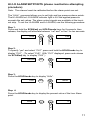
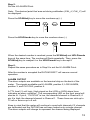
Step 9.
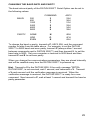
Repeat the same procedure as in Step 8 to enter the second calibration data
point. (Enter a number between +31999 and -9999.)
After the second calibration data point has been accepted, the meter will
display “bUSY” for 10 seconds and then return to normal operating mode
and immediately begin reporting.
ERASING CALIBRATION IN A CHANNEL
(please read before attempting procedure)
A channel of the Datum 2000 can be permanently deactivated by calibrating
the channel and entering zero for both pressure points. If you wish to erase
the calibration of a channel, follow the procedure beginning with Step 1, on
page 18. In Step 5, Select "CAL U". In Step 7, 7a and 7b, set the decimal
point to the first position. In Steps 8 and 9, enter a value of 0. (It does not
matter what, if any, voltage or current signals are applied to the Datum 2000
when you use the Calibration Procedure to erase a channel, as long as they
do not exceed the Datum's input specifications.)
21