1
2
32H
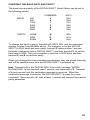
Set the DATUM 2000™ to channel two and lock the meter
so only channel two is displayed. It then transmits one
reading for channel two. Channel two must be calibrated.
S
53H
Force the DATUM 2000™ to scan all active channels. This
has no effect for a DATUM 2000™ with only one channel
calibrated.
V
56H
Verify communication with the DATUM 2000™ Serial Option.
The DATUM 2000™ will respond "SETRA DATUM 2000".
When command A or C is active, the alarm print or continuous print will
continue until interrupted by a new command. The command that interrupts
the printing will not be read; therefore, to start a new command while the
Serial Option is outputting continuous data, send the new command twice.
Allow 1 second between commands transmitted to the DATUM 2000™.
Hint: Transmit a V to the DATUM 2000™, if the verify message, "SETRA
DATUM 2000", is not received, wait 1 second, and retransmit a V. Transmit
a V each second until the verification message is received. When the
verification message is received, the DATUM 2000™ is ready for a new
command.
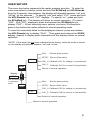
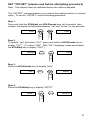
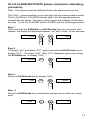
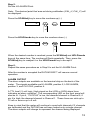
OUTPUT DATA FORMAT
The data is transmitted by the DATUM 2000™ Serial option in the following
format, followed by a carriage return and a line feed.
C:nnnnn,SS
C
the channel number: "1" or "2".
nnnnn
the number or message displayed on the
DATUM 2000™.
SS
Status: "OK", "HI" for high alarm and "LO"
for low alarm.
Examples of data:
1: 9.298,
2: 11.438,
2: 0.UEr,
1: Un.dEr,
1: -11.04,
OK
HI
HI
OK
LO
The decimal point is always transmitted in the position programmed for
display by the DATUM 2000™. For messages such as OVER and UNDER,
the decimal point will appear in the message as above.
If the DATUM 2000 is in calibration mode, the DATUM will output "CAL" once
and then wait for a new command.
24