1
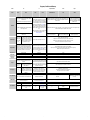
BASIC Comparison Sheet
Marcus von Cube <[email protected]>
History
06.01.2009
08.01.2009
10.01.2009
15.01.2009
26.01.2009
31.01.2009
02.02.2009
08.02.2009
04.03.2009
22.03.2009
12.04.2009
15.04.2009
02.08.2009
09.10.2009
14.12.2009
19.01.2011
14.09.2012
18.11.2012
01.04.2012
29.09.2012
Casio and Sharp Prog/Vars/Mem page
HP-71, TI-74, CC-40 added
Some clarifications, functions page started, HP-75
Functions completed, commands page started
Output commands, including graphics
almost complete
Some more details about files
Epson HX-20 & TRS-80 Model 100
Sharp PC-1403
Canon X-07
Casio FP-200
Casio BASIC ROM OM53-B for PB-2000C/AI-1000, USING fixed for PB-1000 and OM-53B
Minor bugs fixed (Sharp and CURSOR command)
Differences between Sharp PC-E500 and PC-E500S, extra page for Casio MODE commands
Some clarifications on PEEK/POKE for low end Sharps
Sharp PC-1350/PC1421 added.
Minor corrections.
Sharp PC-2500
Corrections to Casio FX-850/880 (AND, OR, XOR, NOT)
Corrections for display resolution of Sharp PC-E500 and PC-G850
Introduction
This document tries to compare the different BASIC dialects offered by various pocket computers made
by Casio, Sharp, HP, TI and other vendors. It is work in progress. Any comments and additions are welcome.
I'm the author of the CASsette I/O Utilities which enable the access to files created by various Casio
and some other BASIC pocket computers and transferred via the sound card or a floppy drive to your
desktop system. The package includes programs which understand and decipher the tokenized form of
a stored BASIC program or create it from a BASIC source text stored on your PC or Mac. I realized that
there are many differences between the implementations, ranging from a few minor annoyances to
huge gaps in functionality. Here I want to share my findings in table form.
The document will always be incomplete in several ways: I only have access to a limited number of different machines, and I do not plan to cover every aspect of each implementation. I concentrate on
areas where the systems are reasonably comparable. This excludes language extensions for special
purposes or special software packages. The tables do not try to replace the manuals but will probably
aid in finding the correct pages in them.
The Tables
On the following pages you will find the pocket computers in my possession or from which I do have a
manual, compared in different areas. There are many more variants of these machines with different
memory configurations or some additional features. If you have information or a manual, just send a
copy!
Blue entries are manual (non programmable) commands, or mark an example.
Grey entries are either not available or obsolete.
Green arguments are optional and have defaults.
Workarounds replace functions which are not implemented.
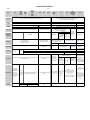
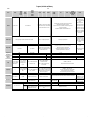
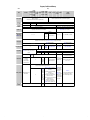
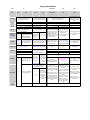
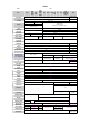
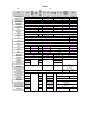
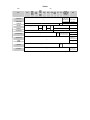
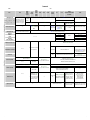
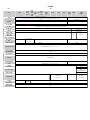
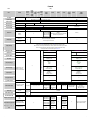
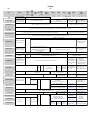
1. ProgVarsMem compares program editing, variables and memory organization.
2. Functions compares the built in functions and operators (strings, math, etc.).
3. Commands compares program flow, subroutines, error handling.
4. Special commands collects non obvious information from diverse areas.
5. Casio MODE explains special variants of the MODE command for some Casio models.
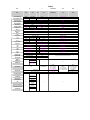
BASIC comparison sheet
Introduction
Page 1
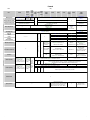
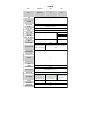
Programs, Variables and Memory
Vendor
Model
Casio
PB-100
PB-300
FX-700P
FX-710P
FX-702
Syntax specifics
FX-730P
FX-770P
FX-785P
FX-790P
FX-795P
PB-220
FX-720P
PB-700
63
PB-1000
PB-2000C/AI-1000
with BASIC ROM
OM-53B
N/A
MEMO database.
MODE 1 sets WRT mode.
Select area with keyboard function P0-P9.
LIST displays lines for editing.
AUTO, DELETE, RENUM
N/A
CLR,
CLR ALL
Memory allocation
Show variable
allocation
N/A
DEFM <n>,
manual mode
only. 8 bytes
per variable.
1-64999
255
255
REM or single quote "'" which implies end of statement (no colon needed), rest ignored.
0-9, PROG n selects area.
Keyboard functions P0-P9 start program.
N/A
PROG n selects area for editing.
EDIT displays line for editing.
0-9, switched with keyboard function P0-P9.
In MODE 0, program is automatically started.
Z-1GR uses CAL key instead of MODE 0.
ASCII file areas F0-F9.
MEMO database.
F0 is the default MEMO
area, also accessible
with MEMO key.
MODE 1 sets BASIC mode.
Select area with keyboard function P0-P9.
EDIT displays lines for editing.
No file system
AUTO and DELETE
N/A
RAM FS with
Load/Save to area.
0-9, PROG n selects area.
RAM file system with
menu selection,
BAS files can be run
directly.
Menu selects BASIC mode.
EDIT displays lines for editing.
ASCII file editor
DELETE and RENUMBER
DEFM <n> allocates n additional variables. 8 bytes per
variable are taken from program memory.
DEFM displays variable allocation and switches to DEFM mode
No DIM mode
LISTV lists array names in DIM mode
SYSTEM displays program areas, angle mode and
free memory
Automatic allocation of two letter "registered"
variables
LISTV lists names of arrays and registered
variables
ProgsVarsMem
EDIT displays line for editing.
No file system
DELETE
RENUM (OM-53B)
Files can be killed from menu.
FRE <n>, n=0..2
0: free variable space,
1: free program space,
2: total variable space.
10 CETL tables.
RENUMBER
NEW, NEW ALL clear single area
or all areas.
No file system
MODE 1 displays free program memory in special display area, display may fail if free memory
greater than 19999 on FX-730P
DEFM <blocks>
allocates additional
variables in blocks of 10.
Block 1 is A0-A9,
Block 20 is T0-T9.
80 bytes are taken from
program memory per
block.
1-65535
NEW kills program in current area, NEW ALL kills all memory.
CLEAR,
CLEAR A
FP-200
Some commands like P. for PRINT
REM, rest of line is ignored.
0-9, switched with keyboard function P0-P9. In MODE 0, program is automatically started.
Edit programs
BASIC comparison sheet
Z-1GR
Spaces are insignificant except before TO, THEN or ELSE following a variable name.
Mixed case entry is allowed and sometimes significant.
79
Comments are N/A
Internal file system
(more infos on
Commands page)
Show memory
VX-4
1-9999
Line length
Kill program(s)
FX-850P
FX-880P
N/A
Line numbers
Program areas
FX-750P
Spaces are insignificant. All keywords and variables must be entered in uppercase letters.
Abbreviations
Comments
PB-770
RESET clears all memory.
SYSTEM displays print mode (angle mode on PB-1000),
CLEAR parameters and free space.
FRE <n>, n=1..5
1, 2: see left,
3: total string space,
4: free variable space,
5: free string space.
CLEAR <str>,<var>
CLEAR <size> allocates allocates <str> bytes for
space for all variables and
strings,
strings
<var> bytes for
variables
FRE <n>, n=1..6
1-5: see left
6: ml space
(uncertain).
Switching modes between CETL
and BASIC shows free memory.
SYSTEM shows program sizes for
all areas.
OM-53B: [memory]
menu sets size for FRE(dummy number) returns free
space for programs. FRE("dummy
file system.
string") returns free string space.
CLEAR <str>,<ml>,<sys>
allocates <str> bytes for strings,
<ml> bytes for machine language,
<sys> bytes for system
(uncertain for Z-1)
PB-1000: <sys> is file system size
OM-53B: <sys> is not allowed.
VARLIST lists names of arrays and variables
AREA <size>
sets the size for CETL tables and
I/O buffers.
CLEAR <str>,<himem>
clears all variables, sets size of
string area and the high memory
limit for BAISC. Above machine
language programs can be
installed.
N/A
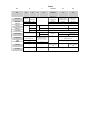
Page 2
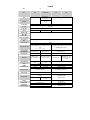
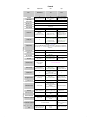
Programs, Variables and Memory
Vendor
Model
Variables
Casio
PB-100
PB-300
FX-700P
FX-710P
FX-702
A-Z, A0-A9..T0-T9.
Numeric range
FX-730P
FX-770P
FX-785P
FX-790P
FX-795P
PB-220
FX-720P
Fixed variables A-Z.
BCD, 10 digits, 2 digits exponent. Special symbol for the exponent.
PB-700
PB-770
FX-750P
FX-850P
FX-880P
VX-4
Z-1GR
PB-1000
PB-2000C/AI-1000
with BASIC ROM
OM-53B
Fixed variables A-Z, maximum of 40 "registered"
two letter variables or arrays. Use of undefined
two letter variables results in an UV error.
Long variable names, case sensitive, must not start with a keyword.
FX-850P/880P restricts length to 15 characters.
The limit for VX-4, Z-1, PB-1000, OM-53B is unknown but higher than 64.
Longer names are truncated.
All variables are independent. Undefined variables return 0.
BCD, 10 or 5 digits, 2 digits exponent
BCD, 10 digits, 2 digits exponent.
FP-200
Long variable names, case
sensitive, must not start with a
keyword.
Maximum length is 255.
All variables are independent.
Undefined variables return 0.
DEFDBL, DEFSGL <letter range>
and suffixes #and ! allow double
or single precision. Variables of
different types are independent
from each other.
BCD with 2 digts exponent.
Single precision: 6+3 digits.
Doube precision: 16+3 digits.
The three guard digits are not
displayed.
Fixed string variables A$-Z$, 7 characters, share memory with A-Z.
String variables
$, 30 characters.
$, 62 characters.
ERR 6
Silent truncation
String too long
String literals
"STRING"
Character set
FX-702P
Lower case
NO
Registered two letter (+$) string variables,
16 characters. Use of undefined two letter string
variables results in an error.
PB-100 extended
"STRING"
ASCII + japanese + graphics
Yes
Arrays
A(...) overlaps variables
A0, A1, etc., created by
DEFM <blocks>.
String arrays
N/A
A(...)-Z(...) overlap A-Z:
A(0)-A(25) are A-Z,
B(0)-B(24) are B-Z,
...
Z(0) is Z.
DIM A(...) creates independent array.
Maximum of 8 arrays.
A$(...)-Z$(...) overlap the fixed
DIM A$(...) creates independent string
string variables A$-Z$ (see
array, 7 characters.
above.)
ASCII
"String", "String – Trailing quote can be omitted on line end.
ASCII + japanese + symbols
NO
DIM Name(...) defines array.
Array names follow the rules of numeric variables.
DIM A$(...)*L defines string array with defined
length L, which defaults to 16 characters. Only
A$-Z$ allowed. Length can be an expression.
Maximum string length is 80.
DIM Name$(...) defines string array.
String array names follow the rules of string variables.
String length is dynamic up to 255 characters.
The total amount of string space must be set by CLEAR.
Three dimensions, up to 255.
Dimensions can be expressions.
Two dimensions, up to 255.
Dimensions can be expressions.
Automatic DIM
No DIM mode.
DEFM works like PB-100.
DIM disables DEFM mode.
All arrays must be defined.
DEFM works like PB-100.
DIM disables DEFM mode.
CLEAR resets all fixed variables and deletes all
registered variables and arrays.
CLEAR or VAC deletes all
variables and arrays.
VAC resets all variables.
No DIM mode.
BASIC comparison sheet
DIM mode: CLEAR deletes all arrays,
ERASE deletes selected arrays.
ERASE deletes selected registered variables or
arrays.
ProgsVarsMem
ASCII + symbols
Yes
DIM A(...) defines normal array,
two letter names allowed.
DIM A!(...) defines "half-precision" array,
only A!-Z! allowed.
1: (0..10*<blocks>-1) Maximum index of Z(...) defined
2: (0..9,0..<blocks>-1)
by DEFM.
Clear variables
Same as PB-700
Yes
Array dimensions
CLEAR or VAC resets all fixed variables.
See left.
DEFSTR <letter range> allows
names without $.
ST error
"String"
PB-100
String variable names follow the rules of numeric variables+$.
String length is dynamic up to 255 characters.
The total amount of string space must be set by CLEAR.
Undefined string variables return an empty string.
Number and size of dimensions is only limited by memory. Dimensions can be expressions.
All arrays must be defined.
Up to three dimensions. Size is
limited by memory.
OPTION BASE 0 or 1 set the
lowest index for next DIM.
Arrays of dimension (10), (10,10)
or (10,10,10) can be created
implicitly by an assignment.
CLEAR deletes all variables and arrays.
ERASE deletes selected arrays.
N/A
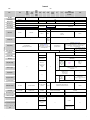
Page 3
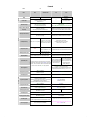
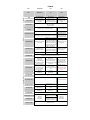
Programs, Variables
Programs,
and Memory
Variables and Memory
Vendor
Model
Syntax specifics
Sharp
PC-1500A
PC-1245
PC-1210 PC-1246
PC-1260
PC-1401
PC-1211 PC-1247
PC-1403 PC-1261
PC-1421
PC-1212 PC-1248
PC-1262
PC-1251
PC-1350
PC-1360
PC-2500
PC-1280
Spaces are insignificant.
All keywords and variables must be entered in uppercase letters.
Abbreviations
PC-1475
PC-E220
PC-G820
PC-E500
PC-E500S
PC-G850
Spaces are insignificant. Mixed case entry is allowed but insignificant.
Keywords can be abbreviated with "."
Line numbers
1-65279
Line length
79 (keywords single char)
1-999
1-65279
79 + line number (keywords count as single char)
255
Comments
REM, rest of line is ignored.
REM or single quote "'" which implies end of statement, rest ignored.
Program areas
Single program, labels allow direct access with DEF key.
RAM file system. FILES shows filenames.
Shift+LOAD loads file (L on PC-E500)
RAM cards
Internal file system
(more infos on
Commands page)
No file system
No file
system
Card file system "F:"
No drive name
"E:" internal RAM, "F:" RAM card.
PRO(GRAM) mode must be selected by switch or BASIC or MODE key, LIST displays lines for editing.
Edit programs
No file system
AUTO, DELETE, RENUM
Kill program(s)
DELETE,
RENUM
N/A
N/A
MEM is
MEM returns free memory.
command.
Show memory
ASCII file editor
TEXT switches to text mode,
BASIC swiches back.
DELETE, RENUM
AUTO, DELETE, RENUM
NEW deletes currently loaded program.
NEW kills unprotected program or RSV area.
NEW0 clears everything, even a protected
program.
STATUS <n>, n=1..4
1: free memory
2: used memory
3: end of of program
4: last line executed
N/A
TEXT switches to text mode,
BASIC switches back.
PC-1360:
AUTO, DELETE, RENUM
DELETE,
RENUM
NEW# kills
ESP.
N/A
KILL"F:file.BAS"
KILL"file.BAS",
Kill from editor menu.
MEM returns free memory.
N/A
MEM#
returns
free ESP
memory.
N/A
KILL"E:..."
KILL"F:..."
FRE<n> n=0,1 returns free space.
n=1 reorganizes string space.
DSKF3 returns free space on
RAM card file system
FRE returns free
memory, including free
RAM disk space
DSKF<d> returns free disk space,
d=3, 4 or "E:", "F:"
Assigning a value to A(n) or A$(n) with n>26 reserves space.
8 bytes per variable are taken from program memory.
Memory allocation
Automatic allocation of two
letter variables.
N/A
Show variable
allocation
BASIC comparison sheet
N/A
MON starts machine
SET MEM "X" (MEM "X" on PC-1350)
language monitor,
"B": all memory is merged, no RAM disk.
EQU# n
which can set aside
PC-1350 only:
reserves n
memory with
"C": use card for program and variables
additional
USER command.
PC-1360 only:
128 byte
*USER <end> sets end
"C": only one card inserted.
blocks for
address to value
"D": program in card 1, data in card 2.
ESP
<end> above 00FF. A
PC-1280 / PC-1475 only:
usage.
"1": PC-1475 with one card or PC-1280 with value of 00FF cancels
BASIC
reservation
internal memory only,
area must
RAM disk "F:" on spare card
be empty.
"2": internal ram or card 1 unused
CONVERT n (PC-1475) migrates cards.
EQU#
MEM$ returns configuration
*USER in ML monitor
returns n.
ProgsVarsMem
MEM$="X",
"S1": internal RAM, RAM card is disk "F"
"S2": RAM card only, no disk "F:"
"B": all RAM is merged, no disk "F:"
MEM$ returns configuration
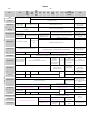
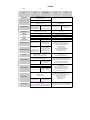
Page 4
Programs, Variables
Programs,
and Memory
Variables and Memory
Vendor
Model
Sharp
PC-1245
PC-1210 PC-1246
PC-1260
PC-1401
PC-1211 PC-1247
PC-1403 PC-1261
PC-1421
PC-1212 PC-1248
PC-1262
PC-1251
PC-1500A
PC-1350
PC-1360
PC-2500
PC-1280
PC-1475
PC-E220
PC-G820
Fixed variables A-Z, automatic independent two letter variables. Longer names are truncated.
Undefined variables return 0.
PC-1421 has special variables for financial calculations:
n, i, PV, FV, PMT, CST, SEL, MAR, MU, NPV, IRR, PRN, INTE, BAL, SPRN, SINTE
Variables
Fixed variables A-Z,
automatic two letter
variables. Longer names
are truncated. Undefined
variables return 0.
DEFDBL, DEFSGL and
suffixes # and ! allow double
and single precision.
DP variables are always
independent. A!-Z! are
identical to fixed variables AZ.
Fixed variables A-Z.
Single precision only
Single precision only
DEFDBL/DEFSGL set default.
Numeric range
String variables
Arrays
String arrays
N/A
BCD, 10 digits,
2 digits exponent.
BCD, 10 digits or 20 digits, 2 digits
exponent.
"String", "String – Trailing quote can be omitted on line end on all Sharp BASIC implementations
ASCII + symbols
Yes
ASCII + japanese + symbols
NO
DIM
Only A() B(...)-Z()
DIM Name(...) defines
allowed to
define
array. Name is one or two
access Aarrays.
characters.
Z.
A() is
reserved.
Only A$()
DIM Name$(...)*L creates
allowed to
string array. See right for
access A$details.
Z$.
Two dimensions up to 255.
Dimensions can be
expressions.
Automatic DIM
@(1) to @(26) address
variables A-Z.
N/A
IBM-PC code page 437
Yes
DIM Name(...) defines array. Name is one or two characters.
PC-1421 has special arrays CFI and NFI with index 0..19.
Single precision only.
Single or double precision
arrays are independent
Single precision only.
DIM Name(...) defines array.
Array names follow the rules of numeric
variables.
Single and double precision arrays are
independent from each other.
DIM Name$(...)*L creates string array with maximum string length L which defaults to 16.
Names follow the rules of numeric arrays+$.
Length can be an expression. Maximum string length is 80.
DIM Name$(...) defines string array.
String array names follow the rules of string
variables.
String length is dynamic up to 254
characters.
Two dimensions up to 255. Dimensions can be expressions.
Number and size of dimensions is only
limited by memory. Dimensions can be
expressions.
A(1) to A(26) or A$(1) to A$(26) can be used to address variables A-Z if they contain the proper data type. Assigning a
value to higher index values reserves additional space.
DIM A(...) or A$(...) disables this overlap except on PC-121x and PC-1248 which reserve A(...).
CLEAR resets all fixed variables and deletes all automatic variables and arrays.
BASIC comparison sheet
Default is set with DEFDBL/DEFSGL.
String variable names follow the rules of
numeric variables+$.
String length is dynamic up to 254
Automatic two letter (+$) string variables, 16 characters. Undefined string variables return an empty
characters. Undefined string variables return
string.
an empty string.
"STRING", "STRING
Array dimensions
Clear variables
DEFDBL, DEFSGL and suffixes # and ! allow
double and single precision. Single and
double precision variables are independent
from each other.
Silent truncation
"String", "String
Character set
Lower case
Long variable names, case insensitive, up to
32 chars. Must not start with keyword.
Longer names are truncated. All variables
are automatic and independent. Undefined
variables return 0.
Fixed string variables A$-Z$, 7 characters, share memory with A-Z.
Fixed string variables A$Z$, independent of A-Z.
Automatic two letter (+$)
string variables, 16
characters for all types.
Undefined string variables
return an empty string.
String too long
String literals
BCD,
10 digits or 20 digits,
2 digits exponent.
BCD, 10 digits, 2 digits exponent. Internal accuracy up to 12 digits.
The PC-1211/1248 have a special symbol for the exponent (leading 1 can be omitted)
PC-E500
PC-E500S
PC-G850
PC-1421: ERASE FIN clears financial variables, ERASE deletes selected arrays.
All others: You cannot erase a single array or variable.
ProgsVarsMem
All arrays must be defined.
CLEAR deletes all variables and arrays.
ERASE deletes selected arrays (except PC-1350.)
Page 5
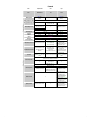
Programs,
Variables
and
Memory
Programs,
Variables
and
Memory
Vendor
Model
Syntax specifics
Abbreviations
HP
HP-75
TI
HP-71
Spaces are insignificant.
Mixed case entry is allowed but insignificant.
Statement delimiter is @ instead of :
With "."
N/A
TI-74
CC-40
Spaces or other delimiters needed around keywords.
Mixed case entry is allowed but insignificant.
1-9999
1-32766
Line length
95
80
Program areas
Edit programs
Epson
TRS-80 Mod. 100
X-07
HX-20
Spaces are irrelevant but kept by the tokenizer.
Mixed case is allowed but insignificant.
RAM file system + one workfile. EDIT <file> selects current
file. RUN <file> sets current file and starts it.
Ports N/A.
No info about
modules
available.
EDIT 'file',
BASIC|TEXT
FETCH
AUTO, DELETE, RENUM
Module ports 0 to 5. Large modules are
divided in sub ports: 5.03. Syntax is
"FILE:PORT(n)" or "FILE:MAIN".
Quotes around filenames are optional.
? is an abbreviation for PRINT.
254
RAM file system (6+2) with menu.
LOAD or SAVE set a pointer to the current RAM file system (6+1). RAM cards occupy
file instead of making a copy. Editing the
the top of RAM and can be used as
5 login areas, switched with LOGIN n,
current program changes the file in the
removable file storage.
n=1..5.
RAM module.
RAM filesystem. Tokenized BASIC
Programs can be given a TITLE and appear
Memory can be swapped or Memory swapping with PUT
programs can be run from the menu. A
RUN "file" starts program without loading
in the start menu.
copied with CALL GET(...)
and GET is N/A.
single unnamed BASIC program can exist
it into working storage.
and CALL PUT(...).
besides the named files.
EDIT first-last starts full screen editor.
"." is the last line edited. The command
creates a temporary ASCII file that is
merged upon editor exit.
NUM/NUMBER, DEL/DELETE, REN/RENUMBER
DELETE
DELETE ALL deletes all lines in current file.
NEW deletes program and variables.
NEW ALL clears all memory (total reset).
CALL ADDMEM (see below) forces NEW ALL.
KILL"file" kills file from RAM disk.
MEM returns free memory.
Show memory
MEM(port) returns free space in specified
port.
SHOWPORT lists available ports.
255
Only a single program.
AUTO, DELETE, RENUMBER
PURGE <file> deletes file from internal RAM, port or device.
1-63999
80 (editor restriction)
REM or single quote "'" which implies end of statement, rest ignored.
EDIT <file> creates or selects file. Up and
LIST <line> or up and down arrow display lines for
down arrow select lines for editing. FETCH editing. Lines must be deleted using DEL, simple entry
<line>/<label> selects specific line.
of a number is treated as a computation.
Kill program(s)
Spaces are relevant before some keywords
like TO. Spaces are kept in the code by the
tokenizer. Mixed case is allowed but
insinificant.
1-65529
REM or "!" which implies end of statement (no colon needed), rest of line ignored.
Internal RAM file system.
Internal file system
(more infos on
Commands page)
Canon
Some keywords have short forms.
Line numbers
Comments
Tandy Radio Shack
FRE(n), n=0,1
0: total user memory,
1: space used by program
and variables.
FRE(n), n=0..5
0, 1: see left
2: free + temporary mem
3: largest block size
4: free memory
5: # of free blocks
LIST first-last lists line on screen for full
LIST first-last displays lines which can be
screen editor. Screen size is just 80
edited on the full virtual screen.
characters. Use LIST@ line + ON/BREAK
"." is the last line edited.
key to edit lines longer than 60 characters.
N/A
AUTO/DELETE/RENUM
NEW deletes current program and variables.
DELETE "file","type" kills file from RAM
disk.
Shift+Ctrl+3 in startup menu forces
memory clear (after ENTER).
FRE(dummy number) returns free space for programs. FRE("dummy string") returns free string space.
MAXRAM returns the highest available
memory address.
HIMEM returns the currently set upper
memory address for BASIC or files.
The manual documents all system
pointers. Use PEEK to get the
corresponding values.
STAT area prints size of current or selected
program.
STAT ALL prints a complete overview.
CALL ADDMEM adds RAM module to user memory.
NEW ALL releases the RAM module.
Both commands clear all memory.
Ports N/A.
Memory allocation
Show variable
allocation
BASIC comparison sheet
CLAIM PORT(port) and FREE PORT(port)
add or remove port memory to main
memory.
SHOW PORT list available ports.
No machine language
support.
CLEAR <str>,<himem> clears all variables
an sets size of the string area and the
CLEAR <str>,<himem>
BASIC upper memory limit which is below
clears all variables, sets size of string area
CLEAR <str>,<RAM file> clears all
the file area.
and the HIMEM value. Use MAXRAM as the
variables, sets size of string area and size
second argument to recover all available
of the RAM file.
FSET <size> reserves memory for the file
RAM.
CALL GETMEM(size,ptr)
area at top of memory. If the size is less or
MEMSET <address> sets aside low
returns a free memory
equal to the size of an inserted RAM card,
memory for machine language programs.
block for machine language The RAM file system works "in place", so
this card can be used as a removal
editing any file, BASIC or TEXT, moves
Default address is &H0A40.
use. Variable ptr is
filesystem.
memory around and affects the free
initialized with the base
If the power up routine detects a
space.
Machine
language
programs
are
WIDTH
<cols>,<rows>,<margin>
address.
configuration change (e. g. RAM card
allocates the virtual screen area and
CALL RELMEM(adr) releases copied to their saved memory location and
swap) you are prompted to allow
can only be loaded if enough high memory
affects the free space.
the block.
adjustment of the system pointers. So
is reserved.
cards of different size can be used
alternately.
See FRE(...)
See FRE(...)
ProgsVarsMem
Page 6
Programs,
Variables
and
Memory
Programs,
Variables
and
Memory
Vendor
Model
Variables
HP
HP-75
TI
HP-71
TI-74
CC-40
A-Z, A0-A9..Z0-Z9. Variables are independent but arrays and
simple variables cannot share the same name. Undefined
Long variable names, case insensitive, up to 15 chars,
variables return 0.
@ and _ allowed. Variables may even start with a
Variables are local to the running program or procedure.
keyword. Longer names result in error. All variables are
automatic and independent. Variables are created by a
manual assignment or automatically by RUN if used in a
program. Variables are created before the program is
executed, so all used variables are defined. Use of
REAL, SHORT and INTEGER declare variables with standard,
undefined variables in command mode results in an
half or integer precision.
error.
Variables in procedures are local to the procedure but
can be made persistent between calls by
ATTACH <procedure>.
Default is REAL.
Canon
Epson
TRS-80 Mod. 100
X-07
HX-20
Two character variable names, case insensitive. Must not contain keyword. Longer
names are truncated. All variables are automatic and independent. Undefined
variables return 0.
BCD, 12 digits or 5 digits, exponent range
Like HP-71 but
+/-499. Special values for NaN and Inf
not IEEE. SHORT
(IEEE standard). Integers are BCD with 5
exponent range
digits and no exponent. Some internal
+/-99.
computations use 15 digits.
String variables
String variable names follow the rules of numeric
A$-Z$, A0$-A9$..Z0$-Z9$. DIM A$[L] sets string length to L.
variables+$. String length is dynamic up to 255
Default is 32, maximum is memory dependent. String
characters. String variables are created by a manual
allocation is static. String variables are independent but
assignment or automatically by RUN if used in a
arrays and simple variables cannot share the same name.
program. Use of undefined string variables results in an
Undefined string variables return an empty string.
error.
Long variable names, case insensitive, up
to 32 chars. Must not start with keyword.
Longer names are truncated. All variables
are automatic and independent. Undefined
variables return 0.
DEFDBL, DEFSGL, DEFINT <letter range> and suffixes #, ! and % allow double or single precision and 16 bit signed integers.
Variables of different types are independent from each other.
Default is double precision.
Numeric range
Default is double precision.
All float constants are double precision.
Default is single precision.
Integer: 16 bit signed, -32768..32767.
Single precision: 32 bit binary float (ca.7 digits), exponent range -64..+62.
Double precision: 64 bit binary float (ca.14 digits), exponent range -64..+62.
Double precision numbers have a D exponent or a trailing #.
BCD, 13 digits, exponent range -128..+127.
String variable names follow the rules of numeric variables+$.
String length is dynamic up to 255 characters. Undefined string variables return an empty string.
DEFSTR <letter range> allows names without $.
String too long
ERR:Excess Chars
E3 Mismatch
LS Error
String literals
"String with 'quotes' ", 'String with "quotes" '
"String with ""quotes"" "
"String", quotes inside string literals are not supported.
Character set
ASCII + symbols
Lower case
Yes
Arrays
String arrays
DIM A(...) defines array. REAL, SHORT or INTEGER A(...)
define arrays of certain type. See above for naming
restrictions.
Static declaration
like TI-74.
Dimension and size can be expressions.
Existing arrays can be redimensioned
without data loss.
N/A
DIM A$(n)[L] defines string array and sets
string length to L. See above for naming
restrictions. Only one dimension allowed.
Default length is 32, maximum is memory
dependent.
ASCII + symbols.
National ASCII + symbols.
Yes
DIM Name(...) defines array. Array names follow the
rules of numeric variables. DIM statements are static
declarations and must appear above any reference to
the array in the program. DIM cannot appear after
THEN or ELSE. After a DIM statement only comments
are allowed on the same line.
DIM Name(...) defines array.
Array names follow the rules of numeric variables.
Arrays of different types are independent from each other.
DIM Name$(...) defines string array.
Array names follow the rules of numeric variables.
String length is dynamic up to 255 characters.
See above for DIM statement restrictions.
DIM Name$(...) defines string array.
String array names follow the rules of string variables.
String length is dynamic up to 255 characters.
Two dimensions. Size is only limited by memory. OPTION
BASE 0 or 1 set the lowest index for next DIM statement.
Three dimensions. Size is only limited by memory.
Dimensions must be constant.
Automatic DIM
Arrays of dimension (10) or (10,10) can be created
implicitly by an assignment.
Arrays of dimension (10), (10,10) or (10,10,10) can be
created implicitly by an assignment.
Arrays of dimension (10), (10,10) or (10,10,10) or more can be created implicitly by an assignment.
DESTROY ALL deletes all variables and
arrays.
Program editing, power cycling, NEW or RUN delete all
variables.
Power cycling, NEW, RUN or CLEAR delete all variables.
DESTROY deletes selected variables or
arrays.
CALL CLEANUP clears
variables not used by the
program.
CLEAR VARS
N/A
N/A
ProgsVarsMem
Number and size of dimensions is only limited by memory. Dimensions can be
expressions.
Limits see left.
OPTION BASE 0 or 1 set the lowest index
for all arrays.
Array dimensions
Clear variables
BASIC comparison sheet
Tandy Radio Shack
N/A
SLEEP turns power of without deleting the
variables.
ERASE deletes selected arrays.
ERASE deletes selected arrays.
Page 7
Functions
Vendor
Model
Casio
PB-100
PB-300
FX-700P
FX-710P
FX-702
FX-730P
FX-770P
FX-785P
FX-790P
FX-795P
PB-220
FX-720P
PB-700
PB-770
FX-850P
FX-880P
VX-4
Z-1GR
PB-1000
PB-2000C/AI-1000
with BASIC ROM
OM-53B
FP-200
Syntax remarks
Parentheses around arguments of many functions are optional.
All function arguments need
parentheses.
Precision of mathematical functions
Default precision
Same as argument.
Concatenation
Substrings
string1 + string2
MID(start,length)
MID is obsolete
N/A
MID$(start,length)
LEN(string variable)
ASCII to string
LEN(string)
CHR$(code)
N/A, no ASCII code
String to ASCII
Number to string
String to number
LEFT$(string,length)
RIGHT$(string$,length)
MID$(string,start,length), length defaults to rest of string.
Works only with the special string variable $.
Length defaults to rest of string.
Length
Strings
FX-750P
ASC(char)
N/A
STR$(expression)
N/A
VAL(string variable)
Expression evaluation
VAL(string), evaluation stops at first illegal character.
795P: $="expr"
MODE 20,V
N/A
N/A
VALF(string)
N/A
Search substring
Case conversion
N/A
Numbers
Repeat string
Absolute Value
ABS x
ABS(x)
Sign
SGN x
SGN(x)
Integer part
SGN x * INT ABS x
FIX(x)
Fractional part
FRAC x
FRAC(x)
Largest integer below or equal
INT x
INT(x)
Smallest integer above or equal
-INT -x
Round to d decimal places.
Examples round to cents.
Workarounds for positive x only!
RND(x,-d – 1), RND(X,-3)
N/A
Display only: SET Fd, SET Ed set display precision.
N/A
Minimum
Implied multiplication AB=A*B
Arithmetic
4*ATN(1) in ANGLE 1
4*ATN(1#) in ANGLE 1
N/A
Maximum
No
Power xy
x ↑ y (special symbol)
x^y
Integer division
INT(a / b)
Modulo
a – b * INT(a / b)
SGN a * (ABS a – ABS b * INT ABS(a / b))
a MOD b
Reduction
N/A
Percentage
a * p / 100
<, ≤, >, ≥, =, ≠ (special symbols)
Result of 1=1
<, <=, =<, >, >=, =>, =, <>, ><
Comparisons cannot appear outside IF statement
-1, can only be used inside a program, not in direct mode.
-1
NOT, AND, OR, XOR
NOT, AND, OR, XOR, EQV, IMP
Logical operators
Logic
N/A
Display only: PRINT USING "###.##";X
Works for current line only.
PI
Other constants
Comparisons
RND is an obsolete alias.
Display only: PRINT USING "###.##";X Display only: SET Fd, SET Ed set
Works for current line only.
display precision
Symbol π
PI
Remainder
-INT(-x)
ROUND(x,-d – 1), ROUND(X,-3)
Number of bits
16, signed
N/A
Priority of NOT
Low
HEX format for integers
Low. Manual recommends
parentheses.
&H0-&HFFFF
N/A
Conversions
HEX display
HEX$(n), n<216, result is padded with "0" to four hex digits.
Deg/min/sec to decimal
DEG(d,m,s)
Number to deg/min/sec
DMS (display)
N/A
DMS$(x)
Degrees to radians
d / 180 * π
d / 180 * PI
Radians to degrees
r / π * 180
r / PI * 180
Polar to rectangular
PRC r,θ -> x=X,y=Y
x=r * COS θ, y=r * SIN θ
REC(r,θ) -> X,Y
Rectangular to polar
RPC x,y -> r=X,θ=Y
Commands
r=SQR(x*x + y*y)
θ=ACS(x / r)
POL(x,y) -> X,Y
See FX-850P.
d / 180 * PI (define PI)
r / PI * 180 (define PI)
REC(r,θ) -> x=X, y=Y
Workaround see left
More conversions
BASIC comparison sheet
N/A
DEG(d,m,s)
N/A
Functions
POL(x,y) -> r=X, θ=Y
Both functions return variable X.
Workaround see left
CDBL, CSNG convert between
double and single precision.
Page 8
Functions
Vendor
Casio
FX-702
PB-220
FX-720P
FX-730P
FX-770P
FX-785P
FX-790P
FX-795P
PB-700
PB-770
Trigonometrics, hyperbolics
Z-1GR
PB-1000
PB-2000C/AI-1000
with BASIC ROM
OM-53B
FP-200
LOG x
LGT x
LOG x
LGT x
LGT(x)
LN x
LOG x
LN x
LOG x
LOG(x)
More accurate ln(x+1)
LN(x + 1)
LOG(x + 1)
LN(x + 1)
Common antilogarithm 10x
10 ↑ x
LOG(x+1)
10 ^ x
Natural antilogarithm e
EXP x
x
EXP(x)
EXP x – 1
More accurate ex-1
Exponent part of number
INT LOG ABS x for x <> 0
EXP(x) – 1
INT LGT ABS x for x <> 0
Square root √x
INT LOG ABS x for x <> 0
see PB-700
INT(LGT(ABS(x)))
SQR x
Cube root ∛x
x ↑ (1/3), x ≥ 0
CUR x
SQR(x)
x ^ (1/3), x ≥ 0
General root y√x
CUR x
x ^ (1/3)
CUB x
x^3
x ^ (1 / y)
x*x
x↑3
CUB x
x^3
sin x, cos x, tan x
SIN x, COS x, TAN x
SIN(x), COS(x), TAN(x)
sin-1 x
ASN x
ASN(x)
cos
ACS(x)
-1
x
ACS x
-1
x
ATN x
ATN(x)
1 / COS x, 1 / SIN x, 1 / TAN x
1/COS(x), 1/SIN(x), 1/TAN(x)
tan
sec x, cosec x, cotan x
Angle to x-axis
ATN(y / x), result probably in wrong quadrant
sinh x
HSN x
cosh x
cosh x
(EXP x – EXP(-x)) / 2
HYPSIN x
(EXP x – EXP(-x)) / 2
HCS x
(EXP x + EXP(-x)) / 2
HTN x
1–2*EXP x/(EXP x+EXP(-x))
HYPSIN x
HYPCOS x
(EXP x + EXP(-x)) / 2
HYPCOS x
(EXP(x) + EXP(-x)) / 2
HYPTAN x
1–2*EXP x/(EXP x+EXP(-x))
HYPTAN x
1–2*EXP(x)/(EXP(x)+EXP(-x))
(EXP(x) – EXP(-x)) / 2
LN(x + SQR(x*x + 1))
sinh-1 x
AHS x
LN(x + SQR(x*x + 1))
HYPASN x
LOG(x + SQR(x*x + 1))
HYPASN x
cosh-1 x
AHC x
LN(x + SQR(x*x – 1))
HAPACS x
LOG(x + SQR(x*x – 1))
HYPACS x
LN(x + SQR(x*x – 1))
tanh-1 x
AHT x
LN((1 + x) / (1 – x)) / 2
HYPATN x
LOG((1 + x) / (1 – x)) / 2
HYPATN x
LN((1 + x) / (1 – x)) / 2
Angle mode degree
MODE 4
ANGLE 0
ANGLE 0, MODE 4
ANGLE 0
Angle mode radian
MODE 5
ANGLE 1
ANGLE 1, MODE 5
ANGLE 1
Angle mode grad
MODE 6
ANGLE 2
ANGLE 2, MODE 6
ANGLE 2
Factorial n!
Probability
VX-4
Common logarithm log10x
Cube x3
n! (postfix)
Permutations nPr
n! / (n-r)!
Combinations nCr
n! / ((n-r)! * r!)
Random number
FACT n
N/A
FACT n
NPR(n,r)
NPR(n,r)
N/A
NCR(n,r)
RND
RND -1 starts new
series.
Clear statistics registers
SAC
STAT CLEAR
STAT CLEAR
Add data point
STAT x,y;frq
STAT x,y;frq
STAT x,y;frequency
Remove data point
DEL x,y;frq
manual only
N/A
List sums and results
N/A
Sums
CNT, SX, SY,
SX2, SY2, SXY
STAT LIST
Means and standard deviations
MX, SDX, SDXN,
MY, SDY, SDYN
MEANX, SDX, SDXN,
MEANY, SDY, SDYN
Linear regression coefficients
LRA, LRB, COR
LRA, LRB, COR
Linear estimations
EOX y, EOY x
STAT LIST only
RND ctrl
ctrl > 0: next in series
ctrl = 0: repeat last #
ctrl < 0: new series
RAN#
N/A
N/A
N/A
NCR(n,r)
RAN#
Set random seed
Statistics
FX-850P
FX-880P
Natural logarithm ln x, logex
Square x2
BASIC comparison sheet
FX-750P
STAT [L]LIST (sums only)
N/A
EOX y, EOY x
CNT, SUMX, SUMY,
SUMX2, SUMY2, SUMXY
EOX y, EOY x
Functions
Library applications 6500, 6510
Logs, powers, roots
Model
PB-100
PB-300
FX-700P
FX-710P
RANDOMIZE
RND(-1)
STAT CLEAR
STAT x,y;frequency
STAT x,y
N/A
N/A
CNT, SUMX, SUMY,
SUMX2, SUMY2, SUMXY
MEANX, SDX, SDXN,
MEANY, SDY, SDYN
LRA, LRB, COR
LRA, LRB
EOX y, EOY x
y=LRA*x+LRB
x=(y-LRB)/LRA
Page 9
Functions
Vendor
Model
Casio
FX-702
PB-100
PB-300
FX-700P
FX-710P
PB-220
FX-720P
FX-730P
FX-770P
FX-785P
FX-790P
FX-795P
Set time and date
PB-700
PB-770
FX-750P
FX-850P
FX-880P
VX-4
Z-1GR
N/A
Get time and date
N/A
Read memory
Various functions
Call machine language
PB-1000 only:
TIME$="hh:mm"
DATE$="MM-DD-YYYY"
TIME$="hh:mm:ss"
DATE$="YY/MM/DD"
TIMER
MODE18(a,b$)
N/A
Modify memory
FP-200
PB-1000: TIME$, DATE$
Get timer value
Get variable address
PB-1000
PB-2000C/AI-1000
with BASIC ROM
OM-53B
b=PEEK a
N/A
MODE19(a,b)
DEFSEG=segment : b=PEEK address / Z-1: INP port
b=PEEK(address)
DEFSEG=segment : POKE address,b / Z-1: OUT port,b
POKE address,b
N/A
POKE a,b
Fixed variables are at fixed addresses, only useful, if PEEK/POKE are available.
N/A
N/A
MODE110
Z-1/PB-1000: CALL address
OM-53B: SYSTEM CALL address
PB-1000 only: CALL "ml-file"
CALL address,A,HL,DE,BC
N/A
DEF FN X(...)=...,
DEF FN X$(...)=...
Names follow variable syntax.
User defined function
N/A
Multi line
TIME$, DATE$
N/A
N/A
Recursion
Swap Variables
N/A
SWAP
More functions
BASIC comparison sheet
N/A
Functions
N/A
CETL access:
RC(r),IT(c),FL(f,r,i)
SUMRC(r1,r2), SUMIT(i1,i2)
Page 10
Functions
Vendor
Model
Sharp
PC-1210
PC-1211
PC-1212
PC-1500A
PC-1245
PC-1246
PC-1247
PC-1248
PC-1251
Syntax remarks
PC-1350
PC-1360
PC-2500
PC-1280
PC-1475
PC-E220
PC-G820
Default precision
Selectable
Concatenation
string1 + string2
string1 + string2
Substrings
LEFT$(s,l)
RIGHT$(s,l)
MID$(s,st,l)
LEFT$(string,length)
RIGHT$(string$,length)
MID$(string,start,length)
Length
LEN string
LEN string
ASCII to string
CHR$ code
CHR$ code
N/A
Single precision
String to ASCII
ASC char
Number to string
STR$ expr
STR$ expression
String to number
VAL string, stops
at first illegal
character.
VAL string, evaluation stops at first illegal character.
N/A
N/A
Expression evaluation
PC-E500
PC-E500S
PC-G850
Parentheses around arguments of many functions are optional. PC-121x allows missing ')'
Precision of mathematical functions
Strings
PC-1260
PC-1401
PC-1403 PC-1261
PC-1421
PC-1262
Selectable
ASC char
EVAL string
AER n(args)
N/A
Search substring
Case conversion
Numbers
Repeat string
Absolute Value
ABS x
Sign
SGN x
Integer part
SGN x * INT ABS x
Fractional part
SGN x * (ABS x - INT ABS x)
Largest integer below or equal
INT x
Smallest integer above or equal
-INT -x
INT(x * 10^d + 0.5) / 10^d,
INT(X*100+0.5)/100
PC-1421: see PC-1403.
Round to d decimal places.
Examples round to cents.
Workarounds for positive x only!
PI
USING
”##.##”
MDF X
Display only: USING "###.##" sets display format, PRINT USING "###.##";X sets format and outputs X.
USING is persistent, even if used together with PRINT.
PI
N/A
PI, PI#, π#
PI
(a > b) * a + (a <= b) * b
Minimum
(a > b) * b + (a <= b) * a
Arithmetic
No
Logic
-(a > b) * b - (a <= b) * a
No
Power xy
x^y
Integer division
INT(a / b)
Modulo
a – b * INT(a / b)
Remainder
SGN a * (ABS a – ABS b * INT ABS(a / b))
Reduction
N/A
Percentage
a * p / 100, short form for PC-1211/1248: AP/E2
<, <=, >, >=, =, <>
PC-121x can compare strings with = only.
Comparisons
Conversions
-(a > b) * a - (a <= b) * b
Yes, high priority
Result of 1=1
1
Logical operators
NOT, AND, OR
1-, *, +
Number of bits
16, signed
logical only
Priority of NOT
High, need ()
N/A
HEX format for integers
&0-&FFFF
N/A
-1
NOT, AND, OR
NOT, AND, OR, XOR (PC-E220 lacks XOR)
16, signed
High, expressions need parentheses.
&0-&FFFF
N/A
&0-&FFFFFFFF
&H0-&HFFFFFFFF
DECI FFFFFFFF
N/A
DECI FFFFFFFF
HEX n, n<232
(display only)
N/A
HEX$(n), n<232, var. l.
HEX n (display only)
Deg/min/sec to decimal
DEG(d.mmss), DMS values are formatted as a single number
Number to deg/min/sec
DMS(d) returns a number formatted as d.mmss
Degrees to radians
d / 180 * PI
Radians to degrees
r / PI * 180
Polar to rectangular
x=r * COS θ, y=r * SIN θ
REC(r,θ) ->Y,Z
Rectangular to polar
r=√(x*x + y*y)
θ=ACS(x / r)
POL(x,y) -> Y,Z
See PC-1280.
More conversions
BASIC comparison sheet
PI, PI#
PI
N/A
Maximum
HEX display
PRINT USING works for
current line only.
Symbol π
Other constants
Implied multiplication AB=A*B
USING "###.##" sets precision for
MDF(X,threshold), threshold defaults to 4.
Use INT (see left)
N/A
&H0-&HFFFFFFFF
&FF..., DECI FFFFFFFF
HEX$(n), n<232, variable length
HEX n (display only, not PC-G850)
REC(r,θ) -> x=Y, y=Z
Workaround see left
POL(x,y) -> r=Y, θ=Z
Both functions return variable Y.
N/A
Functions
Page 11
Functions
Vendor
Sharp
Model
PC-1500A
PC-1245
PC-1246
PC-1247
PC-1248
PC-1251
PC-1210
PC-1211
PC-1212
PC-1260
PC-1401
PC-1403 PC-1261
PC-1421
PC-1262
Trigonometrics, hyperbolics
Logs, powers, roots
Common logarithm log10x
LN x
More accurate ln(x+1)
LN(x + 1)
Common antilogarithm 10
10 ^ x
x
TEN x
10 ^ x
Natural antilogarithm ex
PC-1475
PC-E220
PC-G820
PC-G850
TEN x
EXP x
More accurate e
Exponent part of number
INT LOG ABS x for x <> 0
SQR x, √x
Cube root ∛x
General root y√x
Symbol √x
SQR x, symbol √x
SQR x
x ^ (1/3), x ≥ 0
CUR x
x ^ (1/3), x ≥ 0
CUR x
x ^ (1 / y)
x ROT y
x ^ (1 / y)
x ROT y
Square x2
x*x
XX
SQU x
x*x
SQU x
Cube x3
x^3
XXX
CUB x
x^3
CUB x
sin x, cos x, tan x
SIN x, COS x, TAN x
sin-1 x
ASN x
cos-1 x
ACS x
tan
-1
ATN x
x
sec x, cosec x, cotan x
1 / COS x, 1 / SIN x, 1 / TAN x
Angle to x-axis
sinh x
ATN(y / x), result probably in wrong quadrant
(EXP x – EXP(-x)) / 2
HSN x
cosh x
(EXP x + EXP(-x)) / 2
HCS x
cosh x
1–2*EXP x/(EXP x+EXP(-x))
HTN x
sinh-1 x
LN(x + SQR(x*x + 1))
AHS x
cosh-1 x
LN(x + SQR(x*x – 1))
AHC x
tanh-1 x
LN((1 + x) / (1 – x)) / 2
AHT x
HSN x
HCS x
HTN x
Workaround see left
AHS x
AHC x
AHT x
Angle mode degree
DEGREE
Angle mode radian
RADIAN
GRAD
Factorial n!
FACT n
Permutations nPr
N/A
Combinations nCr
Random number
PC-E500
PC-E500S
EXP x – 1
x-1
Square root √x
PC-1280
LOG x
Natural logarithm ln x, logex
Angle mode grad
Probability
PC-1350
PC-1360
PC-2500
NPR(n,r)
FACT n
NPR(n,r)
N/A
NCR(n,r)
RND ctrl
NCR(n,r)
RND ctrl, 0 < ctrl < 1: 0 ≤ result < 1, ctrl > 2: int result < CEIL(ctrl), ctrl < 0: use previous ctrl value
N/A
Set random seed
RANDOMIZE
RANDOMIZE
Clear statistics registers
Statistics
Add data point
Remove data point
List sums and results
Sums
N/A
Only in manual STAT
mode
N/A
Interactive application.
Japanese prompts on G820 and G850!
Means and standard deviations
Linear regression coefficients
Linear estimations
BASIC comparison sheet
Functions
Page 12
Functions
Vendor
Model
Set time and date
Get time and date
Various functions
Get timer value
Sharp
PC-1500A
PC-1210
PC-1211
PC-1212
PC-1245
PC-1246
PC-1247
PC-1248
PC-1251
PC-1260
PC-1401
PC-1403 PC-1261
PC-1421
PC-1262
PC-1350
PC-1360
PC-2500
TIME=
MMDDhh.mmss
PC-1280
PC-1475
PC-E220
PC-G820
PC-G850
PC-E500
PC-E500S
N/A
TIME
Read memory
b=PEEK a
Modify memory
POKE a,b1,b2,...
Get variable address
Fixed addresses
Call machine language
CALL
addr,params
b=PEEK a
On some machines you can only PEEK the RAM addresses.
N/A
POKE a,b1,b2,...
On the low end machines (124x), a colon after the command may be necessary.
Fixed variables are at fixed addresses.
N/A
CALL address
CALL #bank, address
calls ROM bank
N/A
N/A
User defined function
N/A
Multi line
Recursion
BASIC comparison sheet
Swap Variables
N/A
More functions
PC-1421 financial functions: COMP <fin var>, AMRT, ACC, BGNON, BGNOFF, DAYSI(dd.mmyyyy,dd.mmyyyy), DAYSII()
Functions
Page 13
Functions
Vendor
Model
HP
TI
HP-75
HP-71
Syntax remarks
REAL
Strings
HX-20
All function arguments need parentheses.
Double precision
Single precision (most)
string1 + string2
String[from,to]
<to> defaults to end of string.
Can also be on left side of assignment: Substring
is cut and replacement inserted.
LEFT$(string,length)
RIGHT$(string$,length)
MID$(string,start,length)
SEG$(string,start,length)
LEN(string)
LEN(string)
CHR$(code)
CHR$(code)
String to ASCII
NUM(char)
ASC(char)
Number to string
ASC(char)
STR$(expression)
STR$(expression)
VAL(string), string must be valid number.
VAL(string), string must be valid number.
NUMERIC(string) tests if string is a number.
Numeric expressions not supported.
VAL(string), string must be valid expression.
Numeric expressions are evaluated.
Numeric expressions not supported.
POS(string,substring)
INSTR(start,string,substring)
Case conversion
UPRC$(string)
N/A
N/A
Repeat string
N/A
RPT$(string,count)
SPACE$(length), STRING$(length,code or char) only single character is supported.
Absolute Value
ABS(x)
ABS(x)
Sign
SGN(x)
SGN(x)
Integer part
IP(x)
SGN(x) * INT(ABS(x))
FIX(x)
Fractional part
FP(x)
SGN(x) * (ABS(x) – INT(ABS(x)))
x – FIX(x)
Largest integer below or equal
INT(x), FLOOR(x)
INT(x)
INT(x)
Smallest integer above or equal
Numbers
X-07
string1 & string2
Search substring
Round to d decimal places.
Examples round to cents.
Workarounds for positive x only!
CEIL(x)
-INT(-x)
-INT(-x)
IP(x * 10^d + 0.5) / 10^d,
IP(X*100+0.5)/100
INT(x * 10^d + 0.5) / 10^d,
INT(X*100+0.5)/100
INT(x * 10^d + 0.5) / 10^d,
INT(X*100+0.5)/100
Display only: PRINT USING "###.##";X
USING works for current line only.
Display only: PRINT USING "###.##";X
USING works for current line only.
Display only: PRINT USING"DDD.DD";X
FIX d, SCI d, ENG d set
display precision
N/A
PI
Other constants
Arithmetic
TRS-80 Model 100
Length
String to number
4*ATN(1)
PI
Result is double precision
VER$, INF, NAN, EPS,
MINREAL, MAXREAL
VER$, INF
CALL VERSION(V) returns BASIC
version.
N/A
Result is single precision
MAXRAM returns highest available
RAM address.
N/A
Maximum
MAX(a,b)
-(a > b) * a - (a <= b) * b
-(a > b) * a - (a <= b) * b
Minimum
MIN(a,b)
-(a > b) * b - (a <= b) * a
-(a > b) * b - (a <= b) * a
Implied multiplication AB=A*B
No
No
Power xy
x^y
x^y
Integer division
a DIV b, a \ b
INT(a / b)
a \ b (Yen symbol on X-07)
Modulo
MOD(a,b)
a – b * INT(a / b)
a – b * INT(a / b)
Remainder
RMD(a,b)
SGN(a) * (ABS(a) – ABS(b) * INT(ABS(a/b)))
a MOD b
Reduction
N/A
RED(a,b)
N/A
N/A
Percentage
a * p / 100
p%a
a * p / 100
a * p / 100
<, <=, =<, >, >=, =>, =, <>, ><
Comparisons
<, <=, =<, >, >=, =>, =, <>, ><, #
HP-71 only: ? (unordered, IEEE math)
<, <=, =<, >, >=, =>, =, <>, ><
Result of 1=1
1
-1
-1
See HP-75.
The HP-IL module adds
BINCMP(n),
Logical only: nonzero
BINAND(n,m),
values mapped to 1
BINIOR(n,m),
BINEOR(n,m) and
BIT(n,b) for 20 bit
High, expressions need
integers.
parentheses.
NOT, AND, OR, XOR
NOT, AND, OR, XOR, EQV, IMP
16, signed
16, signed
Low
Low
Logical operators
Logic
Epson
ASCII to string
Expression evaluation
Number of bits
Priority of NOT
NOT, AND, OR, EXOR
HEX format for integers
&H0-&HFFFF
HTD("0")-HTD("FFFFF")
N/A
Deg/min/sec to decimal
Degrees to radians
RAD(d)
Radians to degrees
DEG(r)
&nnnnn, &Onnnnn denote octal
N/A
HEX$(n), n<216
Only in CALC
mode
N/A
Number to deg/min/sec
N/A
DTH$(n), n<220,
0-padded to 5 digits.
HEX display
Conversions
Canon
Default precision
Concatenation
N/A
d / 180 * PI (PI must be defined)
r / PI * 180
r / PI * 180 (PI must be defined)
x=r * COS θ, y=r * SIN θ
x=r * COS θ, y=r * SIN θ
Rectangular to polar
r=SQR(x*x + y*y), θ=ACOS(x / r)
Keyboard function in TI-74 CALC mode.
r=SQR(x*x + y*y), θ=ACOS(x / r)
N/A
In MATH Module
N/A
HEX$(n), n<216
OCT$(n) returns octal string
N/A
d / 180 * PI
Polar to rectangular
More conversions
BASIC comparison sheet
CC-40
Tandy Radio Shack
All function arguments need parentheses.
Precision of mathematical functions
Substrings
TI-74
Functions
CINT, CDBL, CSNG convert between integer, double or single precision.
Functions
Page 14
Functions
Vendor
HP
Logs, powers, roots
Model
TI
HP-75
HP-71
Trigonometrics, hyperbolics
Epson
TRS-80 Model 100
X-07
HX-20
LOG10(x)
LGT(x), LOG10(x)
LOG(x)
LOG(x)
LN(x), LOG(x)
LN(x)
LOG(x)
More accurate ln(x+1)
LOG(x + 1)
LOGP1(x)
LN(x + 1)
LN(x + 1)
EXP(x) – 1
EXPM1(x)
EXP(x) – 1
EXP(x) – 1
INT(LOG(ABS(x))) for x <> 0
Common antilogarithm 10
Natural antilogarithm ex
More accurate e
x-1
LOG(x) / LOG(10)
10 ^ x
x
10 ^ x
EXP(x)
EXP(x)
Exponent part of number
INT(LGT(ABS(x)))
EXPONENT(x)
INT(LOG(ABS(x))) for x <> 0
Square root √x
SQR(x)
SQR(x), SQRT(x)
SQR(x)
SQR(x)
Cube root ∛x
x ^ (1/3), x ≥ 0
x ^ (1/3), x ≥ 0
General root y√x
x ^ (1 / y)
x ^ (1 / y)
Square x2
x*x
x*x
Cube x3
x^3
x^3
SIN(x), COS(x), TAN(x)
SIN(x), COS(x), TAN(x)
sin-1 x
ASIN(x)
ASN(x), ASIN(x)
ASN(x)
ASIN(x)
ATN(x / SQR(1 – x*x))
cos
ACS(x)
ACOS(x)
ATN(x / SQR(1 – x*x))
-1
x
ACOS(x)
ACS(x), ACOS(x)
-1
x
ATAN(x)
ATN(x), ATAN(x)
tan
sec x, cosec x, cotan x
SEC(x), CSC(x), COT(x)
ATN(x)
ATN(x)
1 / COS(x), 1 / SIN(x), 1 / TAN(x)
1 / COS(x), 1 / SIN(x), 1 / TAN(x)
Angle to x-axis
ANGLE(x,y)
sinh x
(EXP(x) – EXP(-x)) / 2
SINH(x)
cosh x
(EXP(x) + EXP(-x)) / 2
COSH(x)
(EXP(x) + EXP(-x)) / 2
(EXP(x) + EXP(-x)) / 2
cosh x
1–2*EXP(x)/(EXP(x)+EXP(-x))
TANH(x)
1–2*EXP(x)/(EXP(x)+EXP(-x))
1–2*EXP(x)/(EXP(x)+EXP(-x))
ATN(y / x), result probably in wrong quadrant
ATN(y / x), result probably in wrong quadrant
LOG(x + SQR(x*x + 1))
(EXP(x) – EXP(-x)) / 2
(EXP(x) – EXP(-x)) / 2
sinh-1 x
LOG(x + SQR(x*x + 1))
ASINH(x)
LN(x + SQR(x*x + 1))
cosh-1 x
LOG(x + SQR(x*x – 1))
ACOSH(x)
LN(x + SQR(x*x – 1))
LOG(x + SQR(x*x – 1))
tanh-1 x
LOG((1 + x) / (1 – x)) / 2
ATANH(x)
LN((1 + x) / (1 – x)) / 2
LOG((1 + x) / (1 – x)) / 2
Angle mode degree
OPTION ANGLE DEGREES
Angle mode radian
OPTION ANGLE RADIANS
RAD
Angle mode grad
GRAD is N/A. OPTION ANGLE optional on HP-71
GRAD
Factorial n!
Probability
Canon
Common logarithm log10x
Permutations nPr
Combinations nCr
All angles are in radians and must be converted in advance.
FACT(n) / FACT(n – r) Only in CALC
mode
FACT(n) /
N/A
N/A
(FACT(n – r)*FACT(r))
Random number
RND
RND, INTRND(bound)
RANDOMIZE seed
If seed is omitted use system value.
RND(ctrl)
ctrl > 0: next in series
ctrl = 0: repeat last #
ctrl < 0: new series
FOR I=1 TO VAL(RIGHT$(TIME$,2)):
D=RND(1):NEXT
RND(ctrl)
ctrl > 0: next in series
ctrl = 0: seed automatically
ctrl < 0: seed with ctrl value
RND(ctrl)
ctrl > 0: next in series (default)
ctrl = 0: repeat last #
ctrl < 0: new series
RANDOMIZE seed
If seed is omitted user is prompted.
STAT Array(# of cols)
up to 15 columns
CLSTAT clears current
Clear statistics registers
Add data point
ADD x1,x2,...
Remove data point
DROP x1,x2,...
List sums and results
Sums
DEG
FACT(n)
N/A
Set random seed
Statistics
CC-40
Tandy Radio Shack
Natural logarithm ln x, logex
sin x, cos x, tan x
BASIC comparison sheet
TI-74
Functions
Display the array
N/A
TOTAL(0),
TOTAL(column)
Means and standard deviations
MEAN(col)
SDEV(col)
Linear regression coefficients
LR col-y, col-x, A, B
Linear estimations
PREDEV(x) (after LR)
Only in CALC
mode
N/A
Functions
N/A
Page 15
Functions
Vendor
Model
HP
HP-75
HP-71
Set time and date
Use TIME mode
SETDATE, SETTIME,
ADJABS, ADJUST, ...
Get time and date
TIME, DATE, TIME$, DATE$ (YY/MM/DD)
Get timer value
TIME
Various functions
Read memory
BASIC comparison sheet
TI
Modify memory
POKE adr$,hex$
Get variable address
CC-40
N/A
Tandy Radio Shack
Canon
Epson
TRS-80 Model 100
X-07
HX-20
TIME$="hh:mm:ss"
DATE$="mm/dd/yy", DAY$="xxx"
DATE$ format for Europe:
"dd/mm/yy".
TIME$="hh:mm:ss"
DATE$="yyyy/mm/dd"
Unchanged parts may be omitted.
TIME$="hh:mm:ss"
DATE$="mm/dd/yy"
DAY=d (1..7)
TIME$, DATE$, DAY$
TIME$, DATE$
TIME$, DATE$, DAY
N/A
PEEK$(adr$,nibbles)
N/A
TI-74
Functions
Can be
installed
N/A
Call machine language
Use external development system and LEX files
User defined function
DEF FN X(...)=..., DEF FN X$(...)=...
Names follow variable syntax.
Multi line
DEF FN X(...) / LET FN X=... / FN END
Recursion
Allowed
CALL PEEK(address,b1,b2,...)
PEEK(address), INP(port)
CALL POKE(address,b1,b2,...)
POKE address,byte, OUT port,byte
N/A
Can be
installed
PEEK(address)
POKE address,byte
VARPTR(var)
CALL EXEC(address,parameters)
CALL GETMEM reserves space.
SUB/SUBEND define a procedure which can
return a value via a parameter.
Function return values are not available.
EXEC address
CALL address,A,HL
N/A
DEF FN X(...)=..., DEF FN X$(...)=...
Names follow variable syntax.
N/A
Not allowed
Swap Variables
N/A
N/A
More functions
N/A
N/A
DEF USRn=address (n=0..9)
A=USRn(param) (n=0..9)
A=USR(address,param)
SWAP var1,var2 – With string
variables, only the pointers are
swapped.
N/A
SWAP var1,var2 – With string
variables, only the pointers are
swapped.
N/A
Functions
Page 16
Commands
Vendor
Model
Casio
PB-100
PB-300
FX-700P
FX-710P
FX-702
FX-730P
FX-770P
FX-785P
FX-790P
FX-795P
PB-220
FX-720P
Labels
Program flow
PB-770
FX-850P
FX-880P
FX-750P
VX-4
GTO/GSB instead of GOTO/GOSUB,
syntax as with PB-100.
ON ... GOTO/GOSUB
GTO variable
#area (0-9)
PROG area (0-9)
#area (0-9)
Number or area may be an expression, even in ON ... GOTO targets.
GOTO var
Use ";" before commands,
THEN only before jump targets.
Available
PB-1000
PB-2000C/AI-1000 with BASIC
ROM OM-53B
Z-1GR
*Label:
(>30 chars allowed)
N/A
Syntax for branch targets besides
line numbers
IF ... THEN ...
PB-700
N/A
#area, *Label
Targets are constant.
GOTO variable
THEN is mandatory,
";" is obsolete.
FP-200
"File"
PROG area (0-9)
"File" may be expression.
Targets are constant.
Available
THEN is mandatory
THEN is mandatory except before GOTO
IF ... THEN ... ELSE ...
ELSE is N/A.
Available
Nested IF
Allowed. Unambiguous because ELSE is not available.
Allowed, nearest ELSE belongs to nested IF.
Multiline IF ... ENDIF
WHILE ... WEND
N/A
REPEAT ... UNTIL
Available
N/A
SWITCH ... CASE ... ENDSWITCH
FOR I=1 TO 2 STEP -1
NEXT I
Loop is executed once, I=0 after loop.
Loop not executed, I=1 after loop.
Variable name on NEXT
Mandatory
Optional, multiple variables allowed.
Function and position of END
Executable command anywhere in program. Not executable from keyboard.
Executable command anywhere in program. Closes all files. Executable from keyboard.
Local procedure definition
besides GOSUB/RETURN
Subroutines
Return from procedure
Use program area
or set a label.
Use separate program area.
RET
Variable scope
Call and parameter passing
GSB #area
GOSUB #area.
GOSUB PROG area
GOSUB #area.
ON ERROR
MODE 99,1
GOSUB PROG area
ON ERROR GOTO
ERL, ERR
N/A
Return from error handler
Error handling
GOSUB "file"
Recursion is possible. Local variables must be emulated by arrays.
Error line and error code
N/A
Disable error handler
MODE 99,0
More event handling
RESUME, RESUME NEXT, RESUME target
N/A
Debugging
N/A
ON ERROR GOTO 0
N/A
A file named "AUTO.EXE" is executed
on power up.
N/A
MODE 2, MODE 3 turn tracing on/off.
TRON, TROFF turn tracing on/off.
Suspend execution
BASIC comparison sheet
Use separate program area.
All variables are global.
Recursion
Continue after STOP,
break key or break point
Use extra file.
RETURN, Z-1GR supports RETURN target
STOP
CONT key
EXE key on empty input line.
CONT
Commands
EXE key on empty input line.
CONT key
OM-53B: Shift+Down
STOP/CONT key
Page 17
Commands
Vendor
FX-702
Clear display
PRT without items
Output to display
PRT, DMS var
Behavior of comma
PB-220
FX-720P
FX-730P
FX-770P
FX-785P
FX-790P
FX-795P
PB-700
PB-770
FP-200
CLS
Clear display before output, pause
New line
Pause and new line
New line
Tabulate (12 chars).
Allowed
Line by line
CONT key
Continuous output
EXE key
PRT CSR n
Line by line
ENTER/RET key
PRINT TAB(n)
TAB(n) only
with LPRINT
LOCATE x,y
LOCATE x
Continuous output
EXE key
PRINT TAB(n)
PRINT USING"& &#,###.##";A$;X
Works on current PRINT/LPRINT statement only. Mixed formats are allowed.
"!" outputs single char, "@" formats a string with its exact length.
"##.##^^^^" sets scientific notation.
SET Fd, SET Ed, SET N
(re)set display precision
PRINT REV;...;NORM;...
Graphics screen
160x32
Query dot or pattern
POINT(x,y)
Set/reset dot
DRAW/DRAWC(x,y)
N/A
192x32
DRAW[C](x1,y1)(x2,y2)-...-(x1,y1)
Multiple points,
no filling
N/A
"+" or "-" can be prefix or postfix, "$$",
"**" and "**$" pad numbers to the left.
N/A
N/A
Draw (filled) rectangle
LOCATE x,y
N/A
PRINT USING "&&&&";A$;B$;...
PRINT USING "###.##^";X,Y
Works for current line only. Only one format
per format string allowed.
SET Fd, SET Ed, SET N
(re)set display precision for numbers.
Reverse (light on dark)
LOCATE x,y
Virtual screen
WAIT n
WAIT 999 (off)
Unit is 0.05s.
N/A
Display formatting
Allowed. ";" between items is optional.
PRINT CSR n
Set display delay
Display
PB-1000
PB-2000C/AI-1000 with BASIC
ROM OM-53B
Z-1GR
PRINT
Default display mode
Position cursor
VX-4
PRINT without items
PRINT ends with ; or ,
Continue after PRINT
FX-850P
FX-880P
FX-750P
Commands not implemented
Model
Casio
PB-100
PB-300
FX-700P
FX-710P
N/A
Draw line or polygon
159x63 with arbitrary scaling.
POINT(x,y)
DRAW/DRAWC(x,y)
LINE(..)-(..),
mode,BF
mode=0: clear
mode=1: draw
F fills
QUAD(..)-(..)
QUADC(..)-(..)
No filling.
Use DRAW,
no filling.
DRAW[C](x1,y1)-(x2,y2)-...-(x1,y1)
Multiple points
DEFCHR$(c)="hex(12)"
Defines char c ≥ 252
(c ≥ 240 on PB-1000).
Graphical patterns
N/A
N/A
More graphics commands
N/A
Printer
(x,y) outside screen area
FP-10 (matrix)
Printer output
LIST/PRT in MODE 7
FA-3 with FP-12S (matrix)
LIST/PRINT in MODE 7
MODE 7/8 turn printer on/off
INIT(X0,Y0),DX,DY
sets origin and number of pixels for a unit
of 1.
N/A
Error
Printer interface and type
Redirect display to printer
CIRCLE(x,y),
r,mode
PAINT(x,y)
Error
FA-10 or FA-4 with FP-100
FA-20 (matrix)
(pen plotter)
LLIST/LPRINT
N/A
FP-100 (pen plotter) connected through FA-6
(except PB-1000, which uses FA-7 or MD-100)
LLIST/LPRINT or redirected LIST/PRINT
PRINT ON/OFF
Set width for printer output
Centronics.
LLIST/LPRINT
MODE 7/8 turn printer on/off
N/A
N/A
LPRINT CHR$(28);CHR$(x)
x=46: text, x=37: graphics
(FA-10 plotter)
Set Printer to text or graphics mode
See PB-700
Printer commands in graphics mode
Additional printer commands in text
mode
BASIC comparison sheet
N/A
Use LPRINT to send plotter
commands.
N/A
N/A
N/A
LPRINT escape sequence
Commands
Page 18
Commands
Vendor
Sound
Model
Casio
PB-100
PB-300
FX-700P
FX-710P
FX-702
FX-730P
FX-770P
FX-785P
FX-790P
FX-795P
PB-220
FX-720P
PB-700
PB-770
FX-850P
FX-880P
FX-750P
Beeper
Z-1GR
PB-1000
PB-2000C/AI-1000 with BASIC
ROM OM-53B
FP-200
BEEP pitch
N/A
N/A
Frequency range
Interactive data input
Behavior of comma or semicolon
after prompt
0: low pitch (default), 1: high pitch
INP"prompt",variable(s),
"prompt",variables(s),...
INPUT"prompt",variable(s),"prompt",variable(s),...
Semicolon is not allowed. Prompt is always followed by "? " and display is cleared upon
first key press.
EXE without value suspends
execution, CONT resumes.
AC clears error condition.
STOP suspends execution, EXE resumes input.
AC clears error condition. IN aborts program.
INPUT "prompt";variable(s)
Only one prompt allowed.
INPUT"prompt",variable(s),"prompt";variable(s),...
Semicolon adds "?" to prompt, comma suppresses it.
Numeric expression or unquoted string must be entered. You cannot skip input. Values are searated by EXE (resp. ENTER/RETURN)
Allowed input values and keys
Input
VX-4
CLS clears screen but input continues.
BRK aborts (CONT does not work.)
ANS/STOP works as answer key.
Comma suppresses "?" after prompt.
Numeric expression or unquoted string. Values are separated by EXE.
Empty input leaves numbers unchanged and sets strings to an empty string.
Number or (quoted) string. Unquoted
strings are stripped on both ends.
Arrow keys allow full screen edit. Rest of line from cursor is accepted as input.
Values are separated by commas. Empty
input causes ?TM error except for a single
string variable.
A$=INKEY$, returns "" if no key pressed.
Read keyboard directly
Some special key codes
Read display contents as input
DATA/READ/RESTORE
Tape filename syntax
A$=KEY$, returns "" if no key
pressed.
A$=KEY, returns "" if no key pressed.
Only unshifted codes and no special keys returned by KEY or KEY$
ANS key returns last result.
N/A
N/A
EXE=13, LEFT/RIGHT=29/28, UP/DOWN=30/31, FX-850P/880P only: S=14, no combined codes
PB-1000: Display sensor fields return 240..255 (top left to bottom right), only with INKEY$ not INPUT$()
ENTER=13, LEFT/RIGHT=29/28,
UP/DOWN=30/31, DEL=17, HOME=11
PF-Keys return strings.
ANS key returns last result.
N/A
Full screen editor works in INPUT mode.
Data elements are quoted or unquoted strings or numeric constants. The line number in RESTORE may be an expression.
"NNNN..." (up to 8 identical chars)
Name can be omitted and defaults
to unnamed or first file found.
"CASp:(s)name"
p=0/1 (phase)
s=S/F (slow/fast)
Default is "CAS0:(F)"
Name is 8 characters. All parts of
name can be omitted.
"name" (8 chars)
Name can be omitted and defaults to unnamed or first file found.
Other storage devices
Save program to tape in binary
A$=INPUT$(count) returns exactly count key presses.
Serial I/O: "COM0:parameters"
Floppy disk: "0:name8.ext"
(No floppy with FX-850P/FX-880P)
N/A
SAVE #area "name"
SAVE "name"
No tape interface
commands.
SAVE "name"
SAVE "name"
N/A
Data elements are quoted or unquoted
strings or numeric constants.
"CAS0:name"
Name is 8 chars. Phase & speed are
set with switches. At least "CAS0:"
must be provided.
"CAS0:name"
Name is 8 chars and can be omitted.
Serial, floppy see left.
RAM disk "name8.ext"
Serial I/O: "COM0:" (baud rate is 300 fix,
7 bits, even parity)
Floppy disk: "0:name8.ext"
SAVE "CAS0:name"
SAVE "CAS0:name"
Cassette is default device.
N/A
Program files
Save multiple programs
SAVE ALL "name"
SAVE A "name"
SAVE ALL "name" (tape only)
N/A
Password must be set beforehand with PASS "password" and will be recorded with SAVE and SAVE ALL. Password protection disables ASCII save (e. g. to serial I/O). Casio tape utilities can reveal the password.
Set (password) protection
Save program to other device
Save in ASCII format
Use list730 utility on PC to convert binary tape file.
LOAD #area "name"
Programmable command.
Load multiple programs
LOAD ALL "name"
SAVE "name",A (tape only)
Use list850 utility on PC to convert tape file.
SAVE "name",A
LOAD "CAS0:name"
LOAD "CAS0:name"
N/A
LOAD A "name"
LOAD A/ALL "name"
LOAD ALL "name"
N/A
LOAD "name" (Serial I/O reads ASCII only.)
Z-1GR file system only accessible from F.COM menu.
N/A
LOAD "name",A (tape only).
Use bas850 utility on PC to create tape file.
Use bas730 utility on PC to create binary tape file from source.
BASIC comparison sheet
SAVE "name"
SAVE "name",A (Serial I/O defaults to ASCII.)
Use list850 utility on PC (not for Z-1GR).
LOAD "name"
Load ASCII program
Load "foreign" program
PASS "password" sets password for all
areas and inhibits SAVE or LIST.
SAVE "name","password" sets password for
cassette file.
SAVE "name" (Serial I/O switches to ASCII.)
Z-1GR file system only accessible from F.COM menu.
N/A
Load binary program from tape
Load binary program from storage
Password is active for current file
only.
Password is active for complete machine.
Use ASCII format or bas850 on PC.
Commands
LOAD "name",A (Serial I/O defaults to ASCII).
Use bas850 utility on PC to create tape file.
PBLOAD phase "name" (not VX)
Use slow ASCII tape format,
serial I/O or PC.
Only via serial I/O.
LOAD "name"
Format is detected.
Use slow ASCII tape format, serial
I/O or PC.
LOAD "name"
Format is detected.
Use serial I/O in ASCII format.
Page 19
Commands
Vendor
Model
MERGE program lines
Handling of duplicate line numbers
Program files
Run program from storage or tape
Casio
PB-100
PB-300
FX-700P
FX-710P
FX-702
Like FX-702P but
All perfomed in one go by LOAD.
Exisiting program is cleared from without automatic
execution
first line of loaded file, which is
automatically started if LOAD is
executed from a running program.
SAVE or LOAD special areas
N/A
Check integrity of file
VER "name" performs checksum test on tape file.
PB-220
FX-720P
FX-730P
FX-770P
FX-785P
FX-790P
FX-795P
PB-700
PB-770
FX-750P
FX-850P
FX-880P
VX-4
PB-1000
PB-2000C/AI-1000 with BASIC
ROM OM-53B
Z-1GR
MERGE "name"
N/A
N/A
Lines are replaced, file type must be ASCII.
N/A
CHAIN "name"
SAVE#"name" saves MEMO.
LOAD#"name",M loads/merges
MEMO.
N/A
N/A
CHAIN "name"
GOTO "name" (RAM disk)
CHAIN "name"
Use F.COM menu for ASCII areas.
SAVE#/LOAD#
Z1-GR only save/load memory:
Use menu to copy any type of file to
of MEMO, see left.
BSAVE start,end
any device.
BLOAD start,end,R
NAME "source" AS "destination"
Delete file
KILL "file"
Copy file
No file system
Use F.COM menu
FILES "pattern"
Format storage medium
FORMAT /cap, cap=6/9/M
OPEN channel on device or file
MEMO N/A
MEMO data base can be accessed
like a single RAM file.
PUT "name" first variable,last variable
Variables are ordered $, A..T9
Data files
Write data sequentially
MEMO N/A
N/A
FILES "0:name"
FORMAT
FORMAT "0:"
INPUT/OUTPUT, #1..#16
N/A
WRITE# var1,var2,...
Writes to MEMO
INPUT/OUTPUT, #1
INPUT/OUTPUT/APPEND, #1..16
CLOSE
CLOSE closes all channels, CLOSE #channel closes a channel.
CLOSE #channel,...
CLOSE without channel closes all open files.
INPUT #channel, var1, var2, ...
READ# var1,var2,...
reads from MEMO
MEMO N/A
The maximum number of file descriptors
must be specified with MOUNT <number>.
memory is taken from CETL area.
PRINT #channel, print item; print item; ...
Commas, TAB(n) and USING (not FX-850P/880P) allowed.
MEMO access with WRITE# (except PB-1000, FP-200)
PUT "name" var1,var2,...
Every single variable must be named.
GET "name" first variable,last variable
Read data sequentially
BASIC comparison sheet
N/A
KILL "0:file"
OPEN "name" FOR mode AS #channel
Close channel
Special I/O functions
CETL has interactive G and P commands.
Use menu.
List directory
Random access files
LOAD "name",R
VERIFY "name" performs checksum tests on tape file
Rename file
Valid OPEN modes and channels
FP-200
RESTORE# string,n,target
positions MEMO pointer.
n=0: rec starts with string (def)
n=1: record contains striing
GOTO target if not found.
GET "name" var1,var2,...
Every single variable must be named.
N/A
N/A
var$=INPUT$(count,#channel)
LINE INPUT #channel, var$ (Not FX-850P/880P)
MEMO access with READ# (except PB-1000)
MEMO access see
left
RESTORE#("Fa") string,n,target
Selects ASCII area a and positions
MEMO pointer in it. (See left)
EOF(channel) tests for end of file.
Commands
OPEN "0:name" AS #chan
FIELD #chan,@,len AS var$,...
(Record size is 256 bytes)
LSET/RSET var$=string
PUT/GET #chan,record > 0
N/A
OPEN "0:name" AS #chan
FIELD #chan,len AS var$,...
(Record size is 256 bytes)
LSET/RSET var$=string
CVD/CVS/MKD$/MKS$
PUT/GET #chan,record > 0
EOF(channel) tests end of file.
EOF(channel) tests end of file.
LOF(channel) returns length of file or LOC(channel) returns next record number.
chars left in input buffer.
LOF(channel) returns number of records.
Page 20
Commands Commands
Vendor
Model
Sharp
PC-1210
PC-1211
PC-1212
PC-1500A
PC-1245
PC-1246
PC-1247
PC-1248
PC-1251
Syntax for branch targets besides
line numbers
Available
GOTO expression
PC-1350
PC-2500
PC-1360
PC-1280
PC-1475
PC-E220
PC-G820
PC-E500
PC-E500S
PC-G850
Alphanumeric(20) with " " or preceded by *. Optional colon.
"Label"
*Label or "Label"
Line number or label may be expression.
Targets are constant.
Available. Target expressions must not contain commas.
Available.
THEN is optional.
PC-121x allows THEN only as an alias for GOTO with a jump target. If the first statement is an assignment, LET must be used.
IF ... THEN ...
Program flow
PC-1403
Alphanumeric(7) with " ". Optional colon.
"A", "S", "D", "F", "G", "H", "J", "K", "L", "Z", "X", "C", "V", "B", "N", "M" + some more are reachable with DEF key (SHFT in DEF mode on PC-121x).
Labels
ON ... GOTO/GOSUB
PC-1401
PC-1421
PC-1260
PC-1261
PC-1262
IF ... THEN ... ELSE ...
ELSE is N/A.
Available.
Nested IF
Allowed. Unambiguous because ELSE is not available.
Allowed, nearest ELSE
belongs to nested IF.
Multiline IF ... ENDIF
WHILE ... WEND
N/A
REPEAT ... UNTIL
Available.
PC-E500S only
SWITCH ... CASE ... ENDSWITCH
FOR I=1 TO 2 STEP -1
NEXT I
Loop executed once, I=0 after loop.
Loop executed, I=1 (!)
Limit and step integer in the
range +/-1000.
Subroutines
Variable name on NEXT
Loop executed once, I=0 after loop.
Loop not executed, I=1 after loop.
Mandatory
Optional
Function and position of END
Executable command anywhere in program. Not executable from keyboard.
Local procedure definition
besides GOSUB/RETURN
Set a label.
Return from procedure
RETURN
Variable scope
All variables are global.
Call and parameter passing
GOSUB "Label"
Recursion
GOSUB *Label
Recursion is possible. Local variables must be emulated by arrays.
ON ERROR
ON ERROR GOTO
Error line and error code
ERL, ERN
N/A
Error handling
Return from error handler
RESUME,
RESUME NEXT, RESUME target
Disable error handler
ON ERROR GOTO 0
More event handling
Debugging
ARUN, AUTOGOTO
Power on auto start
N/A
TRON, TROFF
DEBUG starts in
trace mode
ARUN, AUTOGOTO
Power on auto start
TRON, TROFF turn tracing on/off.
Suspend execution
STOP
Continue after STOP,
break key or break point
CONT
BASIC comparison sheet
N/A
Commands
Page 21
Commands Commands
Vendor
Model
Clear display
Sharp
PC-1210
PC-1211
PC-1212
PC-1500A
CLS
PC-1245
PC-1246
PC-1247
PC-1248
PC-1251
PC-1401
PC-1421
PC-1403
PRINT ends with ; or ,
Allowed
Default display mode
Line by line
PC-1475
PC-E220
PC-G820
PC-E500
PC-E500S
PC-G850
PRINT
Tabulate (12 chars), number of items depends on display size.
Syntax error
Only semicolon allowed
Line by line, display goes blank while running.
Allowed
Line by line, but scrolling.
Continuous output
Enter key
CURSOR n
CURSOR n
On multi line screen n>display length is 2nd line, and so on.
See PC-1360. Needs
GOTO between CURSOR
CURSOR x,y
and INPUT and crashes
CURSOR without arguments releases position for PRINT after
if INPUT prompt ends on
CURSOR positioning followed by INPUT.
last screen position.
N/A
GCURSOR x
Unit is pixel
N/A
WAIT see right
Use PAUSE instead of PRINT, delay is
fixed at 0.85s.
LOCATE x,y
WAIT n, unit is 0.01562s (1/64), maximum 65535.
WAIT without argument sets infinite wait.
N/A
N/A
USING "###.##^" sets number display format, USING "&&&" sets string display format.
USING can be used within PRINT/PAUSE/LPRINT or standalone. USING without format resets the formatting.
USING is persistent, even if used together with PRINT (except on PC-E500). Separate formats are kept for strings and numbers.
PC-122x does not support string formats. All later models support mixed formats (but without constant strings).
PC-E500 supports mixed formats with constant strings like "&&&/##.#%".
Display formatting
Reverse (light on dark)
N/A
See G850
Graphics screen
156x7
150x32
Query dot or pattern
pattern=POINT x
POINT(x,y)
POINT(x,y)
P[RE]SET(x,y),X/S/R
P[RE]SET(x,y),X/S/R
LINE(..)-(..),
X/S/R,BF
F fills box
LINE(..)-(..),
X/S/R,pattern,BF
F fills box
LCD is memory mapped.
See special commands page for details.
Display
PC-1280
CLS
Split display, only two items allowed.
Continue after PRINT
Set/reset dot
Draw (filled) rectangle
N/A
Draw line or polygon
GCURSOR x positions cursor
GPRINT "hex" outputs bits.
Can be freely mixed with PRINT.
Graphical patterns
(x,y) outside screen area
CE-150 (pen plotter, contains ROM
with BASIC commands)
Printer output
LLIST/LPRINT
Redirect display to printer
N/A
Set width for printer output
No other printer available
LINE(..)-(..),X/S/R,pattern
Continues if started with -
GCURSOSR x,y
GPRINT pattern;...
Hexstrings or numbers
GCURSOSR x,y
GPRINT pattern;...
Hexstrings or numbers
N/A
N/A
Virtual screen
Virtual screen with clipping
GRAPH
TEXT
(CE-150)
Printer commands in graphics mode
COLOR, CSIZE, GLCURSOR,
LINE, RLINE, ROTATE, SORIGIN
Additional printer commands in text
mode
LF, LCURSOR, TAB, TEST
CE-126P (matrix), works with all Sharps with 11 pin connector.
PC-1350: CE-515P (see
CE-140P (matrix
right)
plotter)
PC-2500: Built-in pen CE-515P (pen plotter)
N/A
See PC-1360
plotter, no 11 Pin
Serial printer with level
interface.
shifter
CE-515P (pen plotter)
with CE-516L.
Any serial printer through
RS-232 with level shifter.
Any serial printer through RS232 with level shifter.
LLIST/LPRINT
Switch on CE-122.
Disables some LIST
functionality.
PRINT=LPRINT turns printer on, PRINT=PRINT turns printer off. Keyboard function P<->NP (switch on PC-2500) switches between these modes.
N/A
Set Printer to text or graphics mode
BASIC comparison sheet
CE-122 (matrix)
240x32
N/A
Error
Printer interface and type
Emulate with LINE(..)-(..),X,BF
144x48
LINE(..)-(..),X/S/R
Continues if started with -
More graphics commands
Printer
PC-1360
PRINT or PAUSE, PC-121x is limited in what it can display after a semicolon.
Behavior of comma
Set display delay
PC-1350
PC-2500
N/A. Display goes blank while running.
Output to display
Position cursor
PC-1260
PC-1261
PC-1262
N/A
CONSOLE n
PC-2500 only:
GRAPH, LTEXT
LPRINT CHR$ &1B;"a";
(CE-140P, CE-515P,
LPRINT CHR$ &1B;"b"; needs OPEN/CLOSE)
CIRCLE, COLOR,
PC-2500: Use LPRINT to
CROTATE, CSIZE,
send plotter commands.
GLCURSOR, LLINE,
TEST sends test pattern
PAINT, SORGN
OPEN/CLOSE for CE515P
Commands
LF, OPEN/CLOSE for
CE-515P
N/A
CONSOLE n
GRAPH, LTEXT
(CE-140P, CE-515P,
needs OPEN/CLOSE)
CIRCLE, COLOR,
CROTATE, CSIZE,
GLCURSOR, LLINE,
PAINT, SORGN
CONSOLE n
N/A
See PC-1475. Only CE-515P supported.
OPEN and CLOSE are mandatory.
LF, OPEN/CLOSE for
CE-515P
Page 22
Commands Commands
Vendor
Sound
Model
Sharp
PC-1210
PC-1211
PC-1212
PC-1500A
PC-1245
PC-1246
PC-1247
PC-1248
PC-1251
PC-1401
PC-1421
PC-1403
PC-1260
PC-1261
PC-1262
Beeper
BEEP count,frq,time or ON/OFF
Duration depends on time and frq.
BEEP count
Frequency range
Frequency ≈ 1.3E6/(166+22*frq)
0: 7kHz, 129: 440Hz, 255: 230Hz
Only a single pitch available. PC-1246 is mute.
Interactive data input
PC-1350
PC-2500
PC-1360
PC-1280
PC-1475
INPUT"prompt",variable(s), "prompt";variables(s)
Comma forces prompt to be cleared on first key press, semicolon leaves prompt in display. "?" is only displayed if no prompt is specified or after input errors.
Numeric expression or unquoted string. Values are separated by ENTER.
Empty input lines leave numbers and strings unchanged and skip the rest of the program line. INPUT acts as a conditional statement!
Input
Allowed input values and keys
Numeric expression or unquoted string. Values are separated by ENTER.
Empty input lines leave numbers and strings unchanged.
CL/CLS/C-CE clears input field or error condition. DOWN single steps. UP suspends execution. Shift-CA stops program. BRK/BREAK interrupt programs (can be resumed with CONT).
On some machines INPUT has some display problems with multiple prompts or in error situations if the prompt is not positioned in first column.
A$=INKEY$, returns "" if no key pressed.
Read keyboard directly
A$=INKEY$, returns code repeatedly
as long as key is down.
A$=INPUT$(count) returns exactly
count key presses.
N/A
N/A
Some special key codes
ENTER=13, UP/DOWN=4/5, LEFT/RIGHT=15/14, 2nd/SHIFT=16, no combined codes.
Most special keys return codes below 32 or above 127.
AREAD var
Must be first statement directly after a label that can be reached with the DEF key. Program must be started with DEF+label, ignored otherwise.
DATA/READ/RESTORE
See right
Tape filename syntax
"name" (16 chars).
-1 can be appended to the command
name to specify secondary remote
jack. Name can be omitted.
Other storage devices
Save program to tape in binary
ENTER and other special keys do not return codes.
PC-2500 only: ENTER=13, UP/DOWN=30/31, LEFT/RIGHT=29/28,
SHIFT-LEFT/RIGHT=2/6, DEL=127, BS=8, INS=18, CLS=12.
SHIFT and CAPS do work normally.
ENTER=13, UP/DOWN=11/10,
LEFT/RIGHT=8/12, F-Keys=17..22,
SHIFT=1, SML=2, no combined codes.
Read display contents as input
Data elements are quoted or unquoted strings or numeric constants.
Restore target may be *label.
"name" (8 chars) with CSAVE,
CLOAD, etc.
"CAS:name" with OPEN.
Name part can be omitted and
defaults to unnamed or first file
found
"name" (7 chars). Name can be omitted and defaults to unnamed or first file found.
Pocket
disk:
"X:name8
.ext"
N/A
Serial I/O: "parameters"
PC-1360 only:
Pocket disk: "X:name8.ext"
N/A
CSAVE "name"
Format is comaptible.
CSAVE "Name"
RAM/Pocket disk:
"d:name8.ext"
d=F/X
Serial I/O:
Serial I/O: "COM:" (not with
"parameters"
LOAD/SAVE, OPEN only)
RAM/Pocket disk:
RAM disk: "name8.ext" (not with
"d:name8.ext" d=F/X
OPEN)
CSAVE "name"
CSAVE@ "name" saves in older format.
N/A
No RAM disk or multiple areas
See left for INKEY$. INPUT$ returns
CHR$(00)+code for some special keys
(see manual).
N/A
Data elements are quoted strings, string expressions or numeric expressions.
The line number in RESTORE may be an expression.
N/A
Save multiple programs
COPY source TO destination with wildcards
from RAM disk to pocket disk.
"name" (8 chars) with
CSAVE, CLOAD, etc.
"CAS:name" with
SAVE, LOAD, MERGE, CHAIN, OPEN.
Name can be omitted and defaults to
unnamed or first file found
Serial I/O: "COM:parameters"
RAM/Pocket disk: "d:name8.ext"
d=E/F/X
Name defaults to serial I/O if omitted.
CSAVE "name"
CSAVE "name"
N/A
COPY source TO destination with
wildcards from RAM disk to pocket disk.
CSAVE "Name","Password". Saving is
disabled if password is set in memory.
N/A
No file system
Save program to other device
N/A
Save in ASCII format
Load binary program from tape
N/A
N/A
Load binary program from storage
N/A
Use BAS2IMG on PC.
Link (PC-1500)
N/A
Use BAS2IMG on PC.
Link (PC-12xx/13xx/14xx)
N/A
SET "file pattern","P"/" "
Sets/removes write protection.
SAVE "name"
RAM disk only.
SAVE "name"
SAVE "d:name",A (Pocket disk only)
SAVE to serial I/O (not PC-1280) is always in ASCII
Use TEXT menu. Only way to
save to serial I/O.
SAVE "name",A
SAVE to serial I/O
COPY source TO destination with wildcards
from pocket disk to RAM disk.
Pocket or RAM disk: LOAD "name",R
R starts program. Format is detected.
Serial I/O (not PC-1280): OPEN followed by LOAD.
Use ASCII mode,
serial I/O
or BAS2IMG on PC.
Commands
N/A
Pocket or RAM disk: SAVE "d:name"
Serial I/O (not PC-1280): OPEN followed by SAVE.
No RAM disk or multiple areas
Load ASCII program
BASIC comparison sheet
SET "file pattern","P"
Makes file(s) readonly. " " removes the protection.
CLOAD "name"
Format is compatible: Newer models can read older tapes.
CLOAD "name"
Load multiple programs
Load "foreign" program
See PC-1360
CSAVE "Name","Password". Saving is disabled if password is set in memory. Compatibility see CSAVE.
Set (password) protection
See PC-1360
Program files
PC-E500
PC-E500S
PC-G850
BEEP count,frq,time
Duration depends on time and frq.
Syntax like PC-1500.
Same as PC-E500
Frequency = 256000/(90+4*frq)
Buzzer is not connected on G820
My PC-1280 seems to have a speed up installed and beeps higher.
0: 2844,4Hz, 123: 440Hz, 255: 230,6Hz
and G850 models.
INPUT"prompt",variable(s), "prompt";variables(s):more statements
Behavior of comma or semicolon
after prompt
PC-E220
PC-G820
Use ASCII mode
or BAS2IMG on PC.
Use ASCII mode,
serial I/O
or BAS2IMG on PC.
CLOAD "name"
CLOAD "name"
N/A
COPY source TO destination with
wildcards from pocket disk to RAM disk.
LOAD "name"
RAM disk only.
Use TEXT menu. Only way to
read from serial I/O.
Use TEXT menu,
ASCII mode, serial I/O
LOAD "name",R
R starts program.
Format is detected.
CLOAD@ "name"
CSAVE@ "name" saves in older format.
Page 23
Commands Commands
Vendor
Model
MERGE program lines
Handling of duplicate line numbers
Program files
Run program from storage or tape
SAVE or LOAD special areas
Sharp
PC-1210
PC-1211
PC-1212
PC-1500A
PC-1245
PC-1246
PC-1247
PC-1248
PC-1251
PC-1401
PC-1421
CLOAD 1 "name"
MERGE
MERGE "name"
ROM dependent.
"name"
Program is appended, duplicates are allowed. Only last copy editable or
reachable with GOTO. Use labels!
CHAIN "name",start
The start parameter follows GOTO syntax.
PC-1403
PC-1260
PC-1261
PC-1262
N/A
Format storage medium
Data files
Lines are replaced.
CHAIN "CAS:name"
LOAD with option R
Save/load memory in MONitor:
Wstart,end
Rstart
Device is serial I/O.
See PC-1360
PRINT#,"name";var1,var2,...
PRINT#"name";first
A(*) specifies an array.
Write all variables
See left.
Name is mandatory if var1 is a string. beginning with first
Arrays A(*)
Every single variable must be named.
(default A)
can be
appended to
list or
INPUT#,"name";var1,var2,...
INPUT#"name";first
specified
A(*) specifies an array.
Read all variables
alone.
Name is mandatory if var1 is a string. beginning with first
Every single variable must be named.
(default A)
LOAD? "name"
N/A
NAME source AS destination
COPY source TO destination
N/A
COPY source TO destination
FILES/LFILES pattern
N/A
INIT "d:"
N/A
INIT "d:"
OPEN "parameters"
opens serial I/O.
OPEN$ returns active
COM settings.
OPEN "d:name" FOR mode AS #channel
OPEN "parameters" opens serial I/O on #1.
OPEN$ returns active COM settings.
OPEN "CAS:name" FOR mode
OPEN "COM:"
Serial parameters set in menu
OPEN "name" FOR mode AS #channel
OPEN "parameters" AS #ch
opens serial I/O
COM$ returns active COM settings.
#1 is the only available
(serial) channel.
INPUT/OUTPUT/APPEND
Serial I/O: #1, Disk: #2..7, RAM: #20..25
INPUT/OUTPUT, #1
INPUT/OUTPUT/APPEND,
#1..255 (max 6+2)
Any device can take any channel. Serial
defaults to #1 if not specified.
CLOSE
CLOSE closes all channels
CLOSE #ch1,#ch2,... closes selected channels.
CLOSE #1
CLOSE closes all channels.
CLOSE #ch1,#ch2,... selected channels.
PRINT#"name";var1,var2,... (tape only)
Items are single variables, Arrays X(*) or fixed variables A* as block start.
N/A
See PC1360
See PC1360
Old tape syntax is N/A
PRINT#channel,item1,item2,...
Items are single variables, string literals or arrays A(*). ";" can replace "," except between strings, which would be merged.
Channel must be open for OUTPUT or APPPEND. LPRINT after OPEN works like PRINT#1 (serial I/O).
N/A
INPUT#"name";var1,var2,... (tape only)
Variables are single items, Arrays X(*) or fixed variables A* as block start.
N/A
N/A
KILL file
Close channel
N/A
var$=INPUT$(count,#channel)
INPUT#channel,var1,var2,...
Variables are single items or arrays A(*). Channel must be open for INPUT.
N/A
Random access files
BASIC comparison sheet
N/A
CLOAD? "name" (tape)
N/A
OPEN channel on device or file
N/A
PC-E500
PC-E500S
PC-G850
MERGE "CAS:name"
ASCII only
NAME source AS destination
See PC-1360
No file system
List directory
Special I/O functions
PC-E220
PC-G820
CLOAD? "name" (tape only)
Delete file
Read data sequentially
PC-1475
CHAIN "name",start
The start parameter follows GOTO syntax.
Load or save memory to tape:
CSAVEM"name";start,end
CLOADM"name";start
In RSV mode, CSAVE and CLOAD handle RSV memory.
Rename file
Write data sequentially
PC-1280
Program is appended, duplicates are allowed. Only last copy editable or reachable with GOTO. Use labels!
Check integrity of file
Valid OPEN modes and channels
PC-1360
MERGE "name"
N/A
Copy file
PC-1350
PC-2500
N/A
EOF(channel) tests for end of file.
LOF(channel) returns length of file or chars left in input buffer.
LOC(channel) returns current record (256 bytes long).
DSKF(d) returns space on disk: 1: pocket, 3: RAM disk.
N/A
Commands
N/A
EOF/LOF/LOC/DSKF see left.
Parameter d for DSKF is
1 (pocket disk), 3 (E:) or 4 (F:)
Page 24
Commands
Vendor
Model
HP
TI
HP-75
HP-71B with HP-IL
N/A
'LABEL', LABEL
ON ... GOTO/GOSUB
Available
IF ... THEN ...
THEN is mandatory.
Nested IF
CC-40
N/A
IF ... THEN ... ELSE ...
Program flow
TI-74
Alphanumeric(8) with ' ':
Same syntax as file names.
Labels
Syntax for branch targets besides
line numbers
Commands
Available.
N/A
Only after ELSE.
Allowed, nearest ELSE belongs to nested IF.
Multiline IF ... ENDIF
WHILE ... WEND
N/A
REPEAT ... UNTIL
SWITCH ... CASE ... ENDSWITCH
Subroutines
FOR I=1 TO 2 STEP -1
NEXT I
Loop not executed, I=1 after loop.
Variable name on NEXT
Mandatory
Function and position of END
Executable command anywhere in program. Closes all local files and deallocates
local variables. Substitutes END SUB in subroutine. Returns from CALLed external Executable command anywhere in program. Closes all open files. Allowed even
program.
after SUBEND. Executable from keyboard.
HP-75 : not executable from keyboard.
Local procedure definition
besides GOSUB/RETURN
Use DEF FN or external file.
SUB name(params)
Name follows label syntax.
SUB name(params)
Name follows variable syntax.
Return from procedure
END, END FN
END SUB, END or next SUB.
SUBEND. SUBEXIT returns early.
Variable scope
Parameters of FNX() and
variables in external program are local.
Variables are local. Files are local, if no
parameter list is defined.
Call and parameter passing
X=FNY(...)
CALL 'file'
CALL name(R,A,(V),#C )
CALL file
Recursion
Fully implemented.
ON ERROR command
ON ERROR GOTO/GOSUB
Error line and error code
ERRL, ERRN
ERRL, ERRN, ERRM$
Error handling
Disable error handler
N/A
Debugging
BASIC comparison sheet
OFF ERROR
ON ERROR STOP
DEFAULT ON/OFF/EXTEND, TRAP handle
math exceptions.
PAUSE (STOP acts like END)
CONT target
N/A
CALL ERR(CODE,TYPE,FILE,LINE)
RETURN, RETURN NEXT, RETURN line number
TRACE FLOW/VARS/OFF turn tracing on/off.
Suspend execution
Continue after STOP,
break key or break point
ON ERROR line number
RETURN if command is GOSUB.
ON TIMER #n,seconds,commands
OFF TIMER #n
More event handling
CALL name(Reference,Array(),Matrix(,),(Value))
N/A
ON ERROR
Return from error handler
All variables are local.
ATTACH/RELEASE name,... handle
preallocation and allow variable
persistence.
All variables are local.
CONT or SST key
Commands
ON WARNING PRINT/NEXT/ERROR
ON BREAK STOP/NEXT/ERROR
BREAK/UNBREAK line,line,...
set or clear breakpoints.
BREAK (STOP acts like END)
CON/CONTINUE line number
Page 25
Commands
Vendor
Model
HP
TI
HP-75
HP-71B with HP-IL
Clear display
Output to display
Commands
DISP CHR$(27)&"E"
DISP, PRINT
TI-74
CC-40
PRINT or DISPLAY ERASE ALL
DISP, PRINT, implied DISP
DISPLAY (extended syntax), PRINT
Behavior of comma
Tabulate (21 chars), 5 items on display.
Tabulate (15 chars)
PRINT ends with ; or ,
Allowed
Allowed, disables clearing of rest of line.
Default display mode
Continuous with selectable DELAY
Continuous with selectable PAUSE
Continue after PRINT
ENTER key
CLR or ENTER key
PRINT TAB(n)
Columns start at 1.
PRINT/DISP TAB(n)
Columns start at 1.
Position cursor
Set display delay
Display
Display formatting
DISPLAY AT(n) SIZE(s), TAB(x)
TAB(x) is relative to AT(n).
DELAY line secs, scroll secs
Sets both line and scroll delay.
Values ≥ 8 are infinite, fractions of a
second allowed.
DELAY seconds
Accurate to 0.1s
DISP USING"3A, 3D.DD";A$;X. Special HP-format instructions.
Format can be put on IMAGE line and referenced by line number.
N/A
Reverse (light on dark)
FIX d, SCI d, ENG d set default display
precision for numbers.
PAUSE seconds or PAUSE ALL
Accurate to 0.1s.
Must be set in program. Inherited by procedure.
Changes are local to procedure.
PRINT/DISPLAY USING "### ###.##";A$;X
USING works for current statement only. Text uses same format characters as
numbers. Constant text is allowed.
Format can be put on IMAGE line and referenced by line number.
N/A
Graphics screen
132x8
Query dot or pattern
GDISP$ returns complete display.
CHARSET$ returns defined characters.
Set/reset dot
N/A
Draw (filled) rectangle
N/A
N/A
Draw line or polygon
GDISP string set pattern in display.
CHARSET string defines characters.
String is taken as binary data.
Graphical patterns
CALL CHAR(c,"hex(16)")
Defines char c ≤ 6.
Patterns are horizontal.
Can be installed
More graphics commands
N/A
(x,y) outside screen area
Printer
Printer interface and type
N/A
HP-IL printer. There are HP-IL interfaces to HP-IB or
RS-232. Any printer supporting these interfaces can be connected.
Printer output
Redirected PLIST, LIST, PRINT or DISP
Redirect display to printer
PRINTER/DISPLAY IS 'device', '*' resets to display
Set width for printer output
PWIDTH n
LIST"12" (12 is PC-324)
OPEN#channel,"12",OUTPUT:PRINT#channel...
Specify with OPEN: OPEN#channel,...,VARIABLE n
Use PRINT#channel,... to send plotter commands.
N/A
Additional printer commands in text
mode
BASIC comparison sheet
PC-324 (matrix, id 12, DockBus)
HX-1000 (pen plotter, id 10, HexBus)
Printer 80 (matrix, id 16, HexBus)
HX-3000 (serial/parallel, ids 20/50, HexBus)
HexBus devices need adapter cable for TI-74.
DockBus devices need adapter cable for CC-40.
OPEN#channel,"10",OUTPUT:PRINT#channel,CHR$(x)
x=17: text mode, x=19: graphics mode (HX-1000)
Set Printer to text or graphics mode
Printer commands in graphics mode
CALL INDIC(indicator,state)
sets the display indicators.
Settable options in OPEN after device number:
OPEN#1,"10.S=0",OUTPUT sets small print.
Commands
Page 26
Commands
Vendor
Sound
Model
Input
HP-75
TI
HP-71B with HP-IL
TI-74
CC-40
DISPLAY BEEP ...
ACCEPT BEEP ...
N/A
Frequency range
Best accuracy is in the range 100..1400Hz.
Default duration is 0.1s.
Interactive data input
INPUT "prompt",default string;variable(s)
Only one prompt and default string allowed.
INPUT prompt1;variable(s),prompt2;variable(s),...
LINPUT prompt;var$
ACCEPT AT(n) SIZE(s) ERASE ALL VALIDATE("chars",keywords) NULL(def),var
Behavior of comma or semicolon
after prompt
Comma separates default string from prompt.
"?" appears if no prompt is given.
Default string fills input buffer and can be edited by user.
Prompts may be expressions and must be followed by ;. Default is "? ".
ERASE ALL deletes complete display instead of area set by AT and SIZE.
Keywords are ALPHA, UALPHA, DIGIT, NUMERIC, ALPHANUM, ULPHANUM.
A comma seperated list of quoted or unquoted strings, numbers or expressions.
Numeric expression or (quoted) string. Unquoted strings are stripped.
END LINE enters one or more values (if separated by comma.)
CONT leaves values unchanged.
ENTER or CTL+ENTER separates values.
CTL+ENTER ignores input, ENTER alone sets NULL value (with ACCEPT).
A$=KEY$, returns "" if no key pressed.
A$=KEY$, returns "" if no key pressed. KEYDOWN(key) checks if key is pressed.
All keys checked if key isn't specified.
A$=KEY$, waits for a single key press.
CALL KEY(code,status), status=0 if no key pressed,
-1 if same as before, +1 if different key.
Read keyboard directly
Some special key codes
Read display contents as input
DATA/READ/RESTORE
Tape filename syntax
Other storage devices
Program files
HP
Beeper
Allowed input values and keys
unknown
f+Q: "fQ", g+Q: "q", END LINE: "#38",
RUN: "#46", UP/DOWN: "#50","#51"
N/A
DISP$ returns display as string.
Use VAL to parse the string.
Data elements are quoted or unquoted strings or numeric constants.
HP-71B: RESTORE target may be label / ON expr RESTORE targetlist.
Only a single pitch available.
ENTER=13, LEFT/RIGHT=252/254, UP/DOWN=232/233, CLR=250
Key combinations with SHIFT, CTL, FN return combined codes (see manual.)
N/A
Data elements are quoted or unquoted strings or numeric constants.
RESTORE line numbers must be in the same program or subroutine.
The Hex-Bus Wafertape behaves like
"1.name.NM"
the CI-7, except for the .NM suffix.
Name is 12 chars. Optional suffix .NM
The CI-7 is no "real" DockBus device
disables prompting messages. Name
and works only with the TI-74 or TI-95
part can be omitted with OLD and
No analog tape interface. The following commands hold for any file (RAM or
calculators which contain the
defaults to first file found.
external mass storage.) Filename syntax see page ProgVarsMem. Card reader has
neccessary software logic.
name "CARD", ":CARD" or "name:CARD". PCRD is an alias for CARD but creates a
"private" file. The HP-75 allows suffix "/pass" to specify a password.
"n.name or options", n is the device number:
8=QuickDisk, 20=RS-232, 100/101=PC interface.
Filename syntax depends on device. PC-Interface uses the DOS convention
8+3 with complete path specification if neccessary ("\" is CTL+"/" = Yen).
Save program to tape in binary
COPY source TO destination
Default source is current file.
SAVE "1.name.NM"
Save multiple programs
N/A
N/A
Set (password) protection
LOCK 'password' locks machine on power on.
PRIVATE filename (or device :PCRD) makes file execute only (cannot be undone).
PROTECT/UNPROTECT (un)protects a magnet card.
HP-71B: SECURE/UNSECURE filename (re)sets write protection on a file.
SAVE "n.name",PROTECTED
A protected file is execute only.
Save program to other device
COPY source TO destination
Default source is current file.
SAVE "n.name"
n=100 for PC interface.
LIST "20.options" to serial interface.
LIST "101.name" to PC interface.
Save in ASCII format
TRANSFORM source INTO TEXT destination
HP-75 does not support destination name.
Load binary program from tape
COPY source TO destination.
Default destination is current file.
Load multiple programs
N/A
N/A
Load binary program from storage
COPY source TO destination.
Default destination is current file.
OLD "n.name"
n=100 for PC interface.
Load ASCII program
TRANSFORM source INTO BASIC destination
HP-75 does not support destination name. Destination defaults to current file.
TI-BASIC cannot load an ASCII format BASIC program directly.
Use LIF1 interchange format with TRANSFORM.
Use TIC74.EXE on PC with PC interface to create a binary file from source
and load it with OLD"101.name".
Load "foreign" program
BASIC comparison sheet
Commands
Commands
OLD "1.name.NM"
OLD "1.name"
Page 27
Commands
Vendor
Program files
Model
HP
TI
HP-75
HP-71B with HP-IL
TI-74
CC-40
MERGE program lines
MERGE source,first line,last line
Destination is the current file.
Handling of duplicate line numbers
Lines are replaced, file types must match.
Run program from storage or tape
CHAIN file
RUN file,line number or label
SAVE or LOAD special areas
Same internal files have special names:
Special file KEYS stores keyboard
APPT stores the active appointments,
definitions. It is a standard filename and
KEYS stores the keyboard definitions.
can be used with or without quotes.
These are unquoted keywords.
Check integrity of file
Automatically prompted for during write to card.
Rename file
RENAME source TO destination
N/A
Delete file
PURGE file
DELETE "n.name" / CLOSE#channel,DELETE
Copy file
COPY source TO destination
N/A
RUN "n.name"
Executable from program.
Use LOAD.PGM delivered with PC
interface to load machine language
subroutines.
CALL LOAD("n.name") loads machine
language programs.
VERIFY "n.name"
USE OLD/SAVE
List directory
CAT device
CAT device / CAT$(number,device)
Format storage medium
INITIALIZE device,dir size
INITIALIZE volume device,dir size
FORMAT device (numeric id)
OPEN channel on device or file
ASSIGN #channel TO 'name',type
CREATE type name,size,reclen
ASSIGN #channel TO name
Valid OPEN modes and channels
File type is BASIC or TEXT,
default is BASIC.
#channel is #1..9999
BASIC files translate to a list of DATA
statements with line numbers.
File type on CREATE is one of
LIF1/TEXT/DATA/SDATA
(see reference manual for details).
#channel is #1..255
RESTORE #channel,large value sets
pointer to eof for append.
OPEN#channel,"n.name",access,type,VARIABLE n,mode
#channel is #1..255, #0 is display or keyboard and always open.
access is RELATIVE or defaults to sequential.
type is DISPLAY or INTERNAL.
n is the maximum record size.
mode is one of INPUT/OUTPUT/APPEND/UPDATE.
Defaults depend on the selected device.
Options can appear in any order.
Close channel
Data files
Write data sequentially
Random access files
CLOSE #channel,DELETE
DELETE purges closed file (device dependent.)
PRINT #channel;print items
TEXT files and some devices use standard PRINT formatting.
PRINT #channel,print items
DISPLAY files support formatting with comma, USING or TAB.
INTERNAL files treat comma and semicolon the same and don't allow TAB.
Features and exact format are device dependent.
If the list ends with a delimiter, the output is pending.
No matrix support in output statements.
HP-IL needs option ROM.
No matrix support in input statements.
HP-IL needs option ROM.
OUTPUT HP-IL device;print items
Print items on both statements can be
arrays A() or matrices M(,).
ENTER HP-IL device;var1,var2,...
Variables in both statements can be
arrays A() or matrices M(,).
PRINT #channel,record;...
READ #channel,record;...
RESTORE #channel,record
Records are line numbers 1..9999.
File type must be BASIC.
Special I/O functions
User program with CALL IO.
ASSIGN #channel TO * (or '*' or empty string)
A file is closed if the channel is assigned to another file.
READ #channel;var1,var2,...
Read data sequentially
BASIC comparison sheet
Commands
Record numbers are 0 to 1048575
Record size is defined by file.
Checking for end of file must be performed with either a user defined EOF record
or with an ON ERROR handler.
HP-IL knows many more I/O commands, some of which need a special ROM on
the HP-75. The HP-IL commands in the HP-71B come with the interface.
Commands
INPUT #channel,var1,var2,...
LINPUT #channel,var$
Validity checking and features are device dependent.
If the list ends with a delimiter, the input is pending.
RESTORE #channel resets file pointer to first record.
EOF(channel) tests for end of file.
OPEN#channel,"n.name",RELATVE,VARIABLE n,other options
Each record is n bytes long. Record numbers range from 0 to 32767.
PRINT #channel,REC rec,print items
INPUT #channel,REC rec,var1,var2,...
LINPUT #channel,REC rec,var$
RESTORE #channel,REC rec
EOF(channel) checks for end of file.
CALL IO(device,status) performs control functions on HexBus/DockBus
devices. "device" can be a number or a 12 byte string (control block.)
Page 28
Commands
Commands
Vendor
Tandy Radio Shack
Canon
Epson
Model
TRS-80 Model 100
X-07
HX-20
Labels
N/A
Program flow
Syntax for branch targets besides
line numbers
ON ... GOTO/GOSUB
Available
IF ... THEN ...
THEN is mandatory except before GOTO.
IF ... THEN ... ELSE ...
Available
Nested IF
Allowed, nearest ELSE belongs to nested IF.
Multiline IF ... ENDIF
N/A
WHILE ... WEND
Available
N/A
REPEAT ... UNTIL
N/A
SWITCH ... CASE ... ENDSWITCH
FOR I=1 TO 2 STEP -1
NEXT I
Loop executed once, I=0 after loop.
Variable name on NEXT
Function and position of END
Loop not executed, I=1 after loop.
Optional
Executable command anywhere in
program. Executable from keyboard.
Executable command anywhere in program. Closes all files. Executable from
keyboard.
Local procedure definition
besides GOSUB/RETURN
Subroutines
Return from procedure
Variable scope
N/A
Call and parameter passing
Recursion
Error handling
ON ERROR
BASIC comparison sheet
ON ERROR GOTO
Error line and error code
ERL, ERR
Return from error handler
RESUME, RESUME NEXT, RESUME line number
Disable error handler
ON ERROR GOTO 0
More event handling
ON KEY GOSUB line number list
ON COM/MDM GOSUB line number
ON TIME$="time" GOSUB line number
KEY/COM/MDM/TIME$ ON/OFF/STOP
IPL "file.BA" defines startup program.
Debugging
N/A
CONSOLE@1 enables alarm.
ALM$="yyyy/mm/dd/day/HH/MM" sets
alarm; each component can be omitted;
day is a bit mask with 64=Sun..1=Sat.
START$=+"startup sequence"
Monitor can set startup key sequence
with K command.
TRON, TROFF
Suspend execution
STOP
Continue after STOP,
break key or break point
CONT
Commands
Page 29
Commands
Vendor
Tandy Radio Shack
Canon
Epson
Model
TRS-80 Model 100
X-07
HX-20
CLS
Text display scrolling clears graphics.
CLS
Graphics is scrolled with text.
CLS (text only), GCLS (graphics only)
Text display scrolling clears graphics.
Clear display
Output to display
PRINT, ?
Behavior of comma
Tabulate (15 chars)
PRINT ends with ; or ,
Allowed. ";" between items is optional.
Default display mode
Continuous output
Continue after PRINT
PRINT TAB(n),
Columns start at 1.
PRINT TAB(n),
Columns start at 0.
PRINT TAB(n);...;SPC(n);...
Columns start at 1.
Position cursor
PRINT @pos,...
pos=40 is 2nd line, etc.
POS/CSRLIN return x/y position.
LOCATE x,y positions cursor.
POS/CSRLIN return x,y position.
LOCATE x,y,c (c=0,1 ?)
LOCATES x,y positions virtual screen.
POS/CSRLIN return x/y position.
Set display delay
N/A
CONSOLE first line,size,f1,f2,f3
first line and size define scrollable area,
f1=1 enables F-key display,
f2, f3 control key click & repeat.
SCROLL speed,mode,xscrl,yscrl
controls virtual screen scrolling.
WIDTH cols,rows,scroll margin
defines virtual screen size.
Printer
Display
Display formatting
PRINT USING"\ \ #,###.##";A$;X
Works on current PRINT/LPRINT statement only. Mixed formats are allowed. "!" outputs single char, "&" formats a string
with its exact length. "+" or "-" can be prefix or postfix, "$$", "**" and "**$" pad numbers to the left. Literal text can be
escaped with "_".
Reverse (light on dark)
PRINT CHR$(27)"p";"Text";CHR$(27)"q"
N/A
Graphics screen
240x64
120*32
Query dot or pattern
N/A
POINT STEP(x,y)
STEP makes coordinates relative.
POINT(x,y)
Set/reset dot
PSET(x,y), PRESET(x,y)
PSET STEP(x,y), PRESET STEP(x,y)
STEP makes coordinates relative.
PSET(x,y), PRESET(x,y)
Draw (filled) rectangle
LINE(x,y)-(x,y),mode,BF
F fills rectangle.
Draw line or polygon
LINE(x,y)-(x,y),mode
Continues if started with -.
Bit 0 of mode=1 (set) or 0 (reset).
LINE STEP(..)-STEP(..)
STEP makes coordinates relative.
LINE(x,y)-(x,y),mode
Continues if started with -.
mode=PSET (set) or PRESET (reset).
Graphical patterns
N/A
FONT$(c)="c1,...,c8" defines character.
c=128..159,224..255; c1..c8 may be
constants or variables.
CONSOLE@,1 resets all chars to default.
N/A
More graphics commands
SCREEN 0,1 protects the last (label) line
against scrolling.
CIRCLE STEP(x,y),r
STEP makes coordinates relative.
COLOR fg,bg,set
sets color on external screen.
SCREEN text,graph controls external
display. 0,0 is default (LCD).
(x,y) outside screen area
FC Error
Clipping
Virtual screen with clipping
Printer interface and type
Centronics (any type).
Centronics with legacy plug.
Plotter X-710 supported with special
LPRINT syntax.
Serial (TTL): X-711 thermal printer.
Built in dot matrix with graphics.
Printer output
LPRINT, LLIST, PRINT#1,... after
OPEN"LPT:" FOR OUTPUT AS #1
LPRINT, LLIST, PRINT#1,... after
INIT#1,"LPT:" (or "GPR:" or "PRT:")
LPRINT, LLIST, PRINT#1,... after
OPEN"O",#1,"LPT0:"
INIT one of "LPT:", "GPR:", "PRT:" or
"CON:"
OPEN either "LPT0:" or "SCRN:"
Use consecutive LINE commands.
Redirect display to printer
OPEN either "LPT:" or "LCD:"
Set width for printer output
N/A; LPOS returns current position.
Set Printer to text or graphics mode
Depends on printer.
Printer commands in graphics mode
Additional printer commands in text
mode
BASIC comparison sheet
Commands
N/A
LPRINT CHR$(18); sets X-711 to graphics
mode; LPRINT CHR$(13);CHR$(17); sets
text mode.
Send commands with LPRINT.
LCOPY copies the text screen.
SAVE"LPT:" is the same as LLIST.
LPOS returns current column.
Commands
LPRINT[size,color] ... (see PRINT)
size: 1..16
color: 0..3
WIDTH "device", n
N/A
COPY prints text and graphic screen on
built in printer. Only the visible area is
printed.
SAVE"LPT0:" is the same as LLIST.
Page 30
Sound
Commands
Vendor
Tandy Radio Shack
Canon
Epson
Model
TRS-80 Model 100
X-07
HX-20
BEEP, SOUND pitch,duration
Duration of 50 is 1 second.
0..16383 (useful: 220..16383)
Frequency=4915680 Hz / pitch
5586: 880 Hz
BEEP pitch,duration
Duration of 20 is 1 second.
0: pause
1..48: halftones starting from "do"
49..4095: frequency=19200 Hz / pitch.
SOUND pitch,duration
Duration of 10 is 1 second.
1..28: tones C to B in 4 octaves
29..59: halftones, 0: pause
13: 880 Hz
Beeper
Frequency range
INPUT "prompt";variable(s)
Only one prompt allowed.
Interactive data input
Behavior of comma or semicolon
after prompt
Comma is not allowed. "? " is always added to the prompt.
Comma suppresses "?" after prompt.
Number or (quoted) string. Unquoted strings are stripped on left end.
Number or (quoted) string. Unquoted
strings are stripped on both ends.
Values are separated by commas or ENTER. Empty input leaves values untouched.
Values are separated by commas.
Empty input causes ?Redo message
except for a single string variable.
Input
Allowed input values and keys
A$=INKEY$, returns "" if no key pressed.
A$=INPUT$(count) returns exactly
count key presses.
INIT#1,"KBD:" opens keyboard as file.
A=INP(#1) waits & returns ASCII code.
A=SNS(#1) returns 0 or ASCII code.
A=STICK(0) returns status of cursor keys.
A=STRIG(0) returns status of space bar
A=STRIG(1) returns status of F6.
A$=INPUT$(count) returns exactly
count key presses.
Some special key codes
ENTER=13, LEFT/RIGHT=29/28,
UP/DOWN=30/31, BS=8
Use ON KEY to read function keys.
ENTER=13, LEFT/RIGHT=29/28,
UP/DOWN=30/31, HOME/CLR=11/12
F-Keys return strings. STICK(0) gives a
value from 0 to 8 (up=1, up+right=2,...).
ENTER=13, LEFT/RIGHT=29/28,
UP/DOWN=30/31, BS=8, CLR=12
PF-Keys return strings.
Read display contents as input
N/A
A=SCREEN(x,y) returns ASCII code.
N/A
Read keyboard directly
DATA/READ/RESTORE
Tape filename syntax
Other storage devices
Save program to tape in binary
Data elements are quoted or unquoted strings or numeric constants.
"name" (6 chars) with
CSAVE, CLOAD, etc.
"CAS:name" with
SAVE, LOAD, MERGE, OPEN.
Name can be omitted on load and
defaults to first file found.
"name" (6 chars) with
CSAVE, CLOAD, etc.
"CASO:name" (output) or "CASI:name"
(input) with SAVE, LOAD, INIT.
Name can be omitted on load and defaults
to first file found.
"CAS0:name" (8 chars for name).
"CAS1:name" for external tape.
Prefix CAS0: can be omitted.
Name can be omitted on load and
defaults to first file found.
"RAM:name6.ex" is a RAM disk file. The
"RAM:name6","t" is a RAM disk file of type
prefix can be omitted. .ex is .DO for
"t". Type "P" is a BASIC file.
text, .BA for BASIC, .CO for ml.
Serial I/O: "COM:" (TTL) or "OPT:" (optical
Serial I/O: "COM:RBPSX"
coupler)
Floppy: "0:name6.ex" or "1:..."
ROM cartridge: "PAC0:name"
Serial I/O: "COM:(RBPSF)"
Floppy: "d:name", d = A/B/C/D
File name convention for floppy is
unknown.
CSAVE "name"
SAVE "CAS:name"
CSAVE "name"
SAVE "CASO:name"
Program files
Save multiple programs
Set (password) protection
N/A
TITLE "name" makes area read only.
SAVE "device:name"
SAVE "device:name",baud,"mode"
SAVE "device:name",size,"type"
Save in ASCII format
SAVE "device:name",A
INIT#1,"Device:name",p1,"p2"
LIST#1
Load binary program from tape
CLOAD "name"
LOAD "CAS:name"
CLOAD "name"
LOAD "CASI:name"
Save program to other device
Load binary program from storage
Load ASCII program
SAVE"name"
N/A
Load multiple programs
SAVE "device:name"
LOAD "name"
N/A
LOAD "name",R
R starts program.
Format is detected.
LOAD"name" (RAM disk)
LOAD"device:name",p1,"p2" (device)
INIT#5,"device:name",p1,"p2"
CALL &HEE1F turns on remote control
CALL &HEE33 turns off remote control
Load "foreign" program
BASIC comparison sheet
Commands
LOAD "name",R
R starts program.
Format is detected.
Use ASCII mode serial I/O.
Commands
Page 31
Commands
Vendor
Tandy Radio Shack
Canon
Epson
Model
TRS-80 Model 100
X-07
HX-20
MERGE "name"
ASCII only
Same as Load ASCII via remote control.
MERGE "name"
ASCII only
MERGE program lines
Handling of duplicate line numbers
Program files
Commands
Lines are replaced.
Run program from storage or tape
LOAD "name",R
SAVE or LOAD special areas
CSAVEM "name",start,end,entry
SAVEM "name",start,end,entry
RUN "name"
works only for files in RAM.
LOAD "name",R
N/A
SAVEM"name",start,end,entry
Text editor and telco do load/save
CLOAD? "name"
Check integrity of file
SAVE"name",V verifies after save
LOAD? "name"
LOAD? "name"
Rename file
NAME source AS destination
N/A
NAME source AS destination
Delete file
KILL "file"
DELETE "file","type"
KILL "file"
Copy file
Use LOAD/SAVE
List directory
FILES "device:"
DIR (RAM only)
Format storage medium
Use DOS menu
N/A
FILES "device:"
FORMT "d:"
OPEN channel on device or file
OPEN "name" FOR mode AS #channel
INIT#channel,"name",param1,"param2"
param1 is baudrate or size
param2 is mode or file type.
OPEN"mode",#channel,"name"
DEFFIL reclen,address
defines RAM file. Address must be in
area defined by CLEAR.
Valid OPEN modes and channels
INPUT/OUTPUT/APPEND, #1..255
Total number of files set with
MAXFILES=n
Mode depends on device.
RAM Files are always I/O.
#channel is #1..5.
#5 can be used for remote control.
I/O/R, #1..16, mode R on disk only.
FILNUM n reserves space for up to 15
floppy disk FCBs.
RAM files with DEFFIL are unnamed,
have random access and must be
managed by program.
Close channel
CLOSE closes all channels
CLOSE #ch1,#ch2,... closes selected
channels.
There is no close, just reopen the channel.
CLOSE closes all channels
CLOSE #ch1,#ch2,... closes selected
channels.
PRINT #channel,print items
Formatting with comma, USING, SPC or TAB is possible.
Data files
Write data sequentially
OUT #channel,code
outputs a single byte
N/A
N/A
INPUT #channel, var1, var2, ...
LINE INPUT #channel, var$
A=INP(#channel) reads single byte,
waits for input.
A=SNS(#channel) reads single byte
without waiting. 0 denotes no input.
Read data sequentially
var$=INPUT$(count,#channel)
Random access files
var$=INPUT$(count,#channel)
FIELD #channel,len AS var$,...
(Record size is 128 bytes)
LSET/RSET var$=string
CVI/CVD/CVS/MKI$/MKD$/MKS$
PUT/GET #channel,record
N/A
PUT%/GET% record,var1,var2,...,var$
Write/read RAM file. Only one string
allowed at end of list.
Special I/O functions
BASIC comparison sheet
EOF(channel) tests for end of file.
Commands
N/A
LOF(channel) returns length of file or
chars left in input buffer.
LOC(channel) returns current record
(mode R) or sector (I/O).
Page 32
Special commands and some remarks
Casio FX-730/770/780/785/795P MODE commands
See next page.
Casio VX-4
PEEK/POKE only work in RAM: &H1000..02FFF in segment 0 on machines without RAM extension.
MODE110 = CALL
Casio BASIC ROM OM-53B for PC-2000C/AI-1000
The following information was posted in the french MySilicium forum:
The differences between PB-1000 BASIC and OM-53B BASIC for the PB-2000C/AI-1000:
CALL, TIME$ and DATE$ were removed. 6 commands were added, but 5 of them are hidden behind the SYSTEM command.
- RENUM: Well known.
- SYSTEM CALL: Identical to CALL on PB-1000.
- SYSTEM SET: Writes a sequence of key codes (00-99) into the key buffer.
- SYSTEM SW: Calls the RS232C settings menu similar to the VX-4 F.COM>Device>Switch menu.
- SYSTEM COPY: Copies a complete MD-100 disk to another disk.
- SYSTEM SUM: ROM card sum and xor test.
Sharp display routines
The following information was posted in the french MySilicium forum:
The display of the following Sharp PCs goes blank during a calculation:
1210, 1211, 1212, 1245, 1246, 1247, 1248, 1250, 1251, 1260, 1261, 1262, 1401, 1402, 1403
Workaround:
- 1245, 1250, 1251: CALL &11E0 (with WAIT 0) turns display on (with some stray pixels), CALL &11E5 turns it off.
- 1260, 1261, 1262: Display contents stays visible if followed by a ";".
- 1401, 1402: CALL &5A2 turns display on, CALL &59E turns it off. (cf. Le Sharpentier #9, page 30.)
- 1403: CALL &4B8 turns LCD on, CALL &4B4 turns it off.
- 1210, 1211, 1212: Impossible to turn on display. A hidden command # allows some graphics in the first 3 columns.
(See l'Ordinateur de Poche #9, page 63 and #13, page 50 for an example).
Sharp PC-1260/61/62 graphics
The following information is from the book: "System und Trickbuch für den SHARP PC 1260/61" by Bernd Saretz
The display is divided in four areas of 12x5x7 dots each:
Upper
Upper
Lower
Lower
left: &2000..&203B (8192..8251)
right: &2800..&283B (10240..10299)
left: &2040..&207B (8256..8315)
right: &2840..&287B (10304..10363)
The dots are set with POKE. Bit 0 is top, bit 6 is bottom.
Address &203D (8253) controls the indicators. Bit 3 selects Kanji mode and locks you out!
The display must be turned on by CALL &A907 (stays on after break!) or a small ML routine:
10 POKE 25000,2,1,229,164,55:CALL 25000:WAIT 0
On a 1262 the address 25000 might not be the best idea.
Sharp PC-E220/G8xx
CALL has an additional parameter to call Software in other ROM banks which start at &HC000
CALL #5,&HC000 starts the built in Z80-Assembler, even on the G820 where this is officially not supported.
BASIC comparison sheet
Special commands
Page 33
Casio FX-730/770/780/785/795P MODE commands
The following information was posted in the french MySilicium forum:
On some CASIO pockets an equivalent to PEEK and POKE exists.
MODE19(A,B) works like POKE A,B
MODE18(A,B$) is similar to PEEK A
An example how to use MODE18:
10
20
30
40
A=1234
MODE18(A,B$)
B$="&H"+B$
PRINT VAL(B$)
The FX-795 has more hidden functions use by the library program. Most of them will not work on other machines.
Keyboard scan
MODE 21,A,B waits for key and returns internal code in A$ and B.
Matrix operations
MODE
MODE
MODE
MODE
92,A,B : copy matrix A to matrix B.
93,A : transpose matrix A.
94,A,B,C : matrix multiplication C=A*B.
97,A,X,Y : get dimensions X, Y of matrix A.
MODE 99 controls the ERROR stop of a program.
10
20
30
40
MODE
PRINT
MODE
PRINT
99,1
1/0:REM error is ignored
99,0
1/0:REM creates error
A lengthy list of MODE commands has been posted by member ynopum here:
After examining of the quoted program library, and also reading of the forum, and playing with my Casio, I tried to make a
list of the undocumented MODE commands. Most of them were already known, but some are not. My tests showed that the
matrices sizes are not limited to 9x9 as in the FXLibrary. Successful operations were done with 15x15 size for matrix
inversion. We should take in mind that for not well defined matrices the inversion can give unreliable results. Also I did
some speed tests for the matrix operations. The "internal" matrix commands work roughly 5~6 times faster than BASIC
written routines doing the same job (of course a difference of the algorithm plays a major role maybe). This was tested with
random filled matrices 5x5. Also I tested the calculator fx-5500LA with such 5x5 random matrices. It seems it is about
twice faster than fx-795P. It is pity it is not programmable, and the fx-4500PA is obviously much slower than 5500LA - I
decided not to make tests on it. So, here is the list for now:
MODE 10
Standard truncation of the last digits after calculation. This mode is reset after turn-off/on of the device. Produces round
results for integers. (thanks to Xerxes)
MODE 11
No truncation of the last digits. This mode is canceled after turn-off/on of the device. Should be used if we suspect error
accumulation in default mode. (more explanation on Page11 of the thread)
MODE18(A,B)
Gets from address A the HEX value as B$. The syntax is with brackets!
MODE19(A,B)
Puts in address A the value B. The syntax is with brackets!
MODE 20,A
Evaluates as expression the variable $ and puts the result in variable A
MODE 21,A,B
Waits for keypress and returns its character in A$ and its DEC code in B
MODE
MODE
MODE
MODE
22
23
24
25
unknown
unknown
unknown
unknown
MODE 26,A
Converts the value of $ variable (assumed to be a BIN number) to DEC variable A
MODE 27,A
Converts the value of $ variable (assumed to be a HEX number) to DEC variable A
MODE 28,A
Converts the value of variable A (DEC number) to LONG BIN string in variable $
MODE 29,A
Converts the value of variable A (DEC number) to SHORT BIN string in variable $
BASIC comparison sheet
Casio MODE
Page 34
MODE 90,A,B,F
Matrix operation: inverse of matrix A goes to matrix B. Return code F is for success. If the value of F = 0 then the inversion
operation was unsuccessful.
MODE 91,A,,D
Matrix operation: determinant of matrix A goes to variable D. Note the double comma! I tried to put variable there but an
Error occurs.
MODE 92,A,B
Matrix operation: contents of matrix A goes to matrix B
MODE 93,A
Matrix operation: contents of matrix A is transposed
MODE 94,A,B,C
Matrix operation: matrix A multiplied by matrix B goes to C. C variable should not be an array. The command will create it as
an array.
MODE 95,A
Equal to INPUT,A (used in the FXLibrary with error code reading from the memory)
MODE 96,Oper,A,B,C
Boolean operation. Oper has the following options
0 is Twos complement,
1 is NOR,
2 is AND,
3 is OR,
4 is XOR
MODE 97,A,X,Y
Matrix operation: dimensions of matrix A go to X an Y
MODE 99,0 Breaks on Error (default behavior)
MODE 99,1 Continues execution on Error
I tried to find the address of the special $ variable. It seems to start from address 400.
The last entry line is at address 528. The FXLibrary is at address about 16400.
I also tried the "password erase" offered by Xerxes - it works. The password string is located at address 308.
The variables A-Z are stored backwards from the end of the memory: variable A is at address 16376. Variable B is 8 bits
before at 16368 etc. Variable Z is at 16176.
The MEMO-databank seems to be at address 588.
The IN-OUT-CALC string seems to be after the program area - not at fixed address.
Well, another curious thing is that I managed to use 6 more characters from the code table (small D, small L, -1 index, thick
/, b/, /c). I did this with using MODE19 to the address of a string variable. Maybe one day somebody will need to use those
special chars. Functions like CHR$ and ASC can be substituted by short (1-row) programs, using MODE18 & MODE19.
Also the scan-codes of the special buttons for MODE21 are:
128
129
130
134
135
136
137
152
182
183
185
205
206
207
219
220
222
234
235
239
240
241
242
244
245
246
247
251
252
253
BASIC comparison sheet
- SIN
- COS
- TAN
- LOG
- LN
- EXP
- SQR (square root sign)
- DEG(
- &H
- CUR (cubic root sign)
- HYP
- X^2
- X^3
- 10^x
- CLS
- ENG
- STAT
- MEMO
- EXT
- EXE
- INS
->
<- STOP
- MODE
- ^R (return of the last entered line)
- Shift
- IN
- OUT
- CALC
Casio MODE
Page 35
The rest of the codes correspond to the letter or sign of the button depending on the char-code table. I.e. for the key "G"
we have 38, and of we are in EXT-mode the code will be 70 (for "g"). For the key "+" the code is 1. Button BRK doesn't give
code as the program execution breaks when it is pressed.
BASIC comparison sheet
Casio MODE
Page 36