1
Setup PC IP Address
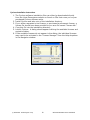
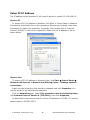
The IP address on the interface PC will need to be set to a static IP: 192.168.1.3.
Windows XP
To access a PC’s IP address in Windows, click Start Æ Control Panel Æ Network
Connections and double click on the computer’s Ethernet port (usually Local Area
Connection 1). Right click and select ‘Properties’ then double click on ‘Internet
Protocol (TCP/IP)’ in the list of components. Make sure the IP address is set as
shown below:
Windows Vista
To access a PC’s IP address in Windows Vista, click Start Æ Control Panel Æ
Network and Internet Æ Network and Sharing Center Æ Manage network
connections.
Right click the connection that should be changed, and click Properties. You
may be asked for an administrator password.
Click the Networking tab. Under This connection uses the following items,
click Internet Protocol Version 4 (TCP/IPv4), then click Properties.
As described in the previous section, set the IP address to 192.168.1.3, and the
subnet mask to 255.255.255.0.
© BlueView Technologies Corp
16
BlueView BV5000 User Handbook