1
SCANNING SETTINGS (ORIGINAL SIZE,
EXPOSURE, RESOLUTION, AND FILE FORMAT)
When sending an image, you can adjust the original size, exposure, resolution, and file format settings as needed.
MANUALLY SETTING THE SCANNING SIZE
If you load an original that is not a standard size (such as an AB size), or if you wish to change the scanning size,
touch the [ORIGINAL] key and set the original size manually.
Perform the following steps after loading the document in the automatic document feeder or on the document glass.
NOTE
Standard sizes that can be detected are as follows:
11"x17", 8-1/2"x14", 8-1/2"x11", 8-1/2"x11"R, 5-1/2"x8-1/2" (A3, B4, A4, A4R, B5, B5R, A5)
If a non-standard size original is loaded (including special sizes), the closest standard size may be displayed, or
the original size may not appear at all.
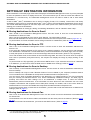
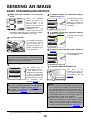
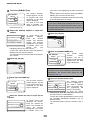
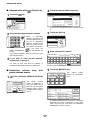
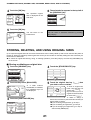
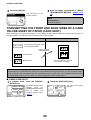
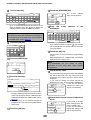
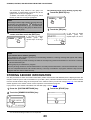
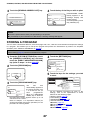
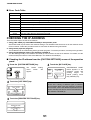
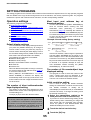
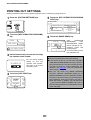
1 Touch the [ORIGINAL] key.
If you wish to select an AB size, touch the
[AB] key and then touch the desired
original size key.
300x300dpi
RESOLUTION
PDF MMR(G4)
FILE FORMAT
AUTO 8½ X11
ORIGINAL
A4
A5R
A4R
AB
B5
B4
INCH
B5R
A3
STANDARD SIZE
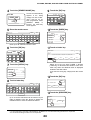
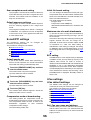
2 Touch the [SCAN SIZE] key.
SCAN SIZE
AUTO 8½ X11
2-SIDED
BOOKLET
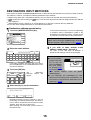
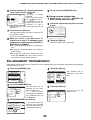
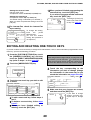
Touch the [X] key and
use the
or
keys
AUTO
to
set
the
length
in
the
X
17 (2 1/2 17)
X
inch
MANUAL
direction,
and
then
touch
(2 1/2 11 5/8)
Y
11 inch
CUSTOM
the [Y] key and do the
SIZE
STANDARD SIZE
SIZE INPUT
same for the Y direction.
The length can be within
the range 2-1/2" to 17"
(64 to 432 mm) in the X direction and 2-1/2" to 115/8" (64 to 297 mm) in the Y direction, set in
increments of 1/8" (1 mm).
MANUAL
NOTE
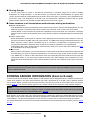
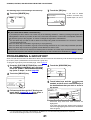
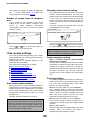
If you wish to rotate the original 90° when creating an
image file, touch the "ROTATE THE IMAGE 90
DEGREES" checkbox (a checkmark should appear
in the box). (only in the E-MAIL/FTP mode)
When using the automatic document
feeder, a setting for originals longer than
17" (432 mm) (31-1/2” (800 mm) at the
maximum) is available. In this case, touch
the [LONG SIZE] key.
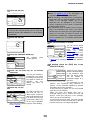
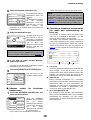
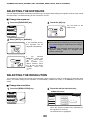
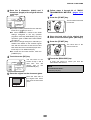
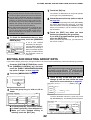
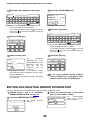
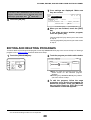
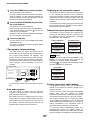
3 Touch the desired original size key.
OK
812 X13
512 X812R
812X14
AB
11X17
INCH
1
2X
8 11
812 X11R
STANDARD SIZE
LONG SIZE
LONG SIZE
SIZE INPUT
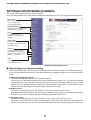
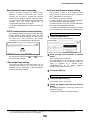
[AB] is highlighted and
AB size keys are
displayed.
To return to the inch
palette, touch the [INCH]
key once again.
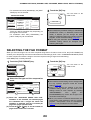
If you wish to select a custom size, touch
the [SIZE INPUT] key and enter the size of
the original
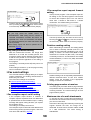
The sizes that can be
selected are displayed.
SEND SIZE *If a B/W scanner
100%
AUTO module/SPF is installed,
the [2-SIDED] keys are
2-SIDED
not displayed.
TABLET
512 X812
OK
A5
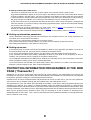
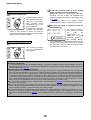
[AUTO] is no longer
highlighted. [MANUAL]
and the original size key
you
touched
are
highlighted.
512 X812
SIZE INPUT
OK
5 8R
8 14
AB
812 X11
11X17
INCH
812 X11R
STANDARD SIZE
20
812 X13
1
1
2X 2
1
2X
LONG SIZE
SIZE INPUT