1
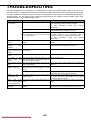
TROUBLESHOOTING
Problem
Check
Solution or cause
The
printer
driver Is there sufficient free space on your hard
cannot be installed.
drive?
Are you using an operating system that is not
supported?
Delete any unneeded files and applications to increase
free space on your hard drive.
Make sure your operating system is supported. (See
the SOFTWARE SETUP GUIDE (for printer) that
accompanied the machine.)
Two-sided printing is Is [2-Sided (Book)] or [2-Sided (Tablet)] Select [2-Sided (Book)] or [2-Sided (Tablet)] (page 2not possible.
selected in the "Main" tab of the printer driver? 2).
Has two-sided printing been prohibited in the "Disabling of Duplex" has been enabled in the key
key operator programs?
operator programs. Consult the key operator.
Not all of the image is Are multiple applications running at once?
Quit all applications that you are not using and try
printed.
printing again.
Stapling does not take Has use of the staple been prohibited in the "Disabling of Stapler" has been enabled in the key
place.
key operator programs?
operator programs. Consult the key operator. The
inserter does not operate (when an inserter is
installed).
Did you attempt to staple more than the Check the maximum number of pages that can be
maximum number of pages?
stapled (page 2-4).
The mail-bin stacker Has the mail-bin stacker been disabled in the "DISABLING OF MAIL-BIN STACKER" has been
cannot be used.
key operator programs?
enabled in the key operator programs. Consult your
key operator and take action accordingly.
Punching does not take Is the "Punch" checkbox selected in the Select the "Punch" checkbox. (page 2-5)
place (when a punch "Main" tab of the printer driver?
module is installed).
Has use of the punch module been prohibited "Disabling of punch" has been enabled in the key
in the key operator programs?
operator programs. Consult the key operator.
Document filing is not Has the printer driver been set to use the Select the "Document Filing" checkbox in the "Job
possible.
document filing function?
Handling" tab of the printer driver. (page 2-12)
Do user folders created in the machine Click the "Get Folder Name" button in the document
appear in "Folder Information"?
filing screen to call up the folders created in the
machine. (page 2-12)
Does the user folder have a password?
Enter the password in "Folder Pass Code" in the
document filing screen. (page 2-12)
Downloaded From ManualsPrinter.com Manuals
6-3