1
B -4
Appendix B: Trunk and Station Ports and Pinouts
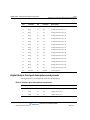
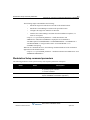
Analog Universal Module port descriptions and pinouts
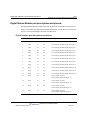
Analog Universal Module port descriptions and pinouts
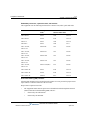
The Analog Universal Module is supported on both the Wave IP 500 and Wave IP 2500 Servers.
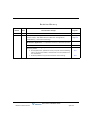
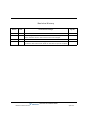
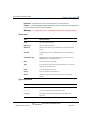
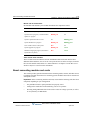
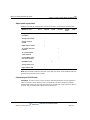
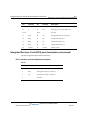
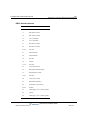
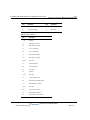
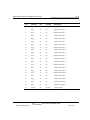
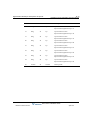
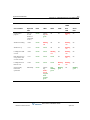
RJ-21X interface port descriptions and pinouts
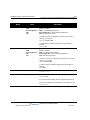
Pin
Function
Pin
Function
Description
1
Ring
26
Tip
Analog FXO trunk port 1
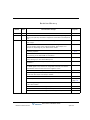
2
Ring
27
Tip
Analog FXO trunk port 2
3
Ring
28
Tip
Analog FXO trunk port 3
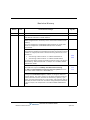
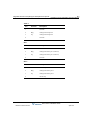
4
Ring
29
Tip
Analog FXO trunk port 4
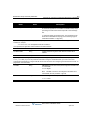
5
Ring
30
Tip
Analog FXO trunk port 5
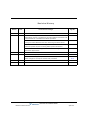
6
Ring
31
Tip
Analog FXO trunk port 6
7
Ring
32
Tip
Analog FXO trunk port 7
8
Ring
33
Tip
Analog FXO trunk port 8
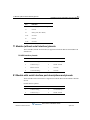
9-16
34-41
Not used
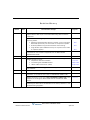
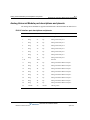
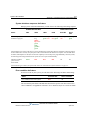
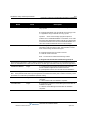
17
Ring
42
Tip
Analog FXS station/DID Trunk port 1
18
Ring
43
Tip
Analog FXS station/DID Trunk port 2
19
Ring
44
Tip
Analog FXS station/DID Trunk port 3
20
Ring
45
Tip
Analog FXS station/DID Trunk port 4
21
Ring
46
Tip
Analog FXS station/DID Trunk port 5
22
Ring
47
Tip
Analog FXS station/DID Trunk port 6
23
Ring
48
Tip
Analog FXS station/DID Trunk port 7
24
Ring
49
Tip
Analog FXS station/DID Trunk port 8
25
Ground
50
Ground
Chassis ground
Wave Server Installation Guide
Release 2.0 Service Pack 1
April 2011