1
MOTLoad Firmware
Most MOTLoad tests can be organized to execute as a group of related tests (a testSuite)
through the use of the testSuite command. The expert operator can customize their
testing by defining and creating a custom testSuite(s). The list of built-in and user-defined
MOTLoad testSuites, and their test contents, can be obtained by entering testSuite -d at
the MOTLoad prompt. All testSuites that are included as part of a product specific MOTLoad
firmware package are product specific. For more information, refer to the testSuite
command description page in the MOTLoad Firmware Package User’s Manual.
Test results and test status are obtained through the testStatus, errorDisplay, and
taskActive commands. Refer to the appropriate command description page in the
MOTLoad Firmware Package User’s Manual for more information.
3.3.3
Command List
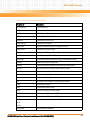
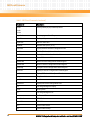
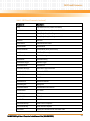
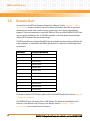
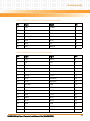
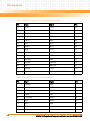
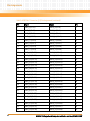
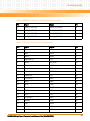
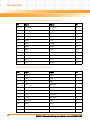
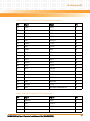
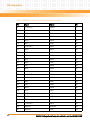
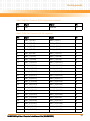
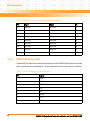
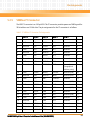
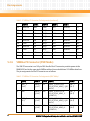
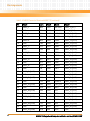
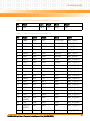
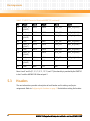
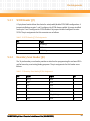
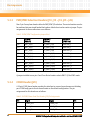
The following table provides a list of all current MOTLoad commands. Products supported by
MOTLoad may or may not employ the full command set. Typing help at the MOTLoad
command prompt will display all commands supported by MOTLoad for a given product.
For a detailed description of these commands refer to the MOTLoad Firmware Package User’s
Manual.
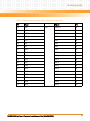
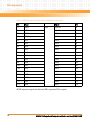
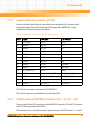
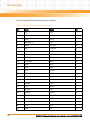
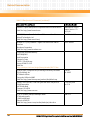
Table 3-1 MOTLoad Commands
Command
Description
as
One-Line Instruction Assembler
bcb
Block Compare Byte/Halfword/Word
bch
bcw
bdTempShow
Display Current Board Temperature
bfb
Block Fill Byte/Halfword/Word
bfh
bfw
blkCp
Block Copy
blkFmt
Block Format
blkRd
Block Read
blkShow
Block Show Device Configuration Data
MVME6100 Single Board Computer Installation and Use (6806800D58E)
33