1
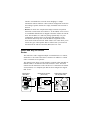
RJ45 Connector Information
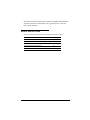
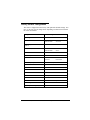
The pinout of the router’s Category 3 and 5
UTP jack is different than a standard Ethernet
UTP jack.
Transmit +
Transmit –
Receive +
Receive –
Ethernet loopback connectors will not work
on the port and vice versa.
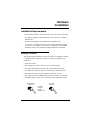
RJ45 Connector
12 345 67
8
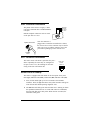
Once the connector is
plugged into a board that is installed in a chassis,
the removal lever on the connector may be hard to
reach. Do not try to pull the connector out of the
port without pushing up on the removal lever.
removal
lever
RJ11 Connector Information
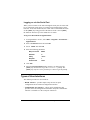
The router comes with an RJ11 jack that uses pins 3
and 4. Optionally, the router may be configured to
use pins 2 and 5. If so, the markings on the outer
casing of the unit will indicate this.
RJ11 Jack
Pinout
1234 56
Router LEDs on Startup
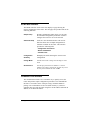
The router is equipped with four LEDs on the front panel: the System
LED (sys), Ethernet LED (enet), ATM LED (atm) and DSL LED (dsl).
1
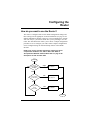
First, all four LEDs light up red for a moment as the hardware
initializes. Then, the sys LED turns solid yellow and then solid green
when the unit has finished passing diagnostic tests.
2
The dsl LED will flash green while the DSL line is training to obatin
the optimum transmission rate. If a DSL link cannot be established,
the LED will flash green and yellow. When the line is trained, the
LED turns solid green.
Efficient Networks, Inc.
Installation Instructions
13