1
INTRODUCTION
1. Introduction
Preface
Dear Customer,
Thank you for choosing PowerMax10-G2, a highly
advanced wireless alarm control system produced by
Visonic Ltd.
Also please make sure that you have the name and
telephone number of the monitoring station your
system will report to. If you ever call the monitoring
station to ask questions, you should be able to come
up with your "ACCOUNT NUMBER" used to identify
your alarm system to the monitoring station. Obtain
this information from your installer and write it.
Overview
The PowerMax10-G2 is a wireless alarm control
system that provides protection against burglary, fire
and tampering. In addition, it can be used to monitor
the activity of disabled or elderly people left at home.
Status information is presented visually.
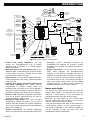
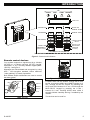
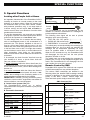
The PowerMax10-G2 is governed by a control panel
(Fig. 1) designed to collect data from various sensors
that are strategically located within and along the
perimeter of the protected site (Figure 2).
In the disarmed state, the system provides you
with visual status information, and initiates an alarm
if smoke is detected or upon disturbance in a 24hour zone (a zone which is active 24-hours a day).
In the armed state, the system will initiate an alarm
upon detection of disturbance in any one of the
armed zones.
A
B
C
D
E
A. INTERNAL SOUNDER
B. INDICATORS
C. DISPLAY
D. CONTROL KEYS
E. KEYPAD
Figure 1. Control Panel
The system identifies a wide range of events alarms, attempts to tamper with sensors and several
types of trouble. Events are automatically reported
via PSTN or optional GSM and Broadband to
2
monitoring stations (in digital form) and to private
telephones (in tones and/or SMS messages). The
person receiving such a message is expected to
investigate the event and act accordingly.
IMPORTANT! All you need to know to secure your
premises can be found in Chapter 2 of this manual.
If you are not familiar with some of the terms used
here, refer to Appendix A at the end of this guide.
Note: This system must be checked by a qualified
technician at least once every three (3) years.
System Features
Your PowerMax10-G2 offers a large number of unique
features:
• Master / User Settings: Two user levels allow
different access types.
• 29 zones: Each protected zone is identified by
number and by name.
• Multiple arming modes: AWAY, HOME, AWAYINSTANT, HOME-INSTANT, LATCHKEY and
BYPASS.
• Liquid crystal display (LCD): Plain-language
status information and prompts are displayed on
the front panel in large, clear letters.
• Real-time clock: The present time is visible on the
display. This feature is also used for the log file by
providing the date and time of each event.
• Various reporting destinations: Events are
reported automatically to monitoring stations,
private telephones of your choice, to a pager and
even by SMS if GSM is installed.
• Selective reporting: Your installer can determine
what type of event will be reported to which
destination.
• Latchkey mode: An automatic “Latchkey”
message is sent to chosen telephones if the
system is disarmed by a “latchkey” user (a junior
family member, for instance).
D-302757