1
i
Table of Contents
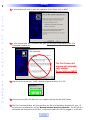
INSTALLING CCP
ON
VISTA
OR
XP PCS
1
You Need a Personal Computer With a USB Port
1
Installing CCP and Microsoft ActiveSync
1
Keep Your Database Up to Date — USE LIVE UPDATE
3
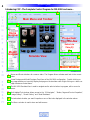
INTRODUCING CCP - THE COMPLETE CONTROL PROGRAM
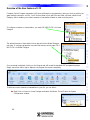
OVERVIEW
OF THE
NEW FEATURES
OF
CCP
CUSTOMIZING THE WORKSPACE
FOR
MX-5000 AND
MORE...
4
5
7
All Windows in the Default Layout can be resized
8
All Windows in the Default Layout can be Moved Around
8
Windows Grouping /Placement Icon
10
Using the Window Auto-Hide Features
11
PROGRAMMING TIPS
Use the Program Menu
Save a Device file and Import for faster programming
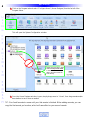
CREATING A NEW SYSTEM FILE
12
12
12
13
Options - New or Existing Files
13
New File - Step by Step
13
Creating and Naming Devices
16
M
X
5
0
0
0
T
W
O
W
A
Y
T
O
U
C
H
S
C
R
E
E
N