1
Function 3: Extension programming
IVX S-Class Administrator’s Manual
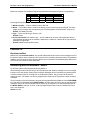
8. Trunk-to-trunk — If enabled, this feature allows manual trunk-to-trunk transfers. While connected
to an outside call, the user can press TRANSFER, dial an offsite number and then complete the
trunk-to-trunk transfer by simply hanging up. Both outside parties are then connected.
Note:
1
After the system dials the external forwarding number, a prompt will be played saying, “You
are receiving a forwarded call. Press any key to accept.” This prompt will play continuously
for 30 seconds. If the forwarded call is answered and the called party dials a digit, the forwarded call will be connected to the called party. If no digit is dialed, the caller is
automatically forwarded to voice mail. While the two lines (trunks) are connected, the system
constantly monitors the lines for open loop conditions (hang-up). If an open loop is detected
on either line, the call is disconnected. The system also monitors for voice activity on the
connected lines. If voice is no longer detected, the call is disconnected. Finally, if both lines
1
are connected for more than 60 minutes , the call will be disconnected.
The default timer can be made longer or shorter.
C.2