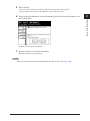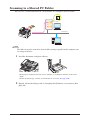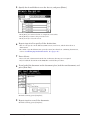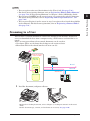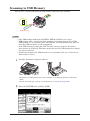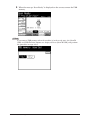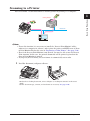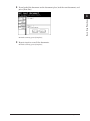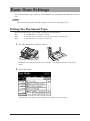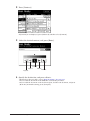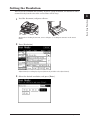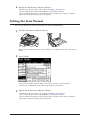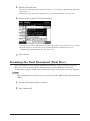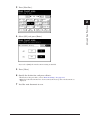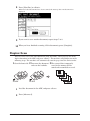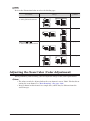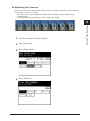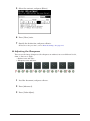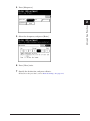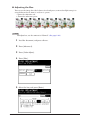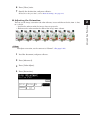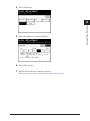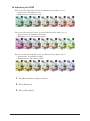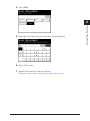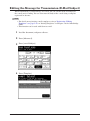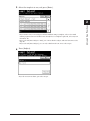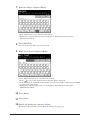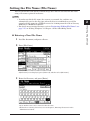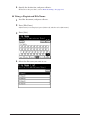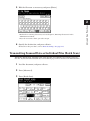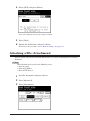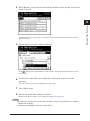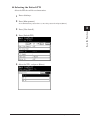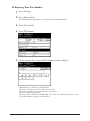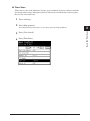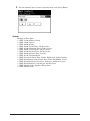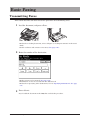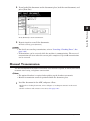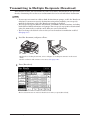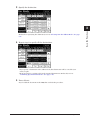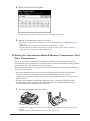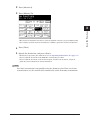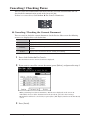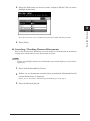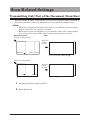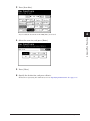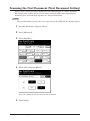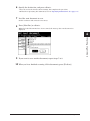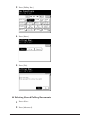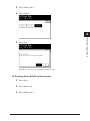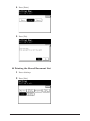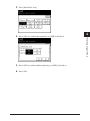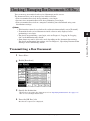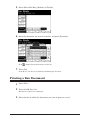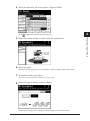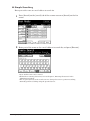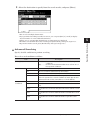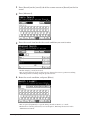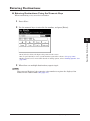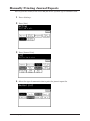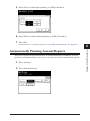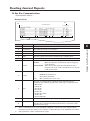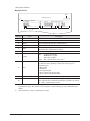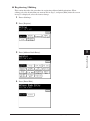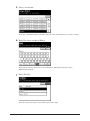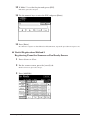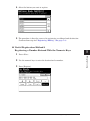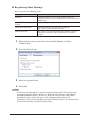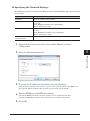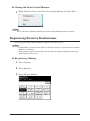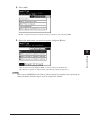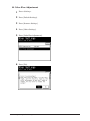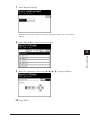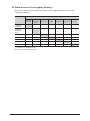
1
Plain-paper digital Fax/Copier/Printer/Scanner Scanner and Fax Guide Please read this guide before operating this machine. After you finish reading this guide, keep it handy for easy reference. Chapter 1 Basic Scan Functions 1 Chapter 2 Advanced Scan Functions 2 Chapter 3 Basic Fax Functions 3 Chapter 4 Advanced Fax Functions 4 Chapter 5 Specifying Destinations 5 Chapter 6 Communication Management 6 Chapter 7 Device Settings 7 Contents How to Read This Manual.......................................................................................... vi Symbols.......................................................................................................................vi Key Descriptions.......................................................................................................vii Screens.......................................................................................................................vii Chapter 1 Basic Scan Functions Basic Scanning.............................................................................................................1-2 Scanning to an E-mail Address...............................................................................1-2 Scanning to a Shared PC Folder.............................................................................1-4 Scanning to a User...................................................................................................1-7 Scanning to USB Memory.....................................................................................1-10 Scanning to an FTP Server....................................................................................1-13 Scanning to a Printer.............................................................................................1-17 Basic Scan Settings...................................................................................................1-20 Setting the Document Type...................................................................................1-20 Setting the Contrast..............................................................................................1-21 Setting the Resolution...........................................................................................1-23 Setting the Scan Format........................................................................................1-24 Chapter 2 Advanced Scan Functions Introduction to Advanced Functions.....................................................................2-2 Advanced Scan Features...........................................................................................2-4 Specifying the Scan Size (Scan Size).......................................................................2-4 Zoom Scanning (Zoom).............................................................................................2-6 Transmitting to Multiple Destinations (Broadcast)...............................................2-7 Scanning the Next Document (Next Doc.)..............................................................2-8 Duplex Scan............................................................................................................2-10 Adjusting the Scan Color (Color Adjustment)......................................................2-12 Editing the Message for Transmission (E-Mail Subject).....................................2-22 Setting the File Name (File Name).......................................................................2-25 Transmitting Scanned Data as Individual Files (Batch Scan)............................2-27 Attaching a File (Attachment)...............................................................................2-28 Selecting the File Format (File Format)...............................................................2-30 Receiving File Path Notification E-mail (Scan Path Notification)......................2-33 Setting Document Categories (Category).............................................................2-35 Setting the Hold Time (Hold Time).......................................................................2-38 Adding Comments (Comments).............................................................................2-39 Using ScanTag........................................................................................................2-40 Scanning Documents Using a TWAIN Box..........................................................2-43 Storing Documents in a TWAIN Box....................................................................2-43 Deleting Stored Documents...................................................................................2-45 Changing the Settings for a TWAIN Box..............................................................2-47 ii Contents Importing the Data in a TWAIN Box....................................................................2-49 Chapter 3 Basic Fax Functions Initial Setup (User Install)........................................................................................3-2 Registering the User Install....................................................................................3-3 Basic Faxing................................................................................................................3-18 Transmitting Faxes................................................................................................3-18 Manual Transmission............................................................................................3-19 Redialing. ...............................................................................................................3-21 Transmitting to Multiple Recipients (Broadcast)................................................3-22 Basic Transmission Settings.................................................................................3-24 Canceling / Checking Faxes...................................................................................3-30 Receiving Faxes......................................................................................................3-36 Operations During Reception................................................................................3-39 Storing Received Documents.................................................................................3-40 Making a Phone Call.................................................................................................3-43 Making a Phone Call..............................................................................................3-43 Receiving a Phone Call..........................................................................................3-44 Adjusting the Speaker Volume..............................................................................3-44 Transmitting Faxes from a Computer..................................................................3-46 Transmitting With the Simple Mode....................................................................3-46 Transmitting With the Advanced Mode................................................................3-52 Internet Fax Transmission (Internet Fax)...........................................................3-60 Transmitting Internet Faxes.................................................................................3-60 Receiving Internet Faxes.......................................................................................3-62 Chapter 4 Advanced Fax Functions Introduction to Advanced Functions.....................................................................4-2 Scan Related Settings.................................................................................................4-4 Transmitting Only Part of the Document (Scan Size)...........................................4-4 Scanning the Next Document (Next Document Setting).......................................4-6 Various Fax Functions...............................................................................................4-8 Setting the Sender Name (TTI)...............................................................................4-8 Transmitting a Cover Page with Documents (Cover page)......................................................4-9 Specifying the Transmission Time (Delayed Transmission)................................4-14 Transmitting Faxes to a Fax Server (E-mail Gateway).......................................4-16 Polling Communications........................................................................................4-17 F-Code Communications.........................................................................................4-23 Registering F-Code Boxes......................................................................................4-23 Transmitting Using Sub-Addresses (F-Code Transmission)...............................4-34 Storing Documents in a Bulletin Box...................................................................4-38 Security Functions....................................................................................................4-45 Restricting Fax Destinations (Closed Transmission)...........................................4-45 Checking the Destination Machine’s Number Before Transmission...................4-46 Entering the Destination Twice Before Transmission (Confirmation Dial).......4-48 Contents iii 1 Security Reception.................................................................................................4-49 PIN Masking..........................................................................................................4-51 Useful Reception Functions....................................................................................4-54 Automatically Distributing Received Documents (Auto Distribution)...............4-54 Setting the Separator Page....................................................................................4-66 Checking / Managing Box Documents (OB Doc.)...............................................4-69 Transmitting a Box Document..............................................................................4-69 Printing a Box Document......................................................................................4-70 Deleting a Box Document......................................................................................4-72 Useful Internet Fax Functions...............................................................................4-73 Editing the Message for Transmission (e-mail Subject)......................................4-73 Transmitting Scanned Data as Individual Files (Batch Transmission).............4-76 Selecting the File Format (File Format)...............................................................4-77 Offramp Transmission...........................................................................................4-78 Creating a TIFF File for an Internet Fax.............................................................4-79 Chapter 5 Specifying Destinations Specifying Destinations.............................................................................................5-2 Selecting from the Address Book.............................................................................5-2 Searching for Server Destinations..........................................................................5-5 Entering Destinations............................................................................................5-11 Specifying Using Search Numbers........................................................................5-13 Selecting From the History....................................................................................5-15 Confirming Specified Destinations.......................................................................5-18 Checking the Specified Destinations.....................................................................5-18 Checking Destinations with the Confirm Destination Function.........................5-19 Chapter 6 Communication Management Checking the Transmission Result (Transmission Report)..............................6-2 Issuing the Transmission Report............................................................................6-2 Reading the Transmission Report...........................................................................6-4 Managing the Communication History..................................................................6-5 Manually Printing Journal Reports........................................................................6-6 Automatically Printing Journal Reports................................................................6-7 Reading Journal Reports.......................................................................................6-11 Chapter 7 Device Settings Registering Destinations...........................................................................................7-2 Registering / Editing Address Book Destinations..................................................7-2 Registering / Editing Groups.................................................................................7-14 Registering / Editing Folder Shortcuts.................................................................7-18 Registering / Editing FTP Server Shortcuts.........................................................7-24 Registering a Color Printer...................................................................................7-30 Registering Favorite Destinations........................................................................7-36 Specifying Default Settings....................................................................................7-39 iv Contents Specifying Default Scanner Settings....................................................................7-39 Specifying Default E-mail Transmission Settings...............................................7-43 Specifying Default Fax Settings............................................................................7-46 Registering Other Settings.....................................................................................7-51 Registering / Editing Templates............................................................................7-51 Registering / Editing File Names..........................................................................7-55 Registering / Editing Document Categories.........................................................7-56 Registering / Editing Domain Names...................................................................7-58 Color Fine Adjustment...........................................................................................7-59 Contents v 1 How to Read This Manual Symbols In this manual, the following symbols are used with the items where important operational and safety information must be observed. Symbol Meaning Warning Describes warnings to protect yourself and others from serious or potentially fatal injury if you handle the machine incorrectly. For safe operation, please follow instructions carefully. Caution Notes a caution to protect yourself and others from personal injury or damage to properties if you handle the machine incorrectly. For safe operation, please follow instructions carefully. IMPORTANT Describes important conditions or restrictions you should carefully observe to avoid problems caused by incorrect operations. Note Describes reference information and additional notes for operation. vi How to Read This Manual Key Descriptions In this manual, the operating keys are described as follows: The key names on the control panel are shown in < >, and the key names on the touch panel are in [ ]. Keys on the control panel Enclosed in < >, for example, <Job Confirm. Fax Cancel>. Touch panel keys Enclosed in [ ], for example, [Contrast]. Screens This manual uses the screens of the MFX-2550 standard model, unless otherwise stated. The screens you see may differ, depending on the options installed. How to Read This Manual vii 1 viii How to Read This Manual Chapter 1 Basic Scan Functions Basic Scanning.............................................................................................................1-2 Scanning to an E-mail Address...............................................................................1-2 Scanning to a Shared PC Folder.............................................................................1-4 Scanning to a User...................................................................................................1-7 Scanning to USB Memory.....................................................................................1-10 Scanning to an FTP Server....................................................................................1-13 Scanning to a Printer.............................................................................................1-17 Basic Scan Settings...................................................................................................1-20 Setting the Document Type...................................................................................1-20 Setting the Contrast..............................................................................................1-21 Setting the Resolution...........................................................................................1-23 Setting the Scan Format........................................................................................1-24 Basic Scanning Scanning to an E-mail Address You can attach the data for a scanned document to an e-mail for transmission. Internet 11 Load the document, and press <Scan>. ••For details on loading documents, refer to Chapter 1, “Loading Documents” in the User’s Guide. ••Set the document type, contrast, and resolution as necessary. (See page 1-20.) 22 Change the file format (see page 2-30) and specify advanced settings such as entering a message (see page 2-22), as necessary. 33 Press the [e-mail] tab. 44 Specify the destination. For details on specifying the destination, refer to “Specifying Destinations”. (See page 5-2.) 1-2 Basic Scanning 55 Press <Start>. ••If you selected a destination from the address book, this step is not required. ••If you loaded the document in the ADF, this concludes the procedure. 66 If you loaded the document on the document glass, load the next document, and Basic Scan Functions press [Next Doc]. 1 To finish scanning, press [Complete]. 77 Repeat step 6 to scan all the documents. To finish scanning, press [Complete]. Note You can register often-used destinations in the [Faves] tab. (See page 7-36.) Basic Scanning 1-3 Scanning to a Shared PC Folder You can save a scanned document to a shared folder in a computer on the network. Shared 2 Shared 1 Network Note The folder to register must have shared folder settings specified on the computer you are using in advance. 11 Load the document, and press <Scan>. ••For details on loading documents, refer to Chapter 1, “Loading Documents” in the User’s Guide. ••Set the document type, contrast, and resolution as necessary. (See page 1-20.) 22 Specify advanced settings such as changing the file format, as necessary. (See page 2-4.) 1-4 Basic Scanning 33 Press the [PC/USB] tab, and then [Folder]. Basic Scan Functions 1 44 Press [Browse]. The list of computers or networks is displayed. ••If the target folder has been registered as a shortcut in advance, select it from the list of shortcuts. ••If the target folder is registered in the [Faves] tab, you can select it from the [Faves] tab. Basic Scanning 1-5 55 Specify the shared folder to save the data to, and press [Enter]. ••Press [Root] to return to the list of computers or networks. ••Press [Back] to return to the previous screen. ••Press [Cancel] to close the screen. 66 Repeat steps 4 to 5 to specify all the destinations. ••You can also specify e-mail addresses, FTP servers, user boxes, and the shared box as destinations. ••To confirm a specified destination, press [Location]. For details on confirming destinations, refer to “Confirming Specified Destinations”. (See page 5-18.) 77 Press <Start>. ••If you selected a destination from the list of shortcuts, this step is not required. ••If you loaded the document in the ADF, this concludes the procedure. 88 If you loaded the document on the document glass, load the next document, and press [Next Doc]. To finish scanning, press [Complete]. 99 Repeat step 8 to scan all the documents. To finish scanning, press [Complete]. 1-6 Basic Scanning Note Scanning to a User You can store a scanned document in a box in the memory of the machine. Registered users can download the data from a computer using a Web browser and transmit it via e-mail. There are two types of boxes that scanned documents can be saved to. •• User boxes: These are the boxes that belong to each registered user. •• Shared box: This is the shared box that all users can use. Inside the memory of the machine User A Box for User A E-mail Box for User B Network Download Shared box User B 11 Load the document, and press <Scan>. ••For details on loading documents, refer to Chapter 1, “Loading Documents” in the User’s Guide. ••Set the document type, contrast, and resolution as necessary. (See page 1-20.) Basic Scanning 1-7 1 Basic Scan Functions •• You can register often-used destinations in the [Faves] tab. (See page 7-36.) •• For details on registering shortcuts, refer to “Registering / Editing Folder Shortcuts” (see page 7-18) or “Registering Shortcuts” in Chapter 3 of the OfficeBridge Guide. •• You can press [Add/Edit] on the screen in step 3 to register/edit, or delete shortcuts. For details on registration, refer to “Registering from an Operation Screen”. (See page 7-24.) •• You can press [Register] on the screen in step 5 to register the selected shared folder in the shortcuts. For details on registration, refer to “Registering a Browsed Folder”. (See page 7-23.) 22 Specify the advanced settings such as the storage period, as necessary. (See page 2-4.) 33 Press the [PC/USB] tab, and then [User]. 44 Specify the destination. ••To specify a user group, press the [Group] and then specify the group. ••If destinations are registered in the [Faves] tab, you can also select a destination from the [Faves] tab. ••If you loaded the document in the ADF, this concludes the procedure. 1-8 Basic Scanning 55 If you loaded the document on the document glass, load the next document, and press [Next Doc]. Basic Scan Functions 1 To finish scanning, press [Complete]. 66 Repeat step 5 to scan all the documents. To finish scanning, press [Complete]. Note You can register often-used destinations in the [Faves] tab. (See page 7-36.) Basic Scanning 1-9 Scanning to USB Memory You can save a scanned document to USB memory connected to the machine. USB memory Note •• Only USB memory formatted with FAT12, FAT16, or FAT32 can be used. •• USB memory with a security function, memory card readers connected via USB, USB memory via an extension cable and USB hub, and USB memory that does not meet the USB standards, are all unsupported. •• If the USB memory becomes full while the data is being saved, the data that is being written is all deleted. Therefore, make sure that the USB memory has enough free space in advance. •• If you want to connect the USB memory via an extension cable, use a cable that is shorter than 3 meters. 11 Load the document, and press <Scan>. ••For details on loading documents, refer to Chapter 1, “Loading Documents” in the User’s Guide. ••Set the document type, contrast, and resolution as necessary. (See page 1-20.) 22 Press the [PC/USB] tab, and then [USB]. 1-10 Basic Scanning 33 Connect the USB memory to the machine. 44 Specify advanced settings such as changing the file format, as necessary. (See page 2-4.) 55 Press <Start>. If you loaded the document in the ADF, this concludes the procedure. 66 If you loaded the document on the document glass, load the next document, and press [Next Doc]. To finish scanning, press [Complete]. Proceed to step 8. 77 Repeat step 6 to scan all the documents. To finish scanning, press [Complete]. Basic Scanning 1-11 Basic Scan Functions 1 88 When the message “Scan Ready” is displayed on the screen, remove the USB memory. Note If you connect USB memory when the machine is in the ready state, the [Scan To USB] and [USB To Print] buttons are displayed. Press [Scan To USB], and perform the procedure in steps 4 to 7. 1-12 Basic Scanning Scanning to an FTP Server FTP Server Network 11 Load the document, and press <Scan>. ••For details on loading documents, refer to Chapter 1, “Loading Documents” in the User’s Guide. ••Set the document type, contrast, and resolution as necessary. (See page 1-20.) 22 Specify advanced settings such as changing the file format, as necessary. (See page 2-4.) 33 Press the [PC/USB] tab, and then [FTP]. Basic Scanning 1-13 1 Basic Scan Functions You can save a scanned document to a specific folder on an FTP (File Transfer Protocol) server. 44 Press [Host]. ••If the target FTP server has been registered as a shortcut in advance, select it from the list of shortcuts. ••If the target FTP server is registered in the [Faves] tab, you can select it from the [Faves] tab. 55 Press [Link]. 66 Enter the link to the FTP server, and press [Enter]. ••Start the link with two slashes (“//”). ••For details on entering characters, refer to Chapter 1, “Entering Characters” in the Administrator’s Guide. 1-14 Basic Scanning 77 Press [User Name]. 88 Enter the user name, and press [Enter]. Basic Scan Functions 1 ••Up to 64 characters can be entered. ••For details on entering characters, refer to Chapter 1, “Entering Characters” in the Administrator’s Guide. 99 Press [Password]. 111 Enter the password, and press [Enter]. ••Up to 28 characters can be entered. ••For details on entering characters, refer to Chapter 1, “Entering Characters” in the Administrator’s Guide. 111 Press [Enter]. 111 Repeat steps 4 to 11 to specify all the destinations. ••You can also specify e-mail addresses, shared folders, user boxes, and the shared box as destinations. ••To confirm a specified destination, press [Location]. For details on confirming destinations, refer to “Confirming Specified Destinations”. (See page 5-18.) Basic Scanning 1-15 111 Press <Start>. ••If you selected a destination from the list of shortcuts, this step is not required. ••If you loaded the document in the ADF, this concludes the procedure. 111 If you loaded the document on the document glass, load the next document, and press [Next Doc]. To finish scanning, press [Complete]. 111 Repeat step 14 to scan all the documents. To finish scanning, press [Complete]. Note •• You can register often-used destinations in the [Faves] tab. (See page 7-36.) •• For details on registering shortcuts, refer to “Registering / Editing FTP Server Shortcuts” (see page 7-24) or “Registering Shortcuts” in Chapter 3 of the OfficeBridge Guide. •• You can press [Add/Edit] on the screen in step 3 to register/edit, or delete shortcuts. For details on registration, refer to “Registering from an Operation Screen”. (See page 7-28.) •• You can press [Register] on the screen in step 11 to register the link in the shortcuts. For details on registration, refer to “Registering an Entered FTP Server”. (See page 7-29.) 1-16 Basic Scanning Scanning to a Printer You can transmit a scanned document to another printer for printing via a computer. Network Note •• To use this function, it is necessary to install the “Scan to Print Monitor” utility software in a computer in advance, and register the printer and MFP to use in Scan to Print Monitor. For details, refer to “Registering a Color Printer”. (See page 7-30.) •• Even if the Scan to Print Monitor is not started, you may be able to use the Scan to Print function. In this case, the printed documents will be printed again when the Scan to Print Monitor is started. •• If you press [Scan to Print], the scan format is automatically set to color. 11 Load the document, and press <Scan>. ••For details on loading documents, refer to Chapter 1, “Loading Documents” in the User’s Guide. ••Set the document type, contrast, and resolution as necessary. (See page 1-20.) Basic Scanning 1-17 Basic Scan Functions 1 Color printer 22 Specify the advanced settings such as the color adjustment, as necessary. (See page 2-4.) 33 Press the [Apps] tab, and then [Scan to Print]. 44 Select the printer. 55 To sort the output, press [Sort]. 66 Enter the number of copies to print using the numeric keys. 77 Press <Start>. If you loaded the document in the ADF, this concludes the procedure. 1-18 Basic Scanning 88 If you loaded the document on the document glass, load the next document, and press [Next Doc]. Basic Scan Functions 1 To finish scanning, press [Complete]. 99 Repeat step 8 to scan all the documents. To finish scanning, press [Complete]. Basic Scanning 1-19 Basic Scan Settings Select the document type, contrast, and resolution, etc. according to the document and its text. Note You can also change the default settings, as necessary. (See page 7-39.) Setting the Document Type Set the document type to scan with according to the document. Text: Auto: Photo: Select this when you want to scan text. Select this when you want to set the document type automatically. Select this when you want to scan photos. 11 Load the document, and press <Scan>. For details on loading documents, refer to Chapter 1, “Loading Documents” in the User’s Guide. 22 Press [Doc.Type]. If [Doc.Type] is not displayed, press [Advanced] and then select [Doc.Type]. 1-20 Basic Scan Settings 33 Select the desired document type, and press [Enter]. Basic Scan Functions 1 44 Specify the destination, and press <Start>. ••For details on the procedure, refer to “Basic Scanning”. (See page 1-2.) ••If you loaded the document in the ADF, this concludes the procedure. ••If you loaded the document on the document glass, load the next document, and press [Next Doc]. To finish scanning, press [Complete]. Setting the Contrast Set the contrast to scan with according to the document. Lightest: Lighter: Normal: Darker: Darkest: Select to scan with the lightest contrast. Select to scan with a contrast between the normal contrast and the lightest contrast. Select to scan with the normal contrast. Select to scan with a contrast between the normal contrast and the darkest contrast. Select to scan with the darkest contrast. 11 Load the document, and press <Scan>. For details on loading documents, refer to Chapter 1, “Loading Documents” in the User’s Guide. Basic Scan Settings 1-21 22 Press [Contrast]. If [Contrast] is not displayed, press [Advanced] and then select [Contrast]. 33 Select the desired contrast, and press [Enter]. Lighter Lightest Normal Darker Darkest 44 Specify the destination, and press <Start>. ••For details on the procedure, refer to “Basic Scanning”. (See page 1-2.) ••If you loaded the document in the ADF, this concludes the procedure. ••If you loaded the document on the document glass, load the next document, and press [Next Doc]. To finish scanning, press [Complete]. 1-22 Basic Scan Settings Setting the Resolution You can set the resolution for scanning. If you set a high resolution, the document will be scanned clearly, but the size of the created data will be large. Basic Scan Functions 11 Load the document, and press <Scan>. 1 For details on loading documents, refer to Chapter 1, “Loading Documents” in the User’s Guide. 22 Press [Resolution]. If [Resolution] is not displayed, press [Advanced] and then select [Resolution]. 33 Select the desired resolution, and press [Enter]. Basic Scan Settings 1-23 44 Specify the destination, and press <Start>. ••For details on the procedure, refer to “Basic Scanning”. (See page 1-2.) ••If you loaded the document in the ADF, this concludes the procedure. ••If you loaded the document on the document glass, load the next document, and press [Next Doc]. To finish scanning, press [Complete]. Setting the Scan Format You can set whether to scan the document in color or monochrome. 11 Load the document, and press <Scan>. For details on loading documents, refer to Chapter 1, “Loading Documents” in the User’s Guide. 22 Press [Color]. ••Scan format switches between “Mono” and “Color” each time you press [Color]. ••If [Color] is not displayed, press [Advanced] and then select [Color]. 33 Specify the destination, and press <Start>. ••For details on the procedure, refer to “Basic Scanning”. (See page 1-2.) ••If you loaded the document in the ADF, this concludes the procedure. ••If you loaded the document on the document glass, load the next document, and press [Next Doc]. To finish scanning, press [Complete]. 1-24 Basic Scan Settings Chapter 2 Advanced Scan Functions Introduction to Advanced Functions.....................................................................2-2 Advanced Scan Features...........................................................................................2-4 Specifying the Scan Size (Scan Size).......................................................................2-4 Zoom Scanning (Zoom).............................................................................................2-6 Transmitting to Multiple Destinations (Broadcast)...............................................2-7 Scanning the Next Document (Next Doc.)..............................................................2-8 Duplex Scan............................................................................................................2-10 Adjusting the Scan Color (Color Adjustment)......................................................2-12 Editing the Message for Transmission (E-Mail Subject).....................................2-22 Setting the File Name (File Name).......................................................................2-25 Transmitting Scanned Data as Individual Files (Batch Scan)............................2-27 Attaching a File (Attachment)...............................................................................2-28 Selecting the File Format (File Format)...............................................................2-30 Receiving File Path Notification E-mail (Scan Path Notification)......................2-33 Setting Document Categories (Category).............................................................2-35 Setting the Hold Time (Hold Time).......................................................................2-38 Adding Comments (Comments).............................................................................2-39 Using ScanTag........................................................................................................2-40 Scanning Documents Using a TWAIN Box..........................................................2-43 Storing Documents in a TWAIN Box....................................................................2-43 Deleting Stored Documents...................................................................................2-45 Changing the Settings for a TWAIN Box..............................................................2-47 Importing the Data in a TWAIN Box....................................................................2-49 Introduction to Advanced Functions This product includes the following scan functions. Scan Size You can transmit or save an image scanned using a scan size set in advance. This is useful when you want to scan a part of the document or want to specify the document size. (See page 2-4.) Zoom You can transmit or save an image scanned with an enlargement ratio or reduction ratio. (See page 2-6.) Broadcast You can transmit to multiple destinations with a single operation. You do not need to scan the document repeatedly for each individual destination. (See page 2-7.) Next Document Setting You can transmit or save separate documents scanned in a row as a single set of data. Since you can scan using both the document glass and the ADF, this is useful for transmitting / saving a combination of documents such as an invoice and a map together. (See page 2-8.) Duplex Scan You can transmit or scan both sides of a document. (See page 2-10.) Color Adjustment When performing color scanning, you can adjust the image to suit your requirements. (See page 2-12.) E-mail Subject When transmitting a scanned image via e-mail, you can edit the body and subject of the e-mail you’re sending. You can also enter the body of the e-mail using a template registered in advance. (See page 2-22.) File Name You can edit the file name for the scanned image data. You can also enter the file name using a file name registered in advance. (See page 2-25.) Batch Scan When the “Batch Scan” function is on, it means that all scanned pages will be saved as one file. If you turn this function off, each scanned page will be saved as an individual file. (See page 2-27.) Attachment You can attach a file on the network (Word, Excel, etc) when transmitting or scanning a document. (See page 2-28.) File Format You can select the file format (TIFF, PDF, etc) for sending. (See page 2-30.) 2-2 Introduction to Advanced Functions Scan Path Notification You can receive an e-mail regarding the location that the scanned document was saved to. (See page 2-33.) Hold Time You can set the storage period (hold time) for documents saved in a box. (See page 2-38.) Comments You can enter comments for documents saved in a box. (See page 2-39.) Using ScanTag The ScanTag feature allows you to enter and send a metadata tag automatically to a network computer. (See page 2-40.) TWAIN You can use application software that supports TWAIN devices to use this product as a scanner. The scanned documents are stored in a TWAIN box, and then imported by the application software. (See page 2-43.) Introduction to Advanced Functions 2-3 1 2 Advanced Scan Functions Document Category You can add a category name (document category) to the scanned document. Setting a document category enables you to filter the documents displayed in the list of documents saved in a box, and enables you to search for documents via their category. (See page 2-35.) Advanced Scan Features Specifying the Scan Size (Scan Size) You can transmit or save an image scanned using a scan size set in advance. This is useful when you want to scan a part of the document or want to specify the document size. Note •• When you scan using the document glass, only an area from the reference setting position equal to the set scan size is scanned. •• When you scan using the ADF, only an area from the center with a width equal to the set scan size is scanned. The whole length of the document is scanned. Document glass ADF Reference setting position Reference setting position A Half-letter Letter Legal A…Legal / Letter / Half-letter Reference setting position Reference setting position A A5 A4 F4 A…A4 / A5 11 Load the document, and press <Scan>. 2-4 Advanced Scan Features / F4 22 Press [Advanced]. 1 Advanced Scan Functions 2 33 Press [Scan Size]. 44 Select the scan size, and press [Enter]. 55 Press [Close]. 66 Specify the destination, and press <Start>. For details on the procedure, refer to “Basic Scanning”. (See page 1-2.) Advanced Scan Features 2-5 Zoom Scanning (Zoom) You can transmit or save an image scanned with an enlargement ratio or reduction ratio. Note •• When enlarging the scan, you can only use the document glass. •• You can set a zoom ratio between 50% and 400% when using the document glass and between 50% and 100% when using the ADF. •• Depending on the selected zoom ratio, some of the image may be left out or there may be extra blank areas on the paper. 11 Load the document, and press <Scan>. 22 Press [Advanced]. 33 Press [Zoom]. 44 Select an enlargement ratio or reduction ratio, and press [Enter]. ••You can press [+] and [-] to set a free zoom ratio. ••You can use the numeric keys to set a free zoom ratio. 55 Press [Close]. 2-6 Advanced Scan Features 66 Specify the destination, and press <Start>. For details on the procedure, refer to “Basic Scanning”. (See page 1-2.) 1 You can transmit to multiple destinations with a single operation. You do not need to scan the document repeatedly for each individual destination. 2 Note Advanced Scan Functions Transmitting to Multiple Destinations (Broadcast) •• If you want to transmit to registered destinations, enable the Broadcast function. If you want to specify destinations using other methods, you can specify multiple destinations even if the Broadcast function is disabled. •• You can change the default value to always have broadcast transmission enabled. (See page 3-8.) •• The number of destinations that can be transmitted to for a single broadcast is indicated below. Destinations Address book destinations and groups Manually entered e-mail addresses Number 2000 30 Shared folders 5 FTP servers 5 User Shared box 200 1 11 Load the document, and press <Scan>. 22 Press [Advanced]. 33 Press [Broadcast]. The broadcast function is enabled / disabled each time you press [Broadcast]. 44 Press [Close]. Advanced Scan Features 2-7 55 Specify the destination. ••For details on specifying the destination for Scan to e-mail, refer to “Specifying Destinations”. (See page 5-2.) ••For details on specifying other destinations, refer to “Basic Scanning”. (See page 1-2.) 66 Repeat step 5 to specify all the destinations. ••If you specify a registered destination, that destination will be canceled if you select it again. ••Press [Location] to confirm or delete the specified destinations. For details, refer to “Confirming Specified Destinations”. (See page 5-18.) 77 Press <Start>. Scanning the Next Document (Next Doc.) You can transmit or save separate documents scanned in a row as a single set of data. Since you can scan using both the document glass and the ADF, this is useful for transmitting / saving a combination of documents such as an invoice and a map together. Note The next document settings can be set separately for the ADF and the document glass (FBS). 11 Load the document, and press <Scan>. 22 Press [Advanced]. 2-8 Advanced Scan Features 33 Press [Next Doc.]. 1 Advanced Scan Functions 2 44 Select [ON], and press [Enter]. If you select [OFF], the next document setting is disabled. 55 Press [Close]. 66 Specify the destination, and press <Start>. ••For details on the procedure, refer to “Basic Scanning”. (See page 1-2.) ••When the loaded documents have been scanned, the message “Set next document” is displayed. 77 Load the next document to scan. Advanced Scan Features 2-9 88 Press [Next Doc] or <Start>. When the loaded documents have been scanned, the message “Set next document” is displayed. 99 If you want to scan another document, repeat steps 7 to 8. 111 When you have finished scanning all the documents, press [Complete]. Duplex Scan You can easily scan a two-sided document using this mode. Just load page one of the duplex document in the ADF, and press <Start>. The machine will prompt you on the following steps. The machine will automatically sort the pages into the correct order. 1 Scan the front side. 2 Turn over the document 3 The scanned data temporarily 4 2 1 To ADF 4 11 Load the document in the ADF, and press <Scan>. 22 Press [Advanced]. 2-10 Advanced Scan Features 5 5 5 6 3 6 5 2 1 11 12 13 4 6 To ADF 4 6 saved in the memory will be sorted and transmitted or saved. 1 and scan the backside. 33 Press [Duplex Scan]. 1 44 Select [Long Edge] or [Short Edge], and press [Enter]. 55 Press [Close]. 66 Specify the destination, and press <Start>. ••For details on the procedure, refer to “Basic Scanning”. (See page 1-2.) ••When the front side scan is over, the machine shows the following screen: 77 Set the backside of the duplex document, and press [Start] or <Start>. Advanced Scan Features 2-11 Advanced Scan Functions 2 Note Refer to the illustration below to select the binding type. Document Letter, Legal, A4, F4 or other portrait document Binding position Image Long edge Short edge Half-letter , A5 or other landscape document Long edge Short edge Adjusting the Scan Color (Color Adjustment) When performing color scanning, you can adjust the image to suit your requirements. Note •• The color can only be adjusted when the scan format is set to “Color”. For details on setting the scan format, see “Basic Scanning”. (See page 1-24.) •• Images shown in this manual are sample data, which may be different from the actual images. 2-12 Advanced Scan Features Adjusting the Contrast You can set the image contrast (the difference between light and dark) to seven different levels, from -3 (low) to +3 (high). -: The difference between brightness and darkness reduces and the whole image becomes dark. +: The light parts become lighter, and the dark parts darker. 1 -3 -2 -1 0 +1 +2 +3 11 Load the document, and press <Scan>. 22 Press [Advanced]. 33 Press [Color Adjust]. 44 Press [Contrast]. Advanced Scan Features 2-13 Advanced Scan Functions 2 55 Select the contrast, and press [Enter]. 66 Press [Close] twice. 77 Specify the destination, and press <Start>. For details on the procedure, refer to “Basic Scanning”. (See page 1-2.) Adjusting the Sharpness You can set the image sharpness (the sharpness or softness) to seven different levels, from -3 (low) to +3 (high). -: Softens texts and lines. +: Sharpens texts and lines. -3 -2 -1 0 11 Load the document, and press <Scan>. 22 Press [Advanced]. 33 Press [Color Adjust]. 2-14 Advanced Scan Features +1 +2 +3 44 Press [Sharpness]. 1 Advanced Scan Functions 2 55 Select the sharpness, and press [Enter]. 66 Press [Close] twice. 77 Specify the destination, and press <Start>. For details on the procedure, refer to “Basic Scanning”. (See page 1-2.) Advanced Scan Features 2-15 Adjusting the Hue You can set the image hue (the balance of red and green, centered on light orange) to seven different levels, from -3 (red) to +3 (green). -: Turns the color tone red. +: Turns the color tone green. -3 -2 -1 0 +1 Note To Adjust hue, set the contrast to “Normal”. (See page 1-21.) 11 Load the document, and press <Scan>. 22 Press [Advanced]. 33 Press [Color Adjust]. 44 Press [Hue]. 55 Select the hue, and press [Enter]. 2-16 Advanced Scan Features +2 +3 66 Press [Close] twice. 77 Specify the destination, and press <Start>. For details on the procedure, refer to “Basic Scanning”. (See page 1-2.) 1 You can set the image saturation (the color vibrancy) to seven different levels, from -3 (low) to +3 (high). -: Lessens the color to make the image closer to grayscale. +: Enhances the color to make the color of the image more vibrant. -3 -2 -1 0 +1 +2 +3 Note To Adjust saturation, set the contrast to “Normal”. (See page 1-21.) 11 Load the document, and press <Scan>. 22 Press [Advanced]. 33 Press [Color Adjust]. 44 Press [Saturation]. Advanced Scan Features 2-17 2 Advanced Scan Functions Adjusting the Saturation 55 Select the saturation, and press [Enter]. 66 Press [Close] twice. 77 Specify the destination, and press <Start>. For details on the procedure, refer to “Basic Scanning”. (See page 1-2.) Adjusting the Lightness You can set the image lightness (brightness and darkness) to seven different levels, from -3 (low) to +3 (high). -: Darkens the entire image. +: Lightens the entire image. -3 -2 -1 0 +1 +2 Note To Adjust lightness, set the contrast to “Normal”. (See page 1-21.) 11 Load the document, and press <Scan>. 22 Press [Advanced]. 33 Press [Color Adjust]. 2-18 Advanced Scan Features +3 44 Press [Lightness]. 1 Advanced Scan Functions 2 55 Select the lightness, and press [Enter]. 66 Press [Close] twice. 77 Specify the destination, and press <Start>. For details on the procedure, refer to “Basic Scanning”. (See page 1-2.) Advanced Scan Features 2-19 Adjusting the RGB You can set the ratio of R (red) to seven different levels, from -3 to +3. -: Lessens red, and enhances cyan. +: Enhances red, and lessens cyan. -3 -2 -1 0 +1 +2 +3 You can set the ratio of G (green) to seven different levels, from -3 to +3. -: Lessens green, and enhances magenta. +: Enhances green, and lessens magenta. -3 -2 -1 0 +1 +2 +3 You can set the ratio of B (blue) to seven different levels, from -3 to +3. -: Lessens blue, and enhances yellow. +: Enhances blue, and lessens yellow. -3 -2 -1 0 11 Load the document, and press <Scan>. 22 Press [Advanced]. 33 Press [Color Adjust]. 2-20 Advanced Scan Features +1 +2 +3 44 Press [RGB]. 1 55 Select [R], [G], or [B], select the color ratio, and press [Enter]. 66 Press [Close] twice. 77 Specify the destination, and press <Start>. For details on the procedure, refer to “Basic Scanning”. (See page 1-2.) Advanced Scan Features 2-21 Advanced Scan Functions 2 Editing the Message for Transmission (E-Mail Subject) When transmitting a scanned image via e-mail, you can edit the body and subject of the e-mail you’re sending. You can also enter the body of the e-mail using a template registered in advance. Note •• For details on registering e-mail templates, refer to “Registering / Editing Templates” (see page 7-51) or “Setting Templates” in Chapter 3 of the OfficeBridge Guide. •• This function can be used with Scan to e-mail. 11 Load the document, and press <Scan>. 22 Press [Advanced]. 33 Press [e-mail Subject]. 44 Press [Template]. 2-22 Advanced Scan Features 55 Select the template to use, and press [Enter]. 1 ••If you want to enter a new subject and text without using a template, select a box with nothing registered in it. If all the boxes already have a template registered, select any box from 01 to 10. ••If you selected [Auto Subject + Text], you cannot edit the subject and mail text. Proceed to step 10. ••If you selected [Auto Subject], you can only edit the mail text. Proceed to step 8. 66 Press [Subject]. If you do not want to edit it, proceed to step 8. Advanced Scan Features 2-23 Advanced Scan Functions 2 77 Enter the subject, and press [Enter]. ••Up to 80 characters can be entered for the subject. ••For details on entering characters, refer to Chapter 1, “Entering Characters” in the Administrator’s Guide. 88 Press [Mail Text]. If you do not want to edit it, proceed to step 10. 99 Enter the mail text, and press [Enter]. ••Up to 1024 characters can be entered for the message. ••Press [ ] to enter a line break. A line break takes up two characters. ••Press [ViewText] to confirm the mail text that has been entered. After confirming, press [Edit] to return to the entry screen. ••For details on entering characters, refer to Chapter 1, “Entering Characters” in the Administrator’s Guide. 111 Press [Enter]. 111 Press [Close]. 111 Specify the destination, and press <Start>. For details on the procedure, refer to “Basic Scanning”. (See page 1-2.) 2-24 Advanced Scan Features Setting the File Name (File Name) Note •• If you do not edit the file name, the current year, month, day, and time are automatically used as the file name when the data is transmitted or saved. For example, the file name for a TIFF file created at 1:30:30 pm on the 15th of January, 2010 will be “20100115133030.tif”. •• For details on registering filenames, refer to “Registering / Editing File Names” (see page 7-55) or “Setting Templates” in Chapter 3 of the OfficeBridge Guide. Entering a New File Name 11 Load the document, and press <Scan>. 22 Press [File Name]. If [File Name] is not displayed, press [Advanced] and then select [File Name]. 33 Enter the file name, and press [Enter]. ••Up to 80 characters can be entered for the file name. ••For details on entering characters, refer to Chapter 1, “Entering Characters” in the Administrator’s Guide. Advanced Scan Features 2-25 1 2 Advanced Scan Functions You can edit the file name for the scanned image data. You can also enter the file name using a file name registered in advance. 44 Specify the destination, and press <Start>. For details on the procedure, refer to “Basic Scanning”. (See page 1-2.) Using a Registered File Name 11 Load the document, and press <Scan>. 22 Press [File Name]. If [File Name] is not displayed, press [Advanced] and then select [File Name]. 33 Press [List]. 44 Select the file name you want to use. 2-26 Advanced Scan Features 55 Edit the file name as necessary, and press [Enter]. 1 ••For details on entering characters, refer to Chapter 1, “Entering Characters” in the Administrator’s Guide. ••If you do not want to edit it, proceed to step 6. 66 Specify the destination, and press <Start>. For details on the procedure, refer to “Basic Scanning”. (See page 1-2.) Transmitting Scanned Data as Individual Files (Batch Scan) When the “Batch Scan” function is on, it means that all scanned pages will be saved as one file. If you turn this function off, each scanned page will be saved as an individual file. 11 Load the document, and press <Scan>. 22 Press [Advanced]. 33 Press [Batch Scan]. Advanced Scan Features 2-27 Advanced Scan Functions 2 44 Select [OFF], and press [Enter]. If you select [ON], the batch scan setting is enabled. 55 Press [Close]. 66 Specify the destination, and press <Start>. For details on the procedure, refer to “Basic Scanning”. (See page 1-2.) Attaching a File (Attachment) You can attach a file on the network (Word, Excel, etc) when transmitting or scanning a document. Note This function can be used in the following cases: •• Scan to e-mail •• Scan to PC Folder •• Scan to FTP Server 11 Load the document, and press <Scan>. 22 Press [Advanced]. 33 Press [Attachment]. 2-28 Advanced Scan Features 44 Press [Browse], and search the network for the folder where the file you want to attach is located. 1 If folder shortcuts are registered, select the shortcut for the folder where the file you want to attach is located. 55 Specify the file to attach, and press [Enter]. Press to display detailed information for the file. To close the detailed information screen, press [Close]. 66 To continue to attach files, press [Shortcut] and repeat steps 4 to 5 of the operation. If you do not want to attach another file, proceed to step 7. 77 Press [Close] twice. 88 Specify the destination, and press <Start>. For details on the procedure, refer to “Basic Scanning”. (See page 1-2.) Note The limits on the files that can be attached with a single transmission are as follows: •• Maximum of 10 files •• Maximum of 20 MB total for the scanned data Advanced Scan Features 2-29 Advanced Scan Functions 2 Selecting the File Format (File Format) You can select the file format (TIFF, PDF, etc) for sending. Available File Formats For monochrome scanning: For color scanning: TIFF, PDF, or encrypted PDF JPEG, PDF, or encrypted PDF Encrypted PDF Settings When you have selected encrypted PDF for the file format, you can also specify the following settings. Item Description *1 Encryption Level Select Low (40-bit RC4), High (128-bit RC4), or High (128-bit AES). Printing Allowed Select whether to allow the file to be printed. Editing Allowed Select whether to allow the file to be edited. Copying Allowed Select whether to allow the file to be copied. Open Password If you set this password, the password must be entered when opening the created PDF file. Up to 28 alphanumeric characters and symbols can be entered for the password. Set the password after pressing <Start>. Permissions Password If you set this password, the password must be entered when printing or editing the created PDF file. The operations for which the password is required can be set in Printing Allowed, Editing Allowed, and Copying Allowed. Up to 28 alphanumeric characters and symbols can be entered for the password. Set the password after pressing <Start>. *** The encryption levels in order of strength are Low (40-bit RC4), High (128-bit RC4), and High (128-bit AES).40-bit RC4 is supported by Acrobat 4.0 (PDF 1.3) or later, 128-bit RC4 is supported by Acrobat 6.0 (PDF 1.5) or later, and 128-bit AES is supported by Acrobat 7.0 (PDF 1.6) or later. Note This function can be used in the following cases: •• Scan to e-mail •• Scan to PC Folder •• Scan to FTP Server •• Scan to USB Memory 11 Load the document, and press <Scan>. 22 Press [Advanced]. 2-30 Advanced Scan Features 33 Press [FileFormat]. 1 Advanced Scan Functions 2 44 Select the file format. The selectable file formats differ according to the selected scan format (color or monochrome). 55 If you selected encrypted PDF in step 4, press [PDF w/ Password] to change the encryption settings. Otherwise, proceed to step 8. Advanced Scan Features 2-31 66 Set the detailed encryption settings, as necessary. 77 Press [Close]. 88 Press [Enter]. 99 Press [Close]. 111 Specify the destination, and press <Start>. ••For details on the procedure, refer to “Basic Scanning”. (See page 1-2.) ••If you selected a file format other than encrypted PDF, the procedure is complete. 111 To set a password for opening the document, enter the password and press [Enter]. If you do not want to set a password for opening the document, press [Enter] without entering a password. 111 Enter the password set in step 11 again, and press [Enter]. If you did not enter a password in step 11, this screen is not displayed. 2-32 Advanced Scan Features 111 To set a permissions password, enter the password and press [Enter]. 1 If you do not want to set a permissions password, press [Enter] without entering a password. 111 Enter the password set in step 13 again, and press [Enter]. If you did not enter a password in step 13, this screen is not displayed. Receiving File Path Notification E-mail (Scan Path Notification) You can receive an e-mail regarding the location that the scanned document was saved to. Note •• Perform a user login before using this function. For details on logging in, refer to Chapter 1, “Logging In / Logging Out ” in the Administrator’s Guide. •• This function can be used with the Scan to PC Folder, Scan to Box, and Scan to FTP Server functions. 11 Load the document, and press <Scan>. 22 Press [Advanced]. Advanced Scan Features 2-33 Advanced Scan Functions 2 33 Press [Scan Path]. 44 Select [ON], and press [Enter]. If you select [OFF], the scan path notification setting is disabled. 55 Press [Close]. 66 Specify the destination, and press <Start>. For details on the procedure, refer to “Basic Scanning”. (See page 1-2.) Note •• The notification e-mail is sent to the e-mail address registered in the user information. This function can only be used if an e-mail address is registered in the user information. •• For details on registering user information, refer to Chapter 3, “Registering Users” in the OfficeBridge Guide. 2-34 Advanced Scan Features Setting Document Categories (Category) Note •• This function can be used with Scan to Box. •• The data is not classified unless you enter a document category. The document category can also be changed after saving the data. •• For details on registering document categories, refer to “Registering / Editing Document Categories” (see page 7-56) or “Setting Templates” in Chapter 3 of the OfficeBridge Guide. Setting a New Document Category 11 Load the document, and press <Scan>. 22 Press [Advanced]. 33 Press [Category]. Advanced Scan Features 2-35 1 2 Advanced Scan Functions You can add a category name (document category) to the scanned document. Setting a document category enables you to filter the documents displayed in the list of documents saved in a box, and enables you to search for documents via their category. You can also set the document category using a document category registered in advance. 44 Enter the document category, and press [Enter]. ••Up to 20 characters can be entered. ••For details on entering characters, refer to Chapter 1, “Entering Characters” in the Administrator’s Guide. 55 Press [Close]. 66 Specify the destination, and press <Start>. For details on the procedure, refer to “Scanning to a User”. (See page 1-7.) Using a Document Category 11 Load the document, and press <Scan>. 22 Press [Advanced]. 33 Press [Category]. 44 Press [List]. 2-36 Advanced Scan Features 55 Select the document category that you want to use. 1 66 Edit the document category, as necessary, and press [Enter]. ••For details on entering characters, refer to Chapter 1, “Entering Characters” in the Administrator’s Guide. ••If you do not want to edit it, proceed to step 7. 77 Press [Close]. 88 Specify the destination, and press <Start>. For details on the procedure, refer to “Scanning to a User”. (See page 1-7.) Advanced Scan Features 2-37 Advanced Scan Functions 2 Setting the Hold Time (Hold Time) You can set the storage period (hold time) for documents saved in a box. Note •• This function can be used with Scan to Box. •• You can set a storage period of 1 to 99 days, or unlimited. The day the data is saved is not included in the storage period. This means that if you set a storage period of one day, the data will be stored until the day after the data was saved. 11 Load the document, and press <Scan>. 22 Press [Advanced]. 33 Press [Hold Time]. 44 Select [ON] to set the storage period, or [OFF] to not set it. If you selected [OFF], press [Enter] and proceed to step 6. 55 Enter the storage period, and press [Enter]. You can use [], [], and the numeric keys. 66 Press [Close]. 2-38 Advanced Scan Features 77 Specify the destination, and press <Start>. For details on the procedure, refer to “Scanning to a User”. (See page 1-7.) 1 Adding Comments (Comments) You can enter comments for documents saved in a box. 2 Note Advanced Scan Functions This function can be used with Scan to Box. 11 Load the document, and press <Scan>. 22 Press [Advanced]. 33 Press [Comments]. 44 Enter the comments, and press [Enter]. ••Up to 1024 characters can be entered. ••Press [ViewText] to confirm the mail text that has been entered. Press [Edit] to return to the entry screen. ••For details on entering characters, refer to Chapter 1, “Entering Characters” in the Administrator’s Guide. Advanced Scan Features 2-39 55 Press [Close]. 66 Specify the destination, and press <Start>. For details on the procedure, refer to “Scanning to a User”. (See page 1-7.) Using ScanTag The ScanTag feature allows you to create image data and metadata (data indicating the attributes and processing method of the image file) in a single scan. The image data and metadata will be sent automatically to a network computer. Note Set ScanTag before using this function. For details, refer to Chapter 3, “Setting ScanTag” in the OfficeBridge Guide. Entering a tag (metadata) at the machine 11 Load the document, and press <Scan>. 22 Press the [Apps] tab, and then [ScanTag]. 33 Select the ScanTag setting you wish to use. 2-40 Advanced Scan Features 44 Set ScanTag. 1 ••If the selected ScanTag setting has been defined as requiring user authentication and you have not logged in, the login screen will appear. For details on logging in, refer to Chapter 1, “Logging In / Logging Out” in the Administrator’s Guide. ••If the tag entry was set to “List Input”, the defined text strings will appear askeys. Select a value from the list. (If the text string is defined as editable, the character entry screen will appear. Change the value (if needed) and then press [Enter].) ••If the tag entry was set to character entry, enter the appropriate text string manually, and then press [Enter]. 55 Confirm the entered values and press [Enter] If you want to correct a value, go back to the previous screen by pressing [Back]. 66 Press <Start>. Advanced Scan Features 2-41 Advanced Scan Functions 2 77 Press [Yes] to scan another document using the tag settings in step 4. ••Press [No] to complete the operation or specify different tag settings. ••When you are logged in, the log out screen is displayed. Press [Yes] to log out. 2-42 Advanced Scan Features Scanning Documents Using a TWAIN Box You can use application software that supports TWAIN devices to use this product as a scanner. The scanned documents are stored in a TWAIN box, and then imported by the application software. 1 •• Install the TWAIN driver to the computer in advance. For details on installing the driver, refer to Chapter 2, “Installing to Windows” in the Printer Guide. •• You can also connect the computer and the machine with a USB cable to retrieve data. Storing Documents in a TWAIN Box 11 Load the document, and press <Scan>. 22 Press [Advanced]. 33 Press [TWAIN Box]. 44 Press [Store]. Scanning Documents Using a TWAIN Box 2-43 Advanced Scan Functions 2 Note 55 Select the TWAIN box in which you want to store the document. 66 If an I.D. code is set for the TWAIN box, enter the I.D. code and press [Enter]. If an I.D. code has not been set, proceed to step 7. 77 Press [Yes] or <Start>. Note •• Up to 99 files can be stored in a single box. •• Up to 9,999 pages of documents can be stored as a single file. 2-44 Scanning Documents Using a TWAIN Box Deleting Stored Documents 11 Press <Scan>. 1 22 Press [Advanced]. 2 Advanced Scan Functions 33 Press [TWAIN Box]. 44 Press [Delete]. 55 Select the TWAIN box in which the documents you want to delete are stored. 66 If an I.D. code is set for the TWAIN box, enter the I.D. code and press [Enter]. If an I.D. code has not been set, proceed to step 7. Scanning Documents Using a TWAIN Box 2-45 77 Select the data you want to delete. To delete all the data stored in the box, press [All Clear]. 88 Press [Yes]. Press [No] to close the screen without deleting the data. 99 Press [Close]. To continue deleting data, repeat the operation from step 5. 2-46 Scanning Documents Using a TWAIN Box Changing the Settings for a TWAIN Box You can register a name and I.D. code for a TWAIN box. 1 22 Press [Register]. 2 Advanced Scan Functions 11 Press <Setting>. 33 Press [TWAIN Box]. 44 Select the TWAIN box you want to register or edit the name or I.D. code for. 55 If an I.D. code is set for the TWAIN box, enter the I.D. code and press [Enter]. If no I.D. code is set, proceed to step 6. Scanning Documents Using a TWAIN Box 2-47 66 To register or edit the name, press [Box Name]. If you do not want to register or edit the name, proceed to step 8. 77 Register or edit the name, and press [Enter]. ••Up to 16 characters can be entered. ••For details on entering characters, refer to Chapter 1, “Entering Characters” in the Administrator’s Guide. 88 To register or edit the I.D code, press [I.D.Code]. If you do not want to register or edit the I.D. code, proceed to step 10. 2-48 Scanning Documents Using a TWAIN Box 99 Register or edit the I.D. code, and press [Enter]. 1 ••Up to 4 characters can be registered. ••To disable the I.D. code, enter “0000”. 111 Press [Enter]. To continue to change other TWAIN box settings, repeat steps 3 to 10 of the operation. Importing the Data in a TWAIN Box You can import the data stored in a TWAIN box using application software that supports TWAIN. The procedure for using Microsoft Office Document Scanning is described here as an example. Since the operation procedure differs according to the application software you are using, refer to the documentation for the application software for details. Note •• Install the TWAIN driver to the computer in advance. For details on installing the driver, refer to Chapter 2, “Installing to Windows” in the Printer Guide. •• You can also connect the computer and the machine with a USB cable to retrieve data. 11 Start the application software that supports TWAIN on your computer. Scanning Documents Using a TWAIN Box 2-49 Advanced Scan Functions 2 22 Click [Scan] and select “Muratec MFX-25xx NW Scan”. If you connected the computer and the machine with a USB cable, select “Muratec MFX-25xx Scan”. 33 Click [OK]. 44 Start scanning. 55 Select the TWAIN box. If an I.D. code is set, enter the I.D. code, and press [OK]. 2-50 Scanning Documents Using a TWAIN Box Description File Number Displays the file number automatically assigned at the machine. Date/Time Displays the date and time that the document was stored in the TWAIN box. Pages Displays the number of pages for the stored document. B/W / Color Displays whether the image was scanned with the monochrome or color scan format. Preview Select [Preview] to display the scanned document. Page range Enables you to set which page to load when a file has multiple pages. Erase document(s) Select [Delete after download] to automatically delete the documents from the TWAIN box after downloading them. Download Starts downloading the stored document. Select MFP Used to change the scanner to connect to when the IP address of the machine has changed, etc. This is for network scanning only. Refresh Updates the list of files. Save Saves the current settings. This cannot be clicked unless the settings have been changed. Default Returns the settings to the factory defaults. Exit Closes Muratec MFX-25xx NW Scan. Resolution, Pixel type, Fixed image size These settings may be required, depending on the application software. Set them as required. (Normally it is not necessary to change these settings from their default values.) [Information] tab Displays the version information for Muratec MFX-25xx NW Scan. 66 Select the document to load, and click [Download]. Note If you connected the computer and the machine with a USB cable, confirm that the machine is not in energy save mode such as the low power mode or the sleep mode. If the machine is in energy save mode, you cannot retrieve data. Press <Energy Save> to disable the energy save mode. Scanning Documents Using a TWAIN Box 2-51 1 2 Advanced Scan Functions Item 2-52 2-52 Chapter 3 Basic Fax Functions Initial Setup (User Install)........................................................................................3-2 Registering the User Install....................................................................................3-3 Basic Faxing................................................................................................................3-18 Transmitting Faxes................................................................................................3-18 Manual Transmission............................................................................................3-19 Redialing. ...............................................................................................................3-21 Transmitting to Multiple Recipients (Broadcast)................................................3-22 Basic Transmission Settings.................................................................................3-24 Canceling / Checking Faxes...................................................................................3-30 Receiving Faxes......................................................................................................3-36 Operations During Reception................................................................................3-39 Storing Received Documents.................................................................................3-40 Making a Phone Call.................................................................................................3-43 Making a Phone Call..............................................................................................3-43 Receiving a Phone Call..........................................................................................3-44 Adjusting the Speaker Volume..............................................................................3-44 Transmitting Faxes from a Computer..................................................................3-46 Transmitting With the Simple Mode....................................................................3-46 Transmitting With the Advanced Mode................................................................3-52 Internet Fax Transmission (Internet Fax)...........................................................3-60 Transmitting Internet Faxes.................................................................................3-60 Receiving Internet Faxes.......................................................................................3-62 Initial Setup (User Install) In some countries you are required by law to indicate the sender name and fax number on every fax you send. YOU MUST THEREFORE STORE THE SENDER NAME AND FAX NUMBER IN YOUR MACHINE BEFORE USING IT. Every fax page you send arrives at the receiving machine with a single line of text at the very top of the page. This text lists a sender name, called the Transmit Terminal Identifier (TTI), and a fax number. Under “User install”, you can setup the following items including your name and fax number. Language Select the language to use. (See page 3-3.) Current date and time Set the correct date and time. This setting is applied to all fax operations, such as the delayed transmission and communication management options. (See page 3-5.) Communication Line Set the dialing type needed for the fax machine, either “Tone” or “Pulse”. If the wrong setting is made, telephoning and faxing cannot be performed. (See page 3-6.) Automatic daylight saving time detection Adjust the clock automatically in the summer time period. (See page 3-7.) Broadcasting Set the broadcast transmission option. (See page 3-8.) Fax reception mode Select the desired reception mode from the Fax mode, Tel/Fax mode, Fax/Tel mode, Answering/Fax mode, or Tel mode options. (See page 3-9.) For details on reception modes, refer to “Receiving Faxes”. (See page 3-36.) Dial tone detection Set the dial tone detection. (See page 3-10.) Sender name (TTI) registration This makes it easy to show the sender’s name to the receiving party, to print the name on the document received by the receiving party, and for the receiving party to know where the document came from. Up to 22 characters can be entered, and three names can be registered. (See page 3-11.) Default TTI The most commonly-used TTI among three possible registered TTIs can be designated as the default TTI. (See page 3-13.) Your fax number The fax number of this machine can be told to the receiving party, or printed on the document received. Up to 20 digits can be entered. (See page 3-14.) 3-2 Initial Setup (User Install) Time zone A time zone is a region that adopts the same time differences as the ones from the Royal Observatory, Greenwich, England (within ± 12 hours), usually regarded as standard time around the world. (See page 3-15.) Caller ID Set this mode to ON to display the caller number (Caller ID) on the display while the machine is beeing called. This is an optional service provided by your telephone company. (See page 3-17.) These settings can be changed at any time. 1 2 •• You can also register or edit “User Install” using a web browser. For details, refer to Chapter 3, “Specifying Device Settings” in the OfficeBridge Guide. •• Print out the “Settings List” to insure that your settings are correct. For the procedure for printing, refer to Chapter 1, “Checking the Machine Information” in the Administrator’s Guide. Registering the User Install Setting the Language Select the language on display. The selected language will be applied to the list printouts as well. 11 Press <Setting>. 22 Press [Management]. If an administrator password is set, enter the password and press [Enter]. Initial Setup (User Install) 3-3 Basic Fax Functions 3 Note 33 Press [User Install]. 44 Press [Language]. 55 Select the language, and press [Enter]. 66 If “The language was changed. Try to turn on power.” is displayed on the screen, turn the power of the machine OFF and then ON again. If the message is not displayed, this step is not required. 3-4 Initial Setup (User Install) Setting the Date & Time Set the current time in the order of year (4 digits), month (2 digits), day (2 digits), hour (24-hour clock, 2 digits), and minutes (2 digits). 1 11 Press <Setting>. 2 22 Press [Management]. If an administrator password is set, enter the password and press [Enter]. Basic Fax Functions 33 Press [User Install]. 3 44 Press [Time Setting]. 55 Select [AM] or [PM] and enter the current date and time, and press [Enter]. You can use [], [], [], [], and the numeric keys. Initial Setup (User Install) 3-5 Setting Communication Line Set the dialing type needed for the fax machine, either “Tone” or “Pulse”. 11 Press <Setting>. 22 Press [Management]. If an administrator password is set, enter the password and press [Enter]. 33 Press [User Install]. 44 Press [Communication Line]. 55 Select the dialing type, and press [Enter]. 3-6 Initial Setup (User Install) Setting Daylight Savings Time Select the validity for the daylight saving time. 11 Press <Setting>. 1 22 Press [Management]. 2 33 Press [User Install]. 3 Basic Fax Functions If an administrator password is set, enter the password and press [Enter]. 44 Press [Set Daylight Saving]. 55 Select [ON] or [OFF], and press [Enter]. Initial Setup (User Install) 3-7 Setting the Broadcast Transmission Option Select whether to start transmission when registered destination is selected (“OFF”), or when <Start> is pressed with all destinations selected (“ON”). Note The broadcast setting is enabled for both scan transmission and fax transmission. 11 Press <Setting>. 22 Press [Management]. If an administrator password is set, enter the password and press [Enter]. 33 Press [User Install]. 44 Press [Broadcast]. 55 Select [ON] or [OFF], and press [Enter]. 3-8 Initial Setup (User Install) Setting the Fax Reception Mode Select the reception mode that best matches the machine usage. 11 Press <Setting>. 1 22 Press [Management]. 2 33 Press [User Install]. 3 Basic Fax Functions If an administrator password is set, enter the password and press [Enter]. 44 Press [Fax Reception Mode]. 55 Select the reception mode, and press [Enter]. Initial Setup (User Install) 3-9 Setting the Dial Tone Detection Select if you set the dial tone detection. Select [OFF] normally. 11 Press <Setting>. 22 Press [Management]. If an administrator password is set, enter the password and press [Enter]. 33 Press [User Install]. 44 Press [Dial Tone Detect]. 55 Select [ON] or [OFF] to detect or not detect the dial tone, and press [Enter]. If you select [ON], you cannot transmit the faxes through a line that cannot acquire a dial tone. 3-10 Initial Setup (User Install) Registering Your Name or Company Name (TTI) You can register three TTI’s (Transmit Terminal Identifier). 11 Press <Setting>. 1 22 Press [Management]. 2 33 Press [User Install]. 3 Basic Fax Functions If an administrator password is set, enter the password and press [Enter]. 44 Press [TTI Enter/Edit]. 55 Press [TTI 1]. Initial Setup (User Install) 3-11 66 Enter the sender name (your name or company name), and press [Enter]. ••You can enter up to 22 characters for the sender name. ••For details on entering characters, refer to Chapter 1, “Entering Characters” in the Administrator’s Guide. 77 To register TTI 2 and TTI 3, press [TTI 2] or [TTI 3], and repeat the operation in step 6. 3-12 Initial Setup (User Install) Selecting the Default TTI Select the TTI that will be used most often. 11 Press <Setting>. 1 22 Press [Management]. 2 33 Press [User Install]. 3 Basic Fax Functions If an administrator password is set, enter the password and press [Enter]. 44 Press [Default TTI]. 55 Select the TTI , and press [Enter]. Initial Setup (User Install) 3-13 Entering Your Fax Number 11 Press <Setting>. 22 Press [Management]. If an administrator password is set, enter the password and press [Enter]. 33 Press [User Install]. 44 Press [TTI Number]. 55 Use the numeric key to enter the TTI number, and press [Enter]. ••This number can contain up to 20 characters. ••To enter “+” symbol before your country code, press [+]. ••To make long numbers easier to read, press [-] to enter it. ••To erase a number, press [Clear]. ••To change just one number, press [] or [] to move the cursor then press [Clear] to erase the number. Then re-enter the correct number. 3-14 Initial Setup (User Install) Time Zone “Time zones” refer to the difference in time (up to ±12 hours) between countries from the Greenwich Observatory in England, which is taken to be standard time, and to regions that use the same difference. 11 Press <Setting>. 1 2 22 Press [Management]. If an administrator password is set, enter the password and press [Enter]. Basic Fax Functions 33 Press [User Install]. 3 44 Press [Time Zone]. Initial Setup (User Install) 3-15 55 Use the numeric keys to enter your time zone, and press [Enter]. Note Example of Time Zone: •• (GMT –11:00) Midway Island •• (GMT –10:00) Hawaii •• (GMT –09:00) Alaska •• (GMT –08:00) Pacific Time (US & Canada) •• (GMT –07:00) Mountain Time (US & Canada) •• (GMT –06:00) Central Time (US & Canada) •• (GMT –05:00) Eastern Time (US & Canada) •• (GMT –04:00) Atlantic Time (Canada) •• (GMT –03:30) Newfoundland •• (GMT) Greenwich Mean Time: Dublin, Edinburgh, Lisbon, London •• (GMT +01:00) Amsterdam, Berlin, Bern, Rome, Stockholm, Vienna •• (GMT +01:00) Belgrade, Bratislava, Budapest, Ljubljana, Prague •• (GMT +01:00) Brussels, Copenhagen, Madrid, Paris •• (GMT +09:00) Osaka, Sapporo, Tokyo, Seoul •• (GMT +10:00) Guam 3-16 Initial Setup (User Install) Setting Caller ID Set this mode to ON to display the caller number (Caller ID) on the display while the machine is being called. This is an optional service provided by your telephone company. Consult your telephone company for the serivece details. 11 Press <Setting>. 1 2 22 Press [Management]. If an administrator password is set, enter the password and press [Enter]. Basic Fax Functions 33 Press [User Install]. 3 44 Press [Caller ID]. 55 Select [ON] or [OFF], and press [Enter]. Initial Setup (User Install) 3-17 Basic Faxing Transmitting Faxes This section describes the often-used basic procedure for transmitting faxes. 11 Load the document, and press <Fax>. ••For details on loading documents, refer to Chapter 1, “Loading Documents” in the User’s Guide. ••Set the resolution and contrast as necessary. (See page 3-24.) 22 Enter the number of the destination. ••Dialing options can be inserted. (See page 3-27.) ••Destinations can also be selected from the address book. ••For details on specifying other destinations, refer to “Specifying Destinations”. (See page 5-2.) 33 Press <Start>. If you loaded the document in the ADF, this concludes the procedure. 3-18 Basic Faxing 44 If you loaded the document on the document glass, load the next document, and press [Next Doc]. 1 2 Basic Fax Functions 3 Press [Tx Start] to start transmission. 55 Repeat step 4 to scan all the documents. To finish scanning, press [Tx Start]. Note •• For details on canceling transmission, refer to “Canceling / Checking Faxes”. (See page 3-30.) •• Transmissions can be reserved while the machine is communicating. The reserved transmission will start when the current job is completed. Up to 100 transmissions can be reserved. Manual Transmission Use this method when the other fax machine uses manual reception, or when you want to transmit after having a telephone conversation. Note •• The optional handset is required when picking up the handset to transmit. •• Manual transmission cannot be performed from the document glass. 11 Load the document in the ADF, and press <Fax>. ••For details on loading documents, refer to Chapter 1, “Loading Documents” in the User’s Guide. ••Set the resolution and contrast as necessary. (See page 3-24.) Basic Faxing 3-19 22 Press [Monitor] or pick up the handset. ••Confirm the dial tone. ••If [Monitor] is not displayed, press [Advanced] and then select [Monitor]. ••If an optional handset is connected, pick up the optional handset. ••If an external phone is connected, pick up the handset of the external phone. 33 Specify the destination. For details on specifying the destination, refer to “Specifying Destinations”. (See page 5-2.) 44 If the other party is using manual reception, ask them to start the fax reception procedure. 55 When you hear the beep from the other fax machine, press <Start>. ••Press [Monitor]. ••If you picked up the optional handset to dial, hang up the handset. ••If you picked up the handset of the external phone to dial, hang up the handset. 3-20 Basic Faxing Redialing “Redialing” refers to the process of transmitting to a previous destination again. The machine supports the following two types of redialing: •• Manual redialing •• Automatic redialing Note You cannot use manual redialing or automatic redialing when performing manual transmission. 1 2 Manual Redialing The machine memorizes the latest 10 destinations transmitted to using the numeric keys. You can recall the memorized numbers to transmit a fax again. For details on the procedure, refer to “Selecting From the Dial History (Redial)”. (See page 5-15.) Automatic Redialing When transmission was not successful during automatic transmission because the line was busy, the number is automatically redialed at regular interval. If the transmission was not successful even after the set number of redials, the document stored in the memory will be deleted and the error message will be printed. Note •• Redialing cannot be performed with real time transmission. •• The automatic redialing frequency and interval can be set from 0 to 14 times and 0 to 5 minutes, respectively. For details on changing the settings, refer to “List of Other Default Settings”. (See page 7-49.) •• For details on canceling a transmission waiting for redialing, refer to “Canceling / Checking Reserved Documents”. (See page 3-31.) Basic Faxing 3-21 Basic Fax Functions 3 Transmitting to Multiple Recipients (Broadcast) This function enables you to transmit the same fax to many destinations in one operation, thereby eliminating the need to scan and transmit the fax to each individual destination. Note •• If you want to transmit to address book destinations or groups, enable the Broadcast function. If you want to specify destinations using other methods, you can specify multiple destinations even if the Broadcast function is disabled. •• You can specify up to 2,000 fax destinations and 2,000 e-mail destinations, including both address book destinations and groups. You can specify up to 30 fax destinations using the numeric keys and 30 e-mail addresses entered manually. •• You can change the default value to always have broadcast transmission enabled. (See page 3-8.) 11 Load the document, and press <Fax>. ••For details on loading documents, refer to Chapter 1, “Loading Documents” in the User’s Guide. ••Set the resolution and contrast as necessary. (See page 3-24.) 22 Press [Broadcast]. The broadcast function is enabled / disabled each time you press [Broadcast]. 3-22 Basic Faxing 33 Specify the destination. 1 2 For details on specifying the destination, refer to “Selecting from the Address Book”. (See page 5-2.) 44 Repeat step 3 to specify all the destinations. ••If you specify a destination in the address book, that destination will be canceled if you select it again. ••Press [Location] to confirm or delete the specified destinations. For details, refer to “Confirming Specified Destinations”. (See page 5-18.) 55 Press <Start>. If you loaded the document in the ADF, this concludes the procedure. Basic Faxing 3-23 Basic Fax Functions 3 66 If you loaded the document on the document glass, load the next document, and press [Next Doc]. Press [Tx Start] to start transmission. 77 Repeat step 6 to scan all the documents. To finish scanning, press [Tx Start]. Note For details on canceling transmission, refer to “Canceling / Checking Faxes”. (See page 3-30.) Basic Transmission Settings You can set the resolution and contrast in accordance with the document and its text, and insert a dial number. Note You can also change the default settings, as necessary. (See page 7-48.) Setting the Resolution Set the resolution to scan with according to the document. • Normal: • Fine: • S-Fine: • Photo: • Background: Select to scan a document with normal text. Select to scan a document with small text, such as a newspaper. Select to scan a document with detailed illustrations or fine text. Select this to scan photos. Select this to scan while erasing the background (background pattern or color) of the document. 11 Load the document, and press <Fax>. 3-24 Basic Faxing 22 Press [Resolution]. 1 2 If [Resolution] is not displayed, press [Advanced] and then select [Resolution]. 33 Select the desired resolution, and press [Enter]. 44 Specify the destination, and press <Start>. ••For details on specifying the destination, refer to “Selecting from the Address Book”. (See page 5-2.) ••If you loaded the document in the ADF, this concludes the procedure. ••If you loaded the document on the document glass, load the next document, and press [Next Doc]. Press [Tx Start] to start transmission. Note •• The Super Fine mode may not be supported by the destination machine. In this case, the optimal resolution will be automatically selected. •• The communication time differs according to the selected resolution. Basic Faxing 3-25 Basic Fax Functions 3 Setting the Contrast Set the contrast to scan with according to the document. • Lightest: • Lighter: • Normal: • Darker: • Darkest: Select to scan with the lightest contrast. Select to scan with a contrast lighter than the standard contrast. Select to scan with the normal contrast. Select to scan with a contrast darker than the standard contrast. Select to scan with the darkest contrast. 11 Load the document, and press <Fax>. 22 Press [Contrast]. If [Contrast] is not displayed, press [Advanced] and then select [Contrast]. 33 Select the desired contrast, and press [Enter]. Lightest Lighter Normal Darker Darkest 44 Specify the destination, and press <Start>. ••For details on specifying the destination, refer to “Selecting from the Address Book”. (See page 5-2.) ••If you loaded the document in the ADF, this concludes the procedure. ••If you loaded the document on the document glass, load the next document, and press [Next Doc]. Press [Tx Start] to start transmission. 3-26 Basic Faxing Dialing Options You can insert dialing options when entering fax numbers or when registering address book destinations. Option1 1 Functions and Applications Hyphen — Makes the entered fax number easier to see. (Example) 111-1111-1111 Pause /P This is used to open a space between dials. To increase the pause time, enter multiple pause options. The time for each pause can also be changed in the settings. (See page 7-49.) (Example) 2/P222-2222-2222 Tone /T This is used to switch from pulse-dialing to tone-dialing. This option may not be available in some countries and regions. Prefix /N This is used to enter a prefix number. A prefix number can only be used when specifying the destination using the numeric keys. To use a prefix number, it is necessary to register it in advance. (See page 7-49.) (Example) /N333-3333-3333 *** o enter dialing options in PC faxes or in OfficeBridge, enter the options indicated in the T Option column. 11 Load the document, and press <Fax>. 22 Press [Advanced]. 33 Press [Dialing Options]. Basic Faxing 3-27 2 3 Basic Fax Functions Name 44 Enter the desired dialing option. Dialing options can also be inserted from the fax number entry screen. 55 Specify the destination, and press <Start>. ••For details on specifying the destination, refer to “Selecting from the Address Book”. (See page 5-2.) ••If you loaded the document in the ADF, this concludes the procedure. ••If you loaded the document on the document glass, load the next document, and press [Next Doc]. Press [Tx Start] to start transmission. Setting the Transmission Method (Memory Transmission / Real Time Transmission) There are two types of automatic transmission; memory transmission, which starts transmission after the document is scanned, and real time transmission, which performs transmission while the document is being scanned. This explanation indicates the procedure for selecting either transmission method for a single fax transmission. •• Real time transmission directly transmits the document to the other fax machine without scanning the document into memory. Transmission starts after the transmission operation, which allows you to easily confirm that the fax is sent to the other machine. •• Memory transmission transmits the document after scanning the document into memory. This allows you to take the document and leave without waiting for the transmission to end, enabling you to save time. 11 Load the document, and press <Fax>. ••For details on loading documents, refer to Chapter 1, “Loading Documents” in the User’s Guide. ••Set the resolution and contrast as necessary. (See page 3-24.) 3-28 Basic Faxing 22 Press [Advanced]. 33 Press [Memory Tx]. 1 2 ••The memory transmission function is enabled / disabled each time you press [Memory Tx]. ••Select [ON] to perform memory transmission or [OFF] to perform real time transmission. 44 Press [Close]. 55 Specify the destination, and press <Start>. ••For details on specifying the destination, refer to “Specifying Destinations”. (See page 5-2.) ••If you loaded the document in the ADF, this concludes the procedure. ••If you loaded the document on the document glass, load the next document, and press [Next Doc]. Press [Tx Start] to start transmission. Note Real time transmission is not possible using the document glass. Even if real time transmission is set, the machine will automatically switch to memory transmission. Basic Faxing 3-29 Basic Fax Functions 3 Canceling / Checking Faxes You can cancel fax transmissions and check currently reserved transmissions. You can also check the communication result of the latest fax jobs. If there is a reserved fax, <Job Confirm. Fax Cancel> illuminates. <Illuminated> Canceling / Checking the Current Document You can cancel or check the current document. On the Review Jobs screen the following statuses are displayed for each destination. Reserved Displayed for a destination that has not yet started transmission. Under execution Displayed for the destination currently being transmitted to. Completed Deleting Redial Displayed for a destination that has finished transmission. Displayed after deleting a destination until the actual deletion process is complete. Displayed for a destination that is waiting for redialing. 11 Press <Job Confirm. Fax Cancel>. The information for the current document is displayed. 22 If you want to cancel the current document, press [Delete], and proceed to step 5. ••When performing broadcast transmission, “Broadcast” is displayed on the screen. To individually check or delete destinations for the broadcast, proceed to the next step. ••Transmission will not be canceled if you press [Close]. The display switches to the Fax Ready screen. 33 Press [Detail]. 3-30 Basic Faxing 44 Select the destination you want to cancel, and press [Delete]. You can select multiple destinations. 1 2 If you do not want to cancel a destination, press [Close]. This ends the procedure. 55 Press [Close]. Canceling / Checking Reserved Documents You can check and cancel documents reserved for delayed transmission or documents waiting to be redialed because the destination was busy. Note If there are multiple internet fax destinations, you cannot display or cancel them separately. 11 Press <Job Confirm. Fax Cancel>. 22 If there are any documents currently being transmitted, information for the current destinations is displayed. If there are no documents currently being transmitted, proceed to step 4. 33 Press the [Delayed job] tab. Basic Faxing 3-31 Basic Fax Functions 3 44 Check the reserved documents. To cancel a reserved document, select the document to cancel, and press [Delete]. ••Reserved documents are displayed in chronological order. To switch the screen, press [], or []. ••When performing broadcast transmission, “Broadcast” is displayed on the screen. To individually check or delete destinations for the broadcast, proceed to step 7. If you do not want to cancel the document, press <Reset>. 55 Press [Yes]. 66 Press [Close]. This ends the procedure. 77 Select the broadcast destination, and press [Detail]. 3-32 Basic Faxing 88 Check the destination. To individually cancel a reserved document, select the destination to cancel, and press [Delete]. 1 2 ••If you do not want to cancel a destination, press [Close]. This ends the procedure. ••You can select multiple destinations. 99 Press [Close] twice. Checking / Printing the Transmission Result You can check or print the transmission history for the past 100 jobs. This enables you to check the result of transmitting via Scan to Folder or Scan to FTP, in addition to checking the result of transmitting via fax and e-mail. Note •• The transmission history of jobs older than the last 100 jobs is automatically deleted. •• For information on printing the transmission history, see “Manually Printing Journal Reports”. (See page 6-6.) 11 Press <Job Confirm./ Fax Cancel>. 22 If there are any documents currently being transmitted, information for the current destinations is displayed. If there are no documents currently being transmitted, proceed to the next step. 33 Press the [History] tab. Basic Faxing 3-33 Basic Fax Functions 3 44 Select the item to display the transmission history for. Here the procedure for displaying the fax transmission history is described as an example. Press [Fax Tx]. ••To display the fax reception history, press [Fax Rx]. ••To display the transmission history for Internet Faxes and Scan to E-Mail jobs, press [e-mail Tx]. ••To display the reception history for Internet Faxes, press [e-mail Rx]. ••To display the transmission history for Scan to Folder jobs, press [Folder Tx]. ••To display the transmission history for Scan to FTP jobs, press [FTP Tx]. ••The transmission history is displayed in order of newest to oldest, with six jobs on each page. 55 To check the details of a transmission result, select the transmission result to check, and press [Detail]. 3-34 Basic Faxing 66 Check the detailed transmission results, and press [Close] or [Print]. 1 2 ••If you pressed [Close], the procedure is complete. ••If you pressed [Print], press [Yes] to print the transmission results. ••For information on reading the transmission results, refer to “Reading Journal Reports”. (See page 6-11.) Note You can automatically print or specify a time for printing the latest communication history. (See page 6-5.) Basic Faxing 3-35 Basic Fax Functions 3 Receiving Faxes You can choose from five reception methods according to your needs. Operating Tips •• Set the reception mode in the initial setup. (See page 3-2.) •• To receive a phone call, an external phone or an optional handset needs to be connected. See Chapter 1, “Connection and Main Settings” in the User’s Guide, how to connect an external phone. •• The machine can be set to ring even if a handset is not installed. For details, refer to Chapter 1, “Specifying Default Settings” in the Administrator’s Guide. Auto Reception for Fax Only (Fax Ready) When the other party sent you a fax When the other party called you The machine rings Reception starts Pick up the optional handset or the external phone handset, and talk to the other party Note •• You can set the machine to ring between 0 and 10 times. For details, refer to “List of Other Default Settings”. (See page 7-49.) •• You can pick up the optional handset or the external phone handset while the machine is ringing to talk on the phone. Prioritizing Fax Reception (Fax/Tel Ready) When the other party sent you a fax When the other party called you Reception starts without the machine ringing The machine rings Pick up the optional handset or the external phone handset, and talk to the other party Note •• You can set the machine to ring between 0 and 10 times. For details, refer to “List of Other Default Settings”. (See page 7-49.) •• Since the machine rings after the call is received when the other party is using a phone, the other party will be made to wait and call charges will increase. 3-36 Basic Faxing Prioritizing Call Reception (Tel/Fax Ready) When the other party called you 1 The machine rings 2 The machine starts reception, but continues to ring Reception starts 3 Pick up the optional handset or the external phone handset, and talk to the other party Note •• You can set the machine to ring between 0 and 10 times. For details, refer to “List of Other Default Settings”. (See page 7-49.) •• When the other party is using a phone, the machine will continue to ring after reception starts. Call charges will be accrued during this time. Using Both the Answering Machine and Fax (Ans/Fax Ready) When the other party sent you a fax When the other party called you The machine rings the number of times set in the answering machine The answering machine message is played Reception starts The message starts recording age Messrding o c re Note •• The automatic answering machine/fax switch may not work, depending on the type of answering machine. •• Automatic reception may not be possible, depending on the other fax machine. •• If the answering machine does not answer, the fax cannot be received. Basic Faxing 3-37 Basic Fax Functions When the other party sent you a fax Primarily Using the Phone (Tel Ready) When the other party sent you a fax When the other party called you The machine rings Pick up the optional handset or the external phone handset Pick up the optional handset or the external phone handset, and talk to the other party Press <Start> Reception starts Note Remove any documents from the ADF when receiving faxes. If there is a document remaining, transmission will start when <Start> is pressed. Setting the Reception Method In addition to setting the reception mode, you can also set manual reception or automatic reception on the screen. • Auto reception: This method automatically receives faxes. For details, refer to “Auto Reception for Fax Only (Fax Ready)”. (See page 3-36.) • Manual reception: This method receives faxes after <Start> is pressed. For details, refer to “Primarily Using the Phone (Tel Ready)”. (See page 3-38.) 11 Press <Fax>. 22 Press [Advanced]. 3-38 Basic Faxing 33 Press [Auto Rx]. 1 2 ••Auto reception is enabled / disabled each time you press [Auto Rx]. ••Select [ON] to set automatic reception or [OFF] to set manual reception. 44 Press [Close]. Operations During Reception The information lamp on the control panel flashes during reception. When out-of-memory reception is performed, the information lamp is illuminated. Information lamp Indicators During Reception If the other party has registered their name and fax number in their machine, that information is displayed on the fax ready screen. The information lamp flashes green during reception. Note •• If the other party has registered their name in their machine, that name is displayed on the screen. If the other party has registered their fax number in their machine, that fax number is displayed on the screen. If both their name and fax number are not registered, nothing is displayed. •• Do not pull out the paper cassette during printing. This may cause a paper jam. •• Reception will be canceled if the memory becomes full during reception. Contact the other party and ask them to transmit the fax again. •• Make sure that too much paper does not accumulate in the paper output tray. This may make it difficult for paper to be output, and cause a paper jam. Basic Faxing 3-39 Basic Fax Functions 3 Memory Reception Memory reception is a function that stores the received document in memory when paper has run out or when performing security reception. When the problem preventing the document from being printed is resolved, the stored document is automatically printed. When a document is stored in the memory of the machine, the information lamp is illuminated green. Note •• Leave the power of the machine ON when replacing paper or toner. •• A maximum of 250 transmissions can be stored in the machine. However, this value differs according to the free memory available in the machine. •• When the memory becomes full during memory reception, the fax reception will be canceled and an error message is displayed. When the problem preventing the document from being printed is resolved, the portion of the received document that could be stored will be printed. Contact the other party and ask them to transmit the fax again. •• When the power shuts off during memory reception, the contents stored in memory will be preserved for approximately 72 hours. Note that the power of the machine has to have been turned ON for at least 24 hours in advance. •• If printing cannot be performed due to a device error such as a paper jam or running out of paper, the information lamp is illuminated red. Storing Received Documents There are various recording methods available according to the specified settings. List of Recording Methods The recording method differs according to the reception reduction rate. For details on the reception reduction rate setting, refer to “List of Other Default Settings”. (See page 7-49.) Rx Reduction Rate Received document size Auto 100% Small document One page only As with original size As with original size Reduced and merged to fit onto one sheet Merged onto one sheet keeping each original size Two or more pages together (with H-Page Reception enabled) 3-40 Basic Faxing Rx Reduction Rate Received document size Auto 100% Standard size document 1 As with original size (Might be slightly reduced.) 3 When the length exceeding the effective recording area is within the reduction margin Reduced to fit onto one sheet Received in each original size, with the area that does not fit onto one sheet cut off When the length exceeding the effective recording area is larger than the reduction margin Received in each original size, the area which does not fit on one sheet will be printed separately on another sheet. Received in each original size, the area which does not fit on one sheet will be printed separately on another sheet. Effective Recording Area Printing is not possible on the area approximately 0.12 in. (3 mm) around the edge of the paper. For this reason, the received document may be reduced in size or cut off during printing. The area which can be printed is referred to as the “effective recording area”. Document 2 100% or reduced zoom ratio Effective recording area Basic Faxing 3-41 Basic Fax Functions Long original As with original size Reduction Margin The reduction margin is the value that determines whether to cut off an edge or reduce the document to fit on one sheet when the received document will not fit in the effective recording area. When a document that is longer than the loaded paper is received, only the blank margin may be printed on the next page, which can be prevented by setting the “reduction margin”. When the document length exceeds the effective recording area but is within the reduction margin, the document is reduced or cut off to fit onto one sheet, but when the document is longer than the reduction margin, the page is divided into multiple sheets. For details, refer to “List of Recording Methods”. (See page 3-40.) Note Set the reduction margin to a value between 0 and 3.35 in. (85 mm), according to the length of the margin for the type of documents that are received most frequently. For details on setting the reduction margin, refer to “List of Other Default Settings”. (See page 7-49.) Paper Saving Settings In order to save paper, you can combine multiple documents onto one sheet of paper or print on both sides of the paper. Paper saving settings include Duplex Reception and H-Page Reception. Function Note H-Page Reception When two Half-Letter size documents have been received in succession, they can be combined and printed on one sheet of paper. • For details on setting H-Page Reception, refer to “List of Other Default Settings”. (See page 7-49.) • When paper of the same size as the received document is loaded, documents will not be combined. • The printing method and reduction rate differ according to the reception reduction rate that is set and the size of the received document. For details, refer to “List of Recording Methods”. (See page 3-40.) For details on setting Duplex Reception, refer to “List of Other Default Settings”. (See page 7-49.) Duplex Reception (Front) (Back) Two documents received in succession can be printed on both sides of the paper. 3-42 Basic Faxing Making a Phone Call 1 This section describes the procedure for making phone calls. Note To make a phone call, an optional handset or an external phone needs to be connected. See Chapter 1, “Connection and Main Settings” in the User’s Guide, how to connect an external phone. 2 Making a Phone Call 11 Pick up the optional handset or the external phone handset. Or press <Fax> and then [Monitor]. If [Monitor] is not displayed, press [Advanced] and then select [Monitor]. 22 Specify the destination. For details on specifying the destination, refer to “Specifying Destinations”. (See page 5-2.) 33 When the connection is established, talk with the other party. When [Monitor] is pressed, you can pick up the optional handset or the external phone handset to talk. Making a Phone Call 3-43 Basic Fax Functions 3 Receiving a Phone Call 11 When the machine rings, pick up the optional handset or the external phone handset. 22 When the connection is established, talk with the other party. If you hear a beeping sound from the other party or hear nothing, it signifies a fax. Press <Start> to receive the fax. Adjusting the Speaker Volume 11 Press <Fax>. 22 Press [Monitor]. If [Monitor] is not displayed, press [Advanced] and then select [Monitor]. 33 Press [Volume]. 3-44 Making a Phone Call 44 Select the desired volume and press [Enter]. 1 2 Basic Fax Functions 3 55 Press [Monitor] to hang up. Making a Phone Call 3-45 Transmitting Faxes from a Computer Documents created with application software can be transmitted by fax or attached to e-mail without printing them. The machine has the following two transmission modes: Simple Mode Advanced Mode In addition to specifying the destination, enables you to set the paper and resolution, a cover page, the format of the file to attach to the e-mail, and transmission report settings. In addition to what can be set with the simple mode, enables you to specify the fax transmission time and edit the subject and text of the e-mail. You can also save the created document in a user box in order to transmit it together with other documents later. Note Install the Muratec Fax to the computer before using this function. For details on installing the driver, refer to Chapter 2, “Installing to Windows” in the Printer Guide. Transmitting With the Simple Mode The procedure for a document created with Microsoft Office Word 2007 is described here as an example. 11 Create and edit the document to transmit. 22 Execute a print command in the application software. When using Microsoft Office Word 2007, click [Print(P)]. 3-46 Transmitting Faxes from a Computer 33 Select “Muratec Fax” as the printer. 1 2 44 Open the detailed settings screen. When using Microsoft Office Word 2007, click [Printing Preferences]. The fax settings are displayed. Transmitting Faxes from a Computer 3-47 Basic Fax Functions 3 55 Click the [Paper] tab, and specify the detailed settings, as necessary. Item Paper Settings Description Document Size Select the size of the document you created. Orientation Select the orientation of the document you created. Enlarge/ Reduce Change this setting to enlarge or reduce the document before transmitting it. Zoom: Select the zoom ratio to specify, between 25% and 400%. Fit to Paper: The zoom ratio is automatically set by specifying the document size and paper size. Paper Size Select the paper size to transmit with. If you select “Same as document size,” the document will be transmitted with the same paper size as the document size. Resolution 200 × 200 dpi: Equivalent to setting the resolution to “Fine” when transmitting from the machine. 400 × 400 dpi: E quivalent to setting the resolution to “Super Fine” when transmitting from the machine. 600 × 600 dpi: E quivalent to setting the resolution to “Super Fine” when transmitting from the machine. Advanced Options The processing of the image data may become slower or the printing may not be performed correctly, depending on the application. In such cases, printing may be able to be performed correctly by enabling this setting. However, it is recommended that you usually use the machine with this setting disabled because it may cause printing to not be performed correctly. 66 Click the [Fax Settings] tab. 77 If it is necessary to change the user information, click [Select User] and select the user. 3-48 Transmitting Faxes from a Computer 88 Select “Simple Mode”. ••To transmit with the Advanced Mode, proceed to step 7 of “Transmitting With the Advanced Mode”. (See page 3-52.) ••“Job Type” and “Show sent documents list” cannot be set when the Simple Mode is selected. 99 Click [OK]. 1 2 111 Start printing in the application software. When using Microsoft Office Word 2007, click [OK]. 3 Basic Fax Functions The “Transmission Dialog Application” screen is displayed. Item Address Book Search String Enter Destination Description To search the address book, enter a keyword here. [Search] Click [Search] to search with the keyword entered in “Search String”. The search results are displayed in the [Search Results] tab. Filter Address Book Select whether to display the personal address book or shared address book, and the address book by company name or name. Address Book The address book is displayed in alphabetical order according to the company name or name, as selected in “Filter Address Book”. Fax Number Enter the fax number of the destination. E-mail Address Enter the e-mail address of the destination. Name When attaching a cover page, enter the destination name. Company Name When attaching a cover page, enter the destination company name. [FAX>] button Click [FAX>] after entering a destination in “Enter Destination” or selecting a destination in “Address Book” to specify the entered or selected destination as a fax destination. [TO>] button Click [TO>] after entering a destination in “Enter Destination” or selecting a destination in “Address Book” to specify the entered or selected destination as an e-mail destination. Transmitting Faxes from a Computer 3-49 Item Description [CC>] button Click [CC>] after entering a destination in “Enter Destination” or selecting a destination in “Address Book” to specify the entered or selected destination as an e-mail CC destination. [BCC>] button Click [BCC>] after entering a destination in “Enter Destination” or selecting a destination in “Address Book” to specify the entered or selected destination as an e-mail BCC destination. Sending Destinations FAX Displays the specified fax destinations. TO Displays the specified e-mail destinations. CC Displays the specified e-mail CC destinations. BCC Displays the specified e-mail BCC destinations. [<Delete] To delete a specified destination, select the destination to delete, and press [<Delete]. [Save settings] Saves the current settings in the [Destination Settings] tab and the [Other Settings] tab. This is useful for saving settings that you use frequently. [Clear] Erases the current settings in the [Destination Settings] tab and the [Other Settings] tab. [Send] Click [Send] to start transmission. [Cancel] Click this to close the screen. 111 Enter the fax number for the destination in the “Fax Number” entry box, and click [FAX>]. ••To enter the destination name and company name on the cover page, also specify the “Name” and “Company Name” entry boxes, and click [FAX>]. ••Pauses and other dialing options can be also entered using the keyboard. For details on dialing options, refer to “Dialing Options”. (See page 3-27.) 111 Enter the e-mail address for the destination in the “E-mail Address” entry box, and click [TO>]. ••To enter the destination name and company name on the cover page, also specify the “Name” and “Company Name” entry boxes, and click [TO>]. ••Press [CC>] or [BCC>] to set the destination as a CC or BCC destination. 111 Select the destination you want to transmit to with the address book, and click [FAX>], [TO>], [CC>], or [BCC>]. ••Click [FAX>] to specify the selected destination as a fax destination. ••Click [TO>], [CC>], or [BCC>] to specify the selected destination as an e-mail destination. ••Enter a search keyword in the “Search String” entry box and click [Search] to search for destinations. The search results are displayed in the [Search Results] tab. 111 Repeat steps 11 to 13 to specify all the destinations. 3-50 Transmitting Faxes from a Computer 111 Click the [Other Setting] tab. 1 2 Item Cover Page Description Do not attach / Attach Sets whether to attach a cover page. Select cover page Sets the format. Subject Enter the subject. Up to 80 characters can be entered. Content Enter the content. Up to 1024 characters can be entered. File Format When transmitting via e-mail, select the file format to convert the document created in the application to. TIFF: The full mode TIFF format. Documents are transmitted with the document size and resolution set when scanning. TIFF-S: The simple mode TIFF format. Documents are all converted to A4 size, 200 dpi for transmission. When the destination machine cannot receive TIFF files, use this file format. PDF: The PDF format. Documents can be sent in this format when the destination is a computer or our machine using the internet fax function. Transmission Report Sets whether to print a transmission report. Sending Destinations FAX Displays the specified fax destinations. TO Displays the specified e-mail destinations. CC Displays the specified e-mail CC destinations. BCC Displays the specified e-mail BCC destinations. [<Delete] To delete a specified destination, select the destination to delete, and press [<Delete]. [Save settings] Saves the current settings in the [Destination Settings] tab and the [Other Setting] tab. This is useful for saving settings that you use frequently. [Clear] Erases the current settings in the [Destination Settings] tab and the [Other Setting] tab. [Send] Click [Send] to start transmission. [Cancel] Click this to close the screen. Transmitting Faxes from a Computer 3-51 Basic Fax Functions 3 111 To attach a cover page, click the “Attach” radio button. If you do not want to attach a cover page, proceed to step 20. 111 Select the format for the cover page from the pull-down menu. 111 In the “Subject” entry field, enter the subject to insert in the cover page. 111 In the “Content” entry field, enter the content to insert in the cover page. 222 Set the file format. 222 Sets whether to print a transmission report. 222 Check the destinations in the “Sending Destinations” field. To delete a destination, select the destination to delete, and click [<Delete]. 222 Click [Send]. Transmitting With the Advanced Mode The procedure for a document created with Microsoft Office Word 2007 is described here as an example. 11 Create and edit the document to transmit. 22 Execute a print command in the application software. When using Microsoft Office Word 2007, click [Print(P)]. 3-52 Transmitting Faxes from a Computer 33 Select “Muratec Fax” as the printer. 1 2 44 To change the detailed print settings, open the detailed settings screen. When using Microsoft Office Word 2007, click [Printing Preferences]. To transmit without changing the detailed settings, proceed to step 8. The fax settings are displayed. Transmitting Faxes from a Computer 3-53 Basic Fax Functions 3 55 Click the [Paper] tab, and specify the detailed settings, as necessary. Item Paper Settings Description Document Size Select the size of the document you created. Orientation Select the orientation of the document you created. Enlarge/ Reduce Change this setting to enlarge or reduce the document before transmitting it. Zoom: Select the zoom ratio to specify, between 25% and 400%. Fit to Paper: The zoom ratio is automatically set by specifying the document size and paper size. Paper Size Select the paper size to transmit with. If you select “Same as document size,” the document will be transmitted with the same paper size as the document size. Resolution 200 × 200 dpi: Equivalent to setting the resolution to “Fine” when transmitting from the machine. 400 × 400 dpi: Equivalent to setting the resolution to “Super Fine” when transmitting from the machine. 600 × 600 dpi: Equivalent to setting the resolution to “Super Fine” when transmitting from the machine. Advanced Options The processing of the image data may become slower or the printing may not be performed correctly, depending on the application. In such cases, printing may be able to be performed correctly by enabling this setting. However, it is recommended that you usually use the machine with this setting disabled because it may cause printing to not be performed correctly. 66 Click the [Fax Settings] tab, and specify the detailed settings, as necessary. 3-54 Transmitting Faxes from a Computer Item To change the sender name, click [Select User] or [Cancel Selection] and change the user name. Note Also set the user name when you want to notify of transmission results using InfoMonitor. Mode Select the Advanced Mode. Job Type Set whether to transmit the created document or save the document in a user box or shared box and transmit it later. Show sent documents list Set whether to display the list of sent documents in OfficeBridge after transmitting or saving the document. 77 Click [OK]. 88 Start printing. When using Microsoft Office Word 2007, click [OK]. The “Transmission Settings” screen is displayed. ••If you select “Save in user box” or “Save in shared box” for the execution type, the document properties screen is displayed. Edit the detailed information for the document as necessary, and press [Forward]. For the procedure for transmitting the saved document, refer to Chapter 2, “Forwarding Documents” in the OfficeBridge Guide. ••If user settings are not specified in the Muratec Fax, the OfficeBridge login screen is displayed. Log in to continue the operation. For details on logging in, refer to Chapter 2, “Logging In / Logging Out” in the OfficeBridge Guide. Transmitting Faxes from a Computer 3-55 1 2 3 Basic Fax Functions User Authentication Description Item Description Select Destinations Specify the method for specifying the destination. Direct Entry: Select this to specify the destination by directly entering the fax number or e-mail address. Shared Address Book: Select this to specify the destination from the shared address book. Personal Address Book: Select this to specify the destination from the personal address book. LDAP Search: Select this to search for destinations from an LDAP (Lightweight Directory Access Protocol) server. Select User: Select this to specify a user or user group for the destination. You can set a user as the destination when a fax destination or an e-mail destination is set. Fax Destination Displayed when “Direct Entry” is selected as the method for specifying destinations. E-mail Destination Displayed when “Direct Entry” is selected as the method for specifying destinations. Cover Page ON/OFF Sets whether to attach a cover page. You can also select the format for the cover page from the pull-down menu. Subject Enter the subject. Up to 80 characters can be entered. Text Enter the mail text. Up to 1024 characters can be entered. Document Set this to attach and transmit a document saved in a user box or shared box. Preview Enables you to check a preview of the document. 3-56 Transmitting Faxes from a Computer Description TTI Transmit Sets whether to print the TTI on the document and which of the three TTIs that can be registered to print. Delayed Transmission Set this to specify the time to transmit the document. Transmissions can be reserved up to one month in advance. Transmission Report If you set the transmission report, you can print the transmission results or send them to an e-mail address you enter. F-Code Transmission To perform F-code transmission, set a sub-address and passcode. Mail Text Setting When transmitting to an e-mail destination, you can enter the text and subject of the e-mail to send. You can also select a template, and edit the selected template. File Format When transmitting via e-mail, select the file format to convert the document created in the application to. TIFF-S: The simple mode TIFF format. Documents are all converted to A4 size, 200 dpi for transmission. When the destination machine cannot receive TIFF files, use this file format. TIFF: The full mode TIFF format. Documents are transmitted with the document size and resolution set when scanning. PDF: The PDF format. Documents can be sent in this format when the destination is a computer or our machine using the internet fax function. Document(s) after transmission Set whether to delete the document without saving it after transmission. [Delete] To delete a set destination, select the destination to delete, and click [Delete]. If you select the check box at the top of Destination(s), you can delete all the destinations. [Send] Click [Send] to start transmission. [Cancel] Click [Cancel] to cancel the operation. When the confirmation screen is displayed, close it. 99 Specify the method for specifying the destination. 111 If you selected manual entry in step 9, enter the fax number for the destination in the “Fax Destination” entry box, and click [Fax]. ••When transmitting via e-mail, enter the e-mail address for the destination in the “E-mail Destination” entry box, and click [TO], [CC], or [BCC]. ••If you click the icon on the right side of the Destination(s) entry box, you can enter previously entered destinations simply by selecting them. ••To enter the destination name and company name on a cover page, also specify the “Name” and “Company Name” entry boxes, and click [Fax], [TO], [CC], or [BCC]. ••Pauses and other dialing options can be also entered using the keyboard. For details on dialing options, refer to “Dialing Options”. (See page 3-27.) ••Proceed to step 15. Transmitting Faxes from a Computer 3-57 1 2 3 Basic Fax Functions Item Advanced Settings 111 If you selected the shared address book or personal address book in step 9, select the destinations using the check boxes, and click [Fax] to transmit via fax, or [TO], [CC], or [BCC] to transmit via e-mail. ••Click the index on top of the address book to filter the address book. ••For details on the selection method, refer to Chapter 2, “Transmitting Documents” in the OfficeBridge Guide. ••Press [Back] to return to the screen in step 9. ••Proceed to step 15. 111 If you selected LDAP searching in step 9, enter the search conditions in Search, and click [Search]. ••For details on the searching method, refer to Chapter 2, “Transmitting Documents” in the OfficeBridge Guide. ••Press [Back] to return to the screen in step 9. 111 Specify the destinations from the search results, and click [Fax] to transmit via fax, or [TO], [CC], or [BCC] to transmit via e-mail. Proceed to step 15. 111 If you selected “Select User” in step 9, click [Add] after selecting the users or user groups to transmit to. ••For details on the selection method, refer to Chapter 2, “Transmitting Documents” in the OfficeBridge Guide. ••Press [Back] to return to the screen in step 9. 111 Repeat steps 9 to 14 to specify all the destinations. 111 To attach a cover page, click the “ ” for the cover page and specify the cover page settings. For details on the settings, refer to Chapter 2, “Transmitting Documents” in the OfficeBridge Guide. 111 Click [Select Doc.] and select the document to attach and transmit a document saved in a user box or shared box. For details on selecting documents, refer to Chapter 2, “Transmitting Documents” in the OfficeBridge Guide. 111 To confirm the image that will be transmitted for the document, click “ the preview. 3-58 Transmitting Faxes from a Computer ” for 111 To specify the transmission time or enter the subject and text for an e-mail, click “ ” for the advanced settings. 1 2 Basic Fax Functions 3 For details on the settings, refer to Chapter 2, “Transmitting Documents” in the OfficeBridge Guide. 222 Check the destinations in the “Destination(s)” field. ••To delete a destination, select the destination to delete, and click [Delete]. ••If you select the check box at the top of Destination(s), you can delete all the destinations. 222 Click [Send]. Transmitting Faxes from a Computer 3-59 Internet Fax Transmission (Internet Fax) The internet fax function enables you to transmit and receive faxes via the internet. Since this function transmits faxes via the internet, it enables you to cheaply send to distant locations without worrying about call charges. It also enables you to transmit faxes as e-mail, allowing you to transmit to destinations that do not have a fax machine. Only the following data can be transmitted and received using the internet fax function. •• Text of the e-mail •• TIFF data attached to the e-mail (TIFF data supported by the internet fax function and TIFF data created using TiffMaker) •• PDF data attached to the e-mail (PDF data created by the machine) Note •• Color documents cannot be transmitted or received using the internet fax function. •• A notification e-mail is transmitted to the sender when data cannot be received. If you set to forward e-mails you cannot receive with the internet fax function in advance, you can receive them using e-mail software, etc. For details on setting this function, refer to Chapter 3, “Setting the Connection Environment” in the OfficeBridge Guide. •• You can also specify an IP address to transmit faxes without going via a mail server. In this case, the receiving machine must be able to perform SMTP reception. Transmitting Internet Faxes 11 Load the document, and press <Fax>. ••For details on loading documents, refer to Chapter 1, “Loading Documents” in the User’s Guide. ••Set the resolution and contrast as necessary. (See page 3-24.) 22 Press [Advanced]. 3-60 Internet Fax Transmission (Internet Fax) 33 Press [Mail Address]. 1 2 44 Enter the e-mail address, and press [Enter]. ••To send to the destination machine without going via a mail server, enter an IP address. ••To specify multiple destinations, repeat steps 3 to 4. ••Up to 50 characters can be entered for an e-mail address. ••Destinations can also be specified using other methods. For details, refer to “Specifying Destinations”. (See page 5-2.) 55 Press [Close]. 66 Press <Start>. ••If you loaded the document in the ADF, this concludes the procedure. ••If you loaded the document on the document glass, load the next document, and press [Next Doc]. Press [Tx Start] to start transmission. Internet Fax Transmission (Internet Fax) 3-61 Basic Fax Functions 3 Receiving Internet Faxes There are two methods for receiving internet faxes using POP; automatic reception performed at a specified interval, and manual reception performed by the user. Manual Reception If you receive only a few documents each day, or you want to check the reception immediately, use manual reception. 11 Press <Fax>. 22 Press [Advanced]. 33 Press [CheckMail]. Automatic Reception For details on setting to automatically receive e-mail at a specified interval, refer to Chapter 3, “Setting the Connection Environment” in the OfficeBridge Guide. 3-62 Internet Fax Transmission (Internet Fax) Chapter 4 Advanced Fax Functions Introduction to Advanced Functions.....................................................................4-2 Scan Related Settings.................................................................................................4-4 Transmitting Only Part of the Document (Scan Size)...........................................4-4 Scanning the Next Document (Next Document Setting).......................................4-6 Various Fax Functions...............................................................................................4-8 Setting the Sender Name (TTI)...............................................................................4-8 Transmitting a Cover Page with Documents (Cover page)......................................................4-9 Specifying the Transmission Time (Delayed Transmission)................................4-14 Transmitting Faxes to a Fax Server (E-mail Gateway).......................................4-16 Polling Communications........................................................................................4-17 F-Code Communications.........................................................................................4-23 Registering F-Code Boxes......................................................................................4-23 Transmitting Using Sub-Addresses (F-Code Transmission)...............................4-34 Storing Documents in a Bulletin Box...................................................................4-38 Security Functions....................................................................................................4-45 Restricting Fax Destinations (Closed Transmission)...........................................4-45 Checking the Destination Machine’s Number Before Transmission...................4-46 Entering the Destination Twice Before Transmission (Confirmation Dial).......4-48 Security Reception.................................................................................................4-49 PIN Masking..........................................................................................................4-51 Useful Reception Functions....................................................................................4-54 Automatically Distributing Received Documents (Auto Distribution)...............4-54 Setting the Separator Page....................................................................................4-66 Checking / Managing Box Documents (OB Doc.)...............................................4-69 Transmitting a Box Document..............................................................................4-69 Printing a Box Document......................................................................................4-70 Deleting a Box Document......................................................................................4-72 Useful Internet Fax Functions...............................................................................4-73 Editing the Message for Transmission (e-mail Subject)......................................4-73 Transmitting Scanned Data as Individual Files (Batch Transmission).............4-76 Selecting the File Format (File Format)...............................................................4-77 Offramp Transmission...........................................................................................4-78 Creating a TIFF File for an Internet Fax.............................................................4-79 Introduction to Advanced Functions This product includes the following fax functions. Scan Size You can transmit an image scanned using a scan size set in advance. This is useful when you want to scan a part of the document or want to specify the document size. (See page 4-4.) Next Document Setting You can scan a series of separate documents and transmit them as a single document. For example, this enables you to scan an invoice using the ADF and a map using the document glass, and send them together in a single transmission. The settings can be specified separately for the ADF and the document glass. (See page 4-6.) TTI You can select from three types of sender names registered in advance. You can also transmit without adding a sender name. (See page 4-8.) Cover Page A cover page containing a simple message can be automatically attached to the documents. You can either enter a subject and message or use a template registered in advance to insert the cover page document. (See page 4-9.) Delayed Transmission You can use this function to specify the date and time to perform transmission. (See page 4-14.) E-mail Gateway You can transmit to a fax server as if you were transmitting to a regular telephone line. (See page 4-16.) Polling Communication Polling enables you to use the machine to request a document that is stored on another machine. The phone call is charged to the receiving party (this machine side). Also, if polling documents are stored in the machine, they can be transmitted automatically when requested by another machine. The phone call is charged to the other party. (See page 4-17.) F-Code Communications This function performs communications using a sub-address or password conforming to ITU-T (International Telecommunication Union) standards. By creating F-code boxes for which a sub-address or password has been registered, you can perform communications regardless of the manufacturer or machine type. (See page 4-23.) Closed Transmission When closed transmission is set, fax messages cannot be transmitted to machines other than this product. If a passcode is set, faxes can only be transmitted to machines that are the same product that have the same passcode registered. (See page 4-45.) ID Check Transmission ID check transmission limits fax transmission to when the lower four digits of the fax number you dialed and those registered in the destination machine match. (See page 4-46.) 4-2 Introduction to Advanced Functions Security Reception If security reception is set, documents received after the specified security reception starting time are stored in memory and not printed. Since it is necessary to enter a passcode to print the documents, this prevents received documents from being taken away. (See page 4-49.) PIN Masking Your machine’s PIN masking feature helps you keep the PIN(personal identification number) private. With PIN masking activated, you can dial a number plus a PIN, but the PIN will not appear in the journal, error message printout, delayed command list or transmission report. (See page 4-51.) Auto Distribution When a fax is received, it is distributed to a specified destination if its information matches the conditions registered in advance. Up to 200 distribution settings can be registered. (See page 4-54.) Separator Page You can change the first sheet of paper with another type of paper to make it easier to separate received documents. For example, if you use colored paper for the separator page, it is easy to identify each individual fax job. (See page 4-66.) Box Documents You can transmit and print transmitted and received documents. (See page 4-69.) E-mail Subject When transmitting a scanned image via internet fax, you can edit the body and subject of the e-mail to send. You can also enter the body of the e-mail using a template registered in advance. (See page 4-73.) Batch Transmission When transmitting a scanned image via internet fax, you can transmit the divided pages of a scanned document. (See page 4-76.) File Format When transmitting a scanned image via internet fax, you can select the file format for saving the file. (See page 4-77.) Offramp Transmission If you transmit an e-mail to the machine, you can transmit the mail text and attached file via fax. (See page 4-78.) Introduction to Advanced Functions 4-3 1 2 3 4 Advanced Fax Functions Confirmation Dial When the confirmation dial function is set, a screen requiring you to reenter the destination will be displayed before starting transmission. Transmission is allowed only when the first and second numbers match. Entering the destination twice enables you check whether there has been a mistake when entering the number. This prevents faxes from being transmitted to the wrong destination by mistake. (See page 4-48.) Scan Related Settings Transmitting Only Part of the Document (Scan Size) You can transmit an image scanned using a scan size set in advance. This is useful when you want to transmit a part of the document or want to specify the document size. Note •• When you scan using the document glass, only an area from the reference setting position equal to the set scan size is scanned. •• When you scan using the ADF, only an area from the center with a width equal to the set scan size is scanned. The whole length of the document is scanned. Document glass ADF Reference setting position Reference setting position A Half-letter Letter Legal A…Legal / Letter / Half-letter Reference setting position Reference setting position A A5 A4 F4 A…A4 / A5 11 Load the document, and press <Fax>. 22 Press [Advanced]. 4-4 Scan Related Settings / F4 33 Press [Scan Size]. 1 2 3 4 Advanced Fax Functions If you loaded the document in the ADF, [Auto] is selected. 44 Select the scan size, and press [Enter]. 55 Press [Close]. 66 Specify the destination, and press <Start>. For details on specifying the destination, refer to “Specifying Destinations”. (See page 5-2.) Scan Related Settings 4-5 Scanning the Next Document (Next Document Setting) You can scan a series of separate documents and transmit them as a single document. For example, this enables you to scan an invoice using the ADF and a map using the document glass, and send them together in a single transmission. Note The next document settings can be set separately for the ADF and the document glass. 11 Load the document, and press <Fax>. 22 Press [Advanced]. 33 Press [Next Doc.]. 44 Select [ON] and press [Enter]. If you select [OFF], the next document setting is disabled. 55 Press [Close]. 4-6 Scan Related Settings 66 Specify the destination, and press <Start>. ••If you do not set the next document settings, this completes the procedure. ••For details on specifying the destination, refer to “Specifying Destinations”. (See page 5-2.) 1 77 Load the next document to scan. Set the resolution and contrast as necessary. 2 88 Press [Next Doc] or <Start>. When the loaded documents have been scanned, the message “Set next document” is displayed. 3 Advanced Fax Functions 4 99 If you want to scan another document, repeat steps 7 to 8. 111 When you have finished scanning all the documents, press [Tx Start]. Scan Related Settings 4-7 Various Fax Functions Setting the Sender Name (TTI) You can select from three types of sender names registered in advance. You can also transmit without adding a sender name. For details on registering sender names, refer to “Registering Your Name or Company Name (TTI)”. (See page 3-11.) 11 Load the document, and press <Fax>. 22 Press [Advanced]. 33 Press [TTI]. 44 Select [ON]. Press [OFF] to perform transmission without adding a sender name. If you selected [OFF], press [Enter] and proceed to step 6. 4-8 Various Fax Functions 55 Select the sender name, and press [Enter]. 1 2 3 77 Specify the destination, and press <Start>. For details on specifying the destination, refer to “Specifying Destinations”. (See page 5-2.) Transmitting a Cover Page with Documents (Cover page) A cover page containing a simple message can be automatically attached to the documents. You can either enter a subject and message or use a template registered in advance to insert the cover page document. For details on registering templates, refer to “Registering / Editing Templates”. (See page 7-51.) Data regarding the destination and the sender is automatically entered on the cover page, but the information that is entered differs according to the method for specifying the destination and the login status. Destination If you specify the destination using the numeric keys, only the fax number is entered field: in the destination field. If you specify an address book destination, the information registered in the address book, such as the company name, department, name, fax number, and e-mail address, is entered in the destination field. TTI field: If you have performed a user login, the information registered for the user, such as the user name and telephone number, is entered in the TTI field. If you have not performed a user login, the TTI name and TTI number registered in the intial setup are entered in the TTI field. For details on performing a user login, refer to Chapter 1, “Logging In / Logging Out” in the Administrator’s Guide. For details on the basic settings, refer to “Initial Setup (User Install)”. (See page 3-2.) Various Fax Functions 4-9 Advanced Fax Functions 4 66 Press [Close]. Note •• A cover page cannot be attached when performing manual transmission. •• You can create new formats for the cover page. A “format” is a cover page template that contains layout data. Formats enable you to automatically insert the destination name and sender name, and enter the subject and mail text. For details on creating new formats, refer to Chapter 4, “Creating Cover Pages (Cover Page Editor)” in the OfficeBridge Guide. •• The following format is set by default. Creating a New Document 11 Load the document, and press <Fax>. 22 Press [Advanced]. 33 Press [Cover Page]. 4-10 Various Fax Functions 44 Select [ON]. 1 2 3 55 Press [Format]. 66 Select the format, and press [Enter]. 77 Press [Subject]. Various Fax Functions 4-11 4 Advanced Fax Functions If you select [OFF], the cover page setting is disabled. If you selected [OFF], press [Enter] and proceed to step 12. 88 Enter the subject, and press [Enter]. ••For details on entering characters, refer to Chapter 1, “Entering Characters” in the Administrator’s Guide. ••Up to 80 characters can be entered for the subject. 99 Press [Text]. 111 Enter the mail text, and press [Enter]. ••Up to 1024 characters can be entered for the mail text. ••Press [ ] to enter a line break. A line break takes up two characters. ••Press [ViewText] to confirm the mail text that has been entered. Press [Edit] to return to the entry screen. ••For details on entering characters, refer to Chapter 1, “Entering Characters” in the Administrator’s Guide. 111 Press [Enter]. To print the specified cover page to check it, press [Print], and then [Yes]. Proceed to step 13. 111 Press [Close]. 111 Specify the destination, and press <Start>. For details on specifying the destination, refer to “Specifying Destinations”. (See page 5-2.) 4-12 Various Fax Functions Using a Template 11 Load the document, and press <Fax>. 22 Press [Advanced]. 1 33 Press [Cover Page]. 2 44 Select [ON]. 3 If you select [OFF], the cover page setting is disabled. If you selected [OFF], press [Enter] and proceed to step 15. Advanced Fax Functions 55 Press [Format]. 4 66 Select the format, and press [Enter]. 77 Press [Template]. 88 Select the template to use, and press [Enter]. 99 To change the subject, press [Subject]. If you do not want to change it, proceed to step 11. Various Fax Functions 4-13 111 Change the subject, and press [Enter]. ••Up to 80 characters can be entered for the subject. ••For details on entering characters, refer to Chapter 1, “Entering Characters” in the Administrator’s Guide. 111 To edit the message, press [Text]. If you do not want to change it, proceed to step 13. 111 Change the message, and press [Enter]. ••Up to 1024 characters can be entered for the mail text. ••Press [ ] to enter a line break. A line break takes up two characters. ••Press [ViewText] to confirm the mail text that has been entered. Press [Close] to return to the entry screen. ••For details on entering characters, refer to Chapter 1, “Entering Characters” in the Administrator’s Guide. 111 Press [Enter]. To print the specified cover page to check it, press [Print], and then [Yes]. Proceed to step 15. 111 Press [Close]. 111 Specify the destination, and press <Start>. For details on specifying the destination, refer to “Specifying Destinations”. (See page 5-2.) Specifying the Transmission Time (Delayed Transmission) You can use this function to specify the date and time to perform transmission. •• You can specify a time and date up to a month ahead. The document for delayed transmission is stored in memory until the specified time, at which point transmission will start. •• If real time transmission is specified, the document will remain loaded until the specified time, so you will not be able to copy, scan, or transmit other faxes. •• This function can be also specified in combination with other functions (such as broadcast, polling, F-Code transmission, and F-Code polling). 11 Load the document, and press <Fax>. 22 Press [Advanced]. 4-14 Various Fax Functions 33 Press [Delayed Tx]. 1 2 3 4 Advanced Fax Functions 44 Select [ON]. Press [OFF] to disable delayed transmission. If you selected [OFF], press [Enter] and proceed to step 6. 55 Select [AM] or [PM] and enter the transmission date and time, and press [Enter]. ••Enter the time in the entry box in the 12 hour format. ••You can use [], [], [], [], and the numeric keys. 66 Press [Close]. Various Fax Functions 4-15 77 Specify the destination, and press <Start>. For details on specifying the destination, refer to “Specifying Destinations”. (See page 5-2.) Note •• After scanning the document, you can check or delete the reserved transmission by pressing <Job Confirm. Fax Cancel>. (See page 3-31.) •• To change the specified time after scheduling the transmission, you need to delete the scheduled transmission and then set it again. Transmitting Faxes to a Fax Server (E-mail Gateway) You can transmit to a fax server as if you were transmitting to a regular telephone line. The e-mail gateway settings need to be registered in advance. For details on registering an e-mail gateway, refer to Chapter 2, “Specifying the Network Settings” in the Administrator’s Guide. Note This function cannot be used in the following cases: •• Real time transmission •• Polling reception. •• F-Code transmission •• Closed transmission •• ID check transmission 11 Load the document, and press <Fax>. 22 Press [Advanced]. 33 Press [E Gateway]. 4-16 Various Fax Functions 44 Select [ON] and press [Enter]. 1 2 3 55 Press [Close]. 66 Specify the destination, and press <Start>. For details on specifying the destination, refer to “Specifying Destinations”. (See page 5-2.) Polling Communications Polling enables you to use the machine to request a document that is stored on another machine. The phone call is charged to the receiving party (this machine side). Also, if polling documents are stored in the machine, they can be transmitted automatically when requested by another machine. The phone call is charged to the other party. Note Passcode polling limits polling to that with machines that have a security function and the same passcode registered. For details on passcode polling, refer to Chapter 2, “Closed Communication” in the Administrator’s Guide. Storing Polling Documents 11 Load the document, and press <Fax>. 22 Press [Advanced]. Various Fax Functions 4-17 Advanced Fax Functions 4 Press [OFF] to disable the e-mail gateway settings. 33 Press [Polling Doc.]. 44 Press [Store]. 55 Press [Yes]. Deleting Stored Polling Documents 11 Press <Fax>. 22 Press [Advanced]. 4-18 Various Fax Functions 33 Press [Polling Doc.]. 44 Press [Delete]. 1 2 3 Advanced Fax Functions 4 55 Press [Yes]. Press [No] to close the screen without deleting the data. Printing Stored Polling Documents 11 Press <Fax>. 22 Press [Advanced]. 33 Press [Polling Doc.]. Various Fax Functions 4-19 44 Press [Print]. 55 Press [Yes]. Printing the Stored Document List 11 Press <Setting> 22 Press [List]. 4-20 Various Fax Functions 33 Press [Stored Doc. List]. 1 2 3 55 Select [ON] to enable combined printing, or [OFF] to disable it. 66 Press [Yes]. Various Fax Functions 4-21 4 Advanced Fax Functions 44 Select [ON] to enable duplex printing, or [OFF] to disable it. Requesting a Polling Document 11 Press <Fax>. 22 Press [Advanced]. 33 Press [Polling]. 44 Select [ON] and press [Enter]. If you select [OFF], the polling setting is disabled. 55 Press [Close]. 66 Specify the destination, and press <Start>. For details on specifying the destination, refer to “Specifying Destinations”. (See page 5-2.) 4-22 Various Fax Functions F-Code Communications Secure F-code box communications: When the other party has set a secure F-code box, secure F-code communications can be performed by specifying the sub-address and the password (if necessary) for that box. Unless the receiver of the security box communication enters a specific I.D. code, the received document cannot be printed out, which is essential for transmitting documents that require confidentiality. F-code bulletin box When the other party has set an F-code bulletin box, documents can be communications: transmitted to the bulletin box. The stored documents in the bulletin box can be retrieved (with F-code polling) by specifying the sub-address of that box. A password can be specified, as necessary. Registering F-Code Boxes The following items can be registered for each box. Item Secure Box Bulletin Box Description Box Name Register if Register if This name is displayed on the button on the screen if necessary necessary registered. If not registered, the sub-address is displayed. Up to 16 characters can be entered. SubAddress Must be Must be Sub-addresses are numbers used to distinguish the F-code registered registered boxes that have been set in memory. Up to 20 digits can be entered. Numerals, # and * can be registered. Password Register if Register if A password is important to prevent documents from being necessary necessary transmitted/received by mistake. Up to 20 digits can be entered. Numerals, # and * can be registered. The same password can be registered for multiple boxes. Hold Time Register if necessary I.D.Code Must be Register if Registering an I.D. code enables you to store confidential registered necessary documents in an F-code box, by restricting the people who can change, print, and delete the box. Up to 4 digits can be registered. Rx Protect Auto Print Overwrite − The hold time indicates the storage period for the document stored in the box. You can set between 0 and 31 days for the storage period. Documents will be retained indefinitely when 0 days has been set. − Register if If this setting is enabled, documents cannot be received. necessary This enables the box to be used as a bulletin box specifically for polling transmission. The Auto Print and Overwrite settings also cannot be set if this setting is enabled. − Register if If this setting is enabled, received documents are printed. necessary − Register if If this setting is enabled, previously stored documents will necessary be overwritten by newly received documents. F-Code Communications 4-23 1 2 3 4 Advanced Fax Functions This function performs communications using a sub-address or password conforming to ITU-T (International Telecommunication Union) standards. By creating F-code boxes for which a sub-address or password has been registered, you can perform communications regardless of the manufacturer or machine type. Utilizing sub-addresses and passwords enables you to use the following functions. Item Erase Tx Doc Secure Box − Bulletin Box Description Register if If this setting is enabled, stored documents are erased after necessary transmission. Note •• To change the type of a box, delete the F-code box you want to change, and register it again. (See page 4-32.) •• Up to 20 F-code boxes can be registered. Registering / Editing Secure F-Code Boxes This section describes the procedure for registering secure F-code boxes. When editing, select the box you want to edit in step 4, and press [Edit]. Enter the I.D. Code and press [Enter], and then select the item you want to edit. 11 Press <Setting>. 22 Press [Register]. 33 Press [F-Code Box]. 44 Press [Add]. When editing, select the box you want to edit, and press [Edit]. 4-24 F-Code Communications 55 Press [Secure Box]. 1 2 3 77 Enter the I.D. code using the numeric keys, and press [Enter]. F-Code Communications 4-25 4 Advanced Fax Functions 66 Enter the sub-address using the numeric keys, and press [Enter]. 88 To set the box name, press [Box Name]. If you do not want to set it, proceed to step 10. 99 Enter the box name, and press [Enter]. For details on entering characters, refer to Chapter 1, “Entering Characters” in the Administrator’s Guide. 111 To set the storage period, press [Hold Time]. If you do not want to set it, proceed to step 12. 111 Enter the storage period, and press [Enter]. You can use [], [], and the numeric keys. 4-26 F-Code Communications 111 To set a password, press [Password]. If you do not want to set it, proceed to step 14. 111 Enter the password using the numeric keys, and press [Enter]. 1 2 3 111 Press [Enter]. To continue to register or edit Secure F-code boxes, repeat the procedure in steps 4 to 13. Registering / Editing F-Code Bulletin Boxes This section describes the procedure for registering F-code bulletin boxes. When editing, select the box you want to edit in step 4, and press [Edit]. If an I.D. code is set, enter the I.D. code. Select the item you want to edit. 11 Press <Setting>. 22 Press [Register]. 33 Press [F-Code Box]. 44 Press [Add]. When editing, select the box you want to edit, and press [Edit]. F-Code Communications 4-27 Advanced Fax Functions 4 55 Press [Bulletin Box]. 66 Enter the sub-address using the numeric keys, and press [Enter]. 77 To set the box name, press [Box Name]. If you do not want to set it, proceed to step 9. 4-28 F-Code Communications 88 Enter the box name, and press [Enter]. 1 2 3 99 To set a password, press [Password]. If a password is not set, proceed to step 11. 111 Enter the password using the numeric keys, and press [Enter]. 111 To set the Rx Protect function, press [Rx Protect]. F-Code Communications 4-29 4 Advanced Fax Functions For details on entering characters, refer to Chapter 1, “Entering Characters” in the Administrator’s Guide. 111 Select [ON], and press [Enter]. ••If you select [OFF], the Rx Protect setting is disabled. ••If you select [ON], proceed to step 17. 111 To set the Auto Print function, press [Auto Print]. If you do not want to set it, proceed to step 15. 111 Select [ON], and press [Enter]. If you select [OFF], the Auto Print setting is disabled. 111 To enable the Overwrite setting, press [Overwrite]. If you do not want to set it, proceed to step 17. 4-30 F-Code Communications 111 Select [ON], and press [Enter]. 1 2 3 111 To set the Erase Tx Doc function, press [Erase Tx Doc]. If you do not want to set it, proceed to step 19. 111 Select [ON], and press [Enter]. If you select [OFF], the Erase Tx Doc setting is disabled. 111 To set an I.D. code, press [I.D.Code]. If you do not want to set it, proceed to step 21. F-Code Communications 4-31 Advanced Fax Functions 4 If you select [OFF], the Overwrite setting is disabled. 222 Enter the I.D. code using the numeric keys, and press [Enter]. 222 Press [Enter]. To continue to register or edit F-code bulletin boxes, repeat the procedure in steps 4 to 20. Deleting F-Code Boxes 11 Press <Setting>. 22 Press [Register]. 33 Press [F-Code Box]. 44 Select the box you want to delete, and press [Delete]. 55 If an I.D. code is set, enter the I.D. code using the numeric keys, and press [Enter]. If an I.D. code is not set, proceed to the next step. 66 Press [Yes]. ••Press [No] to close the screen without deleting the box. ••To continue to delete F-code boxes, press [Enter], and repeat the procedure in steps 4 to 7. 4-32 F-Code Communications Printing the F-Code Box List 11 Press <Setting>. 22 Press [Register]. 1 33 Press [F-Code Box]. 2 44 Press [List]. 3 Advanced Fax Functions 4 55 Select [ON] to enable duplex printing, or [OFF] to disable it. 66 Select [ON] to enable combined printing, or [OFF] to disable it. 77 Press [Yes]. The F-code box list can also be printed from [F-Code Box List] in [List] after pressing <Setting>. F-Code Communications 4-33 Transmitting Using Sub-Addresses (F-Code Transmission) F-Code Transmission Entering sub-addresses and passwords enables secure F-code box transmission and F-code bulletin box transmission to be performed. First check the sub-address and password of the box registered in the other machine. 11 Load the document, and press <Fax>. 22 Press [Advanced]. 33 Press [F-Code Tx]. 44 Select [ON]. Press [OFF] to disable the F-code communication settings. Press [Enter] to complete the procedure. 55 Press the sub-address entry box. 4-34 F-Code Communications 66 Enter the sub-address registered in the other machine using the numeric keys, and press [Enter]. 1 2 3 77 If a password is set, press the password entry box. If a password is not set, proceed to step 9. 88 Enter the password using the numeric keys, and press [Enter]. Up to 20 digits can be entered for a password. Numerals, # and * can be entered. 99 Press [Enter]. Press [F-Code Tx] again to return to the screen in step 4, where you can correct the subaddress and/or password if entered incorrectly. 111 Press [Close]. 111 Specify the destination, and press <Start>. For details on specifying the destination, refer to “Specifying Destinations”. (See page 5-2.) F-Code Communications 4-35 Advanced Fax Functions 4 ••Up to 20 digits can be entered for a sub-address. ••To delete one of the entered characters, press [Clear]. ••To delete all of the entered characters, press [All Clear]. F-Code Polling Enter the sub-address and password to retrieve (polling) the documents stored in another machine’s bulletin box. First check the sub-address and password of the bulletin box in the other machine. 11 Press <Fax>. 22 Press [Advanced]. 33 Press [F-Polling]. 44 Select [ON]. Press [OFF] to disable the F-code polling setting. If you selected [OFF], press [Enter] and proceed to step 8. 55 Press the sub-address entry box. 4-36 F-Code Communications 66 Enter the sub-address registered in the other machine using the numeric keys, and press [Enter]. 1 2 3 77 If a password is set, press the password entry box. If a password is not set, proceed to step 9. 88 Enter the password using the numeric keys, and press [Enter]. Up to 20 digits can be entered for a password. Numerals, # and * can be entered. 99 Press [Enter]. Press [F-Polling] again to return to the screen in step 4, where you can correct the sub-address and/or password if entered incorrectly. 111 Press [Close]. 111 Specify the destination, and press <Start>. For details on specifying the destination, refer to “Specifying Destinations”. (See page 5-2.) F-Code Communications 4-37 Advanced Fax Functions 4 ••Up to 20 digits can be entered for a sub-address. ••To delete one of the entered digits, press [Clear]. ••To delete all of the entered digits, press [All Clear]. Storing Documents in a Bulletin Box You can store documents in bulletin boxes set with an F-code. The following storage methods are available. Overwrite: Add: Overwrites documents in the box. Adds to the documents in the box. Note •• Up to 30 documents can be stored in each box. •• The F-code bulletin box must be registered in advance. (See page 4-27.) Storing Documents 11 Load the document, and press <Fax>. 22 Press [Advanced]. 33 Press [F-Code Doc.]. 44 Press [Store]. 4-38 F-Code Communications 55 Select the F-code box in which you want to store the document. 1 2 3 [Enter]. If it is not set, proceed to step 7. 77 Select the storage method for the document. 88 Press [Yes]. Press [No] to close the screen without storing the document. F-Code Communications 4-39 4 Advanced Fax Functions 66 If an I.D. code is set, enter the I.D. code using the numeric keys, and press Printing Stored Documents Print out security reception documents, documents received in the bulletin boxes and documents stored in the bulletin boxes. If documents have been received in the F-code boxes, F-code reception information will be printed out. Check the box number listed and print out the stored documents. 11 Press <Fax>. 22 Press [Advanced]. 33 Press [F-Code Doc.]. 44 Press [Print]. 55 Select the F-code box in which the documents you want to print are stored. 4-40 F-Code Communications 66 If an I.D. code is set, enter the I.D. code using the numeric keys, and press [Enter]. 1 2 3 4 Advanced Fax Functions If a password is not set, proceed to the next step. 77 Select the file. ••Press [All stored documents] to print all the documents stored in the F-code box. ••This step is not required for a secure box. 88 Press [Yes]. ••Press [No] to close the screen without printing the documents. ••Security reception documents are automatically deleted after being printed. F-Code Communications 4-41 Deleting Stored Documents 11 Press <Fax>. 22 Press [Advanced]. 33 Press [F-Code Doc.]. 44 Press [Delete]. 55 Select the F-code box in which the documents you want to delete are stored. 4-42 F-Code Communications 66 If an I.D. code is set, enter the I.D. code using the numeric keys, and press [Enter]. 1 2 3 4 Advanced Fax Functions If a password is not set, proceed to the next step. 77 Select the file. Press [All stored documents.] to delete all the documents stored in the F-code box. 88 Press [Yes]. Press [No] to close the screen without deleting the data. F-Code Communications 4-43 Printing the Stored Document List 11 Press <Setting>. 22 Press [List]. 33 Press [Stored Doc. List]. 44 Select [ON] to enable duplex printing, or [OFF] to disable it. 55 Select [ON] to enable combined printing, or [OFF] to disable it. 66 Press [Yes]. 4-44 F-Code Communications Security Functions When closed communication is set, fax messages can be transmitted and received between Muratec machines only (excluding some models). If a passcode is set, faxes can only be transmitted to Muratec machines that also have a security function and have the same passcode registered. Note •• For details on passcodes, refer to Chapter 2, “Closed Communication” in the Administrator’s Guide. •• You can also set to always enable closed transmission. For details, refer to Chapter 2, “Closed Communication” in the Administrator’s Guide. •• When using manual transmission (transmission using an optional handset, an external phone handset or the [Monitor] function), the closed transmission function is disabled, even if you set it to ON. 11 Load the document, and press <Fax>. 22 Press [Advanced]. 33 Press [Closed Tx.]. Security Functions 4-45 1 2 3 4 Advanced Fax Functions Restricting Fax Destinations (Closed Transmission) 44 Select [ON], and press [Enter]. If you select [OFF], the closed transmission setting is disabled. 55 Press [Close]. 66 Specify the destination, and press <Start>. For details on specifying the destination, refer to “Specifying Destinations”. (See page 5-2.) Checking the Destination Machine’s Number Before Transmission ID check transmission limits fax transmission to when the lower four digits of the fax number you dialed and those registered in the destination machine match. Transmission is allowed only when the passcodes are matched. Note •• If a fax number is not registered for the destination, a communication error occurs and transmission fails. •• You can also set to always enable ID check transmission. For details, refer to Chapter 2, “Setting ID Check Transmission” in the Administrator’s Guide. •• When using manual transmission (transmission using an optional handset, an external phone handset or the [Monitor] function), the ID check transmission function is disabled, even if you set it to ON. 11 Load the document, and press <Fax>. 22 Press [Advanced]. 4-46 Security Functions 33 Press [ID Check]. 1 2 3 4 Advanced Fax Functions 44 Select [ON] and press [Enter]. Press [OFF] to disable the ID check transmission setting. 55 Press [Close]. 66 Specify the destination, and press <Start>. For details on specifying the destination, refer to “Specifying Destinations”. (See page 5-2.) Security Functions 4-47 Entering the Destination Twice Before Transmission (Confirmation Dial) When the confirmation dial function is set, a screen requiring you to reenter the destination will be displayed before starting transmission. Transmission is allowed only when the first and second numbers match. Entering the destination twice enables you check whether there has been a mistake when entering the number. For details on setting the confirmation dial function, refer to Chapter 2, “Confirming the Destination Before Transmission” in the Administrator’s Guide. Note When the destination includes a dialing option like pause (/P), you need to reenter it exactly as entered previously including the dialing option. 11 Load the document, and press <Fax>. 22 Specify the destination. ••For details on specifying the destination, refer to “Specifying Destinations”. (See page 5-2.) ••When specifying the destination with the numeric keys, press [Enter] after specifying the destination. 33 When the confirmation dial screen is displayed, reenter the destination you entered in step 2. To specify multiple destinations, repeat the operation in steps 2 and 3 until all the destinations are entered twice. When specifying the destination with the numeric keys, press [Enter] after specifying the destination. 4-48 Security Functions 44 Press <Start>. Note The following screen is displayed when the first and second numbers entered do not match. Repeat the procedure in step 3. If the first destination you entered is wrong, press <Reset> and repeat the procedure from step 2. 1 2 3 Security Reception This function stores documents in memory without being printed. This function makes it possible to store documents received at night in the memory, for example, when no one is in the office. Since it is necessary to enter a passcode to print the documents, this prevents received documents from being taken away. This section describes the procedure for manually enabling the security reception function set in advance and printing the received documents. Note •• How to set up security reception, refer to “Security Reception” in the Administrator’s Guide. •• When documents have been received during security reception, the message “Security Reception document exists.” is displayed and the information lamp illuminates green. Turning on Security Reception in Real-time You can manually enable security reception regardless of the set time. 11 Press <Fax>. 22 Press [Advanced]. Security Functions 4-49 Advanced Fax Functions 4 33 Press [SecurityRx]. 44 Enter the protect passcode using the numeric keys, and press [Enter]. 55 Select [ON], and press [Enter]. If you select [OFF], the security reception setting is disabled. Printing Security Reception Documents 11 Press <Fax>. 22 Press [Advanced]. 4-50 Security Functions 33 Press [Security Rx]. 44 Enter the protect passcode using the numeric keys, and press [Enter]. ••To delete one of the entered digits, press [Clear]. ••To delete all of the entered digits, press [All Clear]. 1 2 55 Select [OFF], and press [Enter]. 3 Advanced Fax Functions 4 The security reception documents are printed. PIN Masking To prevent unauthorized long-distance calls, some PBX (private branch exchanger) systems require a PIN (personal identification number) entry when dialing a number. Your machine’s PIN masking feature helps you keep that PIN private. With PIN masking activated, you can dial a number plus a PIN, but the PIN will not appear in the journal, error message printout, delayed command list or transmission report. The PIN may contain up to eight characters including the * or # symbols. You can enter them from the numeric keys. Note Set the PIN mode in advance. For details on setting the PIN mode, refer to Chapter 2, “Activating the PIN mask” in the Administrator’s Guide. Dialing in PIN Mask Mode 1 Note To set Mode 1, register the PIN to the fax number of the destination when registering the destination. 11 Load the document, and press <Fax>. Security Functions 4-51 22 Enter the phone number, press * (“star”) and enter the PIN. The PIN always follows the fax number. For example, to dial 67778889 with a PIN of “12345678”, enter 67778889*12345678. 33 Press [Enter]. 44 Press <Start>. Dialing in PIN Mask Mode 2 11 Load the document, and press <Fax>. 22 Specify the destination. ••If the destination was specified using the numeric keys and/or address book number, proceed to step 3. ••If you specify multiple destinations, proceed to step 3. ••If the destination was specified using the address book, proceed to step 4. 33 Press <Start>. 4-52 Security Functions 44 Use the numeric keys to enter the PIN number, and press [Enter]. 1 2 3 Advanced Fax Functions 4 Security Functions 4-53 Useful Reception Functions Automatically Distributing Received Documents (Auto Distribution) When a fax is received, it is distributed to a specified destination if its information matches the conditions registered in advance. Up to 200 distribution settings can be registered. Reception Office Distribute from 4:45 pm on Friday to 7:00 am on Monday Home Off on Saturday and Sunday Note •• Faxes cannot be distributed when the reception mode is set to the “Tel Ready” mode. Use a reception mode other than the “Tel Ready” mode. For details on checking the currently set reception mode, refer to “Setting the Fax Reception Mode”. (See page 3-9.) •• Since faxes can only be distributed to destinations registered in the address book, register the destinations to distribute to in the address book in advance. (See page 7-2.) •• Auto distribution can also be registered from OfficeBridge. Refer to Chapter 3, “Automatically Distributing Received Documents” in the OfficeBridge Guide. Some auto distribution settings registered with OfficeBridge cannot be changed from the control panel. 4-54 Useful Reception Functions Registering / Editing Individual Distributing Conditions You can register individual distributing conditions to determine whether to forward a received fax. Enter as follows: Setting Select whether to enable this distributing condition individually when automatic distribution is set. If disabled, distribution will not be performed with this condition, even if automatic distribution is set. 1 Name The distributing condition name displayed in the button on the screen. Up to 30 characters can be entered. 2 Destination The destination to distribute to. Destinations registered in advance can be set as the destination to distribute to. Up to 2000 destinations can be specified. You can set one of three priority levels. [High] When the received document matches multiple distributing conditions, this condition is given priority. [Middle] When the received document matches multiple distributing conditions, this condition is given priority if no other matching conditions are set to [High]. [Low] When the received document matches multiple distributing conditions, this condition is given priority if no other matching conditions are set to [High] or [Middle]. Conditions Set the conditions for determining whether to distribute a received document. [Fax Number] Set this to only distribute documents received from a specific fax number. Up to 24 digits can be entered. Numerals, # and * can be entered. [Matching Method] Select the matching method for the fax number. [Sub-Address] To distribute documents received with F-code reception, enter the subaddress registered in the F-code box. Up to 20 digits can be entered. [Password] To distribute documents received with F-code reception, enter the password registered for the F-code box, if required. Up to 20 digits can be entered. Numerals, # and * can be entered. Schedule Distribution starts at the specified time and day of the week. You can also register the time only, or day of the week only. If nothing is registered, distributing is performed regardless of the time. Enter the time in the entry box in the 12 hour format using two digits. Auto Print Enable to also print the received document on this machine. Note This section describes the procedure for registering distributing conditions. When editing, select the distributing condition you want to edit in step 4, and press [Edit]. Select the item to change, and change it while referring to the procedure for registration. 11 Press <Setting>. 22 Press [Register]. Useful Reception Functions 4-55 4 Advanced Fax Functions Priority 3 33 Press [AutoDistribute]. 44 Press [Add]. When editing, select the distributing condition you want to edit, and press [Edit]. 55 Press [Setting]. 4-56 Useful Reception Functions 66 Select [ON], and press [Enter]. 1 2 3 4 Advanced Fax Functions If you select [OFF], the setting is disabled. 77 Press [Name]. 88 Enter the name, and press [Enter]. For details on entering characters, refer to Chapter 1, “Entering Characters” in the Administrator’s Guide. 99 Press [Destination]. Useful Reception Functions 4-57 111 Select the destination fax number from the address book or by pressing [SpeedDial], and press [Enter]. ••If you press [Speed-Dial], you can select a destination using a search number. For details on selecting search numbers, refer to “Specifying Using Search Numbers”. (See page 5-13.) ••If you press [Search], you can search a destination. For details on searching destination, refer to “Searching for Server Destinations”. (See page 5-5.) 111 Press [Priority]. 111 Select the priority level, and press [Enter]. 111 Press [Conditions]. If you do not want to register distribution conditions, proceed to step 25. 4-58 Useful Reception Functions 111 Press [Fax Number]. 1 2 3 111 Enter the fax number using the numeric keys, and press [Enter]. 111 Press [Matching Method]. 111 Select the matching method, and press [Enter]. 111 Press [Sub-Address]. If you do not want to forward F-code reception documents, proceed to step 22. Useful Reception Functions 4-59 4 Advanced Fax Functions If you do not want to register a fax number, proceed to step 18. 111 Enter the sub-address, and press [Enter]. 222 Press [Password]. 222 Enter the password, and press [Enter]. ••To delete one of the entered digits, press [Clear]. ••To delete all of the entered digits, press [All Clear]. 222 Press [Enter]. 222 Press [Schedule]. 222 Press [Weekday]. If you do not want to specify a day of the week, proceed to step 26. 4-60 Useful Reception Functions 222 Select the day of the week, and press [Enter]. 1 2 3 222 Press [Start time]. If you do not want to specify the time, proceed to step 30. 222 Select [AM] or [PM] and enter the start time, and press [Enter]. ••Enter the time in the 12 hour format. ••You can use [], [], [], [], and the numeric keys. 222 Press [End time]. Useful Reception Functions 4-61 Advanced Fax Functions 4 You can select multiple days of the week. 222 Select [AM] or [PM] and enter the end time, and press [Enter]. ••Enter the time in the 12 hour format. ••You can use [], [], [], [], and the numeric keys. 333 Press [Enter]. 333 Press [Auto Print]. 333 Select [ON], and press [Enter]. If you select [OFF], the Auto Print setting is disabled. 333 Press [Enter]. ••To continue to register distributing conditions, and repeat the procedure from steps 4 to 33. ••It is necessary to set auto distribution to enable it. (See page 4-65.) 4-62 Useful Reception Functions Deleting Distributing Conditions 11 Press <Setting>. 22 Press [Register]. 1 33 Press [AutoDistribute]. 2 44 Select the distributing condition you want to delete, and press [Delete]. 3 Advanced Fax Functions 4 55 Press [Yes]. ••Press [No] to close the screen without deleting the data. ••To continue deleting distributing conditions, repeat the operation in steps 4 to 5. Useful Reception Functions 4-63 Printing the Distributing Condition List (Fax Forwarding List) 11 Press <Setting>. 22 Press [Register]. 33 Press [AutoDistribute]. 44 Press [List]. 55 Select [ON] to enable duplex printing, or [OFF] to disable it. 66 Select [ON] to enable combined printing, or [OFF] to disable it. 77 Press [Yes]. Note The auto distribution settings list can also be printed from [Auto Distribute] in [List] after pressing <Setting>. 4-64 Useful Reception Functions Setting Auto Distribution If auto distribution is enabled, the forwarding conditions set individually are enabled and faxes will be distributed according to the registered conditions. 1 11 Press <Fax>. 22 Press [Advanced]. 2 33 Press [AutoDist.]. 3 Advanced Fax Functions 4 44 Select [ON], and press [Enter]. If you select [OFF], the auto distribution setting is disabled. Useful Reception Functions 4-65 Setting the Separator Page You can change the first sheet of paper with another type of paper to make it easier to separate received documents. For example, if you use colored paper for the separator page, it is easy to identify each individual fax job. •• Separator Cassette: Select the cassette or tray to use for the first sheet of paper. •• Print Document :Set whether to insert a blank page in the start of the received document. Separator page separates each received document. 1 2 Blank 1 2 1 2 Print Document: [OFF] 1 2 Print Document: [ON] Note •• Paper sources will only appear on the control panel if they have been installed. •• If a cassette is set to not be used for the fax function, you cannot set it as the separator cassette. For details on paper settings, refer to Chapter 1, “Paper Settings” in the Administrator’s Guide. 11 Press <Setting>. 22 Press [Paper Settings]. 4-66 Useful Reception Functions 33 Press [Separate Rx Page]. 1 2 3 4 Advanced Fax Functions 44 Press [Setting]. 55 Select [ON] and press [Enter]. Press [OFF] to disable the separator page function. 66 Press [Separator Cassette]. Useful Reception Functions 4-67 77 Select the paper source to print the separator page, and press [Enter]. 88 Press [Print Document]. 99 Select [ON] to print on the first page or [OFF] to insert a blank page, and press [Enter]. 4-68 Useful Reception Functions Checking / Managing Box Documents (OB Doc.) You can manage transmitted and received documents on the screen. The documents that can be managed are indicated below: •• Faxes transmitted/received after performing a user login •• Internet faxes transmitted/received after performing a user login •• Faxes transmitted/received on a computer (including faxes distributed using auto distribution settings) 1 Note 3 Transmitting a Box Document 11 Press <Fax>. 22 Enable [Broadcast]. 33 Specify the destination. ••For details on specifying the destination, refer to “Specifying Destinations”. (See page 5-2.) ••You can select multiple destinations. 44 Press the [OB Doc.] tab. The shared reception box is displayed. Checking / Managing Box Documents (OB Doc.) 4-69 4 Advanced Fax Functions •• This function cannot be used when the authentication method is set to [Network]. •• Transmitted and received documents inside a box are only displayed after performing a user login. •• For details on performing a user login, refer to Chapter 1, “Logging In / Logging Out” in the Administrator’s Guide. •• Some boxes may not be able to be used, depending on the document box settings. For details on document box settings, refer to Chapter 3, “Specifying Document Box Settings” in the OfficeBridge Guide. 2 55 Select [Shared Rx Box], [Rx Box], or [Tx Box]. 66 Select the document you want to transmit, and press [Transmit]. Press to display detailed information for the file. 77 Press [Yes]. Press [No] to close the screen without transmitting the document. Printing a Box Document 11 Press <Fax>. 22 Press the [OB Doc.] tab. The shared reception box is displayed. 33 Select the box in which the documents you want to print are saved. 4-70 Checking / Managing Box Documents (OB Doc.) 44 Select the document you want to print, and press [Print]. 1 2 3 to display detailed information for the file. 55 Enter the number of copies to print using the numeric keys. 66 Select the paper. For details on selecting paper, refer to Chapter 1, “Basic Copying” in the Copier Guide. 77 To perform sorting, press [Sort]. If you do not want to perform sorting, proceed to step 9. 88 Select the type of sorting, and press [Enter]. For details on sorting, refer to Chapter 1, “Basic Copying” in the Copier Guide. Checking / Managing Box Documents (OB Doc.) 4-71 4 Advanced Fax Functions Press 99 Press <Start>. ••To continue printing documents, repeat the operation in steps 3 to 9. ••Press <Stop> to cancel printing. IMPORTANT Before pressing <Stop>, check that the document you specified is being printed. Since the document currently being printed will be canceled, you may accidentally cancel another document. Deleting a Box Document Note The administrator password may be required to delete documents, depending on the document box settings. If a screen for entering the administrator password is displayed after the screen in step 5, enter the administrator password, and press [Enter]. For details on document box settings, refer to Chapter 3, “Specifying Document Box Settings” in the OfficeBridge Guide. 11 Press <Fax>. 22 Press the [OB Doc.] tab. The shared reception box is displayed. 33 Select [Shared Rx Box], [Rx Box], or [Tx Box]. 44 Select the document you want to delete, and press [Delete]. Press to display detailed information for the file. 55 Press [Yes]. ••Press [No] to close the screen without deleting the data. ••To continue deleting documents, repeat the operation in steps 3 to 6. 4-72 Checking / Managing Box Documents (OB Doc.) Useful Internet Fax Functions Editing the Message for Transmission (e-mail Subject) 1 When transmitting a scanned image via internet fax, you can edit the body and subject of the e-mail to send. You can also enter the body of the e-mail using a template registered in advance. 2 Note 3 For details on registering e-mail templates, refer to “Registering / Editing Templates” (see page 7-51) or “Setting Templates” in Chapter 3 of the OfficeBridge Guide. 4 Advanced Fax Functions 11 Load the document, and press <Fax>. 22 Press [Advanced]. 33 Press [e-mail Subject]. 44 Press [Template]. Useful Internet Fax Functions 4-73 55 Select the template to use, and press [Enter]. ••If you want to enter a new subject and text without using a template, select a box with nothing registered in it. If all the boxes already have a template registered, select any box from 01 to 10. ••If you selected [Auto Subject + Text], you cannot edit the subject and mail text. Proceed to step 10. ••If you selected [Auto Subject], you can only edit the mail text. Proceed to step 8. 66 Press [Subject]. ••If you do not want to edit it, proceed to step 8. ••For details on entering characters, refer to Chapter 1, “Entering Characters” in the Administrator’s Guide. 4-74 Useful Internet Fax Functions 77 Enter the subject, and press [Enter]. 1 2 3 88 Press [Mail Text]. If you do not want to edit it, proceed to step 10. 99 Enter the mail text, and press [Enter]. ••Up to 1024 characters can be entered for the mail text. ••Press [ ] to enter a line break. A line break takes up two characters. ••Press [ViewText] to confirm the mail text that has been entered. Press [Edit] to return to the entry screen. ••For details on entering characters, refer to Chapter 1, “Entering Characters” in the Administrator’s Guide. 111 Press [Enter]. 111 Press [Close]. 111 Specify the destination, and press <Start>. For details on specifying the destination, refer to “Specifying Destinations”. (See page 5-2.) Useful Internet Fax Functions 4-75 4 Advanced Fax Functions ••Up to 80 characters can be entered for the subject. ••For details on entering characters, refer to Chapter 1, “Entering Characters” in the Administrator’s Guide. Transmitting Scanned Data as Individual Files (Batch Transmission) By disabling batch transmission, you can transmit a scanned document with each page as a separate file. 11 Load the document, and press <Fax>. 22 Press [Advanced]. 33 Press [Batch Tx]. 44 Select [OFF], and press [Enter]. If you select [ON], the batch transmission setting is enabled. 55 Press [Close]. 66 Specify the destination, and press <Start>. For details on specifying the destination, refer to “Specifying Destinations”. (See page 5-2.) 4-76 Useful Internet Fax Functions Selecting the File Format (File Format) Select the file format for saving the file. You can use the following three file formats. TIFF-S: The simple mode TIFF format. Documents are all converted to A4 size, 200 dpi for transmission. When the destination machine cannot receive TIFF files, use this file format. TIFF: The full mode TIFF format. Documents are transmitted with the document size and resolution set when scanning. PDF: The PDF format. Documents can be sent in this format when the destination is a computer or this product. 11 1 2 3 Load the document, and press <Fax>. 4 Advanced Fax Functions 22 Press [Advanced]. 33 Press [FileFormat]. 44 Select the file format, and press [Enter]. 55 Press [Close]. 66 Specify the destination, and press <Start>. For details on specifying the destination, refer to “Specifying Destinations”. (See page 5-2.) Useful Internet Fax Functions 4-77 Offramp Transmission When you send an e-mail to the machine, the machine transmits the mail text and attached file via fax. You can attach a TIFF or PDF file. Note •• Only TIFF files in the simple mode TIFF format can be forwarded. The TIFF Maker software included on the CD that comes with the machine enables you to easily convert data created in various application software into TIFF files. (See page 4-79.) •• Only PDF files of monochrome scans created using this machine can be forwarded. •• There are restrictions on the senders that can perform forwarding. For details, refer to Chapter 3, “Setting the Connection Environment” in the OfficeBridge Guide. •• Up to 30 faxes can be transmitted. 11 Create the e-mail. 22 Attach a file as necessary. 33 Enter “FAXNO:=”, followed by the fax number for the destination, enclosed in “< >”. ••Enter this in the first line. ••To specify multiple destinations, separate them using commas. Example: FAXNO:=<123******, 789******> 44 Enter the message, as necessary. 55 Transmit the e-mail to the machine. The fax will start transmitting when the machine receives the e-mail. 4-78 Useful Internet Fax Functions Creating a TIFF File for an Internet Fax You can use the Muratec TiffMaker to convert documents created in application software to TIFF files that can be used for internet faxes. Note 1 Install the Muratec TiffMaker to the computer before using this function. For details on installing the driver, refer to Chapter 2, “Installing to Windows” in the Printer Guide. 2 The procedure for a document created with Microsoft Office Word 2007 is described here as an example. 3 22 Execute a print command in the application software. When using Microsoft Office Word 2007, click [Print (P)]. 33 Select “Muratec TiffMaker” as the printer. Useful Internet Fax Functions 4-79 Advanced Fax Functions 4 11 Create and edit the document to transmit. 44 Open the detailed print settings screen. ••When using Microsoft Office Word 2007, click [Printing Preferences]. ••To transmit without changing the detailed settings, proceed to step 7. 55 Set the detailed settings as necessary. Item Paper Settings Description Document Size Select the size of the document you created. Orientation Select the orientation of the document you created. Enlarge/ Reduce Change this setting to enlarge or reduce the document before transmitting it. Zoom: Select the zoom ratio to specify, between 25% and 400%. Fit to Paper: The zoom ratio is automatically set by specifying the document size and paper size. Paper Size Select the paper size to print with at the destination. Resolution 200 × 200 dpi: Equivalent to setting the resolution to “Fine” when transmitting from the machine. 400 × 400 dpi: Equivalent to setting the resolution to “Super Fine” when transmitting from the machine. 600 × 600 dpi: Equivalent to setting the resolution to “Super Fine” when transmitting from the machine. Advanced Options The processing of the image data may become slower or the printing may not be performed correctly, depending on the application. In such cases, printing may be able to be performed correctly by enabling this setting. However, it is recommended that you usually use the machine with this setting disabled because it may cause printing to not be performed correctly. 66 Click [OK] to close the advanced settings screen. 4-80 Useful Internet Fax Functions 77 Start printing. When using Microsoft Office Word 2007, click [OK]. The “Save As” dialog box is displayed. 1 2 3 Advanced Fax Functions 4 88 Enter the filename to save with. 99 Specify the location to save to. 111 Click [Save]. Useful Internet Fax Functions 4-81 4-82 4-82 Chapter 5 Specifying Destinations Specifying Destinations.............................................................................................5-2 Selecting from the Address Book.............................................................................5-2 Searching for Server Destinations..........................................................................5-5 Entering Destinations............................................................................................5-11 Specifying Using Search Numbers........................................................................5-13 Selecting From the History....................................................................................5-15 Confirming Specified Destinations.......................................................................5-18 Checking the Specified Destinations.....................................................................5-18 Checking Destinations with the Confirm Destination Function.........................5-19 Specifying Destinations Destinations for faxes, Internet Faxes, and the Scan to E-Mail function can be specified using various methods. Address Book Search Numeric Keys Address Entry Dial History Mail History (Redial) Fax Internet Fax Scan to E-Mail Note In the address book, an icon is displayed at the head of each destination, indicating the type of destination that is registered. : Fax number or fax number group : E-mail address or e-mail address group : Folder shortcut : User : FTP shortcut Selecting from the Address Book If you register a destination in the address book in advance, you can select that destination from the address book displayed on the screen. When you have registered groups, they are also displayed in the address book. When you specify a destination from the address book, transmission will start without pressing <Start>. Selecting From the Address Book 11 Press <Scan> or <Fax>. 22 Select the destination from the address book. (Example: Address book on the [e-mail] tab of the scanner screen.) 5-2 Specifying Destinations (Example: Fax screen) 1 2 3 Using the [Index] Function When there are many destinations registered, you can press [Index] to sort or filter the displayed destinations. Others: Group: [ABC] to [WXYZ]: Lists the destination names starting with a symbol or number. Lists the registered group names. Lists the destination names starting with the selected alpha characters. 11 Press <Scan> or <Fax>. 22 Press [Index]. On the scanner screen, press the [e-mail] tab. Specifying Destinations 5-3 4 5 Specifying Destinations ••You can press the [Fax] tab on the fax screen to display destinations registered with a fax number. You can also press the [e-mail] tab to display destinations registered with an e-mail address or the [All] tab to display all destinations. ••If you enable the Broadcast function in advance, you can specify multiple destinations. (See page 2-7 and 3-22.) ••Press [] or [] to switch the displayed pages. ••To use the personal address book, press <Personal Mode> to switch to the personal address book. Perform a user login before using the personal address book. For details on logging in, refer to Chapter 1, “Logging In / Logging Out” in the Administrator’s Guide. 33 Press the desired button. 44 Select the destination. ••You can press the [Fax] tab on the fax screen to display destinations registered with a fax number. You can also press the [e-mail] tab to display destinations registered with an e-mail address or the [All] tab to display all destinations. ••If you enable the Broadcast function in advance, you can specify multiple destinations. (See page 2-7 and 3-22.) ••Press [] or [] to switch the displayed pages. ••To use the personal address book, press <Personal Mode> to switch to the personal address book. Perform a user login before using the personal address book. For details on logging in, refer to Chapter 1, “Logging In / Logging Out” in the Administrator’s Guide. Note •• For details on registering destinations, refer to the following pages. Destination Type Reference Page Fax number or e-mail address Registering / Editing Address Book Destinations 7-2 Group Registering / Editing Groups 7-14 •• You cannot use prefixes when selecting a destination from the address book. Selecting From the Group When transmitting a fax or Internet Fax, you can specify a destination group without using [Index]. 11 Press <Fax>. 22 Press [Advanced]. 5-4 Specifying Destinations 33 Press [Group Tx]. 1 2 3 4 44 Select the groups, and press [Enter]. Specifying Destinations 5 •• •• indicates fax number group. indicates e-mail address group. Searching for Server Destinations You can search for and select destinations from an LDAP (Lightweight Directory Access Protocol) server and address book destinations. There are two methods for searching for destinations; “simple search”, which enables you to search by entering part of the destination, and “advanced search”, which enables you to search by setting detailed conditions. Note Register the LDAP server in advance. For details on the procedure for registering servers, refer to Chapter 2, “Specifying the Network Settings” in the Administrator’s Guide. Specifying Destinations 5-5 Simple Searching Enter part of the name or e-mail address to search for. 11 Press [Search] on the [e-mail] tab of the scanner screen or [Search] on the fax screen. 22 Enter part of the name or the e-mail address to search for, and press [Execute]. ••Up to 30 characters can be entered. ••For details on entering characters, refer to Chapter 1, “Entering Characters” in the Administrator’s Guide. ••You can press [Server] on the search screen to change the server to perform searching. Normally perform searching using the specified server. 5-6 Specifying Destinations 33 Select the destination to specify from the search results, and press [Enter]. 1 2 3 Advanced Searching Specify detailed conditions to perform searching. Enter the search conditions as follows: Item [AND], [OR] Search Items Search Conditions Description [AND]..........Searches for destinations that meet all the specified conditions. [OR].............Searches for destinations that meet at least one of the specified conditions. Name Enter to search for destinations by name. Fax Enter to search for destinations by fax number. e-mail Enter to search for destinations by e-mail address. Co. Enter to search for destinations by company name. Cannot be specified as a search condition by itself. Specify it in combination with a name, fax number, or e-mail address. Not Use Specify this to not use the search item. Any Specify this to search for destinations that include the search item. Initial Specify this to search for destinations that start with the search item. Final Specify this to search for destinations that end with the search item. Equal Specify this to search for destinations that equal the search item. Specifying Destinations 5-7 4 5 Specifying Destinations ••You can select multiple destinations. ••If you performed searching from the fax screen, you can press [Fax] or [e-mail] to display only fax number or e-mail address destinations. ••If there are no corresponding destinations, no destinations are displayed. ••To further search within the search results, press [NarrowList], and repeat steps 2 to 3. ••To perform another search, press [NewSearch], and repeat steps 2 to 3. 11 Press [Search] on the [e-mail] tab of the scanner screen or [Search] on the fax screen. 22 Press [Advanced]. 33 Press the search item box for the search condition you want to enter. ••In this example, [e-mail] is selected. ••You can press [Server] on the search screen to change the server to perform searching. Normally perform searching using the specified server. 44 Enter the search condition, and press [Enter]. ••You can press [CopyName] to copy the string entered in “Name” or “e-mail”. ••For details on entering characters, refer to Chapter 1, “Entering Characters” in the Administrator’s Guide. 5-8 Specifying Destinations 55 To select a search condition other than “Any”, press the search condition box next to the search item you entered. 1 2 3 4 If you do not want to change the search condition, proceed to step 7. 5 Specifying Destinations 66 Select the search condition, and press [Enter]. 77 To continue entering search conditions, repeat the operation in steps 3 to 6. If the search condition is set, proceed to step 8. 88 Press [Execute]. Specifying Destinations 5-9 99 Select the destination to specify from the search results, and press [Enter]. ••You can select multiple destinations. ••If you performed searching from the fax screen, you can press [Fax] tab or [e-mail] tab to display only fax number or e-mail address destinations. ••Press to check the details for that destination. Press [Close] to close the confirmation screen. ••If there are no corresponding destinations, no destinations are displayed. ••To further search within the search results, press [NarrowList], and repeat steps 3 to 8. ••To perform another search, press [NewSearch], and repeat steps 3 to 8. Regarding Search Results An icon is displayed in front of destinations in the search results. Icon Description A fax number on an LDAP server. An e-mail address on an LDAP server. A fax number registered in the address book. An e-mail address registered in the address book. Note Press to check the details for that destination. Press [Close] to close the confirmation screen. Press [Enter/Edit] to register the displayed destination in the address book. (See page 7-10.) 5-10 Specifying Destinations Entering Destinations Entering Destinations Using the Numeric Keys When transmitting a fax, enter the fax number. 1 11 Press <Fax>. 2 22 Use the numeric keys to enter the fax number, and press [Enter]. 3 4 ••Press [Clear] to delete the digit at the position of the cursor. ••You can press [Prefix] to enter a prefix number registered in advance. (See page 7-49.) ••Dialing options can be entered. For details on dialing options, refer to “Dialing Options”. (See page 3-27.) 33 When there are multiple destinations, repeat step 2. Note You can press [Register] after entering a fax number to register the displayed fax number in the address book. (See page 7-7.) Specifying Destinations 5-11 Specifying Destinations 5 Entering E-mail Addresses When transmitting with Internet Fax or Scan to E-Mail, enter the e-mail address. 11 Press <Scan> or <Fax>. 22 Press [Advanced]. 33 Press [Mail Address]. (Scanner screen) (Fax screen) 5-12 Specifying Destinations 44 Enter the e-mail address, and press [Enter]. 1 2 3 55 When there are multiple destinations, repeat steps 3 to 4. Note You can press [Register] after entering an e-mail address to register the displayed e-mail address in the address book. (See page 7-8.) Specifying Using Search Numbers You can enter destinations by specifying registered search numbers. 11 Press <Scan> or <Fax>. 22 Press [Advanced]. 33 Press [Speed-Dial]. Specifying Destinations 5-13 4 5 Specifying Destinations ••Up to 50 characters can be entered. ••For details on entering characters, refer to Chapter 1, “Entering Characters” in the Administrator’s Guide. 44 Enter the search number using the numeric keys, and press [Enter]. ••You can also enter the search number using [] and []. ••If you pressed <Scan> in step 1, proceed to step 6. 55 Select [Fax] if transmitting a fax or [e-mail] if transmitting an internet fax, and press [Enter]. This screen is only displayed if both a fax number and e-mail address are registered in the address book. 66 When there are multiple destinations, repeat steps in 3 to 5. Note You cannot use prefixes when selecting a destination using the search number. 5-14 Specifying Destinations Selecting From the History Selecting From the Dial History (Redial) When transmitting a fax, you can select a destination from the history of the last 10 destinations entered using the numeric keys. You can also edit the selected history before using it as a destination. Note Transmission using destinations registered in the address book are not displayed in the dial history. 11 Press <Fax>. 1 2 3 4 22 Press [Redial]. Specifying Destinations 5 If [Redial] is not displayed, press [Advanced] and then select [Redial]. 33 Select the destination you want to specify. Specifying Destinations 5-15 44 To change the fax number, edit the number, and press [Enter]. To use the displayed fax number as it is, press [Enter] without editing it. 55 When there are multiple destinations, repeat steps 2 and 4. Selecting E-mail Addresses From the Transmission History When transmitting an Internet Fax or using Scan to E-Mail, you can select a destination from the history of the last 10 e-mail addresses entered. You can also edit the selected history before using it as a destination. Note Transmission using destinations registered in the address book are not displayed in the e-mail history. 11 Press <Scan> or <Fax>. 22 Press [Advanced]. 33 Press [Mail History]. 5-16 Specifying Destinations 44 Select the destination you want to specify. 1 2 3 55 To change the e-mail address, edit the address, and press [Enter]. 4 Specifying Destinations 5 ••To use the displayed e-mail address as it is, press [Enter] without editing it. ••For details on entering characters, refer to Chapter 1, “Entering Characters” in the Administrator’s Guide. 66 When there are multiple destinations, repeat steps 2 and 5. Specifying Destinations 5-17 Confirming Specified Destinations You can confirm or delete the specified destinations before performing transmission. When transmitting with Internet Fax or Scan to E-Mail, you can change a destination to “To”, “Cc”, or “Bcc”. Note An icon is displayed in front of registered destinations in the destination confirmation screen. When you set an e-mail address as the destination, it is set as a “To” destination. To set the destination as a “Cc” or “Bcc” destination, change the setting on the destination confirmation screen. If you entered the destination using the numeric keys or the keyboard, an icon is not displayed. : Fax number or fax number group : E-mail address set as a “To” destination : E-mail address set as a “Cc” destination : E-mail address set as a “Bcc” destination : Folder : FTP server : Shared box : User Checking the Specified Destinations 11 Press [Location]. (Example: Scanner screen) When you specify destinations from the address book, enable the broadcast function in advance. (See page 2-7 and 3-22.) 5-18 Confirming Specified Destinations 22 Confirm the destinations, and press [Enter]. (Example: Scanner screen) 1 2 3 Checking Destinations with the Confirm Destination Function When the confirm destination function is enabled, a screen for confirming or deleting the destinations is displayed when you press <Start> after specifying the destinations. Note For details on setting the confirm destination function, refer to Chapter 2, “Confirming the Destination Before Transmission” in the Administrator’s Guide. 11 A screen for confirming or deleting the destinations is displayed when you press <Start> after specifying the destinations. Confirm the destinations, and press <Start> again. (Example: Scanner screen) ••To delete a selected destination, select the destination to delete, and press [Delete]. ••For an e-mail address, you can change the destination to a “To”, “Cc”, or “Bcc” destination. Press the box for the destination you want to change to switch to a “To", “Cc”, or “Bcc” destination. ••When you select a destination from the address book, the confirmation screen is displayed without pressing <Start>. Confirming Specified Destinations 5-19 4 5 Specifying Destinations ••To delete a selected destination, select the destination to delete, and press [Delete]. ••For an e-mail address, you can change the destination to a “To”, “Cc”, or “Bcc” destination. Press the box for the destination you want to change to switch to a “To”, “Cc”, or “Bcc” destination. You can press [Sort] to sort the destinations in order of “To”, “Cc”, or “Bcc”. 5-20 Confirming Specified Destinations Chapter 6 Communication Management Checking the Transmission Result (Transmission Report)..............................6-2 Issuing the Transmission Report............................................................................6-2 Reading the Transmission Report...........................................................................6-4 Managing the Communication History..................................................................6-5 Manually Printing Journal Reports........................................................................6-6 Automatically Printing Journal Reports................................................................6-7 Reading Journal Reports.......................................................................................6-11 Checking the Transmission Result (Transmission Report) You can print or e-mail the transmission results of faxes and Internet Faxes. Note You can also set to always print a transmission report. For details, refer to “Specifying Default Fax Settings”. (See page 7-48.) Issuing the Transmission Report 11 Load the document, and press <Fax>. 22 Press [Advanced]. 33 Press [Tx Report]. 44 Press [Tx Report Setting]. 55 Select the method for checking the transmission result, and press [Enter]. If you selected [OFF] or [Print], press [Enter] and proceed to step 7. 6-2 Checking the Transmission Result (Transmission Report) 66 If you selected [e-mail], specify the destination for transmission report, and press [Enter]. 1 2 3 4 ••Up to 50 characters can be entered. ••To delete one of the entered characters, press [Clear]. 77 Press [Close] twice. 5 88 Specify the destination, and press <Start>. For details on specifying the destination, refer to “Specifying Destinations”. (See page 5-2.) Note You can change the transmission report settings while scanning. Press [Tx Report] on the screen displayed while scanning. Continue the procedure from step 5. Checking the Transmission Result (Transmission Report) 6-3 Communication Management 6 Reading the Transmission Report 10 11 1 Number 3 4 5 6 Item 7 8 9 Description 1 Destination The destination name, fax number, or e-mail address 2 Type FAX: For fax transmission IFAX: For Internet Fax transmission 3 Mode The resolution used for the communication 4 Start Time The time the communication started 5 Time The time that elapsed from when the communication started until when the communication ended 6 Page The number of pages transmitted Note The type of communication is printed for the following types of communication: • Manual Tx • Polling Tx • F-Code Tx • Broadcast Tx • PC-Fax Tx • PC-Fax F-code Tx • Archive Tx • Rerouted Fax Tx 8 Result OK: Completed normally *: ECM Mode transmission #: Super G3 transmission Code: The communication error code *1 9 Details Blank when the communication ends without an error When a communication error occurs, the error message is printed *1 10 Sender The user name (only when a user is logged in) 11 − The date and time the report was printed 7 *** 2 When a communication error code and error message is printed, confirm the content of the error and perform the transmission again. For details, refer to Chapter 4, “Error Messages” in the Administrator’s Guide. 6-4 Checking the Transmission Result (Transmission Report) Managing the Communication History You can print a journal report that records the communication history of fax, Internet Fax, and scanner jobs to check the communication history. 1 2 You can manually print the journal report or set the machine to automatically print the report according to the settings you register in advance. When manually printing a report, the transmission history for the past 100 jobs is printed. When automatically printing a report, you can set to print the report when there is transmission history for 100 jobs, or set to print the transmission history every day at a set time (daily communication report). Note •• Daily communication reports print the communication history for the previous day (12:00 am to 11:59 pm) at a specified time on the next day. •• When a daily communication report is set, the report is printed at the specified time if the number of jobs that have not been printed is 1,000 or less. When the number of jobs exceeds 1,000, printing is performed once for the first 1,000 jobs, and the rest are printed at the specified time. When the number of jobs exceeds 1,000, if the daily communication report for the previous day has not yet been printed (because it has not yet reached the specified time), the daily communication report is also printed when the number of jobs reaches 1,000. Types of Journal Reports The following types of journal reports are printed by the machine. When manually printing a report, you can select the type of journal report to print. When a daily communication report is set, you can set which type of journal report to print. Each report manages 100 communication jobs. •• Fax Transmit Journal (fax transmission history) •• Fax Receive Journal (fax reception history) •• Fax Communication Journal (fax transmission and reception history) •• Mail Transmit Journal (Internet Fax and Scan to E-Mail transmission history) •• Mail Receive Journal (Internet Fax reception history) •• Mail Communication Journal (Internet Fax and Scan to E-Mail transmission and reception history) •• Folder Transmit Journal (Scan to Folder transmission history) •• FTP Transmit Journal (Scan to FTP transmission history) Note •• The transmission history of jobs older than the last 100 jobs cannot be printed. •• If the power of the machine is turned OFF for an extended period of time (more than 72 hours when the backup battery is charged more than 24 hours), the communication history is erased. For automatic printing without a time specified and manual printing, the history for the latest 100 jobs is always retained. Managing the Communication History 6-5 3 4 5 6 Communication Management Printing a Journal Report Manually Printing Journal Reports You can print the history of the latest 100 jobs for the specified type of communication. 11 Press <Setting>. 22 Press [List]. 33 Press [Journal List]. 44 Select the type of communication to print the journal report for. 6-6 Managing the Communication History 55 Select [ON] to enable duplex printing, or [OFF] to disable it. 1 2 3 66 Select [ON] to enable combined printing, or [OFF] to disable it. 4 5 For information on reading the reports, refer to “Reading Journal Reports”. (See page 6-11.) Automatically Printing Journal Reports You can set to print the report when there is transmission history for 100 jobs, or set to print the transmission history every day at a set time (for a daily communication report). 11 Press <Setting>. 22 Press [Default Settings]. Managing the Communication History 6-7 6 Communication Management 77 Press [Yes]. 33 Press [Fax Settings]. 44 Press [Other Settings]. 55 Press [Auto Print Journal]. 6-8 Managing the Communication History 66 To set to automatically print the journal report, press [ON]. To set the printing time, press [Reserve print]. 1 2 3 4 ••If you selected [ON], proceed to step 12. ••If you selected [OFF], the procedure is complete when you press [Enter]. 77 Press [Print]. 5 88 Enter the printing time, and press [Enter]. ••You can use [], [], and the numeric keys. ••Enter the time in the entry box in the 12 hour format. Managing the Communication History 6-9 Communication Management 6 99 Select the type of communication to print the journal report for. 111 Select [ON], and press [Enter]. ••If you select [OFF], the print setting is disabled. ••To continue selecting types of communication, repeat the operation in steps 9 and 10. 111 Press [Close]. 111 Select [ON] to enable duplex printing, or [OFF] to disable it. 111 Select [ON] to enable combined printing, or [OFF] to disable it. 111 Press [Enter]. 6-10 Managing the Communication History Reading Journal Reports For Fax Communication 1 •• Transmission Journal Example Print 2 11 10 3 4 Number 4 Item 5 6 7 8 9 Description 1 No. The job number 2 Destination The destination name or fax number 3 Mode The resolution used for the communication 4 Start Time The time the communication started 5 Time The time required from start to finish for the communication 6 Page The number of pages transmitted (User name) : GUEST : 7 8 *** *** Sender Result Only when a user is logged in When transmission is performed without logging in to the machine ADMINISTER : When the machine performed transmission with a function such as the archive transmission or scan path notification function OK: Completed normally *: ECM Mode transmission #: Super G3 transmission Code: The communication error code *1 The type of communication is printed for the following types of communication: Nothing is printed for other types of communication. • Manual Tx • Polling Tx • F-Code Tx • Broadcast • PC-Fax Tx • PC-Fax F-code Tx • Archive Tx • Rerouted Fax Tx 9 Note 10 Printed date *2 The date and time that the journal report was printed 11 − The date and time that the journal report was printed, or the date and time that communication history started to be stored for a daily communication report When a communication error code is printed, confirm the content of the error and perform the transmission again. For details, refer to Chapter 4, “Error Messages” in the Administrator’s Guide. Only printed for a daily communication report. Managing the Communication History 6-11 5 6 Communication Management 3 •• Reception Journal Example Print 10 9 3 Number 6 7 8 Description No. The job number 2 Destination The sender’s name or fax number 3 Mode The resolution used for the communication 4 Start Time The time the communication started 5 Time The time that elapsed from when the communication started until when the communication ended 6 Page The number of pages transmitted Result OK: Completed normally *: ECM Mode reception #: Super G3 reception Code: The communication error code *1 8 Note The type of communication is printed for the following types of communication: Nothing is printed for other types of communication. • Manual Rx • Polling Rx • F-code polling Rx • Received in F-code Secure Box • Received in F-code Bulletin Box 9 Printed date *2 The date and time that the journal report was printed − The date and time that the journal report was printed, or the date and time that communication history started to be stored for a daily communication report 10 *** Item 5 1 7 *** 4 When a communication error code is printed, confirm the content of the error and perform the transmission again. For details, refer to Chapter 4, “Error Messages” in the Administrator’s Guide. Only printed for a daily communication report. 6-12 Managing the Communication History For Internet Fax / Scan to E-Mail •• Transmission Journal Example Print 1 2 3 4 5 6 7 3 4 Item Description 1 No. The job number 2 Destination The destination name or e-mail address 3 Start Time The time the transmission started 4 Subject The subject of the communication (User name) : GUEST : *** *** 5 Sender Only when a user is logged in When transmission is performed without logging in to the machine ADMINISTER : When the machine performed transmission with a function such as the archive transmission or scan path notification function 6 Result OK: Transmission complete Code: The communication error code *1 7 Number of addresses The number of destinations transmitted to 8 Printed date *2 The date and time that the journal report was printed 9 − The date and time that the journal report was printed, or the date and time that communication history started to be stored for a daily communication report When a communication error code is printed, confirm the content of the error and perform the transmission again. For details, refer to Chapter 4, “Error Messages” in the Administrator’s Guide. Only printed for a daily communication report. Managing the Communication History 6-13 5 6 Communication Management Number •• Reception Journal Example Print 3 Number *** *** 4 Item 5 6 Description 1 No. The job number 2 Destination The destination name or e-mail address 3 Start Time The time the communication started 4 Subject The subject of the communication 5 Result OK: Completed normally Code: The communication error code *1 6 Note When the machine performs on the following operations, it is displayed in the Note field. • Fax forwarding: An e-mail was received and forwarded as a fax. • Print: An MDN or DSN was printed. • Error Mail (MDN): A reception error occurred and the MDN response was transmitted. • Error Mail (Forwarding): A reception error occurred and the received e-mail was forwarded. • Error Mail (Reply): A reception error occurred and the received e-mail was replied to. • Error Mail (Size over): A reception error occurred due to the e-mail size being too large and a notification e-mail was transmitted. • Erase:A reception error occurred and the received e-mail was erased. 7 Printed date *2 The date and time that the journal report was printed 8 − The date and time that the journal report was printed, or the date and time that communication history started to be stored for a daily communication report When a communication error code is printed, confirm the content of the error and perform the transmission again. For details, refer to Chapter 4, “Error Messages” in the Administrator’s Guide. Only printed for a daily communication report. 6-14 Managing the Communication History For Scan to Folder / Scan to FTP Example Print 1 2 Number Item 5 6 Description 1 No. The job number 2 Destination The shortcut name or folder path / server path 3 File Name The filename 4 Start Time The time the communication started (User name) : GUEST : 5 Sender Only when a user is logged in When transmission is performed without logging in to the machine ADMINISTER : When the machine performed transmission with a function such as the archive transmission or scan path notification function 6 Result OK: Completed normally Code: The communication error code *1 7 Printed date *2 The date and time that the journal report was printed − The date and time that the journal report was printed, or the date and time that communication history started to be stored for a daily communication report 8 *** *** When a communication error code is printed, confirm the content of the error and perform the transmission again. For details, refer to Chapter 4, “Error Messages” in the Administrator’s Guide. Only printed for a daily communication report. Managing the Communication History 6-15 3 4 5 6 Communication Management 4 6-16 Managing the Communication History Chapter 7 Device Settings Registering Destinations...........................................................................................7-2 Registering / Editing Address Book Destinations..................................................7-2 Registering / Editing Groups.................................................................................7-14 Registering / Editing Folder Shortcuts.................................................................7-18 Registering / Editing FTP Server Shortcuts.........................................................7-24 Registering a Color Printer...................................................................................7-30 Registering Favorite Destinations........................................................................7-36 Specifying Default Settings....................................................................................7-39 Specifying Default Scanner Settings....................................................................7-39 Specifying Default E-mail Transmission Settings...............................................7-43 Specifying Default Fax Settings............................................................................7-46 Registering Other Settings.....................................................................................7-51 Registering / Editing Templates............................................................................7-51 Registering / Editing File Names..........................................................................7-55 Registering / Editing Document Categories.........................................................7-56 Registering / Editing Domain Names...................................................................7-58 Color Fine Adjustment...........................................................................................7-59 Registering Destinations Registering / Editing Address Book Destinations Destinations can be registered in the address book for easy use. Up to 2,000 frequently used destinations can be registered. The following items can be registered for each destination. Item Description Search Number The number for the destination. When transmitting a fax or e-mail, enter this number to select the destination. For details, refer to “Specifying Using Search Numbers”. (See page 5-13.) Since any number between 1 and 9999 can be set, you can change the number to one that is easy to remember. Name The name for the destination. When attaching a cover page, the name registered here is entered in the Destination field on the cover page. Up to 24 characters can be entered. Fax No. The fax number of the destination. Pause and other dialing options can be entered in addition to numerals, *, and #. (See page 3-27.) Also register the prefix number if you want to use a prefix. Up to 40 digits can be entered. e-mail The e-mail address of the destination. Up to 50 characters can be entered. Super G3 PIN Set whether to perform transmission with Super G3. If “Mode 1” is set for the PIN mode, register a PIN. Note •• Either a fax number or e-mail address must be registered. •• Address book destinations can also be registered from OfficeBridge. When registering a destination from OfficeBridge, you can also register the phone number and address of the destination and specify rerouting settings. For details, refer to Chapter 3, “Creating Address Books” in the OfficeBridge Guide. •• If you register an address book destination, two address book buttons are created in the address book; a fax number button and e-mail address button. •• For details on setting the PIN mode, refer to Chapter 2, “Activating the PIN mask” in the Administrator’s Guide. 7-2 Registering Destinations Registering / Editing This section describes the procedure for registering address book destinations. When editing, select the destination you want to edit in step 5, and press [Edit]. After the screen in step 7 is displayed, select the item to change. 11 Press <Setting>. 1 2 22 Press [Register]. 3 4 5 6 7 Device Settings 33 Press [Address Book Entry]. 44 Press [Enter/Edit]. Registering Destinations 7-3 55 Press a new button. To change a destination that is already registered, select the destination you want to change. 66 Enter the name, and press [Enter]. For details on entering characters, refer to Chapter 1, “Entering Characters” in the Administrator’s Guide. 77 Press [Fax No.]. If you do not want to register a fax number, proceed to step 9. 7-4 Registering Destinations 88 Use the numeric keys to enter the fax number, and press [Enter]. 1 2 3 Also register dialing options if you want to use them. (See page 3-27.) 4 99 Press [e-mail]. 5 111 Enter the e-mail address, and press [Enter]. 6 Device Settings 7 111 Press [Super G3]. 111 Select [ON] to enable transmission with Super G3 or [OFF] to disable it, and press [Enter]. Registering Destinations 7-5 111 If “Mode 1” is set for the pin mode, press [PIN]. Otherwise, proceed to step 15. 111 Use the numeric keys to enter the PIN, and press [Enter]. 111 Press [Enter]. To continue to register or edit address book destinations, repeat the procedure in steps 5 to 15. Useful Registration Method 1 Registering From the Scanner or Fax Ready Screen 11 Press <Scan> or <Fax>. 22 For the scanner screen, press the [e-mail] tab. For the fax screen, proceed to step 3. 33 Press [Add/Edit]. 7-6 Registering Destinations 44 Select the button you want to register. 1 2 3 4 Continue from step 6 of “Registering / Editing”. (See page 7-4.) Useful Registration Method 2 Registering a Number Entered With the Numeric Keys 11 Press <Fax>. 22 Use the numeric keys to enter the destination fax number. 33 Press [Register]. Registering Destinations 7-7 5 6 7 Device Settings 55 The procedure is then the same as for registering an address book destination. 44 Select the button you want to register, and press [Yes]. ••You can use [], [], and the numeric keys. ••Press [No] to return to the screen in step 2. 55 The procedure is then the same as for registering an address book destination. Continue from step 6 of “Registering / Editing”. (See page 7-4.) Registration Method 3 Useful Registering an Entered E-mail Address 11 Press <Scan> or <Fax>. 22 Press [Advanced]. 33 Press [Mail Address]. (Scanner screen) 7-8 Registering Destinations (Fax screen) 1 2 3 4 44 Enter the e-mail address. 5 6 ••Up to 50 characters can be entered for an e-mail address. ••For details on entering characters, refer to Chapter 1, “Entering Characters” in the Administrator’s Guide. 55 Press [Register]. Registering Destinations 7-9 Device Settings 7 66 Select the button you want to register, and press [Yes]. ••You can use [], [], and the numeric keys. ••Press [No] to return to the screen in step 4. 77 The procedure is then the same as for registering an address book destination. Continue from step 6 of “Registering / Editing”. (See page 7-4.) Useful Registration Method 4 Registering a Search Result 11 Search for a destination. See “Searching for Server Destinations” for how to search destinations. (See page 5-5.) 22 Press on the screen displaying the search results. 7-10 Registering Destinations 33 Press [Register]. 1 2 3 44 Select the button you want to register, and press [Yes]. 4 5 6 Device Settings 7 ••You can use [], [], and the numeric keys. ••Press [No] to return to the screen in step 3. 55 The procedure is then the same as for registering an address book destination. Continue from step 6 of “Registering / Editing”. (See page 7-4.) Deleting 11 Press <Setting>. 22 Press [Register]. 33 Press [Address Book Entry]. Registering Destinations 7-11 44 Press [Delete]. 55 Select the destination you want to delete. 66 Press [Yes]. ••Press [No] to close the screen without deleting the data. ••To continue deleting data, repeat the operation from step 5. 77 Press [Close]. Printing the Address Book Destination List 11 Press <Setting>. 7-12 Registering Destinations 22 Press [List]. 1 2 3 4 33 Press [Address]. 5 6 Device Settings 7 44 Press [Number] or [Alphabet]. 55 Select [ON] to enable duplex printing, or [OFF] to disable it. 66 Select [ON] to enable combined printing, or [OFF] to disable it. 77 Press [Yes]. Registering Destinations 7-13 Registering / Editing Groups When transmitting to many destinations, you can transmit to a group of address book destinations. Up to 200 groups can be registered. Item Name Group Members Description The group name. The group name displayed in the button on the screen. Up to 50 characters can be entered. The destinations registered in the group. Up to 1000 address book destinations can be specified. Note If you register a group, two group buttons are created in the address book; a fax number button and e-mail address button. Registering / Editing 11 Press <Setting>. 22 Press [Register]. 33 Press [Group]. 7-14 Registering Destinations 44 Press [Add]. 1 2 3 To edit a registered group, select the group you want to edit, and press [Edit]. 4 5 55 Enter the group name, and press [Enter]. 6 Device Settings 7 66 Press [Group Members]. 77 Select the destinations to register from the address book, and press [Enter]. ••Select a destination that is already selected to deselect it. ••If you press [Speed-Dial], you can select a destination using a search number. For details on selecting search numbers, refer to “Specifying Using Search Numbers”. (See page 5-13.) ••If you press [Search], you can search a destination. For details on searching destination, refer to “Searching for Server Destinations”. (See page 5-5.) Registering Destinations 7-15 88 Press [Enter]. To continue to register or edit groups, repeat the procedure in step 4 to 9. Deleting 11 Press <Setting>. 22 Press [Register]. 33 Press [Group]. 44 Select the group you want to delete, and press [Delete]. 55 Press [Yes]. ••Press [No] to close the screen without deleting the data. ••To continue deleting groups, repeat the operation in steps 4 to 5. Printing a Group List 11 Press <Setting>. 22 Press [Register]. 33 Press [Group]. 7-16 Registering Destinations 44 Select the group you want to print, and press [List]. 1 2 3 4 55 Press [Number] or [Alphabet]. 5 6 66 Select [ON] to enable duplex printing, or [OFF] to disable it. 77 Select [ON] to enable combined printing, or [OFF] to disable it. 88 Press [Yes]. Note The group list can also be printed from [Group List] in [List] after pressing <Setting>. Registering Destinations 7-17 Device Settings 7 Registering / Editing Folder Shortcuts Up to 300 frequently used shared folders can be registered as shortcuts. Note •• The folder to register must have shared folder settings specified on the computer you are using in advance. •• Shortcuts can also be registered from OfficeBridge. For details, refer to Chapter 3, “Registering Shortcuts” in the OfficeBridge Guide. •• You can register personal folder shortcuts. For details on registering personal settings, refer to Chapter 1, “Using Personal Settings” in the Administrator’s Guide. Registering / Editing The following items can be registered for each folder shortcut. Item Description Shortcut Name This is the button name displayed on the screen. Up to 24 characters can be entered. If you do not register a name, the link will be displayed on the shortcut key. When the link is too long to be displayed on the key, it will be omitted at the center with “.” and only the beginning and ending of the link will be displayed. Link To specify the link to the folder, enter the link manually, or browse to the desired folder. The link must be registered. Up to 128 characters can be entered. User Name Register a user name when it is required to access the folder. Up to 64 characters can be entered. Password Register a password when it is required to access the folder. Up to 28 characters can be entered. Automatic Network Login You can set whether to perform a user login when using shortcuts. This section describes the procedure for registering folder shortcuts. When editing, select the folder shortcut you want to edit in step 4, and press [Edit]. Select the item you want to edit. 11 Press <Setting>. 22 Press [Register]. 33 Press [Folder Shortcut]. 7-18 Registering Destinations 44 Press [Add]. 1 2 3 To change a shortcut that is already registered, select the name of the shortcut you want to change , and press [Edit]. 4 5 55 Press [Shortcut Name]. 6 Device Settings 7 If you do not want to register or edit the shortcut name, proceed to step 7. 66 Register or edit the shortcut name, and press [Enter]. For details on entering characters, refer to Chapter 1, “Entering Characters” in the Administrator’s Guide. Registering Destinations 7-19 77 Press [Link]. If you do not want to change the link, proceed to step 9. 88 Browse to the folder you want to register, specify the folder, and press [Enter]. ••Press [Keypad] to manually enter or edit the link. After entry, press [Enter]. If you are using Windows Vista or Windows Server 2008, specify the computer name instead of the IP address when manually entering the path to the link. Start the link with two slashes (“//”). ••Press [Root] to return to the list of computers or networks. ••Press [Back] to return to the previous screen. 99 Press [User Name]. If user name and password are not required, proceed to step 15. 111 Enter or edit the user name, and press [Enter]. For details on entering characters, refer to Chapter 1, “Entering Characters” in the Administrator’s Guide. 111 Press [Password]. 7-20 Registering Destinations 111 Enter or edit the password, and press [Enter]. 1 2 3 For details on entering characters, refer to Chapter 1, “Entering Characters” in the Administrator’s Guide. 4 5 111 Press [Automatic Network Login]. 111 Select [ON] to set the automatic network login function or [OFF] to disable it, and press [Enter]. 6 Device Settings 7 111 Press [Enter]. To continue to register or edit shortcuts, repeat the procedure in steps 4 to 15. Deleting 11 Press <Setting>. 22 Press [Register]. 33 Press [Folder Shortcut]. Registering Destinations 7-21 44 Select the name of the shortcut to delete, and press [Delete]. 55 Press [Yes] to proceed with the deletion. ••Press [Cancel] to close the screen without deleting the shortcut. ••To continue deleting shortcuts, repeat the operation in steps 4 to 5. 7-22 Registering Destinations Registering a Browsed Folder 11 Specify a folder. See “Scanning to a Shared PC Folder” step 1 to 5. (See page 1-4.) 22 Press [Register]. 1 2 3 4 5 6 33 Press [Yes] to proceed. Device Settings 7 Press [No] to close the screen without registering the shortcut. 44 Refer to the procedure in steps 5 to 15 of “Registering / Editing” to register the shortcut. (See page 7-19.) Registering Destinations 7-23 Registering from an Operation Screen 11 On the screen for specifying a shared folder, press [Add/Edit]. 22 Refer to the procedure in steps 4 to 15 of “Registering / Editing” to register the shortcut. (See page 7-19.) Registering / Editing FTP Server Shortcuts Up to 20 frequently used FTP servers can be registered as FTP server shortcuts. Shortcuts can also be registered from the screen for entering an FTP server. Note Shortcuts can also be registered from OfficeBridge. When registering a shortcut to an FTP server from OfficeBridge, you can also register the PASV mode (default: ON) and port number. For details, refer to Chapter 3, “Registering Shortcuts” in the OfficeBridge Guide. Registering / Editing The following items can be registered for each FTP server shortcut. Item Description Shortcut Name This is the button name displayed on the screen. Up to 24 characters can be entered. If nothing is registered, the first 24 characters of the link are displayed instead. Link Enter the link to the FTP server. The link must be registered. Up to 128 characters can be entered. User Name Register a user name when it is required to access the FTP server. Up to 64 characters can be entered. Password Register a password when it is required to access the FTP server. Up to 28 characters can be entered. 11 Press <Setting>. 22 Press [Register]. 7-24 Registering Destinations 33 Press [FTP Shortcut]. 1 2 3 4 44 Press [Add]. 5 6 To change a shortcut that is already registered, select the name of the shortcut you want to change , and press [Edit]. 55 Press [Shortcut Name]. If you do not want to register or edit the shortcut name, proceed to step 7. 66 Register or edit the shortcut name, and press [Enter]. For details on entering characters, refer to Chapter 1, “Entering Characters” in the Administrator’s Guide. Registering Destinations 7-25 Device Settings 7 77 Press [Link]. If you do not want to change the link, proceed to step 9. 88 Enter or edit the link to the FTP server you want to register, and press [Enter]. Start the link with two slashes (“//”). 99 Press [UserName]. 111 Enter or edit the user name, and press [Enter]. For details on entering characters, refer to Chapter 1, “Entering Characters” in the Administrator’s Guide. 111 Press [Password]. 7-26 Registering Destinations 111 Enter or edit the password, and press [Enter]. 1 2 3 For details on entering characters, refer to Chapter 1, “Entering Characters” in the Administrator’s Guide. 4 5 111 Press [Enter]. To continue to register or edit shortcuts, repeat the procedure in steps 4 to 13. Deleting 6 7 Device Settings 11 Press <Setting>. 22 Press [Register]. 33 Press [FTP Shortcut]. 44 Select the name of the shortcut to delete, and press [Delete]. Registering Destinations 7-27 55 Press [Yes] to proceed with the deletion. ••Press [Cancel] to close the screen without deleting the shortcut. ••To continue deleting shortcuts, repeat the operation in steps 4 to 5. Registering from an Operation Screen 11 On the screen for specifying an FTP server, press [Add/Edit]. 22 Refer to the procedure in steps 4 to 13 of “Registering / Editing” to register the shortcut. (See page 7-25.) 7-28 Registering Destinations Registering an Entered FTP Server 11 Specify an FTP Server. See “Scanning to an FTP Server” step 1 to 10. (See page 1-13.) 22 Press [Register]. 1 2 3 4 5 6 33 Press [Yes]. Device Settings 7 Press [No] to close the screen without registering the shortcut. 44 Refer to the procedure in steps 4 to 13 of “Registering / Editing” to register the shortcut. (See page 7-25.) Registering Destinations 7-29 Registering a Color Printer To use the Scan to Printer function, it is necessary to install the “Scan to Print Monitor” utility software in a computer in advance, and register the shared folder and color printer to use in Scan to Print Monitor. Set the following items in Scan to Print Monitor. Setting Description Reference page Folder Settings Register the shared folder and printer to use with the Scan to Printer function. Must be registered. 7-31 General You can set the following four items. • Print Log • Display print errors in popup window • Delete printed document • Limit memory size 7-34 Network Settings The following items are set when installing the Scan to Print Monitor, but can be changed as necessary. • IP Address • HTTP Port No. • HTTPS Port No. • Perform secure communications 7-35 Note For details on installing the Scan to Print Monitor, refer to the Printer Guide. Starting the Scan to Print Monitor 11 Click [Start] on your computer. If you created a shortcut to the Scan to Print Monitor when installing it, you can double-click the shortcut icon to start the print monitor. 22 Select “Scan to Print Monitor” from “All Programs”. 7-30 Registering Destinations Setting a Folder and Printer Register the shared folder and printer to use with the Scan to Printer function. Item Shared Folder Description Specify the shared folder to use for the Scan to Printer function. Scanned document data is saved in this folder, and is then forwarded to the printer by the Scan to Print Monitor function. Note •It is necessary to create a Scan to Printer shared folder that is separate from the folder used for the Scan to Folder function. •Be sure that the shared folder allows “Full control” at “Permissions for Everyone” in security setting. 1 2 3 Printer Register the printer. You can register a printer installed in the computer you are using. 4 Margin With some printers, the document may be reduced when printed to avoid the margin where printing cannot be performed. You can register that margin to prevent the document from being reduced. For details on the margin value, see the instruction manual for the printer you are using. 5 This is the button name displayed on the panel. Up to 24 characters can be entered. Account Register an account when it is required to access the shared folder. Password Register a password when it is required to access the shared folder. 11 Right-click the task tray icon of the Scan to Print Monitor, and select “Configuration”. 22 Select the [Folder Settings] tab. Registering Destinations 7-31 6 7 Device Settings Name 33 To register a new printer, select an unregistered item, and click [Register/Edit]. ••If the message “Cannot connect to the server.” is displayed, specify the “Network Settings” first. (See page 7-35.) ••To change registered information, select the item you want to change, and click [Register/ Edit]. 44 Click [Browse]. 55 Browse to the shared folder you created in “Browse for Folder”, and click [OK]. 7-32 Registering Destinations 66 Click the “Printer” list button, and select a color printer registered in the computer. 1 2 3 4 88 Click [OK] to close the screen. 99 Place the cursor in the “Name” entry box, and register the printer name. 111 Change the account name, as necessary. 111 Change the password, as necessary. 111 Click [OK]. Registering Destinations 7-33 6 7 Device Settings 77 Click [Margin] and register the margin, if necessary. 5 Registering Other Settings You can register the following items. Item Description Print Log Outputs the print log (record) to the folder in which the executable file for the Scan to Print Monitor is located (the “Scan to PM” folder). Display print errors in popup window Displays a popup message when a print error occurs. Delete printed document Automatically deletes files after they are printed. Also set the retention period for the files. Limit memory size May enable you to perform printing when printing cannot be performed correctly due to the document size or resolution settings. 11 Right-click the task tray icon of the Scan to Print Monitor, and select “Configuration”. 22 Press the [General] tab. 33 Select the required items. 44 Click [OK]. Note If “Delete printed document” is not selected, printed image files will remain in the program installation folder (normally “C:\Program Files\Muratec\OfficeBridge\ ScantoPrintMonitor\Temp”). In this case, delete the images in the above folder periodically to prevent the disc space of the computer from becoming full. Print files saved in the shared folder specified in “Folder Settings” are automatically deleted after printing, regardless of this setting. 7-34 Registering Destinations Specifying the Network Settings The following items are set when installing the Scan to Print Monitor, but can be changed as necessary. Item Description IP Address Set the IP address of the machine. HTTP Port No. This setting is enabled when “Perform secure communications” is deselected. Set the HTTP port number set in OfficeBridge. This is normally set to “80”. HTTPS Port No. This setting is enabled when “Perform secure communications” is selected. Set the HTTPS port number set in OfficeBridge. This is normally set to “433”. Perform secure communications Select this to perform SSL communications. 1 2 3 4 5 11 Right-click the task tray icon of the Scan to Print Monitor, and select 6 22 Select the [Network Settings] tab. 7 Device Settings “Configuration”. 33 To change the IP address of the machine, enter the IP address. Click [Search] to automatically search for copiers on the network and select the MFP to use. Select the IP address of this machine from the search results, and click [OK]. 44 Edit the HTTPS port and HTTP port numbers. ••To edit the HTTP port number, deselect “Perform secure communications” first. ••To edit the HTTPS port number, select “Perform secure communications” first. 55 Click [OK]. Registering Destinations 7-35 Closing the Scan to Print Monitor 11 Right-click the task tray icon of the Scan to Print Monitor, and select “Exit”. Note To use the Scan to Printer function, the Scan to Print Monitor must be started. Registering Favorite Destinations You can register up to 10 destinations to display in the [Faves] tab. Note •• Destinations registered in the [Faves] tab must already be registered in the address book or as a shortcut. •• Destinations registered in the [Faves] tab cannot be deleted without first deleting them from the [Faves] tab. Registering / Editing 11 Press <Setting>. 22 Press [Register]. 33 Press [Favorite Address]. 7-36 Registering Destinations 44 Press [Add]. 1 2 3 To edit a registered favorite, select the favorite you want to edit, and press [Edit]. 55 Select the destination you want to register, and press [Enter]. 4 5 6 ••You can press [e-mail], [Folder], [FTP], or [User] to filter the destinations. ••To continue to register or edit favorites, repeat the procedure in steps 4 to 5. Note You can press [Add/Edit] in the [Faves] tab to jump to the procedure for registering or editing favorites. Perform steps 4 and 5 to register the favorite. Registering Destinations 7-37 Device Settings 7 Deleting 11 Press <Setting>. 22 Press [Register]. 33 Press [Favorite Address]. 44 Select the favorite you want to delete, and press [Delete]. 55 Press [Yes] to proceed with the deletion. ••Press [No] to close the screen without deleting the data. ••To continue to delete favorites, repeat the procedure in steps 4 to 5. 7-38 Registering Destinations Specifying Default Settings The default values are those used when you press <Reset> to return to the ready screen. The machine returns to the default settings if is left without any operation for a designated period of time. Changing the default values of often-used functions can shorten the time required to adjust settings. Other settings are useful default settings. Note You can set the time it takes to return to the default settings. For details, refer to Chapter 1, “Specifying Default Settings” in the Administrator’s Guide Specifying Default Scanner Settings You can change the default values and other settings for the scanner function. For information on the items and settings that can be specified, refer to “List of Default Scanner Settings” (see page 7-41) and “List of Other Settings” (see page 7-43). 1 2 3 4 5 6 Setting Example 7 Device Settings Here the procedure for changing the default contrast is described as an example. 11 Press <Setting>. 22 Press [Default Settings]. Specifying Default Settings 7-39 33 Press [Scanner Settings]. 44 Select [Default Settings] or [Other Settings]. ••In this example, [Default Settings] is selected. ••For details on the settings that can be specified, refer to “List of Default Scanner Settings” (see page 7-41) and “List of Other Settings” (see page 7-43). 55 Select the function to set. In this example, [Contrast] is selected. 7-40 Specifying Default Settings 66 Select the default value, and press [Enter]. 1 2 3 4 In this example, the default contrast value is changed to [Normal]. 5 77 Press [Close]. To continue to change other default values, repeat steps 4 to 7 of the operation. 6 Function Description Settings Reference page 1-20 Doc.Type Set the default document type setting. Contrast Set the default contrast Lightest setting. Lighter Normal Darker Darkest 1-21 Color Set the default scan format setting. Mono Color 1-24 Resolution Set the default resolution setting. 100 dpi 200 dpi 300 dpi 600 dpi 1-23 Scan Size Set the default scan size Letter, Legal, H.LTR , A4, F4, A5 setting. 2-4 Next Doc. You can scan a series of separate documents and transmit them as a single document. 2-8 Text Auto Photo ADF : ON OFF FBS (Document glass): O N OFF Specifying Default Settings 7-41 7 Device Settings List of Default Scanner Settings Function Color Adjust Description Set the default color adjustment setting. Settings Contrast -3 / -2- / -1 / 0 / +1 / +2 / +3 : 0 Reference page 2-12 Sharpness -3 / -2- / -1 / 0 / +1 / +2 / +3 : 0 Hue -3 / -2- / -1 / 0 / +1 / +2 / +3 : 0 Saturation -3 / -2- / -1 / 0 / +1 / +2 / +3 : 0 Lightness -3 / -2- / -1 / 0 / +1 / +2 / +3 : 0 RGB R -3 / -2- / -1 / 0 / +1 / +2 / +3 : 0 G -3 / -2- / -1 / 0 / +1 / +2 / +3 : 0 B -3 / -2- / -1 / 0 / +1 / +2 / + : 0 Sort Set the default setting No Sorting for whether to perform Sort sorting with the Scan to Print function. FileFormat This sets the default file format used when a scanned document is saved. In the default settings for PDF w/ Password, you can set the encryption level and restrictions with a permissions password. Note If you have changed the file format in the default e-mail settings, that setting is also changed. (See page 7-45.) Mono TIFF PDF PDF w/ Password 1-17 2-30 Color JPEG PDF PDF w/ Password PDF w/ Password Encryption Level:Low (40-bit RC4), High (128-bit RC4), High (128-bit AES) Printing: Allowed, Not allowed Editing: Allowed, Not allowed Copying: Allowed, Not allowed Note •• Underlined values are the default settings specified at the time of shipment. •• For details on these settings, refer to “Setting Example”. (See page 7-39.) 7-42 Specifying Default Settings List of Other Settings JPEG Compression Color Fine Adjustment Description Settings Reference page This sets the compression rate used when performing Low color scanning with the JPEG file format. Normal Low:Decreases the compression rate. This option High reduces image degradation, but the data size will be larger. Normal: Normal compression rate. High:Suppresses the data size and shortens the forwarding time, but increases the level of image degradation. − For details on color fine adjustment, refer to “Color Fine Adjustment”. 7-59 1 2 3 Note •• Underlined values are the default settings specified at the time of shipment. •• For details on these settings, refer to “Setting Example”. (See page 7-39.) Specifying Default E-mail Transmission Settings You can change the default Internet Fax and Scan to E-Mail settings. For information on the items and settings that can be specified, refer to “List of Default E-mail Settings” (see page 7-45), “List of Default Internet Fax Settings” (see page 7-45), and “List of Default Template Settings” (see page 7-46). Setting Example Here the procedure for changing the default file format used when attaching a scanned document to an e-mail for transmission (Scan to E-Mail) is described as an example. 11 Press <Setting>. 22 Press [Default Settings]. 33 Press [e-mail Settings]. Specifying Default Settings 7-43 4 5 6 7 Device Settings Function 44 Press [e-mail], [Internet Fax], or [Template]. ••In this example, [e-mail] is selected. ••For information on the items and settings that can be specified, refer to “List of Default E-mail Settings” (see page 7-45), “List of Default Internet Fax Settings” (see page 7-45), and “List of Default Template Settings” (see page 7-46). 55 Select the item to set. In this example, [FileFormat] is selected. 66 Select the default value, and press [Enter]. In this example, the default file format for monochrome scanning is changed to [TIFF] and color scanning to [JPEG]. 7-44 Specifying Default Settings 77 Press [Close]. To continue to change other default values, repeat steps 4 to 7 of the operation. 1 List of Default E-mail Settings Description FileFormat This sets the default file format used when a scanned document is saved. In the default settings for PDF w/ Password, you can set the encryption level and restrictions with a permissions password. Note Batch Scan Reference page Settings 2-30 Mono TIFF PDF PDF w/ Password 3 Color JPEG PDF PDF w/ Password 4 If you have changed the file format in the default scanner settings, that setting is also changed. (See page 7-42.) PDF w/ Password Encryption Level:Low (40-bit RC4), High (128-bit RC4), High (128-bit AES) Printing: Allowed, Not allowed Editing: Allowed, Not allowed Copying: Allowed, Not allowed Set the default batch scan setting. ON OFF 5 6 2-27 Note •• Underlined values are the default settings specified at the time of shipment. •• For details on these settings, refer to “Setting Example”. (See page 7-43.) List of Default Internet Fax Settings Function Description 2 Settings Reference page FileFormat This sets the default file format used when a transmitting data TIFF-S via Internet Fax. TIFF TIFF-S:The simple mode TIFF format. Documents are all PDF converted to A4 size, 200 dpi for transmission. TIFF:The full mode TIFF format. Documents are transmitted with the document size and resolution set when scanning. PDF: Documents are transmitted in the PDF format. 4-77 Batch Tx Set the default batch transmission setting. 4-76 ON OFF Note •• Underlined values are the default settings specified at the time of shipment. •• For details on these settings, refer to “Setting Example”. (See page 7-43.) Specifying Default Settings 7-45 7 Device Settings Function List of Default Template Settings Function Description Auto Subject You can change the default e-mail + Text subject and message settings used with the Internet Fax and Scan to E-Mail functions. Frequently used text can be registered in templates 1 to 10. For details on registering templates, refer to “Registering / Editing Templates”. (See page 7-51.) Settings OFF ON Reference page 2-22 4-73 Default Template Settings Auto Subject + Text Auto Subject Template 1 to Template 10 Note •• Underlined values are the default settings specified at the time of shipment. •• For details on these settings, refer to “Setting Example”. (See page 7-43.) Specifying Default Fax Settings You can set or change the default fax settings. For information on the items and settings that can be specified, refer to “List of Default Transmission Settings” (see page 7-48) and “List of Other Default Settings” (see page 7-49). Setting Example Here the procedure for changing the resolution is described as an example. 11 Press <Setting>. 22 Press [Default Settings]. 33 Press [Fax Settings]. 7-46 Specifying Default Settings 44 Select the default setting to specify. 1 2 3 4 In this example, [Default Settings] is selected. 5 55 Select the function to set. 6 Device Settings 7 In this example, [Resolution] is selected. 66 Select the default value, and press [Enter]. In this example, [Fine] is selected. 77 Press [Close]. To continue to change other default values, repeat steps 4 to 7 of the operation. Specifying Default Settings 7-47 List of Default Transmission Settings Function Description Settings Reference page Resolution This sets the default resolution when a document is scanned. Normal Fine Super Fine Photo Background 3-24 Contrast This sets the default contrast when a document is scanned. Lightest Lighter Normal Darker Darkest 3-26 Next Doc. You can scan a series of separate documents and transmit them as a single document. ADF: ON OFF FBS: ON OFF 4-6 TTI The sender name printed at the top of a document received at the destination. ON OFF 4-8 Cover Page A cover page containing a simple message can be attached to the documents. ON OFF 4-9 Tx Report The transmission result is printed. Or can be OFF checked via e-mail. Print e-mail 6-2 Memory Tx This sets whether to give the priority to memory transmission or to real-time transmissions when sending faxes. 3-28 ON OFF Note •• Underlined values are the default settings specified at the time of shipment. •• For details on these settings, refer to “Setting Example”. (See page 7-46.) 7-48 Specifying Default Settings List of Other Default Settings Description Settings Reference page Redial Attempts This sets the number of redials when the other machine cannot be connected to, for example, when the other line is busy. Set the redial interval in “Redial Interval”. 0 - 14 time(s): 2 time(s) 3-21 Redial Interval This sets the redial interval. 0 - 5 Minutes : 1 Minute 3-21 Number of Rings This sets the number of times the machine rings 0 - 10 time(s): until fax reception starts when the reception 2 time(s) mode is set to Fax or Tel/Fax. The number of rings becomes more than the set number when the machine is in the low power mode. 3-36 Dialing Pause This sets the default dialing interval used when 0 - 10 seconds: the pause option is input. 2 seconds 3-27 S-Fine Resolution This sets the scanning resolution to use when super fine resolution is set for transmission. When set to 600 dpi, the image quality will be higher than with 400 dpi, but the machine may run out of memory when performing the transmission. 600 dpi 400 dpi 3-24 Rx Reduction Rate Select from “Auto”, which automatically selects the magnification according to the length of the document being received, or “100%” to have all faxes printed out at the same rate of reduction. Auto 100 % Reduction Margin 0 - 3.3 in.: This sets at what point the document printout will extend to the following page if the document 1.6 in. being received cannot fit within the effective recordable area. Paper Saving This sets the print method for received documents. OFF H-Page Rx Duplex Rx 3-42 Quick Memory Tx If this is set to “ON”, fax transmission for multiple documents will begin in order of page when it has been scanned and stored. ON OFF − ECM Mode This mode enables any part of a fax that was not transmitted correctly due to a line error will automatically be resent.(The destination machine must also have the same function.) ON OFF − Service Mode Do not set this. ON OFF − Prefix By registering frequently used fax numbers, you (Not registered) can enter a fax number simply by pressing a button. Up to 40 digits can be entered for a prefix number. Numbers, #, *, /P (Pause), and /T (Tone) can be entered. 2 3 4 5 6 3-40 3-42 3-27 Receive Time Stamp Prints the time that documents are received. This enables you to accurately manage the arrival time of received documents. ON OFF − Auto Print Journal ON OFF Reserve print 6-7 You can print a list of communication jobs. 1 Specifying Default Settings 7-49 7 Device Settings Function Function Journal Line Up Description You can select whether to arrange printed journal reports in order of job or in order of communication number. Settings OFF ON Reference page 6-6 Note •• Underlined values are the default settings specified at the time of shipment. •• For details on these settings, refer to “Setting Example”. (See page 7-46.) 7-50 Specifying Default Settings Registering Other Settings You can register other functions used with the Internet Fax and scanner functions. Registering / Editing Templates 2 You can register ten default subjects and messages of the e-mail used when transmitting a fax with a cover page, attaching a scanned document to an e-mail for transmission (Scan to E-mail) or transmitting an internet fax. The title of the registered template. Up to 40 characters can be entered. The subject entered here is used as the subject for the e-mail to transmit. Up to 80 characters can be entered. The text entered here is used as the message for the e-mail to transmit. Up to 1024 characters can be entered. This section describes the procedure for registering templates. When editing, select the template you want to edit in step 4, and press [Edit]. After the screen in step 5 is displayed, select the item to change, and change it while referring to the procedure for registration. 11 Press <Setting>. 22 Press [Register]. 33 Press [Template]. Registering Other Settings 7-51 5 6 7 Device Settings You can register and edit the following three items. Text: 3 4 Registering / Editing Title: Subject: 1 44 Press [Add]. To edit a registered template, select the template you want to edit, and press [Edit]. 55 Press [Title]. 66 Edit the title, and press [Enter]. For details on entering characters, refer to Chapter 1, “Entering Characters” in the Administrator’s Guide. 77 To enter a subject, press [Subject]. If you do not want to enter a subject, proceed to step 9. 7-52 Registering Other Settings 88 Enter or edit the subject, and press [Enter]. 1 2 3 For details on entering characters, refer to Chapter 1, “Entering Characters” in the Administrator’s Guide. 4 5 99 To enter the message, press [Text]. If you do not want to enter the message, proceed to step 10. 111 Enter or edit the message, and press [Enter]. 6 Device Settings 7 ••For details on entering characters, refer to Chapter 1, “Entering Characters” in the Administrator’s Guide. ••Press [ ] to enter a line break. A line break takes up two characters. 111 Press [Enter]. To continue to register or edit templates, repeat the procedure in steps 4 to 1. Registering Other Settings 7-53 Deleting 11 Press <Setting>. 22 Press [Register]. 33 Press [Template]. 44 Select the template you want to delete, and press [Delete]. 55 Press [Yes]. To continue deleting templates, repeat the operation in steps 4 to 5. 7-54 Registering Other Settings Registering / Editing File Names You can register up to 20 file names to use for scanned image data in advance. 1 Registering / Editing 11 Press <Setting>. 2 22 Press [Register]. 3 33 Press [File Name]. 4 5 6 Device Settings 7 44 Select a new button. To change a file name that is already registered, select the file name you want to change. Registering Other Settings 7-55 55 Enter or edit the file name, and press [Enter]. ••Up to 80 characters can be entered. ••For details on entering characters, refer to Chapter 1, “Entering Characters” in the Administrator’s Guide. ••To continue to register or edit file names, repeat the procedure in steps 4 to 5. Deleting Registered file names can be deleted from OfficeBridge. For details, refer to Chapter 3, “Setting Templates” in the OfficeBridge Guide. Registering / Editing Document Categories You can register up to 20 document categories to use when saving scanned documents in the box in advance. Registering / Editing 11 Press <Setting>. 22 Press [Register]. 33 Press [Document Category]. 7-56 Registering Other Settings 44 Select a new button. 1 2 3 To change a document category that is already registered, select the document category you want to change. 55 Enter or edit the document category, and press [Enter]. 4 5 6 Device Settings 7 ••Up to 20 characters can be entered. ••For details on entering characters, refer to Chapter 1, “Entering Characters” in the Administrator’s Guide. ••To continue to register or edit document categories, repeat the procedure in steps 4 to 5. Deleting Registered document categories can be deleted from OfficeBridge. For details, refer to Chapter 3, “Setting Templates” in the OfficeBridge Guide. Registering Other Settings 7-57 Registering / Editing Domain Names The domain name buttons displayed in the “Alphanumeric Display” screen on the character entry screen can use registered domain names. You can register up to 10 types of domain names in advance. Registering / Editing 11 Press <Setting>. 22 Press [Register]. 33 Press [Domain Name]. 44 Select a new button. To change a domain name that is already registered, select the domain name you want to change. 7-58 Registering Other Settings 55 Enter or edit the domain name, and press [Enter]. 1 2 3 ••Up to 20 characters can be entered. ••For details on entering characters, refer to Chapter 1, “Entering Characters” in the Administrator’’s Guide. ••To continue to register or edit domain names, repeat the procedure in steps 4 to 5. Deleting Delete all the characters in step 4 of “Registering / Editing”, and press [Enter]. For the color scan image settings, you can change the adjustment level corresponding the setting value for each item (fine adjustment). The adjustable items are indicated below. Contrast (Density) 6 Description Number R Fine adjustment for the R component (-3 / -2 / -1 / 0 / +1 / +2 / +3) in RGB adjustment 000 - 009 G Fine adjustment for the G component (-3 / -2 / -1 / 0 / +1 / +2 / +3) in RGB adjustment 010 - 019 B RFine adjustment for the B component (-3 / -2 / -1 / 0 / +1 / +2 / +3) 020 - 029 in RGB adjustment Fine adjustment for the contrast setting (-3 / -2 / -1 / 0 / +1 / +2 / +3) 040 - 043 Contrast Fine adjustment for this contrast setting (-3 / -2 / -1 / 0 / +1 / +2 / (Brightness level) +3) 060 - 065 Lightness Fine adjustment for the lightness setting (-3 / -2 / -1 / 0 / +1 / +2 / +3) 066 - 071 Hue Fine adjustment for the hue setting (-3 / -2 / -1 / 0 / +1 / +2 / +3) 072 - 077 Sharpness Fine adjustment for the sharpness setting (-3 / -2 / -1 / 0 / +1 / +2 / +3) 084 - 089 Registering Other Settings 7-59 Device Settings Normally, you do not need to perform the operation described in this section. RGB 5 7 Color Fine Adjustment Item 4 Color Fine Adjustment 11 Press <Setting>. 22 Press [Default Settings]. 33 Press [Scanner Settings]. 44 Press [Other Settings]. 55 Press [Color Fine Adjustment]. 66 Press [Yes]. 7-60 Registering Other Settings 77 Press [Register/Change]. 1 2 3 Press [Initialize] and then [Yes] to return the adjustment values to the factory default settings. 4 5 88 Press [] and [] to select the item to adjust. 6 Device Settings 7 99 Enter the adjustment value using [] [] [] [], and press [Enter]. 111 Press [Close]. Registering Other Settings 7-61 Limitations on Overlapping Settings Refer to the following chart about limitations on overlapping settings for the color adjustment function. Color Fine Adjustment Contrast Contrast (Brightness Sharpness (Density) level) Contrast (Density) RGB Lightness Saturation × Contrast (Brightness level) Sharpness RGB Lightness Saturation Hue : Cannot be set simultaneously Blank: Can be set simultaneously 7-62 Registering Other Settings × Hue ×