1
mx2700_gb_fqr.book
23 ページ
2005年10月10日 月曜日 午後1時50分
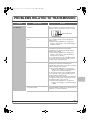
PROBLEMS RELATED TO TRANSMISSION
Problem
Transmission does
not take place.
Point to check
Is the telephone line connected
securely?
Solution
Check the telephone line jack at the back of the right
side of the machine, the wall jack, and any extension
adapters to make sure that all connections are secure.
Telephone line socket
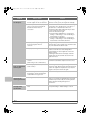
Is the correct dial mode set for your
line?
Ask your administrator to verify that "Dial Mode Setting"
is set correctly for the line you are using. (Default
setting: "Tone")
➞ System Settings (Administrator) > "Image Send
Settings" > "Fax Settings" > "Fax Default Settings" >
"Dial Mode Setting"
Is a busy signal received?
If a busy signal is received, the transmission is
temporarily cancelled and then automatically
re-attempted after a brief interval. (Default setting: 2
attempts, 3 min. intervals)
➞ System Settings (Administrator) > "Image Send
Settings" > "Fax Settings" > "Fax Send Settings" >
"Recall in Case of Line Busy"
To cancel the transmission, press the [JOB STATUS]
key, touch the key of the job that you wish to cancel,
and then touch the [Stop/Delete] key.
Did a communication error occur?
If an error occurs that prevents transmission, the
transmission is temporarily cancelled and then
automatically re-attempted after a brief interval. (Default
setting: 2 attempts, 3 min. intervals)
➞ System Settings (Administrator) > "Image Send
Settings" > "Fax Settings" > "Fax Send Settings" >
"Recall in Case of Communication Error"
To cancel the transmission, press the [JOB STATUS]
key, touch the key of the job that you wish to cancel,
and then touch the [Stop/Delete] key.
The machine supports error correction mode (ECM) and
is configured to automatically resend any part of a fax
that is distorted due to noise on the line.
➞ System Settings (Administrator) > "Image Send
Settings" > "Fax Settings" > "Fax Default Settings"
> "ECM"
Does a message appear indicating that
the memory is full?
If the memory becomes full, the transmission will be
cancelled. Divide the originals into sets and fax each set
separately, or use direct transmission.
23