1
Programming Command Reference
RFGenerator Subsystem
RFGenerator Subsystem
The RFGenerator subsystem commands are used to set and read the controls and
parameters of the SIGNAL GENERATOR functions. Send the
"DISPlay:RFGenerator" command to display the SIGNAL GENERATOR screen
before sending the following commands.
NOTE
This section is applicable only for Test Sets with Option 002.
NOTE
For Test Sets with Option 002, the Radio Standard and Channel
settings done in this function are copied to SPECTRUM
MONITOR and vice versa.
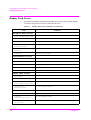
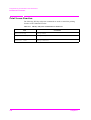
RFGenerator Subsystem Command Reference
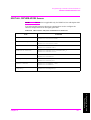
Amplitude
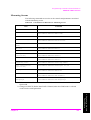
RFGenerator:AMPLitude <real> [DB]
RFGenerator:AMPLitude?
This command specifies an output amplitude of RF Level. The allowable range is
from −110.0 to −50.0 (dBm) in 0.5 steps. At preset, this is set to −50.0 (dBm).
DC Power Mode
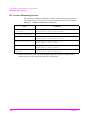
RFGenerator:DCPower:MODE ON|OFF|1|0
RFGenerator:DCPower:MODE?
DC Power Voltage
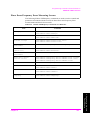
RFGenerator:DCPower:VOLT <real> [V]
RFGenerator:DCPower:VOLT?
This command specifies a voltage value of DC Power. The allowable range is from
3.0 to 11.0 (V) in 0.1 steps. At preset, this is set to 3.0 (V).
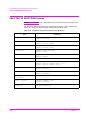
Modulation Function
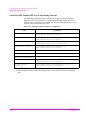
RFGenerator:MODulation OFF|PN9|ALL0
RFGenerator:MODulation?
This command defines a type of Modulation. The choices are OFF, PN9 and
ALL_0. At preset, this is set to OFF.
•
Chapter 3
If OFF is selected, the RF signal is a continuous wave.
61
3. Programming Command
Reference
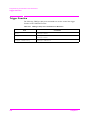
This command defines a supply mode of DC Power. The choices are ON (1) and
OFF (0). If set to ON (1), DC Power is always supplied. If set to OFF (0), DC
Power is not supplied. At preset, this is set to OFF.