1
SPECIFICATIONS
Power Requirements:
115 VAC, 50/60 Hz (Optional 230 VAC, 50/60 Hz); powering a 12 VDC,
700 mA wall-plug-in power module
Dimensions:
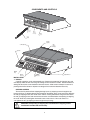
Base: 13 1/2"W x 12"D x 4 1/4"H (343mmW x 305mmD x 108mmH)
Platform: 13 1/2"W x 8 3/4"D (343mmW x 222mmD)
Weight:
14 lb (6.35 kg)
Operating Temperature: 14° F - 114° F (-10° C 40° C)
Weighing Accuracy:
This equipment is manufactured in accordance with the recommendations
set forth by Handbook #44, issued by the United States Department of
Commerce, National Institute of Standards and Technology.
Color:
Load Cell:
Preset prices:
Black and gray with color coded keypad
Single point strain gage
100 keyboard programmable (retained in memory when power is off)
Accumulator:
Accumulates multiple transactions up to $9999.99 total
Tare:
Calibration:
Display:
Keypad and push button
Keypad entered
16 character .56" high red LED front and rear
A. Weight: up to 5 digits
B. Unit Price: up to 5 digits
C. Total Price: up to 6 digits
lb version
kg version
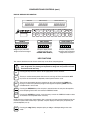
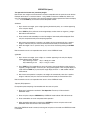
Zero
Zero
Net
Net
Prepack
Prepack
Price per 1 lb
Price per 1 kg
Price per 100 g
Price ger 250 g
Annunciators:
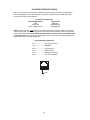
Serial Output:
MODEL
PC-10
PC-10KG
A. RS-232 (Selectable parity,data bits, and stop bits)
B. Selectable baud rate (1200, 2400, 4800, 9600, 19.2k, or 38.4k)
C. “Packed on” date (must be set daily)
D. “Sell by” date (must be set daily)
E. Weight/price/total
F. Programmable header stores 2 lines of name/address (32 characters
maximum)
G. Bar Code Prefix
CAPACITY/GRADUATION
POWER
6 x .002 lb
115VAC
3 x .001 kg
115VAC
PC-20
PC-20KG
15 x .005 lb
6 x .002 kg
115VAC
115VAC
PC-30
PC-30KG
PC-31
PC-31KG
30 x .01 lb
15 x .005 kg
30 x .01 lb
15 x .005 kg
115VAC
115VAC
230VAC
230VAC
“KG” models are metric models
1