1
Frequently Asked Questions
as "Burst" (refer to the previous Q & A). It requires only one clock for the 2nd, 3rd, and 4th QWord
(for example, 5-1-1-1 compares with EDO 5-2-2-2). The SDRAM comes in 64-bit 168-pin DIMM
(Dual-in-line Memory Module) and operates at 3.3V. Note that some old DIMMs are made by
FPM/EDO and only operate at 5V. Do not confuse them with SDRAM DIMM. AOpen is the first
company to support dual-SDRAM DIMMs onboard (AP5V), from Q1 1996.
Q: Can SDRAM DIMM work together with FPM/EDO SIMM?
A: The FPM/EDO operate at 5V while SDRAM operates at 3.3V. The current MB design provides
different power to DIMM and SIMM but connects the data bus together. If you combine SIMM and
DIMM, the system will still work fine; however, only temporarily. After a few months, the SDRAM
3.3V data input will be damaged by 5V FPM/EDO data output line. Therefore, we strongly NOT
recommend DIMM and SIMM combined together. There is one exception, if your SDRAM supports
5V tolerance (such as TI or Samsung), which accepts 5V signal at 3.3V operating power, you can
combine them.
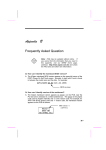
Manufacturer
Model
Suggested
CAS Latency
Time
5V
Tolerance
Samsung
NEC
Micron
TI
TI
KM416S1120AT-G12
D4516161G5-A12-7JF
MT4LC1M16E5TG-6
TMS626162DGE -15
TMS626162DGE M-67
2
2
2
2
3
Yes
No
No
Yes
Yes
Q: What kind of SDRAM have been tested on AP5T/AX5T?
A: There is an important parameter affects SDRAM performance, CAS Latency Time. It is similar as
CAS Access Time of EDO DRAM and is calculated as number of clock state. INTEL TX chipset
support 2 or 3 clocks CAS Latency Time, and the default timing is set to 2 clocks. However, there is
SDRAM which can not meet requirement of INTEL TX chipset. The SDRAM that AOpen had tested
are listed below. If your SDRAM has unstable problem, go into BIOS setup → Chipset Features →
SDRAM(CAS Lat/RAS-to-CAS), change 2/2 to 3/3, which means 3 clocks CAS Latency.
B-2