1
SecureStack A2
Stackable Switches
Configuration Guide
Firmware Version 1.03.xx
P/N 9034155-04
Notice
Enterasys Networks reserves the right to make changes in specifications and other information contained in this
document and its web site without prior notice. The reader should in all cases consult Enterasys Networks to determine
whether any such changes have been made.
The hardware, firmware, or software described in this document is subject to change without notice.
IN NO EVENT SHALL ENTERASYS NETWORKS BE LIABLE FOR ANY INCIDENTAL, INDIRECT, SPECIAL,
OR CONSEQUENTIAL DAMAGES WHATSOEVER (INCLUDING BUT NOT LIMITED TO LOST PROFITS)
ARISING OUT OF OR RELATED TO THIS DOCUMENT, WEB SITE, OR THE INFORMATION CONTAINED IN
THEM, EVEN IF ENTERASYS NETWORKS HAS BEEN ADVISED OF, KNEW OF, OR SHOULD HAVE KNOWN
OF, THE POSSIBILITY OF SUCH DAMAGES.
Enterasys Networks, Inc.
50 Minuteman Road
Andover, MA 01810
© 2006 Enterasys Networks, Inc. All rights reserved.
Part Number: 9034155-04 September 2006
ENTERASYS, ENTERASYS NETWORKS, NETSIGHT, WEBVIEW, and any logos associated therewith, are
trademarks or registered trademarks of Enterasys Networks, Inc. in the United States and other countries.
All other product names mentioned in this manual may be trademarks or registered trademarks of their respective
companies.
Documentation URL: http://www.enterasys.com/support/manuals
Documentacion URL: http://www.enterasys.com/support/manuals
Dokumentation im Internet: http://www.enterasys.com/support/manuals
Version:
Information in this guide refers to SecureStack A2 firmware version 1.03.xx.
i
Notice
Enterasys Networks, Inc.
Firmware License Agreement
BEFORE OPENING OR UTILIZING THE ENCLOSED PRODUCT,
CAREFULLY READ THIS LICENSE AGREEMENT.
This document is an agreement (“Agreement”) between the end user (“You”) and Enterasys Networks, Inc. on behalf of
itself and its Affiliates (as hereinafter defined) (“Enterasys”) that sets forth Your rights and obligations with respect to
the Enterasys software program/firmware installed on the Enterasys product (including any accompanying
documentation, hardware or media) (“Program”) in the package and prevails over any additional, conflicting or
inconsistent terms and conditions appearing on any purchase order or other document submitted by You. “Affiliate”
means any person, partnership, corporation, limited liability company, or other form of enterprise that directly or
indirectly through one or more intermediaries, controls, or is controlled by, or is under common control with the party
specified. This Agreement constitutes the entire understanding between the parties, and supersedes all prior discussions,
representations, understandings or agreements, whether oral or in writing, between the parties with respect to the subject
matter of this Agreement. The Program may be contained in firmware, chips or other media.
BY INSTALLING OR OTHERWISE USING THE PROGRAM, YOU REPRESENT THAT YOU ARE
AUTHORIZED TO ACCEPT THESE TERMS ON BEHALF OF THE END USER (IF THE END USER IS AN
ENTITY ON WHOSE BEHALF YOU ARE AUTHORIZED TO ACT, “YOU” AND “YOUR” SHALL BE DEEMED
TO REFER TO SUCH ENTITY) AND THAT YOU AGREE THAT YOU ARE BOUND BY THE TERMS OF THIS
AGREEMENT, WHICH INCLUDES, AMONG OTHER PROVISIONS, THE LICENSE, THE DISCLAIMER OF
WARRANTY AND THE LIMITATION OF LIABILITY. IF YOU DO NOT AGREE TO THE TERMS OF THIS
AGREEMENT OR ARE NOT AUTHORIZED TO ENTER INTO THIS AGREEMENT, ENTERASYS IS
UNWILLING TO LICENSE THE PROGRAM TO YOU AND YOU AGREE TO RETURN THE UNOPENED
PRODUCT TO ENTERASYS OR YOUR DEALER, IF ANY, WITHIN TEN (10) DAYS FOLLOWING THE DATE
OF RECEIPT FOR A FULL REFUND.
IF YOU HAVE ANY QUESTIONS ABOUT THIS AGREEMENT, CONTACT ENTERASYS NETWORKS, LEGAL
DEPARTMENT AT (978) 684-1000.
You and Enterasys agree as follows:
1. LICENSE. You have the non-exclusive and non-transferable right to use only the one (1) copy of the Program
provided in this package subject to the terms and conditions of this Agreement.
2. RESTRICTIONS. Except as otherwise authorized in writing by Enterasys, You may not, nor may You permit any
third party to:
(i)
Reverse engineer, decompile, disassemble or modify the Program, in whole or in part, including for reasons of
error correction or interoperability, except to the extent expressly permitted by applicable law and to the extent
the parties shall not be permitted by that applicable law, such rights are expressly excluded. Information
necessary to achieve interoperability or correct errors is available from Enterasys upon request and upon
payment of Enterasys’ applicable fee.
(ii) Incorporate the Program, in whole or in part, in any other product or create derivative works based on the
Program, in whole or in part.
(iii) Publish, disclose, copy, reproduce or transmit the Program, in whole or in part.
(iv) Assign, sell, license, sublicense, rent, lease, encumber by way of security interest, pledge or otherwise transfer
the Program, in whole or in part.
(v) Remove any copyright, trademark, proprietary rights, disclaimer or warning notice included on or embedded in
any part of the Program.
ii
Notice
3. APPLICABLE LAW. This Agreement shall be interpreted and governed under the laws and in the state and federal
courts of the Commonwealth of Massachusetts without regard to its conflicts of laws provisions. You accept the personal
jurisdiction and venue of the Commonwealth of Massachusetts courts. None of the 1980 United Nations Convention on
Contracts for the International Sale of Goods, the United Nations Convention on the Limitation Period in the International
Sale of Goods, and the Uniform Computer Information Transactions Act shall apply to this Agreement.
4. EXPORT RESTRICTIONS. You understand that Enterasys and its Affiliates are subject to regulation by agencies
of the U.S. Government, including the U.S. Department of Commerce, which prohibit export or diversion of certain
technical products to certain countries, unless a license to export the Program is obtained from the U.S. Government or
an exception from obtaining such license may be relied upon by the exporting party.
If the Program is exported from the United States pursuant to the License Exception CIV under the U.S. Export
Administration Regulations, You agree that You are a civil end user of the Program and agree that You will use the
Program for civil end uses only and not for military purposes.
If the Program is exported from the United States pursuant to the License Exception TSR under the U.S. Export
Administration Regulations, in addition to the restriction on transfer set forth in Sections 1 or 2 of this Agreement, You
agree not to (i) reexport or release the Program, the source code for the Program or technology to a national of a country
in Country Groups D:1 or E:2 (Albania, Armenia, Azerbaijan, Belarus, Bulgaria, Cambodia, Cuba, Estonia, Georgia,
Iraq, Kazakhstan, Kyrgyzstan, Laos, Latvia, Libya, Lithuania, Moldova, North Korea, the People’s Republic of China,
Romania, Russia, Rwanda, Tajikistan, Turkmenistan, Ukraine, Uzbekistan, Vietnam, or such other countries as may be
designated by the United States Government), (ii) export to Country Groups D:1 or E:2 (as defined herein) the direct
product of the Program or the technology, if such foreign produced direct product is subject to national security controls
as identified on the U.S. Commerce Control List, or (iii) if the direct product of the technology is a complete plant or any
major component of a plant, export to Country Groups D:1 or E:2 the direct product of the plant or a major component
thereof, if such foreign produced direct product is subject to national security controls as identified on the U.S. Commerce
Control List or is subject to State Department controls under the U.S. Munitions List.
5. UNITED STATES GOVERNMENT RESTRICTED RIGHTS. The enclosed Program (i) was developed solely
at private expense; (ii) contains “restricted computer software” submitted with restricted rights in accordance with section
52.227-19 (a) through (d) of the Commercial Computer Software-Restricted Rights Clause and its successors, and (iii) in
all respects is proprietary data belonging to Enterasys and/or its suppliers. For Department of Defense units, the Program
is considered commercial computer software in accordance with DFARS section 227.7202-3 and its successors, and use,
duplication, or disclosure by the Government is subject to restrictions set forth herein.
6. DISCLAIMER OF WARRANTY. EXCEPT FOR THOSE WARRANTIES EXPRESSLY PROVIDED TO YOU
IN WRITING BY ENTERASYS, ENTERASYS DISCLAIMS ALL WARRANTIES, EITHER EXPRESS OR
IMPLIED, INCLUDING BUT NOT LIMITED TO IMPLIED WARRANTIES OF MERCHANTABILITY,
SATISFACTORY QUALITY, FITNESS FOR A PARTICULAR PURPOSE, TITLE AND NON- INFRINGEMENT
WITH RESPECT TO THE PROGRAM. IF IMPLIED WARRANTIES MAY NOT BE DISCLAIMED BY
APPLICABLE LAW, THEN ANY IMPLIED WARRANTIES ARE LIMITED IN DURATION TO THIRTY (30)
DAYS AFTER DELIVERY OF THE PROGRAM TO YOU.
7. LIMITATION OF LIABILITY. IN NO EVENT SHALL ENTERASYS OR ITS SUPPLIERS BE LIABLE FOR
ANY DAMAGES WHATSOEVER (INCLUDING, WITHOUT LIMITATION, DAMAGES FOR LOSS OF
BUSINESS, PROFITS, BUSINESS INTERRUPTION, LOSS OF BUSINESS INFORMATION, SPECIAL,
INCIDENTAL, CONSEQUENTIAL, OR RELIANCE DAMAGES, OR OTHER LOSS) ARISING OUT OF THE USE
OR INABILITY TO USE THE PROGRAM, EVEN IF ENTERASYS HAS BEEN ADVISED OF THE POSSIBILITY
OF SUCH DAMAGES. THIS FOREGOING LIMITATION SHALL APPLY REGARDLESS OF THE CAUSE OF
ACTION UNDER WHICH DAMAGES ARE SOUGHT.
THE CUMULATIVE LIABILITY OF ENTERASYS TO YOU FOR ALL CLAIMS RELATING TO THE PROGRAM,
IN CONTRACT, TORT OR OTHERWISE, SHALL NOT EXCEED THE TOTAL AMOUNT OF FEES PAID TO
ENTERASYS BY YOU FOR THE RIGHTS GRANTED HEREIN.
iii
Notice
8. AUDIT RIGHTS. You hereby acknowledge that the intellectual property rights associated with the Program are of
critical value to Enterasys and, accordingly, You hereby agree to maintain complete books, records and accounts showing
(i) license fees due and paid, and (ii) the use, copying and deployment of the Program. You also grant to Enterasys and
its authorized representatives, upon reasonable notice, the right to audit and examine during Your normal business hours,
Your books, records, accounts and hardware devices upon which the Program may be deployed to verify compliance with
this Agreement, including the verification of the license fees due and paid Enterasys and the use, copying and deployment
of the Program. Enterasys’ right of examination shall be exercised reasonably, in good faith and in a manner calculated
to not unreasonably interfere with Your business. In the event such audit discovers non-compliance with this Agreement,
including copies of the Program made, used or deployed in breach of this Agreement, You shall promptly pay to Enterasys
the appropriate license fees. Enterasys reserves the right, to be exercised in its sole discretion and without prior notice, to
terminate this license, effective immediately, for failure to comply with this Agreement. Upon any such termination, You
shall immediately cease all use of the Program and shall return to Enterasys the Program and all copies of the Program.
9. OWNERSHIP. This is a license agreement and not an agreement for sale. You acknowledge and agree that the
Program constitutes trade secrets and/or copyrighted material of Enterasys and/or its suppliers. You agree to implement
reasonable security measures to protect such trade secrets and copyrighted material. All right, title and interest in and to
the Program shall remain with Enterasys and/or its suppliers. All rights not specifically granted to You shall be reserved
to Enterasys.
10. ENFORCEMENT. You acknowledge and agree that any breach of Sections 2, 4, or 9 of this Agreement by You
may cause Enterasys irreparable damage for which recovery of money damages would be inadequate, and that Enterasys
may be entitled to seek timely injunctive relief to protect Enterasys’ rights under this Agreement in addition to any and
all remedies available at law.
11. ASSIGNMENT. You may not assign, transfer or sublicense this Agreement or any of Your rights or obligations
under this Agreement, except that You may assign this Agreement to any person or entity which acquires substantially all
of Your stock or assets. Enterasys may assign this Agreement in its sole discretion. This Agreement shall be binding upon
and inure to the benefit of the parties, their legal representatives, permitted transferees, successors and assigns as
permitted by this Agreement. Any attempted assignment, transfer or sublicense in violation of the terms of this Agreement
shall be void and a breach of this Agreement.
12. WAIVER. A waiver by Enterasys of a breach of any of the terms and conditions of this Agreement must be in
writing and will not be construed as a waiver of any subsequent breach of such term or condition. Enterasys’ failure to
enforce a term upon Your breach of such term shall not be construed as a waiver of Your breach or prevent enforcement
on any other occasion.
13. SEVERABILITY. In the event any provision of this Agreement is found to be invalid, illegal or unenforceable, the
validity, legality and enforceability of any of the remaining provisions shall not in any way be affected or impaired
thereby, and that provision shall be reformed, construed and enforced to the maximum extent permissible. Any such
invalidity, illegality or unenforceability in any jurisdiction shall not invalidate or render illegal or unenforceable such
provision in any other jurisdiction.
14. TERMINATION. Enterasys may terminate this Agreement immediately upon Your breach of any of the terms and
conditions of this Agreement. Upon any such termination, You shall immediately cease all use of the Program and shall
return to Enterasys the Program and all copies of the Program.
iv
Contents
Figures ..........................................................................................................................................xix
Tables............................................................................................................................................xxi
ABOUT THIS GUIDE
Using This Guide......................................................................................................... xxiii
Structure of This Guide ............................................................................................... xxiv
Related Documents......................................................................................................xxv
Conventions Used in This Guide................................................................................. xxvi
1
INTRODUCTION
1.1
1.2
1.3
2
SecureStack A2 CLI Overview........................................................................ 1-1
Device Management Methods ........................................................................ 1-2
Getting Help .................................................................................................... 1-3
STARTUP AND GENERAL CONFIGURATION
2.1
Startup and General Configuration Summary ................................................. 2-1
2.1.1
Factory Default Settings.................................................................. 2-1
2.1.2
CLI “Command Defaults” Descriptions ........................................... 2-4
2.1.3
CLI Command Modes ..................................................................... 2-5
2.1.4
Using and Configuring WebView .................................................... 2-6
2.1.4.1
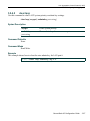
show webview .............................................................. 2-7
2.1.4.2
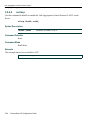
set webview.................................................................. 2-8
2.1.4.3
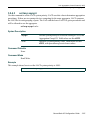
show ssl ....................................................................... 2-9
2.1.4.4
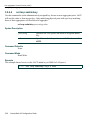
set ssl ......................................................................... 2-10
2.1.5
Process Overview: CLI Startup and General Configuration.......... 2-11
2.1.6
Starting and Navigating the Command Line Interface .................. 2-12
2.1.6.1
Using a Console Port Connection .............................. 2-12
2.1.6.2
Logging in with a Default User Account ..................... 2-12
2.1.6.3
Logging in with an Administratively Configured
User Account.............................................................. 2-13
2.1.6.4
Using a Telnet Connection......................................... 2-13
2.1.7
Getting Help with CLI Syntax ........................................................ 2-15
2.1.7.1
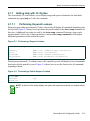
Performing Keyword Lookups .................................... 2-15
2.1.7.2
Displaying Scrolling Screens...................................... 2-16
SecureStack A2 Configuration Guide v
Contents
2.1.8
2.1.9
2.1.10
2.1.11
2.1.12
vi
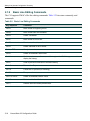
Abbreviating and Completing Commands .................................... 2-17
Basic Line Editing Commands ...................................................... 2-18
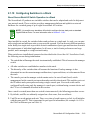
Configuring Switches in a Stack ................................................... 2-19
2.1.10.1
set switch stack-port................................................... 2-25
2.1.10.2
show switch................................................................ 2-26
2.1.10.3
show switch switchtype .............................................. 2-28
2.1.10.4
show switch stack-ports ............................................. 2-29
2.1.10.5
set switch ................................................................... 2-30
2.1.10.6
set switch copy-fw ...................................................... 2-31
2.1.10.7
set switch description ................................................. 2-32
2.1.10.8
set switch movemanagement..................................... 2-33
2.1.10.9
set switch member ..................................................... 2-34
2.1.10.10 clear switch member .................................................. 2-35
Setting User Accounts and Passwords......................................... 2-36
2.1.11.1
show system login ..................................................... 2-37
2.1.11.2
set system login ........................................................ 2-39
2.1.11.3
clear system login ..................................................... 2-40
2.1.11.4
set password ............................................................. 2-41
2.1.11.5
set system password length....................................... 2-42
2.1.11.6
set system password aging ....................................... 2-43
2.1.11.7
set system password history ..................................... 2-44
2.1.11.8
show system lockout ................................................. 2-45
2.1.11.9
set system lockout ..................................................... 2-46
Setting Basic Device Properties.................................................... 2-47
2.1.12.1
show ip address ........................................................ 2-49
2.1.12.2
show ip protocol ........................................................ 2-50
2.1.12.3
set ip address ............................................................ 2-51
2.1.12.4
clear ip address.......................................................... 2-52
2.1.12.5
show system ............................................................. 2-53
2.1.12.6
show system hardware ............................................. 2-55
2.1.12.7
show system utilization ............................................. 2-56
2.1.12.8
set system enhancedbuffermode .............................. 2-58
2.1.12.9
show time .................................................................. 2-59
2.1.12.10 set time ...................................................................... 2-60
2.1.12.11 show summertime ..................................................... 2-61
2.1.12.12 set summertime ......................................................... 2-62
2.1.12.13 set summertime date ................................................. 2-63
2.1.12.14 set summertime recurring ......................................... 2-64
2.1.12.15 clear summertime ...................................................... 2-65
2.1.12.16 set prompt ................................................................. 2-66
2.1.12.17 show banner motd...................................................... 2-67
2.1.12.18 set banner motd ......................................................... 2-68
2.1.12.19 clear banner motd ...................................................... 2-69
SecureStack A2 Configuration Guide
Contents
2.1.13
2.1.14
2.1.15
2.1.16
2.1.17
2.1.12.20 show version ............................................................. 2-70
2.1.12.21 set system name ....................................................... 2-72
2.1.12.22 set system location .................................................... 2-73
2.1.12.23 set system contact .................................................... 2-74
2.1.12.24 set width .................................................................... 2-75
2.1.12.25 set length ................................................................... 2-76
2.1.12.26 show logout ............................................................... 2-77
2.1.12.27 set logout .................................................................. 2-78
2.1.12.28 show console ............................................................ 2-79
2.1.12.29 set console baud ....................................................... 2-80
Configuring Power over Ethernet (PoE) ....................................... 2-81
2.1.13.1
show inlinepower ....................................................... 2-82
2.1.13.2
set inlinepower threshold .......................................... 2-83
2.1.13.3
set inlinepower trap ................................................... 2-84
2.1.13.4
show port inlinepower ............................................... 2-85
2.1.13.5
set port inlinepower ................................................... 2-86
Downloading a New Firmware Image ........................................... 2-87
2.1.14.1
Downloading from a TFTP Server.............................. 2-87
2.1.14.2
Downloading via the Serial Port ................................ 2-88
2.1.14.3
show boot system ..................................................... 2-91
2.1.14.4
set boot system ......................................................... 2-92
Starting and Configuring Telnet .................................................... 2-93
2.1.15.1
show telnet ................................................................ 2-94
2.1.15.2
set telnet .................................................................... 2-95
2.1.15.3
telnet .......................................................................... 2-96
Managing Switch Configuration and Image Files.......................... 2-97
2.1.16.1
show snmp persistmode ............................................ 2-99
2.1.16.2
set snmp persistmode .............................................. 2-100
2.1.16.3
save config ............................................................... 2-101
2.1.16.4
dir ............................................................................ 2-102
2.1.16.5
show config ............................................................. 2-103
2.1.16.6
configure ................................................................. 2-105
2.1.16.7
copy ......................................................................... 2-106
2.1.16.8
delete ...................................................................... 2-107
2.1.16.9
show tftp settings ..................................................... 2-108
2.1.16.10 set tftp timeout.......................................................... 2-109
2.1.16.11 clear tftp timeout....................................................... 2-110
2.1.16.12 set tftp retry .............................................................. 2-111
2.1.16.13 clear tftp retry ........................................................... 2-112
Configuring CDP ......................................................................... 2-113
2.1.17.1
show cdp ................................................................. 2-114
2.1.17.2
set cdp state ............................................................ 2-116
SecureStack A2 Configuration Guide vii
Contents
2.1.18
2.1.19
3
PORT CONFIGURATION
3.1
3.2
3.3
viii
2.1.17.3
set cdp auth ............................................................. 2-117
2.1.17.4
set cdp interval ........................................................ 2-118
2.1.17.5
set cdp hold-time ..................................................... 2-119
2.1.17.6
clear cdp .................................................................. 2-120
Clearing and Closing the CLI ...................................................... 2-121
2.1.18.1
cls (clear screen) ..................................................... 2-122
2.1.18.2
exit .......................................................................... 2-123
Resetting the Switch ................................................................... 2-124
2.1.19.1
reset ........................................................................ 2-125
2.1.19.2
clear config .............................................................. 2-126
Port Configuration Summary........................................................................... 3-1
3.1.1
Port String Syntax Used in the CLI ................................................. 3-3
Process Overview: Port Configuration ............................................................ 3-4
Port Configuration Command Set ................................................................... 3-5
3.3.1
Reviewing Port Status..................................................................... 3-5
3.3.1.1
show port...................................................................... 3-6
3.3.1.2
show port status ........................................................... 3-7
3.3.1.3
show port counters....................................................... 3-9
3.3.2
Disabling / Enabling Ports............................................................. 3-12
3.3.2.1
set port disable........................................................... 3-13
3.3.2.2
set port enable ........................................................... 3-14
3.3.2.3
show port alias ........................................................... 3-15
3.3.2.4
set port alias............................................................... 3-16
3.3.3
Setting Speed and Duplex Mode .................................................. 3-17
3.3.3.1
show port speed......................................................... 3-18
3.3.3.2
set port speed ............................................................ 3-19
3.3.3.3
show port duplex ........................................................ 3-20
3.3.3.4
set port duplex............................................................ 3-21
3.3.4
Enabling / Disabling Jumbo Frame Support ................................. 3-22
3.3.4.1
show port jumbo......................................................... 3-23
3.3.4.2
set port jumbo ............................................................ 3-24
3.3.4.3
clear port jumbo ......................................................... 3-25
3.3.5
Setting Auto-Negotiation ............................................................... 3-26
3.3.5.1
show port negotiation ................................................. 3-27
3.3.5.2
set port negotiation..................................................... 3-28
3.3.5.3
show port advertise .................................................... 3-29
3.3.5.4
set port advertise........................................................ 3-30
3.3.5.5
clear port advertise..................................................... 3-31
3.3.6
Setting Flow Control...................................................................... 3-33
3.3.6.1
show flowcontrol......................................................... 3-34
3.3.6.2
set flowcontrol ............................................................ 3-35
SecureStack A2 Configuration Guide
Contents
3.3.7
3.4
3.5
3.6
Setting Port Traps ......................................................................... 3-36
3.3.7.1
show port trap ............................................................ 3-37
3.3.7.2
set port trap ................................................................ 3-38
3.3.8
Configuring Broadcast Suppression ............................................. 3-39
3.3.8.1
show port broadcast................................................... 3-40
3.3.8.2
set port broadcast ...................................................... 3-41
3.3.8.3
clear port broadcast ................................................... 3-42
Port Mirroring ................................................................................................ 3-43
3.4.1
Mirroring Features......................................................................... 3-43
3.4.2
Setting Port Mirroring .................................................................... 3-43
3.4.2.1
show port mirroring .................................................... 3-44
3.4.2.2
set port mirroring ........................................................ 3-45
3.4.2.3
clear port mirroring ..................................................... 3-46
Link Aggregation Control Protocol (LACP).................................................... 3-47
3.5.1
LACP Operation............................................................................ 3-47
3.5.2
LACP Terminology........................................................................ 3-48
3.5.3
SecureStack A2 Usage Considerations........................................ 3-49
3.5.4
Configuring Link Aggregation........................................................ 3-51
3.5.4.1
show lacp ................................................................... 3-52
3.5.4.2
set lacp....................................................................... 3-54
3.5.4.3
set lacp asyspri .......................................................... 3-55
3.5.4.4
set lacp aadminkey .................................................... 3-56
3.5.4.5
clear lacp.................................................................... 3-57
3.5.4.6
set lacp static ............................................................. 3-58
3.5.4.7
clear lacp static .......................................................... 3-59
3.5.4.8
set lacp singleportlag ................................................. 3-60
3.5.4.9
clear lacp singleportlag .............................................. 3-61
3.5.4.10
show port lacp ............................................................ 3-62
3.5.4.11
set port lacp................................................................ 3-64
3.5.4.12
clear port lacp............................................................. 3-67
Configuring Protected Ports .......................................................................... 3-69
3.6.1
Protected Port Operation .............................................................. 3-69
3.6.2
Protected Port Command Set ....................................................... 3-69
3.6.2.1
set port protected ....................................................... 3-70
3.6.2.2
show port protected.................................................... 3-71
3.6.2.3
clear port protected .................................................... 3-72
3.6.2.4
set port protected name ............................................. 3-73
3.6.2.5
show port protected name.......................................... 3-74
3.6.2.6
clear port protected name .......................................... 3-75
SecureStack A2 Configuration Guide ix
Contents
4
SNMP CONFIGURATION
4.1
4.2
4.3
x
SNMP Configuration Summary ....................................................................... 4-1
4.1.1
SNMPv1 and SNMPv2c.................................................................. 4-1
4.1.2
SNMPv3.......................................................................................... 4-2
4.1.3
About SNMP Security Models and Levels ...................................... 4-2
4.1.4
Using SNMP Contexts to Access Specific MIBs ............................ 4-3
Process Overview: SNMP Configuration ........................................................ 4-4
SNMP Configuration Command Set ............................................................... 4-5
4.3.1
Reviewing SNMP Statistics............................................................. 4-5
4.3.1.1
show snmp engineid ................................................... 4-6
4.3.1.2
show snmp counters ................................................... 4-7
4.3.2
Configuring SNMP Users, Groups, and Communities .................. 4-11
4.3.2.1
show snmp user ........................................................ 4-12
4.3.2.2
set snmp user ............................................................ 4-14
4.3.2.3
clear snmp user ......................................................... 4-15
4.3.2.4
show snmp group ...................................................... 4-16
4.3.2.5
set snmp group ......................................................... 4-18
4.3.2.6
clear snmp group ...................................................... 4-19
4.3.2.7
show snmp community .............................................. 4-20
4.3.2.8
set snmp community ................................................. 4-21
4.3.2.9
clear snmp community .............................................. 4-22
4.3.3
Configuring SNMP Access Rights ................................................ 4-23
4.3.3.1
show snmp access .................................................... 4-24
4.3.3.2
set snmp access ....................................................... 4-27
4.3.3.3
clear snmp access .................................................... 4-29
4.3.4
Configuring SNMP MIB Views ...................................................... 4-30
4.3.4.1
show snmp view ........................................................ 4-31
4.3.4.2
show snmp context ................................................... 4-33
4.3.4.3
set snmp view ........................................................... 4-34
4.3.4.4
clear snmp view ........................................................ 4-35
4.3.5
Configuring SNMP Target Parameters ......................................... 4-36
4.3.5.1
show snmp targetparams .......................................... 4-37
4.3.5.2
set snmp targetparams ............................................. 4-39
4.3.5.3
clear snmp targetparams .......................................... 4-41
4.3.6
Configuring SNMP Target Addresses........................................... 4-42
4.3.6.1
show snmp targetaddr ............................................... 4-43
4.3.6.2
set snmp targetaddr .................................................. 4-45
4.3.6.3
clear snmp targetaddr ............................................... 4-47
4.3.7
Configuring SNMP Notification Parameters.................................. 4-48
4.3.7.1
show snmp notify ...................................................... 4-49
4.3.7.2
set snmp notify .......................................................... 4-51
4.3.7.3
clear snmp notify ....................................................... 4-52
SecureStack A2 Configuration Guide
Contents
4.3.8
5
4.3.7.4
show snmp notifyfilter ................................................ 4-54
4.3.7.5
set snmp notifyfilter ................................................... 4-55
4.3.7.6
clear snmp notifyfilter ................................................ 4-56
4.3.7.7
show snmp notifyprofile ............................................. 4-57
4.3.7.8
set snmp notifyprofile ................................................ 4-58
4.3.7.9
clear snmp notifyprofile ............................................. 4-59
Creating a Basic SNMP Trap Configuration ................................. 4-60
SPANNING TREE CONFIGURATION
5.1
5.2
Spanning Tree Configuration Summary.......................................................... 5-1
5.1.1
Overview: Single, Rapid, and Multiple Spanning Tree Protocols.... 5-1
5.1.2
Spanning Tree Features ................................................................. 5-2
5.1.3
Process Overview: Spanning Tree Configuration ........................... 5-3
Spanning Tree Configuration Command Set .................................................. 5-3
5.2.1
Reviewing and Setting Spanning Tree Bridge Parameters............. 5-3
5.2.1.1
show spantree stats .................................................... 5-6
5.2.1.2
set spantree ................................................................ 5-9
5.2.1.3
show spantree version .............................................. 5-10
5.2.1.4
set spantree version .................................................. 5-11
5.2.1.5
clear spantree version ............................................... 5-12
5.2.1.6
show spantree bpdu-forwarding ................................ 5-13
5.2.1.7
set spantree bpdu-forwarding ................................... 5-14
5.2.1.8
show spantree bridgeprioritymode ............................ 5-15
5.2.1.9
set spantree bridgeprioritymode ................................ 5-16
5.2.1.10
clear spantree bridgeprioritymode ............................. 5-17
5.2.1.11
show spantree mstilist ............................................... 5-18
5.2.1.12
set spantree msti ....................................................... 5-19
5.2.1.13
clear spantree msti .................................................... 5-20
5.2.1.14
show spantree mstmap ............................................. 5-21
5.2.1.15
set spantree mstmap ................................................. 5-22
5.2.1.16
clear spantree mstmap .............................................. 5-23
5.2.1.17
show spantree vlanlist ............................................... 5-24
5.2.1.18
show spantree mstcfgid ............................................ 5-25
5.2.1.19
set spantree mstcfgid ................................................ 5-26
5.2.1.20
clear spantree mstcfgid ............................................. 5-27
5.2.1.21
set spantree priority ................................................... 5-28
5.2.1.22
clear spantree priority ................................................ 5-29
5.2.1.23
set spantree hello ...................................................... 5-30
5.2.1.24
clear spantree hello ................................................... 5-31
5.2.1.25
set spantree maxage ................................................. 5-32
5.2.1.26
clear spantree maxage .............................................. 5-33
5.2.1.27
set spantree fwddelay ............................................... 5-34
SecureStack A2 Configuration Guide xi
Contents
5.2.2
6
802.1Q VLAN CONFIGURATION
6.1
6.2
6.3
xii
5.2.1.28
clear spantree fwddelay ............................................ 5-35
5.2.1.29
show spantree backuproot ......................................... 5-36
5.2.1.30
set spantree backuproot............................................. 5-37
5.2.1.31
clear spantree backuproot.......................................... 5-38
5.2.1.32
show spantree tctrapsuppress ................................... 5-39
5.2.1.33
set spantree tctrapsuppress....................................... 5-40
5.2.1.34
clear spantree tctrapsuppress.................................... 5-41
5.2.1.35
set spantree protomigration ....................................... 5-42
5.2.1.36
show spantree spanguard.......................................... 5-43
5.2.1.37
set spantree spanguard ............................................. 5-44
5.2.1.38
clear spantree spanguard .......................................... 5-45
5.2.1.39
show spantree spanguardtimeout .............................. 5-46
5.2.1.40
set spantree spanguardtimeout.................................. 5-47
5.2.1.41
clear spantree spanguardtimeout............................... 5-48
5.2.1.42
show spantree spanguardlock ................................... 5-49
5.2.1.43
clear / set spantree spanguardlock ............................ 5-50
5.2.1.44
show spantree spanguardtrapenable......................... 5-51
5.2.1.45
set spantree spanguardtrapenable ............................ 5-52
5.2.1.46
clear spantree spanguardtrapenable ......................... 5-53
Reviewing and Setting Spanning Tree Port Parameters .............. 5-54
5.2.2.1
show spantree portadmin .......................................... 5-55
5.2.2.2
set spantree portadmin ............................................. 5-56
5.2.2.3
clear spantree portadmin .......................................... 5-57
5.2.2.4
show spantree portpri ................................................ 5-58
5.2.2.5
set spantree portpri ................................................... 5-59
5.2.2.6
clear spantree portpri ................................................ 5-60
5.2.2.7
show spantree adminpathcost .................................. 5-61
5.2.2.8
set spantree adminpathcost ...................................... 5-62
5.2.2.9
clear spantree adminpathcost ................................... 5-63
5.2.2.10
show spantree adminedge ........................................ 5-64
5.2.2.11
set spantree adminedge ............................................ 5-65
5.2.2.12
clear spantree adminedge ......................................... 5-66
VLAN Configuration Summary ........................................................................ 6-1
6.1.1
Port Assignment Scheme ............................................................... 6-1
6.1.2
Port String Syntax Used in the CLI ................................................. 6-2
Process Overview: 802.1Q VLAN Configuration............................................. 6-2
VLAN Configuration Command Set ................................................................ 6-3
6.3.1
Reviewing Existing VLANs.............................................................. 6-3
6.3.1.1
show vlan .................................................................... 6-4
6.3.2
Creating and Naming Static VLANs................................................ 6-6
SecureStack A2 Configuration Guide
Contents
6.3.3
6.3.4
6.3.5
6.3.6
6.3.7
7
6.3.2.1
set vlan ........................................................................ 6-7
6.3.2.2
set vlan name .............................................................. 6-8
6.3.2.3
clear vlan ..................................................................... 6-9
6.3.2.4
clear vlan name ......................................................... 6-10
Assigning Port VLAN IDs (PVIDs) and Ingress Filtering............... 6-11
6.3.3.1
show port vlan ........................................................... 6-12
6.3.3.2
set port vlan ............................................................... 6-13
6.3.3.3
clear port vlan ............................................................ 6-14
6.3.3.4
show port ingress filter .............................................. 6-15
6.3.3.5
set port ingress filter .................................................. 6-16
6.3.3.6
show port discard ...................................................... 6-17
6.3.3.7
set port discard .......................................................... 6-18
6.3.3.8
clear port discard ....................................................... 6-19
Configuring the VLAN Egress List ................................................ 6-20
6.3.4.1
show port egress ....................................................... 6-21
6.3.4.2
set vlan forbidden ...................................................... 6-22
6.3.4.3
set vlan egress .......................................................... 6-23
6.3.4.4
clear vlan egress ....................................................... 6-25
6.3.4.5
show vlan dynamicegress ......................................... 6-26
6.3.4.6
set vlan dynamicegress ............................................. 6-27
Setting the Host VLAN .................................................................. 6-28
6.3.5.1
show host vlan .......................................................... 6-29
6.3.5.2
set host vlan .............................................................. 6-30
6.3.5.3
clear host vlan ........................................................... 6-31
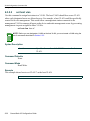
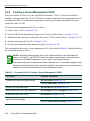
Creating a Secure Management VLAN......................................... 6-32
Enabling/Disabling GVRP (GARP VLAN Registration Protocol)... 6-33
6.3.7.1
show gvrp .................................................................. 6-36
6.3.7.2
show garp timer ......................................................... 6-37
6.3.7.3
set gvrp ..................................................................... 6-39
6.3.7.4
clear gvrp .................................................................. 6-40
6.3.7.5
set garp timer ............................................................ 6-41
DIFFERENTIATED SERVICES CONFIGURATION
7.1
7.2
7.3
Differentiated Services Configuration Summary ............................................. 7-1
Process Overview: Differentiated Services Configuration............................... 7-1
Differentiated Services Configuration Command Set...................................... 7-2
7.3.1
Globally Enabling or Disabling Diffserv........................................... 7-2
7.3.1.1
set diffserv adminmode ................................................ 7-2
7.3.2
Creating Diffserv Classes and Matching Conditions....................... 7-3
7.3.2.1
show diffserv info ........................................................ 7-4
7.3.2.2
show diffserv class ...................................................... 7-5
7.3.2.3
set class create ........................................................... 7-6
SecureStack A2 Configuration Guide xiii
Contents
7.3.3
7.3.4
8
PORT PRIORITY AND RATE LIMITING CONFIGURATION
8.1
8.2
8.3
xiv
7.3.2.4
set diffserv class delete ............................................... 7-7
7.3.2.5
set diffserv class match ............................................... 7-8
7.3.2.6
set diffserv class rename .......................................... 7-12
Configuring Diffserv Policies and Assigning Classes.................... 7-13
7.3.3.1
show diffserv policy ................................................... 7-14
7.3.3.2
set diffserv policy create ............................................ 7-15
7.3.3.3
set diffserv policy delete ............................................ 7-16
7.3.3.4
set diffserv policy class ............................................. 7-17
7.3.3.5
set diffserv policy mark .............................................. 7-18
7.3.3.6
set diffserv policy police style simple ........................ 7-19
7.3.3.7
set diffserv policy rename ......................................... 7-20
Assigning Policies to Service Ports............................................... 7-21
7.3.4.1
show diffserv service info .......................................... 7-22
7.3.4.2
show diffserv service stats ........................................ 7-23
7.3.4.3
set diffserv service .................................................... 7-24
Port Priority Configuration Summary............................................................... 8-1
Process Overview: Port Priority and Rate Limiting ......................................... 8-1
Port Priority and Rate Limiting Configuration Command Set .......................... 8-2
8.3.1
Configuring Port Priority.................................................................. 8-2
8.3.1.1
show port priority ......................................................... 8-3
8.3.1.2
set port priority ............................................................ 8-4
8.3.1.3
clear port priority ......................................................... 8-5
8.3.2
Configuring Priority to Transmit Queue Mapping............................ 8-6
8.3.2.1
show port priority-queue .............................................. 8-7
8.3.2.2
set port priority-queue ................................................. 8-8
8.3.2.3
clear port priority-queue .............................................. 8-9
8.3.3
Configuring Quality of Service (QoS)............................................ 8-10
8.3.3.1
show port txq.............................................................. 8-11
8.3.3.2
set port txq ................................................................. 8-12
8.3.3.3
clear port txq .............................................................. 8-14
8.3.4
Configuring Port Traffic Rate Limiting ........................................... 8-16
8.3.4.1
show port ratelimit ...................................................... 8-17
8.3.4.2
set port ratelimit.......................................................... 8-19
8.3.4.3
clear port ratelimit....................................................... 8-21
SecureStack A2 Configuration Guide
Contents
9
IGMP CONFIGURATION
9.1
9.2
9.3
9.4
10
About IP Multicast Group Management .......................................................... 9-1
IGMP Configuration Summary ........................................................................ 9-2
Process Overview: IGMP Configuration.......................................................... 9-2
IGMP Configuration Command Set................................................................. 9-2
9.4.1
Enabling / Disabling IGMP .............................................................. 9-2
9.4.1.1
show igmpsnooping .................................................... 9-3
9.4.1.2
set igmpsnooping adminmode .................................... 9-4
9.4.1.3
set igmpsnooping interfacemode ................................ 9-5
9.4.2
Configuring IGMP ........................................................................... 9-6
9.4.2.1
set igmpsnooping groupmembershipinterval .............. 9-7
9.4.2.2
set igmpsnooping maxresponse ................................. 9-8
9.4.2.3
set igmpsnooping mcrtrexpiretime .............................. 9-9
9.4.2.4
show igmpsnooping mfdb ......................................... 9-10
9.4.2.5
clear igmpsnooping ................................................... 9-11
SECURITY CONFIGURATION
10.1
10.2
10.3
Overview of Security Methods ...................................................................... 10-1
Process Overview: Security Configuration.................................................... 10-2
Security Configuration Command Set........................................................... 10-3
10.3.1
Configuring RADIUS ..................................................................... 10-3
10.3.1.1
show radius ............................................................... 10-4
10.3.1.2
set radius ................................................................... 10-6
10.3.1.3
clear radius ................................................................ 10-9
10.3.1.4
show radius accounting ........................................... 10-10
10.3.1.5
set radius accounting .............................................. 10-11
10.3.1.6
clear radius accounting ........................................... 10-13
10.3.2
Configuring 802.1X Authentication ............................................. 10-14
10.3.2.1
show dot1x .............................................................. 10-15
10.3.2.2
show dot1x auth-config ........................................... 10-18
10.3.2.3
set dot1x .................................................................. 10-20
10.3.2.4
set dot1x auth-config ............................................... 10-21
10.3.2.5
clear dot1x auth-config ............................................ 10-23
10.3.2.6
show eapol .............................................................. 10-25
10.3.2.7
set eapol .................................................................. 10-28
10.3.2.8
clear eapol ............................................................... 10-29
10.3.3
Configuring MAC Authentication................................................. 10-30
10.3.3.1
show macauthentication........................................... 10-32
10.3.3.2
show macauthentication session ............................. 10-34
10.3.3.3
set macauthentication .............................................. 10-35
10.3.3.4
set macauthentication password.............................. 10-36
SecureStack A2 Configuration Guide xv
Contents
10.3.4
10.3.5
10.3.6
xvi
10.3.3.5
clear macauthentication password........................... 10-37
10.3.3.6
set macauthentication port ....................................... 10-38
10.3.3.7
clear macauthentication authallocated..................... 10-39
10.3.3.8
set macauthentication portinitialize .......................... 10-40
10.3.3.9
set macauthentication macinitialize.......................... 10-41
10.3.3.10 set macauthentication reauthentication.................... 10-42
10.3.3.11 set macauthentication portreauthenticate ................ 10-43
10.3.3.12 set macauthentication macreauthenticate................ 10-44
10.3.3.13 set macauthentication reauthperiod ......................... 10-45
10.3.3.14 clear macauthentication reauthperiod ...................... 10-46
10.3.3.15 set macauthentication portquietperiod ..................... 10-47
10.3.3.16 clear macauthentication portquietperiod .................. 10-48
Configuring Multiple Authentication Methods.............................. 10-49
10.3.4.1
show multiauth ......................................................... 10-50
10.3.4.2
set multiauth mode................................................... 10-51
10.3.4.3
clear multiauth mode................................................ 10-52
10.3.4.4
set multiauth precedence ......................................... 10-53
10.3.4.5
clear multiauth precedence ...................................... 10-54
10.3.4.6
show multiauth port .................................................. 10-55
10.3.4.7
set multiauth port...................................................... 10-56
10.3.4.8
clear multiauth port................................................... 10-57
10.3.4.9
show multiauth station.............................................. 10-58
Configuring VLAN Authorization (RFC 3580) ............................. 10-59
10.3.5.1
set vlanauthorization ................................................ 10-60
10.3.5.2
set vlanauthorization egress .................................... 10-61
10.3.5.3
clear vlanauthorization ............................................. 10-62
10.3.5.4
show vlanauthorization............................................. 10-63
Configuring MAC Locking ........................................................... 10-65
10.3.6.1
show maclock .......................................................... 10-66
10.3.6.2
show maclock stations ............................................ 10-68
10.3.6.3
set maclock enable ................................................. 10-70
10.3.6.4
set maclock disable ................................................. 10-71
10.3.6.5
set maclock .............................................................. 10-72
10.3.6.6
clear maclock ........................................................... 10-73
10.3.6.7
set maclock static..................................................... 10-74
10.3.6.8
clear maclock static ................................................. 10-75
10.3.6.9
set maclock firstarrival ............................................. 10-76
10.3.6.10 clear maclock firstarrival .......................................... 10-77
10.3.6.11 set maclock move .................................................... 10-78
10.3.6.12 set maclock trap ...................................................... 10-79
SecureStack A2 Configuration Guide
Contents
10.3.7
11
Configuring Secure Shell (SSH) ................................................. 10-80
10.3.7.1
show ssh status........................................................ 10-81
10.3.7.2
set ssh...................................................................... 10-82
10.3.7.3
set ssh hostkey ........................................................ 10-83
LOGGING AND NETWORK MANAGEMENT
11.1
11.2
Process Overview: Network Management .................................................... 11-1
Logging And Network Management Command Set...................................... 11-2
11.2.1
Configuring System Logging......................................................... 11-2
11.2.1.1
show logging server .................................................. 11-3
11.2.1.2
set logging server ...................................................... 11-4
11.2.1.3
clear logging server ................................................... 11-6
11.2.1.4
show logging default ................................................. 11-7
11.2.1.5
set logging default ..................................................... 11-8
11.2.1.6
clear logging default .................................................. 11-9
11.2.1.7
show logging local ................................................... 11-10
11.2.1.8
set logging local ...................................................... 11-11
11.2.1.9
clear logging local ................................................... 11-12
11.2.1.10 show logging buffer ................................................. 11-13
11.2.2
Monitoring Network Events and Status....................................... 11-14
11.2.2.1
history ...................................................................... 11-15
11.2.2.2
show history ............................................................ 11-16
11.2.2.3
set history ................................................................ 11-17
11.2.2.4
ping ......................................................................... 11-18
11.2.2.5
show users .............................................................. 11-19
11.2.2.6
disconnect ............................................................... 11-20
11.2.3
Managing Switch Network Addresses and Routes ..................... 11-21
11.2.3.1
show arp .................................................................. 11-22
11.2.3.2
clear arp .................................................................. 11-23
11.2.3.3
show mac ................................................................ 11-24
11.2.3.4
show mac agetime .................................................. 11-26
11.2.4
Configuring Simple Network Time Protocol (SNTP) ................... 11-27
11.2.4.1
show sntp ................................................................ 11-28
11.2.4.2
set sntp client .......................................................... 11-30
11.2.4.3
clear sntp client ....................................................... 11-31
11.2.4.4
set sntp server ......................................................... 11-32
11.2.4.5
clear sntp server ...................................................... 11-33
11.2.4.6
set sntp poll-interval ................................................ 11-34
11.2.4.7
clear sntp poll-interval ............................................. 11-35
11.2.4.8
set sntp poll-retry ..................................................... 11-36
11.2.4.9
clear sntp poll-retry .................................................. 11-37
11.2.4.10 set sntp poll-timeout ................................................ 11-38
SecureStack A2 Configuration Guide xvii
Contents
11.2.5
12
11.2.4.11 clear sntp poll-timeout ............................................. 11-39
Configuring Node Aliases ........................................................... 11-40
11.2.5.1
show nodealias config ............................................. 11-41
11.2.5.2
set nodealias ........................................................... 11-42
11.2.5.3
clear nodealias config ............................................. 11-43
CONFIGURING RMON
12.1
12.2
RMON Monitoring Group Functions.............................................................. 12-1
RMON Command Set ................................................................................... 12-3
12.2.1
Statistics Group Commands ......................................................... 12-3
12.2.1.1
show rmon stats ......................................................... 12-4
12.2.1.2
set rmon stats............................................................. 12-7
12.2.1.3
clear rmon stats.......................................................... 12-8
12.2.2
History Group Commands ............................................................ 12-9
12.2.2.1
show rmon history .................................................... 12-10
12.2.2.2
set rmon history........................................................ 12-12
12.2.2.3
clear rmon history..................................................... 12-13
12.2.3
Alarm Group Commands ............................................................ 12-14
12.2.3.1
show rmon alarm...................................................... 12-15
12.2.3.2
set rmon alarm properties ........................................ 12-17
12.2.3.3
set rmon alarm status............................................... 12-19
12.2.3.4
clear rmon alarm ...................................................... 12-20
12.2.4
Event Group Commands ............................................................ 12-21
12.2.4.1
show rmon event...................................................... 12-22
12.2.4.2
set rmon event properties ........................................ 12-24
12.2.4.3
set rmon event status............................................... 12-25
12.2.4.4
clear rmon event ...................................................... 12-26
12.2.5
Filter Group Commands.............................................................. 12-27
12.2.5.1
show rmon channel .................................................. 12-28
12.2.5.2
set rmon channel...................................................... 12-29
12.2.5.3
clear rmon channel................................................... 12-31
12.2.5.4
show rmon filter........................................................ 12-32
12.2.5.5
set rmon filter ........................................................... 12-33
12.2.5.6
clear rmon filter ........................................................ 12-35
12.2.6
Packet Capture Commands........................................................ 12-36
12.2.6.1
show rmon capture................................................... 12-37
12.2.6.2
set rmon capture ...................................................... 12-38
12.2.6.3
clear rmon capture ................................................... 12-40
INDEX
xviii
SecureStack A2 Configuration Guide
Figures
Figure
2-1
2-2
2-3
2-4
2-5
2-6
6-1
Page
Sample CLI Default Description ...................................................................................... 2-5
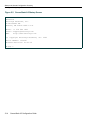
SecureStack A2 Startup Screen.................................................................................... 2-14
Performing a Keyword Lookup ...................................................................................... 2-15
Performing a Partial Keyword Lookup........................................................................... 2-15
Scrolling Screen Output ................................................................................................ 2-16
Abbreviating a Command.............................................................................................. 2-17
Example of VLAN Propagation via GVRP..................................................................... 6-34
SecureStack A2 Configuration Guide xix
Figures
xx
SecureStack A2 Configuration Guide
Tables
Table
2-1
2-2
2-3
2-4
2-5
2-6
2-7
3-1
3-2
3-3
3-4
4-2
4-3
4-4
4-5
4-6
4-7
4-8
4-9
4-10
5-1
6-1
6-2
6-3
6-4
7-1
8-1
10-1
10-2
10-3
10-4
10-5
10-6
10-7
11-1
Page
Default Switch Settings................................................................................................. 2-1
Basic Line Editing Commands.................................................................................... 2-18
show system login Output Details .............................................................................. 2-37
show system lockout Output Details........................................................................... 2-45
show system Output Details ....................................................................................... 2-54
show version Output Details ....................................................................................... 2-71
show cdp Output Details........................................................................................... 2-115
show port status Output Details.................................................................................... 3-7
show port counters Output Details ............................................................................. 3-11
LACP Terms and Definitions ...................................................................................... 3-48
show lacp Output Details ............................................................................................ 3-53
show snmp engineid Output Details ............................................................................. 4-6
show snmp counters Output Details ............................................................................. 4-8
show snmp user Output Details.................................................................................. 4-13
show snmp group Output Details ............................................................................... 4-17
show snmp access Output Details ............................................................................. 4-25
show snmp view Output Details ................................................................................. 4-32
show snmp targetparams Output Details ................................................................... 4-38
show snmp targetaddr Output Details ........................................................................ 4-44
show snmp notify Output Details ................................................................................ 4-50
show spantree Output Details ...................................................................................... 5-7
show vlan Output Details .............................................................................................. 6-5
Command Set for Creating a Secure Management VLAN ......................................... 6-32
show gvrp Output Details ........................................................................................... 6-36
show garp timer Output Details .................................................................................. 6-38
Valid IP DSCP Numeric and Keyword Values ............................................................ 7-10
show port ratelimit Output Details............................................................................... 8-18
show radius Output Details......................................................................................... 10-5
show eapol Output Details........................................................................................ 10-25
show macauthentication Output Details ................................................................... 10-33
show macauthentication session Output Details ...................................................... 10-34
show vlanauthorization Output Details ..................................................................... 10-63
show maclock Output Details ................................................................................... 10-67
show maclock stations Output Details ...................................................................... 10-69
show arp Output Details ........................................................................................... 11-22
SecureStack A2 Configuration Guide
xxi
Tables
11-2
11-3
12-1
12-2
12-3
12-4
xxii
show mac Output Details.......................................................................................... 11-25
show sntp Output Details.......................................................................................... 11-29
RMON Monitoring Group Functions and Commands ................................................. 12-1
show rmon stats Output Details.................................................................................. 12-5
show rmon alarm Output Details .............................................................................. 12-15
show rmon event Output Details .............................................................................. 12-22
SecureStack A2 Configuration Guide
About This Guide
Welcome to the Enterasys Networks SecureStack A2 Configuration Guide. This manual explains
how to access the device’s Command Line Interface (CLI) and how to use it to configure
SecureStack A2 switch devices.
Important Notice
Depending on the firmware version used in your device, some features described in this document
may not be supported. Refer to the Release Notes shipped with your device to determine which
features are supported.
USING THIS GUIDE
A general working knowledge of basic network operations and an understanding of CLI
management applications is helpful before configuring the SecureStack A2 device.
This manual describes how to do the following:
• Access the SecureStack A2 CLI.
• Use CLI commands to perform network management and device configuration operations.
• Establish and manage Virtual Local Area Networks (VLANs).
• Manage static and dynamically-assigned user policies.
• Establish and manage priority classification.
• Configure security protocols, including 802.1X and RADIUS, SSHv2 and MAC locking.
SecureStack A2 Configuration Guide
xxiii
Structure of This Guide
STRUCTURE OF THIS GUIDE
The guide is organized as follows:
Chapter 1, Introduction, provides an overview of the tasks that can be accomplished using the CLI
interface, an overview of local management requirements, and information about obtaining
technical support.
Chapter 2, Startup and General Configuration, provides an overview of the device’s factory
default settings and describes how to start the CLI interface, how to set basic system properties, how
to download a firmware image, how to configure WebView and Telnet, how to manage
configuration files, how to set the login password, and how to exit the CLI.
Chapter 3, Port Configuration, describes how to review and configure console port settings, and
how to enable or disable switch ports and configure switch port settings, including port speed,
duplex mode, auto-negotiation, flow control, port mirroring, link aggegation and broadcast
suppression.
Chapter 4, SNMP Configuration, describes how to configure SNMP users and user groups, access
rights, target addresses, and notification parameters.
Chapter 5, Spanning Tree Configuration, describes how to review and set Spanning Tree bridge
parameters for the device, including bridge priority, hello time, maximum aging time and forward
delay; and how to review and set Spanning Tree port parameters, including port priority and path
costs.
Chapter 6, 802.1Q VLAN Configuration, describes how to create static VLANs, select the mode
of operation for each port, establish VLAN forwarding (egress) lists, route frames according to
VLAN ID, display the current ports and port types associated with a VLAN and protocol, create a
secure management VLAN, and configure ports on the device as GVRP-aware ports.
Chapter 7, Differentiated Services Configuration, describes how to review and configure
Diffserv settings.
Chapter 8, Port Priority and Rate Limiting Configuration, describes how to set the transmit
priority of each port, display the current traffic class mapping-to-priority of each port, set ports to
either transmit frames according to selected priority transmit queues or percentage of port
transmission capacity for each queue, and configure a rate limit for a given port and list of priorities.
Chapter 9, IGMP Configuration, describes how to configure Internet Group Management
Protocol (IGMP) settings for multicast filtering .
Chapter 10, Security Configuration, describes how to configure 802.1X authentication using
EAPOL, how to configure a RADIUS server, Secure Shell server and MAC locking.
xxiv
SecureStack A2 Configuration Guide
Related Documents
Chapter 11, Logging and Network Management, describes how to configure Syslog, how to
manage general switch settings, how to monitor network events and status, how to manage network
addresses and routes, and how to configure SNTP and node aliases.
Chapter 12, Configuring RMON, describes how to use RMON (Remote Network Monitoring),
which provides comprehensive network fault diagnosis, planning, and performance tuning
information and allows for interoperability between SNMP management stations and monitoring
agents.
RELATED DOCUMENTS
The following Enterasys Networks documents may help you to set up, control, and manage the
SecureStack A2 device:
• Ethernet Technology Guide
• Cabling Guide
• SecureStack A2 Installation Guide(s)
• SecureStack Redundant Power System Installation Guide
Documents listed above, can be obtained from the World Wide Web in Adobe Acrobat Portable
Document Format (PDF) at the following web site:
http://www.enterasys.com/support/manuals/
SecureStack A2 Configuration Guide
xxv
Conventions Used in This Guide
CONVENTIONS USED IN THIS GUIDE
The following conventions are used in the text of this document:
Convention
Description
Bold font
Indicates mandatory keywords, parameters or keyboard keys.
italic font
Indicates complete document titles.
Courier font
Used for examples of information displayed on the screen.
Courier font in italics
Indicates a user-supplied value, either required or optional.
[]
Square brackets indicate an optional value.
{}
Braces indicate required values. One or more values may be required.
|
A vertical bar indicates a choice in values.
[x | y | z]
Square brackets with a vertical bar indicates a choice of a value.
{x | y | z}
Braces with a vertical bar indicate a choice of a required value.
[x {y | z} ]
A combination of square brackets with braces and vertical bars indicates a
required choice of an optional value.
The following icons are used in this guide:
NOTE: Calls the reader’s attention to any item of information that may be of special importance.
CAUTION: Contains information essential to avoid damage to the equipment.
PRECAUCIÓN: Contiene información esencial para prevenir dañar el equipo.
ACHTUNG: Verweißt auf wichtige Informationen zum Schutz gegen Beschädigungen.
xxvi
SecureStack A2 Configuration Guide
1
Introduction
This chapter provides an overview of the SecureStack A2’s unique features and functionality, an
overview of the tasks that may be accomplished using the CLI interface, an overview of ways to
manage the switch, and information on how to contact Enterasys Networks for technical support.
Important Notice
Depending on the firmware version you are using, some features described in this document may not be
supported. Refer to the Release Notes shipped with the your switch to determine which features are
supported.
1.1
SECURESTACK A2 CLI OVERVIEW
Enterasys Networks’ SecureStack A2 CLI interface allows you to perform a variety of network
management tasks, including the following:
• Assign IP address and subnet mask.
• Select a default gateway.
• Assign a login password to the switch for additional security.
• Download a new firmware image.
• Designate which network management workstations receive SNMP traps from the switch.
• View switch statistics.
• Manage configuration files.
• Assign ports to operate in the standard or full duplex mode.
• Control the number of received broadcasts that are switched to the other interfaces.
• Set port configurations and port-based VLANs.
SecureStack A2 Configuration Guide
1-1
Device Management Methods
• Configure ports to prioritize and assign a VLAN or Class of Service to incoming frames based
on Layer 2, Layer 3, and Layer 4 information.
• Configure the switch to operate as a Generic Attribute Registration Protocol (GARP) device to
dynamically create VLANs across a switched network.
• Redirect frames according to a port or VLAN and transmit them on a preselected destination
port.
• Configure Spanning Trees.
• Clear NVRAM.
• Configure security methods, including 802.1X, RADIUS, SSHv2, and MAC locking.
1.2
DEVICE MANAGEMENT METHODS
The SecureStack A2 switch can be managed using the following methods:
• Locally using a VT type terminal connected to the console port.
• Remotely using a VT type terminal connected through a modem.
• Remotely using an SNMP management station.
• In-band through a Telnet connection.
• In-band using Enterasys Networks’ NetSight® management application.
• Remotely using WebView™, Enterasys Networks’ embedded web server application.
The SecureStack A2 Installation Guide provides setup instructions for connecting a terminal or
modem to the SecureStack A2 switch.
1-2
SecureStack A2 Configuration Guide
Getting Help
1.3
GETTING HELP
For additional support related to this switch or document, contact Enterasys Networks using one of
the following methods:
World Wide Web
http://www.enterasys.com/services/support/
Phone
1-800-872-8440 (toll-free in U.S. and Canada)
or 1-978-684-1000
For the Enterasys Networks Support toll-free number in your country:
http://www.enterasys.com/services/support/contact/
Internet mail
[email protected]
To expedite your message, type [SWITCHING] in the subject line.
To send comments or suggestions concerning this document to the Technical Publications
Department:
[email protected]
Make sure to include the document Part Number in the email message.
Before calling Enterasys Networks, have the following information ready:
• Your Enterasys Networks service contract number
• A description of the failure
• A description of any action(s) already taken to resolve the problem (for example, changing mode
switches, rebooting the unit)
• The serial and revision numbers of all involved Enterasys Networks products in the network
• A description of your network environment (layout, cable type, and so on)
• Network load and frame size at the time of trouble (if known)
• The switch history (for example, have you returned the switch before, is this a recurring
problem?)
• Any previous Return Material Authorization (RMA) numbers
SecureStack A2 Configuration Guide
1-3
Getting Help
1-4
SecureStack A2 Configuration Guide
2
Startup and General Configuration
This chapter describes factory default settings and the Startup and General Configuration set of
commands.
2.1
STARTUP AND GENERAL CONFIGURATION SUMMARY
At startup, the SecureStack A2 switch is configured with many defaults and standard features. The
following sections provide information on how to review and change factory defaults, and how to
customize basic system settings to adapt to your work environment.
2.1.1
Factory Default Settings
Table 2-1 lists default settings for SecureStack A2 switch operation.
Table 2-1
Default Switch Settings
Feature
Default Setting
CDP discovery protocol
Auto enabled on all ports.
CDP authentication code
Set to 00-00-00-00-00-00-00-00
CDP hold time
Set to 180 seconds.
CDP interval
Transmit frequency of CDP messages set to 60 seconds.
Community name
Public.
EAPOL
Disabled.
EAPOL authentication
mode
When enabled, set to auto for all ports.
GARP timer
Join timer set to 20 centiseconds; leave timer set to 60 centiseconds; leaveall
timer set to 1000 centiseconds.
SecureStack A2 Configuration Guide
2-1
Startup and General Configuration Summary
Factory Default Settings
Table 2-1
Default Switch Settings (Continued)
Feature
Default Setting
GVRP
Globally enabled.
IGMP
Disabled. When enabled, query interval is set to 260 seconds and response
time is set to 10 seconds.
IP mask and gateway
Subnet mask set to 0.0.0.0; default gateway set to 0.0.0.0
IP routes
No static routes configured.
Jumbo frame support
Disabled on all ports.
Link aggregation control
protocol (LACP)
Enabled.
Link aggregation admin
key
Set to 32768 for all ports.
Link aggregation flow
regeneration
Disabled.
Link aggregation system
priority
Set to 32768 for all ports.
Link aggregation outport
algorithm
Set to DIP-SIP.
Lockout
Set to disable Read-Write and Read-Only users, and to lockout the default
admin (Super User) account for 15 minutes, after 3 failed login attempts,
Logging
Syslog port set to UDP port number 514. Logging severity level set to 6
Does
not apply
to MATRIX
(significant
conditions)
for allE7.
applications.
MAC aging time
Set to 300 seconds.
MAC locking
Disabled (globally and on all ports).
Passwords
Set to an empty string for all default user accounts. User must press ENTER
at the password prompt to access CLI.
Password aging
Disabled.
Password history
No passwords are checked for duplication.
Port auto-negotiation
Enabled on all ports.
Port advertised ability
Maximum ability advertised on all ports.
2-2
SecureStack A2 Configuration Guide
Startup and General Configuration Summary
Factory Default Settings
Table 2-1
Default Switch Settings (Continued)
Feature
Default Setting
Port broadcast suppression Enabled and set to limit broadcast packets to 14,881 per second on all switch
ports.
Port duplex mode
Set to half duplex, except for 100BASE-FX and 1000BASE-X, which is set to
full duplex.
Port enable/disable
Enabled.
Port priority
Set to 1.
Port speed
Set to 10 Mbps, except for 1000BASE-X, which is set to 1000 Mbps, and
100BASE-FX, which is set to 100 Mbps.
Port trap
All ports are enabled to send link traps.
Priority classification
Classification rules are automatically enabled when created.
RADIUS client
Disabled.
RADIUS last resort action
When the client is enabled, set to Challenge.
RADIUS retries
When the client is enabled, set to 3.
RADIUS timeout
When the client is enabled, set to 20 seconds.
Rate limiting
Disabled (globally and on all ports).
SNMP
Enabled.
SNTP
Disabled.
Spanning Tree
Globally enabled and enabled on all ports.
Spanning Tree edge port
administrative status
Edge port administrative status begins with the value set to false initially after
the device is powered up. If a Spanning Tree BDPU is not received on the
port within a few seconds, the status setting changes to true.
Spanning Tree edge port
delay
Enabled.
Spanning Tree forward
delay
Set to 15 seconds.
Spanning Tree hello
interval
Set to 2 seconds.
Spanning Tree ID (SID)
Set to 0.
SecureStack A2 Configuration Guide
2-3
Startup and General Configuration Summary
CLI “Command Defaults” Descriptions
Table 2-1
Default Switch Settings (Continued)
Feature
Default Setting
Spanning Tree maximum
aging time
Set to 20 seconds.
Spanning Tree port priority
All ports with bridge priority are set to 128 (medium priority).
Spanning Tree priority
Bridge priority is set to 32768.
Spanning Tree version
Set to mstp (Multiple Spanning Tree Protocol).
SSH
Disabled.
System baud rate
Set to 9600 baud.
System contact
Set to empty string.
System location
Set to empty string.
System name
Set to empty string.
Terminal
CLI display set to 80 columns and 24 rows.
Timeout
Set to 5 minutes.
User names
Login accounts set to ro for Read-Only access; rw for Read-Write access;
and admin for Super User access.
VLAN dynamic egress
Disabled on all VLANs.
VLAN ID
All ports use a VLAN identifier of 1.
2.1.2
CLI “Command Defaults” Descriptions
Each command description in this guide includes a section entitled “Command Defaults” which
contains different information than the factory default settings on the switch as described in
Table 2-1. The command defaults section defines CLI behavior if the user enters a command
without typing optional parameters (indicated by square brackets [ ]). For commands without
optional parameters, the defaults section lists “None”. For commands with optional parameters, this
section describes how the CLI responds if the user opts to enter only the keywords of the command
syntax. Figure 2-1 provides an example.
2-4
SecureStack A2 Configuration Guide
Startup and General Configuration Summary
CLI Command Modes
Figure 2-1
Sample CLI Default Description
show port status [port-string]
Command Defaults
If port-string is not specified, status information for all ports will be displayed.
2.1.3
CLI Command Modes
Each command description in this guide includes a section entitled “Command Mode” which states
whether the command is executable in Admin (Super User), Read-Write, or Read-Only mode. Users
with Read-Only access will only be permitted to view Read-Only (show) commands. Users with
Read-Write access will be able to modify all modifiable parameters in set and show commands, as
well as view Read-Only commands. Administrators or Super Users will be allowed all Read-Write
and Read-Only privileges, and will be able to modify local user accounts. The SecureStack A2
switch indicates which mode a user is logged in as by displaying one of the following prompts:
• Admin: A2(su)->
• Read-Write: A2(rw)->
• Read-Only: A2(ro)->
NOTE: Depending on which switch you are using, your default command prompt may be different
from the examples shown.
SecureStack A2 Configuration Guide
2-5
Startup and General Configuration Summary
Using and Configuring WebView
2.1.4
Using and Configuring WebView
Purpose
WebView is the Enterasys Networks embedded web server for switch configuration and
management tasks. By default, WebView is enabled on TCP port number 80 on the SecureStack A2
switch. You can verify WebView status, and enable or disable WebView, as described in the
following sections. WebView can also be securely used over SSL port 443. By default SSL is
disabled.
To use WebView, type the IP address of the switch in your browser. To use WebView over SSL, type
in https:// then the IP address of the switch. Example: https://172.16.2.10 (SSL must be enabled on
the switch first).
Commands
The commands to configure WebView and SSL are described below.
• show webview (Section 2.1.4.1)
• set webview (Section 2.1.4.2)
• show ssl (Section 2.1.4.3)
• set ssl (Section 2.1.4.4)
2-6
SecureStack A2 Configuration Guide
Startup and General Configuration Summary
Using and Configuring WebView
2.1.4.1
show webview
Use this command to display WebView status.
show webview
Syntax Description
None.
Command Defaults
None.
Command Mode
Read-Only.
Example
This example shows how to display WebView status:
A2(rw)->show webview
WebView is Enabled.
SecureStack A2 Configuration Guide
2-7
Startup and General Configuration Summary
Using and Configuring WebView
2.1.4.2
set webview
Use this command to enable or disable WebView on the switch.
set webview {enable [ssl-only] | disable}
Syntax Description
enable | disable
Enable or disable WebView on the switch.
ssl-only
(Optional) Allow WebView access by means of SSL only.
Command Defaults
None.
Command Mode
Read-Write.
Example
This example shows how to disable WebView on the switch:
A2(rw)->set webview disable
NOTE: It is good practice for security reasons to disable HTTP access on the switch
when finished configuring with WebView, and then to only enable WebView on the
switch when changes need to be made.
2-8
SecureStack A2 Configuration Guide
Startup and General Configuration Summary
Using and Configuring WebView
2.1.4.3
show ssl
Use this command to display SSL status.
show ssl
Syntax Description
None.
Command Defaults
None.
Command Mode
Read-Only.
Example
This example shows how to display SSL status:
A2(rw)->show ssl
SSL status: Enabled
SecureStack A2 Configuration Guide
2-9
Startup and General Configuration Summary
Using and Configuring WebView
2.1.4.4
set ssl
Use this command to enable or disable the use of WebView over SSL port 443. By default, SSL is
disabled on the switch. This command can also be used to reinitialize the hostkey that is used for
encryption.
set ssl {enable | disable | reinitialize | hostkey reinitialize}
Syntax Description
enable | disable
Enable or disable the ability to use WebView over SSL.
reinitialize
Stops and then restarts the SSL process.
hostkey reinitialize Stops SSL, regenerates new keys, and then restarts SSL.
Command Defaults
None.
Command Mode
Read-Write.
Example
This example shows how to enable SSL:
A2(rw)->set ssl enabled
2-10
SecureStack A2 Configuration Guide
Startup and General Configuration Summary
Process Overview: CLI Startup and General Configuration
2.1.5
Process Overview: CLI Startup and General Configuration
Use the following steps as a guide to the startup and general configuration process:
1. Starting and navigating the Command Line Interface (CLI) (Section 2.1.6)
2. Configuring switch operation in a stack (Section 2.1.10)
3. Setting user accounts and passwords (Section 2.1.11)
4. Setting basic switch properties (Section 2.1.12)
5. Configuring Power over Ethernet (PoE) (Section 2.1.13)
6. Downloading a new firmware image (Section 2.1.14)
7. Starting and configuring Telnet (Section 2.1.15)
8. Managing image and configuration files (Section 2.1.16)
9. Configuring the CDP discovery protocol (Section 2.1.17)
10.Clearing and closing the CLI (Section 2.1.18)
11.Resetting the switch (Section 2.1.19)
SecureStack A2 Configuration Guide
2-11
Startup and General Configuration Summary
Starting and Navigating the Command Line Interface
2.1.6
Starting and Navigating the Command Line Interface
2.1.6.1
Using a Console Port Connection
NOTE: By default, the SecureStack A2 switch is configured with three user login accounts: ro for
Read-Only access; rw for Read-Write access; and admin for super-user access to all modifiable
parameters. The default password is set to a blank string. For information on changing these
default settings, refer to Section 2.1.11.
Once you have connected a terminal to the local console port as described in your SecureStack A2
Installation Guide, the startup screen, Figure 2-2, will display. You can now start the Command
Line Interface (CLI) by
• using a default user account, as described in Section 2.1.6.2, or
• using an administratively-assigned user account as described in Section 2.1.6.3.
2.1.6.2
Logging in with a Default User Account
If this is the first time you are logging in to the SecureStack A2 switch, or if the default user accounts
have not been administratively changed, proceed as follows:
1. At the login prompt, enter one of the following default user names:
• ro for Read-Only access,
• rw for Read-Write access.
• admin for Super User access.
2. Press ENTER. The Password prompt displays.
3. Leave this string blank and press ENTER. The switch information and prompt displays as shown
in Figure 2-2.
2-12
SecureStack A2 Configuration Guide
Startup and General Configuration Summary
Starting and Navigating the Command Line Interface
2.1.6.3
Logging in with an Administratively Configured
User Account
If the switch’s default user account settings have been changed, proceed as follows:
1. At the login prompt, enter your administratively-assigned user name and press ENTER.
2. At the Password prompt, enter your password and press ENTER.
The notice of authorization and prompt displays as shown in Figure 2-2.
NOTE: Users with Read-Write (rw) and Read-Only access can use the set password command
(Section 2.1.11.4) to change their own passwords. Administrators with Super User (su) access
can use the set system login command (Section 2.1.11.2) to create and change user accounts,
and the set password command to change any local account password.
2.1.6.4
Using a Telnet Connection
Once the SecureStack series has a valid IP address, you can establish a Telnet session from any
TCP/IP based node on the network as follows.
1. Telnet to the switch’s IP address.
2. Enter login (user name) and password information in one of the following ways:
• If the switch’s default login and password settings have not been changed, follow the steps
listed in Section 2.1.6.2, or
• Enter an administratively-configured user name and password.
The notice of authorization and prompt displays as shown in Figure 2-2.
For information about setting the IP address, refer to Section 2.1.12.3.
For information about configuring Telnet settings, refer to Section 2.1.15.
Refer to the instructions included with the Telnet application for information about establishing a
Telnet session.
SecureStack A2 Configuration Guide
2-13
Startup and General Configuration Summary
Starting and Navigating the Command Line Interface
Figure 2-2
SecureStack A2 Startup Screen
Username: admin
Password:
Enterasys Networks, Inc.
50 Minuteman Rd.
Andover, MA 01810-1008 U.S.A.
Phone: +1 978 684 1000
E-mail: [email protected]
WWW:
http://www.enterasys.com
(c) Copyright Enterasys Networks, Inc. 2005
Serial Number: 1234567
Firmware Revision: 01.00.26
A2(su)->
2-14
SecureStack A2 Configuration Guide
Startup and General Configuration Summary
Getting Help with CLI Syntax
2.1.7
Getting Help with CLI Syntax
The SecureStack A2 switch allows you to display usage and syntax information for individual
commands by typing help or ? after the command.
2.1.7.1
Performing Keyword Lookups
Entering a space and a question mark (?) after a keyword will display all commands beginning with
the keyword. Figure 2-3 shows how to perform a keyword lookup for the show snmp command. In
this case, 4 additional keywords are used by the show snmp command. Entering a space and a
question mark (?) after any of these parameters (such as show snmp community) will display
additional parameters nested within the syntax.
Figure 2-3
Performing a Keyword Lookup
A2(rw)->show snmp ?
community
notify
targetaddr
targetparams
SNMP
SNMP
SNMP
SNMP
v1/v2c
notify
target
target
community name configuration.
configuration
address configuration
parameters configuration
Entering a question mark (?) without a space after a partial keyword will display a list of commands
that begin with the partial keyword. Figure 2-4 shows how to use this function for all commands
beginning with co:
Figure 2-4
Performing a Partial Keyword Lookup
A2(rw->co?
configure
A2(rw)->co
copy
NOTE: At the end of the lookup display, the system will repeat the command you entered without
the ?.
SecureStack A2 Configuration Guide
2-15
Startup and General Configuration Summary
Getting Help with CLI Syntax
2.1.7.2
Displaying Scrolling Screens
If the CLI screen length has been set using the set length command as described in
Section 2.1.12.25, CLI output requiring more than one screen will display --More-- to indicate
continuing screens. To display additional screen output:
• Press any key other than ENTER to advance the output one screen at a time.
• Press ENTER to advance the output one line at a time.
The example in Figure 2-5 shows how the show mac address command indicates that output
continues on more than one screen.
Figure 2-5
Scrolling Screen Output
A2(rw)->show macaddress
MAC Address
FID
Port
Type
---------------------------------------------------------00-00-1d-67-68-69
1
host.0.1 learned
00-00-02-00-00-00
1
fe.1.2
learned
00-00-02-00-00-01
1
fe.1.3
learned
00-00-02-00-00-02
1
fe.1.4
learned
00-00-02-00-00-03
1
fe.1.5
learned
00-00-02-00-00-04
1
fe.1.6
learned
00-00-02-00-00-05
1
fe.1.7
learned
00-00-02-00-00-06
1
fe.1.8
learned
00-00-02-00-00-07
1
fe.1.9
learned
00-00-02-00-00-08
1
fe.1.10
learned
--More--
2-16
SecureStack A2 Configuration Guide
Startup and General Configuration Summary
Abbreviating and Completing Commands
2.1.8
Abbreviating and Completing Commands
The SecureStack A2 switch allows you to abbreviate CLI commands and keywords down to the
number of characters that will allow for a unique abbreviation. Figure 2-6 shows how to abbreviate
the show netstat command to sh net.
Figure 2-6
Abbreviating a Command
A2(rw)->sh net
Active Internet connections (including servers)
Proto Recv-Q Send-Q Local Address
Foreign Address
----- ------ ------ --------------------- --------------------TCP
0
0 10.21.73.13.23
134.141.190.94.51246
TCP
0
275 10.21.73.13.23
134.141.192.119.4724
TCP
0
0 *.80
*.*
TCP
0
0 *.23
*.*
UDP
0
0 10.21.73.13.1030
134.141.89.113.514
UDP
0
0 *.161
*.*
UDP
0
0 *.1025
*.*
UDP
0
0 *.123
*.*
State
------ESTABLISHED
ESTABLISHED
LISTEN
LISTEN
SecureStack A2 Configuration Guide
2-17
Startup and General Configuration Summary
Basic Line Editing Commands
2.1.9
Basic Line Editing Commands
The CLI supports EMACs-like line editing commands. Table 2-2 lists some commonly used
commands.
Table 2-2
Basic Line Editing Commands
Key Sequence
Command
Ctrl+A
Move cursor to beginning of line.
Ctrl+B
Move cursor back one character.
Ctrl+D
Delete a character.
Ctrl+E
Move cursor to end of line.
Ctrl+F
Move cursor forward one character.
Ctrl+H
Delete character to left of cursor.
Ctrl+I or TAB
Complete word.
Ctrl+K
Delete all characters after cursor.
Ctrl+N
Scroll to next command in command history (use the CLI history command to
display the history).
Ctrl+P
Scroll to previous command in command history.
Ctr1+Q
Resume the CLI process.
Ctr1+S
Pause the CLI process (for scrolling).
Ctrl+T
Transpose characters.
Ctrl+U or Ctrl+X
Delete all characters before cursor.
Ctrl+W
Delete word to the left of cursor.
Ctrl+Y
Restore the most recently deleted item.
2-18
SecureStack A2 Configuration Guide
Startup and General Configuration Summary
Configuring Switches in a Stack
2.1.10 Configuring Switches in a Stack
About SecureStack A2 Switch Operation in a Stack
The SecureStack A2 products are stackable switches that can be adapted and scaled to help meet
your network needs. These switches provide a management platform and uplink to a network
backbone for a stacked group of up to eight SecureStack A2 switches.
NOTE: It is possible on a standalone A2 switch to configure the two stack ports as standard
Gigabit Ethernet Ports. For more information refer to Section 2.1.10.1.
Once installed in a stack, the switches behave and perform as a single unit. As such, you can start
with a single unit and add more units as your network expands. You can also mix different products
in the family in a single stack to provide a desired combination of port types and functions to match
the requirements of individual applications. In all cases, a stack of units performs as one large
product, and is managed as a single network entity.
When switches are installed and connected as described in the SecureStack A2 Installation Guide,
the following occurs during initialization:
• The switch that will manage the stack is automatically established. This is known as the manager
switch.
• All other switches are established as members in the stack.
• The hierarchy of the switches that will assume the function of backup manager is also
determined in case the current manager malfunctions, is powered down, or is disconnected from
the stack.
• The console port on the manager switch remains active for out-of-band (local) switch
management, but the console port on each member switch is deactivated. This enables you to set
the IP address and system password using a single console port. Now each switch can be
configured locally using only the manager’s console port, or inband using a remote device and
the CLI set of commands described in this section.
Once a stack is created (more than one switch is interconnected), the following procedure occurs:
1. By default, unit IDs are arbitrarily assigned on a first-come, first-served basis.
2. Unit IDs are saved against each unit. Then, every time a board is power-cycled, it will initialize
with the same unit ID. This is important for port-specific information (for example: fe.4.12 is
the 12th Fast Ethernet port on Unit # 4).
SecureStack A2 Configuration Guide
2-19
Startup and General Configuration Summary
Configuring Switches in a Stack
3. The management election process uses the following precedence to assign a management
switch:
a. Previously assigned / elected management unit
b. Management assigned priority (values 1-15)
c. Hardware preference level
d. Highest MAC Address
Use the following recommended procedures when installing a new stackable system or adding a
new unit to an existing stack.
Important
The following procedures assume that all units have a clean configuration from manufacturing. When
adding a new unit to an already running stack, it is also assumed that the new unit is using the same
firmware image version as other units in the stack.
Installing a New Stackable System of Up to Eight Units
Use the following procedure for installing a new stack of up to eight units out of the box.
1. Before applying power, make sure all physical connections with the stack cables are the same
as described in the SecureStack A2 Installation Guide.
2. Once all of the stack cables have been connected, individually power on each unit from top to
bottom.
NOTES: Ensure that each switch is fully operational before applying power to the next switch.
Since unit IDs are assigned on a first-come, first-served basis, this will ensure that unit IDs are
ordered sequentially.
Once unit IDs are assigned, they are persistent and will be retained during a power cycle to any or
all of the units.
3. (Optional) If desired, change the management unit using the set switch movemanagement
command as described in Section 2.1.10.8.
4. Once the desired master unit has been selected, reset the system using the reset command as
described in Section 2.1.19.2.
5. After the stack has been configured, you can use the show switch unit command
(Section 2.1.10.2) to physically identify each unit. When you enter the command with a unit
number, the MGR LED of the specified switch will blink for 10 seconds. The normal state of
this LED is off for member units and steady green for the manager unit.
2-20
SecureStack A2 Configuration Guide
Startup and General Configuration Summary
Configuring Switches in a Stack
Installing a Previously-Configured System of Up to Eight Units
If member units in a stack have been previous members of a different stack, you may need to
configure the renumbering of the stack as follows:
1. Stack the units in the method desired, and connect the stack cables.
2. Power up only the unit you wish to be manager.
3. Once the management unit is powered up, log into the CLI, and use the show switch command
as described in Section 2.1.10.2 to display stacking information.
4. Clear any switches which are listed as “unassigned” using the clear switch member command
as described in Section 2.1.10.10.
5. Power up the member of the stack you wish to become unit 2. Once the second unit is fully
powered, the COM session of the CLI will state that a new CPU was added.
6. Use the show switch command to redisplay stacking information.
a. If the new member displays as unit 2, you can proceed to repeat this step with the next unit.
b. If the new member displays a different unit number, you must:
• Renumber the stack using the set switch renumber command as described in
Section 2.1.10.6, then
• Clear the original unit number using the clear switch member command.
7. Repeat Step 6 until all members have been renumbered in the order you desire.
8. After the stack has been reconfigured, you can use the show switch unit command
(Section 2.1.10.2) to physically confirm the identity of each unit. When you enter the command
with a unit number, the MGR LED of the specified switch will blink for 10 seconds. The normal
state of this LED is off for member units and steady green for the manager unit.
Adding a New Unit to an Existing Stack
Use the following procedure for installing a new unit to an existing stack configuration. This
procedure assumes that the new unit being added has a clean configuration from manufacturing and
is running the same firmware image version as other units in the stack.
1. Ensure that power is off on the new unit being installed.
2. Use one of the following methods to complete stack cable connections:
• If the running stack uses a daisy chain configuration, make the stack cable connections from
the bottom of the stack to the new unit (that is, STACK DOWN port from the bottom unit of
the running stack to the STACK UP port on the new unit).
SecureStack A2 Configuration Guide
2-21
Startup and General Configuration Summary
Configuring Switches in a Stack
• If the running stack uses a closed loop configuration, break the loop and make the stack cable
connections to the new unit to close the loop.
3. Apply power to the new unit.
Creating a Virtual Switch Configuration
You can create a configuration for a SecureStack A2 switch before adding the actual physical device
to a stack. This preconfiguration feature includes configuring protocols on the ports of the “virtual
switch.”
To create a virtual switch configuration in a stack environment:
1. Display the types of switches supported in the stack, using the show switch switchtype
command (Section 2.1.10.3).
2. Using the output of the show switch switchtype command, determine the switch index (SID) of
the model of switch being configured.
3. Add the virtual switch to the stack using the set switch member command (Section 2.1.10.9).
Use the SID of the switch model, determined in the previous step, and the unit ID that you want
to assign to this switch member.
4. Proceed to configure the ports of the virtual switch as you would do for physically present
devices.
The following example adds a A2H124-48P model (SID is 4) to a stack as unit 2 of the stack. The
first port on that virtual switch (fe.2.1) is then associated with VLAN 555.
A2(su)->show switch switchtype
SID
--1
2
3
4
5
6
Switch Model ID
-------------------------------A2H124-24P
A2H124-24
A2H124-48
A2H124-48P
A2H124-24FX
A2H254-16
Mgmt
Pref
---1
1
1
1
1
1
Code
Version
--------0xa08245
0xa08245
0xa08245
0xa08245
0xa08245
0xa08245
A2(su)->set switch member 2 4
A2(su)->show switch
Management
Preconfig
Plugged-in
Switch
Code
Switch
Status
Model ID
Model ID
Status
Version
------ ------------ ------------- ------------- --------------------- -------1
Mgmt Switch A2H124-48
A2H124-48
OK
01.03.22
2
Unassigned
A2H124-48P
Not Present
00.00.00
2-22
SecureStack A2 Configuration Guide
Startup and General Configuration Summary
Configuring Switches in a Stack
A2(su)->set vlan create 555
A2(su)->clear vlan egress 1 fe.2.1
A2(su)->set port vlan fe.2.1 555 untagged
A2(su)->show port vlan fe.2.1
fe.2.1 is set to 555
Considerations About Using Clear Config in a Stack
When using the clear config command (as described in Section 2.1.19.2) to clear configuration
parameters in a stack, it is important to remember the following:
• Use clear config to clear config parameters without clearing stack unit IDs. This command
WILL NOT clear stack parameters or the IP address and avoids the process of re-numbering the
stack.
• Use clear config all when it is necessary to clear all config parameters, including stack unit IDs
and switch priority values.This command will not clear the IP address.
• Use clear ip address to remove the IP address of the stack.
Configuration parameters and stacking information can also be cleared on the master unit only by
selecting the “restore configuration to factory defaults” option from the boot menu on switch
startup. This selection will leave stacking priorities on all other units.
Using Clear Config on a Standalone A2 with the Uplink Ports Configured as
Standard Gigabit Ethernet Ports
When using the clear config command (as described in Section 2.1.19.2) to clear configuration
parameters on a standalone A2 switch with the uplink ports configured as standard Ethernet ports,
it is important to remember the following:
• The clear config command WILL NOT set the front panel uplink ports back to stack ports.
• The clear config all command WILL set the front panel uplink ports back to stack ports.
Purpose
To review, individually configure and manage switches in a SecureStack A2 stack.
Commands
The commands used to review, individually configure and manage switches in a SecureStack A2
stack are listed below and described in the associated section as shown.
• set switch stack-port (Section 2.1.10.1)
• show switch (Section 2.1.10.2)
SecureStack A2 Configuration Guide
2-23
Startup and General Configuration Summary
Configuring Switches in a Stack
• show switch switchtype (Section 2.1.10.3)
• show switch stack-ports (Section 2.1.10.4)
• set switch (Section 2.1.10.5)
• set switch copy-fw (Section 2.1.10.6)
• set switch description (Section 2.1.10.7)
• set switch movemanagement (Section 2.1.10.8)
• set switch member (Section 2.1.10.9)
• clear switch member (Section 2.1.10.10)
2-24
SecureStack A2 Configuration Guide
Startup and General Configuration Summary
Configuring Switches in a Stack
2.1.10.1
set switch stack-port
Use this command to configure the two front panel uplink ports as standard Gigabit Ethernet ports
or stack ports.
set switch stack-port {ethernet | stack}
NOTES: Use this command only on standalone (non-stacked) A2 switches.
Using this command will cause a switch reset.
Do not stack A2 switches with uplink ports that are in Ethernet mode.
Syntax Description
ethernet | stack
Change the two front panel stack ports to Ethernet mode
or Stacking mode.
Command Defaults
By default, the front panel uplink ports are in stack mode.
Command Mode
Read-Write.
Example
This example shows how to set the front panel stacking ports as Gigabit Ethernet ports:
A2(su)->set switch stack-port ethernet
This command will reset the entire system.
Do you want to continue (y/n) [n]?y
NOTE: The front panel Stacking Ports will only be displayed in the show port status command
when they are in Ethernet mode.
When the front panel uplink ports are configured in Ethernet mode the clear config command will
not change the uplink ports back to Stacking mode. The clear config all command will change the
uplink ports back to Stacking mode.
SecureStack A2 Configuration Guide
2-25
Startup and General Configuration Summary
Configuring Switches in a Stack
2.1.10.2
show switch
Use this command to display information about one or more units in the stack. After a stack has
been configured, you can use this command to physically confirm the identity of each unit. When
you enter the command with a unit number, the MGR LED of the specified switch will blink for 10
seconds. The normal state of this LED is off for member units and steady green for the manager unit.
show switch [status] [unit]
Syntax Description
status
(Optional) Displays power and administrative status
information for one or more units in the stack.
unit
(Optional) Specifies the unit(s) for which information will
display.
Command Defaults
If not specified, status and other configuration information about all units will be
displayed.
Command Mode
Read-Only.
Examples
This example shows how to display information about all switch units in the stack:
A2(rw)->show switch
Management
Switch
Status
------ -----------1
Stack Member
2
Stack Member
3
Stack Member
4
Stack Member
5
Stack Member
6
Stack Member
7
Mgmt Switch
2-26
Preconfig
Model ID
------------A2H124-24
A2H124-24
A2H124-48
A2H124-24P
A2H124-48
A2H124-24P
A2H124-48P
SecureStack A2 Configuration Guide
Plugged-in
Model ID
------------A2H124-24
A2H124-24
A2H124-48
A2H124-24P
A2H124-48
A2H124-24P
A2H124-48P
Switch
Status
--------------------OK
OK
OK
OK
OK
OK
OK
Code
Version
-------01.00.26
01.00.26
01.00.26
01.00.26
01.00.26
01.00.26
01.00.26
Startup and General Configuration Summary
Configuring Switches in a Stack
This example shows how to display information for switch unit 1 in the stack:
A2(rw)->show switch 1
Switch
Management Status
Hardware Management Preference
Admin Management Preference
Switch Type
Preconfigured Model Identifier
Plugged-in Model Identifier
Switch Status
Switch Description
Detected Code Version
Detected Code in Flash
Detected Code in Back Image
Up Time
A2(su)->
1
Management Switch
Unassigned
Unassigned
A2H124-48
A2H124-48
A2H124-48
OK
Enterasys Networks, Inc. A2 -- Model
A2H124-48
01.00.26
01.00.26
01.00.25
0 days 0 hrs 0 mins 34 secs
This example shows how to display status information for switch unit 1 in the stack:
A2(rw)->show switch status 1
Switch
Switch Status
Admin State
Power State
Inserted Switch:
Model Identifier
Description
Configured Switch:
Model Identifier
Description
1
Full
A2H124-48
Enterasys Networks, Inc. A2 -- Model
A2H124-48
A2H124-48
Enterasys Networks, Inc. A2 -- Model
A2H124-48
A2(su)->
SecureStack A2 Configuration Guide
2-27
Startup and General Configuration Summary
Configuring Switches in a Stack
2.1.10.3
show switch switchtype
Use this command to display information about supported switch types in the stack.
show switch switchtype
Syntax Description
None.
Command Defaults
None.
Command Mode
Read-Only.
Examples
This example shows how to display switch type information about all switches in the stack:
A2(rw)->show switch switchtype
SID
Switch Model ID
--- -------------------------------1
A2H124-24P
2
A2H124-24
3
A2H124-48
4
A2H124-48P
5
A2H124-24FX
A2(su)->
Mgmt
Pref
---1
1
1
1
1
Code
Version
--------0xa08245
0xa08245
0xa08245
0xa08245
0xa08245
This example shows how to display switch type information about switch 1 in the stack:
A2(ro)->show switch switchtype 1
Switch Type
Model Identifier
Switch Description
Management Preference
Expected Code Version
0x56540002
A2H124-24P
Enterasys Networks, Inc. A2 -Model
A2H124-24P
1
0xa08245
Supported Cards:
Slot
Card Index (CID)
Model Identifier
2-28
SecureStack A2 Configuration Guide
0
10
A2H124-24P
Startup and General Configuration Summary
Configuring Switches in a Stack
2.1.10.4
show switch stack-ports
Use this command to display various data flow and error counters on stack ports.
show switch stack-ports
Syntax Description
None.
Command Defaults
None.
Command Mode
Read-Only.
Examples
This example shows how to display data and error information on stack ports:
A2(rw)->show switch stack-ports
------------TX-------------- ------------RX----------Data
Error
Data
Error
Stacking
Rate
Rate
Total
Rate
Rate
Total
Switch
Port
(Mb/s) (Errors/s) Errors
(Mb/s) (Errors/s) Errors
------ ---------- ------ ---------- ---------- ------ ---------- -------1
Up
0
0
0
0
0
0
Down
0
0
0
0
0
0
SecureStack A2 Configuration Guide
2-29
Startup and General Configuration Summary
Configuring Switches in a Stack
2.1.10.5
set switch
Use this command to assign a switch ID, to set a switch’s priority for becoming the management
switch if the previous management switch fails, or to change the switch unit ID for a switch in the
stack.
set switch {unit [priority value | renumber newunit]}
Syntax Description
unit
Specifies a unit number for the switch.
priority value
Specifies a priority value for the unit. Valid values are 115 with higher values assigning higher priority.
renumber newunit
Specifies a new number for the unit.
NOTE: This number must be a previously
unassigned unit ID number.
Command Defaults
None.
Command Mode
Read-Write.
Examples
This example shows how to assign priority 3 to switch 5:
A2(rw)->set switch 5 priority 3
This example shows how to renumber switch 5 to switch 7:
A2(rw)->set switch 5 renumber 7
2-30
SecureStack A2 Configuration Guide
Startup and General Configuration Summary
Configuring Switches in a Stack
2.1.10.6
set switch copy-fw
Use this command to replicate the code image file from the management switch to other switch(es)
in the stack.
set switch copy-fw [destination-system unit]
Syntax Description
destination-system
unit
(Optional) Specifies the unit number of unit on which to
copy the management image file.
Command Defaults
If destination-system is not specified, the management image file will be
replicated to all switches in the stack.
Command Mode
Read-Write.
Example
This example shows how to replicate the management image file to all switches in the stack:
A2(rw)->set switch copy-fw
Are you sure you want to copy firmware? (y/n) y
Code transfer completed successfully.
SecureStack A2 Configuration Guide
2-31
Startup and General Configuration Summary
Configuring Switches in a Stack
2.1.10.7
set switch description
Use this command to assign a name to a switch in the stack.
set switch description unit description
Syntax Description
unit
Specifies a unit number for the switch.
description
Specifies a text description for the unit.
Command Defaults
None.
Command Mode
Read-Write.
Example
This example shows how to assign the name “FirstUnit” to switch unit 1 in the stack:
A2(rw)->set switch description 1 FirstUnit
2-32
SecureStack A2 Configuration Guide
Startup and General Configuration Summary
Configuring Switches in a Stack
2.1.10.8
set switch movemanagement
Use this command to move management switch functionality from one switch to another.
set switch movemanagement fromunit tounit
Syntax Description
fromunit
Specifies the unit number of the current management
switch.
tounit
Specifies the unit number of the newly-designated
management switch.
Command Defaults
None.
Command Mode
Read-Write.
Example
This example shows how to move management functionality from switch 1 to switch 2:
A2(rw)->set switch movemenagement 1 2
Moving stack management will unconfigure entire stack including all interfaces.
Are you sure you want to move stack management? (y/n) y
SecureStack A2 Configuration Guide
2-33
Startup and General Configuration Summary
Configuring Switches in a Stack
2.1.10.9
set switch member
Use this command to specify a unit as a non-existent member of a future stack.
set switch member unit switch-id
Syntax Description
unit
Specifies a unit number for the switch.
switch-id
Specifies a switch ID number for the switch.
Command Defaults
None.
Command Mode
Read-Write.
Example
This example shows how to specify a switch as unit 1 with an switch ID of 1:
A2(rw)->set switch member 1 1
2-34
SecureStack A2 Configuration Guide
Startup and General Configuration Summary
Configuring Switches in a Stack
2.1.10.10 clear switch member
Use this command to remove a member entry from the stack.
clear switch member unit
Syntax Description
unit
Specifies the unit number of the switch.
Command Defaults
None.
Command Mode
Read-Write.
Example
This example shows how to remove the switch 5 entry from the stack:
A2(rw)->clear switch member 5
SecureStack A2 Configuration Guide
2-35
Startup and General Configuration Summary
Setting User Accounts and Passwords
2.1.11 Setting User Accounts and Passwords
Purpose
To change the switch’s default user login and password settings, and to add new user accounts and
passwords.
Commands
The commands used to configure user accounts and passwords are listed below and described in the
associated section as shown.
• show system login (Section 2.1.11.1)
• set system login (Section 2.1.11.2)
• clear system login (Section 2.1.11.3)
• set password (Section 2.1.11.4)
• set system password length (Section 2.1.11.5)
• set system password aging (Section 2.1.11.6)
• set system password history (Section 2.1.11.7)
• show system lockout (Section 2.1.11.8)
• set system lockout (Section 2.1.11.9)
2-36
SecureStack A2 Configuration Guide
Startup and General Configuration Summary
Setting User Accounts and Passwords
2.1.11.1
show system login
Use this command to display user login account information.
show system login
Syntax Description
None.
Command Defaults
None.
Command Mode
Super User.
Example
This example shows how to display login account information. In this case, switch defaults have
not been changed:
A2(su)->show system login
Password history size: 0
Password aging
: disabled
Username
Access
State
admin
ro
rw
super-user
read-only
read-write
enabled
enabled
enabled
Table 2-3 provides an explanation of the command output.
Table 2-3
show system login Output Details
Output
What It Displays...
Password history
size
Number of previously used user login passwords that will be
checked for duplication when the set password command is
executed. Configured with set system password history
(Section 2.1.11.7).
Password aging
Number of days user passwords will remain valid before aging out.
Configured with set system password aging (Section 2.1.11.6).
Username
Login user names.
SecureStack A2 Configuration Guide
2-37
Startup and General Configuration Summary
Setting User Accounts and Passwords
Table 2-3
2-38
show system login Output Details (Continued)
Output
What It Displays...
Access
Access assigned to this user account: super-user, read-write or
read-only.
State
Whether this user account is enabled or disabled.
SecureStack A2 Configuration Guide
Startup and General Configuration Summary
Setting User Accounts and Passwords
2.1.11.2
set system login
Use this command to create a new user login account, or to disable or enable an existing account.
The SecureStack A2 switch supports up to 16 user accounts, including the admin account, which
cannot be disabled or deleted.
set system login username {super-user | read-write | read-only} {enable |
disable}
Syntax Description
username
Specifies a login name for a new or existing user. This
string can be a maximum of 80 characters, although a
maximum of 16 characters is recommended for proper
viewing in the show system login display.
super-user |
read-write |
read-only
Specifies the access privileges for this user.
enable | disable
Enables or disables the user account.
NOTE: The default admin (su) account cannot be
disabled.
Command Defaults
None.
Command Mode
Super User.
Example
This example shows how to enable a new user account with the login name “netops” with super user
access privileges:
A2(su)->set system login netops super-user enable
SecureStack A2 Configuration Guide
2-39
Startup and General Configuration Summary
Setting User Accounts and Passwords
2.1.11.3
clear system login
Use this command to remove a local login user account.
clear system login username
Syntax Description
username
Specifies the login name of the account to be cleared.
NOTE: The default admin (su) account cannot be
deleted.
Command Defaults
None.
Command Mode
Super User.
Example
This example shows how to remove the “netops” user account:
A2(su)->clear system login netops
2-40
SecureStack A2 Configuration Guide
Startup and General Configuration Summary
Setting User Accounts and Passwords
2.1.11.4
set password
Use this command to change system default passwords or to set a new login password on the CLI.
set password [username]
Syntax Description
username
(Only available to users with super-user access.) Specifies
a system default or a user-configured login account name.
By default, the SecureStack A2 switch provides the
following account names:
• ro for Read-Only access.
• rw for Read-Write access.
• admin for Super User access. (This access level allows
Read-Write access to all modifiable parameters,
including user accounts.)
Command Defaults
None.
Command Mode
Read-Write users can change their own passwords. Super Users (Admin) can
change any password on the system.
Examples
This example shows how a super-user would change the Read-Write password from the system
default (blank string):
A2(su)->set password rw
Please enter new password: ********
Please re-enter new password: ********
Password changed.
A2(su)->
This example shows how a user with Read-Write access would change his password:
A2(rw)->set password
Please enter old password: ********
Please enter new password: ********
Please re-enter new password: ********
Password changed.
A2(rw)->
SecureStack A2 Configuration Guide
2-41
Startup and General Configuration Summary
Setting User Accounts and Passwords
2.1.11.5
set system password length
Use this command to set the minimum user login password length.
set system password length characters
Syntax Description
characters
Specifies the minimum number of characters for a user
account password. Valid values are 0 to 40.
Command Defaults
None.
Command Mode
Super User.
Example
This example shows how to set the minimum system password length to 8 characters:
A2(su)->set system password length 8
2-42
SecureStack A2 Configuration Guide
Startup and General Configuration Summary
Setting User Accounts and Passwords
2.1.11.6
set system password aging
Use this command to set the number of days user passwords will remain valid before aging out, or
to disable user account password aging.
set system password aging {days | disable}
Syntax Description
days
Specifies the number of days user passwords will remain
valid before aging out. Valid values are 1 to 365.
disable
Disables password aging.
Command Defaults
None.
Command Mode
Super User.
Example
This example shows how to set the system password age time to 45 days:
A2(su)->set system password aging 45
SecureStack A2 Configuration Guide
2-43
Startup and General Configuration Summary
Setting User Accounts and Passwords
2.1.11.7
set system password history
Use this command to set the number of previously used user login passwords that will be checked
for password duplication. This prevents duplicate passwords from being entered into the system
with the set password command.
set system password history size
Syntax Description
size
Specifies the number of passwords checked for
duplication. Valid values are 0 to 10.
Command Defaults
None.
Command Mode
Super User.
Example
This example shows how to configure the system to check the last 10 passwords for duplication
A2(su)->set system password history 10
2-44
SecureStack A2 Configuration Guide
Startup and General Configuration Summary
Setting User Accounts and Passwords
2.1.11.8
show system lockout
Use this command to display settings for locking out users after failed attempts to log in to the
system.
show system lockout
Syntax Description
None.
Command Defaults
None.
Command Mode
Super User.
Example
This example shows how to display user lockout settings. In this case, switch defaults have not been
changed:
A2(su)->show system lockout
Lockout attempts: 3
Lockout time:
15 minutes.
Table 2-4 provides an explanation of the command output. These settings are
configured with the set system lockout command (Section 2.1.11.9).
Table 2-4
show system lockout Output Details
Output
What It Displays...
Lockout attempts
Number of failed login attempts allowed before a read-write or
read-only user’s account will be disabled.
Lockout time
Number of minutes the default admin user account will be locked
out after the maximum login attempts.
SecureStack A2 Configuration Guide
2-45
Startup and General Configuration Summary
Setting User Accounts and Passwords
2.1.11.9
set system lockout
Use this command to set the number of failed login attempts before locking out (disabling) a
read-write or read-only user account, and the number of minutes to lockout the default admin super
user account after maximum login attempts. Once a user account is locked out, it can only be
re-enabled by a super user with the set system login command (Section 2.1.11.2).
set system lockout {[attempts attempts] [time time]}
Syntax Description
attempts attempts
Specifies the number of failed login attempts allowed
before a read-write or read-only user’s account will be
disabled. Valid values are 1 to 10.
time time
Specifies the number of minutes the default admin user
account will be locked out after the maximum login
attempts. Valid values are 0 to 60.
Command Defaults
None.
Command Mode
Super User.
Example
This example shows how to set login attempts to 5 and lockout time to 30 minutes:
A2(su)->set system lockout attempts 5 time 30
2-46
SecureStack A2 Configuration Guide
Startup and General Configuration Summary
Setting Basic Device Properties
2.1.12 Setting Basic Device Properties
Purpose
To display and set the system IP address and other basic system (switch) properties, including time,
contact name and version information.
Commands
The commands used to set basic system information are listed below and described in the associated
section as shown.
• show ip address (Section 2.1.12.1)
• show ip protocol (Section 2.1.12.2)
• set ip address (Section 2.1.12.3)
• clear ip address (Section 2.1.12.4)
• show system (Section 2.1.12.5)
• show system hardware (Section 2.1.12.6)
• show system utilization (Section 2.1.12.7)
• set system enhancedbuffermode (Section 2.1.12.8)
• show time (Section 2.1.12.9)
• set time (Section 2.1.12.10)
• show summertime (Section 2.1.12.11)
• set summertime (Section 2.1.12.12)
• set summertime date (Section 2.1.12.13)
• set summertime recurring (Section 2.1.12.14)
• clear summertime (Section 2.1.12.15)
• set prompt (Section 2.1.12.16)
• show banner motd (Section 2.1.12.17)
• set banner motd (Section 2.1.12.18)
• clear banner motd (Section 2.1.12.19)
• show version (Section 2.1.12.20)
SecureStack A2 Configuration Guide
2-47
Startup and General Configuration Summary
Setting Basic Device Properties
• set system name (Section 2.1.12.21)
• set system location (Section 2.1.12.22)
• set system contact (Section 2.1.12.23)
• set width (Section 2.1.12.24)
• set length (Section 2.1.12.25)
• show logout (Section 2.1.12.26)
• set logout (Section 2.1.12.27)
• show console (Section 2.1.12.28)
• set console baud (Section 2.1.12.29)
2-48
SecureStack A2 Configuration Guide
Startup and General Configuration Summary
Setting Basic Device Properties
2.1.12.1
show ip address
Use this command to display the system IP address and subnet mask.
show ip address
Syntax Description
None.
Command Defaults
None.
Command Mode
Read-Only.
Example
This example shows how to display the system IP address and subnet mask:
A2(rw)->show ip address
Name
Address
------------------------------host
10.42.13.20
Mask
---------------255.255.0.0
SecureStack A2 Configuration Guide
2-49
Startup and General Configuration Summary
Setting Basic Device Properties
2.1.12.2
show ip protocol
Use this command to display the method used to acquire a network IP address for switch
management.
show ip protocol
Syntax Description
None.
Command Defaults
None.
Command Mode
Read-Only.
Example
This example shows how to display the method used to acquire a network IP address:
A2(rw)->show ip protocol
System IP address acquisition method: dhcp
2-50
SecureStack A2 Configuration Guide
Startup and General Configuration Summary
Setting Basic Device Properties
2.1.12.3
set ip address
Use this command to set the system IP address, subnet mask and default gateway.
set ip address ip-address [mask ip-mask] [gateway ip-gateway]
Syntax Description
ip-address
Sets the IP address for the system. For SecureStack A2
stackable systems, this is the IP address of the
management switch as described in Section 2.1.10.
mask ip-mask
(Optional) Sets the system’s subnet mask.
gateway ip-gateway (Optional) Sets the system’s default gateway (next-hop
device).
Command Defaults
If not specified, ip-mask will be set to the natural mask of the ip-address and
ip-gateway will be set to the ip-address.
Command Mode
Read-Write.
Example
This example shows how to set the system IP address to 10.1.10.1 with a mask of 255.255.128.0
and a default gateway of 10.1.0.1:
A2(rw)->set ip address 10.1.10.1 mask 255.255.128.0 gateway 10.1.10.1
SecureStack A2 Configuration Guide
2-51
Startup and General Configuration Summary
Setting Basic Device Properties
2.1.12.4
clear ip address
Use this command to clear the system IP address.
clear ip address
Syntax Description
None.
Command Defaults
None.
Command Mode
Read-Write.
Example
This example shows how to clear the system IP address:
A2(rw)->clear ip address
2-52
SecureStack A2 Configuration Guide
Startup and General Configuration Summary
Setting Basic Device Properties
2.1.12.5
show system
Use this command to display system information, including contact information, power and fan tray
status and uptime.
show system
Syntax Description
None.
Command Defaults
None.
Command Mode
Read-Only.
Example
This example shows how to display system information:
A2(rw)->show system
System contact:
System location:
System name:
PS1-Status
------------ok
PS2-Status
------------not installed
Fan1-Status
------------ok
Uptime d,h:m:s
-------------0,0:30:29
Logout
------5 min
Table 2-5 provides an explanation of the command output.
SecureStack A2 Configuration Guide
2-53
Startup and General Configuration Summary
Setting Basic Device Properties
Table 2-5
show system Output Details
Output
What It Displays...
System contact
Contact person for the system. Default of a blank string can be
changed with the set system contact command
(Section 2.1.12.23).
System location
Where the system is located. Default of a blank string can be
changed with the set system location command
(Section 2.1.12.22).
System name
Name identifying the system. Default of a blank string can be
changed with the set system name command (Section 2.1.12.21).
PS1 and PS2-Status Operational status for power supply 1 and, if installed, power
supply 2.
2-54
Fan Status
Operational status of the fan trays.
Uptime d,h:m:s
System uptime.
Logout
Time an idle console or Telnet CLI session will remain connected
before timing out. Default of 5 minutes can be changed with the set
logout command (Section 2.1.12.27).
SecureStack A2 Configuration Guide
Startup and General Configuration Summary
Setting Basic Device Properties
2.1.12.6
show system hardware
Use this command to display the system’s hardware configuration.
show system hardware
Syntax Description
None.
Command Defaults
None.
Command Mode
Read-Only.
Example
This example shows how to display the system’s hardware configuration:
A2(rw)->show system hardware
SLOT HARDWARE INFORMATION
-------------------Model:
Serial Number:
Vendor ID:
Base MAC Address:
Hardware Version:
FirmWare Version:
Boot Code Version:
A2H124-24
041800129041
0x0e10
00:01:F4:5F:1D:E0
BCM5695 REV 2
01.00.25
01.00.17
SecureStack A2 Configuration Guide
2-55
Startup and General Configuration Summary
Setting Basic Device Properties
2.1.12.7
show system utilization
Use this command to display detailed information about the processor running on the switch, or the
overall memory usage of the Flash and SDRAM storage devices on the unit, or the processes
running on the switch. Only the memory usage in the master unit of a stack is shown.
show system utilization {cpu | storage | process}
Syntax Description
cpu
Display information about the processor running on the
switch.
storage
Display information about the overall memory usage on
the switch.
process
Display information about the processes running on the
switch.
Command Defaults
None.
Command Mode
Read-Only.
Examples
This example shows how to display the system’s cpu utilization:
A2(ro)->show system utilization cpu
Total CPU Utilization:
Switch
CPU
5 sec
1 min
5 min
----------------------------------------------1
1
3%
1%
1%
This example shows how to display the system’s overall memory usage:
A2(su)->show system utilization storage
Storage Utilization:
Type
Description
Size(Kb)
Available (Kb)
--------------------------------------------------------------RAM
RAM device
131072
23217
Flash
Images, Config, Other
15740
2528
2-56
SecureStack A2 Configuration Guide
Startup and General Configuration Summary
Setting Basic Device Properties
This example shows how to display information about the processes running on the system. Only
partial output is shown.
A2(su)->show system utilization process
Switch:1
CPU:1
TID
Name
5Sec
1Min
5Min
---------------------------------------------------------3836d40 sshd
0.00%
0.00%
0.00%
3896c98 captureTask
0.00%
0.00%
0.00%
3978148 vlanDynEg
0.00%
0.00%
0.00%
3a3cbe0 tcdpSendTask
0.00%
0.00%
0.00%
3a4ceb8 tcdpTask
0.00%
0.00%
0.00%
3a670a0 PolicyCtrTask
0.00%
0.00%
0.00%
3d8ae88 etsysPolicy_task
0.00%
0.00%
0.00%
3d9b160 policyHwTask
0.00%
0.00%
0.00%
4064ba0 cdaUpdateTask
0.00%
0.00%
0.00%
...
SecureStack A2 Configuration Guide
2-57
Startup and General Configuration Summary
Setting Basic Device Properties
2.1.12.8
set system enhancedbuffermode
Use this command to enable or disable enhanced buffer mode, which optimizes buffer distribution
for non-stacking single CoS queue operation. Executing this command will reset the switch, so the
system prompts you to confirm whether you want to proceed.
set system enhancedbuffermode {enable | disable}
Syntax Description
enable | disable
Enables or disables enhanced buffer mode.
Command Defaults
None.
Command Mode
Read-Write.
Example
This example shows how to enable enhanced buffer mode:
A2(su)->set system enhancedbuffermode enable
Changes in the enhanced buffer mode will require reseting this unit.
Are you sure you want to continue? (y/n)
2-58
SecureStack A2 Configuration Guide
Startup and General Configuration Summary
Setting Basic Device Properties
2.1.12.9
show time
Use this command to display the current time of day in the system clock.
show time
Syntax Description
None.
Command Defaults
None.
Command Mode
Read-Only.
Example
This example shows how to display the current time. The output shows the day of the week, month,
day, and the time of day in hours, minutes, and seconds and the year:
A2(rw)->show time
THU SEP 05 09:21:57 2002
SecureStack A2 Configuration Guide
2-59
Startup and General Configuration Summary
Setting Basic Device Properties
2.1.12.10 set time
Use this command to change the time of day on the system clock.
set time [mm/dd/yyyy] [hh:mm:ss]
Syntax Description
[mm/dd/yyyy]
[hh:mm:ss]
Sets the time in:
• month, day, year and/or
• 24-hour format
At least one set of time parameters must be entered.
Command Defaults
None.
Command Mode
Read-Write.
Example
This example shows how to set the system clock to 7:50 a.m:
A2(rw)->set time 7:50:00
2-60
SecureStack A2 Configuration Guide
Startup and General Configuration Summary
Setting Basic Device Properties
2.1.12.11 show summertime
Use this command to display daylight savings time settings.
show summertime
Syntax Description
None.
Command Defaults
None.
Command Mode
Read-Only.
Example
This example shows how to display daylight savings time settings:
A2(su)->show summertime
Summertime is disabled and set to ''
Start : SUN APR 04 02:00:00 2004
End
: SUN OCT 31 02:00:00 2004
Offset: 60 minutes (1 hours 0 minutes)
Recurring: yes, starting at 2:00 of the first Sunday of April and ending at 2:00
of the last Sunday of October
SecureStack A2 Configuration Guide
2-61
Startup and General Configuration Summary
Setting Basic Device Properties
2.1.12.12 set summertime
Use this command to enable or disable the daylight savings time function.
set summertime {enable | disable} [zone]
Syntax Description
enable | disable
Enables or disables the daylight savings time function.
zone
(Optional) Applies a name to the daylight savings time
settings.
Command Defaults
If a zone name is not specified, none will be applied.
Command Mode
Read-Only.
Example
This example shows how to enable daylight savings time function:
A2(su)->set summertime enable
2-62
SecureStack A2 Configuration Guide
Startup and General Configuration Summary
Setting Basic Device Properties
2.1.12.13 set summertime date
Use this command to configure specific dates to start and stop daylight savings time. These
settings will be non-recurring and will have to be reset annually.
set summertime date start_month start_date start_year start_hr_min end_month
end_date end_year end_hr_min [offset_minutes]
Syntax Description
start_month
Specifies the month of the year to start daylight savings
time.
start_date
Specifies the day of the month to start daylight savings
time.
start_year
Specifies the year to start daylight savings time.
start_hr_min
Specifies the time of day to start daylight savings time.
Format is hh:mm.
end_month
Specifies the month of the year to end daylight savings
time.
end_date
Specifies the day of the month to end daylight savings
time.
end_year
Specifies the year to end daylight savings time.
end_hr_min
Specifies the time of day to end daylight savings time.
Format is hh:mm.
offset_minutes
(Optional) Specifies the amount of time in minutes to
offset daylight savings time from the non-daylight savings
time system setting. Valid values are 1 - 1440.
Command Defaults
If an offset is not specified, none will be applied.
Command Mode
Read-Write.
Example
This example shows how to set a daylight savings time start date of April 4, 2004 at 2 a.m. and an
ending date of October 31, 2004 at 2 a.m. with an offset time of one hour:
A2(su)->set summertime date April 4 2004 02:00 October 31 2004 02:00 60
SecureStack A2 Configuration Guide
2-63
Startup and General Configuration Summary
Setting Basic Device Properties
2.1.12.14 set summertime recurring
Use this command to configure recurring daylight savings time settings. These settings will start
and stop daylight savings time at the specified day of the month and hour each year and will not
have to be reset annually.
set summertime recurring start_week start_day start_month start_hr_min
end_week end_day end_month end_hr_min [offset_minutes]
Syntax Description
start_week
Specifies the week of the month to restart daylight savings
time. Valid values are: first, second, third, fourth, and
last.
start_day
Specifies the day of the week to restart daylight savings
time.
start_hr_min
Specifies the time of day to restart daylight savings time.
Format is hh:mm.
end_week
Specifies the week of the month to end daylight savings
time.
end_day
Specifies the day of the week to end daylight savings time.
end_hr_min
Specifies the time of day to end daylight savings time.
Format is hh:mm.
offset_minutes
(Optional) Specifies the amount of time in minutes to
offset daylight savings time from the non-daylight savings
time system setting. Valid values are 1 - 1440.
Command Defaults
If an offset is not specified, none will be applied.
Command Mode
Read-Write.
Example
This example shows how set daylight savings time to recur starting the first Sunday of April at 2
a.m. and ending the last Sunday of October at 2 a.m. with an offset time of one hour:
A2(su)->set summertime recurring first Sunday April 02:00 last Sunday October
02:00 60
2-64
SecureStack A2 Configuration Guide
Startup and General Configuration Summary
Setting Basic Device Properties
2.1.12.15 clear summertime
Use this command to clear the daylight savings time configuration.
clear summertime
Syntax Description
None.
Command Defaults
None.
Command Mode
Read-Write.
Example
This example shows how to clear the daylight savings time configuration:
A2(su)->clear summertime
SecureStack A2 Configuration Guide
2-65
Startup and General Configuration Summary
Setting Basic Device Properties
2.1.12.16 set prompt
Use this command to modify the command prompt.
set prompt “prompt_string”
Syntax Description
prompt_string
Specifies a text string for the command prompt.
NOTE: A prompt string containing a space in the text
must be enclosed in quotes as shown in the example
below.
Command Defaults
None.
Command Mode
Read-Write.
Example
This example shows how to set the command prompt to Switch 1:
A2(rw)->set prompt “Switch 1”
Switch 1(rw)->
2-66
SecureStack A2 Configuration Guide
Startup and General Configuration Summary
Setting Basic Device Properties
2.1.12.17 show banner motd
Use this command to show the banner message of the day that will display at session login.
show banner motd
Syntax Description
None.
Command Defaults
None.
Command Mode
Read-Only.
Example
This example shows how to display the banner message of the day:
A2(rw)->show banner motd
O Knights of Ni, you are just and
fair, and we will return with a shrubbery
-King Arthur
SecureStack A2 Configuration Guide
2-67
Startup and General Configuration Summary
Setting Basic Device Properties
2.1.12.18 set banner motd
Use this command to set the banner message of the day displayed at session login.
set banner motd message
Syntax Description
message
Specifies a message of the day. This is a text string that
needs to be in double quotes if any spaces are used. Use a
\n for a new line and \t for a tab (eight spaces).
Command Defaults
None.
Command Mode
Read-Write.
Example
This example shows how to set the message of the day banner to read “O Knights of Ni, you are
just and fair, and we will return with a shrubbery - King Arthur”.
A2(rw)->set banner motd "O Knights of Ni, you are just and \n
fair, and we will return with a shrubbery \n \t -King Arthur"
2-68
SecureStack A2 Configuration Guide
Startup and General Configuration Summary
Setting Basic Device Properties
2.1.12.19 clear banner motd
Use this command to clear the banner message of the day displayed at session login to a blank
string.
clear banner motd
Syntax Description
None.
Command Defaults
None.
Command Mode
Read-Write.
Example
This example shows how to clear the message of the day banner to a blank string:
A2(rw)->clear banner motd
SecureStack A2 Configuration Guide
2-69
Startup and General Configuration Summary
Setting Basic Device Properties
2.1.12.20 show version
Use this command to display hardware and firmware information. Refer to Section 2.1.14 for
instructions on how to download a firmware image.
show version
Syntax Description
None.
Command Defaults
None.
Command Mode
Read-Only.
Example
This example shows how to display version information:
A2(rw)->show version
Copyright (c) 2005 by Enterasys Networks, Inc.
Model
--------------
Serial #
-----------------
Versions
-------------------
A2H124-48
052200119001
Hw:BCM5655 REV 18
Bp:01.00.33
Fw:01.00.26
BuFw:01.00.07
A2H124-48P
052800949041
Hw:BCM5655 REV 18
Bp:01.00.33
Fw:01.00.26
BuFw:01.00.07
PoE:290_21
A2(su)->
Table 2-6 provides an explanation of the command output.
2-70
SecureStack A2 Configuration Guide
Startup and General Configuration Summary
Setting Basic Device Properties
Table 2-6
show version Output Details
Output
What It Displays...
Model
Switch’s model number.
Serial #
Serial number of the switch.
Versions
•
•
•
•
•
Hw: Hardware version number.
Bp: BootPROM version
Fw: Current firmware version number.
BuFw: Backup firmware version number.
PoE: Power over Ethernet driver version.
SecureStack A2 Configuration Guide
2-71
Startup and General Configuration Summary
Setting Basic Device Properties
2.1.12.21 set system name
Use this command to configure a name for the system.
set system name [string]
Syntax Description
string
(Optional) Specifies a text string that identifies the system.
NOTE: A name string containing a space in the text
must be enclosed in quotes as shown in the example
below.
Command Defaults
If string is not specified, the system name will be cleared.
Command Mode
Read-Write.
Example
This example shows how to set the system name to Information Systems:
A2(rw)->set system name “Information Systems”
2-72
SecureStack A2 Configuration Guide
Startup and General Configuration Summary
Setting Basic Device Properties
2.1.12.22 set system location
Use this command to identify the location of the system.
set system location [string]
Syntax Description
string
(Optional) Specifies a text string that indicates where the
system is located.
NOTE: A location string containing a space in the
text must be enclosed in quotes as shown in the
example below.
Command Defaults
If string is not specified, the location name will be cleared.
Command Mode
Read-Write.
Example
This example shows how to set the system location string:
A2(rw)->set system location “Bldg N32-04 Closet 9”
SecureStack A2 Configuration Guide
2-73
Startup and General Configuration Summary
Setting Basic Device Properties
2.1.12.23 set system contact
Use this command to identify a contact person for the system.
set system contact [string]
Syntax Description
string
(Optional) Specifies a text string that contains the name of
the person to contact for system administration.
NOTE: A contact string containing a space in the text
must be enclosed in quotes as shown in the example
below.
Command Defaults
If string is not specified, the contact name will be cleared.
Command Mode
Read-Write.
Example
This example shows how to set the system contact string:
A2(rw)->set system contact “Joe Smith”
2-74
SecureStack A2 Configuration Guide
Startup and General Configuration Summary
Setting Basic Device Properties
2.1.12.24 set width
Use this command to set the number of columns for the terminal connected to the switch’s console
port. The length of the CLI is set using the set length command as described in Section 2.1.12.25.
set width screenwidth [default]
Syntax Description
screenwidth
Sets the number of terminal columns.
Valid values are 50 to 150.
default
(Optional) Makes this setting persistent for all future
sessions (written to NV-RAM).
Command Defaults
None.
Command Mode
Read-Write.
Example
This example shows how to set the screen width to 150:
A2(rw)->set width 150
SecureStack A2 Configuration Guide
2-75
Startup and General Configuration Summary
Setting Basic Device Properties
2.1.12.25 set length
Use this command to set the number of lines the CLI will display. This command is persistent
(written to NV-RAM).
set length screenlength
Syntax Description
screenlength
Sets the number of lines in the CLI display. Valid values are
0, which disables the scrolling screen feature described in
Section 2.1.7.2, and from 5 to 512.
Command Defaults
None.
Command Mode
Read-Write.
Example
This example shows how to set the terminal length to 50:
A2(rw)->set length 50
2-76
SecureStack A2 Configuration Guide
Startup and General Configuration Summary
Setting Basic Device Properties
2.1.12.26 show logout
Use this command to display the time (in seconds) an idle console or Telnet CLI session will remain
connected before timing out.
show logout
Syntax Description
None.
Command Defaults
None.
Command Mode
Read-Only.
Example
This example shows how to display the CLI logout setting:
A2(rw)->show logout
Logout currently set to: 10 minutes.
SecureStack A2 Configuration Guide
2-77
Startup and General Configuration Summary
Setting Basic Device Properties
2.1.12.27 set logout
Use this command to set the time (in minutes) an idle console or Telnet CLI session will remain
connected before timing out.
set logout timeout
Syntax Description
timeout
Sets the number of minutes the system will remain idle
before timing out.
Command Defaults
None.
Command Mode
Read-Write.
Example
This example shows how to set the system timeout to 10 minutes:
A2(rw)->set logout 10
2-78
SecureStack A2 Configuration Guide
Startup and General Configuration Summary
Setting Basic Device Properties
2.1.12.28 show console
Use this command to display console settings.
show console [baud] [bits] [flowcontrol] [parity] [stopbits]
Syntax Description
baud
(Optional) Displays the input/output baud rate.
bits
(Optional) Displays the number of bits per character.
flowcontrol
(Optional) Displays the type of flow control.
parity
(Optional) Displays the type of parity.
stopbits
(Optional) Displays the number of stop bits.
Command Defaults
If not specified, all settings will be displayed.
Command Mode
Read-Only.
Example
This example shows how to display all console settings:
A2(rw)->show console
Baud
Flow
Bits
------ ------- ---9600
Disable 8
StopBits
---------1
Parity
-----none
SecureStack A2 Configuration Guide
2-79
Startup and General Configuration Summary
Setting Basic Device Properties
2.1.12.29 set console baud
Use this command to set the console port baud rate.
set console baud rate
Syntax Description
rate
Sets the console baud rate. Valid values are: 300, 600, 1200,
2400, 4800, 5760, 9600, 14400, 19200, 38400, and 115200.
Command Defaults
None.
Command Mode
Read-Write.
Example
This example shows how to set the console port baud rate to 19200:
A2(rw)->set console baud 19200
2-80
SecureStack A2 Configuration Guide
Startup and General Configuration Summary
Configuring Power over Ethernet (PoE)
2.1.13 Configuring Power over Ethernet (PoE)
Important Notice
This section applies only to PoE-equipped SecureStack switches. Consult the Installation Guide
shipped with your product to determine if it is PoE-equipped.
Purpose
To review and set PoE parameters, including the power available to the unit, the usage threshold for
each unit, whether or not SNMP trap messages will be sent when power status changes, and per-port
PoE settings.
Commands
The commands used to review and set PoE port parameters are listed below and described in the
associated section as shown.
• show inlinepower (Section 2.1.13.1)
• set inlinepower threshold (Section 2.1.13.2)
• set inlinepower trap (Section 2.1.13.3)
• show port inlinepower (Section 2.1.13.4)
• set port inlinepower (Section 2.1.13.5)
SecureStack A2 Configuration Guide
2-81
Startup and General Configuration Summary
Configuring Power over Ethernet (PoE)
2.1.13.1
show inlinepower
Use this command to display switch PoE properties.
show inlinepower
Syntax Description
None.
Command Defaults
None.
Command Mode
Read-Only.
Example
This example shows how to display switch PoE properties. In this case, only units 2, 4, and 8 are
PoE units, so their power configurations display:
A2(rw)->show inlinepower
Unit
---2
4
8
2-82
Status
-----auto
auto
auto
Power(W)
-------360
360
360
Consumption(W)
-------------0.00
0.00
5.20
SecureStack A2 Configuration Guide
Usage(%)
-------0.00
0.00
1.44
Threshold(%)
-----------80
80
80
Trap
---enable
enable
enable
Startup and General Configuration Summary
Configuring Power over Ethernet (PoE)
2.1.13.2
set inlinepower threshold
Use this command to set the PoE usage threshold on a specified unit.
set inlinepower threshold usage-threshold module-number
Syntax Description
usage-threshold
Specifies a PoE threshold as a percentage of total system
power usage. Valid values are 1 - 99.
unit-number
Specifies the unit on which to set the PoE threshold.
Command Defaults
None.
Command Mode
Read-Write.
Example
This example shows how to set the PoE threshold to 50% on unit 1:
A2(rw)->set inlinepower threshold 50 1
SecureStack A2 Configuration Guide
2-83
Startup and General Configuration Summary
Configuring Power over Ethernet (PoE)
2.1.13.3
set inlinepower trap
Use this command to enable or disable the sending of an SNMP trap message for a unit whenever
the status of its ports changes, or whenever the module’s PoE usage threshold is crossed. The unit’s
PoE usage threshold must be set using the set inlinepower threshold command as described in
Section 2.1.13.2.
set inlinepower trap {disable | enable} unit-number
Syntax Description
disable | enable
Disables or enables PoE trap messaging.
unit-number
Specifies the unit on which to disable or enable trap
messaging.
Command Mode
Read-Write.
Example
This example shows how to enable PoE trap messaging on unit 1:
A2(rw)->set inlinepower trap enable 1
2-84
SecureStack A2 Configuration Guide
Startup and General Configuration Summary
Configuring Power over Ethernet (PoE)
2.1.13.4
show port inlinepower
Use this command to display all ports supporting PoE.
show port inlinepower [port-string]
Syntax Description
port-string
(Optional) Displays information for specific PoE port(s).
Command Defaults
If not specified, information for all PoE ports will be displayed.
Command Mode
Read-Only.
Example
This example shows how to display PoE information for Fast Ethernet ports 1 through 6 on unit 1.
In this case, the ports’ administrative state, PoE priority and class have not been changed from
default values:
A2(rw)->show port
Port
Admin
----------fe.1.1
auto
fe.1.2
auto
fe.1.3
auto
fe.1.4
auto
fe.1.5
auto
fe.1.6
auto
inlinepower fe.1.1-6
Oper
Priority
----------------------searching
low
searching
low
searching
low
searching
low
searching
low
searching
low
Class
----0
0
0
0
0
0
SecureStack A2 Configuration Guide
2-85
Startup and General Configuration Summary
Configuring Power over Ethernet (PoE)
2.1.13.5
set port inlinepower
Use this command to configure PoE parameters on one or more ports.
set port inlinepower port-string {[admin {off | auto}] [priority {critical | high |
low}] [type type]}
Syntax Description
port-string
Specifies the port(s) on which to configure PoE.
admin off | auto
Sets the PoE administrative state to off (disabled) or auto
(on).
priority critical |
high | low
Sets the port(s) priority for the PoE allocation algorithm to
critical (highest), high or low.
type type
Specifies a string describing the type of switch connected
to a port.
Command Defaults
None.
Command Mode
Read-Write.
Example
This example shows how to enable PoE on port fe.3.1 with critical priority:
A2(rw)->set port inlinepower fe.3.1 admin auto priority critical
2-86
SecureStack A2 Configuration Guide
Startup and General Configuration Summary
Downloading a New Firmware Image
2.1.14 Downloading a New Firmware Image
You can upgrade the operational firmware in the SecureStack A2 switch without physically opening
the switch or being in the same location. There are two ways to download firmware to the switch:
• Via TFTP download. This procedure uses a TFTP server connected to the network and
downloads the firmware using the TFTP protocol. For details on how to perform a TFTP
download using the copy command, refer to Section 2.1.16.7. For information on setting TFTP
timeout and retry parameters used by the switch, refer to Section 2.1.16.10 and
Section 2.1.16.12.
• Via the serial (console) port. This procedure is an out-of-band operation that copies the firmware
through the serial port to the switch. It should be used in cases when you cannot connect the
switch to perform the in-band copy download procedure via TFTP. Serial console download has
been successfully tested with the following applications:
• HyperTerminal Copyright 1999
• Tera Term Pro Version 2.3
Any other terminal applications may work but are not explicitly supported.
2.1.14.1
Downloading from a TFTP Server
To perform a TFTP download, proceed as follows:
1. If you have not already done so, set the switch’s IP address using the set ip address command
as detailed in Section 2.1.12.3.
2. Download a new image file using the copy command as detailed in Section 2.1.16.7.
SecureStack A2 Configuration Guide
2-87
Startup and General Configuration Summary
Downloading a New Firmware Image
2.1.14.2
Downloading via the Serial Port
To download switch firmware via the serial (console) port, proceed as follows:
1. With the console port connected, power up the switch. The following message displays:
Enterasys A2-Series Boot Code...
SDRAM Circuit Test of 256MB
100%
Version 1.0.13 6/14/2004
Computing MD5 Checksum of operational code...
Select an option. If no selection in 2 seconds then
operational code will start.
1 - Start operational code.
2 - Start Boot Menu.
Select (1, 2):2
Password: *************
2. Before the boot up completes, type 2 to select “Start Boot Menu”. Use “administrator” for the
Password.
NOTE: The above “Boot Menu” password “administrator” can be changed using boot menu
option 10.
2-88
SecureStack A2 Configuration Guide
Startup and General Configuration Summary
Downloading a New Firmware Image
3. The following boot menu options screen displays.
Boot Menu Version 01.00.33 08-03-2005
Options available
1 - Start operational code
2 - Change baud rate
3 - Retrieve event log using XMODEM (64KB).
4 - Load new operational code using XMODEM
5 - Display operational code vital product data
6 - Update Boot Code
7 - Delete operational code
8 - Reset the system
9 - Restore Configuration to factory defaults (delete config files)
10 - Set new Boot Code password
[Boot Menu] 2
4. Type 2. The following baud rate selection screen displays:
1
2
3
4
5
6
7
8
0
-
1200
2400
4800
9600
19200
38400
57600
115200
no change
5. Type 8 to set the switch baud rate to 115200. The following message displays:
Setting baud rate to 115200, you must change your terminal baud rate.
6. Set the terminal baud rate to 115200 and press ENTER.
SecureStack A2 Configuration Guide
2-89
Startup and General Configuration Summary
Downloading a New Firmware Image
7. From the boot menu options screen, type 4 to load new operational code using XMODEM.
When the XMODEM transfer is complete, the following message and header information will
display:
[Boot Menu] 4
Ready to receive the file with XMODEM/CRC....
Ready to RECEIVE File xcode.bin in binary mode
Send several Control-X characters to cCKCKCKCKCKCKCK
XMODEM transfer complete, checking CRC....
Verified operational code CRC.
The following Enterasys Header is in the image:
MD5 Checksum....................fe967970996c4c8c43a10cd1cd7be99a
Boot File Identifier............0x0517
Header Version..................0x0100
Image Type......................0x82
Image Offset....................0x004d
Image length....................0x006053b3
Ident Strings Length............0x0028
Ident Strings...................
A2H124-24
A2H124-48
A2H124-48
Image Version Length............0x7
Image Version Bytes.............0x30 0x2e 0x35 0x2e 0x30 0x2e 0x34 (0.5.0.4)
8. From the boot menu options screen, type 2 to display the baud rate selection screen again.
9. Type 4 set the switch baud rate to 9600. The following message displays:
Setting baud rate to 9600, you must change your terminal baud rate.
10.Set the terminal baud rate to 9600 and press ENTER.
11.From the boot menu options screen, type 1 to start the new operational code. The following
message displays:
Operational Code Date: Tue Jun 29 08:34:05 2004
Uncompressing.....
2-90
SecureStack A2 Configuration Guide
Startup and General Configuration Summary
Downloading a New Firmware Image
2.1.14.3
show boot system
Use this command to display the firmware image the switch loads at startup.
show boot system
Syntax Description
None.
Command Defaults
None.
Command Mode
Read-Only.
Example
This example shows how to display the switch’s boot firmware image:
A2(su)->show boot system
Current system image to boot: bootfile
SecureStack A2 Configuration Guide
2-91
Startup and General Configuration Summary
Downloading a New Firmware Image
2.1.14.4
set boot system
Use this command to set the firmware image the switch loads at startup.
set boot system filename
Syntax Description
filename
Specifies the name of the firmware image file.
Command Defaults
None.
Command Mode
Read-Write.
Example
This example shows how to set the boot firmware image file to “newimage”:
A2(su)->set boot system newimage
2-92
SecureStack A2 Configuration Guide
Startup and General Configuration Summary
Starting and Configuring Telnet
2.1.15 Starting and Configuring Telnet
Purpose
To enable or disable Telnet.
Commands
The commands used to enable, start and configure Telnet are listed below and described in the
associated section as shown.
• show telnet (Section 2.1.15.1)
• set telnet (Section 2.1.15.2)
• telnet (Section 2.1.15.3)
SecureStack A2 Configuration Guide
2-93
Startup and General Configuration Summary
Starting and Configuring Telnet
2.1.15.1
show telnet
Use this command to display the status of Telnet on the switch.
show telnet
Syntax Description
None.
Command Defaults
None.
Command Mode
Read-only.
Example
This example shows how to display Telnet status:
A2(rw)->show telnet
Telnet inbound is currently: ENABLED
Telnet outbound is currently: ENABLED
2-94
SecureStack A2 Configuration Guide
Startup and General Configuration Summary
Starting and Configuring Telnet
2.1.15.2
set telnet
Use this command to enable or disable Telnet on the switch.
set telnet {enable | disable}[inbound | outbound | all]
Syntax Description
enable | disable
Enables or disables Telnet services.
inbound | outbound (Optional) Specifies inbound service (the ability to Telnet
| all
to this switch), outbound service (the ability to Telnet to
other devices), or all (both inbound and outbound).
Command Defaults
If not specified, both inbound and outbound Telnet service will be enabled or
disabled.
Command Mode
Read-Write.
Example
This example shows how to disable inbound and outbound Telnet services:
A2(rw)->set telnet disable all
Disconnect all telnet sessions and disable now (y/n)? [n]: y
All telnet sessions have been terminated, telnet is now disabled.
SecureStack A2 Configuration Guide
2-95
Startup and General Configuration Summary
Starting and Configuring Telnet
2.1.15.3
telnet
Use this command to start a Telnet connection to a remote host. The SecureStack A2 switch allows
a total of four inbound and / or outbound Telnet session to run simultaneously.
telnet host [port]
Syntax Description
host
Specifies the name or IP address of the remote host.
port
(Optional) Specifies the server port number.
Command Defaults
If not specified, the default port number 23 will be used.
Command Mode
Read-Write.
Example
This example shows how to start a Telnet session to a host at 10.21.42.13:
A2(su)->telnet 10.21.42.13
2-96
SecureStack A2 Configuration Guide
Startup and General Configuration Summary
Managing Switch Configuration and Image Files
2.1.16 Managing Switch Configuration and Image Files
Configuration Persistence Mode
The default state of configuration persistence mode is “auto,” which means that when CLI
configuration commands are entered, or when a configuration file stored on the switch is executed,
the configuration is saved to NVRAM automatically at the following intervals:
• On a stand-alone unit, the configuration is checked every two minutes and saved if there has
been a change.
• On a stack, the configuration is saved across the stack every 30 minutes if there has been a
change.
If you want to save a running configuration to NVRAM more often than the automatic intervals,
execute the save config command and wait for the system prompt to return. After the prompt
returns, the configuration will be persistent.
You can change the persistence mode from “auto” to “manual” with the set snmp persistmode
command. If the persistence mode is set to “manual,” configuration commands will not be
automatically written to NVRAM. Although the configuration commands will actively modify the
running configuration, they will not persist across a reset unless the save config command has been
executed.
Purpose
To set and view the persistence mode for CLI configuration commands, manually save the running
configuration, view, manage, and execute configuration files and image files, and set and view
TFTP parameters.
Commands
• show snmp persistmode (Section 2.1.16.1)
• set snmp persistmode (Section 2.1.16.2)
• save config (Section 2.1.16.3)
• dir (Section 2.1.16.4)
• show config (Section 2.1.16.5)
• configure (Section 2.1.16.6)
• copy (Section 2.1.16.7)
• delete (Section 2.1.16.8)
• show tftp settings (Section 2.1.16.9)
SecureStack A2 Configuration Guide
2-97
Startup and General Configuration Summary
Managing Switch Configuration and Image Files
• set tftp timeout (Section 2.1.16.10)
• clear tftp timeout (Section 2.1.16.11)
• set tftp retry (Section 2.1.16.12)
• clear tftp retry (Section 2.1.16.13)
2-98
SecureStack A2 Configuration Guide
Startup and General Configuration Summary
Managing Switch Configuration and Image Files
2.1.16.1
show snmp persistmode
Use this command to display the configuration persistence mode setting. By default, the mode is
set to “auto save,” which automatically saves configuration changes at specific intervals. If the
mode is set to “manual,” configuration commands are never automatically saved. In order to make
configuration changes persistent when the mode is manual, the save config command must be
issued as described in Section 2.1.16.3.
show snmp persistmode
Syntax Description
None.
Command Defaults
None.
Command Mode
Read-Only.
Example
This example shows how to display the configuration persistence mode setting. In this case,
persistence mode is set to “manual”, which means configuration changes are not being
automatically saved.
:
A2(su)->show snmp persistmode
persistmode is manual
SecureStack A2 Configuration Guide
2-99
Startup and General Configuration Summary
Managing Switch Configuration and Image Files
2.1.16.2
set snmp persistmode
Use this command to set the configuration persistence mode, which determines whether
user-defined configuration changes are saved automatically, or require issuing the save config
command. See “Configuration Persistence Mode” on page 2-97 for more information.
set snmp persistmode {auto | manual}
Syntax Description
auto
Sets the configuration persistence mode to automatic.
manual
Sets the configuration persistence mode to manual. In
order to make configuration changes persistent, the save
config command must be issued as described in
Section 2.1.16.3. This mode is useful for reverting back to
old configurations.
Command Defaults
None.
Command Mode
Read-Write.
Example
This example shows how to set the configuration persistence mode to manual:
A2(su)->set snmp persistmade manual
2-100
SecureStack A2 Configuration Guide
Startup and General Configuration Summary
Managing Switch Configuration and Image Files
2.1.16.3
save config
Use this command to save the running configuration on all switch members in a stack.
save config
Syntax Description
None.
Command Defaults
None.
Command Mode
Read-Write.
Example
This example shows how to save the running configuration on all switch members in a stack:
A2(su)->save config
SecureStack A2 Configuration Guide
2-101
Startup and General Configuration Summary
Managing Switch Configuration and Image Files
2.1.16.4
dir
Use this command to list configuration files stored in the file system.
dir [filename]
Syntax Description
filename
(Optional) Specifies the file name or directory to list.
Command Mode
Read-Only.
Command Defaults
If filename is not specified, all files in the system will be displayed.
Example
This example shows how to list all the configuration files in the system:
A2(rw)->dir
Files:
Size
================================ ========
configs:
Jan1_2004.cfg
1125
2-102
SecureStack A2 Configuration Guide
Startup and General Configuration Summary
Managing Switch Configuration and Image Files
2.1.16.5
show config
Use this command to display the system configuration or write the configuration to a file.
show config [all | facility] [outfile {configs/filename}]
Syntax Description
all
(Optional) Displays default and non-default configuration
settings.
facility
Exact name of one facility for which to show configuration,
‘router’ to show router only configuration.
outfile
Specifies that the current configuration will be written to a
text file in the configs/ directory.
configs/filename
Specifies a filename in the configs/ directory to display.
Command Mode
Read-Only.
Command Defaults
By default show config will display all non-default configuration information for
all facilities.
Examples
This example shows how to write the current configuration to a file named save_config2:
A2(rw)->show config outfile configs/save_config2
This example shows how to display switch configuration for the facility ‘port’:
A2(rw)->show config port
#port
set port jumbo disable fe.1.1
!
end
SecureStack A2 Configuration Guide
2-103
Startup and General Configuration Summary
Managing Switch Configuration and Image Files
This example shows how to display the current non-default switch configuration:
A2(rw)->show config
!
#***** NON-DEFAULT CONFIGURATION *****
#console
!
#diffserv
!
#eapol
!
#flowlimit
!
#garp
!
#gvrp
!
#igmp
!
#ip
set ip protocol dhcp
!
#length
!
#logout
!
#mac
!
#mtu
set port jumbo enable fe.3.14
!
2-104
SecureStack A2 Configuration Guide
Startup and General Configuration Summary
Managing Switch Configuration and Image Files
2.1.16.6
configure
Use this command to execute a previously downloaded configuration file stored on the switch.
configure filename [append]
Syntax Description
filename
Specifies the path and file name of the configuration file to
execute.
append
(Optional) Executes the configuration as an appendage to
the current configuration. This is equivalent to typing the
contents of the config file directly into the CLI and can be
used, for example, to make incremental adjustments to the
current configuration.
Command Mode
Read-Write.
Command Defaults
If append is not specified, the current running configuration will be replaced with
the contents of the configuration file, which will require an automated reset of the
unit.
Example
This example shows how to execute the “Jan1_2004.cfg” configuration file:
A2(rw)->configure configs/Jan1_2004.cfg
SecureStack A2 Configuration Guide
2-105
Startup and General Configuration Summary
Managing Switch Configuration and Image Files
2.1.16.7
copy
Use this command to upload or download an image or a CLI configuration file.
copy source destination
Syntax Description
source
Specifies location and name of the source file to copy.
Options are a local file path in the configs directory, or the
URL of a TFTP server.
destination
Specifies location and name of the destination where the file
will be copied. Options are a slot location and file name, or
the URL of a TFTP server.
Command Mode
Read-Write.
Command Defaults
None.
Examples
This example shows how to download an image via TFTP:
A2(rw)->copy tftp://10.1.89.34/version01000 system:image
This example shows how to download a configuration file to the directory structure:
A2(su)->copy tftp://10.1.192.1/Jan1_2004.cfg configs/Jan1_2004.cfg
This example shows how to copy a configuration from the switch to a TFTP server:
A2(su)->copy configs/example.cfg tftp://10.1.192.1/example.cfg
2-106
SecureStack A2 Configuration Guide
Startup and General Configuration Summary
Managing Switch Configuration and Image Files
2.1.16.8
delete
Use this command to remove an image or a CLI configuration file from the SecureStack system.
delete filename
NOTE: Use the show config command as described in Section 2.1.16.5 to display current image
and configuration file names.
Syntax Description
filename
Specifies the local path name to the file. Valid directories are
/images and /slotN.
Command Mode
Read-Write.
Command Defaults
None.
Example
This example shows how to delete the “Jan1_2004.cfg” configuration file:
A2(rw)->delete configs/Jan1_2004.cfg
SecureStack A2 Configuration Guide
2-107
Startup and General Configuration Summary
Managing Switch Configuration and Image Files
2.1.16.9
show tftp settings
Use this command to display TFTP settings used by the switch during data transfers using TFTP.
The TFTP timeout value can be set with the set tftp timeout command. The TFTP retry value can
be set with the set tftp retry command.
show tftp settings
Syntax Description
None.
Command Mode
Read-Only.
Command Defaults
None.
Example
This example shows the output of this command.
A2(ro)->show tftp settings
TFTP packet timeout (seconds): 2
TFTP max retry: 5
2-108
SecureStack A2 Configuration Guide
Startup and General Configuration Summary
Managing Switch Configuration and Image Files
2.1.16.10 set tftp timeout
Use this command to configure how long TFTP will wait for a reply of either an acknowledgement
packet or a data packet during a data transfer.
set tftp timeout seconds
Syntax Description
seconds
Specifies the number of seconds to wait for a reply. The
valid range is from 1 to 30 seconds. Default value is 2
seconds.
Command Mode
Read-Write.
Command Defaults
None.
Example
This example sets the timeout period to 4 seconds.
A2(rw)->set tftp timeout 4
SecureStack A2 Configuration Guide
2-109
Startup and General Configuration Summary
Managing Switch Configuration and Image Files
2.1.16.11 clear tftp timeout
Use this command to reset the TFTP timeout value to the default value of 2 seconds.
clear tftp timeout
Syntax Description
None.
Command Mode
Read-Write.
Command Defaults
None.
Example
This example shows how to clear the timeout value to the default of 2 seconds.
A2(rw)-> clear tftp timeout
2-110
SecureStack A2 Configuration Guide
Startup and General Configuration Summary
Managing Switch Configuration and Image Files
2.1.16.12 set tftp retry
Use this command to configure how many times TFTP will resend a packet, either an
acknowledgement packet or a data packet.
set tftp retry retry
Syntax Description
retry
Specifies the number of times a packet will be resent. The
valid range is from 1 to 1000. Default value is 5 retries.
Command Mode
Read-Write.
Command Defaults
None.
Example
This example sets the retry count to 3.
A2(rw)->set tftp retry 3
SecureStack A2 Configuration Guide
2-111
Startup and General Configuration Summary
Managing Switch Configuration and Image Files
2.1.16.13 clear tftp retry
Use this command to reset the TFTP retry value to the default value of 5 retries.
clear tftp retry
Syntax Description
None.
Command Mode
Read-Write.
Command Defaults
None.
Example
This example shows how to clear the retry value to the default of 5 retries.
A2(rw)-> clear tftp retry
2-112
SecureStack A2 Configuration Guide
Startup and General Configuration Summary
Configuring CDP
2.1.17 Configuring CDP
Purpose
To review and configure the CDP discovery protocol.
Commands
The commands used to review and configure the CDP discovery protocol are listed below and
described in the associated section as shown.
• show cdp (Section 2.1.17.1)
• set cdp state (Section 2.1.17.2)
• set cdp auth (Section 2.1.17.3)
• set cdp interval (Section 2.1.17.4)
• set cdp hold-time (Section 2.1.17.5)
• clear cdp (Section 2.1.17.6)
SecureStack A2 Configuration Guide
2-113
Startup and General Configuration Summary
Configuring CDP
2.1.17.1
show cdp
Use this command to display the status of the CDP discovery protocol and message interval on one
or more ports.
show cdp [port-string]
Syntax Description
port-string
(Optional) Displays CDP status for a specific port. For a
detailed description of possible port-string values, refer to
Section 3.1.1.
Command Defaults
If port-string is not specified, CDP information for all ports will be displayed.
Command Mode
Read-Only.
Example
This example shows how to display CDP information for ports fe.1.1 through fe.1.9:
A2(rw)->show cdp fe.1.1-9
Port
Status
----------------fe.1.1
auto-enable
fe.1.2
auto-enable
fe.1.3
auto-enable
fe.1.4
auto-enable
fe.1.5
auto-enable
fe.1.6
auto-enable
fe.1.7
auto-enable
fe.1.8
auto-enable
fe.1.9
auto-enable
Table 2-7 provides an explanation of the command output.
2-114
SecureStack A2 Configuration Guide
Startup and General Configuration Summary
Configuring CDP
Table 2-7
show cdp Output Details
Output
What It Displays...
CDP Global Status
Whether CDP is globally auto-enabled, enabled or disabled. The
default state of auto-enabled can be reset with the set cdp state
command. For details, refer to Section 2.1.17.2.
CDP Versions
Supported
CDP version number(s) supported by the switch.
CDP Hold Time
Minimum time interval (in seconds) at which CDP configuration
messages can be set. The default of 180 seconds can be reset with
the set cdp hold-time command. For details, refer to
Section 2.1.17.5.
CDP Authentication
Code
Authentication code for CDP discovery protocol. The default of
00-00-00-00-00-00-00-00 can be reset using the set cdp auth
command. For details, refer to Section 2.1.17.3.
CDP Transmit
Frequency
Frequency (in seconds) at which CDP messages can be
transmitted. The default of 60 seconds can be reset with the set
cdp interval command. For details, refer to Section 2.1.17.4.
Port
Port designation. For a detailed description of possible port-string
values, refer to Section 3.1.1.
Status
Whether CDP is enabled, disabled or auto-enabled on the port.
SecureStack A2 Configuration Guide
2-115
Startup and General Configuration Summary
Configuring CDP
2.1.17.2
set cdp state
Use this command to enable or disable the CDP discovery protocol on one or more ports.
set cdp state {auto | disable | enable} [port-string]
Syntax Description
auto | disable |
enable
Auto-enables, disables or enables the CDP protocol on the
specified port(s). In auto-enable mode, which is the default
mode for all ports, a port automatically becomes
CDP-enabled upon receiving its first CDP message.
port-string
(Optional) Enables or disables CDP on specific port(s). For
a detailed description of possible port-string values, refer to
Section 3.1.1
Command Defaults
If port-string is not specified, the CDP state will be globally set.
Command Mode
Read-Write.
Examples
This example shows how to globally enable CDP:
A2(rw)->set cdp state enable
This example shows how to enable the CDP for port fe.1.2:
A2(rw)->set cdp state enable fe.1.2
This example shows how to disable the CDP for port fe.1.2:
A2(rw)->set cdp state disable fe.1.2
2-116
SecureStack A2 Configuration Guide
Startup and General Configuration Summary
Configuring CDP
2.1.17.3
set cdp auth
Use this command to set a global CDP authentication code. This value determines a device’s CDP
domain. If two or more devices have the same CDP authentication code, they will be entered into
each other's CDP neighbor tables. If they have different authentication codes, they are in different
domains and will not be entered into each other’s CDP neighbor tables.
A device with the default authentication code (16 null characters) will recognize all devices, no
matter what their authentication code, and enter them into its CDP neighbor table.
set cdp auth auth-code
Syntax Description
auth-code
Specifies an authentication code for the CDP protocol. This
can be up to 16 hexadecimal values separated by commas.
Command Defaults
None.
Command Mode
Read-Write.
Example
This example shows how to set the CDP authentication code to 1,2,3,4,5,6,7,8:
A2(rw)->set cdp auth 1,2,3,4,5,6,7,8
SecureStack A2 Configuration Guide
2-117
Startup and General Configuration Summary
Configuring CDP
2.1.17.4
set cdp interval
Use this command to set the message interval frequency (in seconds) of the CDP discovery
protocol.
set cdp interval frequency
Syntax Description
frequency
Specifies the transmit frequency of CDP messages in
seconds.Valid values are from 5 to 900 seconds.
Command Defaults
None.
Command Mode
Read-Write.
Example
This example shows how to set the CDP interval frequency to 15 seconds:
A2(rw)->set cdp interval 15
2-118
SecureStack A2 Configuration Guide
Startup and General Configuration Summary
Configuring CDP
2.1.17.5
set cdp hold-time
Use this command to set the hold time value for CDP discovery protocol configuration messages.
set cdp hold-time hold-time
Syntax Description
hold-time
Specifies the hold time value for CDP messages in
seconds.Valid values are from 15 to 600.
Command Defaults
None.
Command Mode
Read-Write.
Example
This example shows how to set CDP hold time to 60 seconds:
A2(rw)->set cdp hold-time 60
SecureStack A2 Configuration Guide
2-119
Startup and General Configuration Summary
Configuring CDP
2.1.17.6
clear cdp
Use this command to reset CDP discovery protocol settings to defaults.
clear cdp {[state] [port-state port-string] [interval] [hold-time] [auth-code]}
Syntax Description
state
(Optional) Resets the global CDP state to auto-enabled.
port-state
port-string
(Optional) Resets the port state on specific port(s) to
auto-enabled.
interval
(Optional) Resets the message frequency interval to 60
seconds.
hold-time
(Optional) Resets the hold time value to 180 seconds.
auth-code
(Optional) Resets the authentication code to 16 bytes of 00
(00-00-00-00-00-00-00-00).
Command Defaults
At least one optional parameter must be entered.
Command Mode
Read-Write.
Example
This example shows how to reset the CDP state to auto-enabled:
A2(rw)->clear cdp state
2-120
SecureStack A2 Configuration Guide
Startup and General Configuration Summary
Clearing and Closing the CLI
2.1.18 Clearing and Closing the CLI
Purpose
To clear the CLI screen or to close your CLI session.
Commands
The commands used to clear and close the CLI session are listed below and described in the
associated sections as shown.
• cls (Section 2.1.18.1)
• exit (Section 2.1.18.2)
SecureStack A2 Configuration Guide
2-121
Startup and General Configuration Summary
Clearing and Closing the CLI
2.1.18.1
cls (clear screen)
Use this command to clear the screen for the current CLI session.
cls
Syntax Description
None.
Command Defaults
None.
Command Mode
Read-Only.
Example
This example shows how to clear the CLI screen:
A2(rw)->cls
2-122
SecureStack A2 Configuration Guide
Startup and General Configuration Summary
Clearing and Closing the CLI
2.1.18.2
exit
Use this command to leave a CLI session.
exit
NOTE: By default, switch timeout occurs after 15 minutes of user inactivity, automatically closing
your CLI session. Use the set logout command as described in Section 2.1.12.27 to change this
default.
Syntax Description
None.
Command Defaults
None.
Command Mode
Read-Only.
Example
This example shows how to exit a CLI session:
A2(rw)->exit
SecureStack A2 Configuration Guide
2-123
Startup and General Configuration Summary
Resetting the Switch
2.1.19 Resetting the Switch
Purpose
To reset one or more units, and to clear the user-defined configuration parameters.
Commands
The commands used to reset the switch and clear the configuration are listed below and described
in the associated sections as shown.
• reset (Section 2.1.19.1)
• clear config (Section 2.1.19.2)
2-124
SecureStack A2 Configuration Guide
Startup and General Configuration Summary
Resetting the Switch
2.1.19.1
reset
Use this command to reset the switch without losing any user-defined configuration settings, or to
display information about switch resets.
reset [unit]
NOTE: The reset button located on the front panel of a SecureStack A2 switch is used to reset
administratively set passwords only. Pushing the reset button will not cause the unit to reboot. For
information on how to reboot the unit, refer to the SecureStack A2 Installation Guide shipped with
your switch.
Syntax Description
unit
(Optional) Specifies a unit to be reset.
Command Defaults
If no unit ID is specified, the entire system will be reset.
Command Mode
Read-Write.
Examples
This example shows how to reset the system:
A2(su)->reset
Are you sure you want to reload the stack? (y/n) y
Saving Configuration to stacking members
Reloading all switches.
This example shows how to reset unit 1 in the stack:
A2(su)->reset 1
Are you sure you want to reload the switch? (y/n) y
Reloading switch 1.
This switch is manager of the stack.
STACK: detach 3 units
SecureStack A2 Configuration Guide
2-125
Startup and General Configuration Summary
Resetting the Switch
2.1.19.2
clear config
Use this command to clear the user-defined configuration parameters.
clear config [all]
NOTES: The switch’s IP address will be retained when running the clear config or the clear
config all command.
To clear the IP address on the SecureStack use the set ip protocol none command.
When using the clear config command to clear configuration parameters in a stack, it is important
to remember the following:
•
Use clear config to clear config parameters without clearing stack unit IDs. This command
WILL NOT clear stack parameters and avoids the process of re-numbering the stack.
•
Use clear config all when it is necessary to clear all config parameters, including stack unit IDs
and switch priority values.
Configuration parameters and stacking information can also be cleared on the master unit only
by selecting option 10 (restore configuration to factory defaults) from the boot menu on switch
startup. This selection will leave stacking priorities on all other units.
When an A2 standalone switch has the front panel uplink ports configured in Ethernet mode, clear
config will not change the uplink ports to Stacking mode. The clear config all command will set
the uplink ports to Stacking mode. Refer to the set switch stack-ports command,
Section 2.1.10.1, for more information.
Syntax Description
all
(Optional) Clears user-defined configuration parameters
and stack unit numbers and priorities.
Command Defaults
If all is not specified, stacking configuration parameters will not be cleared.
Command Mode
Read-Write.
Example
This example shows how to clear configuration parameters, including stacking parameters:
A2(su)->clear config all
2-126
SecureStack A2 Configuration Guide
3
Port Configuration
This chapter describes the Port Configuration set of commands and how to use them.
Important Notice
CLI examples in this guide illustrate a generic command prompt. Depending on which device
you are using, your default command prompt and output may be different than the examples
shown.
3.1
PORT CONFIGURATION SUMMARY
A2H124-24 and A2H124-24P Switch Ports
The A2H124-24 and A2H124-24P stackable devices provide the following types of switch port
connections:
• 24 RJ45 10/100 Mbps Fast Ethernet copper ports.
• 2 SFP slots (labeled port 27 and 28) that provide the option of installing Small Form Pluggable
(SFP) Mini-GBICs for 1000BASE-T compliant copper connections or 1000BASE-SX\LX
fiber-optic connections.
• 2 1000BASE-T RJ45 connectors (labeled port 25 and 26) that can be used for stack connections
when the switch is operating in a stack configuration, or as standard switch ports when the
switch is operating as a stand alone device.
A2H124-48 and A2H124-48P Switch Ports
The A2H124-48 and A2H124-48P stackable devices provide the following types of switch port
connections:
• 48 RJ45 10/100 Mbps Fast Ethernet copper ports.
SecureStack A2 Configuration Guide
3-1
Port Configuration Summary
• 2 SFP slots (labeled port 51 and 52) that provide the option of installing Small Form Pluggable
(SFP) Mini-GBICs for 1000BASE-T compliant copper connections or 1000BASE-SX\LX
fiber-optic connections.
• 2 1000BASE-T RJ45 connectors (labeled port 49 and 50) that can be used for stack connections
when the switch is operating in a stack configuration, or as standard switch ports when the
switch is operating as a stand alone device.
A2H124-24FX Switch Ports
The A2H124-24FX stackable device provides the following types of switch port connections:
• 24 100BASE-FX multimode MT-RJ fiber optic ports.
• 2 SFP slots (labeled port 27 and 28) that provide the option of installing Small Form Pluggable
(SFP) Mini-GBICs for 1000BASE-T compliant copper connections or 1000BASE-SX\LX
fiber-optic connections.
• 2 1000BASE-T RJ45 connectors (labeled port 25 and 26) that can be used for stack connections
when the switch is operating in a stack configuration, or as standard switch ports when the
switch is operating as a stand alone device.
A2H254-16 Switch Ports
The A2H124-16 stackable device provides the following types of switch port connections:
• 8 100BASE-T 10/100 Mbps copper RJ445 ports (odd numbered 1 – 15).
• 8 100BASE-FX multimode MT-RJ ports (even numbered 2 – 16).
• 2 SFP slots (labeled port 19 and 20) that provide the option of installing Small Form Pluggable
(SFP) Mini-GBICs for 1000BASE-T compliant copper connections or 1000BASE-SX\LX
fiber-optic connections.
• 2 1000BASE-T RJ45 connectors (labeled port 17 and 18) that can be used for stack connections
when the switch is operating in a stack configuration, or as standard switch ports when the
switch is operating as a stand alone device.
3-2
SecureStack A2 Configuration Guide
Port Configuration Summary
Port String Syntax Used in the CLI
3.1.1
Port String Syntax Used in the CLI
Commands requiring a port-string parameter use the following syntax to designate port type, unit
number, and port number:
port type.unit number.port number
Where port type can be:
fe for 100-Mbps Ethernet
ge for 1-Gbps Ethernet
com for COM (console) port
host for the host port
lag for IEEE802.3 link aggregation ports
Unit number can be:
1 - 8 for switch units in an A2 stack
Port number can be:
1 – 52 for the A2H124-48 and A2H124-48P
1 – 28 for the A2H124-24, A2H124-24P, and A2H124-24FX
1 – 20 for the A2H254-16
The highest valid port number is dependent on the number of ports in the device and the port type.
Examples
NOTE: You can use a wildcard (*) to indicate all of an item. For example, fe.3.* would represent
all 100Mbps Ethernet (fe) ports on unit in 3 in the stack.
This example shows the port-string syntax for specifying the 100-Mbps Ethernet ports 1 through
10 in unit 1 in the stack.
fe.1.1-10
This example shows the port-string syntax for specifying all ports (of any interface type) in all
units in the stack.
*.*.*
3-3
SecureStack A2 Configuration Guide
Process Overview: Port Configuration
Port String Syntax Used in the CLI
3.2
PROCESS OVERVIEW: PORT CONFIGURATION
Use the following steps as a guide to configuring switch ports on the device:
1. Reviewing port status (Section 3.3.1)
2. Disabling / Enabling and Naming ports (Section 3.3.2)
3. Setting switch port speed and duplex mode (Section 3.3.3)
4. Enabling / Disabling jumbo frame support (Section 3.3.4)
5. Setting auto negotiation (Section 3.3.5)
6. Setting flow control (Section 3.3.6)
7. Setting port traps (Section 3.3.7)
8. Configuring broadcast suppression (Section 3.3.8)
9. Setting port mirroring (Section 3.4)
10.Configuring link aggregation (Section 3.5)
11.Configuring protected ports (Section 3.6)
3-4
SecureStack A2 Configuration Guide
Port Configuration Command Set
Reviewing Port Status
3.3
3.3.1
PORT CONFIGURATION COMMAND SET
Reviewing Port Status
Purpose
To display operating status, duplex mode, speed, port type, and statistical information about traffic
received and transmitted through one or all switch ports on the device.
Commands
The commands used to review port status are listed below and described in the associated sections
as shown.
• show port (Section 3.3.1.1)
• show port status (Section 3.3.1.2)
• show port counters (Section 3.3.1.3)
SecureStack A2 Configuration Guide
3-5
Port Configuration Command Set
Reviewing Port Status
3.3.1.1
show port
Use this command to display whether or not one or more ports are enabled for switching.
show port [port-string]
Syntax Description
port-string
(Optional) Displays operational status for specific port(s).
For a detailed description of possible port-string values,
refer to Section 3.1.1.
Command Defaults
If port-string is not specified, operational status information for all ports will be
displayed.
Command Mode
Read-Only.
Example
This example shows how to display operational status information for fe.3.14:
A2(rw)->show port fe.3.14
Port fe.3.14 enabled
NOTE: On the A2H256-16, switch ports 19 and 20 are shown as ports 17 and 18.
On the A2H124-24FX, switch ports 27 and 28 are shown as ports 25 and 26.
3-6
SecureStack A2 Configuration Guide
Port Configuration Command Set
Reviewing Port Status
3.3.1.2
show port status
Use this command to display operating and admin status, speed, duplex mode and port type for one
or more ports on the device.
show port status [port-string]
Syntax Description
port-string
(Optional) Displays status for specific port(s). For a detailed
description of possible port-string values, refer to
Section 3.1.1.
Command Defaults
If port-string is not specified, status information for all ports will be displayed.
Command Mode
Read-Only.
Example
This example shows how to display status information for fe.3.1 through 4:
A2(rw)->show port status fe.3.1-4
Port
Alias
Oper
(truncated)
Status
------------ -------------- ------fe.3.14
up
Admin
Status
------up
Speed
Duplex
Type
-------100.0M
------- ------------full
10 t
Table 3-1 provides an explanation of the command output.
Table 3-1
show port status Output Details
Output
What It Displays...
Port
Port designation. For a detailed description of possible port-string
values, refer to Section 3.1.1.
Oper Status
Operating status (up or down).
Admin Status
Whether the specified port is enabled (up) or disabled (down). For
details on using the set port disable command to change the
default port status of enabled, refer to Section 3.3.2.1. For details
on using the set port enable command to re-enable ports, refer to
Section 3.3.2.2.
SecureStack A2 Configuration Guide
3-7
Port Configuration Command Set
Reviewing Port Status
Table 3-1
show port status Output Details (Continued)
Output
What It Displays...
Speed
Operational speed in Mbps or Kbps of the specified port. For
details on using the set port speed command to change defaults,
refer to Section 3.3.3.2.
Duplex
Duplex mode (half or full) of the specified port. For details on using
the set port duplex command to change defaults, refer to
Section 3.3.5.
Type
Physical port and interface type.
NOTE: The front panel Stacking Ports will only be displayed with the show port status command
when they are in Ethernet mode. For information on configuring front panel stack ports refer to
Section 2.1.10.1.
3-8
SecureStack A2 Configuration Guide
Port Configuration Command Set
Reviewing Port Status
3.3.1.3
show port counters
Use this command to display port counter statistics detailing traffic through the device and through
all MIB2 network devices.
show port counters [port-string] [switch | mib2]
Syntax Description
port-string
(Optional) Displays counter statistics for specific port(s).
For a detailed description of possible port-string values,
refer to Section 3.1.1.
switch | mib2
(Optional) Displays switch or MIB2 statistics. Switch
statistics detail performance of the switch device. MIB2
interface statistics detail performance of all network
devices.
Command Defaults
• If port-string is not specified, counter statistics will be displayed for all ports.
•
If mib2 or switch are not specified, all counter statistics will be displayed for
the specified port(s).
Command Mode
Read-Only.
SecureStack A2 Configuration Guide
3-9
Port Configuration Command Set
Reviewing Port Status
Examples
This example shows how to display all counter statistics, including MIB2 network traffic and traffic
through the device for fe.3.1:
A2(rw)->show port counters fe.3.1
Port: fe.3.1
MIB2 Interface: 1
No counter discontinuity time
Bridge Port: 2
----------------------------------------------------------------MIB2 Interface Counters
----------------------In Octets
In Unicast Pkts
In Multicast Pkts
In Broadcast Pkts
In Discards
In Errors
In Unknown Protocol
Out Octets
Out Unicasts Pkts
Out Multicast Pkts
Out Broadcast Pkts
Out Errors
0
0
0
0
0
0
0
0
0
0
0
0
802.1Q Switch Counters
---------------------Frames Received
Frames Transmitted
0
0
This example shows how to display all fe.3.1 port counter statistics related to traffic through the
device.
A2(rw)->show port counters fe.3.1 switch
Port: fe.3.1
Bridge Port: 2
No counter discontinuity time
802.1Q Switch Counters
------------------------------------------Frames Received
0
Frames Transmitted
0
Table 3-2 provides an explanation of the command output.
3-10
SecureStack A2 Configuration Guide
Port Configuration Command Set
Reviewing Port Status
Table 3-2
show port counters Output Details
Output
What It Displays...
Port
Port designation. For a detailed description of possible port-string
values, refer to Section 3.1.1.
MIB2 Interface
MIB2 interface designation.
Bridge Port
IEEE 802.1D bridge port designation.
MIB2 Interface
Counters
MIB2 network traffic counts.
802.1Q Switch
Counters
Counts of frames received, transmitted, and filtered.
SecureStack A2 Configuration Guide
3-11
Port Configuration Command Set
Disabling / Enabling Ports
3.3.2
Disabling / Enabling Ports
Purpose
To disable and re-enable one or more ports. By default, all ports are enabled at device startup. You
may want to disable ports for security or to troubleshoot network issues. Ports may also be assigned
an alias for convenience.
Commands
The commands used enable, disable, and name ports are listed below and described in the associated
section as shown.
• set port disable (Section 3.3.2.1)
• set port enable (Section 3.3.2.2)
• show port alias (Section 3.3.2.3)
• set port alias (Section 3.3.2.4)
3-12
SecureStack A2 Configuration Guide
Port Configuration Command Set
Disabling / Enabling Ports
3.3.2.1
set port disable
Use this command to administratively disable one or more ports.
set port disable port-string
Syntax Description
port-string
Specifies the port(s) to disable. For a detailed description
of possible port-string values, refer to Section 3.1.1.
Command Defaults
None.
Command Mode
Read-Write.
Example
This example shows how to disable fe.1.1:
A2(rw)->set port disable fe.1.1
SecureStack A2 Configuration Guide
3-13
Port Configuration Command Set
Disabling / Enabling Ports
3.3.2.2
set port enable
Use this command to administratively enable one or more ports.
set port enable port-string
Syntax Description
port-string
Specifies the port(s) to enable. For a detailed description
of possible port-string values, refer to Section 3.1.1.
Command Defaults
None.
Command Mode
Read-Write.
Example
This example shows how to enable fe.1.3:
A2(rw)->set port enable fe.1.3
3-14
SecureStack A2 Configuration Guide
Port Configuration Command Set
Disabling / Enabling Ports
3.3.2.3
show port alias
Use this command to display the alias name for one or more ports.
show port alias [port-string]
Syntax Description
port-string
(Optional) Displays alias name(s) for specific port(s). For
a detailed description of possible port-string values, refer
to Section 3.1.1.
Command Defaults
If port-string is not specified, aliases for all ports will be displayed.
Command Mode
Read-Only.
Example
This example shows how to display alias information for ports 1-3 on unit 3:
A2(rw)->show
Port fe.3.1
Port fe.3.2
Port fe.3.3
port alias fe.3.1-3
user
user
Admin
SecureStack A2 Configuration Guide
3-15
Port Configuration Command Set
Disabling / Enabling Ports
3.3.2.4
set port alias
Use this command to assign an alias name to a port.
set port alias port-string [name]
Syntax Description
port-string
Specifies the port to which an alias will be assigned. For a
detailed description of possible port-string values, refer
to Section 3.1.1.
name
(Optional) Assigns an alias name to the port. If the alias
name contains spaces, the text string must be surrounded
by double quotes. Maximum length is 60 characters.
Command Defaults
If name is not specified, the alias assigned to the port will be cleared.
Command Mode
Read-Write.
Examples
This example shows how to assign the alias “Admin” to fe.3.3:
A2(rw)->set port alias fe.3.3 Admin
This example shows how to clear the alias for fe.3.3:
A2(rw)->set port alias fe.3.3
3-16
SecureStack A2 Configuration Guide
Port Configuration Command Set
Setting Speed and Duplex Mode
3.3.3
Setting Speed and Duplex Mode
Purpose
To review and set the operational speed in Mbps and the default duplex mode: Half, for half duplex,
or Full, for full duplex for one or more ports.
NOTE: These settings only take effect on ports that have auto-negotiation disabled.
Commands
The commands used to review and set port speed and duplex mode are listed below and described
in the associated section as shown.
• show port speed (Section 3.3.3.1)
• set port speed (Section 3.3.3.2)
• show port duplex (Section 3.3.3.3)
• set port duplex (Section 3.3.3.4)
SecureStack A2 Configuration Guide
3-17
Port Configuration Command Set
Setting Speed and Duplex Mode
3.3.3.1
show port speed
Use this command to display the default speed setting on one or more ports.
show port speed [port-string]
Syntax Description
port-string
(Optional) Displays default speed setting(s) for specific
port(s). For a detailed description of possible port-string
values, refer to Section 3.1.1.
Command Defaults
If port-string is not specified, default speed settings for all ports will display.
Command Mode
Read-Only.
Example
This example shows how to display the default speed setting for 1-Fast Ethernet port 14 in unit 3:
A2(rw)->show port speed fe.3.14
default speed is 10 on port fe.3.14.
3-18
SecureStack A2 Configuration Guide
Port Configuration Command Set
Setting Speed and Duplex Mode
3.3.3.2
set port speed
Use this command to set the default speed of one or more ports. This setting only takes effect on
ports that have auto-negotiation disabled.
set port speed port-string {10 | 100}
Syntax Description
port-string
Specifies the port(s) for which to a speed value will be
set. For a detailed description of possible port-string
values, refer to Section 3.1.1.
10 | 100
Specifies the port speed. Valid values are: 10 Mbps or
100 Mbps.
Command Defaults
None.
Command Mode
Read-Write.
Example
This example shows how to set fe.3.3 to a port speed of 10 Mbps:
A2(rw)->set port speed fe.3.3 10
SecureStack A2 Configuration Guide
3-19
Port Configuration Command Set
Setting Speed and Duplex Mode
3.3.3.3
show port duplex
Use this command to display the default duplex setting (half or full) for one or more ports.
show port duplex [port-string]
Syntax Description
port-string
(Optional) Displays default duplex setting(s) for
specific port(s). For a detailed description of possible
port-string values, refer to Section 3.1.1.
Command Defaults
If port-string is not specified, default duplex settings for all ports will be displayed.
Command Mode
Read-Only.
Example
This example shows how to display the default duplex setting for Fast Ethernet port 14 on unit 3:
A2(rw)->show port duplex fe.3.14
default duplex mode is full on port fe.3.14.
3-20
SecureStack A2 Configuration Guide
Port Configuration Command Set
Setting Speed and Duplex Mode
3.3.3.4
set port duplex
Use this command to set the default duplex type for one or more ports.
set port duplex port-string {full | half}
NOTE: This command will only take effect on ports that have auto-negotiation disabled.
Syntax Description
port-string
Specifies the port(s) for which duplex type will be set. For a
detailed description of possible port-string values, refer to
Section 3.1.1.
full | half
Sets the port(s) to full-duplex or half-duplex operation.
Command Defaults
None.
Command Mode
Read-Write.
Example
This example shows how to set Fast Ethernet port 17 in unit 1 to full duplex:
A2(rw)->set port duplex fe.1.17 full
SecureStack A2 Configuration Guide
3-21
Port Configuration Command Set
Enabling / Disabling Jumbo Frame Support
3.3.4
Enabling / Disabling Jumbo Frame Support
Purpose
To review, enable, and disable jumbo frame support on one or more ports. This allows Ethernet
ports to transmit frames up to 10 KB in size.
Commands
The commands used to review, enable and disable jumbo frame support are listed below and
described in the associated section as shown.
• show port jumbo (Section 3.3.4.1)
• set port jumbo (Section 3.3.4.2)
• clear port jumbo (Section 3.3.4.3)
3-22
SecureStack A2 Configuration Guide
Port Configuration Command Set
Enabling / Disabling Jumbo Frame Support
3.3.4.1
show port jumbo
Use this command to display the status of jumbo frame support and maximum transmission units
(MTU) on one or more ports.
show port jumbo [port-string]
Syntax Description
port-string
(Optional) Displays the status of jumbo frame support
for specific port(s). For a detailed description of
possible port-string values, refer to Section 3.1.1.
Command Defaults
If port-string is not specified, jumbo frame support status for all ports will display.
Command Mode
Read-Only.
Example
This example shows how to display the status of jumbo frame support for fe.1.1:
A2(rw)->show port jumbo fe.1.1
Port Number
Jumbo Status
Max Frame Size
------------- --------------- -----------------fe.1.1
Enable
9216
SecureStack A2 Configuration Guide
3-23
Port Configuration Command Set
Enabling / Disabling Jumbo Frame Support
3.3.4.2
set port jumbo
Use this command to enable or disable jumbo frame support on one or more ports.
set port jumbo {enable | disable} [port-string]
Syntax Description
enable | disable
Enables or disables jumbo frame support.
port-string
(Optional) Specifies the port(s) on which to disable or
enable jumbo frame support. For a detailed description
of possible port-string values, refer to Section 3.1.1.
Command Defaults
If port-string is not specified, jumbo frame support will be enabled or disabled on
all ports.
Command Mode
Read-Write.
Example
This example shows how to enable jumbo frame support for Fast Ethernet port 14 in unit 3:
A2(rw)->set port jumbo enable fe.3.14
3-24
SecureStack A2 Configuration Guide
Port Configuration Command Set
Enabling / Disabling Jumbo Frame Support
3.3.4.3
clear port jumbo
Use this command to reset jumbo frame support status to enabled on one or more ports.
clear port jumbo [port-string]
Syntax Description
port-string
(Optional) Specifies the port(s) on which to reset jumbo
frame support status to enabled. For a detailed
description of possible port-string values, refer to
Section 3.1.1.
Command Defaults
If port-string is not specified, jumbo frame support status will be reset on all ports.
Command Mode
Read-Write.
Example
This example shows how to reset jumbo frame support status for Fast Ethernet port 14 in unit 3:
A2(rw)->clear port jumbo fe.3.14
SecureStack A2 Configuration Guide
3-25
Port Configuration Command Set
Setting Auto-Negotiation
3.3.5
Setting Auto-Negotiation
Purpose
To review, disable or enable auto-negotiation, and to configure port advertisement for speed and
duplex.
During auto-negotiation, the port “tells” the device at the other end of the segment what its
capabilities and mode of operation are. If auto-negotiation is disabled, the port reverts to the values
specified by default speed, default duplex, and the port flow control commands.
Commands
The commands used to review and configure auto-negotiation and port advertisement are listed
below and described in the associated section as shown.
• show port negotiation (Section 3.3.5.1)
• set port negotiation (Section 3.3.5.2)
• show port advertise (Section 3.3.5.3)
• set port advertise (Section 3.3.5.4)
• clear port advertise (Section 3.3.5.5)
3-26
SecureStack A2 Configuration Guide
Port Configuration Command Set
Setting Auto-Negotiation
3.3.5.1
show port negotiation
Use this command to display the status of auto-negotiation for one or more ports.
show port negotiation [port-string]
Syntax Description
port-string
(Optional) Displays auto-negotiation status for specific
port(s). For a detailed description of possible port-string
values, refer to Section 3.1.1.
Command Defaults
If port-string is not specified, auto-negotiation status for all ports will be displayed.
Command Mode
Read-Only.
Example
This example shows how to display auto-negotiation status for 1-Fast Ethernet port 14 in unit 3:
A2(rw)->show port negotiation fe.3.14
auto-negotiation is enabled on port fe.3.14.
SecureStack A2 Configuration Guide
3-27
Port Configuration Command Set
Setting Auto-Negotiation
3.3.5.2
set port negotiation
Use this command to enable or disable auto-negotiation on one or more ports.
set port negotiation port-string {enable | disable}
Syntax Description
port-string
Specifies the port(s) for which to enable or disable
auto-negotiation. For a detailed description of possible
port-string values, refer to Section 3.1.1.
enable | disable
Enables or disables auto-negotiation.
Command Defaults
None.
Command Mode
Read-Write.
Example
This example shows how to disable auto-negotiation on 1-Fast Ethernet port 3 in unit 14:
A2(rw)->set port negotiation fe.3.14 disable
3-28
SecureStack A2 Configuration Guide
Port Configuration Command Set
Setting Auto-Negotiation
3.3.5.3
show port advertise
Use this command to display a port’s actual speed/duplex capabilities along with the port’s
advertised speed/duplex capabilities to be used in auto-negotiation.
show port advertise [port-string]
Syntax Description
port-string
(Optional) Displays advertised ability for specific port(s).
For a detailed description of possible port-string values,
refer to Section 3.1.1.
Command Defaults
If port-string is not specified, advertisement for all ports will be displayed.
Command Mode
Read-Only.
Example
This example shows how to display advertisement status for ports 13 and 14:
A2(su)->show port advertise fe.2.13-14
fe.2.13
capability
advertised
remote
------------------------------------------------10BASE-T
yes
yes
no
10BASE-TFD
yes
yes
no
100BASE-TX
yes
yes
no
100BASE-TXFD
yes
yes
no
1000BASE-T
no
no
no
1000BASE-TFD
no
no
no
pause
yes
yes
no
fe.2.14
capability
advertised
remote
------------------------------------------------10BASE-T
yes
yes
no
10BASE-TFD
yes
yes
no
100BASE-TX
yes
yes
no
100BASE-TXFD
yes
yes
no
1000BASE-T
no
no
no
1000BASE-TFD
no
no
no
pause
yes
yes
no
SecureStack A2 Configuration Guide
3-29
Port Configuration Command Set
Setting Auto-Negotiation
3.3.5.4
set port advertise
Use this command to configure what a port will advertise for speed/duplex capabilities in
auto-negotiation.
set port advertise {port-string}{10t | 10tfd | 100tx | 100txfd | 1000t | 1000tfd |
pause}
Syntax Description
port-string
Select the ports for which to configure advertisements.
For a detailed description of possible port-string values,
refer to Section 3.1.1.
10t
Advertises 10BASE-T half duplex mode.
10tfd
Advertises 10BASE-T full duplex mode.
100tx
Advertises 100BASE-TX half duplex mode.
100txfd
Advertises 100BASE-TX full duplex mode.
1000t
Advertises 1000BASE-T half duplex mode.
1000tfd
Advertises 1000BASE-T full duplex mode.
pause
Advertises PAUSE for full-duplex links.
Command Defaults
None.
Command Mode
Read-Write.
Example
This example shows how to configure port 10 to advertise 1000BASE-T full duplex:
A2(su)->set port advertise fe.2.10 100txfd
3-30
SecureStack A2 Configuration Guide
Port Configuration Command Set
Setting Auto-Negotiation
3.3.5.5
clear port advertise
Use this command to configure a port to not advertise a specific speed/duplex capability when
auto-negotiating with another port.
clear port advertise {port-string}{10t | 10tfd | 100tx | 100txfd | 1000t | 1000tfd |
pause}
Syntax Description
port-string
Clear advertisements for specific port(s). For a detailed
description of possible port-string values, refer to
Section 3.1.1.
10t
Do not Advertise 10BASE-T half duplex mode.
10tfd
Do not Advertise 10BASE-T full duplex mode.
100tx
Do not Advertise 100BASE-TX half duplex mode.
100txfd
Do not Advertise 100BASE-TX full duplex mode.
1000t
Do not Advertise 1000BASE-T half duplex mode.
1000tfd
Do not Advertise 1000BASE-T full duplex mode.
pause
Do not Advertise PAUSE for full-duplex links.
Command Defaults
None.
Command Mode
Read-Write.
SecureStack A2 Configuration Guide
3-31
Port Configuration Command Set
Setting Auto-Negotiation
Example
This example shows how to configure port 1 to not advertise 10 Mbps capability, half and full
duplex, for auto-negotiation:
A2(su)->show port advertise fe.2.1
fe.2.1
capability
advertised
remote
------------------------------------------------10BASE-T
yes
yes
no
10BASE-TFD
yes
yes
no
100BASE-TX
yes
yes
no
100BASE-TXFD
yes
yes
no
1000BASE-T
no
no
no
1000BASE-TFD
no
no
no
pause
yes
yes
no
A2(su)->clear port advertise fe.2.1 10t 10tfd
A2(su)->show port advertise fe.2.1
fe.2.1
capability
advertised
remote
------------------------------------------------10BASE-T
yes
no
no
10BASE-TFD
yes
no
no
100BASE-TX
yes
yes
no
100BASE-TXFD
yes
yes
no
1000BASE-T
no
no
no
1000BASE-TFD
no
no
no
pause
yes
yes
no
3-32
SecureStack A2 Configuration Guide
Port Configuration Command Set
Setting Flow Control
3.3.6
Setting Flow Control
Purpose
To review, enable or disable port flow control. Flow control is used to manage the transmission
between two devices as specified by IEEE 802.3x to prevent receiving ports from being
overwhelmed by frames from transmitting devices.
Commands
The commands used to review and set port flow control are listed below and described in the
associated section as shown.
• show flowcontrol (Section 3.3.6.1)
• set flowcontrol (Section 3.3.6.2)
SecureStack A2 Configuration Guide
3-33
Port Configuration Command Set
Setting Flow Control
3.3.6.1
show flowcontrol
Use this command to display the flow control state.
show flowcontrol
Syntax Description
None.
Command Defaults
None.
Command Mode
Read-Only.
Example
This example shows how to display the port flow control state:
A2(rw)->show flowcontrol
Flow control status: enabled
3-34
SecureStack A2 Configuration Guide
Port Configuration Command Set
Setting Flow Control
3.3.6.2
set flowcontrol
Use this command to enable or disable flow control.
set flowcontrol {enable | disable}
Syntax Description
enable | disable
Enables or disables flow control settings.
Command Defaults
None.
Command Mode
Read-Write.
Example
This example shows how to enable flow control:
A2(rw)->set flowcontrol enable
SecureStack A2 Configuration Guide
3-35
Port Configuration Command Set
Setting Port Traps
3.3.7
Setting Port Traps
Purpose
To display the status, and to enable or disable an SNMP link trap on one or more ports.
This operation is typically used to alert the system manager of a change in the link status
of the port.
Commands
The commands needed to display, enable or disable port traps are listed below and described in the
associated section as shown.
• show port trap (Section 3.3.7.1)
• set port trap (Section 3.3.7.2)
3-36
SecureStack A2 Configuration Guide
Port Configuration Command Set
Setting Port Traps
3.3.7.1
show port trap
Use this command to display whether the port is enabled for generating an SNMP trap message if
its link state changes.
show port trap [port-string]
Syntax Description
port-string
(Optional) Displays link trap status for specific port(s). For
a detailed description of possible port-string values, refer to
Section 3.1.1.
Command Defaults
If port-string is not specified, the trap status for all ports will be displayed.
Command Mode
Read-Only.
Example
This example shows how to display link trap status for fe.3.1 through 4:
A2(rw)->show port trap fe.3.1-4
Link traps enabled on port fe.3.1.
Link traps enabled on port fe.3.2.
Link traps enabled on port fe.3.3.
Link traps enabled on port fe.3.4.
SecureStack A2 Configuration Guide
3-37
Port Configuration Command Set
Setting Port Traps
3.3.7.2
set port trap
Use this command to enabled or disable ports from sending an SNMP trap message if its link state
changes (link goes up or down).
set port trap [port-string] {enable | disable}
Syntax Description
port-string
Specifies the port(s) for which to enable or disable link state
traps. For a detailed description of possible port-string
values, refer to Section 3.1.1.
enable | disable
Enables or disables a trap on the specified port.
Command Defaults
None.
Command Mode
Read-Write.
Example
This example shows how to disable link state traps for ports fe.1.1 through 4:
A2(rw)->set port trap fe.1.1-4 disable
3-38
SecureStack A2 Configuration Guide
Port Configuration Command Set
Configuring Broadcast Suppression
3.3.8
Configuring Broadcast Suppression
Purpose
To review and set the broadcast suppression threshold for one or more ports. This feature limits the
number of received broadcast frames the switch will accept per port. Broadcast suppression
thresholds apply only to broadcast traffic—multicast traffic is not affected. By default, a broadcast
suppression threshold of 14881 packets per second (pps) will be used, regardless of actual port
speed. Broadcast suppression protects against broadcast storms and ARP sweeps.
Commands
The commands used to review and configure port broadcast suppression are listed below and
described in the associated section as shown.
• show port broadcast (Section 3.3.8.1)
• set port broadcast (Section 3.3.8.2)
• clear port broadcast (Section 3.3.8.3)
SecureStack A2 Configuration Guide
3-39
Port Configuration Command Set
Configuring Broadcast Suppression
3.3.8.1
show port broadcast
Use this command to display port broadcast suppression limits.
show port broadcast port-string
Syntax Description
port-string
(Optional) Select the ports for which to show broadcast
suppression thresholds. For a detailed description of
possible port-string values, refer to Section 3.1.1.
Command Defaults
If no ports are defined then broadcast suppression rates will be shown for all ports.
Command Mode
Read-Only.
Example
This example shows how to display the broadcast suppression thresholds for ports 1 through 5 on
unit 2:
A2(su)->show port broadcast fe.2.1-5
Port
Total BC
Threshold
Packets
(pkts/s)
---------------------------------------fe.2.1
0
50
fe.2.2
3305
50
fe.2.3
0
14881
fe.2.4
18578
120
fe.2.5
0
14881
3-40
SecureStack A2 Configuration Guide
Port Configuration Command Set
Configuring Broadcast Suppression
3.3.8.2
set port broadcast
Use this command to set the broadcast suppression limit, in packets per second, on one or more
ports. This sets a threshold on the broadcast traffic that is received and switched out to other ports.
set port broadcast port-string threshold_val
Syntax Description
port-string
Select the ports for which to configure broadcast
suppression thresholds. For a detailed description of
possible port-string values, refer to Section 3.1.1.
threshold_val
Sets the packets per second threshold on broadcast traffic.
Maximum value is 148810 for Fast Ethernet ports and
1488100 for Gigabit ports.
Command Defaults
None.
Command Mode
Read-Write.
Example
This example configures ports 1 through 5 on unit 2 with a broadcast limit of 50 pps:
A2(su)->set port broadcast fe.2.1-5 50
SecureStack A2 Configuration Guide
3-41
Port Configuration Command Set
Configuring Broadcast Suppression
3.3.8.3
clear port broadcast
Use this command to clear the broadcast threshold limit to the default value of 14881 for the
selected port.
clear port broadcast port-string threshold
Syntax Description
port-string
Select the ports for which to clear broadcast suppression
thresholds. For a detailed description of possible
port-string values, refer to Section 3.1.1.
Command Defaults
None.
Command Mode
Read-Write.
Example
This example clears the broadcast threshold limit to 14881 pps for ports 1 through 5 on unit 2:
A2(su)->clear port broadcast fe.2.1-5 threshold
3-42
SecureStack A2 Configuration Guide
Port Mirroring
Mirroring Features
3.4
PORT MIRRORING
CAUTION: Port mirroring configuration should be performed only by personnel who are
knowledgeable about the effects of port mirroring and its impact on network operation.
The SecureStack device allows you to mirror (or redirect) the traffic being switched on a port for
the purposes of network traffic analysis and connection assurance. When port mirroring is enabled,
one port becomes a monitor port for one or more other ports within the system.
3.4.1
Mirroring Features
The SecureStack A2 device also supports the following mirroring features:
• Mirroring can be configured in a many-to-one configuration so that one target (destination) port
can monitor traffic on up to 4 source ports. Only one mirror destination port can be configured
per stack.
• Both transmit and receive traffic will be mirrored.
• A mirroring session which is configured to be active (enabled) will be operationally active only
if both a destination port and at least one source port have been configured.
• A destination port will only act as a mirroring port when the session is operationally active. If
the mirroring session is not operationally active, then the destination port will act as a normal
port and participate in all normal operation with respect to transmitting traffic and participating
in protocols.
3.4.2
Setting Port Mirroring
Purpose
To review and configure port mirroring on the device.
Commands
The commands used to review and configure port mirroring are listed below and described in the
associated section as shown.
• show port mirroring (Section 3.4.2.1)
• set port mirroring (Section 3.4.2.2)
• clear port mirroring (Section 3.4.2.3)
SecureStack A2 Configuration Guide
3-43
Port Mirroring
Setting Port Mirroring
3.4.2.1
show port mirroring
Use this command to display the source and target ports for mirroring, and whether mirroring is
currently enabled or disabled for those ports.
show port mirroring
Syntax Description
None.
Command Defaults
None.
Command Mode
Read-Only.
Example
This example shows how to display port mirroring information. In this case, fe.1.4 is configured as
a source port and fe.1.11 is a target, but mirroring is not currently enabled between the ports:
A2(rw)->show port mirroring
Port Mirroring
==============
Source Port = fe.1.4
Target Port = fe.1.11
Frames Mirrored = Rx and Tx
Port Mirroring status disabled.
3-44
SecureStack A2 Configuration Guide
Port Mirroring
Setting Port Mirroring
3.4.2.2
set port mirroring
Use this command to create a new mirroring relationship or to enable or disable an existing
mirroring relationship between two ports.
NOTE: LAG ports and their underlying physical ports, as described in Section 3.5, cannot be
mirrored.
set port mirroring {create | disable | enable} source destination
Syntax Description
create | disable |
enable
Creates, disables or enables mirroring settings on the
specified ports.
source
Specifies the source port designation. This is the port on
which the traffic will be monitored. For a detailed
description of possible port-string values, refer to
Section 3.1.1.
destination
Specifies the target port designation. This is the port that
will duplicate or “mirror” all the traffic on the monitored
port. Only one destination port can be configured per
stack.
For a detailed description of possible port-string values,
refer to Section 3.1.1.
Command Defaults
None.
Command Mode
Read-Write.
Example
This example shows how to create and enable port mirroring with fe.1.4 as the source port, and
fe.1.11 as the target port:
A2(su)->set port mirroring create fe.1.4 fe.1.11
A2(su)->set port mirroring enable fe.1.4 fe.1.11
SecureStack A2 Configuration Guide
3-45
Port Mirroring
Setting Port Mirroring
3.4.2.3
clear port mirroring
Use this command to clear a port mirroring relationship.
clear port mirroring source destination
Syntax Description
source
Specifies the source port of the mirroring configuration to
be cleared. For a detailed description of possible
port-string values, refer to Section 3.1.1.
destination
Specifies the target port of the mirroring configuration to
be cleared.
Command Defaults
None.
Command Mode
Read-Write.
Example
This example shows how to clear port mirroring between source port fe.1.4 and target port fe.1.11:
A2(rw)->clear port mirroring fe.1.4 fe.1.11
3-46
SecureStack A2 Configuration Guide
Link Aggregation Control Protocol (LACP)
LACP Operation
3.5
LINK AGGREGATION CONTROL PROTOCOL (LACP)
CAUTION: Link aggregation configuration should only be performed by personnel who are
knowledgeable about Spanning Tree and Link Aggregation, and fully understand the ramifications
of modifications beyond device defaults. Otherwise, the proper operation of the network could be
at risk.
Using multiple links simultaneously to increase bandwidth is a desirable switch feature, which can
be accomplished if both sides agree on a set of ports that are being used as a Link Aggregation
Group (LAG). Once a LAG is formed from selected ports, problems with looping can be avoided
since the Spanning Tree can treat this LAG as a single port.
Enabled by default, the Link Aggregation Control Protocol (LACP) logically groups interfaces
together to create a greater bandwidth uplink, or link aggregation, according to the IEEE 802.3ad
standard. This standard allows the switch to determine which ports are in LAGs and configure
them dynamically. Since the protocol is based on the IEEE 802.3ad specification, any switch from
any vendor that supports this standard can aggregate links automatically.
802.3ad LACP aggregations can also be run to end-users (that is, a server) or to a router.
NOTE: Earlier (proprietary) implementations of port aggregation referred to groups of aggregated
ports as "trunks".
3.5.1
LACP Operation
For each aggregatable port on the switch, LACP:
• Maintains configuration information (reflecting the inherent properties of the individual links as
well as those established by management) to control aggregation.
• Exchanges configuration information with other devices to allocate the link to a Link
Aggregation Group (LAG).
NOTE: A given link is allocated to, at most, one Link Aggregation Group (LAG) at a time. The
allocation mechanism attempts to maximize aggregation, subject to management controls.
• Attaches the port to the aggregator used by the LAG, and detaches the port from the aggregator
when it is no longer used by the LAG.
SecureStack A2 Configuration Guide
3-47
Link Aggregation Control Protocol (LACP)
LACP Terminology
• Uses information from the partner device’s link aggregation control entity to decide whether to
aggregate ports.
The operation of LACP involves the following activities:
• Checking that candidate links can actually be aggregated.
• Controlling the addition of a link to a LAG, and the creation of the group if necessary.
• Monitoring the status of aggregated links to ensure that the aggregation is still valid.
• Removing a link from a LAG if its membership is no longer valid, and removing the group if it
no longer has any member links.
In order to allow LACP to determine whether a set of links connect to the same device, and to
determine whether those links are compatible from the point of view of aggregation, it is necessary
to be able to establish the following:
• A globally unique identifier for each device that participates in link aggregation.
• A means of identifying the set of capabilities associated with each port and with each aggregator,
as understood by a given device.
• A means of identifying a LAG and its associated aggregator.
3.5.2
LACP Terminology
Table 3-3 defines key terminology used in LACP configuration.
Table 3-3
LACP Terms and Definitions
Term
Definition
Aggregator
Virtual port that controls link aggregation for underlying physical ports. Each
SecureStack A2 unit provides 6 aggregator ports, which are designated in
the CLI as lag.0.1 through lag.0.6.
LAG
Link Aggregation Group. Once underlying physical ports (that is, fe.x.x or
ge.x.x) are associated with an aggregator port, the resulting aggregation will
be represented as one LAG with a lag.0.x port designation.
NOTE: SecureStack A2 LAGs can have up to 4 associated physical
ports.
LACPDU
3-48
Link Aggregation Control Protocol Data Unit. The protocol exchanges
aggregation state/mode information by way of a port’s actor and partner
operational states. LACPDUs sent by the first party (the actor) convey to the
second party (the actor’s protocol partner) what the actor knows, both about
its own state and that of its partner.
SecureStack A2 Configuration Guide
Link Aggregation Control Protocol (LACP)
SecureStack A2 Usage Considerations
Table 3-3
LACP Terms and Definitions (Continued)
Term
Definition
Actor and Partner
An actor is the local device sending LACPDUs. Its protocol partner is the
device on the other end of the link aggregation. Each maintains current
status of the other via LACPDUs containing information about their ports’
LACP status and operational state.
Admin Key
Value assigned to aggregator ports and physical ports that are candidates
for joining a LAG. The LACP implementation on SecureStack A2 devices will
use this value to form an oper key and will determine which underlying
physical ports are capable of aggregating by comparing oper keys.
Aggregator ports allow only underlying ports with oper keys matching theirs
to join their LAG.
System Priority
Value used to build a LAG ID, which determines aggregation precedence. If
there are two partner devices competing for the same aggregator, LACP
compares the LAG IDs for each grouping of ports. The LAG with the lower
LAG ID is given precedence and will be allowed to use the aggregator.
NOTE: Only one LACP system priority can be set on a
SecureStack A2 device, using either the set lacp asyspri
command (Section 3.5.4.3), or the set port lacp command
(Section 3.5.4.11).
3.5.3
SecureStack A2 Usage Considerations
In normal usage (and typical implementations) there is no need to modify any of the default LACP
parameters on the SecureStack device. The default values will result in the maximum number of
aggregations possible. If the switch is placed in a configuration with its peers not running the
protocol, no dynamic link aggregations will be formed and the switch will function normally (that
is, will block redundant paths). For information about building static aggregations, refer to set lacp
static (Section 3.5.4.6).
Each SecureStack A2 unit provides six virtual link aggregator ports, which are designated in the
CLI as lag.0.1 through lag.0.6. Each LAG can have up to four associated physical ports. Once
underlying physical ports (that is, fe.x.x or ge.x.x) are associated with an aggregator port, the
resulting aggregation will be represented as one LAG with a lag.0.x port designation. LACP
determines which underlying physical ports are capable of aggregating by comparing operational
keys. Aggregator ports allow only underlying ports with keys matching theirs to join their LAG.
LACP uses a system priority value to build a LAG ID, which determines aggregation precedence.
If there are two partner devices competing for the same aggregator, LACP compares the LAG IDs
for each grouping of ports. The LAG with the lower LAG ID is given precedence and will be
allowed to use the aggregator.
SecureStack A2 Configuration Guide
3-49
Link Aggregation Control Protocol (LACP)
SecureStack A2 Usage Considerations
There are a few cases in which ports will not aggregate:
• An underlying physical port is attached to another port on this same switch (loopback).
• There is no available aggregator for two or more ports with the same LAG ID. This can happen
if there are simply no available aggregators, or if none of the aggregators have a matching admin
key and system priority.
• 802.1x authentication is enabled using the set eapol command (Section 10.3.2.7) and ports that
would otherwise aggregate are not 802.1X authorized.
The LACP implementation on the SecureStack A2 device will allow up to a maximum of four ports
into a LAG. The device with the lowest LAG ID determines which underlying physical ports are
allowed into a LAG based on the ports’ LAG port priority. Ports with the lowest LAG port priority
values are allowed into the LAG and all other speed groupings go into a standby state.
When an existing dynamically created LAG is reduced to one port, the SecureStack A2 removes the
LAG from its VLAN and adds the remaining underlying port to the VLAN. For this reason, you
should ensure that the LAG and all the ports in the LAG are assigned to the egress list of the desired
VLAN. Otherwise, when the LAG is removed, the remaining port may be assigned to the wrong
VLAN. The other option is to enable the singleportlag feature as described in Section 3.5.4.8.
NOTE: To aggregate, underlying physical ports must be running in full duplex mode and must be
of the same operating speed.
3-50
SecureStack A2 Configuration Guide
Link Aggregation Control Protocol (LACP)
Configuring Link Aggregation
3.5.4
Configuring Link Aggregation
Purpose
To disable and re-enable the Link Aggregation Control Protocol (LACP), to display and configure
LACP settings for one or more aggregator ports, and to display and configure the LACP settings for
underlying physical ports that are potential members of a link aggregation.
Commands
The commands used to review and configure LACP are listed below and described in the associated
section as shown.
• show lacp (Section 3.5.4.1)
• set lacp (Section 3.5.4.2)
• set lacp asyspri (Section 3.5.4.3)
• set lacp aadminkey (Section 3.5.4.4)
• clear lacp (Section 3.5.4.5)
• set lacp static (Section 3.5.4.6)
• clear lacp static (Section 3.5.4.7)
• set lacp singleportlag (Section 3.5.4.8)
• clear lacp singleportlag (Section 3.5.4.9)
• show port lacp (Section 3.5.4.10)
• set port lacp (Section 3.5.4.11)
• clear port lacp (Section 3.5.4.12)
SecureStack A2 Configuration Guide
3-51
Link Aggregation Control Protocol (LACP)
Configuring Link Aggregation
3.5.4.1
show lacp
Use this command to display information about one or more aggregator ports. Each SecureStack
A2 unit provides 6 virtual link aggregator ports, which are designated in the CLI as lag.0.1 through
lag.0.6.Once underlying physical ports (that is, fe.x.x or ge.x.x) are associated with an aggregator
port, the resulting aggregation will be represented as one Link Aggregation Group (LAG) with a
lag.0.x port designation.
show lacp [port-string]
Syntax Description
port-string
(Optional) Displays LACP information for specific LAG
port(s). Valid port designations are lag.0.1 - 6.
Command Defaults
If port-string is not specified, link aggregation information for all ports will be
displayed.
Command Mode
Read-Only.
Example
This example shows how to display lacp information for lag.0.1:
A2(su)->show lacp lag.0.1
Global Link Aggregation state: enabled
Single Port LAGs:
disabled
Aggregator: lag.0.1
System Identifier:
System Priority:
Admin Key:
Oper Key:
Attached Ports:
Actor
00:11:88:11:74:F9
32768
32768
32768
ge.1.1
ge.1.3
Partner
00:01:F4:5F:1E:20
32768
Table 3-4 provides an explanation of the command output.
3-52
SecureStack A2 Configuration Guide
0
Link Aggregation Control Protocol (LACP)
Configuring Link Aggregation
Table 3-4
show lacp Output Details
Output
What It Displays...
Global Link
Aggregation state
Shows if LACP is enabled or disabled on the SecureStack switch.
Single Port LAGs
Shows if the single port LAG feature has been enabled on the
switch. See Section 3.5.4.8 for more information about single port
LAGs.
Aggregator
LAG port designation. Each SecureStack A2 unit provides 6 virtual
link aggregator ports, which are designated in the CLI as lag.0.1
through lag.0.6. Once underlying physical ports (fe.x.x or ge.x.x)
are associated with an aggregator port, the resulting Link
Aggregation Group (LAG) is represented with a lag.0.x port
designation.
Actor
Local device participating in LACP negotiation.
Partner
Remote device participating in LACP negotiation.
System Identifier
MAC addresses for actor and partner.
System Priority
System priority value which determines aggregation precedence.
Only one LACP system priority can be set on a SecureStack A2
device, using either the set lacp asyspri command
(Section 3.5.4.3), or the set port lacp command
(Section 3.5.4.11).
Admin Key
Port’s administratively assigned key.
Oper Key
Port’s operational key, derived from the admin key. Only
underlying physical ports with oper keys matching the
aggregator’s will be allowed to aggregate.
Attached Ports
Underlying physical ports associated with this aggregator.
SecureStack A2 switches allow up to 4 ports per aggregator.
SecureStack A2 Configuration Guide
3-53
Link Aggregation Control Protocol (LACP)
Configuring Link Aggregation
3.5.4.2
set lacp
Use this command to disable or enable the Link Aggregation Control Protocol (LACP) on the
device.
set lacp {disable | enable}
Syntax Description
disable | enable
Disables or enables LACP.
Command Defaults
None.
Command Mode
Read-Write.
Example
This example shows how to disable LACP:
A2(rw)->set lacp disable
3-54
SecureStack A2 Configuration Guide
Link Aggregation Control Protocol (LACP)
Configuring Link Aggregation
3.5.4.3
set lacp asyspri
Use this command to set the LACP system priority. LACP uses this value to determine aggregation
precedence. If there are two partner devices competing for the same aggregator, LACP compares
the LAG IDs for each grouping of ports. The LAG with the lower LAG ID is given precedence and
will be allowed to use the aggregator.
set lacp asyspri value
Syntax Description
asyspri
Sets the system priority to be used in creating a LAG (Link
Aggregation Group) ID. Valid values are 0 to 65535.
value
Specifies a system priority value. Valid values are 0 to
65535, with precedence given to lower values.
Command Defaults
None.
Command Mode
Read-Write.
Example
This example shows how to set the LACP system priority to 1000:
A2(rw)->set lacp asyspri 1000
SecureStack A2 Configuration Guide
3-55
Link Aggregation Control Protocol (LACP)
Configuring Link Aggregation
3.5.4.4
set lacp aadminkey
Use this command to set the administratively assigned key for one or more aggregator ports. LACP
will use this value to form an oper key. Only underlying physical ports with oper keys matching
those of their aggregators will be allowed to aggregate.
set lacp aadminkey port-string value
Syntax Description
port-string
Specifies the LAG port(s) on which to assign an admin
key.
value
Specifies an admin key value to set. Valid values are 0 to
65535.
Command Defaults
None.
Command Mode
Read-Write.
Example
This example shows how to set the LACP admin key to 2000 for LAG port 6:
A2(rw)->set lacp aadminkey lag.0.6 2000
3-56
SecureStack A2 Configuration Guide
Link Aggregation Control Protocol (LACP)
Configuring Link Aggregation
3.5.4.5
clear lacp
Use this command to clear LACP system priority or admin key settings.
clear lacp {asyspri | aadminkey port-string}
Syntax Description
asyspri
Clears system priority.
aadminkey
port-string
Clears admin keys for one or more ports.
Command Defaults
None.
Command Mode
Read-Write.
Example
This example shows how to clear the actor admin key for LAG port 6:
A2(rw)->clear lacp aadminkey lag.0.6
SecureStack A2 Configuration Guide
3-57
Link Aggregation Control Protocol (LACP)
Configuring Link Aggregation
3.5.4.6
set lacp static
Use this command to disable or enable static link aggregation, or to assign one or more underlying
physical ports to a Link Aggregation Group (LAG).
set lacp static {disable | enable} | lagportstring [key] port-string
Syntax Description
disable | enable
Disables or enables static link aggregation.
lagportstring
Specifies the LAG aggregator port to which new ports will
be assigned.
key
(Optional) Specifies the new member port and LAG port
aggregator admin key value. Only ports with matching
keys are allowed to aggregate. Valid values are 0 - 65535.
NOTE: This key value must be unique. If ports other
than the desired underlying physical ports share the
same admin key value, aggregation will fail or
undesired aggregations will form.
port-string
Specifies the member port(s) to add to the LAG. For a
detailed description of possible port-string values, refer to
Section 3.1.1.
Command Defaults
If not specified, a key will be assigned according to the specified aggregator. For
example a key of 4 would be assigned to lag.0.4.
Command Mode
Read-Write.
Example
This example shows how to add port fe.1.6 to the LAG of aggregator port 6:
A2(rw)->set lacp static lag.0.6 fe.1.6
3-58
SecureStack A2 Configuration Guide
Link Aggregation Control Protocol (LACP)
Configuring Link Aggregation
3.5.4.7
clear lacp static
Use this command to remove specific ports from a Link Aggregation Group.
clear lacp static lagportstring port-string
Syntax Description
lagportstring
Specifies the LAG aggregator port from which ports will
be removed.
port-string
Specifies the port(s) to remove from the LAG. For a
detailed description of possible port-string values, refer to
Section 3.1.1.
Command Defaults
None.
Command Mode
Read-Write.
Example
This example shows how to remove fe.1.6 from the LAG of aggregator port 6:
A2(rw)->clear lacp static lag.0.6 fe.1.6
SecureStack A2 Configuration Guide
3-59
Link Aggregation Control Protocol (LACP)
Configuring Link Aggregation
3.5.4.8
set lacp singleportlag
Use this command to enable or disable the formation of single port LAGs. When enabled, this
maintains LAGs when only one port is receiving protocol transmissions from a partner. If single
port LAG is not enabled, when a LAG goes down to one port, the LAG (lag.0.x) will not be used
but instead the port’s syntax will be used (for example, fe.3.24). This could cause problems if the
LAG and the port have different configurations (the LAG and the port may have different VLAN
or Policy configurations).
set lacp singleportlag {enable | disable}
Syntax Description
disable | enable
Enables or disables the formation of single port LAGs.
Command Defaults
None.
Command Mode
Read-Write.
Example
This example shows how to enable single port LAGs:
A2(su)->set lacp singleportlag enable
3-60
SecureStack A2 Configuration Guide
Link Aggregation Control Protocol (LACP)
Configuring Link Aggregation
3.5.4.9
clear lacp singleportlag
Use this command to reset the single port LAG function back to the default state of disabled.
clear lacp singleportlag
Syntax Description
None.
Command Defaults
None.
Command Mode
Read-Write.
Example
This example shows how to reset the single port LAG function back to disabled:
A2(su)->clear lacp singleportlag
SecureStack A2 Configuration Guide
3-61
Link Aggregation Control Protocol (LACP)
Configuring Link Aggregation
3.5.4.10
show port lacp
Use this command to display link aggregation information for one or more underlying physical
ports.
show port lacp port port-string {[status {detail | summary}] | [counters]}
Syntax Description
port port-string
Displays LACP information for specific port(s). For a
detailed description of possible port-string values, refer to
Section 3.1.1.
status detail |
summary
Displays LACP status in detailed or summary
information.
counters
Displays LACP counter information.
Command Defaults
None.
Command Mode
Read-Only.
Examples
This example shows how to display detailed LACP status information for port fe.1.12:
A2(rw)-> show port lacp port fe.1.12 status detail
Port Instance:
fe.1.12
ActorPort:
1411 PartnerAdminPort:
1411
ActorSystemPriority:
32768 PartnerOperPort:
1411
ActorPortPriority:
32768 PartnerAdminSystemPriority:
32768
ActorAdminKey:
32768 PartnerOperSystemPriority:
32768
ActorOperKey:
32768 PartnerAdminPortPriority:
32768
ActorAdminState:
-----GlA PartnerOperPortPriority:
32768
ActorOperState:
-F----lA PartnerAdminKey:
1411
ActorSystemID:
00-e0-63-9d-b5-87 PartnerOperKey:
1411
SelectedAggID:
none PartnerAdminState:
--DCSGlp
AttachedAggID:
none PartnerOperState:
--DC-Glp
MuxState:
Detached PartnerAdminSystemID: 00-00-00-00-00-00
DebugRxState:
port Disabled PartnerOperSystemID:
00-00-00-00-00-00
3-62
SecureStack A2 Configuration Guide
Link Aggregation Control Protocol (LACP)
Configuring Link Aggregation
NOTE: State definitions, such as ActorAdminState and Partner AdminState, are
indicated with letter abbreviations. If the show port lacp command displays one or
more of the following letters, it means the state is true for the associated actor or partner
ports:
E = Expired; F = Defaulted; D = Distributing (tx enabled); C = Collecting (rx enabled);
S = Synchronized (actor and partner agree); G = Aggregation allowed; S/l = Short/Long
LACP timeout; A/p = Active/Passive LACP.
For more information about these states, refer to set port lacp (Section 3.5.4.11) and
the IEEE 802.3 2002 specification.
This example shows how to display summarized LACP status information for port fe.1.12:
A2(rw)->show port lacp port fe.1.12 status summary
Port
Aggr
Actor System
Partner System
Pri:
System ID: Key:
Pri: System ID:
Key:
fe.1.12
none [(32768,00e0639db587,32768),(32768,000000000000, 1411)]
This example shows how to display LACP counters for port fe.1.12:
A2(rw)->show port lacp port fe.1.12 counters
Port Instance:
fe.1.12
LACPDUsRx:
11067
LACPDUsTx:
0
IllegalRx:
0
UnknownRx:
0
MarkerPDUsRx:
0
MarkerPDUsTx:
0
MarkerResponsePDUsRx:
0
MarkerResponsePDUsTx:
374
SecureStack A2 Configuration Guide
3-63
Link Aggregation Control Protocol (LACP)
Configuring Link Aggregation
3.5.4.11
set port lacp
Use this command to set link aggregation parameters for one or more ports. These settings will
determine the specified underlying physical ports’ ability to join a LAG, and their administrative
state once aggregated.
set port lacp port port-string {[aadminkey aadminkey] [aadminstate
{lacpactive | lacptimeout | lacpagg | lacpsync | lacpcollect | lacpdist | lacpdef |
lacpexpire}] [aportpri aportpri] [asyspri asyspri] [enable | [disable]
[padminkey padminkey] [padminport padminport] [padminportpri
padminportpri] [padminstate {lacpactive | lacptimeout | lacpagg | lacpsync |
lacpcollect | lacpdist | lacpdef | lacpexpire}] [padminsysid padminsysid]
[padminsyspri padminsyspri]
Syntax Description
3-64
port port-string
Specifies the physical port(s) on which to configure
LACP. For a detailed description of possible port-string
values, refer to Section 3.1.1.
aadminkey
aadminkey
Sets the port’s actor admin key. LACP will use this value
to form an oper key and will determine which underlying
physical ports are capable of aggregating by comparing
oper keys. Aggregator ports allow only underlying ports
with oper keys matching theirs to join their LAG. Valid
values are 1 - 65535. The default key value is 32768.
aadminstate
lacpactive |
lacptimeout |
lacpagg | lacpsync |
lacpcollect |
lacpdist | lacpdef |
lacpexpire
Sets the port’s actor LACP administrative state to allow
for:
• lacpactive - Transmitting LACP PDUs.
• lacptimeout - Transmitting LACP PDUs every 1 sec.
vs 30 sec. (default).
•
•
•
•
•
•
SecureStack A2 Configuration Guide
lacpagg - Aggregation on this port.
lacpsync - Transition to synchronization state.
lacpcollect - Transition to collection state.
lacpdist - Transition to distribution state.
lacpdef - Transition to defaulted state.
lacpexpire - Transition to expired state.
Link Aggregation Control Protocol (LACP)
Configuring Link Aggregation
aportpri aportpri
Sets the port’s actor port priority. Valid values are 0 65535, with lower values designating higher priority.
asyspri asyspri
Sets the port’s actor system priority. The LACP
implementation on the SecureStack A2 device uses this
value to determine aggregation precedence when there are
two devices competing for the same aggregator. Valid
values are 0 - 65535, with higher precedence given to
lower values.
NOTE: Only one LACP system priority can be set
on a SecureStack A2 device, using either this
command, or the set lacp asyspri command
(Section 3.5.4.3).
enable
(Optional) Enables LACPDU processing on this port.
disable
(Optional) Disables LACPDU processing on this port.
padminkey
padminkey
Sets a default value to use as the port’s partner admin key.
Only ports with matching admin keys are allowed to
aggregate. Valid values are 1 - 65535.
padminport
padminport
Sets a a default value to use as the port’s partner admin
value. Valid values are 1 - 65535.
padminportpri
padminportpri
Sets a a default value to use as the port’s partner port
priority. Valid values are 0 - 65535, with lower values
given higher priority.
padminstate
Sets a port’s partner LACP administrative state. See
aadminstate for valid options.
lacpactive |
lacptimeout |
lacpagg | lacpsync |
lacpcollect |
lacpdist | lacpdef |
lacpexpire
padminsysid
padminsysid
Sets a default value to use as the port’s partner system ID.
This is a MAC address.
padminsyspri
padminsyspri
Sets a default value to use as the port’s partner priority.
Valid values are 0 - 65535, with lower values given higher
priority.
SecureStack A2 Configuration Guide
3-65
Link Aggregation Control Protocol (LACP)
Configuring Link Aggregation
Command Defaults
• At least one parameter must be entered per port-string.
•
If enable or disable are not specified, port(s) will be enabled with the LACP
parameters entered.
Example
This example shows how to set the actor admin key to 3555 for port fe.3.16:
A2(rw)->set port lacp fe.3.16 aadminkey 3555
3-66
SecureStack A2 Configuration Guide
Link Aggregation Control Protocol (LACP)
Configuring Link Aggregation
3.5.4.12
clear port lacp
Use this command to clear link aggregation settings for one or more ports.
clear port lacp port port-string {[aadminkey] [aportpri] [asyspri]
[aadminstate {lacpactive | lacptimeout | lacpagg | lacpsync | lacpcollect |
lacpdist | lacpdef | lacpexpire | all}] [padminsyspri] [padminsysid]
[padminkey] [padminportpri] [padminport] [padminstate {lacpactive |
lacptimeout | lacpagg | lacpsync | lacpcollect | lacpdist | lacpdef | lacpexpire |
all}]}
Syntax Description
port port-string
Specifies the physical port(s) on which LACP settings will
be cleared. For a detailed description of possible
port-string values, refer to Section 3.1.1.
aadminkey
Clears a port’s actor admin key.
aportpri
Clears a port’s actor port priority.
asyspri
Clears the port’s actor system priority.
aadminstate
Clears a port’s specific actor admin state, or all actor
lacpactive |
admin state(s). For descriptions of specific states, refer to
lacptimeout |
the set port lacp command (Section 3.5.4.11).
lacpagg | lacpsync |
lacpcollect |
lacpdist | lacpdef |
lacpexpire | all
padminsyspri
Clears the port’s default partner priority value.
padminsysid
Clears the port’s default partner system ID.
padminkey
Clears the port’s default partner admin key.
padminportpri
Clears the port’s default partner port priority.
padminport
Deletes a partner port from the LACP configuration.
SecureStack A2 Configuration Guide
3-67
Link Aggregation Control Protocol (LACP)
Configuring Link Aggregation
padminstate
Clears the port’s specific partner admin state, or all partner
lacpactive |
admin state(s).
lacptimeout |
lacpagg | lacpsync |
lacpcollect |
lacpdist | lacpdef |
lacpexpire | all
Command Defaults
None.
Command Mode
Read-Write.
Example
This example shows how to clear all link aggregation parameters for port fe.3.16:
A2(rw)->clear port lacp port fe.3.16
3-68
SecureStack A2 Configuration Guide
Configuring Protected Ports
Protected Port Operation
3.6
CONFIGURING PROTECTED PORTS
The Protected Port feature is used to prevent ports from forwarding traffic to each other, even when
they are on the same VLAN. Ports may be designated as either protected or unprotected. Ports are
unprotected by default. Multiple groups of protected ports are supported.
3.6.1
Protected Port Operation
Ports that are configured to be protected cannot forward traffic to other protected ports in the same
group, regardless of having the same VLAN membership. However, protected ports can forward
traffic to ports which are unprotected (not listed in any group). Protected ports can also forward
traffic to protected ports in a different group, if they are in the same VLAN. Unprotected ports can
forward traffic to both protected and unprotected ports. A port may belong to only one group of
protected ports.
This feature only applies to ports within a switch. It does not apply across multiple switches in a
network.
3.6.2
Protected Port Command Set
Purpose
To create groups of protected ports, assign and remove ports to/from groups, and display
information about protected ports.
Commands
• set port protected (Section 3.6.2.1)
• show port protected (Section 3.6.2.2)
• clear port protected (Section 3.6.2.3)
• set port protected name (Section 3.6.2.4)
• show port protected name (Section 3.6.2.5)
• clear port protected name (Section 3.6.2.6)
SecureStack A2 Configuration Guide
3-69
Configuring Protected Ports
Protected Port Command Set
3.6.2.1
set port protected
Use this command to specify a port to be protected and assign the port to a group of protected ports.
A port can be assigned to only one group.
set port protected port-string group-id
Syntax Description
port-string
Specifies the port or ports to be protected.
group-id
Specifies the id of the group to which the ports should be
assigned. Id can range from 0 to 2.
Command Defaults
None.
Command Mode
Read-write.
Example
This example shows how to assign ports ge.1.1 through ge.1.3 to protected port group 1:
A2(rw)->set port protected ge.1.1-3 1
3-70
SecureStack A2 Configuration Guide
Configuring Protected Ports
Protected Port Command Set
3.6.2.2
show port protected
Use this command to display information about the ports configured for protected mode.
show port protected [port-string] | [group-id ]
Syntax Description
port-string
(Optional) Specifies the port or ports for which to display
information.
group-id
(Optional) Specifies the id of the group for which to
display information. Id can range from 0 to 2.
Command Defaults
If no parameters are entered, information about all protected ports is displayed.
Command Mode
Read-only.
Example
This example shows how to display information about all protected ports:
A2(ro)->show port protected
Group id
Port
---------------------1
ge.1.1
1
ge.1.2
1
ge.1.3
SecureStack A2 Configuration Guide
3-71
Configuring Protected Ports
Protected Port Command Set
3.6.2.3
clear port protected
Use this command to remove a port or group from protected mode.
clear port protected [port-string] | [group-id ]
Syntax Description
port-string
(Optional) Specifies the port or ports to remove from
protected mode.
group-id
(Optional) Specifies the id of the group to remove from
protected mode. Id can range from 0 to 2.
Command Defaults
If no parameters are entered, all protected ports and groups are cleared.
Command Mode
Read-write.
Example
This example shows how to clear protected ports ge.1.1 through ge.1.3:
A2(rw)->clear port protected ge.1.1-3
3-72
SecureStack A2 Configuration Guide
Configuring Protected Ports
Protected Port Command Set
3.6.2.4
set port protected name
Use this command to assign a name to a protected port group id.
set port protected name group-id name
Syntax Description
group-id
Specifies the id of this group. Id can range from 0 to 2.
name
Specifies a name for the group. The name can be up to 32
characters in length.
Command Defaults
None.
Command Mode
Read-write.
Example
This example shows how to assign the name “group1” to protected port group 1:
A2(rw)->set port protected name 1 group1
SecureStack A2 Configuration Guide
3-73
Configuring Protected Ports
Protected Port Command Set
3.6.2.5
show port protected name
Use this command to display the name for the group ids specified.
show port protected name group-id
Syntax Description
group-id
Specifies the id of the group to display. Id can range from
0 to 2.
Command Defaults
None.
Command Mode
Read-only.
Example
This example shows how to show the name of protected port group 1:
A2(ro)->show port protected name 1
Group ID
Group Name
----------------------------1
group1
3-74
SecureStack A2 Configuration Guide
Configuring Protected Ports
Protected Port Command Set
3.6.2.6
clear port protected name
Use this command to clear the name of a protected group.
clear port protected name group-id
Syntax Description
group-id
Specifies the id of the group for which to clear the name.
Id can range from 0 to 2.
Command Defaults
None.
Command Mode
Read-write.
Example
This example shows how to clear the name of protected port group 1:
A2(rw)->clear port protected name 1
SecureStack A2 Configuration Guide
3-75
Configuring Protected Ports
Protected Port Command Set
3-76
SecureStack A2 Configuration Guide
4
SNMP Configuration
This chapter describes the Simple Network Management Protocol (SNMP) set of commands and
how to use them.
4.1
SNMP CONFIGURATION SUMMARY
SNMP is an application-layer protocol that facilitates the exchange of management information
between network devices. SNMP enables network administrators to manage network performance,
find and solve network problems, and plan for network growth.
SecureStack A2 devices support three versions of SNMP:
• Version 1 (SNMPv1) — This is the initial implementation of SNMP. Refer to RFC 1157 for a
full description of functionality.
• Version 2 (SNMPv2c) — The second release of SNMP, described in RFC 1907, has additions
and enhancements to data types, counter size, and protocol operations.
• Version 3 (SNMPv3) — This is the most recent version of SNMP, and includes significant
enhancements to administration and security. SNMPv3 is fully described in RFC 2571,
RFC 2572, RFC 2573, RFC 2574, and RFC 2575.
4.1.1
SNMPv1 and SNMPv2c
The components of SNMPv1 and SNMPv2c network management fall into three categories:
• Managed devices (such as a switch)
• SNMP agents and MIBs, including SNMP traps, community strings, and Remote Monitoring
(RMON) MIBs, which run on managed devices
• SNMP network management applications, such as Enterasys NetSight, which communicate
with agents to get statistics and alerts from the managed devices.
SecureStack A2 Configuration Guide
4-1
SNMP Configuration Summary
SNMPv3
4.1.2
SNMPv3
SNMPv3 is an interoperable standards-based protocol that provides secure access to devices by
authenticating and encrypting frames over the network. The advanced security features provided in
SNMPv3 are as follows:
• Message integrity — Collects data securely without being tampered with or corrupted.
• Authentication — Determines the message is from a valid source.
• Encryption — Scrambles the contents of a frame to prevent it from being seen by an
unauthorized source.
Unlike SNMPv1 and SNMPv2c, in SNMPv3, the concept of SNMP agents and SNMP managers
no longer apply. These concepts have been combined into an SNMP entity. An SNMP entity
consists of an SNMP engine and SNMP applications. An SNMP engine consists of the following
four components:
• Dispatcher — This component sends and receives messages.
• Message processing subsystem — This component accepts outgoing PDUs from the dispatcher
and prepares them for transmission by wrapping them in a message header and returning them
to the dispatcher. The message processing subsystem also accepts incoming messages from the
dispatcher, processes each message header, and returns the enclosed PDU to the dispatcher.
• Security subsystem — This component authenticates and encrypts messages.
• Access control subsystem — This component determines which users and which operations are
allowed access to managed objects.
4.1.3
About SNMP
DoesSecurity
not apply toModels
MATRIX and
E7. Levels
An SNMP security model is an authentication strategy that is set up for a user and the group in
which the user resides. A security level is the permitted level of security within a security model.
The three levels of SNMP security are: No authentication required (NoAuthNoPriv); authentication
required (AuthNoPriv); and privacy (authPriv). A combination of a security model and a security
level determines which security mechanism is employed when handling an SNMP frame. Table 4-1
identifies the levels of SNMP security available on SecureStack A2 devices and authentication
required within each model.
Table 4-1
SNMP Security Levels
Model
Security Level
Authentication
Encryption
How It Works
v1
NoAuthNoPriv
Community string
None
Uses a community string match for
authentication.
4-2
SecureStack A2 Configuration Guide
SNMP Configuration Summary
Using SNMP Contexts to Access Specific MIBs
Table 4-1 SNMP Security Levels (Continued)
Model
Security Level
Authentication
Encryption
How It Works
v2c
NoAuthNoPriv
Community string
None
Uses a community string match for
authentication.
v3
NoAuthNoPriv
User name
None
Uses a user name match for
authentication.
AuthNoPriv
MD5 or SHA
None
Provides authentication based on
the HMAC-MD5 or HMAC-SHA
algorithms.
authPriv
MD5 or SHA
DES
Provides authentication based on
the HMAC-MD5 or HMAC-SHA
algorithms. Provides DES 56-bit
encryption in addition to
authentication based on the
CBC-DES (DES-56) standard.
4.1.4
Using SNMP Contexts to Access Specific MIBs
By default, when operating from the switch CLI, SecureStack A2 devices allow access to all SNMP
MIBs or contexts. A context is a collection of MIB objects, often associated with a particular
physical or logical device.
If no optional context parameters are configured for v1 and v2 “community” names and v3 “user”
groups, these groups are able to access all SNMP MIB objects when in switch mode.
Specifying a context parameter when setting up SNMP user group would permit or restrict the
group’s switch management access to the MIB(s) specified by the context (MIB object ID) value.
All SNMP contexts known to the device can be displayed using the show snmp context command
as described in Section 4.3.4.2.
Example
This example permits the “powergroup” to manage all MIBs via SNMPv3:
A2(rw)->set snmp access powergroup security-model usm
SecureStack A2 Configuration Guide
4-3
Process Overview: SNMP Configuration
Using SNMP Contexts to Access Specific MIBs
4.2
PROCESS OVERVIEW: SNMP CONFIGURATION
NOTE: Commands for configuring SNMP on the SecureStack A2 device are independent during
the SNMP setup process. For instance, target parameters can be specified when setting up
optional notification filters — even though these parameters have not yet been created with the
set snmp targetparams command. The following steps are a guideline to configuring SNMP and
do not necessarily need to be executed in this order.
Use the following steps as a guide to configuring SNMP on the device:
1. Reviewing SNMP statistics (Section 4.3.1)
2. Configuring SNMP users, groups and communities (Section 4.3.2)
3. Configuring SNMP access rights (Section 4.3.3)
4. Configuring SNMP MIB views (Section 4.3.4)
5. Configuring SNMP target parameters (Section 4.3.5)
6. Configuring SNMP target addresses (Section 4.3.6)
7. Configuring SNMP notification parameters (Section 4.3.7)
8. Creating a basic SNMP trap configuration (Section 4.3.8)
4-4
SecureStack A2 Configuration Guide
SNMP Configuration Command Set
Reviewing SNMP Statistics
4.3
4.3.1
SNMP CONFIGURATION COMMAND SET
Reviewing SNMP Statistics
Purpose
To review SNMP statistics.
Commands
The commands used to review SNMP statistics are listed below and described in the associated
section as shown.
• show snmp engineid (Section 4.3.1.1)
• show snmp counters (Section 4.3.1.2)
SecureStack A2 Configuration Guide
4-5
SNMP Configuration Command Set
Reviewing SNMP Statistics
4.3.1.1
show snmp engineid
Use this command to display the SNMP local engine ID. This is the SNMP v3 engine’s
administratively unique identifier.
show snmp engineid
Syntax Description
None.
Command Defaults
None.
Command Mode
Read-Only.
Example
This example shows how to display SNMP engine properties:
A2(rw)->show snmp engineid
EngineId: 80:00:15:f8:03:00:e0:63:9d:b5:87
Engine Boots
= 12
Engine Time
= 162181
Max Msg Size
= 2048
Table 4-2 shows a detailed explanation of the command output.
Table 4-2 show snmp engineid Output Details
4-6
Output
What It Displays...
EngineId
String identifying the SNMP agent on the device.
Engine Boots
Number of times the SNMP engine has been started or
reinitialized.
Engine Time
Time in seconds since last reboot.
Max Msg Size
Maximum accepted length, in bytes, of SNMP frame.
SecureStack A2 Configuration Guide
SNMP Configuration Command Set
Reviewing SNMP Statistics
4.3.1.2
show snmp counters
Use this command to display SNMP traffic counter values.
show snmp counters
Syntax Description
None.
Command Defaults
None.
Command Mode
Read-Only.
Example
This example shows how to display SNMP counter values:
A2(rw)->show snmp counters
--- mib2 SNMP group counters:
snmpInPkts
= 396601
snmpOutPkts
= 396601
snmpInBadVersions
= 0
snmpInBadCommunityNames = 0
snmpInBadCommunityUses = 0
snmpInASNParseErrs
= 0
snmpInTooBigs
= 0
snmpInNoSuchNames
= 0
snmpInBadValues
= 0
snmpInReadOnlys
= 0
snmpInGenErrs
= 0
snmpInTotalReqVars
= 403661
snmpInTotalSetVars
= 534
snmpInGetRequests
= 290
snmpInGetNexts
= 396279
snmpInSetRequests
= 32
snmpInGetResponses
= 0
snmpInTraps
= 0
snmpOutTooBigs
= 0
snmpOutNoSuchNames
= 11
snmpOutBadValues
= 0
snmpOutGenErrs
= 0
snmpOutGetRequests
= 0
snmpOutGetNexts
= 0
SecureStack A2 Configuration Guide
4-7
SNMP Configuration Command Set
Reviewing SNMP Statistics
snmpOutSetRequests
snmpOutGetResponses
snmpOutTraps
snmpSilentDrops
snmpProxyDrops
=
=
=
=
=
0
396601
0
0
0
--- USM Stats counters:
usmStatsUnsupportedSecLevels
usmStatsNotInTimeWindows
usmStatsUnknownUserNames
usmStatsUnknownEngineIDs
usmStatsWrongDigests
usmStatsDecryptionErrors
=
=
=
=
=
=
0
0
0
0
0
0
Table 4-3 shows a detailed explanation of the command output.
Table 4-3 show snmp counters Output Details
4-8
Output
What It Displays...
snmpInPkts
Number of messages delivered to the SNMP entity
from the transport service.
snmpOutPkts
Number of SNMP messages passed from the SNMP
protocol entity to the transport service.
snmpInBadVersions
Number of SNMP messages delivered to the SNMP
entity for an unsupported SNMP version.
snmpInBadCommunityNames
Number of SNMP messages delivered to the SNMP
entity that used an SNMP community name not
known to the entity.
snmpInBadCommunityUses
Number of SNMP messages delivered to the SNMP
entity that represented an SNMP operation not
allowed by the SNMP community named in the
message.
snmpInASNParseErrs
Number of ASN.1 (Abstract Syntax Notation) or BER
(Basic Encoding Rules) errors encountered by the
SNMP entity when decoding received SNMP
messages.
snmpInTooBigs
Number of SNMP PDUs delivered to the SNMP
protocol entity with the value of the error-status field
as "tooBig."
snmpInNoSuchNames
Number of SNMP PDUs delivered to the SNMP
protocol entity with the value of the error-status field
as "noSuchName."
SecureStack A2 Configuration Guide
SNMP Configuration Command Set
Reviewing SNMP Statistics
Table 4-3 show snmp counters Output Details (Continued)
Output
What It Displays...
snmpInBadValues
Number of SNMP PDUs delivered to the SNMP
protocol entity with the value of the error-status field
as "badValue."
snmpInReadOnlys
Number of valid SNMP PDUs delivered to the SNMP
protocol entity with the value of the error-status field
as "readOnly."
snmpInGenErrs
Number of SNMP PDUs delivered to the SNMP
protocol entity with the value of the error-status field
as "genErr."
snmpInTotalReqVars
Number of MIB objects retrieved successfully by the
SNMP protocol entity as the result of receiving valid
SNMP Get-Request and Get-Next PDUs.
snmpInTotalSetVars
Number of MIB objects altered successfully by the
SNMP protocol entity as the result of receiving valid
SNMP Set-Request PDUs.
snmpInGetRequests
Number of SNMP Get-Request PDUs accepted and
processed by the SNMP protocol entity.
snmpInGetNexts
Number of SNMP Get-Next PDUs accepted and
processed by the SNMP protocol entity.
snmpInSetRequests
Number of SNMP Set-Request PDUs accepted and
processed by the SNMP protocol entity.
snmpInGetResponses
Number of SNMP Get-Response PDUs accepted and
processed by the SNMP protocol entity.
snmpInTraps
Number of SNMP Trap PDUs accepted and
processed by the SNMP protocol entity.
snmpOutTooBigs
Number of SNMP PDUs generated by the SNMP
protocol entity with the value of the error-status field
as "tooBig."
snmpOutNoSuchNames
Number of SNMP PDUs generated by the SNMP
protocol entity with the value of the error-status as
"noSuchName."
snmpOutBadValues
Number of SNMP PDUs generated by the SNMP
protocol entity with the value of the error-status field
as "badValue."
snmpOutGenErrs
Number of SNMP PDUs generated by the SNMP
protocol entity with the value of the error-status field
as "genErr."
SecureStack A2 Configuration Guide
4-9
SNMP Configuration Command Set
Reviewing SNMP Statistics
Table 4-3 show snmp counters Output Details (Continued)
4-10
Output
What It Displays...
snmpOutGetRequests
Number of SNMP Get-Request PDUs generated by
the SNMP protocol entity.
snmpOutGetNexts
Number of SNMP Get-Next PDUs generated by the
SNMP protocol entity.
snmpOutSetRequests
Number of SNMP Set-Request PDUs generated by
the SNMP protocol entity.
snmpOutGetResponses
Number of SNMP Get-Response PDUs generated by
the SNMP protocol entity.
snmpOutTraps
Number of SNMP Trap PDUs generated by the SNMP
protocol entity.
snmpSilentDrops
Number of SNMP Get, Set, or Inform request error
messages that were dropped because the reply was
larger than the requestor’s maximum message size.
snmpProxyDrops
Number of SNMP Get, Set, or Inform request error
messages that were dropped because the reply was
larger than the proxy target’s maximum message
size.
usmStatsUnsupportedSec
Levels
Number of packets received by the SNMP engine that
were dropped because they requested a security
level that was unknown to the SNMP engine or
otherwise unavailable.
usmStatsNotInTimeWindows
Number of packets received by the SNMP engine that
were dropped because they appeared outside of the
authoritative SNMP engine's window.
usmStatsUnknownUserNames
Number of packets received by the SNMP engine that
were dropped because they referenced a user that
was not known to the SNMP engine.
usmStatsUnknownEngineIDs
Number of packets received by the SNMP engine that
were dropped because they referenced an
snmpEngineID that was not known to the SNMP
engine.
usmStatsWrongDigests
Number of packets received by the SNMP engine that
were dropped because they did not contain the
expected digest value.
usmStatsDecriptionErrors
Number of packets received by the SNMP engine that
were dropped because they could not be decrypted.
SecureStack A2 Configuration Guide
SNMP Configuration Command Set
Configuring SNMP Users, Groups, and Communities
4.3.2
Configuring SNMP Users, Groups, and Communities
Purpose
To review and configure SNMP users, groups, and v1 and v2 communities. These are defined as
follows:
• User — A person registered in SNMPv3 to access SNMP management.
• Group — A collection of users who share the same SNMP access privileges.
• Community — A name used to authenticate SNMPv1 and v2 users.
Commands
The commands used to review and configure SNMP users, groups, and communities are listed
below and described in the associated section as shown.
• show snmp user (Section 4.3.2.1)
• set snmp user (Section 4.3.2.2)
• clear snmp user (Section 4.3.2.3)
• show snmp group (Section 4.3.2.4)
• set snmp group (Section 4.3.2.5)
• clear snmp group (Section 4.3.2.6)
• show snmp community (Section 4.3.2.7)
• set snmp community (Section 4.3.2.8)
• clear snmp community (Section 4.3.2.9)
SecureStack A2 Configuration Guide
4-11
SNMP Configuration Command Set
Configuring SNMP Users, Groups, and Communities
4.3.2.1
show snmp user
Use this command to display information about SNMP users. These are people registered to access
SNMP management.
show snmp user [list] | [user] | [remote remote] [volatile | nonvolatile |
read-only]
Syntax Description
list
(Optional) Displays a list of registered SNMP user names.
user
(Optional) Displays information about a specific user.
remote remote
(Optional) Displays information about users on a specific
remote SNMP engine.
volatile |
nonvolatile |
read-only
(Optional) Displays user information for a specified
storage type.
Command Defaults
• If list is not specified, detailed SNMP information will be displayed.
•
If user is not specified, information about all SNMP users will be displayed.
•
If remote is not specified, user information about the local SNMP engine will
be displayed.
•
If not specified, user information for all storage types will be displayed.
Command Mode
Read-Only.
Examples
This example shows how to display an SNMP user list:
A2(rw)->show snmp user list
--- SNMP user information ----- List of registered users:
Guest
admin1
admin2
netops
4-12
SecureStack A2 Configuration Guide
SNMP Configuration Command Set
Configuring SNMP Users, Groups, and Communities
This example shows how to display information for the SNMP “guest” user:
A2(rw)->show snmp user guest
--- SNMP user information --EngineId: 00:00:00:63:00:00:00:a1:00:00:00:00
Username
= Guest
Auth protocol
= usmNoAuthProtocol
Privacy protocol
= usmNoPrivProtocol
Storage type
= nonVolatile
Row status
= active
Table 4-4 shows a detailed explanation of the command output.
Table 4-4 show snmp user Output Details
Output
What It Displays...
EngineId
SNMP local engine identifier.
Username
SNMPv1 or v2 community name or SNMPv3 user
name.
Auth protocol
Type of authentication protocol applied to this user.
Privacy protocol
Whether a privacy protocol is applied when
authentication protocol is in use.
Storage type
Whether entry is stored in volatile, nonvolatile or
read-only memory.
Row status
Status of this entry: active, notInService, or
notReady.
SecureStack A2 Configuration Guide
4-13
SNMP Configuration Command Set
Configuring SNMP Users, Groups, and Communities
4.3.2.2
set snmp user
Use this command to create a new SNMPv3 user.
set snmp user user [remote remoteid] [authentication {md5 | sha}]
[authpassword] [privacy privpassword] [volatile | nonvolatile]
Syntax Description
user
Specifies a name for the SNMPv3 user.
remote remoteid
(Optional) Registers the user on a specific remote SNMP
engine.
authentication md5 (Optional) Specifies the authentication type required for
| sha
this user as MD5 or SHA.
authpassword
(Optional) Specifies a password for this user when
authentication is required. Minimum of 8 characters.
privacy
privpassword
(Optional) Applies encryption and specifies an encryption
password. Minimum of 8 characters.
volatile |
nonvolatile
(Optional) Specifies a storage type for this user entry.
Command Defaults
• If remote is not specified, the user will be registered for the local SNMP
engine.
•
If authentication is not specified, no authentication will be applied.
•
If privacy is not specified, no encryption will be applied.
•
If storage type is not specified, nonvolatile will be applied.
Command Mode
Read-Write.
Example
This example shows how to create a new SNMP user named “netops”. By default, this user will be
registered on the local SNMP engine without authentication and encryption. Entries related to this
user will be stored in permanent (nonvolatile) memory:
A2(rw)->set snmp user netops
4-14
SecureStack A2 Configuration Guide
SNMP Configuration Command Set
Configuring SNMP Users, Groups, and Communities
4.3.2.3
clear snmp user
Use this command to remove a user from the SNMPv3 security-model list.
clear snmp user user [remote remote]
Syntax Description
user
Specifies an SNMPv3 user to remove.
remote remote
(Optional) Removes the user from a specific remote
SNMP engine.
Command Defaults
If remote is not specified, the user will be removed from the local SNMP engine.
Command Mode
Read-Write.
Example
This example shows how to remove the SNMP user named “bill”:
A2(rw)->clear snmp user bill
SecureStack A2 Configuration Guide
4-15
SNMP Configuration Command Set
Configuring SNMP Users, Groups, and Communities
4.3.2.4
show snmp group
Use this command to display an SNMP group configuration. An SNMP group is a collection of
SNMPv3 users who share the same access privileges.
show snmp group [groupname groupname] [user user] [security-model {v1 |
v2c | usm}] [volatile | nonvolatile | read-only]
Syntax Description
groupname
groupname
(Optional) Displays information for a specific SNMP
group.
user user
(Optional) Displays information about users within the
specified group.
security-model v1 | (Optional) Displays information about groups assigned to
v2c | usm
a specific security SNMP model.
volatile |
nonvolatile |
read-only
(Optional) Displays SNMP group information for a
specified storage type.
Command Defaults
• If groupname is not specified, information about all SNMP groups will be
displayed.
•
If user is not specified, information about all SNMP users will be displayed.
•
If security-model is not specified, user information about all SNMP versions
will be displayed.
•
If not specified, information for all storage types will be displayed.
Command Mode
Read-Only.
4-16
SecureStack A2 Configuration Guide
SNMP Configuration Command Set
Configuring SNMP Users, Groups, and Communities
Example
This example shows how to display SNMP group information:
A2(rw)->show snmp group
--- SNMP group information --Security model
= SNMPv1
Security/user name
= public
Group name
= Anyone
Storage type
= nonVolatile
Row status
= active
Security model
Security/user name
Group name
Storage type
Row status
=
=
=
=
=
SNMPv1
public.router1
Anyone
nonVolatile
active
Table 4-5 shows a detailed explanation of the command output.
Table 4-5 show snmp group Output Details
Output
What It Displays...
Security model
SNMP version associated with this group.
Security/user name
User belonging to the SNMP group.
Group name
Name of SNMP group.
Storage type
Whether entry is stored in volatile, nonvolatile or
read-only memory.
Row status
Status of this entry: active, notInService, or
notReady.
SecureStack A2 Configuration Guide
4-17
SNMP Configuration Command Set
Configuring SNMP Users, Groups, and Communities
4.3.2.5
set snmp group
Use this command to create an SNMP group. This associates SNMPv3 users to a group that shares
common access privileges.
set snmp group groupname user user security-model {v1 | v2c | usm} [volatile |
nonvolatile]
Syntax Description
groupname
Specifies an SNMP group name to create.
user user
Specifies an SNMPv3 user name to assign to the group.
security-model v1 | Specifies an SNMP security model to assign to the group.
v2c | usm
volatile |
nonvolatile
(Optional) Specifies a storage type for SNMP entries
associated with the group.
Command Defaults
If storage type is not specified, nonvolatile storage will be applied.
Command Mode
Read-Write.
Example
This example shows how to create an SNMP group called “anyone”, assign a user named “public”
and assign SNMPv3 security to the group:
A2(rw)->set snmp group anyone user public security-model usm
4-18
SecureStack A2 Configuration Guide
SNMP Configuration Command Set
Configuring SNMP Users, Groups, and Communities
4.3.2.6
clear snmp group
Use this command to clear SNMP group settings globally or for a specific SNMP group and user.
clear snmp group groupname user [security-model {v1 | v2c | usm}]
Syntax Description
groupname
Specifies the SNMP group to be cleared.
user
Specifies the SNMP user to be cleared.
security-model v1 | (Optional) Clears the settings associated with a specific
v2c | usm
security model.
Command Defaults
If not specified, settings related to all security models will be cleared.
Command Mode
Read-Write.
Example
This example shows how to clear all settings assigned to the “public” user within the SNMP group
“anyone”:
A2(rw)->clear snmp group anyone public
SecureStack A2 Configuration Guide
4-19
SNMP Configuration Command Set
Configuring SNMP Users, Groups, and Communities
4.3.2.7
show snmp community
Use this command to display SNMP community names and status. In SNMPv1 and v2, community
names act as passwords to remote management.
show snmp community [name]
Syntax Description
name
(Optional) Displays SNMP information for a specific
community name.
Command Defaults
If name is not specified, information will be displayed for all SNMP communities.
Command Mode
Read-Only.
Example
This example shows how to display information about the SNMP “public” community name. For a
description of this output, refer to set snmp community (Section 4.3.2.8):
A2(rw)->show snmp community public
--- Configured community strings --Name
Security name
Context
Transport tag
Storage type
Status
4-20
=
=
=
=
=
=
public
public
nonVolatile
active
SecureStack A2 Configuration Guide
SNMP Configuration Command Set
Configuring SNMP Users, Groups, and Communities
4.3.2.8
set snmp community
Use this command to configure an SNMP community group.
set snmp community community [securityname securityname] [context context]
[transport transport] [volatile | nonvolatile]
Syntax Description
community
Specifies a community group name.
securityname
securityname
(Optional) Specifies an SNMP security name to associate
with this community.
context context
(Optional) Specifies a subset of management information
this community will be allowed to access. Valid values are
full or partial context names. To review all contexts
configured for the device, use the show snmp context
command as described in Section 4.3.4.2.
transport transport (Optional) Specifies the set of transport endpoints from
which SNMP request with this community name will be
accepted. Makes a link to a target address table.
volatile |
nonvolatile
(Optional) Specifies the storage type for these entries.
Command Defaults
None.
•
If securityname is not specified, the community name will be used.
•
If context is not specified, access will be granted for the default context.
•
If transport tag is not specified, none will be applied.
•
If storage type is not specified, nonvolatile will be applied.
Command Mode
Read-Write.
Example
This example shows how to set an SNMP community name called “vip”:
A2(rw)->set snmp community vip
SecureStack A2 Configuration Guide
4-21
SNMP Configuration Command Set
Configuring SNMP Users, Groups, and Communities
4.3.2.9
clear snmp community
Use this command to delete an SNMP community name.
clear snmp community name
Syntax Description
name
Specifies the SNMP community name to clear.
Command Defaults
None.
Command Mode
Read-Write.
Example
This example shows how to delete the community name “vip.”
A2(rw)->clear snmp community vip
4-22
SecureStack A2 Configuration Guide
SNMP Configuration Command Set
Configuring SNMP Access Rights
4.3.3
Configuring SNMP Access Rights
Purpose
To review and configure SNMP access rights, assigning viewing privileges and security levels to
SNMP user groups.
Commands
The commands used to review and configure SNMP access are listed below and described in the
associated section as shown.
• show snmp access (Section 4.3.3.1)
• set snmp access (Section 4.3.3.2)
• clear snmp access (Section 4.3.3.3)
SecureStack A2 Configuration Guide
4-23
SNMP Configuration Command Set
Configuring SNMP Access Rights
4.3.3.1
show snmp access
Use this command to display access rights and security levels configured for SNMP one or more
groups.
show snmp access [groupname] [security-model {v1 | v2c | usm}]
[noauthentication | authentication | privacy] [context context] [volatile |
nonvolatile | read-only]
Syntax Description
groupname
(Optional) Displays access information for a specific
SNMPv3 group.
security-model v1 | (Optional) Displays access information for SNMP
v2c | usm
security model version 1, 2c or 3 (usm).
noauthentication |
authentication |
privacy
(Optional) Displays access information for a specific
security level.
context context
(Optional) Displays access information for a specific
context. For a description of how to specify SNMP
contexts, refer to Section 4.1.4.
volatile |
nonvolatile |
read-only
(Optional) Displays access entries for a specific storage
type.
Command Defaults
• If groupname is not specified, access information for all SNMP groups will be
displayed.
•
If security-model is not specified, access information for all SNMP versions
will be displayed.
•
If noauthentication, authentication or privacy are not specified, access
information for all security levels will be displayed.
•
If context is not specified, all contexts will be displayed.
•
If volatile, nonvolatile or read-only are not specified, all entries of all storage
types will be displayed.
Command Mode
Read-Only.
4-24
SecureStack A2 Configuration Guide
SNMP Configuration Command Set
Configuring SNMP Access Rights
Example
This example shows how to display SNMP access information:
A2(rw)->show snmp
Group
=
Security model =
Security level =
Read View
=
Write View
=
Notify View
=
Context match
=
Storage type
=
Row status
=
access
SystemAdmin
USM
noAuthNoPriv
All
Group
Security model
Security level
Read View
Write View
Notify View
Context match
Storage type
Row status
NightOperator
USM
noAuthNoPriv
All
=
=
=
=
=
=
=
=
=
All
exact match
nonVolatile
active
All
exact match
nonVolatile
active
Table 4-6 shows a detailed explanation of the command output.
Table 4-6 show snmp access Output Details
Output
What It Displays...
Group
SNMP group name.
Security model
Security model applied to this group. Valid types are:
SNMPv1, SNMPv2c, and SNMPv3 (User based USM).
Security level
Security level applied to this group. Valid levels are:
•
•
•
noAuthNoPrivacy (no authentication required)
AuthNoPrivacy (authentication required)
authPriv (privacy -- most secure level)
Read View
Name of the view that allows this group to view SNMP
MIB objects.
Write View
Name of the view that allows this group to configure
the contents of the SNMP agent.
SecureStack A2 Configuration Guide
4-25
SNMP Configuration Command Set
Configuring SNMP Access Rights
Table 4-6 show snmp access Output Details (Continued)
4-26
Output
What It Displays...
Notify View
Name of the view that allows this group to send an
SNMP trap message.
Context match
Whether or not SNMP context match must be exact
(full context name match) or a partial match with a
given prefix.
Storage type
Whether access entries for this group are stored in
volatile, nonvolatile or read-only memory.
Row status
Status of this entry: active, notInService, or
notReady.
SecureStack A2 Configuration Guide
SNMP Configuration Command Set
Configuring SNMP Access Rights
4.3.3.2
set snmp access
Use this command to set an SNMP access configuration.
set snmp access groupname security-model {v1 | v2c | usm} [noauthentication
| authentication | privacy] [context context {exact | prefix}] [read read] [write
write] [notify notify] [volatile | nonvolatile]
Syntax Description
groupname
Specifies a name for an SNMPv3 group.
security-model v1 | Specifies SNMP version 1, 2c or 3 (usm).
v2c | usm
noauthentication |
authentication |
privacy
(Optional) Applies SNMP security level as no
authentication, authentication (without privacy) or
privacy. Privacy specifies that messages sent on behalf of
the user are protected from disclosure.
context context
exact | prefix
(Optional) Sets the context for this access configuration
and specifies that the match must be exact (matching the
whole context string) or a prefix match only. Context is a
subset of management information this SNMP group will
be allowed to access. Valid values are full or partial
context names. To review all contexts configured for the
device, use the show snmp context command as
described in Section 4.3.4.2.
read read
(Optional) Specifies a read access view.
write write
(Optional) Specifies a write access view.
notify notify
(Optional) Specifies a notify access view.
volatile |
nonvolatile |
read-only
(Optional) Stores associated SNMP entries as temporary
or permanent, or read-only.
SecureStack A2 Configuration Guide
4-27
SNMP Configuration Command Set
Configuring SNMP Access Rights
Command Defaults
• If security level is not specified, no authentication will be applied.
•
If context is not specified, access will be enabled for the default context. If
context is specified without a context match, exact match will be applied.
•
If read view is not specified none will be applied.
•
If write view is not specified, none will be applied.
•
If notify view is not specified, none will be applied.
•
If storage type is not specified, entries will be stored as permanent and will be
held through device reboot.
Command Mode
Read-Write.
Example
This example permits the “powergroup” to manage all MIBs via SNMPv3:
A2(rw)->set snmp access powergroup security-model usm
4-28
SecureStack A2 Configuration Guide
SNMP Configuration Command Set
Configuring SNMP Access Rights
4.3.3.3
clear snmp access
Use this command to clear the SNMP access entry of a specific group, including its set SNMP
security-model, and level of security.
clear snmp access groupname security-model {v1 | v2c | usm}
[noauthentication | authentication | privacy] [context context]
Syntax Description
groupname
Specifies the name of the SNMP group for which to clear
access.
security-model v1 | Specifies the security model to be cleared for the SNMP
v2c | usm
access group.
noauthentication |
authentication |
privacy
(Optional) Clears a specific security level for the SNMP
access group.
context context
(Optional) Clears a specific context for the SNMP access
group. Enter / - / to clear the default context.
Command Defaults
• If security level is not specified, all levels will be cleared.
•
If context is not specified, none will be applied.
Command Mode
Read-Write.
Example
This example shows how to clear SNMP version 3 access for the “mis-group” via the authentication
protocol:
A2(rw)->clear snmp access mis-group security-model usm authentication
SecureStack A2 Configuration Guide
4-29
SNMP Configuration Command Set
Configuring SNMP MIB Views
4.3.4
Configuring SNMP MIB Views
Purpose
To review and configure SNMP MIB views. SNMP views map SNMP objects to access rights.
Commands
The commands used to review and configure SNMP MIB views are listed below and described in
the associated section as shown.
• show snmp view (Section 4.3.4.1)
• show snmp context (Section 4.3.4.2)
• set snmp view (Section 4.3.4.3)
• clear snmp view (Section 4.3.4.4)
4-30
SecureStack A2 Configuration Guide
SNMP Configuration Command Set
Configuring SNMP MIB Views
4.3.4.1
show snmp view
Use this command to display the MIB configuration for SNMPv3 view-based access (VACM).
show snmp view [viewname] [subtree oid-or-mibobject] [volatile | nonvolatile |
read-only]
Syntax Description
viewname
(Optional) Displays information for a specific MIB view.
subtree
oid-or-mibobject
(Optional) Displays information for a specific MIB
subtree when viewname is specified.
volatile |
nonvolatile |
read-only
(Optional) Displays entries for a specific storage type.
Command Defaults
If no parameters are specified, all SNMP MIB view configuration information will
be displayed.
Command Mode
Read-Only.
Example
This example shows how to display SNMP MIB view configuration information:
A2(rw)->show snmp view
--- SNMP MIB View information --View Name
= All
Subtree OID
= 1
Subtree mask
=
View Type
= included
Storage type
= nonVolatile
Row status
= active
View Name
Subtree OID
Subtree mask
View Type
Storage type
Row status
=
=
=
=
=
=
All
0.0
included
nonVolatile
active
SecureStack A2 Configuration Guide
4-31
SNMP Configuration Command Set
Configuring SNMP MIB Views
View Name
Subtree OID
Subtree mask
View Type
Storage type
Row status
=
=
=
=
=
=
Network
1.3.6.1.2.1
included
nonVolatile
active
Table 4-7 provides an explanation of the command output. For details on using the
set snmp view command to assign variables, refer to Section 4.3.4.3.
Table 4-7
4-32
show snmp view Output Details
Output
What It Displays...
View Name
Name assigned to a MIB view.
Subtree OID
Name identifying a MIB subtree.
Subtree mask
Bitmask applied to a MIB subtree.
View Type
Whether or not subtree use must be included or excluded for this
view.
Storage type
Whether storage is in nonVolatile or Volatile memory.
Row status
Status of this entry: active, notInService, or notReady.
SecureStack A2 Configuration Guide
SNMP Configuration Command Set
Configuring SNMP MIB Views
4.3.4.2
show snmp context
Use this command to display the context list configuration for SNMP’s view-based access control.
An SNMP context is a collection of management information that can be accessed by an SNMP
agent or entity. The default context allows all SNMP agents to access all management information
(MIBs). When created using the set snmp access command (Section 4.3.3.2), other contexts can be
applied to limit access to a subset of management information.
show snmp context
Syntax Description
None.
Command Defaults
None.
Command Mode
Read-Only.
Example
This example shows how to display a list of all SNMP contexts known to the device:
A2(rw)->show snmp context
--- Configured contexts:
default context (all mibs)
SecureStack A2 Configuration Guide
4-33
SNMP Configuration Command Set
Configuring SNMP MIB Views
4.3.4.3
set snmp view
Use this command to set a MIB configuration for SNMPv3 view-based access (VACM).
set snmp view viewname viewname subtree subtree [mask mask] [included |
excluded] [volatile | nonvolatile]
Syntax Description
viewname
viewname
Specifies a name for a MIB view.
subtree subtree
Specifies a MIB subtree name.
mask mask
(Optional) Specifies a bitmask for a subtree.
included | excluded (Optional) Specifies subtree use (default) or no subtree
use.
volatile |
nonvolatile
(Optional) Specifies the use of temporary or permanent
(default) storage.
Command Defaults
• If not specified, mask will be set to 255.255.255.255
•
If not specified, subtree use will be included.
•
If storage type is not specified, nonvolatile (permanent) will be applied.
Command Mode
Read-Write.
Example
This example shows how to set an SNMP MIB view to “public” with a subtree name of 1.3.6.1
included:
A2(rw)->set snmp view viewname public subtree 1.3.6.1 included
4-34
SecureStack A2 Configuration Guide
SNMP Configuration Command Set
Configuring SNMP MIB Views
4.3.4.4
clear snmp view
Use this command to delete an SNMPv3 MIB view.
clear snmp view viewname subtree
Syntax Description
viewname
Specifies the MIB view name to be deleted.
subtree
Specifies the subtree name of the MIB view to be deleted.
Command Defaults
None.
Command Mode
Read-Write.
Example
This example shows how to delete SNMP MIB view “public”:
A2(rw)->clear snmp view public 1.3.6.1
SecureStack A2 Configuration Guide
4-35
SNMP Configuration Command Set
Configuring SNMP Target Parameters
4.3.5
Configuring SNMP Target Parameters
Purpose
To review and configure SNMP target parameters. This controls where and under what
circumstances SNMP notifications will be sent. A target parameter entry can be bound to a target
IP address allowed to receive SNMP notification messages with the set snmp targetaddr
command (Section 4.3.6.2).
Commands
The commands used to review and configure SNMP target parameters are listed below and
described in the associated section as shown.
• show snmp targetparams (Section 4.3.5.1)
• set snmp targetparams (Section 4.3.5.2)
• clear snmp targetparams (Section 4.3.5.3)
4-36
SecureStack A2 Configuration Guide
SNMP Configuration Command Set
Configuring SNMP Target Parameters
4.3.5.1
show snmp targetparams
Use this command to display SNMP parameters used to generate a message to a target.
show snmp targetparams [targetParams] [volatile | nonvolatile | read-only]
Syntax Description
targetParams
(Optional) Displays entries for a specific target parameter.
volatile |
nonvolatile |
read-only
(Optional) Displays target parameter entries for a specific
storage type.
Command Defaults
• If targetParams is not specified, entries associated with all target parameters
will be displayed.
•
If not specified, entries of all storage types will be displayed.
Command Mode
Read-Only.
Example
This example shows how to display SNMP target parameters information:
A2(rw)->show snmp targetparams
--- SNMP TargetParams information --Target Parameter Name
= v1ExampleParams
Security Name
= public
Message Proc. Model
= SNMPv1
Security Level
= noAuthNoPriv
Storage type
= nonVolatile
Row status
= active
Target Parameter Name
Security Name
Message Proc. Model
Security Level
Storage type
Row status
=
=
=
=
=
=
v2cExampleParams
public
SNMPv2c
noAuthNoPriv
nonVolatile
active
SecureStack A2 Configuration Guide
4-37
SNMP Configuration Command Set
Configuring SNMP Target Parameters
Target Parameter Name
Security Name
Message Proc. Model
Security Level
Storage type
Row status
=
=
=
=
=
=
v3ExampleParams
CharlieDChief
USM
authNoPriv
nonVolatile
active
Table 4-8 shows a detailed explanation of the command output.
Table 4-8 show snmp targetparams Output Details
4-38
Output
What It Displays...
Target Parameter Name
Unique identifier for the parameter in the SNMP target
parameters table. Maximum length is 32 bytes.
Security Name
Security string definition.
Message Proc. Model
SNMP version.
Security Level
Type of security level (auth: security level is set to use
authentication protocol, noauth: security level is not
set to use authentication protocol, or privacy).
Storage type
Whether entry is stored in volatile, nonvolatile or
read-only memory.
Row status
Status of this entry: active, notInService, or
notReady.
SecureStack A2 Configuration Guide
SNMP Configuration Command Set
Configuring SNMP Target Parameters
4.3.5.2
set snmp targetparams
Use this command to set SNMP target parameters, a named set of security/authorization criteria
used to generate a message to a target.
set snmp targetparams paramsname user user security-model {v1 | v2c | usm}
message-processing {v1 | v2c | v3} [noauthentication | authentication | privacy]
[volatile | nonvolatile]
Syntax Description
paramsname
Specifies a name identifying parameters used to generate
SNMP messages to a particular target.
user user
Specifies an SNMPv1 or v2 community name or an
SNMPv3 user name. Maximum length is 32 bytes.
security-model v1 | Specifies the SNMP security model applied to this target
v2c | usm
parameter as version 1, 2c or 3 (usm).
messageSpecifies the SNMP message processing model applied to
processing v1 | v2c | this target parameter as version 1, 2c or 3.
v3
noauthentication |
authentication |
privacy
(Optional) Specifies the SNMP security level applied to
this target parameter as no authentication, authentication
(without privacy) or privacy. Privacy specifies that
messages sent on behalf of the user are protected from
disclosure.
volatile |
nonvolatile
(Optional) Specifies the storage type applied to this target
parameter.
Command Defaults
None.
•
If not specified, security level will be set to noauthentication.
•
If not specified, storage type will be set to nonvolatile.
Command Mode
Read-Write.
SecureStack A2 Configuration Guide
4-39
SNMP Configuration Command Set
Configuring SNMP Target Parameters
Example
This example shows how to set SNMP target parameters named “v1ExampleParams” for a user
named “fred” using version 3 security model and message processing, and authentication:
A2(rw)->set snmp targetparams v1ExampleParams user fred security-model usm
message-processing v3 authentication
4-40
SecureStack A2 Configuration Guide
SNMP Configuration Command Set
Configuring SNMP Target Parameters
4.3.5.3
clear snmp targetparams
Use this command to clear the SNMP target parameter configuration.
clear snmp targetparams targetParams
Syntax Description
targetParams
Specifies the name of the parameter in the SNMP target
parameters table to be cleared.
Command Defaults
None.
Command Mode
Read-Write.
Example
This example shows how to clear SNMP target parameters named “v1ExampleParams”:
A2(rw)->clear snmp targetparams v1ExampleParams
SecureStack A2 Configuration Guide
4-41
SNMP Configuration Command Set
Configuring SNMP Target Addresses
4.3.6
Configuring SNMP Target Addresses
Purpose
To review and configure SNMP target addresses which will receive SNMP notification messages.
An address configuration can be linked to optional SNMP transmit, or target, parameters (such as
timeout, retry count, and UDP port) set with the set snmp targetparams command
(Section 4.3.5.2).
Commands
The commands used to review and configure SNMP target addresses are listed below and described
in the associated section as shown.
• show snmp targetaddr (Section 4.3.6.1)
• set snmp targetaddr (Section 4.3.6.2)
• clear snmp targetaddr (Section 4.3.6.3)
4-42
SecureStack A2 Configuration Guide
SNMP Configuration Command Set
Configuring SNMP Target Addresses
4.3.6.1
show snmp targetaddr
Use this command to display SNMP target address information.
show snmp targetaddr [targetAddr] [volatile | nonvolatile | read-only]
Syntax Description
targetAddr
(Optional) Displays information for a specific target
address name.
volatile |
nonvolatile |
read-only
(Optional) When target address is specified, displays
target address information for a specific storage type.
Command Defaults
• If targetAddr is not specified, entries for all target address names will be
displayed.
•
If not specified, entries of all storage types will be displayed for a target
address.
Command Mode
Read-Only.
Example
This example shows how to display SNMP target address information:
A2(rw)->show snmp targetaddr
Target Address Name
= labmachine
Tag List
= v2cTrap
IP Address
= 10.2.3.116
UDP Port#
= 162
Target Mask
= 255.255.255.255
Timeout
= 1500
Retry count
= 4
Parameters
= v2cParams
Storage type
= nonVolatile
Row status
= active
Table 4-9 shows a detailed explanation of the command output.
SecureStack A2 Configuration Guide
4-43
SNMP Configuration Command Set
Configuring SNMP Target Addresses
Table 4-9 show snmp targetaddr Output Details
4-44
Output
What It Displays...
Target Address Name
Unique identifier in the snmpTargetAddressTable.
Tag List
Tags a location to the target address as a place to
send notifications.
IP Address
Target IP address.
UDP Port#
Number of the UDP port of the target host to use.
Target Mask
Target IP address mask.
Timeout
Timeout setting for the target address.
Retry count
Retry setting for the target address.
Parameters
Entry in the snmpTargetParamsTable.
Storage type
Whether entry is stored in volatile, nonvolatile, or
read-only memory.
Row status
Status of this entry: active, notInService, or
notReady.
SecureStack A2 Configuration Guide
SNMP Configuration Command Set
Configuring SNMP Target Addresses
4.3.6.2
set snmp targetaddr
Use this command to configure an SNMP target address. The target address is a unique identifier
and a specific IP address that will receive SNMP notification messages and determine which
community strings will be accepted. This address configuration can be linked to optional SNMP
transmit parameters (such as timeout, retry count, and UDP port).
set snmp targetaddr targetaddr ipaddr param param [udpport udpport] [mask
mask] [timeout timeout] [retries retries] [taglist taglist] [volatile | nonvolatile]
Syntax Description
targetaddr
Specifies a unique identifier to index the
snmpTargetAddrTable. Maximum length is 32 bytes.
ipaddr
Specifies the IP address of the target.
param param
Specifies an entry in the SNMP target parameters table,
which is used when generating a message to the target.
Maximum length is 32 bytes.
udpport udpport
(Optional) Specifies which UDP port of the target host to
use.
mask mask
(Optional) Specifies the IP mask of the target.
timeout timeout
(Optional) Specifies the maximum round trip time
allowed to communicate to this target address. This value
is in .01 seconds and the default is 1500 (15 seconds).
retries retries
(Optional) Specifies the number of message retries
allowed if a response is not received. Default is 3.
taglist taglist
(Optional) Specifies a list of SNMP notify tag values. This
tags a location to the target address as a place to send
notifications. List must be enclosed in quotes and tag
values must be separated by a space (i.e.: “tag 1 tag 2”)
volatile |
nonvolatile
(Optional) Specifies temporary (default), or permanent
storage for SNMP entries.
Command Defaults
• If not specified, udpport will be set to 162.
•
If not specified, mask will be set to 255.255.255.255.
•
If not specified, timeout will be set to 1500.
SecureStack A2 Configuration Guide
4-45
SNMP Configuration Command Set
Configuring SNMP Target Addresses
•
If not specified, number of retries will be set to 3.
•
If taglist is not specified, none will be set.
•
If not specified, storage type will be nonvolatile.
Command Mode
Read-Write.
Example
This example shows how to configure a trap notification called “TrapSink.” This trap notification
will be sent to the workstation 192.168.190.80 (which is target address “tr”). It will use security and
authorization criteria contained in a target parameters entry called “v2cExampleParams”. For more
information on configuring a basic SNMP trap, refer to Section 4.3.8:
A2(rw)->set snmp targetaddr tr 192.168.190.80 param v2cExampleParams taglist
TrapSink
4-46
SecureStack A2 Configuration Guide
SNMP Configuration Command Set
Configuring SNMP Target Addresses
4.3.6.3
clear snmp targetaddr
Use this command to delete an SNMP target address entry.
clear snmp targetaddr targetAddr
Syntax Description
targetAddr
Specifies the target address entry to delete.
Command Defaults
None.
Command Mode
Read-Write.
Example
This example shows how to clear SNMP target address entry “tr”:
A2(rw)->clear snmp targetaddr tr
SecureStack A2 Configuration Guide
4-47
SNMP Configuration Command Set
Configuring SNMP Notification Parameters
4.3.7
Configuring SNMP Notification Parameters
Purpose
To configure SNMP notification parameters and optional filters. Notifications are entities which
handle the generation of SNMP v1 and v2 “traps” or SNMP v3 “informs” messages to select
management targets. Optional notification filters identify which targets should not receive
notifications. For a sample SNMP trap configuration showing how SNMP notification parameters
are associated with security and authorization criteria (target parameters) and mapped to a
management target address, refer to Section 4.3.8.
Commands
The commands used to configure SNMP notification parameters and filters are listed below and
described in the associated section as shown.
• show snmp notify (Section 4.3.7.1)
• set snmp notify (Section 4.3.7.2)
• clear snmp notify (Section 4.3.7.3)
• show snmp notifyfilter (Section 4.3.7.4)
• set snmp notifyfilter (Section 4.3.7.5)
• clear snmp notifyfilter (Section 4.3.7.6)
• show snmp notifyprofile (Section 4.3.7.7)
• set snmp notifyprofile (Section 4.3.7.8)
• clear snmp notifyprofile (Section 4.3.7.9)
4-48
SecureStack A2 Configuration Guide
SNMP Configuration Command Set
Configuring SNMP Notification Parameters
4.3.7.1
show snmp notify
Use this command to display the SNMP notify configuration, which determines which
management targets will receive SNMP notifications.
show snmp notify [notify] [volatile | nonvolatile | read-only]
Syntax Description
notify
(Optional) Displays notify entries for a specific notify
name.
volatile |
nonvolatile |
read-only
(Optional) Displays notify entries for a specific storage
type.
Command Defaults
• If a notify name is not specified, all entries will be displayed.
•
If volatile, nonvolatile or read-only are not specified, all storage type entries
will be displayed.
Command Mode
Read-Only.
Example
This example shows how to display the SNMP notify information:
A2(rw)->show snmp notify
--- SNMP notifyTable information --Notify name
= 1
Notify Tag
= Console
Notify Type
= trap
Storage type
= nonVolatile
Row status
= active
Notify name
Notify Tag
Notify Type
Storage type
Row status
=
=
=
=
=
2
TrapSink
trap
nonVolatile
active
Table 4-10 shows a detailed explanation of the command output.
SecureStack A2 Configuration Guide
4-49
SNMP Configuration Command Set
Configuring SNMP Notification Parameters
Table 4-10 show snmp notify Output Details
4-50
Output
What It Displays...
Notify name
A unique identifier used to index the SNMP notify
table.
Notify Tag
Name of the entry in the SNMP notify table.
Notify Type
Type of notification: SNMPv1 or v2 trap or SNMPv3
InformRequest message.
Storage type
Whether access entry is stored in volatile, nonvolatile
or read-only memory.
Row status
Status of this entry: active, notInService, or
notReady.
SecureStack A2 Configuration Guide
SNMP Configuration Command Set
Configuring SNMP Notification Parameters
4.3.7.2
set snmp notify
Use this command to set the SNMP notify configuration. This creates an entry in the SNMP notify
table, which is used to select management targets who should receive notification messages. This
command’s tag parameter can be used to bind each entry to a target address using the set snmp
targetaddr command (Section 4.3.6.2).
set snmp notify notify tag tag [trap | inform] [volatile | nonvolatile]
Syntax Description
notify
Specifies an SNMP notify name.
tag tag
Specifies an SNMP notify tag. This binds the notify name
to the SNMP target address table.
trap | inform
(Optional) Specifies SNMPv1 or v2 Trap messages
(default) or SNMP v3 InformRequest messages.
volatile |
nonvolatile
(Optional) Specifies temporary (default), or permanent
storage for SNMP entries.
Command Defaults
• If not specified, message type will be set to trap.
•
If not specified, storage type will be set to nonvolatile.
Command Mode
Read-Write.
Example
This example shows how to set an SNMP notify configuration with a notify name of “hello” and a
notify tag of “world”. Notifications will be sent as trap messages and storage type will automatically
default to permanent:
A2(rw)->set snmp notify hello tag world trap
SecureStack A2 Configuration Guide
4-51
SNMP Configuration Command Set
Configuring SNMP Notification Parameters
4.3.7.3
clear snmp notify
Use this command to clear an SNMP notify configuration.
clear snmp notify notify
Syntax Description
notify
Specifies an SNMP notify name to clear.
Command Defaults
None.
Command Mode
Read-Write.
Example
This example shows how to clear the SNMP notify configuration for “hello”:
A2(rw)->clear snmp notify hello
4-52
SecureStack A2 Configuration Guide
SNMP Configuration Command Set
Configuring SNMP Notification Parameters
About SNMP Notify Filters
Profiles indicating which targets should not receive SNMP notification messages are kept in the
NotifyFilter table. If this table is empty, meaning that no filtering is associated with any SNMP
target, then no filtering will take place. “Traps” or “informs” notifications will be sent to all
destinations in the SNMP targetAddrTable that have tags matching those found in the NotifyTable.
When the NotifyFilter table contains profile entries, the SNMP agent will find any filter profile
name that corresponds to the target parameter name contained in an outgoing notification message.
It will then apply the appropriate subtree-specific filter when generating notification messages.
SecureStack A2 Configuration Guide
4-53
SNMP Configuration Command Set
Configuring SNMP Notification Parameters
4.3.7.4
show snmp notifyfilter
Use this command to display SNMP notify filter information, identifying which profiles will not
receive SNMP notifications.
show snmp notifyfilter [profile] [subtree oid-or-mibobject] [volatile |
nonvolatile | read-only]
Syntax Description
profile
(Optional) Displays a specific notify filter.
subtree
oid-or-mibobject
(Optional) Displays a notify filter within a specific
subtree.
volatile |
nonvolatile |
read-only
(Optional) Displays notify filter entries of a specific
storage type.
Command Defaults
If no parameters are specified, all notify filter information will be displayed.
Command Mode
Read-Only.
Example
This example shows how to display SNMP notify filter information. In this case, the notify profile
“pilot1” in subtree 1.3.6 will not receive SNMP notification messages:
A2(rw)->show snmp notifyfilter
--- SNMP notifyFilter information --Profile
= pilot1
Subtree
= 1.3.6
Filter type
= included
Storage type
= nonVolatile
Row status
= active
4-54
SecureStack A2 Configuration Guide
SNMP Configuration Command Set
Configuring SNMP Notification Parameters
4.3.7.5
set snmp notifyfilter
Use this command to create an SNMP notify filter configuration. This identifies which management
targets should NOT receive notification messages, which is useful for fine-tuning the amount of
SNMP traffic generated.
set snmp notifyfilter profile subtree oid-or-mibobject [mask mask] [included |
excluded] [volatile | nonvolatile]
Syntax Description
profile
Specifies an SNMP filter notify name.
subtree
oid-or-mibobject
Specifies a MIB subtree ID target for the filter.
mask mask
(Optional) Applies a subtree mask.
included | excluded (Optional) Specifies that subtree is included or excluded.
volatile |
nonvolatile
(Optional) Specifies a storage type.
Command Defaults
• If not specified, mask is not set.
•
If not specified, subtree will be included.
•
If storage type is not specified, nonvolatile (permanent) will be applied.
Command Mode
Read-Write.
Example
This example shows how to create an SNMP notify filter called “pilot1” with a MIB subtree ID of
1.3.6:
A2(rw)->set snmp notifyfilter pilot1 subtree 1.3.6
SecureStack A2 Configuration Guide
4-55
SNMP Configuration Command Set
Configuring SNMP Notification Parameters
4.3.7.6
clear snmp notifyfilter
Use this command to delete an SNMP notify filter configuration.
clear snmp notifyfilter profile subtree oid-or-mibobject
Syntax Description
profile
Specifies an SNMP filter notify name to delete.
subtree
oid-or-mibobject
Specifies a MIB subtree ID containing the filter to be
deleted.
Command Defaults
None.
Command Mode
Read-Write.
Example
This example shows how to delete the SNMP notify filter “pilot1”:
A2(rw)->clear snmp notifyfilter pilot1 subtree 1.3.6
4-56
SecureStack A2 Configuration Guide
SNMP Configuration Command Set
Configuring SNMP Notification Parameters
4.3.7.7
show snmp notifyprofile
Use this command to display SNMP notify profile information. This associates target parameters to
an SNMP notify filter to determine who should not receive SNMP notifications.
show snmp notifyprofile [profile] [targetparam targetparam] [volatile |
nonvolatile | read-only]
Syntax Description
profile
(Optional) Displays a specific notify profile.
targetparam
targetparam
(Optional) Displays entries for a specific target parameter.
volatile |
nonvolatile |
read-only
(Optional) Displays notify filter entries of a specific
storage type.
Command Defaults
If no parameters are specified, all notify profile information will be displayed.
Command Mode
Read-Only.
Example
This example shows how to display SNMP notify information for the profile named “area51”:
A2(rw)->show snmp notifyprofile area51
--- SNMP notifyProfile information --Notify Profile = area51
TargetParam
= v3ExampleParams
Storage type
= nonVolatile
Row status
= active
SecureStack A2 Configuration Guide
4-57
SNMP Configuration Command Set
Configuring SNMP Notification Parameters
4.3.7.8
set snmp notifyprofile
Use this command to create an SNMP notify filter profile configuration. This associates a
notification filter, created with the set snmp notifyfilter command (Section 4.3.7.5), to a set of
SNMP target parameters to determine which management targets should not receive SNMP
notifications.
set snmp notifyprofile profile targetparam targetparam [volatile | nonvolatile]
Syntax Description
profile
Specifies an SNMP filter notify name.
targetparam
targetparam
Specifies an associated entry in the SNMP Target Params
Table.
volatile |
nonvolatile
(Optional) Specifies a storage type.
Command Defaults
If storage type is not specified, nonvolatile (permanent) will be applied.
Command Mode
Read-Write.
Example
This example shows how to create an SNMP notify profile named area51 and associate a target
parameters entry.
A2(rw)->set snmp notifyprofile area51 targetparam v3ExampleParams
4-58
SecureStack A2 Configuration Guide
SNMP Configuration Command Set
Configuring SNMP Notification Parameters
4.3.7.9
clear snmp notifyprofile
Use this command to delete an SNMP notify profile configuration.
clear snmp notifyprofile profile targetparam targetparam
Syntax Description
profile
Specifies an SNMP filter notify name to delete.
targetparam
targetparam
Specifies an associated entry in the
snmpTargetParamsTable.
Command Defaults
None.
Command Mode
Read-Write.
Example
This example shows how to delete SNMP notify profile “area51”:
A2(rw)->clear snmp notifyprofile area51 targetparam v3ExampleParams
SecureStack A2 Configuration Guide
4-59
SNMP Configuration Command Set
Creating a Basic SNMP Trap Configuration
4.3.8
Creating a Basic SNMP Trap Configuration
Traps are notification messages sent by an SNMPv1 or v2 agent to a network management station,
a console, or a terminal to indicate the occurrence of a significant event, such as when a port or
device goes up or down, when there are authentication failures, and when power supply errors
occur. The following configuration example shows how to use CLI commands to associate SNMP
notification parameters with security and authorization criteria (target parameters), and map the
parameters to a management target address.
NOTE: This example illustrates how to configure an SNMPv2 trap notification. Creating an
SNMPv1 or v3 Trap, or an SNMPv3 Inform notification would require using the same commands
with different parameters, where appropriate. Always ensure that v1/v2 communities or v3 users
used for generating traps or informs are pre-configured with enough privileges to access
corresponding MIBs.
Complete an SNMPv2 trap configuration on a SecureStack A2 device as follows:
1. Create a community name that will act as an SNMP user password.
2. Create an SNMP target parameters entry to associate security and authorization criteria to the
users in the community created in Step 1.
3. Verify if any applicable SNMP notification entries exist, or create a new one. You will use this
entry to send SNMP notification messages to the appropriate management targets created in Step
2.
4. Create a target address entry to bind a management IP address to
• the notification entry and tag name created in Step 3, and
• the target parameters entry created in Step 2.
Table 4-11 shows the commands used to complete an SNMPv2 trap configuration on a SecureStack
A2 device.
Table 4-11 Basic SNMP Trap Configuration Command Set
To do this...
Use these commands...
Create a community name.
set snmp community (Section 4.3.2.8)
Create an SNMP target parameters entry.
set snmp targetparams (Section 4.3.5.2)
Verify if any applicable SNMP notification
entries exist.
show snmp notify (Section 4.3.7.1)
Create a new notification entry.
set snmp notify (Section 4.3.7.2)
4-60
SecureStack A2 Configuration Guide
SNMP Configuration Command Set
Creating a Basic SNMP Trap Configuration
Table 4-11 Basic SNMP Trap Configuration Command Set (Continued)
To do this...
Use these commands...
Create a target address entry.
set snmp targetaddr (Section 4.3.6.2)
Example
This example shows how to:
• Create an SNMP community called mgmt.
• Configure a trap notification called TrapSink.
This trap notification will be sent with the community name mgmt to the workstation
192.168.190.80 (which is target address tr). It will use security and authorization criteria contained
in a target parameters entry called v2cExampleParams.
A2(rw)->set snmp community mgmt
A2(rw)->set snmp targetparams v2cExampleParams user mgmt
security-model v2c message-processing v2c
A2(rw)->set snmp notify entry1 tag TrapSink
A2(rw)->set snmp targetaddr tr 192.168.190.80 param v2cExampleParams taglist
TrapSink
How SNMP Will Use This Configuration
In order to send a trap/notification requested by a MIB code, the SNMP agent requires the
equivalent of a trap “door”, a “key” to unlock the door, and a “procedure” for crossing the doorstep.
To determine if all these elements are in place, the SNMP agent proceeds as follows:
1. Determines if the “keys” for trap “doors” do exist. In the example configuration above, the key
that SNMP is looking for is the notification entry created with the set snmp notify command
which, in this case, is a key labeled entry1.
2. Searches for the doors matching such a key. For example, the parameters set for the entry1 key
shows that it opens only the door TrapSink.
3. Verifies that the specified door TrapSink is, in fact, available. In this case it was built using the
set snmp targetaddr command. This command also specifies that this door leads to the
management station 192.168.190.80, and the “procedure” (targetparams) to cross the doorstep
is called v2ExampleParams.
4. Verifies that the v2ExampleParams description of how to step through the door is, in fact,
there. The agent checks targetparams entries and determines this description was made with
SecureStack A2 Configuration Guide
4-61
SNMP Configuration Command Set
Creating a Basic SNMP Trap Configuration
the set snmp targetparams command, which tells exactly which SNMP protocol to use and
what community name to provide. In this case, the community name is mgmt.
5. Verifies that the mgmt community name is available. In this case, it has been configured using
the set snmp community command.
6. Sends the trap notification message.
4-62
SecureStack A2 Configuration Guide
5
Spanning Tree Configuration
This chapter describes the Spanning Tree Configuration set of commands and how to use them.
5.1
SPANNING TREE CONFIGURATION SUMMARY
5.1.1
Overview: Single, Rapid, and Multiple Spanning Tree Protocols
The IEEE 802.1D Spanning Tree Protocol (STP) resolves the problems of physical loops in a
network by establishing one primary path between any two devices in a network. Any duplicate
paths are barred from use and become standby or blocked paths until the original path fails, at which
point they can be brought into service.
RSTP
The IEEE 802.1w Rapid Spanning Protocol (RSTP), an evolution of 802.1D, can achieve much
faster convergence than legacy STP in a properly configured network. RSTP significantly reduces
the time to reconfigure the network’s active topology when physical topology or configuration
parameter changes occur. It selects one switch as the root of a Spanning Tree-connected active
topology and assigns port roles to individual ports on the switch, depending on whether that port is
part of the active topology.
RSTP provides rapid connectivity following the failure of a switch, switch port, or a LAN. A new
root port and the designated port on the other side of the bridge transition to forwarding through an
explicit handshake between them. By default, user ports are configured to rapidly transition to
forwarding in RSTP.
MSTP
The IEEE 802.1s Multiple Spanning Tree Protocol (MSTP) builds upon 802.1D and RSTP by
optimizing utilization of redundant links between switches in a network. When redundant links
exist between a pair of switches running single STP, one link is forwarding while the others are
SecureStack A2 Configuration Guide
5-1
Spanning Tree Configuration Summary
Spanning Tree Features
blocking for all traffic flowing between the two switches. The blocking links are effectively used
only if the forwarding link goes down. MSTP assigns each VLAN present on the network to a
particular Spanning Tree instance, allowing each switch port to be in a distinct state for each such
instance: blocking for one Spanning Tree while forwarding for another. Thus, traffic associated with
one set of VLANs can traverse a particular inter-switch link, while traffic associated with another
set of VLANs can be blocked on that link. If VLANs are assigned to Spanning Trees wisely, no
inter-switch link will be completely idle, maximizing network utilization.
For details on creating Spanning Tree instances, refer to Section 5.2.1.12.
For details on mapping Spanning Tree instances to VLANs, refer to Section 5.2.1.15.
NOTE: MSTP and RSTP are fully compatible and interoperable with each other and with legacy
STP 802.1D.
5.1.2
Spanning Tree Features
The SecureStack A2 device meets the requirements of the Spanning Tree Protocols by performing
the following functions:
• Creating a single Spanning Tree from any arrangement of switching or bridging elements.
• Compensating automatically for the failure, removal, or addition of any device in an active data
path.
• Achieving port changes in short time intervals, which establishes a stable active topology
quickly with minimal network disturbance.
• Using a minimum amount of communications bandwidth to accomplish the operation of the
Spanning Tree Protocol.
• Reconfiguring the active topology in a manner that is transparent to stations transmitting and
receiving data packets.
• Managing the topology in a consistent and reproducible manner through the use of Spanning
Tree Protocol parameters.
5-2
SecureStack A2 Configuration Guide
Spanning Tree Configuration Command Set
Process Overview: Spanning Tree Configuration
5.1.3
Process Overview: Spanning Tree Configuration
CAUTION: Spanning Tree configuration should be performed only by personnel who
are very knowledgeable about Spanning Trees and the configuration of the Spanning
Tree Algorithm. Otherwise, the proper operation of the network could be at risk.
Use the following steps as a guide in the Spanning Tree configuration process:
1. Reviewing and setting Spanning Tree bridge (device) parameters (Section 5.2.1)
2. Reviewing and setting Spanning Tree port parameters (Section 5.2.2)
NOTE: The term “bridge” is used as an equivalent to the term “switch” or “device” in this
document.
5.2
5.2.1
SPANNING TREE CONFIGURATION COMMAND SET
Reviewing and Setting Spanning Tree Bridge Parameters
Purpose
To display and set Spanning Tree bridge parameters, including device priorities, hello time,
maximum wait time, forward delay, path cost, and topology change trap suppression.
Commands
The commands used to review and set Spanning Tree bridge parameters are listed below and
described in the associated section as shown.
• show spantree stats (Section 5.2.1.1)
• set spantree (Section 5.2.1.2)
• show spantree version (Section 5.2.1.3)
• set spantree version (Section 5.2.1.4)
• clear spantree version (Section 5.2.1.5)
• show spantree bpdu-forwarding (Section 5.2.1.6)
• set spantree bpdu-forwarding (Section 5.2.1.7)
SecureStack A2 Configuration Guide
5-3
Spanning Tree Configuration Command Set
Reviewing and Setting Spanning Tree Bridge Parameters
• show spantree bridgeprioritymode (Section 5.2.1.8)
• set spantree bridgeprioritymode (Section 5.2.1.9)
• clear spantree bridgeprioritymode (Section 5.2.1.10)
• show spantree mstilist (Section 5.2.1.11)
• set spantree msti (Section 5.2.1.12)
• clear spantree msti (Section 5.2.1.13)
• show spantree mstmap (Section 5.2.1.14)
• set spantree mstmap (Section 5.2.1.15)
• clear spantree mstmap (Section 5.2.1.16)
• show spantree vlanlist (Section 5.2.1.17)
• show spantree mstcfgid (Section 5.2.1.18)
• set spantree mstcfgid (Section 5.2.1.19)
• clear spantree mstcfgid (Section 5.2.1.20)
• set spantree priority (Section 5.2.1.21)
• clear spantree priority (Section 5.2.1.22)
• set spantree hello (Section 5.2.1.23)
• clear spantree hello (Section 5.2.1.24)
• set spantree maxage (Section 5.2.1.25)
• clear spantree maxage (Section 5.2.1.26)
• set spantree fwddelay (Section 5.2.1.27)
• clear spantree fwddelay (Section 5.2.1.28)
• show spantree backuproot (Section 5.2.1.29)
• set spantree backuproot (Section 5.2.1.30)
• clear spantree backuproot (Section 5.2.1.31)
• show spantree tctrapsuppress (Section 5.2.1.32)
• set spantree tctrapsuppress (Section 5.2.1.33)
• clear spantree tctrapsuppress (Section 5.2.1.34)
• set spantree protomigration (Section 5.2.1.35)
5-4
SecureStack A2 Configuration Guide
Spanning Tree Configuration Command Set
Reviewing and Setting Spanning Tree Bridge Parameters
• show spantree spanguard (Section 5.2.1.36)
• set spantree spanguard (Section 5.2.1.37)
• clear spantree spanguard (Section 5.2.1.38)
• show spantree spanguardtimeout (Section 5.2.1.39)
• set spantree spanguardtimeout (Section 5.2.1.40)
• clear spantree spanguardtimeout (Section 5.2.1.41)
• show spantree spanguardlock (Section 5.2.1.42)
• clear / set spantree spanguardlock (Section 5.2.1.43)
• show spantree spanguardtrapenable (Section 5.2.1.44)
• set spantree spanguardtrapenable (Section 5.2.1.45)
• clear spantree spanguardtrapenable (Section 5.2.1.46)
SecureStack A2 Configuration Guide
5-5
Spanning Tree Configuration Command Set
Reviewing and Setting Spanning Tree Bridge Parameters
5.2.1.1
show spantree stats
Use this command to display Spanning Tree information for one or more ports.
show spantree stats [port port-string] [sid sid] [active]
Syntax Description
port port-string
(Optional) Displays information for the specified port(s).
For a detailed description of possible port--string values,
refer to Section 3.1.1.
sid sid
(Optional) Displays information for a specific Spanning
Tree identifier. If not specified, SID 0 is assumed.
active
(Optional) Displays information for ports that have received
STP BPDUs since boot.
Command Defaults
• If port-string is not specified, Spanning Tree information for all ports will be
displayed.
•
If sid is not specified, information for Spanning Tree 0 will be displayed.
•
If active is not specified information for all ports will be displayed regardless
of whether or not they have received BPDUs.
Command Mode
Read-Only.
5-6
SecureStack A2 Configuration Guide
Spanning Tree Configuration Command Set
Reviewing and Setting Spanning Tree Bridge Parameters
Example
This example shows how to display the device’s Spanning Tree configuration:
A2(rw)->show spantree stats
Spanning tree status
Spanning tree instance
Designated Root MacAddr
Designated Root Priority
Designated Root Cost
Designated Root Port
Root Max Age
Root Hello Time
Root Forward Delay
Bridge ID MAC Address
Bridge ID Priority
Bridge Max Age
Bridge Hello Time
Bridge Forward Delay
Topology Change Count
Time Since Top Change
Max Hops
-
enabled
0
00-e0-63-9d-c1-c8
0
10000
lag.0.1
20 sec
2 sec
15 sec
00-01-f4-da-5e-3d
32768
20 sec
2 sec
15 sec
7
00 days 03:19:15
20
Table 5-1 shows a detailed explanation of command output.
sssssssss
Table 5-1
show spantree Output Details
Output
What It Displays...
Spanning tree status
Whether Spanning Tree is enabled or disabled.
Spanning tree instance
Spanning Tree ID.
Designated Root MacAddr
MAC address of the designated Spanning Tree root
bridge.
Designated Root Priority
Priority of the designated root bridge.
Designated Root Cost
Total path cost to reach the root.
Designated Root Port
Port through which the root bridge can be reached.
Root Max Age
Amount of time (in seconds) a BPDU packet should be
considered valid.
Root Hello Time
Interval (in seconds) at which the root device sends
BPDU (Bridge Protocol Data Unit) packets.
Root Forward Delay
Amount of time (in seconds) the root device spends in
listening or learning mode.
SecureStack A2 Configuration Guide
5-7
Spanning Tree Configuration Command Set
Reviewing and Setting Spanning Tree Bridge Parameters
Table 5-1
5-8
show spantree Output Details (Continued)
Output
What It Displays...
Bridge ID MAC Address
Unique bridge MAC address, recognized by all bridges
in the network.
Bridge ID Priority
Bridge priority, which is a default value, or is assigned
using the set spantree priority command. For details,
refer to Section 5.2.1.21.
Bridge Max Age
Maximum time (in seconds) the bridge can wait without
receiving a configuration message (bridge “hello”)
before attempting to reconfigure. This is a default
value, or is assigned using the set spantree maxage
command. For details, refer to Section 5.2.1.25.
Bridge Hello Time
Amount of time (in seconds) the bridge sends BPDUs.
This is a default value, or is assigned using the set
spantree hello command. For details, refer to
Section 5.2.1.23.
Bridge Forward Delay
Amount of time (in seconds) the bridge spends in
listening or learning mode. This is a default value, or is
assigned using the set spantree fwddelay command.
For details, refer to Section 5.2.1.27.
Topology Change Count
Number of times topology has changed on the bridge.
Time Since Top Change
Amount of time (in days, hours, minutes and seconds)
since the last topology change.
Max Hops
Maximum number of hops information for a particular
Spanning Tree instance may traverse (via relay of
BPDUs within the applicable MST region) before being
discarded.
SecureStack A2 Configuration Guide
Spanning Tree Configuration Command Set
Reviewing and Setting Spanning Tree Bridge Parameters
5.2.1.2
set spantree
Use this command to globally enable or disable the Spanning Tree protocol on the switch.
set spantree {disable | enable}
Syntax Description
disable | enable
Globally disables or enables Spanning Tree.
Command Defaults
None.
Command Mode
Read-Write.
Example
This example shows how to disable Spanning Tree on the device:
A2(rw)->set spantree disable
SecureStack A2 Configuration Guide
5-9
Spanning Tree Configuration Command Set
Reviewing and Setting Spanning Tree Bridge Parameters
5.2.1.3
show spantree version
Use this command to display the current version of the Spanning Tree protocol running on the
device.
show spantree version
Syntax Description
None.
Command Defaults
None.
Command Mode
Read-Only.
Example
This example shows how to display Spanning Tree version information for the device:
A2(rw)->show spantree version
Force Version is mstp
5-10
SecureStack A2 Configuration Guide
Spanning Tree Configuration Command Set
Reviewing and Setting Spanning Tree Bridge Parameters
5.2.1.4
set spantree version
Use this command to set the version of the Spanning Tree protocol to MSTP (Multiple Spanning
Tree Protocol), RSTP (Rapid Spanning Tree Protocol) or to STP 802.1D-compatible.
set spantree version {mstp | stpcompatible | rstp}
NOTE: In most networks, Spanning Tree version should not be changed from its default setting of
mstp (Multiple Spanning Tree Protocol) mode. MSTP mode is fully compatible and interoperable
with legacy STP 802.1D and Rapid Spanning Tree (RSTP) bridges. Setting the version to
stpcompatible mode will cause the bridge to transmit only 802.1D BPDUs, and will prevent
non-edge ports from rapidly transitioning to forwarding state.
Syntax Description
mstp
Sets the version to STP 802.1s-compatible.
stpcompatible
Sets the version to STP 802.1D-compatible.
rstp
Sets the version to 802.1w-compatible.
Command Defaults
None.
Command Mode
Read-Write.
Example
This example shows how to globally change the Spanning Tree version from the default of MSTP
to RSTP:
A2(rw)->set spantree version rstp
SecureStack A2 Configuration Guide
5-11
Spanning Tree Configuration Command Set
Reviewing and Setting Spanning Tree Bridge Parameters
5.2.1.5
clear spantree version
Use this command to reset the Spanning Tree version to MSTP mode.
clear spantree version
Syntax Description
None.
Command Defaults
None.
Command Mode
Read-Write.
Example
This example shows how to reset the Spanning Tree version:
A2(rw)->clear spantree version
5-12
SecureStack A2 Configuration Guide
Spanning Tree Configuration Command Set
Reviewing and Setting Spanning Tree Bridge Parameters
5.2.1.6
show spantree bpdu-forwarding
Use this command to display the Spanning Tree BPDU forwarding mode.
show spantree bpdu-forwarding
Syntax Description
None.
Command Defaults
None.
Command Mode
Read-Only.
Example
This example shows how to display the Spanning Tree BPDU forwarding mode:
A2(su)->show spantree bpdu-forwarding
BPDU forwarding is disabled.
SecureStack A2 Configuration Guide
5-13
Spanning Tree Configuration Command Set
Reviewing and Setting Spanning Tree Bridge Parameters
5.2.1.7
set spantree bpdu-forwarding
Use this command to set the Spanning Tree BPDU forwarding to enable or disable. By default
BPDU forwarding is disabled.
NOTE: The Spanning Tree protocol must be disabled (set spantree disable) for this
feature to take effect.
set spantree bpdu-forwarding {disable | enable}
Syntax Description
disable | enable
Sets BPDU forwarding to enabled or disabled.
Command Defaults
None.
Command Mode
Read-Write.
Example
This example shows how to enable BPDU forwarding:
A2(su)->set spantree bpdu-forwarding enable
5-14
SecureStack A2 Configuration Guide
Spanning Tree Configuration Command Set
Reviewing and Setting Spanning Tree Bridge Parameters
5.2.1.8
show spantree bridgeprioritymode
Use this command to display the Spanning Tree bridge priority mode setting.
show spantree bridgeprioritymode
Syntax Description
None.
Command Defaults
None.
Command Mode
Read-Only.
Example
This example shows how to display the Spanning Tree bridge priority mode setting:
A2(rw)->show spantree bridgeprioritymode
Bridge Priority Mode is set to IEEE802.1t mode.
SecureStack A2 Configuration Guide
5-15
Spanning Tree Configuration Command Set
Reviewing and Setting Spanning Tree Bridge Parameters
5.2.1.9
set spantree bridgeprioritymode
Use this command to set the Spanning Tree bridge priority mode to 802.1D (legacy) or 802.1t. The
mode affects the range of priority values used to determine which device is selected as the Spanning
Tree root as described in set spantree priority (Section 5.2.1.21). The default for the switch is to
use 802.1t bridge priority mode.
set spantree bridgeprioritymode {8021d | 8021t}
Syntax Description
8021d
Sets the bridge priority mode to use 802.1D (legacy) values,
which are 0 to 65535.
8021t
Sets the bridge priority mode to use 802.1t values, which are
0 to 61440, in increments of 4096. Values will automatically
be rounded up or down, depending on the 802.1t value to
which the entered value is closest.
This is the default bridge priority mode.
Command Defaults
None.
Command Mode
Read-Write.
Example
This example shows how to set the bridge priority mode to 802.1D:
A2(rw)->set spantree bridgeprioritymode 8021d
5-16
SecureStack A2 Configuration Guide
Spanning Tree Configuration Command Set
Reviewing and Setting Spanning Tree Bridge Parameters
5.2.1.10
clear spantree bridgeprioritymode
Use this command to reset the Spanning Tree bridge priority mode to the default setting of 802.1t.
clear spantree bridgeprioritymode
Syntax Description
None.
Command Defaults
None.
Command Mode
Read-Write.
Example
This example shows how to reset the bridge priority mode to 802.1t:
A2(rw)->clear spantree bridgeprioritymode
SecureStack A2 Configuration Guide
5-17
Spanning Tree Configuration Command Set
Reviewing and Setting Spanning Tree Bridge Parameters
5.2.1.11
show spantree mstilist
Use this command to display a list of Multiple Spanning Tree (MST) instances configured on the
device.
show spantree mstilist
Syntax Description
None.
Command Defaults
None.
Command Mode
Read-Only.
Example
This example shows how to display a list of MST instances. In this case, SID 2 has been configured:
A2(rw)->show spantree mstilist
Configured Multiple Spanning Tree instances:
2
5-18
SecureStack A2 Configuration Guide
Spanning Tree Configuration Command Set
Reviewing and Setting Spanning Tree Bridge Parameters
5.2.1.12
set spantree msti
Use this command to create or delete a Multiple Spanning Tree instance.
set spantree msti sid sid {create | delete}
Syntax Description
sid sid
Sets the Multiple Spanning Tree ID. Valid values are 1 4094.
NOTE: SecureStack A2 devices will support up to 4
MST instances.
create | delete
Creates or deletes an MST instance.
Command Defaults
None.
Command Mode
Read-Write.
Example
This example shows how to create an MST instance 2:
A2(rw)->set spantree msti sid 2 create
SecureStack A2 Configuration Guide
5-19
Spanning Tree Configuration Command Set
Reviewing and Setting Spanning Tree Bridge Parameters
5.2.1.13
clear spantree msti
Use this command to delete one or more Multiple Spanning Tree instances.
clear spantree msti [sid sid]
Syntax Description
sid sid
(Optional) Deletes a specific multiple Spanning Tree ID.
Command Defaults
If sid is not specified, all MST instances will be cleared.
Command Mode
Read-Write.
Example
This example shows how to delete all MST instances:
A2(rw)->clear spantree msti
5-20
SecureStack A2 Configuration Guide
Spanning Tree Configuration Command Set
Reviewing and Setting Spanning Tree Bridge Parameters
5.2.1.14
show spantree mstmap
Use this command to display the mapping of a filtering database ID (FID) to Spanning Trees. Since
VLANs are mapped to FIDs, this shows to which SID a VLAN is mapped.
show spantree mstmap [fid fid]
Syntax Description
fid fid
(Optional) Displays information for specific FIDs.
Command Defaults
If fid is not specified, information for all assigned FIDs will be displayed.
Command Mode
Read-Only.
Example
This example shows how to display SID to FID mapping information for FID 1. In this case, no new
mappings have been configured:
A2(rw)->show spantree mstmap fid 1
FID:
SID:
1
0
SecureStack A2 Configuration Guide
5-21
Spanning Tree Configuration Command Set
Reviewing and Setting Spanning Tree Bridge Parameters
5.2.1.15
set spantree mstmap
Use this command to map one or more filtering database IDs (FIDs) to a SID. Since VLANs are
mapped to FIDs, this essentially maps one or more VLAN IDs to a Spanning Tree (SID).
set spantree mstmap fid [sid sid]
Syntax Description
fid
Specifies one or more FIDs to assign to the MST. Valid
values are 1 - 4093, and must correspond to a VLAN ID
created using the set vlan command as described in
Section 6.3.2.1.
sid sid
(Optional) Specifies a Multiple Spanning Tree ID. Valid
values are 1 - 4094, and must correspond to a SID created
using the set msti command as described in
Section 5.2.1.12.
Command Defaults
If sid is not specified, FID(s) will be mapped to Spanning Tree 0.
Command Mode
Read-Write.
Example
This example shows how to map FID 3 to SID 2:
A2(rw)->set spantree mstmap 3 sid 2
5-22
SecureStack A2 Configuration Guide
Spanning Tree Configuration Command Set
Reviewing and Setting Spanning Tree Bridge Parameters
5.2.1.16
clear spantree mstmap
Use this command to map a FID back to SID 0.
clear spantree mstmap fid
Syntax Description
fid
Specifies one or more FIDs to reset to 0.
Command Defaults
If fid is not specified, all SID to FID mappings will be reset.
Command Mode
Read-Write.
Example
This example shows how to map FID 2 back to SID 0:
A2(rw)->clear spantree mstmap 2
SecureStack A2 Configuration Guide
5-23
Spanning Tree Configuration Command Set
Reviewing and Setting Spanning Tree Bridge Parameters
5.2.1.17
show spantree vlanlist
Use this command to display the Spanning Tree ID(s) assigned to one or more VLANs.
show spantree vlanlist [vlan-list]
Syntax Description
vlan-list
(Optional) Displays SIDs assigned to specific VLAN(s).
Command Defaults
If not specified, SID assignment will be displayed for all VLANs.
Command Mode
Read-Only.
Example
This example shows how to display the SIDs mapped to VLAN 1. In this case, SIDs 2, 16 and 42
are mapped to VLAN 1. For this information to display, the SID instance must be created using the
set spantree msti command as described in Section 5.2.1.12, and the FIDs must be mapped to SID
1 using the set spantree mstmap command as described in Section 5.2.1.15:
A2(rw)->show spantree vlanlist 1
The following SIDS are assigned to VLAN 1: 2 16 42
5-24
SecureStack A2 Configuration Guide
Spanning Tree Configuration Command Set
Reviewing and Setting Spanning Tree Bridge Parameters
5.2.1.18
show spantree mstcfgid
Use this command to display the MST configuration identifier elements, including format selector,
configuration name, revision level, and configuration digest.
show spantree mstcfgid
Syntax Description
None.
Command Defaults
None.
Command Mode
Read-Only.
Example
This example shows how to display the MST configuration identifier elements. In this case, the
default revision level of 0, and the default configuration name (a string representing the bridge
MAC address) have not been changed. For information on using the set spantree mstcfgid
command to change these settings, refer to Section 5.2.1.19:
A2(rw)->show spantree mstcfgid
MST Configuration Identifier:
Format Selector: 0
Configuration Name: 00:01:f4:89:51:94
Revision Level: 0
Configuration Digest: ac:36:17:7f:50:28:3c:d4:b8:38:21:d8:ab:26:de:62
SecureStack A2 Configuration Guide
5-25
Spanning Tree Configuration Command Set
Reviewing and Setting Spanning Tree Bridge Parameters
5.2.1.19
set spantree mstcfgid
Use this command to set the MST configuration name and/or revision level.
set spantree mstcfgid {cfgname name | rev level}
Syntax Description
cfgname name
Specifies an MST configuration name.
rev level
Specifies an MST revision level. Valid values are 0 - 65535.
Command Defaults
None.
Command Mode
Read-Write.
Example
This example shows how to set the MST configuration name to “mstconfig”:
A2(rw)->set spantree mstconfigid cfgname mstconfig
5-26
SecureStack A2 Configuration Guide
Spanning Tree Configuration Command Set
Reviewing and Setting Spanning Tree Bridge Parameters
5.2.1.20
clear spantree mstcfgid
Use this command to reset the MST revision level to a default value of 0, and the configuration
name to a default string representing the bridge MAC address.
clear spantree mstcfgid
Syntax Description
None.
Command Defaults
None.
Command Mode
Read-Write.
Example
This example shows how to reset the MST configuration identifier elements to default values:
A2(rw)->clear spantree mstcfgid
SecureStack A2 Configuration Guide
5-27
Spanning Tree Configuration Command Set
Reviewing and Setting Spanning Tree Bridge Parameters
5.2.1.21
set spantree priority
Use this command to set the device’s Spanning Tree priority. The device with the highest priority
(lowest numerical value) becomes the Spanning Tree root device. If all devices have the same
priority, the device with the lowest MAC address will then become the root device. Depending on
the bridge priority mode (set with set spantree bridgeprioritymode command described in
Section 5.2.1.9), some priority values may rounded up or down.
set spantree priority priority [sid]
Syntax Description
priority
Specifies the priority of the bridge. Valid values are
from 0 to 61440 (in increments of 4096), with 0
indicating highest priority and 61440 lowest priority.
sid
(Optional) Sets the priority on a specific Spanning
Tree. Valid values are 0 - 4094. If not specified, SID 0
is assumed.
Command Defaults
If sid is not specified, priority will be set on Spanning Tree 0.
Command Mode
Read-Write.
Example
This example shows how to set the bridge priority to 4096 on SID 1:
A2(rw)->set spantree priority 4096 1
5-28
SecureStack A2 Configuration Guide
Spanning Tree Configuration Command Set
Reviewing and Setting Spanning Tree Bridge Parameters
5.2.1.22
clear spantree priority
Use this command to reset the Spanning Tree priority to the default value of 32768.
clear spantree priority [sid]
Syntax Description
sid
(Optional) Resets the priority on a specific Spanning
Tree. Valid values are 0 - 4094. If not specified, SID 0
is assumed.
Command Defaults
If sid is not specified, priority will be reset on Spanning Tree 0.
Command Mode
Read-Write.
Example
This example shows how to reset the bridge priority on SID 1:
A2(rw)->clear spantree priority 1
SecureStack A2 Configuration Guide
5-29
Spanning Tree Configuration Command Set
Reviewing and Setting Spanning Tree Bridge Parameters
5.2.1.23
set spantree hello
Use this command to set the device’s Spanning Tree hello time, This is the time interval (in seconds)
the device will transmit BPDUs indicating it is active.
set spantree hello interval
Syntax Description
interval
Specifies the number of seconds the system waits before
broadcasting a bridge hello message (a multicast message
indicating that the system is active). Valid values are 1 - 10.
Command Defaults
None.
Command Mode
Read-Write.
Example
This example shows how to globally set the Spanning Tree hello time to 10 seconds:
A2(rw)->set spantree hello 10
5-30
SecureStack A2 Configuration Guide
Spanning Tree Configuration Command Set
Reviewing and Setting Spanning Tree Bridge Parameters
5.2.1.24
clear spantree hello
Use this command to reset the Spanning Tree hello time to the default value of 2 seconds.
clear spantree hello
Syntax Description
None.
Command Defaults
None.
Command Mode
Read-Write.
Example
This example shows how to globally reset the Spanning Tree hello time:
A2(rw)->clear spantree hello
SecureStack A2 Configuration Guide
5-31
Spanning Tree Configuration Command Set
Reviewing and Setting Spanning Tree Bridge Parameters
5.2.1.25
set spantree maxage
Use this command to set the bridge maximum aging time. This is the maximum time (in seconds)
a device can wait without receiving a configuration message (bridge “hello”) before attempting to
reconfigure. All device ports (except for designated ports) should receive configuration messages
at regular intervals. Any port that ages out STP information provided in the last configuration
message becomes the designated port for the attached LAN. If it is a root port, a new root port is
selected from among the device ports attached to the network.
set spantree maxage agingtime
Syntax Description
agingtime
Specifies the maximum number of seconds that the system
retains the information received from other bridges through
STP. Valid values are 6 - 40.
Command Defaults
None.
Command Mode
Read-Write.
Example
This example shows how to set the maximum aging time to 25 seconds:
A2(rw)->set spantree maxage 25
5-32
SecureStack A2 Configuration Guide
Spanning Tree Configuration Command Set
Reviewing and Setting Spanning Tree Bridge Parameters
5.2.1.26
clear spantree maxage
Use this command to reset the maximum aging time for a Spanning Tree to the default value of 20
seconds.
clear spantree maxage
Syntax Description
None.
Command Defaults
None.
Command Mode
Read-Write.
Example
This example shows how to globally reset the maximum aging time:
A2(rw)->clear spantree maxage
SecureStack A2 Configuration Guide
5-33
Spanning Tree Configuration Command Set
Reviewing and Setting Spanning Tree Bridge Parameters
5.2.1.27
set spantree fwddelay
Use this command to set the Spanning Tree forward delay. This is the maximum time (in seconds)
the root device will wait before changing states (i.e., listening to learning to forwarding). This delay
is required because every device must receive information about topology changes before it starts
to forward frames. In addition, each port needs time to listen for conflicting information that would
make it return to a blocking state; otherwise, temporary data loops might result.
set spantree fwddelay delay
Syntax Description
delay
Specifies the number of seconds for the bridge forward
delay. Valid values are 4 - 30.
Command Defaults
None.
Command Mode
Read-Write.
Example
This example shows how to globally set the bridge forward delay to 16 seconds:
A2(rw)->set spantree fwddelay 16
5-34
SecureStack A2 Configuration Guide
Spanning Tree Configuration Command Set
Reviewing and Setting Spanning Tree Bridge Parameters
5.2.1.28
clear spantree fwddelay
Use this command to reset the Spanning Tree forward delay to the default setting of 15 seconds.
clear spantree fwddelay
Syntax Description
None.
Command Defaults
None.
Command Mode
Read-Write.
Example
This example shows how to globally reset the bridge forward delay:
A2(rw)->clear spantree fwddelay
SecureStack A2 Configuration Guide
5-35
Spanning Tree Configuration Command Set
Reviewing and Setting Spanning Tree Bridge Parameters
5.2.1.29
show spantree backuproot
Use this command to display the backup root status for an MST instance.
show spantree backuproot [sid]
Syntax Description
sid
(Optional) Display backup root status for a specific
Spanning Tree identifier. Valid values are 0 - 4094.
If not specified, SID 0 is assumed.
Command Defaults
If a SID is not specified then status will be shown for Spanning Tree instance 0.
Command Mode
Read-Only.
Example
This example shows how to display the status of the backup root function on SID 0:
A2(rw)->show spantree backuproot
Backup root is set to disable on sid 0
5-36
SecureStack A2 Configuration Guide
Spanning Tree Configuration Command Set
Reviewing and Setting Spanning Tree Bridge Parameters
5.2.1.30
set spantree backuproot
Use this command to enable or disable the Spanning Tree backup root function on the switch. This
feature is disabled by default on the SecureStack A2. When this feature is enabled and the A2 is
directly connected to the root bridge, stale Spanning Tree information is prevented from circulating
if the root bridge is lost. If the root bridge is lost, the backup root will dynamically lower its bridge
priority so that it will be selected as the new root over the lost root bridge.
set spantree backuproot sid {disable | enable}
Syntax Description
sid
Specifies the Spanning Tree instance on which to enable
or disable the backup root function.Valid values are 0 4094.
disable | enable
Enables or disables the backup root function.
Command Defaults
None.
Command Mode
Read-Write.
Example
This example shows how to enable the backup root function on SID 2:
A2(rw)->set spantree backuproot 2 enable
SecureStack A2 Configuration Guide
5-37
Spanning Tree Configuration Command Set
Reviewing and Setting Spanning Tree Bridge Parameters
5.2.1.31
clear spantree backuproot
Use this command to reset the Spanning Tree backup root function to the default state of disabled.
clear spantree backuproot sid
Syntax Description
sid
Specifies the Spanning Tree on which to clear the backup
root function.Valid values are 0 - 4094.
Command Defaults
None.
Command Mode
Read-Write.
Example
This example shows how to reset the backup root function to disabled on SID 2:
A2(rw)->clear spantree backuproot 2
5-38
SecureStack A2 Configuration Guide
Spanning Tree Configuration Command Set
Reviewing and Setting Spanning Tree Bridge Parameters
5.2.1.32
show spantree tctrapsuppress
Use this command to display the status of topology change trap suppression on Rapid Spanning
Tree edge ports.
show spantree tctrapsuppress
Syntax Description
None.
Command Defaults
None.
Command Mode
Read-Only.
Example
This example shows how to display the status of topology change trap suppression:
A2(rw)->show spantree tctrapsuppress
Topology change Trap Suppression is set to enabled
SecureStack A2 Configuration Guide
5-39
Spanning Tree Configuration Command Set
Reviewing and Setting Spanning Tree Bridge Parameters
5.2.1.33
set spantree tctrapsuppress
Use this command to disable or enable topology change trap suppression on Rapid Spanning Tree
edge ports. By default, RSTP non-edge (bridge) ports that transition to forwarding or blocking
cause the switch to issue a topology change trap. When topology change trap suppression is
enabled, which is the device default, edge ports (such as end station PCs) are prevented from
sending topology change traps. This is because there is usually no need for network management to
monitor edge port STP transition states, such as when PCs are powered on. When topology change
trap suppression is disabled, all ports, including edge and bridge ports, will transmit topology
change traps.
set spantree tctrapsuppress {disable | enable}
Syntax Description
disable | enable
Disables or enables topology change trap suppression.
Command Defaults
None.
Command Mode
Read-Write.
Example
This example shows how to allow Rapid Spanning Tree edge ports to transmit topology change
traps:
A2(rw)->set spantree tctrapsuppress disable
5-40
SecureStack A2 Configuration Guide
Spanning Tree Configuration Command Set
Reviewing and Setting Spanning Tree Bridge Parameters
5.2.1.34
clear spantree tctrapsuppress
Use this command to clear the status of topology change trap suppression on Rapid Spanning Tree
edge ports to the default state of enabled (edge port topology changes do not generate traps).
clear spantree tctrapsuppress
Syntax Description
None.
Command Defaults
None.
Command Mode
Read-Write.
Example
This example shows how to clear topology change trap suppression setting:
A2(rw)->clear spantree tctrapsuppress
SecureStack A2 Configuration Guide
5-41
Spanning Tree Configuration Command Set
Reviewing and Setting Spanning Tree Bridge Parameters
5.2.1.35
set spantree protomigration
Use this command to reset the protocol state migration machine for one or more Spanning Tree
ports. When operating in RSTP mode, this forces a port to transmit MSTP BPDUs.
set spantree protomigration <port-string>
Syntax Description
port-string
Reset the protocol state migration machine for specific
port(s). For a detailed description of possible port-string
values, refer to Section 3.1.1.
Command Defaults
None.
Command Mode
Read-Write.
Example
This example shows how to reset the protocol state migration machine on port 20:
A2(su)->set spantree protomigration ge.1.20
5-42
SecureStack A2 Configuration Guide
Spanning Tree Configuration Command Set
Reviewing and Setting Spanning Tree Bridge Parameters
5.2.1.36
show spantree spanguard
Use this command to display the status of the Spanning Tree span guard function.
show spantree spanguard
Syntax Description
None.
Command Defaults
None.
Command Mode
Read-Only.
Example
This example shows how to display the span guard function status:
A2(ro)->show spantree spanguard
Spanguard is disabled
SecureStack A2 Configuration Guide
5-43
Spanning Tree Configuration Command Set
Reviewing and Setting Spanning Tree Bridge Parameters
5.2.1.37
set spantree spanguard
Use this command to enable or disable the Spanning Tree span guard function. Span guard is
designed to disable, or lock out an "edge" port when an unexpected BPDU is received. The port
can be configured to be re-enabled after a set time period, or only after manual intervention.
A port can be defined as an edge (user) port using the set spantree adminedge command, described
in Section 5.2.2.11. A port designated as an edge port is expected to be connected to a workstation
or other end-user type of device, and not to another switch in the network. When Spanguard is
enabled, if a non-loopback BPDU is received on an edge port, the Spanning Tree state of that port
will be changed to "blocking" and will no longer forward traffic. The port will remain disabled until
the amount of time defined by set spantree spanguardtimeout (Section 5.2.1.40) has passed since
the last seen BPDU, the port is manually unlocked (set or clear spantree spanguardlock,
Section 5.2.1.43), the configuration of the port is changed so it is not longer an edge port, or the
span guard function is disabled.
Span guard is enabled and disabled only on a global basis across the stack. By default, span guard
is disabled and span guard traps are enabled.
set spantree spanguard {enable | disable}
Syntax Description
enable | disable
Enables or disables the span guard function.
Command Defaults
None.
Command Mode
Read-Write.
Example
This example shows how to enable the span guard function:
A2(rw)->set spantree spanguard enable
5-44
SecureStack A2 Configuration Guide
Spanning Tree Configuration Command Set
Reviewing and Setting Spanning Tree Bridge Parameters
5.2.1.38
clear spantree spanguard
Use this command to reset the status of the Spanning Tree span guard function to disabled.
clear spantree spanguard
Syntax Description
None.
Command Defaults
None.
Command Mode
Read-Write.
Example
This example shows how to reset the status of the span guard function to disabled:
A2(rw)->clear spantree spanguard
SecureStack A2 Configuration Guide
5-45
Spanning Tree Configuration Command Set
Reviewing and Setting Spanning Tree Bridge Parameters
5.2.1.39
show spantree spanguardtimeout
Use this command to display the Spanning Tree span guard timeout setting.
show spantree spanguardtimeout
Syntax Description
None.
Command Defaults
None.
CCommand Mode
Read-Only.
Example
This example shows how to display the span guard timeout setting:
A2(su)->show spantree spanguardtimeout
Spanguard timeout: 300
5-46
SecureStack A2 Configuration Guide
Spanning Tree Configuration Command Set
Reviewing and Setting Spanning Tree Bridge Parameters
5.2.1.40
set spantree spanguardtimeout
Use this command to set the amount of time (in seconds) an edge port will remain locked by the
span guard function.
set spantree spanguardtimeout timeout
Syntax Description
timeout
Specifies a timeout value in seconds. Valid values are 0 to
65535.
A value of 0 will keep the port locked until manually
unlocked. The default value is 300 seconds.
Command Defaults
None.
Command Mode
Read-Write.
Example
This example shows how to set the span guard timeout to 600 seconds:
A2(rw)->set spantree spanguardtimeout 600
SecureStack A2 Configuration Guide
5-47
Spanning Tree Configuration Command Set
Reviewing and Setting Spanning Tree Bridge Parameters
5.2.1.41
clear spantree spanguardtimeout
Use this command to reset the Spanning Tree span guard timeout to the default value of 300
seconds.
clear spantree spanguardtimeout
Syntax Description
None.
Command Defaults
None.
Command Mode
Read-Write.
Example
This example shows how to reset the span guard timeout to 300 seconds:
A2(rw)->clear spantree spanguardtimeout
5-48
SecureStack A2 Configuration Guide
Spanning Tree Configuration Command Set
Reviewing and Setting Spanning Tree Bridge Parameters
5.2.1.42
show spantree spanguardlock
Use this command to display the span guard lock status of one or more ports.
show spantree spanguardlock [port-string]
Syntax Description
port-string
(Optional) Specifies the port(s) for which to show span
guard lock status. For a detailed description of possible
port-string values, refer to Section 3.1.1.
Command Defaults
If no port string is specified, the span guard lock status for all ports is displayed.
Command Mode
Read-Only.
Example
This example shows how to display the span guard lock status for fe.1.1:
A2(su)->show spantree spanguardlock fe.1.1
Port fe.1.1 is Unlocked
SecureStack A2 Configuration Guide
5-49
Spanning Tree Configuration Command Set
Reviewing and Setting Spanning Tree Bridge Parameters
5.2.1.43
clear / set spantree spanguardlock
Use either of these commands to unlock one or more ports locked by the Spanning Tree span guard
function. When span guard is enabled, it locks ports that receive BPDUs when those ports have been
defined as edge (user) ports (as described in Section 5.2.2.11).
clear spantree spanguardlock port-string
set spantree spanguardlock port-string
Syntax Description
port-string
Specifies port(s) to unlock. For a detailed description of
possible port-string values, refer to Section 3.1.1.
Command Defaults
None.
Command Mode
Read-Write.
Example
This example shows how to unlock port fe.1.16:
A2(rw)->clear spantree spanguardlock fe.1.16
5-50
SecureStack A2 Configuration Guide
Spanning Tree Configuration Command Set
Reviewing and Setting Spanning Tree Bridge Parameters
5.2.1.44
show spantree spanguardtrapenable
Use this command to display the state of the Spanning Tree span guard trap function.
show spantree spanguardtrapenable
Syntax Description
None.
Command Defaults
None.
Command Mode
Read-Only.
Example
This example shows how to display the state of the span guard trap function:
A2(ro)->show spantree spanguardtrapenable
Spanguard SNMP traps are enabled
SecureStack A2 Configuration Guide
5-51
Spanning Tree Configuration Command Set
Reviewing and Setting Spanning Tree Bridge Parameters
5.2.1.45
set spantree spanguardtrapenable
Use this command to enable or disable the sending of an SNMP trap message when span guard has
locked a port.
set spantree spanguardtrapenable {disable | enable}
Syntax Description
disable | enable
Disables or enables sending span guard traps. By default,
sending traps is enabled.
Command Defaults
None.
Command Mode
Read-Write.
Example
This example shows how to disable the span guard trap function:
A2(rw)->set spantree spanguardtrapenable disable
5-52
SecureStack A2 Configuration Guide
Spanning Tree Configuration Command Set
Reviewing and Setting Spanning Tree Bridge Parameters
5.2.1.46
clear spantree spanguardtrapenable
Use this command to reset the Spanning Tree span guard trap function back to the default state of
enabled.
clear spantree spanguardtrapenable
Syntax Description
None.
Command Defaults
None.
Command Mode
Read-Write.
Example
This example shows how to reset the span guard trap function to enabled:
A2(rw)->clear spantree spanguardtrapenable
SecureStack A2 Configuration Guide
5-53
Spanning Tree Configuration Command Set
Reviewing and Setting Spanning Tree Port Parameters
5.2.2
Reviewing and Setting Spanning Tree Port Parameters
Purpose
To display and set Spanning Tree port parameters.
Commands
The commands used to review and set Spanning Tree port parameters are listed below and described
in the associated section as shown.
• show spantree portadmin (Section 5.2.2.1)
• set spantree portadmin (Section 5.2.2.2)
• clear spantree portadmin (Section 5.2.2.3)
• show spantree portpri (Section 5.2.2.4)
• set spantree portpri (Section 5.2.2.5)
• clear spantree portpri (Section 5.2.2.6)
• show spantree adminpathcost (Section 5.2.2.7)
• set spantree adminpathcost (Section 5.2.2.8)
• clear spantree adminpathcost (Section 5.2.2.9)
• show spantree adminedge (Section 5.2.2.10)
• set spantree adminedge (Section 5.2.2.11)
• clear spantree adminedge (Section 5.2.2.12)
5-54
SecureStack A2 Configuration Guide
Spanning Tree Configuration Command Set
Reviewing and Setting Spanning Tree Port Parameters
5.2.2.1
show spantree portadmin
Use this command to display the status of the Spanning Tree algorithm on one or more ports.
show spantree portadmin [port port-string]
Syntax Description
port port-string
(Optional) Displays status for specific port(s). For a
detailed description of possible port-string values, refer
to Section 3.1.1.
Command Defaults
If port-string is not specified, status will be displayed for all ports.
Command Mode
Read-Only.
Example
This example shows how to display port admin status for fe.1.7:
A2(rw)->show spantree portadmin port fe.1.7
Port fe.1.7 has portadmin set to enabled
SecureStack A2 Configuration Guide
5-55
Spanning Tree Configuration Command Set
Reviewing and Setting Spanning Tree Port Parameters
5.2.2.2
set spantree portadmin
Use this command to disable or enable the Spanning Tree algorithm on one or more ports.
set spantree portadmin port-string {disable | enable}
Syntax Description
port-string
Specifies the port(s) for which to enable or disable
Spanning Tree. For a detailed description of possible
port-string values, refer to Section 3.1.1.
disable | enable
Disables or enables Spanning Tree.
Command Defaults
None.
Command Mode
Read-Write.
Example
This example shows how to disable Spanning Tree on fe.1.5:
A2(rw)->set spantree portadmin fe.1.5 disable
5-56
SecureStack A2 Configuration Guide
Spanning Tree Configuration Command Set
Reviewing and Setting Spanning Tree Port Parameters
5.2.2.3
clear spantree portadmin
Use this command to reset the default Spanning Tree admin status to enable on one or more ports.
clear spantree portadmin port-string
Syntax Description
port-string
Resets the default admin status on specific port(s). For a
detailed description of possible port-string values, refer to
Section 3.1.1.
Command Defaults
None.
Command Mode
Read-Write.
Example
This example shows how to reset the default Spanning Tree admin state to enable on fe.1.12:
A2(rw)->clear spantree portadmin fe.1.12
SecureStack A2 Configuration Guide
5-57
Spanning Tree Configuration Command Set
Reviewing and Setting Spanning Tree Port Parameters
5.2.2.4
show spantree portpri
Use this command to show the Spanning Tree priority for one or more ports. Port priority is a
component of the port ID, which is one element used in determining Spanning Tree port roles.
show spantree portpri [port port-string] [sid sid]
Syntax Description
port port-string
(Optional) Specifies the port(s) for which to display
Spanning Tree priority. For a detailed description of possible
port-string values, refer to Section 3.1.1.
sid sid
(Optional) Displays port priority for a specific Spanning
Tree identifier. Valid values are 0 - 4094. If not specified,
SID 0 is assumed.
Command Defaults
• If port-string is not specified, port priority will be displayed for all Spanning
Tree ports.
•
If sid is not specified, port priority will be displayed for Spanning Tree 0.
Command Mode
Read-Only.
Example
This example shows how to display the port priority for fe.2.7:
A2(rw)->show spantree portpri port fe.2.7
Port fe.2.7 has a Port Priority of 128 on SID 0
5-58
SecureStack A2 Configuration Guide
Spanning Tree Configuration Command Set
Reviewing and Setting Spanning Tree Port Parameters
5.2.2.5
set spantree portpri
Use this command to set a port’s Spanning Tree priority.
set spantree portpri port-string priority [sid sid]
Syntax Description
port-string
Specifies the port(s) for which to set Spanning Tree port
priority. For a detailed description of possible port-string
values, refer to Section 3.1.1.
priority
Specifies a number that represents the priority of a link in
a Spanning Tree bridge. Valid values are from 0 to 240 (in
increments of 16) with 0 indicating high priority.
sid sid
(Optional) Sets port priority for a specific Spanning Tree
identifier. Valid values are 0 - 4094. If not specified, SID
0 is assumed.
Command Defaults
If sid is not specified, port priority will be set for Spanning Tree 0.
Command Mode
Read-Write.
Example
This example shows how to set the priority of fe.1.3 to 240 on SID 1:
A2(rw)->set spantree portpri fe.1.3 240 sid 1
SecureStack A2 Configuration Guide
5-59
Spanning Tree Configuration Command Set
Reviewing and Setting Spanning Tree Port Parameters
5.2.2.6
clear spantree portpri
Use this command to reset the bridge priority of a Spanning Tree port to a default value of 128.
clear spantree portpri port-string [sid sid]
Syntax Description
port-string
Specifies the port(s) for which to set Spanning Tree port
priority. For a detailed description of possible port-string
values, refer to Section 3.1.1.
sid sid
(Optional) Resets the port priority for a specific Spanning
Tree identifier. Valid values are 0 - 4094. If not specified,
SID 0 will be assumed.
Command Defaults
If sid is not specified, port priority will be set for Spanning Tree 0.
Command Mode
Read-Write.
Example
This example shows how to reset the priority of fe.1.3 to 128 on SID 1:
A2(rw)->clear spantree portpri fe.1.3 sid 1
5-60
SecureStack A2 Configuration Guide
Spanning Tree Configuration Command Set
Reviewing and Setting Spanning Tree Port Parameters
5.2.2.7
show spantree adminpathcost
Use this command to display the admin path cost for a port on one or more Spanning Trees.
show spantree adminpathcost [port port-string] [sid sid]
Syntax Description
port port-string
(Optional) Displays the admin path cost value for specific
port(s). For a detailed description of possible port-string
values, refer to Section 3.1.1.
sid sid
(Optional) Displays the admin path cost for a specific
Spanning Tree identifier. Valid values are 0 - 4094. If not
specified, SID 0 will be assumed.
Command Defaults
• If port-string is not specified, admin path cost for all Spanning Tree ports will
be displayed.
•
If sid is not specified, admin path cost for Spanning Tree 0 will be displayed.
Command Mode
Read-Only.
Example
This example shows how to display the admin path cost for fe.3.4 on SID 1:
A2(rw)->show spantree adminpathcost port fe.3.4 sid 1
Port fe.3.4 has a Port Admin Path Cost of 0 on SID 1
SecureStack A2 Configuration Guide
5-61
Spanning Tree Configuration Command Set
Reviewing and Setting Spanning Tree Port Parameters
5.2.2.8
set spantree adminpathcost
Use this command to set the administrative path cost on a port and one or more Spanning Trees.
set spantree adminpathcost port-string cost [sid sid]
Syntax Description
port-string
Specifies the port(s) on which to set an admin path cost.
For a detailed description of possible port-string values,
refer to Section 3.1.1.
cost
Specifies the port path cost. Va1id values are 0 200000000.
sid sid
(Optional) Sets the admin path cost for a specific Spanning
Tree identifier. Valid values are 0 - 4094. If not specified,
SID 0 will be assumed.
Command Defaults
If sid is not specified, admin path cost will be set for Spanning Tree 0.
Command Mode
Read-Write.
Example
This example shows how to set the admin path cost to 200 for fe.3.2 on SID 1:
A2(rw)->set spantree adminpathcost fe.3.2 200 sid 1
5-62
SecureStack A2 Configuration Guide
Spanning Tree Configuration Command Set
Reviewing and Setting Spanning Tree Port Parameters
5.2.2.9
clear spantree adminpathcost
Use this command to reset the Spanning Tree default value for port admin path cost to 0.
clear spantree adminpathcost port-string [sid sid]
Syntax Description
port-string
Specifies the port(s) for which to reset admin path
cost. For a detailed description of possible port-string
values, refer to Section 3.1.1.
sid sid
(Optional) Resets the admin path cost for specific
Spanning Tree(s). Valid values are 0 - 4094. If not
specified, SID 0 is assumed.
Command Defaults
If sid is not specified, admin path cost will be reset for Spanning Tree 0.
Command Mode
Read-Write.
Example
This example shows how to reset the admin path cost to 0 for fe.3.2 on SID 1:
A2(rw)->clear spantree adminpathcost fe.3.2 sid 1
SecureStack A2 Configuration Guide
5-63
Spanning Tree Configuration Command Set
Reviewing and Setting Spanning Tree Port Parameters
5.2.2.10
show spantree adminedge
Use this command to display the edge port administrative status for a port.
show spantree adminedge [port port-string]
Syntax Description
port port-string
(Optional) Displays edge port administrative status for
specific port(s). For a detailed description of possible
port-string values, refer to Section 3.1.1.
Command Defaults
If port-string is not specified edge port administrative status will be displayed for
all Spanning Tree ports.
Command Mode
Read-Only.
Example
This example shows how to display the edge port status for fe.3.2:
A2(rw)->show spantree adminedge port fe.3.2
Port fe.3.2 has a Port Admin Edge of Edge-Port
5-64
SecureStack A2 Configuration Guide
Spanning Tree Configuration Command Set
Reviewing and Setting Spanning Tree Port Parameters
5.2.2.11
set spantree adminedge
Use this command to set the edge port administrative status on a Spanning Tree port. Edge port
administrative status begins with the value set to false initially after the device is powered up. If a
Spanning Tree BDPU is not received on the port within a few seconds, the status setting changes to
true.
set spantree adminedge port-string {true | false}
Syntax Description
port-string
Specifies the edge port. For a detailed description of
possible port-string values, refer to Section 3.1.1.
true | false
Enables (true) or disables (false) the specified port as a
Spanning Tree edge port.
Command Defaults
None.
Command Mode
Read-Write.
Example
This example shows how to set fe.1.11 as an edge port:
A2(rw)->set spantree adminedge fe.1.11 true
SecureStack A2 Configuration Guide
5-65
Spanning Tree Configuration Command Set
Reviewing and Setting Spanning Tree Port Parameters
5.2.2.12
clear spantree adminedge
Use this command to reset a Spanning Tree port to non-edge status.
clear spantree adminedge port-string
Syntax Description
port-string
Specifies port(s) on which to reset edge port status. For a
detailed description of possible port-string values, refer to
Section 3.1.1.
Command Defaults
None.
Command Mode
Read-Write.
Example
This example shows how to reset fe.1.11 as a non-edge port:
A2(rw)->clear spantree adminedge fe.1.11
5-66
SecureStack A2 Configuration Guide
6
802.1Q VLAN Configuration
This chapter describes the SecureStack system’s capabilities to implement 802.1Q virtual LANs
(VLANs). It documents how to:
• Create, enable, disable and name a VLAN.
• Review status and other information related to VLANs.
• Assign ports to a VLAN and filter unwanted frames on one or more ports
• Set VLAN constraints in order to control the filtering database to which VLANs are allowed to
belong.Use GVRP (GARP VLAN Registration Protocol) to control and propagate VLAN
knowledge through the network.
• Create a secure VLAN for device management security.
NOTE: The device can support up to 1024 802.1Q VLANs. The allowable range for VLANs is 1 to
4093. As a default, all ports on the device are assigned to VLAN ID 1, untagged.
6.1
VLAN CONFIGURATION SUMMARY
Virtual LANs allow the network administrator to partition network traffic into logical groups and
control the flow of that traffic through the network. Once the traffic and, in effect, the users creating
the traffic, are assigned to a VLAN, then broadcast and multicast traffic is contained within the
VLAN and users can be allowed or denied access to any of the network’s resources. Also, some or
all of the ports on the device can be configured as GVRP ports, which enable frames received with
a particular VLAN ID and protocol to be transmitted on a limited number of ports. This keeps the
traffic associated with a particular VLAN and protocol isolated from the other parts of the network.
6.1.1
Port Assignment Scheme
For information on this device’s port assignment scheme, refer to Section 3.1.1.
SecureStack A2 Configuration Guide
6-1
Process Overview: 802.1Q VLAN Configuration
Port String Syntax Used in the CLI
6.1.2
Port String Syntax Used in the CLI
For information on how to designate port numbers in the CLI syntax, refer to Section 3.1.1.
6.2
PROCESS OVERVIEW: 802.1Q VLAN CONFIGURATION
Use the following steps as a guide to configure VLANs on the device (refer to the associated section
in parentheses):
1. Review existing VLANs (Section 6.3.1)
2. Create and name VLANs (Section 6.3.2)
3. Assign port VLAN IDs and ingress filtering (Section 6.3.3)
4. Configure VLAN Egress (Section 6.3.4)
5. Setting the Host VLAN (Section 6.3.5)
6. Create a secure management VLAN (Section 6.3.6)
7. Enable / Disable GVRP (GARP VLAN Registration Protocol) (Section 6.3.7)
Preparing for VLAN Configuration
A little forethought and planning is essential to a good VLAN implementation. Before attempting
to configure a single device for VLAN operation, consider the following:
• How many VLANs will be required?
• What stations will belong to them?
• What ports are connected to those stations?
• What ports will be configured as GVRP-aware ports?
It is also helpful to sketch out a diagram of your VLAN strategy.
6-2
SecureStack A2 Configuration Guide
VLAN Configuration Command Set
Reviewing Existing VLANs
6.3
6.3.1
VLAN CONFIGURATION COMMAND SET
Reviewing Existing VLANs
Purpose
To display a list of VLANs currently configured on the device, to determine how one or more
VLANs were created, the ports allowed and disallowed to transmit traffic belonging to VLAN(s),
and if those ports will transmit the traffic with a VLAN tag included.
Command
The command needed to review existing VLANs is listed below and described in the associated
section as shown.
• show vlan (Section 6.3.1.1)
SecureStack A2 Configuration Guide
6-3
VLAN Configuration Command Set
Reviewing Existing VLANs
6.3.1.1
show vlan
Use this command to display all information related to one or more VLANs.
show vlan [static] [vlan-list] [portinfo [vlan vlan-list | vlan-name] [port
port-string]]
Syntax Description
static
(Optional) Displays information related to static VLANs.
Static VLANs are manually created using the set vlan
command (Section 6.3.2.1), SNMP MIBs, or the WebView
management application. The default VLAN, VLAN 1, is
always statically configured and can’t be deleted. Only ports
that use a specified VLAN as their default VLAN (PVID)
will be displayed.
vlan-list
(Optional) Displays information for a specific VLAN or
range of VLANs.
portinfo
(Optional) Displays VLAN attributes related to one or more
ports.
vlan vlan-list |
vlan-name
(Optional) Displays port information for one or more
VLANs.
port port-string
(Optional) Displays port information for one or more ports.
Command Defaults
If no options are specified, all information related to static and dynamic VLANs
will be displayed.
Command Mode
Read-Only.
6-4
SecureStack A2 Configuration Guide
VLAN Configuration Command Set
Reviewing Existing VLANs
Example
This example shows how to display information for VLAN 1. In this case, VLAN 1 is named
“DEFAULT VLAN” and it is enabled to operate. Ports allowed to transmit frames belonging to
VLAN 1 are listed as egress ports. Ports that won’t include a VLAN tag in their transmitted frames
are listed as untagged ports. There are no forbidden ports (prevented from transmitted frames) on
VLAN 1:
A2(rw)->show vlan 1
VLAN: 1
NAME: DEFAULT VLAN
VLAN Type: Permanent
Egress Ports
host.0.1, fe.1.1-10, fe.2.1-4, fe.3.1-7,
Forbidden Egress Ports
None.
Untagged Ports
host.0.1, fe.1.1-10, fe.2.1-4, fe.3.1-7,
Status: Enabled
Table 6-1 provides an explanation of the command output.
Table 6-1
show vlan Output Details
Output
What It Displays...
VLAN
VLAN ID.
NAME
Name assigned to the VLAN.
Status
Whether it is enabled or disabled.
VLAN Type
Whether it is permanent (static) or dynamic.
Egress Ports
Ports configured to transmit frames for this VLAN.
Forbidden Egress
Ports
Ports prevented from transmitted frames for this VLAN.
Untagged Ports
Ports configured to transmit untagged frames for this VLAN.
SecureStack A2 Configuration Guide
6-5
VLAN Configuration Command Set
Creating and Naming Static VLANs
6.3.2
Creating and Naming Static VLANs
Purpose
To create a new static VLAN, or to enable or disable existing VLAN(s).
Commands
The commands used to create and name static VLANs are listed below and described in the
associated section as shown.
• set vlan (Section 6.3.2.1)
• set vlan name (Section 6.3.2.2)
• clear vlan (Section 6.3.2.3)
• clear vlan name (Section 6.3.2.4)
6-6
SecureStack A2 Configuration Guide
VLAN Configuration Command Set
Creating and Naming Static VLANs
6.3.2.1
set vlan
Use this command to create a new static IEEE 802.1Q VLAN, or to enable or disable an existing
VLAN. Once a VLAN is created, you can assign it a name using the set vlan name command
described in Section 6.3.2.2.
NOTE: Each VLAN ID must be unique. If a duplicate VLAN ID is entered, the device assumes
that the Administrator intends to modify the existing VLAN.
Enter the VLAN ID using a unique number between 2 and 4093. The VLAN IDs of 0, 1, and 4094
and higher may not be used for user-defined VLANs.
set vlan {create | enable | disable} vlan-list
Syntax Description
create | enable |
disable
Creates, enables or disables VLAN(s).
vlan-list
Specifies one or more VLAN IDs to be created, enabled or
disabled.
Command Defaults
None.
Command Mode
Read-Write.
Examples
This example shows how to create VLAN 3:
A2(rw)->set vlan create 3
This example shows how to disable VLAN 3:
A2(rw)->set vlan disable 3
SecureStack A2 Configuration Guide
6-7
VLAN Configuration Command Set
Creating and Naming Static VLANs
6.3.2.2
set vlan name
Use this command to set or change the ASCII name for a new or existing VLAN.
set vlan name vlan-list vlan-name
Syntax Description
vlan-list
Specifies the VLAN ID of the VLAN(s) to be named.
vlan-name
Specifies the string used as the name of the VLAN (1 to 32
characters).
Command Defaults
None.
Command Mode
Read-Write.
Example
This example shows how to set the name for VLAN 7 to green:
A2(rw)->set vlan name 7 green
6-8
SecureStack A2 Configuration Guide
VLAN Configuration Command Set
Creating and Naming Static VLANs
6.3.2.3
clear vlan
Use this command to remove a static VLAN from the list of VLANs recognized by the device.
clear vlan vlan-list
Syntax Description
vlan-list
Specifies the VLAN ID of the VLAN(s) to be removed.
Command Defaults
None.
Command Mode
Read-Write.
Example
This example shows how to remove a static VLAN 9 from the device’s VLAN list:
A2(rw)->clear vlan 9
SecureStack A2 Configuration Guide
6-9
VLAN Configuration Command Set
Creating and Naming Static VLANs
6.3.2.4
clear vlan name
Use this command to remove the name of a VLAN from the VLAN list.
clear vlan name vlan-list
Syntax Description
vlan-list
Specifies the VLAN ID of the VLAN(s) for which the name
will be cleared.
Command Defaults
None.
Command Mode
Read-Write.
Example
This example shows how to clear the name for VLAN 9:
A2(rw)->clear vlan name 9
6-10
SecureStack A2 Configuration Guide
VLAN Configuration Command Set
Assigning Port VLAN IDs (PVIDs) and Ingress Filtering
6.3.3
Assigning Port VLAN IDs (PVIDs) and Ingress Filtering
Purpose
To assign default VLAN IDs to untagged frames on one or more ports, to configure VLAN ingress
filtering and constraints, and to set the frame discard mode.
Commands
The commands used to configure port VLAN IDs and ingress filtering are listed below and
described in the associated section as shown.
• show port vlan (Section 6.3.3.1)
• set port vlan (Section 6.3.3.2)
• clear port vlan (Section 6.3.3.3)
• show port ingress filter (Section 6.3.3.4)
• set port ingress filter (Section 6.3.3.5)
• show port discard (Section 6.3.3.6)
• set port discard (Section 6.3.3.7)
• clear port discard (Section 6.3.3.8)
SecureStack A2 Configuration Guide
6-11
VLAN Configuration Command Set
Assigning Port VLAN IDs (PVIDs) and Ingress Filtering
6.3.3.1
show port vlan
Use this command to display port VLAN identifier (PVID) information. PVID determines the
VLAN to which all untagged frames received on one or more ports will be classified.
show port vlan [port-string]
Syntax Description
port-string
(Optional) Displays PVID information for specific
port(s). For a detailed description of possible port-string
values, refer to Section 3.1.1.
Command Defaults
If port -string is not specified, port VLAN information for all ports will be
displayed.
Command Mode
Read-Only.
Example
This example shows how to display PVIDs assigned to Fast Ethernet ports 1 through 6 in unit 2. In
this case, untagged frames received on these ports will be classified to VLAN 1:
A2(rw)->show port vlan fe.2.1-6
fe.2.1 is set to 1
fe.2.2 is set to 1
fe.2.3 is set to 1
fe.2.4 is set to 1
fe.2.5 is set to 1
fe.2.6 is set to 1
6-12
SecureStack A2 Configuration Guide
VLAN Configuration Command Set
Assigning Port VLAN IDs (PVIDs) and Ingress Filtering
6.3.3.2
set port vlan
Use this command to configure the PVID (port VLAN identifier) for one or more ports. The PVID
is used to classify untagged frames as they ingress into a given port. If the specified VLAN has not
already been created, this command will create it, add the VLAN to the port’s egress list as
untagged, and remove the default VLAN from the port’s egress list.
set port vlan port-string pvid [modify-egress | no-modify-egress]
Syntax Description
port-string
Specifies the port(s) for which to configure a VLAN
identifier. For a detailed description of possible port-string
values, refer to Section 3.1.1.
pvid
Specifies the VLAN ID of the VLAN to which port(s) will
be added.
modify-egress
(Optional) Adds port(s) to VLAN's untagged egress list and
removes them from other untagged egress lists.
no-modify-egress (Optional) Does not prompt for or make egress list changes.
Command Defaults
None.
Command Mode
Read-Write.
Example
This example shows how to add Fast Ethernet port 10 in unit 1 to the port VLAN list of VLAN 4
(PVID 4). Since VLAN 4 is a new VLAN, it is created. Then port fe.1.10 is added to VLAN 4’s
untagged egress list, and is cleared from the egress list of VLAN 1 (the default VLAN):
A2(rw)->set port vlan fe.1.10 4
A2(rw)->set vlan 4 create
A2(rw)->set vlan egress 4 fe.1.10 untagged
A2(rw)->clear vlan egress 1 fe.1.10
SecureStack A2 Configuration Guide
6-13
VLAN Configuration Command Set
Assigning Port VLAN IDs (PVIDs) and Ingress Filtering
6.3.3.3
clear port vlan
Use this command to reset a port’s 802.1Q port VLAN ID (PVID) to the host VLAN ID 1.
clear port vlan port-string
Syntax Description
port-string
Specifies the port(s) to be reset to the host VLAN ID 1. For
a detailed description of possible port-string values, refer to
Section 3.1.1.
Command Defaults
None.
Command Mode
Read-Write.
Example
This example shows how to reset the Fast Ethernet ports 3 and 11 in unit1 to a VLAN ID of 1 (Host
VLAN):
A2(rw)->clear port vlan fe.1.3,fe.1.11
6-14
SecureStack A2 Configuration Guide
VLAN Configuration Command Set
Assigning Port VLAN IDs (PVIDs) and Ingress Filtering
6.3.3.4
show port ingress filter
Use this command to show all ports that are enabled for port ingress filtering, which limits incoming
VLAN ID frames according to a port VLAN egress list. If the VLAN ID specified in the received
frame is not on the port’s VLAN egress list, then that frame is dropped and not forwarded.
show port ingress-filter [port-string]
Syntax Description
port-string
(Optional) Specifies the port(s) for which to display ingress
filtering status. For a detailed description of possible
port-string values, refer to Section 3.1.1.
Command Defaults
If port-string is not specified, ingress filtering status for all ports will be displayed.
Command Mode
Read-Only.
Example
This example shows how to display the port ingress filter status for Fast Ethernet ports 10 through
15 in unit 1. In this case, the ports are disabled for ingress filtering:
A2(rw)->show port ingress-filter fe.1.10-15
Port
State
-------- --------fe.1.10 disabled
fe.1.11 disabled
fe.1.12 disabled
fe.1.13 disabled
fe.1.14 disabled
fe.1.15 disabled
SecureStack A2 Configuration Guide
6-15
VLAN Configuration Command Set
Assigning Port VLAN IDs (PVIDs) and Ingress Filtering
6.3.3.5
set port ingress filter
Use this command to discard all frames received with a VLAN ID that don’t match the port’s VLAN
egress list. When ingress filtering is enabled on a port, the VLAN IDs of incoming frames are
compared to the port’s egress list. If the received VLAN ID does not match a VLAN ID on the port’s
egress list, then the frame is dropped.
Ingress filtering is implemented according to the IEEE 802.1Q standard.
set port ingress-filter port-string {disable | enable}
Syntax Description
port-string
Specifies the port(s) on which to enable or disable ingress
filtering. For a detailed description of possible port-string
values, refer to Section 3.1.1.
disable | enable
Disables or enables ingress filtering.
Command Defaults
None.
Command Mode
Read-Write.
Example
This example shows how to enable port ingress filtering on fe.1.3:
A2(rw)->set port ingress-filter fe.1.3 enable
6-16
SecureStack A2 Configuration Guide
VLAN Configuration Command Set
Assigning Port VLAN IDs (PVIDs) and Ingress Filtering
6.3.3.6
show port discard
Use this command to display the frame discard mode for one or more ports. Ports can be set to
discard frames based on whether or not the frame contains a VLAN tag. They can also be set to
discard both tagged and untagged frames, or neither.
show port discard [port-string]
Syntax Description
port-string
(Optional) Displays the frame discard mode for specific
port(s). For a detailed description of possible port-string
values, refer to Section 3.1.1.
Command Defaults
If port-string is not specified, frame discard mode will be displayed for all ports.
Command Mode
Read-Only.
Example
This example shows how to display the frame discard mode for Fast Ethernet port 7 in unit 2. In this
case, the port has been set to discard all tagged frames:
A2(rw)->show port discard fe.2.7
Port
Discard Mode
------------ ------------fe.2.7
tagged
SecureStack A2 Configuration Guide
6-17
VLAN Configuration Command Set
Assigning Port VLAN IDs (PVIDs) and Ingress Filtering
6.3.3.7
set port discard
Use this command to set the frame discard mode on one or more ports. The options are to discard
all incoming tagged frames, all incoming untagged frames, neither (essentially allow all traffic), or
both (essentially discarding all traffic).
A common practice is to discard all tagged packets on user ports. Typically an Administrator does
not want the end users defining what VLAN they use for communication.
set port discard port-string {tagged | untagged | both | none}
Syntax Description
port-string
Specifies the port(s) for which to set frame discard mode.
For a detailed description of possible port-string values,
refer to Section 3.1.1.
tagged | untagged • Tagged - Discard all incoming (received) tagged packets
| both | none
on the defined port(s).
• Untagged - Discard all incoming untagged packets.
• Both - All traffic will be discarded (tagged and
untagged).
• None - No packets will be discarded.
Command Defaults
None.
Command Mode
Read-Write.
Example
This example shows how to discard all tagged frames received on port fe.3.3:
A2(rw)->set port discard fe.3.3 tagged
6-18
SecureStack A2 Configuration Guide
VLAN Configuration Command Set
Assigning Port VLAN IDs (PVIDs) and Ingress Filtering
6.3.3.8
clear port discard
Use this command to reset the frame discard mode to the factory default setting (none).
clear port discard port-string
Syntax Description
port-string
Specifies the port(s) for which to reset frame discard mode.
For a detailed description of possible port-string values,
refer to Section 3.1.1.
Command Defaults
None.
Command Mode
Read-Write.
Example
This example shows how to reset fe.2.7 to the default discard mode of “none”:
A2(rw)->clear port discard fe.2.7
SecureStack A2 Configuration Guide
6-19
VLAN Configuration Command Set
Configuring the VLAN Egress List
6.3.4
Configuring the VLAN Egress List
Purpose
To assign or remove ports on the egress list of a particular VLAN. This determines which ports on
the switch will be eligible to transmit frames for a particular VLAN. For example, ports 1, 5, 7, 8
could be allowed to transmit frames belonging to VLAN 20 and ports 7,8, 9, 10 could be allowed
to transmit frames tagged with VLAN 30 (a port can belong to multiple VLAN Egress lists). Note
that the Port Egress list for ports 7 and 8 would contain both VLAN 20 and 30.
The port egress type for all ports can be set to tagged, forbidden, or untagged. In general, VLANs
have no egress (except for VLAN 1) until they are configured by static administration, or through
dynamic mechanisms (such as GVRP).
Setting a port to forbidden prevents it from participating in the specified VLAN and ensures that
any dynamic requests (either through GVRP or dynamic egress) for the port to join the VLAN will
be ignored. Setting a port to untagged allows it to transmit frames without a tag header. This setting
is usually used to configure a port connected to an end user device. Frames sent between VLAN
aware switches are typically tagged.
The default VLAN defaults its egress to untagged for all ports.
Commands
The commands used to configure VLAN egress and dynamic VLAN egress are listed below and
described in the associated section as shown.
• show port egress (Section 6.3.4.1)
• set vlan forbidden (Section 6.3.4.2)
• set vlan egress (Section 6.3.4.3)
• clear vlan egress (Section 6.3.4.4)
• show vlan dynamicegress (Section 6.3.4.5)
• set vlan dynamicegress (Section 6.3.4.6)
6-20
SecureStack A2 Configuration Guide
VLAN Configuration Command Set
Configuring the VLAN Egress List
6.3.4.1
show port egress
Use this command to display the VLAN membership for one or more ports.
show port egress [port-string]
Syntax Description
port-string
(Optional) Displays VLAN membership for specific port(s).
For a detailed description of possible port-string values,
refer to Section 3.1.1.
Command Defaults
If port-string is not specified, VLAN membership will be displayed for all ports.
Command Mode
Read-Write.
Example
This example shows you how to show VLAN egress information for fe.1.1 through 3. In this case,
all three ports are allowed to transmit VLAN 1 frames as tagged and VLAN 10 frames as untagged.
Both are static VLANs:
A2(rw)->show port egress fe.1.1-3
Port
Vlan
Egress
Registration
Number
Id
Status
Status
------------------------------------------------------fe.1.1
1
tagged
static
fe.1.1
10
untagged
static
fe.1.2
1
tagged
static
fe.1.2
10
untagged
static
fe.1.3
1
tagged
static
fe.1.3
10
untagged
static
SecureStack A2 Configuration Guide
6-21
VLAN Configuration Command Set
Configuring the VLAN Egress List
6.3.4.2
set vlan forbidden
Use this command to prevent one or more ports from participating in a VLAN. This setting instructs
the device to ignore dynamic requests (either through GVRP or dynamic egress) for the port to join
the VLAN.
set vlan forbidden vlan-id port-string
Syntax Description
vlan-id
Specifies the VLAN for which to set forbidden port(s).
port-string
Specifies the port(s) to set as forbidden for the specified
vlan-id.
Command Defaults
None.
Command Mode
Read-Write.
Example
This example shows you how to set fe.1.3 to forbidden for VLAN 6:
A2(rw)->set vlan forbidden 6 fe.1.3
6-22
SecureStack A2 Configuration Guide
VLAN Configuration Command Set
Configuring the VLAN Egress List
6.3.4.3
set vlan egress
Use this command to add ports to the VLAN egress list for the device, or to prevent one or more
ports from participating in a VLAN. This determines which ports will transmit frames for a
particular VLAN.
set vlan egress vlan-list port-string [untagged | forbidden | tagged]
Syntax Description
vlan-list
Specifies the VLAN where a port(s) will be added to the
egress list.
port-string
Specifies one or more ports to add to the VLAN egress list
of the specified vlan-list. For a detailed description of
possible port-string values, refer to Section 3.1.1.
untagged |
forbidden |
tagged
(Optional) Adds the specified ports as:
• untagged — Causes the port(s) to transmit frames
without an IEEE 802.1Q header tag.
• forbidden — Instructs the device to ignore dynamic
requests (either through GVRP or dynamic egress) from
the port(s) to join the VLAN and disallows egress on that
port.
• tagged — Causes the port(s) to transmit 802.1Q tagged
frames.
Command Defaults
If untagged, forbidden or tagged is not specified, the port will be added to the
VLAN egress list as tagged.
Command Mode
Read-Write.
Examples
This example shows how to add fe.1.5 through 10 to the egress list of VLAN 7. This means that
these ports will transmit VLAN 7 frames as tagged:
A2(rw)->set vlan egress 7 fe.1.5-10
SecureStack A2 Configuration Guide
6-23
VLAN Configuration Command Set
Configuring the VLAN Egress List
This example shows how to forbid Fast Ethernet ports 13 through 15 in unit 1 from joining VLAN
7 and disallow egress on those ports:
A2(rw)->set vlan egress 7 fe.1.13-15 forbidden
This example shows how to allow Fast Ethernet port 2 in unit 1 to transmit VLAN 7 frames as
untagged:
A2(rw)->set vlan egress 7 fe.1.2 untagged
6-24
SecureStack A2 Configuration Guide
VLAN Configuration Command Set
Configuring the VLAN Egress List
6.3.4.4
clear vlan egress
Use this command to remove ports from a VLAN’s egress list.
clear vlan egress vlan-list port-string [forbidden]
Syntax Description
vlan-list
Specifies the number of the VLAN from which a port(s) will
be removed from the egress list.
port-string
Specifies one or more ports to be removed from the VLAN
egress list of the specified vlan-list. For a detailed
description of possible port-string values, refer to
Section 3.1.1.
forbidden
(Optional) Clears the forbidden setting from the specified
port(s) and resets the port(s) as able to egress frames if so
configured by either static or dynamic means.
Command Defaults
If forbidden is not specified, tagged and untagged settings will be cleared.
Command Mode
Read-Write.
Examples
This example shows how to remove fe.3.14 from the egress list of VLAN 9:
A2(rw)->clear vlan egress 9 fe.3.14
This example shows how to remove all Fast Ethernet ports on unit 2 from the egress list of VLAN 4:
A2(rw)->clear vlan egress 4 fe.2.*
SecureStack A2 Configuration Guide
6-25
VLAN Configuration Command Set
Configuring the VLAN Egress List
6.3.4.5
show vlan dynamicegress
Use this command to display the status of dynamic egress (enabled or disabled) for one or more
VLANs.
show vlan dynamicegress [vlan-list]
Syntax Description
vlan-list
(Optional) Displays dynamic egress status for specific
VLAN(s).
Command Defaults
If vlan-list is not specified, the dynamic egress status for all VLANs will be
displayed.
Command Mode
Read-Write.
Example
This example shows how to display the dynamic egress status for VLANs 50-55:
A2(rw)->show vlan dynamicegress 50-55
VLAN 50 is disabled
VLAN 51 is disabled
VLAN 52 is disabled
VLAN 53 is enabled
VLAN 54 is enabled
VLAN 55 is enabled
6-26
SecureStack A2 Configuration Guide
VLAN Configuration Command Set
Configuring the VLAN Egress List
6.3.4.6
set vlan dynamicegress
Use this command to administratively set the dynamic egress status for one or more VLANs. If
dynamic egress is enabled for a particular VLAN, when a port receives a frame tagged with that
VLAN’s ID, the switch will add the receiving port to that VLAN’s egress list. Dynamic egress is
disabled on the SecureStack A2 by default.
For example, assume you have 20 AppleTalk users on your network who are mobile users (that is,
use different ports every day), but you want to keep the AppleTalk traffic isolated in its own VLAN.
You can create an AppleTalk VLAN with a VLAN ID of 55 with a classification rule that all
AppleTalk traffic gets tagged with VLAN ID 55. Then, you enable dynamic egress for VLAN 55.
Now, when an AppleTalk user plugs into port ge.3.5 and sends an AppleTalk packet, the switch will
tag the packet to VLAN 55 and also add port ge.3.5 to VLAN 55’s egress list, which allows the
AppleTalk user to receive AppleTalk traffic.
set vlan dynamicegress vlan-list {enable | disable}
Syntax Description
vlan-list
Specify the VLANs by ID to enable or disable dynamic
egress.
enable | disable
Enables or disables dynamic egress.
Command Defaults
None.
Command Mode
Read-Write.
Example
This example shows how to enable dynamic egress on VLAN 55:
A2(rw)->set vlan dynamicegress 55 enable
SecureStack A2 Configuration Guide
6-27
VLAN Configuration Command Set
Setting the Host VLAN
6.3.5
Setting the Host VLAN
Purpose
To configure a host VLAN that only select devices are allowed to access. This secures the host port
for management-only tasks.
NOTE: The host port is the management entity of the device.
Commands
The commands needed to configure host VLANs are listed below and described in the associated
section as shown.
• show host vlan (Section 6.3.5.1)
• set host vlan (Section 6.3.5.2)
• clear host vlan (Section 6.3.5.3)
6-28
SecureStack A2 Configuration Guide
VLAN Configuration Command Set
Setting the Host VLAN
6.3.5.1
show host vlan
Use this command to display the current host VLAN.
show host vlan
Syntax Description
None.
Command Defaults
None.
Command Mode
Read-Only.
Example
This example shows how to display the host VLAN:
A2(rw)->show host vlan
Host vlan is 7.
SecureStack A2 Configuration Guide
6-29
VLAN Configuration Command Set
Setting the Host VLAN
6.3.5.2
set host vlan
Use this command to assign host status to a VLAN. The host VLAN should be a secure VLAN
where only designated users are allowed access. For example, a host VLAN could be specifically
created for device management. This would allow a management station connected to the
management VLAN to manage all ports on the device and make management secure by preventing
management via ports assigned to other VLANs.
set host vlan vlan-id
NOTE: Before you can designate a VLAN as the host VLAN, you must create a VLAN using the
set of commands described in Section 6.3.2.
Syntax Description
vlan-id
Specifies the number of the VLAN to set as the host
VLAN.
Command Defaults
None.
Command Mode
Read-Write.
Example
This example shows how to set VLAN 7 as the host VLAN:
A2(rw)->set host vlan 7
6-30
SecureStack A2 Configuration Guide
VLAN Configuration Command Set
Setting the Host VLAN
6.3.5.3
clear host vlan
Use this command to reset the host VLAN to the default setting of 1.
clear host vlan
Syntax Description
None.
Command Defaults
None.
Command Mode
Read-Write.
Example
This example shows how to set the host VLAN to the default setting:
A2(rw)->clear host vlan
SecureStack A2 Configuration Guide
6-31
VLAN Configuration Command Set
Creating a Secure Management VLAN
6.3.6
Creating a Secure Management VLAN
If the SecureStack A2 device is to be configured for multiple VLAN’s, it may be desirable to
configure a management-only VLAN. This allows a station connected to the management VLAN
to manage the device. It also makes management secure by preventing configuration via ports
assigned to other VLANs.
To create a secure management VLAN, you must:
1. Create a new VLAN. (Section 6.3.2.1)
2. Set the PVID for the desired switch port to the VLAN created in Step 1. (Section 6.3.3.2)
3. Add the desired switch port to the egress list for the VLAN created in Step 1. (Section 6.3.4.3)
4. Assign host status to the VLAN. (Section 6.3.5.2)
5. Set a private community name and access policy. (Section 4.3.2.8)
The commands used to create a secure management VLAN are listed in Table 6-2 and described in
the associated section as shown.
.
NOTES: By default at device startup, there is one VLAN configured on the SecureStack A2
device. It is VLAN ID 1, the DEFAULT VLAN. The default community name, which determines
remote access for SNMP management, is set to “public” with read-write access.
This example assumes the management station is attached to fe.1.1 and wants untagged frames.
The process described in this section would be repeated on every device that is connected in the
network to ensure that each device has a secure management VLAN.
Table 6-2
Command Set for Creating a Secure Management VLAN
To do this...
Use these commands...
Create a new VLAN and confirm settings.
set vlan create 2 (Section 6.3.2.1)
(Optional) show vlan 2 (Section 6.3.1.1)
Set the PVID to the new VLAN.
set port vlan fe.1.1 2 (Section 6.3.3.2)
Add the port to the new VLAN’s egress list.
set vlan egress 2 fe.1.1 untagged (Section 6.3.4.3)
Assign host status to the VLAN.
set vlan host 2 (Section 6.3.5.2)
Set a private community name and access
policy and confirm settings.
set snmp community private (Section 4.3.2.8)
6-32
SecureStack A2 Configuration Guide
(Optional) show snmp community (Section 4.3.2.7)
VLAN Configuration Command Set
Enabling/Disabling GVRP (GARP VLAN Registration Protocol)
6.3.7
Enabling/Disabling GVRP (GARP VLAN Registration Protocol)
Purpose
To dynamically create VLANs across a switched network. The GVRP command set is used to
display GVRP configuration information, the current global GVRP state setting, individual port
settings (enable or disable) and timer settings. By default, GVRP is enabled globally, but disabled
on all ports.
More About GARP VLAN Registration Protocol (GVRP)
The following sections describe the device operation when its ports are operating under the Generic
Attribute Registration Protocol (GARP) application – GARP VLAN Registration Protocol
(GVRP).
Overview
The purpose of GVRP is to dynamically create VLANs across a switched network. When a VLAN
is declared, the information is transmitted out GVRP configured ports on the device in a GARP
formatted frame using the GVRP multicast MAC address. A switch that receives this frame,
examines the frame, and extracts the VLAN IDs. GVRP then creates the VLANs and adds the
receiving port to its tagged member list for the extracted VLAN ID (s). The information is then
transmitted out the other GVRP configured ports of the device. Figure 6-1 shows an example of
how VLAN blue from end station A would be propagated across a switchnetwork.
How It Works
In Figure 6-1, Switch 4, port 1 is registered as being a member of VLAN Blue and then declares
this fact out all its ports (2 and 3) to Switch 1 and Switch 2. These two devices register this in the
port egress lists of the ports (Switch 1, port 1 and Switch 2, port 1) that received the frames with the
information. Switch 2, which is connected to Switch 3 and Switch 5 declares the same information
to those two devices and the port egress list of each port is updated with the new information,
accordingly.
SecureStack A2 Configuration Guide
6-33
VLAN Configuration Command Set
Enabling/Disabling GVRP (GARP VLAN Registration Protocol)
Figure 6-1
Example of VLAN Propagation via GVRP
Switch 3
Switch 2
R 2D
1
3
1
D
R
Switch 1
1
R
2
D 3 D
End
Station A
1
R
D
Switch 4
1
R Switch 5
R
= Port registered as a member of VLAN Blue
= Port declaring VLAN Blue
Configuring a VLAN on an 802.1Q switch creates a static VLAN entry. The entry will always
remain registered and will not time out. However, dynamic entries will time-out and their
registrations will be removed from the member list if the end station A is removed. This ensures
that, if switches are disconnected or if end stations are removed, the registered information remains
accurate.
The end result is that the port egress list of a port is updated with information about VLANs that
reside on that port, even if the actual station on the VLAN is several hops away.
6-34
SecureStack A2 Configuration Guide
VLAN Configuration Command Set
Enabling/Disabling GVRP (GARP VLAN Registration Protocol)
Commands
The commands used to configure GVRP are listed below and described in the associated section as
shown.
• show gvrp (Section 6.3.7.1)
• show garp timer (Section 6.3.7.2)
• set gvrp (Section 6.3.7.3)
• clear gvrp (Section 6.3.7.4)
• set garp timer (Section 6.3.7.5)
SecureStack A2 Configuration Guide
6-35
VLAN Configuration Command Set
Enabling/Disabling GVRP (GARP VLAN Registration Protocol)
6.3.7.1
show gvrp
Use this command to display GVRP configuration information.
show gvrp [port-string]
Syntax Description
port-string
(Optional) Displays GVRP configuration information for
specific port(s). For a detailed description of possible
port-string values, refer to Section 3.1.1.
Command Defaults
If port-string is not specified, GVRP configuration information will be displayed
for all ports and the device.
Command Mode
Read-Only.
Example
This example shows how to display GVRP status for the device and for Fast Ethernet port 1 in
unit 2:
A2(rw)->show gvrp fe.2.1
Global GVRP status is enabled.
Port Number
----------fe.2.1
GVRP status
----------enabled
Last PDU Origin
----------------00-e0-63-97-d4-36
Table 6-3 provides an explanation of the command output.
Table 6-3
6-36
show gvrp Output Details
Output
What It Displays...
Port Number
Port designation. For a detailed description of possible port-string
values, refer to Section 3.1.1.
GVRP status
Whether GVRP is enabled or disabled on the port.
Last PDU Origin
MAC address of the last GVRP frame received on the port.
SecureStack A2 Configuration Guide
VLAN Configuration Command Set
Enabling/Disabling GVRP (GARP VLAN Registration Protocol)
6.3.7.2
show garp timer
Use this command to display GARP timer values for one or more ports.
show garp timer [port-string]
Syntax Description
port-string
(Optional) Displays GARP timer information for specific
port(s). For a detailed description of possible port-string
values, refer to Section 3.1.1.
Command Defaults
If port-string is not specified, GARP timer information will be displayed for all
ports.
Command Mode
Read-Only.
Example
This example shows how to display GARP timer information on Fast Ethernet ports 1 through 10
in unit 1:
NOTE: For a functional description of the terms join, leave, and leaveall timers, refer to the
standard IEEE 802.1Q documentation, which is not supplied with this device.
A2(rw)->show garp timer fe.1.1-10
Port based GARP Configuration: (Timer units are centiseconds)
Port Number
Join
Leave
Leaveall
----------- ---------- ---------- ---------fe.1.1
20
60
1000
fe.1.2
20
60
1000
fe.1.3
20
60
1000
fe.1.4
20
60
1000
fe.1.5
20
60
1000
fe.1.6
20
60
1000
fe.1.7
20
60
1000
fe.1.8
20
60
1000
fe.1.9
20
60
1000
fe.1.10
20
60
1000
SecureStack A2 Configuration Guide
6-37
VLAN Configuration Command Set
Enabling/Disabling GVRP (GARP VLAN Registration Protocol)
Table 6-4 provides an explanation of the command output. For details on using the
set gvrp command to enable or disable GVRP, refer to Section 6.3.7.3. For details
on using the set garp timer command to change default timer values, refer to
Section 6.3.7.5.
Table 6-4
6-38
show garp timer Output Details
Output
What It Displays...
Port Number
Port designation. For a detailed description of possible port-string
values, refer to Section 3.1.1.
Join
Join timer setting.
Leave
Leave timer setting.
Leaveall
Leavall timer setting.
SecureStack A2 Configuration Guide
VLAN Configuration Command Set
Enabling/Disabling GVRP (GARP VLAN Registration Protocol)
6.3.7.3
set gvrp
Use this command to enable or disable GVRP globally on the device or on one or more ports.
set gvrp {enable | disable} [port-string]
Syntax Description
disable | enable Disables or enables GVRP on the device.
port-string
(Optional) Disables or enables GVRP on specific port(s). For
a detailed description of possible port-string values, refer to
Section 3.1.1.
Command Defaults
If port-string is not specified, GVRP will be disabled or enabled for all ports.
Command Mode
Read-Write.
Examples
This example shows how to enable GVRP globally on the device:
A2(rw)->set gvrp enable
This example shows how to disable GVRP globally on the device:
A2(rw)->set gvrp disable
This example shows how to enable GVRP on fe.1.3:
A2(rw)->set gvrp enable fe.1.3
SecureStack A2 Configuration Guide
6-39
VLAN Configuration Command Set
Enabling/Disabling GVRP (GARP VLAN Registration Protocol)
6.3.7.4
clear gvrp
Use this command to clear GVRP status or on one or more ports.
clear gvrp [port-string]
Syntax Description
port-string
(Optional) Clears GVRP status on specific port(s). For a
detailed description of possible port-string values, refer to
Section 3.1.1.
Command Defaults
If port-string is not specified, GVRP status will be cleared for all ports.
Command Mode
Read-Write.
Example
This example shows how to clear GVRP status globally on the device:
A2(rw)->clear gvrp
6-40
SecureStack A2 Configuration Guide
VLAN Configuration Command Set
Enabling/Disabling GVRP (GARP VLAN Registration Protocol)
6.3.7.5
set garp timer
Use this command to adjust the values of the join, leave, and leaveall timers.
set garp timer {[join timer-value] [leave timer-value] [leaveall timer-value]}
port-string
NOTE: The setting of these timers is critical and should only be changed by personnel familiar
with the 802.1Q standards documentation, which is not supplied with this device.
Syntax Description
join timer-value
Sets the GARP join timer in centiseconds (Refer to 802.1Q
standard.)
leave timer-value
Sets the GARP leave timer in centiseconds (Refer to 802.1Q
standard.)
leaveall
timer-value
Sets the GARP leaveall timer in centiseconds (Refer to
802.1Q standard.)
port-string
Specifies the port(s) on which to configure GARP timer
settings. For a detailed description of possible port-string
values, refer to Section 3.1.1.
Command Defaults
None.
Command Mode
Read-Write.
Examples
This example shows how to set the GARP join timer value to 100 centiseconds for all ports:
A2(rw)->set garp timer join 100 *.*.*
This example shows how to set the leave timer value to 300 centiseconds for all ports:
A2(rw)->set garp timer leave 300 *.*.*
This example shows how to set the leaveall timer value to 20000 centiseconds for all ports:
A2(rw)->set garp timer leaveall 20000 *.*.*
SecureStack A2 Configuration Guide
6-41
VLAN Configuration Command Set
Enabling/Disabling GVRP (GARP VLAN Registration Protocol)
6-42
SecureStack A2 Configuration Guide
7
Differentiated Services Configuration
This chapter describes the Differentiated Services (Diffserv) set of commands and how to use them.
7.1
DIFFERENTIATED SERVICES CONFIGURATION SUMMARY
SecureStack A2 devices support Diffserv policy-based provisioning of network resources by
allowing IT administrators to:
• Create, change or remove Diffserv policies based on business-specific use of network services.
• Prioritize and police traffic according to assigned policies and conditions.
• Assign or unassign ports to Diffserv policies so that only ports activated for a policy will be
allowed to transmit frames accordingly.
7.2
PROCESS OVERVIEW: DIFFERENTIATED SERVICES
CONFIGURATION
Use the following steps as a guide to configure Diffserv on the device:
1. Globally enabling or disabling Diffserv (Section 7.3.1)
2. Creating Diffserv traffic classes and matching conditions (Section 7.3.2)
3. Configuring policies and assigning traffic classes (Section 7.3.3)
4. Assigning policies to service ports (Section 7.3.4)
SecureStack A2 Configuration Guide
7-1
Differentiated Services Configuration Command Set
Globally Enabling or Disabling Diffserv
7.3
DIFFERENTIATED SERVICES CONFIGURATION COMMAND SET
7.3.1
Globally Enabling or Disabling Diffserv
Purpose
To globally enable or disable Diffserv on the device.
Command
The command used to globally enable or disable Diffserv on the device is listed below and
described in the associated section as shown.
• set diffserv adminmode (Section 7.3.1.1)
7.3.1.1
set diffserv adminmode
Use this command to globally enable or disable Diffserv on the device. By default, this function is
disabled at device startup.
set diffserv adminmode {enable | disable}
Syntax Description
enable | disable
Enables or disables Diffserv.
Command Defaults
None.
Command Type
Switch command.
Command Mode
Read-Write.
Example
This example shows how to enable Diffserv:
A2(rw)->set diffserv adminmode enable
7-2
SecureStack A2 Configuration Guide
Differentiated Services Configuration Command Set
Creating Diffserv Classes and Matching Conditions
7.3.2
Creating Diffserv Classes and Matching Conditions
Purpose
To review, create, and configure Diffserv classes and matching conditions.
Commands
The commands used to review, create, and configure Diffserv classes and matching conditions are
listed below and described in the associated section as shown.
• show diffserv info (Section 7.3.2.1)
• show diffserv class (Section 7.3.2.2)
• set diffserv class create (Section 7.3.2.3)
• set diffserv class delete (Section 7.3.2.4)
• set diffserv class match (Section 7.3.2.5)
• set diffserv class rename (Section 7.3.2.6)
SecureStack A2 Configuration Guide
7-3
Differentiated Services Configuration Command Set
Creating Diffserv Classes and Matching Conditions
7.3.2.1
show diffserv info
Use this command to display general Diffserv status information.
show diffserv info
Syntax Description
None.
Command Defaults
None.
Command Type
Switch command.
Command Mode
Read-Only.
Example
This example shows how to display general Diffserv status information:
A2(rw)->show diffserv info
DiffServ Admin Mode............................
Class Table Size Current/Max...................
Class Rule Table Size Current/Max..............
Policy Table Size Current/Max..................
Policy Instance Table Size Current/Max.........
Policy Attribute Table Size Current/Max........
Service Table Size Current/Max.................
7-4
SecureStack A2 Configuration Guide
Enable
0 / 25
0 / 150
1 / 12
0 / 120
0 / 120
0 / 416
Differentiated Services Configuration Command Set
Creating Diffserv Classes and Matching Conditions
7.3.2.2
show diffserv class
Use this command to display information about Diffserv classes.
show diffserv class {summary | detailed classname}
Syntax Description
summary
Displays a summary of Diffserv class information.
detailed
classname
Displays detailed Diffserv information for a specific class.
Command Defaults
None.
Command Type
Switch command.
Command Mode
Read-Only.
Example
This example shows how to display a summary of Diffserv class information. In this case, there are
two classes configured, named “guest” and “admin”:
A2(rw)->show diffserv class summary
Class Name
Class Type
Ref Class Name
----------------- ------------ ------------------------------guest
All
admin
All
SecureStack A2 Configuration Guide
7-5
Differentiated Services Configuration Command Set
Creating Diffserv Classes and Matching Conditions
7.3.2.3
set class create
Use this command to create a new Diffserv class.
set diffserv class create {all classname}
Syntax Description
all
Specifies that all match conditions must be met before the
associated policy is executed.
classname
Specifies a class name for this new Diffserv class.
Command Defaults
None.
Command Type
Switch command.
Command Mode
Read-Write.
Example
This example shows how to create a Diffserv class called “admin”:
A2(rw)->set diffserv class create all admin
7-6
SecureStack A2 Configuration Guide
Differentiated Services Configuration Command Set
Creating Diffserv Classes and Matching Conditions
7.3.2.4
set diffserv class delete
Use this command to delete a Diffserv class and remove any match assigned to the class.
NOTE: You cannot use this command to delete a class that has been assigned to a policy. Before
deleting a class with an assigned policy and service port(s), you must first:
•
Remove the service port(s) assigned to the policy using the set diffserv service remove
command (Section 7.3.4.3), then
•
Remove the specified class using the set diffserv policy class remove command
(Section 7.3.3.4).
set diffserv class delete classname
Syntax Description
classname
Specifies the class name to be deleted.
Command Defaults
None.
Command Type
Switch command.
Command Mode
Read-Write.
Example
This example shows how to delete the Diffserv “admin” class:
A2(rw)->set diffserv class delete admin
SecureStack A2 Configuration Guide
7-7
Differentiated Services Configuration Command Set
Creating Diffserv Classes and Matching Conditions
7.3.2.5
set diffserv class match
Use this command to match a Diffserv class to a service condition based on layer 2, 3 and 4 packet
parameters. Any policy that is applied must be composed of rules that come from only one of the
following four groups.
• Layer 3:
• Destination IP address (dstip)
• Destination Layer 4 port (dstl4port)
• IP Diffserv Code Point (ipdscp)
• IP precedence field (ipprecedence)
• IP type of service (TOS) field (iptos)
• IP protocol field (protocol)
• Source IP address (srcip)
• Source Layer 4 port (srcl4port)
• Layer 2:
• Destination MAC address (dstmac)
• Source MAC address (scrmac)
• VLAN ID (vlan)
• Layer 2 Layer 3 source:
• Source MAC address (scrmac)
• Source IP address (srcip)
• VLAN ID (vlan)
• Layer 2 Layer 3 destination:
• Destination MAC address (dstmac)
• Destination IP address (dstip)
• VLAN ID (vlan)
NOTE: The match type every will work with any group.
You cannot create and add a class to a policy before adding any rules (match conditions) to the class.
Once a class is added to a policy, you cannot add any more rules (match conditions) to the class.
You cannot create outbound policies.
You can only add rules that fit into the same category (shown in the groupings above) to a class. For
example, if you create a class and add the match conditions dstip and dstl4port, you will only be
able to add other rules from the L3 group.
7-8
SecureStack A2 Configuration Guide
Differentiated Services Configuration Command Set
Creating Diffserv Classes and Matching Conditions
Class matches of layer 4 destination or source must be sequenced before the corresponding protocol
match, as illustrated in the third example below.
You can only add classes of the same category to a policy.
set diffserv class match {[every classname] [dstmac | scrmac classname
macaddr macmask] [dstip | srcip classname ipaddr ipmask] [dstl4port |
srcl4port{keyword classname keyword | number classname portnumber}]
[ipdscp classname dscpval] [ipprecedence classname precedencenumber] [iptos
classname tosbits tosmask] [protocol {keyword classname protocol-name |
number classname protocol-number}] [refclass {add | remove}{classname
refclassname}] [vlan classname vlanid]}
Syntax Description
every classname
Matches all packets to a specific class.
dstmac | scrmac
Matches to a specific class based on destination or source
classname
MAC address.
macaddr macmask
dstip | srcip
classname ipaddr
ipmask
Matches to a specific class based on destination or source
IP address.
dstl4port |
srcl4port
keyword
classname keyword
| number
classname
portnumber
Matches to a specific class based on destination or source
layer 4 port number or keyword. Valid keyword values are:
ipdscp classname
dscpval
•
•
•
•
•
•
•
•
•
•
domain
echo
ftp
ftpdata
http
smtp
snmp
telnet
tftp
www
Valid portnumber values are 0 - 65535.
Matches to a specific class based on the value of the IP
Diffserv Code Point. Valid numeric or keyword values can
be entered as listed in Table 7-1 on page 7-10.
SecureStack A2 Configuration Guide
7-9
Differentiated Services Configuration Command Set
Creating Diffserv Classes and Matching Conditions
ipprecedence
Matches to a specific class based on the value of the IP
classname
precedence field. Valid precedencenumber values are:
precedencenumber 0 - 7.
iptos classname
tosbits tosmask
Matches to a specific class based on the value of the IP type
of service (TOS) field. Valid tosbits values are 0 - 255. Valid
tosmask values are 1 - 8.
protocol keyword
classname
protocol-name |
number classname
protocol-number
Matches to a specific class based on number or keyword in
the IP protocol field. Valid protocol-name keywords are:
•
•
•
•
•
icmp
igmp
ip
tcp
udp
Valid protocol-number values are 0 - 255.
refclass add |
Adds or removes a set of already defined match conditions
remove classname to a specific class.
refclassname
vlan classname
vlanid
Table 7-1
Matches to a specific class based on VLAN ID. Valid
values are 1- 4094.
Valid IP DSCP Numeric and Keyword Values
Code Point Map
Numeric Value
Keyword (Usage)
b'000000
0
be (best effort)
b'xxx000
0,8,16,24,32,40,48,56
cs0 - cs7 (Class Selector PHB)
b'101110
46
ef (Expedited Forwarding)
Command Defaults
None.
Command Type
Switch command.
Command Mode
Read-Write.
7-10
SecureStack A2 Configuration Guide
Differentiated Services Configuration Command Set
Creating Diffserv Classes and Matching Conditions
Examples
This example shows how to match the “admin” class to source IP address 130.10.0.32 and only that
IP address type:
A2(rw)->set diffserv class match srcip admin 130.10.0.32 255.255.255.255
This example shows how to match the “admin” class to VLAN 10:
A2(rw)->set diffserv class match vlan admin 10
This example shows how to match the “http” class to TCP packets with a destination port of 80
(HTTP). The layer 4 port match must precede the protocol type.
A2(rw)->set diffserv class match dstl4port keyword http http
A2(rw)->set diffserv class match protocol keyword http tcp
SecureStack A2 Configuration Guide
7-11
Differentiated Services Configuration Command Set
Creating Diffserv Classes and Matching Conditions
7.3.2.6
set diffserv class rename
Use this command to change the name of a Diffserv class.
set diffserv class rename classname newclassname
Syntax Description
classname
Specifies the class name previously set for this new Diffserv
class.
newclassname
Specifies a new class name.
Command Defaults
None.
Command Type
Switch command.
Command Mode
Read-Write.
Example
This example shows how to rename the Diffserv “admin” class to “system”:
A2(rw)->set diffserv class rename admin system
7-12
SecureStack A2 Configuration Guide
Differentiated Services Configuration Command Set
Configuring Diffserv Policies and Assigning Classes
7.3.3
Configuring Diffserv Policies and Assigning Classes
Purpose
To review, create, and configure Diffserv policies and assign classes.
Commands
The commands used to review, create, and configure Diffserv policies and assign classes are listed
below and described in the associated section as shown.
• show diffserv policy (Section 7.3.3.1)
• set diffserv policy create (Section 7.3.3.2)
• set diffserv policy delete (Section 7.3.3.3)
• set diffserv policy class (Section 7.3.3.4)
• set diffserv policy mark (Section 7.3.3.5)
• set diffserv policy police style simple (Section 7.3.3.6)
• set diffserv policy rename (Section 7.3.3.7)
SecureStack A2 Configuration Guide
7-13
Differentiated Services Configuration Command Set
Configuring Diffserv Policies and Assigning Classes
7.3.3.1
show diffserv policy
Use this command to display information about Diffserv policies.
show diffserv policy {summary | detailed policyname}
Syntax Description
summary
Displays Diffserv policy summary information.
detailed
policyname
Displays detailed Diffserv information for a specific policy.
Command Defaults
None.
Command Type
Switch command.
Command Mode
Read-Only.
Example
This example shows how to display a summary of Diffserv policy information. In this case, there is
one policy named “admin,” to which members of the “admin” class have been assigned. This policy
is applied to incoming traffic on its assigned service ports:
A2(rw)->show diffserv policy summary
Policy Name
Policy Type
Class Members
-------------------- ----------- ------------------------------admin
In
admin
7-14
SecureStack A2 Configuration Guide
Differentiated Services Configuration Command Set
Configuring Diffserv Policies and Assigning Classes
7.3.3.2
set diffserv policy create
Use this command to create a new Diffserv policy.
set diffserv policy create policyname {in}
Syntax Description
policyname
Specifies a policy name.
in
Applies this policy to incoming packets.
Command Defaults
None.
Command Type
Switch command.
Command Mode
Read-Write.
Example
This example shows how to create a Diffserv policy called “admin” and apply it to incoming
packets:
A2(rw)->set diffserv policy create admin in
SecureStack A2 Configuration Guide
7-15
Differentiated Services Configuration Command Set
Configuring Diffserv Policies and Assigning Classes
7.3.3.3
set diffserv policy delete
Use this command to delete a Diffserv policy.
NOTE: In order to delete a policy you must first remove the service port(s) assigned to the policy
using the set diffserv service remove command as described in Section 7.3.4.3.
set diffserv policy delete policyname
Syntax Description
policyname
Specifies a policy name to be deleted.
Command Defaults
None.
Command Type
Switch command.
Command Mode
Read-Write.
Example
This example shows how to delete the Diffserv “admin” policy:
A2(rw)->set diffserv policy delete admin
7-16
SecureStack A2 Configuration Guide
Differentiated Services Configuration Command Set
Configuring Diffserv Policies and Assigning Classes
7.3.3.4
set diffserv policy class
Use this command to add or remove a Diffserv class to a specified policy. Once added, policies will
be active for the specified class.
NOTE: Class must be added to a policy using this command before policy parameters, such as
bandwidth, marking, and policing, can be configured.
set diffserv policy class {add | remove} policyname classname
Syntax Description
add | remove
Adds or removes the specified class.
policyname
Specifies the policy name to be associated with the class.
classname
Specifies a class name to add or remove.
Command Defaults
None.
Command Type
Switch command.
Command Mode
Read-Write.
Example
This example shows how to add the “system” class to the “admin” policy:
A2(rw)->set diffserv policy class add admin system
SecureStack A2 Configuration Guide
7-17
Differentiated Services Configuration Command Set
Configuring Diffserv Policies and Assigning Classes
7.3.3.5
set diffserv policy mark
Use this command to mark all packets for the associated Diffserv traffic stream with a specific IP
DSCP or IP precedence value.
set diffserv policy mark {ipdscp | ipprecedence policyname classname value}
Syntax Description
ipdscp |
ipprecedence
Specifies that packets will be marked with either an IP
DSCP or precedence value.
policyname
Specifies the policy name being configured.
classname
Specifies a Diffserv class to associate to this policy.
value
Specifies an IP DSCP or precedence value. Valid numeric or
keyword DCSP values can be entered as listed in Table 7-1
on page 7-10. Valid precedence values are: 0 - 7.
Command Defaults
None.
Command Type
Switch command.
Command Mode
Read-Write.
Example
This example shows how to mark packets matching the “admin” policy in the “system” class for
DSCP expedited forwarding precedence:
A2(rw)->set diffserv policy mark ipdscp admin system ef
7-18
SecureStack A2 Configuration Guide
Differentiated Services Configuration Command Set
Configuring Diffserv Policies and Assigning Classes
7.3.3.6
set diffserv policy police style simple
Use this command to establish the policing style for a Diffserv policy based only on bandwidth for
the specified class.
set diffserv policy police style simple policyname classname bandwidth burstsize
Syntax Description
policyname
Specifies the policy name being configured.
classname
Specifies a Diffserv class to associate to this policy.
bandwidth
Specifies a bandwidth value. Valid values are 1 4294967295.
burstsize
Specifies a burst size value. Valid values are 1 - 128.
Command Defaults
None.
Command Type
Switch command.
Command Mode
Read-Write.
Example
This example shows how to configure a bandwidth-based policing style for the “admin” Diffserv
policy:
A2(rw)->set diffserv policy police style simple admin system 1000 128
SecureStack A2 Configuration Guide
7-19
Differentiated Services Configuration Command Set
Configuring Diffserv Policies and Assigning Classes
7.3.3.7
set diffserv policy rename
Use this command to change the name of a Diffserv policy.
set diffserv policy rename policyname newpolicyname
Syntax Description
policyname
Specifies the policy name previously set for this new
Diffserv class.
newpolicyname
Specifies a new policy name.
Command Defaults
None.
Command Type
Switch command.
Command Mode
Read-Write.
Example
This example shows how to rename the “admin” Diffserv policy to “system”:
A2(rw)->set diffserv policy rename admin system
7-20
SecureStack A2 Configuration Guide
Differentiated Services Configuration Command Set
Assigning Policies to Service Ports
7.3.4
Assigning Policies to Service Ports
Purpose
To review and assign Diffserv policies and their associated classes to service ports.
Commands
The commands used to review and assign Diffserv policies to service ports are listed below and
described in the associated section as shown.
• show diffserv service info (Section 7.3.4.1)
• show diffserv service stats (Section 7.3.4.2)
• set diffserv service (Section 7.3.4.3)
SecureStack A2 Configuration Guide
7-21
Differentiated Services Configuration Command Set
Assigning Policies to Service Ports
7.3.4.1
show diffserv service info
Use this command to display information about Diffserv service ports.
show diffserv service info {summary | detailed port-string} {in}
Syntax Description
summary
Displays Diffserv service port summary information.
detailed
port-string
Displays detailed information for a specific port(s).
in
Displays information about incoming traffic.
Command Defaults
None.
Command Type
Switch command.
Command Mode
Read-Only.
Example
This example shows how to display a summary of incoming Diffserv service port traffic:
A2(rw)->show diffserv service info summary in
DiffServ Admin Mode............................ Enable
Interface
Direction
----------- ----------fe.1.1
In
7-22
SecureStack A2 Configuration Guide
OperStatus
Policy Name
---------- ---------------------Up
admin
Differentiated Services Configuration Command Set
Assigning Policies to Service Ports
7.3.4.2
show diffserv service stats
Use this command to display Diffserv policy service statistics.
show diffserv service stats {summary | detailed port-string} {in}
Syntax Description
summary
Displays Diffserv a summary of service statistics.
detailed
port-string
Displays detailed statistics for a specific port.
in
Displays information about incoming traffic.
Command Defaults
None.
Command Type
Switch command.
Command Mode
Read-Only.
Example
This example shows how to display a detailed incoming traffic statistics about service port fe.1.1:
A2(rw)->show diffserv service stats detailed fe.1.1 in
Interface...................................... fe.1.1
Direction...................................... In
Operational Status............................. Up
Policy Name.................................... admin
Class Name..................................... system
In Discarded Packets........................... 0
SecureStack A2 Configuration Guide
7-23
Differentiated Services Configuration Command Set
Assigning Policies to Service Ports
7.3.4.3
set diffserv service
Use this command to add or remove a Diffserv policy to incoming traffic on one or more ports.
set diffserv service {add | remove} {in} port-string policyname
Syntax Description
add | remove
Adds or removes the specified policy.
in
Adds or removes the specified policy to incoming traffic.
port-string
Specifies the port(s) to which this policy will be applied.
policyname
Specifies the policy name to be added to or removed from
port traffic.
Command Defaults
None.
Command Type
Switch command.
Command Mode
Read-Write.
Example
This example shows how to apply the Diffserv policy named “admin” to incoming traffic on ports
ge.1.1-10:
A2(rw)->set diffserv service add in ge.1.1-10 admin
7-24
SecureStack A2 Configuration Guide
8
Port Priority and Rate Limiting
Configuration
This chapter describes the Port Priority and Rate Limiting set of commands and how to use them.
8.1
PORT PRIORITY CONFIGURATION SUMMARY
The SecureStack A2 device supports Class of Service (CoS), which allows you to assign
mission-critical data to higher priority through the device by delaying less critical traffic during
periods of congestion. The higher priority traffic through the device is serviced first before lower
priority traffic. The Class of Service capability of the device is implemented by a priority queueing
mechanism. Class of Service is based on the IEEE 802.1D (802.1p) standard specification, and
allows you to define eight priorities (0 through 7) and assign them to the transmit queues for each
port.
A priority 0 through 7 can be set on each port, with 0 being the lowest priority. A port receiving a
frame without priority information in its tag header is assigned a priority according to the default
priority setting on the port. For example, if the priority of a port is set to 4, the frames received
through that port without a priority indicated in their tag header are classified as a priority 4 and
transmitted according to that priority.
The device’s rate limiting capabilities allow you to prioritize traffic by limiting the rate of inbound
traffic on a per port/priority basis.
8.2
PROCESS OVERVIEW: PORT PRIORITY AND RATE LIMITING
Use the following steps as a guide to the port priority, QoS classification, and rate limiting
configuration process:
1. Configuring Port Priority (Section 8.3.1)
2. Configuring Priority Queueing (Section 8.3.2)
SecureStack A2 Configuration Guide
8-1
Port Priority and Rate Limiting Configuration Command Set
Configuring Port Priority
3. Configuring Port Quality of Service (Section 8.3.3)
4. Configuring Port Traffic Rate Limiting (Section 8.3.4)
8.3
PORT PRIORITY AND RATE LIMITING CONFIGURATION
COMMAND SET
8.3.1
Configuring Port Priority
Purpose
To view or configure port priority characteristics as follows:
• Display or change the port default Class-of Service (CoS) transmit priority (0 through 7) of each
port for frames that are received (ingress) without priority information in their tag header.
• Display the current traffic class mapping-to-priority of each port.
• Set each port to transmit frames according to 802.1D (802.1p) priority set in the frame header.
Commands
The commands to configure port priority are listed below and described in the associated section.
• show port priority (Section 8.3.2.1)
• set port priority (Section 8.3.1.2)
• clear port priority (Section 8.3.1.3)
8-2
SecureStack A2 Configuration Guide
Port Priority and Rate Limiting Configuration Command Set
Configuring Port Priority
8.3.1.1
show port priority
Use this command to display the 802.1D priority for one or more ports.
show port priority [port-string]
Syntax Description
port-string
(Optional) Displays priority information for a specific port.
For a detailed description of possible port-string values,
refer to Section 3.1.1.
Command Defaults
If port-string is not specified, priority for all ports will be displayed.
Command Mode
Read-Only.
Example
This example shows how to display the port priority for the fe.2.1 through 5:
A2(rw)->show port priority fe.2.1-5
fe.2.1 is set to 0
fe.2.2 is set to 0
fe.2.3 is set to 0
fe.2.4 is set to 0
fe.2.5 is set to 0
SecureStack A2 Configuration Guide
8-3
Port Priority and Rate Limiting Configuration Command Set
Configuring Port Priority
8.3.1.2
set port priority
Use this command to set the 802.1D (802.1p) Class-of-Service transmit queue priority (0 through 7)
on each port. A port receiving a frame without priority information in its tag header is assigned a
priority according to the priority setting on the port. For example, if the priority of a port is set to 5,
the frames received through that port without a priority indicated in their tag header are classified
as a priority 5.
A frame with priority information in its tag header is transmitted according to that priority.
set port priority port-string priority
Syntax Description
port-string
Specifies the port for which to set priority. For a detailed
description of possible port-string values, refer to
Section 3.1.1.
priority
Specifies a value of 0 - 7 to set the CoS port priority for the
port entered in the port-string. Port priority value of 0 is the
lowest priority.
Command Defaults
None.
Command Mode
Read-Write.
Example
This example shows how to set a default priority of 6 on fe.1.3. Frames received by this port without
priority information in their frame header are set to the default setting of 6:
A2(rw)->set port priority fe.1.3 6
8-4
SecureStack A2 Configuration Guide
Port Priority and Rate Limiting Configuration Command Set
Configuring Port Priority
8.3.1.3
clear port priority
Use this command to reset the current CoS port priority setting to 0. This will cause all frames
received without a priority value in its header to be set to priority 0.
clear port priority port-string
Syntax Description
port-string
Specifies the port for which to clear priority. For a detailed
description of possible port-string values, refer to
Section 3.1.1.
Command Defaults
None.
Command Mode
Read-Write.
Example
This example shows how to reset fe.1.11 to the default priority:
A2(rw)->clear port priority fe.1.11
SecureStack A2 Configuration Guide
8-5
Port Priority and Rate Limiting Configuration Command Set
Configuring Priority to Transmit Queue Mapping
8.3.2
Configuring Priority to Transmit Queue Mapping
Purpose
To perform the following:
• View the current priority to transmit queue mapping of each physical port.
• Configure each port to either transmit frames according to the port priority, set using the set port
priority command described in Section 8.3.1.2, or according to a priority based on a percentage
of port transmission capacity, assigned to transmit queues using the set port txq command
described in Section 8.3.3.2.
• Clear current port priority queue settings for one or more ports.
NOTE: Priority to transmit queue mapping on an individual port basis can only be configured on
Gigabit Ethernet ports (ge.x.x). When you use the set port priority-queue command to configure
a Fast Ethernet port (fe.x.x), the mapping values are applied globally to all Fast Ethernet ports on
the stack.
Commands
The commands used in configuring transmit priority queues are listed below and described in the
associated section.
• show port priority-queue (Section 8.3.2.1)
• set port priority-queue (Section 8.3.2.2)
• clear port priority-queue (Section 8.3.2.3)
8-6
SecureStack A2 Configuration Guide
Port Priority and Rate Limiting Configuration Command Set
Configuring Priority to Transmit Queue Mapping
8.3.2.1
show port priority-queue
Use this command to display the port priority levels (0 through 7, with 0 as the lowest level)
associated with the current transmit queue (0 through 5, with 0 being the lowest priority) for each
priority of the selected port. A frame with a certain port priority is transmitted according to the
settings entered using the set priority queue command described in Section 8.3.2.2.
show port priority-queue [port-string]
Syntax Description
port-string
(Optional) Displays the mapping of priorities to transmit
queues for one or more ports.
Command Defaults
If port-string is not specified, priority queue information for all ports will be
displayed.
Command Mode
Read-Only.
Example
This example shows how to display priority queue information for fe.2.1. In this case, frames with
a priority of 0 are associated with transmit queue 1; frames with 1 or 2 priority, are associated with
transmit queue 0; and so forth:
A2(su)->show port priority-queue fe.2.1
Port
P0 P1 P2 P3 P4 P5 P6 P7
--------- -- -- -- -- -- -- -- -fe.2.1
1 0 0 2 3 4 5 5
SecureStack A2 Configuration Guide
8-7
Port Priority and Rate Limiting Configuration Command Set
Configuring Priority to Transmit Queue Mapping
8.3.2.2
set port priority-queue
Use this command to map 802.1D (802.1p) priorities to transmit queues. This command enables
you to change the transmit queue (0 through 5, with 0 being the lowest priority queue) for each port
priority of the selected port. You can apply the new settings to one or more ports.
NOTES: Priority to transmit queue mapping on an individual port basis can only be configured on
Gigabit Ethernet ports (ge.x.x). When you use the set port priority-queue command to configure
a Fast Ethernet port (fe.x.x), the mapping values are applied globally to all Fast Ethernet ports on
the stack.
Although there are eight queues implemented in the switch hardware, only six are available for
use in prioritizing various data and control traffic. The 7th and 8th queues are reserved for
stacking and network control-related communications. Refer to Section 8.3.3 for more information
about configuring the priority mode and weight for these queues.
set port priority-queue port-string priority queue
Syntax Description
port-string
Specifies the port(s) for which to set priority-to-queue
mappings. For a detailed description of possible
port-string values, refer to Section 3.1.1.
priority
Specifies a value of 0 – 7 (0 is the lowest level) that
determines what priority frames will be transmitted on the
transmit queue entered in this command.
queue
Specifies a value of 0 through 5 (0 is the lowest level) that
determines the queue on which to transmit the frames with
the port priority entered in this command.
Command Defaults
None.
Command Mode
Read-Write.
Example
This example shows how to set priority 5 frames received on fe.2.12 to transmit on queue 0.
A2(rw)->set port priority-queue fe.2.12 5 0
8-8
SecureStack A2 Configuration Guide
Port Priority and Rate Limiting Configuration Command Set
Configuring Priority to Transmit Queue Mapping
8.3.2.3
clear port priority-queue
Use this command to reset port priority queue settings back to defaults for one or more ports.
clear port priority-queue port-string
Syntax Description
port-string
Specifies the port for which to clear priority-to-queue
mappings. For a detailed description of possible
port-string values, refer to Section 3.1.1.
Command Defaults
None.
Command Mode
Read-Write.
Example
This example shows how to clear the priority queue settings on fe.2.12:
A2(rw)->clear port priority-queue fe.2.12
SecureStack A2 Configuration Guide
8-9
Port Priority and Rate Limiting Configuration Command Set
Configuring Quality of Service (QoS)
8.3.3
Configuring Quality of Service (QoS)
Purpose
Eight transmit queues are implemented in the switch hardware for each port, but only six are
available for use in prioritizing various data and control traffic. The seventh and eighth queues are
reserved for stacking and network control related communications.
The commands in this section allow you to set the priority mode and weight for each of the available
six queues (queues 0 through 5) for each physical port on the switch. Priority mode and weight
cannot be configured on LAGs, only on the physical ports that make up the LAG.
Command Descriptions
The commands to configure the Quality of Service are listed below and described in the associated
section.
• show port txq (Section 8.3.3.1)
• set port txq (Section 8.3.3.2)
• clear port txq (Section 8.3.3.3)
8-10
SecureStack A2 Configuration Guide
Port Priority and Rate Limiting Configuration Command Set
Configuring Quality of Service (QoS)
8.3.3.1
show port txq
Use this command to display QoS transmit queue information for one or more ports.
show port txq [port-string]
Syntax Description
port-string
(Optional) Specifies port(s) for which to display QoS
settings. For a detailed description of possible port-string
values, refer to Section 3.1.1.
NOTE: Only physical ports will be displayed. LAG ports have
no transmit queue information.
Command Defaults
If the port-string is not specified, the QoS setting of all physical ports will be
displayed.
Command Mode
Read-Only.
Example
This example shows how to display the current algorithm and transmit queue weights configured
on ports ge.1.10 through 24:
A2(su)->show port txq ge.1.10-24
Port
Alg Q0 Q1 Q2 Q3 Q4 Q5
------- --- --- --- --- --- --ge.1.10 WRR 2
10 15 20 24 29
ge.1.11 WRR 2
10 15 20 24 29
ge.1.12 WRR 2
10 15 20 24 29
ge.1.13 WRR 2
10 15 20 24 29
ge.1.14 WRR 2
10 15 20 24 29
ge.1.15 WRR 2
10 15 20 24 29
ge.1.16 WRR 2
10 15 20 24 29
ge.1.17 WRR 2
10 15 20 24 29
ge.1.18 WRR 2
10 15 20 24 29
ge.1.19 WRR 2
10 15 20 24 29
ge.1.20 WRR 2
10 15 20 24 29
ge.1.21 WRR 2
10 15 20 24 29
ge.1.22 WRR 2
10 15 20 24 29
ge.1.23 WRR 2
10 15 20 24 29
ge.1.24 WRR 2
10 15 20 24 29
Q6
--SP
SP
SP
SP
SP
SP
SP
SP
SP
SP
SP
SP
SP
SP
SP
Q7
--SP
SP
SP
SP
SP
SP
SP
SP
SP
SP
SP
SP
SP
SP
SP
SecureStack A2 Configuration Guide
8-11
Port Priority and Rate Limiting Configuration Command Set
Configuring Quality of Service (QoS)
8.3.3.2
set port txq
Use this command to set QoS transmit queue arbitration values for ports.
Eight transmit queues are implemented in the switch hardware for each port, but only six are
available for use in prioritizing various data and control traffic. The seventh and eighth queues are
reserved for stacking and network control related communications and cannot be configured.
Queues can be set for strict priority (SP) or weighted round-robin (WRR). If set for WRR mode,
weights may be assigned to those queues with this command. Weights are specified in the range of
0 to 100 percent. Weights specified for queues 0 through 5 on any port must total 100 percent.
Queues 0 through 5 can be changed to strict priority by configuring queues 0 through 4 at 0 percent
and queue 5 at 100 percent. Queues can be changed back to WRR by changing the weight of queues
0 through 5, or by issuing the clear port txq command.
set port txq port-string value0 value1 value2 value3 value4 value5
Syntax Description
port-string
Specifies port(s) on which to set queue arbitration values.
For a detailed description of possible port-string values,
refer to Section 3.1.1.
NOTE: Only physical ports can be configured with this
command. LAG ports cannot be configured.
value0 - value5
Specifies percentage to allocate to a specific transmit
queue. The values must total 100 percent.
Command Defaults
None.
Command Mode
Read-Write.
Examples
This example shows how to change the arbitration values for the six transmit queues belonging to
ge.1.1:
A2(su)->set port txq ge.1.1 17 17 17 17 16 16
8-12
SecureStack A2 Configuration Guide
Port Priority and Rate Limiting Configuration Command Set
Configuring Quality of Service (QoS)
This example shows how to change the algorithm to strict priority for the six transmit queues
belonging to ge.1.1:
A2(su)->set port txq ge.1.1 0 0 0 0 0 100
A2(su)->show port txq ge.1.1
Port
Alg Q0 Q1 Q2 Q3 Q4 Q5 Q6 Q7
------- --- --- --- --- --- --- --- --ge.1.1 STR SP SP SP SP SP SP SP SP
SecureStack A2 Configuration Guide
8-13
Port Priority and Rate Limiting Configuration Command Set
Configuring Quality of Service (QoS)
8.3.3.3
clear port txq
Use this command to clear port transmit queue values back to their default values.
clear port txq port-string
Syntax Description
port-string
Clears transmit queue values on specific port(s) back to
their default values. For a detailed description of possible
port-string values, refer to Section 3.1.1.
Command Defaults
By default, transmit queues are defined as follows:
Queue
Mode
Weight
0
WRR
1
1
WRR
2
2
WRR
3
3
WRR
4
4
WRR
5
5
WRR
6
6
Strict (not configurable)
–
7
Strict (not configurable)
–
Command Mode
Read-Write.
8-14
SecureStack A2 Configuration Guide
Port Priority and Rate Limiting Configuration Command Set
Configuring Quality of Service (QoS)
Example
This example shows how to clear transmit queue values on ge.1.1:
A2(su)->clear port txq ge.1.1
A2(su)->show port txq ge.1.1
Port
Alg Q0 Q1 Q2 Q3 Q4 Q5 Q6 Q7
------- --- --- --- --- --- --- --- --ge.1.1 WRR 2
10 15 20 24 29 SP SP
SecureStack A2 Configuration Guide
8-15
Port Priority and Rate Limiting Configuration Command Set
Configuring Port Traffic Rate Limiting
8.3.4
Configuring Port Traffic Rate Limiting
Purpose
To limit the rate of inbound traffic on the SecureStack A2 device on a per port/priority basis. The
allowable range for the rate limiting is 64 kilobytes per second minimum up to the maximum
transmission rate allowable on the interface type.
Rate limit is configured for a given port and list of priorities. The list of priorities can include one,
some, or all of the eight 802.1p priority levels. Once configured, the rate of all traffic entering the
port with the priorities configured to that port is not allowed to exceed the programmed limit. If the
rate exceeds the programmed limit, frames are dropped until the rate falls below the limit.
Commands
The commands to configure traffic rate limiting are listed below and described in the associated
section.
• show port ratelimit (Section 8.3.4.1)
• set port ratelimit (Section 8.3.4.2)
• clear port ratelimit (Section 8.3.4.3)
8-16
SecureStack A2 Configuration Guide
Port Priority and Rate Limiting Configuration Command Set
Configuring Port Traffic Rate Limiting
8.3.4.1
show port ratelimit
Use this command to show the traffic rate limiting configuration on one or more ports.
show port ratelimit [port-string]
Syntax Description
port-string
(Optional) Displays rate limiting information for specific
port(s). For a detailed description of possible port-string
values, refer to Section 3.1.1.
Command Defaults
If port-string is not specified, rate limiting information will be displayed for all
ports.
Command Mode
Read-Only.
Example
This example shows how to display the current rate limiting information for fe.2.1:
A2(rw)->show port ratelimit fe.2.1
Global Ratelimiting status is disabled.
Port
Number
----------fe.2.1
fe.2.1
fe.2.1
fe.2.1
fe.2.1
fe.2.1
fe.2.1
fe.2.1
fe.2.1
fe.2.1
fe.2.1
fe.2.1
Index
----1
2
3
4
5
6
7
8
9
10
11
12
Threshold
(kB/s)
--------64
64
64
64
64
64
64
64
64
64
64
64
Action
-----------discard
discard
discard
discard
discard
discard
discard
discard
discard
discard
discard
discard
Direction
--------inbound
inbound
inbound
inbound
inbound
inbound
inbound
inbound
inbound
inbound
inbound
inbound
Priority
List
----------0
0
0
0
0
0
0
0
0
0
0
0
Status
-------disabled
disabled
disabled
disabled
disabled
disabled
disabled
disabled
disabled
disabled
disabled
disabled
Table 8-1 shows a detailed explanation of the command output.
SecureStack A2 Configuration Guide
8-17
Port Priority and Rate Limiting Configuration Command Set
Configuring Port Traffic Rate Limiting
Table 8-1
8-18
show port ratelimit Output Details
Output
What It Displays...
Port Number
Port designation. For a detailed description of
possible port-string values, refer to Section 3.1.1.
Index
Resource index for this port.
Threshold (kB/s)
Port rate limiting threshold in kilobytes per second.
Action
Whether or not frames not conforming to rate limiting
will be discarded.
Direction
Currently rules can only be applied to inbound traffic.
Priority List
802.1D (802.1p) port priority level.
Status
Whether or not this rule is active or disabled.
SecureStack A2 Configuration Guide
Port Priority and Rate Limiting Configuration Command Set
Configuring Port Traffic Rate Limiting
8.3.4.2
set port ratelimit
Use this command to configure the traffic rate limiting status and threshold (in kilobytes per second)
for one or more ports.
set port ratelimit {disable | enable} | port-string priority threshold {disable |
enable} [inbound] [index]
Syntax Description
disable | enable
When entered without a port-string, globally disables or
enables the port rate limiting function. When entered
with a port-string, disables or enables rate limiting on
specific port(s) when the global function is enabled.
port-string
Specifies a port on which to set the rate limiting threshold
and other parameters. For a detailed description of
possible port-string values, refer to Section 3.1.1.
priority
Specifies the 802.1D (802.1p) port priority level
associated with the port-string. The value can be 0 to 7,
with 0 specifying the lowest priority.
threshold
Specifies a port rate limiting threshold in bytes per
second. Range is 64 up the maximum of 2,147,483,647
kilobytes per second.
inbound
(Optional) Applies this rate policing rule to inbound
traffic.
index
(Optional) Assigns a resource index for this port.
Command Defaults
• Threshold will be applied to inbound traffic on the port/priority.
•
If index is not specified, settings will be applied to index 1, and will overwrite
index 1 for any subsequent rate limits configured.
Command Mode
Read-Write.
SecureStack A2 Configuration Guide
8-19
Port Priority and Rate Limiting Configuration Command Set
Configuring Port Traffic Rate Limiting
Example
This example shows how to:
• globally enable rate limiting
• configure rate limiting for inbound traffic on port fe.2.1, index 1, priority 5, to a threshold of
125 KBps:
A2(rw)->set port ratelimit enable
A2(rw)->set port ratelimit fe.2.1 5 125 enable inbound
8-20
SecureStack A2 Configuration Guide
Port Priority and Rate Limiting Configuration Command Set
Configuring Port Traffic Rate Limiting
8.3.4.3
clear port ratelimit
Use this command to clear rate limiting parameters for one or more ports.
clear port ratelimit port-string [index]
Syntax Description
port-string
Specifies the port(s) on which to clear rate limiting. For
a detailed description of possible port-string values, refer
to Section 3.1.1.
index
(Optional) Specifies the associated resource index to be
reset.
Command Defaults
If not specified, all index entries will be reset.
Command Mode
Read-Write.
Example
This example shows how to clear all rate limiting parameters on port fe.2.1:
A2(rw)->clear port ratelimit fe.2.1
SecureStack A2 Configuration Guide
8-21
Port Priority and Rate Limiting Configuration Command Set
Configuring Port Traffic Rate Limiting
8-22
SecureStack A2 Configuration Guide
9
IGMP Configuration
This chapter describes the IGMP Configuration set of commands and how to use them.
9.1
ABOUT IP MULTICAST GROUP MANAGEMENT
The Internet Group Management Protocol (IGMP) runs between hosts and their immediately
neighboring multicast switch device. The protocol’s mechanisms allow a host to inform its local
switch device that it wants to receive transmissions addressed to a specific multicast group.
A multicast-enabled switch device can periodically ask its hosts if they want to receive multicast
traffic. If there is more than one switch device on the LAN performing IP multicasting, one of these
devices is elected “querier” and assumes the responsibility of querying the LAN for group
members.
Based on the group membership information learned from IGMP, a switch device can determine
which (if any) multicast traffic needs to be forwarded to each of its ports. At Layer-3, multicast
switch devices use this information, along with a multicast routing protocol, to support IP
multicasting across the Internet.
IGMP provides the final step in an IP multicast packet delivery service since it is only concerned
with forwarding multicast traffic from the local switch device to group members on a directly
attached subnetwork or LAN segment.
This switch device supports IP multicast group management by passively snooping on the IGMP
query and IGMP report packets transferred between IP multicast switches and IP multicast host
groups to learn IP multicast group members.
The purpose of IP multicast group management is to optimize a switched network’s performance so
multicast packets will only be forwarded to those ports containing multicast group hosts or
multicast switch devices instead of flooding to all ports in the subnet (VLAN).
SecureStack A2 Configuration Guide
9-1
IGMP Configuration Summary
Enabling / Disabling IGMP
9.2
IGMP CONFIGURATION SUMMARY
Multicasting is used to support real-time applications such as video conferences or streaming audio.
A multicast server does not have to establish a separate connection with each client. It merely
broadcasts its service to the network, and any hosts that want to receive the multicast register with
their local multicast switch. Although this approach reduces the network overhead required by a
multicast server, the broadcast traffic must be carefully pruned at every multicast switch it passes
through to ensure that traffic is only passed to the hosts that subscribed to this service.
9.3
PROCESS OVERVIEW: IGMP CONFIGURATION
Use the following steps as a guide in the IGMP configuration process:
1. Enabling / disabling IGMP (Section 9.4.1)
2. Configuring IGMP (Section 9.4.2)
9.4
IGMP CONFIGURATION COMMAND SET
9.4.1
Enabling / Disabling IGMP
Purpose
To display IGMP information and to enable or disable IGMP snooping on the device.
Commands
The commands used to display, enable and disable IGMP are listed below and described in the
associated sections as shown.
• show igmpsnooping (Section 9.4.1.1)
• set igmpsnooping adminmode (Section 9.4.1.2)
• set igmpsnooping interfacemode (Section 9.4.1.3)
9-2
SecureStack A2 Configuration Guide
IGMP Configuration Command Set
Enabling / Disabling IGMP
9.4.1.1
show igmpsnooping
Use this command to display IGMP snooping information. Configured information is displayed
whether or not IGMP snooping is enabled. Status information is displayed only when the function
is enabled. For information on enabling IGMP on the system, refer to Section 9.4.1.2. For
information on enabling IGMP on one or more ports, refer to Section 9.4.1.3.
show igmpsnooping
Syntax Description
None.
Command Defaults
None.
Command Mode
Read-Only.
Example
This example shows how to display IGMP snooping information:
A2(rw)->show igmpsnooping
Admin Mode.....................................
Group Membership Interval......................
Max Response Time..............................
Multicast Router Present Expiration Time.......
Interfaces Enabled for IGMP Snooping...........
Enable
260
100
0
fe.1.1,fe.1.2,fe.1.3
fe.1.4,fe.1.5,fe.1.6
Multicast Control Frame Count..................0
Data Frames Forwarded by the CPU...............0
SecureStack A2 Configuration Guide
9-3
IGMP Configuration Command Set
Enabling / Disabling IGMP
9.4.1.2
set igmpsnooping adminmode
Use this command to enable or disable IGMP on the system.
NOTE: In order for IGMP snooping to be enabled on one or all ports, it must be globally enabled
on the device with this command, and then enabled on a port(s) using the set igmpsnooping
interface mode command as described in Section 9.4.1.3.
set igmpsnooping adminmode {enable | disable}
Syntax Description
enable | disable
Enables or disables IGMP snooping on the system.
Command Defaults
None.
Command Mode
Read-Write.
Example
This example shows how to enable IGMP on the system:
A2(rw)->set igmpsnooping adminmode enable
9-4
SecureStack A2 Configuration Guide
IGMP Configuration Command Set
Enabling / Disabling IGMP
9.4.1.3
set igmpsnooping interfacemode
Use this command to enable or disable IGMP on one or all ports.
NOTE: In order for IGMP snooping to be enabled on one or all ports, it must be globally enabled
on the device using the set igmpsnooping adminmode command as described in
Section 9.4.1.2, and then enabled on a port(s) using this command.
set igmpsnooping interfacemode port-string {enable | disable}
Syntax Description
port-string
Specifies one or more ports on which to enable or disable
IGMP.
enable | disable
Enables or disables IGMP.
Command Defaults
None.
Command Mode
Read-Write.
Example
This example shows how to enable IGMP on ports fe.1-10:
A2(rw)->set igmpsnooping interfacemode fe.1-10 enable
SecureStack A2 Configuration Guide
9-5
IGMP Configuration Command Set
Configuring IGMP
9.4.2
Configuring IGMP
Purpose
To display and set IGMP configuration parameters, including query interval and response time
settings.
Commands
The commands used to configure IGMP are listed below and described in the associated sections as
shown.
• set igmpsnooping groupmembershipinterval (Section 9.4.2.1)
• set igmpsnooping maxresponse (Section 9.4.2.2)
• set igmpsnooping mcrtrexpiretime (Section 9.4.2.3)
• show igmpsnooping mfdb (Section 9.4.2.4)
• clear igmpsnooping (Section 9.4.2.5)
9-6
SecureStack A2 Configuration Guide
IGMP Configuration Command Set
Configuring IGMP
9.4.2.1
set igmpsnooping groupmembershipinterval
Use this command to configure the IGMP group membership interval time for the system. This
value sets the frequency of host-query frame transmissions and must be greater than the IGMP
maximum response time as described in Section 9.4.2.2.
set igmpsnooping groupmembershipinterval time
Syntax Description
time
Specifies the IGMP group membership interval. Valid
values are 2 - 3600 seconds. This value works together with
the set igmpsnooping maxresponsetime command to
remove ports from an IGMP group and must be greater than
the max response time value.
Command Defaults
None.
Command Mode
Read-Write.
Example
This example shows how to set the IGMP group membership interval to 250 seconds:
A2(rw)->set igmpsnooping groupmembershipinterval 250
SecureStack A2 Configuration Guide
9-7
IGMP Configuration Command Set
Configuring IGMP
9.4.2.2
set igmpsnooping maxresponse
Use this command to configure the IGMP query maximum response time for the system. This value
must be less than the IGMP maximum response time as described in Section 9.4.2.1.
set igmpsnooping maxresponse time
Syntax Description
time
Specifies the IGMP maximum query response time. Valid
values are 100 - 255 seconds. This value works together with
the set igmpsnooping groupmembershipinterval
command to remove ports from an IGMP group and must be
less than the group membership interval value.
Command Defaults
None.
Command Mode
Read-Write.
Example
This example shows how to set the IGMP maximum response time to 100 seconds:
A2(rw)->set igmpsnooping maxresponse 100
9-8
SecureStack A2 Configuration Guide
IGMP Configuration Command Set
Configuring IGMP
9.4.2.3
set igmpsnooping mcrtrexpiretime
Use this command to configure the IGMP multicast router expiration time for the system. This timer
is for expiring the switch from the multicast database. If the timer expires, and the only address left
is the multicast switch, then the entry will be removed.
set igmpsnooping mcrtrexpire time
Syntax Description
time
Specifies the IGMP multicast router expiration time. Valid
values are 0 - 3600 seconds. A value of 0 will configure the
system with an infinite expiration time.
Command Defaults
None.
Command Mode
Read-Write.
Example
This example shows how to set the IGMP multicast router expiration time to infinity:
A2(rw)->set igmpsnooping mcrtrexpiretime 0
SecureStack A2 Configuration Guide
9-9
IGMP Configuration Command Set
Configuring IGMP
9.4.2.4
show igmpsnooping mfdb
Use this command to display multicast forwarding database (MFDB) information.
show igmpsnooping mfdb [stats]
Syntax Description
stats
(Optional) Displays MFDB statistics.
Command Defaults
If stats is not specified, all MFDB table entries will be displayed.
Command Mode
Read-Only.
Examples
This example shows how to display multicast forwarding database entries:
A2(rw)->show igmpsnooping mfdb
MAC Address
Type
Description
Interfaces
----------------------- ------- ---------------- ------------------------00:14:01:00:5E:02:CD:B0 Dynamic Network Assist
Fwd: fe.1.1,fe.3.1,fe.4.1,
fe.5.1,fe.6.2,fe.6.3, fe.7.1,fe.8.1
00:32:01:00:5E:37:96:D0 Dynamic Network Assist
Fwd: fe.4.7
00:32:01:00:5E:7F:FF:FA Dynamic Network Assist
Fwd: fe.4.7
This example shows how to display multicast forwarding database statistics:
A2(rw)->show igmpsnooping mfdb stats
Max MFDB Table Entries......................... 256
Most MFDB Entries Since Last Reset............. 1
Current Entries................................ 0
9-10
SecureStack A2 Configuration Guide
IGMP Configuration Command Set
Configuring IGMP
9.4.2.5
clear igmpsnooping
Use this command to clear all IGMP snooping entries.
clear igmpsnooping
Syntax Description
None.
Command Defaults
None.
Command Mode
Read-Write.
Example
This example shows how to clear all IGMP snooping entries:
A2(rw)->clear igmpsnooping
SecureStack A2 Configuration Guide
9-11
IGMP Configuration Command Set
Configuring IGMP
9-12
SecureStack A2 Configuration Guide
10
Security Configuration
This chapter describes the Security Configuration set of commands and how to use them.
10.1 OVERVIEW OF SECURITY METHODS
The following security methods are available for controlling which users are allowed to access,
monitor, and manage the device.
• Login user accounts and passwords – used to log in to the CLI by way of a Telnet connection or
local COM port connection. For details, refer to Section 2.1.11.
• Host Access Control Authentication (HACA) – authenticates user access of Telnet management,
console local management and WebView via a central RADIUS Client/Server application.
When RADIUS is enabled, this essentially overrides login user accounts. When HACA is active
with a valid RADIUS configuration, the user names and passwords used to access the switch via
Telnet, SSH, Webview, and COM ports will be validated against the configured RADIUS server.
Only in the case of a RADIUS timeout will those credentials be compared against credentials
locally configured on the switch. For details, refer to Section 10.3.1.
• SNMP user or community names – allows access to the SecureStack A2 switch by way of a
network SNMP management application. To access the switch, you must enter an SNMP user
or community name string. The level of management access is dependent on the associated
access policy. For details, refer to Chapter 4.
• 802.1X Port Based Network Access Control using EAPOL (Extensible Authentication Protocol)
– provides a mechanism using a RADIUS server for administrators to securely authenticate and
grant appropriate access to end user devices communicating with SecureStack A2 ports. For
details on using CLI commands to configure 802.1X, refer to Section 10.3.2.
NOTE: To configure EAP pass-through, which allows client authentication packets to be
forwarded through the SecureStack switch to an upstream device, 802.1X authentication must be
globally disabled with the set dot1x command (Section 10.3.2.3).
SecureStack A2 Configuration Guide
10-1
Process Overview: Security Configuration
• MAC Authentication – provides a mechanism for administrators to securely authenticate source
MAC addresses and grant appropriate access to end user devices communicating on SecureStack
A2 ports. For details, refer to Section 10.3.3.
• Multiple Authentication Methods – allows users to authenticate using multiple methods of
authentication on the same port. For details, refer to Section 10.3.4.
• RFC 3580 Tunnel Attributes provide a mechanism to contain an 802.1X authenticated user to a
VLAN regardless of the PVID, refer to Section 10.3.5.
• MAC Locking – locks a port to one or more MAC addresses, preventing the use of unauthorized
devices and MAC spoofing on the port. For details, refer to Section 10.3.6.
• Secure Shell (SSH) – provides secure Telnet. For details, refer to Section 10.3.7.
10.2 PROCESS OVERVIEW: SECURITY CONFIGURATION
Use the following steps as a guide to configuring security methods on the device:
1. Configuring RADIUS (Section 10.3.1)
2. Configuring 802.1X Authentication (Section 10.3.2)
3. Configuring MAC Authentication (Section 10.3.3)
4. Configuring multiple authentication methods (Section 10.3.4)
5. Configuring RFC 3580 RADIUS tunnel attributes (Section 10.3.5)
6. Configuring MAC Locking (Section 10.3.6)
7. Configuring Secure Shell (SSH) (Section 10.3.7)
10-2
SecureStack A2 Configuration Guide
Security Configuration Command Set
Configuring RADIUS
10.3 SECURITY CONFIGURATION COMMAND SET
10.3.1 Configuring RADIUS
Purpose
To perform the following:
• Review the RADIUS client/server configuration on the switch.
• Enable or disable the RADIUS client.
• Set local and remote login options.
• Set primary and secondary server parameters, including IP address, timeout period,
authentication realm, and number of user login attempts allowed.
• Reset RADIUS server settings to default values.
• Configure a RADIUS accounting server.
Commands
The commands used to review and configure RADIUS are listed below and described in the
associated section as shown:
• show radius (Section 10.3.1.1)
• set radius (Section 10.3.1.2)
• clear radius (Section 10.3.1.3)
• show radius accounting (Section 10.3.1.4)
• set radius accounting (Section 10.3.1.5)
• clear radius accounting (Section 10.3.1.6)
SecureStack A2 Configuration Guide
10-3
Security Configuration Command Set
Configuring RADIUS
10.3.1.1
show radius
Use this command to display the current RADIUS client/server configuration.
show radius [status | retries | timeout | server [index | all]]
Syntax Description
status
(Optional) Displays the RADIUS server’s enable status.
retries
(Optional) Displays the number of retry attempts before the
RADIUS server times out.
timeout
(Optional) Displays the maximum amount of time (in
seconds) to establish contact with the RADIUS server
before retry attempts begin.
server
(Optional) Displays RADIUS server configuration
information.
index | all
For use with the server parameter to show server
configuration for all servers or a specific RADIUS server as
defined by an index.
Command Mode
Read-Only.
Command Defaults
If no parameters are specified, all RADIUS configuration information will be
displayed.
Example
This example shows how to display RADIUS configuration information:
A2(rw)->show radius
RADIUS status:
Enabled
RADIUS retries:
3
RADIUS timeout:
20 seconds
RADIUS Server
IP Address
----------------------10
172.16.20.10
Auth-Port
--------1812
Realm-Type
----------------management-access
Table 10-1 provides an explanation of the command output.
10-4
SecureStack A2 Configuration Guide
Security Configuration Command Set
Configuring RADIUS
Table 10-1
show radius Output Details
Output
What It Displays...
RADIUS status
Whether RADIUS is enabled or disabled.
RADIUS retries
Number of retry attempts before the RADIUS server times out.
The default value of 3 can be reset using the set radius command
as described in Section 10.3.1.2.
RADIUS timeout
Maximum amount of time (in seconds) to establish contact with
the RADIUS server before retry attempts begin. The default value
of 20 can be reset using the set radius command as described in
Section 10.3.1.2.
RADIUS Server
RADIUS server’s index number, IP address, and UDP
authentication port.
Realm-Type
Realm defines who has to go through the RADIUS server for
authentication.
•
Management-access: This means that anyone trying to access
the switch (Telnet, SSH, Local Management) has to
authenticate through the RADIUS server.
•
Network-access: This means that all the users have to
authenticate to a RADIUS server before they are allowed
access to the network.
•
Any-access: Means that both Management-access and
Network-access have been enabled.
SecureStack A2 Configuration Guide
10-5
Security Configuration Command Set
Configuring RADIUS
10.3.1.2
set radius
Use this command to enable, disable, or configure RADIUS authentication.
set radius {[enable | disable] [retries number-of-retries] [timeout timeout]
[server {indexip-address port [secret-value] [realm {management-access |
any-access | network-access}]}
NOTE: The RADIUS client can only be enabled on the switch once a RADIUS server is online,
and its IP address(es) has been configured with the same password the RADIUS client will use.
Syntax Description
10-6
enable | disable
Enables or disables the RADIUS client.
retries
number-of-retries
Specifies the number of retry attempts before the RADIUS
server times out. Valid values are from 1 to 10. Default is 3.
timeout timeout
Specifies the maximum amount of time (in seconds) to
establish contact with the RADIUS server before retry
attempts begin. Valid values are from 1 to 30. Default is 20
seconds.
server index
ip_address port
Specifies the index number, IP address and the UDP
authentication port for the RADIUS server.
secret-value
(Optional) Specifies an encryption key to be used for
authentication between the RADIUS client and server.
SecureStack A2 Configuration Guide
Security Configuration Command Set
Configuring RADIUS
realm
Realm allows you to define who has to go through the
management-access RADIUS server for authentication.
| any-access |
• management-access: This means that anyone trying to
network-access
access the switch (Telnet, SSH, Local Management) has
to authenticate through the RADIUS server.
• network-access: This means that all the users have to
authenticate to a RADIUS server before they are allowed
access to the network.
• any-access: Means that both Management-access and
Network-access have been enabled.
NOTE: If the management-access or any-access realm
has been configured, the local “admin” account is disabled
for access to the switch using the console, Telnet, or Local
Management. Only the network-access realm allows
access to the local “admin” account.
Command Mode
Read-Write.
Command Defaults
If secret-value is not specified, none will be applied.
If realm is not specified, the any-access realm will be used.
Examples
This example shows how to enable the RADIUS client for authenticating with the RADIUS server
at IP address 10.1.6.203, UDP authentication port 1812, and an authentication password of
“pwsecret.” As previously noted, the “server secret” password entered here must match that already
configured as the Read-Write (rw) password on the RADIUS server:
A2(rw)->set radius server 1 10.1.6.203 1812 pwsecret
This example shows how to set the RADIUS timeout to 5 seconds:
A2(rw)->set radius timeout 5
This example shows how to set RADIUS retries to 10:
A2(rw)->set radius retries 10
SecureStack A2 Configuration Guide
10-7
Security Configuration Command Set
Configuring RADIUS
This example shows how to force any management-access to the switch (telnet, web, SSH) to
authenticate through a RADIUS server. The “all” at the end of the command means that any of the
defined RADIUS servers can be used for this Authentication.
A2(rw)->set radius realm management-access all
10-8
SecureStack A2 Configuration Guide
Security Configuration Command Set
Configuring RADIUS
10.3.1.3
clear radius
Use this command to clear RADIUS server settings.
clear radius [retries] [timeout] [server [realm] {index | all}]
Syntax Description
retries
Resets the maximum number of attempts a user can contact
the RADIUS server before timing out to 3.
timeout
Resets the maximum amount of time to establish contact
with the RADIUS server before timing out to 20 seconds.
server
Deletes the RADIUS server settings.
realm
(Optional) Resets the realm setting to the any-access
authentication.
index | all
For use with the server parameter to clear the server
configuration for all servers or a specific RADIUS server as
defined by an index.
Command Mode
Read-Write.
Command Defaults
None.
Examples
This example shows how to clear all settings on all RADIUS servers:
A2(rw)->clear radius server all
This example shows how to reset the RADIUS timeout to the default value of 20 seconds:
A2(rw)->clear radius timeout
SecureStack A2 Configuration Guide
10-9
Security Configuration Command Set
Configuring RADIUS
10.3.1.4
show radius accounting
Use this command to display the RADIUS accounting configuration. This transmits accounting
information between a network access server and a shared accounting server.
show radius accounting [server | counter ip-address | retries | timeout]
Syntax Description
server
(Optional) Displays one or all RADIUS accounting server
configurations.
counter ip-address (Optional) Displays counters for a RADIUS accounting
server.
retries
(Optional) Displays the maximum number of attempts to
contact the RADIUS accounting server before timing out.
timeout
(Optional) Display the maximum amount of time before
timing out.
Command Mode
Read-Only.
Command Defaults
If no parameters are specified, all RADIUS accounting configuration information
will be displayed.
Example
This example shows how to display RADIUS accounting configuration information. In this case,
RADIUS accounting is not currently enabled and global default settings have not been changed.
One server has been configured. The SecureStack A2 switch allows for up to 10 RADIUS
accounting servers to be configured, with up to 2 active at any given time.
For details on enabling and configuring RADIUS accounting, refer to Section 10.3.1.5:
A2(ro)->show radius accounting
RADIUS accounting status:
Disabled
RADIUS Acct Server IP Address Acct-Port Retries Timeout Status
------------------ ---------- --------- ------- ------- -----1
172.16.2.10 1856
3
20
Disabled
10-10
SecureStack A2 Configuration Guide
Security Configuration Command Set
Configuring RADIUS
10.3.1.5
set radius accounting
Use this command to configure RADIUS accounting.
set radius accounting {[enable | disable] [retries retries] [timeout timeout]
[server ip_address port [server-secret]]}
Syntax Description
enable | disable
Enables or disables the RADIUS accounting client.
retries retries
Sets the maximum number of attempts to contact a specified
RADIUS accounting server before timing out. Valid retry
values are 1 - 10.
timeout timeout
Sets the maximum amount of time (in seconds) to establish
contact with a specified RADIUS accounting server before
timing out. Valid timeout values are 1 - 30.
server ip_address
port server-secret
Specifies the accounting server’s:
• IP address
• UDP authentication port (0 - 65535)
• server-secret (Read-Write password to access this
accounting server. Switch will prompt for this entry
upon creating a server instance, as shown in the example
below.)
Command Mode
Read-Write.
Command Defaults
None.
Examples
This example shows how to enable the RADIUS accounting client for authenticating with the
accounting server at IP address 10.2.4.12, UDP authentication port 1800. As previously noted, the
“server secret” password entered here must match that already configured as the Read-Write (rw)
password on the RADIUS accounting server:
A2(rw)->set radius accounting server 12.12.12.1 1800
Enter secret:
Re-enter secret:
SecureStack A2 Configuration Guide
10-11
Security Configuration Command Set
Configuring RADIUS
This example shows how to set the RADIUS accounting timeout to 30 seconds:
A2(rw)->set radius accounting timeout 30
This example shows how to set RADIUS accounting retries to 10:
A2(rw)->set radius accounting retries 10
10-12
SecureStack A2 Configuration Guide
Security Configuration Command Set
Configuring RADIUS
10.3.1.6
clear radius accounting
Use this command to clear RADIUS accounting configuration settings.
clear radius accounting {server ip-address | retries | timeout | counter}
Syntax Description
server ip-address
Clears the configuration on one or more accounting servers.
retries
Resets the retries to the default value of 2.
timeout
Resets the timeout to 5 seconds.
counter
Clears counters.
Command Mode
Read-Write.
Command Defaults
None.
Example
This example shows how to reset the RADIUS accounting timeout to 5 seconds:
A2(rw)->clear radius accounting timeout
SecureStack A2 Configuration Guide
10-13
Security Configuration Command Set
Configuring 802.1X Authentication
10.3.2 Configuring 802.1X Authentication
Purpose
To review and configure 802.1X authentication for one or more ports using EAPOL (Extensible
Authentication Protocol). 802.1X controls network access by enforcing user authorization on
selected ports, which results in allowing or denying network access according to RADIUS server
configuration.
NOTES: One user per EAPOL-configured port can be authenticated on SecureStack A2 devices.
To configure EAP pass-through, which allows client authentication packets to be forwarded
through the SecureStack switch to an upstream device, 802.1X authentication must be globally
disabled with the set dot1x command (Section 10.3.2.3).
Commands
The commands used to review and configure 802.1X are listed below and described in the
associated section as shown:
• show dot1x (Section 10.3.2.1)
• show dot1x auth-config (Section 10.3.2.2)
• set dot1x (Section 10.3.2.3)
• set dot1x auth-config (Section 10.3.2.4)
• clear dot1x auth-config (Section 10.3.2.5)
• show eapol (Section 10.3.2.6)
• set eapol (Section 10.3.2.7)
• clear eapol (Section 10.3.2.8)
10-14
SecureStack A2 Configuration Guide
Security Configuration Command Set
Configuring 802.1X Authentication
10.3.2.1
show dot1x
Use this command to display 802.1X status, diagnostics, statistics, and reauthentication or
initialization control information for one or more ports.
show dot1x [auth-config] [auth-diag] [auth-stats] [port [init | reauth]]
[port-string]
Syntax Description
auth-config
(Optional) Display 802.1X authentication parameters.
auth-diag
(Optional) Displays authentication diagnostics information.
auth-stats
(Optional) Displays authentication statistics.
port init | reauth
(Optional) Display the protocol version and initialization
control for the port.
port-string
(Optional) Displays information for specific port(s). For a
detailed description of possible port-string values, refer to
Section 3.1.1.
Command Mode
Read-Only.
Command Defaults
• If no parameters are specified, 802.1X status will be displayed.
•
If port-string is not specified, information for all ports will be displayed.
Examples
This example shows how to display 802.1X status:
A2(rw)->show dot1x
DOT1X is disabled.
SecureStack A2 Configuration Guide
10-15
Security Configuration Command Set
Configuring 802.1X Authentication
This example shows how to display authentication diagnostics information for fe.1.1:
A2(rw)->show dot1x auth-diag fe.1.1
Port : 1
Auth-Diag
Enter Connecting:
EAP Logoffs While Connecting:
Enter Authenticating:
Success While Authenticating
Timeouts While Authenticating:
Fails While Authenticating:
ReAuths While Authenticating:
EAP Starts While Authenticating:
EAP logoff While Authenticating:
Backend Responses:
Backend Access Challenges:
Backend Others Requests To Supp:
Backend NonNak Responses From:
Backend Auth Successes:
Backend Auth Fails:
0
0
0
0
0
0
0
0
0
0
0
0
0
0
0
This example shows how to display authentication statistics for fe.1.1:
A2(rw)->show dot1x auth-stats
Port: 1
Auth-Stats
EAPOL Frames Rx:
EAPOL Frames Tx:
EAPOL Start Frames Rx:
EAPOL Logoff Frames Rx:
EAPOL RespId Frames Rx:
EAPOL Resp Frames Rx:
EAPOL Req Frames Tx:
EAP Length Error Frames Rx:
Last EAPOL Frame Version:
Last EAPOL Frame Source:
10-16
SecureStack A2 Configuration Guide
fe.1.1
0
0
0
0
0
0
0
0
0
00:00:00:00:00:00
Security Configuration Command Set
Configuring 802.1X Authentication
This example shows how to display the status of port reauthentication control for fe.1.1 through
fe.1.6:
A2(rw)->show dot1x port reauth fe.1.1-6
Port 1: Port reauthenticate:
FALSE
Port 2: Port reauthenticate:
FALSE
Port 3: Port reauthenticate:
FALSE
Port 4: Port reauthenticate:
FALSE
Port 5: Port reauthenticate:
FALSE
Port 6: Port reauthenticate:
FALSE
SecureStack A2 Configuration Guide
10-17
Security Configuration Command Set
Configuring 802.1X Authentication
10.3.2.2
show dot1x auth-config
Use this command to display 802.1X authentication configuration settings for one or more ports.
show dot1x auth-config [authcontrolled-portcontrol] [maxreq] [quietperiod]
[reauthenabled] [reauthperiod] [servertimeout] [supptimeout] [txperiod]
[port-string]
Syntax Description
authcontrolledportcontrol
(Optional) Displays the current value of the controlled Port
control parameter for the port.
maxreq
(Optional) Displays the value set for maximum requests
currently in use by the backend authentication state
machine.
quietperiod
(Optional) Displays the value set for quiet period currently
in use by the authenticator PAE state machine.
reauthenabled
(Optional) Displays the state of reauthentication control
used by the Reauthentication Timer state machine.
reauthperiod
(Optional) Displays the value, in seconds, set for the
reauthentication period used by the reauthentication timer
state machine.
servertimeout
(Optional) Displays the server timeout value, in seconds,
currently in use by the backend authentication state
machine.
supptimeout
(Optional) Displays the authentication supplicant timeout
value, in seconds, currently in use by the backend
authentication state machine.
txperiod
(Optional) Displays the transmission period value, in
seconds, currently in use by the authenticator PAE state
machine.
port-string
(Optional) Limits the display of desired information
information to specific port(s). For a detailed description of
possible port-string values, refer to Section 3.1.1.
Command Mode
Read-Only.
10-18
SecureStack A2 Configuration Guide
Security Configuration Command Set
Configuring 802.1X Authentication
Command Defaults
• If no parameters are specified, all 802.1X settings will be displayed.
•
If port-string is not specified, information for all ports will be displayed.
Examples
This example shows how to display the EAPOL port control mode for fe.1.1:
A2(rw)->show dot1x auth-config authcontrolled-portcontrol fe.1.1
Port 1: Auth controlled port control:
Auto
This example shows how to display the 802.1X quiet period settings for fe.1.1:
A2(rw)->show dot1x auth-config quietperiod fe.1.1
Port 1: Quiet period:
30
This example shows how to display all 802.1X authentication configuration settings for fe.1.1:
A2(rw)->show dot1x auth-config
Port : 1
Auth-Config
PAE state:
Backend auth state:
Admin controlled directions:
Oper controlled directions:
Auth controlled port status:
Auth controlled port control:
Quiet period:
Transmission period:
Supplicant timeout:
Server timeout:
Maximum requests:
Reauthentication period:
Reauthentication control:
fe.1.1
Initialize
Initialize
Both
Both
Authorized
Auto
60
30
30
30
2
3600
Disabled
SecureStack A2 Configuration Guide
10-19
Security Configuration Command Set
Configuring 802.1X Authentication
10.3.2.3
set dot1x
Use this command to enable or disable 802.1X authentication, to reauthenticate one or more access
entities, or to reinitialize one or more supplicants.
Disabling 802.1X authentication globally, by not entering a specific port-string value, will enable
the EAP pass-through feature. EAP pass-through allows client authentication packets to be
forwarded unmodified through the SecureStack switch to an upstream device.
set dot1x {enable | disable | [port {init | reauth} {true | false} port-string]}
Syntax Description
enable | disable
Enables or disables 802.1X.
port
Enable or disable 802.1X reauthentication or initialization
control.
init | reauth
Configure initialization or reauthentication control.
true | false
Enables (true) or disables (false)
reinitialization/reauthentication.
port-string
(Optional) Specifies the port(s) to reinitialize or
reauthenticate.
Command Mode
Read-Write.
Command Defaults
If no ports are specified, the reinitialization or reauthentication setting will be
applied to all ports.
Examples
This example shows how to enable 802.1X:
A2(rw)->set dot1x enable
This example shows how to reinitialize fe.1.2:
A2(rw)->set dot1x port init true fe.1.2
10-20
SecureStack A2 Configuration Guide
Security Configuration Command Set
Configuring 802.1X Authentication
10.3.2.4
set dot1x auth-config
Use this command to configure 802.1X authentication.
set dot1x auth-config {[maxreq value] [quietperiod value] [reauthenabled
{false | true}] [reauthperiod value] [servertimeout timeout] [supptimeout
timeout] [txperiod value]} [port-string]
Syntax Description
maxreq value
Specifies the maximum number of authentication requests
allowed by the backend authentication state machine. Valid
values are 1 - 2147483647.
quietperiod value
Specifies the time (in seconds) following a failed
authentication before another attempt can be made by the
authenticator PAE state machine. Valid values are 12147483647.
reauthenabled
false | true
Enables (true) or disables (false) reauthentication control
of the reauthentication timer state machine.
reauthperiod
value
Specifies the time lapse (in seconds) between attempts by
the reauthentication timer state machine to reauthenticate a
port. Valid values are 1 - 2147483647.
servertimeout
timeout
Specifies a timeout period (in seconds) for the
authentication server, used by the backend authentication
state machine. Valid values are 1 - 2147483647.
supptimeout
timeout
Specifies a timeout period (in seconds) for the
authentication supplicant used by the backend
authentication state machine. Valid values are 1 2147483647.
txperiod value
Specifies the period (in seconds) which passes between
authenticator PAE state machine EAP transmissions. Valid
values are 1 - 2147483647.
port-string
(Optional) Limits the configuration of desired settings to
specified port(s). For a detailed description of possible
port-string values, refer to Section 3.1.1.
Command Mode
Read-Write.
SecureStack A2 Configuration Guide
10-21
Security Configuration Command Set
Configuring 802.1X Authentication
Command Defaults
If port-string is not specified, authentication parameters will be set on all ports.
Examples
This example shows how to enable reauthentication control on ports fe.1.1-3:
A2(rw)->set dot1x auth-config reauthenabled true fe.1.1-3
This example shows how to set the 802.1X quiet period to 120 seconds on ports fe.1.1-3:
A2(rw)->set dot1x auth-config quietperiod 120 fe.1.1-3
10-22
SecureStack A2 Configuration Guide
Security Configuration Command Set
Configuring 802.1X Authentication
10.3.2.5
clear dot1x auth-config
Use this command to reset 802.1X authentication parameters to default values on one or more ports.
clear dot1x auth-config [authcontrolled-portcontrol] [maxreq] [quietperiod]
[reauthenabled] [reauthperiod] [servertimeout] [supptimeout] [txperiod]
[port-string]
Syntax Description
authcontrolledportcontrol
(Optional) Resets the 802.1X port control mode to auto.
maxreq
(Optional) Resets the maximum requests value to 2.
quietperiod
(Optional) Resets the quiet period value to 60 seconds.
reauthenabled
(Optional) Resets the reauthentication control state to
disabled (false).
reauthperiod
(Optional) Resets the reauthentication period value to 3600
seconds.
servertimeout
(Optional) Resets the server timeout value to 30 seconds.
supptimeout
(Optional) Resets the authentication supplicant timeout
value to 30 seconds.
txperiod
(Optional) Resets the transmission period value to 30
seconds.
port-string
(Optional) Resets settings on specific port(s). For a detailed
description of possible port-string values, refer to
Section 3.1.1.
Command Mode
Read-Write.
Command Defaults
• If no parameters are specified, all authentication parameters will be reset.
•
If no port-string is entered, the action will be a global setting.
Examples
This example shows how to reset the 802.1X port control mode to auto on all ports:
A2(rw)->clear dot1x auth-config authcontrolled-portcontrol
SecureStack A2 Configuration Guide
10-23
Security Configuration Command Set
Configuring 802.1X Authentication
This example shows how to reset reauthentication control to disabled on ports fe.1.1-3:
A2(rw)->clear dot1x auth-config reauthenabled fe.1.1-3
This example shows how to reset the 802.1X quiet period to 60 seconds on ports fe.1.1-3:
A2(rw)->clear dot1x auth-config quietperiod fe.1.1-3
10-24
SecureStack A2 Configuration Guide
Security Configuration Command Set
Configuring 802.1X Authentication
10.3.2.6
show eapol
Use this command to display EAPOL status or settings for one or more ports.
show eapol [port-string]
Syntax Description
port-string
(Optional) Displays EAPOL status for specific port(s). For a
detailed description of possible port-string values, refer to
Section 3.1.1.
Command Mode
Read-Only.
Command Defaults
If port-string is not specified, only EAPOL enable status will be displayed.
Example
This example shows how to display EAPOL status for ports fe.1.1-3:
A2(rw)->show eapol fe.1.1-3
EAPOL is disabled.
Port
-------fe.1.1
fe.1.2
fe.1.3
Authentication State
-------------------Initialized
Initialized
Initialized
Authentication Mode
-------------------Auto
Auto
Auto
Table 10-2 provides an explanation of the command output. For details on using
the set eapol command to enable the protocol and assign an authentication mode,
refer to Section 10.3.2.7.
Table 10-2
show eapol Output Details
Output
What It Displays...
Port
Port designation. For a detailed description of possible port-string
values, refer to Section 3.1.1.
SecureStack A2 Configuration Guide
10-25
Security Configuration Command Set
Configuring 802.1X Authentication
Table 10-2
show eapol Output Details (Continued)
Output
What It Displays...
Authentication State
Current EAPOL authentication state for each port. Possible
internal states for the authenticator (switch) are:
•
•
10-26
initialized: A port is in the initialize state when:
a. authentication is disabled,
b. authentication is enabled and the port is not linked, or
c. authentication is enabled and the port is linked. (In this case
very little time is spent in this state, it immediately
transitions to the connecting state, via disconnected.
disconnected: The port passes through this state on its way to
connected whenever the port is reinitialized, via link state
change, reauthentication failure, or management intervention.
•
connecting: While in this state, the authenticator sends
request/ID messages to the end user.
•
authenticating: The port enters this state from connecting after
receiving a response/ID from the end user. It remains in this
state until the entire authentication exchange between the end
user and the authentication server completes.
•
authenticated: The port enters this state from authenticating
state after the exchange completes with a favorable result. It
remains in this state until linkdown, logoff, or until a
reauthentication begins.
•
aborting: The port enters this state from authenticating when
any event occurs that interrupts the login exchange.
•
held: After any login failure the port remains in this state for the
number of seconds equal to quietPeriod (can be set using MIB).
•
forceAuth: Management is allowing normal, unsecured
switching on this port.
•
forceUnauth: Management is preventing any frames from
being forwarded to or from this port.
SecureStack A2 Configuration Guide
Security Configuration Command Set
Configuring 802.1X Authentication
Table 10-2
Output
show eapol Output Details (Continued)
What It Displays...
Authentication Mode Mode enabling network access for each port. Modes include:
•
Auto: Frames are forwarded according to the authentication
state of each port.
•
Forced Authorized Mode: Meant to disable authentication on
a port. It is intended for ports that support ISLs and devices that
cannot authenticate, such as printers and file servers. If a
default policy is applied to the port via the policy profile MIB,
then frames are forwarded according to the configuration set by
that policy, otherwise frames are forwarded according to the
current configuration for that port. Authentication using 802.1X
is not possible on a port in this mode.
•
Forced Unauthorized Mode: All frames received on the port
are discarded by a filter. Authentication using 802.1X is not
possible on a port in this mode.
SecureStack A2 Configuration Guide
10-27
Security Configuration Command Set
Configuring 802.1X Authentication
10.3.2.7
set eapol
Use this command to enable or disable EAPOL port-based user authentication with the RADIUS
server and to set the authentication mode for one or more ports.
set eapol [enable | disable] [auth-mode {auto | forced-auth | forced-unauth}
port-string]
Syntax Description
enable | disable
Enables or disables EAPOL.
auth-mode
Specifies the authentication mode as:
auto
• auto - Auto authorization mode. This is the default mode
forced-auth
forced-unauth
port-string
and will forward frames according to the authentication
state of the port. For details on this mode, refer to
Table 10-2.
• forced-auth - Forced authorized mode, which disables
authentication on the port.
• forced-unauth - Forced unauthorized mode, which
filters and discards all frames received on the port.
Specifies the port(s) on which to set EAPOL parameters. For
a detailed description of possible port-string values, refer to
Section 3.1.1.
Command Mode
Read-Write.
Command Defaults
None.
Examples
This example shows how to enable EAPOL:
A2(rw)->set eapol enable
This example shows how to enable EAPOL with forced authorized mode on port fe.1.1:
A2(rw)->set eapol auth-mode forced-auth fe.1.1
10-28
SecureStack A2 Configuration Guide
Security Configuration Command Set
Configuring 802.1X Authentication
10.3.2.8
clear eapol
Use this command to globally clear the EAPOL authentication mode, or to clear settings for one or
more ports.
clear eapol [auth-mode] [port-string]
Syntax Description
auth-mode
(Optional) Globally clears the EAPOL authentication mode.
port-string
(Optional) Specifies the port(s) on which to clear EAPOL
parameters. For a detailed description of possible port-string
values, refer to Section 3.1.1.
Command Mode
Read-Write.
Command Defaults
• If auth-mode is not specified, all EAPOL settings will be cleared.
•
If not specified, settings will be cleared for all ports.
Example
This example shows how to clear the EAPOL authentication mode:
A2(rw)->clear eapol auth-mode
SecureStack A2 Configuration Guide
10-29
Security Configuration Command Set
Configuring MAC Authentication
10.3.3 Configuring MAC Authentication
Purpose
To review, disable, enable, and configure MAC authentication. This feature allows the switch to
authenticate source MAC addresses in an exchange with an authentication server. The authenticator
(switch) takes the source MAC seen on a MAC-authentication enabled port and submits it to a
backend client for authentication. The backend client uses the MAC address stored password, if
required, as credentials for an authentication attempt. If accepted, a string representing an access
policy may be returned. If present, the switch applies the associated policy rules.
NOTE: A2 switches only support authentication of one MAC address per port.
Commands
The commands needed to review, enable, disable, and configure MAC authentication are listed
below and described in the associated section as shown:
• show macauthentication (Section 10.3.3.1)
• show macauthentication session (Section 10.3.3.2)
• set macauthentication (Section 10.3.3.3)
• set macauthentication password (Section 10.3.3.4)
• clear macauthentication password (Section 10.3.3.5)
• set macauthentication port (Section 10.3.3.6)
• clear macauthentication authallocated (Section 10.3.3.7)
• set macauthentication portinitialize (Section 10.3.3.8)
• set macauthentication macinitialize (Section 10.3.3.9)
• set macauthentication reauthentication (Section 10.3.3.10)
• set macauthentication portreauthenticate (Section 10.3.3.11)
• set macauthentication macreauthenticate (Section 10.3.3.12)
• set macauthentication reauthperiod (Section 10.3.3.13)
• clear macauthentication reauthperiod (Section 10.3.3.14)
10-30
SecureStack A2 Configuration Guide
Security Configuration Command Set
Configuring MAC Authentication
• set macauthentication portquietperiod (Section 10.3.3.15)
• clear macauthentication portquietperiod (Section 10.3.3.16)
SecureStack A2 Configuration Guide
10-31
Security Configuration Command Set
Configuring MAC Authentication
10.3.3.1
show macauthentication
Use this command to display MAC authentication information for one or more ports.
show macauthentication [port-string]
Syntax Description
port-string
(Optional) Displays MAC authentication information for
specific port(s). For a detailed description of possible
port-string values, refer to Section 3.1.1.
Command Mode
Read-Only.
Command Defaults
If port-string is not specified, MAC authentication information will be displayed
for all ports.
Example
This example shows how to display MAC authentication information for fe.2.1 through 8:
A2(su)->show macauthentication fe.2.1-8
MAC authentication:
- enabled
MAC user password:
- NOPASSWORD
Port username significant bits - 48
Port
------fe.2.1
fe.2.2
fe.2.3
fe.2.4
fe.2.5
fe.2.6
fe.2.7
fe.2.8
Port
State
-------disabled
disabled
disabled
disabled
disabled
disabled
disabled
disabled
Reauth
Period
---------3600
3600
3600
3600
3600
3600
3600
3600
Auth
Allowed
-------1
1
1
1
1
1
1
1
Auth
Allocated
--------1
1
1
1
1
1
1
1
Table 10-3 provides an explanation of the command output.
10-32
SecureStack A2 Configuration Guide
Reauthentications
----------------disabled
disabled
disabled
disabled
disabled
disabled
disabled
disabled
Security Configuration Command Set
Configuring MAC Authentication
Table 10-3
show macauthentication Output Details
Output
What It Displays...
MAC authentication
Whether MAC authentication is globally enabled or disabled. Set
using the set macauthentication command as described in
Section 10.3.3.3.
MAC user password
User password associated with MAC authentication on the switch.
Set using the set macauthentication password command as
described in Section 10.3.3.4.
Port username
significant bits
Number of significant bits in the MAC addresses to be used
starting with the left-most bit of the vendor portion of the MAC
address. The significant portion of the MAC address is sent as a
user-name credential when the primary attempt to authenticate
the full MAC address fails. Any other failure to authenticate the full
address, (i.e., authentication server timeout) causes the next
attempt to start once again with a full MAC authentication. Default
is 48 and cannot be reset.
Port
Port designation. For a detailed description of possible port-string
values, refer to Section 3.1.1.
Port State
Whether or not MAC authentication is enabled or disabled on this
port.
Reauth Period
Reauthentication period for this port. Default value of 30 can be
changed using the set macauthentication reauthperiod
command described in Section 10.3.3.13.
Auth Allowed
Number of concurrent authentications supported on this port.
Default is 1 and cannot be reset.
Auth Allocated
Maximum number of MAC authentications permitted on this port.
Default is 1 and cannot be reset
Reauthentications
Whether or not reauthentication is enabled or disabled on this
port. Set using the set macauthentication reauthentication
command described in Section 10.3.3.10.
SecureStack A2 Configuration Guide
10-33
Security Configuration Command Set
Configuring MAC Authentication
10.3.3.2
show macauthentication session
Use this command to display the active MAC authenticated sessions.
show macauthentication session
Syntax Description
None.
Command Mode
Read-Only.
Command Defaults
If port-string is not specified, MAC session information will be displayed for all
MAC authentication ports.
Example
This example shows how to display MAC session information:
A2(su)->show macauthentication session
Port
MAC Address
Duration
Reauth Period
--------------------- ---------- ------------fe.1.2
00:60:97:b5:4c:07 0,00:52:31 3600
Reauthentications
----------------disabled
Table 10-4 provides an explanation of the command output.
Table 10-4
10-34
show macauthentication session Output Details
Output
What It Displays...
Port
Port designation. For a detailed description of possible port-string
values, refer to Section 3.1.1.
MAC Address
MAC address associated with the session.
Duration
Time this session has been active.
Reauth Period
Reauthentication period for this port, set using the set
macauthentication reauthperiod command described in
Section 10.3.3.13.
Reauthentications
Whether or not reauthentication is enabled or disabled on this
port. Set using the set macauthentication reauthentication
command described in Section 10.3.3.10.
SecureStack A2 Configuration Guide
Security Configuration Command Set
Configuring MAC Authentication
10.3.3.3
set macauthentication
Use this command to globally enable or disable MAC authentication.
set macauthentication {enable | disable}
Syntax Description
enable | disable
Globally enables or disables MAC authentication.
Command Mode
Read-Write.
Command Defaults
None.
Example
This example shows how to globally enable MAC authentication:
A2(su)->set macauthentication enable
SecureStack A2 Configuration Guide
10-35
Security Configuration Command Set
Configuring MAC Authentication
10.3.3.4
set macauthentication password
Use this command to set a MAC authentication password.
set macauthentication password password
Syntax Description
password
Specifies a text string MAC authentication password.
Command Mode
Read-Write.
Command Defaults
None.
Example
This example shows how to set the MAC authentication password to “macauth”:
A2(su)->set macauthentication password macauth
10-36
SecureStack A2 Configuration Guide
Security Configuration Command Set
Configuring MAC Authentication
10.3.3.5
clear macauthentication password
Use this command to clear the MAC authentication password.
clear macauthentication password
Syntax Description
None.
Command Mode
Read-Write.
Command Defaults
None.
Example
This example shows how to clear the MAC authentication password:
A2(su)->clear macauthentication password
SecureStack A2 Configuration Guide
10-37
Security Configuration Command Set
Configuring MAC Authentication
10.3.3.6
set macauthentication port
Use this command to enable or disable one or more ports for MAC authentication.
set macauthentication port {enable | disable} port-string
NOTE: Enabling port(s) for MAC authentication requires globally enabling MAC
authentication on the switch as described in Section 10.3.3.3, and then enabling it on a
port-by-port basis. By default, MAC authentication is globally disabled and disabled on
all ports.
Syntax Description
enable | disable
Enables or disables MAC authentication.
port-string
Specifies port(s) on which to enable or disable MAC
authentication. For a detailed description of possible
port-string values, refer to Section 3.1.1.
Command Mode
Read-Write.
Command Defaults
None.
Example
This example shows how to enable MAC authentication on fe.2.1 though 5:
A2(su)->set macauthentication port enable fe.2.1-5
10-38
SecureStack A2 Configuration Guide
Security Configuration Command Set
Configuring MAC Authentication
10.3.3.7
clear macauthentication authallocated
Use this command to clear the number of MAC authentication sessions allowed for one or more
ports.
clear macauthentication authallocated [port-string]
Syntax Description
port-string
(Optional) Clears the number of authentication sessions
allowed for specific port(s). For a detailed description of
possible port-string values, refer to Section 3.1.1.
Command Mode
Read-Write.
Command Defaults
If port-string is not specified the number of allowed authentication sessions will be
cleared on all ports.
Example
This example shows how to clear the number of allowed MAC authentication sessions on fe.2.1:
A2(su)->clear macauthentication authallocated fe.2.1
SecureStack A2 Configuration Guide
10-39
Security Configuration Command Set
Configuring MAC Authentication
10.3.3.8
set macauthentication portinitialize
Use this command to force one or more MAC authentication ports to re-initialize and remove any
currently active sessions on those ports.
set macauthentication portinitialize port-string
Syntax Description
port-string
Specifies the MAC authentication port(s) to re-initialize. For
a detailed description of possible port-string values, refer to
Section 3.1.1.
Command Mode
Read-Write.
Command Defaults
None.
Example
This example shows how to force fe.2.1 through 5 to initialize:
A2(su)->set macauthentication portinitialize fe.2.1-5
10-40
SecureStack A2 Configuration Guide
Security Configuration Command Set
Configuring MAC Authentication
10.3.3.9
set macauthentication macinitialize
Use this command to force a current MAC authentication session to re-initialize and remove the
session.
set macauthentication macinitialize mac_addr
Syntax Description
mac_addr
Specifies the MAC address of the session to re-initialize.
Command Mode
Read-Write.
Command Defaults
None.
Example
This example shows how to force the MAC authentication session for address 00-60-97-b5-4c-07
to re-initialize:
A2(su)->set macauthentication macinitialize 00-60-97-b5-4c-07
SecureStack A2 Configuration Guide
10-41
Security Configuration Command Set
Configuring MAC Authentication
10.3.3.10 set macauthentication reauthentication
Use this command to enable or disable reauthentication of all currently authenticated MAC
addresses on one or more ports.
set macauthentication reauthentication {enable | disable} port-string
Syntax Description
enable | disable
Enables or disables MAC reauthentication.
port-string
Specifies port(s) on which to enable or disable MAC
reauthentication. For a detailed description of possible
port-string values, refer to Section 3.1.1.
Command Mode
Read-Write.
Command Defaults
None.
Example
This example shows how to enable MAC reauthentication on fe.4.1 though 5:
A2(su)->set macauthentication reauthentication enable fe.4.1-5
10-42
SecureStack A2 Configuration Guide
Security Configuration Command Set
Configuring MAC Authentication
10.3.3.11 set macauthentication portreauthenticate
Use this command to force an immediate reauthentication of the currently active sessions on one or
more MAC authentication ports.
set macauthentication portreauthenticate port-string
Syntax Description
port-string
Specifies MAC authentication port(s) to be reauthenticated.
For a detailed description of possible port-string values,
refer to Section 3.1.1.
Command Mode
Read-Write.
Command Defaults
None.
Example
This example shows how to force fe.2.1 though 5 to reauthenticate:
A2(su)->set macauthentication portreauthentication fe.2.1-5
SecureStack A2 Configuration Guide
10-43
Security Configuration Command Set
Configuring MAC Authentication
10.3.3.12 set macauthentication macreauthenticate
Use this command to force an immediate reauthentication of a MAC address.
set macauthentication macreauthenticate mac_addr
Syntax Description
mac_addr
Specifies the MAC address of the session to reauthenticate.
Command Mode
Read-Write.
Command Defaults
None.
Example
This example shows how to force the MAC authentication session for address 00-60-97-b5-4c-07
to reauthenticate:
A2(su)->set macauthentication macreauthenticate 00-60-97-b5-4c-07
10-44
SecureStack A2 Configuration Guide
Security Configuration Command Set
Configuring MAC Authentication
10.3.3.13 set macauthentication reauthperiod
Use this command to set the MAC reauthentication period (in seconds). This is the time lapse
between attempts to reauthenticate any current MAC address authenticated to a port.
set macauthentication reauthperiod time port-string
Syntax Description
time
Specifies the number of seconds between reauthentication
attempts. Valid values are 1 - 4294967295.
port-string
Specifies the port(s) on which to set the MAC
reauthentication period. For a detailed description of
possible port-string values, refer to Section 3.1.1.
Command Mode
Read-Write.
Command Defaults
None.
Example
This example shows how to set the MAC reauthentication period to 7200 seconds
(2 hours) on fe.2.1 through 5:
A2(su)->set macauthentication reauthperiod 7200 fe.2.1-5
SecureStack A2 Configuration Guide
10-45
Security Configuration Command Set
Configuring MAC Authentication
10.3.3.14 clear macauthentication reauthperiod
Use this command to clear the MAC reauthentication period on one or more ports.
clear macauthentication reauthperiod [port-string]
Syntax Description
port-string
(Optional) Clears the MAC reauthentication period on
specific port(s). For a detailed description of possible
port-string values, refer to Section 3.1.1.
Command Mode
Read-Write.
Command Defaults
If port-string is not specified, the reauthentication period will be cleared on all
ports.
Example
This example shows how to globally clear the MAC reauthentication period:
A2(rw)->clear macauthentication reauthperiod
10-46
SecureStack A2 Configuration Guide
Security Configuration Command Set
Configuring MAC Authentication
10.3.3.15 set macauthentication portquietperiod
Use this command to set the number of seconds following a failed authentication before another
attempted may be made on the port.
set macauthentication portquietperiod time [port-string]
Syntax Description
time
Quiet period in seconds between authentication attempts
port-string
Specifies the port(s) on which to set the quiet period. For a
detailed description of possible port-string values, refer to
Section 3.1.1.
Command Mode
Read-Write.
Command Defaults
None.
Example
This example shows how to set the quiet period after a failed authentication attempt to 5 seconds
for ports fe.1.1-20:
A2(rw)->set macauthentication portquietperiod 5 fe.1.1-20
SecureStack A2 Configuration Guide
10-47
Security Configuration Command Set
Configuring MAC Authentication
10.3.3.16 clear macauthentication portquietperiod
Use this command to clear the number of seconds following a failed authentication before another
attempted may be made on the port to the default setting.
set macauthentication portquietperiod time [port-string]
Syntax Description
time
Quiet period in seconds between authentication attempts
port-string
Specifies the port(s) on which to set the quiet period. For a
detailed description of possible port-string values, refer to
Section 3.1.1.
Command Mode
Read-Write.
Command Defaults
None.
Example
This example shows how to clear the quiet period for ports fe.1.1-20:
A2(rw)->clear macauthentication portquietperiod fe.1.1-20
10-48
SecureStack A2 Configuration Guide
Security Configuration Command Set
Configuring Multiple Authentication Methods
10.3.4 Configuring Multiple Authentication Methods
About Multiple Authentication
When enabled, multiple authentication allows users to authenticate using up to two methods on the
same port. In order for multiple authentication to function on the device, each possible method of
authentication (MAC authentication, 802.1X) must be enabled globally and configured
appropriately on the desired ports with its corresponding command set described in this chapter.
Multiple authentication mode must be globally enabled on the device using the set multiauth mode
command as described in Section 10.3.4.2.
Purpose
To review, enable, disable, and configure multiple authentication on ports.
Commands
The commands to configure multiple authentication are:
• show multiauth (Section 10.3.4.1)
• set multiauth mode (Section 10.3.4.2)
• clear multiauth mode (Section 10.3.4.3)
• set multiauth precedence (Section 10.3.4.4)
• clear multiauth precedence (Section 10.3.4.5)
• show multiauth port (Section 10.3.4.6)
• set multiauth port (Section 10.3.4.7)
• clear multiauth port (Section 10.3.4.8)
• show multiauth station (Section 10.3.4.9)
SecureStack A2 Configuration Guide
10-49
Security Configuration Command Set
Configuring Multiple Authentication Methods
10.3.4.1
show multiauth
Use this command to display multiple authentication system configuration
show multiauth
Syntax Description
None.
Command Mode
Read-Only.
Command Defaults
None.
Example
This example shows how to display multiple authentication system configuration:
A2(rw)->show multiauth
Multiple authentication system configuration
------------------------------------------------Supported types
: dot1x, mac
Maximum number of users
: 280
Current number of users
: 3
System mode
: strict
Default precedence
: dot1x, mac
Admin precedence
Operational precedence
: dot1x, mac
10-50
SecureStack A2 Configuration Guide
Security Configuration Command Set
Configuring Multiple Authentication Methods
10.3.4.2
set multiauth mode
Use this command to set the system authentication mode to allow multiple authentication modes
simultaneously (802.1x and MAC Authentication) on a single port, or to strictly adhere to 802.1x
authentication.
set multiauth mode {multi | strict}
Syntax Description
multi
Allow the system to use multiple authentication modes
simultaneously (802.1x and MAC Authentication) on a
port. This is the default mode.
strict
User must authenticate using 802.1x authentication before
normal traffic (anything other than authentication traffic)
can be forwarded.
NOTE: Multiauth multi mode requires that MAC and 802.1X authentication be enabled globally,
and configured appropriately on the desired ports according to their corresponding command sets
described in this chapter (Refer to Section 10.3.2, “Configuring 802.1X Authentication,” on page
10-14 and Section 10.3.3, “Configuring MAC Authentication,” on page 10-30.)
Command Mode
Read-Write.
Command Defaults
None.
Example
This example shows how to enable simultaneous multiple authentications:
A2(rw)->set multiauth mode multi
SecureStack A2 Configuration Guide
10-51
Security Configuration Command Set
Configuring Multiple Authentication Methods
10.3.4.3
clear multiauth mode
Use this command to clear the system authentication mode.
clear multiauth mode
Syntax Description
None
Command Mode
Read-Write.
Command Defaults
None.
Example
This example shows how to clear the system authentication mode:
A2(rw)->clear multiauth mode
10-52
SecureStack A2 Configuration Guide
Security Configuration Command Set
Configuring Multiple Authentication Methods
10.3.4.4
set multiauth precedence
Use this command to set the system’s multiple authentication administrative precedence. When a
user is successfully authenticated by more than one method at the same time, the precedence of the
authentication methods will determine which RADIUS-returned attribute will be processed.
set multiauth precedence {[dot1x] [mac]}
Syntax Description
dot1x
Sets precedence for 802.1X authentication.
mac
Sets precedence for MAC authentication.
Command Mode
Read-Write.
Command Defaults
None.
Example
This example shows how to set precedence for MAC authentication:
A2(rw)->set multiauth precedence mac dot1x
SecureStack A2 Configuration Guide
10-53
Security Configuration Command Set
Configuring Multiple Authentication Methods
10.3.4.5
clear multiauth precedence
Use this command to clear the system’s multiple authentication administrative precedence.
clear multiauth precedence
Syntax Description
None
Command Mode
Read-Write.
Command Defaults
None.
Example
This example shows how to clear the multiple authentication precedence:
A2(rw)->clear multiauth precedence
10-54
SecureStack A2 Configuration Guide
Security Configuration Command Set
Configuring Multiple Authentication Methods
10.3.4.6
show multiauth port
Use this command to display multiple authentication properties for one or more ports.
show multiauth port [port-string]
Syntax Description
port-string
(Optional) Displays multiple authentication information for
specific port(s).
Command Mode
Read-Only.
Command Defaults
If port-string is not specified, multiple authentication information will be displayed
for all ports.
Example
This example shows how to display multiple authentication information for ports fe.1.1-5:
A2(rw)->show multiauth port fe.1.1-5
Port
Mode
Max
users
------------ ------------ ---------fe.1.1
auth-opt
1
fe.1.2
auth-opt
1
fe.1.3
auth-opt
1
fe.1.4
auth-opt
1
fe.1.5
auth-opt
1
Allowed
users
---------1
1
1
1
1
Current
users
---------0
0
0
0
0
SecureStack A2 Configuration Guide
10-55
Security Configuration Command Set
Configuring Multiple Authentication Methods
10.3.4.7
set multiauth port
Use this command to set multiple authentication properties for one or more ports.
set multiauth port mode {auth-opt | auth-reqd | force-auth | force-unauth} |
numusers numusers port-string
Syntax Description
mode auth-opt |
auth-reqd |
force-auth |
force-unauth
Specifies the port(s)’ multiple authentication mode as:
• auth-opt — Authentication optional (“non-strict”
behavior). If a user does not attempt to authenticate using
802.1x, or if 802.1x authentication fails, the port will
allow traffic to be forwarded according to the defined
default VLAN.
• auth-reqd — Authentication is required.
• force-auth — Authentication considered.
• force-unauth — Authentication disabled.
numusers
numusers
Specifies the number of users allowed authentication on
port(s).
port-string
Specifies the port(s) on which to set multiple authentication
properties.
Command Mode
Read-Write.
Command Defaults
None
Example
This example shows how to set the port multiple authentication mode to required on fe.3.14:
A2(rw)->set multiauth port mode auth-reqd fe.3.14
10-56
SecureStack A2 Configuration Guide
Security Configuration Command Set
Configuring Multiple Authentication Methods
10.3.4.8
clear multiauth port
Use this command to clear multiple authentication properties for one or more ports.
clear multiauth port {mode | numusers} port-string
Syntax Description
mode
Clears the specified port’s multiple authentication mode.
numusers
Clears the value set for the number of users allowed
authentication on the specified port.
port-string
Specifies the port or ports on which to clear multiple
authentication properties.
Command Mode
Read-Write.
Command Defaults
None
Examples
This example shows how to clear the port multiple authentication mode on port ge.3.14:
A2(rw)->clear multiauth port mode ge.3.14
This example shows how to clear the number of users on port ge.3.14:
A2(rw)->clear multiauth port mode ge.3.14
SecureStack A2 Configuration Guide
10-57
Security Configuration Command Set
Configuring Multiple Authentication Methods
10.3.4.9
show multiauth station
Use this command to display multiple authentication station (end user) entries.
show multiauth station [mac address] [port port-string]
Syntax Description
mac address
(Optional) Displays multiple authentication station entries
for specific MAC address(es).
port port-string
(Optional) Displays multiple authentication station entries
for specific port(s).
Command Mode
Read-Only.
Command Defaults
If no options are specified, multiple authentication station entries will be displayed
for all MAC addresses and ports.
Example
This example shows how to display multiple authentication station entries. In this case, two end
users are shown:
Matrix(rw)->show multiauth
Port
Address type
------------ -----------fe.1.20
dot1x
fe.2.16
dot1x
10-58
SecureStack A2 Configuration Guide
station
Address
-----------------------00-10-a4-9e-24-87
00-b0-d0-e5-0c-d0
Security Configuration Command Set
Configuring VLAN Authorization (RFC 3580)
10.3.5 Configuring VLAN Authorization (RFC 3580)
Purpose
Please see section 3-31 of RFC 3580 for details on configuring a RADIUS server to return the
desired tunnel attributes. From RFC 3580, “... it may be desirable to allow a port to be placed into
a particular Virtual LAN (VLAN), defined in [IEEE8021Q], based on the result of the
authentication.”
The RADIUS server typically indicates the desired VLAN by including tunnel attributes within the
Access-Accept. However, the IEEE 802.1X Authenticator may also provide a hint as to the VLAN
to be assigned to the Supplicant by including Tunnel attributes within the Access-Request.
For use in VLAN assignment, the following tunnel attributes are used:
• Tunnel-Type=VLAN (13)
• Tunnel-Medium-Type=802
• Tunnel-Private-Group-ID=VLANID
Commands
The commands used to configure RADIUS tunnel attributes are listed below and described in the
associated sections as shown.
• set vlanauthorization (Section 10.3.5.1)
• set vlanauthorization egress (Section 10.3.5.2)
• clear vlanauthorization (Section 10.3.5.3)
• show vlanauthorization (Section 10.3.5.4)
SecureStack A2 Configuration Guide
10-59
Security Configuration Command Set
Configuring VLAN Authorization (RFC 3580)
10.3.5.1
set vlanauthorization
Use this command to enable or disable the use of the RADIUS VLAN tunnel attribute to put a port
into a particular VLAN based on the result of authentication.
set vlanauthorization {enable | disable} [port-string]
Syntax Description
enable | disable
Enables or disables VLAN authorization/tunnel attributes
port-string
(Optional) Specifies which ports to enable or disable the
use of VLAN tunnel attributes/authorization. For a
detailed description of possible port-string values, refer to
Section 3.1.1.
Command Mode
Read-Write.
Command Defaults
VLAN authentication is disabled by default.
Examples
This example shows how to enable VLAN authentication for all Fast Ethernet ports:
A2(rw)->
set vlanauthorization enable fe.*.*
This example shows how to disable VLAN authentication for all Fast Ethernet ports on stack unit 3:
A2(rw)->
10-60
set vlanauthorization disable fe.3.*
SecureStack A2 Configuration Guide
Security Configuration Command Set
Configuring VLAN Authorization (RFC 3580)
10.3.5.2
set vlanauthorization egress
Use this command to control the modification of the current VLAN egress list of 802.1x
authenticated ports for the VLAN(s) returned in the RADIUS authorization filter id string.
set vlanauthorization egress {none | tagged | untagged} port-string
Syntax Description
none
No egress manipulation will be made.
tagged
The authenticating port will be added to the current tagged
egress list for the VLAN-ID returned.
untagged
The authenticating port will be added to the current
untagged egress list for the VLAN-ID returned (default).
port-string
The port or list of ports to which this command will apply.
For a detailed description of possible port-string values,
refer to Section 3.1.1.
Command Mode
Read-Write.
Command Default
By default the administrative egress will be set to untagged.
Example
This example shows how to enable the insertion of the RADIUS assigned VLAN to an 802.1q tag
for all outbound frames for ports 10 thru 15 on unit number 3.
set vlanauthorization egress tagged fe.3.10-15
SecureStack A2 Configuration Guide
10-61
Security Configuration Command Set
Configuring VLAN Authorization (RFC 3580)
10.3.5.3
clear vlanauthorization
Use this command to return port(s) to the default VLAN authorization configuration (disabled,
egress untagged).
clear vlanauthorization [port-string]
Syntax Description
port-string
(Optional) Specifies which ports are to be restored to
default configuration. If no port string is entered, the
action will be a global setting. For a detailed description
of possible port-string values, refer to Section 3.1.1.
Command Mode
Read-Write.
Command Defaults
If no port string is entered, all ports across the stack will be reset to the default
configuration with VLAN authorization disabled and egress frames untagged.
Example
This example shows how to clear VLAN authentication for all ports on slots 3, 4, and 5:
clear vlanauthorization fe.3-5.*
10-62
SecureStack A2 Configuration Guide
Security Configuration Command Set
Configuring VLAN Authorization (RFC 3580)
10.3.5.4
show vlanauthorization
This command displays the VLAN authorization status and configuration information for the
specified ports.
show vlanauthorization [port-string]
Syntax Description
port-string
(Optional) Displays VLAN authorization status for the
specified ports. For a detailed description of possible
port-string values, refer to Section 3.1.1.
Command Mode
Read-Only.
Command Defaults
If no port string is entered, the status for all ports will be displayed.
Example
This command shows how to display VLAN authorization status for Fast Ethernet port 1 on unit 1.
A2(rw)-> show vlanauthorization fe.1.1
port
----fe.1.1
status
------enabled
administrative egress
------------------------untagged
operational egress
--------------------none
vlan id
-------0
Table 10-5 provides an explanation of command output. For details on using the set
vlanauthorization command to enable and assign protocol and egress attributes,
refer to sections Section 10.3.5.1 and Section 10.3.5.2.
Table 10-5
show vlanauthorization Output Details
Output
What It Displays...
port
Port identification
status
Port status as assigned by set vlanauthorization command
administrative
egress
Port status as assigned by the set vlanauthorization egress
command
SecureStack A2 Configuration Guide
10-63
Security Configuration Command Set
Configuring VLAN Authorization (RFC 3580)
Table 10-5
10-64
show vlanauthorization Output Details (Continued)
Output
What It Displays...
operational egress
If authentication has succeeded, displays the VLAN ID assigned
for egress.
vlan id
If authentication has succeeded, displays the assigned VLAN ID
for ingress.
SecureStack A2 Configuration Guide
Security Configuration Command Set
Configuring MAC Locking
10.3.6 Configuring MAC Locking
Purpose
To review, disable, enable and configure MAC locking. This feature locks a MAC address to one
or more ports, preventing connection of unauthorized devices through the port(s). When source
MAC addresses are received on specified ports, the switch discards all subsequent frames not
containing the configured source addresses. The only frames forwarded on a “locked” port are those
with the “locked” MAC address(es) for that port.
When properly configured, MAC locking is an excellent security tool as it prevents MAC spoofing
on configured ports. Also if a MAC were to be secured by something like Dragon Dynamic
Intrusion Detection, MAC locking would make it more difficult for a hacker to send packets into
the network because the hacker would have to change their MAC address and move to another port.
In the meantime the system Administrator would be receiving a maclock trap notification.
Commands
The commands needed to configure MAC locking are listed below and described in the associated
section as shown:
• show maclock (Section 10.3.6.1)
• show maclock stations (Section 10.3.6.2)
• set maclock enable (Section 10.3.6.3)
• set maclock disable (Section 10.3.6.4)
• set maclock (Section 10.3.6.5)
• clear maclock (Section 10.3.6.6)
• set maclock static (Section 10.3.6.7)
• clear maclock static (Section 10.3.6.8)
• set maclock firstarrival (Section 10.3.6.9)
• clear maclock firstarrival (Section 10.3.6.10)
• set maclock move (Section 10.3.6.11)
• set maclock trap (Section 10.3.6.12)
SecureStack A2 Configuration Guide
10-65
Security Configuration Command Set
Configuring MAC Locking
10.3.6.1
show maclock
Use this command to display the status of MAC locking on one or more ports.
show maclock [port-string]
Syntax Description
port-string
(Optional) Displays MAC locking status for specified
port(s). For a detailed description of possible port-string
values, refer to Section 3.1.1.
Command Defaults
If port-string is not specified, MAC locking status will be displayed for all ports.
Command Mode
Read-Only.
Example
This example shows how to display MAC locking information for ports fe.3.1-5:
A2(rw)->show maclock fe.3.1-5
MAC locking is globally enabled
Port
Number
-------fe.3.1
fe.3.2
fe.3.3
fe.3.4
fe.3.5
Port
Status
-------disabled
enabled
disabled
disabled
disabled
Trap
Status
-------disabled
disabled
disabled
disabled
disabled
Max Static
Allocated
---------2
20
20
20
20
Max FirstArrival
Allocated
---------------600
600
600
600
600
Violating
MAC Address
----------------00:00:00:00:00:00
00:00:00:00:00:00
00:00:00:00:00:00
00:00:00:00:00:00
00:00:00:00:00:00
Table 10-6 provides an explanation of the command output.
10-66
SecureStack A2 Configuration Guide
Security Configuration Command Set
Configuring MAC Locking
Table 10-6
show maclock Output Details
Output
What It Displays...
Port Number
Port designation. For a detailed description of possible port-string
values, refer to Section 3.1.1.
Port Status
Whether MAC locking is enabled or disabled on the port. MAC
locking is globally disabled by default. For details on using set
maclock to enable it on the device and on one or more ports, refer
to Section 10.3.6.3.
Trap Status
Whether MAC lock trap messaging is enabled or disabled on the
port. For details on setting this status using the set maclock trap
command, refer to Section 10.3.6.12.
Max Static Allocated
The maximum number of static MAC addresses allowed to be
locked to a port. For details on setting this value using the set
maclock static command, refer to Section 10.3.6.7.
Max FirstArrival
Allocated
The maximum end station MAC addresses allowed locked to the
port. For details on setting this value using the set maclock
firstarrival command, refer to Section 10.3.6.9.
Violating MAC
Address
Most recent MAC address(es) violating the first arrival value set
for the port.
SecureStack A2 Configuration Guide
10-67
Security Configuration Command Set
Configuring MAC Locking
10.3.6.2
show maclock stations
Use this command to display MAC locking information about end stations connected to the device.
show maclock stations [port-string]
Syntax Description
port-string
(Optional) Displays end station information for specified
port(s). For a detailed description of possible port-string
values, refer to Section 3.1.1.
Command Defaults
If port-string is not specified, MAC locking information will be displayed for all
end stations.
Command Mode
Read-Only.
Example
This example shows how to display MAC locking information for the end stations connected to all
Fast Ethernet ports in unit 3:
A2(rw)->show maclock stations fe.3.*
Port Number MAC Address
Status
State
------------ ------------------------------ -------------fe.3.2
0e:03:ef:d8:0e:03
active
static
fe.3.2
00:00:1d:c3:61:f8
active
first arrival
fe.3.2
00:00:5e:00:01:01
active
first arrival
fe.3.2
00:01:f4:da:5a:53
active
first arrival
Table 10-7 provides an explanation of the command output.
10-68
SecureStack A2 Configuration Guide
Security Configuration Command Set
Configuring MAC Locking
Table 10-7
show maclock stations Output Details
Output
What It Displays...
Port Number
Port designation. For a detailed description of possible port-string
values, refer to Section 3.1.1.
MAC Address
MAC address of the end station(s) locked to the port.
Status
Whether the end stations are active or inactive.
State
Whether the end station locked to the port is a first learned or
first arrival connection.
SecureStack A2 Configuration Guide
10-69
Security Configuration Command Set
Configuring MAC Locking
10.3.6.3
set maclock enable
Use this command to enable MAC locking globally on the switch, and then on a port by port basis.
Both must be done for MAC locking to function. When enabled and configured for a specific MAC
address and port string, this locks a port so that only one end station address is allowed to
communicate on the port.
set maclock enable [port-string]
Syntax Description
port-string
(Optional) Enables MAC locking on specific port(s). For
a detailed description of possible port-string values, refer
to Section 3.1.1.
Command Defaults
If port-string is not specified, then MAC locking is enabled globally on the switch.
Command Mode
Read-Write.
Examples
This example shows how to enable MAC locking on the switch:
A2(rw)->set maclock enable
This example shows how to enable MAC locking on fe.2.3:
A2(rw)->set maclock enable fe.2.3
10-70
SecureStack A2 Configuration Guide
Security Configuration Command Set
Configuring MAC Locking
10.3.6.4
set maclock disable
Use this command to disable MAC locking globally on the switch, or on one or more ports.
set maclock disable [port-string]
Syntax Description
port-string
(Optional) Disables MAC locking on specific port(s). For
a detailed description of possible port-string values, refer
to Section 3.1.1.
Command Defaults
If port-string is not specified, MAC locking will be disabled on the switch.
Command Mode
Read-Write.
Examples
This example shows how to disable MAC locking on the switch:
A2(rw)->set maclock disable
This example shows how to disable MAC locking on fe.2.3:
A2(rw)->set maclock disable fe.2.3
SecureStack A2 Configuration Guide
10-71
Security Configuration Command Set
Configuring MAC Locking
10.3.6.5
set maclock
Use this command to create a static MAC address and enable or disable MAC locking for the
specified MAC address and port. When created and enabled, the specified MAC address is the only
MAC that will be permitted to communicate on the port.
set maclock mac_address port-string {create | enable | disable}
NOTE: Configuring one or more ports for MAC locking requires globally enabling it on
the device first using the set maclock enable command as described in
Section 10.3.6.3.
Syntax Description
mac_address
Specifies the MAC address for which MAC locking will
be created, enabled or disabled.
port-string
Specifies the port on which to create, enable or disable
MAC locking for the specified MAC. For a detailed
description of possible port-string values, refer to
Section 3.1.1.
create
Establishes a MAC locking association between the
specified MAC address and port. Create automatically
enables MAC locking between the specified MAC
address and port.
enable | disable
Enables or disables MAC locking between the specified
MAC address and port.
Command Defaults
None.
Command Mode
Read-Write.
Example
This example shows how to create a MAC locking association between MAC address
00-a0-c9-0d-32-11 and port fe.3.2:
A2(rw)->set maclock 0e:03:ef:d8:44:55 fe.3.2 create
10-72
SecureStack A2 Configuration Guide
Security Configuration Command Set
Configuring MAC Locking
10.3.6.6
clear maclock
Use this command to remove a static maclock MAC address entry. The MAC address that is cleared
will no longer be able to communicate on the port unless the first arrival limit has been set to a value
greater than 0 and this limit has not yet been met.
For example, if user B’s MAC is removed from the static MAC address list and the first arrival limit
has been set to 0, then user B will not be able to communicate on the port. If user A’s MAC is
removed from the static MAC address list and the first arrival limit has been set to 10, but only has
7 entries, user A will become the 8th entry and allowed to communicate on the port.
clear maclock mac_address port-string
Syntax Description
mac_address
Specifies the MAC address that will be removed from the
list of static MACs allowed to communicate on the port.
port-string
Specifies the port on which to clear the MAC address. For
a detailed description of possible port-string values, refer
to Section 3.1.1.
Command Defaults
None.
Command Mode
Read-Write.
Example
This example shows how to remove a MAC from the list of static MACs allowed to communicate
on port fe.3.2:
A2(rw)->clear maclock 0e:03:ef:d8:44:55 fe.3.2
SecureStack A2 Configuration Guide
10-73
Security Configuration Command Set
Configuring MAC Locking
10.3.6.7
set maclock static
Use this command to set the maximum number of static MAC addresses allowed per port. Static
MACs are administratively defined.
set maclock static port-string value
Syntax Description
port-string
Specifies the port on which to set the maximum number of
static MACs allowed. For a detailed description of
possible port-string values, refer to Section 3.1.1.
value
Specifies the maximum number of static MAC addresses
allowed per port. Valid values are 0 to 20.
Command Defaults
None.
Command Mode
Read-Write.
Example
This example shows how to set the maximum number of allowable static MACs to 2 on fe.3.1:
A2(rw)->set maclock static fe.3.1 2
10-74
SecureStack A2 Configuration Guide
Security Configuration Command Set
Configuring MAC Locking
10.3.6.8
clear maclock static
Use this command to reset the number of static MAC addresses allowed per port to the default value
of 20.
clear maclock static port-string
Syntax Description
port-string
Specifies the port on which to reset number of static MAC
addresses allowed. For a detailed description of possible
port-string values, refer to Section 3.1.1.
Command Defaults
None.
Command Mode
Read-Write.
Example
This example shows how to reset the number of allowable static MACs on fe.2.3:
A2(rw)->clear maclock static fe.2.3
SecureStack A2 Configuration Guide
10-75
Security Configuration Command Set
Configuring MAC Locking
10.3.6.9
set maclock firstarrival
Use this command to restrict MAC locking on a port to a maximum number of end station addresses
first connected to that port. The maclock first arrival count resets when the link goes down. This
feature is beneficial if you have roaming users—the first arrival count will be reset every time a user
moves to another port, but will still protect against connecting multiple devices on a single port and
will protect against MAC address spoofing.
If you wish to have only statically set MACs use a port, set the first arrival limit to 0.
set maclock firstarrival port-string value
Syntax Description
port-string
Specifies the port on which to limit MAC locking. For a
detailed description of possible port-string values, refer to
Section 3.1.1.
value
Specifies the number of first arrival end station MAC
addresses to be allowed connections to the port. Valid
values are 0 to 600.
Command Defaults
None.
Command Mode
Read-Write.
Example
This example shows how to restrict MAC locking to 6 MAC addresses on fe.2.3:
A2(rw)->set maclock firstarrival fe.2.3 6
10-76
SecureStack A2 Configuration Guide
Security Configuration Command Set
Configuring MAC Locking
10.3.6.10 clear maclock firstarrival
Use this command to reset the number of first arrival MAC addresses allowed per port to the default
value of 600.
clear maclock firstarrival port-string
Syntax Description
port-string
Specifies the port on which to reset the first arrival value.
For a detailed description of possible port-string values,
refer to Section 3.1.1.
Command Defaults
None.
Command Mode
Read-Write.
Example
This example shows how to reset MAC first arrivals on fe.2.3:
A2(rw)->clear maclock firstarrival fe.2.3
SecureStack A2 Configuration Guide
10-77
Security Configuration Command Set
Configuring MAC Locking
10.3.6.11 set maclock move
Use this command to move all current first arrival MACs to static entries. If there are more
firstarrival MACs than the allowed maximum static MACs, then only the latest firstarrival MACS
will be used. For example, if the set maclock static command was used to set the maximum number
of static MACs to 2, then the set maclock move command was used, but there were 5 MACs in the
first arrival table, only the 2 most recent MAC entries would be used.
set maclock move port-string
Syntax Description
port-string
Specifies the port on which MAC will be move from first
arrival MACs to static entries. For a detailed description
of possible port-string values, refer to Section 3.1.1.
Command Defaults
None.
Command Mode
Read-Write.
Example
This example shows how to move all current first arrival MACs to static entries on ports fe.3.1-40:
A2(rw)->set maclock move fe.3.1-40
10-78
SecureStack A2 Configuration Guide
Security Configuration Command Set
Configuring MAC Locking
10.3.6.12 set maclock trap
Use this command to enable or disable MAC lock trap messaging. When enabled, this feature
authorizes the switch to send an SNMP trap message if an end station is connected that exceeds the
maximum value configured using the set maclock firstarrival command. Violating MAC
addresses are dropped from the switch’s routing table.
set maclock trap port-string {enable | disable}
Syntax Description
port-string
Specifies the port on which MAC lock trap messaging will
be enabled or disabled. For a detailed description of
possible port-string values, refer to Section 3.1.1.
enable | disable
Enables or disables MAC lock trap messaging.
Command Defaults
None.
Command Mode
Read-Write.
Example
This example shows how to enable MAC lock trap messaging on fe.2.3:
A2(rw)->set maclock trap fe.2.3 enable
SecureStack A2 Configuration Guide
10-79
Security Configuration Command Set
Configuring Secure Shell (SSH)
10.3.7 Configuring Secure Shell (SSH)
Purpose
To review, enable, disable, and configure the Secure Shell (SSH) protocol, which provides secure
Telnet.
Commands
The commands used to review and configure SSH are listed below and described in the associated
section as shown:
• show ssh status (Section 10.3.7.1)
• set ssh (Section 10.3.7.2)
• set ssh hostkey (Section 10.3.7.3)
10-80
SecureStack A2 Configuration Guide
Security Configuration Command Set
Configuring Secure Shell (SSH)
10.3.7.1
show ssh status
Use this command to display the current status of SSH on the switch.
show ssh status
Syntax Description
None.
Command Mode
Read-Only.
Command Defaults
None.
Example
This example shows how to display SSH status on the switch:
A2(rw)->show ssh status
SSH Server status:
Disabled.
SecureStack A2 Configuration Guide
10-81
Security Configuration Command Set
Configuring Secure Shell (SSH)
10.3.7.2
set ssh
Use this command to enable, disable or reinitialize SSH server on the device.
set ssh {enable | disable | reinitialize}
Syntax Description
enable | disable
Enables or disables SSH, or reinitializes the SSH server.
reinitialize
Reinitializes the SSH server.
Command Mode
Read-Write.
Command Defaults
None.
Example
This example shows how to disable SSH:
A2(rw)->set ssh disable
10-82
SecureStack A2 Configuration Guide
Security Configuration Command Set
Configuring Secure Shell (SSH)
10.3.7.3
set ssh hostkey
Use this command to set or reinitialize new SSH authentication keys.
set ssh hostkey [reinitialize]
Syntax Description
reinitialize
(Optional) Reinitializes the server host authentication keys.
Command Mode
Read-Write.
Command Defaults
If reinitialize is not specified, the user must supply SSH authentication key values.
Example
This example shows how to regenerate SSH keys:
A2(rw)->set ssh hostkey reinitialize
SecureStack A2 Configuration Guide
10-83
Security Configuration Command Set
Configuring Secure Shell (SSH)
10-84
SecureStack A2 Configuration Guide
11
Logging and Network Management
This chapter describes switch-related logging and network management commands and how to use
them.
11.1 PROCESS OVERVIEW: NETWORK MANAGEMENT
Switch-related network management tasks include the following:
• Configuring System Logging (Section 11.2.1)
• Monitoring Network Events and Status (Section 11.2.2)
• Managing Network Addresses and Routes (Section 11.2.3)
• Configuring SNTP (Section 11.2.4)
• Configuring Node Aliases (Section 11.2.5)
SecureStack A2 Configuration Guide
11-1
Logging And Network Management Command Set
Configuring System Logging
11.2 LOGGING AND NETWORK MANAGEMENT COMMAND SET
11.2.1 Configuring System Logging
Purpose
To display and configure system logging, including Syslog server settings, logging severity levels
for various applications, Syslog default settings, and the logging buffer.
Commands
Commands to configure system logging are listed below and described in the associated section as
shown.
• show logging server (Section 11.2.1.1)
• set logging server (Section 11.2.1.2)
• clear logging server (Section 11.2.1.3)
• show logging default (Section 11.2.1.4)
• set logging default (Section 11.2.1.5)
• clear logging default (Section 11.2.1.6)
• show logging local (Section 11.2.1.7)
• set logging local (Section 11.2.1.8)
• clear logging local (Section 11.2.1.9)
• show logging buffer (Section 11.2.1.10)
11-2
SecureStack A2 Configuration Guide
Logging And Network Management Command Set
Configuring System Logging
11.2.1.1
show logging server
Use this command to display the Syslog configuration for a particular server.
show logging server [index]
Syntax Description
index
(Optional) Displays Syslog information pertaining to a
specific server table entry. Valid values are 1-8.
Command Defaults
If index is not specified, all Syslog server information will be displayed.
Command Type
Switch command.
Command Mode
Read-Only.
Example
This example shows how to display Syslog server configuration information.
A2(rw)->show logging server
IP Address
Facility Severity
Description
Port Status
------------------------------------------------------------------------1 132.140.82.111 local4 warning(5)
default
514 enabled
2 132.140.90.84 local4 warning(5)
default
514 enabled
SecureStack A2 Configuration Guide
11-3
Logging And Network Management Command Set
Configuring System Logging
11.2.1.2
set logging server
Use this command to configure a Syslog server.
set logging server index [ip-addr ip-addr] [facility facility] [severity severity]
[descr descr] [port port] [state {enable | disable}]
Syntax Description
index
Specifies the server table index number for this server.
Valid values are 1 - 8.
ip-addr ip-addr
(Optional) Specifies the Syslog message server’s IP
address.
facility facility
(Optional) Specifies the server’s facility name. Valid
values are: local0 to local7.
severity severity
(Optional) Specifies the severity level at which the server
will log messages. Valid severity values range from 1 to 8.
The corresponding levels are:
•
•
•
•
•
•
•
•
11-4
emergencies (system is unusable) – 1
alerts (immediate action required) – 2
critical conditions – 3
error conditions – 4
warning conditions – 5
notifications (significant conditions) – 6
informational messages – 7
debugging messages – 8
descr descr
(Optional) Specifies a textual string description of this
facility/server.
port port
(Optional) Specifies the default UDP port the client uses
to send to the server.
state enable |
disable
(Optional) Enables or disables this facility/server
configuration.
SecureStack A2 Configuration Guide
Logging And Network Management Command Set
Configuring System Logging
Command Defaults
• If ip-addr is not specified, an entry in the Syslog server table will be created
with the specified index number and the system loopback address, 127.0.0.1,
will be used.
•
If not specified, facility, severity and port will be set to defaults configured
with the set logging default command (Section 11.2.1.5).
•
If state is not specified, the server will not be enabled or disabled.
Command Type
Switch command.
Command Mode
Read-Write.
Example
This command shows how to enable a Syslog server configuration for index 1, IP address
134.141.89.113, facility local4, severity level 3 on port 514:
A2(rw)->set logging server 1 ip-addr 134.141.89.113 facility local4 severity 3
port 514 state enable
SecureStack A2 Configuration Guide
11-5
Logging And Network Management Command Set
Configuring System Logging
11.2.1.3
clear logging server
Use this command to remove a server from the Syslog server table.
clear logging server index
Syntax Description
index
Specifies the server table index number for the server to be
removed. Valid values are 1 - 8.
Command Defaults
None.
Command Type
Switch command.
Command Mode
Read-Write.
Example
This command shows how to remove the Syslog server with index 1 from the server table:
A2(rw)->clear logging server 1
11-6
SecureStack A2 Configuration Guide
Logging And Network Management Command Set
Configuring System Logging
11.2.1.4
show logging default
Use this command to display the Syslog server default values.
show logging default
Syntax Description
None.
Command Defaults
None.
Command Type
Switch command.
Command Mode
Read-Only.
Example
This command shows how to display the Syslog server default values.
A2(rw)->show logging default
Defaults:
Facility
Severity
Port
----------------------------------------local4
warning(5)
514
SecureStack A2 Configuration Guide
11-7
Logging And Network Management Command Set
Configuring System Logging
11.2.1.5
set logging default
Use this command to set logging default values.
set logging default {[facility facility] [severity severity] port port]}
Syntax Description
facility facility
Specifies the default facility name. Valid values are:
local0 to local7.
severity severity
Specifies the default logging severity level. Valid severity
values range from 1 to 8. The corresponding levels are:
•
•
•
•
•
•
•
•
port port
emergencies (system is unusable) – 1
alerts (immediate action required) – 2
critical conditions – 3
error conditions – 4
warning conditions – 5
notifications (significant conditions) – 6
informational messages – 7
debugging messages – 8
Specifies the default UDP port the client uses to send to
the server.
Command Defaults
None.
Command Type
Switch command.
Command Mode
Read-Write.
Example
This example shows how to set the Syslog default facility name to local2 and the severity level to
4 (error logging):
A2(rw)->set logging default facility local2 severity 4
11-8
SecureStack A2 Configuration Guide
Logging And Network Management Command Set
Configuring System Logging
11.2.1.6
clear logging default
Use this command to reset logging default values.
clear logging default {[facility] [severity] [port]}
Syntax Description
facility
(Optional) Resets the default facility name to local4.
severity
(Optional) Resets the default logging severity level to 6
(notifications of significant conditions).
port
(Optional) Resets the default UDP port the client uses to
send to the server to 514.
Command Defaults
• At least one optional parameter must be entered.
•
All three optional keywords must be entered to reset all logging values to
defaults.
Command Type
Switch command.
Command Mode
Read-Write.
Example
This example shows how to reset the Syslog default severity level to 6:
A2(rw)->clear logging default severity
SecureStack A2 Configuration Guide
11-9
Logging And Network Management Command Set
Configuring System Logging
11.2.1.7
show logging local
Use this command to display the state of message logging to the console and a persistent file.
show logging local
Syntax Description
None.
Command Defaults
None.
Command Type
Switch command.
Command Mode
Read-Only.
Example
This example shows how to display the state of message logging. In this case, logging to the console
is enabled and logging to a persistent file is disabled.
A2(rw)->show logging local
Syslog Console Logging enabled
Syslog File Logging disabled
11-10
SecureStack A2 Configuration Guide
Logging And Network Management Command Set
Configuring System Logging
11.2.1.8
set logging local
Use this command to configure log messages to the console and a persistent file.
set logging local console {enable | disable} file {enable | disable}
Syntax Description
console enable |
disable
Enables or disables logging to the console.
file enable | disable Enables or disables logging to a persistent file.
Command Defaults
None.
Command Type
Switch command.
Command Mode
Read-Write.
Example
This command shows how to enable logging to the console and disable logging to a persistent file:
A2(rw)->set logging local console enable file disable
SecureStack A2 Configuration Guide
11-11
Logging And Network Management Command Set
Configuring System Logging
11.2.1.9
clear logging local
Use this command to clear the console and persistent store logging for the local session.
clear logging local
Syntax Description
None.
Command Defaults
None.
Command Type
Switch command.
Command Mode
Read-Write.
Example
This example shows how to clear local logging:
A2(rw)->clear logging local
11-12
SecureStack A2 Configuration Guide
Logging And Network Management Command Set
Configuring System Logging
11.2.1.10 show logging buffer
Use this command to display the last 256 messages logged.
show logging buffer
Syntax Description
None.
Command Defaults
None.
Command Type
Switch command.
Command Mode
Read-Only.
Example
This example shows a portion of the information displayed with the show logging buffer
command:
A2(rw)->show logging buffer
<165>Sep 4 07:43:09 10.42.71.13 CLI[5]User:rw logged in from 10.2.1.122
(telnet)
<165>Sep 4 07:43:24 10.42.71.13 CLI[5]User: debug failed login from 10.4.1.100
(telnet)
SecureStack A2 Configuration Guide
11-13
Logging And Network Management Command Set
Monitoring Network Events and Status
11.2.2 Monitoring Network Events and Status
Purpose
To display switch events and command history, to set the size of the history buffer, and to display
and disconnect current user sessions.
Commands
Commands to monitor switch network events and status are listed below and described in the
associated section as shown.
• history (Section 11.2.2.1)
• show history (Section 11.2.2.2)
• set history (Section 11.2.2.3)
• ping (Section 11.2.2.4)
• show users (Section 11.2.2.5)
• disconnect (Section 11.2.2.6)
11-14
SecureStack A2 Configuration Guide
Logging And Network Management Command Set
Monitoring Network Events and Status
11.2.2.1
history
Use this command to display the contents of the command history buffer. The command history
buffer includes all the switch commands entered up to a maximum of 100, as specified in the set
history command (Section 11.2.2.3).
history
Syntax Description
None.
Command Defaults
None.
Command Mode
Read-Only.
Example
This example shows how to display the contents of the command history buffer. It shows there are
five commands in the buffer:
A2(rw)->history
1 hist
2 show gvrp
3 show vlan
4 show igmp
5 show ip address
SecureStack A2 Configuration Guide
11-15
Logging And Network Management Command Set
Monitoring Network Events and Status
11.2.2.2
show history
Use this command to display the size (in lines) of the history buffer.
show history
Syntax Description
None.
Command Defaults
None.
Command Mode
Read-Only.
Example
This example shows how to display the size of the history buffer:
A2(rw)->show history
History buffer size: 20
11-16
SecureStack A2 Configuration Guide
Logging And Network Management Command Set
Monitoring Network Events and Status
11.2.2.3
set history
Use this command to set the size of the history buffer.
set history size [default]
Syntax Description
size
Specifies the size of the history buffer in lines. Valid values
are 1 to 100.
default
(Optional) Makes this setting persistent for all future
sessions.
Command Defaults
None.
Command Mode
Read-Write.
Example
This example shows how to set the size of the command history buffer to 30 lines:
A2(rw)->set history 30
SecureStack A2 Configuration Guide
11-17
Logging And Network Management Command Set
Monitoring Network Events and Status
11.2.2.4
ping
Use this command to send ICMP echo-request packets to another node on the network from the
switch CLI.
ping host
Syntax Description
host
Specifies the IP address of the device to which the ping
will be sent.
Command Defaults
None.
Command Mode
Read-Write.
Examples
This example shows how to ping IP address 134.141.89.29. In this case, this host is alive:
A2(rw)->ping 134.141.89.29
134.141.89.29 is alive
In this example, the host at IP address is not responding:
A2(rw)->ping 134.141.89.255
no answer from 134.141.89.255
This example shows how to ping IP address 134.141.89.29 with 10 packets:
A2(rw)->ping 134.141.89.29 10
PING 134.141.89.29: 56 data bytes
64 bytes from 134.141.89.29: icmp-seq=0. time=0. ms
64 bytes from 134.141.89.29: icmp-seq=1. time=0. ms
64 bytes from 134.141.89.29: icmp-seq=2. time=0. ms
64 bytes from 134.141.89.29: icmp-seq=3. time=0. ms
64 bytes from 134.141.89.29: icmp-seq=4. time=0. ms
64 bytes from 134.141.89.29: icmp-seq=5. time=0. ms
64 bytes from 134.141.89.29: icmp-seq=6. time=0. ms
64 bytes from 134.141.89.29: icmp-seq=7. time=0. ms
64 bytes from 134.141.89.29: icmp-seq=8. time=0. ms
64 bytes from 134.141.89.29: icmp-seq=9. time=0. ms ----134.141.89.29 PING Statistics---- 10 packets transmitted, 10 packets received, 0% packet loss
round-trip (ms) min/avg/max = 0/0/0
11-18
SecureStack A2 Configuration Guide
Logging And Network Management Command Set
Monitoring Network Events and Status
11.2.2.5
show users
Use this command to display information about the active console port or Telnet session(s) logged
in to the switch.
show users
Syntax Description
None.
Command Defaults
None.
Command Mode
Read-Only.
Example
This example shows how to use the show users command. In this output, there are two Telnet users
logged in with Read-Write access privileges from IP addresses 134.141.192.119 and
134.141.192.18:
A2(rw)->show users
Session User Location
-------- ----- -------------------------* telnet
rw
134.141.192.119
telnet
rw
134.141.192.18
SecureStack A2 Configuration Guide
11-19
Logging And Network Management Command Set
Monitoring Network Events and Status
11.2.2.6
disconnect
Use this command to close an active console port or Telnet session from the switch CLI.
disconnect {ip-addr | console}
Syntax Description
ip-addr
Specifies the IP address of the Telnet session to be
disconnected. This address is displayed in the output
shown in Section 11.2.2.5.
console
Closes an active console port.
Command Defaults
None.
Command Mode
Read-Write.
Examples
This example shows how to close a Telnet session to host 134.141.192.119:
A2(rw)->disconnect 134.141.192.119
This example shows how to close the current console session:
A2(rw)->disconnect console
11-20
SecureStack A2 Configuration Guide
Logging And Network Management Command Set
Managing Switch Network Addresses and Routes
11.2.3 Managing Switch Network Addresses and Routes
Purpose
To display or delete switch ARP table entries, and to display MAC address information.
Commands
Commands to manage switch network addresses and routes are listed below and described in the
associated section as shown.
• show arp (Section 11.2.3.1)
• clear arp (Section 11.2.3.2)
• show mac (Section 11.2.3.3)
• show mac agetime (Section 11.2.3.4)
SecureStack A2 Configuration Guide
11-21
Logging And Network Management Command Set
Managing Switch Network Addresses and Routes
11.2.3.1
show arp
Use this command to display the switch’s ARP table.
show arp
Syntax Description
None.
Command Defaults
None.
Command Mode
Read-Only.
Example
This example shows how to display the ARP table:
A2(rw)->show arp
LINK LEVEL ARP TABLE
IP Address
Phys Address
Flags
Interface
----------------------------------------------------10.20.1.1
00-00-5e-00-01-1
S
host
134.142.21.194
00-00-5e-00-01-1
S
host
134.142.191.192 00-00-5e-00-01-1
S
host
134.142.192.18
00-00-5e-00-01-1
S
host
134.142.192.119 00-00-5e-00-01-1
S
host
-----------------------------------------------------
Table 11-1 provides an explanation of the command output.
Table 11-1
show arp Output Details
Output
What It Displays...
IP Address
IP address mapped to MAC address.
Phys Address
MAC address mapped to IP address.
Flags
Route status. Possible values and their definitions include:
S - manually configured entry (static)
P - respond to ARP requests for this entry
11-22
SecureStack A2 Configuration Guide
Logging And Network Management Command Set
Managing Switch Network Addresses and Routes
11.2.3.2
clear arp
Use this command to delete a specific entry or all entries from the switch’s ARP table.
clear arp {ip | all}
Syntax Description
ip | all
Specifies the IP address in the ARP table to be cleared, or
clears all ARP entries.
Command Defaults
None.
Command Mode
Read-Write.
Example
This example shows how to delete entry 10.1.10.10 from the ARP table:
A2(rw)->clear arp 10.1.10.10
SecureStack A2 Configuration Guide
11-23
Logging And Network Management Command Set
Managing Switch Network Addresses and Routes
11.2.3.3
show mac
Use this command to display MAC addresses in the switch’s filtering database. These are addresses
learned on a port through the switching process.
show mac [address mac-address] [fid fid] [port port-string] [type {other |
invalid | learned | self | mgmt}
Syntax Description
address
mac-address
(Optional) Displays a specific MAC address (if it is known
by the device).
fid fid
(Optional) Displays MAC addresses for a specific filter
database identifier.
port port-string
(Optional) Displays MAC addresses for specific port(s). For
a detailed description of possible port-string values, refer to
Section 3.1.1.
type other |
(Optional) Displays information related to other, invalid,
invalid | learned | learned, self or mgmt (management) address type.
self | mgmt
Command Defaults
If no parameters are specified, all MAC addresses for the device will be displayed.
Command Mode
Read-Only.
11-24
SecureStack A2 Configuration Guide
Logging And Network Management Command Set
Managing Switch Network Addresses and Routes
Example
This example shows how to display MAC address information for fe.2.4:
A2(rw)->show mac port fe.2.4
MAC Address
----------------00-00-39-EB-F8-35
00-00-5E-00-01-01
00-00-F6-00-86-71
00-00-F8-07-1C-EE
00-00-F8-07-41-68
00-00-F8-78-D3-55
00-01-03-84-7C-44
00-01-03-85-3F-8B
00-01-F4-EE-7D-B8
00-10-A4-B3-C4-B7
00-10-A4-B8-D7-C3
00-80-C7-E9-D2-6B
00-90-27-A5-86-ED
00-90-27-A7-C1-D3
00-A0-C9-00-BA-B5
00-A0-C9-36-ED-40
00-A0-C9-73-9D-16
FID
---------1
1
1
1
1
1
1
1
1
1
1
1
1
1
1
1
1
Port
-----------fe.2.4
fe.2.4
fe.2.4
fe.2.4
fe.2.4
fe.2.4
fe.2.4
fe.2.4
fe.2.4
fe.2.4
fe.2.4
fe.2.4
fe.2.4
fe.2.4
fe.2.4
fe.2.4
fe.2.4
Type
------learned
learned
learned
learned
learned
learned
learned
learned
learned
learned
learned
learned
learned
learned
learned
learned
learned
Table 11-2 provides an explanation of the command output.
Table 11-2
show mac Output Details
Output
What It Displays...
MAC Address
MAC addresses mapped to the port(s) shown.
FID
Filter database identifier.
Port
Port designation.
Type
Address type. Valid types are:
•
•
•
•
learned
self
mgmt
other
SecureStack A2 Configuration Guide
11-25
Logging And Network Management Command Set
Managing Switch Network Addresses and Routes
11.2.3.4
show mac agetime
Use this command to display the timeout period for aging learned MAC entries.
show mac agetime
Syntax Description
None.
Command Defaults
None.
Command Mode
Read-Only.
Example
This example shows how to display the MAC timeout period:
A2(rw)->show mac agetime
Aging time: 300 seconds
11-26
SecureStack A2 Configuration Guide
Logging And Network Management Command Set
Configuring Simple Network Time Protocol (SNTP)
11.2.4 Configuring Simple Network Time Protocol (SNTP)
Purpose
To configure the Simple Network Time Protocol (SNTP), which synchronizes device clocks in a
network.
Commands
Commands to configure SNTP are listed below and described in the associated section as shown.
• show sntp (Section 11.2.4.1)
• set sntp client (Section 11.2.4.2)
• clear sntp client (Section 11.2.4.3)
• set sntp server (Section 11.2.4.4)
• clear sntp server (Section 11.2.4.5)
• set sntp poll-interval (Section 11.2.4.6)
• clear sntp poll-interval (Section 11.2.4.7)
• set sntp poll-retry (Section 11.2.4.8)
• clear sntp poll-retry (Section 11.2.4.9)
• set sntp poll-timeout (Section 11.2.4.10)
• clear sntp poll-timeout (Section 11.2.4.11)
SecureStack A2 Configuration Guide
11-27
Logging And Network Management Command Set
Configuring Simple Network Time Protocol (SNTP)
11.2.4.1
show sntp
Use this command to display SNTP client settings.
show sntp
Syntax Description
None.
Command Defaults
None.
Command Mode
Read-Only.
Example
This example shows how to display SNTP client settings:
A2(rw)->show sntp
SNTP Version: 3
Current Time: TUE SEP 09 16:13:33 2003
Timezone: 'EST', offset from UTC is -4 hours and 0 minutes
Client Mode: unicast
Broadcast Count: 0
Poll Interval: 512 seconds
Poll Retry: 1
Poll Timeout: 5 seconds
SNTP Poll Requests: 1175
Last SNTP Update: TUE SEP 09 16:05:24 2003
Last SNTP Request: TUE SEP 09 16:05:24 2003
Last SNTP Status: Success
SNTP-Server
Precedence
Status
------------------------------------------10.2.8.6
2
Active
144.111.29.19
1
Active
Table 11-3 provides an explanation of the command output.
11-28
SecureStack A2 Configuration Guide
Logging And Network Management Command Set
Configuring Simple Network Time Protocol (SNTP)
Table 11-3
show sntp Output Details
Output
What It Displays...
SNTP Version
SNTP version number.
Current Time
Current time on the system clock.
Timezone
Time zone name and amount it is offset from UTC (Universal
Time).
Client Mode
Whether SNTP client is operating in unicast or broadcast mode.
Set using set sntp client command (Section 11.2.4.2).
Broadcast Count
Number of SNTP broadcast frames received.
Poll Interval
Interval between SNTP unicast requests. Default of 512 seconds
can be reset using the set sntp poll-interval command
(Section 11.2.4.6).
Poll Retry
Number of poll retries to a unicast SNTP server. Default of 1 can
be reset using the set sntp poll-retry command
(Section 11.2.4.8).
Poll Timeout
Timeout for a response to a unicast SNTP request. Default of 5
seconds can be reset using set sntp poll-timeout command
(Section 11.2.4.11).
SNTP Poll Requests Total number of SNTP poll requests.
Last SNTP Update
Date and time of most recent SNTP update.
Last SNTP Request
Date and time of most recent SNTP request.
Last SNTP Status
Whether or not broadcast reception or unicast transmission and
reception was successful.
SNTP-Server
IP address(es) of SNTP server(s).
Precedence
Precedence level of SNTP server in relation to its peers. Highest
precedence is 1 and lowest is 10. Default of 1 can be reset using
the set sntp server command (Section 11.2.4.4).
Status
Whether or not the SNTP server is active.
SecureStack A2 Configuration Guide
11-29
Logging And Network Management Command Set
Configuring Simple Network Time Protocol (SNTP)
11.2.4.2
set sntp client
Use this command to set the SNTP operation mode.
set sntp client {broadcast | unicast | disable}
Syntax Description
broadcast
Enables SNTP in broadcast client mode.
unicast
Enables SNTP in unicast (point-to-point) client mode. In
this mode, the client must supply the IP address from which
to retrieve the current time.
disable
Disables SNTP.
Command Defaults
None.
Command Mode
Read-Write.
Example
This example shows how to enable SNTP in broadcast mode:
A2(rw)->set sntp client broadcast
11-30
SecureStack A2 Configuration Guide
Logging And Network Management Command Set
Configuring Simple Network Time Protocol (SNTP)
11.2.4.3
clear sntp client
Use this command to clear the SNTP client’s operational mode.
clear sntp client
Syntax Description
None.
Command Defaults
None.
Command Mode
Read-Write.
Example
This example shows how to clear the SNTP client’s operational mode:
A2(rw)->clear sntp client
SecureStack A2 Configuration Guide
11-31
Logging And Network Management Command Set
Configuring Simple Network Time Protocol (SNTP)
11.2.4.4
set sntp server
Use this command to add a server from which the SNTP client will retrieve the current time when
operating in unicast mode. Up to 10 servers can be set as SNTP servers.
set sntp server ip-address [precedence]
Syntax Description
ip-address
Specifies the SNTP server’s IP address.
precedence
(Optional) Specifies this SNTP server’s precedence in
relation to its peers. Valid values are 1 (highest) to 10
(lowest).
Command Defaults
If precedence is not specified, 1 will be applied.
Command Mode
Read-Write.
Example
This example shows how to set the server at IP address 10.21.1.100 as an SNTP server:
A2(rw)->set sntp server 10.21.1.100
11-32
SecureStack A2 Configuration Guide
Logging And Network Management Command Set
Configuring Simple Network Time Protocol (SNTP)
11.2.4.5
clear sntp server
Use this command to remove one or all servers from the SNTP server list.
clear sntp server {ip-address | all}
Syntax Description
ip-address
Specifies the IP address of a server to remove from the
SNTP server list.
all
Removes all servers from the SNTP server list.
Command Defaults
None.
Command Mode
Read-Write.
Example
This example shows how to remove the server at IP address 10.21.1.100 from the SNTP server list:
A2(rw)->clear sntp server 10.21.1.100
SecureStack A2 Configuration Guide
11-33
Logging And Network Management Command Set
Configuring Simple Network Time Protocol (SNTP)
11.2.4.6
set sntp poll-interval
Use this command to set the poll interval between SNTP unicast requests.
set sntp poll-interval interval
Syntax Description
interval
Specifies the poll interval in seconds. Valid values are 16 to
16284.
Command Defaults
None.
Command Mode
Read-Write.
Example
This example shows how to set the SNTP poll interval to 30 seconds:
A2(rw)->set sntp poll-interval 30
11-34
SecureStack A2 Configuration Guide
Logging And Network Management Command Set
Configuring Simple Network Time Protocol (SNTP)
11.2.4.7
clear sntp poll-interval
Use this command to clear the poll interval between unicast SNTP requests.
clear sntp poll-interval
Syntax Description
None.
Command Defaults
None.
Command Mode
Read-Write.
Example
This example shows how to clear the SNTP poll interval:
A2(rw)->clear sntp poll-interval
SecureStack A2 Configuration Guide
11-35
Logging And Network Management Command Set
Configuring Simple Network Time Protocol (SNTP)
11.2.4.8
set sntp poll-retry
Use this command to set the number of poll retries to a unicast SNTP server.
set sntp poll-retry retry
Syntax Description
retry
Specifies the number of retries. Valid values are 0 to 10.
Command Defaults
None.
Command Mode
Read-Write.
Example
This example shows how to set the number of SNTP poll retries to 5:
A2(rw)->set sntp poll-retry 5
11-36
SecureStack A2 Configuration Guide
Logging And Network Management Command Set
Configuring Simple Network Time Protocol (SNTP)
11.2.4.9
clear sntp poll-retry
Use this command to clear the number of poll retries to a unicast SNTP server.
clear sntp poll-retry
Syntax Description
None.
Command Defaults
None.
Command Mode
Read-Write.
Example
This example shows how to clear the number of SNTP poll retries:
A2(rw)->clear sntp poll-retry
SecureStack A2 Configuration Guide
11-37
Logging And Network Management Command Set
Configuring Simple Network Time Protocol (SNTP)
11.2.4.10 set sntp poll-timeout
Use this command to set the poll timeout (in seconds) for a response to a unicast SNTP request.
set sntp poll-timeout timeout
Syntax Description
timeout
Specifies the poll timeout in seconds. Valid values are 1 to
30.
Command Defaults
None.
Command Mode
Read-Write.
Example
This example shows how to set the SNTP poll timeout to 10 seconds:
A2(rw)->set sntp poll-timeout 10
11-38
SecureStack A2 Configuration Guide
Logging And Network Management Command Set
Configuring Simple Network Time Protocol (SNTP)
11.2.4.11 clear sntp poll-timeout
Use this command to clear the SNTP poll timeout.
clear sntp poll-timeout
Syntax Description
None.
Command Defaults
None.
Command Mode
Read-Write.
Example
This example shows how to clear the SNTP poll timeout:
A2(rw)->clear sntp poll-timeout
SecureStack A2 Configuration Guide
11-39
Logging And Network Management Command Set
Configuring Node Aliases
11.2.5 Configuring Node Aliases
Purpose
To review, configure, disable, and re-enable node (port) alias functionality, which determines what
network protocols are running on one or more ports.
Commands
Commands to configure node aliases are listed below and described in the associated section as
shown.
• show nodealias config (Section 11.2.5.1)
• set nodealias (Section 11.2.5.2)
• clear nodealias config (Section 11.2.5.3)
11-40
SecureStack A2 Configuration Guide
Logging And Network Management Command Set
Configuring Node Aliases
11.2.5.1
show nodealias config
Use this command to display node alias properties for one or more ports.
show nodealias config [port-string]
Syntax Description
port-string
(Optional) Displays node alias properties for specific
port(s). For a detailed description of possible port-string
values, refer to Section 3.1.1.
Command Defaults
If port-string is not specified, node alias properties will be displayed for all ports.
Command Mode
Read-Only.
Example
This example shows how to display node alias properties for fe.1.10:
A2(rw)->show nodealias
Port Number
----------fe.1.10
config fe.1.10
Max Entries
----------32
Used Entries
-----------0
Status
---------Enable
SecureStack A2 Configuration Guide
11-41
Logging And Network Management Command Set
Configuring Node Aliases
11.2.5.2
set nodealias
Use this command to enable or disable a node alias agent on one or more ports, or set the maximum
number of alias entries per port. Upon packet reception, node aliases are dynamically assigned to
ports enabled with an alias agent, which is the default setting on SecureStack A2 devices. Node
aliases cannot be statically created, but can be deleted using the clear node alias config command
as described in Section 11.2.5.3.
set nodealias {enable | disable | maxentries} port-string
Syntax Description
enable | disable
Enables or disables a node alias agent.
maxentries
Set the maximum number of alias entries per ports
port-string
Specifies the port(s) on which to enable/disable node alias
agent or set a maximum number of entries. For a detailed
description of possible port-string values, refer to
Section 3.1.1.
Command Defaults
None.
Command Type
Switch command.
Command Mode
Read-Write.
Example
This example shows how to disable the node alias agent on fe.1.3:
A2(rw)->set nodealias disable fe.1.3
11-42
SecureStack A2 Configuration Guide
Logging And Network Management Command Set
Configuring Node Aliases
11.2.5.3
clear nodealias config
Use this command to reset node alias state to enabled.
clear nodealias config port-string
Syntax Description
port-string
Specifies the port(s) on which to reset the node alias
configuration. For a detailed description of possible
port-string values, refer to Section 3.1.1.
Command Defaults
None.
Command Type
Switch command.
Command Mode
Read-Write.
Example
This example shows how to reset the node alias configuration on fe.1.3:
A2(rw)->clear nodealias config fe.1.3
SecureStack A2 Configuration Guide
11-43
Logging And Network Management Command Set
Configuring Node Aliases
11-44
SecureStack A2 Configuration Guide
12
Configuring RMON
RMON (Remote Network Monitoring) provides comprehensive network fault diagnosis, planning,
and performance tuning information, and allows for interoperability between SNMP management
stations and monitoring agents. RMON extends the SNMP MIB capability by defining additional
MIBs that generate a much richer set of data about network usage. These MIB “groups” each gather
specific sets of data to meet common network monitoring requirements.
12.1 RMON MONITORING GROUP FUNCTIONS
Table 12-1 lists the RMON monitoring groups supported on SecureStack A2 devices, each group’s
function and the elements it monitors, and the associated configuration commands needed.
Table 12-1
RMON
Group
Statistics
History
RMON Monitoring Group Functions and Commands
What It Does...
What It Monitors...
CLI Command(s)
Records statistics measured
by the RMON probe for each
monitored interface on the
device.
Packets dropped, packets
sent, bytes sent (octets),
broadcast and multicast
packets, CRC errors,
oversized and undersized
packets, fragments, jabbers,
and counters for packets.
show rmon stats
(Section 12.2.1.1)
Records periodic statistical
samples from a network.
Sample period, number of
samples and item(s)
sampled.
set rmon stats
(Section 12.2.1.2)
clear rmon stats
(Section 12.2.1.3)
show rmon history
(Section 12.2.2.1)
set rmon history
(Section 12.2.2.2)
clear rmon history
(Section 12.2.2.3)
SecureStack A2 Configuration Guide
12-1
RMON Monitoring Group Functions
Table 12-1
RMON
Group
Alarm
Event
RMON Monitoring Group Functions and Commands (Continued)
What It Does...
What It Monitors...
CLI Command(s)
Periodically gathers
statistical samples from
variables in the probe and
compares them with
previously configured
thresholds. If the monitored
variable crosses a threshold,
an event is generated.
Alarm type, interval, starting
threshold, stop threshold.
show rmon alarm
(Section 12.2.3.1)
Controls the generation and
notification of events from
the device.
Event type, description, last
time event was sent.
set rmon alarm properties
(Section 12.2.3.2)
set rmon alarm status
(Section 12.2.3.3)
clear rmon alarm
(Section 12.2.3.4)
show rmon event
(Section 12.2.4.1)
set rmon event properties
(Section 12.2.4.2)
set rmon event status
(Section 12.2.4.3)
clear rmon event
(Section 12.2.4.4)
Filter
Allows packets to be
matched by a filter equation.
These matched packets
form a data stream or
“channel” that may be
captured.
Packets matching the filter
configuration.
show rmon channel
(Section 12.2.5.1)
set rmon channel
(Section 12.2.5.2)
clear rmon channel
(Section 12.2.5.3)
show rmon filter
(Section 12.2.5.4)
set rmon filter
(Section 12.2.5.5)
clear rmon filter
(Section 12.2.5.6)
Packet
Capture
Allows packets to be
captured upon a filter match.
Packets matching the filter
configuration.
show rmon capture
(Section 12.2.6.1)
set rmon capture
(Section 12.2.6.2)
clear rmon capture
(Section 12.2.6.3)
12-2
SecureStack A2 Configuration Guide
RMON Command Set
Statistics Group Commands
12.2 RMON COMMAND SET
12.2.1 Statistics Group Commands
Purpose
To display, configure, and clear RMON statistics.
Commands
• show rmon stats (Section 12.2.1.1)
• set rmon stats (Section 12.2.1.2)
• clear rmon stats (Section 12.2.1.3)
SecureStack A2 Configuration Guide
12-3
RMON Command Set
Statistics Group Commands
12.2.1.1
show rmon stats
Use this command to display RMON statistics measured for one or more ports.
show rmon stats [port-string]
Syntax Description
port-string
(Optional) Displays RMON statistics for specific port(s).
Command Defaults
If port-string is not specified, RMON stats will be displayed for all ports.
Command Mode
Read-Only.
Example
This example shows how to display RMON statistics for Fast Ethernet port 1 in switch 1.
:
A2(ro)->show rmon stats fe.1.1
Port: fe.1.1
------------------------------------Index
= 1
Owner
= monitor
Data Source
= ifIndex.1
Drop Events
Collisions
Jabbers
Broadcast Pkts
Multicast Pkts
CRC Errors
Undersize Pkts
Oversize Pkts
Fragments
=
=
=
=
=
=
=
=
=
0
0
0
0
0
0
0
0
0
Packets
Octets
0
64
65
- 127
128 - 255
256 - 511
512 - 1023
1024 - 1518
Octets
Octets
Octets
Octets
Octets
Octets
=
=
=
=
=
=
=
=
Table 12-2 provides an explanation of the command output.
12-4
SecureStack A2 Configuration Guide
0
0
0
0
0
0
0
0
RMON Command Set
Statistics Group Commands
Table 12-2
show rmon stats Output Details
Output
What It Displays...
Port
Port designation.
Owner
Name of the entity that configured this entry. Monitor is default.
Data Source
Data source of the statistics being displayed.
Drop Events
Total number of times that the switch was forced to discard frames
due to lack of available switch device resources. This does not
display the number of frames dropped, only the number of times
the switch was forced to discard frames.
Collisions
Total number of collisions that have occurred on this interface.
Jabbers
Total number of frames that were greater than 1518 bytes and had
either a bad FCS or a bad CRC.
Broadcast Pkts
Total number of good frames that were directed to the broadcast
address. This value does not include multicast frames.
Multicast Pkts
Total number of good frames that were directed to the multicast
address. This value does not include broadcast frames.
CRC Errors
Number of frames with bad Cyclic Redundancy Checks (CRC)
received from the network. The CRC is a 4-byte field in the data
frame that ensures that the data received is the same as the data
that was originally sent.
Undersize Pkts
Number of frames received containing less than the minimum
Ethernet frame size of 64 bytes (not including the preamble) but
having a valid CRC.
Oversize Pkts
Number of frames received that exceeded 1518 data bytes (not
including the preamble) but had a valid CRC.
Fragments
Number of received frames that are not the minimum number of
bytes in length, or received frames that had a bad or missing
Frame Check Sequence (FCS), were less than 64 bytes in length
(excluding framing bits, but including FCS bytes) and had an
invalid CRC. It is normal for this value to increment since
fragments are a normal result of collisions in a half-duplex network.
Packets
Total number of frames (including bad frames, broadcast frames,
and multicast frames) received on this interface.
Octets
Total number of octets (bytes) of data, including those in bad
frames, received on this interface.
0 – 64 Octets
Total number of frames, including bad frames, received that were
64 bytes in length (excluding framing bits, but including FCS
bytes).
SecureStack A2 Configuration Guide
12-5
RMON Command Set
Statistics Group Commands
Table 12-2
12-6
show rmon stats Output Details (Continued)
Output
What It Displays...
65 – 127 Octets
Total number of frames, including bad frames, received that were
between 65 and 127 bytes in length (excluding framing bits, but
including FCS bytes).
128 – 255 Octets
Total number of frames, including bad frames, received that were
between 128 and 255 bytes in length (excluding framing bits, but
including FCS bytes).
256 – 511 Octets
Total number of frames, including bad frames, received that were
between 256 and 511 bytes in length (excluding framing bits, but
including FCS bytes).
512 – 1023 Octets
Total number of frames, including bad frames, received that were
between 512 and 1023 bytes in length (excluding framing bits, but
including FCS bytes).
1024 – 1518 Octets
Total number of frames, including bad frames, received that were
between 1024 and 1518 bytes in length (excluding framing bits, but
including FCS bytes).
SecureStack A2 Configuration Guide
RMON Command Set
Statistics Group Commands
12.2.1.2
set rmon stats
Use this command to configure an RMON statistics entry.
set rmon stats index port-string [owner]
Syntax Description
index
Specifies an index for this statistics entry.
port-string
Specifies port(s) to which this entry will be assigned.
owner
(Optional) Assigns an owner for this entry.
Command Defaults
If owner is not specified, monitor will be applied.
Command Mode
Read-Write.
Example
This example shows how to configure RMON statistics entry 2 for fe.1.20:
A2(rw)->set rmon stats 2 fe.1.20
SecureStack A2 Configuration Guide
12-7
RMON Command Set
Statistics Group Commands
12.2.1.3
clear rmon stats
Use this command to delete one or more RMON statistics entries.
clear rmon stats {index-list | to-defaults}
Syntax Description
index-list
Specifies one or more stats entries to be deleted, causing
them to disappear from any future RMON queries.
to-defaults
Resets all history entries to default values. This will cause
entries to reappear in RMON queries.
Command Defaults
None.
Command Mode
Read-Write.
Example
This example shows how to delete RMON statistics entry 2:
A2(rw)->clear rmon stats 2
12-8
SecureStack A2 Configuration Guide
RMON Command Set
History Group Commands
12.2.2 History Group Commands
Purpose
To display, configure, and clear RMON history properties and statistics.
Commands
• show rmon history (Section 12.2.2.1)
• set rmon history (Section 12.2.2.2)
• clear rmon history (Section 12.2.2.3)
SecureStack A2 Configuration Guide
12-9
RMON Command Set
History Group Commands
12.2.2.1
show rmon history
Use this command to display RMON history properties and statistics. The RMON history group
records periodic statistical samples from a network.
show rmon history [port-string]
Syntax Description
port-string
(Optional) Displays RMON history entries for specific
port(s).
Command Defaults
If port-string is not specified, information about all RMON history entries will be
displayed.
Command Mode
Read-Only.
Example
This example shows how to display RMON history entries for Fast Ethernet port 1 in switch 1. A
control entry displays first, followed by actual entries corresponding to the control entry. In this
case, the default settings for entry owner, sampling interval, and maximum number of entries.
(buckets) have not been changed from their default values. For a description of the types of statistics
shown, refer to Table 12-2.
12-10
SecureStack A2 Configuration Guide
RMON Command Set
History Group Commands
:
A2(ro)->show rmon history fe.1.1
Port: fe.1.1
------------------------------------Index 1
Owner
= monitor
Status
= valid
Data Source
= ifIndex.1
Interval
= 30
Buckets Requested = 50
Buckets Granted
= 10
Sample 2779
Drop Events
Octets
Packets
Broadcast Pkts
Multicast Pkts
CRC Align Errors
=
=
=
=
=
=
Interval Start: 1 days 0 hours 2 minutes 22 seconds
0
Undersize Pkts
= 0
0
Oversize Pkts
= 0
0
Fragments
= 0
0
Jabbers
= 0
0
Collisions
= 0
0
Utilization(%)
= 0
SecureStack A2 Configuration Guide
12-11
RMON Command Set
History Group Commands
12.2.2.2
set rmon history
Use this command to configure an RMON history entry.
set rmon history index [port-string] [buckets buckets] [interval interval] [owner
owner]
Syntax Description
index-list
Specifies an index number for this entry.
port-string
(Optional) Assigns this entry to a specific port.
buckets buckets
(Optional) Specifies the maximum number of entries to
maintain.
interval interval
(Optional) Specifies the sampling interval in seconds.
owner owner
(Optional) Specifies an owner for this entry.
Command Defaults
• If buckets is not specified, the maximum number of entries maintained will be
50.
•
If not specified, interval will be set to 30 seconds.
•
If owner is not specified, monitor will be applied.
Command Mode
Read-Write.
Example
This example shows how configure RMON history entry 1 on port fe.2.1 to sample every 20
seconds:
A2(rw)->set rmon history 1 fe.2.1 interval 20
12-12
SecureStack A2 Configuration Guide
RMON Command Set
History Group Commands
12.2.2.3
clear rmon history
Use this command to delete one or more RMON history entries or reset one or more entries to
default values. For specific values, refer to Section 12.2.2.2.
clear rmon history {index-list | to-defaults}
Syntax Description
index-list
Specifies one or more history entries to be deleted,
causing them to disappear from any future RMON
queries.
to-defaults
Resets all history entries to default values. This will cause
entries to reappear in RMON queries.
Command Defaults
None.
Command Mode
Read-Write.
Example
This example shows how to delete RMON history entry 1:
A2(rw)->clear rmon history 1
SecureStack A2 Configuration Guide
12-13
RMON Command Set
Alarm Group Commands
12.2.3 Alarm Group Commands
Purpose
To display, configure, and clear RMON alarm entries and properties.
Commands
• show rmon alarm (Section 12.2.3.1)
• set rmon alarm properties (Section 12.2.3.2)
• set rmon alarm status (Section 12.2.3.3)
• clear rmon alarm (Section 12.2.3.4)
12-14
SecureStack A2 Configuration Guide
RMON Command Set
Alarm Group Commands
12.2.3.1
show rmon alarm
Use this command to display RMON alarm entries. The RMON alarm group periodically takes
statistical samples from RMON variables and compares them with previously configured
thresholds. If the monitored variable crosses a threshold an RMON event is generated.
show rmon alarm [index]
Syntax Description
index
(Optional) Displays RMON alarm entries for a specific
entry index ID.
Command Defaults
If index is not specified, information about all RMON alarm entries will be
displayed.
Command Mode
Read-Only.
Example
This example shows how to display RMON alarm entry 3:
A2(rw)->show rmon alarm 3
Index 3
--------------------Owner
=
Status
=
Variable
=
Sample Type
=
Interval
=
Rising Threshold
=
Rising Event Index =
Manager
valid
1.3.6.1.4.1.5624.1.2.29.1.2.1.0
delta
Startup Alarm
30
Value
1
Falling Threshold
2
Falling Event Index
=
=
=
=
rising
0
0
0
Table 12-3 provides an explanation of the command output.
Table 12-3
show rmon alarm Output Details
Output
What It Displays...
Index
Index number for this alarm entry.
Owner
Text string identifying who configured this entry.
SecureStack A2 Configuration Guide
12-15
RMON Command Set
Alarm Group Commands
Table 12-3
12-16
show rmon alarm Output Details (Continued)
Output
What It Displays...
Status
Whether this event entry is enabled (valid) or disabled.
Variable
MIB object to be monitored.
Sample Type
Whether the monitoring method is an absolute or a delta sampling.
Startup Alarm
Whether alarm generated when this entry is first enabled is rising,
falling, or either.
Interval
Interval in seconds at which RMON will conduct sample monitoring.
Rising Threshold
Minimum threshold for causing a rising alarm.
Falling Threshold
Maximum threshold for causing a falling alarm.
Rising Event Index
Index number of the RMON event to be triggered when the rising
threshold is crossed.
Falling Event Index
Index number of the RMON event to be triggered when the falling
threshold is crossed.
SecureStack A2 Configuration Guide
RMON Command Set
Alarm Group Commands
12.2.3.2
set rmon alarm properties
Use this command to configure an RMON alarm entry, or to create a new alarm entry with an
unused alarm index number.
set rmon alarm properties index [interval interval] [object object] [type
{absolute | delta}] [startup {rising | falling | either}] [rthresh rthresh] [fthresh
fthresh] [revent revent] [fevent fevent] [owner owner]
Syntax Description
index
Specifies an index number for this entry. Maximum
number or entries is 50. Maximum value is 65535.
interval interval
(Optional) Specifies an interval (in seconds) for RMON to
conduct sample monitoring.
object object
(Optional) Specifies a MIB object to be monitored.
NOTE: This parameter is not mandatory for
executing the command, but must be specified
in order to enable the alarm entry configuration.
type absolute | delta (Optional) Specifies the monitoring method as: sampling
the absolute value of the object, or the difference (delta)
between object samples.
startup rising |
falling | either
(Optional) Specifies the type of alarm generated when this
event is first enabled as:
• Rising - Sends alarm when an RMON event reaches a
maximum threshold condition is reached, for example,
more than 30 collisions per second.
• Falling - Sends alarm when RMON event falls below a
minimum threshold condition, for example when the
network is behaving normally again.
• Either - Sends alarm when either a rising or falling
threshold is reached.
rthresh rthresh
(Optional) Specifies a minimum threshold for causing a
rising alarm.
fthresh fthresh
Specifies a maximum threshold for causing a falling
alarm.
revent revent
Specifies the index number of the RMON event to be
triggered when the rising threshold is crossed.
SecureStack A2 Configuration Guide
12-17
RMON Command Set
Alarm Group Commands
fevent fevent
Specifies the index number of the RMON event to be
triggered when the falling threshold is crossed.
owner owner
(Optional) Specifies the name of the entity that configured
this alarm entry.
Command Defaults
• interval - 3600 seconds
•
type - absolute
•
startup - rising
•
rthresh - 0
•
fthresh - 0
•
revent - 0
•
fevent - 0
•
owner - monitor
Command Mode
Read-Write.
Example
This example shows how to configure a rising RMON alarm. This entry will conduct monitoring of
the delta between samples every 30 seconds:
A2(rw)->set rmon alarm properties 3 interval 30 object
1.3.6.1.4.1.5624.1.2.29.1.2.1.0 type delta rthresh 1 revent 2 owner Manager
12-18
SecureStack A2 Configuration Guide
RMON Command Set
Alarm Group Commands
12.2.3.3
set rmon alarm status
Use this command to enable an RMON alarm entry. An alarm is a notification that a statistical
sample of a monitored variable has crossed a configured threshold.
set rmon alarm status index enable
NOTE: An RMON alarm entry can be created using this command, configured using
the set rmon alarm properties command (Section 12.2.3.2), then enabled using this
command. An RMON alarm entry can be created and configured at the same time by
specifying an unused index with the set properties command.
Syntax Description
index
Specifies an index number for this entry. Maximum
number or entries is 50. Maximum value is 65535.
enable
Enables this alarm entry.
Command Defaults
None.
Command Mode
Read-Write.
Example
This example shows how to enable RMON alarm entry 3:
A2(rw)->set rmon alarm status 3 enable
SecureStack A2 Configuration Guide
12-19
RMON Command Set
Alarm Group Commands
12.2.3.4
clear rmon alarm
Use this command to delete an RMON alarm entry.
clear rmon alarm index
Syntax Description
index
Specifies the index number of entry to be cleared.
Command Defaults
None.
Command Mode
Read-Write.
Example
This example shows how to clear RMON alarm entry 1:
A2(rw)->clear rmon alarm 1
12-20
SecureStack A2 Configuration Guide
RMON Command Set
Event Group Commands
12.2.4 Event Group Commands
Purpose
To display and clear RMON events, and to configure RMON event properties.
Commands
• show rmon event (Section 12.2.4.1)
• set rmon event properties (Section 12.2.4.2)
• set rmon event status (Section 12.2.4.3)
• clear rmon event (Section 12.2.4.4)
SecureStack A2 Configuration Guide
12-21
RMON Command Set
Event Group Commands
12.2.4.1
show rmon event
Use this command to display RMON event entry properties.
show rmon event [index]
Syntax Description
index
(Optional) Displays RMON properties and log entries for a
specific entry index ID.
Command Defaults
If index is not specified, information about all RMON entries will be displayed.
Command Mode
Read-Only.
Example
This example shows how to display RMON event entry 3:
A2(rw)->show rmon event 3
Index 3
---------------Owner
=
Status
=
Description
=
Type
=
Community
=
Last Time Sent =
Manager
valid
STP Topology change
log-and-trap
public
0 days 0 hours 0 minutes 37 seconds
Table 12-4 provides an explanation of the command output.
Table 12-4
12-22
show rmon event Output Details
Output
What It Displays...
Index
Index number for this event entry.
Owner
Text string identifying who configured this entry.
Status
Whether this event entry is enabled (valid) or disabled.
Description
Text string description of this event.
Type
Whether the event notification will be a log entry, and SNMP trap,
both, or none.
SecureStack A2 Configuration Guide
RMON Command Set
Event Group Commands
Table 12-4
show rmon event Output Details (Continued)
Output
What It Displays...
Community
SNMP community name if message type is set to trap.
Last Time Sent
When an event notification matching this entry was sent.
SecureStack A2 Configuration Guide
12-23
RMON Command Set
Event Group Commands
12.2.4.2
set rmon event properties
Use this command to configure an RMON event entry, or to create a new event entry with an unused
event index number.
set rmon event properties index [description description] [type {none | log | trap
| both}] [community community] [owner owner]
Syntax Description
index
Specifies an index number for this entry. Maximum
number of entries is 100. Maximum value is 65535.
description
description
(Optional) Specifies a text string description of this event.
type none | log |
trap | both
(Optional) Specifies the type of RMON event notification
as: none, a log table entry, an SNMP trap, or both a log
entry and a trap message.
community
community
(Optional) Specifies an SNMP community name to use if
the message type is set to trap. For details on setting
SNMP traps and community names, refer to Section 4.3.8.
owner owner
(Optional) Specifies the name of the entity that configured
this entry.
Command Defaults
• If description is not specified, none will be applied.
•
If not specified, type none will be applied.
•
If owner is not specified, monitor will be applied.
Command Mode
Read-Write.
Example
This example shows how to create and enable an RMON event entry called “STP topology change”
that will send both a log entry and an SNMP trap message to the “public” community:
A2(rw)->set rmon event properties 2 description "STP topology change" type both
community public owner Manager
12-24
SecureStack A2 Configuration Guide
RMON Command Set
Event Group Commands
12.2.4.3
set rmon event status
Use this command to enable an RMON event entry. An event entry describes the parameters of an
RMON event that can be triggered. Events can be fired by RMON alarms and can be configured to
create a log entry, generate a trap, or both.
set rmon event status index enable
NOTE: An RMON event entry can be created using this command, configured using
the set rmon event properties command (Section 12.2.4.2), then enabled using this
command. An RMON event entry can be created and configured at the same time by
specifying an unused index with the set properties command.
Syntax Description
index
Specifies an index number for this entry. Maximum
number of entries is 100. Maximum value is 65535.
enable
Enables this event entry.
Command Defaults
None.
Command Mode
Read-Write.
Example
This example shows how to enable RMON event entry 1:
A2(rw)->set rmon event status 1 enable
SecureStack A2 Configuration Guide
12-25
RMON Command Set
Event Group Commands
12.2.4.4
clear rmon event
Use this command to delete an RMON event entry and any associated log entries.
clear rmon event index
Syntax Description
index
Specifies the index number of the entry to be cleared.
Command Defaults
None.
Command Mode
Read-Write.
Example
This example shows how to clear RMON event 1:
A2(rw)->clear rmon event 1
12-26
SecureStack A2 Configuration Guide
RMON Command Set
Filter Group Commands
12.2.5 Filter Group Commands
The packet capture and filter function is disabled by default. When it is enabled, the SecureStack
A2 switch will capture 100 frames as close to sequentially as possible. These 100 frames will be
placed into a buffer for inspection. If there is data in the buffer when the function is started, the
buffer will be overwritten. Once 100 frames have been captured, the capture will stop. Filtering
will be performed on the frames captured in the buffer.
NOTE: Packet capture filter is sampling only and does not guarantee receipt of back to back
packets.
One channel at a time can be supported, with up to three filters. Configured channel, filter, and
buffer control information will be saved across resets, but captured frames will not.
This function cannot be used concurrently with port mirroring. The system will check to prevent
concurrently enabling both functions, and a warning will be generated in the CLI if attempted.
Commands
• show rmon channel (Section 12.2.5.1)
• set rmon channel (Section 12.2.5.2)
• clear rmon channel (Section 12.2.5.3)
• show rmon filter (Section 12.2.5.4)
• set rmon filter (Section 12.2.5.5)
• clear rmon filter (Section 12.2.5.6)
SecureStack A2 Configuration Guide
12-27
RMON Command Set
Filter Group Commands
12.2.5.1
show rmon channel
Use this command to display RMON channel entries for one or more ports.
show rmon channel [port-string]
Syntax Description
port-string
(Optional) Displays RMON channel entries for a specific
port(s).
Command Defaults
If port-string is not specified, information about all channels will be displayed.
Command Mode
Read-Only.
Example
This example shows how to display RMON channel information for fe.2.12:
A2(rw)->show rmon channel fe.2.12
Port fe.2.12
Channel index= 628
EntryStatus= valid
---------------------------------------------------------Control
off
AcceptType
matched
OnEventIndex
0
OffEventIndex
0
EventIndex
0
Status
ready
Matches
4498
Description
Thu Dec 16 12:57:32 EST 2004
Owner
NetSight smith
12-28
SecureStack A2 Configuration Guide
RMON Command Set
Filter Group Commands
12.2.5.2
set rmon channel
Use this command to configure an RMON channel entry.
set rmon channel index port-string [accept {matched | failed}] [control {on |
off}] [description description] [owner owner]
Syntax Description
index
Specifies an index number for this entry. An entry will
automatically be created if an unused index number is
chosen. Maximum number of entries is 2. Maximum value
is 65535.
port-string
Specifies the port on which traffic will be monitored.
accept matched |
failed
(Optional) Specifies the action of the filters on this
channel as:
• matched - Packets will be accepted on filter matches
• failed - Packets will be accepted if they fail a match
control on | off
(Optional) Enables or disables control of the flow of data
through the channel.
description
description
(Optional) Specifies a description for this channel.
owner owner
(Optional) Specifies the name of the entity that configured
this entry.
Command Defaults
• If an action is not specified, packets will be accepted on filter matches.
•
If not specified, control will be set to off.
•
If a description is not specified, none will be applied.
•
If owner is not specified, it will be set to monitor.
Command Mode
Read-Write.
SecureStack A2 Configuration Guide
12-29
RMON Command Set
Filter Group Commands
Example
This example shows how to create an RMON channel entry:
A2(rw)->set rmon channel 54313 fe.2.12 accept failed control on description
"capture all"
12-30
SecureStack A2 Configuration Guide
RMON Command Set
Filter Group Commands
12.2.5.3
clear rmon channel
Use this command to clear an RMON channel entry.
clear rmon channel index
Syntax Description
index
Specifies the channel entry to be cleared.
Command Defaults
None.
Command Mode
Read-Write.
Example
This example shows how to clear RMON channel entry 2:
A2(rw)->clear rmon channel 2
SecureStack A2 Configuration Guide
12-31
RMON Command Set
Filter Group Commands
12.2.5.4
show rmon filter
Use this command to display one or more RMON filter entries.
show rmon filter [index index | channel channel]
Syntax Description
index index |
channel channel
(Optional) Displays information about a specific filter entry,
or about all filters which belong to a specific channel.
Command Defaults
If no options are specified, information for all filter entries will be displayed.
Command Mode
Read-Only.
Example
This example shows how to display all RMON filter entries and channel information:
A2(rw)->show rmon filter
Index= 55508
Channel Index= 628
EntryStatus= valid
---------------------------------------------------------Data Offset
0
PktStatus
0
PktStatusMask
0
PktStatusNotMask
0
Owner
ETS,NAC-D
----------------------------Data
ff ff ff ff ff ff
----------------------------DataMask
ff ff ff ff ff ff
----------------------------DataNotMask
00 00 00 00 00 00
12-32
SecureStack A2 Configuration Guide
RMON Command Set
Filter Group Commands
12.2.5.5
set rmon filter
Use this command to configure an RMON filter entry.
set rmon filter index channel_index [offset offset] [status status] [smask smask]
[snotmask snotmask] [data data] [dmask dmask] [dnotmask dnotmask] [owner
owner]
Syntax Description
index
Specifies an index number for this entry. An entry will
automatically be created if an unused index number is
chosen. Maximum number of entries is 10. Maximum
value is 65535.
channel_index
Specifies the channel to which this filter will be applied.
offset offset
(Optional) Specifies an offset from the beginning of the
packet to look for matches.
status status
(Optional) Specifies packet status bits that are to be
matched.
smask smask
(Optional) Specifies the mask applied to status to indicate
which bits are significant.
snotmask snotmask (Optional) Specifies the inversion mask that indicates
which bits should be set or not set
data data
(Optional) Specifies the data to be matched.
dmask dmask
(Optional) Specifies the mask applied to data to indicate
which bits are significant.
dnotmask dnotmask (Optional) Specifies the inversion mask that indicates
which bits should be set or not set.
owner
(Optional) Specifies the name of the entity that configured
this entry.
Command Defaults
• If owner is not specified, it will be set to monitor.
•
If no other options are specified, none (0) will be applied.
Command Mode
Read-Write.
SecureStack A2 Configuration Guide
12-33
RMON Command Set
Filter Group Commands
Example
This example shows how to create RMON filter 1 and apply it to channel 9:
A2(rw)->set rmon filter 1 9 offset 30 data 0a154305 dmask ffffffff
12-34
SecureStack A2 Configuration Guide
RMON Command Set
Filter Group Commands
12.2.5.6
clear rmon filter
Use this command to clear an RMON filter entry.
clear rmon filter {index index | channel channel}
Syntax Description
index index |
channel channel
Clears a specific filter entry, or all entries belonging to a
specific channel.
Command Defaults
None.
Command Mode
Read-Write.
Example
This example shows how to clear RMON filter entry 1:
A2(rw)->clear rmon filter index 1
SecureStack A2 Configuration Guide
12-35
RMON Command Set
Packet Capture Commands
12.2.6 Packet Capture Commands
Note that packet capture filter is sampling only and does not guarantee receipt of back to back
packets.
Purpose
To display RMON capture entries, configure, enable, or disable capture entries, and clear capture
entries.
Commands
• show rmon capture (Section 12.2.6.1)
• set rmon capture (Section 12.2.6.2)
• clear rmon capture (Section 12.2.6.3)
12-36
SecureStack A2 Configuration Guide
RMON Command Set
Packet Capture Commands
12.2.6.1
show rmon capture
Use this command to display RMON capture entries and associated buffer control entries.
show rmon capture [index [nodata]]
Syntax Description
index
(Optional) Displays the specified buffer control entry and all
captured packets associated with that entry.
nodata
(Optional) Displays only the buffer control entry specified
by index.
Command Defaults
If no options are specified, all buffer control entries and associated captured
packets will be displayed.
Command Mode
Read-Only.
Example
This example shows how to display RMON capture entries and associated buffer entries:
A2(rw)->show rmon capture
Buf.control= 28062 Channel= 38283
EntryStatus= valid
---------------------------------------------------------FullStatus
avail
FullAction
lock
Captured packets
251
Capture slice
1518
Download size
100
Download offset
0
Max Octet Requested 50000
Max Octet Granted
50000
Start time
1 days 0 hours 51 minutes 15 seconds
Owner
monitor
captureEntry= 1
Buff.control= 28062
-------------------------------------------Pkt ID
9
Pkt time
1 days 0 hours 51 minutes 15 seconds
Pkt Length 93
Pkt status 0
Data:
00 00 5e 00 01 01 00 01 f4 00 7d ce 08 00 45 00
00 4b b4 b9 00 00 40 11 32 5c 0a 15 43 05 86 8d
bf e5 00 a1 0e 2b 00 37 cf ca 30 2d 02 01 00 04
06 70 75 62 6c 69 63 a2 20 02 02 0c 92 02 01 00
02 01 00 30 14 30 12 06 0d 2b 06 01 02 01 10 07
01 01 0b 81 fd 1c 02 01 01 00 11 0b 00
SecureStack A2 Configuration Guide
12-37
RMON Command Set
Packet Capture Commands
12.2.6.2
set rmon capture
Use this command to configure an RMON capture entry.
set rmon capture index {channel [action {lock}] [slice slice] [loadsize loadsize]
[offset offset] [asksize asksize] [owner owner]}
Syntax Description
index
Specifies a buffer control entry.
channel
Specifies the channel to which this capture entry will be
applied.
action lock
(Optional) Specifies the action of the buffer when it is full
as:
• lock - Packets will cease to be accepted
slice slice
(Optional) Specifies the maximum octets from each
packet to be saved in a buffer. (default: 1518)
loadsize loadsize
(Optional) Specifies the maximum octets from each
packet to be downloaded from the buffer (default: 100)
offset offset
(Optional) Specifies that the first octet from each packet
that will be retrieved.
asksize asksize
(Optional) Specifies the requested maximum octets to be
saved in this buffer.
owner
(Optional) Specifies the name of the entity that configured
this entry.
Command Defaults
• If not specified, action defaults to lock.
12-38
•
If not specified, offset defaults to 0.
•
If not specified, asksize defaults to 1 (which will request as many octets as
possible)
•
If slice is not specified, 1518 will be applied.
•
If loadsize is not specified, 100 will be applied.
•
If owner is not specified, it will be set to monitor.
SecureStack A2 Configuration Guide
RMON Command Set
Packet Capture Commands
Command Mode
Read-Write.
Example
This example shows how to create RMON capture entry 1 to “listen” on channel 628:
A2(rw)->set rmon capture 1 628
SecureStack A2 Configuration Guide
12-39
RMON Command Set
Packet Capture Commands
12.2.6.3
clear rmon capture
Use this command to clears an RMON capture entry.
clear rmon capture index
Syntax Description
index
Specifies the capture entry to be cleared.
Command Defaults
None.
Command Mode
Read-Write.
Example
This example shows how to clear RMON capture entry 1:
A2(rw)->clear rmon capture 1
12-40
SecureStack A2 Configuration Guide
Index
Numerics
802.1D 5-1
802.1p 8-1
802.1Q 6-1
802.1s 5-1
802.1w 5-1
802.1X 10⁻²⁸
A
Advertised Ability 3-26
Alias
node 11-40
Authentication
802.1X 10⁻¹⁴
EAPOL 10-28
MAC 10-30
multiple methods 10-49
RADIUS server 10-6, 10-11
SSH 10-83
Auto-negotiation 3-26
B
banner motd 2-68
Baud Rate 2-80
Broadcast
suppression, enabling on ports 3-39
C
CDP Discovery Protocol 2-113
Class of Service 8-1
Classification Policies 7-1
clear maclock static 10-75
Clearing NVRAM 2-126
CLI
closing 2-121
scrolling screens 2-16
starting 2-12
Command History Buffer 11-15, 11-16
Command Line Interface. See also CLI
Configuration
clearing switch parameters 2-126
Configuration Files
copying 2-106
deleting 2-107
displaying 2-103
executing 2-105
show running config 2-107
Contexts (SNMP) 4-3
Copying Configuration or Image Files 2-106
Cost
Spanning Tree port 5-65
D
Defaults
CLI behavior, described 2-4
factory installed 2-1
Differentiated Services
adding classes to policies 7-17
assigning policies to service ports 7-21
configuration summary 7-1
configuring policies 7-13
creating classes and matching
conditions 7-3
deleting classes 7-7
deleting policies 7-16
displaying class information 7-5
displaying status information 7-4
globally enabling or disabling 7-2
marking packets 7-18
matching classes to conditions 7-8
setting policing styles for policies 7-19
Diffserv, see Differentiated Services
Index-1
Index
E
K
EAP pass-through 10-1, 10-20
EAPOL 10-28
Keyword Lookups 2-15
F
L
Getting Help 1-3
GVRP
enabling and disabling 6-39
purpose of 6-33
timer 6-41
Line Editing Commands 2-18
Link Aggregation (LACP) 3-51
Lockout
set system 2-45
Logging 11-2
Login
administratively configured 2-13
default 2-12
setting accounts 2-36
via Telnet 2-13
H
M
Flow Control 3-33
Forbidden VLAN port 6-22
G
Hardware
show system 2-55, 2-70
Help
keyword lookups 2-15
Host VLAN 6-28
I
ICMP 11-18
IGMP 9-1
configuration summary 9-2
configuring parameters 9-6
displaying snooping information 9-3
enabling and disabling 9-2
enabling snooping globally 9-4
enabling snooping on interfaces 9-5
Image File
copying 2-106
downloading 2-87
Ingress Filtering 6-11, 6-16
IP
routes, managing in switch mode 11-21
J
Jumbo Frame Support 3-22
Index-2
MAC Addresses
displaying 11-24
MAC Authentication 10-30
MAC Locking 10-65
maximum static entries 10-74
static 10-74
Management VLAN 6-32
Mirroring Ports 3-43
motd 2-68
Multicast Filtering 9-1, 9-2
Multicast group management, about 9-1
Multiple authentication methods 10-49
Multiple Spanning Tree Protocol (MSTP) 5-1
N
Name
setting for a VLAN 6-8
setting for the system 2-72
Network Management
addresses and routes 11-21
monitoring switch events and status 11-14
Node Alias 11-40
NVRAM
clearing 2-126
Index
P
Password
aging 2-43
history 2-43, 2-44
set new 2-41
setting the login 2-41
Ping 11-18
PoE, see Power over Ethernet
Port Mirroring 3-43
Port Priority
configuring 8-2
Port String
syntax used in the CLI 3-3
Port(s)
alias 3-16
assignment scheme 3-3
auto-negotiation and advertised ability 3-26
broadcast suppression 3-39
counters, reviewing statistics 3-9
duplex mode, setting 3-17
flow control 3-33
MAC lock 10-70
mirroring 3-43
priority, configuring 8-2
speed, setting 3-17
status, reviewing 3-5
Power over Ethernet, configuring 2-81
Priority to Transmit Queue Mapping 8-6
Prompt, setting 2-66
Q
Quality of Service (QoS)
configuring 8-10
R
RADIUS 10-3
realm 10-6, 10-7
RADIUS server 10-6, 10-11
Rapid Spanning Tree Protocol (RSTP) 5-1
Rate Limiting 8-16
RFC 3580 10-59
RMON
configuring 12-1
group functions 12-1
S
Scrolling screens 2-16
Secure Shell (SSH) 10-80
enabling 10-82
regenerating new keys 10-83
Security
methods, overview of 10-1
Serial Port
downloading upgrades via 2-87
set diffserv adminmode 7-2
set switch stack-port 2-25
show system utilization cpu 2-56
SNMP
access rights 4-23
accessing in router mode 4-3
enabling on the switch 4-27
MIB views 4-30
notification parameters 4-48
notify filters 4-53
security models and levels 4-2
statistics 4-5
target addresses 4-42
target parameters 4-36
trap configuration example 4-60
users, groups and communities 4-11
SNTP 11-27
Spanning Tree 5-1
backup root 5-36, 5-37
bridge parameters 5-3
features 5-2
port parameters 5-54
Rapid Spanning Tree Protocol (RSTP) 5-1
SSL WebView 2-10
Stacking
configuring switches in a stack 2-19
installing units 2-20
Syslog 11-2
System Information
displaying basic 2-53
Index-3
Index
setting basic 2-47
V
Technical Support 1-3
Telnet
disconnecting 11-20
enabling in switch mode 2-95
TFTP
downloading firmware upgrades via 2-87
retry 2-111
settings 2-108
timeout 2-109
Timeout
CLI, system 2-78
RADIUS 10-6
Trap
SNMP configuration example 4-60
Tunnel Attributes 10-59
Version Information 2-70
VLANs
assigning ingress filtering 6-16
assigning port VLAN IDs 6-11
authentication 10-59, 10-63
configuring for IP routing 6-2
creating static 6-6
dynamic egress 6-27
egress lists 6-20, 10-61
enabling GVRP 6-33
forbidden ports 6-22
host, setting 6-28
ingress filtering 6-11
naming 6-8
RADIUS 10-59
reviewing existing 6-3
secure management, creating 6-32
U
W
T
User Accounts
default 2-12
setting 2-36
Index-4
WebView 1-2, 2-6, 2-11
WebView SSL 2-10