1
3. Quick Installation Guide
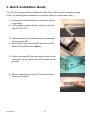
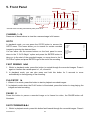
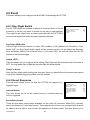
The CCT730 is equipped with a hot-swap Hard Disk Drive (HDD) that can be exchanged when
it is full. The following photos illustrate how to install the HDD into its removable caddy.
1) Pull the exterior handle towards you and unlock with the
key provided.
2) Pull the handle outwards until the caddy is free from the
case of the CCT730.
3) Push the release latch to slide the top cover backwards
and remove the HDD.
4) Insert the DC power cable and IDE cable into the HDD.
Make sure the HDD is set to “Master”.
5) Position the empty HDD into the caddy and slide the top
cover back to secure. Secure the HDD using the screws
provided.
6) Slide the caddy back into the CCT730 case and lock it
with the key provided.
CCT730 V1.1
12