1
Hi Flow Sampler
Operation
With the Hi Flow Sampler located in an area containing clean air (no
combustible gases or vapors), turn ON the instrument by first pulling up
the ON/OFF switch and then moving it to its ON position.
WARNING: Turning ON the instrument in air contaminated with
combustible gas will cause false readings to occur. Use one of Bacharach’s
portable gas detection instruments to sample the surrounding area for
levels of combustible gas before turning ON the instrument.
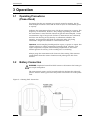
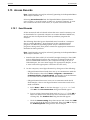
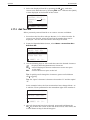
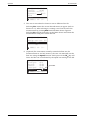
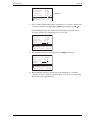
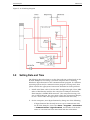
An initial banner screen is first displayed for 3 seconds that shows the
instrument’s name, software version, and the software’s Month, Day,
Year, and Time of creation.
B a c h a r a c h ,
H i
F l o w
I n c .
S a m p l e r
N o v
v e r
1 . 4 0
1 3 2 0 0 4 1 1 : 2 0
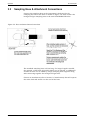
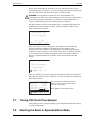
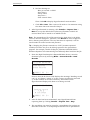
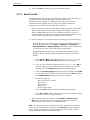
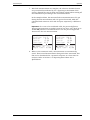
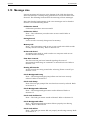
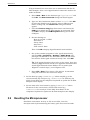
After the banner screen is displayed, the sensors are automatically
zeroed to ambient conditions. Zeroing time is dependent on the
temperature of the sensors, and whether there is residual gas present
inside the sensor chambers. If a sensor fails to zero, a message appears
at the bottom of the LCD describing the cause of the failure. Refer to
Section 6 Troubleshooting for possible causes and remedies for this
failure.
1 1 / 2 2 / 0 4
0 9 : 4 5 : 3 0
Z e r o i n g
S e n s o r s
P l e a s e
W a i t . . .
[ 0 0 0 1 ]
( M )
S - -
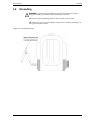
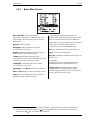
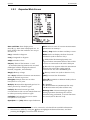
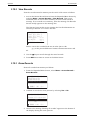
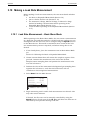
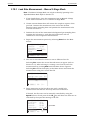
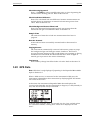
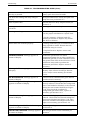
After the sensors are zeroed, either the instrument’s Basic or Expanded
Main Screen appears (refer to Section 3.8). The example below shows the
Basic Main Screen.
1 1
B a
L e
L e
S p
S t
/ 2
c k
a k
a k
e e
a r
t
2 /
( %
( %
( N
d (
)
0 4
)
o t
L O <
[ 0 0 0 1 ]
3.7
0 9 : 4
0
0
A v a i
( M )
5 :
. 0
. 0
l .
>
)
0
0
3 0
H I )
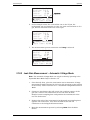
T h e a r r o w s y m b o ls o n th e le ft in d ic a te th a t
th e r e a r e m o r e ite m s to v ie w a b o v e a n d /o r
b e lo w th e c u r r e n t d is p la y .
P re s s
k e y s to v ie w a d d itio n a l ite m s .
S - -
Turning OFF the Hi Flow Sampler
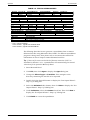
Turn OFF the unit by simply pulling up the ON/OFF switch and moving
it to its OFF position.
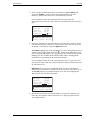
3.8
Selecting the Basic or Expanded Menu Mode
Instruction 0055-9017
13