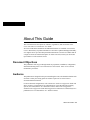
1
Upgrading the DRAM SIMM
Cisco IOS feature set requires a DRAM configuration other than 4, 8, or 16 MB, your router
will have a combination of fixed DRAM and a DRAM SIMM. For example, if the
Cisco IOS feature set originally ordered with your router requires 6-MB DRAM, your
router will include 2-MB fixed DRAM and a 4-MB DRAM SIMM for a total of 6-MB
DRAM (because a 6-MB DRAM SIMM is not available).
The system allocates the total memory installed on the fixed DRAM or the DRAM SIMM
as primary and shared memory. Primary memory is used to store the operating
configuration, routing tables, caches, queues, and packets. Shared memory is used to store
incoming and outgoing packets.
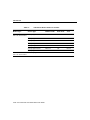
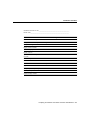
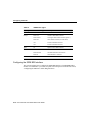
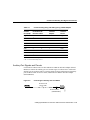
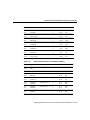
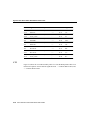
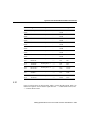
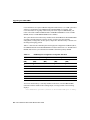
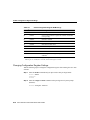
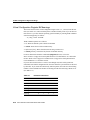
Table A-1 describes the relationship between the physical configuration of DRAM (that is,
fixed DRAM and which size DRAM SIMM are needed to obtain from 2- to 18-MB of total
DRAM) and how the system allocates the DRAM as shared and primary DRAM.
Table A-1
DRAM Physical Configuration and System Allocation
Physical Configuration
System Allocation
Total DRAM
(MB)
Fixed DRAM
(MB)
DRAM SIMM
(MB)
Shared DRAM
(MB)
Primary DRAM
(MB)
2
2
–
1
1
4
–
4
2
2
6
2
4
2
4
8
–
8
2
6
10
2
8
2
8
16
–
16
2
14
18
2
16
2
16
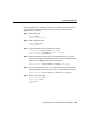
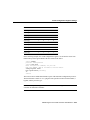
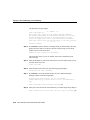
To see how much memory is currently installed in the router, enter the show version
command. Near the middle of the resulting output, a message similar to the following
displays:
Cisco XXXX(68030) processor (revision X) with 4092K/2048K bytes of memory.
A-8 Cisco 2524 and Cisco 2525 Router User Guide