1
7.5 802.15.4 RF Network Setup
(MSI-8000 Connection)
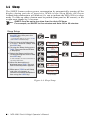
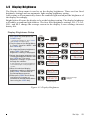
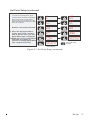
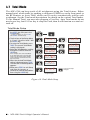
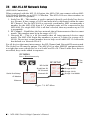
When equipped with the 802.15.4 Option, the MSI-4260 can connect with an MSI8000 Remote Display or an 802.15.4 Modem. The MSI-4260 uses three numbers to
connect to an 802.15.4 piconet:
1. ScaleCore ID – This number is used to uniquely identify each ScaleCore device
in a Piconet. It has a range of 0-254 and must not be duplicated within the same
RF Channel. For the MSI-8000 as network coordinator, MSI recommends a
number for the MSI-4260 from 0-3 if multiple units will be connected to the
MSI-8000. If a single MSI-4260 is all that’s needed, then any number up to 254
is acceptable.
2. RF Channel – Establishes the base network that all interconnected devices must
match. This number must be in the range of 12-23.
3. Network ID – This is a 64 bit number that all interconnected devices must
match. The MSI-4260 limits this number to a max of 5 digits for a range of 099999. Do not use a small number here to help avoid other 802.15.4 networks
that default to a Network ID of 0.
For all devices that must interconnect, the RF Channel and Network ID must match.
The ScaleCore ID must be unique. The MSI-4260 or other MSI RF equipment that is
a weight data source should be set to a ScaleCore ID of 0. Then if other slave devices
are added, they can be added in sequence.
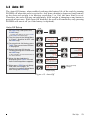
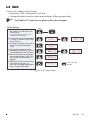
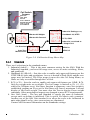
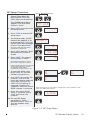
RF MENU
Press Simultaneously
TARE
T
USER
RF SETUP
F
RF On/Off
ScaleCore ID
RF Channel
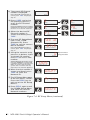
Serial Out Setup
rF Modem
Ethernet
3ULQW
U)
(WKQW
Network ID
2Q2II
6&LG
&KQO
QHWLG
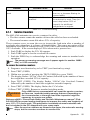
Figure 7-4. RF Menu
50
MSI-4260 Port-A-Weigh Operator’s Manual
2Q
2II
RF On
RF Off
Range 0-254
Range 12-23
Range 1 to 99999