1
FEATURE
OPTION
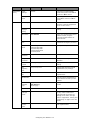
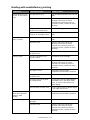
Fax Setup
(cont.)
Default
Settings
(cont/)
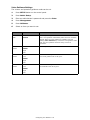
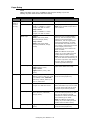
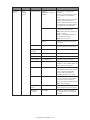
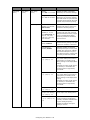
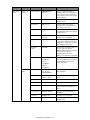
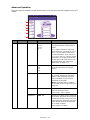
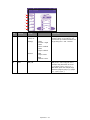
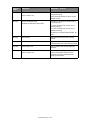
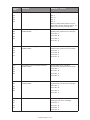
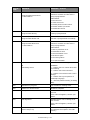
F-Code Box
DESCRIPTION
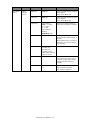
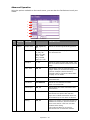
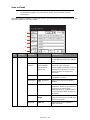
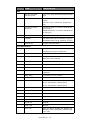
MCF Report
OFF, ON
If enabled, the result of the
transmission will be printed out
each time.
Memory Tx
OFF, ON
This sets the transmission mode to
memory Tx (ON) or real-time Tx
(OFF).
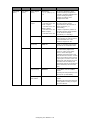
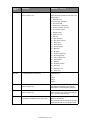
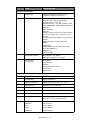
Register/Edit
Secure Box
Secure Box: received data cannot
be printed without entering ID
code (for secret documents).
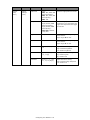
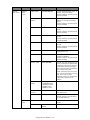
Use the numeric keypad to enter
the sub-address and ID code (note
enter a four-digit ID code).
You can also enter a Box Name,
Password and specify the hold
time for your secure box.
Bulletin Box
Bulletin Box: Enable to transmit/
receive documents to/from
Bulletin.
You can also enter a Box Name,
Password, enable Rx Protect, Auto
Print, OverWrite, Erase Tx Doc and
specify a four-digit ID code.
Delete
Select the box number to delete
and press Yes to confirm deletion.
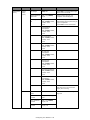
If you are deleting a secure box
entry, enter the four-digit ID code
and press Yes to confirm deletion.
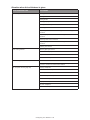
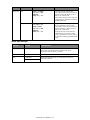
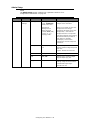
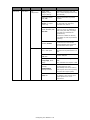
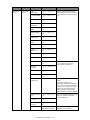
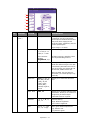
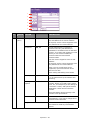
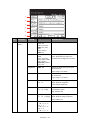
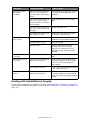
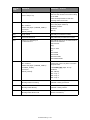
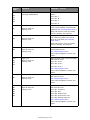
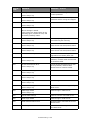
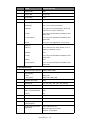
Security
function
Auto Print
Journal
Report
ID check Tx
OFF, ON
Check and match the last four
digits of the destination fax
numbers with those registered in
the target. If ON, the unit will send
only when they match.
Check broadcast
dest.
OFF, ON
Fax number confirmation screen
displays before sending the fax.
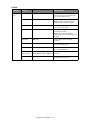
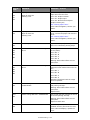
Confirm Dial
OFF, ON
When ON, you will be asked to reenter the destination fax number.
The fax will only be sent when the
two numbers match.
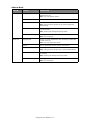
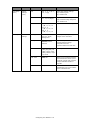
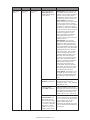
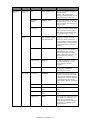
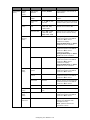
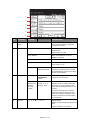
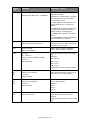
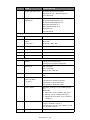
Setting
OFF, ON
Enable/disable auto print journal
report.
Print time
OFF, ON
When ON, enter the time using
the arrow keys or keypad.
The journal report will be printed
at the specified time every day.
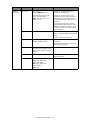
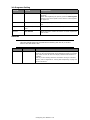
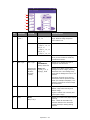
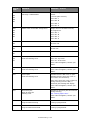
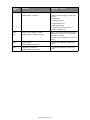
Other
Settings
Redial Tries
00~02~14 Times
Set the number of redial attempts.
Redial Interval
0~1~5 Min
Set the time between redial
attempts.
Configuring Your Machine > 41