1
INTEGRA
SATEL
47
Change prefix
The function is available to the master, if the installer has allowed prefixes to be used in the
system. The installer, using the corresponding service function (ÆSERVICE MODE ÆOPTIONS
ÆPREFIX LENGTH), can determine the prefix length (1–8 digits). If the prefix length
programmed by the installer is 0, no prefixes will be used.
The CHANGE PREFIX function enables programming the prefixes and the time to remind of the
need to change the prefix. For further prefix related information refer to section PREFIXES
(p. 27).
Masters
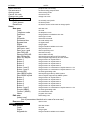
This function is used for entering new users with master authority level, changing data related
to the existing master user, or for removing the master user. Only the installer having
a service code is authorized to use this function. Only one user with such authority level may
be assigned to each object. The list of all rights which may be assigned to the master user is
identical to that shown in the description of the USERS function. The function makes it
possible to select the devices (keypads, etc.) which could be operated by the given master
user. The introduced changes become valid in the system as from exiting the function by
pressing the [*] key and accepting the changes with the key [1].
Note: In order to create a new administrator, an access code must be assigned to him.
Users
This function makes it possible to enter new users in the system, as well as edit or remove
the existing ones.
Note: A user will be created after at least one identifier is assigned to him: an access code,
proximity card, DALLAS chip or keyfob.
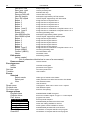
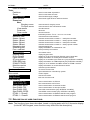
For each user, the following can be defined:
Code – a password assigned to the new user (if the new user is authorized to change his
own code, he should change it!). The password that has been changed cannot be
intercepted in the DLOADX and GUARDX programs.
Telephone code – a code by which the system will recognize the user in the answering
phone calls function. If this code is not assigned, the user will be unable to check the
status of partitions he has access to, and control the REMOTE SWITCH type outputs by
phone (see section ANSWERING PHONE CALLS). This code may be also required to control
the INTEGRA 128-WRL control panel by means of SMS messages (see section SMS
CONTROL in the PROGRAMMING manual).
Partitions – assignment of partitions the user has access to (i.e. he is authorized to arm or
disarm them, clear alarms, and start the control functions). The list of partitions shown by
this function is limited to the partitions accessible to the user entering a new user.
Type – determination of additional properties of the code – one type can be chosen for the
particular code. Below is the list of types:
1. Normal – basic code type assigned to the user.
2. Single – code to be used once only.
3. Time renewable – code for which the validity time is given when entering a new user.
Before the validity period expires, the control panel prompts the user with such a code
that he must change the code. After the change, the validity period is counted from the
beginning. After this user code type is chosen (when entering or editing), the
EXISTENCE TIME function appears in menu, where number of code validity days should
be defined.