1
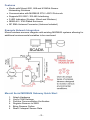
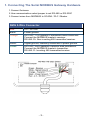
Connecting the Serial MODBUS Gateway to the USB
Programming Dongle:
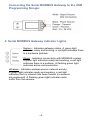
2. Serial MODBUS Gateway Indicator Lights
System - Indicates gateway status. A green light
indicates ready and working, a red light indicates there
is a hardware problem.
Wired - Indicates connectivity with MODBUS system.
A green light indicates ready and working, a red light
indicates there is a problem. A flashing green light
indicates active communication.
Wireless - Indicates wireless sensor network activity.
A green light indicates ready and working, a red light
indicates that no network has been formed (no sensors
are registered). A flashing green light indicates radio
traffic from the sensors.
-4-