1
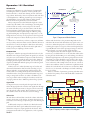
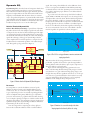
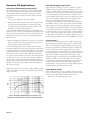
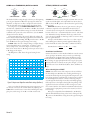
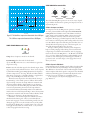
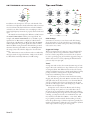
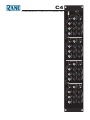
COMPressor THRESHOLD, RATIO and GAIN -20 -10 -30 0 +10 -40 0 2 1.5 +20 1 dBu COMP THRESHOLD n:1 ATTACK, RELEASE and KNEE 100 5 -6 +6 50 250 10 -12 +12 25 500 RATIO dB GAIN ms 125 500 1s 50 ATTACK 2s 25 ms RELEASE Auto Hard Soft KNEE Auto The threshold, like crossing through a doorway, is the beginning point of gain adjustment. When the input signal is below the threshold, a compressor acts like a straight wire. Above threhsold, the side-chain asserts itself and turns the volume down. In Compressor mode, COMP THRESHOLD defines the absolute level, adjustable from –40 dBu to +20 dBu, above which compression begins. If soft-knee settings are used, the threshold is defined as the point at the center of the knee. (See the KNEE description for more details). In Dynamic EQ mode, this control defines the relative difference between the broadband program material and the bandpass signal defined by the PEQ. The pointer between –10 dBu and –20 dBu shows the typical setting for De-essing. RATIO defines the ratio of Input change to Output change, and is adjustable from 1:1 (straight wire, no change) to 10:1 (heavy compression), as shown in Figure 14. For example, a Ratio of 4:1 means that a 4 dB change at the input causes only a 1 dB change at the output. The pointer at 10:1 shows the typical setting for Deessing. +15 +10 +5 0 -5 -10 Ratio 10:1 -15 -20 Threshold -25 -30 -35 -40 -40 Gain Reduction x Release = 5 dB x 1 s = 0.5 s 10 dB 10 dB Auto Attack and Release Unsure about how to set the Attack and Release controls? Venue doors opening in 15 minutes and you need to speed through sound check? No problem! Simply rotate the Release control 1:1 fully clockwise until Auto is lit, indicating the Attack and Release settings are appropriately fixed for most types of program material. The C4’s not entirely on auto pilot, though – you still have full control over the Threshold, Ratio, Gain, and Knee settings. +20 O u t p u t d B u ATTACK determines how fast the gain is turned down once the signal exceeds Threshold, and is adjustable from 25 ms (fast) to 500 ms (slow). The pointer at 25 ms shows the typical setting for De-essing. RELEASE determines the rate of gain increase as less gain reduction is required, and is adjustable from 25 ms (fast) to 2 seconds (slow). It is important to understand the difference between release rate – as determined by this control – and release time. The Release setting determines how long it takes for the gain to change by 10 dB, not how long it takes to return to unity gain (no gain reduction). Example: with the Release control set to 1 s, when a signal with 5 dB of gain reduction presently applied suddenly drops below threshold, the release time is 0.5 s, calculated as follows: -35 -30 -25 -20 -15 -10 -5 0 +5 +10 +15 +20 Input dBu Figure 14. Input versus Output for various Ratio settings (hard knee) Once you reduce the dynamic range using compression, you can increase or decrease the overall loudness by adjusting the GAIN. This control features a center-detent marking the unity gain point, with a range of +12 dB or -12 dB on either side. Manual-8 We are the Knights of KNEE KNEE controls the action of the compressor above and below the threshold point. Hard knee does nothing until the signal exceeds the threshold point, then applies full compression. Soft knee begins applying a small amount of compression just before the threshold point is reached, continues increasing compression through the threshold point and beyond, finally applying full compression to the highest level signals. Depending on the application and source material, soft knee settings can sound more natural. On the other hand for maximum loudness before compression (for equipment protection for instance), use hard knee settings. Knee span is adjustable from 0 dB (Hard) to 10 dB (Soft), with the Threshold always being at the center of this span. The pointer at the Hard Knee setting shows the typical setting for De-essing.