1
LIMIT THRESHOLD and Headroom Meter
LIMIT
3
-20
-10
-30
6
0
12
+10
-40
dBu
+22
Tips and Tricks
-20
LIMIT THRESHOLD
Headroom
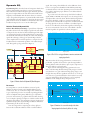
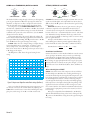
In addition to the Compressor / De-esser, each channel of the
C4 features an independent, brick-wall Limiter with an instantaneous attack time, fixed 25 ms hold time and a fixed 6 dB/second release rate. The C4’s limiter uses oversampling in order to
ensure high frequency transients are properly detected and acted
upon.
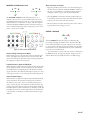
The Headroom meter displays the difference, in dB, between
the LIMIT THRESHOLD and the present signal level. For
example, with LIMIT THRESHOLD set to +10 dBu, a peak
signal level of +4 dBu results in a display of 6 dB of remaining headroom (+10 dB minus +4 dB equals 6 dB). The LIMIT
indicator lights when the present signal exceeds the set Limit
Threshold. When setting the Limiter Threshold keep in mind
that music often has peaks which are 12 to 20 dB higher than
the average (rms) value, which is displayed on the side-chain
meter.
Note: The Limiter is active at all times and is not affected by
the bypass switch. To bypass the limiter, simply rotate the Limiter Threshold control fully clockwise (+22 dBu setting).
1.5
+10
-40
+20
1
dBu
n:1
COMP THRESHOLD
RATIO
100
500
50
250
25
ms
0
2
0
-30
24
dB
-10
125
5
-6
10
-12
ATTACK
ms
-20
1s
Auto
RELEASE
5
0.5
10
Hard
Soft
KNEE
oct
BANDWIDTH
6
0
12
+10
-40
dBu
+22
24
dB
LIMIT THRESHOLD
Headroom
0
3.15k
125
20
-10
-30
640
1
LIMIT
3
Auto
2
BYPASS
+12
dB
2s
25
ACTIVE
GAIN
50
500
+6
Hz
20k
FREQUENCY
PEQ
-12
dB
GAIN
+12
Comp Listen Dynamic
EQ
SIDE-CHAIN
Initial Settings
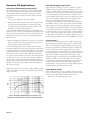
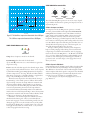
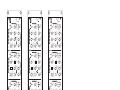
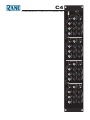
Sometimes it is necessary to start from scratch. The drawing
above shows where to set the controls for no processing (the
black knobs have no affect at this point). Then you can adjust
each section one at a time.
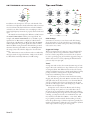
Suggested Settings
There is no magic recipe of compressor settings which work for
every audio source in every performance situation. There are,
however, a few key ingredients you can add to the ol’ dynamics stew to get things going. Start with the suggested settings in
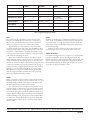
Table 1, then season to taste by adjusting the Threshold until
your ears tell you it’s just right.
Vocals
A tough issue with vocals is the extreme dynamic range of some
singers. Those who can lull you to sleep and then scare you with
an unexpected blast. The difference between the soft crooning
and the loud climax represents too much signal change for many
preamps and mixers, causing them to clip and distort badly.
Compression and limiting comes to the rescue.
Use the limiter to prevent the extreme levels from causing
clipping and distorting the sound. With its automatic fast attack
and quick release mode, all you need to set is the Limit Threshold. Set it as high as the next piece of equipment in the signal
path allows. The C4 gives you a wide setting range of -40 to +22
dBu that covers all requirements.
Compression is one of the most effective tricks for bringing the vocals up in any mix, live or recorded. This is due to
the increase in perceived loudness which results from reducing
peaks and increasing the average level. Good settings for natural
sounding, yet compressed vocals, are a medium fast (25 – 50
ms) attack and a medium-slow (100 ms – 1 sec) release. Releasing too quickly sounds unnatural, while attacking too slowly
misses the problem surges. Soft knee compression generally best
matches vocal dynamics. Adjust the ratio to match the dynamics
of the singer, with 2:1 being a good starting point.
Manual-10