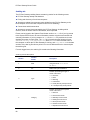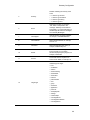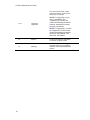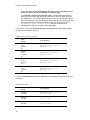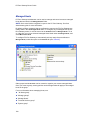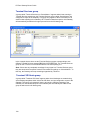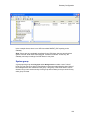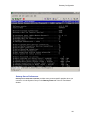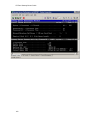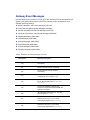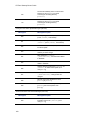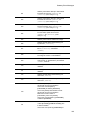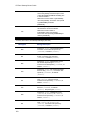
1
PC-Duo Gateway Server Guide Release 12.1 August 2012 Vector Networks, Inc. 541 Tenth Street, Unit 123 Atlanta, GA 30318 (800) 330-5035 http://www.vector-networks.com © Copyright 2012 Vector Networks Technologies and Proxy Networks, Inc. All rights reserved. PC-Duo is a trademark of Vector Networks Technologies, and PROXY is a trademark of Proxy Networks, Inc. Microsoft, Windows, Windows NT, Windows Server, and other Microsoft products referenced herein are either trademarks or registered trademarks of the Microsoft Corporation in the United States and other countries. Novell and NetWare are registered trademarks of Novell, Inc. All other trademarks are the property of their respective owners. This product includes software developed by the OpenSSL Project for use in the OpenSSL Toolkit (http://www.openssl.org), cryptographic software written by Eric Young ([email protected]), and compression software from the ZLIB project (http://www.zlib.net/). PC-Duo Gateway Server Guide Table of Contents PC-Duo overview .......................................................................................................................................... 5 What‘s New in PC-Duo 12.1 ...................................................................................................................... 6 What‘s New in PC-Duo 12.0 ...................................................................................................................... 6 What‘s New in PC-Duo 11.6 .................................................................................................................. 6 What‘s New in PC-Duo 11.3 .................................................................................................................. 7 What's New in PC-Duo 11.2 .................................................................................................................. 7 PC-Duo solutions ....................................................................................................................................... 9 PC-Duo Express Edition ........................................................................................................................ 9 PC-Duo Enterprise Edition ..................................................................................................................... 9 PC-Duo On-Demand Edition ................................................................................................................. 9 PC-Duo applications ................................................................................................................................ 11 PC-Duo Host ........................................................................................................................................ 12 PC-Duo Terminal Services Host .......................................................................................................... 13 PC-Duo VDI Host ................................................................................................................................. 14 PC-Duo Master .................................................................................................................................... 15 PC-Duo Gateway ................................................................................................................................. 16 PC-Duo Web Console.......................................................................................................................... 17 PC-Duo Web Desktop.......................................................................................................................... 18 PC-Duo Deployment Tool .................................................................................................................... 19 PC-Duo technologies ............................................................................................................................... 20 PC-Duo services ...................................................................................................................................... 21 PC-Duo connection types ........................................................................................................................ 22 RDP session sharing: Follow the active session ................................................................................. 22 Peer-to-peer connections .................................................................................................................... 22 Gateway-managed connections .......................................................................................................... 23 Firewall-friendly connections ............................................................................................................... 25 Terminal Services connections ............................................................................................................ 25 VDI connections ................................................................................................................................... 26 VNC connections ................................................................................................................................. 27 PC-Duo security features ........................................................................................................................ 28 Authentication ...................................................................................................................................... 28 Authorization ........................................................................................................................................ 31 Auditing ................................................................................................................................................ 31 Encryption ............................................................................................................................................ 31 PC-Duo networking features ................................................................................................................... 33 2 PC-Duo Overview Network protocols ................................................................................................................................ 33 Network addressing schemas .............................................................................................................. 33 Wake-on-LAN support ......................................................................................................................... 33 PC-Duo documentation and technical support ........................................................................................ 35 Typographical conventions in documentation ..................................................................................... 35 Technical support options .................................................................................................................... 36 Gateway Installation .................................................................................................................................... 37 Requirements .......................................................................................................................................... 38 Operating system requirements ........................................................................................................... 38 Hardware requirements ....................................................................................................................... 38 Installation requirements ...................................................................................................................... 38 Screen recording requirements ........................................................................................................... 38 Network requirements .......................................................................................................................... 39 Configuration options ............................................................................................................................... 40 Installation notes ...................................................................................................................................... 41 Install via internet download ................................................................................................................ 41 Windows Firewall exceptions ............................................................................................................... 41 Gateway service accounts....................................................................................................................... 42 Use the default service account ........................................................................................................... 42 Use a different service account ........................................................................................................... 42 Use shared screen password authentication ....................................................................................... 42 SSL certificates ........................................................................................................................................ 44 Select a previously installed certificate ................................................................................................ 45 Create and install a self-signed server certificate ................................................................................ 45 Create a certificate request for a certificate authority .......................................................................... 46 Cancel pending request to a certificate authority ................................................................................ 46 Install a certificate created by a certificate authority ............................................................................ 46 Remove selected certificate from Gateway ......................................................................................... 47 View Certificate .................................................................................................................................... 47 Licensing.................................................................................................................................................. 50 Gateway License Modes ..................................................................................................................... 50 Add a license key before your trial period expires ............................................................................... 51 Add a license key after your trial period expires .................................................................................. 51 Upgrade a license key ......................................................................................................................... 51 Gateway Operation ..................................................................................................................................... 52 Start the Gateway .................................................................................................................................... 53 Run the Gateway Administrator .............................................................................................................. 54 3 PC-Duo Gateway Server Guide Configure security through the Gateway ................................................................................................. 55 Configure the Gateway ............................................................................................................................ 56 Gateway Configuration ................................................................................................................................ 58 Remote Control Gateway servers ........................................................................................................... 59 Add a Gateway .................................................................................................................................... 59 Connect/Disconnect ............................................................................................................................. 60 About the product................................................................................................................................. 60 Web menu ............................................................................................................................................ 60 View ..................................................................................................................................................... 60 Export List ............................................................................................................................................ 60 Gateway connection properties ........................................................................................................... 60 Gateway Server Settings ......................................................................................................................... 64 General Settings .................................................................................................................................. 64 Polling for Hosts ................................................................................................................................... 94 Gateway Security ................................................................................................................................. 99 Managed Hosts ..................................................................................................................................... 108 Menu options ..................................................................................................................................... 109 Send Wake-on-LAN Signal ................................................................................................................ 109 All Hosts group ................................................................................................................................... 110 Manage groups .................................................................................................................................. 111 Manage Hosts .................................................................................................................................... 122 Terminal Services group .................................................................................................................... 138 Transient VDI Hosts group ................................................................................................................ 138 System group ..................................................................................................................................... 139 Unmanaged Hosts ................................................................................................................................. 143 Active Status .......................................................................................................................................... 144 Active Users ....................................................................................................................................... 144 Active Gateway Data Services .......................................................................................................... 144 Active Master Connection Services ................................................................................................... 144 Active Hosts ....................................................................................................................................... 145 Active Recordings .............................................................................................................................. 145 Reverse Connections......................................................................................................................... 145 Pending Host Status Updates ............................................................................................................ 145 Help .................................................................................................................................................... 146 Help .................................................................................................................................................... 146 About PC-Duo Gateway..................................................................................................................... 146 Gateway Event Messages ........................................................................................................................ 147 4 PC-Duo Overview PC-Duo overview Thank you for selecting PC-Duo remote desktop solutions. PC-Duo remote desktop solutions provide professional features that enable helpdesk technicians, network administrators, IT managers, and software trainers to deliver professional remote support for a fraction of the cost of hosted solutions. Some selected features include: Remote Access: Reach anyone, anywhere, anytime using firewall- and NAT-friendly remote control connections. Remote Control: Diagnose and resolve support issues without having to physically visit remote computer. Remote Management: Repair remote computers and make configuration changes in real-time and without disturbing currently logged-on user. Collaboration: Enable two or more technicians to work on the same remote computer at the same time using chat, screen-sharing and easy-to-pass remote support. NOTE: Before you use PC-Duo remote desktop solutions, you should be familiar with basic network concepts, such as protocols, encryption, IP addresses, ports, and subnets. To learn more about PC-Duo remote desktop solutions, see: "What's New" "PC-Duo solutions" "PC-Duo applications" "PC-Duo technologies" "PC-Duo services" "PC-Duo connection types" "PC-Duo security features" "PC-Duo networking features" "PC-Duo documentation and technical support" 5 PC-Duo Gateway Server Guide What’s New in PC-Duo 12.1 PC-Duo 12.1 introduces the following new features and capabilities: “Click Once” Web Desktop: Ability to generate a window to a remote desktop directly from the Web Console (Master not required). No administrative rights needed and no reboot required. On-Demand Edition key required for activation (see PC-Duo Web Console Operating Guide) Concurrent User License Mode: In this mode, the Gateway will monitor the number of simultaneous Gateway users according to account type (Administrative, Master, Personal) (see PC-Duo Web Console Operating Guide) Inactivity Timeouts: To free up concurrent user licenses when users are connected to the Gateway but not active, Web Console, Master and Gateway Administrator will be automatically disconnected from the Gateway, and input control will be automatically released from Web Desktop or Connection Window (see PC-Duo Gateway Administrator Guide) Automatic Grouping of Hosts: Ability to configure Hosts to automatically report to custom Gateway group(s) according to custom or generic rules (see PC-Duo Gateway Administrator Guide) Virtual Desktop support: Enables virtual desktop images generated in environments such as Citrix XenDesktop to include Hosts, and to have the Hosts report to Gateway until the desktop image is discarded (see PC-Duo Host Guide) What’s New in PC-Duo 12.0 PC-Duo 12.0 introduces the following new features and capabilities: Web Console: A new server-side application that enables browser-based access to the Gateway Server for configuration and administration. If On-Demand Edition key is present, Web Console will also be enabled for Web Desktop feature (see PC-Duo Web Console Operating Guide) Kernel-mode Screen Capture driver: The kernel-mode screen capture driver is now available for Windows 7, Vista and Windows 2008 Server. In many situations, the kernelmode screen capture driver will outperform the default user-mode screen capture driver (see PC-Duo Host Guide) Input Suppression: Ability to turn off keyboard and mouse input on the remote desktop machine for Windows 7, Vista and Windows 2008 Server (see PC-Duo Master Guide) Address Bindings: Ability to bind the SSL and TCP network protocols to all addresses or to select specific addresses on the Gateway Server (see PC-Duo Gateway Administrator Guide) What’s New in PC-Duo 11.6 Windows 7 support: PC-Duo 11.6 provides full support (remote access, remote control, remote management) for Windows 7 computers, including 32- and 64-bit platforms. 6 PC-Duo Overview Windows Server 2008 R2 support: PC-Duo 11.6 provides full support (remote access, remote control, remote management) for Windows Server 2008 R2 computers (64-bit platforms only). Mac, Linux support: PC-Duo 11.6 provides support (remote access, remote control) for Macintosh and Linux computers running VNC server software (standard on Macs). Wake-on-LAN support: PC-Duo 11.6 includes ability to turn on remote computers that are configured to listen for Wake-on-LAN signal. Remote Power Scheme management: PC-Duo 11.6 includes new remote management tools that allows Master user to view and change power scheme settings on remote computers. Screen Recording Playback via URL: PC-Duo 11.6 includes ability for Master to playback a PC-Duo screen recording from a standard web server over HTTP or HTTPS. RDP compatibility: If a remote computer is hosting an active RDP session, PC-Duo 11.6 Host will capture and provide input control to the RDP session. Active Directory integration: PC-Duo 11.6 Deployment Tool can now be used to discover computers and OUs in Active Directory domains, install new PC-Duo software, upgrade existing software, and/or push configuration changes to existing software. What’s New in PC-Duo 11.3 Remote Management service: PC-Duo 11.3 features a new service that allows Master user to generate inventory of hardware and software assets on a remote Host. Also allows Master user to query and change certain system settings. Terminal Services support: PC-Duo 11.3 supports server-side Hosts for thin client, terminal services sessions for Citrix XenApp (formerly Citrix Presentation Server) and Windows Terminal Server. User-Mode Screen Capture optimization: PC-Duo 11.3 includes significant performance and reliability enhancements for user-mode screen capture technology introduced in PC-Duo 11.3. What's New in PC-Duo 11.2 PC-Duo 11.2 introduced the following new features and capabilities: Windows Vista and Server 2008 support: PC-Duo 11.2 applications (Host, Master, Gateway, Deployment Tool) now run on Windows Vista and Windows Server 2008 operating systems. NOTE: PC-Duo 11.2 introduces a new screen capture technology (user-mode) for Windows Vista and Windows Server 2008 platforms. Bandwidth throttling: PC-Duo 11.2 allows screen capture settings to be modified in order to reduce the amount of bandwidth used. Usually, this will reduce screen capture quality but improve responsiveness and overall performance (see PC-Duo Host Guide for more information). Popup notifications: PC-Duo 11.2 supports popup "toast" notifications when connections are established to remote computers (see PC-Duo Host Guide for more information). Send keystroke button: PC-Duo 11.2 now provides a new toolbar button on the Master Remote Desktop Window, which can be configured to send Ctrl+Alt+Del or one of 7 PC-Duo Gateway Server Guide the other available keyboard combinations to remote computer (see PC-Duo Master Guide for more information). Host-based chat: PC-Duo 11.2 introduces support for Host-based chat. This new service automatically creates a private chat room including Host user and any technicians connected to the Host. Technicians can see and participate in multiple chat rooms simultaneously (see PC-Duo Master Guide for more information). File transfer resume: Occasionally, a file transfer operation is interrupted when a connection is lost. PC-Duo 11.2 introduces the ability to resume interrupted file transfers exactly from the point of interruption (see PC-Duo Master Guide for more information). Windows Media format support: PC-Duo screen recording files are produced in a streamlined, proprietary format and play back in a viewer provided with PC-Duo Master. PC-Duo 11.2 introduces a new utility to enable technicians to convert PC-Duo screen recording files into Windows Media format for play back in WM-compatible players and editing in off-the-shelf media tools (see PC-Duo Master Guide for more information). 8 PC-Duo Overview PC-Duo solutions Vector Networks provides three solutions for remote desktop support: PC-Duo Express Edition PC-Duo Express Edition is an easy-to-use remote desktop solution that uses simple peer-to-peer connections between helpdesk technicians and end-user remote computers. It is ideally suited for smaller companies and workgroups in which the number of remote computers being supported is small and manageable. PC-Duo Enterprise Edition PC-Duo Enterprise Edition is an enterprise-class remote desktop solution that uses a robust, scalable server to establish and maintain a secure network of connections to enduser machines. It leverages centralized administration, security and network access to simplify and automate the creation, management, and monitoring of this ―network within a network‖. PC-Duo Enterprise Edition is ideally suited for enterprises and corporate workgroups with large numbers of remote computers, multiple domains and/or employees with remote computers outside the network. PC-Duo On-Demand Edition PC-Duo On-DemandEdition is a web-enabled version of the Enterprise Edition, and includes Web Desktop for on-demand access to remote desktops in place of the installed Master application. PC-Duo Features PC-Duo Express Edition PC-Duo Enterprise Edition PC-Duo On-Demand Edition Components PC-Duo Host Yes Yes Yes PC-Duo Terminal Services Host No Yes Yes PC-Duo VDI Host No Yes Yes PC-Duo Master Yes Yes No PC-Duo Gateway No Yes Yes PC-Duo Web Console No Yes Yes PC-Duo Web Desktop No No Yes PC-Duo Deployment Tool Yes Yes Yes Yes Yes Yes Connection Types Peer-to-peer connections 9 PC-Duo Gateway Server Guide Gateway-managed connections No Yes Yes Firewall-friendly connections No Yes Yes Terminal services connections No Yes Yes VDI connections No Yes Yes VNC connections Yes Yes No 10 PC-Duo Overview PC-Duo applications The PC-Duo remote desktop solutions include some or all of the following applications: PC-Duo Components PC-Duo Express Edition PC-Duo Enterprise Edition PC-Duo On-Demand Edition PC-Duo Host Yes Yes Yes PC-Duo Terminal Services Host No Yes Yes PC-Duo VDI Host No Yes Yes PC-Duo Master Yes Yes No PC-Duo Gateway No Yes Yes PC-Duo Web Console No Yes Yes PC-Duo Web Desktop No No Yes PC-Duo Deployment Tool Yes Yes Yes 11 PC-Duo Gateway Server Guide PC-Duo Host PC-Duo Host runs as a Windows service on the machine on which it is installed, and supports both peer-to-peer connections as well as Gateway-managed connections. By installing PC-Duo Host on a computer in your network, you can: Allow technicians to make peer-to-peer remote control connections to the machine, whether someone is there or not. Each Host manages its own security settings and access rights. Allow or force technicians to make Gateway-managed remote support connections to the machine through a central server (PC-Duo Gateway), which will automatically enforce security settings and access rights according to policies set at the server. The PC-Duo Host requires a Host license key. For more information about configuring and operating PC-Duo Host, please see the PCDuo Host Guide. 12 PC-Duo Overview PC-Duo Terminal Services Host PC-Duo Terminal Services Host is a server-side version of the PC-Duo Host designed to support Terminal Services sessions. The Terminal Services Host, also known as the root Host, runs on the Terminal Server (such as those from Citrix or Microsoft), and is configured to support one or more concurrent Terminal Services sessions. Each time the Terminal Server generates a new Terminal Services session, the Terminal Services Host injects a copy of the Host into the session. The session Host will include instructions for reporting to one or more Gateways. When the TS session is discarded, the TS Host session will also be discarded and will be automatically removed from the Gateway(s). The PC-Duo Terminal Services Host requires a special Host license key that will specify the maximum number of concurrent Terminal Services sessions that can be supported on that Terminal Server. For more information about configuring and operating PC-Duo Terminal Services Host, please see the PC-Duo Host Guide. 13 PC-Duo Gateway Server Guide PC-Duo VDI Host PC-Duo Virtual Desktop Image Host is a special version of the PC-Duo Host designed to support the transient nature of virtual desktops. The VDI Host can be included as part of a virtual desktop template; when one or more virtual desktop sessions are generated using this template (often to create a pool of virtual desktop images), the sessions will include a Host with all the features of the installed Host but not the permanent nature. When the virtual desktop session is discarded, the Host will also be discarded and will be removed automatically from the Gateway(s). The PC-Duo VDI Host requires a special Host license key that will specify the maximum number of concurrent VDI sessions that can be supported in the virtual desktop environment. For more information about configuring and operating PC-Duo VDI Host, please see the PC-Duo Host Guide. 14 PC-Duo Overview PC-Duo Master PC-Duo Master is a console application that technicians can use to establish remote support connections to one or more Host computers. With PC-Duo Master, you can: Make one or more peer-to-peer remote support connections to Host computers in your network. Connect to PC-Duo Gateway and make one or more Gateway-managed remote support connections to Host computers from a directory of available Hosts. View the entire screen of the remote computer. Take complete control of a Host computer using the local keyboard and mouse. Share control of the Host computer with its end-user. Passively monitor the Host computer without exercising control. Use the clipboard transfer feature to transfer portions of text, bitmaps, and other objects between your Host and Master computers. Use the PC-Duo file transfer feature to copy files between your Host and Master computers. Use the PC-Duo remote printing feature to print locally from applications running on a remote computer. Record screen activity on the Host and play back the recording on the Master. Chat with end-user and any other technicians connected to the same Host. For more information about configuring and operating PC-Duo Master, please see the PC-Duo Master Guide. 15 PC-Duo Gateway Server Guide PC-Duo Gateway PC-Duo Gateway is an enterprise class server, which provides centralized administration, security and management for a network of remote support connections to Host computers in your environment. With PC-Duo Gateway configured as the hub of your remote support network, you can: Organize large numbers of Host computers into logical groups for easier access and management. Reach remote computers outside the network, behind firewalls or NAT-devices. Utilize SSL for certificate-based authentication. Create custom access rights policies and apply them to groups to make configuration changes more quickly and efficiently. Monitor and manage remote support activity in real-time. Keep detailed records of all remote support activity in your network with comprehensive audit logs. Record screen activity on one or more remote computers simultaneously using PC- Duo Gateway‘s screen recording feature. PC-Duo Gateway includes the PC-Duo Gateway Administrator, a tool for configuring the Gateway and for monitoring, managing and auditing remote support activity in your network. For more information about configuring and operating PC-Duo Gateway, please see the PC-Duo Gateway Server Guide. 16 PC-Duo Overview PC-Duo Web Console PC-Duo Web Console is a web application that provides browser-based access to the PC-Duo Gateway Server for administration and configuration. It is effectively a webbased version of the Gateway Administrator. The Web Console also includes an optional feature called the Web Desktop, which allows on-demand access to remote desktops directly from the Web Console. It is effectively a web-based version of the Master application. With PC-Duo Web Console: Administrators can access and edit all the configuration information on the Gateway Server, including Groups, Security, Permissions, etc. The Administrative web account can be used in conjunction with or instead of the standalone Gateway Administrator application. If the Web Desktop is enabled, Helpdesk technicians can view and access remote desktops connected to the Gateway. For more information about configuring and operating PC-Duo Web Console, please see the PC-Duo Web Console Operating Guide. For more information about installing PC-Duo Web Console, please see the PC-Duo Web Console Installation Guide. 17 PC-Duo Gateway Server Guide PC-Duo Web Desktop The Web Desktop is an optional feature of the Web Console, which allows on-demand access to remote desktops directly from the Web Console. It is effectively a web-based version of the Master application. With PC-Duo Web Desktop: Helpdesk technicians can view and access remote desktops connected to the Gateway. Employees can view and access their computers at work, even if they are on the road or at home. The Personal web account offers convenient, secure, reliable alternative to VPN. To enable the Web Desktop, a special key must be entered into the Gateway Server. For more information about configuring and operating PC-Duo Web Desktop, please see the PC-Duo Web Console Operating Guide. 18 PC-Duo Overview PC-Duo Deployment Tool PC-Duo Deployment Tool is an easy-to-use software distribution utility that automates the deployment and installation of PC-Duo applications to remote computers in your network. With PC-Duo Deployment Tool, you can: Automatically deploy an image of PC-Duo Host, Master or Gateway to one or more computers or groups of computers in your network and avoid manual effort of going to each machine. Create an image of PC-Duo Host, Master or Gateway with custom configuration options that can be mass deployed on large numbers of computers in your environment. Create and push custom configuration options for PC-Duo Host, Master or Gateway, without having to reinstall underlying software. Use Active Directory to find remote computers and push software and configuration settings to them. For more information about configuring and operating PC-Duo Deployment Tool, please see the PC-Duo Deployment Tool Guide. 19 PC-Duo Gateway Server Guide PC-Duo technologies PC-Duo remote desktop solutions utilize highly optimized technologies to deliver speed, performance and reliability, including: Highly efficient screen capture algorithms. PC-Duo utilizes two kinds of screen capture technology: Kernel-mode screen capture. This technology utilizes the PC-Duo mirror driver, which reproduces graphics drawing commands from the remote Host on the PCDuo Master user‘s screen quickly and efficiently. User-mode screen capture. This technology works without a mirror driver and is designed to adjust automatically to the amount of CPU and bandwidth available on the remote Host machine. Streamlined communication protocol. The PC-Duo protocol has been honed over 15 years for efficiency and reliability when sending screen capture data to another computer in real-time and receiving keyboard/mouse input. Using these technologies, PC-Duo remote support solutions enable technicians to find and fix problems on remote computers faster and easier than ever before. 20 PC-Duo Overview PC-Duo services PC-Duo remote desktop solutions offer technicians a number of professional-quality services for investigating and solving problems on Host remote computers, including: Remote Control: ability to view screen activity on an end-user‘s remote machine, and with proper authorization, take control of and send keyboard/mouse inputs to the remote machine in real-time Remote Clipboard: ability to copy selected items on the screen of a remote machine into the clipboard on the remote machine and transfer the contents to the clipboard on the technician‘s machine, and vice versa File Transfer: ability to drag-and-drop files or directories on the remote machine to the technician‘s machine, and vice versa Host-based Chat: ability to chat with the end-user on a remote machine, and any other technicians connected to that machine Remote Printing: ability to print selected items from the remote machine to a printer attached to the technician‘s machine Host Administration: ability to view and edit configuration settings of the PC-Duo Host installed on the remote machine Remote Management: ability to generate inventory of hardware and software assets on remote machine, and to query and change certain system settings. See "Remote Management features" for more information about tools available through this service. 21 PC-Duo Gateway Server Guide PC-Duo connection types PC-Duo services are performed over service connections between a PC-Duo Master (with appropriate access rights) and a PC-Duo Host. Service connections are established on demand, when a PC-Duo Master requests a service from a PC-Duo Host. PC-Duo supports several different types of remote access connections: PC-Duo Connection Types PC-Duo Express Edition PC-Duo Enterprise Edition PC-Duo On-Demand Edition RDP session sharing Yes Yes Yes Peer-to-peer connections Yes Yes Yes Gateway-managed connections No Yes Yes Firewall-friendly connections No Yes Yes Terminal Services connections No Yes Yes VDI connections No Yes Yes VNC connections Yes Yes No RDP session sharing: Follow the active session PC-Duo connections can be used to share an active RDP session in real-time. If PC-Duo Host is running on a desktop-class operating system (e.g. Windows 7), and there is an active/connected RDP session being hosted on that computer, then the Host will automatically capture and provide input control to that RDP session. In essence, the Host will capture what the remote RDP session user is seeing, not what the local physical console on that machine is showing (probably the Windows login screen). When there is no active/connected RDP session being hosted on that computer, or if an active/connected RDP session is stopped, the Host will automatically capture and provide input control to the session running on the computer and being displayed on the local console. The Host will follow the active session as it moves from RDP user back to the local console. Note: This feature only applies to desktop-class operating systems, which support only one active session at a time. Server-class operating systems (e.g. Windows Server 2003 or Server 2008) can support multiple sessions simultaneously via Terminal Services; use the Terminal Services support in the Host to capture and/or provide input control to one or more sessions on server-class OS. Peer-to-peer connections When a computer with PC-Duo Master establishes a direct connection to a computer with PC-Duo Host, the connection that is established is a peer-to-peer connection. 22 PC-Duo Overview By default, PC-Duo Master searches the network for Host computers when it starts up. Any Host computers it finds are listed on the Peer-to-Peer Hosts tab of the PC-Duo Master window. Peer-to-peer connections from Master (M) to Host (H) The dotted and solid lines, shown in above depict two different sets of peer-to-peer connections between PC-Duo Masters to PC-Duo Hosts. PC-Duo‘s peer-to-peer connections enable the following: PC-Duo Master users with proper credentials can securely access Host computers within the network. When you permit full access to a Host computer, the PC-Duo Master user can monitor all activity on the Host computer. In addition, PC-Duo Master users with full access rights can exercise complete control over that computer. When the Host and Masters are in the same domain, PC-Duo Host can be configured to use the Microsoft Windows authentication service to check credentials of any PC-Duo Master users. An access control policy can allow (or deny) full or partial access for authenticated PC-Duo Master users to access services on a Host computer. Although PC-Duo‘s peer-to-peer connections provide a secure solution for remote support, this solution is not recommended for large and/or highly distributed networks; instead, consider using PC-Duo Gateway for centrally managed remote support connections. Gateway-managed connections 23 PC-Duo Gateway Server Guide When a computer with PC-Duo Master establishes a connection to a computer with PCDuo Host through a central server (i.e. PC-Duo Gateway), the connection that is established is a Gateway-managed connection. In this way, the Gateway serves as a central location for managing and monitoring connections, configuration, security and reporting. Any Host computers found by the Gateway are listed on the Gateway Hosts tab of the PC-Duo Master window. In large networks, the PC-Duo Gateway can be configured to manage connections with hundreds or thousands of Hosts simultaneously, enabling Masters to find and take control of Hosts instantly. Gateway-managed connections utilize the same strong authentication and authorization that is available with PC-Duo‘s peer-to-peer connections. In addition, PC-Duo Gateway provides the following capabilities: Seamless connections from Master computers to Host computers through a PC-Duo Gateway. To the PC-Duo Master user, the connection appears as if it were a peer-topeer connection to the Host computer, even if the Host is outside the domain and/or behind a firewall or NAT device. Centralized management of access rights to remote computers in your network. Once you configure your Host computers to report to the PC-Duo Gateway, you can achieve global management through a single security policy that you configure using PCDuo Gateway Administrator. User-based access policies. Customize and apply access policies to individual PC- Duo Master users or groups in your network. Allow full remote access to one or more Host computers for some PC-Duo Master users, while restricting access rights for others. Comprehensive logging and auditing of all remote control activity within your network. With this feature, you can keep records of all remote support connections. Continuous screen recording. PC-Duo Gateway allows you to record screen activity on any remote Host. Efficient file compression makes 24x7 recording economical and manageable. 24 PC-Duo Overview Gateway (G)-managed connections from Master (M) to Host (H) Firewall-friendly connections When PC-Duo Master users need access to Hosts that are outside the domain, and/or behind a firewall or NAT-device, normal peer-to-peer or Gateway-managed connections will not work. In these cases, it is difficult to find and maintain a secure remote support connection because of dynamic port assignments and other network challenges. For these situations, PC-Duo Gateway builds special firewall-friendly connections to these Hosts. When Hosts are outside the domain, the Hosts are programmed to automatically initiate contact with the Gateway. The Gateway will use this initial contact to build a firewall-friendly connection to the Host. In this way, the remote Host outside the domain will appear just like any Host inside the domain. Terminal Services connections PC-Duo provides server-side support (screen capture, input control, screen recording) for session-based virtual desktops hosted by Terminal Services on Windows Server 2003 or Window Server 2008 (now called "Remote Desktop Services"). Windows Server creates and hosts the Terminal Services (TS) sessions like virtual machines. A presentation technology using a display protocol such as RDP from Microsoft or ICA from Citrix is typically used to remote the session display, as well as the keyboard and mouse input, to and from an end user device (such as a thin client computer like a Wyse terminal). PC-Duo allows technicians to capture (and if desired, record) the session presentation information at the Windows Server before it is remoted to the end user device over the RDP or ICA display protocol. PC-Duo is able to do this by injecting a Host instance into each server-side TS session, which in turn captures and sends presentation information directly to PC-Duo Gateway for recording and/or further transmission to a PC-Duo Master. Note: Because TS sessions are captured at the Windows Server (and not at the end user device), PC-Duo Host effectively bypasses the technology used to remote the sessions to the end users, and will therefore be compatible with Microsoft Terminal Services clients as well as Citrix Presentation Server (now known as XenApp) clients. Note: PC-Duo only supports TS sessions created on server-class Windows operating systems such as Windows Server 2003 and Windows Server 2008. See Terminal Services tab in PC-Duo Host Guide for more specific configuration and setup information. Root Host for TS sessions The ―Terminal Services‖ feature of Windows Server 2003 and Windows Server 2008 allows multiple virtual desktop sessions to be active simultaneously. PC-Duo provides remote access and remote control to these sessions on the Windows Server by injecting a separate instance of the Host service into every new TS session. A special version of the Host called the "root" Host must be loaded on the TS server (a "root" Host is a standard Host with a special TS license key - see About tab in the PC-Duo Host Guide for more information); it will automatically spawn new Host instances every time a new TS session is created. Transient Hosts Each TS instance of the Host will have its own unique workstationID and must be configured to report to a Gateway. When it first reports to the Gateway Server, it will be 25 PC-Duo Gateway Server Guide automatically managed and added to the ―All Hosts‖ group. The TS Hosts are considered transient, since they go away when the TS user logs out of his/her session. In order to keep track of transient TS Hosts, the PC-Duo Gateway will create a new Group called "Terminal Services on <Servername>", and automatically insert transient Hosts into this Group. They are automatically deleted from the Gateway when the TS session ends. The main purpose of this Group is to allow security to be assigned to the Hosts and TS sessions that belong to this Group, and to provide the correct and appropriate access to the TS-based Host instances. Note: PC-Duo Host for Terminal Services works on Server 2003 & Server 2008, and requires a Gateway Server v6.10 or later. Recording TS Hosts Recordings are normally deleted from the Gateway database when their associated workstation record is deleted. Transient TS Host workstation records are automatically deleted from the Gateway when the TS user logs out of his/her session. However, to prevent recordings of TS Hosts from being automatically deleted when the TS session ends, the TS session recordings are reassigned to an artificial permanent workstation record called "Recordings on <Servername>". All recordings of all TS Hosts on a given TS server will be associated with this one record. This approach has the following advantages: Recordings are not orphaned All recordings can be kept in one place, TS recordings can be kept separate from console (root Host) recordings Security can be configured separately for each recording. Limitations of TS Hosts Due to technical limitations and the nature of Terminal Services sessions, the following Host features are not supported. Remote printing Keyboard and mouse suppression (requires kernel-based input stack intercept) Screen blanking (requires kernel-based support and physical display to blank) Peer-to-peer connections: all protocols are disabled, and the only connections that can be made are through a configured Gateway Server Kernel-mode screen capture (even on Windows Server 2003, requires kernel-mode display support) VDI connections PC-Duo provides a special version of the Host to run inside of virtual desktop images (VDI) created from virtual desktop templates in environments such as Citrix XenDesktop. If the regular Host is specified in the template, then the Host will automatically be installed when the virtual desktops are created using this template. This works fine with Peer-to-Peer connections to the Host in the VDI, but has some complications when the Host is configured to report to one or more Gateway Servers: The GWS must be configured to ―automatically manage new Hosts‖ to have the Host become available without any manual intervention. 26 PC-Duo Overview If the virtual desktop is discarded when the user logs out, the Host is effectively destroyed as well, but the Gateway doesn‘t know this. The Host remains known to the Gateway (and managed, using a Managed Hosts license) until it is manually cleaned up by an administrator, or until the Delete Hosts older than feature kicks in and deletes it. (But note that setting is measured in days, default is set to 120, and setting that to a low value runs the risk of deleting conventional installed Hosts that are simply offline for a while.) To address both of these problems, the Gateway Server supports a special version of the Host for VDI that is ―transient‖ in nature (similar to a Terminal Services Host session); when the VDI Host is specified in the template, the following will occur: A new group, ―Transient VDI Hosts‖, is automatically created at the Gateway when a Host of this type first reports. All Hosts of this type are automatically managed (independent of the ―automatically manage Hosts‖ setting), and are added to this group. If the virtual desktop is discarded when the user logs out, the VDI Host, because of its transient nature, will automatically be disconnected and removed from the Gateway, freeing up a Managed Host license. Similar to what happens when recording TS Host sessions, a new pseudo-host, ―Recordings of Transient VDI Hosts‖, is created when any of these Hosts is recorded. The recording of the VDI Host is associated with this pseudo-Host instead of with the Host workstation, and will remain in there even after the virtual desktop is discarded If the Gateway is in Managed Hosts licensing mode, a new license key that limits the maximum number of VDI Hosts that can be connected to the Gateway concurrently is required VNC connections PC-Duo provides remote access and remote control to computers running a standard version of VNC (Virtual Network Computing) server. A VNC server is built into recent versions of the Mac OS X operating system from Apple Computer, and is also available on many versions of the Linux operating system. When properly configured, technicians can use PC-Duo Master on Windows to connect to and take control of Mac and Linux computers running standard VNC server. PC-Duo currently supports peer-to-peer connections to VNC servers. Support for Gateway-managed connections to VNC servers is expected in the next release. See "VNC Hosts" in the PC-Duo Master Guide for more information on configuring and connecting to VNC servers. Supported Platforms PC-Duo Master can interoperate with standard VNC servers on following platforms: Mac OS X v10.5-10.7 Red Hat Linux Fedora 11-16 27 PC-Duo Gateway Server Guide PC-Duo security features One of the most valuable aspects of PC-Duo remote desktop solutions is the ability to create and enforce fine-grained access control policies, and to easily modify them to reflect changes in your organization. PC-Duo security features include the following: ―Authentication‖ ―Authorization‖ ―Auditing‖ ―Encryption‖ Authentication In the PC-Duo model, PC-Duo applications that request information and services are considered ―clients‖ and those that provide information and services are considered ―servers‖. For example, the PC-Duo Master is considered a client when it connects to and requests a list of Hosts from a PC-Duo Gateway. In turn, the PC-Duo Gateway is considered a client when it connects to and requests information from a PC-Duo Host in the same domain. Connection Client Server Peer-to-peer Master Host Gateway-managed (Gateway & Host are in same domain) Master-Gateway relationship Master Gateway Gateway-Host relationship Gateway Host Gateway-managed (Gateway & Host are not in same domain) Master-Gateway relationship Master Gateway Gateway-Host relationship Host Gateway When PC-Duo Host is not in the same domain as the Gateway, the relationship is automatically reversed: The Host is programmed to be the client and will reach out to the Gateway (see ―Firewall-friendly connections‖ for more information about PC-Duo firewallfriendly connections). To guarantee security in the PC-Duo environment, it is critical that PC-Duo components acting as servers validate the credentials of users of PC-Duo components acting as clients before they provide access or data. The burden is placed on the client to authenticate itself to the server. PC-Duo implements two types of authentication to support this: 28 PC-Duo Overview ―Identity Authentication‖ ―Endpoint Authentication‖ Identity Authentication In general, this operation answers the following security question: How does the server know who the client is? A PC-Duo application acting as a server will not provide access or information to any PC-Duo application acting as a client until it can validate that client‘s identity. PC-Duo provides the server three different methods of authenticating the identity of the PC-Duo client: Connection Windows authentication Simple password Sharedsecret password Peer-to-peer Yes Yes No Gateway-managed (Gateway & Host are in same domain) Master-Gateway relationship Yes No No Gateway-Host relationship Yes No Yes Gateway-managed (Gateway & Host are not in same domain) Master-Gateway relationship Yes No No Gateway-Host relationship No No Yes Windows authentication: By default, a PC-Duo application acting as a server uses Windows authentication to check the Windows credentials of the client application: The Host will check the Windows credentials of the PC-Duo Master user in the case of a peer-to-peer connection; The Gateway will check the Windows credentials of the PC-Duo Master users in the Master-Gateway part of a Gateway-managed connection; The Host will check the Windows credentials of the user logged into the Gateway in the Gateway-Host part of a Gateway-managed connection (when Host and Gateway are in the same domain). NOTE: If Host and Gateway are not in the same domain, Windows authentication will not usually be available. In that case, Host and Gateway will rely on Shared secret password. Simple password: Prior to making a connection, a custom password can be created on the Security tab of the Host and shared with PC-Duo Master user. This feature permits the PC-Duo Master user to connect to a Host without regard to PC-Duo Master user‘s Windows credentials. NOTE: Simple password applies only to peer-to-peer connections. 29 PC-Duo Gateway Server Guide Shared secret password: In the case that the Host does not share a domain relationship with the PC-Duo Gateway, or if the Host is outside of the network and cannot contact its domain controller, Windows authentication will not usually be available. Behind the scenes, the PC-Duo Gateway and the Host will exchange a 16-byte secret password that only they will know. As a result, in all subsequent connections, the PC-Duo Gateway and Host will have some measure of authentication when they are not in the same domain. If the Host belongs to the same domain as the PC-Duo Gateway, and the Host is able to reach a domain controller, the Host will prefer to do Windows authentication instead of shared secret password. Endpoint Authentication In general, this operation answers the following security question: How does the client know it is connected to the right server? Identity authentication doesn't prohibit the client from being fooled into connecting to a different server. In order to guarantee that information and services are coming from the expected server, PC-Duo supports endpoint authentication using Secure Sockets Layer (SSL). SSL certificate authentication (PC-Duo Gateway only): PC-Duo has implemented server endpoint authentication using SSL, which means the client will request and validate a certificate from the server before providing requested information or services. This ensures the client has connected to the right server. The following list describes where SSL authentication can and cannot be used: Peer-to-peer connections: SSL authentication is not available for peer-to-peer connections. This would require each Host (acting as server) to carry its own certificate, which would be unwieldy and costly to manage. Gateway-managed connections (Host is in same domain as Gateway): SSL authentication is available between Master (acting as client) and Gateway (acting as server). Before connecting, the Master will request and validate a certificate from the Gateway. In general, SSL between Master and Gateway would be most useful when the Master is outside the LAN and/or coming in through a corporate firewall to access the Gateway. NOTE: SSL authentication is not available between the Gateway (acting as client) and the Host (acting as server). As in peer-to-peer connections, this would require each Host to carry its own certificate. SSL connections to the Host are generally not required because the Host can be configured to use a reverse connection to the Gateway, which can use SSL. Gateway-managed connections (Host is not in same domain as Gateway): When the Host is outside the LAN and/or behind a firewall or NAT-device, the Host is the client and has responsibility to contact the Gateway. SSL authentication is supported and would be appropriate to ensure that the Host is connecting to the right Gateway. The Host will validate the Gateway Server certificate before accepting the connection, ensuring that the Host is communicating with the correct Gateway Server. In summary, SSL can be used by the Master to authenticate a Gateway, and by a Host to authenticate a Gateway when the Host is outside the domain: 30 Connection Client Server SSL Supported Peer-to-peer Master Host No PC-Duo Overview Gateway-managed (Master & Host are in same domain) Master-Gateway relationship Master Gateway Yes Gateway-Host relationship Gateway Host No Gateway-managed (Master & Host are not in same domain) Master-Gateway relationship Master Gateway Yes Gateway-Host relationship Host Gateway Yes Authorization One of the strongest features of PC-Duo remote support solutions is the fine-grained access control. For example, to perform remote support, you must have the following: Proper credentials with which to connect to the Host computer Authorization to view the Host computer remotely Authorization to control the Host computer remotely Your credentials are established when you connect to a Host computer (or to a PC-Duo Gateway), and persist until the connection breaks. You can configure access and other rights directly on the Host computer for peer-to-peer connections. Alternatively, you can use the PC-Duo Gateway to enforce custom access rights policies on PC-Duo Master users, roles, or groups for Gateway-managed connections. Auditing PC-Duo Gateway provides a detailed log of connection attempts, actions and other activities that occur in the network. This log is also customizable and exportable to 3rd party reporting products using standard formats. PC-Duo Gateway also features screen recording for any Host in contact with a Gateway, whether or not there is an active remote support connection. With this feature, PC-Duo Master users can keep a visual log of activities going on in the network. Encryption To ensure privacy of communications between PC-Duo applications across the network, PC-Duo provides advanced encryption using Advanced Encryption Standard (AES) block ciphers and Secure Hashing Algorithm (SHA-1). This protection will be automatic and transparent every time two PC-Duo 5.20 components or later are communicating with each other. By default, PC-Duo uses AES 256-bit encryption, however other encryption options can be set, including: AES encryption (256-bit key) with SHA1 hash AES encryption (192-bit key) with SHA1 hash 31 PC-Duo Gateway Server Guide AES encryption (128-bit key) with SHA1 hash Triple-DES (3DES) encryption (192-bit key) with SHA1 hash RC4-compatible encryption (128-bit key) with MD5 hash NOTE: PC-Duo 11.2 applications and older support only RC4 encryption; thus, this would be the encrpytion option negotiated between a PC-Duo 11.2 or later application (e.g. PC-Duo Master) and PC-Duo 11.2 application (e.g. PC-Duo Host). Order of precedence When two PC-Duo components have different encryption options set, the first encryption choice in common between the two is used (going down the list in order), with preference set as follows: Preference set by the Host, when the Gateway requests connection to the Host Preference set by the Gateway, when the Master requests connection to a Host through the Gateway 32 PC-Duo Overview PC-Duo networking features PC-Duo remote desktop solutions support several standard transport protocols for computer-to-computer communication, and two types of network addressing schemas. Network protocols PC-Duo products support most of the standard networking and transport protocols, including: IP: IP is a general-purpose protocol supported on a wide variety of networks and servers. PC-Duo components support communications using either the TCP or UDP transport protocols running over IP. PC-Duo has established the following standard ports for use with either TCP or UDP: PC-Duo Host listens on port 1505 by default PC-Duo Gateway listens on port 2303 by default SSL: The SSL protocol runs above TCP/IP and below higher-level protocols such as HTTP or IMAP. Using TCP/IP on behalf of the higher-level protocols allows an SSLenabled server to authenticate itself to an SSL-enabled client, and then establish an encrypted connection between the remote computers. By default, PC-Duo Gateway listens for incoming SSL connections on port 443, but it might be appropriate to note that this can be easily changed to avoid conflicts with other server software installed on the same machine. The PC-Duo Gateway now ships with a Gateway Certificate Manager to manage the creation and/or selection of a SSL security certificate for the PC-Duo Gateway. Network addressing schemas The PC-Duo UDP, TCP and SSL transport protocols support the use of either IPv4 (32bit) or IPv6 (128-bit) addresses. Wake-on-LAN support PC-Duo can be used to "wake-up" remote computers that have been shut down (sleeping, hibernating, or soft off; i.e., ACPI state G1 or G2), with power reserved for the network card, but not disconnected from its power source. The network card listens for a specific packet containing its MAC address, called the magic packet, that is broadcast on the subnet or LAN. In order to execute this feature, both the MAC address and the last known IP address of the remote computer must be known. Since the PC-Duo Gateway knows both of these pieces of information, it is in a position to send the Wake-on-LAN signal. PC-Duo implements this functionality in Gateway-managed connections in two ways: Implicit Wake-on-LAN: If Gateway is asked to make a connection to a remote computer and the last status indicates that the remote computer is "Offline", the Gateway will automatically attempt to wake up the remote computer by sending appropriately configured WOL signal. If the remote computer was shut down in a state capable of receiving WOL signal, it will wake up and report to the Gateway and a connection will be established. 33 PC-Duo Gateway Server Guide Explicit Wake-on-LAN: A network administrator, using either PC-Duo Master or PC- Duo Gateway Administrator, can attempt to wake up a remote computer by explicitly sending the WOL signal to that machine. If the remote computer was shut down in a state capable of receiving WOL signal, it will wake up and report to the Gateway and a connection will be established. See "Send Wake-on-LAN Signal" in the PC-Duo Master Guide for more information. 34 PC-Duo Overview PC-Duo documentation and technical support Each of the four PC-Duo components has its own guide: PC-Duo Master Guide PC-Duo Host Guide PC-Duo Gateway Server Guide PC-Duo Web Console Operating Guide PC-Duo Web Console Installation Guide PC-Duo Deployment Tool Guide For more information about PC-Duo documentation and technical support, see: "Typographical conventions" "Technical support options" Typographical conventions in documentation PC-Duo documentation uses typographical conventions to convey different types of information. Computer text Filenames, directory names, account names, IP addresses, URLs, commands, and file listings appear in a plain fixed-width font: You can use the default domain user account named ‗RemoteControlGateway‘. In examples, text that you type literally is shown in a bold font. To run the installation program, type installme in the command line. Screen interaction Text related to the user interface appears in bold sans serif type. Enter your username in the Login field and click OK. Menu commands are presented as the name of the menu, followed by the > sign and the name of the command. If a menu item opens a submenu, the complete menu path is given. Choose Edit > Cut. Choose Edit > Paste As… > Text. Variable text Variable text that you must replace with your own information appears in a fixed-width font in italics. For example, you would enter your name and password in place of YourName and YourPassword in the following interaction. 35 PC-Duo Gateway Server Guide Enter your name: YourName Password: YourPassword File names and computer text can also be displayed in italics to indicate that you should replace the values shown with values appropriate for your enterprise. Key names Names of keyboard keys appear in SMALL CAPS. When you need to press two or more keys simultaneously, the key names are joined by a + sign: Press RETURN. Press CTRL+ALT+DEL. Technical support options If you have any problems installing or using the PC-Duo remote support products, information and support resources are available to help: This manual and the Release Notes may contain the information you need to solve your problem. Please re-read the relevant sections. You may find a solution you overlooked. Our technical support staff can be contacted by the following means: For Americas and Asia/Pacific: email: [email protected] phone: (800) 330-5035 For Europe, Middle East and Africa: email: [email protected] phone: +44 2030040750 We offer a range of support options including support and maintenance contracts, and time and materials projects. Consult our web site for the support plan that best meets your needs. Go to http://www.vector-networks.com and navigate to the Support section of the web site for more information. 36 Gateway Installation PC-Duo Gateway can be installed on any computer that runs a supported operating system (OS) and meets the minimum requirements described in this section. "Requirements" "Configuration options" "Installation notes" "Gateway service accounts" "SSL certificates" "Licensing" PC-Duo Gateway Server Guide Requirements PC-Duo Gateway can be installed on any computer that runs a supported operating system (OS) and meets the minimum requirements described in this section. NOTE: If you plan to use PC-Duo Host with PC-Duo Gateway, then install PC-Duo Host after you install PC-Duo Gateway. Operating system requirements PC-Duo Gateway is supported on the following server-class operating systems in production environments: Windows Server 2003 (original or R2, 32- and 64-bit platforms) Windows Server 2008 (original, 32-bit platforms only) Windows Server 2008 (R2, 64-bit platforms only) PC-Duo Gateway runs natively on x86 and as a 32-bit application on x64 platforms. PC-Duo Gateway can be installed and run on desktop-class operating systems, including Windows XP, Windows Vista and Windows 7, but should only be used for evaluation or small workload purposes. PC-Duo Gateway is not supported on desktop-class operating systems in production environments. Hardware requirements The hardware requirements are: Minimum requirements – Server-class computer with 1 Ghz or higher processor clock speed and 512 MB RAM or higher, or the minimum requirements of the server-class operating system, whichever are greater. Additional requirements – See table below for additional hardware requirements for screen recording. Installation requirements The following additional requirements are required or recommended for installation of PC-Duo Gateway: Windows Installer 2.0 or later – Required by the installer. If needed, this upgrade is applied automatically when the SETUP.EXE installer image is run. Adobe Reader – Required for documentation. Local Administrator access rights – PC-Duo Gateway runs as a Windows service on the local machine. Therefore, Local Administrator access rights are required for the user who is installing Gateway on the machine. NOTE: These prerequisites are met by the supported platforms, and therefore they are not included in the PC-Duo software distribution packages. Screen recording requirements 38 Gateway Installation Screen recording hardware requirements vary according many factors, including the number of simultaneous active recording sessions, the resolution and color depth of each remote desktop, the type and amount of screen activity, the use of wallpaper and/or other visual effects, etc. Also, note that one connection between Host and PC-Duo Gateway may support one or more simultaneous recordings. Concurrent Host connections: More concurrent connections can be supported if encryption is turned off. The following recommendations assume moderate screen activity: Network bandwidth: 20 KB/sec per recording session. Depending on the applications you are recording, the actual bandwidth requirements may be higher or lower in your environment (see the factors listed above). Adjust the bandwidth requirements accordingly. Disk space: Approximately 2GB or less per 24 hours of continuous recording. Recording file sizes vary based on level of screen activity; actual file sizes may be higher or lower in your environment. To accommodate the relationship between connections and hardware requirements, see below for recommendations for additional incremental hardware requirements.: Simultaneous Connections Recording Sessions CPU Memory Network Bandwidth 50 (encrypted) 50 2 Ghz 1 GB 8 Mbps 100 (encrypted) 100 2x2 Ghz 2 GB 16 Mbps Network requirements PC-Duo Gateway operates over any type of network, including dial-up, Ethernet, token ring, and FDDI, provided that the network supports the TCP/IP, UDP/IP, IPX, or SSL protocols. The following conditions apply: IP is a general-purpose protocol supported on a wide variety of networks and servers. The Microsoft TCP/IP Protocol (or any other WinSock 2 compliant IP stack) must be available to enable communication using TCP or UDP over IP. IPX provides access to Novell NetWare servers. To enable communication using IPX, it is not necessary for any computer to be logged into a NetWare server, nor is it necessary to run a NetWare client. To enable communication using IPX, you must have the Microsoft NWLink IPX/SPX Compatible Transport (included with the operating system). The SSL protocol runs above TCP/IP and below higher-level protocols such as HTTP or IMAP. Using TCP/IP on behalf of the higher-level protocols allows an SSL-enabled server to authenticate itself to an SSL-enabled client, and both machines to establish an encrypted connection. The PC-Duo UDP, TCP and SSL transports fully support both IPv4 and IPv6 addressing. 39 PC-Duo Gateway Server Guide Configuration options PC-Duo Gateway Edition can be configured to operate in any of the following ways: PC-Duo Gateway only: Require all remote control connections to pass through a central management server (PC-Duo Gateway). The PC-Duo Gateway functions as the hub of a network of connections to all the Host computers in your environment (―network within the network‖). This (recommended) solution allows for auditing of all remote activity and provides the maximum control over all remote connections in the network. This solution also provides tools and infrastructure to monitor and manage all the remote access and remote control activity in your network. PC-Duo Gateway and peer-to-peer: Allow both peer-to-peer and PC-Duo Gateway connections in your network. However, auditing of remote control activity is only available for connections made through a PC-Duo Gateway. Peer-to-peer only: Configure PC-Duo Host and PC-Duo Master for direct peer-to-peer connections within your network. This solution may require specific configuration of each Host computer and does not allow for the auditing of remote control activity within your network. The following table shows valid network configuration options for PC-Duo remote support solutions: Configuration Options PC-Duo Workstation Edition PC-Duo Gateway Edition PC-Duo Enterprise Edition Peer-to-peer only Yes Yes Yes Gateway-managed only No Yes Yes Peer-to-peer & Gatewaymanaged No Yes Yes 40 Gateway Installation Installation notes PC-Duo Gateway has two main components: PC-Duo Gateway, which runs as a service with no user interface. Multiple PC-Duo Gateways can be installed in the network. PC-Duo Gateway Administrator, which is used to configure one or more PC-Duo Gateways. PC-Duo Gateway Administrator (which does not require a license) can be installed on multiple computers in your network. Install via internet download PC-Duo applications are distributed as ZIP files available for download from http://www.vector-networks.com. The contents should be unzipped (while preserving the directory tree structure) on your computer. To install the PC-Duo Gateway and PC-Duo Gateway Administrator, simply click on the Gateway.msi file. Windows Firewall exceptions PC-Duo Gateway automatically registers itself as an exception with Windows Firewall. At installation time, the Host installer and Gateway installer create program-based exceptions in the Windows Firewall. The exceptions are named ―PC-Duo Host‖ and ―PCDuo Gateway‖, and allow network traffic to the Host service and Gateway service programs, respectively, over their standard default ports. If you do not want the exceptions (e.g. because the Host is set for reverse connections only, and should not be ―exposed‖), you should disable the exceptions by unchecking the box in the configuration dialog for Windows Firewall itself. It is not recommended that the exceptions be deleted, because they will be recreated and enabled if you upgrade to a later version of PC-Duo. The exceptions are removed automatically when the products (Host, Gateway) are uninstalled. 41 PC-Duo Gateway Server Guide Gateway service accounts The PC-Duo Gateway service runs as a domain-based or local account, not as LocalSystem or another built-in account. As part of the installation procedure, the PCDuo Gateway installer will prompt you for an account username and password, with the default being "RemoteControlGateway". If the account you select does not exist, you will be prompted to create it. You must have the proper domain administrative privileges to create an account on your domain. This account is used by the PC-Duo Gateway to identify itself when it connects to computers running PC-Duo Host. The same domain user account can be used for all PCDuo Gateways installed on your network. Use the default service account The default is to create a domain user account named 'RemoteControlGateway'. One advantage of using this account name is that Hosts installed after this domain account is created will automatically grant full access rights to this account, whether or not the Host is configured to report to the Gateway Server. This facilitates access to Hosts that are not preconfigured to report to the Gateway Server. Use a different service account The default account does not need to be used; a different account name can be used instead. However, once the Gateway has been installed, you cannot just change this service account in the Windows Service Control manager and have it function properly. If you wish to change the account with which the Gateway Service runs, the recommended course of action is to uninstall the Gateway and reinstall it specifying the desired account. This will ensure that the Gateway is installed and configured correctly. The Gateway's database will remain intact during this procedure but some local settings made in the Gateway Administrator may be lost. If you need to change the account after installation and cannot uninstall/reinstall, please contact technical support. Use shared screen password authentication Previously, if PC-Duo Host was installed before domain ‗RemoteControlGateway‘ account had been created, this account had to be added manually to the Host security settings (or some other Gateway account had to be created and added to the Host security settings). Now, as long as the PC-Duo Gateway is on the known list of PC-Duo Gateways on the Host‘s Gateways tab, the Host will automatically add that Gateway‘s user account to its security settings list with full access rights. With this autoconfiguration feature, there is no longer any need to manually add the default Gateway user account or to create and configure a new Gateway user account on the Host. PC-Duo Host and a known PC-Duo Gateway (i.e. PC-Duo Gateway listed on the Host‘s Security Settings tab) are now programmed to automatically establish a 16-byte secret password between each other called a 'shared secret password‘. This secret is established behind the scenes when the Host and the known PC-Duo Gateway first communicate with each other, and is unique on a per-PC-Duo Gateway basis. 42 Gateway Installation NOTE: At this first connection, the Host implicitly trusts the PC-Duo Gateway because it is on the known Gateways list. For even higher level of authentication, use SSL protocol with valid certificates to confirm the identity of the PC-Duo Gateway. On all subsequent connection attempts when the Host and PC-Duo Gateway are not in the same domain, the shared secret password will be presented and accepted for authentication (because it is known only to the Host and PC-Duo Gateway). No configuration change is required and the Host security remains unchanged for all other requests. 43 PC-Duo Gateway Server Guide SSL certificates PC-Duo Gateway Certificate Manager gets installed along with the PC-Duo Gateway and has options as shown below: NOTE: The Certificate Manager must be run by an administrator and can only connect to the PC-Duo Gateway running on the local computer. The Connect button is only enabled if the Certificate Manager cannot connect to the PC-Duo Gateway running on the default port via the TCP protocol. To configure an SSL certificate, choose one of the following options under Choose a Management Action: "Select a previously installed certificate" "Create and install a self-signed server certificate" "Create a certificate request for a certificate authority" "Cancel pending request to a certificate authority" "Install a certificate created by a certificate authority" "Remove selected certificate from the Gateway" 44 Gateway Installation "View Certificate" Select a previously installed certificate To select a certificate previously installed in the local computer certificate store: 1 Choose the radio button Select a certificate previously installed in the local computer certificate store and click Request. The Select Certificate window appears as shown below: 2 Select the certificate you want to use, and then click OK. Create and install a self-signed server certificate To create and install a self-signed server certificate: 1 Choose the radio button Create and Install a self-signed server certificate and click Create. The Create new Self-Signed Certificate window appears, as shown below: 45 PC-Duo Gateway Server Guide 2 Enter the required information for the new certificate, and then click OK. Create a certificate request for a certificate authority To create a certificate request to be submitted to a certificate authority: 1 Choose the radio button Create a certificate request to be submitted to a certificate authority (like VeriSign) and click Request. The Enter Information for Certificate Request window appears. 2 Enter the required information for the new certificate and click OK. 3 Enter a certificate password in both the Password and Confirm Password fields and click OK. The Browse for Folder window appears. 4 Select a directory to save the certificate request and click OK. The certificate request is saved to a file in the selected directory. 5 While the request is pending, this radio button will be disabled. Cancel pending request to a certificate authority If a certificate request has been submitted to a certificate authority, the Cancel pending request for a certificate submitted to a certificate authority will be enabled. To cancel a pending certificate request that has been submitted to a certificate authority, choose this radio button and click Cancel. The Create a certificate request to be submitted to a certificate authority (like VeriSign) will be enabled and the Cancel pending request for a certificate submitted to a certificate authority will be disabled. Install a certificate created by a certificate authority If a certificate request has been submitted to a certificate authority, the Install a certificate created by a certificate authority will be enabled. To install a certificate created by a certificate authority from a previous request: 46 Gateway Installation 1 Choose the radio button Install a certificate created by a certificate authority from a previous request and click Request. The Find issued certificate file: window appears. 2 Locate the folder where the Certificate file is located, and then click Open. 3 Locate the folder where the Private Key file is located, and then click Open. 4 Locate the folder where the Configuration file is located, and then click Open. The Enter private key password: dialog box appears. 5 Enter the password of the private key and press OK. Remove selected certificate from Gateway To remove a certificate, click Remove selected certificate from PC-Duo Gateway, and then click Request. View Certificate At any time while connected, click View Certificate to view the currently selected Gateway certificate. 47 PC-Duo Gateway Server Guide View the details of the certificate on the Details tab: Select certain sets of detail by choosing one of the filters available under the Show: dropdown box. The default is to show all the certificate details. View the entities involved in certifying the certificate by selecting the Certification Path tab. Install Certificate On the General tab of the SSL Certificate window, click on Install Certificate to install the certificate in the certificate store or the PC-Duo Master user (Master-Gateway relationship) or PC-Duo Host user (Host-Gateway relationship when Host is outside domain of Gateway). If it goes into trusted roots, a valid certificate will allow that user to trust the SSL connection without getting a prompt in the future. Click on Install Certificate to bring up the Certificate Import Wizard and follow the step-bystep directions to store the certificate. 48 Gateway Installation 49 PC-Duo Gateway Server Guide Licensing If you downloaded this software from the Vector Networks web site on a 30-day trial basis and want to continue using the product, you may purchase it by contacting a preferred reseller, or by contacting Vector Networks directly. Your purchase provides an appropriate license key to use with Gateway. The software does not need to be re-installed after you purchase it. The product package contains a license key that you can add to your existing installation. This key converts your 30-day trial software directly to an unlimited version. Gateway Administrator does not require a license. However, every PC-Duo Gateway you install does require its own license. Use Gateway Administrator to manage your PC-Duo Gateway licenses. Gateway License Modes The Gateway Server can be licensed for either Concurrent Users or Managed Hosts. A Concurrent User is defined as the combination of a valid Windows account, local computer name, web browser and web browser session (if using Web Console). The Concurrent User license restricts the number of users for each of three account types (Administrative, Master, Personal), which have different access rights. The Concurrent User model is typically used with Enterprise Edition. See the General Settings > Licenses Tab for more information about Concurrent User account types. A Managed Host is a Host reporting to the Gateway that is automatically or manually switched from Unmanaged Hosts group to the All Hosts group on the Gateway. By reporting to the All Hosts group, the Host will be visible and accessible through the Gateway. The Managed Host license restricts the number of Hosts that can report to the All Hosts group, and is typically used with the Gateway Edition. See the General Settings > Licenses Tab for more information about Managed Host computer types. Below is a summary of the two license modes: License Modes & Lic Key Prefix Concurrent Users (License Key Prefix: 5048) Description Enterprise Edition key Gateway Server is enabled to find/manage Hosts in or outside of network Web Console is enabled for administration and configuration of Gateway Server, Hosts, Groups, security, etc. Web Console is also enabled for Web Desktop (i.e. Connect/Connect As options available in Host context menu). The license model is Concurrent User Accounts, and the total number of concurrent Web Desktops enabled for mouse/keyboard input (full remote control) is equal to the sum of concurrent user accounts for all 5048 keys shown here. These keys do not require 5010 keys to be present. If one or more of these keys are present, any 5010 keys will be ignored. Managed Hosts (License Key Prefix: 5010) 50 Gateway Edition key Gateway Server is enabled to find/manage Hosts in or outside of network Web Console is enabled for administration and configuration of Gateway Gateway Installation Server, Hosts, Groups, security, etc. only Web Desktop is not enabled The license model is Managed Hosts, and the total number of managed Hosts is equal to the sum of Hosts specified in all the 5010 keys shown here. If any 5048 keys are present, these keys will be ignored. Must explicitly specify the number of installed Hosts, TS Host sessions (concurrent) and/or VDI Hosts (concurrent) that Gateway should be able to support Add a license key before your trial period expires To add a license key for a selected PC-Duo Gateway in the Gateway Administrator window, follow these steps: 1 Double-click the Gateway Server Settings folder. 2 Right-click the General Settings folder and choose Properties. The General Settings Properties window opens. 3 Select the Licenses tab. 4 Enter the license key, click Add License, and then click OK. Your license is activated immediately. You do not need to restart the Gateway server. NOTE: If you are upgrading, then the original base license key for the Gateway must be present in order for the upgrade key to be activated. Add a license key after your trial period expires When the trial period expires, the PC-Duo Gateway continues to run, but refuses to make any connections except Gateway Administration connections. You can add a license key after the trial expires by connecting the Gateway Administrator to the PC-Duo Gateway and following the instructions above. Upgrade a license key If you are upgrading your license, you will receive an upgrade license key, which you should add using the instructions above. Both the original product license and the upgrade license will be listed on the About tab. 51 Gateway Operation Once PC-Duo Gateway, PC-Duo Host, and PC-Duo Master are properly configured, a PC-Duo Master user can follow these steps to connect to a Host computer through a PCDuo Gateway: 1 Select Start > All Programs > Vector Networks > PC-Duo Master. 2 Select the Managed Hosts tab in the PC-Duo Master window. 3 Connect to a PC-Duo Gateway. 4 Select a group to narrow the number of Managed Hosts listed (optional). 5 Connect to one of the managed Hosts. With a properly configured access control policy on the PC-Duo Gateway, the Managed Hosts tab of the PC-Duo Master window lists only those managed Hosts to which the PCDuo Master user has the right to connect. The default settings for the Gateway provide full administrative access to any member of the standard Windows Administrators group. With these default settings, a user of PCDuo Master who is a member of the Administrators group can connect to and control any Host computer under management of the PC-Duo Gateway. "Start the Gateway" "Run the Gateway Administrator" "Configure security through the Gateway" "Configure the Gateway" "Send Wake-on-LAN Signal" See "Menu options" for description of commands available from menu bar or context menu. Gateway Operation Start the Gateway Gateway has two main components: PC-Duo Gateway runs as a service with no user interface. You can have multiple PC- Duo Gateways on your network, each on their own computer. You cannot use a PC-Duo Gateway unless this service is running. PC-Duo Gateway Administrator window lets you configure one or more PC-Duo Gateways. To start PC-Duo Gateway Administrator window, select the Start > All Programs > Vector Networks > PC-Duo Gateway Administrator command. The PC-Duo Gateway Administrator window appears: PC-Duo Gateway Administrator window runs as a snap-in to the Microsoft Management Console (MMC). To learn more about the operation of MMC, select Help > Help Topics from the menu bar. 53 PC-Duo Gateway Server Guide Run the Gateway Administrator PC-Duo Gateway Administrator window runs as a portion of an MMC console tree. PC-Duo Gateway console tree appears when you open the PC-Duo Gateway Administrator window. Remote Control Gateway Servers is listed as the top item in the console tree on the left, with a number of folders below it. Each of these folders represents settings or collections of settings that you can configure and view: To access the commands associated with a specific node in the tree, use one of following methods: Select a node whose items you want to configure or view, then select a command from the Action menu. Right-click a selected node in the tree. When you select one of the nodes in the console tree, all of the items contained in or associated with that node appear in the details pane at the right. Display and/or edit settings for most items in the details pane (on the right) by double- clicking the item. Most configuration changes you make occur immediately when you click OK. Except for changes to the following three features, you never have to restart the Gateway to effect a configuration change: UDP port (see ―Gateway properties‖) Directory for audit logs (see ―Auditing‖) 54 Gateway Operation Configure security through the Gateway PC-Duo Gateway has six different areas of security. Use ―Gateway Security‖ to configure user credentials-based rights to access and/or control this PC-Duo Gateway. Use ―Group security‖ to configure user credentials-based rights to access or modify the name or description of a managed Host Group. Use ―Host security for a group‖ to configure user credentials-based rights to access and/or control the Hosts in a managed Host Group. Use ―Host security‖ to configure user credentials-based rights to access and/or control just that Host. Use ―Session security for a group‖ to configure user credentials-based rights to access the recorded sessions for the Hosts in a managed Host Group. Use ―Session security‖ to configure user credentials-based rights to access the recorded sessions just for that Host. To determine the resulting effective security for a given managed Host, double-click the managed Host and then select the Effective Security tab of its properties. See ―Gateway Security‖ for more information. 55 PC-Duo Gateway Server Guide Configure the Gateway Follow this procedure to set up and configure PC-Duo Gateway in your network. Each step provides directions to use the default settings for PC-Duo Gateway. Information about customizing the PC-Duo Gateway configuration is also provided where appropriate. 1 Create a domain user account for your PC-Duo Gateway. If you choose the default account user name (RemoteControlGateway), the steps for Host computer configuration will be simpler. 2 Install PC-Duo Gateway and PC-Duo Gateway Administrator window on the same computer, and assign the PC-Duo Gateway domain user account from Step 1 when prompted. Unless you are using a 30-day trial version of the product, a valid PC-Duo Gateway license must be provided. 3 By default, PC-Duo Gateway is set to automatically maintain connections with Hosts outside its domain that have successfully reported to it across firewalls or NAT-devices (using reverse control connections). Generally, these Hosts have public IP addresses. However, it is also possible that a Host inside the domain is using a public IP address. In this case, the Gateway needs to be configured not to maintain reverse control connection to this Host, in order to avoid unnecessary network traffic. See ―Network‖ for more information. 4 Install the current version of PC-Duo Host on all Host computers in your network to which you require remote access. Configure the following PC-Duo Host tasks as necessary: For each Host computer that you want to manage with the PC-Duo Gateway must be configured to report to the Gateway. A Host computer can be configured to report to the Gateway by using the Gateway tab of the PC-Duo Host Control Panel window. Alternatively, PC-Duo Host configuration and installation options can be set using the PC-Duo Deployment Tool. Use the Deployment Tool when you want to propagate particular Host configuration options to a large number of Host computers in your network. See PC-Duo Deployment Tool Guide for more information. 5 Start PC-Duo Gateway Administrator window. If you are not immediately connected to the PC-Duo Gateway, you may need to right-click the server, and select Connect. By default, any Host computers that are currently reporting to this PC-Duo Gateway are listed under Unmanaged Hosts. If there are any Host computers not listed there, you can search for them on your network according to the instructions in ―Create a new polling schedule‖ and ―Run a polling schedule manually‖. 6 Select and right-click all Host computers for which you expect to manage access, and select Move to All Hosts. These Host computers are now listed under All Hosts in Managed Hosts. The default access and control policy settings for Gateway assign full access and control rights only to the Administrators group. You can modify the access and control policy for your network as needed: If you do not use the default settings, customize the access control policy for all Host computers in your network. See ―Configuring security through PC-Duo Gateway‖ for descriptions of the different types of access and control rights you can assign. Configure the same policy for all Host computers, or you can configure different policies for different (groups of) Host computers. See ―Host security for a group‖ and ―Host security‖. See also ―Add a group‖ for information on creating groups of Host 56 Gateway Operation computers to which you assign the same access and control policy for one or more users. Assign the access and control rights to individual users, or to (domain) groups of users. In particular, if users who connect to the PC-Duo Gateway via PC-Duo Master are not in the Administrators group, you must, at minimum, assign access rights to the PCDuo Gateway according to ―Gateway Security‖. These access and Host computer view rights must be assigned to all users who expect to connect to remote Host computers through the PC-Duo Gateway. Check the results of any policies you assign for a selected Host computer listed under any group under Managed Hosts by double-clicking the Host computer and selecting the Effective Security tab. 7 Install PC-Duo Master on any computer from which you require remote access or control. Configure Gateway-managed access from the Managed Hosts tab of the PC-Duo Master window. Any user of PC-Duo Master expecting to connect to the PC-Duo Gateway must have access rights to connect to the PC-Duo Gateway, and viewing rights for any Host computers to which they are expected to connect. With the default settings, such rights are automatically granted to any users in the PC-Duo Gateway administrators group. The Managed Hosts tab lists the Host computers to which the user can connect (through the selected PC-Duo Gateway). See the PC-Duo Master documentation for information on connecting to a PC-Duo Gateway from PC-Duo Master, and for listing the relevant Host computers. 8 Any remote users with the proper access and control rights can now connect to a Host computer through the PC-Duo Gateway from the Managed Hosts tab of the PC-Duo Master window. NOTE: This is the general procedure for configuring Gateway-managed access control. Your procedure may be different, depending on your network and access requirements. For example, you can configure a management approach that sends newly discovered Host computers directly to Managed Hosts. See “General Settings” for configuration information. 57 Gateway Configuration This section explains each of the components of PC-Duo Gateway that can be configured using the PC-Duo Gateway Administrator. ―Remote Control Gateway servers‖ to add or delete PC-Duo Gateways in the PCDuo Gateway Administrator. ―Gateway Server Settings‖ to view and/or edit configuration settings for the Gateway, including security settings ―Managed Hosts‖ to create groups of Hosts under PC-Duo Gateway management and to set security for groups and Hosts. ―Unmanaged Hosts‖ to list computers in your network running PC-Duo Host that are not under PC-Duo Gateway management. From here, you can move these computers to Managed Hosts. ―Active Status‖ to view incoming and outgoing connection activity within this PC-Duo Gateway. ―Help" to find help on any topics related to PC-Duo Gateway. Gateway Configuration Remote Control Gateway servers When you start PC-Duo Gateway Administrator, the list of currently configured PC-Duo Gateways is listed under Remote Control Gateway Servers. If you install PC-Duo Gateway Administrator on the same computer on which you install the PC-Duo Gateway, your PCDuo Gateway Administrator is automatically set to connect to and configure your PC-Duo Gateway. The following topics describe how to configure your PC-Duo Gateway once you are connected: "Add a Gateway" "Connect/Disconnect" "About the product" "Web menu" "View" "Export List" "Gateway connection properties" Add a Gateway To add a PC-Duo Gateway to the list, right-click Remote Control Gateway Servers and select Add Gateway. The Find Gateway Wizard appears. 59 PC-Duo Gateway Server Guide Using the Find Gateway Wizard, you can locate a PC-Duo Gateway on your network and optionally configure the credentials to connect to it. When adding a PC-Duo Gateway, you can perform one of the following: Specify a PC-Duo Gateway network address and protocol directly. Poll to discover PC-Duo Gateway on your network with a specified protocol, and select a PC-Duo Gateway from the resulting list. Connect/Disconnect Toggle the PC-Duo Gateway Administrator connection to select a Gateway server that you have configured. To toggle the connection, right-click the PC-Duo Gateway name and select Connect or Disconnect. To make a connection, the Gateway service for the selected server must already be started on that computer. To start or stop the Gateway service, select it from Control Panel > Administrative Tools > Services. About the product To view version information, right-click Remote Control Gateway Servers and select About PC-Duo Gateway Administrator. Web menu To access several product-related web pages, right-click Remote Control Gateway Servers and select Web: Vector Networks Home Page opens the Vector Networks home page. Check for Updates and Maintenance Releases opens the web page for all users of the PC-Duo family of products. Purchase Additional Licenses opens the Vector Networks store web page from which you can purchase the products. Order Technical Support Contract opens the Vector Networks support web page, where you can enter a request for a support contract. View Gateway information can be managed in the right window pane. Right-click Remote Control Gateway Servers, select View, and then select Add/Remove Columns... Select the data elements you want to see and Add them to the display list. Select data elements you want to remove and Remove them from the display list. Manage the order in which the data elements are displayed from left to right by highlighting the element in the display list and clicking Move Up or Move Down. Export List Gateway information that appears in the right window pane can be exported to a text file. Right-click Remote Control Gateway Servers, select Export List. When the file system window appears, type in a file name and click Save. Gateway connection properties 60 Gateway Configuration When the PC-Duo Gateway Administrator connects to a PC-Duo Gateway, it establishes a connection to it. To view and/or edit the configuration settings of any PC-Duo Gateway, double-click any server listed under Remote Control Gateway Servers. When the PC-Duo Gateway Administrator is connected, a green icon will appear next to the Gateway; some connection properties and basic Gateway information will be presented. If the PC-Duo Gateway Administrator is not connected, a red icon will appear next to the Gateway. Connection tab To view and/or edit connection configuration settings, right click on any PC-Duo Gateway listed under Remote Control Gateway Servers and scroll down to Properties. Note: The PC-Duo Gateway Administrator must be disconnected from the target PC-Duo Gateway before you can edit and of the connection configuration settings. 61 PC-Duo Gateway Server Guide The Connection tab lets you view and/or edit the following parameters of the connection configuration settings: The user-editable Display Name used to describe this connection. Protocol and Port, the protocol and port used by PC-Duo Gateway Administrator in connecting to the PC-Duo Gateway. Choose protocols from UDP/IP, TCP/IP, SSL Select the standard port, or specify the port in the text area next to Port. The Gateway Specifier, the network address or station name used to connect to the server. The view-only Station Name, and Network Address for the PC-Duo Gateway. Check Use encryption to encrypt data exchanges between PC-Duo Gateway Administrator and the PC-Duo Gateway. If the Administrator or the PC-Duo Gateway requests encryption, the connection will be encrypted. Connect As tab The Connect As tab lets you view and/or edit the credentials used by PC-Duo Gateway Administrator to connect to the target PC-Duo Gateway: Select Use logged-in username and password to use the current logged-in user credentials. 62 Gateway Configuration Select Use the following username and password to change the credentials used to connect. With this option, you can check Save this username and password for later to use it for all future connections to the PC-Duo Gateway. NOTE: You must also configure access rights on the PC-Duo Gateway for the credentials used. 63 PC-Duo Gateway Server Guide Gateway Server Settings From Gateway Server Settings, the following setting can be viewed and/or edited: "General Settings" - to set preferences for management, auditing, protocols, and encryption, and add licenses. "Poll for Hosts" - to search your network for computers running PC-Duo Host (either manually or on a schedule) and to list these under a selected PC-Duo Gateway in the PC-Duo Gateway Administrator window. "Gateway Security" - to set security policies to access and modify settings for a selected PC-Duo Gateway in the PC-Duo Gateway Administrator window. General Settings From Gateway Server Settings, when you right-click General Settings and select Properties, the General Settings Properties window appears. You can view and edit the following settings options: ―General‖ - to set management options. ―Auditing‖ - to set logging options. ―Protocols‖ - to set the protocols used by the PC-Duo Gateway. ―Encryption‖ - to enable encryption for one or more remote control services. ―Schedule‖ - to schedule maintenance tasks, such as deleting old recordings and compacting the PC-Duo Gateway database. ―Recording‖ - to specify directory, checkpoint, and limit parameters for recordings. 64 Gateway Configuration ―Licenses‖ - to view and add licenses for Gateway. ―Network‖ - to view and edit network polling ranges. ―Grouping‖ - to view and edit custom rules for automatically assigning Hosts to Gateway Groups. General tab PC-Duo Gateway provides options for the following managed Host management styles: Workstation-based managed Host management (default), where managed Hosts are displayed as workstations in the PC-Duo Gateway Administrator and PC-Duo Master. With this approach, you can specify remote control access policies for individual Host computers, groups of Host computers, or all Host computers. Logged-in user-based managed Host management, where managed Hosts may be displayed both as workstations and as logged-in users in the PC-Duo Gateway Administrator and PC-Duo Master. With this approach, you can specify remote control access policies for managed Host computers based on which user is logged in to them. With each of these approaches, the following management options are available: Send all newly discovered workstations (and/or logged-in users) reporting for the first time to the PC-Duo Gateway to the Unmanaged Hosts folder. This is the default. This option works best if you are managing relatively few Host computers or logged-in users. With this option, you must move all managed Hosts that you want to manage from Unmanaged Hosts into the All Hosts folder. Send all newly discovered workstations (and/or logged-in users) reporting for the first time to the PC-Duo Gateway to the All Hosts folder. This option works best if you are managing most of your Host computers (and/or logged-in users). With this option, you must move all managed Hosts that you do not want to manage from All Hosts into the Unmanaged Hosts folder. Set these options from the General tab of the General Settings Properties window. 65 PC-Duo Gateway Server Guide The following options can be set in the General tab: Setting Description Gateway station name View/edit the name of the Gateway Server Workstation-based Choose this option to have all Hosts that report to the Gateway to be Host management automatically moved from ―Unmanaged Hosts‖ to ―All Hosts‖ group (i.e. managed). By doing so, the Hosts will be accessible through the Gateway, and if the Gateway is in Managed Hosts license mode, will count against the license 66 Gateway Configuration User-based Host management Status updates for managed Hosts Automatic Host Cleanup Choose this option to select hosts for management according to logged-in user Enable management of Hosts by logged-in user names Choose this option to have Hosts into which certain users log in automatically moved from ―Unmanaged Hosts‖ to ―All Hosts‖ Show logged-in users by username only (without domain names) Simplify the appearance of logged-in users by showing username only Automatically move newly discovered usernames from “Unmanaged Hosts” to the “All Hosts” group Enabled by choosing the first option above Choose this option to specify a time interval, in minutes, to configure how often Hosts should report in to the Gateway (Default = 30 minutes). Set this figure to a higher number if you have a large number of Hosts to manage. Choose this option to specify a time interval, in days, before stale (nonresponsive) Host entries are cleaned up. The Gateway periodically checks the status of connections to managed Hosts (see above). The Gateway records time of each successful status report. Hosts that don't have successful status reports within the time period specified here (default = 120 days) will automatically be deleted from the Gateway database. This includes Hosts with stale status time stamps in both the All Hosts and Unmanaged Host lists. Deleting stale Host entries from the All Hosts group will also free up license count, if the Gateway Server license model is Managed Hosts. Concurrent User If the Gateway Server is in Concurrent User license mode, user licenses are License Mode initially consumed based on successful login using one of the PC-Duo Inactivity Timeouts applications; in order to utilize licenses efficiently, the following parameters allow administrators to automatically release licenses after period of inactivity & warning The first two parameters apply to Web Console, Master (Gateway Hosts tab only), and Gateway Administrator only. The last parameter applies to Web Desktop (through Web Console) and Connection Window (through Master) only. Warn users after <#> minutes Specify a time interval, in minutes, before a warning message appears on user screen because of inactivity (Default = 15 minutes; range = 1 minute to 1,440 minutes, or 24 hours) Logout users after an additional <#> minutes Specify a time interval, in minutes, before user is automatically logged out of a PC-Duo application is message because of inactivity following warning message (Default = 5 minutes; range = 1 minute to 1,440 minutes, or 24 hours) Automatically release input control after <#> minutes Specify a time interval, in minutes, before input control is release from a remote desktop window session because of inactivity (Default = 10 minutes; range = 1 minute to 1,440 minutes, or 24 hours). Inactivity is defined as no input (from keyboard or mouse) during interval. 67 PC-Duo Gateway Server Guide Auditing tab The PC-Duo Gateway auditing feature creates log entries for the following events: PC-Duo Gateway startup and shutdown Polling and discovery of new Host computers Attempts to update Host computer status (either from the PC-Duo Gateway to the Host computer or from the Host computer to the PC-Duo Gateway) Connections and disconnections Attempts to access Hosts managed by the PC-Duo Gateway, including which services, such as remote control or file transfer, were requested Events can be logged to the System Event Viewer and/or to a .CSV file. If you log events to the System Event Viewer, the event information contains only the event number and summary information. If you log events to a .CSV file, the .CSV file provides much more detailed information for each event. The .CSV file is named using the following format: MACHINE-Gateway-YYYY-MM-DD-HH.CSV, where MACHINE is the machine name of the computer on which the PC-Duo Gateway is running, and YYYY-MM-DD-HH is the date and time of the last log file rollover period. You can use Microsoft Excel to view and print the audit log file. For each logged event, the audit log file contains the following information: Audit Log Column Descriptions Column Column Header Description 1 Date Date and time of the event recorded using the format: YYYY/MM/DD HH:MM:SS. 2 ms Milliseconds part of date/time. Type Number representing the type or cause of the event: • 0 = Success • 1 = Error • 2 = Warning • 4 = Information • 8 = Audit (Security Check) Success • 16 = Audit (Security Check) Failure Category Number representing the specific cause of the event: • 1 = General • 2 = Host Access Check • 3 = Gateway Access Check • 4 = Settings Access Check • 5 = Group Access Check • 6 = Session Access Check • 7 = Operation Access Check 3 4 68 Gateway Configuration Severity Number indicating the severity of the event: • 0 = Event Log Success • 1 = Event Log Information • 2 = Event Log Warning • 3 = Event Log Error 6 Event Message ID number, for example, ‗100‘, which corresponds to the message: ‗Gateway service started successfully.‘ For a thorough listing of the Message IDs and their messages, see ―Gateway Messages.‖ 7 ClientAppID Internal network connection identifier, for example, 1C637D8E9B434DC. 8 ClientAddress Client network address, for example, 123.123.1.2 9 ClientUser Client authenticated user name, for example, AMERICAS\jones 10 Result 32-bit error or result code generated by the program or by a system function employed by the program, for example, C004C005. 11 Access Access bits that are required if an access check failed, for example, 40. TargetType Indicates type of target: • host • workstation • session • activerecording • activemaster • activeclient • licenses • pollschedules • user • group • activehost • application • protocols • activeplayback • settings • memberships • unmanagedhost • unmanagedworkstation • unmanageduser 5 12 69 PC-Duo Gateway Server Guide Five columns that contain Target specific information, usually a 64 or 128-bit key, for example. 13-17 TargetInfo1 TargetInfo5 NOTE: For TargetType = host, user, or workstation, the TargetInfo(1-5) columns will contain the following information: machine, workstationid, station, protocol, and address. NOTE: For TargetType = session, the TargetInfo(1-5) columns will contain the following information: sessionid, workstationid, user, time-local, and elapsed. 18 19 70 MiscInfo Contains miscellaneous information, for example, program location. Message Contains a copy of the text logged to the system Event Log, for example, ‗Gateway noted network address list change.‘ Gateway Configuration Logging options can be configured from the Auditing tab of the General Settings Properties window: If you do not want to log Gateway-managed remote connection activity, do not check either Audit Logging Location box. To send log events to the system Event viewer, check Create entries in Event Viewer Application Log. To send log events to a text (.csv) file, check Create entries in text file in the directory, and type the directory path in the box provided. Specify the following parameters for the audit log file: Automatically start a new log file - Use this field to specify the log file rollover period. Enter the number of hours after which to start a new log file: once every 6 71 PC-Duo Gateway Server Guide hours, once daily, or once weekly (default value). If you set this parameter to once weekly, the rollover will occur at midnight on a Saturday night. Automatically delete log files older than (days) - Use this field to specify how many days you want to save the log files. Enter the number of days. 40 days is the default value. This ensures that all activity, for at least over the past 30 days, has been logged for accounting purposes. Old log files are deleted when the start date is greater than the number of days specified in the audit log file name, MACHINE-Gateway-YYYY-MM-DD-HH.CSV, where the date and time represents the initial time period the event was logged. For example, if you set the Automatically start a new log file field to once every 6 hours, the log files are named as follows: Audit Log File - Once Every 6 Hours Time Period Log File Name 12:00:00 am to 5:59:59 am MACHINE-Gateway-YYYYMM-DD-00.CSV 6:00:00 am to 11:59:59 am MACHINE-Gateway-YYYYMM-DD-06.CSV 12:00:00 pm to 5:59:59 pm MACHINE-Gateway-YYYYMM-DD-12.CSV 6:00:00 pm to 11:59:59 pm MACHINE-Gateway-YYYYMM-DD-18.CSV If you set the Automatically start a new log file field to once daily, the log files are named as follows: Audit Log File - Daily 72 Time Period Log File Name February 26, 2006 MACHINE-Gateway-200602-26-00.CSV February 27, 2006 MACHINE-Gateway-200602-27-00.CSV February 28, 2006 MACHINE-Gateway-200602-28-00.CSV Gateway Configuration If you set the Automatically start a new log file field to once weekly, the log files are named as follows: Audit Log File - Weekly Time Period Log File Name March 4, 2006 MACHINE-Gateway-200603-04-00.CSV March 11, 2006 MACHINE-Gateway-200603-11-00.CSV March 18, 2006 MACHINE-Gateway-200603-18-00.CSV NOTE: When planning scheduled downtime for PC-Duo Gateway maintenance and backups, be aware that if a periodic task, such as deleting old log files, was scheduled to run during that particular downtime period, it will not run until the next regularly scheduled period. If you have stopped the PC-Duo Gateway during a scheduled audit log rollover, the rollover will occur when you next restart the PC-Duo Gateway, and the newly generated events will be added to the correct log file. There are two types of operations to log: Select Failed operations only to log only operation failures. Select All operations, successful or failed to log all operations. The Audit Database Connection fields provide real-time status on the underlying SQL database containing the audit information. Protocols tab Enable protocols and configure UDP/IP, TCP/IP and SSL policies under the Protocols tab of the General Settings Properties window. 73 PC-Duo Gateway Server Guide From the Port drop-down list box, type the port or select the standard port (default), and then check the Enabled checkbox to enable any of the following protocols: UDP/IP TCP/IP SSL Address Bindings For the TCP/IP or SSL protocol, click Bindings to select addresses to which the selected protocol should bind. By default, all possible addresses are selected but the user can use this option to restrict binding to selected addresses or to no addresses. This option allows the Gateway administrator to configure specific ports on a multi-homed machine. 74 Gateway Configuration Address Restrictions For the TCP/IP or SSL protocol, click Host to configure address restrictions on connections to Host computers. Click Other Clients to configure address restrictions on connections to client computers running PC-Duo Master or PC-Duo Gateway Administrator. The windows that appear after clicking Host and Other Clients are similar to the one shown below for TCP Host Address Restrictions. Select one of the following default policies for TCP/IP or SSL protocols for the Address Restrictions window: Granted access to grant access to all addresses except those addresses listed in the text box. Denied access to deny access to all addresses except those addresses listed in the text box. 75 PC-Duo Gateway Server Guide If you are using SSL, you can also click the View Cert button to see the currently installed certificate; see the Gateway Certificate Manager section in the Installation chapter to manage the SSL certificate the server uses. Click Add to add an address to your TCP/IP or SSL policy exception list. Depending on your policy, either the Grant Access On window or the Deny Access On window appears. Specify one of the following address exception options: Select Single computer (at one IP address) to specify one exception to your TCP/IP or SSL policy. Select Group of computers (by subnet mask) to specify an exception to your TCP/IP or SSL policy for a group of addresses. You can specify the group of addresses via a single address and a subnet mask. Select Group of computers (by start address and count) to specify the exception rule for a group of computers by counting addresses from one starting address. Select Single computer (at one IPV6 address) to specify one exception to your TCP/IP or SSL policy. Select Group of computers (by IPV6 subnet mask) to specify an exception to your TCP/IP or SSL policy for a group of addresses. You can specify the group of addresses via a single address and a subnet mask. SSL Certificate For the SSL protocol, the real-time status of any SSL certificates is shown in the SSL Certificate box. Click View Cert to view the currently installed security certificate. Certificates are selected and managed using the PC-Duo Gateway Certificate Manager. 76 Gateway Configuration Encryption tab Encryption options can be enabled under the Encryption tab of the General Settings Properties window. Select the following encryption options if you want to enable encryption. Check Gateway Data Services to encrypt all connections to the PC-Duo Gateway for data services, such as those used to present lists of Hosts or configuration information, in the PC-Duo Master or the PC-Duo Gateway Administrator. Such services include settings, listing of managed Hosts, and listing of groups of Gateway Hosts. Click on Select Ciphers to view and edit a list of encryption options. Each option is a combination of an encryption algorithm (AES, Triple-DES or RC4), 77 PC-Duo Gateway Server Guide encryption key length (256-, 192- or 128-bit), and hashing algorithm (SHA1). Use the Up and Down keys to change the order of preference (used when negotiating encryption options with another PC-Duo application), or to enable/disable encryption options. Check Master Connection Services to encrypt the connections between PC-Duo Master and the PC-Duo Gateway which are used to transmit remote control, remote clipboard, file transfer, chat and remote printing data. Click on Select Ciphers to view and edit a list of encryption options. See above for more details. Check Host status and administration to encrypt connections from the PC-Duo Gateway to Host computers for status reporting and remote administration. Check Host Connection Services to encrypt connections between the PC-Duo Gateway and Host computers which are used to transmit remote control, remote clipboard, file transfer, chat and remote printing data. Schedule tab Use the Schedule tab of the General Settings Properties window to schedule the following maintenance tasks: Delete old recordings Delete old log files Compact the PC-Duo Gateway database While the database is being compacted, the PC-Duo Gateway will hold operations that require the use of the database until it finishes compacting. This includes creating new connections to Host computers. Connections that are already active at the time of compaction are not affected or interrupted. Periodic tasks should be scheduled to occur when you expect the PC-Duo Gateway to be used minimally, such as overnight. Any 78 Gateway Configuration attempt to access a Host or play a recording on it is delayed until the server finishes compacting. To set the Periodic Tasks Schedule, choose one of the following options: Once a day, on selected days of the week - Specify the Starting at time by selecting the Hour and Minute from the drop-down lists. Check one or more day checkboxes to specify the day(s) on which the tasks should be performed. Periodically throughout the day, every day - Specify the Starting at time by selecting the Hour and Minute from the drop-down lists. Then type a number for each of the following settings: Repeat every X hour(s) - Acceptable values are 1 to 12. For Y time(s) every day - Acceptable values depend on the previous setting of X. The product of X and Y can not exceed 24. 79 PC-Duo Gateway Server Guide According to an Advanced schedule - Specify the most specific dates and times by typing comma-separated values for the following settings: Set of Months - Acceptable values are the month abbreviation or number of a month. For example, the ninth month could be specified as Sep or 9. If you leave this field blank, the schedule runs every month. Set of Days - Acceptable values range from 1 to 31. Days of Week - Acceptable values are day abbreviation or number of a day of the week. For example, the last day of the week could be specified as Sat or 7. If you leave this field blank, the schedule runs every day for the specified months. NOTE: You can set either Set of Days or Days of Week, but you cannot set both. 80 Gateway Configuration Set of Hours in the day - Acceptable values are 0 to 23. For example, the values 0, 6, 12, 18 indicate 12 AM, 6 AM, 12 PM, and 6 PM. If you leave this field blank, the schedule runs every hour. Set of Minutes past the hour - Acceptable values are 0 to 59. This setting works in conjunction with the previous one. If Set of Hours in the day is 0, 6, 12, 18 and you type 0, 15, 30, 45 in this field, the schedule will run at 12:00 AM, 6:15 AM, 12:30 PM and 6:45 PM. If you leave this field blank, the schedule runs every minute of the specified hours. Recording tab 81 PC-Duo Gateway Server Guide Use the Recordings tab of the General Settings Properties window to specify the following parameters: The directory where the PC-Duo Gateway saves Host recordings. When a checkpoint is generated during a recording. The limits for how large, long, and old a recorded session can be. To specify the location where the PC-Duo Gateway saves recorded sessions, type a full path in the Recording File Directory text box. The default is C:\Program Files\Vector Networks\PC-Duo Gateway\Data\Recordings. In the Master Playback window, when you position the slider forward or backward within a recording, the playback must resume from the nearest checkpoint, which provides a 82 Gateway Configuration complete picture of the Host screen. The more checkpoints you have within a recording, the quicker it is to locate a particular point within the recording. However, adding too many checkpoints can drastically increase network traffic and cause the recording files to become very large. To set the Automatic Checkpoint Generation, type a value for the following settings: The Minimum data size (KB) before criteria checked field specifies how much screen data must be generated in a recording before the PC-Duo Gateway will begin to check the other two Automatic Checkpoint criteria. The Maximum data size (KB) after minimum field specifies the largest amount of data than can be recorded before the next checkpoint must be generated. The Maximum duration (seconds) after minimum field specifies the longest amount of time that a recording can go before the next checkpoint must be generated. To set the Limits for a recorded session, type a value for the following settings: The Maximum recorded session size (KB) field specifies the largest file size for a recording. The Maximum recorded session duration (hours) field specifies the longest amount of time that a recording can last. The Automatically delete sessions older than (hours) field specifies how old a recording can be before it is deleted. Recordings which exceed this limit are deleted according to the schedule you specify in the Schedule tab. To set Screen Capture Preferences, choose one of the following settings: By default, the Gateway will defer to the screen capture preferences selected by the Host, so the option Use Host settings for screen capture preferences will be set (see Screen tab in PC-Duo Host Guide for more information). If you prefer to override the Host preferences, select Override Host settings as follows: and choose one of the following two options: - Prefer kernel mode, but use this profile for user mode will attempt to use kernel mode drivers to capture screen data on Host, as long as kernel mode drivers are available (generally the case for Windows XP, Windows Server 2003 and older platforms) - Prefer user mode, and use this profile will use user mode code to capture screen data on Host and will use the bandwidth throttling settings according to the "user mode profile" that can be accessed by pressing Configure... The description for the currently selected user mode profile will appear as a text field next to the Configure... button (for example, "High Quality/High Bandwidth"). Bandwidth throttling The user-mode screen capture technology has the ability to "throttle" itself to a restricted amount of bandwidth. This may be preferable when responsiveness and throughput are more important than screen quality, particularly over low-bandwidth connections. The amount of throttling is controlled by parameters set in a "user mode profile". The “Configure…” button on the Screen tab brings up a dialog that allows the end-user to select a hard-coded, predefined configuration, or to specify a custom configuration. 83 PC-Duo Gateway Server Guide Each "user mode profile‖ consists of the following information: Description string Image type (enumeration, current default is JPEG) Color depth (numeric value 6-24 bits per pixel (bpp) for Hextile; percentage of highest quality for JPEG) Polling frequencies (three values -- Capture, Foreground, and Background, in milliseconds). Note however that the UI will display these values on a scale of 1 to 10, with 1 being the least aggressive (longest time), and 10 being the most aggressive (shortest time). The underlying API and settings storage will have the raw millisecond values. Bandwidth limit (numeric value 20 KB/sec to unlimited) The Host settings are preconfigured with the following four profiles: Profile Settings 84 High Quality/High Medium Medium Low Low Gateway Configuration Bandwidth Description High Quality Medium Medium-Low (for screen recording) Low (for screen recording) Image Type Hextile Hextile JPEG JPEG Color Depth 24 bpp 15 bpp 85% 75% Capture Rate 8 8 8 8 Foreground 10 8 6 4 Background 6 4 2 1 Bandwidth Limit Unlimited 100 KB/sec 60 Kbyte/sec 30 Kbyte/sec The Medium-Low and Low profiles are appropriate for high volume screen recording environments, when screen quality can be traded off for lower screen capture rates and smaller screen recording file sizes. You can create your own custom user mode profile by selecting [Custom] from the dropdown list and specifying your desired parameters. Licenses tab PC-Duo Gateway licenses can be viewed, added or deleted through the Licenses tab of the General Settings Properties window. To remove a license from your PC-Duo Gateway, select the license from the list of licenses and click Remove License. To add a license to your PC-Duo Gateway, type a valid license in the text box and click Add License. Your valid PC-Duo Gateway license appears in the list of licenses at the top There are two different license models: Managed Hosts: In this model, the number of Hosts that report to the Gateway is monitored against the total number of Hosts that is allowed to report according to the license(s) installed (only the keys labeled ―Gateway Server Managed Hosts‖ will be recognized). Note: This model is enforced when no Concurrent User license keys are present. There are three types of Hosts monitored: Non-Transient workstations are machines with standalone installed PC-Duo Host application. These are Hosts will have a persistent connection to the Gateway and must be explicitly removed from the Gateway to free up a NonTransient workstation license slot. Terminal Services instances are terminal services sessions into which the server-side Terminal Services Host has injected a Host instance. These Hosts are transient and will disappear from the Gateway when the terminal services session ends (however, any screen recordings will be maintained in a separate Gateway 85 PC-Duo Gateway Server Guide Group specifically for terminal services session recordings). A Terminal Services instance license slot will automatically be freed up when the session ends. Transient VDI Hosts are transitory instances of the Host application that are loaded and executed into virtual desktop images created from profiles defined in virtual desktop environments such as Citrix XenDesktop. Similar to Terminal Server instances, these licenses are concurrent and will be freed up when virtual desktop images are destroyed. Concurrent Users: In this model, the number of users currently connected to the Gateway is monitored against the total number of users that are allowed to report to the Gateway according to the license(s) installed (only the keys labeled ―Gateway Server Concurrent Users‖ will be recognized). 86 Gateway Configuration A ―user‖ is uniquely defined by the following parameters: Windows account credentials Local machine Browser (e.g. Internet Explorer) and browser session Any change to one or more of these parameters will essentially create a new ‗user‘; for example, same Windows account credentials on the same local machine but different browser will be a new user. Note: This model is enforced when one or more Concurrent User licenses are present. There are three types of Hosts monitored: Administrative users are users logged into the Gateway using either an Administrative account in the Web Console or the standalone Gateway Administrator application. Master users are users logged into the Gateway using either a Master account in the Web Console or the standalone Master application. Personal users are users logged into the Gateway using a Personal account in the Web Console. Limited Admin users are users with valid Windows credentials for a Web Console Administrative user account but no available Administrative user license when they attempt to log in; this is a view-only version of the Administrative user account that will give user access to the Activity > Active Accounts page in the Web Console, so that they can see what licenses are in use Note: See the PC-Duo Web Console Operating Guide for more information about Web Console account types 87 PC-Duo Gateway Server Guide . Incremental Licenses In each license model, the licensed Gateway capacity can be increased by adding one or more licenses through the Add License field. Note that the total number of allowed licenses for Managed Hosts or Concurrent Users will be the aggregate of one or more of the respective licenses. There is no limit to the number of incremental licenses that can be added. Any licenses from the license model not being enforced will be ignored. Network tab Network address ranges that the PC-Duo Gateway will consider to be on "the local network" can be viewed, added or deleted on the Network tab. Hosts that appear to be on "the local network" will not automatically have Reverse Connections kept open. 88 Gateway Configuration The default list of local network address ranges consists of a few well-known private address ranges. The current list of local network address ranges known to the PC-Duo Gateway appears in the Network tab window: To add a custom address range, click Add Range and the Add Local Address Range window appears: 89 PC-Duo Gateway Server Guide Select Single Computer (at one IPv4 address) and enter an IP address in the Address field. Select Group of computers (by IPv4 subnet mask) and enter the appropriate values into Address and Mask. Select Group of computers (by IPv4 start address & count), enter the first address in a range in the Address field, and enter the number of addresses in the range in the Number of addresses field. Select Single Computer (at one IPv6 address) and enter an IP address in the Address field. Select Group of computers (by IPv6 subnet mask) and enter the appropriate values into Address and Mask. Add a list of commonly used address ranges by clicking on Add Common Ranges. An additional set of address ranges will appear in the Network tab window. Edit any address range by selecting it in the list and clicking Edit Range. Delete any address range by selecting one or more ranges in the list and clicking Remove Range. Grouping tab One or more rules can be configured to automatically assign Hosts reporting to the Gateway to one or more custom Gateway Groups. The rules can be configured using Active Directory, network address (IPv4 only), or the Extension tag in the Host. In addition, there are a few generic rules that can be used, if no custom rules are specified. 90 Gateway Configuration Custom Grouping Rules Below is a description of each of the custom rule types: Add Active Directory Rule: Select the domain name that should be searched for the computer machine name, and optionally enter a prefix string to pre-pend to the OU found. If found, the Host is put into a group named for the OU to which it belongs. In the example below, if the computer name of the Host machine is found in the vectornetworks.com domain, and it is a member of an OU that has same name as a custom group in the Gateway, the Host machine will be assigned to that Gateway group. 91 PC-Duo Gateway Server Guide Add IPv4 Address Rule: Specify an IPv4 address and the number of sequential addresses that should be searched after that, and select the group(s) to which the Hosts should be assigned. In the example below, if any Host machines report to the Gateway with an IPv4 address between 192.168.1.1 and 192.169.1.50, the will automatically be assigned to the custom Gateway group named ―test‖. Add Tag Rule: Specify an extension tag name and value; if any Host has this extension tag defined (check the Host‘s Extension tab in the Host Control Panel), and if the value of the tag in the Host matches the value specified above (anywhere, case insensitive), then the Host will be assigned to the custom group specified in the dropdown box. In the example below, if any Host that reports to the Gateway contains the custom extension tag ―test_tag‖, and if that Host value for that tag contains ―test‖ anywhere, that Host will be assigned to the custom Gateway group ―test‖. 92 Gateway Configuration Generic Grouping Rules If no custom Grouping rules are specified, Hosts can be automatically assigned to a group according to one of the following generic Grouping rules: Put Host in “All Hosts” group only: Specify this option to have the Host assigned only to the ―All Hosts‖ group when it reports to the Gateway; similar in function to the Automatically move newly discovered workstations from “Unmanaged Hosts” to the “All Hosts” group option on the General tab.. Put Host in the group <groupname>: Specify this option to have the Host assigned to the custom group specified in the dropdown box. Note: The Host will also be assigned to the ―All Hosts‖ group. Leave existing Group memberships alone: Specify this option to ensure that no assignments are made. 93 PC-Duo Gateway Server Guide Polling for Hosts PC-Duo Gateway can periodically search the network for computers running PC-Duo Host according to a schedule you create. Schedule your PC-Duo Gateway to search for Host computers based on network address, protocol, and port. Each search you create and save is called a polling schedule. Create as many polling schedules as you require, however to avoid network bandwidth issues, you may want to use polling judiciously. Manage polling schedules with the following commands: "Create a new polling schedule" "Edit a polling schedule" "Remove a polling schedule" "View polling schedule properties" "Run a polling schedule manually" NOTE: If you configure all Host computers in your network to report to the PC-Duo Gateway, then you need not configure a polling schedule. It is useful to configure a polling schedule if you need to manage Host computers on your network that are not yet configured to report to the PC-Duo Gateway, or to discover any unauthorized network computers running PC-Duo Host. Create a new polling schedule To create a new polling schedule, expand the Gateway Server Settings folder. Right-click the Polling for Hosts folder and select New Polling Schedule. The Polling Schedule Properties window opens. 94 Gateway Configuration Edit a polling schedule To edit a polling schedule, double-click the schedule in the Polling for Hosts folder. The Polling Schedule Properties window opens. Remove a polling schedule To remove a polling schedule, right-click the schedule in the Polling for Hosts folder, and select Delete. View polling schedule properties You can poll for network computers running PC-Duo Host by specifying the port, protocol, and address on the General tab of the Polling Schedule Properties window. Specify the protocol and one or more addresses: Select the protocol and port from the list. Type the port number if you do not want the standard port. Specify one or more addresses to be polled: Select Broadcast to address to poll for a single Host computer by its IP address. Type an IP address in the Address text box. 95 PC-Duo Gateway Server Guide Select Scan address range to poll for a set of Host computers by specifying a range of network IP addresses. To specify the range, type an address in the First Address text box and a number in the Number of Addresses text box. A polling schedule can be specified in three ways from the Schedule tab: Once a day, on selected days of the week: Check the days of the week for which you would like to schedule a poll. Select the hour and five-minute interval (05, 10, 15, etc.) available from the lists. Periodically, throughout the day, every day 96 Gateway Configuration Select the number of times each day to repeat the polling schedule. Select the frequency of repetition and starting time. Using an advanced schedule: 97 PC-Duo Gateway Server Guide For more information about the type of data to enter, see According to an Advanced Schedule description. Run a polling schedule manually Once you have created a polling schedule, you can run it manually to locate new computers running PC-Duo Host. To manually run a polling schedule, right-click a selected schedule and select Poll Now. 98 Gateway Configuration Gateway Security Users can be granted the right to access and administer Gateway Security under Gateway Server Settings in the PC-Duo Gateway Administrator window. There are three different areas under Gateway Security: "Data Services Security" governs the right to make connections to the PC-Duo Gateway, the right to manage Hosts and create groups, and the right to view active status information. If a user does not have the right to make connections to the PC-Duo Gateway, then he or she also cannot make any connections to Gateway-managed Hosts with PC-Duo Master. "Settings Security" governs the right to view or modify Gateway General Settings. Presumes the right to make connections to the PC-Duo Gateway: Settings security policies require Data Services Security connection access rights. Settings security policies specify which users can modify a PC-Duo Gateway configuration. "Operation Security" governs miscellaneous settings that are not commonly used. Three of the four settings can be accessed only by the writing an application using the PC-Duo Software Developer‘s Kit (SDK). To view or edit PC-Duo Gateway security, right-click Gateway Security under Gateway Server Settings, and select Properties. Data Services Security Access control and security permissions for PC-Duo Gateway operations can be granted from the Data Services Security tab of the Gateway Security window. 99 PC-Duo Gateway Server Guide In the Data Services Security tab, the following tasks can be performed: Click Add to add a user or group for which you will specify permissions. Select an existing user or group that has permissions and click Remove to remove it. Select a user or group and click Allow or Deny for the list of Permissions, each of is a common grouping of individual permissions. The individual permissions can be seen on the Advanced page. The following common groupings exist: Full Control/Administration: Includes every permission in the list. View Information: Includes permission to read-only access of information. Modify Information: Includes permission to read/write access of information. Connect from Master: Includes permission to connect to the PC-Duo Gateway from a Master. Edit Security: Includes permission to change Data Services Security. Special Permissions: Indicates a non-standard grouping of permissions. Click Advanced to specify advanced permissions and open the Advanced Security Settings window: 100 Gateway Configuration In the Permissions tab of the Advanced Security Settings window, select an entry for which you want to assign advanced permissions and click Edit. The Permission Entry window opens. Each advanced permission is treated individually; click Allow or Deny for any of the them. The following permissions exist: Connect to Gateway Server: Determines if you can connect to the PC-Duo Gateway. This permission ultimately determines access to the server. Regardless of other permissions, you can allow or deny access with this one setting. Manage Hosts: Determines if you can move managed Hosts from the Unmanaged Hosts folder to the Managed Hosts folder. Create Groups: Determines if you can create a group of managed Hosts in the Managed Hosts folder. View Audit Logs: Determines if you can view logs of Gateway activities kept in the Event Viewer Application log or in a separate audit log file. View Active Data Services: Determines if you can view active data services in the Active Gateway Data Services folder. Modify Active Data Services: Determines if you can delete an active data service from the Active Gateway Data Services folder. View Active Connection Services: Determines if you can view active connection services in the Active Master Connection Services folder. Modify Active Connection Services: Determines if you can delete an active connection service from the Active Master Connection Services folder. View Active Hosts: Determines if you can view active managed Host connections in the Active Hosts folder. Modify Active Hosts: Determines if you can delete an active managed Host connection from the Active Hosts folder. View Active Recordings: Determines if you can view the list of active recordings in the Active Recordings folder. Modify Active Recordings: Determines if you can delete (stop) an active recording from the Active Recordings folder regardless of who started the recording. View Active Users: Determines if you can view a list of user accounts that are currently connected to the Gateway Send IPC Data: Determines if you can use the ProxyGW SDK method ―sendIPCData.‖ For more information, refer to the PC-Duo SDK documentation set. Read Permissions: Determines if you can read permissions in the Data Services Security tab. Change Permissions: Determines if you can allow or deny permissions in the Data Services Security tab. Take Ownership: Determines if you can take ownership of permissions in the Data Services Security tab away from another user and give them to yourself. If you take ownership of permissions, you can change them. Settings Security 101 PC-Duo Gateway Server Guide Access control and security permissions for PC-Duo Gateway settings can be granted from the Settings Security tab of the Gateway Security window. In the Settings Security tab, you can perform the following tasks: Click Add to add a user or group for which you will specify permissions. Select an existing user or group that has permissions and click Remove to remove it. Select a user or group and click Allow or Deny for the list of Permissions, each of which is a common grouping of individual permissions. The individual permissions can be seen on the Advanced page. The following common groupings exist: Full Control/Administration: Includes every permission in the list. View Settings: Includes permission to read-only access to PC-Duo Gateway settings. Modify Settings: Includes permission to read/write PC-Duo Gateway settings. Edit Security: Includes permission to change Settings Security. Special Permissions: Indicates a non-standard grouping of permissions. Click Advanced to specify advanced permissions and open the Advanced Security Settings window: 102 Gateway Configuration In the Permissions tab of the Advanced Security Settings window, select an entry for which you want to assign advanced permissions and click Edit. The Permission Entry window opens: Each advanced permission is treated individually; you can click Allow or Deny for any permission in the list. The following permissions apply: View General Settings: Determines if you can view settings on the General tab. Modify General Settings: Determines if you can modify settings on the General tab. View Licenses: Determines if you can view settings on the Licenses tab. Modify Licenses: Determines if you can modify settings on the Licenses tab. View Poll Settings: Applies to polling schedules in the Polling for Hosts folder. Determines if you can view a list of polling schedules, as well as the properties for each schedule. Modify Poll Settings: Applies to polling schedules in the Polling for Hosts folder. Determines if you can create new polling schedules, delete existing polling schedules and modify the properties for any schedule. 103 PC-Duo Gateway Server Guide View Protocols: Determines if you can view settings on the Protocols tab. Modify Protocols: Determines if you can modify settings on the Protocols tab. View Audit Settings: Determines if you can view settings on the Auditing tab. Modify Audit Settings: Determines if you can modify settings on the Auditing tab. View Encryption Settings: Determines if you can view settings on the Encryption tab. Modify Encryption Settings: Determines if you can modify settings on the Encryption tab. View Recording Settings: Determines if you can view settings on the Recording tab. Modify Recording Settings: Determines if you can modify settings on the Recording tab. Read Permissions: Applies to the Settings Security tab. Determines if you can read the permissions. Change Permissions: Applies to the Settings Security tab. Determines if you can modify the permissions. Take Ownership: Applies to the Settings Security tab. Determines if you can take ownership of permissions away from another user and give them to yourself. If you take ownership of permissions, you can change them. Operation Security Access control and security permissions for PC-Duo Gateway operations can be granted from the Operation Security tab of the Gateway Security window. 104 Gateway Configuration In the Operation Security tab, you can perform the following tasks: Click Add to add a user or group for which you will specify permissions. Select an existing user or group that has permissions and click Remove to remove it. Select a user or group and click Allow or Deny for the list of Permissions, each of which is a common grouping of individual permissions. The individual permissions can be seen on the Advanced page. The following common groupings exist: Full Control/Administration: Includes every permission in the list. Record to File: Includes permission to call the PC-Duo Gateway Client method beginRecordingToFile, which starts a Host recording to a specific file. This can be accessed only by writing an application with the PC-Duo SDK. Connect to File: Includes permission to call the PC-Duo Viewer method connectToRecordedSessionFile, which requests the PC-Duo Gateway to play a specific recorded session file. This can be accessed only by writing an application with the PC-Duo SDK. Import Session: Includes permission to call the PC-Duo Gateway Client methods import_v25_Session and importSession, which create entries in the PC-Duo Gateway database to import a specific file of a recorded session. This can be accessed only by writing an application with the PC-Duo SDK. View Diagnostics: Determines if you can see additional diagnostic information in the Active Status section of the PC-Duo Gateway Administrator. 105 PC-Duo Gateway Server Guide Edit Security: Includes permission to change Operation Security. Special Permissions: Indicates a non-standard grouping of permissions. Click Advanced to specify advanced permissions and open the Advanced Security Settings window. In the Permissions tab of the Advanced Security Settings window, select an entry for which you want to assign advanced permissions and click Edit. The Permission Entry window opens: Each advanced permission is treated individually; you can click Allow or Deny for any permission in the list. The following permissions exist: Record to File: Includes permission to call the PC-Duo Gateway Client method beginRecordingToFile, which starts a Host recording to a specific file. This can be accessed only by writing an application with the PC-Duo SDK. Connect to File: Includes permission to call the PC-Duo Viewer method connectToRecordedSessionFile, which requests the PC-Duo Gateway to play a specific recorded session file. This can be accessed only by writing an application with the PC-Duo SDK. Import Session: Includes permission to call the PC-Duo Gateway Client methods import_v25_Session and importSession, which create entries in the PC-Duo 106 Gateway Configuration Gateway database to import a specific file of a recorded session. This can be accessed only by writing an application with the PC-Duo SDK. View Diagnostics: Determines if you can see additional diagnostic information in the Active Status section of the PC-Duo Gateway Administrator. Read Permissions: Determines if you can read the permissions. Change Permissions: Determines if you can modify the permissions. Take Ownership: Determines if you can take ownership of permissions away from another user and give them to yourself. If you take ownership of permissions, you can change them. 107 PC-Duo Gateway Server Guide Managed Hosts PC-Duo Gateway Administrator can be used to manage and control access to managed Hosts that are listed in the Managed Hosts folder. NOTE: Hosts must first be configured to report to the PC-Duo Gateway. See Host Administrator guide for more information. By default, all Host computers that are configured to report to the PC-Duo Gateway are initially listed in the Unmanaged Hosts folder. To configure any unmanaged Host for PCDuo Gateway control, it must be moved to the All Hosts folder in Managed Hosts. To do so, right-click one or more selected managed Hosts listed under Unmanaged Hosts, and select Move to All Hosts To configure PC-Duo Gateway to automatically add any newly discovered Hosts to Managed Hosts, select this option on the General tab (see ―General‖). . Other groups beside All Hosts can be created to organize your remote managed Hosts. Once you create a group, security policies can be assigned that will apply to all managed Hosts in the group. For more information about managing Hosts, see: "All Hosts group" "Manage groups" "Manage Hosts" "Terminal Services group" "System group" 108 Gateway Configuration Menu options The following section includes descriptions of commands available from the context menu when a Managed Host is highlighted and Action is selected from the Gateway Administrator tool bar or the user right-clicks on the highlighted Host: Menu Action Command Description Move to Unmanaged Hosts Remove selected Host from Managed Hosts (delete from All Hosts group as well as any other custom groups) and move to Unmanaged Hosts list Delete from Gateway Remove selected Host from Managed Hosts (delete from All Hosts group as well as any other custom groups) and delete record from Gateway. Will not appear in Unmanaged Hosts list. Send Wake-on-LAN Signal Send Wake-on-LAN signal explicitly to selected Host (should show "Offline" status) at last known MAC address and IP address. Cut Remove selected Host from current group and mark icon for deletion (copy to clipboard) Copy Copy Host record saved in clipboard to current group results page Properties Show Managed Hosts properties tab for selected Host Help Show context sensitive Help file for this subject Send Wake-on-LAN Signal When a Master attempts to connect through the Gateway to a remote computer with a Host, and the last Host status in the Gateway indicates that the Host is offline, PC-Duo assumes that the remote computer is asleep, and will automatically send the Wake-on- 109 PC-Duo Gateway Server Guide LAN signal (based on its MAC address and last known IP address). If the Gateway doesn‘t think the Host is offline, this step is skipped. If the remote computer was asleep, and wakes up in a timely manner, the Master connection attempt will be successful (although it may take longer than if the computer were already awake). If the computer doesn‘t wake up in a timely manner, the connection attempt will fail, but the computer will now be awake so if the Master attempts a connection again, it should be successful. The Master user can also explicitly try to wake up an offline computer by selecting a Host with offline status in the Gateway Hosts tab and then invoking the Send Wake-on-LAN Signal command from the console menu bar (Action > Send Wake-on-LAN Signal) or Gateway Hosts tab context menu. If a Host is not selected, the Send Wake-on-LAN Signal command will not be active. All Hosts group Each PC-Duo Gateway has an All Hosts folder, which is initially empty. PC-Duo Hosts which are configured to report to this PC-Duo Gateway and have been classified as Managed Hosts will appear initially in the All Hosts folder . 110 Gateway Configuration When you right-click a workstation in the All Hosts folder, you can select Move to Unmanaged Hosts if the workstation is no longer a managed host. View and edit security and other group properties for these Gateway Hosts by rightclicking All Hosts and selecting Properties. To remove all knowledge of one or more managed Hosts in the All Hosts folder, rightclick a selected group of managed Hosts and select Delete from Gateway. If the selected Hosts are still configured to report to the PC-Duo Gateway, they will continue to do so until they are reconfigured (i.e. Gateway is removed from the Gateways tab in the Host), and may quickly reappear in the Unmanaged Hosts folder. Manage groups Create and manage your own groups with the following commands: View group properties Add a group Edit the properties of a group Remove a group Rename a group View group properties View and edit properties of a selected group listed in the Managed Hosts folder when you right-click the group and select Properties. ―General group properties‖ to view the general properties of the group. ―Group security‖ to specify the security policy for modifying the group itself. ―Host security for a group‖ to specify the security policy for all Hosts in the selected group. 111 PC-Duo Gateway Server Guide ―Session security for a group‖ to specify the security policy for all recordings made of Hosts in the selected group. ―Hosts in a group‖ to view all managed Hosts in the selected group. Add a group If you manage a large number of Host computers, it may be convenient for you to create groups of managed Hosts to which you apply the same security policies. For example, you could create a group, represented by a folder called Engineering, that would contain the workstations in an engineering group. All groups are listed in the Managed Hosts folder. Manage group security properties through the group‘s properties. To add a group to the list of managed groups, right-click Managed Hosts, and select New > Group. The New Group window appears. Type a name and optional description for the group, and click OK. Edit the properties of a group To edit the properties of a group, double-click the group listed in the Managed Hosts folder. Remove a group 112 Gateway Configuration To remove a group listed in the Managed Hosts folder, right-click the group and select Delete. Rename a group To rename a group listed in the Managed Hosts folder, double-click the group, and change the name of the group on the General tab. General group properties View and/or edit the group name and description from the General tab on the Properties window for that group. The group name is the folder name in Managed Hosts. When the Managed Hosts folder is selected in the right pane, each group name and its Description appears in the right pane. Group ID is not editable. This provides a unique ID for the group that is used by the Gateway. Group security 113 PC-Duo Gateway Server Guide Set security permissions for a specific group by selecting the Group Security tab in the Properties window for that group. NOTE: The security policy you implement here applies to only group administration policies and does not apply to the managed Hosts in the group. To create a security policy that affects all managed Hosts in the group, see “Host security for a group”. In the Group Security tab, the following tasks can be performed: Click Add to add a user or group for which PC-Duo Master user will specify permissions. Select a user or group that has permissions and click Remove to remove it. Select a user or group and click Allow or Deny for the list of Permissions, each of which is a common grouping of individual permissions. The individual permissions can be seen on the Advanced page. The following common groupings exist: Full Control/Administration: Includes every permission in the list. Modify Group: Determines if PC-Duo Master user can modify settings for the selected group. Delete Group: Determines if PC-Duo Master user can delete the selected group. Visible: Determines if PC-Duo Master user can see the selected group. 114 Gateway Configuration Edit Security: Determines if PC-Duo Master user can change the security settings for the selected group. Special Permissions: Indicates a non-standard grouping of permissions. Click Advanced to specify advanced permissions and open the Advanced Security Settings window. In the Permissions tab of the Advanced Security Settings window, select a user or group of users for which you want to assign advanced permissions and click Edit. The Permission Entry window opens. Each advanced permission is treated individually; you can click Allow or Deny for any of the following permissions. Visible: Determines if PC-Duo Master user can view the selected group. Modify Group: Determines if PC-Duo Master user can modify settings for the selected group. Delete Group: Determines if PC-Duo Master user can delete the selected group. 115 PC-Duo Gateway Server Guide Read Permissions: Determines if PC-Duo Master user can read permissions in the Group Security tab. Change Permissions: Determines if PC-Duo Master user can allow or deny permissions in the Group Security tab. Take Ownership: Determines if PC-Duo Master user can take ownership of permissions in the Group Security tab away from another user. If PC-Duo Master user takes ownership of permissions, PC-Duo Master user can change them. Host security for a group Set security permissions for access to a group of Hosts by editing the Host Security tab on the Properties window for that group. Highlight any group under Managed Hosts in the Gateway Administrator navigation tree, right click on the group and select Properties from the context menu. Now select the Host Security tab to create/edit permissions to this group of Hosts for specific (Master) users or groups of users (e.g. Administrators group). NOTE: The security policies you specify for Hosts at the group level are superseded by any security policy you specify for an individual Host (see Host security for more information). In the Host Security tab, the following tasks can be performed: 116 Gateway Configuration Click Add to add a user or group for which you will specify permissions. Select a user or group that has permissions and click Remove to remove it. Select a user or group and click Allow or Deny for the list of Permissions, each of which is a common grouping of individual permissions. The individual permissions can be seen on the Advanced page. The following common groupings exist: Full Control/Administration: Includes every permission in the Advanced list. Full User: Includes every permissions in the Advanced list except permission to delete a Host or edit the security from the PC-Duo Gateway. Remote Control: Includes permission to connect to any Host in the group and control it via the keyboard and mouse. View Only: Includes permission to connect to any Host in the group but not to control it. File Transfer: Includes permission to transfer files to and from any Host in the group, but does not include permission to view or control the Host. Remote Administration: Includes permission to connect to any Host in the group via the PC-Duo Gateway using the PHSETUP.EXE command line utility. Edit Security: Determines if PC-Duo Master user can change the Host security settings for the selected group. Special Permissions: Indicates a non-standard grouping of permissions. Click Advanced to specify special permissions and advanced settings; the Advanced Security Settings window will appear. In the Permissions tab of the Advanced Security Settings window, select a user or group of users for which you want to assign advanced permissions and click Edit. The Permission Entry window opens. 117 PC-Duo Gateway Server Guide Each advanced permission is treated individually, click Allow or Deny for any of the following permissions: Visible: Determines if PC-Duo Master user can see Hosts that are in the group. Some Hosts could be in the group, but not be visible to PC-Duo Master user, if blocked by individual Host permissions or other group permissions. Connect for Services: Determines if PC-Duo Master user can connect to all Hosts in the group for Remote Control, File Transfer, and Remote Printing. Remote View: Determines if PC-Duo Master user can view activities of all Hosts in the group. Input Control: Determines if PC-Duo Master user can control the mouse and keyboard of all Hosts in the group. File Transfer Read: Determines if PC-Duo Master user can transfer a file from the Host computer to the local computer. File Transfer Write: Determines if PC-Duo Master user can transfer a file from the local computer to the Host computer. Remote Printing: Determines if PC-Duo Master user can print from an application on the Host computer to a printer that is accessible from the local computer. 118 Gateway Configuration Clipboard Read: Determines if PC-Duo Master user can read the contents of the Host computer clipboard from the Remote Control tab of the PC-Duo Master Remote Desktop Window. Clipboard Write: Determines if PC-Duo Master user can write contents of the clipboard to a Host computer application from the Remote Control tab of the PC-Duo Master Remote Desktop Window. Chat: Determines if a PC-Duo Master user can be added to a private chat room including the PC-Duo Host user, and any other PC-Duo Master users connected to the same Host. Remote Management: Determines if a PC-Duo Master user can issue WMI commands to a PC-Duo Host and process responses via the Remote Management tab in the Master Remote Desktop Window. Bypass Connection Permission: Determines if a PC-Duo Master user can connect to a PC-Duo Host without causing the Permission to Connect window to pop-up on the Host even if it is set to do so. Start Recording: Determines if PC-Duo Master user can record activity on any Host in the group. Take Input Control: Determines if PC-Duo Master user can take control of any Host computer in the group, from another remote user who has control. Connect for Administration: Determines if PC-Duo Master user can connect to a Host via the PC-Duo Gateway using the PHSETUP.EXE command line utility. Delete Host: Determines if PC-Duo Master user can delete any Host computer in the group from the PC-Duo Gateway. This removes all references to the Host, which includes removing the Host from any group. Read Permissions: Determines if PC-Duo Master user can read permissions in the Host Security tab. Change Permissions: Determines if PC-Duo Master user can allow or deny permissions in the Host Security tab. Take Ownership: Determines if PC-Duo Master user can take ownership of permissions in the Host Security tab away from another user PC-Duo Master user. If PCDuo Master user takes ownership of permissions, the PC-Duo Master user can change them. Session security for a group Configure security for completed recording sessions of any Host in a specific group by selecting the Session Security tab on the Properties window for that group. NOTE: The security policies you specify for recorded sessions at the group level are superseded by any security policy you specify for an individual managed Host. 119 PC-Duo Gateway Server Guide In the Session Security tab, the following tasks can be performed: Click Add to add a user or group for which you will specify permissions. Select a user or group that has permissions and click Remove to remove it. Select a user or group and click Allow or Deny for the list of Permissions, each of which is a common grouping of individual permissions. The individual permissions can be seen on the Advanced page. The following common groupings exist: Full Control/Administration: Includes every permission in the list. Play Recorded Session: Determines if PC-Duo Master user can play sessions that were recorded on Hosts in this group. Delete Session: Determines if PC-Duo Master user can delete sessions that were recorded on Hosts in this group. Edit Security: Determines if PC-Duo Master user can change the Session security settings for the selected group. Special Permissions: Indicates a non-standard grouping of permissions. Click Advanced to specify special permissions and advanced settings; the Advanced Security Settings window will appear. 120 Gateway Configuration In the Permissions tab of the Advanced Security Settings window, select a user or group of users for which you want to assign advanced permissions and click Edit. The Permission Entry window opens. Each advanced permission is treated individually; you can click Allow or Deny for any of the following permissions: Visible: Determines if PC-Duo Master user can see sessions that were recorded on any Host in the group. Sessions are listed on the Sessions tab of the Host properties and on the bottom half of the Managed Hosts tab of the PC-Duo Master. Play Recorded Session: Determines if PC-Duo Master user can play sessions that were recorded on Hosts in this group. Delete Session: Determines if PC-Duo Master user can delete sessions that were recorded on Hosts in this group. Read Permissions: Determines if PC-Duo Master user can read permissions in the Session Security tab. Change Permissions: Determines if PC-Duo Master user can allow or deny permissions in the Session Security tab. 121 PC-Duo Gateway Server Guide Take Ownership: Determines if PC-Duo Master user can take ownership of permissions in the Session Security tab away from another user. If PC-Duo Master user takes ownership of permissions, PC-Duo Master user can change them. Hosts in a group View the list of managed Hosts associated with a specific group by selecting the Hosts tab on the Properties window for that group. Manage Hosts Manage Hosts and their properties using the following commands: View Host properties Remove a Host from a Group Remove a Host from Managed Hosts list Remove a Host from the Gateway View Host properties 122 Gateway Configuration To view the properties of any Host in a group, double-click on any Host listed in the group to bring up the Root Properties window For more detailed information, see the following topics: ―General‖ to review managed Host connection information. ―Host Security‖ to set security policy for a selected managed Host. ―Effective Security‖ to view the net effect of individual and group security policies on a specific managed Host. ―Session Security‖ to view the security policy that is in effect for a recording session for a specific managed Host. ―Sessions‖ to view a list of completed recording sessions for this managed Host. ―Groups‖ to view the groups to which this managed Host belongs. Remove a Host from a group To remove one or more Hosts from any group (but retain the Host(s) as managed Host(s) in the All Hosts group), select the Host(s) in the group, right-click the selected Host(s) to 123 PC-Duo Gateway Server Guide pull up the context menu, and select Remove to remove the Host(s) from the group. The Gateway will still try to maintain and check status of connections to the Host(s). Remove a Host from Managed Hosts list To remove one or more Hosts from the Managed Hosts list, select the Host(s) in any group (e.g. the All Hosts group), right-click on the selected Host(s) to pull up the context menu, and select Move to Unmanaged Hosts. The Gateway will no longer try to maintain and check status of connections to the Host(s). Remove a Host from the Gateway To completely remove one or more Hosts from the Gateway, select the Host(s) in any group (e.g. All Hosts group), right-click to bring up the context menu, and select Delete from Gateway. This will remove the Host(s) from the group, as well as any other groups (including the All Hosts group) to which the Host(s) belonged. The Host(s) will also be removed from the Unmanaged Hosts list. NOTE: If the selected Hosts are still configured to report to the PC-Duo Gateway, they will continue to do so until the Gateway entry is removed from their Gateways tab, and may quickly reappear in the Unmanaged Hosts list. General properties View address, protocol, and port information for a specific managed Host by selecting the General tab on the Properties window for that Host. 124 Gateway Configuration NOTE: The workstation’s Host key will be needed to connect to a Host through a PC-Duo Gateway from the PC-Duo Master command line. See the PC-Duo Master Guide for more information. Host security Set security permissions for access to a specific managed Host by editing the Host Security tab on the Properties window for that Host.. Select any Host under Managed Hosts in the Gateway Administrator navigation tree, right click on the Host and select Properties from the context menu. Now select the Host Security tab to create/edit permissions to this Host for specific (Master) users or groups of users (e.g. Administrators group). NOTE: The security policy you specify for a specific Host will take precedence over any security policy you specify for group that includes that specific Host (see Host security for a group for more information). 125 PC-Duo Gateway Server Guide In the Host Security tab, the following tasks can be performed: Click Add to add a user or group for which you will specify permissions. Select a user or group that has permissions and click Remove to remove it. Select a user or group and click Allow or Deny for the list of Permissions, each of which is a common grouping of individual permissions. The individual permissions can be seen on the Advanced page. The following common groupings exist: Full Control/Administration: Includes every permission in the Advanced list. Full User: Includes every permission in the Advanced list except the permission to delete a Host from the PC-Duo Gateway. Remote Control: Includes permission to connect to a Host and control it via the keyboard and mouse. View Only: Includes permission to connect to a Host but not to control it. File Transfer: Includes permission to transfer files to and from a Host, but does not include permission to view or control the Host. Remote Administration: Includes permission to connect to a Host via the PC- Duo Gateway using the PHSETUP.EXE command line utility. Edit Security: Determines if PC-Duo Master user can change the security settings for the selected Host. 126 Gateway Configuration Special Permissions: Indicates a non-standard grouping of permissions. Click Advanced to specify special permissions and advanced settings; the Advanced Security Settings window will appear. In the Permissions tab of the Advanced Security Settings window, select a user or group of users for which you want to assign advanced permissions and click Edit. The Permission Entry window opens. Each advanced permission is treated individually; you can click Allow or Deny for any permission in the list. These permissions apply to the selected managed Host only. Visible: Determines if PC-Duo Master user can see this Host. Some Hosts may not otherwise be visible to PC-Duo Master user if blocked by permissions at the group level. Connect for Services: Determines if PC-Duo Master user can connect to all Hosts for Remote Control, File Transfer, and Remote Printing. Remote View: Determines if PC-Duo Master user can view activities of all Hosts. Input Control: Determines if PC-Duo Master user can control the mouse and keyboard of all Hosts. 127 PC-Duo Gateway Server Guide File Transfer Read: Determines if PC-Duo Master user can transfer a file from the Host to the local computer. File Transfer Write: Determines if PC-Duo Master user can transfer a file from the local computer to the Host. Remote Printing: Determines if PC-Duo Master user can print from an application on the Host to a printer that is accessible from the local computer. Clipboard Read: Determines if PC-Duo Master user can read the contents of the Host clipboard from the Remote Control tab of the PC-Duo Master Remote Desktop Window. Clipboard Write: Determines if PC-Duo Master user can write contents of the clipboard to a Host application from the Remote Control tab of the PC-Duo Master Remote Desktop Window. Chat: Determines if a PC-Duo Master user can be added to a private chat room including the PC-Duo Host user, and any other PC-Duo Master users connected to the same Host. Remote Management: Determines if a PC-Duo Master user can issue WMI commands to a PC-Duo Host and process responses via the Remote Management tab in the Master Remote Desktop Window. Bypass Connection Permission: Determines if a PC-Duo Master user can connect to a PC-Duo Host without causing the Permission to Connect window to pop-up on the Host even if it is set to do so. Start Recording: Determines if PC-Duo Master user can record activity on any Host. Take Input Control: Determines if PC-Duo Master user can take control of any Host, from another remote user who has control. Connect for Administration: Determines if PC-Duo Master user can connect to a Host so PC-Duo Master user can view or modify PC-Duo Host settings. Delete Host: Determines if PC-Duo Master user can delete any Host from the PC-Duo Gateway. This removes all references to the Host. Read Permissions: Determines if PC-Duo Master user can read permissions in the Host Security tab. Change Permissions: Determines if PC-Duo Master user can allow or deny permissions in the Host Security tab. Take Ownership: Determines if PC-Duo Master user can take ownership of permissions in the Host Security tab away from another user. If PC-Duo Master user take ownership of permissions, PC-Duo Master user can change them. NOTE: This managed Host security feature can be used to override any managed Host security features you set at the group level. Effective security View the net effect of any individual and/or group security policies for a specific managed Host by selecting the Effective Security tab on the Properties window for that Host.. 128 Gateway Configuration Click Advanced to view special permissions and advanced settings; the Advanced Security Settings window will appear. In the Permissions tab of the Advanced Security Settings window, select a user or group of users for which you want to view advanced permissions and click View. The Permission Entry window opens. NOTE: Only View option is available, since Effective Security calculates the combined net effect of any individual and group security policies applicable to this Host. 129 PC-Duo Gateway Server Guide Visible: Determines if PC-Duo Master user can see this Host. Some Hosts may not otherwise be visible to PC-Duo Master user if blocked by permissions at the group level. Connect for Services: Determines if PC-Duo Master user can connect to all Hosts for Remote Control, File Transfer, and Remote Printing. Remote View: Determines if PC-Duo Master user can view activities of all Hosts. Input Control: Determines if PC-Duo Master user can control the mouse and keyboard of all Hosts. File Transfer Read: Determines if PC-Duo Master user can transfer a file from the Host to the local computer. File Transfer Write: Determines if PC-Duo Master user can transfer a file from the local computer to the Host. Remote Printing: Determines if PC-Duo Master user can print from an application on the Host to a printer that is accessible from the local computer. Clipboard Read: Determines if PC-Duo Master user can read the contents of the Host clipboard from the Remote Control tab of the PC-Duo Master Remote Desktop Window. Clipboard Write: Determines if PC-Duo Master user can write contents of the clipboard to a Host application from the Remote Control tab of the PC-Duo Master Remote Desktop Window. 130 Gateway Configuration Chat: Determines if a PC-Duo Master user can be added to a private chat room including the PC-Duo Host user, and any other PC-Duo Master users connected to the same Host. Remote Management: Determines if a PC-Duo Master user can issue WMI commands to a PC-Duo Host and process responses via the Remote Management tab in the Master Remote Desktop Window. Bypass Connection Permission: Determines if a PC-Duo Master user can connect to a PC-Duo Host without causing the Permission to Connect window to pop-up on the Host even if it is set to do so. Start Recording: Determines if PC-Duo Master user can record activity on any Host. Take Input Control: Determines if PC-Duo Master user can take control of any Host, from another remote user who has control. Connect for Administration: Determines if PC-Duo Master user can connect to a Host so PC-Duo Master user can view or modify PC-Duo Host settings. Delete Host: Determines if PC-Duo Master user can delete any Host from the PC-Duo Gateway. This removes all references to the Host. Read Permissions: Determines if PC-Duo Master user can read permissions in the Host Security tab. Change Permissions: Determines if PC-Duo Master user can allow or deny permissions in the Host Security tab. Take Ownership: Determines if PC-Duo Master user can take ownership of permissions in the Host Security tab away from another user. If PC-Duo Master user take ownership of permissions, PC-Duo Master user can change them. How effective security is calculated Effective security for an individual managed Host is calculated by the Gateway by sequentially applying the following configurable security policies: ―Host security‖ for an individual managed Host ―Host security for a group‖ Because effective security is calculated by the Gateway, it is not editable. However, since the calculation of the effective security for a managed Host depends on configurable security settings, by modifying these settings you can effect change to the managed Host effective security. Gateway computes effective security in one of two ways, depending on your Gateway management options: When user-based managed Host management is not enabled, the security of the remote machine is considered only. The security is calculated using the following sequence: 1 The individual managed Host security policy is applied first. 2 The group security policy for any group to which the managed Host belongs is applied next. In each case, denied access to features takes precedence over allowed access. When user-based managed Host management is enabled, the security of both the user (logged-in user at the console of the remote machine) and the remote machine is considered. The security is calculated using the following sequence: 131 PC-Duo Gateway Server Guide 1 The user-specific security policy is applied first. 2 The group security policy for any group to which the user belongs is applied next. 3 The remote machine security policy is applied next. 4 The group security policy for any group to which the remote machine belongs is applied last. For each security policy, denied access to features takes precedence over allowed access. Effective security and managed Host group security policies When applying a security policy to a group of managed Hosts, note the following: Every managed Host belongs to the All Hosts group. When you configure Host Security for the All Hosts group, the security policy applies to all managed Hosts. The default access and control policy allows domain Administrators full control to all managed Hosts. Create any number of groups, and assign Gateway Hosts to them. You may want to use groups to locate specific managed Hosts easily, or to group them in logical ways. Additionally, when you assign access rights at the group level, you can assign the same security policy to a group of related managed Hosts. Assign managed Hosts to one or more groups. Group security policies that you assign are aggregated in the effective security calculation, with all group-level deny-type rules taking precedence over allow-type rules. Consequently, the group security contribution to the effective security of a managed Host is calculated using all of the group managed Host policies obtained from all of the groups to which the managed Host belongs. Session security Configure security for completed recording sessions of a specific Host by selecting the Session Security tab on the Properties window for that Host. NOTE: The security features described in this section are identical to those described in “Session security for a group”, except that in this case they apply only to the selected managed Host. 132 Gateway Configuration In the Session Security tab, the following tasks can be performed: Click Add to add a user or group for which you will specify permissions. Select a user or group that has permissions and click Remove to remove it. Select a user or group and click Allow or Deny for the list of Permissions, each of which is a common grouping of individual permissions. The individual permissions can be seen on the Advanced page. The following common groupings exist: Full Control/Administration: Includes every permission in the Advanced list. Play Recorded Session: Determines if PC-Duo Master user can play sessions that were recorded on this Host. Delete Session: Determines if PC-Duo Master user can delete sessions that were recorded on this Host. Edit Security: Determines if PC-Duo Master user can change the Session security settings for the selected Host. Special Permissions: Indicates a non-standard grouping of permissions. Click Advanced to specify special permissions and advanced settings; the Advanced Security Settings window will appear. 133 PC-Duo Gateway Server Guide In the Permissions tab of the Advanced Security Settings window, select a user or group of users for which you want to assign advanced permissions and click Edit. The Permission Entry window opens. Each advanced permission is treated individually; click Allow or Deny for any permission in the list. These permissions apply to the selected managed Host only. Visible: Determines if PC-Duo Master user can see sessions that were recorded on this Host. Sessions are listed on the Sessions tab of the Host properties and on the bottom half of the Managed Hosts tab of the PC-Duo Master. Play Recorded Session: Determines if PC-Duo Master user can play sessions that were recorded on this Host. Delete Session: Determines if PC-Duo Master user can delete sessions that were recorded on this Host. Read Permissions: Determines if PC-Duo Master user can read permissions in the Session Security tab. Change Permissions: Determines if PC-Duo Master user can allow or deny permissions in the Session Security tab. 134 Gateway Configuration Take Ownership: Determines if PC-Duo Master user can take ownership of permissions in the Session Security tab away from another user. If PC-Duo Master user takes ownership of permissions, PC-Duo Master user can change them. Sessions View a list of completed recording sessions for a specific Host by selecting Sessions tab on the Properties window for that Host. For each session, the following information is provided: Session Name—Displays the Host name on which the session was recorded, followed by the date and time of the recording. Start Time—Displays the time the recording began. Duration—Displays the length of the recording. In the Sessions tab, the following tasks can be performed: Click Delete to delete the session from the PC-Duo Gateway. Click Properties to view the session properties: 135 PC-Duo Gateway Server Guide Start Time - Displays the time the recording began. Duration - Displays the length of the recording. Workstation ID - Displays the unique identifier for the copy of PC-Duo Host that is installed on the machine. User - Displays the name of the user who was logged into the Host computer when the session was recorded. Recording Key - Displays the unique identifier for the recording in the system. Filename - Displays the full path and name of the recording on the PC-Duo Gateway. The default name of a recording is the Host name, followed by the start date and time. Each element in the name is separated by a hyphen and .Prx Rec is the file extension. For example, the following recording was made on a Host named Dodge and it began on November 22, 2005 at 10:53:41: DODGE-2005-11-22-10-53-41.PrxRec Size (Bytes) - Displays the size of the recorded session. Started By - Displays the name of the user who was logged into PC-Duo Master and recorded the screen activity. 136 Gateway Configuration Groups View all of the groups to which a managed Host belongs from the Groups tab on the Properties window for that Host. 137 PC-Duo Gateway Server Guide Terminal Services group A group called "Terminal Services on <ServerName>" appears when Hosts running in Terminal Services sessions on the Terminal Services server called <ServerName> are configured to report to the Gateway. This group only appears if there is at least one TS session Host reporting to the Gateway. All TS session Hosts that report to this Gateway will automatically be added to this group as well as to the All Hosts group. In the example above, there are two Terminal Services groups corresponding to two different Terminal Services servers (BEACON, INTEGRATION). The Terminal Services group for the TS server on INTEGRATION has one Host reporting to it. Note: If there are any completed recordings for any Hosts in a Terminal Services group, they are stored under a special "internal" Host called "Recordings on <ServerName>". In this way, the Gateway can keep recordings organized by TS server. Transient VDI Hosts group A group called "Transient VDI Hosts" appears when virtual desktops are created using virtual desktop templates which include the VDI Host, and are configured to report to the Gateway. This group only appears if there is at least one VDI Host reporting to the Gateway. All VDI Hosts that report to this Gateway will automatically be added to this group as well as to the All Hosts group. 138 Gateway Configuration In the example above, there is one VDI Host called ―MAPLE_VDI‖ reporting to the Gateway. Note: If there are any completed recordings for any VDI Hosts, they are stored under a special "internal" Host called "Recordings of Transient VDI Hosts". In this way, the Gateway can keep recordings of all VDI Hosts in one place. System group A group special group named System under Managed Hosts contains a set of ‗virtual‘ Hosts you can connect to with PC-Duo Master to view some administrative data. None of the managed Hosts are contained in this group. This group or the Hosts within it can be deleted, but you can set the security for the group and its Hosts just as you would for any other group of Hosts. 139 PC-Duo Gateway Server Guide View statistics of the PC-Duo Gateway by connecting to either of these virtual Hosts from your Master: "Gateway Server 'At-A-Glance'" "Gateway Server Performance" Gateway Server 'At-A-Glance' Gateway Server At-A-Glance provides some server-specific statistics when you connect to it in the Systems Group on the Managed Hosts tab of the PC-Duo Master window. 140 Gateway Configuration Gateway Server Performance Gateway Server Performance Monitor provides some process-specific statistics when you connect to it in the Systems Group on the Gateway Hosts tab of the PC-Duo Master window. 141 PC-Duo Gateway Server Guide 142 Gateway Configuration Unmanaged Hosts Unless the default settings for a PC-Duo Gateway are modified, all managed Hosts that are configured to report to a PC-Duo Gateway are initially listed under Unmanaged Hosts. PC-Duo Gateway cannot be used to control access to any unmanaged managed Hosts. Hosts must first be moved from Unmanaged Hosts to Managed Hosts. To add one or more managed Hosts from Unmanaged Hosts to Managed Hosts, right-click the selected group of managed Hosts, and select Move to All Hosts. See ―All Hosts group‖ for more information on configuring managed Gateway Hosts. To remove one or more managed Hosts from Unmanaged Hosts, right-click the selected group of managed Hosts, and select Delete from Gateway. To configure PC-Duo Gateway to automatically add any newly discovered Hosts to Managed Hosts, select this option on the General tab (see ―General‖). 143 PC-Duo Gateway Server Guide Active Status View the status of the following types of active operations in the Active Status folder: ―Active Users‖ ―Active Gateway Data Services‖ ―Active Master Connection Services‖ ―Active Hosts‖ ―Active Recordings‖ ―Reverse Connections‖ ―Pending Host Status Updates‖ Active Users This folder shows a list of all the user accounts currently connected to the PC-Duo Gateway for services, including administration and remote desktops. Active Gateway Data Services This folder shows a list of all the PC-Duo applications currently connected to the PC-Duo Gateway for services, including PC-Duo Web Console, PC-Duo Gateway Administrator, PC-Duo Master. Active Master Connection Services 144 Gateway Configuration This folder shows a list of all the PC-Duo Master users with active remote desktop windows to Hosts open through the PC-Duo Gateway. Active Hosts This folder shows a list of all the PC-Duo Hosts that have one or more remote desktop windows open through the PC-Duo Gateway. Active Recordings This folder shows a list of all the PC-Duo Hosts that are currently being recorded through the PC-Duo Gateway. Reverse Connections This folder shows a list of all the PC-Duo Hosts that are currently using reverse connections to communicate with the PC-Duo Gateway Server. Pending Host Status Updates This folder shows a list of all the PC-Duo Hosts that are waiting for status updates. . 145 PC-Duo Gateway Server Guide Help Get help on PC-Duo Gateway Administrator in any of the following ways: Select Help > Help on PC-Duo Gateway Administrator to display the help topics for this product. Right-click any node or item in the PC-Duo Gateway Administrator window and select Help. Help for the selected item displays. Press F1 on your keyboard when you have selected any node or item in the PC-Duo Gateway Administrator window to display Help for the selected item. About PC-Duo Gateway You can check the version number of the PC-Duo Gateway software you are running by selecting Help > About PC-Duo Gateway Administrator... from the Help menu. The following popup window with the version number will appear: 146 Gateway Event Messages Use this appendix as a reference to look up PC-Duo Gateway event messages that may appear in the System Event Viewer or PC-Duo Gateway log file, depending on your Gateway Audit Log settings. Startup, Shutdown, and Failure Messages (100-199) Polling and Host Status Update Messages (200-299) General Information and Failures Messages (300-799) Connects, Disconnects, and Attempts Messages (800-999) Gateway Messages (1000-1999) Host Messages (2000-2999) Settings Messages (3000-3999) Group Messages (4000-4999) Session Messages (5000-5999) Operation Messages (6000-6999) Startup, Shutdown, and Failure Messages (100-199) Message ID Message Description 100 PC-Duo Gateway service started successfully. 101 PC-Duo Gateway service is stopping. 102 PC-Duo Gateway service stopped successfully. 103 PC-Duo Gateway service is exiting unexpectedly (error code:[ERROR]). 104 An unexpected error ([ERROR]) occurred in the PC-Duo Gateway service: [PROGRAM LOCATION] 105 The PC-Duo Gateway could not start because the required file PGSVC.MDB was missing or damaged. 106 ―No valid license was found.‖ or ―Your trial period expired on [DATE].‖ 107 The PC-Duo Gateway Server could not start because an error ([ERROR]) occurred accessing the registry key: [LOCATION] 108 The PC-Duo Gateway Server could not start because an error ([ERROR]) occurred accessing the data directory: [LOCATION] PC-Duo Gateway Server Guide 109 The PC-Duo Gateway Server could not start because an error ([ERROR]) occurred accessing the recording directory: [LOCATION] 110 The PC-Duo Gateway Server could not start because an error ([ERROR]) occurred accessing the audit log directory: [LOCATION] Polling and Host Status Update Messages (200-299) Message ID Message Description 200 Started polling [PROTOCOL] at [ADDRESS] (count [NUMBER], 0=broadcast) 201 Completed polling [PROTOCOL], starting at [ADDRESS] (count [NUMBER], 0=broadcast) 202 Contacted Host [STATION] at [ADDRESS] for status update. 203 Host [STATION] at [ADDRESS] advised Gateway of status change. 204 New workstation [STATION] ([WORKSTATIONID]) discovered and added to database. 205 New user [USERNAME] discovered and added to database. 206 Gateway failed to contact Host [STATION] at [ADDRESS] to obtain status update (error code:[ERROR]). 207 Gateway noted Host [STATION] ([WORKSTATIONID]) settings CRC has changed. 208 Reverse connection established to Host [STATION] at [ADDRESS]. 209 Reverse connection to Host [STATION] at [ADDRESS] was closed (status code: [ERROR]). General Information and Failures Messages (300-799) Message ID 300 148 Message Description Gateway noted failure attempt to authenticate for Master services for [SERVICE] (error code:[ERROR]). Gateway Event Messages 301 Gateway noted failure attempt to authenticate for Admin services from [ADDRESS] via [PROTOCOL] (error code:[ERROR]). 302 Gateway noted failure attempt to authenticate for Admin services from [ADDRESS] via [PROTOCOL] (error code:[ERROR]). 303 Gateway noted failure attempt to authenticate reverse connection from [ADDRESS] via [PROTOCOL] (error code:[ERROR]). 304 Gateway noted failure attempt to authenticate for Host Status update services from [ADDRESS] via [PROTOCOL] (error code:[ERROR]). 305 Gateway noted network address list change. 306 Gateway periodic tasks started deleting old log files from [DIRECTORY]. 307 Gateway periodic tasks found [NUMBER] log files in [DIRECTORY] and deleted [NUMBER]. 308 Gateway periodic tasks started deleting old recordings for ―Users‖ or ―Workstations‖. 309 Gateway periodic tasks found [NUMBER] hosts (―Users‖ or ―Workstations‖) and deleted [NUMBER] sessions. 310 Gateway periodic tasks started compacting database. 311 Gateway periodic tasks finished compacting database. 312 Gateway periodic tasks started deleting old Hosts from [DATASET]. 313 Gateway periodic tasks deleted [NUMBER] Hosts from [DATASET]. 700 Connection [APPID] administration access was denied due to license limitation. Connection was attempted by [USERNAME] at address [ADDRESS]. Connection [APPID] administration access was denied due to license limitation. Maximum licensed number of [CATEGORY] users was [COUNT]. Connection was attempted by [USERNAME] at address [ADDRESS]. 701 Connection [APPID] was denied input control of Host [STATION] ([WORKSTATIONID]) due to license limitation. Connection was opened by [USERNAME] at 149 PC-Duo Gateway Server Guide address [ADDRESS]. Connection [APPID] was denied input control of Host [STATION] ([WORKSTATIONID]) due to license limitation. Maximum licensed number of [CATEGORY] users was [COUNT]. Connection was opened by [USERNAME] at address [ADDRESS]. 702 Connection [APPID] administration access was limited due to license limitation. Maximum licensed number of [CATEGORY] users was [COUNT]. Connection was opened by [USERNAME] at address [ADDRESS]. Connects, Disconnects, and Attempts Messages (800-999) Message ID 150 Message Description 800 Connection [APPID] opened administration connection. Connection was opened by [USERNAME] at address [ADDRESS]. 801 Connection [APPID] for administration was closed. Connection was opened by [USERNAME] at address [ADDRESS]. 802 Connection [APPID] administration access was denied. Required rights [RIGHTS]. Connection was attempted by [USERNAME] at address [ADDRESS]. 810 Connection [APPID] was opened for Master services using [SERVICE]. Connection was opened by [USERNAME] at address [ADDRESS]. 811 Connection [APPID] for Master services using [SERVICE] has been closed. Connection was opened by [USERNAME] at address [ADDRESS]. 812 Connection [APPID] for Master services was denied to [USERNAME] at address [ADDRESS]. Required rights [RIGHTS]. 820 Connection [APPID] established to Host [STATION] at [ADDRESS] for [SERVICE]. Connection was opened by [USERNAME] at address [ADDRESS]. 821 Connection [APPID] closed connection to Host [STATION] at [ADDRESS] for [SERVICE]. Connection was opened by [USERNAME] at address [ADDRESS]. Gateway Event Messages 822 Connection [APPID] was denied access to Host [STATION] ([WORKSTATIONID]) for [SERVICE]. Required rights [RIGHTS]. Connection was opened by [USERNAME] at address [ADDRESS]. 823 Connection [APPID] was granted access to Host [STATION] ([WORKSTATIONID]) for [SERVICE]. Connection was opened by [USERNAME] at address [ADDRESS]. 824 Connection [APPID] attempted connection to recently managed/unmanaged Host [STATION] ([WORKSTATIONID]). Connection was opened by [USERNAME] at address [ADDRESS]. 826 Failed to connect to Host [STATION] at [ADDRESS] using [SERVICE] (error code:[ERROR]). 827 Failed to connect to Host [STATION] ([WORKSTATIONID]) for [SERVICE] (error code:[ERROR]). Attempted by [USERNAME] at address [ADDRESS]. 832 Connection [APPID] was denied permission to start recording of Host [STATION] ([WORKSTATIONID]). Required rights [RIGHTS]. Connection was opened by [USERNAME] at address [ADDRESS]. 833 Connection [APPID] started recording of Host [STATION] ([WORKSTATIONID]). Connection was opened by [USERNAME] at address [ADDRESS]. 834 Connection [APPID] canceled recording [SESSIONID] of Host [WORKSTATIONKEY]. Connection was opened by [USERNAME] at address [ADDRESS]. 835 Connection [APPID] was denied access to stop recording [SESSIONID] of Host [WORKSTATIONKEY]. Connection was opened by [USERNAME] at address [ADDRESS]. 842 Connection [APPID] was denied access to Recorded Session [SESSIONID] ([WORKSTATIONID] on [DATE]) for [DURATION]. Required rights [RIGHTS]. Connection was opened by [USERNAME] at address [ADDRESS]. 843 Connection [APPID] was granted access to Recorded Session [SESSIONID] ([WORKSTATIONID] on [DATE]) for 151 PC-Duo Gateway Server Guide [DURATION]. Connection was opened by [USERNAME] at address [ADDRESS]. 850 Established recording file [FILENAME] for Host [WORKSTATIONID] 851 Closed recording file [FILENAME] for Host [WORKSTATIONID] 859 Recording [FILENAME] of Host [WORKSTATIONID] is receiving data from the Host Gateway Messages (1000-1999) Message ID 152 Message Description 1000 Connection [APPID] sent IPC to client [ACTIVECLIENTID]. Connection was opened by [USERNAME] at address [ADDRESS]. 1001 Connection [APPID] denied IPC to client [ACTIVECLIENTID]. Required rights [RIGHTS]. Connection was opened by [USERNAME] at address [ADDRESS]. 1006 Connection [APPID] reordered groups. Connection was opened by [USERNAME] at address [ADDRESS]. 1007 Connection [APPID] denied group reorder. Required rights [RIGHTS]. Connection was opened by [USERNAME] at address [ADDRESS]. 1008 Connection [APPID] deleted (closed) admin connection to [WORKSTATIONID]. Connection was opened by [USERNAME] at address [ADDRESS]. 1009 Connection [APPID] denied delete of admin connection to [WORKSTATIONID]. Required rights [RIGHTS]. Connection was opened by [USERNAME] at address [ADDRESS]. 1010 Connection [APPID] identified admin connection as [APPNAME]. Connection was opened by [USERNAME] at address [ADDRESS]. 1011 Connection [APPID] denied identification of admin connection as [APPNAME]. Required rights [RIGHTS]. Connection was opened by Gateway Event Messages [USERNAME] at address [ADDRESS]. 1012 Connection [APPID] queried (read) admin connection to [WORKSTATIONID]. Connection was opened by [USERNAME] at address [ADDRESS]. 1013 Connection [APPID] denied query of admin connection to [WORKSTATIONID]. Required rights [RIGHTS]. Connection was opened by [USERNAME] at address [ADDRESS]. 1014 Connection [APPID] created Group [GROUPNAME] ([GROUPID]). Connection was opened by [USERNAME] at address [ADDRESS]. 1015 Connection [APPID] denied create of Group [GROUPNAME] ([GROUPID]). Required rights [RIGHTS]. Connection was opened by [USERNAME] at address [ADDRESS]. 1016 Connection [APPID] managed Host [STATION] ([WORKSTATIONID]). Connection was opened by [USERNAME] at address [ADDRESS]. 1017 Connection [APPID] denied right to manage Host [STATION] ([WORKSTATIONID]). Required rights [RIGHTS]. Connection was opened by [USERNAME] at address [ADDRESS]. 1018 Connection [APPID] unmanaged Host [STATION] ([WORKSTATIONID]). Connection was opened by [USERNAME] at address [ADDRESS]. 1019 Connection [APPID] denied right to unmanage Host [STATION] ([WORKSTATIONID]). Required rights [RIGHTS]. Connection was opened by [USERNAME] at address [ADDRESS]. 1020 Connection [APPID] created Host [STATION] ([WORKSTATIONID]). Connection was opened by [USERNAME] at address [ADDRESS]. 1021 Connection [APPID] denied right to create Host [STATION] ([WORKSTATIONID]). Required rights [RIGHTS]. Connection was opened by [USERNAME] at address [ADDRESS]. 153 PC-Duo Gateway Server Guide 154 1022 Connection [APPID] disconnected Master [USERNAME] authenticated as [USERNAME] at [ADDRESS]. Connection was opened by [USERNAME] at address [ADDRESS]. 1023 Connection [APPID] denied right to disconnect Master [USERNAME] authenticated as [USERNAME] at [ADDRESS]. Required rights [RIGHTS]. Connection was opened by [USERNAME] at address [ADDRESS]. 1024 Connection [APPID] started immediate poll ([POLLID]) of the network. Connection was opened by [USERNAME] at address [ADDRESS]. 1025 Connection [APPID] denied right to start immediate poll ([POLLID]) of the network. Required rights [RIGHTS]. Connection was opened by [USERNAME] at address [ADDRESS]. 1026 Connection [APPID] closed connection to Host [WORKSTATIONID]. Connection was opened by [USERNAME] at address [ADDRESS]. 1027 Connection [APPID] denied right to close connection to Host [WORKSTATIONID]. Required rights [RIGHTS]. Connection was opened by [USERNAME] at address [ADDRESS]. 1028 Connection [APPID] queried (read) connection to Host [WORKSTATIONID] at [ADDRESS]. Connection was opened by [USERNAME] at address [ADDRESS]. 1029 Connection [APPID] denied right to query connection to Host [WORKSTATIONID] at [ADDRESS]. Required rights [RIGHTS]. Connection was opened by [USERNAME] at address [ADDRESS]. 1030 Host screen PAUSED (Station:[STATION], Protocol:[PROTOCOL], Address:[ADDRESS], WorkstationID:[WORKSTATIONID], ActiveHostKey:[ACTIVEHOSTID]). Connection [APPID] was opened by [USERNAME] at address [ADDRESS]. 1031 Host screen PAUSE denied (Station:[STATION], Protocol:[PROTOCOL], Address:[ADDRESS], WorkstationID:[WORKSTATIONID], ActiveHostKey:[ACTIVEHOSTID]). Connection [APPID] was opened by [USERNAME] at address [ADDRESS]. Gateway Event Messages 1032 Host screen RESUMED (Station:[STATION], Protocol:[PROTOCOL], Address:[ADDRESS], WorkstationID:[WORKSTATIONID], ActiveHostKey:[ACTIVEHOSTID]). Connection [APPID] was opened by [USERNAME] at address [ADDRESS]. 1033 Host screen RESUME denied (Station:[STATION], Protocol:[PROTOCOL], Address:[ADDRESS], WorkstationID:[WORKSTATIONID], ActiveHostKey:[ACTIVEHOSTID]). Connection [APPID] was opened by [USERNAME] at address [ADDRESS]. Host Messages (2000-2999) Message ID Message Description 2000 Connection [APPID] was granted input control of Host [STATION] ([WORKSTATIONID]). Connection was opened by [USERNAME] at address [ADDRESS]. 2001 Connection [APPID] was denied input control of Host [STATION] ([WORKSTATIONID]). Required rights [RIGHTS]. Connection was opened by [USERNAME] at address [ADDRESS]. 2002 Connection [APPID] released input control of Host [STATION] ([WORKSTATIONID]). Connection was opened by [USERNAME] at address [ADDRESS]. 2003 Connection [APPID] was denied permission to release input control of Host [STATION] ([WORKSTATIONID]). Required rights [RIGHTS]. Connection was opened by [USERNAME] at address [ADDRESS]. 2004 Connection [APPID] enabled change notifications for Host [STATION] ([WORKSTATIONID]). Connection was opened by [USERNAME] at address [ADDRESS]. 2005 Connection [APPID] was denied change notifications for Host [STATION] ([WORKSTATIONID]). Required rights [RIGHTS]. Connection was opened by [USERNAME] at address [ADDRESS]. 2006 Connection [APPID] queried input control for Host [STATION] ([WORKSTATIONID]). Connection was opened by [USERNAME] at 155 PC-Duo Gateway Server Guide address [ADDRESS]. 156 2007 Connection [APPID] denied query of input control for Host [STATION] ([WORKSTATIONID]). Required rights [RIGHTS]. Connection was opened by [USERNAME] at address [ADDRESS]. 2010 Connection [APPID] deleted record for Host [STATION] ([WORKSTATIONID]). Connection was opened by [USERNAME] at address [ADDRESS]. 2011 Connection [APPID] denied delete of Host [STATION] ([WORKSTATIONID]. Required rights [RIGHTS]. Connection was opened by [USERNAME] at address [ADDRESS]. 2012 Connection [APPID] modified record for Host [STATION] ([WORKSTATIONID]). Connection was opened by [USERNAME] at address [ADDRESS]. 2013 Connection [APPID] denied modify of Host [STATION] ([WORKSTATIONID]. Required rights [RIGHTS]. Connection was opened by [USERNAME] at address [ADDRESS]. 2014 Connection [APPID] queried (read) record for Host [STATION] ([WORKSTATIONID]). Connection was opened by [USERNAME] at address [ADDRESS]. 2015 Connection [APPID] denied query of Host [STATION] ([WORKSTATIONID]. Required rights [RIGHTS]. Connection was opened by [USERNAME] at address [ADDRESS]. 2016 Connection [APPID] removed Host [USERKEY or WORKSTATIONKEY] from Group [GROUPID]. Connection was opened by [USERNAME] at address [ADDRESS]. 2017 Connection [APPID] denied remove Host [USERKEY or WORKSTATIONKEY] from Group [GROUPID]. Required rights [RIGHTS]. Connection was opened by [USERNAME] at address [ADDRESS]. 2018 Connection [APPID] added Host [USERKEY or WORKSTATIONKEY] from Group [GROUPID]. Connection was opened by [USERNAME] at address [ADDRESS]. Gateway Event Messages 2019 Connection [APPID] denied add Host [USERKEY or WORKSTATIONKEY] from Group [GROUPID]. Required rights [RIGHTS]. Connection was opened by [USERNAME] at address [ADDRESS]. 2020 Connection [APPID] sent a Wake-on-LAN signal to Host [STATION] ([WORKSTATIONID]). Connection was opened by [USERNAME] at address [ADDRESS]. 2021 Connection [APPID] denied a Wake-on-LAN signal to Host [STATION] ([WORKSTATIONID]). Connection was opened by [USERNAME] at address [ADDRESS]. 2022 Connection [APPID] queued Host [STATION] ([WORKSTATIONID]) for a status update. Connection was opened by [USERNAME] at address [ADDRESS]. 2023 Connection [APPID] denied request to queue Host [STATION] ([WORKSTATIONID]) for status update. Required rights [RIGHTS]. Connection was opened by [USERNAME] at address [ADDRESS]. Settings Messages (3000-3999) Message ID Message Description 3000 Connection [APPID] enabled change notifications for [COLLECTION]. Connection was opened by [USERNAME] at address [ADDRESS]. 3001 Connection [APPID] denied change notifications for [COLLECTION]. Required rights [RIGHTS]. Connection was opened by [USERNAME] at address [ADDRESS]. 3002 Connection [APPID] read diagnostic logging settings. Connection was opened by [USERNAME] at address [ADDRESS]. 3003 Connection [APPID] denied read access to diagnostic logging settings. Required rights [RIGHTS]. Connection was opened by [USERNAME] at address [ADDRESS]. 3004 Connection [APPID] wrote diagnostic logging settings. Connection was opened by [USERNAME] at address [ADDRESS]. 157 PC-Duo Gateway Server Guide 158 3005 Connection [APPID] denied write access to diagnostic logging settings. Required rights [RIGHTS]. Connection was opened by [USERNAME] at address [ADDRESS]. 3006 Connection [APPID] deleted (reset) gateway settings. Connection was opened by [USERNAME] at address [ADDRESS]. 3007 Connection [APPID] denied delete of gateway settings. Required rights [RIGHTS]. Connection was opened by [USERNAME] at address [ADDRESS]. 3008 Connection [APPID] deleted license [LICENSEKEY]. Connection was opened by [USERNAME] at address [ADDRESS]. 3009 Connection [APPID] denied delete of license [LICENSEKEY]. Required rights [RIGHTS]. Connection was opened by [USERNAME] at address [ADDRESS]. 3010 Connection [APPID] added license [LICENSEKEY]. Connection was opened by [USERNAME] at address [ADDRESS]. 3011 Connection [APPID] denied right to add license [LICENSEKEY]. Required rights [RIGHTS]. Connection was opened by [USERNAME] at address [ADDRESS]. 3012 Connection [APPID] queried (read) license [LICENSEKEY]. Connection was opened by [USERNAME] at address [ADDRESS]. 3013 Connection [APPID] denied query of license [LICENSEKEY]. Required rights [RIGHTS]. Connection was opened by [USERNAME] at address [ADDRESS]. 3014 Connection [APPID] modified protocol [PROTOCOL]. Connection was opened by [USERNAME] at address [ADDRESS]. 3015 Connection [APPID] denied modify of protocol [PROTOCOL]. Required rights [RIGHTS]. Connection was opened by [USERNAME] at address [ADDRESS]. 3016 Connection [APPID] queried (read) protocol [PROTOCOL]. Connection was opened by [USERNAME] at address [ADDRESS]. 3017 Connection [APPID] denied query of protocol [PROTOCOL]. Required rights [RIGHTS]. Connection was opened by [USERNAME] at address [ADDRESS]. Gateway Event Messages 3018 Connection [APPID] started an immediate poll ([POLLID]) of the network. Connection was opened by [USERNAME] at address [ADDRESS]. 3024 Connection [APPID] denied right to start an immediate poll ([POLLID]) of the network. Required rights [RIGHTS]. Connection was opened by [USERNAME] at address [ADDRESS]. 3025 Connection [APPID] deleted polling schedule [POLLID] of the [PROTOCOL] network. Connection was opened by [USERNAME] at address [ADDRESS]. 3026 Connection [APPID] denied right to delete polling schedule [POLLID] of the [PROTOCOL] network. Required rights [RIGHTS]. Connection was opened by [USERNAME] at address [ADDRESS]. 3027 Connection [APPID] created or modified a polling schedule. Connection was opened by [USERNAME] at address [ADDRESS]. 3028 Connection [APPID] denied right to create or modify a polling schedule. Required rights [RIGHTS]. Connection was opened by [USERNAME] at address [ADDRESS]. 3029 Connection [APPID] queried (read) a polling schedule. Connection was opened by [USERNAME] at address [ADDRESS]. 3030 Connection [APPID] denied right to query a polling schedule. Required rights [RIGHTS]. Connection was opened by [USERNAME] at address [ADDRESS]. 3031 Connection [APPID] deleted host grouping rule (%7, %8, %9). Connection was opened by [USERNAME] at address [ADDRESS]. 3032 Connection [APPID] denied right to delete host grouping rule (%7, %8, %9). Required rights [RIGHTS]. Connection was opened by [USERNAME] at address [ADDRESS]. 3033 Connection [APPID] created host grouping rule (%7, %8, %9). Connection was opened by [USERNAME] at address [ADDRESS]. 3034 Connection [APPID] denied right to create a host grouping rule. Required rights [RIGHTS]. Connection was opened by 159 PC-Duo Gateway Server Guide [USERNAME] at address [ADDRESS]. 3035 Connection [APPID] queried (read) a host grouping rule. Connection was opened by [USERNAME] at address [ADDRESS]. 3036 Connection [APPID] denied right to query a host grouping rule. Required rights [RIGHTS]. Connection was opened by [USERNAME] at address [ADDRESS]. Group Messages (4000-4999) Message ID Message Description 4000 Connection [APPID] modified Group [GROUPNAME] ([GROUPID]). Connection was opened by [USERNAME] at address [ADDRESS]. 4001 Connection [APPID] denied modify of Group [GROUPNAME] ([GROUPID]). Required rights [RIGHTS]. Connection was opened by [USERNAME] at address [ADDRESS]. 4002 Connection [APPID] deleted Group [GROUPNAME] ([GROUPID]). Connection was opened by [USERNAME] at address [ADDRESS]. 4003 Connection [APPID] denied delete of Group [GROUPNAME] ([GROUPID]). Required rights [RIGHTS]. Connection was opened by [USERNAME] at address [ADDRESS]. Session Messages (5000-5999) Message ID 160 Message Description 5000 Connection [APPID] modified Session [SESSIONID]. Connection was opened by [USERNAME] at address [ADDRESS]. 5001 Connection [APPID] denied modify of Session [SESSIONID]. Required rights [RIGHTS]. Connection was opened by [USERNAME] at address [ADDRESS]. 5002 Connection [APPID] deleted Session [SESSIONID]. Connection was opened by [USERNAME] at address [ADDRESS]. 5003 Connection [APPID] denied delete of Session [SESSIONID]. Required rights [RIGHTS]. Connection was opened by [USERNAME] at address [ADDRESS]. Gateway Event Messages 5004 Connection [APPID] modified SessionSecurity for ([WORKSTATIONID] X [USERNAME]). Connection was opened by [USERNAME] at address [ADDRESS]. 5005 Connection [APPID] denied modify of SessionSecurity for ([WORKSTATIONID] X [USERNAME]). Required rights [RIGHTS]. Connection was opened by [USERNAME] at address [ADDRESS]. 5006 Connection [APPID] deleted SessionSecurity for ([WORKSTATIONID] X [USERNAME]). Connection was opened by [USERNAME] at address [ADDRESS]. 5007 Connection [APPID] denied delete of SessionSecurity for ([WORKSTATIONID] X [USERNAME]). Required rights [RIGHTS]. Connection was opened by [USERNAME] at address [ADDRESS]. Operation Messages (6000-6999) Message ID Message Description 6000 Connection [APPID] performed operation [OPERATION]. 6001 Connection [APPID] denied access to operation [OPERATION]. 6002 Connection [APPID] connected to recorded session file [FILENAME]. 6003 Connection [APPID] denied access to recorded session file [FILENAME]. 6004 Connection [APPID] started recording of Host [WORKSTATIONID] to file [FILENAME]. 6005 Connection [APPID] denied permission to record Host [WORKSTATIONID] to file [FILENAME]. Required rights [RIGHTS]. 161