1
1
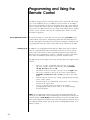
Press and hold the balance (BAL) button until “0L” appears in
the display. A momentary press of the balance button will, of
course, simply place the PRE in balance mode. When you press
and hold the balance button instead, the PRE will wait for a
few seconds to make sure that your press-and-hold action is
quite deliberate, and then enter a teaching mode which allows
you to program a learning remote control with infrared (IR)
commands. The PRE’s main display will show a number and
the letter “L” (for “Learn”) when in this mode.
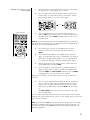
The PRE will display a “0L” code when it has entered its
teaching mode and is ready to help the remote control learn
the commands that correspond to the PRE’s front panel buttons. If no further buttons are pressed within approximately
ten seconds, the PRE will “time out” and return to normal
operation.
2
Press and hold the mute button until “1L” appears in the display. You will see the usual small yellow LED light up when
you first press the mute button, indicating that the PRE is
sending the IR code for the mute function. By continuing to
hold this button, however, you are instructing the PRE to give
you access to programming options beyond those represented
by the front panel buttons.
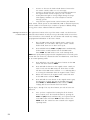
The table below lists the special commands which are available
for the PRE. In the second column are the programming “codes”
used in the main display to represent those special commands.
special commands table
stereo/mono toggle
polarity normal/inverted toggle
display on/off toggle
direct access to main path
direct access to record path
direct access to operate
direct access to standby
direct access to mute on (e.g., volume reduced)
direct access to mute off (e.g., volume normal)
1L
2L
3L
4L
5L
6L
7L
8L
9L
3
Use the volume +/– buttons to select the code that corresponds
to the special function you would like to teach your remote
control. Pressing the volume + button will increase the program
code number by one; volume – will decrease the program code
number by one. Select the desired code number from the list
above.
4
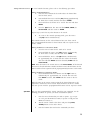
Momentarily press the mute button to transmit that code. Line
up the IR window of the PRE remote control with the center
of the main display of the PRE, at a distance of approximately
6"-12". Select the to-be-learned button on the remote, then
fire the selected code from the PRE.
37