1
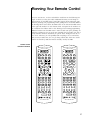
power
standby
mute
volume
8
PRE OPERATIONAL CONTROLS
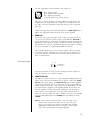
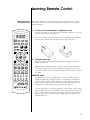
This section of the learning remote contains the most often used controls
for the Proceed PRE.
•
volume
polarity
cd1
•
•
5
cd2
6
•
tape1
7
tape2
•
8
bal/aux
9
•
•
tuner
0
mono
display
•
•
•
•
balance
path
•
•
•
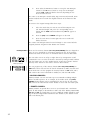
standby: pressing this button will place the PRE into standby
mode. As with all buttons on the learning remote, this button
can be “programmed over” if you wish. For example, you
may decide to leave the PRE “on” all the time and use the
standby button to turn another component on and off instead.
mute: pressing this button duplicates the function of the mute
button on the front panel, reducing the volume of the main
system by a user-selectable amount.
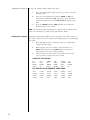
volume +/–: these buttons normally adjust the overall system
volume, although they are also used in conjunction with other
buttons and/or menu items to vary most of the available system adjustments.
polarity: inverts the polarity (sometimes inaccurately called
“absolute phase”) of the outputs of the PRE. A second press
of this button will restore the outputs to their original, noninverting polarity.
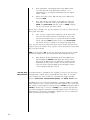
cd1: selects the cd1 input (on either the main path or the
record path, depending which is selected).
cd2: selects the cd2 input (on either the main path or the
record path, depending which is selected).
tape1: selects the tape1 input (on either the main path or the
record path, depending which is selected).
tape2: selects the tape2 input (on either the main path or the
record path, depending which is selected).
bal/aux: selects the bal/aux input (on either the main path or
the record path, depending which is selected).
tuner: selects the tuner input (on either the main path or the
record path, depending which is selected).
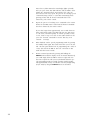
mono: sums the left and right channels of the PRE to a monophonic signal, which is then routed to both left and right outputs.
display: pressing this button will turn off the front panel display of the PRE to facilitate listening to music (or watching
movies) in a darkened room without visual distractions. The
PRE’s display will turn back on momentarily when adjusting
the unit’s operation in order to acknowledge the changes.
The display may be returned to its normal, always-on mode
by pressing the display button again.
path: pressing this button toggles the PRE between the main
and record signal paths. Having selected a path, subsequent
source selections affect only that path.
balance: pressing this button temporarily allows the volume +/
– keys to affect the balance of the left and right speakers rather
than the overall volume.
For more information on the teaching your remote new functions, see
Programming and Using the Remote Control.
21