1
Printing with Mac OS X: An ICC Workflow 14
STEP 6: Choosing Your Printer Driver Settings & Printing Your Image
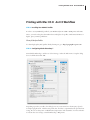
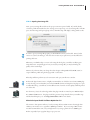
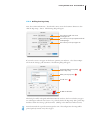
Next, pull down the driver features menu and select ‘Paper Configuration’.
The following dialog box appears.
Make sure to verify this setting.
Sometimes the Color Density is adjusted for
the creation of an RGB profile to optimize
D-max and color gamut.
Again, make sure you are selecting the correct settings for your ICC profile.
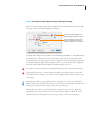
Depending upon your media input type, you may have a ‘Roll Paper Option’ selection. If so, pull
down the driver features menu and select ‘Roll Paper Option’.
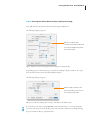
The following dialog box appears.
Whatever settings you make here, will
always override what you have set on the
front control panel of the printer.
When you are all done making driver settings, then click on the ‘Print’ button.
If you make a preset of these settings BEFORE you hit the ‘Print’ button, you can speed-up this
process the next time you use this profile, printer, ink, and media combination, by simply selecting
the preset within the ‘Presets:’ pull down menu.