1
Printing with Mac OS X: An ICC Workflow 9
STEP 3: Opening Your Image File
Next, open your image file and choose the proper conversion option if asked. If your file already
contains a profile that matches the color settings you’ve setup in step 2 or if your image file is in LAB
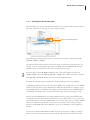
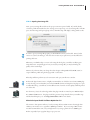
space, then the image will open right up. If not, then Photoshop will display a dialog similar to this:
In order to open your image file properly, you should NOT convert your data file. Instead, select
‘Leave as is (don’t color manage)’. The less color conversions you perform on your data file before
printing the better.
Whenever you ask Photoshop to convert color using this dialog box, you will be modifying your
image file forever. Depending upon how you created your image file, you may be limiting the
quality of the actual image!
However, if you know what your doing, then select ‘Assign working RGB: Adobe RGB (1998)’ or
assign a different profile using the ‘Assign profile:’ radio button.
Photoshop will then perform any color conversions and open your file into a window.
NIKON D1X & D1H
NIKON D100
Professional digital camera owners, I highly recommend the use of Adobe’s new Camera RAW plugin. By shooting your work within your camera’s RAW file format and using this new plug-in to open
it within Photoshop, you will have an incredible amount of control over the quality and final printed
size of the shot.
For the money (~$99), the technology within this plug-in makes it a must buy. For EPSON Stylus
Pro 7600 and 9600 owners, this plug-in will also generate a larger data file from your smaller original file that will impress you. Visit http://www.adobe.com for more details.
What Color Space Should I Calibrate My Monitor To?
The answer to this question will vary, but if your using the latest LCD monitors from Apple then
calibrate your monitors to a 2.2 gamma at 6500 degrees Kelvin. If you are using a CRT monitor
I would recommend the same, but you might want to try using a gamma of 1.8 at 5000 degrees
Kelvin, especially if your a graphic design or pre-press user.