1
Reading the Indicator Light
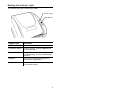
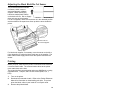
The indicator light monitors the printer's status.
Indicator Light
Feed Button
Indicator Light
Description
GREEN
Printer is on and ready to use.
FLASHING GREEN
Printer is paused. Press the FEED button
to resume printing.
FLASHING RED
Printer error condition. See
“Troubleshooting,” for error conditions and
solutions.
ORANGE
The system is detecting the supply and
ribbon status (if applicable).
No light
Printer is off. Make sure the power supply
is connected properly.
3