1
D-3
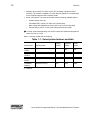
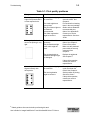
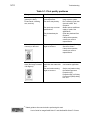
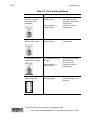
Magnetic Stripe settings used by the Select
printer
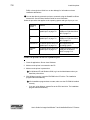
The following table presents technical details that apply to encoding magnetic stripe
data.
IATA
ABA
TTS
NTT
Binary
Character Differential
32
48
48
0
0
Start Sentinel (SS)
(ASCII character)
% (37)
; (59)
; (59)
127
None
End Sentinel (ES)
(ASCII character)
? (63)
? (63)
? (63)
127
None
Lowest ASCII Character
space (32)
0 (48)
0 (48)
(1)
0
Highest ASCII Character
_ (95)
? (63)
? (63)
(126)
255
Character-level parity (VRC)
Odd
Odd
Odd
Even
None
Cumulative parity (LRC)
Even
Even
Even
Even
None
Density in bits per inch
210
75
210
210
210
Data bits per character
6
4
4
7
8
Maximum number of
encodable characters (not
including start and end
sentinel or LRC)
76
37
104
69
33
Encoding direction
SS first
SS first
SS first
SS last
SS first
Start sentinel adjustment
310
320
310
450
310
Magnetic Stripe Setup
Do the following to set up the printer and printer driver to encode magnetic stripes on
cards:
•
•
Use cards with magnetic stripes when making a printer test card.
•
Select the encoding format. If a custom format, such as triple-IATA, is used, select
Binary or “Use Printer coercivity” in the printer driver.
Determine the coercivity to use. Usually, the coercivity is system-wide decision:
magnetic stripe readers are likely to require a specific coercivity value. Card stock
is purchased to match that coercivity value. Set the coercivity in the printer driver.
User’s Guide for ImageCard® Select™ and UltraGrafix® Select™ Printers