1
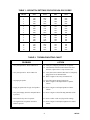
TABLE 1 - DIPSWITCH SETTINGS FOR DOOR UNLOCK CODES
DIGIT
SW1
SW2
SW3
SW4
1
2
3
4
ON
OFF
ON
OFF
OFF
ON
ON
OFF
OFF
OFF
OFF
ON
OFF
OFF
OFF
OFF
5
6
7
8
ON
OFF
ON
OFF
OFF
ON
ON
OFF
ON
ON
ON
OFF
OFF
OFF
OFF
ON
9
0
*
#
ON
OFF
ON
OFF
OFF
ON
ON
OFF
OFF
OFF
OFF
ON
ON
ON
ON
ON
A
B
C
D
ON
OFF
ON
OFF
OFF
ON
ON
OFF
ON
ON
ON
OFF
ON
ON
ON
OFF
TABLE 2: TROUBLESHOOTING CHART
PROBLEM
ACTION
1. No system operation - Power LED not lit.
1a. Verify AC voltage is present at the receptacle.
1b. Check the fuse located on the bottom of the unit.
If blown, replace with a 1 amp 250 VAC fuse.
2. No system operation - Power LED is lit.
2a. Verify that screw terminal connectors are completely
plugged into circuit board headers.
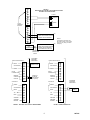
2b. Refer to Figure 2 and verify all connections.
3. No paging at speaker.
3a. Check door plate speaker connections.
3b. Refer to Figure 5 and adjust Phone to Speaker
volume.
4. Paging at speaker but no reply from speaker.
4a. Refer to Figure 5 and adjust Speaker to Phone
volume.
5. No system ringing when the doorplate button
is pressed.
5a. Refer to Figure 5 and check Ring ON/OFF switch.
6. Door unlock relay does not operate.
6a. Refer to Table 1 and verify dip switch settings.
7. No ringback tone to speaker when door
button is pressed.
7a. Refer to Figure 5 and adjust ringback tone volume
control.
4
947301