1
U.S. Robotics Wireless MAXg Range Extender
Installation
USR5441 Installation Guide
Package Contents:
USR5441 Wireless MAXg Range Extender
5VDC power supply
Quick Installation Guide
Installation CD-ROM which includes User Guide
One (1) Ethernet cable
Detachable antenna
Prepare for installation
You must be using a wireless router or access point that supports WDS (Wireless Distribution
System). If you are using WPA as an encryption method in your wireless network, you must be
using either TKIP or AES, not a combination, since the Range Extender only supports one or the
other.
You must have administrator rights on your computer in order to install this product.
Be sure to find out what letter your CD-ROM drive uses before you begin installing your new product. You will need to know this to install your software.
Connecting the Wireless MAXg Range Extender
Note: For the most updated information, visit: http://www.usr.com/support/.
You can also refer to the User Guide on the U.S. Robotics Installation CD-ROM for more
detailed information.
Step One: Connect the Wireless MAXg Range Extender
Note: Look at the label on the bottom of the Wireless MAXg Range Extender and write
down the LAN MAC address listed before you physically place the Range Extender. You will
need this for future reference.
A.
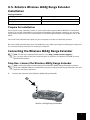
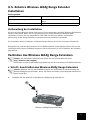
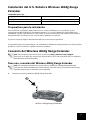
Connect the antenna to the Wireless MAXg Range Extender.
A
Wireless MAXg Range Extender
1