1
Chapter 18 Managing Users, Groups, Roles, and Permissions
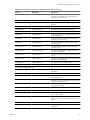
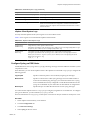
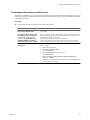
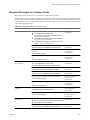
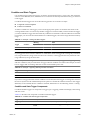
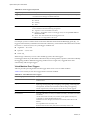
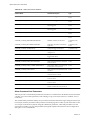
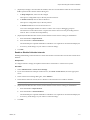
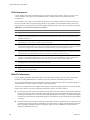
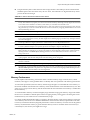
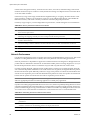
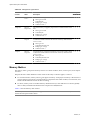
Required Privileges for Common Tasks
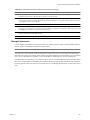
Many tasks require permissions on more than one object in the inventory.
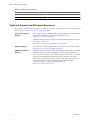
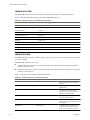
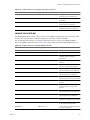
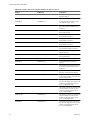
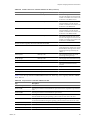
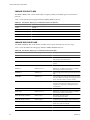
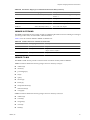
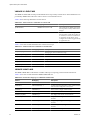
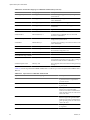
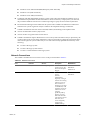
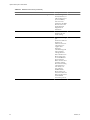
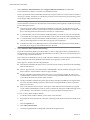
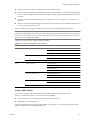
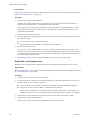
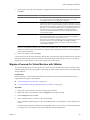
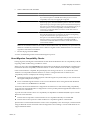
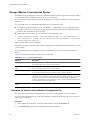
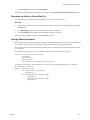
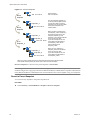
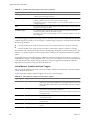
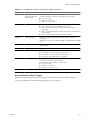
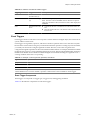
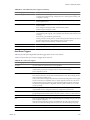
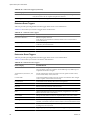
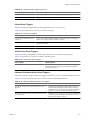
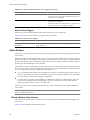
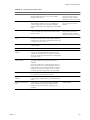
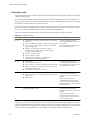
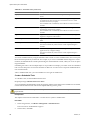
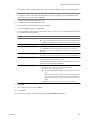
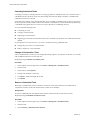
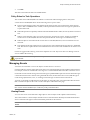
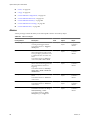
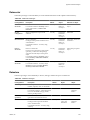
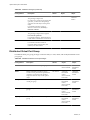
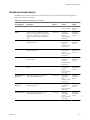
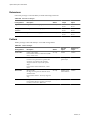
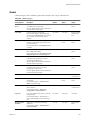
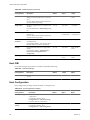
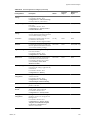
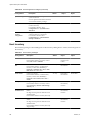
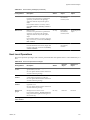
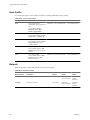
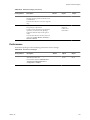
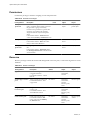
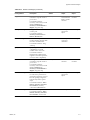
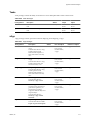
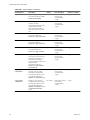
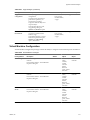
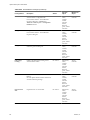
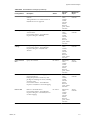
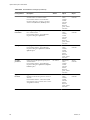
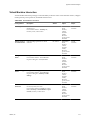
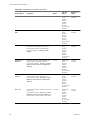
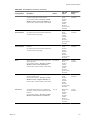
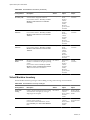
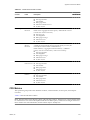
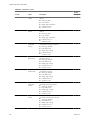
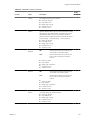
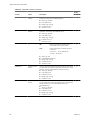
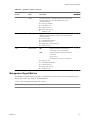
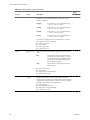
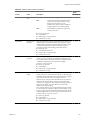
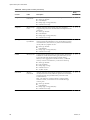
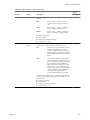
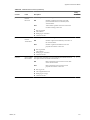
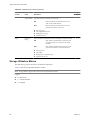
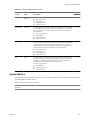
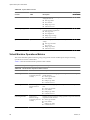
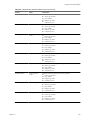
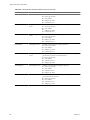
Table 18-2 lists common tasks that require more than one privilege. It lists the privileges required to perform
the tasks and, where applicable, the appropriate sample roles. You can use the listed Applicable Roles on the
listed inventory objects to grant permission to perform these tasks, or you can create your own roles with the
equivalent required privileges.
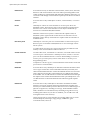
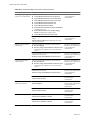
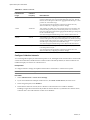
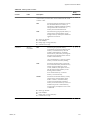
Table 18-2. Required Privileges for Common Tasks
Task
Required Privileges
Applicable Role
Create a virtual machine
On the destination folder or datacenter:
n Virtual Machine.Inventory.Create
n Virtual Machine.Configuration.Add New Disk (if
creating a new virtual disk)
n Virtual Machine .Configuration.Add Existing Disk
(if using an existing virtual disk)
n Virtual Machine.Configuration.Raw Device (if using
a RDM or SCSI pass-through device)
Virtual Machine
Administrator
On the destination host, cluster, or resource pool:
Resource.Assign Virtual Machine to Resource Pool
Virtual Machine
Administrator
On the destination datastore or folder containing a
datastore:
Datastore.Allocate Space
Datastore Consumer or
Virtual Machine
Administrator
On the network that the virtual machine will be assigned
to:
Network.Assign Network
Network Consumer or
Virtual Machine
Administrator
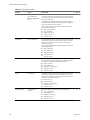
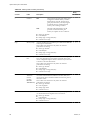
On the destination folder or datacenter:
n Virtual Machine.Inventory.Create
n Virtual Machine.Configuration.Add New Disk
Virtual Machine
Administrator
On a template or folder of templates:
Virtual Machine.Provisioning.Deploy Template
Virtual Machine
Administrator
On the destination host, cluster or resource pool:
Resource.Assign Virtual.Machine to Resource Pool
Virtual Machine
Administrator
On the destination datastore or folder of datastores:
Datastore.Allocate Space
Datastore Consumer or
Virtual Machine
Administrator
On the network that the virtual machine will be assigned
to:
Network.Assign Network
Network Consumer or
Virtual Machine
Administrator
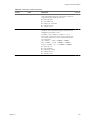
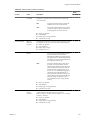
On the virtual machine or a folder of virtual machines:
Virtual Machine.State.Create Snapshot
Virtual Machine Power User
or Virtual Machine
Administrator
On the destination datastore or folder of datastores:
Datastore.Allocate Space
Datastore Consumer or
Virtual Machine
Administrator
On the virtual machine or folder of virtual machines:
n Resource.Assign Virtual Machine to Resource Pool
n Virtual Machine.Inventory.Move
Virtual Machine
Administrator
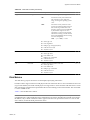
On the destination resource pool:
Resource.Assign Virtual Machine to Resource Pool
Virtual Machine
Administrator
Deploy a virtual machine
from a template
Take a virtual machine
snapshot
Move a virtual machine into a
resource pool
VMware, Inc.
227