1
Preparation
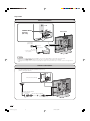
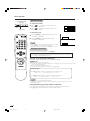
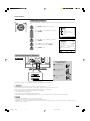
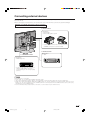
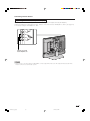
Power connection
POWER INPUT
terminal
(DC 13V)
MAIN POWER
Household
power outlet
To POWER
INPUT terminal
Plug into
power outlet.
AC cord*
* Product shape varies in
some countries.
AC adapter
NOTE teote:
• Use a commercially available AC plug adapter, if necessary, depending on the design of the wall outlet.
• Always turn the MAIN POWER switch of the LCD TV set to off when connecting the AC adapter.
• Unplug the AC adapter from the LCD TV set and power outlet when the LCD TV set is not to be used for a long period of
time.
Antenna connection
• Using the supplied antenna cable, connect the room
antenna terminal to the antenna terminal on the TV set.
(Refer to the figure below.)
ANT. (Antenna terminal)
Room antenna terminal
(75-ohm type)
Antenna cable (supplied)
To antenna terminal
6
lc22aa1h_en_p01_10
6
04.2.25, 2:53 PM