1
Red Hat Enterprise Linux 6
Virtualization Guide
Guide to Virtualization on Red Hat Enterprise Linux 6
Virtualization Guide
Red Hat Enterprise Linux 6 Virtualization Guide
Guide to Virtualization on Red Hat Enterprise Linux 6
Edition 1
Author
Copyright © 2008,2009,2010 Red Hat, Inc.
The text of and illustrations in this document are licensed by Red Hat under a Creative Commons
Attribution–Share Alike 3.0 Unported license ("CC-BY-SA"). An explanation of CC-BY-SA is available
at http://creativecommons.org/licenses/by-sa/3.0/. In accordance with CC-BY-SA, if you distribute this
document or an adaptation of it, you must provide the URL for the original version.
Red Hat, as the licensor of this document, waives the right to enforce, and agrees not to assert,
Section 4d of CC-BY-SA to the fullest extent permitted by applicable law.
Red Hat, Red Hat Enterprise Linux, the Shadowman logo, JBoss, MetaMatrix, Fedora, the Infinity
Logo, and RHCE are trademarks of Red Hat, Inc., registered in the United States and other countries.
Linux® is the registered trademark of Linus Torvalds in the United States and other countries.
Java® is a registered trademark of Oracle and/or its affiliates.
XFS® is a trademark of Silicon Graphics International Corp. or its subsidiaries in the United States
and/or other countries.
MySQL® is a registered trademark of MySQL AB in the United States, the European Union and other
countries.
All other trademarks are the property of their respective owners.
1801 Varsity Drive
Raleigh, NC 27606-2072 USA
Phone: +1 919 754 3700
Phone: 888 733 4281
Fax: +1 919 754 3701
The Red Hat Enterprise Linux Virtualization Guide contains information on installation, configuring,
administering, and troubleshooting virtualization technologies included with Red Hat Enterprise Linux.
Preface
vii
1. Document Conventions .................................................................................................. vii
1.1. Typographic Conventions .................................................................................... vii
1.2. Pull-quote Conventions ........................................................................................ ix
1.3. Notes and Warnings ............................................................................................ ix
2. We need your feedback .................................................................................................. x
1. Introduction
1.1. What is virtualization? ..................................................................................................
1.2. KVM and virtualization in Red Hat Enterprise Linux ........................................................
1.3. libvirt and the libvirt tools ..............................................................................................
1.4. Virtualized hardware devices ........................................................................................
1.4.1. Virtualized and emulated devices .......................................................................
1.4.2. Para-virtualized drivers ......................................................................................
1.4.3. Physically shared devices ..................................................................................
1.5. Storage ........................................................................................................................
1.6. Virtualization security features .......................................................................................
1.7. Migration ......................................................................................................................
1.8. V2V .............................................................................................................................
1
1
1
2
2
3
4
5
6
7
7
8
I. Requirements and limitations
9
2. System requirements
11
3. KVM compatibility
13
4. Virtualization limitations
4.1. General limitations for virtualization .....................................................................
4.2. KVM limitations ..................................................................................................
4.3. Application limitations .........................................................................................
15
15
15
16
II. Installation
19
5. Installing the virtualization packages
21
5.1. Installing KVM with a new Red Hat Enterprise Linux installation ............................. 21
5.2. Installing KVM packages on an existing Red Hat Enterprise Linux system ............... 25
6. Virtualized guest installation overview
6.1. Virtualized guest prerequisites and considerations ................................................
6.2. Creating guests with virt-install ............................................................................
6.3. Creating guests with virt-manager .......................................................................
6.4. Installing guests with PXE ...................................................................................
27
27
27
28
37
7. Installing Red Hat Enterprise Linux 6 as a virtualized guest
7.1. Creating a Red Hat Enterprise Linux 6 guest with local installation media ...............
7.2. Creating a Red Hat Enterprise Linux 6 guest with a network installation tree ...........
7.3. Creating a Red Hat Enterprise Linux 6 guest with PXE .........................................
43
43
53
55
8. Installing Red Hat Enterprise Linux 6 as a para-virtualized guest on Red Hat
Enterprise Linux 5
59
8.1. Using virt-install .................................................................................................. 59
8.2. Using virt-manager ............................................................................................. 60
9. Installing a fully-virtualized Windows guest
71
9.1. Using virt-install to create a guest ....................................................................... 71
9.2. Installing Windows 2003 ..................................................................................... 72
iii
Virtualization Guide
III. Configuration
73
10. Network Configuration
75
10.1. Network Address Translation (NAT) with libvirt .................................................... 75
10.2. Bridged networking with libvirt ........................................................................... 76
11. KVM Para-virtualized Drivers
79
11.1. Using the para-virtualized drivers with Red Hat Enterprise Linux 3.9 guests ........... 79
11.2. Installing the KVM Windows para-virtualized drivers ............................................ 82
11.2.1. Installing the drivers on an installed Windows guest .................................. 82
11.2.2. Installing drivers during the Windows installation ...................................... 92
11.3. Using KVM para-virtualized drivers for existing devices ....................................... 99
11.4. Using KVM para-virtualized drivers for new devices ........................................... 100
12. PCI passthrough
12.1. Adding a PCI device with virsh ........................................................................
12.2. Adding a PCI device with virt-manager .............................................................
12.3. PCI passthrough with virt-install .......................................................................
107
108
110
114
13. SR-IOV
13.1. Introduction ....................................................................................................
13.2. Using SR-IOV .................................................................................................
13.3. Troubleshooting SR-IOV ..................................................................................
117
117
118
121
14. KVM guest timing management
123
IV. Administration
127
15. Server best practices
129
16. Security for virtualization
16.1. Storage security issues ...................................................................................
16.2. SELinux and virtualization ...............................................................................
16.3. SELinux .........................................................................................................
16.4. Virtualization firewall information ......................................................................
131
131
131
133
133
17. sVirt
135
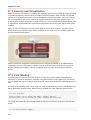
17.1. Security and Virtualization ............................................................................... 136
17.2. sVirt labeling ................................................................................................... 136
iv
18. KVM live migration
18.1. Live migration requirements ............................................................................
18.2. Shared storage example: NFS for a simple migration ........................................
18.3. Live KVM migration with virsh .........................................................................
18.4. Migrating with virt-manager .............................................................................
139
139
140
141
142
19. Remote management of virtualized guests
19.1. Remote management with SSH .......................................................................
19.2. Remote management over TLS and SSL .........................................................
19.3. Transport modes .............................................................................................
155
155
156
157
20. Overcommitting with KVM
161
21. KSM
165
22. Advanced virtualization administration
22.1. Guest scheduling ............................................................................................
22.2. Advanced memory management ......................................................................
22.3. Guest block I/O throttling .................................................................................
22.4. Guest network I/O throttling .............................................................................
169
169
169
169
169
23. Migrating to KVM from other hypervisors using virt-v2v
23.1. Preparing to convert a virtualized guest ...........................................................
23.2. Converting virtualized guests ...........................................................................
23.2.1. virt-v2v ................................................................................................
23.2.2. Converting a local Xen virtualized guest ................................................
23.2.3. Converting a remote Xen virtualized guest .............................................
23.2.4. Converting a VMware ESX virtualized guest ..........................................
23.2.5. Converting a virtualized guest running Windows .....................................
23.3. Running converted virtualized guests ...............................................................
23.4. Configuration changes ....................................................................................
23.4.1. Configuration changes for Linux virtualized guests ..................................
23.4.2. Configuration changes for Windows virtualized guests ............................
171
171
175
175
177
177
177
178
179
179
179
180
24. Miscellaneous administration tasks
24.1. Automatically starting guests ...........................................................................
24.2. Using qemu-img .............................................................................................
24.3. Verifying virtualization extensions .....................................................................
24.4. Setting KVM processor affinities ......................................................................
24.5. Generating a new unique MAC address ...........................................................
24.6. Improving guest response time ........................................................................
24.7. Very Secure ftpd .........................................................................................
24.8. Disable SMART disk monitoring for guests .......................................................
24.9. Configuring a VNC Server ...............................................................................
24.10. Gracefully shutting down guests ....................................................................
24.11. Virtual machine timer management with libvirt .................................................
183
183
183
184
185
189
190
191
192
192
192
193
V. Virtualization storage topics
197
25. Storage concepts
199
25.1. Storage pools ................................................................................................. 199
25.2. Volumes ........................................................................................................ 200
26. Storage pools
26.1. Creating storage pools ...................................................................................
26.1.1. Dedicated storage device-based storage pools ......................................
26.1.2. Partition-based storage pools ................................................................
26.1.3. Directory-based storage pools ...............................................................
26.1.4. LVM-based storage pools .....................................................................
26.1.5. iSCSI-based storage pools ...................................................................
26.1.6. NFS-based storage pools .....................................................................
203
203
203
205
211
217
223
232
27. Volumes
27.1. Creating volumes ............................................................................................
27.2. Cloning volumes .............................................................................................
27.3. Adding storage devices to guests ....................................................................
27.3.1. Adding file based storage to a guest .....................................................
27.3.2. Adding hard drives and other block devices to a guest ............................
27.4. Deleting and removing volumes .......................................................................
237
237
237
238
238
240
241
28. Miscellaneous storage topics
28.1. Creating a virtualized floppy disk controller .......................................................
28.2. Configuring persistent storage in Red Hat Enterprise Linux 6 .............................
28.3. Accessing data from a guest disk image ..........................................................
243
243
244
247
29. N_Port ID Virtualization (NPIV)
251
29.1. Enabling NPIV on the switch ........................................................................... 251
v
Virtualization Guide
29.1.1. Identifying HBAs in a Host System ........................................................ 251
29.1.2. Verify NPIV is used on the HBA ............................................................ 252
VI. Virtualization reference guide
255
30. Managing guests with virsh
257
31. Managing guests with the Virtual Machine Manager (virt-manager)
31.1. Starting virt-manager .......................................................................................
31.2. The Virtual Machine Manager main window ......................................................
31.3. The virtual hardware details window ................................................................
31.4. Virtual Machine graphical console ....................................................................
31.5. Adding a remote connection ............................................................................
31.6. Displaying guest details ..................................................................................
31.7. Performance monitoring ..................................................................................
31.8. Displaying CPU usage ....................................................................................
31.9. Displaying Disk I/O .........................................................................................
31.10. Displaying Network I/O ..................................................................................
31.11. Managing a virtual network ............................................................................
31.12. Creating a virtual network ..............................................................................
267
267
268
269
271
273
274
281
283
284
285
286
288
32. libvirt configuration reference
297
33. Creating custom libvirt scripts
299
33.1. Using XML configuration files with virsh ........................................................... 299
VII. Troubleshooting
34. Troubleshooting
34.1. Debugging and troubleshooting tools ...............................................................
34.2. kvm_stat ........................................................................................................
34.3. Log files .........................................................................................................
34.4. Troubleshooting with serial consoles ................................................................
34.5. Virtualization log files ......................................................................................
34.6. Loop device errors ..........................................................................................
34.7. Enabling Intel VT and AMD-V virtualization hardware extensions in BIOS ............
34.8. KVM networking performance ..........................................................................
301
303
303
304
307
307
308
308
308
309
A. Additional resources
311
A.1. Online resources ...................................................................................................... 311
A.2. Installed documentation ............................................................................................ 311
Glossary
313
B. Revision History
317
C. Colophon
319
vi
Preface
Welcome to the Red Hat Enterprise Linux 6 Virtualization Guide. This guide covers all aspects of using
and managing virtualization products included with Red Hat Enterprise Linux 6.
This book is divided into 7 parts:
• System Requirements
• Installation
• Configuration
• Administration
• Reference
• Troubleshooting
• Appendixes
Key terms and concepts used throughout this book are covered in the Glossary.
1. Document Conventions
This manual uses several conventions to highlight certain words and phrases and draw attention to
specific pieces of information.
1
In PDF and paper editions, this manual uses typefaces drawn from the Liberation Fonts set. The
Liberation Fonts set is also used in HTML editions if the set is installed on your system. If not,
alternative but equivalent typefaces are displayed. Note: Red Hat Enterprise Linux 5 and later includes
the Liberation Fonts set by default.
1.1. Typographic Conventions
Four typographic conventions are used to call attention to specific words and phrases. These
conventions, and the circumstances they apply to, are as follows.
Mono-spaced Bold
Used to highlight system input, including shell commands, file names and paths. Also used to highlight
keycaps and key combinations. For example:
To see the contents of the file my_next_bestselling_novel in your current
working directory, enter the cat my_next_bestselling_novel command at the
shell prompt and press Enter to execute the command.
The above includes a file name, a shell command and a keycap, all presented in mono-spaced bold
and all distinguishable thanks to context.
Key combinations can be distinguished from keycaps by the hyphen connecting each part of a key
combination. For example:
Press Enter to execute the command.
1
https://fedorahosted.org/liberation-fonts/
vii
Preface
Press Ctrl+Alt+F2 to switch to the first virtual terminal. Press Ctrl+Alt+F1 to
return to your X-Windows session.
The first paragraph highlights the particular keycap to press. The second highlights two key
combinations (each a set of three keycaps with each set pressed simultaneously).
If source code is discussed, class names, methods, functions, variable names and returned values
mentioned within a paragraph will be presented as above, in mono-spaced bold. For example:
File-related classes include filesystem for file systems, file for files, and dir for
directories. Each class has its own associated set of permissions.
Proportional Bold
This denotes words or phrases encountered on a system, including application names; dialog box text;
labeled buttons; check-box and radio button labels; menu titles and sub-menu titles. For example:
Choose System → Preferences → Mouse from the main menu bar to launch Mouse
Preferences. In the Buttons tab, click the Left-handed mouse check box and click
Close to switch the primary mouse button from the left to the right (making the mouse
suitable for use in the left hand).
To insert a special character into a gedit file, choose Applications → Accessories
→ Character Map from the main menu bar. Next, choose Search → Find… from the
Character Map menu bar, type the name of the character in the Search field and click
Next. The character you sought will be highlighted in the Character Table. Doubleclick this highlighted character to place it in the Text to copy field and then click the
Copy button. Now switch back to your document and choose Edit → Paste from the
gedit menu bar.
The above text includes application names; system-wide menu names and items; application-specific
menu names; and buttons and text found within a GUI interface, all presented in proportional bold and
all distinguishable by context.
Mono-spaced Bold Italic or Proportional Bold Italic
Whether mono-spaced bold or proportional bold, the addition of italics indicates replaceable or
variable text. Italics denotes text you do not input literally or displayed text that changes depending on
circumstance. For example:
To connect to a remote machine using ssh, type ssh [email protected] at
a shell prompt. If the remote machine is example.com and your username on that
machine is john, type ssh [email protected].
The mount -o remount file-system command remounts the named file
system. For example, to remount the /home file system, the command is mount -o
remount /home.
To see the version of a currently installed package, use the rpm -q package
command. It will return a result as follows: package-version-release.
Note the words in bold italics above — username, domain.name, file-system, package, version and
release. Each word is a placeholder, either for text you enter when issuing a command or for text
displayed by the system.
Aside from standard usage for presenting the title of a work, italics denotes the first use of a new and
important term. For example:
viii
Pull-quote Conventions
Publican is a DocBook publishing system.
1.2. Pull-quote Conventions
Terminal output and source code listings are set off visually from the surrounding text.
Output sent to a terminal is set in mono-spaced roman and presented thus:
books
books_tests
Desktop
Desktop1
documentation
downloads
drafts
images
mss
notes
photos
scripts
stuff
svgs
svn
Source-code listings are also set in mono-spaced roman but add syntax highlighting as follows:
package org.jboss.book.jca.ex1;
import javax.naming.InitialContext;
public class ExClient
{
public static void main(String args[])
throws Exception
{
InitialContext iniCtx = new InitialContext();
Object
ref
= iniCtx.lookup("EchoBean");
EchoHome
home
= (EchoHome) ref;
Echo
echo
= home.create();
System.out.println("Created Echo");
System.out.println("Echo.echo('Hello') = " + echo.echo("Hello"));
}
}
1.3. Notes and Warnings
Finally, we use three visual styles to draw attention to information that might otherwise be overlooked.
Note
Notes are tips, shortcuts or alternative approaches to the task at hand. Ignoring a note should
have no negative consequences, but you might miss out on a trick that makes your life easier.
Important
Important boxes detail things that are easily missed: configuration changes that only apply to
the current session, or services that need restarting before an update will apply. Ignoring a box
labeled 'Important' will not cause data loss but may cause irritation and frustration.
Warning
Warnings should not be ignored. Ignoring warnings will most likely cause data loss.
ix
Preface
2. We need your feedback
If you find a typographical error in this manual, or if you have thought of a way to make this manual
better, we would love to hear from you. Submit a report in Bugzilla: http://bugzilla.redhat.com/ against
the Red_Hat_Enterprise_Linux product.
When submitting a bug report, be sure to refer to the correct component: doc-Virtualization_Guide and
version number: 6.
If you have a suggestion for improving the documentation, try to be as specific as possible when
describing it. If you have found an error, include the section number and some of the surrounding text
so we can find it easily.
x
Chapter 1.
Introduction
This chapter introduces various virtualization technologies, applications and features and explains how
they work. The purpose of this chapter is to assist Red Hat Enterprise Linux users in understanding
the basics of virtualization.
1.1. What is virtualization?
Virtualization is a broad computing term for running software, usually operating systems, concurrently
and isolated from other programs on one system. Most existing implementations of virtualization use a
hypervisor, a software layer that controls hardware and provides guest operating systems with access
to underlying hardware. The hypervisor allows multiple operating systems to run on the same physical
system by offering virtualized hardware to the guest operating system. There are various methods for
virtualizing operating systems:
• Hardware-assisted virtualization is the technique used for full virtualization with KVM.
• Para-virtualization is a technique used by Xen to run Linux guests.
• Software virtualization or emulation. Software virtualization uses binary translation and other
emulation techniques to run unmodified operating systems. Software virtualization is significantly
slower than hardware-assisted virtualization or para-virtualization. Software virtualization, using
QEMU without KVM, is unsupported by Red Hat Enterprise Linux.
1.2. KVM and virtualization in Red Hat Enterprise Linux
What is KVM?
(KVM) is a Full virtualization solution for Linux on AMD64 and Intel 64 hardware. KVM is a Linux
kernel module built for the standard Red Hat Enterprise Linux 6 kernel. KVM can run multiple,
unmodified virtualized guest Windows and Linux operating systems.The KVM hypervisor in Red Hat
Enterprise Linux is managed with the libvirt API and tools built for libvirt, virt-manager and virsh.
Virtualized guests are run as Linux processes and threads which are controlled by these modules.
Red Hat Enterprise Linux KVM hypervisors can be managed by the Red Hat Enterprise Virtualization
Manager as an alternative to the virsh and virt-manager tools.
The kvm package also contains Linux kernel modules which manage devices, memory and
management APIs for the Hypervisor module itself.
This book covers virtualization topics for Red Hat Enterprise Linux 6. The Kernel based Virtual
Machine (KVM) hypervisor is provided with Red Hat Enterprise Linux. The KVM hypervisor supports
Full virtualization.
Overcommitting
The KVM hypervisor supports overcommitting virtualized CPUs and memory. Overcommitting means
allocating more virtualized CPUs or memory than the available resources on the system. CPU
overcommitting allows virtualized guests to run on fewer servers and in higher densities. Memory
overcommitting allows hosts to utilize memory and virtual memory to increase guest densities.
For more information on overcommitting with KVM, refer to Chapter 20, Overcommitting with KVM.
1
Chapter 1. Introduction
KSM
Kernel SamePage Merging (KSM) is used by the KVM hypervisor to allow KVM guests to share
identical memory pages. These shared pages are usually common libraries or other identical, high-use
data. KSM allows for greater guest density of identical or similar guest operating systems by avoiding
memory duplication.
For more information on KSM, refer to Chapter 21, KSM.
1.3. libvirt and the libvirt tools
Libvirt is a hypervisor-independent virtualization API that is able to interact with the virtualization
capabilities of a range of operating systems.
libvirt provides a common, generic and stable layer to securely manage virtualized guests on a host.
libvirt provides a common interface for managing local systems and networked hosts. libvirt provides
all APIs required to provision, create, modify, monitor, control, migrate and stop virtualized guests
if the hypervisor supports these operations. Although multiple hosts may be accessed with libvirt
simultaneously, the APIs are limited to single node operations.
libvirt is designed as a building block for higher level management tools and applications. libvirt
focuses on managing single hosts, with the exception of migration capabilities. libvirt provides APIs to
enumerate, monitor and use the resources available on the managed node, including CPUs, memory,
storage, networking and Non-Uniform Memory Access (NUMA) partitions. The management tools can
be located on separate physical machines from the host using secure protocols.
Red Hat Enterprise Linux 6 supports libvirt and included libvirt-based tools as its default method for
virtualization management.
libvirt is free software available under the GNU Lesser General Public License. The libvirt project aims
to provide a long term stable C API. The libvirt Open Source project currently supports Xen, QEmu,
KVM, LXC, OpenVZ, VirtualBox, OpenNebula, and VMware ESX. The Red Hat Enterprise Linux 6
libvirt package supports Xen on Red Hat Enterprise Linux 5 and KVM on Red Hat Enterprise Linux 5
and Red Hat Enterprise Linux 6.
virsh
The virsh command-line tool is built on the libvirt management API and operates as an
alternative to the graphical virt-manager application. The virsh command can be used in readonly mode by unprivileged users or, with root access, full administration functionality. The virsh
command is ideal for scripting virtualization administration.
The virsh command is included in the libvirt-client package.
virt-manager
virt-manager is a graphical desktop tool for managing virtualized guests. virt-manager can be
used to perform virtualization administration, virtualized guest creation, migration and configuration
tasks. virt-manager allows access to graphical guest consoles. virt-manager can view
virtualized guests, host statistics, device information and performance graphs. virt-manager can
manage the local hypervisor and remote hypervisors using the same interface and methods.
1.4. Virtualized hardware devices
Virtualization on Red Hat Linux 6 presents three distinct types of system devices to virtualized guests.
The three types include:
2
Virtualized and emulated devices
• Emulated software devices.
• Para-virtualized devices.
• Physically shared devices.
These hardware devices all appear as physically attached hardware devices to the virtualized guest
but the device drivers work in different ways.
1.4.1. Virtualized and emulated devices
The KVM hypervisor implements many core devices for virtualized guests in software. These emulated
hardware devices are crucial for virtualizing operating systems. This section is provided as an
introduction to the emulated devices and emulated device drivers.
Emulated devices are virtual devices which exist entirely in software. The emulated devices do not
require a real hardware device to back them.
Emulated drivers may use either a physical device or a virtual software device. Emulated drivers are
a translation layer between the guest and the Linux kernel (which manages the source device). The
device level instructions are completely translated by the KVM hypervisor. Any device, of the same
type, recognized by the Linux kernel may be used as the backing source device for the emulated
drivers.
Virtualized CPUs (VCPUs)
A system has a number of virtual CPUs (VCPUs) relative to the number of physical processor cores.
The number of virtual CPUs is finite and represents the total number of virtual CPUs that can be
assigned to guest virtual machines.
Emulated graphics devices
Two emulated graphics devices are provided. These devices can be connected to with the SPICE
protocol or with VNC.
• The ac97 device emulates a Cirrus CLGD 5446 PCI VGA card.
• The vga device emulates a dummy VGA card with Bochs VESA extensions (hardware level,
including all non-standard modes).
Emulated system components
Various core system components are emulated to provide basic system functions.
• A Cirrus i440FX host PCI bridge.
• PIIX3 PCI to ISA bridge.
• A PS/2 mouse and keyboard.
• An EvTouch USB Graphics Tablet.
• A PCI UHCI USB controller and a virtualized USB hub.
• A PCI and ISA network adapters.
• Emulated serial ports.
3
Chapter 1. Introduction
Emulated sound devices
Two emulated sound devices are available:
• The ac97 device emulates an Intel 82801AA AC97 Audio compatible sound card.
• The es1370 device emulates an ENSONIQ AudioPCI ES1370 sound card.
Emulated network drivers
There are four emulated network drivers available for network devices:
• The e1000 driver emulates an Intel E1000 network adaptor (Intel 82540EM, 82573L, 82544GC).
• The ne2k_pci driver emulates a Novell NE2000 network adaptor.
• The pcnet driver emulates an AMD Lance Am7990 network adaptor.
• The rtl8139 driver emulates a Realtek 8139 network adaptor.
Emulated storage drivers
Storage devices and storage pools can use the emulated drivers to attach storage devices to
virtualized guests. Alternatively, the para-virtualized drivers can be used.
Note that the storage drivers are not storage devices. The drivers are used to attach a backing storage
device, file or storage pool volume to a virtualized guest. The backing storage device can be any
supported type of storage device, file, or storage pool volume.
The emulated IDE driver
The KVM hypervisor provides two emulated PCI IDE interfaces. The emulated IDE driver can be
used to attach any combination of up to four virtualized IDE hard disks or virtualized IDE CD-ROM
drives to each virtualized guest. The emulated IDE driver is used for virtualized CD-ROM and
DVD-ROM drives.
The emulated floppy disk drive driver
The emulated floppy disk drive driver is used for creating virtualized floppy drives.
1.4.2. Para-virtualized drivers
Para-virtualized drivers are device drivers that increase the I/O performance of virtualized guests.
Para-virtualized drivers decrease I/O latency and increase I/O throughput to near bare-metal levels.
It is recommended to use the para-virtualized drivers for virtualized guests running I/O intensive
applications.
The para-virtualized drivers must be installed on the guest operating system. By default, the paravirtualized drivers are included in Red Hat Enterprise Linux 4.7 and newer, Red Hat Enterprise Linux
5.4 and newer and Red Hat Enterprise Linux 6.0 and newer. The para-virtualized drivers must be
manually installed on Windows guests. For more information on using the para-virtualized drivers refer
to Chapter 11, KVM Para-virtualized Drivers.
Para-virtualized network driver
The para-virtualized network driver is a Red Hat branded virtual network device. The para-virtualized
network driver can be used as the driver for existing network devices or new network devices for
virtualized guests.
4
Physically shared devices
Para-virtualized block driver
The para-virtualized block driver is a driver for all storage devices supported by the hypervisor
attached to the virtualized guest (except for floppy disk drives, which must be emulated).
The para-virtualized clock
Guests using the Time Stamp Counter (TSC) as a clock source may suffer timing issues.
KVM works around hosts that do not have a constant Time Stamp Counter by providing guests with a
para-virtualized clock.
For more information on the para-virtualized clock refer to Chapter 14, KVM guest timing
management.
The para-virtualized serial driver
The para-virtualized serial driver (virtio-serial) is a bytestream-oriented, character stream driver. The
para-virtualized serial driver provides a simple communication interface between the host's user space
and the guest's user space where networking is not available or unusable.
The balloon driver
The balloon driver allows guests to express to the hypervisor how much memory they require. The
balloon driver allows the host to efficiently allocate memory to the guest and allow free memory to be
allocated to other guests and processes.
Guests using the balloon driver can mark sections of the guest's RAM as not in use (balloon inflation).
The hypervisor can free the memory and use the memory for other host processes or other guests on
that host.
When the guest requires the freed memory again, the hypervisor can reallocate RAM to the guest
(balloon deflation).
1.4.3. Physically shared devices
Certain hardware platforms allow virtualized guests to directly access various hardware devices and
components. This process in virtualization is known as passthrough. Passthrough is known as device
assignment in some of the KVM documentation and the KVM code.
PCI passthrough
The KVM hypervisor supports attaching PCI devices on the host system to virtualized guests.
PCI passthrough allows guests to have exclusive access to PCI devices for a range of tasks. PCI
passthrough allows PCI devices to appear and behave as if they were physically attached to the guest
operating system.
Almost all PCI and PCI Express devices that support passthrough, except for graphics cards, can be
directly attached to virtualized guests with PCI passthrough.
SR-IOV
SR-IOV (Single Root I/O Virtualization) is a standard for a type of PCI passthrough which natively
shares a single device to multiple guests.
SR-IOV enables a Single Root Function (for example, a single Ethernet port), to appear as multiple,
separate, physical devices. A physical device with SR-IOV capabilities can be configured to appear
5
Chapter 1. Introduction
in the PCI configuration space as multiple functions, each device has its own configuration space
complete with Base Address Registers (BARs).
SR-IOV uses two new PCI functions:
• Virtualization-PF
• Virtualization VF
For more information on SR-IOV, refer to Chapter 13, SR-IOV.
NPIV
N_Port ID Virtualization (NPIV) is a function available with some Fibre Channel devices. NPIV shares
a single physical N_Port as multiple N_Port IDs. NPIV provides similar functionality for Host Bus
Adaptors (HBAs) that SR-IOV provides for network interfaces. With NPIV, virtualized guests can be
provided with a virtual Fibre Channel initiator to Storage Area Networks (SANs).
NPIV can provide high density virtualized environments with enterprise-level storage solutions.
For more information on NPIV, refer to Chapter 29, N_Port ID Virtualization (NPIV).
1.5. Storage
Storage for virtualized guests is abstracted from the physical storage used by the guest. Storage is
attached to virtualized guests using the para-virtualized (Section 1.4.2, “Para-virtualized drivers”) or
emulated block device drivers (Emulated storage drivers).
Storage pools
A storage pool is a file, directory, or storage device managed by libvirt for the purpose of providing
storage to virtualized guests. Storage pools are divided into storage volumes that store virtualized
guest images or are attached to virtualized guests as additional storage.
Storage pools can be divided up into volumes or allocated directly to a guest. Volumes of a storage
pool can be allocated to virtualized guests. There are two categories of storage pool available:
Local storage pools
Local storage pools are directly attached to the host server. Local storage pools include local
directories, directly attached disks, and LVM volume groups on local devices.
Local storage pools are useful for development, testing and small deployments that do not require
migration or large numbers of virtualized guests. Local storage pools are not suitable for many
production environments as local storage pools do not support live migration.
Networked (shared) storage pools
Networked storage pools covers storage devices shared over a network using standard protocols.
Networked storage required for migrating guest virtualized guests between hosts. Networked storage
pools are managed by libvirt.
Storage volumes
Storage pools are divided into storage volumes. Storage volumes are an abstraction of physical
partitions, LVM logical volumes, file-based disk images and other storage types handled by libvirt.
6
Virtualization security features
Storage volumes are presented to virtualized guests as local storage devices regardless of the
underlying hardware.
For more information on storage and virtualization refer to Part V, “Virtualization storage topics”.
1.6. Virtualization security features
SELinux
SELinux was developed by the US National Security Agency and others to provide Mandatory Access
Control (MAC) for Linux. All processes and files are given a type and access is limited by fine-grained
controls. SELinux limits an attackers abilities and works to prevent many common security exploits
such as buffer overflow attacks and privilege escalation.
SELinux strengthens the security model of Red Hat Enterprise Linux hosts and virtualized Red Hat
Enterprise Linux guests. SELinux is configured and tested to work, by default, with all virtualization
tools shipped with Red Hat Enterprise Linux 6.
For more information on SELinux and virtualization, refer to Section 16.2, “SELinux and virtualization”.
sVirt
sVirt is a technology included in Red Hat Enterprise Linux 6 that integrates SELinux and virtualization.
sVirt applies Mandatory Access Control (MAC) to improve security when using virtualized guests. sVirt
improves security and hardens the system against bugs in the hypervisor that might be used as an
attack vector for the host or to another virtualized guest.
For more information on sVirt, refer to Chapter 17, sVirt.
1.7. Migration
Migration is the term for the process of moving a virtualized guest from one host to another. Migration
can be conducted offline (where the guest is suspended and then moved) or live (where a guest is
moved without suspending).
Migration is a key feature of virtualization as software is completely separated from hardware.
Migration is useful for:
• Load balancing - guests can be moved to hosts with lower usage when a host becomes overloaded.
• Hardware failover - when hardware devices on the host start to fail, guests can be safely relocated
so the host can be powered down and repaired.
• Energy saving - guests can be redistributed to other hosts and host systems powered off to save
energy and cut costs in low usage periods.
• Geographic migration - guests can be moved to another location for lower latency or in serious
circumstances.
Migration only moves the virtualized guest's memory. The guest's storage is located on networked
storage which is shared between the source host and the destination.
Shared, networked storage must be used for storing guest images. Without shared storage migration
is not possible. It is recommended to use libvirt managed storage pools for shared storage.
7
Chapter 1. Introduction
Offline migration
An offline migration suspends the guest then moves an image of the guest's memory to the destination
host. The guest is resumed on the destination host and then memory the guest used on the source
host is freed.
Live migration
Live migration is the process of migrating a running guest from one physical host to another physical
host.
For more information on migration refer to Chapter 18, KVM live migration.
1.8. V2V
Virtualized to virtualized migration, known as V2V, is supported in Red Hat Enterprise Linux 6 for
certain virtualized guests.
Red Hat Enterprise Linux 6 provides tools for converting virtualized guests from other types of
hypervisor to KVM. The virt-v2v tool converts and imports virtual machines from Xen, other
versions of KVM and VMware ESX.
For more information on using V2V, refer to Chapter 23, Migrating to KVM from other hypervisors
using virt-v2v
8
Part I. Requirements and limitations
System requirements, support
restrictions and limitations
for virtualization with Red
Hat Enterprise Linux 6
These chapters outline the system requirements, support restrictions, and limitations of virtualization
on Red Hat Enterprise Linux 6.
Chapter 2.
System requirements
This chapter lists system requirements for successfully running virtualized guest operating systems
with Red Hat Enterprise Linux 6. Virtualization is available for Red Hat Enterprise Linux 6 on the Intel
64 and AMD64 architecture.
The KVM hypervisor is provided with Red Hat Enterprise Linux 6.
For information on installing the virtualization packages, read Chapter 5, Installing the virtualization
packages.
Minimum system requirements
• 6GB free disk space
• 2GB of RAM.
Recommended system requirements
• 6GB plus the required disk space recommended by the guest operating system per guest. For most
operating systems more than 6GB of disk space is recommended.
• One processor core or hyper-thread for each virtualized CPU and one for the hypervisor.
• 2GB of RAM plus additional RAM for virtualized guests.
KVM overcommit
KVM can overcommit physical resources for virtualized guests. Overcommitting resources means
the total virtualized RAM and processor cores used by the guests can exceed the physical RAM
and processor cores on the host. For information on safely overcommitting resources with KVM
refer to Chapter 20, Overcommitting with KVM.
KVM requirements
The KVM hypervisor requires:
• an Intel processor with the Intel VT and the Intel 64 extensions, or
• an AMD processor with the AMD-V and the AMD64 extensions.
Refer to Section 24.3, “Verifying virtualization extensions” to determine if your processor has the
virtualization extensions.
Storage support
The working guest storage methods are:
• files on local storage,
• physical disk partitions,
• locally connected physical LUNs,
• LVM partitions,
• NFS shared file systems,
• iSCSI,
11
Chapter 2. System requirements
• GFS2 clustered file systems, and
• Fibre Channel-based LUNs
• SRP devices (SCSI RDMA Protocol), the block export protocol used in Infiniband and 10GbE
iWARP adapters.
File-based guest storage
File-based guest images should be stored in the /var/lib/libvirt/images/ folder. If you
use a different directory you must add the directory to the SELinux policy. Refer to Section 16.2,
“SELinux and virtualization” for details.
12
Chapter 3.
KVM compatibility
The KVM hypervisor requires a processor with the Intel-VT or AMD-V virtualization extensions.
Note that this list is not complete. Help us expand it by sending in a bug with anything you get working.
To verify whether your processor supports the virtualization extensions and for information on
enabling the virtualization extensions if they are disabled, refer to Section 24.3, “Verifying virtualization
extensions”.
Red Hat Enterprise Linux 6.0 Servers with the kvm package are limited to 256 processor cores or less.
Supported guests
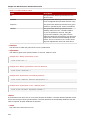
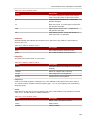
Operating system
Red Hat Enterprise Linux 3 x86
Support level
Optimized with para-virtualized drivers
Red Hat Enterprise Linux 4 x86
Optimized with para-virtualized drivers
Red Hat Enterprise Linux 4 AMD Optimized with para-virtualized drivers
64 and Intel 64
Red Hat Enterprise Linux 5 x86
Optimized with para-virtualized drivers
Red Hat Enterprise Linux 5 AMD Optimized with para-virtualized drivers
64 and Intel 64
Red Hat Enterprise Linux 6 x86
Optimized with para-virtualized drivers
Red Hat Enterprise Linux 6 AMD Optimized with para-virtualized drivers
64 and Intel 64
Fedora 12 x86
Optimized with para-virtualized drivers
Fedora 12 AMD 64 and Intel 64
Optimized with para-virtualized drivers
Fedora 13 x86
Optimized with para-virtualized drivers
Fedora 13 AMD 64 and Intel 64
Optimized with para-virtualized drivers
Windows Server 2003 R2 32-Bit
Optimized with para-virtualized drivers
Windows Server 2003 R2 64-Bit
Optimized with para-virtualized drivers
Windows Server 2003 Service
Pack 2 32-Bit
Optimized with para-virtualized drivers
Windows Server 2003 Service
Pack 2 64-Bit
Optimized with para-virtualized drivers
Windows XP 32-Bit
Optimized with para-virtualized drivers
Windows Vista 32-Bit
Supported
Windows Vista 64-Bit
Supported
Windows Server 2008 32-Bit
Optimized with para-virtualized drivers
Windows Server 2008 (and R2)
64-Bit
Optimized with para-virtualized drivers
Windows 7 32-Bit
Optimized with para-virtualized drivers
Windows 7 64-Bit
Optimized with para-virtualized drivers
13
14
Chapter 4.
Virtualization limitations
This chapter covers additional support and product limitations of the virtualization packages in Red Hat
Enterprise Linux 6.
4.1. General limitations for virtualization
Other limitations
For the list of all other limitations and issues affecting virtualization read the Red Hat Enterprise Linux
6 Release Notes. The Red Hat Enterprise Linux 6 Release Notes cover the present new features,
known issues and limitations as they are updated or discovered.
Test before deployment
You should test for the maximum anticipated load and virtualized network stress before deploying
heavy I/O applications. Stress testing is important as there are performance drops caused by
virtualization with increased I/O usage.
4.2. KVM limitations
The following limitations apply to the KVM hypervisor:
Maximum VCPUs per guest
Virtualized guests support up to a maximum of 64 virtualized CPUs in Red Hat Enterprise Linux
6.0.
Constant TSC bit
Systems without a Constant Time Stamp Counter require additional configuration. Refer to
Chapter 14, KVM guest timing management for details on determining whether you have a
Constant Time Stamp Counter and configuration steps for fixing any related issues.
Memory overcommit
KVM supports memory overcommit and can store the memory of guests in swap. A guest will run
slower if it is swapped frequently. When KSM is used, make sure that the swap size is the size of
the overcommit ratio.
CPU overcommit
It is not recommended to have more than 10 virtual CPUs per physical processor core. Any
number of overcommitted virtual CPUs above the number of physical processor cores may cause
problems with certain virtualized guests.
Overcommitting CPUs has some risk and can lead to instability. Refer to Chapter 20,
Overcommitting with KVM for tips and recommendations on overcommitting CPUs.
Virtualized SCSI devices
SCSI emulation is limited to 16 virtualized (emulated) SCSI devices..
Virtualized IDE devices
KVM is limited to a maximum of four virtualized (emulated) IDE devices per guest.
15
Chapter 4. Virtualization limitations
Para-virtualized devices
Para-virtualized devices, which use the virtio drivers, are PCI devices. Presently, guests are
limited to a maximum of 32 PCI devices. Some PCI devices are critical for the guest to run and
these devices cannot be removed. The default, required devices are:
• the host bridge,
• the ISA bridge and usb bridge (The usb and isa bridges are the same device),
• the graphics card (using either the Cirrus or qxl driver), and
• the memory balloon device.
Out of the 32 available PCI devices for a guest 4 are not removable. This means there are only
28 PCI slots available for additional devices per guest. Every para-virtualized network or block
device uses one slot. Each guest can use up to 28 additional devices made up of any combination
of para-virtualized network, para-virtualized disk devices, or other PCI devices using VT-d.
Migration limitations
Live migration is only possible with CPUs from the same vendor (that is, Intel to Intel or AMD to
AMD only).
The No eXecution (NX) bit must be set to on or off for both CPUs for live migration.
Storage limitations
The host should not use disk labels to identify file systems in the fstab file, the initrd file or
used by the kernel command line. If less privileged users, especially virtualized guests, have write
access to whole partitions or LVM volumes the host system could be compromised.
Guest should not be given write access to whole disks or block devices (for example, /dev/sdb).
Virtualized guests with access to block devices may be able to access other block devices on the
system or modify volume labels which can be used to compromise the host system. Use partitions
(for example, /dev/sdb1) or LVM volumes to prevent this issue.
SR-IOV limitations
SR-IOV is only supported with the following devices:
Intel® 82576NS Gigabit Ethernet Controller (igb driver)
Intel® 82576EB Gigabit Ethernet Controller (igb driver)
Neterion X3100 Series 10GbE PCIe (vxge driver)
Intel® 82599ES 10 Gigabit Ethernet Controller (ixgbe driver)
Intel® 82599EB 10 Gigabit Ethernet Controller (ixgbe driver)
PCI passthrough limitations
PCI passthrough (attaching PCI devices to guests) should work on systems with the AMD IOMMU
or Intel VT-d technologies.
4.3. Application limitations
There are aspects of virtualization which make virtualization unsuitable for certain types of
applications.
16
Application limitations
Applications with high I/O throughput requirements should use the para-virtualized drivers for fully
virtualized guests. Without the para-virtualized drivers certain applications may be unstable under
heavy I/O loads.
The following applications should be avoided for their high I/O requirement reasons:
• kdump server
• netdump server
You should carefully evaluate databasing applications before running them on a virtualized guest.
Databases generally use network and storage I/O devices intensively. These applications may not be
suitable for a fully virtualized environment. Consider the para-virtualized drivers or PCI passthrough for
increased I/O performance. Refer to Chapter 11, KVM Para-virtualized Drivers for more information on
the para-virtualized drivers for fully virtualized guests. Refer to Chapter 12, PCI passthrough for more
information on the PCI passthrough.
Other applications and tools which heavily utilize I/O or require real-time performance should be
evaluated carefully. Using full virtualization with the para-virtualized drivers (refer to Chapter 11, KVM
Para-virtualized Drivers) or PCI passthrough (refer to Chapter 12, PCI passthrough) results in better
performance with I/O intensive applications. Applications still suffer a small performance loss from
running in virtualized environments. The performance benefits of virtualization through consolidating to
newer and faster hardware should be evaluated against the potential application performance issues
associated with using virtualization.
17
18
Part II. Installation
Virtualization installation topics
These chapters cover setting up the host and installing virtualized guests with Red Hat Enterprise
Linux 6. It is recommended to read these chapters carefully to ensure successful installation of
virtualized guest operating systems.
Chapter 5.
Installing the virtualization packages
Before you can use virtualization, the virtualization packages must be installed on your computer.
Virtualization packages can be installed either during the installation sequence or after installation
using the yum command and the Red Hat Network (RHN).
The KVM hypervisor uses the default Red Hat Enterprise Linux kernel with the kvm kernel module.
5.1. Installing KVM with a new Red Hat Enterprise Linux
installation
This section covers installing virtualization tools and KVM package as part of a fresh Red Hat
Enterprise Linux installation.
Need help installing?
1
The Installation Guide (available from redhat.com ) covers installing Red Hat Enterprise Linux in
detail.
1.
Start an interactive Red Hat Enterprise Linux installation from the Red Hat Enterprise Linux
Installation CD-ROM, DVD or PXE.
2.
You must enter a valid installation number when prompted to receive access to the virtualization
and other Advanced Platform packages.
3.
Complete the other steps up to the package selection step.
1
http://www.redhat.com/docs/manuals/enterprise/
21
Chapter 5. Installing the virtualization packages
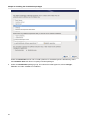
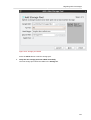
Select the Virtual Host server role to install a platform for virtualized guests. Alternatively, select
the Customize Now radio button to specify individual packages.
4.
22
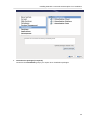
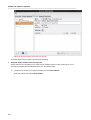
Select the Virtualization package group. This selects the KVM hypervisor, virt-manager,
libvirt and virt-viewer for installation.
Installing KVM with a new Red Hat Enterprise Linux installation
5.
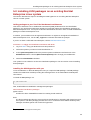
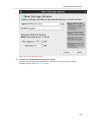
Customize the packages (if required)
Customize the Virtualization group if you require other virtualization packages.
23
Chapter 5. Installing the virtualization packages
Press the Close button then the Next button to continue the installation.
Note
You require a valid RHN virtualization entitlement to receive updates for the virtualization
packages.
Installing KVM packages with Kickstart files
This section describes how to use a Kickstart file to install Red Hat Enterprise Linux with the KVM
hypervisor packages. Kickstart files allow for large, automated installations without a user manually
installing each individual system. The steps in this section will assist you in creating and using a
Kickstart file to install Red Hat Enterprise Linux with the virtualization packages.
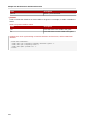
In the %packages section of your Kickstart file, append the following package group:
%packages
@kvm
2
More information on Kickstart files can be found on Red Hat's website, redhat.com , in the Installation
Guide.
2
http://www.redhat.com/docs/manuals/enterprise/
24
Installing KVM packages on an existing Red Hat Enterprise Linux system
5.2. Installing KVM packages on an existing Red Hat
Enterprise Linux system
The section describes the steps for installing the KVM hypervisor on a working Red Hat Enterprise
Linux 6 or newer system.
Adding packages to your list of Red Hat Network entitlements
This section describes how to enable Red Hat Network (RHN) entitlements for the virtualization
packages. You need these entitlements enabled to install and update the virtualization packages on
Red Hat Enterprise Linux. You require a valid Red Hat Network account in order to install virtualization
packages on Red Hat Enterprise Linux.
In addition, your machines must be registered with RHN. To register an unregistered installation of
Red Hat Enterprise Linux, run the rhn_register command and follow the prompts.
3
If you do not have a valid Red Hat subscription, visit the Red Hat online store .
Procedure 5.1. Adding the Virtualization entitlement with RHN
4
1. Log in to RHN using your RHN username and password.
2.
Select the systems you want to install virtualization on.
3.
In the System Properties section the present systems entitlements are listed next to the
Entitlements header. Use the (Edit These Properties) link to change your entitlements.
4.
Select the Virtualization checkbox.
Your system is now entitled to receive the virtualization packages. The next section covers installing
these packages.
Installing the KVM hypervisor with yum
To use virtualization on Red Hat Enterprise Linux you require the kvm package. The kvm package
contains the KVM kernel module providing the KVM hypervisor on the default Red Hat Enterprise
Linux kernel.
To install the kvm package, run:
# yum install kvm
Now, install additional virtualization management packages.
Recommended virtualization packages:
python-virtinst
Provides the virt-install command for creating virtual machines.
libvirt
The libvirt package provides the server and host side libraries for interacting with hypervisors and
host systems. The libvirt package provides the libvirtd daemon that handles the library calls,
manages virtualizes guests and controls the hypervisor.
3
https://www.redhat.com/wapps/store/catalog.html
25
Chapter 5. Installing the virtualization packages
libvirt-python
The libvirt-python package contains a module that permits applications written in the Python
programming language to use the interface supplied by the libvirt API.
virt-manager
virt-manager, also known as Virtual Machine Manager, provides a graphical tool for
administering virtual machines. It uses libvirt-client library as the management API.
libvirt-client
The libvirt-client package provides the client-side APIs and libraries for accessing libvirt servers.
The libvirt-client package includes the virsh command line tool to manage and control virtualized
guests and hypervisors from the command line or a special virtualization shell.
Install the other recommended virtualization packages:
# yum install virt-manager libvirt libvirt-python python-virtinst libvirt-client
26
Chapter 6.
Virtualized guest installation overview
After you have installed the virtualization packages on the host system you can create guest operating
systems. This chapter describes the general processes for installing guest operating systems on
virtual machines. You can create guests using the New button in virt-manager or use the command
line interface virt-install. Both methods are covered by this chapter.
Detailed installation instructions are available for specific versions of Red Hat Enterprise Linux, other
Linux distributions, Solaris and Windows. Refer to the relevant procedure for you guest operating
system:
• Red Hat Enterprise Linux 5.
• Para-virtualized Red Hat Enterprise Linux 6 on Red Hat Enterprise Linux 5: Chapter 8, Installing
Red Hat Enterprise Linux 6 as a para-virtualized guest on Red Hat Enterprise Linux 5
• Red Hat Enterprise Linux 6: Chapter 7, Installing Red Hat Enterprise Linux 6 as a virtualized guest
• Microsoft Windows operating systems: Chapter 9, Installing a fully-virtualized Windows guest
6.1. Virtualized guest prerequisites and considerations
Various factors should be considered before creating any virtualized guests. Factors include:
• Performance
• Input/output requirements and types of input/output.
• Storage.
• Networking and network infrastructure.
• Guest load and usage for processor and memory resources.
6.2. Creating guests with virt-install
You can use the virt-install command to create virtualized guests from the command line.
virt-install is used either interactively or as part of a script to automate the creation of virtual
machines. Using virt-install with Kickstart files allows for unattended installation of virtual
machines.
The virt-install tool provides a number of options one can pass on the command line. To see a
complete list of options run:
$ virt-install --help
The virt-install man page also documents each command option and important variables.
qemu-img is a related command which may be used before virt-install to configure storage
options.
An important option is the --vnc option which opens a graphical window for the guest's installation.
Example 6.1. Using virt-install to install a RHEL 5 guest
This example creates a RHEL 5 guest with the following settings:
27
Chapter 6. Virtualized guest installation overview
• Uses LVM partitioning
• Is a plain QEMU guest
• Uses virtual networking
• Boots from PXE
• Uses VNC server/viewer
# virt-install \
--network network:default \
--name rhel5support --ram=756\
--file=/var/lib/libvirt/images/rhel5support.img \
--file-size=6 --vnc --cdrom=/dev/sr0
Refer to man virt-install for more examples.
6.3. Creating guests with virt-manager
virt-manager, also known as Virtual Machine Manager, is a graphical tool for creating and
managing virtualized guests.
Procedure 6.1. Creating a virtualized guest with virt-manager
1. Open virt-manager
Start virt-manager. Launch the Virtual Machine Manager application from the Applications
menu and System Tools submenu. Alternatively, run the virt-manager command as root.
2.
Optional: Open a remote hypervisor
Refer to Section 31.5, “Adding a remote connection”
Select the hypervisor and press the Connect button to connect to the remote hypervisor.
3.
28
Create a new guest
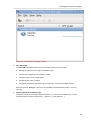
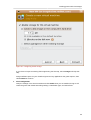
The virt-manager window allows you to create a new virtual machine. Click the New button
(Figure 6.1, “Virtual Machine Manager window”) to open the New VM wizard.
Creating guests with virt-manager
Figure 6.1. Virtual Machine Manager window
4.
New VM wizard
The New VM wizard breaks down the guest creation process into five steps:
1. Naming the guest and choosing the installation type
2. Locating and configuring the installation media
3. Configuring memory and CPU options
4. Configuring the guest's storage
5. Configuring networking, hypervisor type, architecture, and other hardware settings
Ensure that virt-manager can access the installation media (whether locally or over the
network).
5.
Specify name and installation type
The guest creation process starts with the selection of a name and installation type. Virtual
machine names can have underscores (_), periods (.), and hyphens (-).
29
Chapter 6. Virtualized guest installation overview
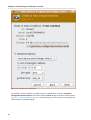
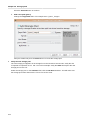
Figure 6.2. Step 1
Type in a virtual machine name and choose an installation type:
Local install media (ISO image or CDROM)
This method uses a CD-ROM, DVD, or image of an installation disk (e.g. .iso).
Network Install (HTTP, FTP, or NFS)
Network installing involves the use of a mirrored Red Hat Enterprise Linux or Fedora
installation tree to install a guest. The installation tree must be accessible through either
HTTP, FTP, or NFS.
30
Creating guests with virt-manager
Network Boot (PXE)
This method uses a Preboot eXecution Environment (PXE) server to install the guest. Setting
up a PXE server is covered in the Deployment Guide. To install via network boot, the guest
must have a routable IP address or shared network device. For information on the required
networking configuration for PXE installation, refer to Chapter 10, Network Configuration.
Import existing disk image
This method allows you to create a new guest and import a disk image (containing a preinstalled, bootable operating system) to it.
Click Forward to continue.
6.
Configure installation
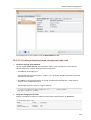
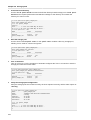
Next, configure the OS type and Version of the installation. Except for network booting, this step
also requires further configuration (depending on your chosen installation method). When using
local install media or importing an existing disk image, you need to specify the location of the
installation media or disk image.
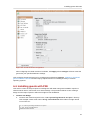
Figure 6.3. Local install media (configuration)
31
Chapter 6. Virtualized guest installation overview
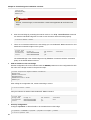
Figure 6.4. Import existing disk image (configuration)
Important
It is recommend that you use the default directory for virtual machine images, /var/lib/
libvirt/images/. If you are using a different location, make sure it is added to your
SELinux policy and relabeled before you continue with the installation. Refer to Section 16.2,
“SELinux and virtualization” for details on how to do this.
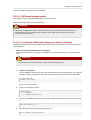
When performing a network install, you need to specify the URL of the installation tree. You can
also specify the URL of any kickstart files you want to use, along with any kernel options you want
to pass during installation.
32
Creating guests with virt-manager
Figure 6.5. Network Install (configuration)
Click Forward to continue.
7.
Configure CPU and memory
The next step involves configuring the number of CPUs and amount of memory to allocate to the
virtual machine. The wizard shows the number of CPUs and amount of memory you can allocate;
configure these settings and click Forward.
33
Chapter 6. Virtualized guest installation overview
Figure 6.6. Configuring CPU and Memory
8.
34
Configure storage
Assign a physical storage device (Block device) or a file-based image (File). File-based images
should be stored in /var/lib/libvirt/images/ to satisfy default SELinux permissions.
Creating guests with virt-manager
Figure 6.7. Configuring virtual storage
If you chose to import an existing disk image during the first step, virt-manager will skip this
step.
Assign sufficient space for your virtualized guest and any applications the guest requires, then
click Forward to continue.
9.
Final configuration
Verify the settings of the virtual machine and click Finish when you are satisfied; doing so will
create the guest with default networking settings, virtualization type, and architecture.
35
Chapter 6. Virtualized guest installation overview
Figure 6.8. Verifying the configuration
If you prefer to further configure the virtual machine's hardware first, check the Customize
configuration before install box first before clicking Finish. Doing so will open another wizard
Figure 6.9, “Virtual hardware configuration” that will allow you to add, remove, and configure the
virtual machine's hardware settings.
36
Installing guests with PXE
Figure 6.9. Virtual hardware configuration
After configuring the virtual machine's hardware, click Apply. virt-manager will then create the
guest with your specified hardware settings.
This concludes the general process for creating guests with virt-manager. Chapter 6, Virtualized
guest installation overview contains step-by-step instructions to installing a variety of common
operating systems.
6.4. Installing guests with PXE
This section covers the steps required to install guests with PXE. PXE guest installation requires a
shared network device, also known as a network bridge. The procedures below covers creating a
bridge and the steps required to utilize the bridge for PXE installation.
1.
Create a new bridge
a. Create a new network script file in the /etc/sysconfig/network-scripts/ directory.
This example creates a file named ifcfg-installation which makes a bridge named
installation.
# cd /etc/sysconfig/network-scripts/
# vim ifcfg-installation
DEVICE=installation
37
Chapter 6. Virtualized guest installation overview
TYPE=Bridge
BOOTPROTO=dhcp
ONBOOT=yes
Warning
The line, TYPE=Bridge, is case-sensitive. It must have uppercase 'B' and lower case
'ridge'.
b.
Start the new bridge by restarting the network service. The ifup installation command
can start the individual bridge but it is safer to test the entire network restarts properly.
# service network restart
c.
There are no interfaces added to the new bridge yet. Use the brctl show command to view
details about network bridges on the system.
# brctl show
bridge name
installation
virbr0
bridge id
8000.000000000000
8000.000000000000
STP enabled
no
yes
interfaces
The virbr0 bridge is the default bridge used by libvirt for Network Address Translation
(NAT) on the default Ethernet device.
2.
Add an interface to the new bridge
Edit the configuration file for the interface. Add the BRIDGE parameter to the configuration file with
the name of the bridge created in the previous steps.
# Intel Corporation Gigabit Network Connection
DEVICE=eth1
BRIDGE=installation
BOOTPROTO=dhcp
HWADDR=00:13:20:F7:6E:8E
ONBOOT=yes
After editing the configuration file, restart networking or reboot.
# service network restart
Verify the interface is attached with the brctl show command:
# brctl show
bridge name
installation
virbr0
3.
bridge id
8000.001320f76e8e
8000.000000000000
STP enabled
no
yes
interfaces
eth1
Security configuration
Configure iptables to allow all traffic to be forwarded across the bridge.
# iptables -I FORWARD -m physdev --physdev-is-bridged -j ACCEPT
# service iptables save
38
Installing guests with PXE
# service iptables restart
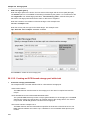
Disable iptables on bridges
Alternatively, prevent bridged traffic from being processed by iptables rules. In /etc/
sysctl.conf append the following lines:
net.bridge.bridge-nf-call-ip6tables = 0
net.bridge.bridge-nf-call-iptables = 0
net.bridge.bridge-nf-call-arptables = 0
Reload the kernel parameters configured with sysctl.
# sysctl -p /etc/sysctl.conf
4.
Restart libvirt before the installation
Restart the libvirt daemon.
# service libvirtd reload
The bridge is configured, you can now begin an installation.
PXE installation with virt-install
For virt-install append the --network=bridge:installation installation parameter where
installation is the name of your bridge. For PXE installations use the --pxe parameter.
Example 6.2. PXE installation with virt-install
# virt-install --hvm --connect qemu:///system \
--network=bridge:installation --pxe\
--name EL10 --ram=756 \
--vcpus=4
--os-type=linux --os-variant=rhel5
--file=/var/lib/libvirt/images/EL10.img \
PXE installation with virt-manager
The steps below are the steps that vary from the standard virt-manager installation procedures.
1.
Select PXE
Select PXE as the installation method.
39
Chapter 6. Virtualized guest installation overview
2.
40
Select the bridge
Select Shared physical device and select the bridge created in the previous procedure.
Installing guests with PXE
3.
Start the installation
The installation is ready to start.
41
Chapter 6. Virtualized guest installation overview
A DHCP request is sent and if a valid PXE server is found the guest installation processes will start.
42
Chapter 7.
Installing Red Hat Enterprise Linux 6 as
a virtualized guest
This Chapter covers how to install Red Hat Enterprise Linux 6 as a fully virtualized guest on Red Hat
Enterprise Linux 6.
This procedure assumes that the KVM hypervisor and all other required packages are installed and
the host is configured for virtualization. For more information on installing the virtualization pacakges,
refer to Chapter 5, Installing the virtualization packages.
7.1. Creating a Red Hat Enterprise Linux 6 guest with local
installation media
This procedure covers creating a virtualized Red Hat Enterprise Linux 6 guest with a locally stored
1
installation DVD or DVD image. DVD images are available from rhn.redhat.com for Red Hat
Enterprise Linux 6.
Procedure 7.1. Creating a Red Hat Enterprise Linux 6 guest with virt-manager
1. Optional: Preparation
Prepare the storage environment for the virtualized guest. For more information on preparing
storage, refer to Part V, “Virtualization storage topics”.
Note
Various storage types may be used for storing virtualized guests. However, for a guest to be
able to use migration features the guest must be created on networked storage.
Red Hat Enterprise Linux 6 requires at least 1GB of storage space. However, Red Hat
recommends at least 5GB of storage space for a Red Hat Enterprise Linux 6 installation and for
the procedures in this guide.
2.
1
Open virt-manager and start the wizard
Open virt-manager by executing the virt-manager command as root or opening Applications ->
System Tools -> Virtual Machine Manager.
http://www.rhn.redhat.com
43
Chapter 7. Installing Red Hat Enterprise Linux 6 as a virtualized guest
Figure 7.1. The main virt-manager window
Press the create new virtualized guest button (see figure Figure 7.2, “The create new
virtualized guest button”) to start the new virtualized guest wizard.
Figure 7.2. The create new virtualized guest button
The Create a new virtual machine window opens.
3.
Name the virtualized guest
Guest names can contain letters, numbers and the following characters: '_', '.' and '-'. Guest
names must be unique for migration.
Choose the Local install media (ISO image or CDROM) radio button.
44
Creating a Red Hat Enterprise Linux 6 guest with local installation media
Figure 7.3. The Create a new virtual machine window - Step 1
Press Forward to continue.
4.
Select the installation media
Select the installation ISO image location or a DVD drive with the installation disc inside. This
example uses an ISO file image of the Red Hat Enterprise Linux 6.0 installation DVD image.
45
Chapter 7. Installing Red Hat Enterprise Linux 6 as a virtualized guest
Figure 7.4. The Locate ISO media volume window
Image files and SELinux
For ISO image files and guest storage images, the recommended directory to use is the
/var/lib/libvirt/images/ directory. Any other location may require additional
configuration for SELinux, refer to Section 16.2, “SELinux and virtualization” for details.
Select the operating system type and version which match the installation media you have
selected.
46
Creating a Red Hat Enterprise Linux 6 guest with local installation media
Figure 7.5. The Create a new virtual machine window - Step 2
Press Forward to continue.
5.
Set RAM and virtual CPUs
Choose appropriate values for the virtualized CPUs and RAM allocation. These values affect the
host's and guest's performance. Memory and virtualized CPUs can be overcommitted, for more
information on overcommitting refer to Chapter 20, Overcommitting with KVM.
Virtualized guests require sufficient physical memory (RAM) to run efficiently and effectively. Red
Hat supports a minimum of 512MB of RAM for a virtualized guest. Red Hat recommends at least
1024MB of RAM for each logical core.
Assign sufficient virtual CPUs for the virtualized guest. If the guest runs a multithreaded
application, assign the number of virtualized CPUs the guest will require to run efficiently.
You cannot assign more virtual CPUs than there are physical processors (or hyper-threads)
available on the host system. The number of virtual CPUs available is noted in the Up to X
available field.
47
Chapter 7. Installing Red Hat Enterprise Linux 6 as a virtualized guest
Figure 7.6. The Create a new virtual machine window - Step 3
Press Forward to continue.
6.
Storage
Enable and assign storage for the Red Hat Enterprise Linux 6 guest. Assign at least 5GB for a
desktop installation or at least 1GB for a minimal installation.
Migration
Live and offline migrations require guests to be installed on shared network storage. For
information on setting up shared storage for guests refer to Part V, “Virtualization storage
topics”.
a.
48
With the default local storage
Select the Create a disk image on the computer's hard drive radio button to create a
file-based image in the default storage pool, the /var/lib/libvirt/images/ directory.
Enter the size of the disk image to be created. If the Allocate entire disk now check box is
selected, a disk image of the size specified will be created immediately. If not, the disk image
will grow as it becomes filled.
Creating a Red Hat Enterprise Linux 6 guest with local installation media
Figure 7.7. The Create a new virtual machine window - Step 4
b.
With a storage pool
Select Select managed or other existing storage to use a storage pool.
49
Chapter 7. Installing Red Hat Enterprise Linux 6 as a virtualized guest
Figure 7.8. The Locate or create storage volume window
50
i.
Press the browse button to open the storage pool browser.
ii.
Select a storage pool from the Storage Pools list.
iii.
Optional: Press the New Volume button to create a new storage volume. Enter the name
of the new storage volume.
iv.
Press the Choose Volume button to select the volume for the virtualized guest.
Creating a Red Hat Enterprise Linux 6 guest with local installation media
Figure 7.9. The Create a new virtual machine window - Step 4
Press Forward to continue.
7.
Verify and finish
Verify there were no errors made during the wizard and everything appears as expected.
Select the Customize configuration before install check box to change the guest's storage or
network devices, to use the para-virtualized drivers or, to add additional devices.
Press the Advanced options down arrow to inspect and modify advanced options. For a standard
Red Hat Enterprise Linux 6 none of these options require modification.
51
Chapter 7. Installing Red Hat Enterprise Linux 6 as a virtualized guest
Figure 7.10. The Create a new virtual machine window - Step 5
Press Finish to continue into the Red Hat Enterprise Linux installation sequence. For more
information on installing Red Hat Enterprise Linux 6 refer to the Red Hat Enterprise Linux 6
Installation Guide.
A Red Hat Enterprise Linux 6 guest is now created from a an ISO installation disc image.
52
Creating a Red Hat Enterprise Linux 6 guest with a network installation tree
7.2. Creating a Red Hat Enterprise Linux 6 guest with a
network installation tree
Procedure 7.2. Creating a Red Hat Enterprise Linux 6 guest with virt-manager
1. Optional: Preparation
Prepare the storage environment for the virtualized guest. For more information on preparing
storage, refer to Part V, “Virtualization storage topics”.
Note
Various storage types may be used for storing virtualized guests. However, for a guest to be
able to use migration features the guest must be created on networked storage.
Red Hat Enterprise Linux 6 requires at least 1GB of storage space. However, Red Hat
recommends at least 5GB of storage space for a Red Hat Enterprise Linux 6 installation and for
the procedures in this guide.
2.
Open virt-manager and start the wizard
Open virt-manager by executing the virt-manager command as root or opening Applications ->
System Tools -> Virtual Machine Manager.
53
Chapter 7. Installing Red Hat Enterprise Linux 6 as a virtualized guest
Figure 7.11. The main virt-manager window
Press the create new virtualized guest button (see figure Figure 7.12, “The create new
virtualized guest button”) to start the new virtualized guest wizard.
Figure 7.12. The create new virtualized guest button
The Create a new virtual machine window opens.
3.
Name the virtualized guest
Guest names can contain letters, numbers and the following characters: '_', '.' and '-'. Guest
names must be unique for migration.
Choose the installation method from the list of radio buttons.
54
Creating a Red Hat Enterprise Linux 6 guest with PXE
Figure 7.13. The Create a new virtual machine window - Step 1
Press Forward to continue.
7.3. Creating a Red Hat Enterprise Linux 6 guest with PXE
Procedure 7.3. Creating a Red Hat Enterprise Linux 6 guest with virt-manager
1. Optional: Preparation
Prepare the storage environment for the virtualized guest. For more information on preparing
storage, refer to Part V, “Virtualization storage topics”.
Note
Various storage types may be used for storing virtualized guests. However, for a guest to be
able to use migration features the guest must be created on networked storage.
Red Hat Enterprise Linux 6 requires at least 1GB of storage space. However, Red Hat
recommends at least 5GB of storage space for a Red Hat Enterprise Linux 6 installation and for
the procedures in this guide.
55
Chapter 7. Installing Red Hat Enterprise Linux 6 as a virtualized guest
2.
Open virt-manager and start the wizard
Open virt-manager by executing the virt-manager command as root or opening Applications ->
System Tools -> Virtual Machine Manager.
Figure 7.14. The main virt-manager window
Press the create new virtualized guest button (see figure Figure 7.15, “The create new
virtualized guest button”) to start the new virtualized guest wizard.
Figure 7.15. The create new virtualized guest button
The Create a new virtual machine window opens.
3.
56
Name the virtualized guest
Guest names can contain letters, numbers and the following characters: '_', '.' and '-'. Guest
names must be unique for migration.
Creating a Red Hat Enterprise Linux 6 guest with PXE
Choose the installation method from the list of radio buttons.
Figure 7.16. The Create a new virtual machine window - Step 1
Press Forward to continue.
57
58
Chapter 8.
Installing Red Hat Enterprise Linux 6
as a para-virtualized guest on Red Hat
Enterprise Linux 5
This section describes how to install Red Hat Enterprise Linux 6 as a para-virtualized guest on Red
Hat Enterprise Linux 5. Para-virtualization is only available for Red Hat Enterprise Linux 5 hosts. Red
Hat Enterprise Linux 6 uses the PV-opts features of the Linux kernel to appear as a compatible Xen
para-virtualized guest.
Important note on para-virtualization
Para-virtualization only works with the Xen hypervisor. Para-virtualization does not work with the
KVM hypervisor. This procedure is for Red Hat Enterprise Linux 5.4 or newer.
8.1. Using virt-install
This section covers creating a para-virtualized Red Hat Enterprise Linux 6 guest on a Red Hat
Enterprise Linux 5 host using the virt-install command. For instructions on virt-manager,
refer to the procedure in Section 8.2, “Using virt-manager”.
This method installs Red Hat Enterprise Linux 6 from a remote server hosting the network installation
tree. The installation instructions presented in this section are similar to installing from the minimal
installation live CD-ROM.
Automating with virt-install
Guests can be created with the command line virt-install tool. The --vnc option shows the
graphical installation. The name of the guest in the example is rhel6PV, the disk image file is
rhel6PV.img and a local mirror of the Red Hat Enterprise Linux 6 installation tree is http://
example.com/installation_tree/RHEL6-x86/. Replace those values with values for your
system and network.
# virt-install --name rhel6PV \
--disk /var/lib/libvirt/images/rhel6PV.img,size=5 \
--vnc --paravirt --vcpus=2 --ram=1024 \
-location=http://example.com/installation_tree/RHEL6-x86/
Red Hat Enterprise Linux can be installed without a graphical interface or manual input. Use a
Kickstart file to automate the installation process. This example extends the previous example
with a Kickstart file, located at http://example.com/kickstart/ks.cfg, to fully automate
the installation.
# virt-install --name rhel6PV \
--disk /var/lib/libvirt/images/rhel6PV.img,size=5 \
--nographics --paravirt --vcpus=2 --ram=1024 \
-location=http://example.com/installation_tree/RHEL6-x86/ \
-x "ks=http://example.com/kickstart/ks.cfg"
59
Chapter 8. Installing Red Hat Enterprise Linux 6 as a para-virtualized guest on Red Hat Enterprise Linux 5
The graphical console opens showing the initial boot phase of the guest:
After your guest has completed its initial boot, the standard installation process for Red Hat Enterprise
Linux 6 starts. For most systems the default answers are acceptable.
Refer to the Red Hat Enterprise Linux 6 Installation Guide for more information on installing Red Hat
Enterprise Linux 6.
8.2. Using virt-manager
Procedure 8.1. Creating a para-virtualized Red Hat Enterprise Linux 6 guest with virt-manager
1. Open virt-manager
Start virt-manager. Launch the Virtual Machine Manager application from the Applications
menu and System Tools submenu. Alternatively, run the virt-manager command as root.
2.
Select the hypervisor
Select the hypervisor. Note that presently the KVM hypervisor is named qemu.
Connect to a hypervisor if you have not already done so. Open the File menu and select the Add
Connection... option. Refer to Section 31.5, “Adding a remote connection”.
Once a hypervisor connection is selected the New button becomes available. Press the New
button.
60
Using virt-manager
3.
Start the new virtual machine wizard
Pressing the New button starts the virtual machine creation wizard.
Press Forward to continue.
4.
Name the virtual machine
Provide a name for your virtualized guest. The following punctuation and whitespace characters
are permitted for '_', '.' and '-' characters.
61
Chapter 8. Installing Red Hat Enterprise Linux 6 as a para-virtualized guest on Red Hat Enterprise Linux 5
Press Forward to continue.
5.
62
Choose a virtualization method
Select Xen para-virtualized as the virtualization method.
Using virt-manager
Press Forward to continue.
6.
Select the installation method
Red Hat Enterprise Linux can be installed using one of the following methods:
• local install media, either an ISO image or physical optical media.
• Select Network install tree if you have the installation tree for Red Hat Enterprise Linux hosted
somewhere on your network via HTTP, FTP or NFS.
• PXE can be used if you have a PXE server configured for booting Red Hat Enterprise Linux
installation media. Configuring a sever to PXE boot a Red Hat Enterprise Linux installation is
not covered by this guide. However, most of the installation steps are the same after the media
boots.
Set OS Type to Linux and OS Variant to Red Hat Enterprise Linux 5 as shown in the
screenshot.
63
Chapter 8. Installing Red Hat Enterprise Linux 6 as a para-virtualized guest on Red Hat Enterprise Linux 5
Press Forward to continue.
7.
64
Locate installation media
Select ISO image location or CD-ROM or DVD device. This example uses an ISO file image of
the Red Hat Enterprise Linux installation DVD.
a.
Press the Browse button.
b.
Search to the location of the ISO file and select the ISO image. Press Open to confirm your
selection.
c.
The file is selected and ready to install.
Using virt-manager
Press Forward to continue.
Image files and SELinux
For ISO image files and guest storage images it is recommended to use the /var/lib/
libvirt/images/ directory. Any other location may require additional configuration for
SELinux, refer to Section 16.2, “SELinux and virtualization” for details.
8.
Storage setup
Assign a physical storage device (Block device) or a file-based image (File). File-based images
should be stored in the /var/lib/libvirt/images/ directory to satisfy default SELinux
permissions. Assign sufficient space for your virtualized guest and any applications the guest
requires.
65
Chapter 8. Installing Red Hat Enterprise Linux 6 as a para-virtualized guest on Red Hat Enterprise Linux 5
Press Forward to continue.
Migration
Live and offline migrations require guests to be installed on shared network storage. For
information on setting up shared storage for guests refer to Part V, “Virtualization storage
topics”.
9.
Network setup
Select either Virtual network or Shared physical device.
The virtual network option uses Network Address Translation (NAT) to share the default network
device with the virtualized guest. Use the virtual network option for wireless networks.
The shared physical device option uses a network bond to give the virtualized guest full access to
a network device.
66
Using virt-manager
Press Forward to continue.
10. Memory and CPU allocation
The Memory and CPU Allocation window displays. Choose appropriate values for the virtualized
CPUs and RAM allocation. These values affect the host's and guest's performance.
Virtualized guests require sufficient physical memory (RAM) to run efficiently and effectively.
Choose a memory value which suits your guest operating system and application requirements.
Remember, guests use physical RAM. Running too many guests or leaving insufficient memory
for the host system results in significant usage of virtual memory and swapping. Virtual memory is
significantly slower which causes degraded system performance and responsiveness. Ensure you
allocate sufficient memory for all guests and the host to operate effectively.
Assign sufficient virtual CPUs for the virtualized guest. If the guest runs a multithreaded
application, assign the number of virtualized CPUs the guest will require to run efficiently. Do
not assign more virtual CPUs than there are physical processors (or hyper-threads) available on
the host system. It is possible to over allocate virtual processors, however, over allocating has
a significant, negative effect on guest and host performance due to processor context switching
overheads.
67
Chapter 8. Installing Red Hat Enterprise Linux 6 as a para-virtualized guest on Red Hat Enterprise Linux 5
Press Forward to continue.
11. Verify and start guest installation
Verify the configuration.
68
Using virt-manager
Press Finish to start the guest installation procedure.
12. Installing Red Hat Enterprise Linux
Complete the Red Hat Enterprise Linux installation sequence. The installation sequence is
1
covered by the Red Hat Enterprise Linux 6 Installation Guide. Refer to Red Hat Documentation
for the Red Hat Enterprise Linux 6 Installation Guide.
69
70
Chapter 9.
Installing a fully-virtualized Windows
guest
Red Hat Enterprise Linux 6 supports the installation of any Microsoft Windows operating system
as a fully virtualized guest. This chapter describes how to create a fully virtualized guest using the
command-line (virt-install), launch the operating system's installer inside the guest, and access
the installer through virt-viewer.
To install a Windows operating system on the guest, use the virt-viewer tool. This tool allows
you to display the graphical console of a virtual machine (via the VNC protocol). In doing so, virtviewer allows you to install a fully virtualized guest's operating system through that operating
system's installer (e.g. the Windows XP installer).
Installing a Windows operating system involves two major steps:
1. Creating the guest (using either virt-install or virt-manager)
2. Installing the Windows operating system on the guest (through virt-viewer)
Note that this chapter does not describe how to install a Windows operating system on a fullyvirtualized guest. Rather, it only covers how to create the guest and launch the installer within the
guest. For information on how to install a Windows operating system, refer to the relevant Microsoft
installation documentation.
9.1. Using virt-install to create a guest
The virt-install command allows you to create a fully-virtualized guest from a terminal, i.e.
without a GUI. If you prefer to use a GUI instead, refer to Section 6.3, “Creating guests with virtmanager” for instructions on how to use virt-manager.
Important
Before creating the guest, consider first if the guest needs to use KVM Windows para-virtualized
drivers. If it does, keep in mind that you can do so during or after installing the Windows operating
system on the guest. For more information about para-virtualized drivers, refer to Chapter 11,
KVM Para-virtualized Drivers.
For instructions on how to install KVM para-virtualized drivers, refer to Section 11.2, “Installing the
KVM Windows para-virtualized drivers”.
It is possible to create a fully-virtualized guest with only a single command. To do so, simply run the
following program (replace the values accordingly):
# virt-install \
--name=guest-name \
--network network=default \
--disk path=path-to-disk \
--disk size=disk-size \
--cdrom=path-to-install-disk \
--vnc --ram=1024
The path-to-disk must be a device (e.g. /dev/sda3) or image file (/var/lib/libvirt/
images/name.img). It must also have enough free space to support the disk-size.
71
Chapter 9. Installing a fully-virtualized Windows guest
Important
All image files should be stored in /var/lib/libvirt/images/. Other directory locations
for file-based images are prohibited by SELinux. If you run SELinux in enforcing mode, refer to
Section 16.2, “SELinux and virtualization” for more information on installing guests.
You can also run virt-install interactively. To do so, use the --prompt command, as in:
# virt-install --prompt
Once the fully-virtualized guest is created, virt-viewer will launch the guest and run the operating
system's installer. Refer to to the relevant Microsoft installation documentation for instructions on how
to install the operating system.
Important
If you are installing Windows 2003, you will need to select a different computer type before
installing the operating system. As soon as virt-viewer launches, press F5 and refer to
Section 9.2, “Installing Windows 2003” for further instructions before proceeding.
9.2. Installing Windows 2003
Windows 2003 requires a specific computer type in order to install properly on a fully-virtualized guest.
This needs to be specified at the beginning of the installation process.
As soon as virt-viewer launches and boots the installer, press F5. If you do not press F5 at the
right time you will need to restart the installation. Pressing F5 allows you to select a different HAL or
Computer Type.
Figure 9.1. Selecting a different HAL
Choose Standard PC as the Computer Type. Then, press Enter to continue with the installation
process.
72
Part III. Configuration
Configuring virtualization in
Red Hat Enterprise Linux 6
These chapters cover configuration procedures for various advanced virtualization tasks. These tasks
include adding network and storage devices, enhancing security, improving performance, and using
the para-virtualized drivers on fully virtualized guests.
Chapter 10.
Network Configuration
This page provides an introduction to the common networking configurations used by libvirt based
applications. For additional information consult the libvirt network architecture documentation: http://
libvirt.org/intro.html.
Red Hat Enterprise Linux 6 supports the following networking setups for virtualization:
• virtual networks using Network Address Translation (NAT)
• directly allocated physical devices using PCI passthrough or SR-IOV.
• bridged networks
You must enable NAT, network bridging or directly share a physical device to allow external hosts
access to network services on virtualized guests.
10.1. Network Address Translation (NAT) with libvirt
One of the most common methods for sharing network connections is to use Network Address
Translation (NAT) forwarding (also know as virtual networks).
Host configuration
Every standard libvirt installation provides NAT based connectivity to virtual machines out of the
box. This is the so called 'default virtual network'. Verify that it is available with the virsh net-list
--all command.
# virsh net-list --all
Name
State
Autostart
----------------------------------------default
active
yes
If it is missing, the example XML configuration file can be reloaded and activated:
# virsh net-define /usr/share/libvirt/networks/default.xml
The default network is defined from /usr/share/libvirt/networks/default.xml
Mark the default network to automatically start:
# virsh net-autostart default
Network default marked as autostarted
Start the default network:
# virsh net-start default
Network default started
Once the libvirt default network is running, you will see an isolated bridge device. This device does
not have any physical interfaces added. The new device uses NAT and IP forwarding to connect to
outside world. Do not add new interfaces.
# brctl show
bridge name
virbr0
bridge id
8000.000000000000
STP enabled
yes
interfaces
75
Chapter 10. Network Configuration
libvirt adds iptables rules which allow traffic to and from guests attached to the virbr0 device
in the INPUT, FORWARD, OUTPUT and POSTROUTING chains. libvirt then attempts to enable the
ip_forward parameter. Some other applications may disable ip_forward, so the best option is to
add the following to /etc/sysctl.conf.
net.ipv4.ip_forward = 1
Guest configuration
Once the host configuration is complete, a guest can be connected to the virtual network based on
its name. To connect a guest to the 'default' virtual network, the following could be used in the XML
configuration file (such as /etc/libvirtd/qemu/myguest.xml) for the guest:
<interface type='network'>
<source network='default'/>
</interface>
Note
Defining a MAC address is optional. A MAC address is automatically generated if omitted.
Manually setting the MAC address may be useful to maintain consistency or easy reference
throughout your environment, or to avoid the very small chance of a conflict.
<interface type='network'>
<source network='default'/>
<mac address='00:16:3e:1a:b3:4a'/>
</interface>
10.2. Bridged networking with libvirt
Bridged networking (also known as physical device sharing) is used for dedicating a physical device
to a virtual machine. Bridging is often used for more advanced setups and on servers with multiple
network interfaces.
Disable NetworkManager
NetworkManager does not support bridging. NetworkManager must be disabled to use networking with
the network scripts (located in the /etc/sysconfig/network-scripts/ directory).
#
#
#
#
chkconfig NetworkManager off
chkconfig network on
service NetworkManager stop
service network start
Note
Instead of turning off NetworkManager, add "NM_CONTROLLED=no" to the ifcfg-* scripts used
in the examples.
76
Bridged networking with libvirt
Creating the bridge
Create or edit the following two network configuration files. These steps can be repeated (with different
names) for additional network bridges.
1.
Change to the network scripts directory
Change to the /etc/sysconfig/network-scripts directory:
# cd /etc/sysconfig/network-scripts
2.
Modify a network interface to make a bridge
Edit the network script for the network device you are adding to the bridge. In this example,
/etc/sysconfig/network-scripts/ifcfg-eth0 is used. This file defines eth0, the
physical network interface which is set as part of a bridge:
DEVICE=eth0
# change the hardware address to match the hardware address your NIC uses
HWADDR=00:16:76:D6:C9:45
ONBOOT=yes
BRIDGE=br0
Tip
You can configure the device's Maximum Transfer Unit (MTU) by appending an MTU variable
to the end of the configuration file.
MTU=9000
3.
Create the bridge script
Create a new network script in the /etc/sysconfig/network-scripts directory called
ifcfg-br0 or similar. The br0 is the name of the bridge, this can be anything as long as the
name of the file is the same as the DEVICE parameter, and that it matches the bridge name used
in step 2.
DEVICE=br0
TYPE=Bridge
BOOTPROTO=dhcp
ONBOOT=yes
DELAY=0
Warning
The line, TYPE=Bridge, is case-sensitive. It must have uppercase 'B' and lower case 'ridge'.
4.
Restart the network
After configuring, restart networking or reboot.
# service network restart
77
Chapter 10. Network Configuration
5.
Configure iptables
Configure iptables to allow all traffic to be forwarded across the bridge.
# iptables -I FORWARD -m physdev --physdev-is-bridged -j ACCEPT
# service iptables save
# service iptables restart
Disable iptables on bridges
Alternatively, prevent bridged traffic from being processed by iptables rules. In /etc/
sysctl.conf append the following lines:
net.bridge.bridge-nf-call-ip6tables = 0
net.bridge.bridge-nf-call-iptables = 0
net.bridge.bridge-nf-call-arptables = 0
Reload the kernel parameters configured with sysctl.
# sysctl -p /etc/sysctl.conf
6.
Restart the libvirt service
Restart the libvirt service with the service command.
# service libvirtd reload
7.
Verify the bridge
Verify the new bridge is available with the bridge control command (brctl).
# brctl show
bridge name
virbr0
br0
bridge id
8000.000000000000
8000.000e0cb30550
STP enabled
yes
no
interfaces
eth0
A "Shared physical device" is now available through virt-manager and libvirt, which guests can be
attached and have full network access.
Note, the bridge is completely independent of the virbr0 bridge. Do not attempt to attach a physical
device to virbr0. The virbr0 bridge is only for Network Address Translation (NAT) connectivity.
78
Chapter 11.
KVM Para-virtualized Drivers
Para-virtualized drivers are available for virtualized Windows guests running on KVM hosts. These
para-virtualized drivers are included in the virtio package. The virtio package supports block (storage)
devices and network interface controllers.
Para-virtualized drivers enhance the performance of fully virtualized guests. With the para-virtualized
drivers guest I/O latency decreases and throughput increases to near bare-metal levels. It is
recommended to use the para-virtualized drivers for fully virtualized guests running I/O heavy tasks
and applications.
The KVM para-virtualized drivers are automatically loaded and installed on the following:
• Red Hat Enterprise Linux 3.9 and newer
• Red Hat Enterprise Linux 4.8 and newer
• Red Hat Enterprise Linux 5.3 and newer
• Red Hat Enterprise Linux 6 and newer
• Some versions of Linux based on the 2.6.27 kernel or newer kernel versions.
Versions of Red Hat Enterprise Linux in the list above detect and install the drivers, additional
installation steps are not required.
Note
PCI devices are limited by the virtualized system architecture. Out of the 32 available PCI devices
for a guest, 4 are not removable. This means there are up to 28 free PCI slots available for
additional devices per guest. Each PCI device in a guest can have up to 8 functions.
The following Microsoft Windows versions are expected to function normally using KVM paravirtualized drivers:
• Windows XP (32-bit only)
• Windows Server 2003 (32-bit and 64-bit versions)
• Windows Server 2008 (32-bit and 64-bit versions)
• Windows 7 (32-bit and 64-bit versions)
11.1. Using the para-virtualized drivers with Red Hat
Enterprise Linux 3.9 guests
Para-virtualized drivers for Red Hat Enterprise Linux 3.9 consist of five kernel modules: virtio,
virtio_blk, virtio_net, virtio_pci and virtio_ring. All five modules must be loaded to
use both the para-virtualized block and network devices drivers.
79
Chapter 11. KVM Para-virtualized Drivers
Note
To use the network device driver only, load the virtio, virtio_net and virtio_pci
modules. To use the block device driver only, load the virtio, virtio_ring, virtio_blk
and virtio_pci modules.
Modified initrd files
The virtio package modifies the initrd RAM disk file in the /boot directory. The original initrd file
is saved to /boot/initrd- kernel-version .img.virtio.orig. The original initrd file is
replaced with a new initrd RAM disk containing the virtio driver modules. The initrd RAM disk
is modified to allow the guest to boot from a storage device using the para-virtualized drivers.
To use a different initrd file, you must ensure that drivers are loaded with the sysinit script
(Loading the para-virtualized drivers with the sysinit script) or when creating new initrd RAM disk
(Adding the para-virtualized drivers to the initrd RAM disk).
Loading the para-virtualized drivers with the sysinit script
This procedure covers loading the para-virtualized driver modules during the boot sequence on a Red
Hat Enterprise Linux 3.9 or newer guest with the sysinit script. Note that the guest cannot use the
para-virtualized drivers for the default boot disk if the modules are loaded with the sysinit script.
The drivers must be loaded in the following order:
1. virtio
2. virtio_ring
3. virtio_blk
4. virtio_net
5. virtio_pci
Only order of virtio_net and virtio_blk can be change. If the drivers are loaded in a different
order, drivers will not work.
Configure the modules to . Locate the following section of the /etc/rc.d/rc.sysinit file.
if [ -f /etc/rc.modules ]; then
/etc/rc.modules
fi
Append the following lines after that section:
if [ -f /etc/rc.modules ]; then
/etc/rc.modules
fi
modprobe
modprobe
modprobe
modprobe
80
virtio
virtio_ring # Comment this out if you do not need block driver
virtio_blk # Comment this out if you do not need block driver
virtio_net # Comment this out if you do not need net driver
Using the para-virtualized drivers with Red Hat Enterprise Linux 3.9 guests
modprobe virtio_pci
Reboot the guest to load the kernel modules.
Adding the para-virtualized drivers to the initrd RAM disk
This procedure covers loading the para-virtualized driver modules with the kernel on a Red Hat
Enterprise Linux 3.9 or newer guest by including the modules in the initrd RAM disk. The mkinitrd tool
configures the initrd RAM disk to load the the modules. Specify the additional modules with the -with parameter for the mkinitrd command. Append following set of parameters, in the exact order,
when using the mkinitrd command to create a custom initrd RAM disk:
--with virtio --with virtio_ring --with virtio_blk --with virtio_net --with virtio_pci
AMD64 and Intel 64 issues
Use the x86_64 version of the virtio package for AMD64 systems.
Use the ia32e version of the virtio package for Intel 64 systems. Using the x86_64 version of the
virtio may cause a 'Unresolved symbol' error during the boot sequence on Intel 64 systems.
Network performance issues
If you experience low performance with the para-virtualized network drivers, verify the setting for the
GSO and TSO features on the host system. The para-virtualized network drivers require that the GSO
and TSO options are disabled for optimal performance.
Verify the status of the GSO and TSO settings, use the command on the host (replacing interface
with the network interface used by the guest):
# ethtool -k interface
Disable the GSO and TSO options with the following commands on the host:
# ethtool -K interface gso off
# ethtool -K interface tso off
Para-virtualized driver swap partition issue
After activating the para-virtualized block device driver the swap partition may not be available. This
issue is may be caused by a change in disk device name. To fix this issue, open the /etc/fstab file
and locate the lines containing swap partitions, for example:
/dev/hda3
swap swap defaults 0 0
The para-virtualized drivers use the /dev/vd* naming convention, not the /dev/hd* naming
convention. To resolve this issue modify the incorrect swap entries in the /etc/fstab file to use the
/dev/vd* convention, for the example above:
/dev/vda3
swap swap defaults 0 0
Save the changes and reboot the virtualized guest. The guest should now correctly have swap
partitions.
81
Chapter 11. KVM Para-virtualized Drivers
11.2. Installing the KVM Windows para-virtualized drivers
This section covers the installation process for the KVM Windows para-virtualized drivers. The KVM
para-virtualized drivers can be loaded during the Windows installation or installed after the guest is
installed.
You can install the para-virtualized drivers on your guest by one of the following methods:
• hosting the installation files on a network accessible to the guest,
• using a virtualized CD-ROM device of the driver installation disk .iso file, or
• using a virtualized floppy device to install the drivers during boot time (for Windows guests).
This guide describes installation from the para-virtualized installer disk as a virtualized CD-ROM
device.
1.
Download the drivers
The virtio-win package contains the para-virtualized block and network drivers for all supported
Windows guests.
Download the virtio-win package with the yum command.
# yum install virtio-win
1
The drivers are also from Microsoft (windowsservercatalog.com ). Note that the Red Hat
Enterprise Virtualization Hypervisor and Red Hat Enterprise Linux are created on the same
code base so the drivers for the same version (for example, Red Hat Enterprise Virtualization
Hypervisor 2.2 and Red Hat Enterprise Linux 5.5) are supported for both environments.
The virtio-win package installs a CD-ROM image, virtio-win.iso, in the /usr/share/
virtio-win/ directory.
2.
Install the para-virtualized drivers
It is recommended to install the drivers on the guest before attaching or modifying a device to use
the para-virtualized drivers.
For block devices storing root file systems or other block devices required for booting the guest,
the drivers must be installed before the device is modified. If the drivers are not installed on the
guest and the driver is set to the virtio driver the guest will not boot.
11.2.1. Installing the drivers on an installed Windows guest
This procedure covers installing the para-virtualized drivers with a virtualized CD-ROM after Windows
is installed.
Follow Procedure 11.1, “Installing from the driver CD-ROM image with virt-manager” to add a CDROM image with virt-manager and then install the drivers.
Procedure 11.1. Installing from the driver CD-ROM image with virt-manager
1. Open virt-manager and the guest
Open virt-manager, select your virtualized guest from the list by double clicking the guest
name.
2.
82
Open the hardware window
Click the blue Information button at the top to view guest details. Then click the Add Hardware
button at the bottom of the window.
Installing the drivers on an installed Windows guest
3.
Select the device type
This opens a wizard for adding the new device. Select Storage from the dropdown menu.
83
Chapter 11. KVM Para-virtualized Drivers
Click the Forward button to proceed.
4.
Select the ISO file
Select Select managed or other existing storage and set the file location of the para-virtualized
drivers .iso image file. The default location for the latest version of the drivers is /usr/share/
virtio-win/virtio-win.iso.
Change the Device type to IDE cdrom and click the Forward button to proceed.
84
Installing the drivers on an installed Windows guest
5.
Finish adding virtual hardware
Press the Finish button to complete the wizard.
85
Chapter 11. KVM Para-virtualized Drivers
6.
Reboot
Reboot or start the guest to begin using the driver disc. Virtualized IDE devices require a restart to
for the guest to recognize the new device.
Once the CD-ROM with the drivers is attached and the guest has started, proceed with
Procedure 11.2, “Windows installation”.
Procedure 11.2. Windows installation
1. Open My Computer
On the Windows guest, open My Computer and select the CD-ROM drive.
86
Installing the drivers on an installed Windows guest
2.
Select the correct installation files
There are four files available on the disc. Select the drivers you require for your guest's
architecture:
• the para-virtualized block device driver (RHEV-Block.msi for 32-bit guests or RHEVBlock64.msi for 64-bit guests),
• the para-virtualized network device driver (RHEV-Network.msi for 32-bit guests or RHEVBlock64.msi for 64-bit guests),
• or both the block and network device drivers.
Double click the installation files to install the drivers.
3.
Install the block device driver
a. Start the block device driver installation
Double click RHEV-Block.msi or RHEV-Block64.msi.
87
Chapter 11. KVM Para-virtualized Drivers
Press Install to continue.
b.
Confirm the exception
Windows may prompt for a security exception.
Press Yes if it is correct.
88
Installing the drivers on an installed Windows guest
c.
Finish
Press Finish to complete the installation.
4.
Install the network device driver
a. Start the network device driver installation
Double click RHEV-Network.msi or RHEV-Network64.msi.
89
Chapter 11. KVM Para-virtualized Drivers
Press Next to continue.
b.
Performance setting
This screen configures advanced TCP settings for the network driver. TCP timestamps and
TCP window scaling can be enabled or disabled. The default is, 1, for window scaling to be
enabled.
2
TCP window scaling is covered by IETF RFC 1323 . The RFC defines a method of increasing
the receive window size to a size greater than the default maximum of 65,535 bytes up to a
new maximum of 1 gigabyte (1,073,741,824 bytes). TCP window scaling allows networks to
transfer at closer to theoretical network bandwidth limits. Larger receive windows may not be
supported by some networking hardware or operating systems.
3
TCP timestamps are also defined by IETF RFC 1323 . TCP timestamps are used to better
calculate Return Travel Time estimates by embedding timing information is embedded in
packets. TCP timestamps help the system to adapt to changing traffic levels and avoid
congestion issues on busy networks.
Value
0
90
Action
Disable TCP timestamps and window scaling.
1
Enable TCP window scaling.
2
Enable TCP timestamps.
3
Enable TCP timestamps and window scaling.
Installing the drivers on an installed Windows guest
Press Next to continue.
c.
Confirm the exception
Windows may prompt for a security exception.
Press Yes if it is correct.
91
Chapter 11. KVM Para-virtualized Drivers
d.
Finish
Press Finish to complete the installation.
5.
Reboot
Reboot the guest to complete the driver installation.
Change an existing device to use the para-virtualized drivers (Section 11.3, “Using KVM paravirtualized drivers for existing devices”) or install a new device using the para-virtualized drivers
(Section 11.4, “Using KVM para-virtualized drivers for new devices”).
11.2.2. Installing drivers during the Windows installation
This procedure covers installing the para-virtualized drivers during a Windows installation.
This method allows a Windows guest to use the para-virtualized (virtio) drivers for the default
storage device.
1.
Install the virtio-win package:
# yum install virtio-win
Creating guests
Create the guest, as normal, without starting the guest. Follow one of the procedures below.
92
Installing drivers during the Windows installation
2.
Creating the guest with virsh
This method attaches the para-virtualized driver floppy disk to a Windows guest before the
installation.
If the guest is created from an XML definition file with virsh use the virsh define command
not the virsh create command.
a.
Create, but do not start, the guest. Refer to Chapter 30, Managing guests with virsh for
details on creating guests with the virsh command.
b.
Add the driver disk as a virtualized floppy disk with the virsh command. This example can
be copied and used if there are no other virtualized floppy devices attached to the virtualized
guest.
# virsh attach-disk guest1 /usr/share/virtio-win/virtio-drivers.vfd fda --type
floppy
3.
Creating the guest with virt-manager
a. At the final step of the virt-manager guest creation wizard, check the Customize
configuration before install checkbox.
93
Chapter 11. KVM Para-virtualized Drivers
Press the Finish button to continue.
b.
94
Add the new device
Select Storage from the Hardware type list. Click Forward to continue.
Installing drivers during the Windows installation
c.
Select the driver disk
Select Select managed or existing storage.
Set the location to /usr/share/virtio-win/virtio-drivers.vfd.
Change Device type to Floppy disk.
95
Chapter 11. KVM Para-virtualized Drivers
Press the Forward button to continue.
d.
96
Confirm the new device
Click the Finish button to confirm the device setup and add the device to the guest.
Installing drivers during the Windows installation
Press the green tick button to add the new device.
4.
Creating the guest with virt-install
Append the following parameter exactly as listed below to add the driver disk to the installation
with the virt-install command :
--disk path=/usr/share/virtio-win/virtio-drivers.vfd,device=floppy
5.
During the installation, additional steps are required to install drivers, depending on the type of
Windows guest.
a.
Windows Server 2003 and Windows XP
Before the installation blue screen repeatedly press F6 for third party drivers.
97
Chapter 11. KVM Para-virtualized Drivers
Press S to install additional
98
Using KVM para-virtualized drivers for existing devices
Press Enter to continue the installation.
b.
Windows Server 2008
Install the guest as described by Section 9.1, “Using virt-install to create a guest”
When the installer prompts you for the driver, click on Load Driver, point the installer to
Drive A: and pick the driver that suits your guest operating system and architecture.
11.3. Using KVM para-virtualized drivers for existing
devices
You can modify an existing hard disk device attached to the guest to use the virtio driver instead of
the virtualized IDE driver. This example edits libvirt configuration files. Alternatively, virt-manager,
virsh attach-disk or virsh attach-interface can add a new device using the paravirtualized drivers Section 11.4, “Using KVM para-virtualized drivers for new devices”. Note that the
guest does not need to be shut down to perform these steps, however the change will not be applied
until the guest is completely shut down and rebooted.
1.
Run the virsh edit <guestname> command to edit the XML configuration file for your device.
For example, virsh edit guest1. The configuration files are located in /etc/libvirt/
qemu.
2.
Below is a file-based block device using the virtualized IDE driver. This is a typical entry for a
virtualized guest not using the para-virtualized drivers.
<disk type='file' device='disk'>
<source file='/var/lib/libvirt/images/disk1.img'/>
<target dev='hda' bus='ide'/>
</disk>
3.
Change the entry to use the para-virtualized device by modifying the bus= entry to virtio. Note
that if the disk was previously IDE it will have a target similar to hda, hdb, or hdc and so on. When
changing to bus=virtio the target needs to be changed to vda, vdb, or vdc accordingly.
<disk type='file' device='disk'>
99
Chapter 11. KVM Para-virtualized Drivers
<source file='/var/lib/libvirt/images/disk1.img'/>
<target dev='vda' bus='virtio'/>
</disk>
Remove the address tag inside the disk tags. This must be done for this procedure to work.
Libvirt will regenerate the address tag appropriately the next time the guest is started.
4.
Please refer to the libvirt wiki: http://wiki.libvirt.org/page/Virtio for more details on using Virtio.
11.4. Using KVM para-virtualized drivers for new devices
This procedure covers creating new devices using the KVM para-virtualized drivers with virtmanager.
Alternatively, the virsh attach-disk or virsh attach-interface commands can be used to
attach devices using the para-virtualized drivers.
Install the drivers first
Ensure the drivers have been installed on the Windows guest before proceeding to install new
devices. If the drivers are unavailable the device will not be recognized and will not work.
Procedure 11.3. Starting the new device wizard
1. Open the virtualized guest by double clicking on the name of the guest in virt-manager.
2.
Open the Information tab by pressing the i information button.
Figure 11.1. The information tab button
3.
In the information tab, press the Add Hardware button.
4.
In the Adding Virtual Hardware tab select Storage or Network for the type of device. The storage
and network device wizards are covered in procedures Procedure 11.4, “Adding a storage device
using the para-virtualized storage driver” and Procedure 11.5, “Adding a network device using the
para-virtualized network driver”
Procedure 11.4. Adding a storage device using the para-virtualized storage driver
1. Select hardware type
Select Storage as the Hardware type.
100
Using KVM para-virtualized drivers for new devices
Press Forward to continue.
2.
Select the storage device and driver
Create a new disk image or select a storage pool volume.
Set the Device type to Virtio Disk to use the para-virtualized drivers.
101
Chapter 11. KVM Para-virtualized Drivers
Press Forward to continue.
3.
102
Finish the procedure
Confirm the details for the new device are correct.
Using KVM para-virtualized drivers for new devices
Press Finish to complete the procedure.
Procedure 11.5. Adding a network device using the para-virtualized network driver
1. Select hardware type
Select Network as the Hardware type.
103
Chapter 11. KVM Para-virtualized Drivers
Press Forward to continue.
2.
Select the network device and driver
Select the network device from the Host device list.
Create a custom MAC address or use the one provided.
Set the Device model to virtio to use the para-virtualized drivers.
104
Using KVM para-virtualized drivers for new devices
Press Forward to continue.
3.
Finish the procedure
Confirm the details for the new device are correct.
105
Chapter 11. KVM Para-virtualized Drivers
Press Finish to complete the procedure.
Once all new devices are added, reboot the guest. Windows guests may may not recognise the
devices until the guest is rebooted.
106
Chapter 12.
PCI passthrough
This chapter covers using PCI passthrough with KVM.
Certain hardware platforms allow virtualized guests to directly access various hardware devices and
components. This process in virtualization is known as passthrough. Passthrough is known as device
assignment in some of the KVM documentation and the KVM code.
The KVM hypervisor supports attaching PCI devices on the host system to virtualized guests.
PCI passthrough allows guests to have exclusive access to PCI devices for a range of tasks. PCI
passthrough allows PCI devices to appear and behave as if they were physically attached to the guest
operating system. PCI passthrough can improve the I/O performance of devices attached to virtualized
guests.
Almost all PCI and PCI Express devices that support passthrough, except for graphics cards, can be
directly attached to virtualized guests with PCI passthrough.
PCI passthrough is only available on hardware platforms supporting either Intel VT-d or AMD IOMMU.
These Intel VT-d or AMD IOMMU extensions must be enabled in BIOS for PCI passthrough to
function.
Red Hat Enterprise Linux 6.0 and newer supports hot plugging PCI passthrough devices into
virtualized guests.
Out of the 32 available PCI devices for a guest 4 are not removable. This means there are only 28
PCI slots available for additional devices per guest. Every para-virtualized network or block device
uses one slot. Each guest can use up to 28 additional devices made up of any combination of paravirtualized network, para-virtualized disk devices, or other PCI devices using VT-d.
Procedure 12.1. Preparing an Intel system for PCI passthrough
1. Enable the Intel VT-d extensions
The Intel VT-d extensions provides hardware support for directly assigning a physical devices to
guest.
The VT-d extensions are required for PCI passthrough with Red Hat Enterprise Linux. The
extensions must be enabled in the BIOS. Some system manufacturers disable these extensions
by default.
These extensions are often called various terms in BIOS which differ from manufacturer to
manufacturer. Consult your system manufacturer's documentation.
2.
Activate Intel VT-d in the kernel
Activate Intel VT-d in the kernel by appending the intel_iommu=on parameter to the kernel line
of the kernel line in the /boot/grub/grub.conf file.
The example below is a modified grub.conf file with Intel VT-d activated.
default=0
timeout=5
splashimage=(hd0,0)/grub/splash.xpm.gz
hiddenmenu
title Red Hat Enterprise Linux Server (2.6.32-36.x86-645)
root (hd0,0)
kernel /vmlinuz-2.6.32-36.x86-64 ro root=/dev/VolGroup00/LogVol00 rhgb
quiet intel_iommu=on
initrd /initrd-2.6.32-36.x86-64.img
107
Chapter 12. PCI passthrough
3.
Ready to use
Reboot the system to enable the changes. Your system is now PCI passthrough capable.
Procedure 12.2. Preparing an AMD system for PCI passthrough
•
Enable AMD IOMMU extensions
The AMD IOMMU extensions are required for PCI passthrough with Red Hat Enterprise Linux.
The extensions must be enabled in the BIOS. Some system manufacturers disable these
extensions by default.
AMD systems only require that the IOMMU is enabled in the BIOS. The system is ready for PCI
passthrough once the IOMMU is enabled.
12.1. Adding a PCI device with virsh
These steps cover adding a PCI device to a virtualized guest on a KVM hypervisor using hardwareassisted PCI passthrough.
This example uses a USB controller device with the PCI identifier code, pci_8086_3a6c, and a fully
virtualized guest named win2k3.
1.
Identify the device
Identify the PCI device designated for passthrough to the guest. The virsh nodedev-list
command lists all devices attached to the system. The --tree option is useful for identifying
devices attached to the PCI device (for example, disk controllers and USB controllers).
# virsh nodedev-list --tree
For a list of only PCI devices, run the following command:
# virsh nodedev-list | grep pci
In the output from this command, each PCI device is identified by a string, as shown in the
following example output:
pci_0000_00_00_0
pci_0000_00_02_0
pci_0000_00_02_1
pci_0000_00_03_0
pci_0000_00_03_2
pci_0000_00_03_3
pci_0000_00_19_0
pci_0000_00_1a_0
pci_0000_00_1a_1
pci_0000_00_1a_2
pci_0000_00_1a_7
pci_0000_00_1b_0
pci_0000_00_1c_0
Tip: determining the PCI device
Comparing lspci output to lspci -n (which turns off name resolution) output can assist in
deriving which device has which device identifier code.
108
Adding a PCI device with virsh
Record the PCI device number; the number is needed in other steps.
2.
Information on the domain, bus and function are available from output of the virsh nodedevdumpxml command:
# virsh nodedev-dumpxml pci_8086_3a6c
<device>
<name>pci_8086_3a6c</name>
<parent>computer</parent>
<capability type='pci'>
<domain>0</domain>
<bus>0</bus>
<slot>26</slot>
<function>7</function>
<id='0x3a6c'>82801JD/DO (ICH10 Family) USB2 EHCI Controller #2</product>
<vendor id='0x8086'>Intel Corporation</vendor>
</capability>
</device>
3.
Detach the device from the system. Attached devices cannot be used and may cause various
errors if connected to a guest without detaching first.
# virsh nodedev-dettach pci_8086_3a6c
Device pci_8086_3a6c dettached
4.
Convert slot and function values to hexadecimal values (from decimal) to get the PCI bus
addresses. Append "0x" to the beginning of the output to tell the computer that the value is a
hexadecimal number.
For example, if bus = 0, slot = 26 and function = 7 run the following:
$ printf %x 0
0
$ printf %x 26
1a
$ printf %x 7
7
The values to use:
bus='0x00'
slot='0x1a'
function='0x7'
5.
Run virsh edit (or virsh attach device) and added a device entry in the <devices> section to
attach the PCI device to the guest.
# virsh edit win2k3
<hostdev mode='subsystem' type='pci' managed='yes'>
<source>
<address domain='0x0000' bus='0x00' slot='0x1a' function='0x7'/>
</source>
</hostdev>
6.
Once the guest system is configured to use the PCI address, the host system must be configured
to stop using the device. The ehci driver is loaded by default for the USB PCI controller.
109
Chapter 12. PCI passthrough
$ readlink /sys/bus/pci/devices/0000\:00\:1a.7/driver
../../../bus/pci/drivers/ehci_hcd
7.
Detach the device:
$ virsh nodedev-dettach pci_8086_3a6c
8.
Verify it is now under the control of pci_stub:
$ readlink /sys/bus/pci/devices/0000\:00\:1d.7/driver
../../../bus/pci/drivers/pci-stub
9.
Set a sebool to allow the management of the PCI device from the guest:
$ setsebool -P virt_manage_sysfs 1
10. Start the guest system :
# virsh start win2k3
The PCI device should now be successfully attached to the guest and accessible to the guest
operating system.
12.2. Adding a PCI device with virt-manager
PCI devices can be added to guests using the graphical virt-manager tool. The following procedure
adds a 2 port USB controller to a virtualized guest.
1.
Identify the device
Identify the PCI device designated for passthrough to the guest. The virsh nodedev-list
command lists all devices attached to the system. The --tree option is useful for identifying
devices attached to the PCI device (for example, disk controllers and USB controllers).
# virsh nodedev-list --tree
For a list of only PCI devices, run the following command:
# virsh nodedev-list | grep pci
In the output from this command, each PCI device is identified by a string, as shown in the
following example output:
pci_0000_00_00_0
pci_0000_00_02_0
pci_0000_00_02_1
pci_0000_00_03_0
pci_0000_00_03_2
pci_0000_00_03_3
pci_0000_00_19_0
pci_0000_00_1a_0
pci_0000_00_1a_1
pci_0000_00_1a_2
110
Adding a PCI device with virt-manager
pci_0000_00_1a_7
pci_0000_00_1b_0
pci_0000_00_1c_0
Tip: determining the PCI device
Comparing lspci output to lspci -n (which turns off name resolution) output can assist in
deriving which device has which device identifier code.
Record the PCI device number; the number is needed in other steps.
2.
Detach the PCI device
Detach the device from the system.
# virsh nodedev-dettach pci_8086_3a6c
Device pci_8086_3a6c dettached
3.
Open the hardware settings
Open the virtual machine and click the Add Hardware button to add a new device to the guest.
111
Chapter 12. PCI passthrough
4.
Add the new device
Select Physical Host Device from the Hardware type list. Click Forward to continue.
5.
Select a PCI device
Select an unused PCI device. Note that selecting PCI devices presently in use on the host causes
errors. In this example a PCI to USB interface device is used.
112
Adding a PCI device with virt-manager
6.
Confirm the new device
Click the Finish button to confirm the device setup and add the device to the guest.
113
Chapter 12. PCI passthrough
The setup is complete and the guest can now use the PCI device.
12.3. PCI passthrough with virt-install
To use PCI passthrough with the virt-install parameter, use the additional --host-device parameter.
1.
Identify the PCI device
Identify the PCI device designated for passthrough to the guest. The virsh nodedev-list
command lists all devices attached to the system. The --tree option is useful for identifying
devices attached to the PCI device (for example, disk controllers and USB controllers).
# virsh nodedev-list --tree
For a list of only PCI devices, run the following command:
# virsh nodedev-list | grep pci
In the output from this command, each PCI device is identified by a string, as shown in the
following example output:
pci_0000_00_00_0
114
PCI passthrough with virt-install
pci_0000_00_02_0
pci_0000_00_02_1
pci_0000_00_03_0
pci_0000_00_03_2
pci_0000_00_03_3
pci_0000_00_19_0
pci_0000_00_1a_0
pci_0000_00_1a_1
pci_0000_00_1a_2
pci_0000_00_1a_7
pci_0000_00_1b_0
pci_0000_00_1c_0
Tip: determining the PCI device
Comparing lspci output to lspci -n (which turns off name resolution) output can assist in
deriving which device has which device identifier code.
2.
Add the device
Use the PCI identifier output from the virsh nodedev command as the value for the --hostdevice parameter.
# virt-install \
-n hostdev-test -r 1024 --vcpus 2 \
--os-variant fedora11 -v \
-l http://download.fedoraproject.org/pub/fedora/linux/development/x86_64/os \
-x 'console=ttyS0 vnc' --nonetworks --nographics \
--disk pool=default,size=8 \
--debug --host-device=pci_8086_10bd
3.
Complete the installation
Complete the guest installation. The PCI device should be attached to the guest.
115
116
Chapter 13.
SR-IOV
13.1. Introduction
The PCI-SIG (PCI Special Interest Group) developed the Single Root I/O Virtualization (SR-IOV)
specification. The SR-IOV specification is a standard for a type of PCI passthrough which natively
shares a single device to multiple guests. SR-IOV reduces hypervisor involvement by specifying
virtualization compatible memory spaces, interrupts and DMA streams. SR-IOV improves device
performance for virtualized guests.
Figure 13.1. How SR-IOV works
SR-IOV enables a Single Root Function (for example, a single Ethernet port), to appear as multiple,
separate, physical devices. A physical device with SR-IOV capabilities can be configured to appear
in the PCI configuration space as multiple functions, each device has its own configuration space
complete with Base Address Registers (BARs).
SR-IOV uses two new PCI functions:
• Physical Functions (PFs) are full PCIe devices that include the SR-IOV capabilities. Physical
Functions are discovered, managed, and configured as normal PCI devices. Physical Functions
configure and manage the SR-IOV functionality by assigning Virtual Functions.
• Virtual Functions (VFs) are simple PCIe functions that only process I/O. Each Virtual Function is
derived from a Physical Function. The number of Virtual Functions a device may have is limited
by the device hardware. A single Ethernet port, the Physical Device, may map to many Virtual
Functions that can be shared to virtualized guests.
The hypervisor can map one or more Virtual Functions to a virtualized guest. The Virtual Function's
configuration space is mapped to the configuration space presented to the virtualized guest by the
hypervisor.
Each Virtual Function can only be mapped to a single guest at a time, as Virtual Functions require
real hardware resources. A virtualized guest can have multiple Virtual Functions. A Virtual Function
117
Chapter 13. SR-IOV
appears as a network card in the same way as a normal network card would appear to an operating
system.
The SR-IOV drivers are implemented in the kernel. The core implementation is contained in the PCI
subsystem, but there must also be driver support for both the Physical Function (PF) and Virtual
Function (VF) devices. With an SR-IOV capable device one can allocate VFs from a PF. The VFs
appear as PCI devices which are backed on the physical PCI device by resources (queues, and
register sets).
Migrating guests with SR-IOV is possible with the vhost-net feature.
Advantages of SR-IOV
SR-IOV devices can share a single physical port with multiple virtualized guests.
Virtual Functions have near-native performance and provide better performance than para-virtualized
drivers and emulated access. Virtual Functions provide data protection between virtualized guests on
the same physical server as the data is managed and controlled by the hardware.
These features allow for increased virtualized guest density on hosts within a data center.
SR-IOV is better able to utilize the bandwidth of devices with multiple guests.
13.2. Using SR-IOV
This section covers attaching Virtual Function to a guest as an additional network device.
SR-IOV requires Intel VT-d support.
Procedure 13.1. Attach an SR-IOV network device
1. Enable Intel VT-d in BIOS and in the kernel
Skip this step if Intel VT-d is already enabled and working.
Enable Intel VT-D in BIOS if it is not enabled already. Refer to Procedure 12.1, “Preparing an Intel
system for PCI passthrough” for procedural help on enabling Intel VT-d in BIOS and the kernel.
2.
Verify support
Verify if the PCI device with SR-IOV capabilities are detected. This example lists an Intel 82576
network interface card which supports SR-IOV. Use the lspci command to verify if the device
was detected.
# lspci
03:00.0 Ethernet controller: Intel Corporation 82576 Gigabit Network Connection (rev 01)
03:00.1 Ethernet controller: Intel Corporation 82576 Gigabit Network Connection (rev 01)
Note that the output has been modified to remove all other devices.
3.
Start the SR-IOV kernel modules
If the device is supported the driver kernel module should be loaded automatically by the kernel.
Optional parameters can be passed to the module using the modprobe command. The Intel
82576 network interface card uses the igb driver kernel module.
# modprobe igb [<option>=<VAL1>,<VAL2>,]
# lsmod |grep igb
igb
87592 0
dca
6708
1 igb
118
Using SR-IOV
4.
Activate Virtual Functions
The max_vfs parameter of the igb module allocates the maximum number of Virtual Functions.
The max_vfs parameter causes the driver to spawn, up to the value of the parameter in, Virtual
Functions. For this particular card the valid range is 0 to 7.
Remove the module to change the variable.
# modprobe -r igb
Restart the module with the max_vfs set to 1 or any number of Virtual Functions up to the
maximum supported by your device.
# modprobe igb max_vfs=7
5.
Make the Virtual Functions persistent
The modprobe command /etc/modprobe.d/igb.conf options igb max_vfs=7
6.
Inspect the new Virtual Functions
Using the lspci command, list the newly added Virtual Functions attached to the Intel 82576
network device.
# lspci
0b:00.0
0b:00.1
0b:10.0
0b:10.1
0b:10.2
0b:10.3
0b:10.4
0b:10.5
0b:10.6
0b:10.7
0b:11.0
0b:11.1
0b:11.2
0b:11.3
0b:11.4
0b:11.5
| grep 82576
Ethernet controller:
Ethernet controller:
Ethernet controller:
Ethernet controller:
Ethernet controller:
Ethernet controller:
Ethernet controller:
Ethernet controller:
Ethernet controller:
Ethernet controller:
Ethernet controller:
Ethernet controller:
Ethernet controller:
Ethernet controller:
Ethernet controller:
Ethernet controller:
Intel
Intel
Intel
Intel
Intel
Intel
Intel
Intel
Intel
Intel
Intel
Intel
Intel
Intel
Intel
Intel
Corporation
Corporation
Corporation
Corporation
Corporation
Corporation
Corporation
Corporation
Corporation
Corporation
Corporation
Corporation
Corporation
Corporation
Corporation
Corporation
82576
82576
82576
82576
82576
82576
82576
82576
82576
82576
82576
82576
82576
82576
82576
82576
Gigabit
Gigabit
Virtual
Virtual
Virtual
Virtual
Virtual
Virtual
Virtual
Virtual
Virtual
Virtual
Virtual
Virtual
Virtual
Virtual
Network Connection (rev 01)
Network Connection (rev 01)
Function (rev 01)
Function (rev 01)
Function (rev 01)
Function (rev 01)
Function (rev 01)
Function (rev 01)
Function (rev 01)
Function (rev 01)
Function (rev 01)
Function (rev 01)
Function (rev 01)
Function (rev 01)
Function (rev 01)
Function (rev 01)
The identifier for the PCI device is found with the -n parameter of the lspci command. The
Physical Functions corresponds to 0b:00.0 and 0b:00.1. All the Virtual Functions have
Virtual Function in the description.
7.
Verify devices exist with virsh
The libvirt service must recognize the device before adding a device to a guest. libvirt
uses a similar notation to the lspci output. All punctuation characters, ; and ., in lspci output
are changed to underscores (_).
Use the virsh nodedev-list command and the grep command to filter the Intel 82576
network device from the list of available host devices. 0b is the filter for the Intel 82576 network
devices in this example. This may vary for your system and may result in additional devices.
# virsh nodedev-list | grep 0b
pci_0000_0b_00_0
pci_0000_0b_00_1
pci_0000_0b_10_0
pci_0000_0b_10_1
119
Chapter 13. SR-IOV
pci_0000_0b_10_2
pci_0000_0b_10_3
pci_0000_0b_10_4
pci_0000_0b_10_5
pci_0000_0b_10_6
pci_0000_0b_11_7
pci_0000_0b_11_1
pci_0000_0b_11_2
pci_0000_0b_11_3
pci_0000_0b_11_4
pci_0000_0b_11_5
The serial numbers for the Virtual Functions and Physical Functions should be in the list.
8.
Get device details with virsh
The pci_0000_0b_00_0 is one of the Physical Functions and pci_0000_0b_10_0 is the first
corresponding Virtual Function for that Physical Function. Use the virsh nodedev-dumpxml
command to get advanced output for both devices.
<device>
<name>pci_0000_0b_00_0</name>
<parent>pci_0000_00_01_0</parent>
<driver>
<name>igb</name>
</driver>
<capability type='pci'>
<domain>0</domain>
<bus>11</bus>
<slot>0</slot>
<function>0</function>
<product id='0x10c9'>Intel Corporation</product>
<vendor id='0x8086'>82576 Gigabit Network Connection</vendor>
</capability>
</device>
# virsh nodedev-dumpxml pci_0000_0b_10_0
<device>
<name>pci_0000_0b_10_0</name>
<parent>pci_0000_00_01_0</parent>
<driver>
<name>igbvf</name>
</driver>
<capability type='pci'>
<domain>0</domain>
<bus>11</bus>
<slot>16</slot>
<function>0</function>
<product id='0x10ca'>Intel Corporation</product>
<vendor id='0x8086'>82576 Virtual Function</vendor>
</capability>
</device>
This example adds the Virtual Function pci_0000_0b_10_0 to the guest in Step 10. Note the
bus, slot and function parameters of the Virtual Function, these are required for adding the
device.
9.
Detach the Virtual Functions
Devices attached to a host cannot be attached to guests. Red Hat Enterprise Linux automatically
attaches new devices to the host. Detach the Virtual Function from the host so that the Virtual
Function can be used by the guest. Detaching the Physical Function causes errors, only detach
the required Virtual Functions.
# virsh nodedev-dettach pci_0000_0b_10_0
120
Troubleshooting SR-IOV
Device pci_0000_0b_10_0 dettached
10. Add the Virtual Function to the guest
a. Shut down the guest.
b.
Use the output from the virsh nodedev-dumpxml pci_8086_10ca_0 command to
calculate the values for the configuration file. Convert slot and function values to hexadecimal
values (from decimal) to get the PCI bus addresses. Append "0x" to the beginning of the
output to tell the computer that the value is a hexadecimal number.
The example device has the following values: bus = 3, slot = 16 and function = 1. Use the
printf utility to convert decimal values to hexadecimal values.
$ printf %x 3
3
$ printf %x 16
10
$ printf %x 1
1
This example would use the following values in the configuration file:
bus='0x03'
slot='0x10'
function='0x01'
c.
Open the XML configuration file with the virsh edit command. This example edits a guest
named MyGuest.
# virsh edit MyGuest
d.
The default text editor will open the libvirt configuration file for the guest. Add the new device
to the devices section of the XML configuration file.
<hostdev mode='subsystem' type='pci'>
<source>
<address bus='0x03' slot='0x10' function='0x01'/>
</source>
</hostdev>
e.
Save the configuration.
11. Restart
Restart the guest to complete the installation.
# virsh start MyGuest
The guest should start successfully and detect a new network interface card. This new card is the
Virtual Function of the SR-IOV device.
13.3. Troubleshooting SR-IOV
This section contains some issues and solutions for problems which may affect SR-IOV.
121
Chapter 13. SR-IOV
Error starting the guest
Start the configured vm , an error reported as follows:
# virsh start test
error: Failed to start domain test
error: internal error unable to start guest: char device redirected to
/dev/pts/2
get_real_device: /sys/bus/pci/devices/0000:03:10.0/config: Permission denied
init_assigned_device: Error: Couldn't get real device (03:10.0)!
Failed to initialize assigned device host=03:10.0
This error is often caused by a device which is already assigned to another guest or to the host itself.
122
Chapter 14.
KVM guest timing management
Virtualization poses various challenges for guest time keeping. Guests using the Time Stamp Counter
(TSC) as a clock source may suffer timing issues as some CPUs do not have a constant Time Stamp
Counter. Guests without accurate timekeeping may have issues with some networked applications and
processes as the guest will run faster or slower than the actual time and fall out of synchronization.
KVM works around this issue by providing guests with a para-virtualized clock. Alternatively, some
guests may use other x86 clock sources for their timing in future versions of those operating systems.
Guests can have several problems caused by inaccurate clocks and counters:
• Clocks can fall out of synchronization with the actual time which invalidates sessions and affects
networks.
• Guests with slower clocks may have issues migrating.
These problems exist on other virtualization platforms and timing should always be tested.
NTP
The Network Time Protocol (NTP) daemon should be running on the host and the guests. Enable
the ntpd service:
# service ntpd start
Add the ntpd service to the default startup sequence:
# chkconfig ntpd on
Using the ntpd service should minimize the affects of clock skew in all cases.
Determining if your CPU has the constant Time Stamp Counter
Your CPU has a constant Time Stamp Counter if the constant_tsc flag is present. To determine if
your CPU has the constant_tsc flag run the following command:
$ cat /proc/cpuinfo | grep constant_tsc
If any output is given your CPU has the constant_tsc bit. If no output is given follow the instructions
below.
Configuring hosts without a constant Time Stamp Counter
Systems without constant time stamp counters require additional configuration. Power management
features interfere with accurate time keeping and must be disabled for guests to accurately keep time
with KVM.
Note
These instructions are for AMD revision F cpus only.
123
Chapter 14. KVM guest timing management
1
If the CPU lacks the constant_tsc bit, disable all power management features (BZ#513138 ).
Each system has several timers it uses to keep time. The TSC is not stable on the host, which
is sometimes caused by cpufreq changes, deep C state, or migration to a host with a faster
TSC. Deep C sleep states can stop the TSC. To prevent the kernel using deep C states append
processor.max_cstate=1 to the kernel boot options in the grub.conf file on the host:
title Red Hat Enterprise Linux (2.6.32-36.x86-64)
root (hd0,0)
kernel /vmlinuz-2.6.32-36.x86-64 ro root=/dev/VolGroup00/LogVol00 rhgb
quiet processor.max_cstate=1
Disable cpufreq (only necessary on hosts without the constant_tsc) by editing the /etc/
sysconfig/cpuspeed configuration file and change the MIN_SPEED and MAX_SPEED variables
to the highest frequency available. Valid limits can be found in the /sys/devices/system/cpu/
cpu*/cpufreq/scaling_available_frequencies files.
Using the para-virtualized clock with Red Hat Enterprise Linux guests
For certain Red Hat Enterprise Linux guests, additional kernel parameters are required. These
parameters can be set by appending them to the end of the /kernel line in the /boot/grub/grub.conf file
of the guest.
The table below lists versions of Red Hat Enterprise Linux and the parameters required for guests on
systems without a constant Time Stamp Counter.
Red Hat Enterprise Linux
6.0 AMD64/Intel 64 with the
para-virtualized clock
1
Additional guest kernel parameters
Additional parameters are not required
6.0 AMD64/Intel 64 without the
para-virtualized clock
notsc lpj=n
5.5 AMD64/Intel 64 with the
para-virtualized clock
Additional parameters are not required
5.5 AMD64/Intel 64 without the
para-virtualized clock
divider=10 notsc lpj=n
5.5 x86 with the para-virtualized
clock
Additional parameters are not required
5.5 x86 without the paravirtualized clock
divider=10 clocksource=acpi_pm lpj=n
5.4 AMD64/Intel 64
divider=10 notsc
5.4 x86
divider=10 clocksource=acpi_pm
5.3 AMD64/Intel 64
divider=10 notsc
5.3 x86
divider=10 clocksource=acpi_pm
4.8 AMD64/Intel 64
notsc divider=10
4.8 x86
clock=pmtmr divider=10
3.9 AMD64/Intel 64
Additional parameters are not required
3.9 x86
Additional parameters are not required
https://bugzilla.redhat.com/show_bug.cgi?id=513138
124
Using the Real-Time Clock with Windows Server 2003 and Windows XP guests
Windows uses the both the Real-Time Clock (RTC) and the Time Stamp Counter (TSC). For Windows
guests the Real-Time Clock can be used instead of the TSC for all time sources which resolves guest
timing issues.
To enable the Real-Time Clock for the PMTIMER clock source (the PMTIMER usually uses the TSC)
add the following line to the Windows boot settings. Windows boot settings are stored in the boot.ini
file. Add the following line to the boot.ini file:
/use pmtimer
For more information on Windows boot settings and the pmtimer option, refer to Available switch
2
options for the Windows XP and the Windows Server 2003 Boot.ini files .
Using the Real-Time Clock with Windows Vista, Windows Server 2008 and Windows 7
guests
Windows uses the both the Real-Time Clock (RTC) and the Time Stamp Counter (TSC). For Windows
guests the Real-Time Clock can be used instead of the TSC for all time sources which resolves guest
timing issues.
The boot.ini file is no longer used from Windows Vista and newer. Windows Vista, Windows
Server 2008 and Windows 7 use the Boot Configuration Data Editor (bcdedit.exe) to modify the
Windows boot parameters.
This procedure is only required if the guest is having time keeping issues. Time keeping issues may
not affect guests on all host systems.
1.
Open the Windows guest.
2.
Open the Accessories menu of the start menu. Right click on the Command Prompt
application, select Run as Administrator.
3.
Confirm the security exception, if prompted.
4.
Set the boot manager to use the platform clock. This should instruct Windows to use the PM timer
for the primary clock source. The system UUID ({default} in the example below) should be
changed if the system UUID is different than the default boot device.
C:\Windows\system32>bcdedit /set {default} USEPLATFORMCLOCK on
The operation completed successfully
This fix should improve time keeping for Windows Vista, Windows Server 2008 and Windows 7
guests.
2
http://support.microsoft.com/kb/833721
125
126
Part IV. Administration
Administering virtualized systems
These chapters contain information for administering host and virtualized guests using tools included
in Red Hat Enterprise Linux 6.
Chapter 15.
Server best practices
The following tasks and tips can assist you with securing and ensuring reliability of your Red Hat
Enterprise Linux host.
• Run SELinux in enforcing mode. Set SELinux to run in enforcing mode with the setenforce
command.
# setenforce 1
• Remove or disable any unnecessary services such as AutoFS, NFS, FTP, HTTP, NIS, telnetd,
sendmail and so on.
• Only add the minimum number of user accounts needed for platform management on the server
and remove unnecessary user accounts.
• Avoid running any unessential applications on your host. Running applications on the host may
impact virtual machine performance and can affect server stability. Any application which may crash
the server will also cause all virtual machines on the server to go down.
• Use a central location for virtual machine installations and images. Virtual machine images should
be stored under /var/lib/libvirt/images/. If you are using a different directory for your
virtual machine images make sure you add the directory to your SELinux policy and relabel it before
starting the installation.
• Installation sources, trees, and images should be stored in a central location, usually the location of
your vsftpd server.
129
130
Chapter 16.
Security for virtualization
When deploying virtualization technologies on your corporate infrastructure, you must ensure that
the host cannot be compromised. The host is a Red Hat Enterprise Linux system that manages the
system, devices, memory and networks as well as all virtualized guests. If the host is insecure, all
guests in the system are vulnerable. There are several ways to enhance security on systems using
virtualization. You or your organization should create a Deployment Plan containing the operating
specifications and specifies which services are needed on your virtualized guests and host servers as
well as what support is required for these services. Here are a few security issues to consider while
developing a deployment plan:
• Run only necessary services on hosts. The fewer processes and services running on the host, the
higher the level of security and performance.
• Enable SELinux on the hypervisor. Read Section 16.2, “SELinux and virtualization” for more
information on using SELinux and virtualization.
• Use a firewall to restrict traffic to the host. You can setup a firewall with default-reject rules that will
help secure the host from attacks. It is also important to limit network-facing services.
• Do not allow normal users to access the host. The host is privileged, and granting access to
unprivileged accounts may compromise the level of security.
16.1. Storage security issues
Administrators of virtualized guests can change the partitions the host boots in certain circumstances.
To prevent this administrators should follow these recommendations:
The host should not use disk labels to identify file systems in the fstab file, the initrd file or used
by the kernel command line. If less privileged users, especially virtualized guests, have write access to
whole partitions or LVM volumes.
Guests should not be given write access to whole disks or block devices (for example, /dev/sdb).
Use partitions (for example, /dev/sdb1) or LVM volumes.
16.2. SELinux and virtualization
Security Enhanced Linux was developed by the NSA with assistance from the Linux community to
provide stronger security for Linux. SELinux limits an attackers abilities and works to prevent many
common security exploits such as buffer overflow attacks and privilege escalation. It is because of
these benefits that all Red Hat Enterprise Linux systems should run with SELinux enabled and in
enforcing mode.
SELinux prevents guest images from loading if SELinux is enabled and the images are not in the
correct directory. SELinux requires that all guest images are stored in /var/lib/libvirt/images.
Adding LVM based storage with SELinux in enforcing mode
The following section is an example of adding a logical volume to a virtualized guest with SELinux
enabled. These instructions also work for hard drive partitions.
Procedure 16.1. Creating and mounting a logical volume on a virtualized guest with SELinux enabled
1. Create a logical volume. This example creates a 5 gigabyte logical volume named
NewVolumeName on the volume group named volumegroup.
131
Chapter 16. Security for virtualization
# lvcreate -n NewVolumeName -L 5G volumegroup
2.
Format the NewVolumeName logical volume with a file system that supports extended attributes,
such as ext3.
# mke2fs -j /dev/volumegroup/NewVolumeName
3.
Create a new directory for mounting the new logical volume. This directory can be anywhere on
your file system. It is advised not to put it in important system directories (/etc, /var, /sys) or in
home directories (/home or /root). This example uses a directory called /virtstorage
# mkdir /virtstorage
4.
Mount the logical volume.
# mount /dev/volumegroup/NewVolumeName /virtstorage
5.
Set the correct SELinux type for the libvirt image folder.
# semanage fcontext -a -t virt_image_t "/virtstorage(/.*)?"
If the targeted policy is used (targeted is the default policy) the command appends a line to the /
etc/selinux/targeted/contexts/files/file_contexts.local file which makes the
change persistent. The appended line may resemble this:
/virtstorage(/.*)?
6.
system_u:object_r:virt_image_t:s0
Run the command to change the type of the mount point (/virtstorage) and all files under it to
virt_image_t (the restorecon and setfiles commands read the files in /etc/selinux/
targeted/contexts/files/).
# restorecon -R -v /virtstorage
Testing new attributes
Create a new file (using the touch command) on the file system.
# touch /virtstorage/newfile
Verify the file has been relabeled using the following command:
# sudo ls -Z /virtstorage
-rw-------. root root system_u:object_r:virt_image_t:s0 newfile
The output shows that the new file has the correct attribute, virt_image_t.
132
SELinux
16.3. SELinux
This sections contains topics to consider when using SELinux with your virtualization deployment.
When you deploy system changes or add devices, you must update your SELinux policy accordingly.
To configure an LVM volume for a guest, you must modify the SELinux context for the respective
underlying block device and volume group.
# semanage fcontext -a -t virt_image _t -f -b /dev/sda2
# restorecon /dev/sda2
KVM and SELinux
There are several SELinux Booleans which affect KVM and libvirt. These Booleans are listed below for
your convenience.
KVM SELinux Booleans
SELinux Boolean
Description
allow_unconfined_qemu_transitionDefault: off. This Boolean controls whether KVM guests can be
transitioned to unconfined users.
qemu_full_network
Default: on. This Boolean controls full network access to KVM
guests.
qemu_use_cifs
Default: on. This Boolean controls KVM's access to CIFS or
Samba file systems.
qemu_use_comm
Default: off. This Boolean controls whether KVM can access
serial or parallel communications ports.
qemu_use_nfs
Default: on. This Boolean controls KVM's access to NFS file
systems.
16.4. Virtualization firewall information
Various ports are used for communication between virtualized guests and management utilities.
Guest network services
Any network service on a virtualized guest must have the applicable ports open on the guest to
allow external access. If a network service on a guest is firewalled it will be inaccessible. Always
verify the guests network configuration first.
• ICMP requests must be accepted. ICMP packets are used for network testing. You cannot ping
guests if ICMP packets are blocked.
• Port 22 should be open for SSH access and the initial installation.
• Ports 80 or 443 (depending on the security settings on the RHEV Manager) are used by the vdsmreg service to communicate information about the host.
• Ports 5634 to 6166 are used for guest console access with the SPICE protocol.
• Ports 49152 to 49216 are used for migrations with KVM. Migration may use any port in this range
depending on the number of concurrent migrations occurring.
133
Chapter 16. Security for virtualization
• Enabling IP forwarding (net.ipv4.ip_forward = 1) is also required for shared bridges and
the default bridge. Note that installing libvirt enables this variable so it will be enabled when the
virtualization packages are installed unless it was manually disabled.
134
Chapter 17.
sVirt
sVirt is a technology included in Red Hat Enterprise Linux 6 that integrates SELinux and virtualization.
sVirt applies Mandatory Access Control (MAC) to improve security when using virtualized guests. The
main reasons for integrating these technologies are to improve security and harden the system against
bugs in the hypervisor that might be used as an attack vector aimed toward the host or to another
virtualized guest.
This chapter describes how sVirt integrates with virtualization technologies in Red Hat Enterprise
Linux 6.
Non-virtualized environments
In a non-virtualized environment, hosts are separated from each other physically and each host has
a self-contained environment, consisting of services such as a web server, or a DNS server. These
services communicate directly to their own user space, host kernel and physical host, offering their
services directly to the network. The following image represents a non-virtualized environment:
Virtualized environments
In a virtualized environment, several operating systems can run on a single host kernel and physical
host. The following image represents a virtualized environment:
135
Chapter 17. sVirt
17.1. Security and Virtualization
When services are not virtualized, machines are physically separated. Any exploit is usually contained
to the affected machine, with the obvious exception of network attacks. When services are grouped
together in a virtualized environment, extra vulnerabilities emerge in the system. If there is a security
flaw in the hypervisor that can be exploited by a guest instance, this guest may be able to not only
attack the host, but also other guests running on that host. This is not theoretical; attacks already exist
on hypervisors. These attacks can extend beyond the guest instance and could expose other guests
to attack.
sVirt is an effort to isolate guests and limit their ability to launch further attacks if exploited. This is
demonstrated in the following image, where an attack can not break out of the virtualized guest and
extend to another host instance:
SELinux introduces a pluggable security framework for virtualized instances in its implementation
of Mandatory Access Control (MAC). The sVirt framework allows guests and their resources to be
uniquely labeled. Once labeled, rules can be applied which can reject access between different
guests.
17.2. sVirt labeling
Like other services under the protection of SELinux, sVirt uses process-based mechanisms and
restrictions to provide an extra layer of security over guest instances. Under typical use, you should
not even notice that sVirt is working in the background. This section describes the labeling features of
sVirt.
As shown in the following output, when using sVirt, each virtualized guest process is labeled and runs
with a dynamically generated level. Each process is isolated from other VMs with different levels:
# ps -eZ | grep qemu
system_u:system_r:svirt_t:s0:c87,c520 27950 ? 00:00:17 qemu-kvm
system_u:system_r:svirt_t:s0:c639,c757 27989 ? 00:00:06 qemu-system-x86
The actual disk images are automatically labeled to match the processes, as shown in the following
output:
# ls -lZ /var/lib/libvirt/images/*
136
sVirt labeling
system_u:object_r:svirt_image_t:s0:c87,c520
image1
The following table outlines the different labels that can be assigned when using sVirt:
Table 17.1. sVirt labels
Type
SELinux Context
Description
Virtualized guest processes
system_u:system_r:svirt_t:MCS1 MCS1 is a randomly
selected MCS field. Currently
approximately 500,000 labels
are supported.
Virtualized guest images
system_u:object_r:svirt_image_t:MCS1
Only svirt_t processes with the
same MCS fields are able to
read/write these image files
and devices.
Virtualized guest shared read/
write content
system_u:object_r:svirt_image_t:s0
All svirt_t processes are
allowed to write to the
svirt_image_t:s0 files and
devices.
Virtualized guest shared read
only content
system_u:object_r:svirt_content_t:s0
All svirt_t processes are able
to read files/devices with this
label.
Virtualized guest images
system_u:object_r:virt_content_t:s0
System default label used
when an image exits. No svirt_t
virtual processes are allowed
to read files/devices with this
label.
It is also possible to perform static labeling when using sVirt. Static labels allow the administrator to
select a specific label, including the MCS/MLS field, for a virtualized guest. Administrators who run
statically-labeled virtualized guests are responsible for setting the correct label on the image files.
The virtualized guest will always be started with that label, and the sVirt system will never modify the
label of a statically-labeled virtual machine's content. This allows the sVirt component to run in an MLS
environment. You can also run multiple virtualized guests with different sensitivity levels on a system,
depending on your requirements.
137
138
Chapter 18.
KVM live migration
This chapter covers migrating guests running on a KVM hypervisor to another KVM host.
Migration is the term for the process of moving a virtualized guest from one host to another. Migration
is a key feature of virtualization as software is completely separated from hardware. Migration is useful
for:
• Load balancing - guests can be moved to hosts with lower usage when a host becomes overloaded.
• Hardware failover - when hardware devices on the host start to fail, guests can be safely relocated
so the host can be powered down and repaired.
• Energy saving - guests can be redistributed to other hosts and host systems powered off to save
energy and cut costs in low usage periods.
• Geographic migration - guests can be moved to another location for lower latency or in serious
circumstances.
Migrations can be performed live or offline. To migrate guests the storage must be shared. Migration
works by sending the guests memory to the destination host. The shared storage stores the guest's
default file system. The file system image is not sent over the network from the source host to the
destination host.
An offline migration suspends the guest then moves an image of the guests memory to the destination
host. The guest is resumed on the destination host and the memory the guest used on the source host
is freed.
The time an offline migration takes depends on network bandwidth and latency. If the network is
experiencing heavy use or low bandwidth the migration will take much longer.
A live migration keeps the guest running on the source host and begins moving the memory without
stopping the guest. All modified memory pages are monitored for changes and sent to the destination
while the image is sent. The memory is updated with the changed pages. The process continues until
the amount of pause time allowed for the guest equals the predicted time for the final few pages to
be transferred. KVM estimates the time remaining and attempts to transfer the maximum amount
of page files from the source to the destination until KVM predicts the amount of remaining pages
can be transferred during a very brief time while the virtualized guest is paused. The registers are
loaded on the new host and the guest is then resumed on the destination host. If the guest cannot
be merged (which happens when guests are under extreme loads) the guest is paused and then an
offline migration is started instead.
18.1. Live migration requirements
Migrating guests requires the following:
Migration requirements
• A virtualized guest installed on shared networked storage using one of the following protocols:
• Fibre Channel
• iSCSI
• NFS
• GFS2
139
Chapter 18. KVM live migration
• Two or more Red Hat Enterprise Linux systems of the same version with the same updates.
• Both systems must have the appropriate ports open.
• Both systems must have identical network configurations. All bridging and network configurations
must be exactly the same on both hosts.
• Shared storage must mount at the same location on source and destination systems. The mounted
directory name must be identical.
Configuring network storage
Configure shared storage and install a guest on the shared storage. For shared storage instructions,
refer to Part V, “Virtualization storage topics”.
Alternatively, use the NFS example in Section 18.2, “Shared storage example: NFS for a simple
migration”.
18.2. Shared storage example: NFS for a simple migration
This example uses NFS to share guest images with other KVM hosts. This example is not practical for
large installations, this example is only for demonstrating migration techniques and small deployments.
Do not use this example for migrating or running more than a few virtualized guests.
For advanced and more robust shared storage instructions, refer to Part V, “Virtualization storage
topics”
1.
Export your libvirt image directory
Add the default image directory to the /etc/exports file:
/var/lib/libvirt/images *.example.com(rw,no_root_squash,async)
Change the hosts parameter as required for your environment.
2.
Start NFS
a. Install the NFS packages if they are not yet installed:
# yum install nfs
b.
Open the ports for NFS in iptables and add NFS to the /etc/hosts.allow file.
c.
Start the NFS service:
# service nfs start
3.
Mount the shared storage on the destination
On the destination system, mount the /var/lib/libvirt/images directory:
# mount sourceURL:/var/lib/libvirt/images /var/lib/libvirt/images
140
Live KVM migration with virsh
Locations must be the same on source and destination
Whichever directory is chosen for the guests must exactly the same on host and guest. This
applies to all types of shared storage. The directory must be the same or the migration will
fail.
18.3. Live KVM migration with virsh
A guest can be migrated to another host with the virsh command. The migrate command accepts
parameters in the following format:
# virsh migrate --live GuestName DestinationURL
The GuestName parameter represents the name of the guest which you want to migrate.
The DestinationURL parameter is the URL or hostname of the destination system. The destination
system must run the same version of Red Hat Enterprise Linux, be using the same hypervisor and
have libvirt running.
Once the command is entered you will be prompted for the root password of the destination system.
Example: live migration with virsh
This example migrates from test1.example.com to test2.example.com. Change the host
names for your environment. This example migrates a virtual machine named RHEL4test.
This example assumes you have fully configured shared storage and meet all the prerequisites (listed
here: Migration requirements).
1.
Verify the guest is running
From the source system, test1.example.com, verify RHEL4test is running:
[root@test1 ~]# virsh list
Id Name
State
---------------------------------10 RHEL4
running
2.
Migrate the guest
Execute the following command to live migrate the guest to the destination,
test2.example.com. Append /system to the end of the destination URL to tell libvirt that you
need full access.
# virsh migrate --live RHEL4test qemu+ssh://test2.example.com/system
Once the command is entered you will be prompted for the root password of the destination
system.
3.
Wait
The migration may take some time depending on load and the size of the guest. virsh only
reports errors. The guest continues to run on the source host until fully migrated.
141
Chapter 18. KVM live migration
Verify the guest has arrived at the destination host
From the destination system, test2.example.com, verify RHEL4test is running:
4.
[root@test2 ~]# virsh list
Id Name
State
---------------------------------10 RHEL4
running
The live migration is now complete.
Other networking methods
libvirt supports a variety of networking methods including TLS/SSL, unix sockets, SSH, and
unencrypted TCP. Refer to Chapter 19, Remote management of virtualized guests for more
information on using other methods.
18.4. Migrating with virt-manager
This section covers migrating KVM based guests with virt-manager.
1.
Connect to the source and the target hosts
Connect to the source and target hosts. On the File menu, click Add Connection, the Add
Connection window appears.
Enter the following details:
• Hypervisor: Select QEMU.
• Connection: Select the connection type.
• Hostname: Enter the hostname.
Press the Connect button.
142
Migrating with virt-manager
Figure 18.1. Add Connection
virt-manager now displays the newly connected host in the list of available hosts.
143
Chapter 18. KVM live migration
Figure 18.2. Connected Host
2.
Add a storage pool to both hosts
Both hosts must be connected to the same storage pool. Create the storage pool on both hosts
using the same network storage device. Using a storage pool ensures both servers have identical
storage configurations. This procedure uses a NFS server.
a.
Open the storage tab
On the Edit menu, click Host Details, the Host Details window appears.
Click the Storage tab.
144
Migrating with virt-manager
Figure 18.3. Storage tab
b.
Add a storage pool with the same NFS to the source and target hosts.
Add a new storage pool. In the lower left corner of the window, click the + button. The Add a
New Storage Pool window appears.
Enter the following details:
• Name: Enter the name of the storage pool.
• Type: Select netfs: Network Exported Directory.
145
Chapter 18. KVM live migration
Figure 18.4. Add a new Storage Pool
Press Forward to continue.
c.
Specify storage pool details
Enter the following details:
• Format: Select the storage type. This must be NFS or iSCSI for live migrations.
• Host Name: Enter the IP address or fully-qualified domain name of the storage server.
146
Migrating with virt-manager
Figure 18.5. Storage pool details
Press the Finish button to add the storage pool.
d.
Verify the new storage pool was added sucessfully
The new storage pool should be visible in the Storage tab.
147
Chapter 18. KVM live migration
Figure 18.6. New storage pool in the storage tab
Complete these steps on both hosts before proceeding.
3.
Optional: Add a volume to the storage pool
Add a volume to the storage pool or create a new virtualized guest on the storage pool. If your
storage pool already has virtualized guests, you can skip this step.
a.
Create a new volume in the shared storage pool, click New Volume.
Enter the details, then click Create Volume.
148
Migrating with virt-manager
Figure 18.7. Add a storage volume
b.
Create a new virtualized guest on the new volume
Create a new virtualized guest that uses the new volume. For information on creating
virtualized guests, refer to Part II, “Installation”.
149
Chapter 18. KVM live migration
Figure 18.8. New virtualized guest
The Virtual Machine window appears.
150
Migrating with virt-manager
Figure 18.9. Virtual Machine window
4.
Migrate the virtualized guest
From the main virt-manager screen, right-click on the virtual machine and select Migrate.... The
Migrate the virtual machine window appears.
151
Chapter 18. KVM live migration
Figure 18.10. Migrate the virtual machine
Select the destination host from the list.
Select Migrate offline to disable live migration and do an offline migration.
Select advanced options if required. For a standard migration, no of these settings should be
modified.
Press Migrate to confirm and migrate the virtualized guest.
152
Migrating with virt-manager
5.
A status bar tracks the progress of the migration. Once the migration is complete the virtualized
guest will appear in the list of virtualized guests on the destination.
Figure 18.11. Completed migration
153
154
Chapter 19.
Remote management of virtualized
guests
This section explains how to remotely manage your virtualized guests using ssh or TLS and SSL.
19.1. Remote management with SSH
The ssh package provides an encrypted network protocol which can securely send management
functions to remote virtualization servers. The method described uses the libvirt management
connection securely tunneled over an SSH connection to manage the remote machines. All the
authentication is done using SSH public key cryptography and passwords or passphrases gathered
by your local SSH agent. In addition the VNC console for each guest virtual machine is tunneled over
SSH.
SSH is usually configured by default so you probably already have SSH keys setup and no extra
firewall rules needed to access the management service or VNC console.
Be aware of the issues with using SSH for remotely managing your virtual machines, including:
• you require root log in access to the remote machine for managing virtual machines,
• the initial connection setup process may be slow,
• there is no standard or trivial way to revoke a user's key on all hosts or guests, and
• ssh does not scale well with larger numbers of remote machines.
Configuring password less or password managed SSH access for virt-manager
The following instructions assume you are starting from scratch and do not already have SSH keys set
up. If you have SSH keys set up and copied to the other systems you can skip this procedure.
The user is important for remote management
SSH keys are user dependent. Only the user who owns the key may access that key.
virt-manager must run as the user who owns the keys to connect to the remote host. That
means, if the remote systems are managed by a non-root user virt-manager must be run in
unprivileged mode. If the remote systems are managed by the local root user then the SSH keys
must be owned and created by root.
You cannot manage the local host as an unprivileged user with virt-manager.
1.
Optional: Changing user
Change user, if required. This example uses the local root user for remotely managing the other
hosts and the local host.
$ su -
2.
Generating the SSH key pair
Generate a public key pair on the machine virt-manager is used. This example uses the
default key location, in the ~/.ssh/ directory.
155
Chapter 19. Remote management of virtualized guests
$ ssh-keygen -t rsa
3.
Copying the keys to the remote hosts
Remote login without a password, or with a passphrase, requires an SSH key to be distributed to
the systems being managed. Use the ssh-copy-id command to copy the key to root user at the
system address provided (in the example, [email protected]).
$ ssh-copy-id -i ~/.ssh/id_rsa.pub [email protected]
[email protected]'s password:
Now try logging into the machine, with the ssh [email protected] command and check in the
.ssh/authorized_keys file to make sure unexpected keys have not been added.
Repeat for other systems, as required.
4.
Optional: Add the passphrase to the ssh-agent
Add the passphrase for the SSH key to the ssh-agent, if required. On the local host, use the
following command to add the passphrase (if there was one) to enable password-less login.
# ssh-add ~/.ssh/id_rsa.pub
The SSH key was added to the remote system.
The libvirt daemon (libvirtd)
The libvirt daemon provide an interface for managing virtual machines. You must have the
libvirtd daemon installed and running on every remote host that needs managing.
$ ssh root@somehost
# chkconfig libvirtd on
# service libvirtd start
After libvirtd and SSH are configured you should be able to remotely access and manage your
virtual machines. You should also be able to access your guests with VNC at this point.
Accessing remote hosts with virt-manager
Remote hosts can be managed with the virt-manager GUI tool. SSH keys must belong to the user
executing virt-manager for password-less login to work.
1.
Start virt-manager.
2.
Open the File->Add Connection menu.
3.
Input values for the hypervisor type, the connection, Connection->Remote tunnel over SSH, and
enter the desired hostname, then click connection.
19.2. Remote management over TLS and SSL
You can manage virtual machines using TLS and SSL. TLS and SSL provides greater scalability but
is more complicated than ssh (refer to Section 19.1, “Remote management with SSH”). TLS and SSL
is the same technology used by web browsers for secure connections. The libvirt management
connection opens a TCP port for incoming connections, which is securely encrypted and authenticated
based on x509 certificates.
156
Transport modes
TLS/SSL access for virt-manager
The libvirt Wiki contains complete details on how to configure TLS/SSL access: http://wiki.libvirt.org/
page/TLSSetup
To enable SSL and TLS for VNC, refer to the libvirt Wiki: http://wiki.libvirt.org/page/VNCTLSSetup. It is
necessary to place the Certificate Authority Certificate, Client Certificate, and Client Certificate Private
Key, in the following locations:
• The Certificate Authority Certificate should be placed in /etc/pki/CA/cacert.pem.
• The Client Certificate, signed by the CA, should be placed in either of:
• /etc/pki/libvirt-vnc/clientcert.pem for system wide use, or
• $HOME/.pki/libvirt-vnc/clientcert.pem for an individual user.
• The Private Key for the Client Certificate should be placed in either of:
• /etc/pki/libvirt-vnc/private/clientkey.pem for system wide use, or
• $HOME/.pki/libvirt-vnc/private/clientkey.pem for an individual user.
19.3. Transport modes
For remote management, libvirt supports the following transport modes:
Transport Layer Security (TLS)
Transport Layer Security TLS 1.0 (SSL 3.1) authenticated and encrypted TCP/IP socket, usually
listening on a public port number. To use this you will need to generate client and server certificates.
The standard port is 16514.
UNIX sockets
Unix domain sockets are only accessible on the local machine. Sockets are not encrypted, and
use UNIX permissions or SELinux for authentication. The standard socket names are /var/
run/libvirt/libvirt-sock and /var/run/libvirt/libvirt-sock-ro (for read-only
connections).
SSH
Transported over a Secure Shell protocol (SSH) connection. Requires Netcat (the nc package)
installed. The libvirt daemon (libvirtd) must be running on the remote machine. Port 22 must be
open for SSH access. You should use some sort of ssh key management (for example, the sshagent utility) or you will be prompted for a password.
ext
The ext parameter is used for any external program which can make a connection to the remote
machine by means outside the scope of libvirt. This parameter is unsupported.
tcp
Unencrypted TCP/IP socket. Not recommended for production use, this is normally disabled, but an
administrator can enable it for testing or use over a trusted network. The default port is 16509.
The default transport, if no other is specified, is tls.
157
Chapter 19. Remote management of virtualized guests
Remote URIs
A Uniform Resource Identifier (URI) is used by virsh and libvirt to connect to a remote host.
URIs can also be used with the --connect parameter for the virsh command to execute single
commands or migrations on remote hosts.
libvirt URIs take the general form (content in square brackets, "[]", represents optional functions):
driver[+transport]://[username@][hostname][:port]/[path][?extraparameters]
The transport method or the hostname must be provided to target an external location.
Examples of remote management parameters
• Connect to a remote KVM host named server7, using SSH transport and the SSH username
ccurran.
qemu+ssh://ccurran@server7/
• Connect to a remote KVM hypervisor on the host named server7 using TLS.
qemu://server7/
• Connect to a remote KVM hypervisor on host server7 using TLS. The no_verify=1 instructs
libvirt not to verify the server's certificate.
qemu://server7/?no_verify=1
Testing examples
• Connect to the local KVM hypervisor with a non-standard UNIX socket. The full path to the Unix
socket is supplied explicitly in this case.
qemu+unix:///system?socket=/opt/libvirt/run/libvirt/libvirt-sock
• Connect to the libvirt daemon with an unencrypted TCP/IP connection to the server with the IP
address 10.1.1.10 on port 5000. This uses the test driver with default settings.
test+tcp://10.1.1.10:5000/default
Extra URI parameters
Extra parameters can be appended to remote URIs. The table below Table 19.1, “Extra URI
parameters” covers the recognized parameters. All other parameters are ignored. Note that parameter
values must be URI-escaped (that is, a question mark (?) is appended before the parameter and
special characters are converted into the URI format).
Table 19.1. Extra URI parameters
Name
Transport mode
Description
Example usage
name
all modes
The name passed
to the remote
virConnectOpen
function. The name
is normally formed by
removing transport,
name=qemu:///system
158
Transport modes
Name
Transport mode
Description
Example usage
hostname, port
number, username and
extra parameters from
the remote URI, but in
certain very complex
cases it may be better
to supply the name
explicitly.
command
ssh and ext
The external
command. For ext
transport this is
required. For ssh the
default is ssh. The
PATH is searched for
the command.
command=/opt/
openssh/bin/ssh
socket
unix and ssh
The path to the UNIX
socket=/opt/libvirt/run/
domain socket, which
libvirt/libvirt-sock
overrides the default.
For ssh transport, this
is passed to the remote
netcat command (see
netcat).
netcat
ssh
The netcat command
can be used to connect
to remote systems.
The default netcat
parameter uses the
nc command. For
SSH transport, libvirt
constructs an SSH
command using the
form below:
netcat=/opt/netcat/bin/
nc
command -p port [-l
username] hostname
netcat -U socket
The port, username
and hostname
parameters can be
specified as part of
the remote URI. The
command, netcat and
socket come from
other extra parameters.
no_verify
tls
If set to a non-zero
value, this disables
client checks of the
server's certificate.
Note that to disable
no_verify=1
159
Chapter 19. Remote management of virtualized guests
Name
Transport mode
Description
Example usage
server checks of the
client's certificate or
IP address you must
change the libvirtd
configuration.
no_tty
160
ssh
If set to a non-zero
value, this stops ssh
from asking for a
password if it cannot
log in to the remote
machine automatically
(for using ssh-agent
or similar). Use this
when you do not
have access to a
terminal - for example
in graphical programs
which use libvirt.
no_tty=1
Chapter 20.
Overcommitting with KVM
The KVM hypervisor supports overcommitting CPUs and overcommitting memory. Overcommitting is
allocating more virtualized CPUs or memory than there are physical resources on the system. With
CPU overcommit, under-utilized virtualized servers or desktops can run on fewer servers which saves
power and money.
Overcommitting memory
Most operating systems and applications do not use 100% of the available RAM all the time. This
behavior can be exploited with KVM. KVM can allocate more memory for virtualized guests than the
host has physically available.
With KVM, virtual machines are Linux processes. Guests on the KVM hypervisor do not have
dedicated blocks of physical RAM assigned to them, instead guests function as Linux processes. The
Linux kernel allocates each process memory when the process requests more memory. KVM guests
are allocated memory when requested by the guest operating system. The guest only requires slightly
more physical memory than the virtualized operating system reports as used. The Linux kernel swaps
infrequently used memory out of physical memory and into virtual memory. Swapping decreases the
amount of memory required by virtualized guests.
When physical memory is completely used or a process is inactive for some time, Linux moves the
process's memory to swap. Swap is usually a partition on a hard disk drive or solid state drive which
Linux uses to extend virtual memory. Swap is significantly slower than RAM due to the throughput and
response times of hard drives and solid state drives.
As KVM virtual machines are Linux processes, underused or idle memory of virtualized guests is
moved by default to swap. The total memory used by guests can be overcommitted, which is to use
more than the physically available host memory. Overcommitting requires sufficient swap space for all
guests and all host processes.
Without sufficient swap space for all processes in virtual memory the pdflush process, the cleanup
process, starts. The pdflush process kills processes to free memory so the system does not crash.
pdflush may destroy virtualized guests or other system processes which may cause file system
errors and may leave virtualized guests unbootable.This can cause issues if virtualized guests use
their total RAM.
Warning
If sufficient swap is not available guest operating systems will be forcibly shut down. This may
leave guests inoperable. Avoid this by never overcommitting more memory than there is swap
available.
Overcommitting with KSM
If KSM is used ensure the swap size is sufficient for the overcommitted RAM. KSM reduces
the RAM usage of identical or similar guests. Overcommitting guests with KSM without
sufficient swap may be possible but is not recommended. For more information on KSM and
overcommitting, refer to Chapter 21, KSM.
161
Chapter 20. Overcommitting with KVM
Configuring swap for overcommitting memory
The swap partition is used for swapping underused memory to the hard drive to speed up memory
performance. The default size of the swap partition is calculated from the physical RAM of the host.
1
Red Hat Knowledgebase has an article on safely and efficiently determining the size of the swap
partition.
The swap partition must be large enough to provide virtual memory for all guests and the host system.
Important
The example below is provided as a guide for configuring swap only. The settings listed may not
be appropriate for your environment.
Example 20.1. Memory overcommit example
ExampleServer1 has 32GB of RAM. The system is being configured to run 56 guests with 1GB of
virtualized memory. The host system rarely uses more than 4GB of memory for system processes,
drivers and storage caching.
32GB minus 4GB for the host leaves 28GB of physical RAM for virtualized guests. Each guest uses
1GB of RAM, a total of 56GB of virtual RAM is required for the guests.
The Red Hat Knowledgebase recommends 8GB of swap for a system with 32GB of RAM. To safely
overcommit memory there must be sufficient virtual memory for all guests and the host. The host
has 28GB of RAM for guests (which need 56GB of RAM). Therefore, the system needs at least
28GB of swap for the guests.
ExampleServer1 requires at least 36GB (8GB for the host and 28GB for the guests) of swap to
safely overcommit for all 56 guests.
It is possible to overcommit memory over ten times the amount of physical RAM in the system. This
only works with certain types of guest, for example, desktop virtualization with minimal intensive usage
or running several identical guests with KSM. Configuring swap and memory overcommit is not a
formula, each environment and setup is different. Your environment must be tested and customized to
ensure stability and performance.
For more information on KSM and overcommitting, refer to Chapter 21, KSM.
Overcommitting virtualized CPUs
The KVM hypervisor supports overcommitting virtualized CPUs. Virtualized CPUs can be
overcommitted as far as load limits of virtualized guests allow. Use caution when overcommitting
VCPUs as loads near 100% may cause dropped requests or unusable response times.
Virtualized CPUs are overcommitted best when each virtualized guest only has a single VCPU. The
Linux scheduler is very efficient with this type of load. KVM should safely support guests with loads
under 100% at a ratio of five VCPUs. Overcommitting single VCPU virtualized guests is not an issue.
You cannot overcommit symmetric multiprocessing guests on more than the physical number of
processing cores. For example a guest with four VCPUs should not be run on a host with a dual
1
http://kbase.redhat.com/faq/docs/DOC-15252
162
core processor. Overcommitting symmetric multiprocessing guests in over the physical number of
processing cores will cause significant performance degradation.
Assigning guests VCPUs up to the number of physical cores is appropriate and works as expected.
For example, running virtualized guests with four VCPUs on a quad core host. Guests with less than
100% loads should function effectively in this setup.
Always test first
Do not overcommit memory or CPUs in a production environment without extensive testing.
Applications which use 100% of memory or processing resources may become unstable in
overcommitted environments. Test before deploying.
163
164
Chapter 21.
KSM
The concept of shared memory is common in modern operating systems. For example, when a
program is first started it shares all of its memory with the parent program. When either the child or
parent program tries to modify this memory, the kernel allocates a new memory region, copies the
original contents and allows the program to modify this new region. This is known as copy on write.
KSM is a new Linux feature which uses this concept in reverse. KSM enables the kernel to examine
two or more already running programs and compare their memory. If any memory regions or pages
are identical, KSM reduces multiple references to multiple identical memory pages to a single
reference to a single page. This page is then marked copy on write. If the contents of the page is
modified, a new page is created.
This is useful for virtualization with KVM. When a virtualized guest is started, it only inherits the
memory from the parent qemu-kvm process. Once the guest is running the contents of the guest
operating system image can be shared when guests are running the same operating system or
applications. KSM only identifies and merges identical pages which does not interfere with the guest
or impact the security of the host or the guests. KSM allows KVM to request that these identical guest
memory regions be shared.
KSM provides enhanced memory speed and utilization. With KSM, common process data is stored
in cache or in main memory. This reduces cache misses for the KVM guests which can improve
performance for some applications and operating systems. Secondly, sharing memory reduces the
overall memory usage of guests which allows for higher densities and greater utilization of resources.
Red Hat Enterprise Linux uses two separate methods for controlling KSM:
• The ksm service starts and stops the KSM kernel thread.
• The ksmtuned service controls and tunes the ksm, dynamically managing same-page merging. The
ksmtuned service starts ksm and stops the ksm service if memory sharing is not necessary. The
ksmtuned service must be told with the retune parameter to run when new virtualized guests are
created or destroyed.
Both of these services are controlled with the standard service management tools.
The KSM service
The ksm service is a standard Linux daemon that uses the KSM kernel features.
KSM is included in the qemu-common package, which is a dependency of KVM. KSM is enabled
by default in Red Hat Enterprise Linux. When the ksm service is not started, KSM shares only 2000
pages. This default is low and provides limited memory saving benefits.
When the ksm service is started, KSM will share up to half of the host system's main memory. Start the
ksm service to enable KSM to share more memory.
# service ksm start
Starting ksm:
[
OK
]
The ksm service can be added to the default startup sequence. Make the ksm service persistent with
the chkconfig command.
# chkconfig ksm on
165
Chapter 21. KSM
The KSM tuning service
The ksmtuned service does not have any options. The ksmtuned service loops and adjusts ksm.
The ksmtuned service is notified by libvirt when a virtualized guest is created or destroyed.
# service ksmtuned start
Starting ksmtuned:
[
OK
]
The ksmtuned service can be tuned with the retune parameter. The retune parameter instructs
ksmtuned to run tuning functions manually.
The /etc/ksmtuned.conf file is the configuration file for the ksmtuned service. The file output
below is the default ksmtuned.conf file.
# Configuration file for ksmtuned.
# How long ksmtuned should sleep between tuning adjustments
# KSM_MONITOR_INTERVAL=60
# Millisecond sleep between ksm scans for 16Gb server.
# Smaller servers sleep more, bigger sleep less.
# KSM_SLEEP_MSEC=10
#
#
#
#
KSM_NPAGES_BOOST=300
KSM_NPAGES_DECAY=-50
KSM_NPAGES_MIN=64
KSM_NPAGES_MAX=1250
# KSM_THRES_COEF=20
# KSM_THRES_CONST=2048
# uncomment the following to enable ksmtuned debug information
# LOGFILE=/var/log/ksmtuned
# DEBUG=1
KSM variables and monitoring
KSM stores monitoring data in the /sys/kernel/mm/ksm/ directory. Files in this directory are
updated by the kernel and are an accurate record of KSM usage and statistics.
The variables in the list below are also configurable variables in the /etc/ksmtuned.conf file as
noted below.
The /sys/kernel/mm/ksm/ files
full_scans
Full scans run.
pages_shared
Total pages shared.
pages_sharing
Pages presently shared.
pages_to_scan
Pages not scanned.
pages_unshared
Pages no longer shared.
166
pages_volatile
Number of volatile pages.
run
Whether the KSM process is running.
sleep_millisecs
Sleep milliseconds.
KSM tuning activity is stored in the /var/log/ksmtuned log file if the DEBUG=1 line is added to
the /etc/ksmtuned.conf file. The log file location can be changed with the LOGFILE parameter.
Changing the log file location is not advised and may require special configuration of SELinux settings.
The /etc/sysconfig/ksm file can manually set a number or all pages used by KSM as not
swappable.
1.
Open the /etc/sysconfig/ksm file with a text editor.
#
#
#
#
2.
The maximum number of unswappable kernel pages
which may be allocated by ksm (0 for unlimited)
If unset, defaults to half of total memory
KSM_MAX_KERNEL_PAGES=
Uncomment the KSM_MAX_KERNEL_PAGES line to manually configure the number of
unswappable pages for KSM. Setting this variable to 0 configures KSM to keep all identical pages
in main memory which can improve performance if the system has sufficient main memory.
# The maximum number of unswappable kernel pages
# which may be allocated by ksm (0 for unlimited)
# If unset, defaults to half of total memory
KSM_MAX_KERNEL_PAGES=0
Deactivating KSM
KSM has a performance overhead which may be too large for certain environments or host systems.
KSM can be deactivated by stopping the ksm service and the ksmtuned service. Stopping the
services deactivates KSM but does not persist after restarting.
# service ksm stop
Stopping ksm:
# service ksmtuned stop
Stopping ksmtuned:
[
OK
]
[
OK
]
Persistently deactivate KSM with the chkconfig command. To turn off the services, run the following
commands:
# chkconfig ksm off
# chkconfig ksmtuned off
167
168
Chapter 22.
Advanced virtualization administration
This chapter covers advanced administration tools for fine tuning and controlling virtualized guests and
host system resources.
Note
This chapter is a work in progress. Refer back to this document at a later date.
22.1. Guest scheduling
KVM guests function as Linux processes. By default, KVM guests are prioritized and scheduled with
the Linux Completely Fair Scheduler. Tuning the schedule for guest processes may be required for
some environments or to prioritize certain guests.
22.2. Advanced memory management
Capping memory available to guests and preventing overcommit on certain guests.
22.3. Guest block I/O throttling
Limit guest block I/O throughput.
22.4. Guest network I/O throttling
Limit guest network activity.
169
170
Chapter 23.
Migrating to KVM from other
hypervisors using virt-v2v
The virt-v2v command converts guests from a foreign hypervisor to run on KVM, managed by
libvirt. The virt-v2v command can currently convert Red Hat Enterprise Linux 4, Red Hat Enterprise
Linux 5, Windows Vista, Windows 7, Windows Server 2003 and Windows Server 2008 virtualized
guests running on Xen, KVM and VMware ESX. The virt-v2v command enables para-virtualized
(virtio) drivers in the converted guest if possible.
virt-v2v is available on Red Hat Network (RHN) in the Red Hat Enterprise Linux Server (v. 6 for
64-bit x86_64) or Red Hat Enterprise Linux Workstation (v.6 for x86_64) channel.
The virt-v2v tool requires root access to the host system.
Installing virt-v2v
To install virt-v2v from RHN, ensure the system is subscribed to the appropriate channel, then run:
yum install virt-v2v
23.1. Preparing to convert a virtualized guest
Before a virtualized guest can be converted, ensure that the following steps are completed.
1. Create a local storage domain for transferred storage
virt-v2v copies the guest storage to a locally defined libvirt storage pool during import. This
pool can be defined using any libvirt tool, and can be of any type. The simplest way to create a
new pool is with virt-manager. Select your host, right click and select details.
Figure 23.1. Select host details
Select the Storage tab.
171
Chapter 23. Migrating to KVM from other hypervisors using virt-v2v
Figure 23.2. The storage tab
Click the plus sign (+) button to add a new storage pool.
172
Preparing to convert a virtualized guest
Figure 23.3. Adding a storage pool
2. Create local network interfaces.
The local machine must have an appropriate network to which the converted virtualized guest can
connect. This is likely to be a bridge interface. A bridge interface can be created using standard
tools on the host. Since version 0.8.3, virt-manager can also create and manage bridges.
3. Specify network mappings in virt-v2v.conf. This step is optional, and is not required for most
use cases.
If your virtualized guest has multiple network interfaces, /etc/virt-v2v.conf must be edited
to specify the network mapping for all interfaces. You can specify an alternative virt-v2v.conf
file with the -f parameter.
If your virtualized guest only has a single network interface, it is simpler to use the --network or
--bridge parameters, rather than modifying virt-v2v.conf.
Preparing to convert a virtualized guest running Linux
Before a virtualized guest running Linux can be converted, ensure that the following steps are
completed.
1. Obtain the software
As part of the conversion process, virt-v2v may install a new kernel and drivers on the
virtualized guest. If the host running virt-v2v is registered to Red Hat Network (RHN), the
required packages will be automatically downloaded. For environments where RHN is not
available, the virt-v2v.conf file references a list of RPMs used for this purpose. The RPMs
relevant to your virtualized guest must be downloaded manually from RHN and made available
in the directory specified by the path-root configuration element, which by default is /var/lib/
173
Chapter 23. Migrating to KVM from other hypervisors using virt-v2v
virt-v2v/software/. virt-v2v will display an error similar to Example 23.1, “Missing
Package error” if software it depends upon for a particular conversion is not available.
Example 23.1. Missing Package error
virt-v2v: Installation failed because the following files referenced in the
configuration file are required, but missing:
rhel/5/kernel-2.6.18-128.el5.x86_64.rpm
rhel/5/ecryptfs-utils-56-8.el5.x86_64.rpm
rhel/5/ecryptfs-utils-56-8.el5.i386.rpm
To obtain the relevant RPMs for your environment, repeat these steps for each missing package:
1.
Login to Red Hat Network
2.
Select Channels
3.
Use the Filter by Product Channel function to select the channel for the version of Red
Hat Enterprise Linux running on the virtualized guest. In the case of the example shown in
Example 23.1, “Missing Package error”, the channel is Red Hat Enterprise Linux Server 5.3.
4.
Select the Packages tab
5.
Use the Filter by Package function to locate the missing package
6.
Select the package exactly matching the one shown in the error message. For the
the example shown in Example 23.1, “Missing Package error”, the first package is
kernel-2.6.18-128.el5.x86_64
7.
Select Download Package at the bottom of the package details page
8.
Save the downloaded package to the appropriate directory in /var/lib/virt-v2v/
software. For Red Hat Enterprise Linux 5, the directory is /var/lib/virt-v2v/
software/rhel/5
Preparing to convert a virtualized guest running Windows
Before a virtualized guest running Windows can be converted, ensure that the following steps are
completed.
Important
Virtualized guests running Windows can only be converted for output to Red Hat Enterprise
Virtualization. The conversion procedure depends on post-processing by the Red Hat Enterprise
Virtualization Manager for completion. See Section 23.4.2, “Configuration changes for Windows
virtualized guests” for details of the process. Virtualized guests running Windows cannot be
converted for output to libvirt.
1. Obtain the Guest Tools ISO
As part of the conversion process for virtualized guests running Windows, the Red Hat Enterprise
Virtualization Manager will install drivers using the Guest Tools ISO. See Section 23.4.2,
“Configuration changes for Windows virtualized guests” for details of the process. The Guest Tools
ISO is obtained as follows:
174
Converting virtualized guests
1.
From the Red Hat Enterprise Virtualization Manager, Login to Red Hat Network
2.
Click on Download Software
3.
Select the Red Hat Enterprise Virtualization (x86-64) channel
4.
Select the Red Hat Enterprise Virt Manager for Desktops (v.2 x86) or Red Hat Enterprise
Virt Manager for Desktops (v.2 x86) channel, as appropriate for your subscription.
5.
Download Guest Tools ISO for 2.2 and save it locally
2. Upload the Guest Tools ISO to the Red Hat Enterprise Virtualization Manager
Upload the Guest Tools ISO using the ISO Uploader. See the Red Hat Enterprise Virtualization for
Servers Administration Guide for instructions.
3. Ensure that the libguestfs-winsupport package is installed on the host running virt-v2v. This
package provides support for NTFS, which is used by many Windows systems. If you attempt to
convert a virtualized guest using NTFS without the libguestfs-winsupport package installed, the
conversion will fail.
4. Ensure that the virtio-win package is installed on the host running virt-v2v. This package
provides para-virtualized block and network drivers for Windows guests. If you attempt to convert
a virtualized guest running Windows without the virtio-win package installed, the conversion will
fail giving an error message concerning missing files.
Preparing to convert a local Xen virtualized guest
The following is required when converting virtualized guests on a host which used to run Xen, but has
been updated to run KVM. It is not required when converting a Xen guest imported directly from a
running libvirt/Xen instance.
1. Obtain the XML for the virtualized guest
virt-v2v uses a libvirt domain description to determine the current configuration of the
virtualized guest, including the location of its storage. Before starting the conversion, obtain this
from the host running the virtualized guest with the following command:
virsh dumpxml vm-name > vm-name.xml
This will require booting into a Xen kernel to obtain the XML, as libvirt needs to connect to a
running Xen hypervisor to obtain its metadata. The conversion process is optimized for KVM, so
obtaining domain data while running a Xen kernel, then performing the conversion using a KVM
kernel will be more efficient than running the conversion on a Xen kernel.
23.2. Converting virtualized guests
Once you have prepared to convert the virtualized guests, use virt-v2v to perform the actual
conversions. This section provides the steps to convert the virtualized guests, and the reference table
for virt-v2v. Note that conversions are resource intensive processes, involving copying the whole
disk image for a virtualized guest. In typical environments, converting a single virtualized guest takes
approximately 5-10 minutes.
23.2.1. virt-v2v
virt-v2v converts guests from a foreign hypervisor to run on KVM, managed by libvirt.
175
Chapter 23. Migrating to KVM from other hypervisors using virt-v2v
virt-v2v -i libvirtxml -op pool --bridge brname vm-name.xml
virt-v2v -op pool --network netname vm-name
virt-v2v -ic esx://esx.example.com/?no_verify=1 -op pool --bridge brname vm-name
Parameters
-i input
Specifies the input method to obtain the guest for conversion. The
default is libvirt. Supported options are:
• libvirt Guest argument is the name of a libvirt domain.
• libvirtxml Guest argument is the path to an XML file containing
a libvirt domain.
-ic URI
Specifies the connection to use when using the libvirt input method. If
omitted, this defaults to qemu:///system.
virt-v2v can currently automatically obtain guest storage from local
libvirt connections, ESX connections, and connections over SSH.
Other types of connection are not supported.
-o method
Specifies the output method. If no output method is specified, the
default is libvirt. Supported output methods are:
• libvirt, create a libvirt guest. See the -oc and -op options. -op
must be specified for the libvirt output method.
• rhev, create a guest on a Red Hat Enterprise Virtualization Export
storage domain, which can later be imported using the manager.
The -osd or Export storage domain must be specified for the rhev
output method.
-oc URI
Specifies the libvirt connection to use to create the converted guest.
If omitted, this defaults to qemu:///system. Note that virt-v2v must be
able to write directly to storage described by this libvirt connection.
This makes writing to a remote connection impractical at present.
-op pool
Specifies the pool which will be used to create new storage for the
converted guest.
-osd domain
Specifies the path to an existing Red Hat Enterprise Virtualization
Export storage domain.
The domain must be in the format <host > <path>; for example,
storage.example.com:/rhev/export. The nfs export must be
mountable and writable by the machine running virt-v2v.
-f file | --config
file
Load the virt-v2v configuration from file. Defaults to /etc/virt-v2v.conf if
it exists.
-n network | -network network
Map all guest bridges or networks which don't have a mapping in the
configuration file to the specified network.
This option cannot be used in conjunction with --bridge.
-b bridge | --bridge
bridge
Map all guest bridges or networks which don't have a mapping in the
configuration file to the specified bridge.
This option cannot be used in conjunction with --network.
--help
176
Display brief help.
Converting a local Xen virtualized guest
--version
Display version number and exit.
23.2.2. Converting a local Xen virtualized guest
Ensure that the virtualized guest's XML is available locally, and that the storage referred to in the XML
is available locally at the same paths.
To convert the virtualized guest from an XML file, run:
virt-v2v -i libvirtxml -op pool --bridge brname vm-name.xml
Where pool is the local storage pool to hold the image, brname is the name of a local network bridge
to connect the converted guest's network to, and vm-name.xml is the path to the virtualized guest's
exported XML. You may also use the --network parameter to connect to a locally managed network,
or specify multiple mappings in /etc/virt-v2v.conf.
If your guest uses a Xen para-virtualized kernel (it would be called something like kernel-xen or
kernel-xenU), virt-v2v will attempt to install a new kernel during the conversion process. You can
avoid this requirement by installing a regular kernel, which won't reference a hypervisor in its name,
alongside the Xen kernel prior to conversion. You should not make this newly installed kernel your
default kernel, because Xen will not boot it. virt-v2v will make it the default during conversion.
23.2.3. Converting a remote Xen virtualized guest
Xen virtualized guests can be converted remotely via SSH. Ensure that the host running the virtualized
guest is accessible via SSH.
To convert the virtualized guest, run:
virt-v2v -ic xen+ssh://[email protected] -op pool --bridge brname vm-name
Where vmhost.example.com is the host running the virtualized guest, pool is the local storage
pool to hold the image, brname is the name of a local network bridge to connect the converted
guest's network to, and vm-name is the domain of the Xen virtualized guest. You may also use the -network parameter to connect to a locally managed network, or specify multiple mappings in /etc/
virt-v2v.conf.
If your guest uses a Xen para-virtualized kernel (it would be called something like kernel-xen or
kernel-xenU), virt-v2v will attempt to install a new kernel during the conversion process. You can
avoid this requirement by installing a regular kernel, which won't reference a hypervisor in its name,
alongside the Xen kernel prior to conversion. You should not make this newly installed kernel your
default kernel, because Xen will not boot it. virt-v2v will make it the default during conversion.
23.2.4. Converting a VMware ESX virtualized guest
Ensure that the virtualized guest is stopped prior to running the v2v process.
To convert the virtualized guest, run:
virt-v2v -ic esx://esx.example.com/ -op pool --bridge brname vm-name
Where esx.example.com is the VMware ESX server, pool is the local storage pool to hold the
image, brname is the name of a local network bridge to connect the converted guest's network to,
and vm-name is the name of the virtualized guest. You may also use the --network parameter to
connect to a locally managed network, or specify multiple mappings in /etc/virt-v2v.conf.
177
Chapter 23. Migrating to KVM from other hypervisors using virt-v2v
Authenticating to the ESX server
Connecting to the ESX server will require authentication. virt-v2v supports password authentication
when connecting to ESX. It reads passwords from $HOME/.netrc. The format of this file is described in
the netrc(5) man page. An example entry is:
machine esx.example.com login root password s3cr3t
.netrc permissions
The .netrc file must have a permission mask of 0600 to be read correctly by virt-v2v
Connecting to an ESX server with an invalid certificate
In non-production environments, the ESX server may have a non-valid certificate, for example a selfsigned certificate. In this case, certificate checking can be explicitly disabled by adding '?no_verify=1'
to the connection URI as shown below:
... -ic esx://esx.example.com/?no_verify=1 ...
23.2.5. Converting a virtualized guest running Windows
Important
Virtualized guests running Windows can only be converted for output to Red Hat Enterprise
Virtualization. The conversion procedure depends on post-processing by the Red Hat Enterprise
Virtualization Manager for completion. See Section 23.4.2, “Configuration changes for Windows
virtualized guests” for details of the process. Virtualized guests running Windows cannot be
converted for output to libvirt.
This example demonstrates converting a local Xen virtualized guest running Windows for output to
Red Hat Enterprise Virtualization. Ensure that the virtualized guest's XML is available locally, and that
the storage referred to in the XML is available locally at the same paths.
To convert the virtualized guest from an XML file, run:
virt-v2v -i libvirtxml -o rhev -osd storage.example.com:/exportdomain --network rhevm vmname.xml
Where vm-name.xml is the path to the virtualized guest's exported xml, and
storage.example.com:/exportdomain is the export storage domain. You may also use the -network parameter to connect to a locally managed network, or specify multiple mappings in /etc/
virt-v2v.conf.
If your guest uses a Xen para-virtualized kernel (it would be called something like kernel-xen or
kernel-xenU), virt-v2v will attempt to install a new kernel during the conversion process. You can
avoid this requirement by installing a regular kernel, which won't reference a hypervisor in its name,
alongside the Xen kernel prior to conversion. You should not make this newly installed kernel your
default kernel, because Xen will not boot it. virt-v2v will make it the default during conversion.
178
Running converted virtualized guests
23.3. Running converted virtualized guests
On successful completion, virt-v2v will create a new libvirt domain for the converted virtualized
guest with the same name as the original virtualized guest. It can be started as usual using libvirt tools,
for example virt-manager.
Guest network configuration
virt-v2v cannot currently reconfigure a guest's network configuration. If the converted guest is not
connected to the same subnet as the source, its network configuration may have to be updated.
23.4. Configuration changes
As well as configuring libvirt appropriately, virt-v2v will make certain changes to a guest to enable
it to run on a KVM hypervisor either with or without virtio drivers. These changes are specific to
the guest operating system. The details specified here pertain to supported Red Hat based Linux
distributions and Windows.
23.4.1. Configuration changes for Linux virtualized guests
Table 23.1. virt-v2v changes to Linux virtualized guests
Change
Description
Kernel
Un-bootable, that is, xen para-virtualized, kernels
will be uninstalled. No new kernel will be installed
if there is a remaining kernel which supports
virtio. If no remaining kernel supports virtio and
the configuration file specifies a new kernel it will
be installed and configured as the default.
X reconfiguration
If the guest has X configured, its display driver
will be updated. See GUEST DRIVERS for which
driver will be used.
Rename block devices
If changes have caused block devices to change
name, these changes will be reflected in /etc/
fstab
Configure device drivers
Whether virtio or non-virtio drivers are
configured, virt-v2v will ensure that the correct
network and block drivers are specified in the
modprobe configuration.
initrd
virt-v2v will ensure that the initrd for the default
kernel supports booting the root device, whether
it is using virtio or not.
SELinux
virt-v2v will initiate a relabel of the guest on the
next boot. This ensures that any changes it has
made are correctly labeled according to the
guest's local policy.
virt-v2v will configure the following drivers in a Linux guest:
Table 23.2. Configured drivers in a Linux Guest
Para-virtualized driver type
Driver module
Display
cirrus
179
Chapter 23. Migrating to KVM from other hypervisors using virt-v2v
Para-virtualized driver type
Driver module
Storage
virtio_blk
Network
virtio_net
In addition, initrd will preload the virtio_pci driver
Other drivers
Display
cirrus
Block
Virtualized IDE
Network
Virtualized e1000
23.4.2. Configuration changes for Windows virtualized guests
Warning
Before converting Windows virtualized guests, ensure that the libguestfs-winsupport and virtiowin packages are installed on the host running virt-v2v. These packages provide support
for NTFS and Windows para-virtualized block and network drivers. If you attempt to convert a
virtualized guest using NTFS without the libguestfs-winsupport package installed, the conversion
will fail. If you attempt to convert a virtualized guest running Windows without the virtio-win
package installed, the conversion will fail giving an error message concerning missing files.
virt-v2v can convert virtualized guests running Windows Vista, Windows 7, Windows Server 2003
and Windows Server 2008. The conversion process for virtualized guests running Windows is slightly
to different to the process for virtualized guests running Linux. Windows virtualized guest images are
converted as follows:
1.
virt-v2v installs virtio block drivers.
2.
virt-v2v installs the CDUpgrader utility.
3.
virt-v2v makes registry changes to include the virtio block drivers in the CriticalDeviceDatabase
section of the registry, and ensure the CDUpgrader service is started at the next boot.
At this point, virt-v2v has completed the conversion. The converted virtualized guest is now
bootable, but does not yet have all the drivers installed necessary to function correctly. The conversion
must be finished by the Red Hat Enterprise Virtualization Manager. The Manager performs the
following steps:
1.
The virtualized guest is imported and run on the Manager. See the Red Hat Enterprise
Virtualization for Servers Administration Guide for details.
Important
The first boot stage can take several minutes to run, and must not be interrupted. It will run
automatically without any administrator intervention other than starting the virtualized guest.
To ensure the process is not interrupted, no user should login to the virtualized guest until it
has quiesced. You can check for this in the Manager GUI.
2.
180
The Manager attaches the Guest Tools CD to the virtual machine.
Configuration changes for Windows virtualized guests
Note
The Guest Tools ISO must be uploaded using the ISO Uploader for this step to succeed. See
Preparing to convert a virtualized guest running Windows for instructions.
3.
CDUpgrader detects the Guest Tools CD and installs all the virtio drivers from it, including a reinstall of the virtio block drivers.
181
182
Chapter 24.
Miscellaneous administration tasks
This chapter contain useful hints and tips to improve virtualization performance, scale and stability.
24.1. Automatically starting guests
This section covers how to make virtualized guests start automatically during the host system's boot
phase.
This example uses virsh to set a guest, TestServer, to automatically start when the host boots.
# virsh autostart TestServer
Domain TestServer marked as autostarted
The guest now automatically starts with the host.
To stop a guest automatically booting use the --disable parameter
# virsh autostart --disable TestServer
Domain TestServer unmarked as autostarted
The guest no longer automatically starts with the host.
24.2. Using qemu-img
The qemu-img command line tool is used for formatting various file systems used by KVM. qemuimg should be used for formatting virtualized guest images, additional storage devices and network
storage. qemu-img options and usages are listed below.
Formatting and creating new images or devices
Create the new disk image filename of size size and format format.
# qemu-img create [-6] [-e] [-b base_image] [-f format] filename [size]
If base_image is specified, then the image will record only the differences from base_image. No size
needs to be specified in this case. base_image will never be modified unless you use the "commit"
monitor command.
Convert an existing image to another format
The convert option is used for converting a recognized format to another image format.
Command format:
# qemu-img convert [-c] [-e] [-f format] filename [-O output_format] output_filename
Convert the disk image filename to disk image output_filename using format output_format.
The disk image can be optionally encrypted with the -e option or compressed with the -c option.
Only the qcow2 format supports encryption or compression. the compression is read-only. It means
that if a compressed sector is rewritten, then it is rewritten as uncompressed data.
The encryption uses the AES format with very secure 128-bit keys. Use a long password (over 16
characters) to get maximum protection.
183
Chapter 24. Miscellaneous administration tasks
Image conversion is also useful to get smaller image when using a format which can grow, such as
qcow or cow. The empty sectors are detected and suppressed from the destination image.
getting image information
the info parameter displays information about a disk image. the format for the info option is as
follows:
# qemu-img info [-f format] filename
give information about the disk image filename. use it in particular to know the size reserved on disk
which can be different from the displayed size. if vm snapshots are stored in the disk image, they are
displayed too.
Supported formats
The format of an image is usually guessed automatically. The following formats are supported:
raw
Raw disk image format (default). This format has the advantage of being simple and easily
exportable to all other emulators. If your file system supports holes (for example in ext2 or ext3
on Linux or NTFS on Windows), then only the written sectors will reserve space. Use qemu-img
info to know the real size used by the image or ls -ls on Unix/Linux.
qcow2
QEMU image format, the most versatile format. Use it to have smaller images (useful if your file
system does not supports holes, for example: on Windows), optional AES encryption, zlib based
compression and support of multiple VM snapshots.
qcow
Old QEMU image format. Only included for compatibility with older versions.
cow
User Mode Linux Copy On Write image format. The cow format is included only for compatibility
with previous versions. It does not work with Windows.
vmdk
VMware 3 and 4 compatible image format.
cloop
Linux Compressed Loop image, useful only to reuse directly compressed CD-ROM images
present for example in the Knoppix CD-ROMs.
24.3. Verifying virtualization extensions
Use this section to determine whether your system has the hardware virtualization extensions.
Virtualization extensions (Intel VT or AMD-V) are required for full virtualization.
1.
Run the following command to verify the CPU virtualization extensions are available:
$ grep -E 'svm|vmx' /proc/cpuinfo
2.
184
Analyze the output.
Setting KVM processor affinities
• The following output contains a vmx entry indicating an Intel processor with the Intel VT
extensions:
flags
: fpu tsc msr pae mce cx8 apic mtrr mca cmov pat pse36 clflush
dts acpi mmx fxsr sse sse2 ss ht tm syscall lm constant_tsc pni monitor ds_cpl
vmx est tm2 cx16 xtpr lahf_lm
• The following output contains an svm entry indicating an AMD processor with the AMD-V
extensions:
flags
: fpu tsc msr pae mce cx8 apic mtrr mca cmov pat pse36 clflush
mmx fxsr sse sse2 ht syscall nx mmxext fxsr_opt lm 3dnowext 3dnow pni cx16
lahf_lm cmp_legacy svm cr8legacy ts fid vid ttp tm stc
If any output is received, the processor has the hardware virtualization extensions. However in
some circumstances manufacturers disable the virtualization extensions in BIOS.
The "flags:" output content may appear multiple times, once for each hyperthread, core or CPU
on the system.
The virtualization extensions may be disabled in the BIOS. If the extensions do not appear or full
virtualization does not work refer to Procedure 34.1, “Enabling virtualization extensions in BIOS”.
3.
For users of the KVM hypervisor
If the kvm package is installed. I As an additional check, verify that the kvm modules are loaded in
the kernel:
# lsmod | grep kvm
If the output includes kvm_intel or kvm_amd then the kvm hardware virtualization modules are
loaded and your system meets requirements. sudo
Additional output
If the libvirt package is installed, the virsh command can output a full list of virtualization system
capabilities. Run virsh capabilities as root to receive the complete list.
24.4. Setting KVM processor affinities
This section covers setting processor and processing core affinities with libvirt and KVM guests.
By default, libvirt provisions guests using the hypervisor's default policy. For most hypervisors,
the policy is to run guests on any available processing core or CPU. There are times when an
explicit policy may be better, in particular for systems with a NUMA (Non-Uniform Memory Access)
architecture. A guest on a NUMA system should be pinned to a processing core so that its memory
allocations are always local to the node it is running on. This avoids cross-node memory transports
which have less bandwidth and can significantly degrade performance.
On a non-NUMA systems some form of explicit placement across the hosts’ sockets, cores and
hyperthreads may be more efficient.
185
Chapter 24. Miscellaneous administration tasks
Identifying CPU and NUMA topology
The first step in deciding what policy to apply is to determine the host’s memory and CPU topology.
The virsh nodeinfo command provides information about how many sockets, cores and
hyperthreads there are attached a host.
# virsh nodeinfo
CPU model:
CPU(s):
CPU frequency:
CPU socket(s):
Core(s) per socket:
Thread(s) per core:
NUMA cell(s):
Memory size:
x86_64
8
1000 MHz
2
4
1
1
8179176 kB
This system has eight CPUs, in two sockets, each processor has four cores.
The output shows that that the system has a NUMA architecture. NUMA is more complex and requires
more data to accurately interpret. Use the virsh capabilities to get additional output data on the
CPU configuration.
# virsh capabilities
<capabilities>
<host>
<cpu>
<arch>x86_64</arch>
</cpu>
<migration_features>
<live/>
<uri_transports>
<uri_transport>tcp</uri_transport>
</uri_transports>
</migration_features>
<topology>
<cells num='2'>
<cell id='0'>
<cpus num='4'>
<cpu id='0'/>
<cpu id='1'/>
<cpu id='2'/>
<cpu id='3'/>
</cpus>
</cell>
<cell id='1'>
<cpus num='4'>
<cpu id='4'/>
<cpu id='5'/>
<cpu id='6'/>
<cpu id='7'/>
</cpus>
</cell>
</cells>
</topology>
<secmodel>
<model>selinux</model>
<doi>0</doi>
</secmodel>
</host>
[ Additional XML removed ]
</capabilities>
186
Setting KVM processor affinities
The output shows two NUMA nodes (also know as NUMA cells), each containing four logical CPUs
(four processing cores). This system has two sockets, therefore it can be inferred that each socket is
a separate NUMA node. For a guest with four virtual CPUs, it would be optimal to lock the guest to
physical CPUs 0 to 3, or 4 to 7 to avoid accessing non-local memory, which are significantly slower
than accessing local memory.
If a guest requires eight virtual CPUs, as each NUMA node only has four physical CPUs, a better
utilization may be obtained by running a pair of four virtual CPU guests and splitting the work between
them, rather than using a single 8 CPU guest. Running across multiple NUMA nodes significantly
degrades performance for physical and virtualized tasks.
Decide which NUMA node can run the guest
Locking a guest to a particular NUMA node offers no benefit if that node does not have sufficient free
memory for that guest. libvirt stores information on the free memory available on each node. Use the
virsh freecell command to display the free memory on all NUMA nodes.
# virsh freecell
0: 2203620 kB
1: 3354784 kB
If a guest requires 3 GB of RAM allocated, then the guest should be run on NUMA node (cell) 1. Node
0 only has 2.2GB free which is probably not sufficient for certain guests.
Lock a guest to a NUMA node or physical CPU set
Once you have determined which node to run the guest on, refer to the capabilities data (the output of
the virsh capabilities command) about NUMA topology.
1.
Extract from the virsh capabilities output.
<topology>
<cells num='2'>
<cell id='0'>
<cpus num='4'>
<cpu id='0'/>
<cpu id='1'/>
<cpu id='2'/>
<cpu id='3'/>
</cpus>
</cell>
<cell id='1'>
<cpus num='4'>
<cpu id='4'/>
<cpu id='5'/>
<cpu id='6'/>
<cpu id='7'/>
</cpus>
</cell>
</cells>
</topology>
2.
Observe that the node 1, <cell id='1'>, has physical CPUs 4 to 7.
3.
The guest can be locked to a set of CPUs by appending the cpuset attribute to the configuration
file.
a.
While the guest is offline, open the configuration file with virsh edit.
187
Chapter 24. Miscellaneous administration tasks
b.
Locate where the guest's virtual CPU count is specified. Find the vcpus element.
<vcpus>4</vcpus>
The guest in this example has four CPUs.
c.
Add a cpuset attribute with the CPU numbers for the relevant NUMA cell.
<vcpus cpuset='4-7'>4</vcpus>
4.
Save the configuration file and restart the guest.
The guest has been locked to CPUs 4 to 7.
Automatically locking guests to CPUs with virt-install
The virt-install provisioning tool provides a simple way to automatically apply a 'best fit' NUMA
policy when guests are created.
The cpuset option for virt-install can use a CPU set of processors or the parameter auto. The
auto parameter automatically determines the optimal CPU locking using the available NUMA data.
For a NUMA system, use the --cpuset=auto with the virt-install command when creating
new guests.
Tuning CPU affinity on running guests
There may be times where modifying CPU affinities on running guests is preferable to rebooting the
guest. The virsh vcpuinfo and virsh vcpupin commands can perform CPU affinity changes on
running guests.
The virsh vcpuinfo command gives up to date information about where each virtual CPU is
running.
In this example, guest1 is a guest with four virtual CPUs is running on a KVM host.
# virsh vcpuinfo guest1
VCPU:
0
CPU:
3
State:
running
CPU time:
0.5s
CPU Affinity:
yyyyyyyy
VCPU:
1
CPU:
1
State:
running
CPU Affinity:
yyyyyyyy
VCPU:
2
CPU:
1
State:
running
CPU Affinity:
yyyyyyyy
VCPU:
3
CPU:
2
State:
running
CPU Affinity:
yyyyyyyy
The virsh vcpuinfo output (the yyyyyyyy value of CPU Affinity) shows that the guest can
presently run on any CPU.
188
Generating a new unique MAC address
To lock the virtual CPUs to the second NUMA node (CPUs four to seven), run the following
commands.
#
#
#
#
virsh
virsh
virsh
virsh
vcpupin
vcpupin
vcpupin
vcpupin
guest1
guest1
guest1
guest1
0
1
2
3
4
5
6
7
The virsh vcpuinfo command confirms the change in affinity.
# virsh vcpuinfo guest1
VCPU:
0
CPU:
4
State:
running
CPU time:
32.2s
CPU Affinity:
----y--VCPU:
1
CPU:
5
State:
running
CPU time:
16.9s
CPU Affinity:
-----y-VCPU:
2
CPU:
6
State:
running
CPU time:
11.9s
CPU Affinity:
------yVCPU:
3
CPU:
7
State:
running
CPU time:
14.6s
CPU Affinity:
-------y
Information from the KVM processes can also confirm that the guest is now running on the second
NUMA node.
# grep pid /var/run/libvirt/qemu/guest1.xml
<domstatus state='running' pid='4907'>
# grep Cpus_allowed_list /proc/4907/task/*/status
/proc/4907/task/4916/status:Cpus_allowed_list: 4
/proc/4907/task/4917/status:Cpus_allowed_list: 5
/proc/4907/task/4918/status:Cpus_allowed_list: 6
/proc/4907/task/4919/status:Cpus_allowed_list: 7
</section>
24.5. Generating a new unique MAC address
In some case you will need to generate a new and unique MAC address for a guest. There is no
command line tool available to generate a new MAC address at the time of writing. The script
provided below can generate a new MAC address for your guests. Save the script to your guest as
macgen.py. Now from that directory you can run the script using ./macgen.py and it will generate a
new MAC address. A sample output would look like the following:
$ ./macgen.py
00:16:3e:20:b0:11
#!/usr/bin/python
# macgen.py script to generate a MAC address for virtualized guests
#
import random
#
def randomMAC():
189
Chapter 24. Miscellaneous administration tasks
mac = [ 0x00, 0x16, 0x3e,
random.randint(0x00, 0x7f),
random.randint(0x00, 0xff),
random.randint(0x00, 0xff) ]
return ':'.join(map(lambda x: "%02x" % x, mac))
#
print randomMAC()
Another method to generate a new MAC for your guest
You can also use the built-in modules of python-virtinst to generate a new MAC address and
UUID for use in a guest configuration file:
# echo 'import virtinst.util ; print\
virtinst.util.uuidToString(virtinst.util.randomUUID())' | python
# echo 'import virtinst.util ; print virtinst.util.randomMAC()' | python
The script above can also be implemented as a script file as seen below.
#!/usr/bin/env python
# -*- mode: python; -*print ""
print "New UUID:"
import virtinst.util ; print virtinst.util.uuidToString(virtinst.util.randomUUID())
print "New MAC:"
import virtinst.util ; print virtinst.util.randomMAC()
print ""
24.6. Improving guest response time
Virtualized guests can sometimes be slow to respond with certain workloads and usage patterns.
Examples of situations which may cause slow or unresponsive guests:
• Severely overcommitted memory.
• Overcommitted memory with high processor usage
• Other (not qemu-kvm processes) busy or stalled processes on the host.
These types of workload may cause guests to appear slow or unresponsive. Usually, the guests
memory is eventually fully loaded from swap into the hosts main memory. Once the guest is loaded in
main memory, the guest will preform normally. Note, the process of loading a guest from swap to main
memory may take several seconds per gigabyte of RAM assigned to the guest depending on the type
of storage used for swap and the performance of the components.
KVM virtualized guests function as Linux processes. Linux processes are not permanently kept in
main memory (physical RAM). The kernel scheduler swaps process memory into virtual memory
(swap). Swap, with conventional hard disk drives, is thousands of times slower than main memory in
modern computers. If a guest is inactive for long periods of time, the guest may be placed into swap
by the kernel.
KVM virtualized guests processes may be moved to swap regardless of whether memory is
overcommitted or overall memory usage.
Using unsafe overcommit levels or overcommitting with swap turned off guest processes or other
critical processes may be killed by the pdflush kernel function. pdflush automatically kills
processes to keep the system from crashing and to free up memory. Always ensure the host has
sufficient swap space when overcommitting memory.
190
Very Secure ftpd
For more information on overcommitting with KVM, refer to Chapter 20, Overcommitting with KVM.
Warning: turning off swap
Virtual memory allows Linux system to use more memory than there is physical RAM on the
system. Underused processes are swapped out which allows active processes to use memory,
improving memory utilization. Disabling swap reduces memory utilization as all processes are
stored in physical RAM.
If swap is turned off, do not overcommit guests. Overcommitting guests without any swap can
cause guests or the host system to crash.
Turning off swap
Swap usage can be completely turned off to prevent guests from being unresponsive while they are
moved back to main memory. This may improve performance but will expose the system to certain
risks.
The swapoff command can disable all swap partitions and swap files on a system.
# swapoff -a
To make this change permanent, remove swap lines from the /etc/fstab file and restart the host
system.
Using SSDs for swap
Using Solid State Drives (SSDs) for swap storage may improve the performance of virtualized guests.
Using RAID arrays, faster disks or separate drives dedicated to swap may also improve performance.
24.7. Very Secure ftpd
vsftpd can provide access to installation trees for para-virtualized guests (for example, the Red
Hat Enterprise Linux repositories) or other data. If you have not installed vsftpd during the server
installation you can grab the RPM package from your Server directory of your installation media and
install it using the rpm -ivh vsftpd*.rpm (note that the RPM package must be in your current
directory).
1. To configure vsftpd, edit /etc/passwd using vipw and change the ftp user's home directory to
the directory where you are going to keep the installation trees for your guests. An example entry
for the FTP user would look like the following:
ftp:x:14:50:FTP User:/installtree/:/sbin/nologin
2. Verify that vsftpd is not enabled using the chkconfig --list vsftpd:
$ chkconfig --list vsftpd
vsftpd
0:off
1:off
2:off
3:off
4:off
5:off
6:off
3. Run the chkconfig --levels 345 vsftpd on to start vsftpd automatically for run levels 3, 4
and 5.
191
Chapter 24. Miscellaneous administration tasks
4. Use the chkconfig --list vsftpd command to verify the vsftpd daemon is enabled to
start during system boot:
$ chkconfig --list vsftpd
vsftpd
0:off
1:off
2:off
3:on
4:on
5:on
6:off
5. use the service vsftpd start vsftpd to start the vsftpd service:
$service vsftpd start vsftpd
Starting vsftpd for vsftpd:
[
OK
]
24.8. Disable SMART disk monitoring for guests
SMART disk monitoring can be safely disabled as virtual disks and the physical storage devices are
managed by the host.
# service smartd stop
# chkconfig --del smartd
24.9. Configuring a VNC Server
To configure a VNC server use the Remote Desktop application in System > Preferences.
Alternatively, you can run the vino-preferences command.
The following steps set up a dedicated VNC server session:
1. Edit the ~/.vnc/xstartup file to start a GNOME session whenever vncserver is started. The
first time you run the vncserver script it will ask you for a password you want to use for your VNC
session.
2. A sample xstartup file:
#!/bin/sh
# Uncomment the following two lines for normal desktop:
# unset SESSION_MANAGER
# exec /etc/X11/xinit/xinitrc
[ -x /etc/vnc/xstartup ] && exec /etc/vnc/xstartup
[ -r $HOME/.Xresources ] && xrdb $HOME/.Xresources
#xsetroot -solid grey
#vncconfig -iconic &
#xterm -geometry 80x24+10+10 -ls -title "$VNCDESKTOP Desktop" &
#twm &
if test -z "$DBUS_SESSION_BUS_ADDRESS" ; then
eval `dbus-launch --sh-syntax –exit-with-session`
echo "D-BUS per-session daemon address is: \
$DBUS_SESSION_BUS_ADDRESS"
fi
exec gnome-session
24.10. Gracefully shutting down guests
Installing virtualized Red Hat Enterprise Linux 6 guests with the Minimal installation installation
option will not install the acpid package.
192
Virtual machine timer management with libvirt
Without the acpid package, the Red Hat Enterprise Linux 6 guest does not shut down when the virsh
shutdown command is executed. The virsh shutdown command is designed to gracefully shut
down virtualized guests.
Using virsh shutdown is easier and safer for system administration. Without graceful shut down
with the virsh shutdown command a system administrator must log into a virtualized guest
manually or send the Ctrl-Alt-Del key combination to each guest.
Other virtualized operating systems
Other virtualized operating systems may be affected by this issue. The virsh shutdown
command requires that the guest operating system is configured to handle ACPI shut down
requests. Many operating systems require additional configuration on the guest operating system
to accept ACPI shut down requests.
Procedure 24.1. Workaround for Red Hat Enterprise Linux 6
1. Install the acpid package
The acpid service listen and processes ACPI requests.
Log into the guest and install the acpid package on the guest:
# yum install acpid
2.
Enable the acpid service
Set the acpid service to start during the guest boot sequence and start the service:
# chkconfig acpid on
# service acpid start
The guest is now configured to shut down when the virsh shutdown command is used.
24.11. Virtual machine timer management with libvirt
Accurate time keeping on virtualized guests is a key challenge for virtualization platforms. Different
hypervisors attempt to handle the problem of time keeping in a variety of ways. Libvirt provides
hypervisor independent configuration settings for time management, using the <clock> and <timer>
elements in the domain XML. Note that not all options are supported for all hypervisors. The domain
XML can be edited using the virsh edit command. See Editing a guest's configuration file for
details.
<clock>
The clock element is used to determine how the guest clock is synchronized with the host clock. The
clock element has the following attributes:
• offset
Determines how the guest clock is offset from the host clock. The offset attribute has the following
possible values:
193
Chapter 24. Miscellaneous administration tasks
Table 24.1. Offset attribute values
Value
Description
utc
The guest clock will be synchronized to UTC
when booted.
localtime
The guest clock will be synchronized to the
host's configured timezone when booted, if any.
timezone
The guest clock will be synchronized to a given
timezone, specified by the timezone attribute.
variable
The guest clock will be synchronized to an
arbitrary offset from UTC. The delta relative
to UTC is specified in seconds, using the
adjustment attribute. The guest is free to
adjust the Real Time Clock (RTC) over time and
expect that it will be honored following the next
reboot. This is in contrast to utc mode, where
any RTC adjustments are lost at each reboot.
• timezone
The timezone to which the guest clock is to be synchronized.
• adjustment
The delta for guest clock synchronization. In seconds, relative to UTC.
Example 24.1. Always synchronize to UTC
<clock offset="utc" />
Example 24.2. Always synchronize to the host timezone
<clock offset="localtime" />
Example 24.3. Synchronize to an arbitrary timezone
<clock offset="timezone" timezone="Europe/Paris" />
Example 24.4. Synchronize to UTC + arbitrary offset
<clock offset="variable" adjustment="123456" />
<timer>
A clock element can have zero or more timer elements as children. The timer element specifies a time
source used for guest clock synchronization. The timer element has the following attributes. Only the
name is required, all other attributes are optional.
• name
The name of the time source to use.
194
Virtual machine timer management with libvirt
Table 24.2. name attribute values
Value
Description
platform
The master virtual time source which may be
used to drive the policy of other time sources.
pit
Programmable Interval Timer - a timer with
periodic interrupts.
rtc
Real Time Clock - a continuously running timer
with periodic interrupts.
hpet
High Precision Event Timer - multiple timers
with periodic interrupts.
tsc
Time Stamp Counter - counts the number of
ticks since reset, no interrupts.
• wallclock
Specifies whether the wallclock should track host or guest time. Only valid for a name value of
platform or rtc.
Table 24.3. wallclock attribute values
Value
Description
host
RTC wallclock always tracks host time.
guest
RTC wallclock always tracks guest time.
• tickpolicy
The policy used to pass ticks on to the guest.
Table 24.4. tickpolicy attribute values
Value
Description
none
Continue to deliver at normal rate (i.e. ticks are
delayed).
catchup
Deliver at a higher rate to catch up.
merge
Ticks merged into one single tick.
discard
All missed ticks are discarded.
• frequency
Used to set a fixed frequency, measured in Hz. This attribute is only relevant for a name value of
tsc. All other timers operate at a fixed frequency (pit, rtc), or at a frequency fully controlled by
the guest (hpet).
• mode
Determines how the time source is exposed to the guest. This attribute is only relevant for a name
value of tsc. All other timers are always emulated.
Table 24.5. mode attribute values
Value
Description
auto
Native if safe, otherwise emulated.
native
Always native.
emulate
Always emulate.
195
Chapter 24. Miscellaneous administration tasks
Value
Description
paravirt
Native + para-virtualized.
• present
Used to override the default set of timers visible to the guest. For example, to enable or disable the
HPET.
Table 24.6. present attribute values
Value
Description
yes
Force this timer to the visible to the guest.
no
Force this timer to not be visible to the guest.
Example 24.5. Clock synchronizing to local time with RTC and PIT timers, and the HPET timer
disabled
<clock mode="localtime">
<timer name="rtc" tickpolicy="catchup" wallclock="guest" />
<timer name="pit" tickpolicy="none" />
<timer name="hpet" present="no" />
</clock>
196
Part V. Virtualization storage topics
Introduction to storage
administration for virtualization
These chapters contain information the storage used in a virtualized environment. The chapters
explain the concepts of storage pools and volumes, provide detailed configuration procedures and
cover other relevant storage topics.
Chapter 25.
Storage concepts
This chapter introduces the concepts used for describing managing storage devices.
Local storage
Local storage is directly attached to the host server. Local storage includes local directories, directly
attached disks, and LVM volume groups on local storage devices.
Networked storage
Networked storage covers storage devices shared over a network using standard protocols.
Networked storage includes shared storage devices using Fibre Channel, iSCSI, NFS, GFS2, and
SCSI RDMA protocols. Networked storage is a requirement for migrating guest virtualized guests
between hosts.
25.1. Storage pools
A storage pool is a file, directory, or storage device managed by libvirt for the purpose of providing
storage to virtualized guests. Storage pools are divided into storage volumes that store virtualized
guest images or are attached to virtualized guests as additional storage.
libvirt uses a directory-based storage pool, the /var/lib/libvirt/images/ directory, as the
default storage pool. The default storage pool can be changed to another storage pool.
Storage pools can be divided up into volumes or allocated directly to a guest. Volumes of a storage
pool can be allocated to virtualized guests. There are two categories of storage pool available:
Local storage pools
Local storage pools are directly attached to the host server. Local storage pools include local
directories, directly attached disks, and LVM volume groups on local devices.
Local storage pools are useful for development, testing and small deployments that do not require
migration or large numbers of virtualized guests. Local storage pools are not suitable for many
production environments as local storage pools do not support live migration.
Networked (shared) storage pools
Networked storage pools covers storage devices shared over a network using standard protocols.
Supported protocols for networked storage pools:
• Fibre Channel-based LUNs
• iSCSI
• NFS
• GFS2
• SCSI RDMA protocols (SCSI RCP), the block export protocol used in Infiniband and 10GbE iWARP
adapters.
Networked storage is a requirement for migrating guest virtualized guests between hosts. Networked
storage pools are managed by libvirt.
199
Chapter 25. Storage concepts
25.2. Volumes
Storage pools are divided into storage volumes. Storage volumes are an abstraction of physical
partitions, LVM logical volumes, file-based disk images and other storage types handled by libvirt.
Storage volumes are presented to virtualized guests as local storage devices regardless of the
underlying hardware.
Referencing volumes
To reference a specific volume, three approaches are possible:
The name of the volume and the storage pool
A volume may be referred to by name, along with an identifier for the storage pool it belongs in.
On the virsh command line, this takes the form --pool storage_pool volume_name.
For example, a volume named firstimage in the guest_images pool.
# virsh vol-info --pool guest_images
firstimage
Name:
firstimage
Type:
block
Capacity:
20.00 GB
Allocation:
20.00 GB
virsh #
The full path to the storage on the host system
A volume may also be referred to by its full path on the file system. When using this approach, a
pool identifier does not need to be included.
For example, a volume named secondimage.img, visible to the host system as /images/
secondimage.img. The image can be referred to as /images/secondimage.img.
# virsh vol-info /images/secondimage.img
Name:
secondimage.img
Type:
file
Capacity:
20.00 GB
Allocation:
136.00 KB
The unique volume key
When a volume is first created in the virtualization system, a unique identifier is generated and
assigned to it. The unique identifier is termed the volume key. The format of this volume key varies
upon the storage used.
When used with block based storage such as LVM, the volume key may follow this format:
c3pKz4-qPVc-Xf7M-7WNM-WJc8-qSiz-mtvpGn
When used with file based storage, the volume key may instead be a copy of the full path to the
volume storage.
/images/secondimage.img
For example, a volume with the volume key of Wlvnf7-a4a3-Tlje-lJDa-9eak-PZBvLoZuUr:
# virsh vol-info Wlvnf7-a4a3-Tlje-lJDa-9eak-PZBv-LoZuUr
200
Volumes
Name:
Type:
Capacity:
Allocation:
firstimage
block
20.00 GB
20.00 GB
virsh provides commands for converting between a volume name, volume path, or volume key:
vol-name
Returns the volume name when provided with a volume path or volume key.
# virsh vol-name /dev/guest_images/firstimage firstimage
# virsh vol-name Wlvnf7-a4a3-Tlje-lJDa-9eak-PZBv-LoZuUr
vol-path
Returns the volume path when provided with a volume key, or a storage pool identifier and volume
name.
# virsh vol-path Wlvnf7-a4a3-Tlje-lJDa-9eak-PZBv-LoZuUr
/dev/guest_images/firstimage
# virsh vol-path --pool guest_images firstimage
/dev/guest_images/firstimage
The vol-key command
Returns the volume key when provided with a volume path, or a storage pool identifier and volume
name.
# virsh vol-key /dev/guest_images/firstimage
Wlvnf7-a4a3-Tlje-lJDa-9eak-PZBv-LoZuUr
# virsh vol-key --pool guest_images firstimage Wlvnf7-a4a3-Tlje-lJDa-9eak-PZBv-LoZuUr
201
202
Chapter 26.
Storage pools
26.1. Creating storage pools
26.1.1. Dedicated storage device-based storage pools
This section covers dedicating storage devices to virtualized guests.
Security issues with dedicated disks
Guests should not be given write access to whole disks or block devices (for example, /dev/
sdb). Use partitions (for example, /dev/sdb1) or LVM volumes.
Guests with full access to a disk device may be able to maliciously access other disk devices that
they are not assigned due to disks not having access control lists.
26.1.1.1. Creating a dedicated disk storage pool using virsh
This procedure creates a new storage pool using a dedicated disk device with the virsh command.
Warning
Dedicating a disk to a storage pool will reformat and erase all data presently stored on the disk
device. Back up the storage device before commencing the procedure.
1.
Create a GPT disk label on the disk
The disk must be relabeled with a GUID Partition Table (GPT) disk label. GPT disk labels allow for
creating a large numbers of partitions, up to 128 partitions, on each device. GPT partition tables
can store partition data for far more partitions than the msdos partition table.
# parted /dev/sdb
GNU Parted 2.1
Using /dev/sdb
Welcome to GNU Parted! Type 'help' to view a list of commands.
(parted) mklabel
New disk label type? gpt
(parted) quit
Information: You may need to update /etc/fstab.
#
2.
Create the storage pool configuration file
Create a temporary XML text file containing the storage pool information required for the new
device.
The file must be in the format shown below, and contain the following fields:
<name>guest_images_disk</name>
The name parameter determines the name of the storage pool. This example uses the name
guest_images_disk in the example below.
203
Chapter 26. Storage pools
<device path='/dev/sdb'/>
The device parameter with the path attribute specifies the device path of the storage
device. This example uses the device /dev/sdb .
<target> <path>/dev</path>
The file system target parameter with the path sub-parameter determines the location on
the host file system to attach volumes created with this this storage pool.
For example, sdb1, sdb2, sdb3. Using /dev/, as in the example below, means volumes
created from this storage pool can be accessed as /dev/sdb1, /dev/sdb2, /dev/sdb3.
<format type='gpt'/>
The format parameter specifies the partition table type. his example uses the gpt in the
example below, to match the GPT disk label type created in the previous step.
Create the XML file for the storage pool device with a text editor.
Example 26.1. Dedicated storage device storage pool
<pool type='disk'>
<name>guest_images_disk</name>
<source>
<device path='/dev/sdb'/>
<format type='gpt'/>
</source>
<target>
<path>/dev</path>
</target>
</pool>
3.
Attach the device
Add the storage pool definition using the virsh pool-define command with the XML
configuration file created in the previous step.
# virsh pool-define ~/guest_images_disk.xml
Pool guest_images_disk defined from /root/guest_images_disk.xml
# virsh pool-list --all
Name
State
Autostart
----------------------------------------default
active
yes
guest_images_disk
inactive
no
4.
Start the storage pool
Start the storage pool with the virsh pool-start command. Verify the pool is started with the
virsh pool-list --all command.
# virsh pool-start guest_images_disk
Pool guest_images_disk started
# virsh pool-list --all
Name
State
Autostart
----------------------------------------default
active
yes
guest_images_disk
active
no
204
Partition-based storage pools
5.
Turn on autostart
Turn on autostart for the storage pool. Autostart configures the libvirtd service to start the
storage pool when the service starts.
# virsh pool-autostart guest_images_disk
Pool guest_images_disk marked as autostarted
# virsh pool-list --all
Name
State
Autostart
----------------------------------------default
active
yes
guest_images_disk
active
yes
6.
Verify the storage pool configuration
Verify the storage pool was created correctly, the sizes reported correctly, and the state reports as
running.
# virsh pool-info guest_images_disk
Name:
guest_images_disk
UUID:
551a67c8-5f2a-012c-3844-df29b167431c
State:
running
Capacity:
465.76 GB
Allocation:
0.00
Available:
465.76 GB
# ls -la /dev/sdb
brw-rw----. 1 root disk 8, 16 May 30 14:08 /dev/sdb
# virsh vol-list guest_images_disk
Name
Path
-----------------------------------------
7.
Optional: Remove the temporary configuration file
Remove the temporary storage pool XML configuration file if it is not needed.
# rm ~/guest_images_disk.xml
A dedicated storage device storage pool is now available.
26.1.2. Partition-based storage pools
This section covers using a pre-formatted block device, a partition, as a storage pool.
For the following examples, a host has a 500GB hard drive (/dev/sdc) partitioned into one 500GB,
ext4 formatted partition (/dev/sdc1). We set up a storage pool for it using the procedure below.
26.1.2.1. Creating a partition-based storage pool using virt-manager
This procedure creates a new storage pool using a partition of a storage device.
Procedure 26.1. Creating a partition-based storage pool with virt-manager
1. Open the storage pool settings
a. In the virt-manager graphical interface, select the host from the main window.
Open the Edit menu and select Host Details
205
Chapter 26. Storage pools
b.
206
Click on the Storage tab of the Host Details window.
Partition-based storage pools
2.
Create the new storage pool
a. Add a new pool (part 1)
Press the + button (the add pool button). The Add a New Storage Pool wizard appears.
Choose a Name for the storage pool. This example uses the name guest_images_fs.
Change the Type to fs: Pre-Formatted Block Device.
207
Chapter 26. Storage pools
Press the Forward button to continue.
b.
Add a new pool (part 2)
Change the Target Path, Format, and Source Path fields.
Target Path
Enter the location to mount the source device for the storage pool in the Target Path
field. If the location does does not already exist, virt-manager will create the directory.
Format
Select a format from the Format list. The device is formatted with the selected format.
This example uses the ext4 file system, the default Red Hat Enterprise Linux file
system.
Source Path
Enter the device in the Source Path field.
This example uses the /dev/sdc1 device.
Verify the details and press the Finish button to create the storage pool.
3.
Verify the new storage pool
The new storage pool appears in the storage list on the left after a few seconds. Verify the size is
reported as expected, 458.20 GB Free in this example. Verify the State field reports the new
storage pool as Active.
Select the storage pool. In the Autostart field, click the On Boot checkbox. This will make sure
the storage device starts whenever the libvirtd service starts.
208
Partition-based storage pools
The storage pool is now created, close the Host Details window.
26.1.2.2. Creating a partition-based storage pool using virsh
This section covers creating a partition-based storage pool with the virsh command.
Security warning
Do not use this procedure to assign an entire disk as a storage pool (for example, /dev/sdb).
Guests should not be given write access to whole disks or block devices. Only use this method to
assign partitions (for example, /dev/sdb1) to storage pools.
Procedure 26.2. Creating pre-formatted block device storage pools using virsh
1. Create the storage pool definition
Use the virsh pool-define-as command to create a new storage pool definition. There are
three options that must be provided to define a pre-formatted disk as a storage pool:
Partition name
The name parameter determines the name of the storage pool. This example uses the name
guest_images_fs in the example below.
device
The device parameter with the path attribute specifies the device path of the storage
device. This example uses the partition /dev/sdc1 .
mountpoint
The mountpoint on the local file system where the formatted device will be mounted. If the
mount point directory does not exist, the virsh command can create the directory.
209
Chapter 26. Storage pools
The directory /guest_images is used in this example.
# virsh pool-define-as guest_images_fs fs - - /dev/sdc1 - "/guest_images"
Pool guest_images_fs defined
The new pool and mount points are now created.
2.
Verify the new pool
List the present storage pools.
# virsh pool-list --all
Name
State
Autostart
----------------------------------------default
active
yes
guest_images_fs
inactive
no
3.
Ceate the mount point
Use the virsh pool-build command to create a mount point for a pre-formatted file system
storage pool.
# virsh pool-build guest_images_fs
Pool guest_images_fs built
# ls -la /guest_images
total 8
drwx------. 2 root root 4096 May 31 19:38 .
dr-xr-xr-x. 25 root root 4096 May 31 19:38 ..
# virsh pool-list --all
Name
State
Autostart
----------------------------------------default
active
yes
guest_images_fs
inactive
no
4.
Start the storage pool
Use the virsh pool-start command to mount the file system onto the mount point and make
the pool available for use.
# virsh pool-start guest_images_fs
Pool guest_images_fs started
# virsh pool-list --all
Name
State
Autostart
----------------------------------------default
active
yes
guest_images_fs
active
no
5.
Turn on autostart
By default, a storage pool is defined with virsh is not set to automatically start each time the
libvirtd starts. Turn on automatic start with the virsh pool-autostart command. The
storage pool is now automatically started each time libvirtd starts.
# virsh pool-autostart guest_images_fs
Pool guest_images_fs marked as autostarted
# virsh pool-list --all
Name
State
Autostart
----------------------------------------default
active
yes
210
Directory-based storage pools
guest_images_fs
6.
active
yes
Verify the storage pool
Verify the storage pool was created correctly, the sizes reported are as expected, and the state is
reported as running. Verify there is a "lost+found" directory in the mount point on the file system,
indicating the device is mounted.
# virsh pool-info guest_images_fs
Name:
guest_images_fs
UUID:
c7466869-e82a-a66c-2187-dc9d6f0877d0
State:
running
Capacity:
458.39 GB
Allocation:
197.91 MB
Available:
458.20 GB
# mount | grep /guest_images
/dev/sdc1 on /guest_images type ext4 (rw)
# ls -la /guest_images
total 24
drwxr-xr-x. 3 root root 4096 May 31 19:47 .
dr-xr-xr-x. 25 root root 4096 May 31 19:38 ..
drwx------. 2 root root 16384 May 31 14:18 lost+found
26.1.3. Directory-based storage pools
This section covers storing virtualized guests in a directory on the host.
Directory-based storage pools can be created with virt-manager or the virsh command line tools.
26.1.3.1. Creating a directory-based storage pool with virt-manager
1.
Create the local directory
a. Optional: Create a new directory for the storage pool
Create the directory on the host for the storage pool. An existing directory can be used if
permissions and SELinux are configured correctly. This example uses a directory named /
guest_images.
# mkdir /guest_images
b.
Set directory ownership
Change the user and group ownership of the directory. The directory must be owned by the
root user.
# chown root:root /guest_images
c.
Set directory permissions
Change the file permissions of the directory.
# chmod 700 /guest_images
d.
Verify the changes
Verify the permissions were modified. The output shows a correctly configured empty
directory.
# ls -la /guest_images
211
Chapter 26. Storage pools
total 8
drwx------. 2 root root 4096 May 28 13:57 .
dr-xr-xr-x. 26 root root 4096 May 28 13:57 ..
2.
Configure SELinux file contexts
Configure the correct SELinux context for the new directory.
# semanage fcontext -a -t virt_image_t /guest_images
3.
Open the storage pool settings
a. In the virt-manager graphical interface, select the host from the main window.
Open the Edit menu and select Host Details
b.
212
Click on the Storage tab of the Host Details window.
Directory-based storage pools
4.
Create the new storage pool
a. Add a new pool (part 1)
Press the + button (the add pool button). The Add a New Storage Pool wizard appears.
Choose a Name for the storage pool. This example uses the name guest_images_dir.
Change the Type to dir: Filesystem Directory.
213
Chapter 26. Storage pools
Press the Forward button to continue.
b.
Add a new pool (part 2)
Change the Target Path field. This example uses /guest_images.
Verify the details and press the Finish button to create the storage pool.
5.
Verify the new storage pool
The new storage pool appears in the storage list on the left after a few seconds. Verify the size
is reported as expected, 36.41 GB Free in this example. Verify the State field reports the new
storage pool as Active.
Select the storage pool. In the Autostart field, click the On Boot checkbox. This will make sure
the storage pool starts whenever the libvirtd service sarts.
214
Directory-based storage pools
The storage pool is now created, close the Host Details window.
26.1.3.2. Creating a directory-based storage pool with virsh
1.
Create the storage pool definition
Use the virsh pool-define-as command to define a new storage pool. There are two
options required for creating directory-based storage pools:
• The name of the storage pool.
This example uses the name guest_images_dir. All further virsh commands used in this
example use this name.
• The path to a file system directory for storing virtualized guest image files . If this directory
does not exist, virsh will create it.
This example uses the /guest_images directory.
# virsh pool-define-as guest_images_dir dir - - - - "/guest_images"
Pool guest_images_dir defined
2.
Verify the storage pool is listed
Verify the storage pool object is created correctly and the state reports it as inactive.
# virsh pool-list --all
Name
State
Autostart
----------------------------------------default
active
yes
guest_images_dir
inactive
no
215
Chapter 26. Storage pools
3.
Create the local directory
Use the virsh pool-build command to build the directory-based storage pool. virsh poolbuild sets the required permissions and SELinux settings for the directory and creates the
directory if it does not exist.
# virsh pool-build guest_images_dir
Pool guest_images_dir built
# ls -la /guest_images
total 8
drwx------. 2 root root 4096 May 30 02:44 .
dr-xr-xr-x. 26 root root 4096 May 30 02:44 ..
# virsh pool-list --all
Name
State
Autostart
----------------------------------------default
active
yes
guest_images_dir
inactive
no
4.
Start the storage pool
Use the virsh command pool-start for this. pool-start enables a directory storage pool,
allowing it to be used for volumes and guests.
# virsh pool-start guest_images_dir
Pool guest_images_dir started
# virsh pool-list --all
Name
State
Autostart
----------------------------------------default
active
yes
guest_images_dir
active
no
5.
Turn on autostart
Turn on autostart for the storage pool. Autostart configures the libvirtd service to start the
storage pool when the service starts.
# virsh pool-autostart guest_images_dir
Pool guest_images_dir marked as autostarted
# virsh pool-list --all
Name
State
Autostart
----------------------------------------default
active
yes
guest_images_dir
active
yes
6.
Verify the storage pool configuration
Verify the storage pool was created correctly, the sizes reported correctly, and the state reports as
running.
# virsh pool-info guest_images_dir
Name:
guest_images_dir
UUID:
779081bf-7a82-107b-2874-a19a9c51d24c
State:
running
Capacity:
49.22 GB
Allocation:
12.80 GB
Available:
36.41 GB
# ls -la /guest_images
total 8
drwx------. 2 root root 4096 May 30 02:44 .
dr-xr-xr-x. 26 root root 4096 May 30 02:44 ..
#
216
LVM-based storage pools
A directory-based storage pool is now available.
26.1.4. LVM-based storage pools
This chapter covers using LVM volume groups as storage pools.
LVM-based storage groups provide flexibility of
Warning
LVM-based storage pools require a full disk partition. This partition will be formatted and all
data presently stored on the disk device will be erased. Back up the storage device before
commencing the procedure.
26.1.4.1. Creating an LVM-based storage pool with virt-manager
LVM-based storage pools can use existing LVM volume groups or create new LVM volume groups on
a blank partition.
1.
Optional: Create new partition for LVM volumes
These steps describe how to create a new partition and LVM volume group on a new hard disk
drive.
Warning
This procedure will remove all data from the selected storage device.
a.
Create a new partition
Use the fdisk command to create a new disk partition from the command line. The following
example creates a new partition that uses the entire disk on the storage device /dev/sdb.
# fdisk /dev/sdb
Command (m for help):
Press n for a new partition.
b.
Press p for a primary partition.
Command action
e
extended
p
primary partition (1-4)
c.
Choose an available partition number. In this example the first partition is chosen by entering
1.
Partition number (1-4): 1
d.
Enter the default first cylinder by pressing Enter.
First cylinder (1-400, default 1):
217
Chapter 26. Storage pools
e.
Select the size of the partition. In this example the entire disk is allocated by pressing Enter.
Last cylinder or +size or +sizeM or +sizeK (2-400, default 400):
f.
Set the type of partition by pressing t.
Command (m for help): t
g.
Choose the partition you created in the previous steps. In this example, the partition number
is 1.
Partition number (1-4): 1
h.
Enter 8e for a Linux LVM partition.
Hex code (type L to list codes): 8e
i.
write changes to disk and quit.
Command (m for help): w
Command (m for help): q
j.
Create a new LVM volume group
Create a new LVM volume group with the vgcreate command. This example creates a
volume group named guest_images_lvm.
# vgcreate guest_images_lvm /dev/sdb1
Physical volmue "/dev/vdb1" successfully created
Volume group "guest_images_lvm" successfully created
The new LVM volume group, guest_images_lvm, can now be used for an LVM-based storage
pool.
2.
Open the storage pool settings
a. In the virt-manager graphical interface, select the host from the main window.
Open the Edit menu and select Host Details
218
LVM-based storage pools
b.
Click on the Storage tab of the Host Details window.
219
Chapter 26. Storage pools
3.
Create the new storage pool
a. Start the Wizard
Press the + button (the add pool button). The Add a New Storage Pool wizard appears.
Choose a Name for the storage pool. We use guest_images_lvm for this example. Then
change the Type to logical: LVM Volume Group, and
220
LVM-based storage pools
Press the Forward button to continue.
b.
Add a new pool (part 2)
Change the Target Path field. This example uses /guest_images.
Now fill in the Target Path and Source Path fields, then tick the Build Pool check box.
• Use the Target Path field to either select an existing LVM volume group or as the name for
a new volume group. The default format is /dev/storage_pool_name.
This example uses a new volume group named /dev/guest_images_lvm.
• The Source Path field is optional if an existing LVM volume group is used in the Target
Path.
For new LVM volume groups, input the location of a storage device in the Source Path
field. This example uses a blank partition /dev/sdc.
• The Build Pool checkbox instructs virt-manager to create a new LVM volume group. If
you are using an existing volume group you should not select the Build Pool checkbox.
This example is using a blank partition to create a new volume group so the Build Pool
checkbox must be selected.
Verify the details and press the Finish button format the LVM volume group and create the
storage pool.
c.
Confirm the device to be formatted
A warning message appears.
221
Chapter 26. Storage pools
Press the Yes button to proceed to erase all data on the storage device and create the
storage pool.
4.
Verify the new storage pool
The new storage pool will appear in the list on the left after a few seconds. Verify the details are
what you expect, 465.76 GB Free in our example. Also verify the State field reports the new
storage pool as Active.
It is generally a good idea to have the Autostart check box enabled, to ensure the storage pool
starts automatically with libvirtd.
Close the Host Details dialog, as the task is now complete.
26.1.4.2. Creating an LVM-based storage pool with virsh
•
222
# virsh pool-define-as guest_images_lvm logical - - /dev/sdc libvirt_lvm /
dev/libvirt_lvm
iSCSI-based storage pools
Pool guest_images_lvm defined
# virsh pool-build guest_images_lvm
Pool guest_images_lvm built
# virsh pool-start guest_images_lvm
Pool guest_images_lvm started
# vgs
VG
#PV #LV #SN Attr
VSize
VFree
libvirt_lvm
1
0
0 wz--n- 465.76g 465.76g
# virsh pool-autostart guest_images_lvm
Pool guest_images_lvm marked as autostarted
# virsh pool-list --all
Name
State
Autostart
----------------------------------------default
active
yes
guest_images_lvm
active
yes
# virsh vol-create-as guest_images_lvm volume1 8G
Vol volume1 created
# virsh vol-create-as guest_images_lvm volume2 8G
Vol volume2 created
# virsh vol-create-as guest_images_lvm volume3 8G
Vol volume3 created
# virsh vol-list guest_images_lvm
Name
Path
----------------------------------------volume1
/dev/libvirt_lvm/volume1
volume2
/dev/libvirt_lvm/volume2
volume3
/dev/libvirt_lvm/volume3
# lvscan
ACTIVE
'/dev/libvirt_lvm/volume1' [8.00 GiB] inherit
ACTIVE
'/dev/libvirt_lvm/volume2' [8.00 GiB] inherit
ACTIVE
'/dev/libvirt_lvm/volume3' [8.00 GiB] inherit
# lvs
LV
VG
Attr
LSize
Origin Snap% Move Log Copy%
volume1 libvirt_lvm -wi-a8.00g
volume2 libvirt_lvm -wi-a8.00g
volume3 libvirt_lvm -wi-a8.00g
# vgs
VG
#PV #LV #SN Attr
VSize
VFree
libvirt_lvm
1
3
0 wz--n- 465.76g 441.76g
vg_host2
1
3
0 wz--n- 465.27g
0
#
Convert
26.1.5. iSCSI-based storage pools
This section covers using iSCSI-based devices to store virtualized guests.
iSCSI (Internet Small Computer System Interface) is a network protocol for sharing storage devices.
iSCSI connects initiators (storage clients) to targets (storage servers) using SCSI instructions over the
1
IP layer. For more information and background on the iSCSI protocol refer to wikipedia's iSCSI article .
26.1.5.1. Configuring a software iSCSI target
The scsi-target-utils package provides a tool for creating software-backed iSCSI targets.
1
http://en.wikipedia.org/wiki/ISCSI
223
Chapter 26. Storage pools
Procedure 26.3. Creating an iSCSI target
1. Install the required packages
Install the scsi-target-utils package and all dependencies
# yum install scsi-target-utils
2.
Start the tgtd service
The tgtd service hosts SCSI targets and uses the iSCSI protocol to host targets. Start the tgtd
service and make the service persistent after restarting with the chkconfig command.
# service tgtd start
# chkconfig tgtd on
3.
Optional: Create LVM volumes
LVM volumes are useful for iSCSI backing images. LVM snapshots and resizing can be beneficial
for virtualized guests. This example creates an LVM image named virtimage1 on a new volume
group named virtstore on a RAID5 array for hosting virtualized guests with iSCSI.
a.
Create the RAID array
Creating software RAID5 arrays is covered by the Red Hat Enterprise Linux Deployment
Guide.
b.
Create the LVM volume group
Create a volume group named virtstore with the vgcreate command.
# vgcreate virtstore /dev/md1
c.
Create a LVM logical volume
Create a logical volume group named virtimage1 on the virtstore volume group with a
size of 20GB using the lvcreate command.
# lvcreate --size 20G -n virtimage1
virtstore
The new logical volume, virtimage1, is ready to use for iSCSI.
4.
Optional: Create file-based images
File-based storage is sufficient for testing but is not recommended for production environments
or any significant I/O activity. This optional procedure creates a file based imaged named
virtimage2.img for an iSCSI target.
a.
Create a new directory for the image
Create a new directory to store the image. The directory must have the correct SELinux
contexts.
# mkdir -p /var/lib/tgtd/virtualization
b.
Create the image file
Create an image named virtimage2.img with a size of 10GB.
# dd if=/dev/zero of=/var/lib/tgtd/virtualization/virtimage2.img bs=1M seek=10000
count=0
224
iSCSI-based storage pools
c.
Configure SELinux file contexts
Configure the correct SELinux context for the new image and directory.
# restorecon -R /var/lib/tgtd
The new file-based image, virtimage2.img, is ready to use for iSCSI.
5.
Create targets
Targets can be created by adding a XML entry to the /etc/tgt/targets.conf file. The
target attribute requires an iSCSI Qualified Name (IQN). The IQN is in the format:
iqn.yyyy-mm.reversed domain name:optional identifier text
Where:
• yyyy-mm represents the year and month the device was started (for example: 2010-05);
• reversed domain name is the hosts domain name in reverse (for example
server1.example.com in an IQN would be com.example.server1); and
• optional identifier text is any text string, without spaces, that assists the administrator
in identifying devices or hardware.
This example creates iSCSI targets for the two types of images created in the optional steps on
server1.example.com with an optional identifier trial. Add the following to the /etc/tgt/
targets.conf file.
<target iqn.2010-05.com.example.server1:trial>
backing-store /dev/virtstore/virtimage1 #LUN 1
backing-store /var/lib/tgtd/virtualization/virtimage2.img
write-cache off
</target>
#LUN 2
Ensure that the /etc/tgt/targets.conf file contains the default-driver iscsi line to
set the driver type as iSCSI. The driver uses iSCSI by default.
Important
This example creates a globally accessible target without access control. Refer to the scsitarget-utils for information on implementing secure access.
6.
Restart the tgtd service
Restart the tgtd service to reload the configuration changes.
# service tgtd restart
7.
iptables configuration
Open port 3260 for iSCSI access with iptables.
# iptables -I INPUT -p tcp -m tcp --dport 3260 -j ACCEPT
# service iptables save
225
Chapter 26. Storage pools
# service iptables restart
8.
Verify the new targets
View the new targets to ensure the setup was success with the tgt-admin --show command.
# tgt-admin --show
Target 1: iqn.2010-05.com.example.server1:trial
System information:
Driver: iscsi
State: ready
I_T nexus information:
LUN information:
LUN: 0
Type: controller
SCSI ID: IET
00010000
SCSI SN: beaf10
Size: 0 MB
Online: Yes
Removable media: No
Backing store type: rdwr
Backing store path: None
LUN: 1
Type: disk
SCSI ID: IET
00010001
SCSI SN: beaf11
Size: 20000 MB
Online: Yes
Removable media: No
Backing store type: rdwr
Backing store path: /dev/virtstore/virtimage1
LUN: 2
Type: disk
SCSI ID: IET
00010002
SCSI SN: beaf12
Size: 10000 MB
Online: Yes
Removable media: No
Backing store type: rdwr
Backing store path: /var/lib/tgtd/virtualization/virtimage2.img
Account information:
ACL information:
ALL
Security warning
The ACL list is set to all. This allows all systems on the local network to access this device. It
is recommended to set host access ACLs for production environments.
9.
Optional: Test discovery
Test whether the new iSCSI device is discoverable.
# iscsiadm --mode discovery --type sendtargets --portal server1.example.com
127.0.0.1:3260,1 iqn.2010-05.com.example.server1:trial1
10. Optional: Test attaching the device
Attach the new device (iqn.2010-05.com.example.server1:trial1) to determine whether
the device can be attached.
226
iSCSI-based storage pools
# iscsiadm -d2 -m node --login
scsiadm: Max file limits 1024 1024
Logging in to [iface: default, target: iqn.2010-05.com.example.server1:trial1, portal:
10.0.0.1,3260]
Login to [iface: default, target: iqn.2010-05.com.example.server1:trial1, portal:
10.0.0.1,3260] successful.
Detach the device.
# iscsiadm -d2 -m node --logout
scsiadm: Max file limits 1024 1024
Logging out of session [sid: 2, target: iqn.2010-05.com.example.server1:trial1, portal:
10.0.0.1,3260
Logout of [sid: 2, target: iqn.2010-05.com.example.server1:trial1, portal:
10.0.0.1,3260] successful.
An iSCSI device is now ready to use for virtualization.
26.1.5.2. Adding an iSCSI target to virt-manager
This procedure covers creating a storage pool with an iSCSI target in virt-manager.
Procedure 26.4. Adding an iSCSI device to virt-manager
1. Open the host storage tab
Open the Storage tab in the Host Details window.
a.
Open virt-manager.
b.
Select a host from the main virt-manager window.
227
Chapter 26. Storage pools
228
c.
Open the Edit menu and select Host Details.
d.
Click on the Storage tab of the Host Details window.
iSCSI-based storage pools
2.
Add a new pool (part 1)
Press the + button (the add pool button). The Add a New Storage Pool wizard appears.
Choose a name for the storage pool, change the Type to iscsi, and press Forward to continue.
229
Chapter 26. Storage pools
3.
Add a new pool (part 2)
Enter the target path for the device, the host name of the target and the source path (the IQN).
The Format option is not available as formatting is handled by the guests. It is not advised to edit
the Target Path. The default target path value, /dev/disk/by-path/, adds the drive path to
that folder. The target path should be the same on all hosts for migration.
Enter the hostname or IP address of the iSCSI target. This example uses
server1.example.com.
Enter the source path, the IQN for the iSCSI target. This example uses
iqn.2010-05.com.example.server1:trial1.
Press Finish to create the new storage pool.
26.1.5.3. Creating an iSCSI-based storage pool with virsh
1.
Create the storage pool definition
The example below is an XML definition file for a iSCSI-based storage pool.
<name>trial1</name>
The name element sets the name for the storage pool. The name is required and must be
unique.
<uuid>afcc5367-6770-e151-bcb3-847bc36c5e28</uuid>
The optional uuid element provides a unique global identifier for the storage pool. The uuid
element can contain any valid UUID or an existing UUID for the storage device. If a UUID is
not provided, virsh will generate a UUID for the storage pool.
<host name='server1.example.com'/>
The host element with the name attribute specifies the hostname of the iSCSI server. The
host element attribute can contain a port attribute for a non-standard iSCSI protocol port
number.
230
iSCSI-based storage pools
<device path='iqn.2010-05.com.example.server1:trial1'/>
The device element path attribute must contain the IQN for the iSCSI server.
With a text editor, create an XML file for the iSCSI storage pool. This example uses a XML
definition named trial1.xml.
<pool type='iscsi'>
<name>trial1</name>
<uuid>afcc5367-6770-e151-bcb3-847bc36c5e28</uuid>
<source>
<host name='server1.example.com'/>
<device path='iqn.2010-05.com.example.server1:trial1'/>
</source>
<target>
<path>/dev/disk/by-path</path>
</target>
</pool>
Use the pool-define command to define the storage pool but not start it.
# virsh pool-define trial1.xml
Pool trial1 defined
2.
Alternative step: Use pool-define-as to define the pool from the command line
Storage pool definitions can be created with the virsh command line tool. Creating storage pools
with virsh is useful for systems administrators using scripts to create multiple storage pools.
The virsh pool-define-as command has several parameters which are accepted in the
following format:
virsh pool-define-as name type source-host source-path source-dev source-name target
The type, iscsi, defines this pool as an iSCSI based storage pool. The name parameter must
be unique and sets the name for the storage pool. The source-host and source-path
parameters are the hostname and iSCSI IQN respectively. The source-dev and source-name
parameters are not required for iSCSI-based pools, use a - character to leave the field blank. The
target parameter defines the location for mounting the iSCSI device on the host.
The example below creates the same iSCSI-based storage pool as the previous step.
# virsh pool-define-as trial1 iscsi server1.example.com
iqn.2010-05.com.example.server1:trial1 - - /dev/disk/by-path
Pool trial1 defined
3.
Verify the storage pool is listed
Verify the storage pool object is created correctly and the state reports as inactive.
# virsh pool-list --all
Name
State
Autostart
----------------------------------------default
active
yes
trial1
inactive
no
231
Chapter 26. Storage pools
4.
Start the storage pool
Use the virsh command pool-start for this. pool-start enables a directory storage pool,
allowing it to be used for volumes and guests.
# virsh pool-start guest_images_disk
Pool guest_images_disk started
# virsh pool-list --all
Name
State
Autostart
----------------------------------------default
active
yes
trial1
active
no
5.
Turn on autostart
Turn on autostart for the storage pool. Autostart configures the libvirtd service to start the
storage pool when the service starts.
# virsh pool-autostart trial1
Pool trial1 marked as autostarted
Verify that the trial1 pool has autostart set:
# virsh pool-list --all
Name
State
Autostart
----------------------------------------default
active
yes
trial1
active
yes
6.
Verify the storage pool configuration
Verify the storage pool was created correctly, the sizes reported correctly, and the state reports as
running.
# virsh pool-info trial1
Name:
trial1
UUID:
afcc5367-6770-e151-bcb3-847bc36c5e28
State:
running
Persistent:
unknown
Autostart:
yes
Capacity:
100.31 GB
Allocation:
0.00
Available:
100.31 GB
An iSCSI-based storage pool is now available.
26.1.6. NFS-based storage pools
This procedure covers creating a storage pool with a NFS mount point in virt-manager.
26.1.6.1. Creating a NFS-based storage pool with virt-manager
1.
232
Open the host storage tab
Open the Storage tab in the Host Details window.
a.
Open virt-manager.
b.
Select a host from the main virt-manager window.
NFS-based storage pools
c.
Open the Edit menu and select Host Details.
d.
Click on the Storage tab of the Host Details window.
233
Chapter 26. Storage pools
2.
Create a new pool (part 1)
Press the + button (the add pool button). The Add a New Storage Pool wizard appears.
Choose a name for the storage pool and press Forward to continue.
234
NFS-based storage pools
3.
Create a new pool (part 2)
Enter the target path for the device, the hostname and the NFS share path. Set the Format option
to NFS or auto (to detect the type). The target path must be identical on all hosts for migration.
Enter the hostname or IP address of the NFS server. This example uses
server1.example.com.
Enter the NFS path. This example uses /nfstrial.
Press Finish to create the new storage pool.
235
236
Chapter 27.
Volumes
27.1. Creating volumes
This section shows how to create disk volumes inside a block based storage pool.
# virsh vol-create-as guest_images_disk volume1 8G
Vol volume1 created
# virsh vol-create-as guest_images_disk volume2 8G
Vol volume2 created
# virsh vol-create-as guest_images_disk volume3 8G
Vol volume3 created
# virsh vol-list guest_images_disk
Name
Path
----------------------------------------volume1
/dev/sdb1
volume2
/dev/sdb2
volume3
/dev/sdb3
# parted -s /dev/sdb print
Model: ATA ST3500418AS (scsi)
Disk /dev/sdb: 500GB
Sector size (logical/physical): 512B/512B
Partition Table: gpt
Number Start
2
17.4kB
3
8590MB
1
21.5GB
End
8590MB
17.2GB
30.1GB
Size
8590MB
8590MB
8590MB
File system
Name
primary
primary
primary
Flags
#
27.2. Cloning volumes
Placeholder : Needs to describe what "cloning" means in this regard
The new volume will be allocated from storage in the same storage pool as the volume being cloned.
# virsh vol-clone --pool guest_images_disk volume3 clone1
Vol clone1 cloned from volume3
# virsh vol-list guest_images_disk
Name
Path
----------------------------------------clone1
/dev/sdb1
volume2
/dev/sdb2
volume3
/dev/sdb3
# parted -s /dev/sdb print
Model: ATA ST3500418AS (scsi)
Disk /dev/sdb: 500GB
Sector size (logical/physical): 512B/512B
Partition Table: gpt
Number Start
2
8590MB
3
17.2GB
1
25.8GB
End
17.2GB
25.8GB
34.4GB
Size
8590MB
8590MB
8590MB
File system
Name
primary
primary
primary
Flags
237
Chapter 27. Volumes
#
27.3. Adding storage devices to guests
This section covers adding storage devices to a virtualized guest. Additional storage can only be
added after guests are created.
27.3.1. Adding file based storage to a guest
File-based storage or file-based containers are files on the hosts file system which act as virtualized
hard drives for virtualized guests. To add a file-based container perform the following steps:
1.
Create an empty container file or using an existing file container (such as an ISO file).
a.
Create a sparse file using the dd command. Sparse files are not recommended due to data
integrity and performance issues. Sparse files are created much faster and can used for
testing but should not be used in production environments.
# dd if=/dev/zero of=/var/lib/libvirt/images/FileName.img bs=1M seek=4096 count=0
b.
Non-sparse, pre-allocated files are recommended for file-based storage images. Create a
non-sparse file, execute:
# dd if=/dev/zero of=/var/lib/libvirt/images/FileName.img bs=1M count=4096
Both commands create a 400MB file which can be used as additional storage for a virtualized
guest.
2.
Dump the configuration for the guest. In this example the guest is called Guest1 and the file is
saved in the users home directory.
# virsh dumpxml Guest1 > ~/Guest1.xml
3.
Open the configuration file (Guest1.xml in this example) in a text editor. Find the <disk>
elements, these elements describe storage devices. The following is an example disk element:
<disk type='file' device='disk'>
<driver name='virtio' cache='none'/>
<source file='/var/lib/libvirt/images/Guest1.img'/>
<target dev='sda'/>
</disk>
4.
Add the additional storage by duplicating or writing a new <disk> element. Ensure you specify
a device name for the virtual block device attributes. These attributes must be unique for each
guest configuration file. The following example is a configuration file section which contains an
additional file-based storage container named FileName.img.
<disk type='file' device='disk'>
<driver name='virtio' cache='none'/>
<source file='/var/lib/libvirt/images/Guest1.img'/>
<target dev='sda'/>
</disk>
<disk type='file' device='disk'>
<driver name='virtio' cache='none'/>
238
Adding file based storage to a guest
<source file='/var/lib/libvirt/images/FileName.img'/>
<target dev='sdb'/>
</disk>
5.
Restart the guest from the updated configuration file.
# virsh create Guest1.xml
6.
The following steps are Linux guest specific. Other operating systems handle new storage
devices in different ways. For other systems, refer to that operating system's documentation
The guest now uses the file FileName.img as the device called /dev/sdb. This device requires
formatting from the guest. On the guest, partition the device into one primary partition for the
entire device then format the device.
a.
Press n for a new partition.
# fdisk /dev/sdb
Command (m for help):
b.
Press p for a primary partition.
Command action
e
extended
p
primary partition (1-4)
c.
Choose an available partition number. In this example the first partition is chosen by entering
1.
Partition number (1-4): 1
d.
Enter the default first cylinder by pressing Enter.
First cylinder (1-400, default 1):
e.
Select the size of the partition. In this example the entire disk is allocated by pressing Enter.
Last cylinder or +size or +sizeM or +sizeK (2-400, default 400):
f.
Set the type of partition by pressing t.
Command (m for help): t
g.
Choose the partition you created in the previous steps. In this example, the partition number
is 1.
Partition number (1-4): 1
h.
Enter 83 for a linux partition.
Hex code (type L to list codes): 83
239
Chapter 27. Volumes
i.
write changes to disk and quit.
Command (m for help): w
Command (m for help): q
j.
Format the new partition with the ext3 file system.
# mke2fs -j /dev/sdb1
7.
Mount the disk on the guest.
# mount /dev/sdb1 /myfiles
The guest now has an additional virtualized file-based storage device.
27.3.2. Adding hard drives and other block devices to a guest
System administrators use additional hard drives to provide increased storage space for a guest, or to
separate system data from user data.
Procedure 27.1. Adding physical block devices to virtualized guests
This procedure describes how to add a hard drive on the host to a virtualized guest. It applies to all
physical block devices, including CD-ROM, DVD and floppy devices.
1.
Physically attach the hard disk device to the host. Configure the host if the drive is not accessible
by default.
2.
Configure the device with multipath and persistence on the host if required.
3.
Use the virsh attach command as below, replacing:
# virsh attach-disk myguest /dev/sdb1 sdc --driver tap --mode readonly
• myguest with the name of the guest.
• /dev/sdb1 with the device on the host to add.
• sdc with the location on the guest where the device should be added. It must be an unused
device name.
Use the sd* notation for Windows guests as well, the guest will recognize the device correctly.
• Only include the --mode readonly parameter if the device should be read only to the guest.
Additionally, there are optional arguments that may be added:
• Append the --type hdd parameter to the command for CD-ROM or DVD devices.
• Append the --type floppy parameter to the command for floppy devices.
4.
240
The guest now has a new hard disk device called /dev/sdb on Linux or D: drive, or similar,
on Windows. This device may require formatting.
Deleting and removing volumes
Block device security - disk labels
The host should not use disk labels to identify file systems in the fstab file, the initrd file or
on the kernel command line. Doing so presents a security risk if less privileged users, such as
virtualized guests, have write access to whole partitions or LVM volumes.
A virtualized guest could write a disk label belonging to the host, to its own block device storage.
Upon reboot of the host, the host could then mistakenly use the virtualized guests disk as a
system disk, compromising the host system.
Block device security - whole disk access
Guests should not be given write access to whole disks or block devices (for example, /dev/
sdb). Virtualized guests with access to block devices may be able to access other block devices
on the system or modify volume labels which can be used to compromise the host system. Use
partitions (for example, /dev/sdb1) or LVM volumes to prevent this issue.
27.4. Deleting and removing volumes
This section shows how to delete a disk volume from a block based storage pool.
# virsh vol-delete --pool guest_images_disk volume1
Vol volume1 deleted
# virsh vol-list guest_images_disk
Name
Path
----------------------------------------volume2
/dev/sdb2
volume3
/dev/sdb3
# parted -s /dev/sdb print
Model: ATA ST3500418AS (scsi)
Disk /dev/sdb: 500GB
Sector size (logical/physical): 512B/512B
Partition Table: gpt
Number Start
2
8590MB
3
17.2GB
End
17.2GB
25.8GB
Size
8590MB
8590MB
File system
Name
primary
primary
Flags
#
241
242
Chapter 28.
Miscellaneous storage topics
28.1. Creating a virtualized floppy disk controller
Floppy disk controllers are required for a number of older operating systems, especially for installing
drivers. Presently, physical floppy disk devices cannot be accessed from virtualized guests. However,
creating and accessing floppy disk images from virtualized floppy drives should work. This section
covers creating a virtualized floppy device.
An image file of a floppy disk is required. Create floppy disk image files with the dd command.
Replace /dev/fd0 with the name of a floppy device and name the disk appropriately.
# dd if=/dev/fd0 of=~/legacydrivers.img
This example uses a guest created with virt-manager running a fully virtualized Fedora installation
with an image located in /var/lib/libvirt/images/Fedora.img.
1.
Create the XML configuration file for your guest image using the virsh command on a running
guest.
# virsh dumpxml Fedora > Fedora.xml
This saves the configuration settings as an XML file which can be edited to customize the
operations and devices used by the guest. For more information on using the virsh XML
configuration files, refer to Chapter 33, Creating custom libvirt scripts.
2.
Create a floppy disk image for the guest.
# dd if=/dev/zero of=/var/lib/libvirt/images/Fedora-floppy.img bs=512 count=2880
3.
Add the content below, changing where appropriate, to your guest's configuration XML file. This
example is an emulated floppy device using a file-based image.
<disk type='file' device='floppy'>
<source file='/var/lib/libvirt/images/Fedora-floppy.img'/>
<target dev='fda'/>
</disk>
4.
Force the guest to stop. To shut down the guest gracefully, use the virsh shutdown command
instead.
# virsh destroy Fedora
5.
Restart the guest using the XML configuration file.
# virsh create Fedora.xml
The floppy device is now available in the guest and stored as an image file on the host.
243
Chapter 28. Miscellaneous storage topics
28.2. Configuring persistent storage in Red Hat Enterprise
Linux 6
This section is for systems with external or networked storage; for example, Fibre Channel, iSCSI,
or SRP based storage devices. It is recommended that those systems have persistent device names
configured for your hosts. This assists live migration as well as providing consistent device names and
storage for multiple virtualized systems.
Universally Unique Identifiers (UUIDs) are a standardized method for identifying computers and
devices in distributed computing environments. This section uses UUIDs to identify iSCSI, SRP, or
Fibre Channel LUNs. UUIDs persist after restarts, disconnection and device swaps. The UUID is
similar to a label on the device.
Systems which are not running multipath must use Single path configuration. Systems running
multipath can use Multiple path configuration.
Single path configuration
This procedure implements LUN device persistence using udev. Only use this procedure for hosts
which are not using multipath.
1.
Edit the /etc/scsi_id.config file.
•
Add the following line:
options=--whitelisted --replace-whitespace
This sets the default options for scsi_id, ensuring returned UUIDs contains no spaces. The
IET iSCSI target otherwise returns spaces in UUIDs, which can cause problems.
2.
To display the UUID for a given device run the scsi_id --whitelisted --replacewhitespace --device=/dev/sd* command. For example:
# scsi_id --whitelisted --replace-whitespace --device=/dev/sdc
1IET_00010001
The output may vary from the example above. The output in this example displays the UUID of
the device /dev/sdc.
3.
Verify the UUID output from the scsi_id --whitelisted --replace-whitespace -device=/dev/sd* command is correct and as expected.
4.
Create a rule to name the device. Create a file named 20-names.rules in the /etc/udev/
rules.d directory. Add new rules to this file. All rules are added to the same file using the same
format. Rules follow this format:
KERNEL=="sd*", SUBSYSTEM=="block", PROGRAM="/sbin/scsi_id --whitelisted --replacewhitespace /dev/$name", RESULT=="UUID", NAME="devicename"
Replace UUID and devicename with the UUID retrieved above, and a name for the device. This
is an example for the rule above for three example iSCSI luns:
KERNEL=="sd*", SUBSYSTEM=="block", PROGRAM="/sbin/scsi_id --whitelisted --replacewhitespace /dev/$name", RESULT=="1IET_00010001", NAME="rack4row16lun1"
KERNEL=="sd*", SUBSYSTEM=="block", PROGRAM="/sbin/scsi_id --whitelisted --replacewhitespace /dev/$name", RESULT=="1IET_00010002", NAME="rack4row16lun2"
244
Configuring persistent storage in Red Hat Enterprise Linux 6
KERNEL=="sd*", SUBSYSTEM=="block", PROGRAM="/sbin/scsi_id --whitelisted --replacewhitespace /dev/$name", RESULT=="1IET_00010003", NAME="rack4row16lun3"
The udev daemon now searches all devices named /dev/sd* for a matching UUID in the rules.
When a matching device is connected to the system the device is assigned the name from the
rule. For example:
# ls -la /dev/rack4row16*
brw-rw---- 1 root disk 8, 18 May 25 23:35 /dev/rack4row16lun1
brw-rw---- 1 root disk 8, 34 May 25 23:35 /dev/rack4row16lun2
brw-rw---- 1 root disk 8, 50 May 25 23:35 /dev/rack4row16lun3
5.
Copy the changes in /etc/scsi_id.config and /etc/udev/rules.d/20-names.rules to
all relevant hosts.
Networked storage devices with configured rules now have persistent names on all hosts where the
files were updated This means you can migrate guests between hosts using the shared storage and
the guests can access the storage devices in their configuration files.
Multiple path configuration
The multipath package is used for systems with more than one physical path from the computer
to storage devices. multipath provides fault tolerance, fail-over and enhanced performance for
network storage devices attached to Red Hat Enterprise Linux 6 systems.
Implementing LUN persistence in a multipath environment requires defined alias names for your
multipath devices. Each storage device has a UUID, also known as a World Wide Identifier or WWID,
which acts as a key for the aliased names.
This procedure implements LUN device persistence using the multipath daemon.
1.
Determine the World Wide Identifier of each device using the scsi_id --whitelisted -replace-whitespace --device=/dev/sd* command:
# scsi_id --whitelisted
1IET_00010004
# scsi_id --whitelisted
1IET_00010005
# scsi_id --whitelisted
1IET_00010006
# scsi_id --whitelisted
1IET_00010007
2.
--replace-whitespace --device=/dev/sde
--replace-whitespace --device=/dev/sdf
--replace-whitespace --device=/dev/sdg
--replace-whitespace --device=/dev/sdh
Create the multipath configuration file, /etc/multipath.conf. In it create a defaults
section, and disable the user_friendly_names option unless you have a specific need for it.
It is also a good idea to configure the default arguments for the getuid_callout option. This is
generally a useful start:
defaults {
user_friendly_names no
getuid_callout
"/sbin/scsi_id --whitelisted --replace-whitespace --device=/dev/%n"
}
3.
Below the defaults section add a multipaths section (note the plural spelling). In this section
add each of the WWIDs identified from the scsi_id command above. For example:
multipaths {
245
Chapter 28. Miscellaneous storage topics
multipath {
wwid
1IET_00010004
alias
oramp1
}
multipath {
wwid
1IET_00010005
alias
oramp2
}
multipath {
wwid
1IET_00010006
alias
oramp3
}
multipath {
wwid
1IET_00010007
alias
oramp4
}
}
Multipath devices are created in the /dev/mapper directory. The above example will create 4
LUNs named /dev/mapper/oramp1, /dev/mapper/oramp2, /dev/mapper/oramp3 and /
dev/mapper/oramp4.
4.
Enable the multipathd daemon to start at system boot.
# chkconfig multipathd on
# chkconfig --list multipathd
multipathd
0:off 1:off 2:on 3:on 4:on 5:on 6:off
5.
The mapping of these device WWIDs to their alias names will now persist across reboots. For
example:
# ls -la /dev/mapper/oramp*
brw-rw---- 1 root disk 253, 6 May 26 00:17 /dev/mapper/oramp1
brw-rw---- 1 root disk 253, 7 May 26 00:17 /dev/mapper/oramp2
brw-rw---- 1 root disk 253, 8 May 26 00:17 /dev/mapper/oramp3
brw-rw---- 1 root disk 253, 9 May 26 00:17 /dev/mapper/oramp4
# multipath -ll
oramp1 (1IET_00010004) dm-6 IET,VIRTUAL-DISK
size=20.0G features='0' hwhandler='0' wp=rw
|-+- policy='round-robin 0' prio=1 status=active
| `- 8:0:0:4 sde 8:64
active ready running
`-+- policy='round-robin 0' prio=1 status=enabled
`- 9:0:0:4 sdbl 67:240 active ready running
oramp3 (1IET_00010006) dm-8 IET,VIRTUAL-DISK
size=20.0G features='0' hwhandler='0' wp=rw
|-+- policy='round-robin 0' prio=1 status=active
| `- 8:0:0:6 sdg 8:96
active ready running
`-+- policy='round-robin 0' prio=1 status=enabled
`- 9:0:0:6 sdbn 68:16 active ready running
oramp2 (1IET_00010005) dm-7 IET,VIRTUAL-DISK
size=20.0G features='0' hwhandler='0' wp=rw
|-+- policy='round-robin 0' prio=1 status=active
| `- 8:0:0:5 sdf 8:80
active ready running
`-+- policy='round-robin 0' prio=1 status=enabled
`- 9:0:0:5 sdbm 68:0
active ready running
oramp4 (1IET_00010007) dm-9 IET,VIRTUAL-DISK
size=20.0G features='0' hwhandler='0' wp=rw
|-+- policy='round-robin 0' prio=1 status=active
| `- 8:0:0:7 sdh 8:112 active ready running
`-+- policy='round-robin 0' prio=1 status=enabled
246
Accessing data from a guest disk image
`- 9:0:0:7
sdbo 68:32
active ready running
28.3. Accessing data from a guest disk image
There are various methods for accessing the data from guest image files. One common method is to
use the kpartx tool, covered by this section, to mount the guest file system as a loop device which
can then be accessed.
The kpartx command creates device maps from partition tables. Each guest storage image has a
partition table embedded in the file.
1
The libguestfs and guestfish packages, available from the EPEL repository, allow advanced
modification and access to guest file systems. The libguestfs and guestfish packages are not covered
in this section at this time.
Warning
Guests must be offline before their files can be read. Editing or reading files of an active guest is
not possible and may cause data loss or damage.
Procedure 28.1. Accessing guest image data
1. Install the kpartx package.
# yum install kpartx
2.
Use kpartx to list partition device mappings attached to a file-based storage image. This example
uses a image file named guest1.img.
# kpartx -l /var/lib/libvirt/images/guest1.img
loop0p1 : 0 409600 /dev/loop0 63
loop0p2 : 0 10064717 /dev/loop0 409663
guest1 is a Linux guest. The first partition is the boot partition and the second partition is an
EXT3 containing the root partition.
3.
Add the partition mappings to the recognized devices in /dev/mapper/.
# kpartx -a /var/lib/libvirt/images/guest1.img
•
Test that the partition mapping worked. There should be new devices in the /dev/mapper/
directory
# ls /dev/mapper/
loop0p1
loop0p2
The mappings for the image are named in the format loopXpY.
1
http://fedoraproject.org/wiki/EPEL
247
Chapter 28. Miscellaneous storage topics
4.
Mount the loop device which to a directory. If required, create the directory. This example uses /
mnt/guest1 for mounting the partition.
# mkdir /mnt/guest1
# mount /dev/mapper/loop0p1 /mnt/guest1 -o loop,ro
5.
The files are now available for reading in the /mnt/guest1 directory. Read or copy the files.
6.
Unmount the device so the guest image can be reused by the guest. If the device is mounted the
guest cannot access the image and therefore cannot start.
# umount /mnt/guest1
7.
Disconnect the image file from the partition mappings.
# kpartx -d /var/lib/libvirt/images/guest1.img
The guest can now be restarted.
Accessing data from guest LVM volumes
Many Linux guests use Logical Volume Management (LVM) volumes. Additional steps are required to
read data on LVM volumes on virtual storage images.
1.
Add the partition mappings for the guest1.img to the recognized devices in the /dev/mapper/
directory.
# kpartx -a /var/lib/libvirt/images/guest1.img
2.
In this example the LVM volumes are on a second partition. The volumes require a rescan with
the vgscan command to find the new volume groups.
# vgscan
Reading all physical volumes . This may take a while...
Found volume group "VolGroup00" using metadata type lvm2
3.
Activate the volume group on the partition (called VolGroup00 by default) with the vgchange ay command.
# vgchange -ay VolGroup00
2 logical volumes in volume group VolGroup00 now active.
4.
Use the lvs command to display information about the new volumes. The volume names (the LV
column) are required to mount the volumes.
# lvs
LV VG Attr Lsize Origin Snap% Move Log Copy%
LogVol00 VolGroup00 -wi-a- 5.06G
LogVol01 VolGroup00 -wi-a- 800.00M
5.
248
Mount /dev/VolGroup00/LogVol00 in the /mnt/guestboot/ directory.
Accessing data from a guest disk image
# mount /dev/VolGroup00/LogVol00 /mnt/guestboot
6.
The files are now available for reading in the /mnt/guestboot directory. Read or copy the files.
7.
Unmount the device so the guest image can be reused by the guest. If the device is mounted the
guest cannot access the image and therefore cannot start.
# umount /mnt/guestboot
8.
Disconnect the volume group VolGroup00
# vgchange -an VolGroup00
9.
Disconnect the image file from the partition mappings.
# kpartx -d /var/lib/libvirt/images/guest1.img
The guest can now be restarted.
249
250
Chapter 29.
N_Port ID Virtualization (NPIV)
N_Port ID Virtualization (NPIV) is a function available with some Fibre Channel devices. NPIV shares
a single physical N_Port as multiple N_Port IDs. NPIV provides similar functionality for Host Bus
Adaptors (HBAs) that SR-IOV provides for network interfaces. With NPIV, virtualized guests can be
provided with a virtual Fibre Channel initiator to Storage Area Networks (SANs).
N_Ports are addressed with a 24 bit N_Port ID, which is assigned by the Fibre Channel switch.
Why use NPIV
• Without NPIV virtualized guests must share an HBA's WWN on the SAN. With NPIV, it is possible to
use LUN masking and zoning for virtualized guest.
• With NPIV migration with zones and LUN masking is possible.
• Physical HBAs are expensive and use an expansion slot. With NPIV, more guests can access SAN
resources and guest density can be increased.
Each N_Port has a unique identity (port WWN and node WWN) on the SAN and can be used for
zoning and LUN masking. Soft zoning, which you can use to group ports together by port WWN, is the
preferred method of zoning.
29.1. Enabling NPIV on the switch
Enabling the NPIV on a Fibre Channel port on a switch
admin> portcfgshow 0
......
NPIV capability
ON
......
Usage
portCfgNPIVPort <PortNumber> <Mode>
Mode
Meaning
0
Disable the NPIV capability on the port
1
Enable the NPIV capability on the port
Example:
admin> portCfgNPIVPort 0 1
29.1.1. Identifying HBAs in a Host System
To determine the types of HBAs in the system, enter the following command:
# ls /proc/scsi
QLogic HBAs are listed as qla2xxx. Emulex HBAs are listed as lpfc.
QLogic Example
# ls /proc/scsi/qla2xxx
Emulex Example
# ls /proc/scsi/lpfc
251
Chapter 29. N_Port ID Virtualization (NPIV)
29.1.2. Verify NPIV is used on the HBA
Output the data from the kernel on the port nodes of the HBA.
Example 29.1. QLogic controller example
# cat /proc/scsi/qla2xxx/7
FC Port Information for Virtual Ports:
Virtual Port index = 1
Virtual Port 1:VP State = <ACTIVE>, Vp Flags = 0x0
scsiqla2port3=500601609020fd54:500601601020fd54:a00000:1000: 1;
scsiqla2port4=500601609020fd54:500601681020fd54:a10000:1000: 1;
Virtual Port 1 SCSI LUN Information:
( 0:10): Total reqs 10, Pending reqs 0, flags 0x0, 2:0:1000,
Example 29.2. Emulex controller example
# cat /proc/scsi/lpfc/3
SLI Rev: 3
NPIV Supported: VPIs max 127 VPIs used 1
RPIs max 512 RPIs used 13
Vports list on this physical port:
Vport DID 0x2f0901, vpi 1, state 0x20
Portname: 48:19:00:0c:29:00:00:0d Nodename: 48:19:00:0c:29:00:00:0b
29.1.2.1. Create and destroy a virtual HBA with NPIV
Issue an NPIV create call. Confirm that the host has started a new virtual HBA and that any storage
zones are usable.
To create virtual HBAs using libvirt, you require a NPIV capable HBA and switch.
Confirm that you have those by manually creating a new HBA by printing the contents of the /
sys/class/fc_host/hostN directory where class is the type of adaptor and fc_host is the host
number.
Note that the WWN used below are for demonstrative purposes only. Use WWN customized for your
SAN environment.
Add a new virtual HBA with the following command where
'1111222233334444:5555666677778888' is WWPN:WWNN and host5 is the physical HBA which
the virtual HBA is a client of.
# echo '1111222233334444:5555666677778888' > /sys/class/fc_host/host5/vport_create
If the creation is successful, a new HBA in the system with the next available host number.
Note
The virtual HBAs can be destroyed with the following command:
# echo '1111222233334444:5555666677778888' > /sys/class/fc_host/host5/vport_delete
252
Verify NPIV is used on the HBA
Adding the virtual HBA with virsh
This procedure covers creating virtual HBA devices on a host with virsh. This procedure requires a
compatible HBA device.
1.
List available HBAs
Find the node device name of the HBA with the virtual adapters. List of all the HBAs on the host
with the following command:
# virsh nodedev-list -TODO-cap=scsi_host
pci_10df_fe00_0_scsi_host
pci_10df_fe00_0_scsi_host_0
pci_10df_fe00_scsi_host
pci_10df_fe00_scsi_host_0
pci_10df_fe00_scsi_host_0_scsi_host
pci_10df_fe00_scsi_host_0_scsi_host_0
2.
Gather parent HBA device data
Output the XML definition for each required HBA. This example uses the HBA,
pci_10df_fe00_scsi_host.
# virsh nodedev-dumpxml pci_10df_fe00_scsi_host
<device>
<name>pci_10df_fe00_scsi_host</name>
<parent>pci_10df_fe00</parent>
<capability type='scsi_host'>
<host>5</host>
<capability type='fc_host'>
<wwnn>20000000c9848140</wwnn>
<wwpn>10000000c9848140</wwpn>
</capability>
<capability type='vport_ops' />
</capability>
</device>
HBAs capable of creating virtual HBAs have a capability type='vport_ops' in the XML
definition.
3.
Create the XML definition for the virtual HBA
With information gathered in the previous step, create an XML definition for the virtual HBA. This
example uses a file named newHBA.xml.
<device>
<parent>pci_10df_fe00_0_scsi_host</parent>
<capability type='scsi_host'>
<capability type='fc_host'>
<wwpn>1111222233334444</wwpn>
<wwnn>5555666677778888</wwnn>
</capability>
</capability>
</device>
The <parent> element is the name of the parent HBA listed by the virsh nodedev-list
command. The <wwpn> and <wwnn> elements are the WWNN and WWPN for the virtual HBA.
253
Chapter 29. N_Port ID Virtualization (NPIV)
WWNN and WWPN validation
Libvirt does not validate the WWPN or WWNN values, invalid WWNs are rejected by
the kernel and libvirt reports the failure. The error reported by the kernel is similar to the
following:
# virsh nodedev-create badwwn.xml
error: Failed to create node device from badwwn.xml
error: Write of '1111222233334444:5555666677778888' to '/sys/class/fc_host/host6/
vport_create' during vport create/delete failed: No such file or directory
Create the virtual HBA
Create the virtual HBA with the virsh nodedev-create command using the file from the
previous step.
4.
# virsh nodedev-create newHBA.xml
Node device pci_10df_fe00_0_scsi_host_0_scsi_host created from newHBA.xml
The new virtual HBA should be detected and available to the host. The create command output
gives you the node device name of the newly created device.
Destroying a virtual HBA with virsh
To destroy the device, use virsh nodedev-destroy:
# virsh nodedev-destroy pci_10df_fe00_0_scsi_host_0_scsi_host
Destroyed node device 'pci_10df_fe00_0_scsi_host_0_scsi_host'
254
Part VI. Virtualization reference guide
Virtualization commands,
system tools, applications and
additional systems reference
These chapters provide detailed descriptions of virtualization commands, system tools, and
applications included in Red Hat Enterprise Linux 6. These chapters are designed for users requiring
information on advanced functionality and other features.
Chapter 30.
Managing guests with virsh
virsh is a command line interface tool for managing guests and the hypervisor.
The virsh command-line tool is built on the libvirt management API and operates as an
alternative to the qemu-kvm command and the graphical virt-manager application. The virsh
command can be used in read-only mode by unprivileged users or, with root access, full administration
functionality. The virsh command is ideal for scripting virtualization administration.
virsh command quick reference
The following tables provide a quick reference for all virsh command line options.
Table 30.1. Guest management commands
Command
Description
help
Prints basic help information.
list
Lists all guests.
dumpxml
Outputs the XML configuration file for the guest.
create
Creates a guest from an XML configuration file
and starts the new guest.
start
Starts an inactive guest.
destroy
Forces a guest to stop.
define
Outputs an XML configuration file for a guest.
domid
Displays the guest's ID.
domuuid
Displays the guest's UUID.
dominfo
Displays guest information.
domname
Displays the guest's name.
domstate
Displays the state of a guest.
quit
Quits the interactive terminal.
reboot
Reboots a guest.
restore
Restores a previously saved guest stored in a
file.
resume
Resumes a paused guest.
save
Save the present state of a guest to a file.
shutdown
Gracefully shuts down a guest.
suspend
Pauses a guest.
undefine
Deletes all files associated with a guest.
migrate
Migrates a guest to another host.
The following virsh command options manage guest and hypervisor resources:
Table 30.2. Resource management options
Command
Description
setmem
Sets the allocated memory for a guest.
setmaxmem
Sets maximum memory limit for the hypervisor.
257
Chapter 30. Managing guests with virsh
Command
Description
setvcpus
Changes number of virtual CPUs assigned to a
guest.
vcpuinfo
Displays virtual CPU information about a guest.
vcpupin
Controls the virtual CPU affinity of a guest.
domblkstat
Displays block device statistics for a running
guest.
domifstat
Displays network interface statistics for a running
guest.
attach-device
Attach a device to a guest, using a device
definition in an XML file.
attach-disk
Attaches a new disk device to a guest.
attach-interface
Attaches a new network interface to a guest.
detach-device
Detach a device from a guest, takes the same
kind of XML descriptions as command attachdevice.
detach-disk
Detach a disk device from a guest.
detach-interface
Detach a network interface from a guest.
The virsh commands for managing and creating storage pools and volumes.
For more information on using storage pools with virsh, refer to http://libvirt.org/formatstorage.html
Table 30.3. Storage Pool options
Command
Description
find-storage-pool-sources
Returns the XML definition for all storage pools
of a given type that could be found.
find-storage-pool-sources port
Returns data on all storage pools of a given type
that could be found as XML. If the host and port
are provided, this command can be run remotely.
pool-autostart
Sets the storage pool to start at boot time.
pool-build
The pool-build command builds a defined
pool. This command can format disks and create
partitions.
pool-create
pool-create creates and starts a storage pool
from the provided XML storage pool definition
file.
pool-create-as name
Creates and starts a storage pool from the
provided parameters. If the --print-xml
parameter is specified, the command prints
the XML definition for the storage pool without
creating the storage pool.
pool-define
Creates a storage bool from an XML definition
file but does not start the new storage pool.
pool-define-as name
Creates but does not start, a storage pool from
the provided parameters. If the --print-xml
parameter is specified, the command prints
258
Command
Description
the XML definition for the storage pool without
creating the storage pool.
pool-destroy
Permanently destroys a storage pool in
libvirt. The raw data contained in the storage
pool is not changed and can be recovered with
the pool-create command.
pool-delete
Destroys the storage resources used by
a storage pool. This operation cannot be
recovered. The storage pool still exists after this
command but all data is deleted.
pool-dumpxml
Prints the XML definition for a storage pool.
pool-edit
Opens the XML definition file for a storage pool
in the users default text editor.
pool-info
Returns information about a storage pool.
pool-list
Lists storage pools known to libvirt. By default,
pool-list lists pools in use by active guests.
The --inactive parameter lists inactive pools
and the --all parameter lists all pools.
pool-undefine
Deletes the definition for an inactive storage
pool.
pool-uuid
Returns the UUID of the named pool.
pool-name
Prints a storage pool's name when provided the
UUID of a storage pool.
pool-refresh
Refreshes the list of volumes contained in a
storage pool.
pool-start
Starts a storage pool that is defined but inactive.
This table contains miscellaneous virsh commands:
Table 30.4. Miscellaneous options
Command
Description
version
Displays the version of virsh
nodeinfo
Outputs information about the hypervisor
Connecting to the hypervisor
Connect to a hypervisor session with virsh:
# virsh connect {name}
Where {name} is the machine name (hostname) or URL of the hypervisor. To initiate a read-only
connection, append the above command with --readonly.
Creating a virtual machine XML dump (configuration file)
Output a guest's XML configuration file with virsh:
# virsh dumpxml {guest-id, guestname or uuid}
259
Chapter 30. Managing guests with virsh
This command outputs the guest's XML configuration file to standard out (stdout). You can save the
data by piping the output to a file. An example of piping the output to a file called guest.xml:
# virsh dumpxml GuestID > guest.xml
This file guest.xml can recreate the guest (refer to Editing a guest's configuration file. You can edit
this XML configuration file to configure additional devices or to deploy additional guests. Refer to
Section 33.1, “Using XML configuration files with virsh” for more information on modifying files created
with virsh dumpxml.
An example of virsh dumpxml output:
# virsh dumpxml r5b2-mySQL01
<domain type='kvm' id='13'>
<name>r5b2-mySQL01</name>
<uuid>4a4c59a7ee3fc78196e4288f2862f011</uuid>
<bootloader>/usr/bin/pygrub</bootloader>
<os>
<type>linux</type>
<kernel>/var/lib/libvirt/vmlinuz.2dgnU_</kernel>
<initrd>/var/lib/libvirt/initrd.UQafMw</initrd>
<cmdline>ro root=/dev/VolGroup00/LogVol00 rhgb quiet</cmdline>
</os>
<memory>512000</memory>
<vcpu>1</vcpu>
<on_poweroff>destroy</on_poweroff>
<on_reboot>restart</on_reboot>
<on_crash>restart</on_crash>
<devices>
<interface type='bridge'>
<source bridge='br0'/>
<mac address='00:16:3e:49:1d:11'/>
<script path='bridge'/>
</interface>
<graphics type='vnc' port='5900'/>
<console tty='/dev/pts/4'/>
</devices>
</domain>
Creating a guest from a configuration file
Guests can be created from XML configuration files. You can copy existing XML from previously
created guests or use the dumpxml option (refer to Creating a virtual machine XML dump
(configuration file)). To create a guest with virsh from an XML file:
# virsh create configuration_file.xml
Editing a guest's configuration file
Instead of using the dumpxml option (refer to Creating a virtual machine XML dump (configuration
file)) guests can be edited either while they run or while they are offline. The virsh edit command
provides this functionality. For example, to edit the guest named softwaretesting:
# virsh edit softwaretesting
This opens a text editor. The default text editor is the $EDITOR shell parameter (set to vi by default).
260
Suspending a guest
Suspend a guest with virsh:
# virsh suspend {domain-id, domain-name or domain-uuid}
When a guest is in a suspended state, it consumes system RAM but not processor resources. Disk
and network I/O does not occur while the guest is suspended. This operation is immediate and the
guest can be restarted with the resume (Resuming a guest) option.
Resuming a guest
Restore a suspended guest with virsh using the resume option:
# virsh resume {domain-id, domain-name or domain-uuid}
This operation is immediate and the guest parameters are preserved for suspend and resume
operations.
Save a guest
Save the current state of a guest to a file using the virsh command:
# virsh save {domain-name, domain-id or domain-uuid} filename
This stops the guest you specify and saves the data to a file, which may take some time given the
amount of memory in use by your guest. You can restore the state of the guest with the restore
(Restore a guest) option. Save is similar to pause, instead of just pausing a guest the present state of
the guest is saved.
Restore a guest
Restore a guest previously saved with the virsh save command (Save a guest) using virsh:
# virsh restore filename
This restarts the saved guest, which may take some time. The guest's name and UUID are preserved
but are allocated for a new id.
Shut down a guest
Shut down a guest using the virsh command:
# virsh shutdown {domain-id, domain-name or domain-uuid}
You can control the behavior of the rebooting guest by modifying the on_shutdown parameter in the
guest's configuration file.
Rebooting a guest
Reboot a guest using virsh command:
#virsh reboot {domain-id, domain-name or domain-uuid}
261
Chapter 30. Managing guests with virsh
You can control the behavior of the rebooting guest by modifying the on_reboot element in the
guest's configuration file.
Forcing a guest to stop
Force a guest to stop with the virsh command:
# virsh destroy {domain-id, domain-name or domain-uuid}
This command does an immediate ungraceful shutdown and stops the specified guest. Using
virsh destroy can corrupt guest file systems . Use the destroy option only when the guest is
unresponsive.
Getting the domain ID of a guest
To get the domain ID of a guest:
# virsh domid {domain-name or domain-uuid}
Getting the domain name of a guest
To get the domain name of a guest:
# virsh domname {domain-id or domain-uuid}
Getting the UUID of a guest
To get the Universally Unique Identifier (UUID) for a guest:
# virsh domuuid {domain-id or domain-name}
An example of virsh domuuid output:
# virsh domuuid r5b2-mySQL01
4a4c59a7-ee3f-c781-96e4-288f2862f011
Displaying guest Information
Using virsh with the guest's domain ID, domain name or UUID you can display information on the
specified guest:
# virsh dominfo {domain-id, domain-name or domain-uuid}
This is an example of virsh dominfo output:
# virsh dominfo r5b2-mySQL01
id:
13
name:
r5b2-mysql01
uuid:
4a4c59a7-ee3f-c781-96e4-288f2862f011
os type:
linux
state:
blocked
cpu(s):
1
cpu time:
11.0s
max memory:
512000 kb
262
used memory:
512000 kb
Displaying host information
To display information about the host:
# virsh nodeinfo
An example of virsh nodeinfo output:
# virsh nodeinfo
CPU model
CPU (s)
CPU frequency
CPU socket(s)
Core(s) per socket
Threads per core:
Numa cell(s)
Memory size:
x86_64
8
2895 Mhz
2
2
2
1
1046528 kb
This displays the node information and the machines that support the virtualization process.
Editing a storage pool definition
The virsh pool-edit command takes the name or UUID for a storage pool and opens the XML
definition file for a storage pool in the users default text editor.
The virsh pool-edit command is equivalent to running the following commands:
# virsh pool-dumpxml pool > pool.xml
# vim pool.xml
# virsh pool-define pool.xml
Note
The default editor is defined by the $VISUAL or $EDITOR environment variables, and default is
vi.
Displaying the guests
To display the guest list and their current states with virsh:
# virsh list
Other options available include:
the --inactive option to list inactive guests (that is, guests that have been defined but are not
currently active), and
the --all option lists all guests. For example:
# virsh list --all
Id Name
State
---------------------------------0 Domain-0
running
1 Domain202
paused
263
Chapter 30. Managing guests with virsh
2 Domain010
3 Domain9600
inactive
crashed
The output from virsh list is categorized as one of the six states (listed below).
• The running state refers to guests which are currently active on a CPU.
• Guests listed as blocked are blocked, and are not running or runnable. This is caused by a guest
waiting on I/O (a traditional wait state) or guests in a sleep mode.
• The paused state lists domains that are paused. This occurs if an administrator uses the pause
button in virt-manager, xm pause or virsh suspend. When a guest is paused it consumes
memory and other resources but it is ineligible for scheduling and CPU resources from the
hypervisor.
• The shutdown state is for guests in the process of shutting down. The guest is sent a shutdown
signal and should be in the process of stopping its operations gracefully. This may not work with all
guest operating systems; some operating systems do not respond to these signals.
• Domains in the dying state are in is in process of dying, which is a state where the domain has not
completely shut-down or crashed.
• crashed guests have failed while running and are no longer running. This state can only occur if
the guest has been configured not to restart on crash.
Displaying virtual CPU information
To display virtual CPU information from a guest with virsh:
# virsh vcpuinfo {domain-id, domain-name or domain-uuid}
An example of virsh vcpuinfo output:
# virsh vcpuinfo r5b2-mySQL01
VCPU:
0
CPU:
0
State:
blocked
CPU time:
0.0s
CPU Affinity:
yy
Configuring virtual CPU affinity
To configure the affinity of virtual CPUs with physical CPUs:
# virsh vcpupin domain-id vcpu cpulist
The domain-id parameter is the guest's ID number or name.
The vcpu parameter denotes the number of virtualized CPUs allocated to the guest.The vcpu
parameter must be provided.
The cpulist parameter is a list of physical CPU identifier numbers separated by commas. The
cpulist parameter determines which physical CPUs the VCPUs can run on.
Configuring virtual CPU count
To modify the number of CPUs assigned to a guest with virsh:
264
# virsh setvcpus {domain-name, domain-id or domain-uuid} count
The new count value cannot exceed the count above the amount specified when the guest was
created.
Configuring memory allocation
To modify a guest's memory allocation with virsh :
# virsh setmem {domain-id or domain-name} count
You must specify the count in kilobytes. The new count value cannot exceed the amount you specified
when you created the guest. Values lower than 64 MB are unlikely to work with most guest operating
systems. A higher maximum memory value does not affect an active guests. If the new value is lower
the available memory will shrink and the guest may crash.
Displaying guest block device information
Use virsh domblkstat to display block device statistics for a running guest.
# virsh domblkstat GuestName block-device
Displaying guest network device information
Use virsh domifstat to display network interface statistics for a running guest.
# virsh domifstat GuestName interface-device
Migrating guests with virsh
A guest can be migrated to another host with virsh. Migrate domain to another host. Add --live for
live migration. The migrate command accepts parameters in the following format:
# virsh migrate --live GuestName DestinationURL
The --live parameter is optional. Add the --live parameter for live migrations.
The GuestName parameter represents the name of the guest which you want to migrate.
The DestinationURL parameter is the URL or hostname of the destination system. The destination
system requires:
• Red Hat Enterprise Linux 5.4 (ASYNC update 4) or newer,
• the same hypervisor version, and
• the libvirt service must be started.
Once the command is entered you will be prompted for the root password of the destination system.
Managing virtual networks
This section covers managing virtual networks with the virsh command. To list virtual networks:
265
Chapter 30. Managing guests with virsh
# virsh net-list
This command generates output similar to:
# virsh net-list
Name
State
Autostart
----------------------------------------default
active
yes
vnet1
active
yes
vnet2
active
yes
To view network information for a specific virtual network:
# virsh net-dumpxml NetworkName
This displays information about a specified virtual network in XML format:
# virsh net-dumpxml vnet1
<network>
<name>vnet1</name>
<uuid>98361b46-1581-acb7-1643-85a412626e70</uuid>
<forward dev='eth0'/>
<bridge name='vnet0' stp='on' forwardDelay='0' />
<ip address='192.168.100.1' netmask='255.255.255.0'>
<dhcp>
<range start='192.168.100.128' end='192.168.100.254' />
</dhcp>
</ip>
</network>
Other virsh commands used in managing virtual networks are:
• virsh net-autostart network-name — Autostart a network specified as network-name.
• virsh net-create XMLfile — generates and starts a new network using an existing XML file.
• virsh net-define XMLfile — generates a new network device from an existing XML file
without starting it.
• virsh net-destroy network-name — destroy a network specified as network-name.
• virsh net-name networkUUID — convert a specified networkUUID to a network name.
• virsh net-uuid network-name — convert a specified network-name to a network UUID.
• virsh net-start nameOfInactiveNetwork — starts an inactive network.
• virsh net-undefine nameOfInactiveNetwork — removes the definition of an inactive
network.
266
Chapter 31.
Managing guests with the Virtual
Machine Manager (virt-manager)
This section describes the Virtual Machine Manager (virt-manager) windows, dialog boxes, and
various GUI controls.
virt-manager provides a graphical view of hypervisors and guest on your system and on remote
machines. You can use virt-manager to define virtualized guests. virt-manager can perform
virtualization management tasks, including:
• assigning memory,
• assigning virtual CPUs,
• monitoring operational performance,
• saving and restoring, pausing and resuming, and shutting down and starting virtualized guests,
• links to the textual and graphical consoles, and
• live and offline migrations.
31.1. Starting virt-manager
To start virt-manager session open the Applications menu, then the System Tools menu and
select Virtual Machine Manager (virt-manager).
The virt-manager main window appears.
267
Chapter 31. Managing guests with the Virtual Machine Manager (virt-manager)
Figure 31.1. Starting virt-manager
Alternatively, virt-manager can be started remotely using ssh as demonstrated in the following
command:
ssh -X host's address
[remotehost]# virt-manager
Using ssh to manage virtual machines and hosts is discussed further in Section 19.1, “Remote
management with SSH”.
31.2. The Virtual Machine Manager main window
This main window displays all the running guests and resources used by guests. Select a virtualized
guest by double clicking the guest's name.
268
The virtual hardware details window
Figure 31.2. Virtual Machine Manager main window
31.3. The virtual hardware details window
The virtual hardware details window displays information about the virtual hardware configured for the
virtualized guest. Virtual hardware resources can be added, removed and modified in this window. To
access the virtual hardware details window, click on the icon in the toolbar.
269
Chapter 31. Managing guests with the Virtual Machine Manager (virt-manager)
Figure 31.3. The virtual hardware details icon
Clicking the icon displays the virtual hardware details window.
270
Virtual Machine graphical console
Figure 31.4. The virtual hardware details window
31.4. Virtual Machine graphical console
This window displays a virtualized guest's graphical console. Virtualized guests use different
techniques to export their local virtual framebuffers, but both technologies use VNC to make them
available to the Virtual Machine Manager's console window. If your virtual machine is set to require
authentication, the Virtual Machine graphical console prompts you for a password before the display
appears.
271
Chapter 31. Managing guests with the Virtual Machine Manager (virt-manager)
Figure 31.5. Graphical console window
A note on security and VNC
VNC is considered insecure by many security experts, however, several changes have been
made to enable the secure usage of VNC for virtualization on Red Hat enterprise Linux. The
guest machines only listen to the local host's loopback address (127.0.0.1). This ensures only
those with shell privileges on the host can access virt-manager and the virtual machine through
VNC.
Remote administration can be performed following the instructions in Chapter 19, Remote
management of virtualized guests. TLS can provide enterprise level security for managing guest
and host systems.
Your local desktop can intercept key combinations (for example, Ctrl+Alt+F11) to prevent them from
being sent to the guest machine. You can use virt-managersticky key' capability to send these
sequences. You must press any modifier key (Ctrl or Alt) 3 times and the key you specify gets treated
as active until the next non-modifier key is pressed. Then you can send Ctrl-Alt-F11 to the guest by
entering the key sequence 'Ctrl Ctrl Ctrl Alt+F1'.
SPICE is an alternative to VNC available for Red Hat Enterprise Linux.
272
Adding a remote connection
31.5. Adding a remote connection
This procedure covers how to set up a connection to a remote system using virt-manager.
1.
To create a new connection open the File menu and select the Add Connection... menu item.
2.
The Add Connection wizard appears. Select the hypervisor. For Red Hat Enterprise Linux 6
systems select QEMU/KVM. Select Local for the local system or one of the remote connection
options and click Connect. This example uses Remote tunnel over SSH which works on default
installations. For more information on configuring remote connections refer to Chapter 19, Remote
management of virtualized guests
Figure 31.6. Add Connection
3.
Enter the root password for the selected host when prompted.
A remote host is now connected and appears in the main virt-manager window.
273
Chapter 31. Managing guests with the Virtual Machine Manager (virt-manager)
Figure 31.7. Remote host in the main virt-manager window
31.6. Displaying guest details
You can use the Virtual Machine Monitor to view activity information for any virtual machines on your
system.
To view a virtual system's details:
274
Displaying guest details
1.
In the Virtual Machine Manager main window, highlight the virtual machine that you want to view.
Figure 31.8. Selecting a virtual machine to display
275
Chapter 31. Managing guests with the Virtual Machine Manager (virt-manager)
2.
From the Virtual Machine Manager Edit menu, select Virtual Machine Details.
Figure 31.9. Displaying the virtual machine details
On the Virtual Machine window, select Overview from the navigation pane on the left hand side.
The Overview view shows a summary of configuration details for the virtualized guest.
276
Displaying guest details
Figure 31.10. Displaying guest details overview
3.
Select Performance from the navigation pane on the left hand side.
The Performance view shows a summary of guest performance, including CPU and Memory
usage.
277
Chapter 31. Managing guests with the Virtual Machine Manager (virt-manager)
Figure 31.11. Displaying guest performance details
278
Displaying guest details
4.
Select Processor from the navigation pane on the left hand side. The Processor view allows you
to view or change the current processor allocation.
Figure 31.12. Processor allocation panel
279
Chapter 31. Managing guests with the Virtual Machine Manager (virt-manager)
5.
Select Memory from the navigation pane on the left hand side. The Memory view allows you to
view or change the current memory allocation.
Figure 31.13. Displaying memory allocation
280
Performance monitoring
6.
Each virtual disk attached to the virtual machine is displayed in the navigation pane. Click on a
virtual disk to modify or remove it.
Figure 31.14. Displaying disk configuration
7.
Each virtual network interface attached to the virtual machine is displayed in the nagivation pane.
Click on a virtual network interface to modify or remove it.
Figure 31.15. Displaying network configuration
31.7. Performance monitoring
Performance monitoring preferences can be modified with virt-manager's preferences window.
To configure Performance monitoring:
281
Chapter 31. Managing guests with the Virtual Machine Manager (virt-manager)
1.
From the Edit menu, select Preferences.
Figure 31.16. Modifying guest preferences
The Preferences window appears.
282
Displaying CPU usage
2.
From the Stats tab specify the time in seconds or stats polling options.
Figure 31.17. Configuring performance monitoring
31.8. Displaying CPU usage
To view the CPU usage for all virtual machines on your system:
283
Chapter 31. Managing guests with the Virtual Machine Manager (virt-manager)
1.
From the View menu, select Graph, then the CPU Usage check box.
Figure 31.18. Selecting CPU usage
2.
The Virtual Machine Manager shows a graph of CPU usage for all virtual machines on your
system.
Figure 31.19. Displaying CPU usage
31.9. Displaying Disk I/O
To view the disk I/O for all virtual machines on your system:
284
Displaying Network I/O
1.
From the View menu, select Graph, then the Disk I/O check box.
Figure 31.20. Selecting Disk I/O
2.
The Virtual Machine Manager shows a graph of Disk I/O for all virtual machines on your system.
Figure 31.21. Displaying Disk I/O
31.10. Displaying Network I/O
To view the network I/O for all virtual machines on your system:
285
Chapter 31. Managing guests with the Virtual Machine Manager (virt-manager)
1.
From the View menu, select Graph, then the Network I/O check box.
Figure 31.22. Selecting Network I/O
2.
The Virtual Machine Manager shows a graph of Network I/O for all virtual machines on your
system.
Figure 31.23. Displaying Network I/O
31.11. Managing a virtual network
To configure a virtual network on your system:
286
Managing a virtual network
1.
From the Edit menu, select Host Details.
Figure 31.24. Selecting a host's details
287
Chapter 31. Managing guests with the Virtual Machine Manager (virt-manager)
2.
This will open the Host Details menu. Click the Virtual Networks tab.
Figure 31.25. Virtual network configuration
3.
All available virtual networks are listed on the left-hand box of the menu. You can edit the
configuration of a virtual network by selecting it from this box and editing as you see fit.
31.12. Creating a virtual network
To create a virtual network on your system:
288
Creating a virtual network
1.
Open the Host Details menu (refer to Section 31.11, “Managing a virtual network”) and click the
Add Network button, identified by a plus sign (+) icon.
Figure 31.26. Virtual network configuration
This will open the Create a new virtual network window. Click Forward to continue.
289
Chapter 31. Managing guests with the Virtual Machine Manager (virt-manager)
Figure 31.27. Creating a new virtual network
290
Creating a virtual network
2.
Enter an appropriate name for your virtual network and click Forward.
Figure 31.28. Naming your virtual network
291
Chapter 31. Managing guests with the Virtual Machine Manager (virt-manager)
3.
Enter an IPv4 address space for your virtual network and click Forward.
Figure 31.29. Choosing an IPv4 address space
292
Creating a virtual network
4.
Define the DHCP range for your virtual network by specifying a Start and End range of IP
addresses. Click Forward to continue.
Figure 31.30. Selecting the DHCP range
293
Chapter 31. Managing guests with the Virtual Machine Manager (virt-manager)
5.
Select how the virtual network should connect to the physical network.
Figure 31.31. Connecting to physical network
If you select Forwarding to physical network, choose whether the Destination should be Any
physical device or a specific physical device. Also select whether the Mode should be NAT or
Routed.
Click Forward to continue.
294
Creating a virtual network
6.
You are now ready to create the network. Check the configuration of your network and click
Finish.
Figure 31.32. Ready to create network
295
Chapter 31. Managing guests with the Virtual Machine Manager (virt-manager)
7.
The new virtual network is now available in the Virtual Network tab of the Host Details window.
Figure 31.33. New virtual network is now available
296
Chapter 32.
libvirt configuration reference
This chapter provides is a references for various parameters of libvirt XML configuration files
Table 32.1. libvirt configuration files
Item
Description
pae
Specifies the physical address extension
configuration data.
apic
Specifies the advanced programmable interrupt
controller configuration data.
memory
Specifies the memory size in megabytes.
vcpus
Specifies the numbers of virtual CPUs.
console
Specifies the port numbers to export the domain
consoles to.
nic
Specifies the number of virtual network
interfaces.
vif
Lists the randomly-assigned MAC addresses and
bridges assigned to use for the domain's network
addresses.
disk
Lists the block devices to export to the domain
and exports physical devices to domain with read
only access.
dhcp
Enables networking using DHCP.
netmask
Specifies the configured IP netmasks.
gateway
Specifies the configured IP gateways.
acpi
Specifies the advanced configuration power
interface configuration data.
297
298
Chapter 33.
Creating custom libvirt scripts
This section provides some information which may be useful to programmers and system
administrators intending to write custom scripts to make their lives easier by using libvirt.
Chapter 24, Miscellaneous administration tasks is recommended reading for programmers thinking of
writing new applications which use libvirt.
33.1. Using XML configuration files with virsh
virsh can handle XML configuration files. You may want to use this to your advantage for scripting
large deployments with special options. You can add devices defined in an XML file to a running
virtualized guest. For example, to add a ISO file as hdc to a running guest create an XML file:
# cat satelliteiso.xml
<disk type="file" device="disk">
<driver name="file"/>
<source file="/var/lib/libvirt/images/rhn-satellite-5.0.1-11-redhat-linux-as-i386-4embedded-oracle.iso"/>
<target dev="hdc"/>
<readonly/>
</disk>
Run virsh attach-device to attach the ISO as hdc to a guest called "satellite" :
# virsh attach-device satellite satelliteiso.xml
299
300
Part VII. Troubleshooting
Introduction to troubleshooting
and problem solving
The following chapters provide information to assist you in troubleshooting issues you may encounter
using virtualization.
Important note on virtualization issues
Your particular problem may not appear in this book due to ongoing development which creates
and fixes bugs. For the most up to date list of known bugs, issues and bug fixes read the Red
Hat Enterprise Linux 6 Release Notes for your version and hardware architecture. The Release
Notes can be found in the documentation section of the Red Hat website, www.redhat.com/docs/
1
manuals/enterprise/ .
If all else fails...
Contact Red Hat Global Support Services (https://www.redhat.com/apps/support/). Our staff can
assist you in resolving your issues.
1
http://www.redhat.com/docs/manuals/enterprise/
Chapter 34.
Troubleshooting
This chapter covers common problems and solutions for Red Hat Enterprise Linux 6 virtualization
issues.
This chapter is to give you, the reader, a background to identify where problems with virtualization
technologies are. Troubleshooting takes practice and experience which are difficult to learn from a
book. It is recommended that you experiment and test virtualization on Red Hat Enterprise Linux 6 to
develop your troubleshooting skills.
If you cannot find the answer in this document there may be an answer online from the virtualization
community. Refer to Section A.1, “Online resources” for a list of Linux virtualization websites.
34.1. Debugging and troubleshooting tools
This section summarizes the System Administrator applications, the networking utilities, and
debugging tools. You can employ these standard System administration tools and logs to assist with
troubleshooting:
• kvm_stat
• kvmtrace
• vmstat
• iostat
• lsof
• systemtap
• crash
• sysrq
• sysrq t
• sysrq w
These networking tools can assist with troubleshooting virtualization networking problems:
• ifconfig
• tcpdump
The tcpdump command 'sniffs' network packets. tcpdump is useful for finding network
abnormalities and problems with network authentication. There is a graphical version of tcpdump
named wireshark.
• brctl
brctl is a networking tool that inspects and configures the Ethernet bridge configuration in the
Virtualization linux kernel. You must have root access before performing these example commands:
# brctl show
bridge-name
bridge-id
STP enabled interfaces
----------------------------------------------------------------------------virtbr0
8000.feffffff
yes
eth0
303
Chapter 34. Troubleshooting
# brctl showmacs virtbr0
port-no
mac-addr
1
fe:ff:ff:ff:ff:
2
fe:ff:ff:fe:ff:
# brctl showstp virtbr0
virtbr0
bridge-id
8000.fefffffffff
designated-root
8000.fefffffffff
root-port
0
max-age
20.00
hello-time
2.00
forward-delay
0.00
aging-time
300.01
hello-timer
1.43
topology-change-timer 0.00
local?
yes
yes
aging timer
0.00
0.00
path-cost
bridge-max-age
bridge-hello-time
bridge-forward-delay
0
20.00
2.00
0.00
tcn-timer
gc-timer
0.00
0.02
Listed below are some other useful commands for troubleshooting virtualization.
• strace is a command which traces system calls and events received and used by another process.
• vncviewer: connect to a VNC server running on your server or a virtual machine. Install vncviwer
using the yum install vnc command.
• vncserver: start a remote desktop on your server. Gives you the ability to run graphical user
interfaces such as virt-manager via a remote session. Install vncserver using the yum install
vnc-server command.
34.2. kvm_stat
The kvm_stat command is a python script which retrieves runtime statistics from the kvm kernel
module. The kvm_stat command can be used to diagnose guest behavior visible to kvm. In
particular, performance related issues with guests. Currently, the reported statistics are for the entire
system; the behavior of all running guests is reported.
The kvm_stat command requires that the kvm kernel module is loaded and debugfs is mounted.
If either of these features are not enabled, the command will output the required steps to enable
debugfs or the kvm module. For example:
# kvm_stat
Please mount debugfs ('mount -t debugfs debugfs /sys/kernel/debug')
and ensure the kvm modules are loaded
Mount debugfs if required:
# mount -t debugfs debugfs /sys/kernel/debug
kvm_stat output
The kvm_stat command outputs statistics for all virtualized guests and the host. The output is
updated until the command is terminated (using Ctrl+c or the q key).
# kvm_stat
kvm statistics
efer_reload
exits
fpu_reload
304
94
4003074
1313881
0
31272
10796
kvm_stat
halt_exits
14050
259
halt_wakeup
4496
203
host_state_reload 1638354
24893
hypercalls
0
0
insn_emulation
1093850
1909
insn_emulation_fail
0
0
invlpg
75569
0
io_exits
1596984
24509
irq_exits
21013
363
irq_injections
48039
1222
irq_window
24656
870
largepages
0
0
mmio_exits
11873
0
mmu_cache_miss
42565
8
mmu_flooded
14752
0
mmu_pde_zapped
58730
0
mmu_pte_updated
6
0
mmu_pte_write
138795
0
mmu_recycled
0
0
mmu_shadow_zapped
40358
0
mmu_unsync
793
0
nmi_injections
0
0
nmi_window
0
0
pf_fixed
697731
3150
pf_guest
279349
0
remote_tlb_flush
5
0
request_irq
0
0
signal_exits
1
0
tlb_flush
200190
0
Explanation of variables:
efer_reload
The number of Extended Feature Enable Register (EFER) reloads.
exits
The count of all VMEXIT calls.
fpu_reload
The number of times a VMENTRY reloaded the FPU state. The fpu_reload is incremented when
a guest is using the Floating Point Unit (FPU).
halt_exits
Number of guest exits due to halt calls. This type of exit is usually seen when a guest is idle.
halt_wakeup
Number of wakeups from a halt.
host_state_reload
Count of full reloads of the host state (currently tallies MSR setup and guest MSR reads).
hypercalls
Number of guest hypervisor service calls.
insn_emulation
Number of guest instructions emulated by the host.
insn_emulation_fail
Number of failed insn_emulation attempts.
io_exits
Number of guest exits from I/O port accesses.
305
Chapter 34. Troubleshooting
irq_exits
Number of guest exits due to external interrupts.
irq_injections
Number of interrupts sent to guests.
irq_window
Number of guest exits from an outstanding interrupt window.
largepages
Number of large pages currently in use.
mmio_exits
Number of guest exits due to memory mapped I/O (MMIO) accesses.
mmu_cache_miss
Number of KVM MMU shadow pages created.
mmu_flooded
Detection count of excessive write operations to an MMU page. This counts detected write
operations not of individual write operations.
mmu_pde_zapped
Number of page directory entry (PDE) destruction operations.
mmu_pte_updated
Number of page table entry (PTE) destruction operations.
mmu_pte_write
Number of guest page table entry (PTE) write operations.
mmu_recycled
Number of shadow pages that can be reclaimed.
mmu_shadow_zapped
Number of invalidated shadow pages.
mmu_unsync
Number of non-synchronized pages which are not yet unlinked.
nmi_injections
Number of Non-maskable Interrupt (NMI) injections to the guest.
nmi_window
Number of guest exits from (outstanding) Non-maskable Interrupt (NMI) windows.
pf_fixed
Number of fixed (non-paging) page table entry (PTE) maps.
pf_guest
Number of page faults injected into guests.
remote_tlb_flush
Number of remote (sibling CPU) Translation Lookaside Buffer (TLB) flush requests.
306
Log files
request_irq
Number of guest interrupt window request exits.
signal_exits
Number of guest exits due to pending signals from the host.
tlb_flush
Number of tlb_flush operations performed by the hypervisor.
Note
The output information from the kvm_stat command is exported by the KVM hypervisor as
pseudo files located in the /sys/kernel/debug/kvm/ directory.
34.3. Log files
KVM uses various log files. All the log files are standard ASCII files, and accessible with a text editor.
• The default directory for all file-based images is the /var/lib/libvirt/images directory.
• qemu-kvm.[PID].log is the log file created by the qemu-kvm process for each fully virtualized
guest. When using this log file, you must retrieve the given qemu-kvm process PID, by using the ps
command to examine process arguments to isolate the qemu-kvm process on the virtual machine.
Note that you must replace the [PID] symbol with the actual PID qemu-kvm process.
If you encounter any errors with the Virtual Machine Manager, you can review the generated data in
the virt-manager.log file that resides in the /.virt-manager directory. Note that every time
you start the Virtual Machine Manager, it overwrites the existing log file contents. Make sure to backup
the virt-manager.log file, before you restart the Virtual Machine manager after a system error.
34.4. Troubleshooting with serial consoles
Linux kernels can output information to serial ports. This is useful for debugging kernel panics and
hardware issues with video devices or headless servers. The subsections in this section cover setting
up serial console output for machines running Red Hat Enterprise Linux 6 virtualization kernels and
their virtualized guests.
This section covers how to enable serial console output for fully virtualized guests.
Fully virtualized guest serial console output can be viewed with the virsh console command.
Be aware fully virtualized guest serial consoles have some limitations. Present limitations include:
• output data may be dropped or scrambled.
The serial port is called ttyS0 on Linux or COM1 on Windows.
You must configure the virtualized operating system to output information to the virtual serial port.
To output kernel information from a fully virtualized Linux guest into the domain modify the /boot/
grub/grub.conf file by inserting the line console=tty0 console=ttyS0,115200.
title Red Hat Enterprise Linux Server (2.6.32-36.x86-64)
root (hd0,0)
kernel /vmlinuz-2.6.32-36.x86-64 ro root=/dev/volgroup00/logvol00
console=tty0 console=ttyS0,115200
307
Chapter 34. Troubleshooting
initrd /initrd-2.6.32-36.x86-64.img
Reboot the guest.
On the host, access the serial console with the following command:
# virsh console
You can also use virt-manager to display the virtual text console. In the guest console window,
select Serial Console from the View menu.
34.5. Virtualization log files
• /var/log/libvirt/qemu/GuestName.log
If you encounter any errors with the Virtual Machine Manager, you can review the generated data in
the virt-manager.log file that resides in the /.virt-manager directory. Note that every time
you start the Virtual Machine Manager, it overwrites the existing log file contents. Make sure to backup
the virt-manager.log file, before you restart the Virtual Machine manager after a system error.
34.6. Loop device errors
If file-based guest images are used you may have to increase the number of configured loop devices.
The default configuration allows up to eight active loop devices. If more than eight file-based guests
or loop devices are needed the number of loop devices configured can be adjusted in /etc/
modprobe.conf. Edit /etc/modprobe.conf and add the following line to it:
options loop max_loop=64
This example uses 64 but you can specify another number to set the maximum loop value. You may
also have to implement loop device backed guests on your system. To use a loop device backed
guests for a full virtualized system, use the phy: device or file: file commands.
34.7. Enabling Intel VT and AMD-V virtualization hardware
extensions in BIOS
This section describes how to identify hardware virtualization extensions and enable them in your
BIOS if they are disabled.
The Intel VT extensions can be disabled in the BIOS. Certain laptop vendors have disabled the Intel
VT extensions by default in their CPUs.
The virtualization extensions cannot be disabled in the BIOS for AMD-V.
The virtualization extensions are sometimes disabled in BIOS, usually by laptop manufacturers. Refer
to the following section for instructions on enabling disabled virtualization extensions.
Verify the virtualization extensions are enabled in BIOS. The BIOS settings for Intel® VT or AMDV are usually in the Chipset or Processor menus. The menu names may vary from this guide, the
virtualization extension settings may be found in Security Settings or other non standard menu
names.
Procedure 34.1. Enabling virtualization extensions in BIOS
1. Reboot the computer and open the system's BIOS menu. This can usually be done by pressing
the delete key, the F1 key or Alt and F4 keys depending on the system.
308
KVM networking performance
2.
Enabling the virtualization extensions in BIOS
Note: BIOS steps
Many of the steps below may vary depending on your motherboard, processor type, chipset
and OEM. Refer to your system's accompanying documentation for the correct information
on configuring your system.
a.
Open the Processor submenu The processor settings menu may be hidden in the Chipset,
Advanced CPU Configuration or Northbridge.
b.
Enable Intel Virtualization Technology (also known as Intel VT). AMD-V extensions cannot
be disabled in the BIOS and should already be enabled. The virtualization extensions may be
labeled Virtualization Extensions, Vanderpool or various other names depending on the
OEM and system BIOS.
c.
Enable Intel VTd or AMD IOMMU, if the options are available. Intel VTd and AMD IOMMU
are used for PCI passthrough.
d.
Select Save & Exit.
3.
Reboot the machine.
4.
When the machine has booted, run cat /proc/cpuinfo | grep vmx svm. If the command
outputs, the virtualization extensions are now enabled. If there is no output your system may not
have the virtualization extensions or the correct BIOS setting enabled.
34.8. KVM networking performance
By default, KVM virtual machines are assigned a virtual Realtek 8139 (rtl8139) NIC (network interface
controller).
The rtl8139 virtualized NIC works fine in most environments. However, this device can suffer from
performance degradation problems on some networks, for example, a 10 Gigabit Ethernet network.
To improve performance switch to the para-virtualized network driver.
Note
Note that the virtualized Intel PRO/1000 (e1000) driver is also supported as an emulated driver
choice. To use the e1000 driver, replace virtio in the procedure below with e1000. For the
best performance it is recommended to use the virtio driver.
Procedure 34.2. Switching to the virtio driver
1. Shutdown the guest operating system.
2.
Edit the guest's configuration file with the virsh command (where GUEST is the guest's name):
# virsh edit GUEST
The virsh edit command uses the $EDITOR shell variable to determine which editor to use.
309
Chapter 34. Troubleshooting
3.
Find the network interface section of the configuration. This section resembles the snippet below:
<interface type='network'>
[output truncated]
<model type='rtl8139' />
</interface>
4.
Change the type attribute of the model element from 'rtl8139' to 'virtio'. This will change
the driver from the rtl8139 driver to the e1000 driver.
<interface type='network'>
[output truncated]
<model type='virtio' />
</interface>
5.
Save the changes and exit the text editor
6.
Restart the guest operating system.
Creating new guests using other network drivers
Alternatively, new virtualized guests can be created with a different network driver. This may be
required if you are having difficulty installing guests over a network connection. This method requires
you to have at least one virtualized guest already created (possibly installed from CD or DVD) to use
as a template.
1.
Create an XML template from an existing virtualized guest (in this example, named Guest1):
# virsh dumpxml Guest1 > /tmp/guest-template.xml
2.
Copy and edit the XML file and update the unique fields: virtual machine name, UUID, disk image,
MAC address, and any other unique parameters. Note that you can delete the UUID and MAC
address lines and virsh will generate a UUID and MAC address.
# cp /tmp/guest-template.xml /tmp/new-guest.xml
# vi /tmp/new-guest.xml
Add the model line in the network interface section:
<interface type='network'>
[output truncated]
<model type='virtio' />
</interface>
3.
Create the new virtual machine:
# virsh define /tmp/new-guest.xml
# virsh start new-guest
310
Appendix A. Additional resources
To learn more about virtualization and Red Hat Enterprise Linux, refer to the following resources.
A.1. Online resources
• http://www.libvirt.org/ is the official website for the libvirt virtualization API.
• http://virt-manager.et.redhat.com/ is the project website for the Virtual Machine Manager (virtmanager), the graphical application for managing virtual machines.
• Open Virtualization Center
http://www.openvirtualization.com
1
• Red Hat Documentation
http://www.redhat.com/docs/
• Virtualization technologies overview
http://virt.kernelnewbies.org
2
• Red Hat Emerging Technologies group
3
http://et.redhat.com
A.2. Installed documentation
• man virsh and /usr/share/doc/libvirt-<version-number> — Contains sub commands
and options for the virsh virtual machine management utility as well as comprehensive information
about the libvirt virtualization library API.
• /usr/share/doc/gnome-applet-vm-<version-number> — Documentation for the GNOME
graphical panel applet that monitors and manages locally-running virtual machines.
• /usr/share/doc/libvirt-python-<version-number> — Provides details on the Python
bindings for the libvirt library. The libvirt-python package allows python developers to
create programs that interface with the libvirt virtualization management library.
• /usr/share/doc/python-virtinst-<version-number> — Provides documentation on
the virt-install command that helps in starting installations of Fedora and Red Hat Enterprise
Linux related distributions inside of virtual machines.
• /usr/share/doc/virt-manager-<version-number> — Provides documentation on the
Virtual Machine Manager, which provides a graphical tool for administering virtual machines.
311
312
Glossary
This glossary is intended to define the terms used in this Installation Guide.
Bare-metal
The term bare-metal refers to the underlying physical architecture of a
computer. Running an operating system on bare-metal is another way
of referring to running an unmodified version of the operating system
on the physical hardware. An example of operating system running on
bare metal is a normally installed operating system.
Full virtualization
KVM uses full, hardware-assisted virtualization. Full virtualization
uses hardware features of the processor to provide total abstraction
of the underlying physical system (Bare-metal) and creates a new
virtual machine in which the guest operating systems can run. No
modifications are needed in the guest operating system. The guest
operating system and any applications on the guest are not aware
of the virtualized environment and run normally. Para-virtualization
requires a modified version of the Linux operating system.
Fully virtualized
See Full virtualization.
Guest system
Also known as guests, virtual machines, virtual servers or domains.
Hardware Virtual Machine
See Full virtualization
Host
The host operating system runs virtualized guests.
Hypervisor
The hypervisor is the software layer that abstracts the hardware from
the operating system permitting multiple operating systems to run on
the same hardware. The hypervisor runs on a host operating system
allowing other virtualized operating systems to run on the host's
hardware.
The Kernel-based Virtual Machine hypervisor is provided with Red
Hat Enterprise Linux.
I/O
Short for input/output (pronounced "eye-oh"). The term I/O describes
any program, operation or device that transfers data to or from a
computer and to or from a peripheral device. Every transfer is an
output from one device and an input into another. Devices such as
keyboards and mouses are input-only devices while devices such as
printers are output-only. A writable CD-ROM is both an input and an
output device.
Kernel SamePage Merging
Kernel SamePage Merging (KSM) is used by the KVM hypervisor
to allow KVM guests to share identical memory pages. The pages
shared are usually common libraries or other identical, high-use data.
KSM allows for greater guest density of identical or similar guest
operating systems by avoiding memory duplication.
For information on using KSM with Red Hat Enterprise Linux refer to
Chapter 21, KSM.
Kernel-based Virtual
Machine
KVM (Kernel-based Virtual Machine) is a Full virtualization solution
for Linux on AMD64 and Intel 64 hardware. KVM is a Linux kernel
module built for the standard Red Hat Enterprise Linux kernel. KVM
313
Glossary
can run multiple, unmodified virtualized guest Windows and Linux
operating systems. The KVM hypervisor in Red Hat Enterprise
Linux is managed with the libvirt API and tools built for libvirt, virtmanager and virsh.
KVM is a set of Linux kernel modules which manage devices,
memory and management APIs for the Hypervisor module itself.
Virtualized guests are run as Linux processes and threads which are
controlled by these modules.
Red Hat Enterprise Linux KVM hypervisors can be managed by the
Red Hat Enterprise Virtualization Manager as an alternative to libvirt.
LUN
A Logical Unit Number (LUN) is a number assigned to a logical unit (a
SCSI protocol entity).
MAC Addresses
The Media Access Control Address is the hardware address for a
Network Interface Controller. In the context of virtualization MAC
addresses must be generated for virtual network interfaces with each
MAC on your local domain being unique.
Migration
Migration is the term for the process of moving a virtualized guest
from one host to another. Migration can be conducted offline (where
the guest is suspended and then moved) or live (where a guest is
moved without suspending).
Offline migration
An offline migration suspends the guest then moves an image of the
guest's memory to the destination host.
Live migration
Live migration is the process of migrating a running guest from one
physical host to another physical host.
Para-virtualization
Para-virtualization is only available in Red Hat Enterprise Linux 5.
Para-virtualization uses software mechanisms to share devices and
system resources with specially-designed kernels or newer kernels
with the PV-opts features.
Para-virtualized
See Para-virtualization,
Para-virtualized drivers
Para-virtualized drivers are device drivers that operate on fully
virtualized Linux guests. These drivers greatly increase performance
of network and block device I/O for fully virtualized guests.
PCI passthrough
The KVM hypervisor supports attaching PCI devices on the host
system to virtualized guests. PCI passthrough allows guests to
have exclusive access to PCI devices for a range of tasks. PCI
passthrough allows PCI devices to appear and behave as if they were
physically attached to the guest operating system.
Physical Functions
Physical Functions (PFs) are full PCIe devices that include the SRIOV capabilities. Physical Functions are discovered, managed, and
configured as normal PCI devices. Physical Functions configure and
manage the SR-IOV functionality by assigning Virtual Functions.
314
Security Enhanced Linux
Short for Security Enhanced Linux, SELinux uses Linux Security
Modules (LSM) in the Linux kernel to provide a range of minimum
privilege required security policies.
Single Root I/O
Virtualization
SR-IOV is a standard for a type of PCI passthrough which natively
shares a single device to multiple guests.
SR-IOV enables a Single Root Function (for example, a single
Ethernet port), to appear as multiple, separate, physical devices. A
physical device with SR-IOV capabilities can be configured to appear
in the PCI configuration space as multiple functions, each device has
its own configuration space complete with Base Address Registers
(BARs).
SR-IOV uses two new PCI functions:
• Physical Functions
• Virtual Functions
Universally Unique Identifier
A Universally Unique Identifier (UUID) is a standardized numbering
method for devices, systems and certain software objects in
distributed computing environments. Types of UUIDs in virtualization
include: ext2 and ext3 file system identifiers, RAID device
identifiers, iSCSI and LUN device identifiers, MAC addresses and
virtual machine identifiers.
Virtual Functions
Virtual Functions (VFs) are simple PCIe functions that only process
I/O. Each Virtual Function is derived from a Physical Function. The
number of Virtual Functions a device may have is limited by the
device hardware. A single Ethernet port, the Physical Device, may
map to many Virtual Functions that can be shared to virtualized
guests.
Virtual machines
A virtual machine is a software implementation of a physical
machine or programming language (for example the Java Runtime
Environment or LISP). Virtual machines in the context of virtualization
are operating systems running on virtualized hardware.
Virtualization
Virtualization is a broad computing term for running software, usually
operating systems, concurrently and isolated from other programs
on one system. Most existing implementations of virtualization use
a hypervisor, a software layer that controls hardware and provides
guest operating systems with access to underlying hardware. The
hypervisor allows multiple operating systems to run on the same
physical system by giving the guest operating system virtualized
hardware. There are various methods for virtualizing operating
systems:
• Hardware-assisted virtualization is the technique used for full
virtualization with KVM (definition: Full virtualization)
• Para-virtualization is a technique used by Xen to run Linux guests
(definition: Para-virtualization)
• Software virtualization or emulation. Software virtualization uses
binary translation and other emulation techniques to run unmodified
315
Glossary
operating systems. Software virtualization is significantly slower
than hardware-assisted virtualization or para-virtualization.
Software virtualization, in the form of QEMU or BORCH, works in
Red Hat Enterprise Linux, it's just slow.
Red Hat Enterprise Linux supports hardware-assisted, full
virtualization with the KVM hypervisor.
Virtualized CPU
A system has a number of virtual CPUs (VCPUs) relative to the
number of physical processor cores. The number of virtual CPUs is
finite and represents the total number of virtual CPUs that can be
assigned to guest virtual machines.
Xen
Xen is not available as a hypervisor type for Red Hat Enterprise Linux
6 and newer. Xen is only supported for Red Hat Enterprise Linux 5
and newer.
Red Hat Enterprise Linux 5 supports the Xen hypervisor and the KVM
hypervisor (refer to Kernel-based Virtual Machine). Both hypervisors
have different architectures and development approaches. The Xen
hypervisor runs underneath a Red Hat Enterprise Linux operating
system which acts as a host managing system resources and
virtualization APIs.
Red Hat Enterprise Linux 6 is supported as a para-virtualized and
fully-virtualized guest of Red Hat Enterprise Linux 5.4 (and newer)
running the Xen hypervisor. Red Hat Enterprise Linux 6 is also
supported as a guest of the Red Hat Enterprise Linux 5.4 (and newer)
running the KVM hypervisor.
316
Appendix B. Revision History
Revision
Mon Oct 04 2010
6.0-35
Review for 6.0 release.
Scott Radvan [email protected]
Revision
Thu Sep 09 2010
6.0-25
1
Resolves BZ#621740 .
Christopher Curran [email protected]
Revision
Fri Sep 03 2010
Christopher Curran [email protected]
6.0-24
2
Updated para-virtualized driver usage procedures. BZ#621740 .
Revision
Tue May 25 2010
6.0-23
3
New storage content BZ#536816 .
Christopher Curran [email protected]
Revision
Fri May 14 2010
Christopher Curran [email protected]
6.0-22
4
Fixes BZ#587911 , which expands supported storage devices.
Updated Introduction chapter
Updated Troubleshooting chapter
Updated KSM chapter
Updated overcommitting guidance.
Revision
Tue Apr 20 2010
6.0-11
Beta version update. Various fixes included.
Christopher Curran [email protected]
Revision
6.0-10
Christopher Curran [email protected]
Thu Apr 15 2010
Forward-ported the following fixes from the Red Hat Enterprise Linux 5.5 release:
5
Fixes BZ#573558 , and expands SR-IOV content.
6
Fixes BZ#559052 , expands the KVM para-virtualized drivers chapter.
7
Fixes BZ#578342 .
8
Fixes BZ#573553 .
9
Fixes BZ#573556 .
10
Fixes BZ#573549 .
11
Fixes BZ#534020 .
12
Fixes BZ#573555 .
Revision 6.0-5 Mon Mar 01 2010
Christopher Curran [email protected]
317
Appendix B. Revision History
Beta version released.
318
Appendix C. Colophon
This manual was written in the DocBook XML v4.3 format.
This book is based on the original work of Jan Mark Holzer, Justin Clift and Chris Curran.
This book is edited and maintained by Scott Radvan.
Other writing credits go to:
• Daniel Berrange contributed various sections on libvirt.
• Don Dutile contributed technical editing for the para-virtualized drivers section.
• Barry Donahue contributed technical editing for the para-virtualized drivers section.
• Rick Ring contributed technical editing for the Virtual Machine Manager Section.
• Michael Kearey contributed technical editing for the sections on using XML configuration files with
virsh and virtualized floppy drives.
• Marco Grigull contributed technical editing for the software compatibility and performance section.
• Eugene Teo contributed technical editing for the Managing Guests with virsh section.
Publican, the publishing tool which produced this book, was written by Jeffrey Fearn.
Translators
Due to technical limitations, the translators credited in this section are those who worked on previous
versions of the Red Hat Enterprise Linux Virtualization Guide and the Fedora Virtualization Guide.
To find out who translated the current version of the guide, visit https://fedoraproject.org/wiki/
Fedora_13_Documentation_Translations_-_Contributors. These translators will receive credit in
subsequent versions of this guide.
• Simplified Chinese
• Leah Wei Liu
• Traditional Chinese
• Chester Cheng
• Terry Chuang
• Japanese
• Kiyoto Hashida
• Korean
• Eun-ju Kim
• Dutch
• Geert Warrink
• French
319
Appendix C. Colophon
• Sam Friedmann
• German
• Hedda Peters
• Greek
• Nikos Charonitakis
• Italian
• Silvio Pierro
• Francesco Valente
• Brazilian Portuguese
• Glaucia de Freitas
• Leticia de Lima
• Spanish
• Domingo Becker
• Héctor Daniel Cabrera
• Angela Garcia
• Gladys Guerrero
• Russian
• Yuliya Poyarkova
320