1
Connect Tech Xtreme/104 Plus, PCI-104 and PCI/104 Express Family User Manual
Electrical Interfaces Xtreme/PCI-104 12 Port Opto
I/O Port Power for the Xtreme/PCI-104 Opto 12 Port
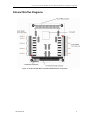
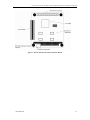
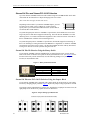
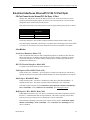
Jumpers J2A, J2B and J2C provide the ability to power on or off the I/O section of a port in
groups of four. Removing the jumpers will remove power from the DC-DC converter and all
components in the isolated section of the product.
This mode can be used in cases where power is in short supply and the group of ports is unused.
Jumper
J2A
J2B
J2C
Port bank Activated /
Deactivated
Ports 1-4
Ports 5-8
Ports 9-12
The factory default is to have all three jumpers installed to enable all three banks of ports.
Note about Fusing: Each bank is protected by a resettable fuse from damage due to circuit failure
or overload. To reset the fuse, the power should be removed for a minimum of one minute.
Line Modes
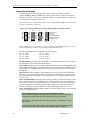
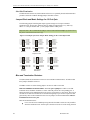
Low Power Shutdown: Mode (111)
This is the default mode when no mode configuration jumpers are installed. In this mode the
SP336 line transceiver is shutdown and the I/O section port consumes a minimum of current.
The current reduction is as much as 50ma for shutting down of a RS232 port and 70mA for
shutting down a RS485 port.
RS-232 Electrical Interface: Mode (001)
To operate a port in RS-232 mode select mode 001.
Full Duplex 4-Wire RS485: Mode (101)
In this mode, TxD+/- and RxD+/- are being driven to a known level all the time. This mode is
typically used in point-to-point situations much like RS-232, where long distances are required.
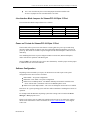
Multi-drop 4-WireRS485 Mode
In this mode the TxD+/- line driver is enabled only when data is transmitted and RxD+/- is
enabled all of the time. This mode is typically used in multi-drop 4-wire connections.
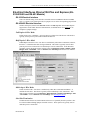
This mode requires software setup in Control Panel – System Properties – Hardware - Device Manager –
Ports – CTI PCI UART. Click on Advanced under Port Settings. (See Half Duplex Mode).
Half Duplex 2-Wire RS485: Mode (100)
In Half Duplex mode the TxD+/- line driver is enabled only when data is transmitted, whereas,
the RxD+/- is disabled when data is being transmitted. This mode is typically used in either
point-to-point 2-wire connections or in multi-drop 2-wire bus connections.
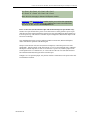
In the Windows Operating system, this mode requires software setup in Control Panel – System –
Hardware – Device Manager – Ports – CTI PCI UART. Click on Advanced under Port Settings after the
driver is installed.
Revision 0.08
21