1
Manual
Simrad MS50
Satellite Terminal
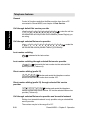
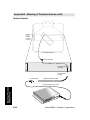
RADIATION WARNING
RADIO FREQUENCY RADIATION
HAZARD - KEEP CLEAR
1 METRE MINIMUM
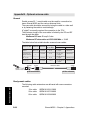
High levels of radio frequency radiation are considered health hazardous. Although no single value of
“safe radiation level” has been agreed upon by all
countries, the American National Standards Institute
(ANSI/LEEE C95.1-1992) recommends that people
should not be exposed to radiation stronger than
1 milliwatt per square centimetre at the frequencies
used in the SIMRAD MS50 terminal. Accordingly, the
operator of the terminal should ensure that the area
extending 1 metre from the front of the antenna be
kept clear of personnel when the terminal is transmitting.
OBTAINING LICENSING FOR INMARSAT TERMINALS
Under rights given under ITU Radio Regulations, local telecommunications
administrations establish and enforce national rules and regulations governing
types of emissions, power levels, and other parameters that effect the purity of
signal, which may be radiated in the various frequency bands of the radio spectrum.
To legally operate an Inmarsat terminal, it is necessary to obtain permission from
the local telecommunications regulatory authorities of the country you are operating within. Using your terminal in any country without permission causes you to
run the risk of confiscation of the terminal or legal action from local authorities.
Normal practice for taking telecommunications into another country is to apply for
a license before travel. If a license has not been obtained before travel, the
equipment may be put into storage by local authorities until such time as a license is obtained.
All specifications are subject to change without notice.
Chapter 1. Introduction
Equipment .............................................................................. 1.1
System description ................................................................ 1.6
Chapter 2. Operation
Call from Display Handset ..................................................... 2.1
Telephone features .............................................................. 2.10
Chapter 3. Telefax Service
Setting up ............................................................................... 3.1
Using telefax with Simrad MS50 ............................................ 3.2
1. Introduction
Chapter 4. Data Service
Setting up ............................................................................... 4.1
Starting from PC .................................................................... 4.3
Sending NIMS message ........................................................ 4.6
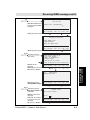
Receiving NIMS message ..................................................... 4.8
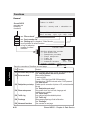
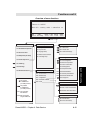
Functions ............................................................................. 4.10
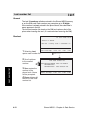
Last number list ................................................................... 4.12
Phone book .......................................................................... 4.13
Key lock ............................................................................... 4.15
Default Net service provider & terrestrial network ............... 4.16
User access ......................................................................... 4.17
Data/printer port setup ......................................................... 4.20
Phone setup ......................................................................... 4.23
Setting date and time ........................................................ 4.23
Setting key lock ................................................................. 4.24
Language setup ................................................................ 4.25
Language reset ................................................................. 4.26
Mailbox access numbers .................................................. 4.27
Call charge setup .............................................................. 4.28
Traffic log ............................................................................. 4.29
Precharge ............................................................................ 4.32
Precharge on SIM card ..................................................... 4.38
2. Operation
Advanced functions:
Access control .....................................................................
Restricted dialing ..............................................................
Restricted dialing setup .....................................................
Access code ......................................................................
Access code setup ............................................................
Restricted SIM usage ........................................................
Checking SIM restrictions .................................................
Setting SIM restrictions .....................................................
Satellite setup ......................................................................
Net service provider and terrestrial network .....................
S/A operator and terrestrial network .................................
Configuration .......................................................................
Port configuration ..............................................................
Net service providers ........................................................
Power conservation ..........................................................
Set diagnostics ..................................................................
Storing of Preferred/Allowed Net service provider
and Stand Alone operator on the SIM Card ......................
Charge tone ......................................................................
Information available ............................................................
IMN numbers ....................................................................
Misc. version ID information ..............................................
Oscillator compensation ....................................................
Network status ..................................................................
Installation ............................................................................
Paid functions ...................................................................
Phone name setup ............................................................
4.40
4.41
4.43
4.44
4.45
4.46
4.47
4.48
4.49
4.49
4.49
4.50
4.50
4.51
4.52
4.52
4.53
4.55
4.56
4.56
4.57
4.57
4.57
4.58
4.58
4.58
3. Telefax Service
4. Data Service
Chapter 5. Appendices / Index
Appendix A
Telephone country codes .................................................... A-1
Service address codes ........................................................ A-5
Appendix B
Installation of Simrad MS50 ................................................ B-1
Installation of Marine Antenna ............................................. B-4
Installation of Voyager Antenna ........................................ B-10
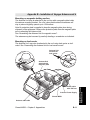
Mounting of Portable Antenna ........................................... B-15
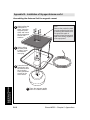
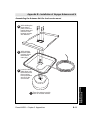
Installation of Provident Antenna ...................................... B-18
Optional antenna cable ..................................................... B-22
Appendix C
AT commands .................................................................... C-1
DTE interface ................................................................... C-17
Appendix D
Secure voice (option) ......................................................... D-1
Aero functions (option) ....................................................... D-2
Appendix E
List of terms ........................................................................ E-1
Appendix F
Troubleshooting .................................................................. F-1
5. Appendices
Simrad MS50 – User’s Manual
Doc. No. QLZB 911073-4 Rev. B Copytema 04/99
Chapter 1. Introduction
Equipment .................................................................................. 1.1
System description ..................................................................... 1.6
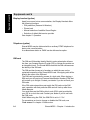
The design and specifications of the
equipment may be changed without notice.
Simrad MS50 – User’s Manual
INTRODUCTION
Contents
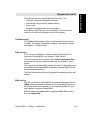
Telephone Antenna unit Coax cable
Chapter 1. Introduction
General
The Simrad MS50 terminal provides access to the international dialup telephone, facsimile and data networks via the
Inmarsat 3 Spot Beam satellite system.
The terminal comprises:
• Simrad MS50
• Antenna Unit including RF transceiver (option).
See next page for alternatives.
• Display Handset or telephone (option)
A single coax cable links Simrad MS50 and Antenna Unit.
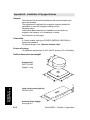
Example of antenna:
Portable
Antenna Unit
Coax cable
Simrad MS50
DIAL 00+INTL
TEL.NO.+
SHIFT BAT
ALPHA
ON
FUNC
ALPHA
SHIFT
MORE/
HELP
ENTER
LES
PTT
ON/OFF
LIST
ESC
1
ABC
DEL
2
PLAY
3
GHI
6
PQR
9
YZÆ
4
JKL
5
MNO
7
STU
8
VWX
DATA
ØÅ.
LIST
DEF
0
TAX
ÄÖÜ
LIGHT
SPC
Display Handset
or telephone.
(option)
SIM card
Figure 1.1 Simrad MS50 w/Portable Antenna.
Simrad MS50 – Chapter 1. Introduction
1.1
Equipment
Equipment
Equipment cont’d
Equipment cont’d
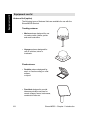
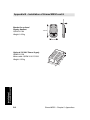
Antenna Unit (option)
The following types of Antenna Units are available for use with the
Simrad MS50 terminal:
Tracking antenna:
• Marine antenna designed for use
on marine crafts, leisure yachts
and work boats alike.
• Voyager antenna designed for
use on vehicles, trains or
riverboats.
Fixed antenna:
• Portable antenna designed for
semi- or fixed mounting on a flat
surface,
or tripod.
• Provident designed to provide
telecommunication services for
remote villages, farms, businesses,
construction sites etc.
1.2
Simrad MS50 – Chapter 1. Introduction
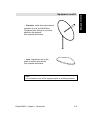
• Expander, which allows simultanous
operation of up to six WorldPhone
Telephone Units through a one meter
parabolic dish antenna.
See separate information.
• Aero, intended for use on the
small to medium size aircraft.
See separate information.
Note!
It is advisable to turn off the equipment prior to switching antenna.
Simrad MS50 – Chapter 1. Introduction
1.3
Equipment cont’d
Equipment cont’d
Equipment cont’d
Equipment cont’d
Display handset (option)
Apart from normal voice communication, the Display Handset offers
the following functions:
• PIN protection (Personal Id Number)
• Phone book
• Manual selection of satellite Ocean Region
• Selection of default Net service provider
See chapter 2. Operation
Telephone (option)
Simrad MS50 may be delivered with an ordinary DTMF telephone for
basic voice communication.
A cordless base station or PABX can be delivered as option.
SIM card
The SIM card (Subscriber Identity Module) carries subscription information from your Inmarsat Service Provider (ISP) or Net service provider on
an integrated circuit. The Simrad MS50 used with the SIM card assumes
the identity of the SIM card.
The SIM card has its own set of numbers on which the user can be
contacted irrespective of the Simrad MS50 used. All outgoing calls will be
billed to the owner of the SIM card.
The SIM card is protected by means of a lock code. When buying a
SIM card you will receive a Personal Identification Number (PIN) that
will contain up to 8 digits. Contact your dealer if you do not have your
PIN code.
If the PIN code entered does not match the PIN code on the SIM
card, operation with that particular SIM card will lock-up after three
failed attempts.
You must then use the SIM un-block code (PUK code) provided by
your ISP to un-lock the card. Contact your dealer if you do not have
the PUK code.
Note! When using the PUK, the SIM PIN is set to 1 2 3 4.
For procedures on how to change or disable the PIN code, see
"User access" in chapter 4. Data service.
1.4
Simrad MS50 – Chapter 1. Introduction
The SIM card can store miscellaneous information, f.ex.:
• PIN code (Personal Identification Number)
• Last number list (previously called numbers)
• Phone book
• Allowed and preferred Net service providers
Note! When using SIM card, the accessibility of the functions described in this manual will depend on the card supplier.
Telefax service
The Telefax facility supports Group 3 fax transmission at a rate of
2.4 Kbps. The telefax is assigned a separate incoming call number.
see chapter 3. Telefax service.
Data service
A PC can be connected for individual setup and operation of all
functions of Simrad MS50, see chapter 4. Data Service.
The PC also allows the use of the built in Data Transmission Service without the aid of a modem or data card, see chapter 4. Data
service.
The Asynchronous Data (ASD) system provides 2.4 Kbps data transfer between two Simrad MS50s, or between a Simrad MS50 and the
fixed international network.
The Data Transmission Service is assigned a separate incoming call
number.
Mail service
With PC connected to Simrad MS50, the Internet Messages Service
(NIMS) allows a message of maximum 1024 characters to be sent to
the Simrad MS50 from a website, or from the Simrad MS50 to an email address or another Simrad MS50.
NIMS messages are addressed to a response NIMS IMN number.
See also appendix E.
Simrad MS50 – Chapter 1. Introduction
1.5
Equipment cont’d
Equipment cont’d
System description
System description
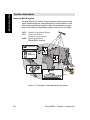
Inmarsat Mini-M system
Inmarsat Mini-M is a satellite communications system that provides
highly-reliable telephone, data and facsimile communication to and
from mobile subscribers anywhere within the worldwide coverage
area of the Inmarsat 3 Spot Beam system, see map on next page.
NCS:
LES:
MES:
R
P 7
– 4 8
1 5
S 2 69
0 3
#
R
Network Coordinating Station
Land Earth Station
(w/Net service providers)
Mobile Earth Station
(WorldPhone
Simrad
MS50terminal)
terminal
TELEPHONE
NETWORKS
DATA
NETWORKS
LES
NCS
MES
MES
MES
Figure 1.2 Overwiew of the Inmarsat Mini-M system.
1.6
Simrad MS50 – Chapter 1. Introduction
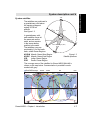
System satellites
178°E
The satellites are positioned in
a geostationary orbit above
the equator at approximately 35700 km
altitude.
See figure 1.3.
35
70
Pacific Ocean Region
0k
m
12 EQUAT
OR
00
0k
In geostationary orbit,
m
each satellite moves at
the same rate as the
Indian Ocean Region
Atlantic Ocean Region (West)
earth, and so remains
in the same relative
Atlantic Ocean Region (East)
position to the earth.
The satellites cover approximately 1/4 of the earth
each, called Ocean Regions:
15.
5°W
Figure 1.3
AOR-W Atlantic Ocean West Region
Satellite
positions
AOR-E Atlantic Ocean East Region
IOR
Indian Ocean Region
POR
Pacific Ocean Region
RT
H
°W
54
64.
5°E
EA
The coverage area of the satellites for Simrad MS50 (Mini-M) is
shown on the map below. Communication is possible in areas
marked with grey.
WorldPhone
Simrad MS50 coverage
coverage
AOR-W
AOR-E
IOR
POR
Equator
Simrad MS50 – Chapter 1. Introduction
1.7
System description cont’d
System description cont’d
System description cont’d
System description cont’d
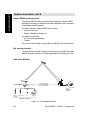
Simrad MS50 communication
The Simrad MS50 terminal provides direct telephony, telefax, NIMS
and data connection to international public networks via the Inmarsat
3 Spot Beam satellite system.
For basic operation Simrad MS50 must include:
• Antenna Unit, and
• Display Handset or telephone.
For added functionality:
• PC for control and settings.
• Telefax
Only a thin coaxial cable connects Simrad MS50 to the Antenna Unit.
Net service provider
The Net service provider issues your user licence and IMN (Inmarsat
Mobile Number) numbers. It is also responsible for the billing of calls.
Calls from Mobiles
Marine
Antenna
Telefax
Path established by
the Simrad MS50
terminal via satellite.
Simrad MS50
PC/modem
Public
Telephone
Network
DIAL 00+INTL
TEL.NO.+
ON
FUNC
SHIFT
ALPHA
SHIFT BAT
ALPHA
ENTER
MORE/
HELP
LES
PTT
ON/OFF
LIST
ESC
1
4
7
ABC
JKL
STU
DEL
2
LIST
PLAY
DEF
5
MNO
8
VWX
0
ÄÖÜ
3
GHI
6
PQR
9
YZÆ
TAX
LIGHT
DATA
ØÅ.
SPC
Display Telephone
Handset
PC
Telefax
Additional equipment
Figure 1.4 Communication path.
1.8
Simrad MS50 – Chapter 1. Introduction
To make an outgoing call, you use a standard international telephone
number with the 00 prefix. The mobile automatically includes information to identify the MES and the particular port that originates the call.
Simrad MS50 has four ports configured for: display handset, telephone, telefax and data.
The LES uses the port identifying information (OI) for billing purposes.
The mobile transmits the dialing information on a channel specially
assigned by the NCS, to the LES, which also has been instructed to
tune to the same channel. LES routes the call over the public telecommunications networks to the intended destination. When the
called party responds, the call proceeds.
Calls to Mobiles
The Simrad MS50 terminal receives incoming calls via the IMN phone
numbers. IMN numbers are assigned to the following ports:
• Display Handset (HS port)
• Telephone (TEL port)
• Data service (DATA port)
• Telefax service (FAX port)
• NIMS service
Calls are made as ordinary international (Satellite) calls where each
Ocean Region has an international country code. If an area is covered by more than one satellite, it is necessary that the caller knows
which satellite (Ocean Region) the mobile is tuned to, or if not known
try the other satellite(s).
The international codes to the four Ocean Regions are as follows:
• Atlantic Ocean East Region:
871
• Pacific Ocean Region:
872
• Indian Ocean Region:
873
• Atlantic Ocean West Region:
874
Note! Some Net service providers support the common Ocean Region access no. 870, which connects the call to the dialed Simrad
MS50 regardless of the Ocean Region the user currently communicates through.
Services
•
•
•
•
Telephone calls – basic telephony services.
Telefax – CCITT Group 3 facsimile services, 2.4 kbps.
Data communication – Hayes compatible 2.4 kbps data service.
Mail service – NIMS
Simrad MS50 – Chapter 1. Introduction
1.9
System description cont’d
System description cont’d
Chapter 2. Operation
Call from Display Handset .......................................................... 2.1
Telephone features ................................................................... 2.10
The design and specifications of the
equipment may be changed without notice.
Simrad MS50 – User’s Manual
OPERATION
Contents
Chapter 2. Operation
Call from Display Handset
Display and keys
Handsfree
microphone
2 x 12 character
alphanumerical
LCD display.
Dial 00+Intn
Phone No.+
SHIFT
ALPHA
SHIFT
ON
ALPHA
Auxiliary keys:
Allows selection of
secondary functions,
displaying additional
information, volume
and contrast
adjustment
etc.
FUNC
ALPHA
ENTER
SHIFT
MORE/
HELP
LES
PTT
ON
FUNC
Selects functions
LIST
ALPHA
Selects alphabetic key function
ENTER
Enters selected choice.
SHIFT
Selects secondary functions.
MORE/
HELP
Displays additional
information/help.
ON/OFF
ESC
Number keys:
Only the number keys
are required to call
the end subscriber.
Pressing ALPHA
selects letter entries.
Pressing SHIFT
selects secondary
functions.
Displayed when applicable:
• at hook OFF
• when additional info/help is
available.
• when SIM card is inserted
• when loudspeaker is ON.
• when pressing SHIFT to use
secondary functions.
• when pressing ALPHA to select
keypad letters.
• when receiving a call. Stops
flashing during communication.
• when power is turned ON.
DEL
1
ABC
2
4
JKL
7
STU
DATA
ØÅ.
PLAY
LIST
DEF
3
GHI
5
MNO
6
PQR
8
VWX
9
YZÆ
0
ÄÖÜ
TAX
LES
PTT
Turns internal loudspeaker
ON/OFF.
Switches between handsfree
and normal use.
LIGHT
SPC
ON/OFF
ESC
Handsfree
loudspeaker
DEL
LIST
LIST
Simrad MS50 – Chapter 2. Operation
Not in use
Switches Simrad MS50 on/off.
Toggles hook switch, or reverts
to previous position.
Deletes last character entry, or
complete entry.
Adjusts volume or contrast.
Steps down/up through function
menu/choices.
LIST scrolls through choices .
2.1
Call from Display Handset
The Display Handset is used for telephone calls and basic functions.
Additional control of functions and other facilities must be done from a PC connected to Simrad MS50, see chapter 4. Data Service.
Call from Display Handset cont’d
Idle mode
Call from Display
Handset cont’d
The following message
appears in the display
when in IDLE mode:
Dial 00+Intn
Phone No.+
470 ON
Hook ON/OFF
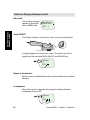
The Display Handset is secured in a desk- or wall-mounted bracket:
click!
Hook ON/OFF magnet
A magnet toggles the internal hook switch. The switch can also be
toggled with the combined HOOK ON/OFF and ESCAPE key:
ESC
Telenor
?
470 ON
Beeps in the handset
Before contact is established with the selected satellite beeps indicate
attempts.
Loudspeaker
When off-hook the loudspeaker key toggles the Display Handset
loudspeaker ON and OFF:
Telenor
?
470 ON
2.2
Simrad MS50 – Chapter 2. Operation
Call from Display Handset cont’d
Volume control
The received volume in the Display Handset may be adjusted during a call:
LIST
• Reducing the volume:
• Increasing the volume:
LIST
Call from Display
Handset cont’d
The volume is reset when clearing the call.
Light in display and keys
• Turns on during activity (default)
SHIFT
9 YZÆ once.
• For permanent light, press
Repeat strokes to turn light off, and repeat again to revert to
"activity" mode of illumination.
LIGHT
Incoming call indicator
flashes when receiving a call to the Display Handset.
The indicator turns off
Ringing
when the call is
established.
470
ON
PIN code
The user is prompted for the 4-8 digit Personal Identification Number
each time Simrad MS50 is switched on:
• SIM PIN? (with SIM card).
• Phone PIN? (without SIM card).
Note! The PIN code may also be entered from the PC, if connected,
see "Starting from PC" in chapter 4. Data Service.
Be aware that the PIN protection may have been disabled, see "User
access" in the same chapter.
Simrad MS50 – Chapter 2. Operation
2.3
Call from Display Handset cont’d
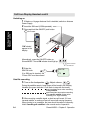
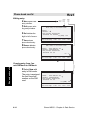
Switching on
1
If Marine or Voyager Antenna Unit is installed, switch on Antenna
Power Supply.
2
3
Insert the SIM card (if SIM operated):
Press and hold the ON/OFF push button
for 2 secs.
Call from Display
Handset cont’d
ON/OFF
DIAL 00+INTL
TEL.NO.+
SHIFT BAT
ALPHA
ON
SHIFT
ALPHA
MORE/
HELP
ON/OFF
ESC
1
"ON" should
appear in the
display.
ABC
DEL
2
PLAY
DEF
4
JKL
5
MNO
7
STU
8
VWX
0
ÄÖÜ
DATA
ØÅ.
TAX
ENTER
LES
PTT
LIST
LIST
3
GHI
6
PQR
9
YZÆ
O
(N N-O
ot FF
in
us
e)
FUNC
LIGHT
SPC
Alternatively, press the ON-OFF button on
Simrad MS50. The red ON indicator should light up:
ON
L1 L2
Search indicator
Call indicator
4
Enter the
?
SIM PIN code:
If no SIM card is inserted, the
"Phone PIN" must be entered.
SPC
SIM PIN
?
470 ON
Satellite searching
5
Turn on the loudspeaker:
. Adjust volume:
LIST
LIST
.
During the satellite search, beep tones will be heard in the Display
Handset (the green indicator L2 will flash in step with the tones):
slow intermittent tones when searching
for any satellite.
rapid intermittent tones when searching
for a specific satellite (faster when
searching for a single satellite).
6
2.4
When receiving a satellite signal, a short tone will sound. If it is an
Inmarsat satellite, a continuous tone will sound with varying frequency.
When closing in on a satellite, the tone should increase in frequency.
Note! Searching all satellites is the normal mode of operation.
Simrad MS50 – Chapter 2. Operation
Call from Display Handset cont’d
Signal strength indication
7
Accept the satellite, e.g. AOR-E:
SPC
(or
ENTER
)
once to restart the search,
Press
twice to choose another region, see next page.
IIII]
Use AOR-E?
470 ON
Dial 00+Intn
Phone No.+
470 ON
8
Key in the international call prefix 00, followed by
country code and subscriber number (max. 22 digits):
0
ÄÖÜ
6
0
PQR
ÄÖÜ
7
4
STU
JKL
2
7
PLAY
DEF
STU
4
JKL
4
JKL
7
STU
0
0
ÄÖÜ
Telenor
004767244700
470 ON
ÄÖÜ
For explanation of call numbers and list of telephone
country codes, see appendix A.
2
3
8
To use short number, f.ex. no 8:
See "Phone book" in chapter 4. Data Service.
0
To retransmit last number:
See "Last number list" in chapter 4. Data Service.
PLAY
TAX
DEF
GHI
ÄÖÜ
SPC
VWX
SPC
See also"Telephone features" later in this chapter.
9
Initiate the call:
Slow beeps are heard during call setup.
Ringing tone is heard until answer.
SPC
(or
ENTER
)
Hours :minutes :seconds
displays
Pressing
FUNC
the duration of the call as it proceeds:
Calling
Telenor
470 ON
FUNC
The call indicator L1 lights.
10 Clear the call when finished:
ESC
0:05:28
Telenor
470 ON
Dial 00+Intn
Phone No.+
470 ON
Call through selected Net service provider:
11 Enter the reference code, e.g. BT:
2
PLAY
DEF
DATA
ØÅ.
Continue from step 1.
002 BT
470
ON
Note! Availability of this function depends on provider.
Simrad MS50 – Chapter 2. Operation
2.5
Call from Display
Handset cont’d
ESC
Call from Display Handset cont’d
Call from Display
Handset cont’d
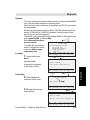
Satellite Ocean Region
Some geographic locations allow contact with more than one Ocean
Region satellite. It is recommended to choose an Ocean Region
providing good signal quality and cost-effective communication.
Use the Satellite Coverage Map in chapter 1. Introduction to select
the Ocean Region at your location:
AOR-W Atlantic Ocean Region West: (1)
AOR–E Atlantic Ocean Region East: (2)
POR
Pacific Ocean Region:
(3)
IOR
Indian Ocean Region:
(4)
Dial 00+Intn
Phone No.+
470 ON
To select, starting from idle:
1
Enter Ocean Region select mode:
SHIFT
7
IIII]
Use AOR-E?
470 ON
STU
twice
(also entered when pressing
during satellite search, see previous page.)
ESC
2
Enter list:
Select>All
AOR-W
AOR-E
0
ON
POR
IOR
FUNC
and scroll down to wanted region:
LIST
Turn on loudspeaker to hear
search tone, and adjust volume:
ENTER
LIST
LIST
Pressing
3
ESC
stops the search.
Accept the satellite, e.g. AOR-E:
SPC
(or
ENTER
)
IIII]
Use AOR-E?
470 ON
Note !
The antenna must be connected when selecting Ocean Region.
2.6
Simrad MS50 – Chapter 2. Operation
Call from Display Handset cont’d
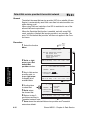
The default Inmarsat Net service provider (ISP) for a satellite (Ocean
Region) is automatically used if the user does not select another one
when making a call.
When using SIM card, selection of an ISP is restricted to one of the
allowed Net service providers!
When the Restricted Net function is enabled, and with some SIM
cards, selection of default Net service provider is not possible.
See also "Selecting default Net service provider" in chapter 4. Data
Service.
Dial 00+Intn
Phone No.+
470 ON
To select:
1
Open the function MENU:
2
Display the current default Net:
MENU
> Provider
1
ON
FUNC
AOR-E
Telenor
004 ON
ENTER
3
Scroll down through list
to wanted Net service provider:
> CMC
BT
001 ON
LIST
4
Store the chosen Net
service provider as default:
SPC
(or
Revert to idle:
Simrad MS50 – Chapter 2. Operation
2x
ENTER
)
CMC
Default Net
001 ON
ESC
2.7
Call from Display
Handset cont’d
Default Net service provider
Call from Display Handset cont’d
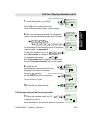
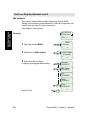
IMN numbers
Call from Display
Handset cont’d
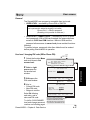
This function lists the IMN numbers assigned to Simrad MS50.
Editing of the numbers on the telephone or SIM card respectively can
only be done from the PC (when connected).
See chapter 4. Data Service.
Dial 00+Intn
Phone No.+
470 ON
Readout:
1
Open the function MENU:
FUNC
2
Scroll down to IMN numbers:
LIST
3
Enter list and scroll down
to display the assigned IMN numbers:
ENTER
LIST
MENU
> Provider
1
ON
> IMN numbers
Information
8
ON
Handset
762420510
ON
Std. Phone
762424333
Fax ON
762459000
NIMS ON
762445912
LIST
Data ON
762420510
ON
Revert to idle:
2.8
2x
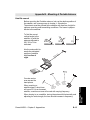
ESC
Simrad MS50 – Chapter 2. Operation
Call from Display Handset cont’d
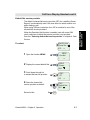
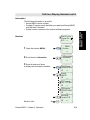
Information
Call from Display
Handset cont’d
The following information is provided:
• Simrad MS50 version number.
• Forward ID number which identifies your particular Simrad MS50
and SIM card if installed.
• System version numbers of the internal software programs.
Dial 00+Intn
Phone No.+
470 ON
Readout:
1
Open the function MENU:
FUNC
2
Scroll down to Information:
LIST
3 Enter list and scroll down
to display the information available:
ENTER
LIST
MENU
> Provider
1
ON
IMN numbers
> Information
1
ON
WorldPhone
ModemV0.9D8
91
ON
Fwd Id.
ABCDF
92
ON
DSP version.
Ver. 3.1.3/Q93
93
ON
KDB version.
QPRG9110029/
94
ON
LIST
Revert to idle:
Simrad MS50 – Chapter 2. Operation
2x
Boot prog.
Version 1.09
95
ON
ESC
2.9
Telephone features
General
Control of functions and other facilities must be done from a PC
connected to Simrad MS50, see chapter 4. Data Service.
Telephone features
Call through default Net service provider
routes the call via
0 0 4 7 6 7 2 4 4 7 0 0
the default Net service provider for the satellite (Ocean Region) you
are using.
Call through selected Net service provider
4
0 0 4 7 6 7 2 4 4 7 0 0
call via the Net service provider Telenor (4) in Norway.
routes the
Last number redialing
0
retransmits the last number.
Last number redialing through selected Net service provider
retransmits the last number via the selected Net
4
0
service provider (Telenor=4).
Short number dialing (prefix 23)
2 3 1 0 5
fetches and sends the telephone number
stored on the SIM card under short number 105.
Short number dialing (prefix 23) through selected Net service
provider
fetches and sends the telephone
4
2 3 1 0 5
number stored under short number 105 via the selected Net service
provider (Telenor=4).
Call through selected Net service provider and terrestrial network
Dialing via a terrestrial network is only possible using a selected Net
service provider.
The number may be in the range 0 to 127.
2.10
Simrad MS50 – Chapter 2. Operation
Telephone features cont’d
Example of a call through selected Net, e.g. Telenor, and terrestrial
network 1:
4
1
0
0
4
7
6
7
2
4
4
7
0
0
NETWORK
Service calls
Special information services are accessible with 2-digit service address code. See appendix A.
Note! Not all Net service providers offer every service listed.
Example of obtaining assistance from the International Operator:
Dial: 1
1
To call Simrad MS50
Dial the international prefix (normally 00) followed by
87X IMN number, f.ex. 00 871 762420510.
Depends on which satellite Simrad MS50 is currently using:
1 – AOR-E
2 – POR
3 – IOR
4 – AOR-W
(Atlantic Ocean Region East)
(Pacific Ocean Region)
(Indian Ocean Region)
(Atlantic Ocean Region West)
Note! Some Net service providers support the common Ocean Region access no. 870, which connects the call to the dialed Simrad
MS50 regardless of the Ocean Region the user currently communicates through.
Simrad MS50 – Chapter 2. Operation
2.11
Telephone features cont’d
NET PROVIDER
Making a call
Contents
Chapter 3. Telefax Service
TELEFAX SERVICE
Setting up ................................................................................... 3.1
Using telefax with Simrad MS50 ................................................. 3.2
The design and specifications of the
equipment may be changed without notice.
Simrad MS50 – User’s Manual
Chapter 3. Telefax Service
Setting up
General
The Simrad MS50 terminal provides access to a telefax service at a
transmisson rate of 2.4 Kbps.
Limitations
Simrad MS50 is fully compatible with the world’s leading telefax
machines and telefax software standards. However, transmission
may not be possible through some of the telefax machines available
on the market. Please check with your Net service provider before
purchasing a telefax for use with Simrad MS50.
Installation
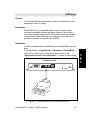
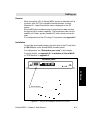
Verify that the FAX port is configured for telefax service, see
"Advanced functions: Port configuration" in chapter 4. Data Service.
Connector panel
1
5 4 3 2 1
6
1
6
1
8
6 7 8 9
ON-OFF
RS-232
DC IN
FAX
TEL
HS
ON
L1 L2
RF OUT
Figure 3.1 Telefax communication with Simrad MS50.
Simrad MS50 – Chapter 4. Telefax Service
3.1
Setting up
Connect the telefax cable to the FAX port on the Simrad MS50 connector
panel.
For wiring details, see appendix B – Installation of Simrad MS50.
Using telefax with Simrad MS50
Transmission
Telefax calls made by Simrad MS50 are telefax only. Any telephone
handset connected to the telefax machine is for dialing purposes only.
To send a fax, use the same dialing sequence as when making a call,
either through the default Net or a selected one.
See chapter 2. Operation.
Note! Enter
as the last digit before starting transmission.
Using Telefax with
Simrad MS50
Telefax transmissions normally take 1.5 minutes per standard text
page using standard resolution. Using superfine or halftone resolution
will double the transmission time. To save time, avoid using a separate cover page.
If a call failure should occur while sending a multi-page document, resend only the failed pages.
3.2
Simrad MS50 – Chapter 4. Telefax Service
Contents
Chapter 4. Data Service
Setting up .................................................................................................... 4.1
Starting from PC .......................................................................................... 4.3
Sending NIMS message .............................................................................. 4.6
Receiving NIMS message ........................................................................... 4.8
Functions ................................................................................................... 4.10
Last number list ......................................................................................... 4.12
Phone book ............................................................................................... 4.13
Key lock ..................................................................................................... 4.15
Default Net service provider & terrestrial network ..................................... 4.16
User access ............................................................................................... 4.17
Data/printer port setup ............................................................................... 4.20
Phone setup .............................................................................................. 4.23
Setting date and time ............................................................................. 4.23
Setting key lock ...................................................................................... 4.24
Language setup ...................................................................................... 4.25
Language reset ...................................................................................... 4.26
Mailbox access numbers ........................................................................ 4.27
Call charge setup ................................................................................... 4.28
Traffic log ................................................................................................... 4.29
Precharge .................................................................................................. 4.32
Precharge on SIM card .......................................................................... 4.38
Access control ........................................................................................... 4.40
Restricted dialing .................................................................................... 4.41
Restricted dialing setup .......................................................................... 4.43
Access code ........................................................................................... 4.44
Access code setup ................................................................................. 4.45
Restricted SIM usage ............................................................................. 4.46
Checking SIM restrictions ....................................................................... 4.47
Setting SIM restrictions .......................................................................... 4.48
Satellite setup ............................................................................................ 4.49
Net service provider and terrestrial network ........................................... 4.49
S/A operator and terrestrial network ....................................................... 4.49
Configuration ............................................................................................. 4.50
Port configuration ................................................................................... 4.50
Net service providers .............................................................................. 4.51
Power conservation ................................................................................ 4.52
Set diagnostics ....................................................................................... 4.52
Storing of Preferred/Allowed Net service provider
and Stand Alone operator on the SIM Card ........................................... 4.53
Charge tone ............................................................................................ 4.55
Information available ................................................................................. 4.56
IMN numbers .......................................................................................... 4.56
Misc. version ID information ................................................................... 4.57
Oscillator compensation ......................................................................... 4.57
Network status ........................................................................................ 4.57
Installation ................................................................................................. 4.58
Paid functions ......................................................................................... 4.58
Phone name setup ................................................................................. 4.58
The design and specifications of the
equipment may be changed without notice.
Simrad MS50 – User’s Manual
DATA SERVICE
Advanced functions:
Chapter 4. Data Service
Setting up
General
When connecting a PC to Simrad MS50, access is obtained to all its
functions. With a VT100 compatible terminal emulator, such as
Windows 95 – HyperTerminal the menu is displayed on the PC
screen.
Simrad MS50 also provides access to asynchronous data services
through its built-in modem capability. The transmisson rate over the
satellite is 2.4 Kbps, and any standard PC with a serial port can be
used.
For configuration from the PC using AT commands, see appendix C.
Installation
Connect the serial cable between the serial port on the PC and the 9pin RS-232 port on the Simrad MS50 connector panel.
For configuration, see "Data/printer port setup" in this chapter.
For wiring details, see appendix B – Installation of Simrad MS50,
or "DTE interface" in appendix C.
Connector panel
1
5 4 3 2 1
6
1
6
1
8
6 7 8 9
RS-232
DC IN
FAX
TEL
HS
ON
L1 L2
RF OUT
Setting up
ON-OFF
PC serial port
Figure 4.1 The PC is connected to the RS-232 port.
Simrad MS50 – Chapter 4. Data Service
4.1
Setting up cont’d
Initial settings of Simrad MS50
• Speed, normally 9600 bps.
• 8 data bits
• No parity
• 1 stop bit
See "Data/printer port setup" in this chapter.
Initial settings of the PC
Setting up cont’d
Use a PC terminal emulator program, f.ex. HyperTerminal.
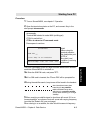
1 Start the HyperTerminal.
2
3
Enter a name for the terminal, f.ex. "modem_test".
4
In the "COM1 Properties" window, set as follows:
• Bits per second: 9600 bps.
• Data bits:
8
• Parity:
None
• Stop bits:
1
• Flow control:
None
5
In the File menu, select Properties then click Settings and select
Terminal.
6
7
Select ANSI in the Emulation list box.
8
Click on Ok.
In the "Phone Number" window, select Direct to COM1 (or the
COM port Simrad MS50 is connected to).
In the View menu, click Fonts. Select Terminal in the Fonts list.
Set the size to 11 points.
Testing the installation
Entering a command on the PC keyboard (f.ex. ATç) should
cause "OK" to be displayed on the screen.
If there is no response, check that the baud rate setting is the same
both for the PC and Simrad MS50.
4.2
Simrad MS50 – Chapter 4. Data Service
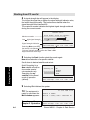
Starting from PC
Procedure
1
Turn on Simrad MS50, see chapter 2. Operation.
2 Open the terminal emulator on the PC, and connect. Key in the
start prompt at+wneradte.
at+wneradte
Terminal MMI started in mode: MMI (multilingual)
CTRL-f to switch font
CTRL-x to return to AT command mode.
Press space to continue
>SIM PIN: _
Press “Help” for an introduction
470
SIM
Ctrl + T for Help
<Del
<+U> <+I> <+O>
Ok
<+P>
Note!
When using the
terminal emulator,
the data/printer port
(DTE) is
busy and is not
capable of receiving
a data call.
The user is prompted for the 4-8 digit Personal Identification Number
each time Simrad MS50 is switched on:
3a
Enter the SIM PIN code, and press ç:
3b If no SIM card is inserted, the "Phone PIN" will be prompted for.
4 During the satellite search, beep tones will be heard in the handset
slow intermittent tones when
searching for any satellite.
rapid intermittent tones when
searching for a specific satellite
(faster when searching for a single
satellite).
5 When receiving a satellite signal, a short tone will sound. If it is an
Inmarsat satellite, a continuous tone will sound with varying frequency
(provided the Tone is ON, see next page).
When closing in on a satellite, the tone should increase in frequency.
Simrad MS50 – Chapter 4. Data Service
4.3
Starting from PC
Simrad MS50
Starting from PC cont’d
6
A signal strength bar will appear in the display.
The longer the signal bar or higher the signal strength indicator value,
the better the signal quality. The bar becomes dashed when the
signal strength value reaches 400.
The maximum marker indicates the highest signal strength achieved
during the current search.
Satellite search
Maximum marker
Found AOR-E. Accept this satellite?
]
Low
high signal strength
Signal strength indication
Volume^v
470
SIM
Ctrl + T for Help
Tone Seek New
<+U> <+I> <+O>
Selecting Mute turns OFF
the search tone (Mute Tone).
"Volume" indicator appears when the Tone is ON.
Adjust level with arrow keys.
Ok
<+P>
8
Selecting the Seek function starts the search again.
New allows selection of a specific satellite:
Scroll down to desired satellite and select:
Starting from PC cont’d
Note! Searching for a
New satellite should be
done under special
circumstances only.
Searching for any
satellite is the normal
mode of operation
(default).
9
search satellite
SatelliteNew
search
All satellite?
t> this
AOR-W
AOR-E
>>>>>>>>>>>>>==============
]
V POR
Searching for
470
SIM
Ctrl + T for Help
Selct
<+U> <+I> <+O>
Selecting Ok initializes the system.
27 June 1998 10 : 54
10
4.4
Quit
<+P>
The equipment is
ready for use when the
Main window appears:
Telenor in AOR-E
To make a call, see
chapter 2. Operation
470
SIM
Ctrl + T for Help
Dial 00 + country code + subscriber no
Book Last Menu
<+U> <+I> <+O>
Seek
<+P>
Simrad MS50 – Chapter 4. Data Service
Starting from PC cont’d
Selecting functions
The Simrad MS50
27 June 1998 10 : 54
screen window shows
the function currently
Telenor in AOR-E
assigned to each "soft"
Dial 00 + country code + subscriber no
key <U, I, O or P>
The example shows the
functions selectable
470
SIM
Book Last Menu Seek
when starting
Ctrl + T for Help <+U> <+I> <+O> <+P>
Simrad MS50.
In this situation, pressing:
ª U selects the phone Book
ª I shows the 10 Last number list
ª O selects the Menu
ª P selects the antenna Seek function
The function selectable with ª U, I, O or P will vary with the
opened window.
For an overview, see "Functions" later in this chapter.
Whenever needed,
pressing:
^ To make a call:
Dial 00 + country code + subscriber
number; press "Call" and wait for
answer.
V (For an example, press V)
ª T selects Help
470
SIM
Ctrl + T for Help
Keys
<+U> <+I> <+O>
<+P>
V = arrow down
ª U selects Keys for direct explanation
of the various tasks performed by the four "soft" keys.
Printing
When printing f.ex. a NIMS message or Traffic log, the screen
switches to text mode. Simrad MS50 must be restarted to revert to
data mode.
Simrad MS50 – Chapter 4. Data Service
4.5
Starting from PC cont’d
Help
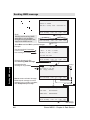
Out box Sending NIMS message
Sending NIMS message
27 June 1998 10 : 54
Telenor in AOR-E
Dial 00 + country code + subscriber no
470
SIM
Ctrl + T for Help
Note!
Sending and receiving NIMS
messages is only possible
through service providers that
support the NIMS service.
Book Last Menu
<+U> <+I> <+O>
Seek
<+P>
ªO
470
SIM
Ctrl + T for Help
Lock Mail Selct
<+U> <+I> <+O>
Quit
<+P>
ªI
Select Menu and then Mail to open Mail manager:
Example:
You have received 6 messages,
3 are not read
In Box :
6
mail
3 unread
One message is not sent
Out Box : 2
mail
1 unsent
Mail manager
You have new mail
Selecting In opens In Box,
see Receiving NIMS message
470 IN SIM
Ctrl + T for Help
ªI
Indicates that the
message is not yet Sent
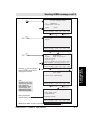
Sending NIMS message
In
Out Setup Quit
<+U> <+I> <+O> <+P>
message
details
Out Box
001> * Have a nice day
002
Happy Birthday
>
470 IN SIM
Remov Edit New
Ctrl + T for Help <+U> <+I> <+O>
Remov erases selected message.
Print outputs message to screen.
Appears only if a printer is enabled,
see "Data/printer port setup".
Print
<+P>
See next page
Setup for sending mail
User name :
Kari Nordmann
NIMS center :
004767244445
470 IN SIM
Ctrl + T for Help
Edit
<+U> <+I> <+O>
Ok
<+P>
reverts to
ª P Ok
mail manager
4.6
Simrad MS50 – Chapter 4. Data Service
Sending NIMS message cont’d
Out Box message details
To:
hal @nera.no
< Subject: Have a nice day
Status :
Unsent
V
470 IN SIM
Edit
Ctrl + T for Help <+U> <+I> <+O>
ªU
Ok
<+P>
ªP
New
ªO
> To:
_
Subject
470 IN SIM
Ctrl + T for Help
Del
<+U> <+I> <+O>
ªU I
O
Send
<+P>
P
Edit
To :
hal @ nera. no
Subject :
Have a nice day ! ! !
Hello, my friend !
How are you ?
Here in Norway the sun is shining and
V this weekend I am going skiing in the.
470 IN SIM
Ctrl + T for Help
Del
<+U> <+I> <+O>
ªU I
Pressing É opens a window
which provides the choice of
sending the mail later.
O
Send
<+P>
P
Sending NIMS
message cont’d
ªI
Send details
> NIMS center: 004767244445
Note!
The IMN number of the
NIMS service must have
been entered into
Simrad MS50 to allow
communication, see
Advanced functions:
Information available.
470 IN SIM
Ctrl + T for Help
Del
<+U> <+I> <+O>
ªU
Ok
<+P>
ªP
Sending message
Calling NIMS center
at 004767244445
Status information,
changes during call
Submitting message
470 IN SIM
Ctrl + T for Help
Abort stops NIMS call after confirmation
Simrad MS50 – Chapter 4. Data Service
<+U> <+I> <+O>
Abort
<+P>
ªP
4.7
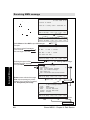
Internet message NIMS Mail In box
Receiving NIMS message
27 June 1998 10 : 54
Telenor in AOR-E
Dial 00 + country code + subscriber no
470 IN SIM
Ctrl + T for Help
Book Last Menu
<+U> <+I> <+O>
Seek
<+P>
ªO
470 IN SIM
Ctrl + T for Help
Lock Mail Selct
<+U> <+I> <+O>
Quit
<+P>
ªI
Select Menu and then Mail to open Mail manager:
Example:
Mail manager
You have received 6 messages,
In Box : 6 mail 3 unread
3 are not read
One message is not sent
Out Box : 2
mail
1 unsent
You have new mail
470 IN SIM
Ctrl + T for Help
ªU See “Sending NIMS message”.
Selecting In opens In Box
Receiving NIMS message
Indicates that the message
is not yet Read
In Box
001 >
002
003
004
005
>
* Hello !
Voice mailbox message
Fax mailbox message
* Mail me !
* Information from Service Provider
V
470 IN SIM
Ctrl + T for Help
Remov erases selected message.
Print outputs message to printer.
Appears only if a printer is enabled,
see “Data/printer port setup”.
In
Out Setup Quit
<+U> <+I> <+O> <+P>
Print Remov Read
<+U> <+I> <+O>
ªU I
O
In Box message details
Type:
NIMS
< From:
Knut Knutsen
Sent:
26 June 1998 15:57
Arrived: 26 June 1998 15:58
Status : Unread
V
470 IN SIM
Read
Ctrl + T for Help <+U> <+I> <+O>
ªU
Get
<+P>
P
See next page
Ok
<+P>
reverts
ªP Ok
to In box
See next page
4.8
Simrad MS50 – Chapter 4. Data Service
Reply
Receiving NIMS message cont’d
Get
ªP
Get new mail
Get calls the NIMS server
to read out stored NIMS
messages.
>NIMS center : 004766844445_
470 IN SIM
Ctrl + T for Help
Modify the server number if required:
<Del
<+U> <+I> <+O>
ªU
Ok
<+P>
ªP
Checking for new mail
Calling NIMS center
at 004767244445
Dialing the NIMS center
470 IN SIM
Ctrl + T for Help
<+U> <+I> <+O>
ªP
Abort stops the request to the NIMS server:
Read
ªI
Readout example:
001 Hello !
Abort
<+P>
Date: 03 Jan 1998 15 : 57
From : Knut Knutsen
Reply - to : [email protected]
Subject : Hello !
How are you my friend ?
V Here in Norway the sun is shining and
Receiving NIMS
message cont’d
470 IN SIM
Reply Next Remov Ok
Remov erases
Ctrl + T for Help <+U> <+I> <+O> <+P>
message
Next displays next message
ªU I O P
Ok reverts to In Box
>To :
[email protected]
Subject :Re : Hello
Send returns mail, see
“Sending NIMS message”.
Read Readout example:
ªU 002 Voice mailbox
message
Remov erases alert
message
Call dials the mailbox
to read out the voice
message
Ok reverts to In Box
470 IN SIM
Ctrl + T for Help
<Del abc CR/LF Send
<+U> <+I> <+O> <+P>
ªU
ªP
Mailbox access
Voice mail at Telenor
Call to : 57 _
470 IN SIM
Ctrl + T for Help
Simrad MS50 – Chapter 4. Data Service
<Del Remov Call
<+U> <+I> <+O>
ªU I
O
Ok
<+P>
P
4.9
Book Last Seek Menu Default Net Provider Access level Data/printer port setup
Phone setup Battery manager Advanced functions User access Owner access CHV2
Functions
General
27 June 1998 10 : 54
The WorldPhone
Simrad
MS50
provides the
following
functions:
Telenor in AOR-E
Dial 00 + country code + subscriber no
470
SIM
Ctrl + T for Help
Book
Last
Seek
Menu
Book Last Menu
<+U> <+I> <+O>
see "Phone book"
see "Last number list"
see "Setting up" in chapter 4. Data Service
scroll up/down to select function:
or key in reference
number for direct
Function menu
selection.
001>Set default Net provider
002 Set access level
003 Data/printer port setup
004 Phone setup menu
006 Traffic log
008 Precharge
470
SIM
Book Last Mail
009
Ctrl
+ T Advanced
for Help functions
<+U> <+I> <+O>
See also overview of functions on next page
Ref. Function
Functions
Seek
<+P>
Quit
<+P>
ªO
Features
001 Set default Net provider Allows changing Net service provider and terrestrial network.
See "Selecting default Net service provider".
002 Set access level
Allows shifting between
• user level, and
• owner / CHV2 level (non-SIM / SIM operation),
changing phone / SIM PIN code and owner / CHV2 password.
See "User access".
003 Data/printer port setup Enables port for connection of printer or PC, and sets transfer
bit rate.
See "Data/printer port setup".
004 Phone setup menu
Sets system clock, key lock code, language and
mailbox access numbers.
See "Phone setup".
006 Traffic log
Logs calls and provides detailed printout.
See "Traffic log".
008 Precharge
Allows preprogramming of total call duration.
See "Precharge".
009 Advanced functions
See overview on next page.
4.10
Simrad MS50 – Chapter 4. Data Service
Functions cont’d
Overview of menu functions
27 June 1998 10 : 54
Telenor in AOR-E
Dial 00 + country code + subscriber no
470
SIM
Ctrl + T for Help
Book Last Menu
<+U> <+I> <+O>
Seek
<+P>
ªO
Function menu
001 Set default Net provider
002 Set access level
4 – Phone setup menu
91 – Access control menu
004 Set system clock
001 Restrict dial
005 Key lock code
002 Access code
006 Language setup
003 Restrict SIM usage
007 Mailbox access numbers
003 Data/printer port setup
008 Call charge setup
97 – Configuration menu
004 Phone setup menu
001 Port configuration
002 Net service providers
006 Traffic log
003 Power conservation
SIM+ 005 Set preferred Nets
009 Advanced functions
9 – Advanced functions menu
SIM+ 007 Set S/A preferred Nets
006 Satellite setup
SIM+ 008 Set S/A allowed Nets
007 Configuration
Only appears
in OWNER level
(non-SIM operation).
SIM+ 006 Set allowed Nets
001 Access control
009 Charge tone
008 Information available
009 Install
Only editable
in OWNER level
(non-SIM operation).
SIM Only accessible
with SIM card.
SIM+ May be restricted
to higher SIM levels.
98 – Information available
/
SIM+ 001 IMN numbers
002 Misc. version Id information
009 Network status information
99 – Installation menu
001 Paid functions
002 Phone name setup
Simrad MS50 – Chapter 4. Data Service
4.11
Functions cont’d
004 Set diagnostics
008 Precharge
Call Save Erase Apnd Call Del
Last
Last number list
General
The last 10 numbers called are stored in the Simrad MS50 memory
or on the SIM card. Each number may comprise up to 22 digits.
If the number is already stored in the phone book, the subscriber’s
name appears in the list.
The last used number list stored on the SIM card replaces that of the
phone when inserting the card. (It is restored when removing the SIM).
Readout:
27 June 1998 10 : 54
Telenor in AOR-E
Dial 00 + country code + subscriber no
1 Selecting Last
opens used number list:
470
SIM
Ctrl + T for Help
Last number list
Seek
<+P>
ªI
Scroll the
up/down
12 Press
Last number function key:
Last
to the wanted
number:
2 Scroll cop to
the
wanted
3 Save
copies the
number:
number to the
phone book. Name
will be prompted.
Book Last Menu
<+U> <+I> <+O>
used number list
001>0044173764880 Nera Ltd Redhill
004766843120
004766724700
Nera SatCom AS
470
SIM
Ctrl + T for Help
Erase Save
<+U> <+I> <+O> <+P>
Erase deletes
all the selected number:
34 Pressing
Call sends
entries in Last used
4number
Press list.
Corr. to change the number:
4.12
Simrad MS50 – Chapter 4. Data Service
Right arrow New entry Call Short number
Phone book
Book
General
The following may be stored for abbreviated dialing from the Display
Handset or telephone:
• 99 entries with names of up to 29 characters in Simrad MS50.
• Up to 100 entries (no.100 and up) with names of up to 10 characters on the SIM card (varies with type).
The list is sorted by name. The SIM card entries and "phone" entries
merge when the card is inserted.
Dialing example
on the Display Handset fetches and sends the
telephone number stored in the phone book under short number 8.
2
PLAY
DEF
3
GHI
8
TAX
VWX
SPC
Phonebook entry
27 June 1998 10 : 54
Telenor in AOR-E
Dial 00 + country code + subscriber no
1
470
SIM
Ctrl + T for Help
Phone book
Nera Satcom AS
102> Nera Ltd Redhill
470
SIM
Ctrl + T for Help
3
Right arrow
displays all data:
Seek
<+P>
ªU
2
Scroll up/down or
search for first letter(s)
of subscriber
name:
Book Last Menu
<+U> <+I> <+O>
^
>
New
<+U> <+I> <+O>
Phone book
Book opens
the phone book:
Edit
<+P>
Short number
100 and up
when stored
on SIM card
Name : Nera Ltd Redhill
Number : 00441737648800
< Net provider: Default Net
Terrestrial network: 00
no. (SIM): 102
V
470
SIM
Ctrl + T for Help
New
<+U> <+I> <+O>
ªO
Simrad MS50 – Chapter 4. Data Service
Edit
<+P>
P
See next
page
4.13
Phone book cont’d
Book
Editing entry
New
4
5
Edit opens existing entry window.
Edit
ªU P
New opens new
entry window:
New entry in the Phone book
6 Del deletes the
digit to left of cursor.
> Name : _
Number :
Net provider: Default Net
Terrestrial net: Default
no. (SIM): 102
7 Save stores
470
SIM
Ctrl + T for Help
<Del
<+U> <+I> <+O>
Save
<+P>
phone book entry.
8 Remov deletes
phone book entry.
Edit mode in the Phone book
> Name : Nera Satcom AS _
Number : 004766724700
Net provider: Default Net
Terrestrial net: 00
no. : 4
470
SIM
Ctrl + T for Help
<Del Remov New
<+U> <+I> <+O>
Save
<+P>
ªO
Phone book cont’d
Copying entry from f.ex.
non-SIM book to SIM book
9 Select New with
entry in Edit mode.
The entry is assigned
the first free short
number on the SIM
card.
Edit mode in the Phone book
> Name : Nera Satcom AS _
Number : 004766724700
Net provider: Default Net
Terrestrial net: 00
no. (SIM): 102
470
SIM
Ctrl + T for Help
4.14
<Del Remov New
<+U> <+I> <+O>
Save
<+P>
Simrad MS50 – Chapter 4. Data Service
Key lock
General
The key lock function prevents unauthorized use when Simrad MS50
is on, but still allows reception of incoming calls.
When the lock is set no dial tone is produced, and PC AT commands
are unavailable.
Entering a login password (Phone PIN / SIM PIN) will still unlock the
phone. (If Phone PIN / SIM PIN is disabled, turning power off and
then on will not unlock the phone.)
The facility is only accessible when Simrad MS50 is restricted for use
Menu
with a specific SIM, or with no SIM.
ªO
See Advanced functions:
Access control.
Function menu
To initiate the key lock and
001> Set default Net provider
Set access level
enter or change the unlock
Data/printer port setup
code, see Phone setup:
Phone setup menu
Traffic log
setting key lock.
470
SIM
Ctrl + T for Help
1
Select the function
Menu:
and then Lock:
A warning is displayed
in the main window:
2
Select Open and
enter the unlock code:
Quit
<+P>
ªU
27 June 1998 10 : 54
Telenor in AOR-E
Phone locked, incoming calls only
470
SIM
Ctrl + T for Help
Unlocking
Lock Mail Selct
<+U> <+I> <+O>
Open
<+U> <+I> <+O>
Seek
<+P>
Key lock
Locking
ªO
1 – 6 digits
Open telephone
>Enter unlock code:
3
470
SIM
Ctrl + T for Help
<Del
<+U> <+I> <+O>
Ok opens the normal
main window:
Ok
<+P>
ªP
27 June 1998 10 : 54
Telenor in AOR-E
Dial 00 + country code + subscriber no
470
SIM
Ctrl + T for Help
Simrad MS50 – Chapter 4. Data Service
Book Last Menu
<+U> <+I> <+O>
Seek
<+P>
4.15
Default Net service provider & terrestrial network
Menu
General
The default Inmarsat Net service provider (ISP) for a satellite (Ocean
Region) is automatically used if the user does not select another one
when making a call.
When using SIM card, selection of an ISP is restricted to one of the
allowed Net service providers!
When the Restricted Net function is enabled, and with some SIM
cards, selection of default Net service provider is not possible. The
entry "001 Set default Net provider" will then not appear in the Function menu.
Procedure
Menu
1
ªO
Select the function
Menu:
Function menu
2
Default Net service provider
& terrestrial network
Selct or right
arrow opens Set
default Net
provider window:
001> Set default Net provider
Set access level
Data/printer port setup
Phone setup menu
Traffic log
470
SIM
Lock Mail Selct
Ctrl + T for Help <+U> <+I> <+O>
>
Quit
<+P>
1 – Set default Net provider
Satellite : AOR–E
3
Key in Net service
provider code, or
press right arrow
to display list of
available Nets:
4
Scroll up/down
to select Net:
5
Selct enters
the chosen Net.
6
Return to step 3,
scroll down and key in
Terrestrial network code.
> Default Net: KDD _
> Terrestrial network: 00
470
SIM
Ctrl + T for Help
>
<Del
<+U> <+I> <+O>
Save
<+P>
ªP
Net service providers
1 – Set default Net provider
> 001 CMC
Satellite : AOR–E
002 BT
003 KDD
> Default Net: KDD _
V 004 Telenor
Terrestrial network: 00
470
SIM
Ctrl + T for Help
Selct
<+U> <+I> <+O>
>
<+P>
ªO
7 Save stores the selected Net service provider and Terrestrial
network as default.
4.16
Simrad MS50 – Chapter 4. Data Service
User access
Menu
General
The Simrad MS50 user program is accessible from two levels:
• USER LEVEL – accessed by Phone PIN or SIM PIN.
Note! If the Phone PIN is accidentally lost, it is possible to reset the
user’s password to default by logging in as owner:
"Phone PIN: * + owner’s password"
(Resetting is not possible on SIM card.)
• CHV2 LEVEL / OWNER LEVEL – accessed by CHV2 or owner
level passwords. With a SIM card inserted, the password allows
access to CHV2 level SIM functions. Without a SIM card the
password allows access to owner level phone resident functions.
Warning!
To prevent misuse, passwords other than default must be entered
before putting Simrad MS50 in operation.
User level / changing PIN code (SIM or Phone PIN):
Menu
ªO
1
2 Selct or right
arrow opens the
Set access level
window:
3
Edit opens the
PIN code window:
4
Key in:
• Current PIN code
• New PIN code
• Retype to confirm
Select Ok following
each entry, and to
store new PIN code:
Function menu
Set default Net provider
002> Set access level
Data/printer port setup
>
2 – Set access level
>Access level : User level _
470
SIM
Ctrl + T for Help
Edit Owner Ok
<+U> <+I> <+O> <+P>
ªI
Visible in non-SIM
mode only
Edit phone PIN
> Old PIN:
New PIN:
Retype new PIN: _
470
SIM
Ctrl + T for Help
<Del
<+U> <+I> <+O>
Pressing Ok without entering any
numbers for New PIN and Retype new
PIN disables SIM PIN/Phone PIN.
NB! "Old" PIN code must be entered
to reactivate the SIM PIN/Phone PIN.
Ok
<+P>
ªP
To shift to CHV2/OWNER
level and change password,
continue on following pages . . . . . . . . . . . . . . . . . . . . . . . . . . . . . .
Simrad MS50 – Chapter 4. Data Service
4.17
User access
Select the function Menu
and scroll down to Set
access level:
Menu
User access cont’d
Shifting to CHV2 level / changing password:
Menu
1
ªO
Select the function
Menu:
2
Scroll down to
Set access level:
Function menu
Set default Net provider
002> Set access level
Data/printer port setup
3 Selct or right
arrow opens the Set
access level window:
>
2 – Set access level
>Access level: User level _
4
Key in 2002 to
open the window
for entering
password:
470
SIM
Ctrl + T for Help
Edit
<+U> <+I> <+O>
Ok
<+P>
2 – Set access level
Access level: CHV2 level
5
Key in password:
User access cont’d
OK activates the
CHV2 level:
> Password:
_
470
SIM
Ctrl + T for Help
<Del
<+U> <+I> <+O>
Ok
<+P>
ªP
Changing password:
6
Open Set access
level window again:
2 – Set access level
>Access level: CHV2 level _
7
Edit opens
password window:
Key in:
• Current password
• New password
• Retype to check
Select Ok following
each entry:
470
SIM
Ctrl + T for Help
Ok
<+P>
ªI O
Edit password
Old password:
New password:
> Retype new password: _
470
4.18
Edit User
<+U> <+I> <+O>
SIM
<Del
Ok
To revert to User level,
Ctrl + T for Help <+U> <+I> <+O> <+P>
reselect the "Set access
ªP
level" function and select User
Simrad MS50 – Chapter 4. Data Service
User access cont’d
Menu
Shifting to owner level / changing password:
Menu
1
Select the function
Menu:
2 Scroll down to
Set access level:
3 Selct or right
arrow opens the Set
access level window:
ªO
Function menu
Set default Net provider
002> Set access level
Data/printer port setup
>
2 – Set access level
>Access level: User level _
5
Key in password.
OK activates the Owner
level:
Changing password:
470
SIM
Ctrl + T for Help
Edit Owner Ok
<+U> <+I> <+O> <+P>
ªO
2 – Set access level
Access level: Owner level
> Password:
_
470
SIM
Ctrl + T for Help
<Del
<+U> <+I> <+O>
ªP
2 – Set access level
6
Open set access
level window again:
>Access level: Owner level _
7
470
SIM
Ctrl + T for Help
Edit opens
password window:
Key in:
• Current password
• New password
(10 – 12 digits)
Ok
<+P>
User access cont’d
4 Owner opens the
window for entering
the password:
Note! The default
password is:
1234567890
Edit User
<+U> <+I> <+O>
ªI
Ok
<+P>
O
Edit password
Old password:
New password:
• Retype to check
> Retype new password: _
Select Ok following
each entry:
470
SIM
<Del
Ctrl + T for Help <+U> <+I>
To revert to User level,
reselect the "Set access
level" function and select User
Simrad MS50 – Chapter 4. Data Service
<+O>
Ok
<+P>
ªP
4.19
Data/printer port setup
Menu
General
The RS-232 port may be set to operate with a PC or, for instance, to
output a Traffic log directly to a printer.
Note! The bit rate setting applies for both PC and printer transfer.
When printing f.ex. the Traffic log to the PC, the screen enters text
mode. To revert to data mode, Simrad MS50 must be restarted.
Setup for data communication
• Speed as selected on next page, normally 9600 bps.
Note! The bit rate set between the PC and the Simrad MS50 must
be higher than the nominal 2400 bps Simrad MS50-to-satellite bit
rate to ensure maximum speed transfer.
• No parity *
• 8 data bits *
• 1 stop bit *
* These parameters can only be changed using AT commands,
see appendix C.
Setup for output to printer
Data/printer port setup
A printer must have serial interface, and is set as follows:
• Speed as selected on next page, i.e. the bit rate specified for the
printer to be connected.
• No parity
• 8 data bits
• 1 stop bit
4.20
Simrad MS50 – Chapter 4. Data Service
Data/printer port setup cont’d
Menu
Procedure
Menu
Function menu
Set access level
003> Data/printer port setup
Phone setup menu
2
Scroll down to
Data/printer
port setup:
3
>
3 – Data/printer port setup
Selct or right
arrow selects the
Data/printer port
setup window:
> Bit rate:
Printer
:
AT modem:
Hot Dial:
Initial mode:
Bit rate:
2400 bps
Enabled
Disabled
Enabled
AT mode
470
SIM
Ctrl + T for Help
4
Edit or right
arrow opens list
of bit rates:
_
>
Edit
<+U> <+I> <+O>
Save
<+P>
ªI
Available bit rates
3 – Data/printer
port setup
1200 bps
2400 bps
Bit rate:
96004800
bps bps
–
Printer
: Disabled
> 9600 bps
AT modem: Enabled
19200 bps
Hot dial:
Enabled
38400 bps
Initial mode: AT mode
5
Scroll up/down
to required data/
printer bit rate:
Note!
It is recommended
to use 9600 bps for
data communication.
6
ªO
Select the function Menu:
470
SIM
Ctrl + T for Help
Selct
<+U> <+I> <+O>
<+P>
ªO
Selct enters the chosen rate:
Data/printer port setup cont’d
1
Printer:
For output to printer, select bit rate according to printer specifications.
7
Scroll down to
printer:
Enable/Disable
the DATA port for
printing, as required.
3 – Data/printer port setup
Bit rate:
> Printer
:
> AT modem:
Hot Dial:
Initial mode:
470
9600 bps
Enabled _
Enabled
Disabled
AT modem
SIM
>
>
Enab Disab Save
<+P>
Ctrl + T for Help <+U> <+I> <+O>
AT modem:
ªI O
8 Scroll down to AT modem:
Enable/Disable the DATA port for AT modem as required.
Recommended port setup
Mode
Printer:
AT modem:
Hot dial:
Output to printer
Data com. (AT)
Enabled
Disabled
Disabled
Disabled
Enabled
Disabled
Simrad MS50 – Chapter 4. Data Service
Data com. (DTR dialing)
Disabled
Disabled
Enabled
4.21
Menu
Data/printer port setup cont’d
Hot dial:
When enabled, this function monitors the DTR-pin on the DATA port.
If the DTR-pin is pulled high by equipment connected to the DATA
port, a data call is automatically initiated to a pre-programmed
number. The number is automatically stored under short number 99.
3 – Data/printer port setup
9
Scroll down to
Hot Dial:
10 Setup opens the
Phone book editing
window.
Enter name, f.ex. "Hot".
Fill in required number,
and change provider
and network, if needed.
Bit rate:
Printer
:
AT modem:
> Hot Dial:
> Initial mode:
9600 bps
Enabled
Disabled
Enabled _
AT mode
470
SIM
Ctrl + T for Help
>
>
Setup Enab Disab Save
<+U> <+I> <+O> <+P>
ªU
Edit mode in the Phone book
> Name : Hot _
Number : 004766779016
Net provider: Default Net
Terrestrial net: 00
Hot dial
470
SIM
Ctrl + T for Help
<Del
<+U> <+I> <+O>
Save
<+P>
Data/printer port setup cont’d
Initial mode:
The mode is set to AT modem as default.
When selecting any of the MMI (Man Machine Interface) settings, the
PC screen automatically displays the Simrad MS50 menu.
11 Choose Initial mode
(step 9), and scroll down
to required MMI interface:
Initial mode
3 – Data/printer
port setup
> AT modem
Bit rate:
9600MMI
bps(ASCII)
MMI (extended ANSI)
Printer
: Disabled
MMI (multilingual)
AT modem: Disabled
Hot Dial:
Enabled
> Initial mode: AT mode
470
SIM
Ctrl + T for Help
Selct
<+U> <+I> <+O>
<+P>
ªO
Selct enters the chosen mode:
3 – Data/printer port setup
Bit rate:
Printer
:
AT modem:
Hot Dial:
Initial mode:
9600 bps
Disabled
Disabled
Enabled
AT mode
470
SIM
Ctrl + T for Help
12 Save stores the settings:
4.22
Setup Enab Disab Save
<+U> <+I> <+O> <+P>
ªP
Simrad MS50 – Chapter 4. Data Service
Phone setup
Phone setup
Menu
General
This function sets as follows:
• Date and time, see below.
• Key lock, which prevents unauthorized use, see following pages.
• Language, see following pages.
• Mailbox access numbers, see following pages.
Setting date and time
The date and time is set to UTC (GMT) at the factory. It is recommended to leave this setting if correct.
Warning! The system is automatically restarted when accepting new
time settings. All calls will be disconnected.
Menu
ªO
1
Select function Menu
and scroll down to
Phone setup menu:
2 Select Selct or press
right arrow and scroll
down to Set system clock:
3
Function menu
Data/printer port setup
004> Phone setup menu
Traffic log
>
4 – Phone setup menu
Volume control
004> Set system clock
Key lock code
Language setup
Mailbox access numbers
Call charge setup
470
SIM
Ctrl + T for Help
Continue with
Selct or right arrow
to select Set system
clock function and
key in new data:
Lock Mail Selct
<+U> <+I> <+O>
>
Quit
<+P>
ªO
Phone setup
Example
44 – Set system clock
> Hour:
Minute:
Day:
Month:
Year:
Move down using
down arrow.
13 _
02
29
06
1998
470
SIM
Ctrl + T for Help
<Del
<+U> <+I> <+O>
Ok
<+P>
ªP
4 Select OK and
confirm with Yes if
settings are correct.
Note! The Simrad MS50
is now restarted.
New system clock setting
13:02:00
29 June 1998
Proceed to system reset?
470
SIM
Ctrl + T for Help
Simrad MS50 – Chapter 4. Data Service
Yes
<+U> <+I> <+O>
No
<+P>
ªU
4.23
Menu
Phone setup cont’d
Setting key lock
Simrad MS50 must be set for use with a specific SIM, or with no
SIM. See Advanced functions: Access control.
Procedure
1
Select the function
Menu:
2
Scroll down to
Phone setup menu:
3 Select Selct or
press right arrow
and scroll down to
Key lock code:
Menu
ªO
Function menu
Data/printer port setup
004> Phone setup menu
Traffic log
4 – Phone setup menu
Set system clock
005> Key lock code
Language setup
Mailbox access numbers
470
SIM
Ctrl + T for Help
4
Phone setup cont’d
Continue with
Selct or right arrow
to Key lock window.
Enter unlock code:
(1 - 6 digits)
Lock Mail Selct
<+U> <+I> <+O>
>Enter unlock code:
_
<Del
<+U> <+I> <+O>
4.24
Ok
<+P>
ªP
45 – Key lock
>Confirm unlock code:
470
SIM
Ctrl + T for Help
and press OK again:
Quit
<+P>
45 – Key lock
and select OK:
Repeat code to
confirm:
>
ªO
1 – 6 digits
470
SIM
Ctrl + T for Help
5
>
_
<Del
<+U> <+I> <+O>
Ok
<+P>
ªP
Simrad MS50 – Chapter 4. Data Service
Phone setup cont’d
Menu
Language setup
The display language may be changed as described below.
Example
1
Select the function
Menu:
27 June 1998 10 : 54
Telenor in AOR-E
Dial 00 + country code + subscriber no
470
SIM
Ctrl + T for Help
Book Last Menu
<+U> <+I> <+O>
Seek
<+P>
ªO
2
Scroll down to
Phone setup menu:
3 Select Selct or
press right arrow
and scroll down to
Language setup:
^
Function menu
Data/printer port setup
004> Phone setup menu
Traffic log
>
^
4 – Phone setup menu
Key lock code
006> Language setup
Mailbox access numbers
470
SIM
Ctrl + T for Help
Lock Mail Selct
<+U> <+I> <+O>
>
Quit
<+P>
4
Continue with
Selct or right arrow
to select function.
Phone setup cont’d
ªO
46 – Language setup
>Language:
English _
470
SIM
Ctrl + T for Help
Edit
<+U> <+I> <+O>
ªU
5
Select Edit and
scroll up/down to
wanted language:
>Language:
Selct reads out the
selected language in
470
the setup window:
Ctrl + T
Save changes the display
text to the selected language.
>
Save
<+P>
ªP
^ Available languages
45 –English
Key lock
> Deutsch
Español
Français
Portugués
SIM
for Help
To easy restore English, see next page.
Simrad MS50 – Chapter 4. Data Service
Selct
<+U> <+I> <+O>
<+P>
ªO
4.25
Menu
Phone setup cont’d
Language reset
When starting Simrad MS50 with the display language set to f.ex.
Portugese, the Eng function key provides an easy way to restore the
default English display language:
Nera WorldPhone
1
> PIN do SIM:
_
Tecle "Help" para uma apresentacão
470
SIM
Ctrl + T for Help
<Apag
Eng
<+U> <+I> <+O>
Ok
<+P>
ªO
Do you want to reset the language to
English ? ( "SIM" = "Yes" and "Não " =
"No" )
Quer substituir para língua inglesa ?
470
SIM
Ctrl + T for Help
Sim
<+U> <+I> <+O>
ªP
Phone setup cont’d
ªU
Não
<+P>
4.26
Simrad MS50 – Chapter 4. Data Service
Phone setup cont’d
Menu
Mailbox access numbers
When receiving a mail alert (voice, fax or data), the user must call the
server mailbox to retrieve the message. To call the mailbox, normally
the default number 57 can be used.
The mailbox dial-up number may be changed as described below.
Example
1
Select the function
Menu:
Scroll down to
Phone setup menu:
3 Select Selct or
press right arrow and
scroll down to Mailbox
access numbers:
4
Continue with
Selct or right arrow
to select function
and key in new
numbers:
^
Function menu
Data/printer port setup
004> Phone setup menu
Traffic log
>
^
4 – Phone setup menu
Language setup
007> Mailbox access numbers
Call charge setup
470
SIM
Ctrl + T for Help
Lock Mail Selct
<+U> <+I> <+O>
Quit
<+P>
ªO
Phone setup cont’d
2
Menu
ªO
47 – Mailbox access numbers
> Voice:
Fax:
Data:
57 _
57
57
Default numbers for mailbox access
5
OK stores the new
mailbox number(s).
470
SIM
Ctrl + T for Help
Simrad MS50 – Chapter 4. Data Service
<Del
<+U> <+I> <+O>
Ok
<+P>
ªO
4.27
Menu
Phone setup cont’d
Call charge setup
With the Call charge function enabled the cost of the call will be
displayed during the call and for 10 seconds after the call is terminated. Later the charge can be fetched using the Traffic log function.
The price per unit and minimum charge time is set as described
below.
Example
1
Select the function
Menu:
2
Scroll down t o
Phone setup menu:
3 Select Selct or
press right arrow and
scroll down to Call
charge setup:
4
Call charge setup
Continue with
Selct or right arrow
to select the Call
charge function.
Menu
ªO
^
Function menu
Data/printer port setup
004> Phone setup menu
Traffic log
>
^
4 – Phone setup menu
Mailbox access numbers
008> Call charge setup
470
SIM
Ctrl + T for Help
Lock Mail Selct
<+U> <+I> <+O>
>
Quit
<+P>
ªO
48 – Call charge
Enab activates the
values set below.
Charge time unit (s):
Price per charge unit:
Minimum charge time (s):
Disab disables the
Call charge indication.
Ok activates the call
charge indication.
470
SIM
Ctrl + T for Help
Setup Enab Disab Ok
<+U> <+I> <+O> <+P>
ªU I
O
P
48 – Call charge
5
Select Setup to
modify entries:
> Charge time unit (s):
Price per charge unit:
Minimum charge time (s):
470
SIM
Ctrl + T for Help
Save stores the new values:
4.28
6
3.00
60
6 _
3.00
60
<Del
<+U> <+I> <+O>
ªU
Save
<+P>
ªP
Simrad MS50 – Chapter 4. Data Service
Menu
Traffic log
General
This function logs all outgoing calls both with and without SIM card
inserted. Every call is logged with:
•
•
•
•
subscriber number, start time and duration
service (voice, fax, data, NIMS)
Net provider and satellite
user name (if access code is enabled) / SIM card FWD
The Simrad MS50 owner may set the log output mode as follows,
(see Traffic log settings):
• off (stops logging)
• cleared (stops logging and clears the log)
• for automatic printout after 1 or 10 calls (auto print limit).
• for display on the screen
• logging of incoming calls
Menu
Traffic log readout
ªO
1
Select the function
Menu and scroll down
to Traffic log:
^
Function menu
Phone setup menu
006> Traffic log
Precharge
>
2
Right arrow or
selct opens the
Traffic log window:
6 – Traffic log
Log mode :
Unprinted calls :
Auto print limit :
View
<+U> <+I> <+O>
Only appears when log
mode is set for output to
printer.See next page.
3
View displays
the list of call data:
Scroll up/down
to wanted call:
Ok
<+P>
ªO P
Minutes:seconds
^
Dialed number
> * # 004766844700,
# incoming call,
* # 003963221800,
* # 00551155053008,
V
470
SIM
Ctrl + T for Help
4
Call start
01Sep 13:56,
18Aug 17:08,
15Aug 11:08,
03Jul 12:44,
<+U> <+I> <+O>
Dur.
0:01>
0:12
0:05
0:11
Quit
<+P>
# : entry tagged for printout by owner
* : entry not yet printed
Pressing right
arrow shows
detailed call data:
^ Dialed number :
Net provider
Satellite :
Service :
Voice
Reg. No :
1
Printed :
No
V Tagged :
Yes
470
SIM
Ctrl + T for Help
004767244700
Telenor
AOR-E
User :
Nera
Start : 01Sep 13:56
Duration : 0:10:02
Charge :
90
<+U> <+I> <+O>
Appears when "Access code" is enabled.
(For SIM card call – SIM Id: ABCDF)
See Advanced functions:
Access control.
Simrad MS50 – Chapter 4. Data Service
Quit
<+P>
When call charge is
enabled, the "Charge"
field appears showing the
cost of the viewed call.
4.29
Traffic log
470
SIM
Ctrl + T for Help
To printer
0
1
Menu
Traffic log cont’d
Ref. #: record printed
no. previously.
"No hash" when
printed first time.
Subscriber
number
Start date
and time
Call duration
in minutes
and seconds
Ref
Dialed number
Call start
001 # 004767243669
980711 09:20
002
0044222534555
980711 10:56
003 # 004722259024
980711 13:24
004
00494088251
980711 15:46
005 # 00871765421392
980712 08:45
006
Incoming call
980712 09:33
007 # 00494088251
980712 10:47
008 # 0044816865701
980712 13:55
009
004722259024
980712 16:09
010 # 044222534555
980712 16:53
Total duration is 2:05:28 (125.46 minutes)
10 records printed 98.07.12 17:34
Number of
records
Duration in
hours, minutes
and seconds
Accumulated time in
minutes and 1/100
of a minute
Port
Dur.
4:05
2:33
11:22
10:05
5:32
6:14
9:11
5:20
15:44
9:10
Net service
provider
Port
H.set
H.set
TEL
TEL
H.set
H.set
TEL
TEL
TEL
H.set
WorldPhone
Simrad MS50
user (only appears
when access code
is enabled)
Net
CMC
BT
Telenor
Teleglobe IDG
AOR-E
BT
Teleglobe IDG
BT
Telenor
BT
User
Aslaug
Bob
John
Franz
Charlie
Bob
Franz
George
John
Bob
Note! When call charge is
enabled, the duration field will
be replaced by a call charge field
showing the cost of each call.
Traffic log cont’d
Example of traffic log printout.
4.30
Simrad MS50 – Chapter 4. Data Service
Menu
Traffic log cont’d
Traffic log settings (owner level only)
1
6 – Traffic log
Open the Traffic
log window:
Print outputs all unprinted and tagged entries.
See previous page.
>Log mode:
Unprinted calls:
>Auto print limit:
>Log incoming calls:
470
Ctrl + T for Help
To printer >
0
1>
Enabled >
Print Edit View
<+U> <+I> <+O>
ªI
2 Select Edit or
press right arrow
for settings:
Ok
<+P>
O
Only appears when log mode
is set for output to printer.
See next page.
Log mode
Off
> Cleared
Print after 1 call
Print after 10 calls
To screen
Scroll up/down and Selct
at wanted output Log mode:
Auto print limit can
easily be toggled between
1 and 10:
Print frequency
> Print after each call
Print after 10 calls
Logging of incoming calls
can be enabled/disabled:
Log incoming calls
> Enabled
Disabled
View displays the
list of calls:
Scroll up/down to
wanted call:
^
Tag tags entry:
Repeat to untag.
Pressing right arrow
shows detailed call data
of selected number:
Print outputs the
selected entry to the
printer without header
and footer.
Dialed number
> * # 004767244700,
# Incoming call,
* # 003963221800,
* # 00551155053008,
V
470
SIM
Ctrl + T for Help
Not printed
Call start
03Jul 13:56,
15Aug 17:08,
18Aug 11:08,
01Sep 12:44,
<+U> <+I> <+O>
Dur.
0:01>
0:12
0:05
0:11
Quit
<+P>
Tag for printout
^ Dialed number :
Net provider
Satellite :
Service :
Reg. No :
V Printed :
Remove erases the
entry from the log.
Quit reverts to main
window.
Traffic log cont’d
3
470
SIM
Ctrl + T for Help
Voice
1
No
004767244700
Telenor
AOR-E
User :
Nera
Start : 03Jul 13:56
Duration : 0:10:02
Tagged :
Yes
Print Remov Tag
<+U> <+I> <+O>
Quit
<+P>
Hours:minutes:seconds
Appears when "Access code" is enabled.
(For SIM card call – SIM Id: ABCDF)
See Advanced functions: Access control.
Simrad MS50 – Chapter 4. Data Service
4.31
Menu
Precharge
General
For use with SIM, see "Precharge on SIM card".
Simrad MS50 can be preprogrammed with a total call duration limit of
up to 44640 minutes (744 hours).
The owner stores a special telephone number under short number
00. This allows the user to call the owner to buy more time even when
having exceeded the time limit.
During a call the remaining time is displayed next to the call duration
in hours and minutes (seconds for the last minute).
For users, the Precharge function only appears in the menu when
enabled, i.e when bought time is loaded, see following pages.
Precharge readout
1
Select the function
Menu:
2
Scroll down
to Precharge:
Menu
ªO
^
Function menu
Traffic log
008> Precharge
Avanced functions
>
3
Precharge
Selct or right
arrow opens the
Precharge window
which displays the time
used and remaining in
hours, minutes and
seconds:
8 – Precharge
Time used:
Time remaining:
470
SIM
Ctrl + T for Help
4.32
2:33:45
0:56:15
Code
<+U> <+I> <+O>
Ok
<+P>
Simrad MS50 – Chapter 4. Data Service
Menu
Precharge cont’d
Buying more remaining time
There are three ways to load precharge time:
• Call the owner via short number 00 and get the buy code during
the conversation.
(Calling short number 00 can be done even if exceeding the remaining time limit and does not influence the limit value).
See next page.
• Fax or mail the Forward ID and Index to the owner who generates
the buy code and returns this by fax, mail, etc.
See following pages.
Precharge cont’d
• The owner loads the new Precharge limit into Simrad MS50.
See following pages.
Simrad MS50 – Chapter 4. Data Service
4.33
Menu
Precharge cont’d
Buying time by calling the owner
1
Dial 00:
00
> Number:
00 _
Net provider: Telenor
Terrestrial network: 00
470
SIM
Ctrl + T for Help
<Del Call
<+U> <+I> <+O>
Short
<+P>
ªP
and select Short:
Calling Owner
via Telenor in AOR-E
Status:
00:07 / 0:00
Connected
Handset
Volume^v
2
Selecting Menu displays
IMN numbers:
470
SIM
Ctrl + T for Help
On
Mute Menu
<+U> <+I> <+O>
Clear
<+P>
ªO
IMN numbers
3
Precharge cont’d
Selecting Time opens
the Precharge window
displaying the Forward
ID, Index and user code
entry field:
Read the Forward ID,
Index and the new call
duration you want to buy
to the owner.
Then key in the code he
reads back to you.
The code contains
the time information.
Handset: 762420510
Phone: 762420511
Fax:
762420512
Data:
762420513
NIMS:
762420513
470
SIM
Ctrl + T for Help
É
Time
<+U> <+I> <+O>
Book
<+P>
ªI
8 – Precharge
Forward ID: 6955B9
Index:
827660941
> Code: 123456 _
470
SIM
Ctrl + T for Help
<Del
<+U> <+I> <+O>
ªI
Ok
<+P>
ªP
8 – Precharge
Ok loads the new
remaining time limit:
4 Select Ok again and
then press Esc to return to
the conversation window:
4.34
Time used:
2:33:45
Time remaining: 3:56:15
470
SIM
Ctrl + T for Help
Code
<+U> <+I> <+O>
Ok
<+P>
ªP
Simrad MS50 – Chapter 4. Data Service
Menu
Precharge cont’d
Buying time via fax or mail
Menu
ªO
1
2
^
Function menu
Traffic log
008> Precharge
Advanced functions
Selct or right
arrow opens the
Precharge window:
3
Code opens the
Precharge window
displaying the Forward
ID, Index and user
code entry field:
Fax or mail the Forward
ID, Index and the new
call duration you want
to buy to the owner.
>
8 – Precharge
Time used:
2:33:45
Time remaining: 0:56:15
470
SIM
Ctrl + T for Help
Code
<+U> <+I> <+O>
Ok
<+P>
ªO
8 – Precharge
Forward ID: 6955B9
Index:
827660941
> Code: 123456 _
470
SIM
Key in the code faxed
Ctrl + T for Help
or mailed back to you.
The code contains the time information.
<Del
<+U> <+I> <+O>
Ok
<+P>
Precharge cont’d
Select the
function Menu
and scroll down
to Precharge:
Ok loads the new remaining time limit.
Simrad MS50 – Chapter 4. Data Service
4.35
Menu
Precharge cont’d
Owner loads Precharge time
Simrad MS50 must be set in owner level.
Menu
ªO
1
Select the
function Menu
and scroll down
to Precharge:
2
Selct or right
arrow opens the
Precharge window:
^
Function menu
Traffic log
008> Precharge
Advanced functions
8 – Precharge
Time used:
2:33:45
Time remaining: 0:56:15
470
SIM
Ctrl + T for Help
Clear Buy NewK Ok
<+U> <+I> <+O> <+P>
ªU I
Precharge cont’d
3 Selecting Buy
allows keying in a
new time limit:
The Precharge menu
entry is now no longer
visible from user level.
O
P
8 – Precharge
> Buy minutes: 250 _
470
SIM
Ctrl + T for Help
4 Selecting Clear
disables the
Precharge function:
>
<Del
<+U> <+I> <+O>
Ok
<+P>
8 – Precharge
Precharge disabled
470
SIM
Ctrl + T for Help
Clear Buy NewK Ok
<+U> <+I> <+O> <+P>
Precharge is enabled when buying minutes.
ªP
NB! Remember to revert to user level.
4.36
Simrad MS50 – Chapter 4. Data Service
Menu
Precharge cont’d
Key readout
Simrad MS50 must be set in owner level.
Using the Precharge Administrator program (QPRG 9110039) to
generate a buyer’s Precharge code requires both the owners password and a "key" generated by Simrad MS50, as follows:
Menu
ªO
1
Select the function
Menu and scroll down
to Precharge:
^
Function menu
Traffic log
008> Precharge
Advanced functions
2
Selct or right
arrow opens the
Precharge window:
>
8 – Precharge
Time used:
2:33:45
Time remaining: 0:56:15
470
SIM
Ctrl + T for Help
Clear Buy NewK Ok
<+U> <+I> <+O> <+P>
ªO
8 – Precharge
3
Time used:
2:33:45
Time remaining: 0:56:15
Precharge code handling:
Clear Buy NewK Ok
<+U> <+I> <+O> <+P>
ªO
OWNER
USER
• Before a Simrad MS50 may be rented, the
owner must derive its specific key (NewK) and
store it in the data base of the Precharge
Administrator program, which is used to
generate more precharge minutes for the user.
See above.
At changes, the NewK must be updated in the
data base.
The owner also needs to register the
Simrad MS50’s owner password with the
Precharge Administrator program.
More call time is needed:
• The owner uses the Precharge Administrator
program to generate the Precharge code for
the user on basis of the above NewK, owner’s
password and the information received from
the user.
• the user calls the owner
via short number 00,
• or sends telefax or mail.
• The owner reads or sends the
new Precharge code to the user.
Simrad MS50 – Chapter 4. Data Service
When wanting to buy
more call time, the user
conveys the Forward ID,
Index and the requested
call time to the owner:
The user keys in the new
Precharge code
provided by the owner.
4.37
Precharge cont’d
Key: 200 085 213 056 149 115 094
470
SIM
Ctrl + T for Help
Precharge option cont’d
A new "key" is
generated every time
NewK is selected:
Precharge on SIM card
Menu
Precharge cont’d
Precharge on SIM card
When using SIM card, any Precharge set on the telephone itself is
overridden. If no Precharge is set on the SIM card, Simrad MS50 may
be used freely.
Readout on SIM
The procedure is the same as described previously for the telephone
(except for the Code function which now is not required),
see "Precharge readout" :
8 – Precharge
Time used:
2:33:45
Time remaining: 0:56:15
470
SIM
Ctrl + T for Help
<+U> <+I> <+O>
Ok
<+P>
ªP
Precharge on SIM card
Precharge cont’d
During a conversation, the time remaining and call duration
are displayed as for calls without using SIM card.
Some SIM cards may have a prepaid option. Contact your SIM vendor for more information on how to upgrade your SIM card.
4.38
Simrad MS50 – Chapter 4. Data Service
Advanced functions:
Menu
Advanced functions
Overview
Some of the Advanced functions are accessible from Phone OWNER
LEVEL or CHV2 LEVEL only.
The OWNER LEVEL and CHV2 levels are protected by passwords.
For shifting to owner/CHV2 level and assignment of password, see
"User access".
The Advanced functions include as follows:
• Access control:
Restrict dial
Access code
Restrict SIM usage
• Satellite setup
Port configuration
Net service providers
Power conservation
Set diagnostics
Set preferred Nets
(with SIM card only)
Set allowed Nets
(with SIM card only; CHV2 level or higher)
Set S/A preferred Nets (with SIM card only)
Set S/A allowed Nets (with SIM card only; CHV2 level or higher)
Charge tone
• Information available:
IMN numbers
Misc. version Id information
Oscillator Compensation
(owner level, or in user level
Network status information when diagnostics is ON, see
Configuration: Set diagnostics)
• Install: Installation and debug menu:
Paid functions (owner level)
Phone name setup (owner level)
Simrad MS50 – Chapter 4. Data Service
4.39
Advanced functions
• Configuration:
Access control
Introduction
Menu
Advanced functions: Access control
Introduction
The following functions are available for controlling the use of
Simrad MS50:
• Restrict dial which allows the owner to establish a Barred list of
subscriber numbers that cannot be called, or set Simrad MS50 for
dialing from Phone Book only.
See next page.
• Access code which opens Simrad MS50 for up to 25 authorized
users. See following pages.
• Restrict SIM usage which permits controlling the use of SIM card
with Simrad MS50. See following pages.
The functions are editable in owner level only.
Procedure:
1 Select the function
Menu and scroll
down to Advanced
functions:
Access control
2 Select Selct or press
right arrow to open the
Advanced functions
menu:
3
Continue with Selct
or right arrow to open
the Access control
menu:
allowing selection
of submenus:
Menu
ªO
^
Function menu
Precharge
009> Advanced functions
>
9 – Advanced functions menu
001> Access control
Satellite setup
Configuration
Information available
470
SIM
Ctrl + T for Help
>
Lock Mail Selct
<+U> <+I> <+O>
Quit
<+P>
ªO
91 – Access control menu
001> Restrict dial
002 > Access code
003 > Restrict SIM usage
470
SIM
Ctrl + T for Help
>
>
>
Lock Mail Selct
<+U> <+I> <+O>
Quit
<+P>
ªO
Restricted dialing, see next page
Access code, see following pages
Restricted SIM usage, see following pages
4.40
Simrad MS50 – Chapter 4. Data Service
Advanced functions: Access control cont’d
Menu
Restricted dialing
Simrad MS50 provides three choices of controlling calls:
• No restrictions.
• Barred list, which may contain up to 10 phone numbers or part of
numbers that can not be called. F.ex. the entry "0087" in the
barred list prevents all mobile-to-mobile calls.
• Dial from Book only, which restricts calls to the numbers in the
Phone Book (in Simrad MS50). It is still possible to append, i.e. a
short number entry with number field "0047" means that it is possible to dial all Norwegian numbers. When a SIM card is inserted, the
SIM entries will not be merged with the "phone" entries.
Access control cont’d
The function is active for non-SIM operation and for one specific SIM
card, see "Restricted SIM usage". It applies to all ports of Simrad
MS50. Only one of the lists can be activated at one time.
Simrad MS50 – Chapter 4. Data Service
4.41
Advanced functions: Access control cont’d
Menu
Checking the dialing setup:
1 Select Selct or press
right arrow via
Advanced functions
to open the Access
control menu:
2
Continue with Selct
or right arrow to open
the Restricted dialing
window, which shows
the active list:
91 – Access control menu
001>Restrict dial
Access code
Restrict SIM usage
470
SIM
Ctrl + T for Help
>
Lock Mail Selct
<+U> <+I> <+O>
Quit
<+P>
ªO
911 – Restricted dialing
• No restrictions
• Barred list
• Dial from Book
onl
The list to be active
is selected by the
owner, see next page.
Current mode : No restrictions
470
SIM
Ctrl + T for Help
<+U> <+I> <+O>
Ok
<+P>
Alternative
Current mode : Barred list
470
SIM
Ctrl + T for Help
List
<+U> <+I> <+O>
Ok
<+P>
Access control cont’d
ªO
911 – Blocked numbers
001>004767244700
0044816865701
470
SIM
Ctrl + T for Help
<+U> <+I> <+O>
Ok
<+P>
Alternative
Current mode : Dial from Book only
470
SIM
Ctrl + T for Help
Book
<+U> <+I> <+O>
Ok
<+P>
ªO
Similar to Phone book, see this chapter.
4.42
Simrad MS50 – Chapter 4. Data Service
Restricted dialing setup
Advanced functions: Access control cont’d
Menu
Restricted dialing setup (owner level only)
The "barred list" and the phone book are established as follows:
1 Select Selct or press
right arrow via
Advanced functions:
Access control to open
the Restrict dial window:
The window shows which
list is currently active:
91 – Access control menu
001>Restrict dial
Access code
>
911 – Restricted dialing
Current mode : Barred list _
470
Ctrl + T for Help
Edit
List
<+U> <+I> <+O>
ªI
2
Edit allows selection of
restriction mode.
3
911 – Blocked numbers
Remov Edit New
<+U> <+I> <+O>
ªI
4
Ok
<+P>
O
911 – Blocking number
> Barred root : 0047800
Empty
field when
selecting
New
470
Ctrl + T for Help
Save
<+P>
<Del
<+U> <+I> <+O>
ªP
911 – Restricted dialing
5
When the restriction
mode "Dial from Book only"
is active, selecting Book
allows short numbers
to be entered:
Current mode : Dial from Book only _
470
Ctrl + T for Help
NB! Remember to revert to user level
Simrad MS50 – Chapter 4. Data Service
Edit
Book Ok
<+U> <+I> <+O> <+P>
ªO
Similar to Phone book,see this chapter
4.43
Access control cont’d
001>0047800xxx
0044816865701
470
Ctrl + T for Help
Selecting Edit
allows the barred number
to be modified:
The field is empty when
selecting New to add a
phone number to the list.
Remove deletes number.
Save stores the changes.
O
Type of restriction
> Barred list
Dial from Book only
No restrictions
Scroll up/down to select:
(Selct enters chosen mode)
Selecting List displays
the blocked phone
numbers:
Ok
<+P>
Menu
Advanced functions: Access control cont’d
Access code
When the access code function has been enabled, the user is
prompted for a 1 - 8 digit personal code when making a call.
The code opens Simrad MS50 for one call. Up to 25 authorized users
can be allocated access codes.
The function is active for non-SIM use and for one specific SIM card,
see "Restricted SIM usage". It applies to all ports of Simrad MS50.
The access code can only be
27 June 1998 10 : 54
entered from owner level,
Telenor in AOR-E
see next page.
Enter access code to call
470
SIM
Ctrl + T for Help
Making a call:
At hook-off, the Access code
login window opens, prompting
the user to enter the access code:
Access control cont’d
To make a call, see
chapter 2. Operation
Access code login
>Access code:
470
SIM
Ctrl + T for Help
2 Pressing Fax or Data shows
which users are allowed to
make a telefax or data call:
1
Selecting Selct or pressing
right arrow via Advanced
functions opens the Access
control menu.
Scroll down to Access code.
Using Selct or right arrow
again opens the Access code
window, which indicates whether
the Access code function is
Enabled or Disabled:
<Del Phone Fax
<+U> <+I> <+O>
Data
<+P>
ªI O
P
Ready for fax call
<+U> <+I> <+O>
Quit
<+P>
ªP
or data call
91 – Access control menu
Restrict dial
002>Access code
Restrict SIM usage
470
SIM
Ctrl + T for Help
>
Lock Mail Selct
<+U> <+I> <+O>
Quit
<+P>
ªO
912 – Access code
>Access code: Enabled
470
SIM
Ctrl + T for Help
4.44
_
Telephone is opened for User1
Please proceed with call.
470
SIM
Ctrl + T for Help
Checking the setup:
Seek
<+P>
ªO
1 – 6 digits
1
2
Menu
<+U> <+I> <+O>
<+U> <+I> <+O>
Ok
<+P>
Simrad MS50 – Chapter 4. Data Service
Access code setup
Advanced functions: Access control cont’d
Menu
Calling from external phone
1
2
Lift handset; enter access code + "#" on external phone.
If access code is accepted, a dial tone is heard and the number to
be dialed can be entered. Press "#" to initiate the call.
Access code setup (owner level only)
Access code is edited or entered as follows:
1 Selecting Selct or pressing
right arrow via Advanced
functions opens the
91 – Access
Access control menu.
2
Scroll down to
Access code.
3
Selecting Selct or
pressing right arrow
again opens the Access
code window:
control menu
Restrict dial
002>Access code
Restrict SIM usage
470
Ctrl + T for Help
>
Lock Mail Selct
<+U> <+I> <+O>
Quit
<+P>
ªO
912 – Access code
>Access code: Enabled _
470
Ctrl + T for Help
Setup Enab Disab Ok
<+U> <+I> <+O> <+P>
ªU I
4
Setup displays the list
of authorized users:
Access control cont’d
Enab/Disab enables/
disables the access
code function.
O
Access codes
Scroll down to wanted
user:
001> User1
User2
470
Ctrl + T for Help
Select Edit to modify the
code, or select New to
add a user to the list:
Use Del to modify.
Select ABC or abc to
enter uppercase/ lowercase
letters as required.
Ok stores modified user name.
NB! Remember to revert to user level
Simrad MS50 – Chapter 4. Data Service
Remov Edit New
<+U> <+I> <+O>
ªI
O
Starts with
empty name
field when
selecting New.
Code is
prompted
when name
is entered.
Access code edit
Name:
> Code:
Abc
_
470
Ctrl + T for Help
<Del ABC abc
<+U> <+I> <+O>
ªU I
Quit
<+P>
O
Ok
<+P>
P
4.45
Advanced functions: Access control cont’d
Menu
Restricted SIM usage
Allowed SIM
Simrad MS50 can be set to operate from:
• one specific SIM card. Any other SIM users will be rejected.
• no SIM card. All SIM users will be rejected.
• any SIM card.
Restricted SIM
The restrictions "Restrict dial" and "Access code" can be set to be
active for:
• one specific SIM card (in addition to non-SIM usage)
• no SIM card (only active for non-SIM usage).
The setting can only be made from owner level, see Setting SIM
restrictions. See also Restricted dialing and Access code.
When restricted to SIM provider
Access control cont’d
The service provider can lock Simrad MS50 to a specific type of
card, e.g. a "MOBIQ" SIM card. The restrictions will then be:
• any "MOBIQ" SIM card.
• one specific "MOBIQ" card.
• no SIM card at all.
4.46
Simrad MS50 – Chapter 4. Data Service
Menu
Advanced functions: Access control cont’d
Menu
Checking SIM restrictions
ªO
1
Select the function
Menu and scroll down to
Advanced functions:
2 Selct or right arrow
opens the Advanced
functions menu.
3
Scroll down to
Access control and
use Selct or right arrow
to open the Access
control menu:
^
Function menu
Precharge
009> Advanced functions
>
9 – Advanced functions menu
001> Access control
Aero functions
>
91 – Access control menu
Access code
003>Restrict SIM usage
>
4
Scroll down to
Restrict SIM usage,
470
SIM
Lock
Ctrl + T for Help <+U>
and use Selct or right
arrow to open the
Alternatives: see below
SIM restrictions
window:
913 – SIM
Allowed SIM:
Restricted SIM:
Mail Selct
<+I> <+O>
Quit
<+P>
ªO
restrictions
Any
No restrictions
SIM provider Id: 8012
<+U> <+I> <+O>
Ok
<+P>
Access control cont’d
470
SIM
Ctrl + T for Help
Appears if card is locked by SIM provider
913 – SIM restrictions
Allowed SIM:
Locked to one
Card number:
89013000513658144571
Restricted SIM: Locked to one
Card number:
89013000513658144571
SIM provider Id: 8012
Alternative restrictions:
470
SIM
Ctrl + T for Help
<+U> <+I> <+O>
Ok
<+P>
When Allowed SIM is set to:
• Any, no restrictions apply
• No SIM, SIM cards are not accepted.
• Locked to one, one specific card is allowed.
When Restricted SIM is set to:
• No restrictions, Access code and Restricted dial only apply for
non-SIM operation.
• Locked to one, Access code and Restricted dial apply for nonSIM operation and operation with the specified SIM card.
Simrad MS50 – Chapter 4. Data Service
4.47
Setting SIM restrictions
Menu
Advanced functions: Access control cont’d
Setting SIM restrictions (owner level only)
1 Select Selct or press
right arrow via Advanced
functions to open the
Access control menu:
2
Continue with Selct or
right arrow to open the
SIM restrictions window:
* Restricted SIM:
3
Scroll down to
Restricted SIM:
91 – Access control menu
Access code
003>Restrict SIM usage
>
913 – SIM restrictions
> Allowed SIM:
Any
_
Restricted SIM: No restrictions
913 – SIM restrictions
Allowed SIM:
> Restricted SIM:
470
Ctrl + T for Help
Any
No restrictions _
Lock
Open
<+U> <+I> <+O>
ªU
Ok
<+P>
O
913 – SIM restrictions
4 Select Lock and insert
the actual SIM card:
Access control cont’d
Simrad MS50 can now
be operated with that
specific card only:
Allowed SIM:
Any
> Restricted SIM: No restrictions _
Please insert the actual SIM card.
470
Ctrl + T for Help
<+U> <+I> <+O>
<+P>
913 – SIM restrictions
Allowed SIM:
Any
> Restricted SIM: Locked to one _
Card number:
8980120000166470336
Please retract the SIM card.
When retracting the card,
the Id of the SIM provider
is displayed:
470
Ctrl + T for Help
Any
> Restricted SIM: Locked to one _
Card number:
8980120000166470336
SIM provider Id: 8012
470
Ctrl + T for Help
* Allowed SIM:
<+P>
913 – SIM restrictions
Allowed SIM:
Ok stores the settings.
<+U> <+I> <+O>
Lock
Open
<+U> <+I> <+O>
Ok
<+P>
Appears if card is locked by SIM provider
Follow the same procedure as for Restricted SIM with the marker
remaining at Allowed SIM.
4.48
Simrad MS50 – Chapter 4. Data Service
Satellite setup
Advanced functions: Satellite setup
Menu
General
Allows preprogramming of default Net service provider, S/A operator (Stand
Alone operator) and terrestrial network for each satellite region (Ocean Region).
Net service provider and terrestrial network
1
Select the function
Menu and scroll down to
Advanced functions:
2
Sroll down to
Satellite setup:
Selct or right arrow
opens the list of Satellites
and Default Net providers.
Scroll up/down to wanted
satellite:
Selct then initiates search
for the specified satellite.
^
Function menu
Precharge
009> Advanced functions
>
9 – Advanced functions menu
Aero functions
006> Satellite setup
Configuration
Satellite
AOR-W
001>AOR-E
POR
IOR
Region 4
Region 5
Region 6
470
SIM 7
Region
Ctrl + T for Help
(and a new spot beam selection)
Right arrow displays
satellite info:
Menu
ªO
>
Default Net provider
004 Telenor
003 KDD
001 CMC
002 BT
Edit
Selct
<+U> <+I> <+O>
>
Ok
<+P>
ªU
Satellite : AOR–E
(scroll to wanted satellite)
< Default Net : 003 KDD
Terrestrial network :
00
3
470
SIM
Ctrl + T for Help
S/A operator : 001 CMC
Terrestrial network :
00
Edit
Selct
<+U> <+I> <+O>
Ok
<+P>
ªU
Satellite : AOR–E
> Default Net : KDD _
Terrestrial network : 00
4
Right arrow opens the
list of available Net service
providers.
>
S/A operator : CMC
Terrestrial network : 00
470
SIM
Ctrl + T for Help
<Del
<+U> <+I> <+O>
5
Scroll up/down to wanted Net.
Selct enters the new default Net
service provider:
6 Return to step 4, scroll down to
Terrestrial network and key in code.
Save stores the selected Net service
provider and Terrestrial network as the
default for that particular satellite.
Save
<+P>
ªP
Net service providers
> 001 CMC
002 BT
003 KDD
V 004 Telenor
Selct
ªO
S/A operator and terrestrial network
Repeat steps 4 - 6 for selection of S/A operator and terrestrial network.
Simrad MS50 – Chapter 4. Data Service
4.49
Satellite setup
Edit opens the setting
window for the selected
satellite:
Port configuration
Configuration
Menu
Advanced functions: Configuration
Port configuration
• Displays current configuration. Reconfiguration can be made in
"owner" level only (non-SIM operation).
• With Broadcast On, incoming calls initiate ringing on all ports
configured for voice communication.
• The secure voice function allows selected port(s) to be used with
encrypted telephone. See appendix D – Secure voice option.
Menu
Example
1
Select the function
Menu and scroll down to
Advanced functions:
2 Select Selct or press
right arrow and scroll
down to Configuration:
3 Selct or right
arrow opens the
Configuration menu:
ªO
^
Function menu
Precharge
009> Advanced functions
9 – Advanced functions menu
Satellite setup
007> Configuration
Information available
>
97 – Configuration menu
001> Port configuration
Net service providers
Power conservation
Set diagnostics
Set preferred Nets
470
Ctrl + T for Help
Configuration
>
>
Lock Mail Selct
<+U> <+I> <+O>
Quit
<+P>
ªO
4 Activating Selct or
right arrow again displays
the Port configuration
window, which shows the
present service of the
ports, and the incoming
call response.
Service
Handset: Voice
TEL:
Voice
FAX:
Fax
Broadcast: Off
470
Ctrl + T for Help
Secure voice
Enabled
<+U> <+I> <+O>
Secure voice appears
when bought.
Ok
<+P>
ªP
For enabling/disabling of
secure voice, see appendix D.
For port details, see appendix B – Connecting up optional equipment.
4.50
Simrad MS50 – Chapter 4. Data Service
Advanced functions: Configuration cont’d
Menu
Net service providers
Each Net service provider has a station code. The "Net service provider" window displays a list which matches the codes to the station
owners. Names can be edited in "owner" level (non-SIM operation).
Example:
Menu
ªO
1
Select the function
Menu and scroll down
to Advanced
functions:
^
Function menu
Precharge
009> Advanced functions
>
2
3 Selct or right
arrow selects the
Configuration menu:
Using Selct or right
arrow again opens
list of Net service
providers:
4
Scroll up/down to
wanted service provider:
9 – Advanced functions menu
Satellite setup
007> Configuration
Information available
>
97 – Configuration menu
Port configuration
002>Net service providers
>
Power conservation
Set diagnostics
Charge tone
Set preferred Nets
470
SIM
Lock Mail Selct Quit
Ctrl + T for Help <+U> <+I> <+O> <+P>
Configuration cont’d
Select Selct or
press right arrow
and scroll down to
Configuration:
972 – Net service providers
KDD
004> Telenor
Indosat
France Telecom
Station 12
Teleglobe IDB
470
SIM
Ctrl + T for Help
Ok stores the chosen provider:
Simrad MS50 – Chapter 4. Data Service
<+U> <+I> <+O>
Ok
<+P>
ªP
4.51
Menu
Advanced functions: Configuration cont’d
Power conservation
Battery power can be conserved during voice calls and/or telefax
calls. The conservation can be enabled for voice and/or telefax.
When set in Auto mode, the conservation facility is automatically
enabled.
The speech quality at the remote end may be slightly impaired with
power conservation enabled.
Menu
Example
ªO
1
Select the function
Menu and scroll down
to Advanced functions:
2 Select Selct or press
right arrow and scroll
down to Configuration:
3 Selct or right
arrow selects the
Configuration menu:
4
Configuration cont’d
Scroll down and use
Selct or right arrow to
open the Power
conservation window:
^
Function menu
Precharge
009> Advanced functions
9 – Advanced functions menu
Satellite setup
007> Configuration
Information available
>
97 – Configuration menu
Net service providers
003>Power conservation
>
Set diagnostics
>
Charge tone
Set preferred Nets
Set S/A preferred Nets
470
SIM
Lock Mail Selct Quit
Ctrl + T for Help <+U> <+I> <+O> <+P>
ªO
5
Enable/Disable power
reduction during voice/fax
calls, as required.
Auto reduces drain
automatically.
Save stores new
entries or modifications:
>
973 – Power conservation
Voice:
> Fax:
Enabled
Disabled _
470
SIM
Ctrl + T for Help
Auto Enab Disab Save
<+U> <+I> <+O> <+P>
ªU I
O
P
Set diagnostics
Additional system
information is displayed
when diagnostics is
turned On.
Note! Not necessary for
normal telephone usage.
4.52
974 – Set diagnostics
>Set diagnostics:
470
SIM
Ctrl + T for Help
Off
_
On
Off
<+U> <+I> <+O>
ªI
O
Ok
<+P>
P
Simrad MS50 – Chapter 4. Data Service
Menu
Advanced functions: Configuration cont’d
Storing of Preferred/Allowed Net service provider
and Stand Alone operator on the SIM Card
These functions allow you to store the preferred and allowed Net
service provider and preferred and allowed Stand Alone operator
for each satellite region on a SIM card. Note! The access level required to operate the functions depend on the SIM card supplier.
Menu
Preferred Net service provider
ªO
1 Select the function
Menu and scroll down to
Advanced functions:
^
Function menu
Precharge
009> Advanced functions
2 Select Selct or press
right arrow and scroll
down to Configuration:
>
9 – Advanced functions menu
Satellite setup
007> Configuration
Information available
3 Selct or right
arrow selects the
Configuration menu:
Scroll down to Set
preferred Nets:
>
97 – Configuration menu
Charge tone
005>Set preferred Nets
Set S/A preferred Nets
Selct or right arrow
opens the list of Set
preferred Net providers.
470
SIM
Ctrl + T for Help
Lock Mail Selct
<+U> <+I> <+O>
Scroll up/down to
wanted satellite:
975 – Set preferred Nets
AOR-W
001> AOR-E
POR
IOR
Region 4
Region 5
Region 6
470 Region
SIM 7
Selct
Ctrl + T for Help <+U> <+I> <+O>
>
Quit
<+P>
4 Selct or right
arrow shows the
current Net and TNID
for the selected
satellite:
ªI
Configuration cont’d
ªO
>
Ok
<+P>
P
More information (preferred
Net for selected satellite)
975 – Set preferred Nets AOR–E
001>BT
CMC
Telenor
(TNID=Terrestrial
Network Identification Digits)
Remove deletes the
the Net entry.
TNID:
TNID:
TNID:
470
SIM
Ctrl + T for Help
Remov Edit
<+U> <+I> <+O>
ªU I
Removes entry from list
Simrad MS50 – Chapter 4. Data Service
00
09
44
Ok
<+P>
P
See next page
4.53
Menu
Advanced functions: Configuration cont’d
5
Edit opens list
of available Nets:
6
Scroll up/down to
wanted Net:
Selct enters new default
Net service provider:
Edit
ªI
Net service providers
975 – SIM preferred
001 CMCNets AOR–E : 45
> 002 BT
: 00
001>BT
TNID: 00
003 KDD
: 53
CMC
TNID:
09
004 Telenor
: 44
Telenor
TNID: 12
44
012 Station
: 07
470
SIM
Ctrl + T for Help
Selct
<+U> <+I> <+O>
<+P>
ªO
If the SIM card is not "restricted":
5b Edit opens satellite
preferred list window:
AOR-E preferred list (1)
> Net provider: Telenor
Terrestrial network: 00
Selct or right arrow opens
list of available Nets.
Configuration cont’d
6b Scroll up/down
to wanted Net:
Selct enters new default
Net service provider:
470
SIM
Ctrl + T for Help
>
Selct
<+U> <+I> <+O>
<+P>
ªO
Net service providers
975 – SIM preferred
001 CMCNets AOR–E
> 002 BT
001>BT
TNID: 00
003 KDD
CMC
TNID: 09
004 Telenor
Telenor
TNID:
44
012 Station 12
470
SIM
Ctrl + T for Help
Selct
<+U> <+I> <+O>
<+P>
ªO
Set S/A preferred Net (Stand Alone operator)
Repeat steps 3 through 6.
Set allowed Nets / Set S/A allowed Nets
Restricted to "CHV2" or higher, depending on Net service provider.
Repeat steps 3 through 6.
4.54
Simrad MS50 – Chapter 4. Data Service
Advanced functions: Configuration cont’d
Menu
Charge tone
When the charge tone function is enabled, a single frequency tone or
DTMF is transmitted once the call has been established. The tone
informs an external debiting system, f.ex. a pay phone (connected to
the TEL port), that charging can start.
Settings can only be made in owner level.
Menu
ªO
1
Select the function
Menu and scroll down to
Advanced functions:
2
Via the Advanced
functions menu, use
Selct or right arrow to open
the Configuration Menu:
3
Scroll down to Charge
tone, and use Selct or right
arrow to open the Charge
tone window:
^
Function menu
Precharge
009> Advanced functions
>
9 – Advanced functions menu
Satellite setup
007> Configuration
Information available
>
^
97 – Configuration menu
Set diagnostics
009>Charge tone
470
Ctrl + T for Help
Lock Mail Selct
<+U> <+I> <+O>
>
Quit
<+P>
979 – Charge tone
Tone type:
Single type
Configuration cont’d
Setup:
Frequency (Hz): 2400
Duration (ms): 1000
4 Selecting Setup opens the
Charge tone setup window,
which allows setting the
required single frequency
tone or DTMF, and its
duration in milliseconds.
Valid settings:
Frequency: 400 - 3400 Hz
Duration:
10 - 5000 ms
DTMF key: 0 - 15
470
Ctrl + T for Help
Setup Enab Disab Quit
<+U> <+I> <+O> <+P>
ªU
Charge tone setup
>Tone type:
Single type
>
Frequency (Hz): 2400
Duration (ms): 1000
470
Ctrl + T for Help
Key no. when
selecting DTMF.
Edit
<+U> <+I> <+O>
Save
<+P>
ªI
Available tone types
> Single tone
DTMF
Selct
Selct enters the chosen settings:
Simrad MS50 – Chapter 4. Data Service
ªO
4.55
Information available
Menu
Advanced functions: Information available
General
The following information and facilities are provided:
• The IMN numbers assigned to Simrad MS50.
Access level must be set to "owner" or "CHV2" for editing of the
numbers on the telephone or SIM card respectively.
• Forward ID number which identifies your particular Simrad MS50
and SIM card if installed.
• System version numbers of the internal software programs. See
next page.
• Restoring communication with the satellite when receiving the
alarm: Not available, see "Oscillator compensation" on next page.
(The function only appears when "Set diagnostics" is On).
• Network status information (only appears when "Set diagnostics"
is On, or the access level is set to "owner"), see next page.
Menu
IMN numbers
ªO
1
Select the function
Menu and scroll down
to Advanced functions:
^
Function menu
Precharge
009> Advanced functions
Information available
Use Selct or right arrow
to continue down to
Information available:
>
9 – Advanced functions menu
Configuration
008> Information available
>
2
Selct or right arrow
opens the Information
available window:
3
98 – Information available
001> IMN numbers
002> Misc. version Id information
007> Oscillator compensation
009> Network status information
470
SIM
Ctrl + T for Help
Selecting Selct or pressing
right arrow again opens
the IMN numbers window:
Lock Mail Selct
<+U> <+I> <+O>
>
>
>
>
Quit
<+P>
ªO
981 – IMN numbers
Handset: 762420510
Phone: 762424333
Fax:
762445900
Data:
762430520
NIMS:
762445912
470
SIM
Ctrl + T for Help
<+U> <+I> <+O>
Ok
<+P>
ªP
4.56
Simrad MS50 – Chapter 4. Data Service
See
next
page
Menu
Advanced functions: Information available cont’d
98 – Information available
IMN numbers
002> Misc. version Id information
007>Oscillator compensation
009> Network status information
>
>
>
Misc. version ID information
Scroll down and use
Selct or right arrow to
open Version information
window.
982 – Version information
001>
Terminal Id is
FWD: ABCDF
System version
Release 1.0.2
14 Jan 1997
470
SIM
Ctrl + T for Help
<+U> <+I> <+O>
Oscillator compensation
5
Scroll down and use
Selct or right arrow to
open Oscillator
compensation window:
ªP
987 – Oscillator compensation AOR - E
Default compensation :
Field adjustment :
Current TDM offset :
Total compensation :
Select Scan with the
antenna pointed towards
the satellite.
(Pointing is automatic on
Marine & Voyager antennas.
Will take 10-15 minutes.)
If several choices, scroll
down to preferred frequency.
Select Selct:
Ok
<+P>
470
SIM
Ctrl + T for Help
Not defined
0.000 kHz
Not available
--------Not available
Scan Update Reset Ok
<+U> <+I> <+O> <+P>
ªU
Possible oscillator offsets (IOR)
001 Offset:
0.180 kHz (Active NCSC)
470
SIM
Ctrl + T for Help
Selct
<+U> <+I> <+O>
Information available cont’d
4
<+P>
ªU
Verification succeeded
The selected NCSC candidate seems to
be correct
When Verification
succeeded is displayed,
select Save to update the
Simrad MS50 oscillator.
Network status
6
Scroll down and use Selct
or right arrow for readout
of network data.
To accept this frequency and use it in
the future, press “Save”
470
SIM
Ctrl + T for Help
Save
<+P>
ªP
989 – Network status
1
2
3
4
5
Lk:00
Lk:00 Lk:00
Lk:00
Lk:00
Region registration:
Successful
Current ocean:
AOR-E
Active NCSC:
0
Active spot beam Id:
3
NSR
470
SIM
Ctrl + T for Help
Simrad MS50 – Chapter 4. Data Service
<+U> <+I> <+O>
Oreg Cap ChAdv P.Adv
<+U> <+I> <+O> <+P>
4.57
Installation
Menu
Advanced functions: Installation
Paid functions
Only appears in owner level (non-SIM operation).
An enhanced Simrad MS50 function is activated by entering the
"Opening key" provided when purchased:
Menu
1
Select the function
Menu and scroll down
to Advanced functions:
Use Selct or right arrow
to continue down to
Install:
ªO
^
Function menu
Precharge
009> Advanced functions
>
9 – Advanced functions menu
Information available
009> Install
>
2
Selct or right arrow
opens the Installation
menu:
3 Selecting Selct or
pressing right arrow
again opens the
Paid functions list:
The list only shows
purchased functions.
Installation
4 Selecting New opens
the Open new paid
functions window:
Enter the "Opening
key" and select Ok.
99 – Installation menu
001> Paid functions
002> Phone name setup
991 – Paid functions
001> Charge tone
002> Traffic log
003> Precharge
004> Restricted Net provider
005> Restricted dial
006> Secure voice
007> Access
470
SIM code
New
008>
Ctrl
+ TData
for Help <+U> <+I> <+O>
009> Advanced service level
010> Fax
011> NIMS
012> Aero functions
ªO
Ok
<+P>
P
991 – Open new paid functions
>Code:
1234 _
470
SIM
Ctrl + T for Help
Phone name setup
>
>
<+U> <+I> <+O>
Ok
<+P>
ªP
Only appears in owner level (non-SIM operation).
Repeat steps 1 and 2
992 – Phone name setup
to open Phone name
setup window:
> Factory name: Nera _
Phone name: WorldPhone
Use Del to modify.
Select ABC or abc to enter
uppercase/lowercase letters 470
SIM
<Del ABC abc
Save
as required. Save stores the Ctrl + T for Help <+U> <+I> <+O> <+P>
ªU I O P
modified phone name.
4.58
Simrad MS50 – Chapter 4. Data Service
Contents
Chapter 5. Appendices
Appendix A
Telephone country codes .......................................... A-1
Service address codes.............................................. A-5
Appendix B
Installation of Simrad MS50 ...................................... B-1
Installation of Marine Antenna .................................. B-4
Installation of Voyager Antenna .............................. B-10
Mounting of Portable Antenna ................................ B-15
Installation of Provident Antenna ............................ B-18
Optional antenna cable ........................................... B-22
Appendix C
AT commands ........................................................... C-1
DTE interface .......................................................... C-17
Appendix D
Secure voice (option) ................................................ D-1
Aero functions (option) .............................................. D-2
Appendix E
List of terms .............................................................. E-1
APPENDICES
Appendix F
Troubleshooting ........................................................ F-1
Simrad MS50 – User’s Manual
Chapter 5. Appendices / Index Appendix
A
Telephone
country codes
Appendix A – Telephone country codes
Explanation with examples:
Mobile - to - fixed subscriber, telephone call
through default Net:
00 47 66844700 Call/
Automatic call prefix
Telephone country code
See list of telephone country
codes in this appendix.
Subscriber number
To send number
Mobile - to - fixed subscriber, telephone call
through selected Net service provider:
Selection of e.g. Net service
provider 004
4
00 47 66844700 Call/
Automatic call prefix
Telephone country code
See list of telephone country
codes in this appendix.
Subscriber number
To send number
Fixed/mobile - to - Mobile telephone call:
XX 871 765421392 Call/
International call prefix (normally 00)
Telephone satellite (Ocean Region) code:
871 – AOR-E
872 – POR
873 – IOR
874 – AOR-W
Telephone country codes
9-digit Inmarsat Mobile Number (IMN)
To send number
Note! Some Net service providers support the common Ocean Region
access no. 870, which connects the call to the dialed Simrad MS50
regardless of the Ocean Region the user currently communicates through.
Simrad MS50 – Chapter 5. Appendices
A-1
Appendix A – Telephone country codes cont’d
Afghanistan (Islamic State of) ........................ 93
Cuba ............................................................... 53
Albania (Republic of) .................................... 355
Cyprus (Republic of) .................................... 357
Algeria (People’s Democratic Republic of) .... 21b1) Czech Republic ............................................ 420 c)
American Samoa ......................................... 684
Angola (Republic of) .................................... 244
Democratic People’s Republic of Korea ...... 850
Anguilla ............................................................ 1 a) Denmark ......................................................... 45
Antigua and Barbuda ....................................... 2 a) Diego Garda ................................................. 246
Argentine Republic ......................................... 54
Djibouti (Republic of) .................................... 253
Armenia (Republic of) .................................. 374 d) Dominican Republic ......................................... 1 a)
Aruba ............................................................ 297
Ascension ..................................................... 247
Ecuador ........................................................ 593
Atlantic Ocean East Region (AOR-E) (Inmarsat) ..... 871
Egypt (Arab Republic of) ................................ 20
Atlantic Ocean West Region (AOR-W) (Inmarsat) ... 874
El Salvador (Republic of) ............................. 503
Australia ......................................................... 61
Equatorial Guinea (Republic of) ................... 240
Australian External Territories ...................... 672
Eritrea ........................................................... 291
Austria ............................................................ 43
Estonia (Republic of) .................................... 372
Azerbaijani Republic .................................... 994
Ethiopia ........................................................ 251
Telephone country codes
Bahamas (Commonwealth of the) ................... 1 a)
Bahrain (State of) ......................................... 973
Bangladesh (People’s Republic of) .............. 380
Barbados .......................................................... 1 a)
Belarus (Republic of) ................................... 375 d)
Belgium .......................................................... 32
Belize ........................................................... 501
Benin (Republic of) ...................................... 223
Bermuda ........................................................... 1 a)
Bhutan (Kingdom of) .................................... 975
Bolivia (Republic of) ..................................... 591
Bosnia and Herzegovina (Republic of) ........ 387
Botswana (Republic of) ................................ 267
Brazil (Federative Republic of) ....................... 55
British Virgin Islands ........................................ 1 a)
Brunei Darussalam ...................................... 673
Bulgaria (Republic of) .................................. 859
Burkina Faso ................................................ 226
Burundi (Republic of) ................................... 257
Cambodia ..................................................... 355
Cameroon (Republic of) ............................... 237
Canada ............................................................ 1 a)
Cape Verde (Republic of) ............................ 238
Cayman Islands ............................................... 1 a)
Central African Republic .............................. 236
Chad (Republic of) ....................................... 235
Chile ............................................................... 56
China (People’s Republic of) ......................... 86 e)
Colombia (Republic of) .................................. 57
Comoros (Islamic Federal Republic of the) .. 269
Congo (Republic of the) ............................... 242
Cook Islands ................................................ 682
Costa Rica .................................................... 506
Croatia (Republic of) .................................... 385
A-2
Falkland Islands (Malvinas) ......................... 500
Faroe Islands (Denmark) ............................. 298
Fiji (Republic of) ........................................... 679
Finland ......................................................... 358
France ............................................................ 33 c)
French Poiynesia ........................................... 68
Gabonese Republic ..................................... 241
Gambia (Republic of the) ............................. 220
Georgia (Republic of) ....................................... 7 d)
Germany (Federal Republic of) ...................... 49
Ghana .......................................................... 233
Gibraltar ....................................................... 350
Greece ........................................................... 30
Greenland (Denmark) .................................. 299
Grenada ........................................................... 1 a)
Guadeloupe (French Department of) ........... 590
Guam ........................................................... 671
Guatemala (Republic of) .............................. 502
Guiana (French Department of) ................... 594
Guinea (Republic of) .................................... 224
Guinea-Bissau (Republic of) ........................ 245
Guyana ......................................................... 592
Haiti (Republic of) ........................................ 509
Honduras (Republic of) ................................ 504
Hongkong ..................................................... 852
Hungary (Republic of) .................................... 36
Iceland .......................................................... 354
India (Republic of) .......................................... 91
Indian Ocean Region (IOR)(Inmarsat) ......... 873
Indonesia (Republic of) .................................. 62
Iran (Islamic Republic of) ............................... 98
Iraq (Republic of) ......................................... 964
Simrad MS50 – Chapter 5. Appendices
Appendix A – Telephone country codes cont’d
Ireland .......................................................... 353
Israel (State of)............................................. 972
Italy ................................................................. 39
Ivory Cost (Republic of) ............................... 225
Jamaica ............................................................ 1 a)
Japan ............................................................. 81
Jordan (Hashemite Kingdom of) .................. 962
New Zealand .................................................. 64
Nicaragua...................................... ............... 505
Niger (Republic of the) ................................. 227
Nigeria (Federal Republic of) ....................... 234
Niue ........................................... .................. 683
Northern Mariana Islands (Commonwealth of the) .. 670
Norway ........................................................... 47
Oman (Sultanate of) ..................................... 968
Pacific Ocean Region (POR)(Inmarsat) ....... 872
Pakistan (Islamic Republic of) ....................... 92
Palau (Republic of) ...................................... 680
Panama (Republic of) .................................. 507
Papua New Guinea ............................... ...... 675
Paraguay (Republic of) ................................ 595
Peru ................................................................ 51
Philippines (Republic of the) .......................... 63
Poland (Republic of) ...................................... 48
Portugal ........................................................ 351
Lao People’s Democratic Republic .............. 856
Latvia (Republic of) ...................................... 371
Lebanon ....................................................... 961
Lesotho (Kingdom of) ................................... 266
Liberia (Republic of) ..................................... 231
Libya (Socialist People’s Ubyan Arab Jamahiriya) ... 21b2)
Liechtenstein (Principality of) ......................... 41 c) Qatar (State of) ............................................ 974
Lithuania (Republic of) ................................. 370
Luxembourg ................................................. 352
Reunion (French Department of) ................. 262
Romania ......................................................... 40
Macau .......................................................... 853
Russian Federation .......................................... 7 d)
Rwandese Republic ..................................... 250
Macedonia (the former Yugoslav Republic of) .. 389
Madagascar (Republic of) ............................ 261
Malawi .......................................................... 265
Saint Vincent and the Grenadines ................... 1 a)
Saint Luda ........................................................ 1 a)
Malaysia ......................................................... 60
Saint Kitts and Nevis ........................................ 1 a)
Maldives (Republic of) ................................. 960
Saint Helena ................................................ 290
Mali (Republic of) ......................................... 223
Saint Pierre and Miquelon (French Department of) . 508
Malta ............................................................ 356
San Marino (Republic of) ............................. 378
Marshall Islands (Republic of the) ....... ........ 692
Sao Tome and Principe (Democratic Repulic of) 239
Martinique (French Department of) .............. 596
Saudi Arabia (Kingdom of) ........................... 966
Mauritania (Islamic Republic of) ................... 222
Senegal (Republic of) .................................. 221
Mauritius (Republic of) ................................. 230
Seychelles (Republic of) .............................. 248
Mexico ............................................................ 52
Sierra Leone ................................................ 232
Micronesia (Federated States of) ................. 691
Singapore (Republic of) ................................. 65
Moldova (Republic of) .................................. 373
Monaco ........................................................ 337 c) Slovak Republic ........................................... 421 c)
Mongolia ....................................................... 976
Slovenia (Republic of) .................................. 386
Montserrat ........................................................ 1 a) Solomon Islands .......................................... 677
Morocco (Kingdom of) .................................... 21b3) Somali Democratic Republic ........................ 252
Mozambique (Republic of) ........................... 258
South Africa (Republic of) .............................. 27
Myanmar (Union of) ....................................... 95
Spain .............................................................. 34
Sri Lanka (Democratic Socialist Republic of) . 94
Namibia (Republic of) .................................. 264
Sudan (Republic of the) ............................... 249
Nauru (Republic of) ...................................... 674
Suriname (Republic of) ................................ 597
Nepal ............................................................ 977
Swaziland (Kingdom of) ............................... 268
Netherlands Antilles ..................................... 599
Sweden .......................................................... 46
Netherlands (Kingdom of the) ........................ 31
Switzerland (Confederation of) ...................... 41 c)
Syrian Arab Republic ................................... 963
New Caledonia ............................................. 687
Simrad MS50 – Chapter 5. Appendices
A-3
Telephone country codes
Kazakhstan (Republic of) ................................. 7 d)
Kenya (Republic of) ..................................... 254
Kiribati Republic of) ...................................... 686
Kuwait (State of) .......................................... 965
Kyrgyzstan (Republic of) .............................. 996 d)
Appendix A – Telephone country codes cont’d
Tajikistan (Republic of) .................................... 7 d)
Tanzania (United Republic of) ..................... 255
Thailand ......................................................... 66
Togolese Republic ....................................... 228
Tokelau ........................................................ 690
Tonga (Kingdom of) ..................................... 676
Trinidad and Tobago (Code actually used: +1) .. 296
Tunisia ............................................................ 21b4)
Turkey ............................................................ 90
Turkmenistan ............................................... 993 d)
Turks arid Caicos Islands ................................. 1 a)
Tuvalu .......................................................... 688
Uganda (Republic of) ................................... 256
Ukraine ......................................................... 380 d)
United Arab Emirates ................................... 971 h)
United States of America, + Puerto Rico, Virgin
Islands .............................................................. 1 a)
United Kingdom of Great Britain and Northern
Ireland ............................................................ 44
Uruguay (Eastern Republic of) ..................... 598
Uzbekistan (Republic of) .................................. 7 d)
Vanuatu (Republic of) .................................. 678
Vatican City State ........................................ 379
Venezuela (Republic of) ................................. 58
Viet Nam (Socialist Republic of) .................... 84
Wallis and Futuna ........................................ 681
Western Samoa (Independent State of) ...... 685
Yemen (Republic of) .................................... 967
Yugoslavia (Federal Republic of) ................. 381
Zaire (Republic of) ....................................... 243
Zambia (Republic of) .................................... 260
Zanzibar (Tanzania) ..................................... 259
Zimbabwe (Republic of) ............................... 263
Notes
a):
b1):
b2):
b3):
Telephone country codes
b4):
c):
d):
e):
h:)
Integrated numbering area.
Integrated numbering area with subdivisions: 213, 214 and 215 for Algeria.
Integrated numbering area with subdivisions: 218 and 219 for Libya.
Integrated numbering area with subdivisions: 210, 211, 212 (212 in service) for
Morocco.
Integrated numbering area with subdivisions: 216, 217 for Tunisia.
Integrated numbering plan.
Will form part of numbering zone 7.
Code 866 has been allocated to the province of Taiwan.
United Arab Emirates (U.A.E.) incl: Abu Dhabi, AJmna, Dubai, Fujeirah, Ras Al,
Khaimah, Sharjah, Umm al Oaiwain.
A-4
Simrad MS50 – Chapter 5. Appendices
Service address codes
Appendix A – Service address codes
Mail retrieval ................................................... 57
Maritime assistance ....................................... 39
Maritime enquiries .......................................... 31
Medical advice ............................................... 32
Medical assistance ......................................... 38
Meteorological reports ................................... 41
Collect call ...................................................... 35
Credit card call ............................................... 36
Commissioning tests ...................................... 92
Navigational hazards and warnings ............... 42
National operator ........................................... 13
National information service ........................... 14
Databases ...................................................... 70
Person-to-person call ..................................... 34
Faxmail ........................................................... 26
Ship position reports ...................................... 43
International outgoing operator ...................... 11
International information service .................... 12
Technical assistance (on network) ................. 33
Telephone call booking .................................. 17
Time and duration .......................................... 37
Time announcement ...................................... 50
Simrad MS50 – Chapter 5. Appendices
A-5
Service address codes
Abbreviated dialing ........................................ 23
Access to maritime packet assembly/
disassembly ................................................... 20
Administration specialized use .................... 6(X)
Automatic ....................................................... 00
Automatic line test .......................................... 91
Appendix B
Installation of Simrad MS50
Appendix B – Installation of Simrad MS50
General
Simrad MS50 is provided with holes for mounting on desktop or
bulkhead. The same mounting arrangement and dimensions apply to
Antenna Power Supply delivered with the Marine Antenna and
Voyager Antenna.
Source of energy
The equipment operates from 10 to 32 Volts DC from any 12V or 24V
battery.
Power Supply for operation from 230 VAC may be supplied as an
option, QBMJ 911004.
Outline dimensions and weight
Simrad MS50
QUFC 911947
Weight: 1 kg
Same outline dimensions
apply to:
Antenna Power Supply
QUFC 911951
Weight: 1 kg
30
155
211
211 mm
15 mm
Dia 4.5 mm
Dia 4.5 mm
119 mm
Dia 4.5 mm
Simrad MS50 – Chapter 5. Appendices
Installation of
Simrad MS50
155 mm
Dia 4.5 mm
B-1
22 mm
Appendix B – Installation of Simrad MS50 cont’d
Bracket for optional
Display Handset
QSXA 911394
100 mm
Weight: 0.06 kg
61 mm
Optional 230 VAC Power Supply
QBMJ 911004
Mains cable: QRPM 911017/1500
52
168
Weight: 0.65 kg
Installation of
Simrad MS50 cont’d
100
B-2
Simrad MS50 – Chapter 5. Appendices
Appendix B – Installation of Simrad MS50 cont’d
Connecting up optional equipment
SIMRAD MS50
1
5 4 3 2 1
6
1
6
1
8
6 7 8 9
ON-OFF
RS-232
DC IN
FAX
TEL
HS
ON
L1 L2
RF OUT
PC
CD (109)
RXD (104)
TXD (103)
DTR (108)
GND (102)
DSR (107)
RTS (105)
CTS (106)
RI (125)
DATA
1
2
3
4
5
6
7
8
9
TELEFAX
TELEPHONE
4
2
5
3
6
7
8
0
#
S
Re
9
Installation of
Simrad MS50 cont’d
1
P
DISPLAY HANDSET
DIAL 00+INTL
TEL. NO.+
SHIFT BAT
ALPHA
ON
FUNC
SHIFT
ALPHA
MORE/
HELP
ON/OFF
ESC
DEL
ABC
4
JKL
5
STU
8
VWX
0
ÄÖÜ
7
DATA
ØÅ.
2
PLAY
1
DEF
MNO
TAX
ENTER
LES
PTT
LIST
LIST
3
GHI
6
PQR
9
YZÆ
LIGHT
SPC
Simrad MS50 – Chapter 5. Appendices
B-3
Installation of Marine Antenna
Appendix B – Installation of Marine Antenna
Location
Avoid obstructions
The Antenna ideally requires a free line of sight in all directions above
an elevation angle of 5 degrees.
Any obstruction will cause blind sectors, and may result in degradation or even loss of communication with the satellite.
Degrading of the communication is only completely avoided by placing
the antenna higher than any obstructions. This is often not feasible and
a compromise must be made to reduce the number of blind sectors.
The degree of communication degradation depends on the size of the
obstructions; the distance to them must therefore be considered.
Preferably, all obstructions within 3 m of the antenna should be
avoided. Obstructions less than 15 cm in diameter can be ignored
beyond this distance.
Installation of Antenna Unit on top of mast must be avoided.
Compass safe distance
For installation on Norwegian or British vessels, the Antenna Unit
should be located at a distance of at least 1.0 metre from the magnetic steering compass. Be aware that requirements may vary from
one country to another.
Radiation precautions
Persons should not be near the
antenna when transmitting for
periods of more than 1 hour per
day.
Installation of
Marine Antenna
Avoid interference
The Antenna Unit should be
MICROWAVE RADIATION !
separated as far as possible
NO ADMITTANCE WITHIN 1 M
from other communication and
navigation antennas onboard
such as Radar, Satellite, HF/VHF/UHF, GPS antennas etc..
Preferably by at least 5 metres.
The Antenna Unit should be installed so that severe vibration and
shock are avoided. If installed on top of a pipe or signal/radar mast,
the mast must be supported by stays.
The equipment is supplied with gasket and a flange for mounting of
the Antenna Unit on top of a 42.4 mm outer diameter pipe.
Other installation bracket is optional.
B-4
Simrad MS50 – Chapter 5. Appendices
Appendix B – Installation of Marine Antenna cont’d
Coax Cable
A 12 metre coaxial cable type RG-223 (QRPM 911084-12000) is
supplied as standard.
For greater lengths, see "Optional antenna cable".
The coax cable should be secured by laying the cable in a tube and/
or by fastening the cable to avoid damage.
Outline dimensions
297
Antenna Unit
QUFF 911904
(less mounting pipe)
251
Weight: 3.8 kg
Note!
The antenna has been delivered with 3 different types of radomes.
The latest version (type 3) is mounted as illustrated on page B-6.
The earlier versions (type 1 and 2) are mounted as shown on page
B-8. Be aware of the condensation drainage through the area around
the coax connector for these versions, see illustration.
Simrad MS50 – Chapter 5. Appendices
B-5
Installation of Marine
Antenna cont’d
Antenna Power Supply:
See page B-1
Appendix B – Installation of Marine Antenna cont’d
Mounting the Antenna Unit with radome type 3
Procedure:
Thread coax cable through
sockets and tube prior to
final assembling and
installing Antenna Unit
Radome
type 3
Apply silicone
compound
Note!
Condensation
drainage.
Do not cover!
Gasket
Hexagon
screws/
washers (6)
Mounting flange
Lock screw (2)
Use 6 mm
unbrako key
Mounting flange dimensions:
72
Installation of Marine
Antenna cont’d
Dia 7
85.5
55
Tube (option)
Outer dia 42.4
DIMENSIONS IN MILLIMETRES
B-6
Simrad MS50 – Chapter 5. Appendices
Appendix B – Installation of Marine Antenna cont’d
Mounting the radome top of radome type 3
1 Place gasket on
radome base.
2 Lower radome top
down onto the base
with alignment mark
across for alignment
area on the base.
Radome top
3 Turn radome top
approx 30° clockwise
until the snap function
locks.
Alignment mark
Locking screw
Alignment area
Simrad MS50 – Chapter 5. Appendices
Snap lock function
Radome base
B-7
Installation of Marine
Antenna cont’d
Gasket
Appendix B – Installation of Marine Antenna cont’d
Mounting the Antenna Unit with radome type 1 and 2
Mounting:
Thread coax cable through
sockets and tube prior to
final assembling and
installing Antenna Unit
Radome
type 1 and 2
Sealed inside
with O-ring
Note!
Condensation
drainage.
Do not cover
this area!
Gasket
Hexagon
screws/
washers (6)
Mounting flange
Lock screw (2)
Use 6 mm
unbrako key
Installation of Marine
Antenna cont’d
Mounting flange dimensions:
72
Dia 7
85.5
55
Tube (option)
Outer dia 42.4
DIMENSIONS IN MILLIMETRES
B-8
Simrad MS50 – Chapter 5. Appendices
Appendix B – Installation of Marine Antenna cont’d
Connecting up
Radome
type 3
N-connector
Delivered
with approx.
50 cm coax
cable for
connection
to antenna
N-connector
ADE
Above Deck Equipment
BDE
Below Deck Equipment
Simrad MS50
Antenna coax cable
Standard:
type RG223
Length 12 m.
For greater lenghts,
see “Optional
antenna cable”.
DIAL 00+INTL
TEL.NO.+
SHIFT BAT
ALPHA
ON
FUNC
ALPHA
SHIFT
MORE/
HELP
ON/OFF
ESC
1
4
7
ABC
DEL
2
PLAY
DEF
JKL
5
MNO
STU
8
VWX
0
ÄÖÜ
DATA
ØÅ.
TAX
QRPM 911084-12000
ENTER
LES
PTT
LIST
LIST
3
GHI
6
PQR
9
YZÆ
LIGHT
SPC
RF cable to/from
Simrad MS50
QRPM 911081
Display
Handset
(option)
Power cable type
QRPM 911080-2000
10 - 32V DC
Installation of Marine
Antenna cont’d
Antenna
Power Supply
Power cable to
Simrad MS50
QRPM 911101
NB! Polarity dependent:
The positive lead is tagged.
(The NEGATIVE pole is connected
to the CENTRE PIN of the 3-pin plug.)
Fuse: 15 A slow blow
Simrad MS50 – Chapter 5. Appendices
B-9
Installation of Voyager Antenna
Appendix B – Installation of Voyager Antenna
General
The Antenna Unit should be installed so that severe vibration and
shock are avoided.
The equipment is supplied with a magnetic mounting bracket for
installation on cars with magnetic-holding roof top.
Mounting option:
Load Carrier Base Assembly for installation on cars with nonmagnetic roof material, or for installation on trains.
See illustration on next page.
Coax cable
A 5 metre coaxial cable type GO2232D (QRPM 911086-5000) is
supplied as standard.
For greater lengths, see "Optional antenna cable".
Source of energy
The equipment operates from 10 to 32 Volts DC from any 12V or 24V battery.
Outline dimensions and weight
27
14
Antenna Unit
QUFF 911905
5
0
Weight: 3.0 kg
35
35
0
0
23
Installation of
Voyager Antenna
Load carrier mount (option)
QSXA 811990
46
37
1
4
Antenna Power Supply:
See page B-1
B-10
Simrad MS50 – Chapter 5. Appendices
Appendix B – Installation of Voyager Antenna cont’d
Mounting on magnetic-holding surface
The Antenna Unit may be attached to the roof top with a magnetic plate inside
the antenna mounting bracket. On a flat, clean metal surface the antenna will
stay in place at highway speeds up to 150 km/hour.
Note! A protection plate is supplied to keep the magnetic plate clean during
shipment of the equipment. Remove the protection plate from the magnetic plate
prior to attaching the Antenna Unit.
See "Assembling the Antenna Unit for magnetic mount".
The antenna may be loosened by carefully bending a screwdriver as indicated.
Mounting on load carrier
The Antenna Unit may also be attached to the roof using load carrier as indicated. See "Assembling the Antenna Unit for load carrier mount".
Antenna Unit
mounted on
load carrier
Power cable
with 15A fuse
Antenna Power Supply
Simrad MS50
Antenna coax cable
Simrad MS50 – Chapter 5. Appendices
B-11
Installation of Voyager
Antenna cont’d
Antenna Unit
attached with
magnetic plate
Appendix B – Installation of Voyager Antenna cont’d
Assembling the Antenna Unit for magnetic mount
While holding the
base plate in
place, lower the
magnetic plate
down and mount
the four hexagon
screws with
washers.
3
While holding
the base plate
in place, mount
the antenna
coax plug.
2
Lower the base
plate down onto
the antenna with
the mounting
holes positioned
across for the
screw holes.
Installation of Voyager
Antenna cont’d
4
1
B-12
Note!
Remove the protection plate
from the magnetic plate prior
to attaching the Antenna Unit.
The protection plate is
supplied to keep the magnetic
plate clean during shipment
of the equipment.
Place the antenna upside
down on a stable surface.
Simrad MS50 – Chapter 5. Appendices
Appendix B – Installation of Voyager Antenna cont’d
4
While holding the
base plate in
place, lower the
bracket down and
mount the four
hexagon screws
with washers.
3
While holding
the base plate
in place, mount
the antenna
coax plug.
2
Lower the base
plate down onto
the antenna with
the mounting
holes positioned
across for the
screw holes.
1
Installation of Voyager
Antenna cont’d
Assembling the Antenna Unit for load carrier mount
Place the antenna upside
down on a stable surface.
Simrad MS50 – Chapter 5. Appendices
B-13
Appendix B – Installation of Voyager Antenna cont’d
Connecting up
ODE
Outdoor Equipment
IDE
Antenna coax cable
Standard:
QRPM 911086-5000
Length 5 m.
Indoor Equipment
Simrad MS50
DIAL 00+INTL
TEL.NO.+
SHIFT BAT
ALPHA
ON
FUNC
ALPHA
SHIFT
MORE/
HELP
ON/OFF
ESC
1
4
7
ABC
DEL
2
PLAY
DEF
JKL
5
MNO
STU
8
VWX
0
ÄÖÜ
DATA
ØÅ.
TAX
ENTER
LES
PTT
LIST
LIST
3
GHI
6
PQR
9
YZÆ
LIGHT
SPC
RF cable to/from
Simrad MS50
QRPM 911081
Installation of Voyager
Antenna cont’d
Display
Handset
(option)
Antenna
Power Supply
Power cable to
Simrad MS50
QRPM 911101
Power cable type
QRPM 911080-2000
10 - 32V DC
NB! Polarity dependent:
The positive lead is tagged.
(The NEGATIVE pole is connected
to the CENTRE PIN of the 3-pin plug.)
Fuse: 15 A slow blow
B-14
Simrad MS50 – Chapter 5. Appendices
Mounting of Portable Antenna
Appendix B – Mounting of Portable Antenna
Satellite search
Before mounting the Portable antenna, look up the relative position of
the satellite, see coverage map in chapter 1. Introduction.
The antenna must be pointed at the satellite with free line of sight for
optimum receiving and transmitting conditions. The beam is perpendicular to the antenna.
To find the correct
vertical angle to the
satellite, try with the
antenna adjusted to
60°, 30° or 0° as
indicated.
60°
Aim the antenna/lid towards the estimated
position of satellite
with free line of
sight.
30°
0°
of ite
ine tell
e l sa
e
Fr ht to
sig
When receiving a
satellite signal, a short tone
will sound. If it is an Inmarsat
satellite, a continuous tone will sound with varying frequency.
When closing in on a satellite, turning the antenna/lid horizontally and
adjusting its vertical angle, the tone should increase in frequency.
Simrad MS50 – Chapter 5. Appendices
B-15
Mounting of Portable
Antenna
Or make a slow
scan across the
hemisphere.
Appendix B – Mounting of Portable Antenna cont’d
Installation
The Portable Antenna Unit can be mounted in several ways. See
examples below.
Screw mount
Standard
tripod mount
Handle used
as support
Mounting of Portable
Antenna cont’d
Antenna
tightening
screws
B-16
Simrad MS50 – Chapter 5. Appendices
Appendix B – Mounting of Portable Antenna cont’d
Connecting up
ODE
Outdoor Equipment
IDE
Indoor Equipment
Antenna coax cable
Standard:
type GO2232D
Length 5 m.
QRPM 911061-3000
Simrad MS50
Display
Handset
(option)
DIAL 00+INTL
TEL.NO.+
SHIFT BAT
ALPHA
ON
FUNC
ALPHA
SHIFT
MORE/
HELP
ON/OFF
ESC
PLAY
ENTER
LES
PTT
LIST
LIST
2 DEF
3 GHI
4 JKL
5 MNO
6 PQR
7 STU
8 VWX
9 YZÆ
DATA
0 ÄÖÜ
SPC
ØÅ.
TAX
LIGHT
Mounting of Portable
Antenna cont’d
1 ABC
DEL
Power cable type
QRPM 911080-2000
10 - 32V DC
NB! Polarity dependent:
The positive lead is tagged.
(The NEGATIVE pole is connected
to the CENTRE PIN of the 3-pin plug.)
Fuse: 8 A slow blow
Simrad MS50 – Chapter 5. Appendices
B-17
Installation of Provident Antenna
Appendix B – Mounting of Provident Antenna
Satellite search
Before mounting the Provident Antenna, look up the relative position
of the satellite, see coverage map in chapter 1. Introduction.
The antenna must be pointed at the satellite with free line of sight for
optimum receiving and transmitting conditions. The beam is perpendicular to the antenna.
When during adjustment of the antenna a satellite signal is received,
a short tone will sound. If it is an Inmarsat satellite, a continuous tone
will sound with varying frequency. When closing in on a satellite,
turning the antenna horizontally and adjusting its vertical angle, the
tone should increase in frequency.
See "Mounting of Portable Antenna".
Coax cable
A 10 metre coaxial cable type RG-223 (QRPM 911091-10000) is
supplied as standard.
For greater lengths, see "Optional antenna cable".
A bracket is available with N-connector receptacle for connection of
extended antenna cable, see "Optional bracket".
Source of energy
Mounting of Provident
Antenna
The equipment operates from 10 to 32 Volts DC from any 12V or 24V
battery, using the 2 m DC power cable, QRPM 911080-2000. The
positive lead of the power cable is tagged.
B-18
Simrad MS50 – Chapter 5. Appendices
Appendix B – Mounting of Provident Antenna cont’d
Outline dimensions
521
Antenna Unit
QUFC 911906
521
Weight: 3.0 kg
(antenna only)
Mounting the Antenna Unit
Adjustment screws
(90 degree range)
U-bolt
Mast bracket
Mounting of Provident
Antenna cont’d
Coax connector
RF transceiver
Max dia 120 mm
Simrad MS50 – Chapter 5. Appendices
B-19
Appendix B – Mounting of Provident Antenna cont’d
Optional bracket
Fastened
using
existing
hexagon
screws
Rear side of antenna
Coax connector
N-connector
(female)
N-connector
(male)
N-connectors
Optional antenna cable
Mounting of Provident
Antenna cont’d
“Pigtail” QRPM 911059.1000
B-20
Simrad MS50 – Chapter 5. Appendices
Appendix B – Mounting of Provident Antenna cont’d
Connecting up
ODE
Outdoor Equipment
IDE
Indoor Equipment
Antenna coax cable
Standard:
QRPM 911091
Length 10 m.
Mounting of Provident
Antenna cont’d
Simrad MS50
Power cable type
QRPM 911080-2000
10 - 32V DC
NB! Polarity dependent:
The positive lead is tagged.
(The NEGATIVE pole is connected
to the CENTRE PIN of the 3-pin plug.)
Fuse: 8 A slow blow
Simrad MS50 – Chapter 5. Appendices
B-21
Optional antenna cable
Appendix B – Optional antenna cable
General
Double screen 50 Ω coaxial cable must be used for connection between Simrad MS50 and the various Antenna Units.
The coax cable should be secured by laying the cable in a tube and/
or by fastening the cable to avoid damage.
A "pigtail" is normally required for connection to the TPU.
The maximum length of the coax cable is limited by the DC and RF
loss through the cable:
Maximum DC loss: R loop 0.6 ohm
Maximum RF attenuation at 1525-1660 MHz: < 10 dB
The table below lists suitable double screened coax cables:
*Antenna cable
Reference
Diameter
max. length
for 10 dB/0.6
Suitable coaxial connectors
at Simrad MS50
at the antenna
10.8 mm
25 m
11N-50-7-5
+ “pigtail”
S 10172 B-10
(QTZC 502 012
12.9 mm
75 m
11N-50-10-4
+ “pigtail”
RF 1/2” 50
16.0 mm
95 m
11N-50-12-115 11N-50-12-115
+ “pigtail”
RF 7/8” 50
27.5 mm
172 m
11N-50-23-101 11N-50-23-101
+ “pigtail”
RG214
MIL-C-17
N/female
N/male
*Antenna cable
11N-50-7-5
11N-50-10-4
N/male
Pigtail QRPM 911059-1000
at Simrad MS50
at the antenna
Ready-made cables
Optional antenna cable
The following cable extensions are delivered with coax connectors
mounted:
10 m cable
QRPM 911091-10000
28 m cable
QRPM 911057-28000
80 m cable
QRPM 911058-80000
B-22
Simrad MS50 – Chapter 5. Appendices
Appendix C
AT commands
Appendix C – AT commands
General
The AT command set allows you to configure the Simrad MS50 ASD
function directly from your PC keyboard. The AT characters are a
prefix to the commands you issue to the Simrad MS50’s ASD service.
Most communication applications do not require knowledge of AT
commands.
Every time you type AT, you are essentially asking for the Simrad
MS50 ASD’s ATtention. For instance, if you want to answer an incoming data call, you would type ATA to answer: ATAç
When a value associated with a command is not entered, it is assumed to be 0, f.ex.: AT&D equals AT&D0.
Hanging up – escape sequence
Once the the Simrad MS50 ASD is online to another system, the only
command it recognises is an escape code that contains three typed
pluses, (+) which forces the Simrad MS50 ASD back to command
mode.
The following should be done, when issuing the escape command:
• Wait one second after sending the last item of data.
• Type +++ with less than one second between the characters.
• Wait one second, an "OK" response should appear.
Do not type the AT prefix or Carriage Return. The guard time of one
second before and after the code prevents the Simrad MS50 ASD
from misinterpreting the occurrence of +++ in the transmitted data
stream.
If necessary, the character used in the escape code or the duration of
the guard time can be changed by altering Register S2 or S12,
see S-register commands.
AT commands
• In response to +++, the Simrad MS50 ASD returns to command mode.
• To hang up, key ATHç
• To return to online mode, key ATOç
Simrad MS50 – Chapter 5. Appendices
C-1
Appendix C – AT commands cont’d
Operating modes
The Simrad MS50 ASD function may operate in three modes:
• Command mode
The Simrad MS50 ASD responds to AT commands. No remote
communication occurs.
• Online command mode
A data call is taking place and an escape sequence has been
initiated, after which the Simrad MS50 ASD will respond to AT
commands during the call.
AT commands cont’d
• Online data mode
Once the Simrad MS50 ASD is connected up, anything arriving
from the PC is interpreted as data and sent to the remote end and
vice versa.
C-2
Simrad MS50 – Chapter 5. Appendices
Appendix C – AT commands cont’d
Basic AT commands
Note! AT commands may be entered in either upper or lower case
(not mixed).
AT A ç
instructs the Simrad MS50 ASD to connect the line and
start the answer sequence of the incoming call. Used
when not configured for auto answer.
AT D 00 47 67 24 47 00 ç
instructs the Simrad MS50 ASD to dial the number
00 47 67 24 47 00 via the default Net service provider.
AT D 4* 00 47 67 24 47 00 ç
instructs the Simrad MS50 ASD to dial the number
00 47 67 24 47 00 via the selected Net service provider,
e.g. Telenor (Norwegian Telecom, code no.4).
AT D 23 11 ç dials the telephone number stored
under short number 11.
AT E[n] ç
sets local echo of keyboard commands on/off:
Default
AT E0 ç turns local echo OFF.
AT E1 ç turns local echo ON.
AT H ç
AT H ç sets the Simrad MS50 ASD ON-hook
when in Online Data Mode. Disconnects the line and
terminates the call.
AT O ç
returns to Online Data Mode when in Online Command
Mode during a data call.
Simrad MS50 – Chapter 5. Appendices
C-3
AT commands cont’d
hook control:
Appendix C – AT commands cont’d
AT Q[n] ç
sets responses sent by the Simrad MS50 ASD:
Default
AT Q0 ç : the Simrad MS50 ASD returns
responses like OK or ERROR.
AT Q1 ç : the Simrad MS50 ASD does not
return responses.
AT S
sets and displays S register values. See "S-Register
Commands".
AT V[n] ç
sets the Simrad MS50 ASD response format to words or
numbers:
Default
AT V0 ç selects numeric response.
AT V1 ç selects verbal response.
AT X[n] ç
selects CONNECT result code format
(dial tone detection – busy detection):
AT X0 ç
basic message set: OK, CONNECT, RING, NO CARRIER, ERROR.
AT X1 ç
basic message set extended with CONNECT xxxx-yyyy.
AT X2 ç
AT commands cont’d
basic message set extended with NO DIALTONE.
AT X3 ç
basic message set extended with BUSY.
Default
AT X4 ç
basic message set extended with all of the above.
C-4
Simrad MS50 – Chapter 5. Appendices
Appendix C – AT commands cont’d
AT Z ç
resets the Simrad MS50 ASD configuration to last saved
command. Also clears the call if used when in Online
Command Mode.
repeats last command.
Re-executes the last AT command string issued to
the Simrad MS50 ASD, including redialing a telephone
number.
AT commands cont’d
A/
Simrad MS50 – Chapter 5. Appendices
C-5
Appendix C – AT commands cont’d
Extended AT commands
AT & C[n] ç
determines the Data Carrier Detect (DCD) behaviour:
Default
AT & C0 ç sets DCD always ON.
AT & C1 ç sets DCD, only when connected.
AT & D[n] ç
selects the Data Terminal Ready (DTR) behaviour:
AT & D0 ç the Simrad MS50 ASD ignores
DTR.
AT & D1 ç the Simrad MS50 ASD enters
Online Command Mode when DTR goes inactive.
Default
AT & D2 ç the Simrad MS50 ASD clears
call when DTR goes inactive.
AT & F ç
resets the Simrad MS50 ASD to factory default. The
factory default is not saved as with the AT&W command,
so ATZ revokes to last saved values.
AT & S[n] ç
selects the Data Set Ready (DSR) behaviour:
Default
AT & S0 ç sets DSR permanently ON.
AT & S1 ç sets DSR ON when satellite link
is established.
AT commands cont’d
AT & V ç
displays stored configuration profile.
AT & W ç
saves active configuration profile.
(May be recalled using AT Z ç).
C-6
Simrad MS50 – Chapter 5. Appendices
Appendix C – AT commands cont’d
Extended AT+I, +G and +W commands
The extended AT+I, AT+G and AT+W commands are non-standard
features some of which are designed specially for the Inmarsat
Mini-M system.
AT +GCAP ç
displays capabilities supported by Simrad MS50 terminals.
AT +GMI ç
displays manufacturer identification.
AT +GMM ç
displays equipment identification.
AT +GMR ç
displays software revision.
AT +ICF =[n<format>] [,m<parity>] ç
specifies the local serial port start-stop (asynchronous)
character framing between the PC and the Simrad MS50.
AT +ICF ? ç
displays current settings.
AT +ICF =? ç
Default
AT commands cont’d
displays available settings.
Format reference number n :
1 = 8 data bits, 2 stop bits
3 = 8 data bits, 1 stop bit
4 = 7 data bits, 2 stop bits
5 = 7 data bits, 1 parity bit, 1 stop bit
Simrad MS50 – Chapter 5. Appendices
C-7
Appendix C – AT commands cont’d
Default
Parity reference number m :
0 = odd
1 = even
2 = mark
3 = space
Example:
AT +ICF =3,3 ç
specifies a data format of 8 data bits,1 stop bit and space
parity.
AT +IFC =[n<WP-to-PC>] [,m<PC-to-WP>] ; ç
specifies the local flow control between the PC and the
Simrad MS50.
AT +IFC ? ç
displays current settings.
AT +IFC =? ç
displays available settings.
AT commands cont’d
Default
Default
Simrad MS50 - to - PC, reference number n :
0 = no flow control
1 = XON/XOFF (software flow control stripped of control
characters.)
2 = RTS (hardware flow control)
3 = XON/XOFF (software flow control with pass-through
of control characters.)
PC - to - Simrad MS50, reference number m :
0 = no flow control
1 = XON/XOFF (software flow control)
2 = CTS (hardware flow control)
AT +IPR =[r(PC-to-WP rate)] ç
specifies the data rate at which PC - Simrad MS50 interface accepts commands.
C-8
Simrad MS50 – Chapter 5. Appendices
Appendix C – AT commands cont’d
AT +IPR ? ç
displays current settings.
AT +IPR =? ç
displays available settings.
Selectable data rates, r :
1200 bps
2400 bps
4800 bps
9600 bps
19200 bps
38400 bps
Example:
AT +IPR =9600 ç
specifies a data rate of 9600 bps between the PC and the
Simrad MS50 telephone unit.
AT +W ç
Indicates which PCCA standard the Simrad MS50 ASD
complies with.
AT +WKSIZE =[n] ç
sets the maximum ARQ window size for subsequent data
calls using ARQ mode. The ARQ window determines the
size of the buffer that keeps in memory data not yet
acknowledged by the other end.
AT +WKSIZE ? ç
AT commands cont’d
displays current settings.
AT +WKSIZE =? ç
displays available settings.
Valid value of n = 1 - 63
Default
Simrad MS50 : n = 15
Simrad MS50 – Chapter 5. Appendices
C-9
Appendix C – AT commands cont’d
AT +WINMARSAT ç
lists Inmarsat specific functions supported by the Simrad
MS50 ASD.
AT +WLES =[n] ç
selects the Net service provider for the next outgoing call.
The parameter nnn specifies the Net service provider
Access Code. Three digits must be keyed in. If omitted,
the default Net service provider set from the Simrad MS50
is selected.
Range = 0 - 255
nnn = 000, default Net service provider.
AT +WNERAHSHAKE =[n] ç
Default
selects handshake setup.
n = 1 fills the Simrad MS50 buffer before handshaking
with the Net service provider.
n = 0 routes handshake transitions from the PC directly to
the Net service provider. Minimizes transmission
delays when handshake is used seldom.
AT +WRATE =[<sat_rate>] [,<ter_rate>] ç
AT commands cont’d
sets the wanted satellite data rate, and the terrestrial data
rate used for outgoing data calls.
AT +WRATE ? ç
displays selected rates.
AT +WRATE =? ç
displays available rates.
Sat_rate, i.e. requested data rate to use over satellite
channel, for Simrad MS50 permanently set to:
2400 bps
C-10
Simrad MS50 – Chapter 5. Appendices
Appendix C – AT commands cont’d
Default
Ter_rate, i.e. data rate to use on terrestrial modem:
1200 bps
2400 bps
4800 bps
9600 bps
14400 bps
Example:
AT +WRATE =2400,2400 ç
sets both the satellite rate and the terrestrial modem rate
to 2400 bps.
AT +WRTL =[<low>] [,<high>] ç sets the lower
and upper threshold level in bytes of the buffer used in the
Net service provider-to-Simrad MS50 direction (Simrad
MS50 receive buffer).
AT +WRTL ? ç
displays selected threshold levels.
AT WRTL =? ç
displays available threshold levels.
The high parameter specifies the upper threshold at
which point the Simrad MS50 ASD should issue an RNR
(Receiver Not Ready) packet signalling that it is not ready
to receive any more data from Net service provider:
Valid value: 1-512
Default value: 240
Note! The high value must be larger than the low value.
When the high value is omitted, it becomes low value +
120.
Simrad MS50 – Chapter 5. Appendices
C-11
AT commands cont’d
The low parameter specifies the lower threshold at which
point the Simrad MS50 ASD should issue an RR (Receiver Ready) packet signalling that it is ready to receive
data from Net service provider:
Valid value: 0-511
Default value: 120
Appendix C – AT commands cont’d
AT +WS45 =[n] ç
sets the requested satellite and terrestrial error correction
scheme for data calls.
AT +WS45 ? ç
displays current setting.
AT WS45 =? ç
displays available setting.
Parameter reference number
Default
n:
Sat. err.corr. Terr. err.corr.
End-to-end
0
non-ARQ
non-V.42
NARQ
1
ARQ
V.42
ARQ
200
non-ARQ
V.42
NARQ
201
ARQ
non-V.42
NARQ
AT +WS46 ? ç
shows that the Inmarsat Mini-M ASD standard is to be
used for data communication. This is fixed and may not
be changed.
AT +WTNID =[<nnn>] ç sets the terrestrial
network for the next outgoing data call.
AT commands cont’d
AT +WTNID ? ç
displays selected TNID.
AT +WTNID =? ç
displays available TNIDs.
The parameter nnn specifies the terrestrial network ID. If
omitted, it is set to 000.
Range = 0 - 255
nnn = 000, terrestrial network unspecified.
C-12
Simrad MS50 – Chapter 5. Appendices
Appendix C – AT commands cont’d
AT +WTTL =[<low>] [,<high>] ç sets the lower
and upper threshold level in bytes of the buffer used in the
SIMRAD MS50-to-Net service provider direction (Simrad
MS50 transmit buffer).
AT +WTTL ? ç
displays selected threshold levels.
AT WTTL =? ç
displays available threshold levels.
The low parameter specifies the lower threshold at which
point the Simrad MS50 ASD should issue an XON, or
raise the CTS line signalling that it is ready to receive data
from the PC:
Valid value: 0-511
Default value: 120
The high parameter specifies the upper threshold at
which point the Simrad MS50 ASD should issue an an
XOFF, or lower the CTS line signalling that it is not ready
to receive data from the PC:
Valid value: 1-512
Default value: 240
Note! The high value must be larger than the low value.
When the high value is omitted, it becomes low value +
120.
AT +WXR =[n] ç
determines the format of a CONNECT response from the
Simrad MS50 ASD.
AT commands cont’d
AT +WXR ? ç
displays selected format.
AT +WXR =? ç
displays available formats.
Format reference number n :
0 = CONNECT <see below* >
Simrad MS50 – Chapter 5. Appendices
C-13
Appendix C – AT commands cont’d
Default
1 = +WXSR:<satellite rate>,<ARQ I NARQ>
+WXTR:<terrestrial rate>,<ARQ I NARQ>
+WXKR:<ARQ window size>
CONNECT <PC-WP rate>
2 = CONNECT <see below* >,<ARQ I NARQ>
3 = CONNECT <ARQ I NARQ>
* The lowest value of PC-WP rate, satellite rate and
AT commands cont’d
terrestrial rate.
C-14
Simrad MS50 – Chapter 5. Appendices
Appendix C – AT commands cont’d
S-Register commands
S-registers are special memory locations in the Simrad MS50 for
storing specific configuration and operating parameters.
AT S0 =[n] ç
specifies automatic answer at the nth ring.
0=OFF, 1-255=ON.
AT S0 =<n> ç
sets value of register.
AT S0 ? ç
displays current value of register.
Default
AT S0 =0 ç turns automatic answer OFF.
AT S0 =1 ç answers after 1 ring.
the Simrad MS50 ASD will terminate incoming calls
after 95 secs.
AT S2 =[n] ç
stores the ASCII decimal code for the escape character.
Authorized codes within: 0 to 255.
n≥128 disables the escape sequence.
AT S2 =<n> ç
sets value of register.
AT S2 ? ç
displays current value of register.
Default
AT S2 =43 ç sets the ESCAPE code to
AT commands cont’d
43 (+-key).
AT S3 = [n] ç
stores the ASCII decimal code for the carriage return
character. Authorized codes within: 0 to 127.
AT S3 =<n> ç
sets value of register.
AT S3 ? ç
displays current value of register.
Simrad MS50 – Chapter 5. Appendices
C-15
Appendix C – AT commands cont’d
Default
AT S3 =13 ç sets the CARRIAGE
RETURN code to 13 (ç -key).
AT S4 =[n] ç
stores the ASCII decimal code for the line feed character.
Authorized codes: 0 to 127.
AT S4 =<n> ç
sets value of register.
AT S4 ? ç
displays current value of register.
Default
AT S4 =10 ç sets the LINE FEED code
to 10.
AT S5 =[n] ç
stores the ASCII decimal code for the editing character.
Authorized codes: 0 to 127.
AT S5 =<n> ç
sets value of register.
AT S5 ? ç
displays current value of register.
Default
AT S5 =8 ç sets the BACK SPACE code
to 8.
AT S25 =[n] ç
AT commands cont’d
sets delay before examining DTR (108/2) after dialing and
when online with a Simrad MS50-to-Net call.
Range: 0-255 hundredths of a second.
AT S25 =<n> ç
sets delay value.
AT S25 ? ; ç
displays current delay value.
Default
AT S25 =5 ç sets delay to 5 (corresponding to 50 milliseconds).
C-16
Simrad MS50 – Chapter 5. Appendices
DTE interface
Appendix C – DTE interface
Pin assignments
Pin
Mnenumber monic
Circuit DIN
CCITT Signal
circuit source
Description
1
CD
109
DCE
Carrier detect
2
RXD
BB
D1
104
DTE
Received Data
3
TXD
BA
D2
103
DCE
Transmitted Data
4
DTR
108
DTE
Data terminal ready
5
GND
102
6
DSR
107
DCE
Data set ready
7
RTS
CA
S2
105
DTE
Request To Send
8
CTS
CB
M2
106
DCE
Clear To Send
9
RI
125
DCE
Ring indicator
Signal ground
Signal source DTE means the signal goes from the PC to the Simrad MS50.
Signal source DCE means the signal goes from the Simrad MS50 to the PC.
WorldPhone
Voyager
Voyager
Antenna
WorldPhone
Marine
Marine
Antenna
DTE interface
5 4 3 2 1
6 7 8 9
DTE
Simrad MS50 – Chapter 5. Appendices
DCE
C-17
Appendix C – DTE interface cont’d
Signal descriptions
102 Signal Ground
Digital ground, return line.
103 Send Data
Data transmitted from DTE (PC) to DCE (Simrad MS50).
104 Receive data
Data Received from DCE (Simrad MS50) to DTE (PC).
105 Request To Send
OFF requests DCE (Simrad MS50) to suspend transmission to DTE (PC).
ON requests DCE (Simrad MS50) to resume transmission to DTE (PC).
DTE interface cont’d
106 Clear to send
OFF indicates that DCE (Simrad MS50) cannot accept data from DTE
(PC).
ON indicates that DCE (Simrad MS50) is prepared to accept data from
DTE (PC).
107 Data Set Ready
Signal from Simrad MS50 that when ON indicates that a data call setup is
in progress.
108 Data Terminal Ready
Signal from PC. This signal is used in the Hotline mode and indicate when
going from OFF to ON that the PC wants to make a data call. The PC
clears the call by setting the signal from ON to OFF.
109 Receive Signal Indicator
Signal from Simrad MS50 that when ON indicates that connection is
established and received data will be delivered on circuit 104, Received
Data.
125 Ring Indicator
Signal from Simrad MS50. This signal is used in the Auto answer OFF
mode and when ON indicates that an incoming call is in progress. The
signal will go OFF when the call is answered by the PC by turning circuit
108 Data Terminal Ready ON.
C-18
Simrad MS50 – Chapter 5. Appendices
Secure voice (option)
Appendix D
Appendix D – Secure voice (option)
General
Simrad MS50 can be programmed to allow operation of encrypted
speech through the TEL port and the FAX port when this is
configured for voice service.
The STU IIB/III is enabled as default on ports configured for voice service.
Menu
STU enabling/disabling
Select the function
Menu and scroll down to
Advanced functions:
2 Select Selct or press
right arrow and scroll
down to Configuration:
3 Selct or right
arrow selects the
Configuration menu:
^
Function menu
Precharge
009> Advanced functions
>
9 – Advanced functions menu
Satellite setup
007> Configuration
Information available
>
97 – Configuration menu
001> Port configuration
Net service providers
Power conservation
Set diagnostics
Set preferred Nets
4
Selecting Selct or
pressing right arrow
again displays which
ports are enabled/
disabled for use
with secure voice:
470
SIM
Ctrl + T for Help
Lock Mail Selct
<+U> <+I> <+O>
6
Repeat steps 4 and 5
to select mode for fax port:
Simrad MS50 – Chapter 5. Appendices
Quit
<+P>
ªO
Service
Handset: Voice
>TEL:
Voice
>FAX:
Fax
Broadcast: On
Secure voice
Enabled _
5 Select Edit or press
470
SIM
Broad
right arrow for
Ctrl + T for Help <+U>
enabling/disabling
Broadcast: On/Off
ªU
of secure voice.
Scroll up/down and Selct
at wanted mode:
>
Edit
<+I> <+O>
I
O
>
>
Save
<+P>
P
Service / Secure voice
Secure voice
1
ªO
> Voice / Enabled
Voice / Disabled
Service / Secure voice
> Fax
Voice / Enabled
Voice / Disabled
D-1
Aero functions (option)
Appendix D – Aero functions (option)
Magnetometer calibration
1
Select the function
Menu and scroll down to
Advanced functions:
2 Selct or right arrow
opens the Advanced
functions menu.
3
Scroll down to Aero
functions and use
Selct or right arrow
to open the Aero
functions window:
4
Use Selct or right
arrow to open the
Magnetometer
calibration window:
Start initiates calibration.
Abort stops the procedure.
Configure landing speed
Menu
ªO
^
Function menu
Precharge
009> Advanced functions
9 – Advanced functions menu
Access control
005> Aero functions
Satellite setup
Key in anticipated speed.
001> Magnetometer calibration
002> Configure landing speed
003> Satellite locations
470
SIM
Ctrl + T for Help
Aero functions
Scroll down in the menu
and use Selct or right
arrow to open the
Satellite locations
window:
Prev/Next lists the position
of available satellite regions.
Quit
<+P>
951 – Magnetometer calibration
Press "Start" to initiate the
calibration process for the
aeronautical antenna magnetometer.
470
SIM
Ctrl + T for Help
Start
<+U> <+I> <+O>
Abort
<+P>
ªU
952 – Configure landing speed
>Landing speed (m/s): 50 _
470
SIM
Ctrl + T for Help
<Del
Send
<+U> <+I> <+O>
Ok
<+P>
ªO
953 – Satellite locations
AOR-W
>Longitude:
Location:
54 _
WEST
470
SIM
Ctrl + T for Help
(For possible new satellites, key
in position and scroll down to select location)
D-2
>
>
>
Lock Mail Selct
<+U> <+I> <+O>
Satellite locations
6
>
95 – Aero functions
5
Scroll down in the menu
and use Selct or right
arrow to open the
Configure landing speed
window:
>
Prev Next Save
<+U> <+I> <+O>
ªU I
O
Ok
<+P>
P
Simrad MS50 – Chapter 5. Appendices
List of terms
Appendix E
Appendix E – List of terms
AOR-E Atlantic Ocean Region East.
AOR-W Atlantic Ocean Region West.
ARQ automatic repeat request, protocol for error detection and automatic
retransmission of defective blocks of data.
ASD asynchronous data transmission
ASD function/service the built-in capability of the Simrad MS50 for asynchronous data transmission.
AT command used to control modem functions from the PC keyboard
(ATtention).
AT modem the built-in modem of the Simrad MS50 that performs the
modulation and demodulation required for data communication.
Azimuth horizontal direction angle between north and, e.g. the direction to
the satellite.
Bit rate the number of bits transmitted per second (bps).
BPS Bits Per Second
CHV2 higher access level on the SIM card, corresponding to Simrad MS50
"owner" level.
DC Direct Current
DCE data circuit terminal equipment
Deg degrees
DTE data terminal equipment
DTMF Dual-Tone Multifrequency Dialing, pulsing in which each digit is
represented by a specific pair of audio frequencies (one tone below 1000 Hz
and another above 1200 Hz).
Elevation vertical angle to the satellite, e.g. the height of the satellite above
the horizon as seen from the ship.
FWD forward
IMN Inmarsat Mobile Number, a unique 9-digit number which identifies each
port of the Simrad MS50.
List of terms
Inmarsat International Maritime Satellite Organisation.
IOR Indian Ocean Region.
ISN Inmarsat Serial Number, individual number assigned to each Simrad
MS50 terminal.
ISP Inmarsat Service Provider
KBPS KiloBits Per Second
Simrad MS50 – Chapter 5. Appendices
E-1
Appendix E – List of terms cont’d
LES Land Earth Station, a station that interconnects fixed telecommunications networks with the Inmarsat system; may also be called a CES (Coast
Earth Station) or a GES (Ground Earth Station).
MES Mobile Earth Station, a user terminal for an Inmarsat system; the
Simrad MS50 terminal is an MES for the Inmarsat Mini-M system; MES may
also be called SES (Ship Earth Station) or, if on aircraft, AES (Aeronautical
Earth Station).
NCS Network Coordination Station, station that supervises all messages and
signals sent in the Inmarsat system; one in each Ocean Region.
NIMS Nera Internet Messages Service, allows a message of maximum 1024
characters to be sent to the Simrad MS50 from a website, or to an e-mail
address from the Simrad MS50.
Non-ARQ non-automatic repeat request, see ARQ
Ocean Region the coverage area of an Inmarsat satellite within which the
Simrad MS50 may communicate.
PABX private automatic branch exchange
PCCA Portable Computer & Communications Association Modem Standards Committee.
PIN Personal Identification Number
PUK Personal Unblocking Key, code that allows unblocking a SIM card.
RF Radio Frequency
RNR Receiver Not Ready data signal
RR Receiver Ready data signal
S/A operator StandAlone operator who maintains connectivity in the event
of Network Coordinating Station failure.
SIM Subscriber Identity Module
SMS Smart Message System
Spot Beam an Ocean Region is divided into sub-regions, each “spotlighted”
by a beam from the region satellite.
List of terms cont’d
Terrestrial Network a fixed telecommunications network, such as a telephone network or a data network, which connects to the Inmarsat system at
an LES/NCS.
TNID Terrestrial Network Identification Digits
UTC Coordinated Universal Time, referenced to Greenwich Mean Time
(GMT)
E-2
Simrad MS50 – Chapter 5. Appendices
Troubleshooting
Appendix F
Appendix F – Troubleshooting
1.
The power indicator does not light up:
• Is the power turned ON?
• Is the power properly connected?
2.
The access PIN code appears to be invalid:
• The code may have been changed. The access Phone PIN is
reset to default by logging in as owner:
+ owner’s password
Note! The SIM card can only be unblocked using a PUK code (Pin
Unblock Key). Contact the agent.
*
3.
The Simrad MS50 cannot find the satellite:
• Check that no obstacles block the free sight to the satellite.
The signal strength indicator should preferably exceed 415.
• Check that the coax cable is connected properly.
• If accessible, try another antenna unit.
• The warning "Not available" appears in the display.
To restore communication with the satellite,
see chapter 4. Data Service: Advanced functions: Information
available: Oscillator compensation.
4.
The Simrad MS50 functions abnormally:
5.
Unsuccessful call attempt:
• The called party is busy ("Subscriber busy" appears on the
display).
• Call the Net service provider. If unsuccessful, wait for some time
and try again.
• The Simrad MS50 is not properly commissioned. Check with the
Net service provider.
Simrad MS50 – Chapter 5. Appendices
F-1
Troubleshooting
• Turn off power and disconnect power cable/battery.
• Connect power cable/battery, and switch on again.
Appendix F – Troubleshooting cont’d
6.
Problems with telefax:
• Remember to press "#" as last digit before starting transmission.
• Verify that the service is commissioned, see step 5.
• Connect an external standard telephone to the FAX port and verify
that you have a dial tone.
• Be aware of system transmission delays. The OFF-HOOK time
should therefore be as long as possible (e.g. 2 minutes).
When the fax machine is called, ringing time should be set to
minimum (e.g. immediate answer).
• Try a different fax machine.
• Check that the port is configured for telefax service (and not voice),
see chapter 4. Data Service:
Advanced functions: Configuration.
7.
Problems with data communication:
Troubleshooting
• Verify correct bit rate on PC and telephone unit,
see chapter 4. Data Service: Data/printer port setup.
• Try to connect to the server through a terminal emulator.
• Check the PC program settings, and if necessary extend the
timeout intervals.
• Contact the PC applications vendor for help.
F-2
Simrad MS50 – Chapter 5. Appendices
Index
Access
code 4.40
control 4.46, 4.47
level 4.10, 4.17
Advanced functions 4.10, 4.39
Aero functions D-2
configure landing speed D-2
magnetometer calibration D-2
satellite locations D-2
Allowed SIM 4.46
Antenna Unit 1.1
mounting B-8, B-11, B-12, B-13, B-15
Apnd 4.12
AT commands C-1
AT modem 4.21
Azimuth E-1
B
Baud rate 4.2, 4.20
Bit rate 4.1, 4.20
Book 4.10
Buying more time 4.33
C
Call 4.12, 4.13
country codes A-2
data C-1
explanation A-1
fax 3.2
from Display Handset 2.1
from telephone 2.10
from/to mobiles 1.8
service address codes A-5
through selected provider 2.5, 2.10
to Simrad MS50 2.11
Calls
service 2.11
Charge tone 4.55
CHV2 4.10, 4.17, E-1
Coax cable 1.1, B-18
Compass safe distance B-4
Configuration 4.39, 4.50
Connecting up
optional equipment B-22
Country codes 1.9, A-1
D
Data
bits 4.20
networks 1.1
DATA connector 4.1
Data/printer port setup 4.10, 4.20
Date and time 4.23
Default Net service provider 2.7, 4.10
Diagnostics 4.52
Dimensions B-19
Marine Antenna B-5
Simrad MS50 B-1
Voyager Antenna B-10
Display and keys 2.1
Display Handset
light on/off 2.3
DTE interface C-17, C-18
E
Editing entry in phone book 4.14
Simrad MS50 – User’s Manual
Elevation E-1
Eng(lish)-key 4.26
Equipment 1.1
Erase 4.12
Escape key 2.2
F
Facsimile 1.1
FAX connector 3.1
Forward ID 2.9, 4.56
Functions 4.5, 4.10
overview 4.11
FWD E-1
G
Geostationary orbit 1.7
H
Help 4.5
Hot dial 4.22
I
Idle mode 2.2
Illumination
of display and keys 2.3
IMN
Inmarsat Mobile Number 4.56, E-1
IMN numbers 2.8
In box 4.8
Information available 4.56, 4.57
Inmarsat E-1
Mini-M system 1.6
Installation 4.1
of Marine Antenna B-4
of Portable Antenna B-15
of Provident Antenna B-18
of Simrad MS50 B-1
of Voyager Antenna B-10
Interference B-4
International
codes 1.9, A-2
dial-up telephone 1.1
Internet message 4.8
ISN E-1
K
Key
light 2.3
lock 4.24
L
Land Earth Station, LES
Language
reset 4.26
setup 4.25
Last number
list 1.5, 4.12
Last number list 4.12
Level
CHV2 4.17, E-1
owner 4.19
user 4.10, 4.17
Light intensity 2.3
Lock 4.24
Loudspeaker 2.2
Lowercase 4.45, 4.58
E-2
Index
A
Index
M
S
Mail 4.8
service 1.5
Mailbox access numbers 4.27
Marine Antenna B-4
Menu 4.10
MES
description E-2
Mobile Earth Station E-2
Mobile-to-LES Call 1.8
Mounting
Antenna Unit B-6, B-8, B-11, B-12, B-13
Power Supply B-7
Mute 4.4
Satellite
altitude 1.7
coverage 1.7
geostationary positions 1.7
Ocean Region 2.6, 4.16
positions 1.7
searching 2.4
setup 4.49
Secure voice D-1
Seek 4.10
Sending NIMS message 4.6
Service
address codes A-5
calls 2.11
Services
list of 1.9
Set diagnostics 4.52
Setting
date and time 4.23, 4.24, 4.27
key lock 4.24
up 4.3
Short number 4.13
SIM
card 4.40, 4.53
restrictions 4.46, 4.48
Simrad MS50 1.1, 4.1
Spot beam, term E-2
Stand Alone operator 4.53, E-2
Stop bit 4.20
STU D-1
System
information 4.52, 4.56, 4.57
satellites 1.7
N
Net service provider 1.5, 1.8, 4.16, 4.49, 4.51, 4.53
Network 1.1
Network status 4.57
NIMS
mail service 1.5
receiving 4.8
sending 4.6
Numbers. See IMN numbers
O
Ocean Region 4.16, 4.49
codes 1.9
current 2.6
Optional equipment B-3
Oscillator compensation 4.57
Out box 4.6
Owner
access 4.10
level 4.17
level password 4.19
setting level 4.19
Index
P
T
Telefax
service 3.1
Telephone
call. See Call
unit 1.1, B-1
Terms
list of E-1
Terrestrial network 4.49
Text message 1.5, 4.8
Time 4.23. See also Date and time
TNID E-2
Traffic log 4.29
Transceiver 1.1
Transmission rate
data 1.5, 4.1
telefax 1.5, 3.1
Turning on 2.4
Paid functions 4.58
Parity 4.20
Password 4.18, 4.19
PCCA C-9, E-2
Phone
name setup 4.58
setup 4.10
Phone book 1.5, 4.13, 4.14
new entry 4.13
PIN code 1.5, 2.3, 4.17
Port configuration 4.50
Portable Antenna B-15
Power
conservation 4.52
reduction 4.52
Precharge 4.32
on SIM card 4.38
Printer 4.20
Provident Antenna B-18
Uppercase 4.45, 4.58
User
access 4.10
level 4.17
R
V
Radiation precautions B-4
Receiving NIMS message 4.8
Reply 4.9
Restricted
dialing 4.40
SIM 4.46
U
Version 4.57
Voyager Antenna
B-10
Simrad MS50 – User’s Manual
Nera SatCom AS
Marine & Mobile
P.O.Box 91, N-1375 BILLINGSTAD, Norway
Phone: +47 67 24 47 00
Telex: 71721 umeb n
Telefax: +47 67 24 46 21
Website: http://www.nera.satcom.no