1
GETTING STARTED
HANDSET FUNCTIONS CONT’D
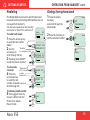
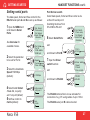
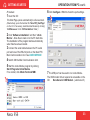
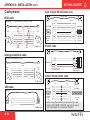
Setting serial ports
The data speed, format and flow control for the
RS-232 serial ports A and B are set up as follows:
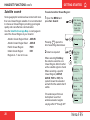
1 Open the MENU and
Sat. Search
Phone setup
Set Network
»Serial Ports
Information
scroll down to Serial
Ports:
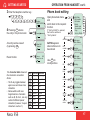
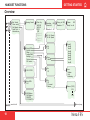
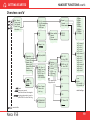
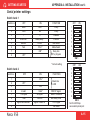
See Overview for
available choices.
2 Select the parameter
to be set for Port A:
OK
OK
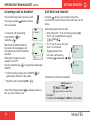
3 Select the listed data
Speed 115200bps
(default):
»Port A
Port B
COM defaults
NMEA port
»Speed
Format
Flow control
Port B driver switch
Select data speed, format and flow control as described for serial port A.
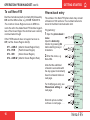
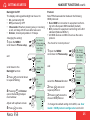
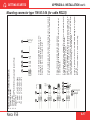
Switching the driver from
RS-232B to RS-422:
6 Select Serial Ports:
and
scroll down to Port B:
7 Open the Driver
switch function:
OK
OK
8 data bits, no parity
and 1 stop bit (default)
5 Set flow control to
rts/cts (default):
Nera F55
OK
OK
and
»115200bps
scroll down to RS-422:
4 Select listed format:
Sat. Search
Phone setup
Set Network
»Serial Ports
Information
OK
Port A
»Port B
»Driver switch
Speed
Format
Flow control
RS-232
»RS-422
» d=8,p=none,s=1
d=8,p=e,s=1
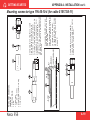
The RS-422 terminal block is now activated for
connection of e.g. PC using cables of up to 100 m.
OK
none
»rts/cts
The RS-232 serial port B is disconnected.
27