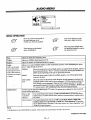
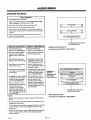
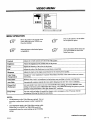
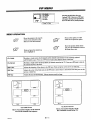
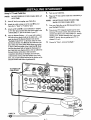
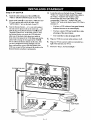
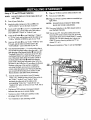
1
Advanced
Video Imaging
Projection Color TV
Picture-In-Picture
MTS Stereo Audio
Surround Sound
Return the Product
RegistrationCard,
andyour TV
could be
FREE!
OPERATINGGUIDE& WARRANTY
for models...
PVR4869,PVR5269,PVR6069
ZENITH ELECTRONICS CORPORATION
1000 MILWAUKEE AVENUE
GLENVIEW, ILLINOIS 60025
Part No. 206-2923-01
Pdnted in U.S,A.
EP-EDCBA -
WATCH
US.
WARNING:
TO REDUCE
THE RISK OF ELECTRIC
SHOCK DO NOT
REMOVE COVER (OR BACK). NO USER SERVICEABLE
PARTS
INSIDE.
REFER
TO
QUALIFIED
SERVICE
PERSONNEL.
TO PREVENT FIRE OR SHOCK HAZARDS, DO NOT EXPOSE
THIS PRODUCT TO RAIN OR MOISTURE.
The lightning flash
triangle, is intended
"dangerous voltage"
sufficient magnitude
with arrowhead symbol, within an equilateral
to alert the user to the presence of uninsulated
within the product's enclosure that may be of
to constitute a risk of electric shock to persons.
The exclamation point within an equilateral triangle is intended to
alert the user to the presence of important operating and maintenance
(servicing) instructions in the literature accompanying the appliance.
Safety
Note
Tips
Refer to the "Safety Tips" booklet that came with your
product for important safety considerations.
to Cable
TV System
Installer
This reminder is provided to call the cable TV system
installer's attention to Article 820-40 of the NEC that
provides guidelines for proper grounding and, in particular,
specifies that the cable ground shall be connected to the
grounding system of the building, as close to the point of
the cable entry as practical.
Power-Cord
CAUTION
Polarization
This product is equipped with a polarized alternatingcurrent line plug (a plug having one blade wider than the
other.) This plug will fit into the power outlet only one
way. This is a safety feature. If you are unable to insert the
plug fully into the outlet, try reversing the plug. If the plug
should still fail to fit, contact your electrician to replace
To prevent electric shock, match wide blade of plug to
wide slot, fully insert.
your obsolete outlet. Do not defeat the safety purpose of
the polagized plug.
pousser jusqu'au fond.
rvw_m
Copyright
ATTENTION
Pour _viter les chocs _lectriques, inlroduire la lame la plus
large de la fiche dans la borne correspondante de la prise et
© Zenith Electronics
Corporation
1995
CONTENTS
Part
1.
Connections
Operations
andBasic
INTRODUCTION
Welcome ............................................
Installation
Part
Considerations ..............................
ii
iii
iii
STANDARD CONNECTIONS FOR YOUR TV
Connection Center, Cable, VCR, S-Video,
Accessory Jacks, Speakers, Audio Amplifier,
and Connections For Using PIP ........................
FIRST TIME YOU OPERATE YOUR TV
Control Panel, Power, Source, Auto
Program, Clock, and Other Options .....................
PIP OPERATION
Introduction, Selecting Main Picture and PIP Inset
Source, PIP Functions, Operation With Various
Configurations
......................................
Part
2.
Universal
Remote
and Menus
SETUP MENU
Auto Program, Ch. Add/Del, Ch. Labels, Source ID,
Clock Set, Timer Setup, Parental Ctl, Caption/
Text, Background, and StarSight .......................
AUDIO MENU
Bass, Treble, Balance, Audio, and Enhancement ..........
VIDEO MENU
Contrast, Brightness, Color, Tint, Sharpness, Color Temp,
Video Filter, Auto Flesh, Picture Pref, and Projo Setup .....
PIP MENU
Ch. Guide, Ch. Review, PIP Color, PIP Tint,
and PIP Size, ......................................
How
to use this
Standard TV installation
be using StarSight®.
_k
_92_t-o
operating
Control
TV OPTIONS MENU
Timer, Captions, Z-Trak, PIP, Freeze and Move PIP .......
SOURCE MENU
Menu Operation, Source Selection,
and Source Identification ............................
1-1
2-1
SETUP MENU
Auto Program, Ch. Add/Del, Ch. Labels, Source ID,
Clock Set, Timer Setup, Parental Ctl, Caption/
Text, Background, and StarSight ......................
AUDIO MENU
Bass, Treble, Balance, Audio, and Enhancement .........
3-1
Control
UNIVERSAL REMOTE CONTROL
Battery Installation, Operating Mode, TV Operations,
StarSight Operations, Operational Modes, Programming,
Special Features, Auto Find, and Brand Codes ............
QUICK REFERENCE TO MENUS
Available Menus, and Basic Operation ..................
SOURCE MENU
Menu Operation, Source Selection,
and Source Identification .............................
Z-Trek Remote
and Menus
Z.TRAK REMOTE CONTROL
Battery Installation, Operating Mode,
Basic Operations and Auto Find ........................
QUICK REFERENCE
TO MENUS
Available Menus, Accessing the Menu,
Channel Icons and Volume Control ....................
ii
Methods of Operation .................................
Model/Features Chart .................................
3.
4-1
VIDEO MENU
Contrast, Brightness, Color, Tint, Sharpness, Color Temp,
Video Filter, Auto Flesh, Picture Pref, and Projo Setup ....
PIP MENU
Ch. Guide, Ch. Review, PIP Color, PIP Tint,
and PIP Size ......................................
5-1
Part
4.
Maintenance,
and Warranty
7-1
12-1
13-1
14-1
15-1
16-1
17-1
18-1
Accessories,
MAINTENANCE AND TROUBLESHOOTING
Caring, Extended Absence, Interference,
Before Calling for Service ...........................
Replacement Product Registration Card
Accessories for Your TV
6-1
11-1
19-1
Your Zenith Warranty
8-1
9-1
10-1
guide
and operation is given in this portion of the operating guide.
Follow
the procedures given if you will not
Refer to the StarSight® portion of this operating guide for StarSight® installation and operation.
i
INTRODUCTION
WELCOME
Send the model number, serial number, and date of purchase
or original installation, with a full explanation of the problem
and the service history. We will welcome the opportunity to
look into your specific question or problem and to be of assistance in resolving it promptly.
Welcome into the family of Zenith Color Television owners.
This guide provides instructions on how to operate your new
'IV. It is supplemented by a booklet containing Safety Tips.
We urge you to read these publications carefully so that you
will receive full enjoyment from your new Zenith "IV for
many years to come.
The model and serial numbers of your new TV are located on the
back of the TV cabinet. For your future convenience and protection, we suggest that you record these numbers here:
Your new Zenith projection "IV has been designed and built to
give you the very best in quality, features and performance.
There are many regional Zenith authorized service centers
throughout the U.S., Canada and Mexico who can attend
promptly and effectively to ordinary service needs.
Model No.
Serial No.
If you should have an unusual performance or service problem
that cannot be satisfactorily resolved by your Zenith authorized
service center, call or write:
I'11"11 -.
Zenith Electronics Corporation
Customer Service Department
1000 Milwaukee Avenue
Glenview, IL 60025
Telephone: (708) 391-8752
Mon-Fri, 8:00 a.m. - 4:30 p.m. Central Time
INSTALLATION
PRO
CONSlDERATIONS
Please read and observe each safety point in the "Safety
Tips" folder when installing and using your TV.
Ventilation m Proper ventilation keeps your TV
running cool. Air circulates through perforations
in the back and bottom of the cabinet. Do not
VIDEO GAMES AND OTHER FIXED
PATTERN DISPLAY CAUTION _ If you use your TV for
video games, teletext or other fixed displays, avoid setting the
BRIGHTNESS control for an excessively bright picture. A
bright, fixed pattern, if used for long periods of time, can result in a permanent imprint on the TV picture tube. You can reduce this possibility by alternating the use of the fixed pattern
display with normal TV picture viewing, by turning down the
CONTRAST control for sustained fixed pattern use, and by
turning off the fixed pattern display when not in use.
block these vents or you will shorten the life of
your TV.
on normal household current, 120 volt 60 Hertz AC.
Power
Your TV
is designed
to operate
Do not Source
attempt m
to operate
it on
DC current.
Power Cord _ Your power cord has a polarized
plug as required by Underwriters' Laboratories. It
has one regular blade and one wide blade and fits
only one way into a standard electrical outlet. If
the blades will not enter either way, your outlet is
very old and non-standard. A new outlet should be
installed by a qualified electrician.
PLUGGING IN YOUR TV -- Be sure to plug your TV into
an "unswitched" AC power source. The "switched" AC outlets found on some video equipment will not continue supplying power to the TV once the equipment is turned off. If the
power to the TV is interrupted, you will have to reset the clock
in the TV to the current time.
Safe Operation -- Your TV is manufactured and
tested with your safety in mind. However, unusual
stress caused by dropping or mishandling, exposure to flood, fire, rain or moisture, or accidental
spilling of liquids into the TV, can result in potential electrical shock or fire hazards. If this happens, have your TV checked by a service
technician before using it again.
WEU_ODP
LOGIC
Manufactured under license from Dolby Laboratories Licensing Corporation.
Additionally licensed under Canadian patent number 1,037,877. "Dolby",
"Pro Logic" and the double-D symbol are trademarks of Dolby Laboratories
Licensing Corporation.
Before you install your TV...
_
•
I
ii
INTRODUCTION
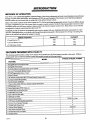
METHODS
OF OPERATION
Your TV is a very sophisticated appliance. Optional features, video picture adjustments and audio sound adjustments are performed
through on-screen menus and displays. Self explanatory ICONS are used throughout. Most features can be selected and adjusted
from the comfort of your favorite chair by using either of the infrared remote controls.
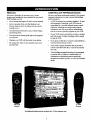
Either of two remote controls can be used to operate the TV. Use the multi-brand programmable remote if you have different brands
and types of equipment in your video system which you need to control remotely. Use the Z-Trak programmable remote if you feel
comfortable using track-ball access similar to that provided by the familiar computer mouse device. Many features can be selected
and adjusted by using the control panel provided on the TV.
StarSight® provides an electronic programming guide which is updated with new scheduling information automatically on a periodic basis. StarSight® allows you to rapidly scan through the programming guide to find a program for viewing or recording. Programs can be searched and selected by category if desired.
Method
Standard TV
of Operation
starSight
• Control Panel on "IV.
YES
NO
* Universal Remote Control
YES
YES
• Z-Trak Remote Control
YES
YES
FEATURES
PROVIDED
WITH
YOUR
TV
This operating guide describes a family of TV models. Not all models have all of the features described in this guide. Different
control panels may be used from model to model. Most models include the following features:
MODEL
PVR4669, PVR5269, PVR6069
FEATURE
• StarSight® Electronic Program Guide
Y
• StarSight® Demonstration
Y
* On-Screen Menus Accessed By Remote or TV Controls
Y
• Universal Programmable Remote Control
Y
• Z-Trak Programmable Remote Control
Y
• Picture-In-Picture
Y
• 181 Channel Tuning (STD/HRC/ICC
Y
Band Selected Automatically)
• Automatic Channel Programming
Y
• Favorite Channel Add/Delete
* Channel Labels (ABC, TNT, etc.) for Easy Channel Identification
Y
Y
• Multiple Input Sources
Y
• Source Identification (VCR, Cable, etc.)
Y
• Antenns/Cable
Y
and Loop Out Jacks
• Audio/Video (A/V) Jacks
Y
• Super-VHS A/V Input Jacks
Y
• Additional A/V Jacks
Y
• Surround Sound System
Dolby Pro Logic
Y
• MTS Stereo with SEQ (Spatial Equalization)
• Surround Sound Speaker Terminals
Y
• Variable Audio Output Jacks
Y
• Surround Sound Speakers
Optional
Y
• Sleep Timer and On/Off Timer
• Closed Caption and Text Modes
Y
• Parental Control
Y
2923-0143
°oo
In
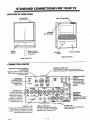
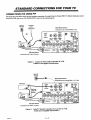
STANDARD
LOCATION
OF USER
CONNECTIONS
FOR YOUR TV
ITEMS
Control Panel
Place VCR Shelf Here
(On top of "IV)
!
i
Additional
A/V Input Jacks
I
/
/
¢r
/
Built-in
speakers
Connection
(Pointtowardscreen
Remote
Control
to operateTV)
Rear View of TV
Front View of TV
CONNECTION
CENTER
ANTENNA/CABLE
2 LOOP OUT
TO DECODER
Routes the cable-TV input to Antenna/
Cable 2 back to the cable box supplied
by the cable service.
STARSIGHT
CONTROL
PORT
Jack
for connection
of-StarSight Remote
Emitter cable.
//
(_
AUOIO
morn _.r
LOOPOUT ANTENNA
TOo,'coo'Ea CABLE
• nE0
ANTENNA/CABLE 1 or 2
75-ohm antenna or cable-TV connection to your 'IV.
Attach your antenna, cable-TV line or VCR to these jacks.
--
STARSIGHT
• O,ITO,
orr
MONITOR OUT
Audio and video output
jacks to route A!V to an -optional extra monitor or
other A/V component.
Whatever is currently being watched on your TV is
provided at these jacks.
'_
r--AU010_
_
RIGHT
UEFT
TO EXTERNALAlP
speakers.
VtOtOl
IN
r-
VARIABLE AUDIO
OUTPUT
Standard phono jack
connectors for output
to an optional stereo
amplifieror to external
ANTENNA
CABLE
V_OEO,,,_NIIL___J
"7
Vi0E0
@®®
@®®
VIDEO 1 or 2 IN
Jacks for audio and video input from a stereo
VCR or other A/V component. (You must
connect to these jacks in order to hear stereo
sound when playing a stereo tape.)
2923-01-O
Power Cord Entry
Center
,0o,_
i-'wo
VIDEO 1 LOOP OUT
Use these to send the incoming audio
and video (from Video 1 In) to another
component, such as a second VCR.
1 -- 1
r--tU010-"a |1I1"_/IIIIM
SURROUND
SPEAKER
TERMINALS
'
t su.ouNo,n-
Connections for output to
optional surround sound
speakers.
S-VIDEO I IN
Jacks for audio and video input from
a Super-VHS VCR.
STANDARD
OTHER
JACKS
CONNECTIONS
FOR YOUR TV
ON TV (Some Models)
S-VIDEO 2 IN
VIDEO 3
t'f
X...
BASIC
AUOlO
tN_'r
CONNECTION
Ifa VCR will not be connected
.,.]
tN S-VIDEO
2 IN /
VIOEO
iNPUT
Jacks
Super-VHS
Jacks for
for audio
audio and
and video
video input
input from
from aa second
third stereo
VCR or VCR.
other A/V
J
TO TV WITHOUT
component.
VCR
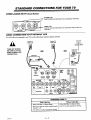
to your TV, you have three basic connection
options, as shown.
Antenna
Wall Jack
Cable TV
TURN OFF POWER
OR UNPLUG TV BEFORE MAKING ANY
CONNECTION.
Wall Jack
Cable TV
,,, I,;,
x \x !
Flat Wire
OR
OR
(300 ohm)
300/75
ohm
Adaptor
i
I
Round Wire
(75 ohm)
iUBHT
LEFT
TO EXTERNALAMP
VIDEO
MONITOROUT
r--tUOlO---_
®®®
VIDEO
O
R AUOIOL
AUX CONTROL
VIDEOl IN
VIDEO1 IN
F"
"--J
VIDEO
i"- AUOlO--t
@@@
I
N
|-VIDEO
1 IN
VIDEO
, ,@
@@
LOOP_T
L
,
@®®
l-Win
R
i÷
L SURROUND SPKR|
OPERATING YOUR "iV
With Cable
Box
• Select Ant/Cable 1 in Source Menu.
• Tune TV to cable box output channel (usually
channel 3 or 4).
• Use cable box to select channels for viewing.
2923-ot-o
1 -- 2
Select Ant/Cable 1 in Source Menu.
Use TV to select channels for viewing.
:
Without
Cable
Box
STANDARD
BASIC
CONNECTION
If you are connecting
CONNECTIONS
TO TV WITH
FOR YOUR 715
VCR
a VCR to your TV, you have three basic connection
Cable TV
Wall Jack
options,
as shown.
Cable TV
Wall Jack
Antenna
OR
"'°'" VCR
:_._...
Cable Box
_IN
,;;,
OR
OUT _
Flat Wire
II
(300 ohm)
.
.... "'-..
IN
Round Wire
OUT
(75 ohm)
STARSIGHT
@
t
t
tI
STARSIGHT
i
:
VARIABLE
AUOm
_..
RI6HT
LOOP OUT
ANTENHA
ANTENNA
ToOiECOOEn CABLE
CABLE
MONITOROUT
WOEO
r-AUOlO-_
_
VIDEO1 IN
WD[O
AUXCONTROL
@
L
@®
, ,@
@@
L
VIDEO2 IN
_.--AUOM--_
R
S-VIDEO1 IN
_
LEFT
TOEXTERNALAMP
LOOPOUT
i.WEo
n
OPERATING
YOUR 13/
t
!
G
H
÷
SURROUND
OPKRS
i
VCR's
TV/VCR*
Switch Setting
TV
With Cable Box
• Select Antenna/Cable
Without
I in Source Menu.
• Select Antenna/Cable
• Tune VCR to cable box output channel (usually channel
3 or4).
• Tune "IV to VCR output channel (usually channel
3 or4).
* Tune TV to VCR output channel (usually channel
3 or 4).
• Use VCR to select channels for viewing.
May be labeled TV/Video.
2923_1_
• Use TV to select channels for viewing.
• Use the cable box to select channels for viewing.
• Select Antenna/Cable 1 in Source Menu.
• Use the cable box to select channels for viewing.
*
Box
• Select Antenna/Cable 1 in Source Menu.
• Tune TV to cable box output channel (usually channel
3 or 4).
VCR
Cable
1--3
l in Source Menu.
STANDARD
ADDITIONAL
CONNECTIONS
CONNECTIONS
FOR STEREO
FOR YOUR TV
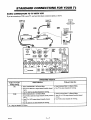
VCR
If you have a stereo VCR, or other stereo audio/video (MV) component, you must make these additional connections shown below in order to hear stereo sound from the component.
STARSIGHT
• _,
@
_
'_2
_
STARSIGUT
VARIABLE
e}
)
¢QNTROL PORT
LOOPOUT
ANTEHHA
TODECODER CABLE
TO EXTERNAL
AMP
AUDIO
ANTENNA
CABLE
•
MONITOROUT
VIDEO
[--AUDIO--_
VIDEO1 IN
p
®®®
VIDEO
D AUDIO L
' VIDEO ,
.-_
f ,nnPOUT
,
##
°
I
I
!
,,
_oo
VIDEO
R AUDIO'L
s
VIDEO2 IN
r'AUOlO'_
,,,
:
i
P
,_
i
•
P,
' '!
_
L SURROUNDSPKRS
,
,,
VIDEO L
R
AUDIO
AJV OUTPUT
VCR
Optional
Super-VHS
STARSIDHT
STARSIGHT
LOOPOUT
1or,tcooe.
ANTENNA
CABLE
• NONITOROUT
VIDEO
s--AUDIO-_
®®®®
VlIDEO
O
R AUDIOL
AUXCONTROL
E
F
T
o
VIDEO L
R
AUDIO
A/V OUTPUT
lrst Stereo
L
_
"_,.VIDEOIIN :
....
"
2nd Stereo
VCR
AIVOUTPUT
VNNUUBLE
AtmlO
OUTPUT
VCR
I
RIGHT
LEFT
TOEXTERNAL
AMP
ANTENNA
CABLE
VIDEO1 IN
p-
vIREo
I
I
®@
LOOP
OUT
OPERATING YOUR "IV
USING AN JACKS
S-VIDEO
R
L
BURROUND|PKRS,
• Select Video l* in the Source Menu.
• Use VCR (or other component) to select
channels for viewing.
or,
• Watch a tape playing in the VCR.
*
_2_0t-o
1_
4
Select the Source in the Source Menu that
corresponds to the jacks to which the A/V
component is connected.
STANDARD
AUDIO/VIDEO
(A/V)
CONNECTIONS
CONNECTIONS
FOR OPTIONAL
FOR YOUR TV
VIDEO
EQUIPMENT
Connections to VIDEO 3 IN or S-VIDEO 2 IN jacks.
(Some TV models only.)
OPERATING YOUR TV
USING AN JACKS
Super-VHS
VCR
Stereo Camcorder
[__
Jxl,
• Select Video 3* in the Sol]rce Menu.
AUDIOOUT
,,RII--I
• Use VCR (or other component) to select channels for viewing.
or,
• Watch a tape playing in the VCR.
•
_\""_"g""--_*',
OPTIONAL
VlOEO| I_1 S-_
AUDIO
| IN
AMPLIFIER/SURROUND
SOUND
Select the Source in the Source
Menu that corresponds to the jacks
to which the A/V component is connected.
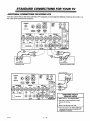
CONNECTIONS
If you wish to listen to the TV audio through an external amplifier or stereo system, or listen to surround
tions to the TV shown in the illustration below.
TO TV
sound audio, make the connec-
TURN OFF POWER OR UNPLUG TV BEFORE MAKING ANY CONNECTION.
PUT
L
R
8PKROUTPUT
Back of Optional
Stereo
Amplifier
°l
$a.YER
L
8ohm
Surround
Speaker8
t
SURROUNOSPgM
Single Surround
Amplifier and Dual Surround Speaker Connections
Surround
8 ohm
Speaker
Speaker
Connection
DIFFERENT WAYS TO LISTEN TO YOUR TV
TV Speakers
• Use the TV's volume control to raise and
lower the level of sound being heard from
the TV's speakers.
• Set the options in the Audio Menu for your
own personal listening preferences.
2923-01-A
External Amplifier Speakers
• You may also listen to yout2TV through the
speakers of your stereo or external
amplifier when it is connected as shown in
the illustration. Use the TV's volume
control to raise and lower the level of
sound being heard from the TV's speakers
and the amplifier's speakers.
Surround Sound
• Connect surround sound speakers as shown.
The level of surround sound will vary,
depending on the program being viewed.
Note that not all programs have surround
sound audio.
• If you want to connect only one surround
speaker to your TV, connect the speaker
wire to the terminals adjacent to the positive
• Set the options in the Audio Menu for your
(+) and negative (-) symbols that are circled.
own personal listening preferences.
1 -- 5
STANDARD
CONNECTIONS
FOR USING
CONNECTIONS
FOR YOUR TV
PIP
The illustrations that follow show the most common connections for using Picture-In-Picture (PIP). For further information on the
actual use of PIP, refer to the "PIP OPERATION" section of this operating guide.
Cable TV
Wall Jack
ANTENNA
Main Picture Source
Connected to the Antenna/Cable I jack.
OR
VCR
A/V
mEO
OUTPUT
IIOIITOROUT
r-tUm-_
IN
/JJ_O
L
R
VIOE0
ANTENNA
PIP Inset Source
Connected to the Video 1 In jacks.
Option 1: Antenna or Direct Cable Connection To VCR.
(Cables are not supplied with television.)
Cable TV
Wall Jack
Main Picture Source
",,,Connected to the Antenna/Cable1 or2 jack.
CABLE BOX
STAflII|HT
STARStGHT
_
0=1PUT
$mlff
t.IFT
T0E]ffBtN_UlP
CABLE
LOOP
Ob'T
Connected to the Video 1 In jacks.
Option 2:
2923-01-O
Cable-TV Decoder Connection via Loop Out To VCR.
(Cables are not supplied with television.)
1 -- 6
O_
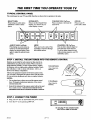
THE FIRST
TYPICAL
CONTROL
TIME YOU OPERATE
YOUR
TV
PANEL
The control panel on your TV may differ from the one shown but its operation is the same.
SELECT (SEL)
Press during on-screen menu
operations to select a menu
option.
ENTER (ENT)
Press to see the ChannelfFime
display, or to remove any onscreen display or menu.
J
\
/
#'_
MENU
..->
__/_. v
I
1. INSTALL
•
CH
VOL
A
CH
,4k
/
J
OFF
ON
•
/
MENU
Press once to see a menu. Press
repeatedly to sequence through
the available menus.
ADJUST (ADJ) Left/Right
Press during on-screen menu operation to see information/status
display for selected option. Press
again to adjust the selected menu
option.
STEP
VOL
V
ENT
OFF-ON
Press to turn TV
power ON or OFF.
VOLUME (VOL) Up/Down
Press to increase or decrease the
sound level.
THE BA ITERIES
INTO
CHANNEL (CH) Up/Down
Press to select channels higher or
lower than the current channel.
To add or delete channels stored
in the scanning sequence, see CH.
ADD/DEL option.
THE REMOTE
Batteries are provided for each remote, but they must be installed before using the remote controls. When a remote no
longer function normally, or when it loses memory, replace
the batteries with two high-quality, alkaline, batteries. Match
plus with plus (+ with +), minus with minus (- with -), as
shown in the battery compartment.
CONTROL
Universal Remote
(Uses 2 size AAA
batteries.)
Unless your equipment responds to the factory preset codes,
you will need to reprogram the remote control with the codes
of your particular equipment each time you replace batteries.
NOTES:
•
•
Do not place heavy objects on top of the remote control
keys. Prolonged unintentional operation of the remote
shortens battery life.
Remov_ the batteries if the remote control will not be used
for a month or more. THEM,_aJFACTORERIS NOT RE-,
SPONSIBLE
STEP
FOR DAMAGE
2. CONNECT
CAUSED BY BATTERY
(Uses 2 size AA
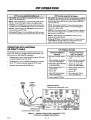
batteries.)
LEAKAGE.
THE POWER
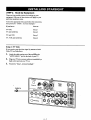
1. Plug your TV into an unswitched
2.
Z-Trak Remote
Turn the TV on by pressing
AC power source.
OFF-ON.
] r'_ [_ I'_-_'1
Do not plug TV into switched outlet
on a VCR or cable-TV decoder
2923_1_
2m 1
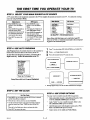
THE FIRST TIME YOU OPERATE
STEP
3.
SELECT
YOUR
MAIN
SOURCE
YOUR
TV
& PIP SOURCE
A TV source refers to the equipment connected to the TV that supplies the picture and sound to your TV. You select the viewing
source by using the Source Menu.
MainSeurce
PiP Source
PIP Source
• Press SOURCE on your
remote to view the Source
Menu.
Press SOURCE on your
remote to view the Source
Menu.
Ant/Cable 1
Ant/Cable 2
Video 1
Video 2
S-Video 1
Video 3
S-Video 2
Press the Left or Right key to
* Press SOURCE repeatedly to
select the source which
select PIP Source column.
corresponds to the jack on the I• Press SOURCE repeatedly to
TV connection panel that is
select the source which
receiving the input signal.
corresponds to the jack that is
receiving the PIP input signal.
• Press QUIT to remove the
menu.
STEP
•
4. USE AUTO
Ant/Cable 1
Video 1
Video 2
S-Video 1
Video 3
S-Video 2
<1,. Main/PIP
I'4,1"o Select Source I
Source Menu with Main Source set to Ant/Cable 1 and PIP
Source set to Video I. Connection must made to the corresponding jacks on the connection panel.
ress QUIT to remove the
menu.
PROGRAM
Press 1",1,to select either OFF AIR ANTENNA or CABLE TV.
Auto Program finds all available channels on the currently selected source and stores them in the memory of the "IV.
Press <---_ to begin channel search.
To start the Auto Program procedure, press the Left or
Right arrow key. Follow the instructions on the TV.
Wait a few seconds for the TV screen to clear.
PPESS
T£ TO_
.Auto Program
Ch. Add/Del
Ch. Labels
Source ID
Clock Set
"l]merSetup
Parental Ctl
Caption/Text
Background
StarSight
Press ,_
SELECIION
:
To Program
SEARCHING
CABLE "IV INPUT TYPE
OFFNRN_NA
I
r,_UETV J
PRESS
'0, TOB_GIN_G
J
_AUTO_HAS_
SF.ARO-IING
C/_BI.E
W
I
Setup Menu with Auto Program Highlighted
"------b
CHANf_L __ _ IS 0_")
FOUND
/
TM
___ _FOLI_
LPRESSsr_ R)R' DBaONStRAaON
Ofs'rMsl;
Message appears only ifTV has not been authorized for StarSight.
STEP
5. SET THE CLOCK
STEP
Set The Clock
OPTIONS
You may want to consider using the following
•
Delete undesirable channels or add additional
• Press MENU on your remote until the SETUP icon is selected
and the Setup Menu is displayed.
to the CIL (Channel)
• Press the Up or Down arrow key to select Clock Set.
• Use the numbered buttons on the universal remote control to
enter the correct time. Press TIMER to select AM or PM.
or
Press the Left or Right arrow keys to advance the clock.
options:.
channels:
Refer
Add/Del option for details.
•
Apply "labels"
Ch. (Channel)
•
Label the input sources with descriptive names such as VCR.
Refer to the Source ID option for details.
•
Adjust options
• Press QUIT to remove the menu.
2923et-o
6. USE OTHER
2 -- 2
to your available channels:
Labels option for details.
in the Audio
and Video
Refer to the
Menus.
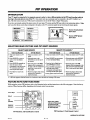
PIP OPERATION
INTRODUCTION
Your TV must be connected to two separate sources in order to view a different picture in the PIP inset from that which is
showing in the main picture area of the TV. One source (such as an antenna) must be connected to the ANT/CABLE I or 2
jack. The other source (such as a VCR) must be connected to one set of the Video or Super Video jacks.
If you have not already selected the input Sources for your main TV picture and the PIP inset, refer to the instructions below. Make
sure you select those sources that correspond to the jacks on the TV connection panel that are receiving the input signals.
PIP Source
L_lin ,_muroe
Source of main picture
shows here
Ant/Cable1
Ant/Cable z
Video 1
Video 2
S-Video 1
Video 3
S-Video2
41_Main/PIP
SELECTING
Video1
Video2
S-Video 1
Video3
S-Video2
'1'4,ToSelect Source I
MAIN
PICTURE
SELECT
Universal
Source of PIP picture
shows here
AND
PIP INSET
SOURCES
SELECT PIP SOURCE *
MAIN SOURCE
Remote
Z-Trak
Remote
Universal
Remote
• Make sure remote is in TV
mode.
• Make sure remote is in TV
mode.
Make sure remote is in TV mode.
Z-Trak Remote
• Make sure remote is in 'IV mode.'
• Press SOURCE on your remote to view the Source
Menu.
* Point and press on the
SOURCE icon (at the top of
the screen).
Press SOURCE on your remote
to view the Source Menu.
• Point and press on the SOURCE
icon (at the top of the screen).
•
• Point and press on the Main
Source which corresponds to
the jack on the TV connection
panel that is receiving the
input signal.
Press the Left or Right key to
select PIP Source column.
• Point and press on the PIP
Source which corresponds to the
jack on the TV connection panel
that is receiving the input signal.
Press SOURCE repeatedly to
select the source which
corresponds to the jack on the
TV connection panel that is
receiving the input signal.
• Press QUIT to remove the
menu.
*
* Move the pointer off the menu
and press the TrackbaU to
remove the menu.
Press SOURCE repeatedly to
select the source which
corresponds to the jack that is
receiving the PIP input signal.
Press QUIT to remove the menu.
j• Move the pointer off the menu
and press the Trackball to
remove the menu.
A PIP inset appears while the Source icon is selected to show the effect of selecting a PIP source.
PICTURE-IN-PICTURE
FUNCTIONS
While using the various PIP functions, refer to the illustration below and the instructions
eration of these functions differ, depending which remote control you are using.
Arrow Keys
l:
SWAP
PIP
11!
SOURCE
_
on the following
pages.
Note that the op-
[ ff_"i
Select these options
with the Z-Trak remote
to perform the PIP
functions described on
the following page.
[
-I'ir'r_r
Captions
Z-Trak
PI P On
Freeze
MovePIP
Swap
PIP Functions, Z-Trak Remote Control
PIP Functions, Universal Remote Control
continued on next page
29234)1-O
3 m 1
PIP OPERATION
• PIP On/Off: Press the PIP key to display the PIP inset. Press it
again to remove the PIP inset.
PIP On/Off: Move pointer to left of TV screen and press on PIP On
to display the PIP inset. Move the PIP inset to desired location on the
screen and press the trackball to set it in place. Press on PIP Off to
remove the PIP inset.
• SWAP: Press the SWAP key to swap the main picture with the
PIP inset. Press SWAP again to return to the original display.
• FREEZE: Press FREEZE to freeze motion of the picture shown
in the PIP inset. Press FREEZE again to return to a live PIP inset.
• PIP Size: Select PIP Size in the PIP Menu to choose between
seeing a small or large PIP inset.
SWAP:
Move pointer to left of TV screen and press on Swap to
swap the main picture with the PIP inset. Press on Swap again to
return to the original display.
FREEZE: Move pointer to left of TV screen and press on Freeze to
freeze motion of the picture shown in the PIP inset. Press on Freeze
again to retum to a live PIP inset.
• Moving the PIP Inset: Use the Left/Right and Up/Down arrow
keys to move the PIP inset to the desired corner of the TV screen.
• PIP Size: Select PIP Size in the PIP Menu to choose between
seeing a small or large PIP inset.
• Moving the PIP Inset: Move pointer to left of TV screen and press
on Move PIP and move the PIP inset to desired location on the
screen. Press the trackball to set the inset in place.
OPERATION
OR DIRECT
WITH ANTENNA
CABLE
PIP VIEWING OPTIONS
This illustration shows the basic connection of your TV to a
stereo VCR. With your equipment setup in this manner, your
television has the following PIP capabilities:
•
Viewing
Simultaneously view a video tape playing in the VCR and
a channel selected by the TV's tuner.
Simultaneously view two different channels; one selected
by the TV's tuner and another using the VCR's tuner.
Swap the main picture and the PIP inset.
Two Different
Channels
• Set VCR's TV/VCR* switch to
TV.
Set VCR's TV/VCR* switch
toTV.
• Select Ant/Cable 1 as the Main
Source in the Source Menu.
Select Ant/Cable 1 as the Main
Source in the Source Menu.
• Select Video 1 as the PIP Source
in the Source Menu.
Select Video 1 as the PIP
Source in the Source Menu.
• Select a channel with the TV's
channel selector.
Select a channel with the TV's
channel selector.
• Turn on PIP.
Turn on PIP.
Select a PIP channel using the
VCR's channel selector.
* May be labeled TVNideo.
Cable TV
Wall Jack
ANTENNA
Main Picture Source
Connected to the Antenna/Cable I jack.
OR
STARLIGHT
.
mclmt t_m"
"_ ! _¢"
LOOPOUT ANTENNA/
ri
VCR
AIV
K¢0IilI
CABLE
IIONITINIOUT
OUTPUT
ANTENNA
p_IILE
YIDEO1IN
IN
Aumo
L
R
VIii0
ANTENNA
...................
i"
PIP Inset Source
Connected to the Video 1 In jacks.
Option 1: Antenna or Direct Cable Connection To VCR.
(Cables are not supplied with television.)
29234)143
3_
Viewing a Video Tape
anda TV Channel
2
Play a tape in the VCR and
view it in the PIP inset.
PIP
OPERATION
WITH
CABLE
OPERATION
DECODER
With your equipment setup in this manner, your television has
the following PIP capabilities:
•
Simultaneously view a video tape playing in the VCR and
a basic cable channel selected by the TV's tuner.
•
Simultaneously view two different cable channels; one
cable channel selected by the TV's tuner and another
cable channel selected by the cable box.
•
Swap the main picture and the PIP inset.
PIP VIEWING OPTIONS
Viewing a Video Tape
and a Cable Channel
• Select Ant/Cable 2 as the
Main Source in the Source
Menu.
• Select Ant/Cable 2 as the
Main Source in the Source
Menu.
• Select Video 1 as the PIP
Source in the Source Menu.
• Select Video 1 as the PIP
Source in the Source Menu.
* Select a channel with the
TV's channel selector.
• Turn on PIP inset.
i. Select a channel with the
TV's channel selector.
• Turn on PIP inset.
NOTE:
•
Viewing Two Different
Cable Channels
The cable channels you can view depends on the service
you have purchased from your cable company.
• Select a PIP channel using the
tuner in the Cable Box.
• Play a tape in the VCR and
view it in the PIP inset.
Cable "IV
Wall Jack
Main Picture Source
Connectedto the Antenna/Cable 2 jack.
CABLE BOX
I
Out from
Cable-TV
Decoder
LOOPOUT
10 li|lltn
ANTENNA
CABLE
,*ANTENNA
/'
CABLE
VCR
LOOP
OIT
PIP Inset source
Connected to the Video 1 In jacks.
Option 2:
2_3_t_
Cable-TV Decoder Connection via Loop Out To VCR.
(Cables are not supplied with television.)
3--3
UNIVERSAL
REMOTE
CONTROL
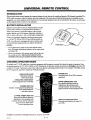
INTRODUCTION
This universal remote control operates the common features of most, but not all, models and brands of IR (infrared) controlled TVs,
VCRs, cable converters, video disc players, and audio equipment. The remote may provide functions that are not available on your
equipment, e.g., menu operations. Some functions of your particular equipment may not be controlled by this remote. In such cases,
use the original remote control for your equipment.
BATTERY
INSTALLATION
Batteries are provided, but must be installed before using the
remote control. When it no longer functions normally, or
when it loses memory, replace the batteries with two highquality, alkaline, size AAA batteries. Match plus with plus (+
with +), minus with minus (- with -) in the battery compartment.
Unless your equipment responds to the factory preset codes,
i.e.. 101 for TV, 201 for VCR, 353 for CABLE, and 401 for
AUX., you will need to reprogram the remote with the codes
of your particular equipment after you replace the batteries.
Push tab in
NOTES:
•
Do not place heavy objects on top of the remote control
keys. Prolonged unintentional
operation of the remote shortens battery life.
•
Remove the batteries if the remote control will not be used
for a month or more. THE MANUFACTURER IS NOT RESPONSIBLE FOR DAMAGE CAUSED BY BATrERY LEAKAGE.
CHOOSING
OPERATING
MODE
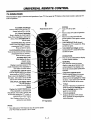
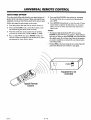
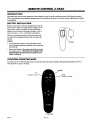
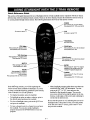
To control your TV, VCR, cable box, or auxiliary equipment with this remote, you must first choose the mode of operation. Press
the desired mode key for TV, VCR, CABLE or AUX. Pressing the Jr (Star) key will put the remote into StarSight mode. Press TV
to return to TV mode. Some keys on the remote will always operate a particular product function. For example, VOLUME controls
the TV sound level, and PLAY controls the VCR play function.
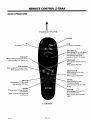
POWER KEY
Switches power ON or OFF to selected
equipment.
INDICATOR LIGHT
Illuminates whenever
remote sends signal.
OPERATING MODE KEYS
Selects equipment to be controlled.
•
Initiates
NUMBER
UPPER ARROW KEY PAD
Keys perform different functions
depending on the operating mode
currently selected. See the following
pages for details of each operating mode.
KEY PAD
menu/equipment
programming,
direct channel selection
and other functions.
LOWER ARROW KEY PAD
Keys perform different functions
depending on the operating mode
currently selected. See the following
pages for more details of the
various operating modes.
SPECIAL FUNCTION KEYS
Activates special features on some TVs
and VCRs.
StarSight®is a trademark of StarSight Telecast Inc., Fremont, CA 94538.
2923-01-A
4-
I
UNIVERSAL
TV OPERA
REMOTE
CONTROL
TIONS
These descriptions apply to functions and operations of your "IV. First, press the TV button on the remote control to select the TV
mode of operation.
t
FLASHBK (Flashback)
Press to return to the previous TV
channel selected for viewing.
Point Remote at TV.
TV
Press to select TV mode of operation.
MUTE
Press to turn offsound while the
picture remains. Press again to restore
the sound.
CC (Closed Captioning)
Press to display the closed caption
menu. Press repeatedly to select your
choice. Press ENTER/TUNE to
exit the menu.
CHANNEL/DAY (Up Arrow)
Tunes to the next (higher) channel
programmed into TV memory.
Press and hold to repeat.
VOLUME/PAGE (Left Arrow)
Decreases the TV's sound level. Press
and hold to repeat.
VOLUME/PAGE (Right Arrow)
Increases the TV's sound level. Press
and hold to repeat.
DAY/CHANNEL (Down Arrow)
Tunes to the previous (lower) channel
programmed into TV memory.
Press and hold to repeat.
ENTER/TUNE
Press to see the Channel/Time display
or enter channel numbers.
NUMBER KEY PAD
Enter number for direct
channel tuning.
MENU/GUIDE
Displays on-screen menus for "IV
mode of operation. Press repeatedly to
view other on-screen menus.
QUIT/SEQ
Exits from the current on-screen
display or pop-up and returns to the
current channel. If no display is on,
this is the normal spatial equalization
ON/OFF.
LEFT/RIGHT
ARROW KEYS
Used to respond when an on-screen
menu needs an ADJUST response.
Press to move the highlight bar within
the menu. Also used to move the PIP
inset to new location on the screen.
UP/DOWN ARROW KEYS
Used to respond when an on-screen
menu needs a SELECT response.
Press to move the highlight bar within
the menu. Also used to move the PIP
inset to new location on the screen.
PIP, SWAP, and FREEZ KEYS
See PIP Operation
•
section for more details.
* (Star)
Press the * (Star) key to exit the TV
mode and enter the StarSight mode.
See the StarSight section of this
guide for more details.
TV/VCR SOURCE
Displays the menu of TV sources.
Press repeatedly to step through the
source selections.
TIMER
Displays the SLEEP TIMER menu.
Press repeatedly to set desired TV
shut-off time. Also used to specify AM
or PM when setting the TV's clock or
programming a timer feature.
See "Getting to Know Your TV."
section for more details.
TV Operations
NOTE:
• Keys dedicated to VCR functions may be used to operate
your VCR while the remote is in TV mode.
29_-ot-o
POWER
Turns TV ON or OFF.
4 -- 2
UNIVERSAL
OPERATIONAL
Key
FOR FACTORY
TV Mode
Code 101
Push-button
or
MODES
Label
REMOTE
PRESET
with
CODES
VCR Mode
Code 201
StarSight Mode
accessed
CONTROL
*
Cable Mode
Code 353
AUX Mode
Code 401
POWER
"IV Power On/Off
Star Power On/Off
VCR Power On/Off
Cable Power On/Off
AUX TV/Disc
CABLE
Selects Cable Mode
Selects Cable Mode
Selects Cable Mode
Selects Cable Mode
Selects Cable Mode
VCR
Selects VCR Mode
Selects VCR Mode
Selects VCR Mode
Selects VCR Mode
Selects VCR Mode
AUX
Selects AUX Mode
Selects AUX Mode
Selects AUX Mode
Selects AUX Mode
Selects AUX Mode
TV
Selects TV Mode
Selects TV Mode
Selects TV Mode
Selects TV Mode
Selects "IV Mode
TV Closed Captions
TV Closed Captions
VCR AM/PM
CABLE FC (Favorite Ch.)
AUX Audio
CABLE Flashback
AUX FrameJTime
CC
FLASHBK
TV Flashback
StarSight Flashback
VCR Flashback
MUTE
TV Mute
StarSight Mute
TV Mute
TV Mute (See Note 1)
TV Mute
TV Channel Up
StarSight CH/Day Up
VCR Channel Up
CABLE Claannel Up
AUX Skip >>
CABLE Channel Dn
AUX Skip <<
CHANNEL/DAY
UP
CHANNEl/DAY
DN
TV Channel Dn
StarSight CH/Day Dn
VCR Channel Dn
VOLUME/PAGE
UP
TV Volume Up
StarSight Vol/Page Up
TV Volume Up
TV VolumeUp (SeeNcm I) TV Volume Up
DN
TV Volume Dn
StarSight Vol/Page Dn
TV Volume Dn
TV Vohm_ Dn (SeeNoteI) TV Volume Dn
1
TV Digit 1
StarSight Digit 1
VCR DigitI
CABLE
DigitI
AUX Digit l
2
TV Digit 2
StarSight Digit 2
VCR Digit2
CABLE
Digit2
AUX Digit 2
3
TV Digit 3
StarSight Digit 3
VCR Digit3
CABLE
Digit3
AUX Digit 3
CABLE
Digit4
AUX Digit 4
VOLUME/PAGE
4
"IV Digit 4
StarSight Digit 4
VCR Digit
4
5
"IV Digit 5
StarSight Digit 5
VCR Digit5
CABLE
Digit5
AUX Digit 5
6
TV Digit 6
StarSight Digit 6
VCR Digit6
CABLE
Digit6
AUX Digit 6
CABLE
Digit7
AUX Digit 7
7
TV Digit 7
StarSight Digit 7
VCR Digit7
8
"IV Digit 8
StarSight Digit 8
VCR Digit8
CABLE
Digit8
AUX Digit 8
9
TV Digit 9
StarSight Digit 9
VCR Digit9
CABLE
Digit9
AUX Digit 9
TV Digit 0
StarSight Digit 0
VCR Digit0
CABLE
Digit0
AUX Digit 0
CABLE Enter
AUX Display
0
ENTER/TUNE
"IV Enter
StarSight Enter/Tune
VCR Enter
MENU/GUIDE
TV Menu
StarSight Guides
VCR Menu
CABLE Menu
AUX Program
(No Function)
StarSight Theme
(No Function)
(No Function)
(No Function)
AUX Part
THEME
UP ARROW
TV Select Up
StarSight Select Up
VCR Select Up
CABLE Up Arrow
DOWN ARROW
TV Select Dn
StarSight Select Dn
VCR Select Dn
CABLE Down Arrow
AUX Random
LElrr ARROW
TV Adjust Left
StarSight Adjust Left
VCR AdjustLeft
CABLE Left Arrow
AUX x3 FAST <
VCR AdjustRight
CABLE Right Arrow
AUX
RIGHT ARROW
QUIT/SEQ
* (Star)
StarSight Adjust Right
TV Adjust Right
x3FAST >
TV SEQ Sound/Quit
StarSight Quit
VCR Quit
CABLE Quit
AUX Clear
Enters StarSight Mode
Enters StarSight Mode
Enters StarSight Mode
Enters StarSight Mode
Enters StarSight Mode
CABLE Day Up
AUX Repeat-Side
PIP
TV PIP On/Off
StarSight PIP On/Off
VCR VCR+
SWAP
TV PIP Swap
TV PIP Swap
VCR Channel Map
CABLE Day Down
AUX Repeat-A-B
FBEEZ
TV PIP Freeze
TV PIP Freeze
VCR Search
CABLE Pg Up/*
AUX Repeat-Chap
AUX Memory
TO DO
(NoFunction)
StarSight To Do
VCR Memory
CABLE Pg Dn/#
TIMF.R
TV Timer
TV Timer
VCR Timer
CABLE Timer
AUX Still ><
TV/VCR/SOURCE
"IV Source
TV Source
VCR TV/VCR Tuner
CABLE Info
AUX TV/Disc
RECORD
VCR Record
StarSight VCR Record
VCR Record
CABLE Buy
AUX Edit
AUX Pause
PAUSE
VCR Pause
VCR Pause
VCR Pause
CABLE Guide
REWIND
VCR Rewind
VCR Rewind
VCR Rewind
VCR Rewind
AUX Scan <<
PLAY
VCR Play
VCR Play
VCR Play
VCR Play
AUX Play
STOP
VCR Stop
VCR Stop
VCR Stop
VCR Stop
AUX Stop/Eject
VCR Fast Forward
VCR Fast Forward
AUX
VCR Fast Forward
FFWD
VCR Fast Forward
Reference:
NOTES:
1.
Can
be overwritten
2923-01"O
with Cable
Vol/Mute
when
399
Scan >>
124-205-05
and
tiP 221-879-03
is entered.
4_
3
UNIVERSAL
PROGRAMMING
YOUR
REMOTE
CONTROL
REMOTE
If you are using Zenith products, the remote is programmed for
the most commonly used codes. For other brands -- or if your
remote fails to control your Zenith products -- you will have
to program the remote.
4.
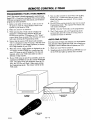
Follow these steps for each product you are using:
1.
Look up the three-digit code for your brand (such as
Zenith) and type of equipment (such as VCR) in the
code table on the following page.
2.
Press and hold PRG with a small blunt object until
the indicator lights (about three seconds).
3.
Press TV, VCR, CABLE, or AUX to select the product you want your remote to control. (Use CABLE
or AUX, to program your remote for a second TV or
VCR or to program your remote for a video disc
player or audio equipment.)
Key in the three-digit code for your equipment, then
press ENTER/TUNE.
The indicator light should
flash, then turn off to indicate that the code was accepted. If the indicator stays on, repeat steps 3 and 4
or try using a different code.
5. Write the codes that operate your equipment on the
label inside the battery compartment
for future
reference.
To erase all code programming and return to the factory preset
codes, key in code 9-1-1 when programming the remote.
NOTES:
• The remote cannot be programmed while in the StarSight
mode: Choose TV, VCR, CABLE or AUX mode before
pressing PRG.
• If no key on your remote is pressed within 60 seconds, the
programming process will stop, and you will have to start
again.
° You may cancel programming at any time by pressing PRG.
SPECIAL
FEATURES
AUX+I, AUX+2, AUX+3 Capability
Amplifier Volume Override
Your remote can control up to seven electronic components. If
you have programmed the remote for four components using the
TV, VCR, CABLE and AUX keys, you may also program it for
up to three additional components (AUX+I, AUX+2, AUX+3)
by holding the AUX key and pressing the 1, 2 or 3 key during
programming. Once programmed, hold down the AUX key and
press 1, 2 or 3, to access the additional AUX +1, 2 or 3 mode.
Cable Box Volume
You may use your remote to override your TV, VCR or video
disk player's volume functions with your amplifier's volume and
muting.
You may use your remote to control cable box volume and muting if available on your equipment. Firstprogram your remote
with the bragd code for your cable device using the CABLE or
AUX key. Then repeat the progranuning steps, again using the
CABLE or AUX key, but key in code 3-9--9 instead of a brand
code.
To restore TV volume/mute control to the CABLE or AUX
mode, reprogram your cable code into that mode.
1.
Program your amplifier code into the CABLE mode
or one of the AUX modes.
2.
Select the mode on your remote (TV, VCR, etc.)
where you want the amplifier volume control function to appear. In other words, if you want to operate the volume and mute of your amplifier while the
remote is in TV mode, press TV for this step.
3.
Begin the programming steps as described in "Programming Your Remote" and key in code 4-9-9, followed by ENTER.
The amplifiervolume and mute features are now available in the
current mode.
To restore normal volume and muting control to your TV,
VCR, cable or laser disc player, reprogram the remote for these
units into each mode (TV, VCR, etc.) to be restored.
NOTE:
• CD and tape devices will automatically select amplifier volume and mute.
2923-0t-o
4 -- 4
UNIVERSAL
AUTO
FIND
REMOTE
CONTROL
OPTION
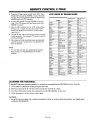
If you have tried all the codes listed for your brand and type of
product in the code table, and none of those codes operate your
equipment,you can use Auto Find to search for the code you need.
Follow these steps for each product you are using:
1. Turn the product
ON and aim the remote
Press and hold POWER, then release it, repeating
this action about once a second until the product
turns OFF.
St
,
toward it.
2.
Press and hold PRG with a small blunt object until
the indicator lights (about three seconds).
3.
Press the mode key on the remote for the product
you want to control: TV, VCR, CABLE, or AUX.
4.
Key in code 0-0-0, then press ENTER within two
seconds. When the indicator light flashes three times
and remains lit, Auto Find is active.
Press ENTER immediately to save the code. If your
remote fails to operate the functions you use most
often, you can re-enter Auto Find and search for a
better code.
NOTES:
• The indicator light should flash OFF when you press
POWER and back ON when you release it. If the indicator
light stays on when you press POWER, Auto Find has tried
all available codes. If you finish Auto Find and the product
you want to control has not turned off, your remote cannot
control that product.
• Pressing PRG at any time during the use of Auto Find will
cancel Auto Find, and you will have to start again.
ON
POWER
I1_
OFF
Equipment to be
controlled
Typical Remote
Control
_23_1_
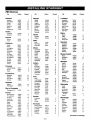
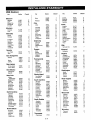
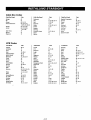
4--5
UNIVERSAL
OPERA
TIN(3
CODES
NAME
311.332.
342
106, 107
Magnavox
207.214.231
RCA
104,116, 126,157,
161.162,167.168
Maramz
207.218
Pana._nic
313. 320
Tedmics
432.459
209
Paragon
333
Toshiba
447
Realistic
105. 123, 124
Memorcx
206. 212. 214. 231
Philips
Yamaha
448
Sampo
119
Mitsubtshi
204. 222. 252
347. 350. 352.
354. 355
7Pnith
I04
Samsung
103. 119, 134. 141
460. 461,498.501.
5O2
MontSonwa'y
Ward
208.214. 216.
219. 231. 249
116,121.130,133
_vom.n_N_
CONTROL
Quasar
TVS
Admlml
BY BRAND
REMOTE
154
Piolle_r
315. 343
103.146
Sanyo
108.109.
RCA DSS
373
AOC
104
Scott
119.124
Multi Tech
239
Regency
329
Bell & Howell
121
_ars
103.108.109.110.
NEC
202. 218
Samsung
335
Broksomc
131,136
Candk
139
II8
IlL 118. 134
sha_
103. 105.122. 133.
250
)non
Scientific
214.251.
Panasomc
259
Atlanta
Centurion
119
Cg.tzen
121,139
Signature 2000
316. 323. 336. 364
Sprucer
313
137. 156.169
Pentax
215
Standard Comp
335
Phdco
207.214
Temcan
339. 356.371
103. 104. 105.
AUDIO TAPE
DECKS
Demm
455
Hanuan/Kardon
456
WC
457
Kcnwood
450
'.on[_
141
113. 114. 119.
121. 130. 133
Phdlps
207. 214. 227
Tocom
317. 318.346
_omnado
103
Sony
115. 143. 151. 170
Pmneer
210.215
Unika
348. 362
Onkyo
458
_rown
I03
Soundestgn
139
Portland
246
United Satelhtc
344
Philips DCC
454
216. 260
358. 362
Pionne_
451.478
Pro Scan
Umversal
Quasar
214,259
Vid Tcch
34O
Sony
452
RCA
215.216,220.227,
Video Way
349
Technics
454. 497
240,242,260
Vtcwstar
354. 355. 372
Zenith
301. 353
Zenflh Satelhte
312. 328. 330. 351
Cunts Mathes
116,119,121
Dnewoo
149,159
Daewoo
TV/VCR
Daytron
148
119
ElekWa
121
Emerson
103.104.123.124.
131.136.145
Emerson TV/VCR
158
Hsher
109.118
Funa,t TV/VCR
154
General
Electru:
I06.107.114,
116,117,161
Goldstar
I03,104,119,147
Goldstar TVNCR
153
Hitachi
102.103,129,163 !
J.C Penney
104.I I0.114,
117,119
112.113. 117.119.
127.128,139
Sylvania
Sympha_
rV/VC_154
Tatung
106
Tckmka
103, 112, 121.
124, 139
206,208,212.
Reahstic
103,121
Samsung
220. 230
Toshiba
110. 111, 134,171
SanStll
239
XRI000
121
Sanyo
206. 212. 247
Yorx
119
Scott
204, 205. 233. 243
Zemth
101, 149
Sears
206. 209.211.
153.154.
sharp
208.26
Shimom
239
Signature 2000
208.214.216.
231
Sony
217. 232, 237
WC
125. 132,164
Alwa
231
Sylvama
207. 214. 227
KMC
103
Akai
223, 238. 241
Symphonic
231
KTV
103. 104, 138
Audio
(urazal
121
Lodgenet
121
Logtk
121
LXI
133, 137
Magnavox
103. 112. 113,
117. 119. 127.
128. 139. 165
Magnavox TVNCR
w
MaFsUc
Maran_
173
121
104, 120. 155
206.247
Tashiko
2O9
Tatung
202
Teac
202.231
Broksomc
221.226.250,255
Tekn_,a
234
Canon
214
Toshiba
205. 215
Citizen
2O9
Craig
212
Cures Mathes
214,259
Daewoo
244,246,248,254
Daytron
236,246
DBX
202.218
Emerson
203. 221. 223.
239
XRI000
Vector Research
204.218
Yamaha
202. 218
Zemth
20l. 224. 225.
229. 237
M_a_n
146
Memomx
121
MGN
Ml_ub_ht
104. 119. 120.
130. 140. 155
Fisher
21I.212, 213,247
Allegro/fiB Swttch 361
Mon_ome_
Ward
103, 104. 105.
113, 114. 119,
Fumu
231
Germm
305. 331.338
214.216. 220
General Elecmc
367
226. 233. 235.
243.250
121. 130. 133
General
Elecmc
NEC
104. 119
Goldstar
2O9
Parla._onlc
1(}6. 107. 160. 166
Go Video
256.262.263
Panasonic TV/V(_
174
Hitachi
215.257
Phflco
lo3. 104. 112.
Instant REplay
214.227
113, 139
Phthps
112. 113
Ihoneer
135
Portl_d
1113
ProScan
116. 157. 162, 167
2923-01-O
:ABLE/SATELLITE
358.362
Allegro
GeneralInsmmaent 305.306
J C Penney
214.215.218.227
JVC
202.225.258
404
1401
401
AUDIO CD
PLAYERS
Akai
409. 424
Crown
410
Denon
411
Fisher
412, 438
Goldstar
460
Harman/Kardon
413
JVC
415
Kenwood
412, 416. 417. 441
Magnavox
421,422,
433,434
Mitsubkdd
423,424
NAD
425. 426,447
4akamichi
427.428
NEC
429
Onkyo
430
P_aasonic
431. 432
Phihps
421,433,434
Pioneer
43 I. 435
Quasar
432
Hamlm
302.303.345.
365.366
Radio Shack
431. 436. 439. 440.
441
lerrold
304.307.308.309.
310.318. 360.363
RCA
437
Ka]€ Vk_lon
335
Sanyo
438.439
Scott
440
Sharp
44 I.442
Sony
443. 444. 445
Soundesign
461. 498.501,502
Macom
314.321
202
Magnavox
334
Loglk
239
NSC
335.339.368.
369.370
LXI
2O9.231
Kenwood
Sony
Sa,
yo
Zemth
219. 231. 249
Adventura
Bell& Howell
[ 402. 403
I
208, 261
Dynanucs
VIDEO DISK
PLAYERS
Paoneet
Admiral
202, 218
4 -- 6
AUDIO TUNERS
AND AMPLIFIERS
212.215
172
VCRS
453
i
214,231
Tele_nt
Zenith TV/VCR
Yamaha
Denon
462. 463
Fts_r
464
Goldslar
460
Hannah/
Kardon
465
IVC
466
I_nwood
468, 469
Marantz
472.503
Onkyo
473
Philips
475,476
Pioneer
477,478.479
Radio Shack
487. 488
Re.alk_c
480
Sanyo
481
Scott
482
Sharp
483
Sherwood
487.488
Sony
489. 490. 491. 492
Soundesign
461. 498. 501. 502
Tcac
494, 495
Techn_
497
Yamaha
496
Zenith
460, 461. 498. 501,
5O2
Ref: 124-205-05 and
BP 221-879-03
QUICK
AVAILABLE
REFERENCE
TO MENUS:
UNIVERSAL
REMOTE
MENUS
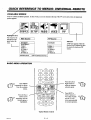
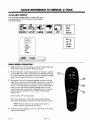
Your TV is icon and menu operated. In other words, an icon is selected at the top of the TV screen and a menu of adjustment
options appears.
I
i
]
5DUREE
[_
VIDEO] J
J
i
i
!
i
Highlighted Icon
The menu for the
selected icon appears below the
icons.
I
I Main Source
PIP Inset
StarSight
Ant/Cable 2
Video 1
Video 2
S-Video 1
Video 3
S-Video 2
_. Main/PIP
BASIC
MENU
I PIP Source
I
StarSight
A PIP inset appears while the
Source icon is selected to show
the result of selecting a PIP
Video 1
Video 2
S-Video 1
Video 3
S-Video 2
'1',1,To Select Source
source.
]
OPERATION
V
O O(D
t
repeatedly to choose
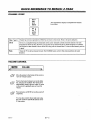
Press MENU
from the available
menus.
Press the Up or
Down arrows
repeatedly
until the
desired option
is
highlighted.
_
....
@®®@
Typical
2923-01-O
Remote
5 -- 1
Control
Press the Left or
, Right arrows to
adjust or change a
selected option.
Press QUIT to
remove menus or
wait a few seconds
and the TV will
return automatically
to normal operation.
""_-"_'_l
SOURCE
Main Source
Video 3 and S-Video 2 are
source options for some TV
models only.
MENU
1
PIP Source
A PIP inset appears while the
Source icon is selected to show the
effect of choosing a PIP source.
StarSight
Video 1
Video 2
If the PIP Source is changed, the
PIP inset will remain on the screen
after you exit from menu operations°
S-Video 1
Video 3 _
S-Video
1'4, To Select Source
OPERA "lION
@
SOURCE
1 or 2
1, 2 or 3
S-VIDEO
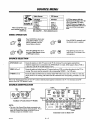
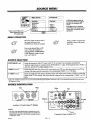
Press SOURCE for direct entry
to the Source Menu, or press
MENU repeatedly until the
Source Menu is selected.
Press SOURCE repeatedly until
the desired source is selected.
Press the Left/Right keys to select either Main Source column
or PIP Source column.
Press QUIT or wait a few seconds for the TV to return to normal operation.
SELECTION
ANT/CABLE
VIDEO
I
StarSight
Ant/Cable 2
Video 1
Video 2
S-Video 1
fVideo 3
%S-Video 2
q)* Main/PIP
MENU
I or 2
Routes the antenna or cable-TV source to the TV for viewing. You see program material from
whichever signal source is connected to the ANT/CABLE
1 or 2 jack. (If the signal is from a VCR or
a cable box, tune the TV to either channel 3 or 4.)
Routes the audio and video from an A/V source (such as a VCR or a video disc player) to the TV for
viewing. The source must be connected tO the corresponding VIDEO 1, 2 or 3 IN jacks.
Routes the audio and video from an auxiliary Super-VHS video source (such as a VCR or a video disc
player) to the "IV for viewing. The source must be connected to the corresponding
S-VIDEO
1 or 2 IN
jacks.
Refer to the "Standard Connections for Your "IV" section to make the proper equipment connections to the TV. For information about PIP
sources, refer to the "PIP Operation" section.
SOURCE
IDENTIFICATION
Yellow
Blue
Red
White
LOOP OUT
10 Mceett
Magenta
lIOliITOAOUT
i--All040--1
ANTENNA
CABLE
ANTENNA
CABLE
VIOE61IN
lrlmEO
YIOEO
Z Ill
r-- AIIMO--I
I
Auxiliary A/V Jacks (Some TV Models)
NOTE:
• The color of the Channel/Time display corresponds to the
color rings around the connectors of the jack panels. For example, the Channel/Time display will be Red if you are
watching a program on Ant/Cable 1 source.
2923.1_
Lt. Blue
Connection
6 -- 1
Center on Back of TV
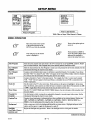
SETUP
MENU
Ch. Add/Del
Ch. Labels
Source ID
ClockSet
Timer Setup
ParentalCtl
Caption/Text
Background
StarSight
Clock Set
Timer Setup
Parental Ctl
Caption/Text
Background
Press 4), To Program
I Press 4).To Label Sources]
While a Video or Super-Video 2 Source is Chose.
MENU
OPERATION
@
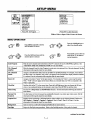
Press the Left/Right keys to
adjust the selected option.
SETUP
MENUrepeatedly
is shown.until the
Press
MENU
Press QUIT or wait a few seconds for the TV to return to
normal operation.
Press the Up/Down keys until the
desired option is selected.
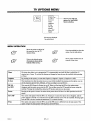
Auto Program
Finds all active channels and stores them in the TV's memory for use by CHANNEL up/down.
"THE FIRST TIME YOU OPERATE YOUR TV" for more details.
Ch. (Channel)
Add/Del
Edits the channels found by Auto Program to create your own personal list of favorite channels. See the
information following this chart for more details.
Ch. (Channel)
Labels
Assigns a network/station label, name or call letters to specified channels. For example, if you choose
the label "ABC" for channel 9, then "ABC" will appear in the Channel/Time display whenever channel
9 is selected. See the information following this chart for more details.
Source ID
Assigns a descriptive "name" to the input sources. For example, the Video 1 source may be named
VCR. "VCR" will now appear in the Source Menu as a reminder that your VCR is connected to the
Video 1 input jacks.
Clock Set"
Sets the clock in the TV to the correct time. Press the Left/Right arrow keys to advance the 24-hour
clock, or use numbered buttons on the remote to enter time. Press ENTER to start the clock.
Timer Setup
Sets the TV's Sleep Timer and On/Off Timer features. See the information following this chart for
more details.
Parental Ctl.
(Control)
Use this feature to block viewing of any undesirable channels or an entire input video source. See the
information following this chart for more details.
Caption/Text
Displays closed captioning or informational text when available on the selected channel. Options are:
Off, Caption 1, Caption 2, Caption 3, Caption 4, Text 1, Text 2, Text 3, Or Text 4. See the
information following this chart for more details.
Background
Adds or removes a solid-color background behind the on-screen menus.
StarSight
Begins the StarSight setup procedure. Refer to the StarSight section of this guide for details.
continued
2923-ol-o
7 -- 1
See
on next page
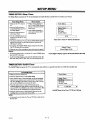
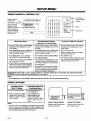
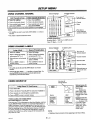
SETUP
USING
CH. (CHANNEL)
MENU
ADD/DEL
Selector Highlight
Delete Channels
Add Channels to Scan
from Scan
Press the Up/Down keys to se- • Press the Up/Down keys to
lect Ch. Add/Delete.
select Ch. Add/Delete.
o
14
15
16
17
18
19
20
21
22
23
24
25
26
27
28
29
30
• Use the Left/Right and Up/
Down keys to move selector
to the channel being deleted.
31
32
33
34
35
36
37
38
39
40
41
42
43
44
45
46
47
48
49
50
51
52
53
54
Press
* Delete the channel by
pressing SOURCE until the
display shows Deleted.
55
56
57
58
59
60
Source |
ToChange I
• Press Left/Right keys to view
the add/delete screen.
Use the Left/Right and Up/
Down keys to move selector
to the channel being added.
Add the channel by pressing
SOURCE until the display
shows Added.
----" Channel
Status
Added
67
68
69
70
71
72
73
74
75
76
77
78
"_
Instructions
/
61 62 63 64 65 66
NOTE:
I..,. C,a..e,.+1
• Ch. Add/Del can only be used with ANT/CABLE
• The audio of deleted channels is muted.
CHANNEL
1 or 2 Source.
Use Down key to
,.- move selector to
additional numbers
if present.
Available channels are:
Broadcast Band -- VHF 2 to 13, UHF 14 to 83
Cable-TV Band -- 1 to 139
LABELS
Selector Highlight
i
Live view of
selected channel.
O
13
Press Left/Right keys to view
the add/delete screen.
USING
Available Channels
Assi_
Labels
I
• Press the Up/Down keys to se- ;
lect Ch. Labels.
Press the Up/Down keys to
select Ch. Labels.
• Press Left/Right keys to view
the Channel Label screen.
Press Left/Right keys to view
the Channel Label screen.
• Select a channel by pressing
the CHANNEL Up/Down
keys.
Select a channel by pressing
the CHANNEL Up/Down
keys.
• Use the Left/Right and Up/
Down keys to move selector
to the desired label.
Use the Left/Right and Up/
Down keys to move selector
to the four dashes or NONE.
"'-"
ADC
CA
CNBC
CTN
ENC
FAM
GALA
IC
ME/U
NOS
RDS
SIN
NOTE:
• Ch. Labels can only be used with ANT/CABLE
Available Labels
AMC
CBC
NONE
CNN
CTV
ESPN
FNN
HBO
INSP
MMT
PBS
REQ
TBS
I MoreLabels
%
I or 2 Source.
BCC
CBN
COM
DIS
ESPN2
FOX
HN
JCN
MTV
PLAY
SC
TBN
BET
CBS
CSPN
DISC
ET
F&V
HSE
LIFE
NBC
PTL
SCFI
TELE
BRAV
CMTV
CSP2
E!
EWTN
FX
HSN
MAX
NICK
OVC
SHOW
TLC
-.--- Current Channel
Ch9
[ABC
Live view of
selected channel.
I
Selected Label
Press Down arrow
"--" for more labels.
4, t
• Selecting the four dashes (- - - -) specifies that no channel label is assigned. Or, in addition to not assigning a label, NONE blocks the station or network labels that are transmitted by some television stations.
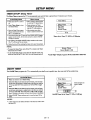
USING
SOURCE
ID
NmesTo rourSou
Optional names for
ANT/CABLE 1 or 2
Sources are:
Live view of
selecW_xlSource.
:: !
• In the Setup Menu, press the Up/Down keys to select Source ID. I
• Press the Left/Right keys to view the Source ID screen.
I
• Press the Up/Down keys to choose a Source.
• Press the Left/Right keys to Label the chosen Source.
]
!
Source
VIDEO GAMES AND OTHER FIXED
PATI'ERN DISPLAY CAUTION
If you use your TV for video games or other fixed displays, avoid setting the BRIGHTNESS control for an excessively bright picture. A
bright, fixed pattern, if used for long periods of time, can result in a
permanent imprint on the TV picture tube. You can reduce this possibility by alternating the use of the fixed pattern display with normal
TV picture viewing, by turning down the CONTRAST control for
sustained fixed pattern use, and by turning off the fixed pattern display when not in use.
2923-01-A
I
AnVCable 2
Video 1
Video
2
Ant/Cable
I 1
S-Video I
Label
StarSight
Antenna
VCR
Disabled
Video Game
NOTE:
• "Disabling" a Source prevents it from
appearing in the Source Menu.
7 -- 2
.... , Disabled, Antenna, Cable, Cable
Box, Satellite, VCR,
StarSight (Ant/Cable
1 only). ' Optional names for
VIDEO Sources are:
.... , Disabled, VCR,
VCR2, Camcorder,
Video Game, Laser
Disc, Audio Only,
Satellite (some models
only).
SETUP
TIMER
SETUP:
Sleep
The Sleep Timer programs
MENU
Timer
the TV to automatically
turn itself off after a period from 15 minutes
up to 4 hours.
Direct Access
From Setup Menu
on
• Make sure the TV's clock is
set.
• With no menus showing
the TV, press TIMER on your
remote to directly access the
Sleep Timer.
• Press the Up/Down keys to
select Timer Setup and view
the Timer Menu.
Timer Menu
On Time
Off Time
On/Off Timer
• Press TIMER repeatedly to
set the period of time the TV
will remain on.
• Press the Up/Down keys to
select Sleep Timer.
]
• Use the Left/Right keys to set
the period of time the TV will
remain on.
0:15
}
Timer Set to Turn TV OFF in 15 Minutes
• One minute before the TV turns off, the GOOD NIGHT display
appears on the screen. At this time you have a choice of the
following two actions.
,. Do nothing. The GOOD NIGHT display remains on the screen.
The TV will turn off in one minute.
SleepNight
Timer
Good
0:58
I" Delay the turn-off by resetting the timer with a new time period.
NOTES:
• To cancel the Sleep Timer, turn off the TV or press TIMER repeatedly until OFF is showing.
• As the Good Night display counts down.the f'mal 60 seconds, the
audio and video of the TV also "dim" for a soft, discreet turn-off.
TIMER
The On/Off
SETUP:
Timer
On/Off
programs
]
"Good Night" Display Appears 60 Seconds Before Shut-Off
Timer
the TV to automatically
turn itself on at a specific
time then turn itself off at another
I Timer
• Make sure the TV's clock is set.
Menu
time.
I
• Press the Up/Down keys to select Timer Setup
Timer
• Press Up/Down keys to select On Time. and use the numbered
buttons on your remote to enter a time for the "IV to turn itself
ON. Press TIMER on the remote to select AM or PM. (You can
also use the Left/Right keys to advance the time.)
• Press the Up/Down keys to select OffTime and use the
numbered buttons on your remote to enter a time for the TV to
turn itself OFF. Press TIMER on the remote to select AM or PM.
(You can also use the Left/Right keys to advance the time.)
• Press the Up/Down keys to select On/OffTimer
Left/Right keys to turn the timer ON (or OFF).
11:00 AM
On/Off Timer Set to Turn TV ON at 11:00 am
and use the
NOTE:
• A time must be set for either On Time or Off Time in order to turn
the timer ON.
2923-01-O
k]
7w 3
SETUP
USING
PARENTAL
CONTROL
MENU
(PC)
f
Period of time PC
will be active.
]
1
2
t
7
8
Block Hours
13
19
25
14
20
26
15
21
27
Block Source
31
32
37
38
43
[ Parental
Control Menu
_1
Blocks entire source. _",,,p
Blocks individual
_
channels for Ant/
1"
Cable
or appear
2 sources.
(Does Inot
if _
the entire Ant/Cable
source is blocked by
Block Source.)
Block Entire
Block Channels
I
t
O FF
Source
4
S
6
10
11
12
16
22
28
17
23
29
18
24
30
33
34
35
36
39
40
41
42
44
45
46
47
48
49
50
51
52
53
54
55
56
57
58
59
60
61
62
63
64
65
66
67
68
69
70
71
72
73
74
75
76
77
78
Block Individual
(Ant/Cable
3
[]
Live view of
selected channel.
Channel
Unblocked
-----
Source
Press
+
To Change
Channels
I or 2 Sources
Status
Re-enter
Instructions
PC While it is Activated
Only)
• Press the Up/Down keys to select Parental
Ctl and press the Left/Right keys to view
the PC Menu.
Press the Up/Down keys to select Parental
Ctl and press the Left/Right keys to view the
PC Menu.
• Press the Up/Down keys to select Parental
Ctl and press the Left/Right keys to view
the PC Menu.
• Select Block Hours and use Left/Right keys
to set the length of time PC will be active:
OFF, 12, 24, 48 or 72 hours.
Select Block Hours and use Left/Right keys
to set the length of time PC will be active:
OFF, 12, 24, 48 or 72 hours.
• Enter your access code.
• Select Block Source and use Left/Right
keys to"Block" the current input source.
DO NOTHING WITH BLOCK SOURCE.
• To block other sources, press the SOURCE
key and set them to "Block."
• Press ENTER to exit and enter any 4-digit
"Parental Access Code" when prompted to
do so. (You will be prompted to verify the
number by entering it a second time.)
Use Left/Right and Up/Down keys to select
a channel and press the SOURCE key to set
it to "Block." Repeat this for each channel
you want blocked.
Select Block Channels.
• Make your changes (block more channels,
reset the time period, etc.).
• Press ENTER to exit.
• You will be prompted to change your access
code. Either enter a new 4-digit code or do
nothing to retain the current code.
Press ENTER to exit and enter any 4-digit
"Parental Access Code" when prompted to
do so. (You will be prompted to verify the
number by entering it a second time.)
REMEMBER YOUR CODE! TO RE-ACCESS PARENTAL CONTROL WHILE IT IS ACTIVATED, YOU MUST ENTER THIS
NUMBER. Otherwise, simply allow the specified period of time to elapse.
NOTE:
• Do not unplug the TV in an attempt to deactivate the Parental Control. This only resets Parental Control.
USING
CAPTIONS
Activating Captions
(With CC Button)
Activating Captions/Text
(From Setup Menu)
• Press CC button on remote.
• Press the Up/Down keys to
select Caption/Text.
• Press CC repeatedly to toggle
through the five choices: Off,
Caption 1, Caption 2, Caption
3 And Caption 4.
• Press Left/Right keys to
toggle through the nine
choices: Off, Caption I,
Caption 2, Caption 3, Caption
4, Text 1, Text 2, Text 3, or
Text 4.
J
NOTE:
• At present, very few TV programs or video tapes offer text captioning for any option other than Caption 1. Therefore, Caption 1 is the
only recommended choice, unless you know that a specific program is
providing captioning using one of the other selections.
2923_1-o
m
"J_4_IIoI Are you I
_ [°utthere?
I
'_
._
/
Typical Captions Display
Captions may be shown anywhere on the screen.
7 -- 4
m
m
m
m
m
m
m
m
m
See special newscast
tonight at 7:00PM bn
channel2.
C
)
Typical Text Display
Fixed size text window fills
lower half of screen.
AUDIO
I
I
RUDID
MENU
MENU
I
:::,Bass
Treble
Balance
Audio
Enhancement
OPERATION
Press MENU repeatedly until the
AUDIO MENU is shown.
Press the Left/Right keys to
adjust the selected option.
Press the Up/Down keys until the
desired option is either highlighted or selected.
Press QUIT or wait a few seconds for the TV to return to
normal operation.
Bass
Adjusts the BASS (low-frequency) level.
Treble
Adjusts the TREBLE (high-frequency) level.
Balance
Adjusts the balance of sound between the two speakers.
Audio
Allows you to select STEREO, MONO or 2ND AUDIO/SAP operation. See information below this chart
for more details.
(SAP is not an option
for the video sources.
Audio signals received
from a video source are
assumed to be monaural
or stereo. )
Enhancement
STEREO:
Directs the sound to the Left and Right speakers as supplied by the program. Stereo is
the recommend choice: The TV switches automatically
between the STEREO and
MONO modes depending on the type of signal being-received.
MONO:
Directs the same sound to both Left and Right speakers, even if the program
received is in stereo.
2ND AUDIO/
SAP:
Directs the sound for the Second Audio Program (second language) to both the Left
and Right speakers. SAP sound is always monaural. If SAP is selected, you hear the
SAP (usually a second language). When the SAP broadcast ends, the TV switches
automatically (defaults) to the type of signal being received, STEREO or MONO. The
TV switches back to 2ND AUDIO/SAP when the SAP broadcast resumes.
Provides a list of options for enhancing the TV's audio. The options shown depend on what is selected
for the AUDIO option above.
Mono or 2nd
Audio/SAP
Selected:
Your audio Enhancement options are Off and Pseudo Stereo. Off specifies _at no
Enhancement is activated. Pseudo Stereo enhances monaural audio to emulate stereolike sound.
Stereo Selected:
Your audio Enhancement
options are Off, Concert Hall, Theater,
Night Club,
Stadium, Dolby Pro Logic-Normal
and Dolhy Pro Logic-Phantom.
Off specifies
that no Enhancement
is activated. For the other options, see "Stereo Operation," and
"Dolby Pro Logic Operation."
NOTE:
• All adjustments on the Audio Menu are optional. You do not have to adjust these features in order to use your TV.
2923-os-o
being
8-
1
AUDIO
SPEAKER
MENU
BALANCE
Stereo Operation
is Select Stereo as the Audio option.
• Select a desired Enhancement: Concert llall, Theater,
Club or Stadium, or set Enhancement to Off.
Press 4, 1' To Change Speaker
Press • • To Change Level
Night
, Adjust Bass and Treble for the most pleasing sound.
Front Speakers
IIIIIIIII1(I)1111111111
1;
, Select Balance and press the Left/Right arrow key to view the
speaker balance screen.
. Press the Up/Down keys to choose the speakers you want to
adjust; either the front speakers (those in the TV) or the optional
surround sound speakers.
• Press the Left/Right keys to adjust the selected speakers.
u,n
<l
Surround Speakers
i i I I I I I I I(DIII
III
R_
Max[
I
I II1•
I Surround
SpeakersRequiredI
Message appears when adjusting Surround Sound.
STEREO SOUND BALANCE
Up/Down arrow keys select the speakers.
Dolby Pro Logic-Normal
Select Dolby Pro LogicNormal as the Enhancement.
Turn on the external amplifier
and set its volume to
approximately the same
volume as the TV.
Bass and Treble can not be
adjusted for Pro Logic
Normal.
• Select Balance and press the
Left/Right arrow key to view
the Pro Logic balance screen.
* Press the Up/Down keys to
select a speaker (Left, Right
or Surround) to adjust.
• A highlight box and an
audible "hissing" sound will
"bounce" between the
selected speaker and the
Center,Reference.
Press the Left/Right keys to
set the volume of the
"hissing" (for the selected
speaker) to approximately the
same level as the "hissing" of
the Center Reference. Do
this for each speaker.
Dolby Pro Logic.Phantom
Left/Right arrow keys balance sound to left and fight
speakers in television and increase/decrease
surround
sound.
• Select Dolby Pro Logic
Phantom as the Enhancement.
• Adjust Bass and Treble for the
most pleasing sound.
• Select Balance and press the
Left/Right arrow key to view
the Pro Logic balance screen.
• Press the Up/Down keys to
select a speaker (Left, Right or
Surround) to adjust.
Press 4, 1' To Change Speaker
Press • • To Change Level
Highlight box
"bounces"
between selected
speaker and
Center
Reference.
• A highlight box and an
audible "hissing" sound will
"bounce" between the selected
speaker and the Center
Reference.
Press the Left/Right keys to
set the volume of the
"hissing" (for the selected
speaker) to approximately the
same level as the "hissing" of
the Center Reference. Do
this for each speaker.
4
Speaker
I I I I I I I Right
I I I_)1
I I I I I III
I
ExtemalAmTiflerRequirsd
Up/Down arrow keys select the speakers.
to hear Surround Sound.
to use Dolby
I_. I
I
I
Message appears only for Pro
Logic Normal selection.
Left/Right arrow keys adjusts the level of sound.
• An external amplifier must be connected
Normal
audio enhancement.
Pro Logic-
• To fully appreciate the quality of sound provided by the Dolby Pro
Logic audio system, make sure the speakers are balanced as described above.
• While Pro Logic-Normal
is selected, Bass and Treble adjustments
on the TV are not possible. These must be adjusted using the external amplifier.
2923-o,-o
I I I I I I t I ll_t I I1"11 1 It I_
PRO LOGIC BALANCE
Surround speakers must be connected
I
Speakers
I I I I I ISurround
I I I Ill_l
I I I I I I I•
NOTES:
• Optional
CenterReferenceSpeake_.
8_ 2
VIDEO
MENU
Brightness
Color
Tint
Sharpness
ColorTemp
Video Filter
Auto Flesh
Picture Pref
Projo Setup
|
UIOEO
•
MENU
O
,I
OPERATION
@
Press the Left/Right keys to
adjust the selected option.
VIDEO MENU is shown.
Press MENU repeatedly until the
Press QUIT or wait a few seconds for the TV to return to
normal operation.
Press the Up/Down keys until the
desired option is either highlighted or selected.
Contrast
Adjusts the overall contrast and color level of the picture.
Brightuess
Adjusts the brightness level of black areas in the picture.
Color
Adjusts the intensity of the colors in the picture.
Tint
Adjusts the color of the flesh tones to more Green or more Red.
Sharpness
Adjusts the clarity of the edges around objects for the clearest picture quality.
Color Temp
(Temperature)
Changes the "color temperature" or picture white balance between cooler natural whites and warmer
(red) colors.
Video Filter
Reduces video "noise" or interference in dark picture areas resulting in clearer overall pictures.
Auto Flesh
Automatically maintains natural skin tones under changing scene and video source conditions.
Picture PreT.
(Preference)
Lets you decide if you want to use your own CUSTOM video settings, the factory PRESET video
settings or the factory preset THEATER video settings. The THEATER settings are preset to provide
optimum visual performance in low light "theater-like" conditions
Projo Setup
Lets you verify and adjust, if needed, the dynamic color convergence of the TV picture. See the
information following this chart for more details.
NOTES:
All adjustments on the Video Menu are optional. It is not necessary to adjust these features in order to operate the TV.
Any adjustments made to the Video Menu settings while Picture Pref. is in PRESET or THEATER mode will automatically
store the current settings as the CUSTOM setting.
continued on next page
_23.1_
9N
1
REMOTE
CONTROL
Z-TRAK
INTRODUCTION
This multi-brand remote control operates the common features of most, but not all, models and brands of IR (infrared) controlled
VCRs. Some functions of your particularequipment may not be controlled by this remote. Insuch cases, use the original remote controlfor
your equipment,
BATTERY
INSTALLATION
Batteries are provided, but must be installed before using the
remote control. When it no longer functions normally, or if it
loses memory, replace the batteries with two high-quality,
alkaline, size AA batteries. Match plus with plus (+ with +),
minus with minus (- with -) in the battery compartment.
Unless your equipment responds to the factory preset code,
you will need to reprogram the remote after you replace the
batteries.
NOTES:
•
Do not place heavy objects on top of the remote control
keys. Prolonged unintentional operation of the remote shortens battery life.
• Remove the batteries if the remote control will not be used
for a month or more. THE MANUFACTURER IS NOT
RESPONSIBLE FOR DAMAGE CAUSED BY BATTERY LEAKAGE.
CHOOSING
OPERATING
MODE
To control your TV or VCR with this remote, you must first choose the mode of operation. Press the desired mode key for TV or
VCR. Press TV to return to TV mode.
POWER
TV
VCR
SetremotetoTVmode
Z-Trak Remote
2923.ot_o
11 _ 1
REMOTE
BASIC
CONTROL
Z-TRAK
OPERATIONS
Point Remote at TV or VCR
POWER
TV
Set remote to "Iv mode.
VCR
remote to VCR mode
TRACKBALL
operating TV or VCR: Moves
on-screen pointer to desired TV
menu selection. Press on the
trackball to "choose" the selection.
VOL Up/_
When operating TV: Increase volume
When operating VCR: Fast forward
CHAN Up/_
When operating TV: Go to the next
channel
When operating VCR: Play
VOL Down/'_
When operating TV: Decrease volume
When operating VCR: Rewind
CHAN Down/•
When operating TV: Go to the
previous channel
When operating VCR: STOP
ENTER
When operating TV: View
Channel/Time display
When operating VCR: View VCR
display
MUTE II
When operating TV: Mute sound
When operating VCR: Pause
RECRD
When operating TV: Begin StarSight
record function
FLSHBK
When operating TV: Tune TV to
the last channel viewed
When operating VCR: Begin VCR
record function
When operating VCR: TV./VCR
switch
Z-Trak Remote
2923-01-0
11 -- 2
REMOTE
PROGRAMMING
YOUR
Z-TRAK
CONTROL
Z-TRAK
REMOTE
Your Z-Trak remote is already programmed to work with most
Zenith VCR's. If you have a non-Zenith VCR, or if your Zenith
VCR does not respond to your Z-Trak remote, you will need to
program your remote as follows:
7.
Now try other controls on your VCR, such as Play,
Rewind, etc., to make sure that the correct VCR
brand code number was selected.
(If not, repeat
steps 3 to 7.)
1.
Refer to the table of VCR Codes, in this section of
the guide. Locate the 3-digit number which corresponds to your brand of VCR.
8.
The MUTE key can be pressed at any time to cancel
Programming mode. The original VCR brand code
will remain unchanged.
2.
Make sure your TV is turned on.
NOTE:
3.
While pointing the Z-Trak remote towards your
Zenith TV, simultaneously
hold the MUTE and
ENTER keys until the TV displays a VCR "Setup"
screen (about three seconds). The VCR key will also
light upon entering the Programming mode.
4.
Notice that the current VCR brand code (initially
"201") is displayed on the TV screen. Roll the trackball up or down (or use CHAN Up/Down) to choose
the 3-digit number of your VCR.
5.
When the correct 3-digit number is displayed on the
TV screen, use the POWER key to make sure that
your VCR turns on and off properly. If it does not
respond, refer to the VCR Codes table to select a
different 3-digit number.
6.
9.
Only the VCR mode can be programmed.
The Z-Trak remote will exit Programming mode
automatically
after 60 seconds if no key press or
trackball movement is detected.
AUTO
FIND
OPTION
If you have tried all 3-digit codes listed for your VCR manufacturer, and none of them operate your VCR, you will need to try
"AutoFind" to see if a different code will operate your VCR:
1. Make sure your VCR is turned
2.
If your VCR turns on and off successfully,
press the
trackball (or ENTER) to save the current VCR brand
code. The setup screen will disappear from the TV.
Also, the VCR key will flash 3 times upon exiting
the Programming
mode. The remote will be in the
VCR mode.
f
/
I
TV displays
VCR code
Equipment to be
controlled
Z-Trak Remote
Control
2923-o,-0
11 -- 3
on.
Simultaneously
hold the MUTE and ENTER keys until the VCR key lights up (about three seconds).
REMOTE
3.
4.
5.
6.
7,
CONTROL
Z-TRAK
VCR CODES
Point the Z-Trak remote towards your VCR. Press
CHAN UP followed by POWER. If your VCR did
not turn off, keep repeating CHAN UP followed by
POWER until the VCR responds.
BY BRAND
Montgomery
If your VCR turned off, press ENTER to save the
code. The VCR button will flash three times after
ENTER is pressed.
Ward
208, 214, 216, 219,
231,249
VCRS
Multi Tech
239
Admiral
208, 261
NEC
202. 218
Adventura
231
Orion
250
Aiwa
231
Panasonic
214,251,259
Now try other controls on your VCR, such as Play,
Rewind, etc., to make sure that the correct VCR
brand code number was selected. (If not, repeat
steps 2 to 4.)
Akai
223. 238, 241
Pentax
215
Audio
202, 218
Philco
207.214
Philips
207,214,227
Pion_r
210,215
Portland
246
The MUTE key can be pressed at any time to cancel
AutoFind mode. The original VCR brand code will
remain unchanged.
Pro Scan
2 t6, 260
Quasar
214. 259
RCA
215.216,220,227,240.
242,260
Dynamics
The remote will exit AutoFind mode automatically
after 60 seconds if no key press or trackball movement is detected.
Bell & Howell
206,247
Broksonic
221.226,250,255
Canon
214
Citizen
209
Craig
212
Curtis Mathes
214,259
Dacwoo
244,246,248,254
Realistic
206,208,212.214,231
Daytron
236,246
Samstmg
220,230
DBX
202,218
Sansui
239
Emerson
203.221,223,226,
Sanyo
206,212,247
Scott
204,205.233,243
Sears
206,209,2-I
I,212.215
Shalp
208,261
Shintom
239
Signature2000
20_,214,216.219,
23I,249
Sony
217,232.237
Sylvania
207,214,227
233,235.243,250
NOTE:
•
NAME
To view the code that was programmed, perform
Steps 2 and 3 of "Programming
Your Z-Trak
Remote."
Fisher
211,212,213,247
Funai
231
General
214,216.220
Electric
Coldatar
209
Go Video
256.262,263
Hitachi
215,257
Instant Replay
214,227
J.C. Penney
214,215,218,227
JVC
202,225,258
Kenwood
2O2
Logik
239
LXI
209, 231
Magnavox
207. 214, 231
Maratttz
207, 218
Marta
209
, Memorcx
206,212,214,231
Mitsubishi
CLEANING
231
Symphonic
Tashiko
12O9
Tatung
202
Teac
202,231
Tcknika
234
Toshiba
205.215
Vector Research
204, 218
Yamaha
202,218
Zenith
201.224.225,229,237
XRI000
239
204,222,252,264
THE TRACKBALL
To keep the Z-Trak remote functioning properly, it is necessary to occasionally clean the TRACKBALL device. To do this:
1, Use a solution
of mild dish washing
detergent
and water.
2,
Moisten
a clean soft cloth with the solution and lay the cloth flat on a table.
3.
Turn the Z-Trak remote
4.
Allow the remote to air-dry before using it again.
upside down and gently roll the TRACKBALL
on the cloth.
CAUTION:
•
DO NOT USE ALCOHOL OR OTHER CLEANING
DAMAGE THE REMOTE.
2923-01-O
FLUIDS TO CLEAN
11 -- 4
THE TRACKBALL
AS THESE MAY
QUICK
AVAILABLE
REFERENCE
TO MENUS:
Z-TRAK
MENUS
Your TV is icon and menu operated. In other words, an icon
is selected at the top of the TV screen and a menu of adjustment options appears.
Ch 11
PBS
3:15
Stereo
Ch
All Ch
Flash
Timer
Captions
Z Trak
PiP
Freeze
J<_[(_!_[_
BASIC
1.
MENU
VOLUME
I>J
OPERATION
Make sure that your Z-Trak remote is in the TV mode (rather
VCR mode), by pressing the TV button on the top.
than
+
Press the trackball. A small square, known as the pointer, appears
in the middle of the screen. It should be blue, indicating TV mode.
If you have StarSight, the pointer may be red, indicating StarSight
mode. The next step tells you how to switch modes.
Q
The pointer is moved by rolling the trackball up, down, left, and
right. Move the pointer to the left edge of the screen. A column of
TV options appears. The icon at the top indicates which mode is
activ_ -- TV or StarSight (if connected). A TV icon represents TV
mode; a circle with a star represents StarSight mode. You can
switch between the two modes by locating the pointer on the icon
and pressing the trackball. The icon switches and the pointer
changes color.
Set the mode to TV (a blue pointer).
The various menus are not all visible on the screen simultaneously. Each menu appears when you move the pointer on top of it.
NOTE: Whenever the text reads "point to the option",
means "position the pointer on the option".
+
To make the pointer disappear,
and press the trackball.
2923-01-0
it
move it to the center of the screen
12--
1
QUICK
CHANNEL
REFERENCE
TO MENUS:
Z-TRAK
ICONS
Ch 11
PBS
3:15
Stereo
The Channel/Time display accompanies the Channel
Icons Menu.
c.
Ch t
All Ch
Flash
Chan I' and ,_
Channel up or down; equivalent to CHAN Up or Down on the remote. Point to the arrow and press.
All Ch
Gives you a complete listing of all channels on the screen. Channels currently stored in memory (via Auto
Program) are shown in color. However, you can tune to any channel on the list. Point and press on a channel;
the program on that channel is shown in the PIP, along with the channel label. To tune to that channel, press on
it again.
Flash
Tunes the TV to the last channel viewed. The FLSHBK button on the Z-Trak remote performs the same
function.
VOLUME
[ <t('-M_-_
CONTROL
VOLUME
'_>"
Move
theVolume
pointer to
the bottom of the screen to
view the
Control.
Point to the desired volume level on the slider
bar, and press the trackbaU. The volume level
automatically jumps to the new value. Or, press
on the arrows to gradually raise or lower the
volume.
Point and press on MUTE to turn the sound off
completely.
You may also control volume and mute using
the VOL Up/Down and MUTE buttons on the
Z-Trak remote.
2923-01-0
12 -- 2
TV OPTIONS
MENU
I
_
,_---...._._
Timer
Captions
Z Trak
PIP ON
Freeze
Move PIP*
The TV icon will only
appear for Ant/Cable 1
Source selection.
Swap*
*Not always displayed.
See table below
MENU
OPERATION
Move the pointer to the left of
the screenMenu.
Options
to view the TV
,_
Press the trackball to select the
option. See the table below.
Move pointer off the menu to
remove it from view.
(Its
shown option.
at the
Pointstatus
to theisdesired
bottom of the screen.)
Timer
The sleep timer allows you to program the TV to automatically turn itself off after a period from 15
minutes up to 4 hours. To activate this feature and change the interval, press the trackball while pointing
at Timer.
Captions
By pressing on this option, you can select Caption 1, Caption 2, Caption 3, Caption 4 or OFF.
Z-Trak
This determines how fast the pointer moves as you roll the trackball. By pressing on this option, you can
set this response speed to Slow, Medium, or Fast, according to your preference.
PIP ON (or OFF)
This turns the PIP (Picture-In-Picture) on or off. When you first turn the PIP on, the options menu
disappears and the pointer moves into the PIP. You can then move the PIP around the screen, using the
trackball. Pressing the trackball then locks the PIP in place and removes the pointer.
Freeze
Pressing on this option "freezes" the action of the picture in the PIP inset. See PIP Operation section for
details.
Move PIP
This option only appears when the PIP is on. Pressing on it causes the options list to disappear, and the
pointer appears in the PIP. You can then move the PIP around the screen with the trackball. Pressing again
locks the PIP in its new location and returns the TV to normal viewing.
Swap
This option only appears when the PIP is on and the PIP source is different from the main source. This
option "swaps" the main picture with the picture in the PIP inset.
2923-ol-o
13 _
1
SOURCE
I I PIP Source
[ Main Source
StarSight
Ant/Cable 2
Video 1
Video 2
-Vidnn
MENU
StarSight
Video 1
Video 2
R-Vidc_n 1
1
ideo 3
-Video 2
Video 3 and S-Video 2 are
source options for some
TV models
MENU
Video 3 2 )
S-Video
t
A PIP inset appears while the
Source icon is selected to show
the effect of choosing a PIP
source.
If the PIP Source is changed,
the PIP inset will remain on the
screen after you exit the menu
operations.
IEXlT]
only.
OPERATION
Move the pointer to the top left of
the screen and point to the
SOURCE icon. Press the trackball.
Point to "EXIT" and press the
trackball to remove the menu
from view.
Point to the desired Main or PIP
source. Press the trackball. Or,
press repeatedly on Main Source
or PIP Source to toggle through
your source options
SOURCE
SELECTION
ANT/CABLE 1 or 2
Routes the antenna or cable-TV source to the TV for viewing. You see program material from
whichever signal source is connected to the ANT/CABLE 1 or 2 jack. (If the signal is from a VCR or a
cable box, tune the TV to either channel 3 or 4.)
VIDEO 1, 2 or 3
Routes the audio and video from an A/V source (such as a VCR or a video disc player) to the TV for
viewing. The source must be connected to the corresponding VIDEO 1, 2 or 3 IN jacks.
S-VIDEO
Routes the audio and video from an auxiliary Super-VHS video source (such as a VCR or a video disc
player) to the TV for viewing. The source must be connected to the corresponding S-VIDEO 1 or 2 IN
jacks.
I or 2
Refer to the "Standard Connections for Your TV'" section to make the proper equipment connections to the TV. For information about PIP sources, refer to the
"PIP Operation" section.
SOURt2E
IDENTIFICATION
Blue
White
DEO 11IN
Yellow
Red
N
Iff&nm_n't
©
Magenta
MJDIO INPUT
Id01_tl'Ofl0Ltl
VIDEO INPUT
Lt. _lue
Auxiliary A/V Jacks (Some TV Models)
NOTE:
_
• The color of the Channel/Time display corresponds to the color
tings around the connectors of the jack panels. For example, the
Channel/Time display will be Red if you am watching a program
on Ant/Cable 1 source.
2923-01-0
Green
Connection Center on Back of TV
14-
1
SETUP
MENU
J
iiiiiii!A_!i!i_iiiiiiiiiiiiiiiiii!iii!iiiiiii_i,liiiiii_i
5ETUP
Ch. Add/Del
Ch. Labels
Source ID
Clock Set
Timer Setup
Parental Ctl
Caption/Text
Background
StarSight
l Press To Program
ource ID
Clock Set
Timer Setup
Parental Ctl
Caption/Text
Background
[ Press To Label Sources
1
While Video or Super-Video
MENU
Source
I
is Chosen
OPERATION
Press on the option again to
access it.
Move the pointer to the top left
of the screen and point to the
SETUP icon. Press the trackball.
fro::1"-
Point and press on the desired
option to highlight it.
_\4:_
Point and press on EXIT or
move the pointer off the menu
and press the trackball to
remove the menu from view.
Auto Program
Finds all active channels and stores them in the TV's memory for use by CHANNEL up/down. Follow
the on-screen directions. Auto Program runs on the currently selected Ant/Cable source.
Ch. (Channel)
Add/Del
Edits the channels found by Auto Program to create your own personal list of favorite channels. See the
information following this chart for more details.
Ch. (Channel)
Labels
Assigns a network/station label, name or call letters to specified channels. For example, if you choose
the label "ABC" for channel 9, then "ABC" will appear in the Channel/Time display whenever channel
9 is selected. See the information following this chart for more details.
Source ID
Assigns a descriptive "name" to the input sources. For example, the Video 1 source may be named
VCR. "VCR" will now appear in the Source Menu as a reminder that your VCR is connected to the
Video 1 input jacks.
Clock Set
°
Sets the clock in the TV to the correct time. Point and press on the option to highlight it. In the status
bar at the bottom, point and press on either the hours or minutes to adjust them. Point and press on AM
or PM to toggle them. Move pointer away from menu to remove it from view.
Timer Setup
Sets the TV's SLEEP TIMER and ON/OFF TIMER features. See the information following this chart
for more details.
Parental Ctl.
(Control)
Use this feature to block viewing of any undesirable channels or an entire input video source. See the
information following this chart for more details.
Caption/Text
Displays closed captioning or informational text when available on the selected channel. Options are:
OFF, CAPTION 1, CAPTION 2, CAPTION 3, CAPTION 4, TEXT 1, TEXT 2, TEXT 3, or
TEXT 4. See the information following this chart for more details.
Background
Adds or removes a solid-color background behind the on-screen menus. Highlight and press on the
option, and then press to toggle the background on and off.
StarSight
(Ant/Cable 1 Source
selection only)
Begins the StarSight setup procedure. Refer to the StarSight section of this guide for details.
continued on next page
2923-01-O
15 --1
SETUP
USING
CHANNEL
MENU
ADDADEL
Add Channels to Scan
:* Select Ch. Add/Del.
Delete: Cha.elS fr?_iS _
• Select Ch. Add/Delete.
• Point to the desired channel.
• Point to the desired channel.
!• Press trackball until channel
status shows Added.
• Press trackball until channel
status shows Deleted.
Available
Selector Highlight
I 1
7
13
19
25
31
37
43
49
55
61
67
Press on EXIT to tune to the channel pointed to by the highlight.
NOTE:
• Ch. Add/Del can only be used with ANT/CABLE 1 or 2 Source
selection.
• The Audio of deleted channels is muted.
2
8 _
14
20
26
32
38
44
50
56
62
68
10
Available
"-
Live view of
selected channel.
---
Channel
12
15
21
27
16 17 18
4
5 6 I
22 23 24
28
29
30
33
39
34
40
35
41
36
42
51
57
63
69
52
58
64
70
53
59
65
71
54
60
66
72
73 74 75
I Morn_mml.
•
11
Channels
Chg__
.... Status
I Added
Press here to
_" access additional
numbers if present.
76 777_.B,- _']
_
channels
are:
Broadcast Band -- VHF 2 to 13, UHF 14 to 83
Cable-TV Band-- 1 to 139
USING
CHANNEL
LABELS
Av.ailable Labels
Selector Highlight
i• Select a channel by pointing
and pressing Ch 1` or .[..
• Select a channel by pointing
and pressing Ch 1"or ,1,.
• Point and press on the desired
label.
• Point and press on the four
dashes or NONE.
• Press on EXIT to return to
normal viewing.
• Press on EXIT to returnto
normal viewing.
--ADC
CA
CNBC
CTN
ENC
FAM
NOTE:
• Ch. Labels can only be used with ANT/CABLE 1 or 2 Source
selection.
• Selecting the four dashes (.... ) specifies no channel label. Or,
selecting NONE blocks the station or network labels that are
transmitted by some television stations.
USING
SOURCE
. Live view of
selected channel.
• Select Ch. Labels.
• Select Ch. Labels.
NONE
AMC
CBC
CNN
CTV
ESPN
FNN
A&E
SCC
CBN
COB
DIS
ESPN2
FOX
BET
CBS
CSPN
DISC
ET
F&V
GALAHBO
IC
INSP
ME/U MM'r
NOS PBS
RDS REO
HN
JCN
MTV
PLAY
SC
HSE
LIFE
NBC
PTL
SCFI
BRAV
CMTV
CSP2
El
EWTN
FX
Current Channel
Ch 9 _
ABC
HSN
MAX
NICK
OVC
SHOW Ch
° I-p
s,. rss r.. r ts rtc
_..
Live view of
selected Source.
Optional names for
ANT/CABLE 1 or 2
Sources are:
• Select Source ID.
• Point to the desired "Source/Label" line and press to highlight it.
[
Press repeatedy to scroll through the available labels.
Press on EXIT to return to normal viewing.
VIDEO GAMES AND OTHER FIXED
PATTERN DISPLAY CAUTION
If you use your TV for video games or other fixed displays, avoid setting the BRIGHTNESS control for an excessively bright picture. A
bright, fixed pattern, if used for long periods of time, can result in a
permanent imprint on the TV picture tube. You can reduce this possibility by alternating the use of the fixed pattern display with normal
TV picture viewing, by turning down the CONTRAST control for
sustained fixed pattern use, and by turning off the fixed pattern display when not in use.
29234)1-0
- Channel Selector
- Point and press on
this box for more
labels.
[ .oret.ab.,,S
ID
,Selected Label
Source
Label
Ant/Cable 1
Ant/Cable 2
Video 1
Video 2
S-Video 1
Antenna
VCR
VCR 2
StarSight
I
Video Game
,.
_,
Disabed, Antenna, Cable, Cable
Box, Satellite, VCR,
StarSight (Ant/Cable
1 only)." Optional names for
VIDEO Sources are:
_,
Disabled, VCR,
Camcorder, Video
Game, Laser Disc,
Audio Only, VCR2,
Satellite (some
models only).
NOTE:
• Disabling a Source prevents it from appearing in the Source Menu.
15 -- 2
SETUP
TIMER
SETUP:
Sleep
MENU
Timer
The Sleep Timer programs the TV to automatically turn itself off after a period from 15 minutes up to 4 hours.
From Setup Menu
* Make sure the TV's clock is
set.
Direct Access.
- Select Timer Setup to view
the Timer Menu.
• Point and press on Timer
repeatedly to set the period of
time the TV will remain on.
• Press on Sleep Timer repeatedly to set the period of time
the TV will remain on.
• Move pointer away from
menu to remove it from view.
• One minute
before
the TV turns off, the GOOD
appears on the screen.
lowing two actions.
I Timer Menu
• Move pointer to left of screen
to view the TV Option Menu.
NIGHT
At this time you have a choice
• Do nothing. The Cd3OD NIGHT display
The TV will turn off in one minute.
On Time
Off Time
I
/
On/Off Timer
l
o:15
I
display
Timer
of the fol-
I
Set to Turn
I
TV OFF in 15 Minutes
remains on the screen.
• Delay the turn-off by resetting the timer with a new time period.
NOTE:
• To cancel the Sleep Timer, turn off the TV or return to the Timer
feature and set it to OFF.
SleepNight
Timer
Good
0:58
• As the Good Night display counts down the final 60 seconds, the
audio and video of hte TV also "dim" for a soft, discreet turn-off.
ON/OFF
TIMER
The On/Off
Timer programs
the TV to automatically
"Good
Night"
Appears
60 Seconds
turn itself on at a specific time, then turn itself off at another
,,d
I Timer Menu
• Make sure clock is set to Timer Setup.
• Select On Time. In the Status bar at the bottom, point and press
on the hours and minutes to adjust them to the time you want the
TV to ttu_nitself ON. Point and press on AM (or PM) to toggle
them.
Timer
....
• .........
[Off
Time ............
Before Shut-Off
time.
I
lSleep
!
.:.:
Point and press on
these to adjust
I/
I°"/°"+'m°'
F
• Select On Time. In the Status bar at the bottom, point and press
on the hours and minutes to adjust them to the time you want the
TV to turn itself OFF. Point and press on AM (or PM) to toggle
them. Or, press on the arrows to move time forward or backward.
On/Off
• Select ON/OFF Timer and press on it to turn the timer ON (or
OFF).
NOTE:
• A time must be set for either On Time or Off Time in order to turn
the timer ON.
292r01_
Display
I
15 -- 3
Timer
Set to Turn
TV ON at 11:00 am
SETUP
USING
PARENTAL
CONTROL
I Enter Parental Access Code:
MENU
(PC)
I
] <0><1><2><3><4><5><6><7><8><9>]
Point and press
I Parental
Control
Menu
Block Hours
Block Source
Block Channels
14
I
_
_
OFF
on these digits to
enter code.
eriod of time PC
will be active.
P]
Blocks entire source.
Blocks individual
channels for Ant/
Cable
Block Entire Source
1
7
13
19
25
31
37
43
49
55
61
67
73
2
3
8 []
14 15
20 21
26 27
32 33
38 39
44 45
50 51
56 57
62 63
68 69
74 75
4
10
16
22
28
34
40
46
52
58
64
70
76
5
11
17
23
29
35
41
47
53
59
65
71
77
Live view of
selected channel.
6
12
18
24
30
36
42
48
54
60
66
72
78
I
Channel
Status
l More Channels i
1 or 2 sources.
Block Individual Channels
Re-enter
PC While it is Activated
• Select Parental Cfl.
• SelectParental Ctl.
• Select Parental Ctl.
• Select Block Hours and press on the arrow
to set the length of time PC will be active:
OFF, 12, 24, 48, or 72 hours.
i• Select Block Hours and press on the arrow
to set the length of time PC will be active:
OFF, 12, 24, 48, or 72 hours.
;* Enter your access code when prompted to
do so.
• Set Block Source. Move the pointer to
the status bar at the bottom and press on
"unblocked" to change it to "blocked."
, DO NOTHING WITH BLOCK SOURCE.
* Make your changes (block more channels,
reset the time period, etc.)
• To block other sources, move the pointer to
the left side of the status bar and press to select another source. Move the pointer back
to the right side and press to show
"blocked."
• Select Block Channels.
• Point and press on Exit.
• Point and
4-number
individual
verify the
• Point and press on Exit twice and enter a
4-number access code by pressing on the
individual numbers.
press on Exit and enter any
access code by pressing on the
numbers. You will be asked to
code by entering it again.
• For each channel to be blocked, move the
pointer to the number and press the trackball
twice.
• You will be prompted to "change code if
desired." Either enter a new 4-number code
or do nothing to retain the current code.
REMEMBER YOUR ACCESS CODE! TO RE-ACCESS PARENTAL CONTROL WHILE IT IS ACTIVATED,
ENTER THIS NUMBER. Otherwise, simply allow the specified period of time to elapse.
YOU MUST
NOTE:
• Do not unplug the TV in an attempt to deactivate the Parental Control. This only resets Parental Control.
USlN(;
CAPTIONS
Highlight and press Caption/Text.
Press the trackball repeatedly to toggle through the nine choices:
: Off, Caption 1, Caption
Activating
2, CaptionCaptions
3, Caption 4, Text 1, Text 2,
Text 3, or Text 4.
spedal n
_ tonightat 7.'OOPM
on I
_annel 2.
)_r
NOTE:
• At present, very few TV programs or video tapes offer text captioning for any option other than CAPTION 1. Therefore, CAPTION
1 is the only recommended choice, unless you know that a specific
program is providing captioning using one of the other selections.
Typical
Captions
Display
Captions may be shown
anywhere on the screen.
Typical
15 -- 4
Text Display
Fixed size text window
fills lower half of
screen.
2923-ol-o
I
AUDIO
'_l_J:_
MENU
I ] B_unal_nnCceement
; Treble
,unlnj
14
MENU
t o
OPERATION
Move the pointer to the top left of
the screen and point to the
AUDIO icon. Press the trackball.
Press on the option or on the
slider bar to adjust the option.
Point and press on the desired
option to highlight it.
Move the pointer off the menu
and press the trackball to remove
the menu from view.
Bass
Adjusts the BASS (low-frequency) level.
Treble
Adjusts the TREBLE (high-frequency)
Balance
Adjusts the balance of sound between the two speakers.
Audio
(SAP is not an option
for the video sources.
Audio signals received
from a video source are
assumed to be monaural
or stereo.)
Allows you to select STEREO, MONO or 2ND AUDIOISAP
press to toggle through the choices:
STEREO:
MONO:
2ND AUDIO/
SAP:
Enhancement
level.
operation. After highlighting the option,
Directs the sound to the Left and Right speakers as supplied by the program. Stereo is
the recommended choice: The TV switches automatically between the STEREO and
MONO modes depending on the type of signal being received.
Directs the same sound to both Left and Right speakers, even if the program being
• received is in stereo.
Directs the sound for the Second Audio Program (second language) to both the Left
and Right speakers. SAP sound is always monaural. If SAP is selected, you hear the
SAP (usually a second language). When the SAP broadcast ends, the TV switches
automatically (defaults) to the type of signal being received, STEREO or MONO. The
TV switches back to 2ND AUDIO/SAP when the SAP broadcast resumes.
Provides a list of options for enhancing the TV's audio. The options
for the AUDIO option above.
shown depend
on what is selected
Mono or 2rid
Audio/SAP
Selected:
Your audio Enhancement
options are Off and Pseudo Stereo. Off specifies that no
Enhancement
is activated. Pseudo Stereo enhances monaural audio to emulatestereolike sound.
Stereo Selected:
Your audio Enhancement
options are Off, Concert
Hall, Theater,
Stadium,
Dolby Pro Logic-Normal
and Dolby Pro Logic-Phantom.
that no Enhancement
is activated. For the other options, see "Stereo
"Dolby Pro Logic Operation."
Night Club,
Off specifies
Operation,"
and
NOTE:
• All adjustments on the AUDIO MENU are optional. You do not have to use these features in order to use your TV.
Continued
2923-ol-o
16-
1
on next page
AUDIO
SPEAKER
MENU
BALANCE
•
Stereo Operation
i
• Select Stereo as the Audio option.
• Select a desired Enhancement: Concert Hall, Theater, Night
Club or Stadium, or set Enhancement to Off.
• Adjust Bass and Treble for the most pleasing sound.
Rgt
I I I I I I IFrontSpeakers
I I I_11 I I I I I I I I_
[_
• Select Balance to view the speaker balance screen.
• Point and press on the speakers you want to adjust; either the
front speakers (those in the TV) or the optional surround sound
speakers.
MIn
Surround
411
• Press on the arrows or on a specific point on the slider bar to
adjust the selected speakers.
•I
Speakers
I I I I I I I I_l
Surround
Speakers
I
Max[
I I I I I I I I I_
Required
I
I
"
Message appears when adjusting Surround Sound.
Dolby Pro
I Dolbyerol
.....
L_c,Phanto,:
: :...... m
• Select Dolby Pro LogicNormal as the Enhancement.
• Select Dolby Pro Logic
Phantom as the Enhancement.
• Turn on the external amplifier
and set is volume to approximately the same volume as the
TV.
, Adjust the Bass and Treble for
the most pleasing sound.
• Bass and Treble can not be
adjusted for Pro Logic-Normal
• Select Balance and press the
Left/Right arrow key to view
the Pro Logic balance screen.
• Select Balance to view the Pro
Logic balance screen.
Press the Up/Down keys to
select a speaker (Left, Right or
Surround) to adjust.
• Point and press on the speaker
(Left, Right or Surround) you
want to adjust.
• A highlight box and an audible
"hissing" sound will "bounce"
between the selected speaker
and the Center Reference.
A highlight box and an audible
"hissing" sound will "bounce"
between the selected speaker
and the Center Reference.
• Press on the arrows or on a
specific point on the slider bar
to set the volume of the
"hissing" (for the selected
speaker) to approximately the
same level as the "hissing" of
the Center Reference. Do this
for each speaker.
Press on the arrows or on a
specific point on the slider bar
to set the volume of the
"hissing" (for the selected
speaker) to approximately the
same level as the "hissing" of
the Center Reference. Do this
for each speaker.
NOTES:
STEREO SOUND BALANCE
Point and press on slider bar to adjust balance.
Highlight box
"bounces"
between selected
speaker and
Center Reference.
Illl
Right
Ill(I)llSpeaker
I I I I Ill
[ 4111111111 SurroundSpeakers
II1_1111
I II1_
I
IDl"
I
External Amplifier Required I
Message appears only for Pro
Logic Normal selection.
PRO LOGIC BALANCE
Point and press on slider bar to adjust balance.
• Optional Surround speakers must be connected to hear Surround
Sound.
• An external amplifier must be connected to use Dolby Pro LogicNormal audio enhancment.
• To fully appreciate the quality of sound provided by the Dolby Pro
Logic audio system, make sure the speakers are balanced as described above.
• While Pro Logic-Normal is selected, Bass and Treble adjustments
on the TV are not possible. These must be adjusted using the
external amplifier.
2923-01-O
4111
16 -- 2
VIDEO
1
UInEn
MENU
MENU
Contrast
Brightness
Color
Tint
Sharpness
Color Temp
Video Filter
Auto Flesh
Picture Pref
Projo Setup
OPERATION
Press on the option or on the slider
bar to adjust the option.
screen
andpointer
point totothe
Move the
theVIDEO
top left icon.
of the
Press the trackball.
LL.ZJ
Point
and press
to highlight
it. on the desired option
Move the pointer off the menu and
press the trackball to remove the
menu from view.
Contrast
Adjusts the overall contrast and color level of the picture.
Brightness
Adjusts the brightness level of black areas in the picture.
Color
Adjusts the intensity of the colors in the picture.
Tint
Adjusts the color of the flesh tones to more Green or more Red.
Sharpness
Adjusts the clarity of the edges around objects for the clearest picture quality.
Color Temp
(Temperature)
Changes the "color temperature" or picture white balance between cooler natural whites and warmer
(red) colors.
Video Filter
Reduces video "noise" or interference in dark picture areas resulting in clearer overall pictures.
Auto Flesh
Automatically maintains natural skin tones under changing scene and video source conditions.
Picture Pref.
(Preference)
Lets you decide if you want to use your own CUSTOM video settings, the factory PRESET video
settings or the factory preset THEATER video settings. The THEATER settings are preset to provide
optimum visual performance in low light "theater-like" conditions
Projo Setup
Lets you verify and adjust, if needed, the dynamic color convergence of the TV picture. See the
information following this chart for more details.
NOTES:
•
All adjustments on the Video Menu are optional. It is not
necessary to adjust these features in order to operate the
TV.
Any adjustments made to the Video Menu settings while
Picture Pref. is in PRESET or THEATER mode will
automatically store the current settings as the CUSTOM
setting.
continued
2923-01-o
17 -- 1
on next page
VIDEO
PROJO
MENU
SETUP
If you move your TV from its original location, or if after
time, you notice color "fringes" around objects in the picture,
you may want to realign the colors by adjusting the convergence as described in the following steps.
:
I
nEDtOnBtoO-----I
/xA
: i!i__i:i :_i
¸
,,
' .......
t>
t>
i
• Press on bar to select Projo Setup.
<]
• Press the Left/Right keys to view the "Converge" lines.
• Press on bar to select either RED or Blue lines to converge.
• Press the Up/Down and Left/Right arrow keys to place the color
lines directly on top of the white lines. (Do this for both colors if
necessary.)
Four intersecting WHITE lines indicate properly converged television: No adjustment is necessary.
NOTES:
• Any adjustments made to the Video Menu settings while Picture
Pref. is in PRESET mode will automatically store the current settings as the CUSTOM setting.
a_a to_8ton)----I _
• Each time the TV is moved to a different location, the convergence
should be checked.
e_ _.
Four RED (or Blue) lines offset from the WHITE lines indicate
converging is necessary. Follow the steps to align the color lines
with the white lines.
2923-01-O
17 -- 2
PIP MENU
PIP
Ch.Review
PIPColor
PIP Tint
PIPSize
Selecting the PIP Menu does not
"activate" PIP. However, a PIP inset
will appear during menu operation to
show the effect of any setting changes.
Press To View
MENU
OPERA
I_1_-"
[
TION
Move the pointer to the top left
of the screen and point to the
PIP icon. Press the trackball.
Press on the option or on the
slider bar to adjust the option.
I_"_-_
Move the pointer off the menu
and press the trackball to remove
the menu from view.
Point and press the desired option to highlight it.
Ch. Guide
Provides a visual review of all channels in the channel scan memory for the currently selected
ANT/CABLE source. Press on a PIP inset to tune to the channel shown in the inset.
Ch. Review
Provides a visual review of the last three (3) channels tuned on the TV. Press on a PIP inset to tune to
the channel shown in the inset.
PIP Color
Adjusts the intensity of the colors in the PIP inset. Point and press on the arrows or slider bar.
PIP Tint
Adjusts the color of the flesh tones in the PIP inset to more Green or more Red. Point and press on the
arrows or slider bar.
PIP Size
Adjusts the size of the PIP inset. Choose between small or large.
l
CH 2
CH 2
CH 6
lJ
CH 3
CH7
CH 3
CH 5
CH 9
CH 5
Ch. Guide
Ch. Review Screen
Screen
Shows3-secondlive displaysof the
last 3 channelsviewed on the TV.
Shows 3-second live displays of all channels
saved in the channel scan sequence.
2923-01-O
18 -- 1
MAINTENANCE
CARING
FOR YOUR
PROJECTION
AND
TROUBLESHOOTING
TV
Your projection TV will look better, have a longer life and perform better if you care for it properly.
Use a soft cloth moistened with warm water and rub lightly in
the soiled areas of the screen. DO NOT USE A TISSUE OR
PAPER TOWEL, AS THESE MAY DAMAGE SURFACE.
Wipe only in the vertical (up/down) direction (along the
grooves). If there is a dirt buildup, a mild solution of warm
water and Ivory dishwashing detergent may be used. Use dry
soft cloth to dry the screen. Care should be taken to avoid
scratches or damage to the screen surface.
safety, disconnect AC power to your TV.
irst check to see that the TV is off. For added
NOTE: If you unplug your TV, you will have to
reset the clock to the current time.
_k
Cabinet
Picture Screen Cleaning
Care
Non-Wood Cabinet or Cabinet Components Moisten a soft
cloth with a mild soap solution or Ivory dishwashing detergent. Wipe the surface with a damp cloth. Then rinse the cloth
in clean water and wipe the surface again. Allow the TV to airdry before turning it on.
NOTE -- The TV screen is easily damaged.
tal contact with the screen.
Avoid acciden-
Wood Cabinets or Cabinet Components Use any good furniture cleaner and polish. Regular care will help preserve the
finish.
EXTENDED
ABSENCE
Before an extended absence (such as a vacation) you may
want to disconnect AC power to your TV. This will protect
the projection TV from possible damage from lightning or
power line surges. If you have an outdoor antenna, you may
also want to disconnect the antenna from the wall plate connection center
PICTURE
NOTE: If you unplug your TV, you will have to reset the
clock to the current time.
INTERFERENCE
Your picture may be affected by interference caused by one or
a number of factors. These include:
Speckled or Streaked Picture Can be caused by nearby automobile ignition, electrical appliances, etc. This is most noticeable in weak signal areas.
Snow in Picture Caused by insufficient signal. Usually
caused by the TV being located too far from the TV station or
by an improper antenna installation.
TVCARPRO
Ghosts or Reflections Caused by signals being reflected
from surrounding buildings, water tanks, or other high structures.
Radio Signal Police, amateur or CB radio transmitters may
cause interference.
These interference problems can often be corrected through
the use of a better antenna, signal amplifiers, or various filter
devices. See your TV dealer for additional information, and accessories available for your projection TV.
19 --
1
MAINTENANCE
BEFORE
CALLING
AND
TROUBLESHOOTING
FOR SERVICE
Check these items and see if you can correct the rouble by changing the adjustment of a control or the setting of a switch. By making
these simple checks before calling for service, you may save time and money.
Problem
Try This
Picture OK. Poor sound.
Re-orient antenna. Try another channel -- possible station trouble.
Adjust Audio Menu options. Check for local interference. Is
antenna/cable connection loose?
Sound OK. Poor picture.
Re-orient antenna. Try another channel -- possible station trouble.
Adjust Video Menu options. Trouble with cable-TV system? Is
antenna/cable connection loose?
No picture or sound.
Is TV on? Is there power in wall outlet? Is TV plugged in? Is antenna
hooked up? Is cable hooked up? Trouble with cable-TV system?
Check auxiliary audio/video equipment. Check channel selection. Is
the channel blocked by Parental Control?
Picture blurred or distorted. Ghost in picture.
Check antenna or cable hook up for broken wires. Try another
channel -- possible station trouble. Check for local interference.
No color, or poor color.
Is it a color program? Check antenna or cable hook up for broken
wires. Adjust Video Menu options.
No sound.
Volume setting may be too low. Check MUTE button operation on
remote control.
Cannot select certain channels.
Channels may be skipped in Ch. Add/Del option of Setup Menu. Use
Auto Program a second time.
No closed captions
Are captions available? Is Caption 1, Caption 2, Caption 3, Or
Caption 4 selected using the Captions option on the Setup Menu?
Black or blue box covers half of screen.
Is text information available? Is Text 1, Text 2, Text 3 Or Text 4
selected in the Captions option of the Setup Menu.
No picture or sound when a video or
super-video source is selected,
Is audio/video source hooked up properly? Are all wires connected to
the video source input jacks on connection center?
No stereo sound or weak stereo sound
when using a stereo VCR.
Check AUDIO mode. Was stereo sound present before selecting
the video or super-video source?
PIP inset frame is black or lacks contrast when
selecting a video or super-video source for PIP inset,
Adjust Pip Color and Contrast settings in PIP Menu. Are all wires
connected to the video source input jacks on connection center?
PIP inset frame is "snowy" when using Ant/
Cable 1 or'2 for PIP and Video 1 for main picture.
Is TV/VCR switch on the VCR in the TV position?
No picture when using a video source for the PIP
inset and Ant/Cable I or 2 for main picture.
Is TV/VCR switch on the VCR in the TV position?
Remote control does not work.
Are batteries okay? Is TV turned ON? Is remote in TV mode?
Always request that your technician use only genuine Zenith
exact replacement parts for continued Quality and Safety performance. Keep your Zenith ALL Zenith.
NOTES:
If your TV fails to respond to the Picture Pref. selection,
or to any other menu selection, you must reset the TV.
Simply disconnect the AC power cord from the power outlet. Wait a few minutes, then plug the TV back into the
outlet. You will have to reset the clock to the current time.
•
2923-o,-0
19 -- 2
Unplugging the TV does not deactivate the Parental
Control.
REPLACEMENT
PRODUCT
You could win a full refund on your new Zenith
Look for the Product Registration
REGISTRATION
CARD
Product Card lost or misplaced?
product.
Card on your new video
The Product Registration Card furnished with your video product is pre-printed with its Model and Serial numbers. Please
fill out the card and mail it at your earliest convenience. It is
imperative that Zenith know how to reach you promptly if we
discover a safety problem that would affect you. If the original
card has been lost or misplaced, you may use the replacement
card provided below. Either card will qualify you for the free
drawing, but you are limited to only one entry in the drawing.
Complete the card, place it in an envelope and mail it to:
product.
Each month a drawing is held by Zenith from the completed
Product Registration Cards received during the preceding
month. Zenith will reimburse the winner for the full purchase
price of the product purchased.
In order to participate, simply complete and return the Product
Registration Card at once, even if you choose not to complete
the information
and interests portion of the questionnaire.
Zenith Electronics Corporation
P. O. Box 173257
Denver, CO 80217-3257
Use the replacement Product Registration Card only if the
original card has been misplaced or lost.
The odds of winning the free drawing described above, depend on the number of participants. Free drawing offer is
void in Canada and other places where restricted or prohibited by law. Offer is void for Hotel/Motel and Institutional
models. Rental models are not eligible.
PHOTOCOPY AND CUT ALONG DASHED LINE
|
Zenith Product
Registration
Card
(_) Please Print Clearly or Type
1. l"-]Mr.
|
i
2. D Mrs.
3. _] Ms.
4. [7 Miss
First Name
Initial
IIIIIIIIII
IIIIIIII
IIIIIIIIIIIIIIII
State
i
i
i
IIIIII1-11111
!
Name
IIII
IIIIII
i
i
Apt. No.
City
i
=
Last
l
Street
IIIIIIIIIIIIIIIII
|
|
i
=
HSZ01-01
(_) Area Code Telephone
Zip Code
IIIIIIII1-11111
CopyNumbers Here
From Label on Set
II II
IIIIIII
®
Date of Purchase
Mo.
Day
Yr.
IIIIIIIII
Pleaserecordthemodelnumber
andserialnumberfromthesticker
onthebackofyourset.
|
|
|
i
=
m
i
i
l
"rvc._dlD3
BROKEN
ORLOSTREMOTE
CONTROL?
Foran ExactReplacementRemoteControl
for your newZenithTelevision,
seeyour local
Zenith Dealeror order direct by calling
1-800-255-6790. Toassurethe correct
remotefor your newZenith, please
haveyour television'smodel number
ONLY
s39.95
ready!
OTHER
FINEACCESSORIES
FORYOURVCR.
WirelessSpeakerSystem:
Wireless
Headphone
System:
WirelessInfrared HeadphoneSystem:
• Wirelessspeakersreceivesoundfrom IV,
VCR,or Stereothrough walls, floors,or
outside.
• Enjoyyour favoriteIV show in privacy
without disturbing others in the same room.
• Speakersare easyto move--'nocordclutter."
An attractiveadditionto anyroom.
• WirelessHeadphones
receivesound from IV,
VCRor Stereothrough walls, floors or outside.
• Allowsfreedom of activitywhile relaxingor
working around your home.
• Listen to your stereo while others watch IV in
the same room.
• Works up to 150 feet! Indoors and outdoors.
• Works upto 150 feet! Indoorsandoutdoors.
• Workswith anyIV, VCR,or audio device.
• Createsan instanthomeentertainmentcenter!
• Completelycordless,simple to use.
• Rich, full sound--virtually interferencefree.
• Greatfor the hearing-impaired.
ZHBO0
WIRELESS
SPEAKERSYSTEM
WIRELESS
HEADPHONESYSTEM
WIRELESS
STEREOHEADPHONES
ONLY$249.95
ONLY$119.95
ONLY$69.95
PHOTOCOPY
PAGE
ANDDETACH
HERE
To order these fine accessories,
pleasefill out this cardand
return a photocopyto:
ITEMNUMBER DESCRIPTION
Attn: AccessoryOffers
ZenithVideoTechCorporation
1000 MiLwaukee
Avenue
Glenview,lUinois60025-2493
or call1-800-255-6790
[QUANTITYPRICEPERITEM PRICE
SalesTax:Please
addyourstatesalestaxifyou
livein oneofthefollowingstates.
CA7 3/4%,GA4°/o,IL8 3/4%,KS4.9°/o,k'Y6%, ME8°/o,
PA8%,RI 7%,TX7 3/4°/o,
VA41/2°/o,WA8.2°/o.
[] Check or moneyorder
(Madepayable
toZenithVideoTechCorp.)
[] Visa []
SHIPTO:
Illlllllllllllllt
Telephone:(
Signature:
/
611/95
Address:
/
TMSerialNumber
Mo. Day Yr.
(fromsticker
onback
ofunit) (Approx.
dateofpurchase.)
PLEASE
ALLOW
UPTO3 WEEKS
FORDELIVERY.
THANK
YOU!
)
Name:
IMPORTANT:PLEASEBESURETOCOMPLETETHEINFORMATIONBELOW.
VCRACCS3
$4.50
TOTALAMOUNT OF ORDER
Account
#
"IVModelNumber
(fromsticker
onbackofunit)
STATESALESTAX
SHIPPING& HANDLING
Mastercard
ExpirationDate:
SUBTOTAL
Apt#
City
State
ZipCode
NOTE:Orders
canonly
besenttocustomers
witflin
theUnited
States.
YOUR ZENITH
Consumer
Protection
Plan for Zenith Projection
TV
Welcome into the Zenith family! We believe that you will be
pleased with your new Zenith Projection TV. Please read this
Consumer Protection Plan carefully. It is a "ONE YEAR
FULL WARRANTY,"
plus a limited second year picture tube
warranty, as defined under federal law. This warranty gives
you specific legal rights, and you may also have other rights
that vary from state to state within the U.S.A.
Zenith's
Responsibility
Service Labor and Parts -- During a period of one year
from effective warranty date, Zenith will supply new or
remanufactured
replacement picture tubes or other parts, and
will pay for service labor by a Zenith authorized service
center, when such parts or service labor are needed to repair
the product as a result of manufacturing
defects. Further,
Zenith will supply a new or remanufactured
replacement for
any picture tube which fails during the second year after
effective warranty date because of a manufacturing
defect.
Replacement
parts are warranted for the remaining portion of
the original warranty period. The above service labor warranty
applies only in the U.S.A.
On-Site Service -- Warranty
Projection TV is installed.
service
is provided
where the
Not Covered -- This warranty covers manufacturing
defects
and does not cover installation, adjustment of customer
controls in the home, installation or repair of home antenna
systems, cable converters or cable company-supplied
equipment; it also does not cover damage due to misuse,
abuse, negligence, acts of God or other causes beyond the
control of Zenith. Any alteration of the product after
manufacture
voids this warranty in its entirety.
WARRANTY
Owner's Responsibility
Effective Warranty Date -- Warranty begins on the date of
original consumer installation. For your convenience, keep the
dealers dated bill of sale or delivery ticket as evidence of the
purchase date.
Operating Guide -- Read your Operating Guide carefully so
that you will understand the operation of your set and how to
adjust the customer controls.
Antenna -- Reception problems caused by inadequate home
antennas or faulty antenna connections are the owner's
responsibility.
Important: Product Registration -- Please fill out and mall
your Owner Registration Card. It is imperative that Zenith
know how to reach you promptly if we should discover a
safety problem that could affect you.
Warranty Service -- For warranty service information,
contact any Zenith authorized service center. Parts and service
labor that are Zenith's responsibility (see above) will be
provided without charge. Other service is at the owner's
expense. If you have any problem in obtaining satisfactory
warranty service, call or write:
Zenith Electronics Corporation
Customer Service Department
1000 Milwaukee Avenue
Glenview, IL 60025
Telephone: (708) 391-8752
Mon-Fri, 8:00 a.m. - 4:30 p.m. Central Time
NOTE: Before you ask for Warranty service, check the
Operating Guide section entitled, "MAINTENANCE
AND TROUBLESHOOTING."
It may be possible to
avoid a service call.
_RPRO2
SIGHT
®
STAR
s
39650 Liberty Street
StarSight Telecast, Inc.
I G H T. Fremont, CA94538
Part No. 206-2923-01
Printed in U.S.A.
EP-EDCBA
WATCH
US.
TO BE LICENSED
TO USE THE STARSIGHT ® SYSTEM AND STARSIGHT
FEATURES OF THIS EQUIPMENT, YOU MUST BE REGISTERED WITH
STARSIGHT OR AN AUTHORIZED REPRESENTATIVE. LICENSED UNDER
U.S. PATENT NUMBERS 4,706,121 AND 5,151,789. USE RIGHTS RESERVED.
STARSIGHT IS NOT IN ANY WAY LIABLE FOR THE ACCURACY OF THE
PROGRAM SCHEDULE INFORMATION PROVIDED BY THE STARSIGHT
SYSTEM. IN NO EVENT SHALL STARSIGHT BE LIABLE FOR ANY
AMOUNTS REPRESENTING LOSS OF PROFITS, OR INDIRECT, SPECIAL, OR
CONSEQUENTIAL DAMAGES IN CONNECTION WITH THE PROVISION OR
USE OF ANY INFORMATION, EQUIPMENT, OR SERVICE RELATING TO
THE STARSIGHT SYSTEM.
© 1995 StarSight Telecast Inc.
StarSight is a trademark of StarSight Telecast.
StarSight is a subscription service.
This Operating Guide may not be duplicated,
copied or transferred in any way without prior
written permission of StarSight Telecast, Inc.
Patent
Statement
Compliance Statement
This device complies with Part 15 of the FCC
Rules. Operation is subject to the following two
conditions: ( 1) this device may not cause harmful interference and (2) this device must accept
any interference received, including interference
that may cause undesired operation.
Trademark
The StarSight Guide system and its use are protected by one or more of the following U.S. patents: U.S. Patent No. 4,706,121, U.S. Patent No.
5,151,789; use rights reserved. For licensing and
subscription information, call (800) 643-STAR.
Statement
StarSight is a trademark of StarSight Telecast Inc.
INTRODUCTION .......................................
Welcome ...............................................
b
b
Cable Box and VCR Requirements ...........................
h
Selecting and de-selecting channels .......................
B-13
Changing the channel order ..............................
B-14
USING STARSIGHT WITH THE Z-TRAK REMOTE
Quick Reference Guide ..................................
.....
(2-1
C- 1
INSTALLING
STARSIGHT ............................
STEP 1. Fill out the StarSight Checklist .....................
A-1
A-1
STEP 2. Hook-Up Equipment .............................
A-2
STEP 3. Activate StarSight ...............................
STEP 4. Checking Your StarSight Setup ....................
PBS Stations ..........................................
A-6
A-7
A-8
What's on when you change channels: Grazing ...............
C-5
What's on without changing channels: Browsing .............
C-5
Cable Box Codes ......................................
A-10
VCR Codes ..........................................
A-10
Finding out what's on all channels: Grid Guide ...............
Choosing a program: Tuning from a Guide ..................
C-6
C-7
USING STARSIGHT WITH THE UNIVERSAL REMOTE
. B-I
Basic Operation ........................................
B-1
Finding out more about what you're watching: the STAR button. B-2
What's on when you change channels: Grazing ...............
B-3
What's on without changing channels: Browsing ..............
B-4
Finding out what's on all channels: Grid Guide ...............
B-5
Viweing what's on a single channel: Channel Guide ...........
B-6
Choosing programs by category: Theme Guide ...............
B-7
R_:ording
B-8
what you're watching: Current Recording
..........
Getting started with the Z-Trak remote ......................
C-2
Finding out more about what you're watching:
Channel Pop-Ups ...................................
C-.4
Viewing what's on a specific channel: Channel Guide .........
C-8
Choosing programs by category: Theme Guide ...............
C-9
Recording what you're watching: Current Recording .........
(2-10
Reviewing your schedule of individual recordings:
Recordings List ...................................
C-11
Reviewing daily or weekly series recordings:
Series Recordings List ..............................
C-12
How to watch one channel while recording another: Watch and
Record ..........................................
C- 12
B-9
CHANGING YOUR EQUIPMENT SETUP ...............
What you should do when you get a new VCR ...............
D-I
D-1
Reviewing your schedule of individual recordings:
Recordings List ...................................
B- 10
What you should do when you change your cable box or
service or when you move ............................
D-2
Reviewing daily or weekly series recordings:
Series Recordings List ..............................
B- 11
TROUBLESHOOTING ................................
Before calling for service ................................
E-1
E*I
How to watch one channel while recording another:
Watch and record ..................................
B- 12
Scheduling a recording from StarSight guides: Future Recording.
i
How
i
to use this
operating
StarSight ir_stallation and operation
going to use StarSight.
_,
Refer
to the TV portion
guide
is given in this portion
of this operating
of the operating
guide for TV installation
guide.
Follow
and operation
the procedures
without
StarSight.
given
if you are
Welcome
Cable"
Welcome to StarSight, an innovative way to locate
programs and manage the many channels that you receive.
With StarSight, you can:
Be sure to read these requirements carefully. They contain
important information you need to ensure that StarSight
performs properly.
*
See an instant description
•
•
Select a program from a list that displays your
favorite types of shows by theme (movies, sports,
comedies, etc.).
of what's
on any channel.
•
Get information about plots, casts, content ratings,
and running times.
•
Tune from an on-screen
you selected.
•
Program
•
Re-arrange the order of your channels
favorites first.
guide right to the program
your VCR with the touch of one button.
Box
and
VCR
Requirements.
A VCR is required for recording capability. To take
full advantage of StarSight, your VCR must be
controllable by a wireless infrared remote control.
Otherwise, StarSight can still provide program
information, but will not be able to automatically
tune to or record a specific program on your VCR.
•
If your VCR remote control does not have a number
pad with at least 10 digits, StarSight will be unable
to tune the VCR.
•
If you have a Cable Box, it must be controllable
wireless infrared remote control.
•
Your Cable company should be able to provide a
remote-controlled
Cable Box, if you do not already
have one.
to put your
by a
Your StarSight-equipped
television is not designed
to operate with, or control, a satellite dish. For
information on StarSight products specifically
designed for satellite systems, see your local satellite
dealer.
Z-Trak
Remote
Universal
Remote
StarSight
grid display
shown
on direct view TV for reference
only.
StarSight must be installed properly for you to enjoy all of its benefits. To ensure proper installation, follow the procedure
this section in the order they are presented.
STEP
1.
Fill
out
the
StarSight
Checklist.
STARSlGHT
CHECKLIST
Complete sections A and B, and keep this checklist close at hand during subsen'ption,
A
PBS Station:
Consult the table of PBS Stations, located at the end of this section.
Find the PBS station that is closest to your city. (If you receive two or more stations,
select the one with the clearest picture.) Write the PBS Station letters and channel
number below.
PBS Station Letters:
PBS Station Channel Number:
For Cable Users Only:
newspaper's
Check your Cable company's channel line-Up Or yourlocal
TV listings to see if the PBS station in yourarea
number from the one you wrotedown
If so, write your PBS station's
(You will use this channel
S
above.
has a different channel
•
Cable channel number here:
number during the Setup process.)
Code Numbers:
Consult the table of Cable Box Codes and VCR Codes,
the end of this section.
Find the code numbers
them below.
that apply to your brands of Cable Box and VCR and write
CABLE BOX
Code 1:
Code 4:
"
:_ Code 2_
,, .
Code 3: ...................
Code 5:
.....
Code 6: ...............
VCR
Code !:
.Code 5:
:-,
Code 2:
.
"
Code 6:. .................
Now proceed to "Step 2. Hook-Up
C
located at
Code 3:" "
Code 4:
Cod_ 7:
:C_lo 8"...
Equipment."
During Subscription,..
StarSight will display on-screen your personal STAR numbe r
and I,D. number. When these numbers appear on your TV s_a_n, write them heze.
Star#
i.D.#
,,,,,,
A-I
,,,,,
,
,,
,,,
,,,
,,,
,
in
STEP
2.
Hook-Up
Equipment.
There are four possible choices for hooking up your
equipment. Only one of these choices will apply to your
particular equipment setup.
Turn to the appropriate Setup and follow the instructions,
then proceed to "STEP 3. Activate StarSight."
If you have...
Turn to
TV Only
Setup 1
TV and Cable Box
Setup 2
TV and VCR
Setup 3
TV, VCR and Cable Box
Setup 4
Setup
1: TV Only
If you receive your television signal by antenna or basic
Cable TV (no Cable Box):
Attach the cable coming out of the wall • to the
"ANT/CABLE
1" jack on the back of your TV.
,t
3_
Plug your TV into a power outlet not controlled by a
light switch and turn your TV on.
Proceed to "Step 3. Activate StarSight."
CABLE A
A-2
Setup
NOTE:
2: TV and Cable
Box
DO NOT UNPLUG
ANYTIME.
YOUR CABLE BOX AT
2.
e
e
Turn on your Cable Box.
6.
Plug your TV into a power outlet not controlled by a
light switch.
NOTE:
Turn off, but do not unplug, your Cable Box.
le
5,
Attach the cable coming out of the wall O to your
Cable Box's "Input" or "Cable In" jack.
o
Attach an RF cable O to your Cable Box' s "Output"
or '"IV Set" jack, and the other end of this cable to the
"ANT/CABLE
1" jack on the back of your TV.
Take the Remote Emitter -- it's a wire with a plug at
one end and two plastic bulbs at the other ends -- and
push the plug of the Remote Emitter wire into the
"StarSight Control Port" on the back of the TV. Run
the Remote Emitter wire _ under the Cable Box and
place either one of the plastic bulbs about two inches
in front of the front panel of the Cable Box _. Make
sure that the plastic bulb is facing the front panel of
the Cable Box (see diagram below). Do not adhere the
Remote Emitter at this time. After you have
completed subscribing to StarSight, and you have
confirmed the correct code that operates your Cable
Box, you can peel off the backing of the sticker on the
Remote Emitter and adhere it permanently.
DO NOT PLUG YOUR TV INTO THE
BACK OF YOUR CABLE BOX.
Tune your Cable Box to the PBS channel listed on
your StarSight Checklist.
So
Turn on your TV. Using the number pad on
Universal TV remote control, tune your TV
channel that allows you to watch Cable TV,
channel 3 or 4. If these channels don't show
Cable TV service, then try putting your TV
channel 2, 5, or 6.
9.
Proceed to "Step 3. Activate StarSight."
your
to the
usually
your
on
TO FRONT OF
CABLE BOX
©00
I
I
Loop OUT
IN
BOX
FRONT
CABLE A
A-3
Setup
3: TV and VCR
4.
Attach the cable coming out of the wall O to the
"VHF In" (FROM ANTENNA) jack of your VCR.
Attach an RF cable O to your VCR's "VHF Out" (TO
TV) jack, and the other end of this cable to the
"ANT/CABLE I" jack on the back of your TV.
3_
Take the Remote Emitter -- it's a wire with a plug at
one end and two plastic bulbs at the other ends -- and
push the plug of the Remote Emitter wire _ into the
"StarSight Control Port" on the back of the TV. Run
the Remote Emitter wire under the VCR and place
either one of the plastic bulbs about two inches in
front of the front panel of the VCR. Make sure that the
plastic bulb is facing the front panel of the VCR O.
Do not adhere the Remote Emitter at this time. After
you have completed activating StarSight, and you
have confirmed the correct code that operates your
VCR you can peel off the backing of the sticker on the
Remote Emitter and adhere it permanently.
Locate the section.on the back of your TV labeled
"Video 1 In." Attach the three Audio/Video cables to
the "Video," "Audio R" and "Audio L" jacks
and attach the other ends of the cables to the
corresponding "Video Out," "Audio R Out" and
"Audio L Out" jacks on the back of your VCR. This is
necessary if...
•
You have a VCR without a front panel channel
indicator that uses an on-screen display.
•
You have a stereo VCR and would like to take
advantage
of the stereo feature.
You would like to take advantage
of PIP.
5o
Plug your VCR into a power outlet and leave it off.
6°
Plug your TV into a power outlet not controlled by.a
light switch and turn your TV on.
7.
Proceed to "Step 3. Activate StarSight."
TO FRONT OF VCR
_D_01
IN
T
AUDIo
our L AUOIoR VIDEo
VHFIN
VHF OUT
CABLE A
A-4
VCR FRONT
Setup
4: TV and VCR
NOTE:
and Cable
DO NOT UNPLUG
ANY TIME.
Box
YOUR CABLE
BOX AT
2.
e
o
.
,
7.
9.
Turn on your Cable Box.
Attach the cable coming out of the wall O to the
"ANT/CABLE 2" jack on the back of your TV.
NOTE:
Attach an RF cable Q to your TV's "LOOP OUT TO
DECODER" jack, and the other end of this cable to
your Cable Box's "Input" or "Cable In" jack.
11. Tune your Cable Box to the PBS channel listed on
12.
Turn on your TV. Using the number pad on
Universal TV remote control, tune your TV
channel that allows you to watch Cable TV,
channel 3 or 4. If these channels don't show
Cable TV service, then try putting your TV
channel 2, 5, or 6.
13.
Proceed to Installation "Step 3. Activate StarSight."
Attach an RF cable I_ to your Cable Box's "Output"
or "TV Set" jack, and the other end of this cable to the
"VHF In" (FROM ANTENNA) jack of your VCR.
Attach an RF cable _ to your VCR's "VHF Out" (TO
TV) jack, and the other end of this Cable to the
"ANT/CABLE
1" jack on the back of your TV.
Take the Remote Emitter -- it's a wire with a plug at
one end and two plastic bulbs at the other ends -- and
push the plug of the Remote Emitter O wire into the
"StarSight Control Port" on the back of the TV. Run
one Remote Emitter wire under the VCR and place
one of the plastic bulbs about two inches in front of
the front panel of the VCR Q. Make sure that the
plastic bulb is facing the front panel of the VCR. Do
the same for the Cable Box. Do not adhere the Remote
Emitters at this time. After you have completed
activating StarSight, and you have confirmed the
correct codes that operate your VCR and Cable Box,
you can peel off the backing of the stickers on the
Remote Emitters and adhere them permanently.
TO FRONT OF VCR
AND CABLE BOX
CABLEA
ocate the section on the back of your TV labeled
"Video 1 In." Attach the three Audio/Video cables to
corresponding "Video Out," "Audio R Out" and
"Audio L Out" jacks on the back of your VCR. This is
necessary if...
You have a VCR without a front panel channel
indicator that uses an on-screen display.
You have a stereo VCR and would like to take
advantage
of the stereo feature.
You would like to take advantage
DO NOT PLUG YOUR TV INTO THE
BACK OF YOUR CABLE BOX.
your StarSight Checklist.
the "Video," "Audio R" and "Audio L" jacks
and attach the other ends of the cables to the
•
Plug your VCR into a power outlet and leave it off.
10. Plug your TV into a power outlet not controlled by a
light switch.
Turn off your Cable Box.
lo
8.
of PIP.
A-5
your
to the
usually
your
on
STEP
3. Activate
StarSight
How to Activate
To bring StarSight information into your home, you must
activate StarSight. You start the process directly through
your TV, in a series of easy steps that take only minutes.
First,
•
•
you must
StarSight:
If you have a Cable Box, make sure that it is tuned to
the PBS channel listed on the StarSight Checklist.
le
If you do not have a Cable Box, be sure that your TV
is tuned to the correct PBS channel. StarSight will
search for schedule information on this channel.
be sure that you:
have completed the StarSight Checklist.
have followed the step-by-step installation
instructions on the preceding pages that apply to
your video equipment
2.
•
have your Universal
3.
•
have a videotape
Press ENTER/TUNE to begin activation. Then follow
the on-screen instructions.
4.
StarSight will ask you about your equipment, search
for schedule information on your PBS station and
display your STAR # and ID #. (Enter these numbers
in paragraph "C" of your StarSight Checklist.) You
will also be asked to call StarSight.
30-second
•
•
The StarSight Menu will be displayed with "Activate
StarSight" highlighted.
remote control handy.
ready that you can use for a
recording test (if you have a VCR)
have a telephone nearby to call StarSight's toll-free
activation number: 1-800-643-STAR.
YOU SHOULD
Press STAR on your remote control to get into
StarSight mode.
e
The StarSight representative will ask you for some
subscriber information, and will activate StarSight.
e
When you have been authorized, you'll see a screen
that says: Congratulations?
e
Proceed to "Step 4. Checking Your StarSight Setup."
ALSO KNOW...
If no schedule data is found, you may be tuned to the wrong PBS station. Check the PBS station written on your
StarSight Checklist and try again. Or, try tuning to a different PBS station that is listed for your area at the end of
this section. (If no station is listed for your area, call 1-800-628-STAR for further information.)
A-6
Step
4.
Checking
Your
StarSight
Setup
e
test your equipment
e
StarSight
on-screen
displays.
carefully.
All you have to do is respond to the
on-screen
prompts.
prompted
to insert a videotape
recording
Please
e
message.
will now guide you through a series of
finding the correct code or
call the
Help Desk at (800) 628-STAR.
Your StarSight
System is now all set up and ready
to collect program
StarSight
until you see a
getting your VCR or Cable Box to respond,
the final step is to
on your remote control when
you see the "Congratulations!"
30-second
If you have any difficulty
setup. Here's how:
Press ENTER/TUNE
le
StarSight,
instructions
screen that says: Congratulations!
If you do not have a VCR or Cable Box, proceed to
number 4.
Now that you' ve activated
Follow the on-screen
receive StarSight
information.
You'll begin to
program information
whenever
your TV is turned off or turned to your PBS station.
follow the instructions
Initially, it will take between
collect program information,
If you're using a VCR, you'll be
you simply wait overnight.
will gather the information
that can be used for a
test.
4 and 12 hours to
so we recommend that
While your TV is off, it
that it needs. Following
this initial process, your system will automatically
Find the Cable Box and VCR codes on your
be updated with the latest program
StarSight
time your TV is turned off.
Checklist.
information
any
If you' ve listed more than one code for a given
brand of Cable Box and VCR, don't worry:
StarSight lets you test each code until the correct
one has been found.
Be sure the Remote
are positioned
this section.
YOU SHOULD
Emitters
according
you placed previously
to the instructions
earlier in
ALSO KNOW...
It is important that you:
•
Always be sure your"IV set is plugged in.
•
Always leave your Cable Box ON, otherwise you risk losing your StarSight program information.
•
Be sur_ you leave your VCR OFF when it's not being used. If you forget to turn off your VCR, a scheduled recording
cannot occur.
•
It will normally take from 3 to 5 seconds for Cable Box channels to change. This is the time it takes for the Remote
Emitter's infrared signal to communicate with your Cable Box.
A-7
PBS
Stations
City
Station
Channel
Alabama
Station
Channel
WCIQ
WBIQ
WGIQ
WHIQ
WHIQ
WEIQ
WAIQ
7
I0
43
25
25
42
26
Alaska
Albany
Atlanta
Augusta
Chatsworth
Columbus
Dawson
Macon
Savannah
Waycross
Anchorage
Fairbanks
KAKM
KUAC
7
9
Arizona
Waikiki
Phoenix
Tucson
KAET
KUAT
8
6
California
Fmreka
Fresno
KEET
KVPT
i3
!8
Los Angeles
Monterey
Sacramento
Salinas
KCET
KTEH
KVIE
KTEH
28
54
6
54
San Diego
Santa Barbara
KPBS
KCET
!5
28
San Francisco
San Jose
Stockton
KQED
KQED
KVIE
9
9
6
Redding
Visalia
KIXE
KVPT
9
18
KTSC
KRMA
KTSC
8
6
8
Bridgeport
Hartford
WEDW
WEDH
49
24
New Haven
Norwich
WEDY
WEDN
65
53
Sea ford
WDPB
64
Wilmington
WHYY
12
Colorado Springs
Denver
Pueblo
Connecticut
Delaware
Dist. of Columbia
D.C.
WETA
26
Florida
Daytona Beach
Ft. Lauderdale
WMFE
WPBT
Ft. Myers
Gainesville
I acksonville
WSFP
WUFT
WJCT
Miami
Naples
Orlando
WPBT
WSFP
WMFE
Panama City
Pensacola
WFSG
WSRE
Tampa
St. Petersburg
Tallahassee
Thomasville
West Palm Beach
WEDU
WEDU
WFS U
WFS U
WXEL
24
2
30
5
7
2
30
24
56
23
3
3
II
!1
42
14
8
20
18
28
25
15
9
8
KHET
KMEB
11
10
Idaho
Boise
Idaho Falls
Twin Falls
KAID
KISU
KITT
4
10
13
WSIU
WILL
WTTW
8
12
11
24
47
Illinois
Carbondale
Champaign
Chicago
Moline
Peoria
WQPT
WTVP
Quincy
Rock Island
WQEC
WQPT
Springfield
WILL
27
24
12
Fort Wayne
Lafayette
Indianapolis
South Bend
Vincennes
WNIT
WNIN
WFWA
WFYI
WFYI
WNIT
WVUT
34
9
39
20
20
34
22
Iowa
Ames
KDIN
KIIN
KBIN
11
12
32
Davenport
Des Moines
KQCT
Fort Dodge
Iowa City
Mason City
Red Oak
KTIN
KIlN
KYIN
KHIN
KSIN
KRIN
36
11
21
12
24
36
27
32
Cedar Rapids
Council Bluffs
Sioux City
Waterloo
KDIN
Kansas
Alexandria
KLPA
25
Baton Rouge
El Dorado
WLPB
KLTM
27
13
Lafayette
Lake Charles
Monroe
New Orleans
KLPB
KLTL
KLTM
WYES
27
18
13
12
Shreveport
KITS
24
Bangor
Calais
WMEB
WMED
12
13
Lewiston
WCBB
10
Presque Isle
WMEM
10
Annapolis
Baltimore
Frederick
WMPT
WMPB
WFPT
22
67
62
Hagerstown
Oakland
WWPB
WGPT
31
36
Salisbury
WCPB
28
Maine
Maryland
Massachusetts
Boston
WGBH
2
Springfield
Holyoke
WGBY
WGBY
57
57
Alpena
Bad Axe
WCML
WUCX
6
35
Bay City
Detroit
Flint
WUCM
WTVS
WFUM
19
56
28
Grand Rapids
Kalamazoo
WGVU
WGVU
WGVK
35
35
52
Lansing
Marquette
Mount Pleasant
WKAR
WNMU
WCMU
23
13
14
Saginaw
Traverse City
WFUM
WCMW
28
21
Austin
KYIN
24
Duluth
La Crescent
WDSE
WHLA
8
31
Mason City
MinneapolisSt. Paul
KYIN
24
KTCI
17
Superior
WDSE
Minnesota
8
Mississippi
KTWU
3
!1
Biloxi
Bude
Columbus
WMAH
WMAU
WMAB
19
17
2
WKYU
WSIU
WKLE
24
8
46
Gulfport
Greenville
Greenwood
WMAH
WMAO
WMAO
19
23
23
WKPC
WSIU
WSBN
15
8
47
Jackson
Meridian
Oxford
WMPN
WMAW
WMAV
29
14
18
KOOD
KSWK
Topeka
'Kentucky
Tri-Cities
Channel
9
Hutchinson
Lakin
Bowling Green
Cape Girardeau
Lexington
Louisville
Paducah
Station
Michigan
Indiana
Elkhart
Evansville
Colorado
WABW
WGTV
WCES
WCLP
WJSP
WACS
WDCO
WVAN
WXGA
Hawaii
Honolulu
City
Louisiana
Georgia
Anniston
Birmingham
Dothan
Decatur
tluntsville
Mobile
Montgomery
Washington,
City
(Continued
A-8
on next page)
PBS Stations
City
Station
City
Channel
Minor
Missouri
Hannibal
Joplin
Kansas City
Springfield
St. Louis
WQEC
KOZ!
KCPT
KOZK
KETC
27
26
19
21
9
Montana
KUSM
KUSM
9
9
Bassett
KMNE
7
Hastings
KUON
KHNE
KLNE
KUON
KRNE
KXNE
KPNE
KYNE
KTNE
12
29
3
12
12
19
9
26
13
Bozeman
Butte
Nebraska
Lexington
Lincoln
Merdrnan
Norfolk
North Platte
Omaha
Scottsbluff
KLVX
KNPB
10
5
WENH
WNET
WEKW
WLED
1I
13
52
49
WNET
WHYY
13
12
KNME
KNME
5
5
New Hampshire
Durham
Keene
Littleton
New Jersey
N. New Jersey
S. New Jersey
New Mexico
Albuquerque
Santa Fe
3
6
4
WV1Z
WEAU
WV IZ
WCET
WOSU
WPTD
WBGU
WPBO
WOUC
WGTE
WNEO
25
49
25
48
34
16
27
42
44
30
45
KWET
KOET
KETA
KOED
!2
3
13
1!
KOAB
KEPB
KFFS
KSYS
KOPB
3
28
22
8
10
17
46
17
13
18
57
21
24
16
WUNF
WUNG
WUND
WUNK
WUNL
WUNM
WUNE
WUNC
WUNP
WUNJ
33
58
2
25
26
19
17
4
36
39
Bismarck
Drakinson
Ellendale
KBME
KDSE
KJRE
3
9
19
Fargo
Grand Forks
KFME
KGFE
13
2
North Carolina
North Dakota
City
Station
Channel
Jackson
Knoxville
Memphis
Nashville
WLIT
WKOP
WKNO
WDCN
i1
15
10
8
Amarillo
Austin
Corpus Christi
Dallas
El Paso
Ft. Worth
KACV
KLRU
KEDT
KERA
KCOS
KERA
2
18
16
13
13
13
Harlingen
Houston
Lubbock
Odessa Midland
San Antonio
Temple
Waco
KMBH
KUHT
KTXT
KOCV
KLRN
KNCT
KNCT
60
8
5
36
9
46
46
Ohio
Akron
Cleveland
Cincinnati
Columbus
Dayton
Lima
Portsmouth
Steubenville
Toledo
Youngstown
Texas
Oklahoma
Cheyenne
Eufaula
Oklahoma City
Tulsa
Bend
Eugene
Klamath Falls
Medford
Portland
Altoona
Erie
Harrisburg
Johnstown
Lancaster
Philadelphia
Pittsburgh
Scranton
Wilkes-Barre
WPSX
WQLN
WITF
WPSX
WITF
WHYY
WQED
WVIA
WVIA
3
54
33
3
33
12
13
44
44
WSBE
WSBE
36
36
WEBA
WJWJ
WITV
WRLK
WHMC
WJPM
WNTV
WNEH
WPBY
WNSC
WRET
WRJA
14
16
7
35
23
33
29
38
33
3O
49
27
Aberdeen
Brookings
Eagle Butte
Lowry •
Martin
Pierre
KDSD
KESD
KPSD
KQSD
KZSD
KTS D
16
8
13
Il
8
I0
Rapid City
Vermillion
KBHE
KUSD
9
2
WTCI
45
South Dakota
Tennessee
Chattanooga
Salt Lake City
KUED
WCFE
57
Arlington
Charlottesville
WETA
WHTJ
26
41
Harrisonburg
Lynchburg
Norfolk
Norton
Petersburg
Portsmouth
Richmond
Roanoke
WVPT
WBRA
WHRO
WSBN
WCVE
WHRO
WCVE
WB RA
51
15
15
47
23
15
23
15
KCTS
KSPS
KCTS
KYVE
9
7
9
47
Beckley
Bluefield
Charleston
WSWP
WSWP
WPBY
9
9
33
Clarkbarg
Huntington
Parkersburg
Weston
Wheeling
WNPB
WPBY
WOUB
WNPB
WOUC
24
33
20
24
44
WPNE
WHLA
WPNE
WHLA
WHA
WHWC
WMVS
WLEF
WHRM
WHRM
38
31
38
31
21
28
10
36
20
20
KTNE
KUED
13
7
Burlington
Virginia
Washington
Seattle
Spokane
Tacoma
Yakima
West Virginia
South Carolina
Allendale
Beaufort
Charleston
Columbia
Conway
Florence
Greenville
Greenwood
Huntington
Rock Hill
Spartanburg
Sumter
Utah
"Vermont
Pennsyvania
New Bedford
Providence
WMHT
WSKG
WNED
WNET
WNPI
WCFE
WXXI
WCNY
WNPE
Asheville
Charlotte
Columbia
Greenville
Greensboro
Jacksonville
Linville
Raleigh-Durham
Roanoke Rapids
Wilmington
KBME
KSRE
KWSE
Rhode Island
New York
AlbanySchenectady
Binghampton
Buffalo
New York
Norwood
Plattsburgfl
Rochester
Syracuse
Watertown
Channel
Oregon
Nevada
Las Vegas
Reno
Williston
Station
A-9
Wisconsin
Appleton
Eau Clair
Green Bay
La Crosse
Madison
Menomonie
Milwaukee
Park Falls
Rhinelander
Wassau
Wyoming
Cheyenne
Evanston
Cable
Cable
Box
Box Brand
Codes
Code
Allegro
OE
62
67
Gemini
05, 31, 38
04, 05, 06, 07,
08,09, 10, 18,60
02, 45, 65, 66
04,07,08,09,
10, 18, 60
35
21
34
General
Instrument
Hamlin
Jerrold
Kale Vision
Macom
Magnavox
Cable Box Brand
Code
Northcoast
NSC
Oak
Panasonic
75
35, 39, 68, 69, 70
11, 32, 42
13, 20
47, 50, 52, 54, 55
15, 43
29
35
Philips
Pioneer
Regency
Samsung
Scientific Atlanta
16, 23, 36, 64
76
13
Signal
Sprucer
Cable Box Brand
Code
StandardComponents
Texscan
Tocom
Unika
Universal
35
Video Way
Vid Tech
Viewstar
Zenith
Zenith HT-2000
39,
17,
48,
58,
49
40
56, 71
18, 46
62
62
54, 55, 72
01
19
VCR Codes
VCR Brand
Code
VCR Brand
Admiral
Adventura
Aiwa
08, 61
31
Jerrold
JVC
Kenwood
Akai
Audio Dynamics
Bell& Howell
Broksonic
Canon
Cir.izen
Craig
Curtis Mathes
D_ewoo
Daytron
DBX
Emerson
Fisher
Funai
General Electric
Go Video
Goldstar
Hitachi
Instant Replay
JC Penney
31
23, 38, 41
02,18
06, 47
21, 26, 50, 55
14
09
12
Magnavox
Marantz
Marta
Memorex
Mitsubishi
14, 59
46, 48, 54
46
Montgomery Ward
Multi Tech
NEC
02, 18
03, 21, 23, 26, 33,
35, 43, 50
Orion
Panasonic
Pentax
Philco
11, 12, 13, 47
31
14, 16, 20
56, 62, 63
01,09
15, 57
14, 27
14, 15, 18, 27
Code
Logik
LXI
VCR Brand
Code
18
02, 25, 58
02
39
Samsung
Sansui
20
39
Sanyo
Scott
09,31
07, 14, 31
07, 18
09
Sears
06,12,47
04,05,33,43
06,09,11.12,15
08,61
39
06,
04,
08,
39
02,
50
Sony Video8
Sony VHS
Sony
Sony Beta
Sylvania
Symphonic
Tashiko
12, 14, 31
22
14, 16, 31, 49
18
14, 51, 59
15
07, 14
07, 14, 27
Philips
Pioneer
Portland
lO,15"
46
Proscan
16,
14,
15,
06,
Quasar
RCA
Realistic
A-10
60
59
16, 20, 27, 60
08, 12, 14, 31
Sharp
Shintom
Signature 2000
Tatung
Teac
Teknika
Toshiba
Vector Research
Yamaha
Zenith
Zenith VHS
Zenith Beta
08,14,16,31,49
17
32
32, 37
37
07, 14, 27
31
09
02
02, 31
09, 34
05, 15
04,18
02, 18
00
01.24, 25
37
Basic
Operation
This section of the guide discusses the use of StarSight with the Universal Remote. The following illustration shows the
Universal Remote and its controls.
VCR_
PressVCRbutton,then_
POWER buttonto tum_
VCR onand off
FLASHBK
Return to the previously
tuned channel
UP
Go to the nextchannel
"
RIGHT
Display the next page in
StarSight Program Guides
(hold to repeat)
DAY
Move ahead24 hoursfromthe
•.'L DOWN
Go to the previouschannel
screentime currently
displayed
in StarSight Program Guides
(hold to repeat)
ENTER/TUNE
PAGE
LEFT
channel; enter selections in
Display the previous page
in StarSight Program
Guides (hold to repeat)
StarSight Setup
UP ARROW
Move up onerow or selection;
while viewing TV, display
information for programs on
other channels-(hold to repeat)
Move back 24 hours from the
screen time currently displayed
in StarSight Program Guides
(hold to repeat)
QUIT/SEQ
Exit the current screen or
NUMBER PAD
Enter number for direct
Pop-up, or return to the
currently tuned channel
channel tuning', enter
number selections in
StarSight Setup
STAR
MENU/GUIDE
Press to use StarSight;
display StarSight Information
Pop-ups; make and confLrm
selections
Display the Grid Guide or
Channel Guide; access TV
on-ser_cfl
_Bus
THEME
TO DO
Display the Theme
Guide's program categones
Displays
Guide for some o
Display list of single
recordings, series recordings,
and StarSight Setup Menu
Ln-the
TV/VCR
LEFT
Move left one time slot or
column (hold to repeat)
RECORD
Schedule a programfor
recording; confirm or
cancelrecordings
SOURCE
Select different equipment
connected to your TV
(eg. VCR)
DOWN ARROW
Move down one row or
RIGHT
ARROW
Move right one time slot or
column (hold to repeat)
selection; while viewing
TV, display information
for programs on other
channels (hold to repeat)
B-1
Finding out more about what
watching:
the STAR button
1.
e
you're
Press the STAR button. You'll see the program title
and time remaining "Pop up" for five seconds.
Press STAR again. The Pop-up changes to provide
more detailed information. (It goes away in 30
seconds.) Or...
along
England
i
the
obert
Stereo
_ _ _::_
FoPbes
(CC)
°_ :_ .....
__
e
canals
and
and
Scotland.
Perkins
i ......
_:_
C.BL
I_
Press STAR again to resume watching TV.
YOU SHOULD ALSO KNOW...
•
If at anytime you findyou cannotactivatethe StarSightfunctions,just pressthe STAR button.
B-2
rivers
of
paddles
_'_
8:08P
II
What's
Grazing
1.
on
when
you
change
channels:
Press CHANNEL/Day
Up or Down to change
channels.The Pop-up for the new program
automatically displays and then disappears in five
seconds.
CBL
2,,
Press STAR while the Pop-up is displayed to get even
more information on the program.
i!i!!i!i!
Travels
8:08
3.
Press STAR again to resume watching TV.
YOU SHOULD
•
ALSO KNOW...
If you press STAR twice and then change channels, you will get full program descriptions while you are channel
surfing. (Does not apply to Cable Box Setups.)
p,_'_
What's
on
without
changing
channels:
Browsing
1.
Press 1"or ,1,to see what's on other channels. Notice that
you will continue to see your presently tuned program,
but will get a Pop-up for a program on a different
channel.
2.
Press 1"or ,[, as many times as you'd like (or hold to
repeat) to see Pop-ups for different programs.
e
4.
Press STAR while the Pop-up is displayed to get even
more information on the program.
Press STAR again. The Pop-up disappears.
........
A middle-aged
new sides
to
YOU SHOULD
couplediscovers
their
relationship
ALSO KNOW.,.
•
Press ENTER/TUNE to go directly to the program in the Pop-up.
•
If the PIP window is displayed, press the STAR button and then press T or ,1,to browse channels.
•
The program title Pop-up appears in yellow for the currently tuned program.
B-4
Finding
Grid
out
what's
on
Using
channels:
STARSIGHT
the StarSight
Grid Guide
SEP
7
to see:
e
•
*what's on right now
•
what's
•
what the programs are about
le
all
Guide
on for the next seven days
ome ALOne
In A Day's
Nor
M,a"ior League
Baseball
(L)
Batman
Zn th'e Be'st ofTimes
CasabLanca
The Prince
of Tides
WET_<_:PBS CBL_
9:00P
Press MENU/GUIDE to see a full listing of all
programs. (Remember: If the Grid Guide doesn't
appear, you may not be in StarSight mode. Just press
STAR.)
S T
2.
Press ,_, •, T, or _ to move the highlight bar around
the Grid Guide.
3.
Press STAR any time to get information
highlighted show.
4.
A
R S
I
G H T
SEP
7
about the
Scott
and
Roll
Press PIP to view the currently highlighted show.
9:00P
5.
6.
Press ENTER!TUNE
highlighted show.
• Press QUIT/SEQ
YOU SHOULD
to tune to any currently
to resume watching TV.
ALSO KNOW...
•
Press numbers followed by • or • to move to a specific
time in the guide.
•
Press RECORD to record any highlighted show.
•
Press VOLUME/Page Left or Right to see additional channel listings.
•
Press CHANNEL/Day Up or Down to see different days for the same time.
-
If you have a cable box, the PIP window will only show your presently tuned channel.
B-5
Viewing
Channel
what's
Guide
on a single
channel:
STARSIGHT
Do you have a favorite channel? Showtime?
Nickelodeon?
Whatever it is, StarSight can show you a channel's
schedule for an entire week.
1,
Press MENU/GUIDE
to see the Grid Guide.
2,
Press 1"or ,1, to move the highlight bar to the channel
you want to know about.
I4
e
1
Scott
and MoLly
Bingo
ALL in a Day's
Work
Major
League BasebaLL
Batman
Fresh
Prince
tBlossom
Avonlea
The Prince
of Tides
CNN _: _.:_-._. CBL
Moneyline
7:00P
e
6.
7:25P
Press MENU/GUIDE again to see the Channel Guide
for the channel you highlighted.
Press VOLUME/Page
the same channel.
de
(L)
Press ENTER/TUNE
Press QUIT/SEQ
YOU SHOULD
._"- -_ X _
Right to see more programs on
8:00P
to tune to a current program.
to resume watching TV.
v
w _
.:
_
_.e_-
_
9:00P
IO:OOP
Larry
WorLd
11:00P
11:30P
12:00A
12:30A
Sports
Moneyline
Newsnight
Inside
I:00A
1:30A
2:00A
Showbiz
Newsnight
Worldwide
King
News
Live!
Tonight
Politics
'92
Today
Update
Update
7:25P
ALSO KNOW...
•
Press STAR to learn more about a program.
-
Press CHANNEL/Day
•
Press MENU/GUIDE to go back and forth between the Channel Guide and Grid Guide.
•
Press RECORD to record any highlighted show.
Up or CHANNEL!Day
"
Primenews
Down to see the Channel Guide for other channels.
B--6
Choosing
programs
Theme Guide
What's
by category:
TARSIGHT
your favorite kind of program?
Sports? Movies? Comedies? StarSight gives you a
selection of categories to help you pick your favorite shows
for the coming week.
1.
Press THEME to see the StarSight Themes menu.
2.
Press 1"or ,L to highlight a Theme.
CSPAN2
CBL
_
7:41P
Movies
3.
Press STAR to see the categories for that Theme.
4o
Press 1"or ,1,to highlight a category.
ALL
Movies
"_'_c _i_ _1_ dv ent_'_d_
°÷: _'_ _;_ "°:_
_-,;,,,-,. -._ ,'_ .........
,,,, _..._._.._._..._.:
o:_,:,o.%_.........
_^"
o_,_.,_:_
? _ ....
_. I
i •_-o$_dy..,.._...::_
!..................
_:: .....::_,..:,.:..
Fantasy/Science
MeStern-
Fiction
:
..
Horror
-Rus._cat;/BanceHistoricaL/Biographical
,,_¢.eL-Laneb_S;
Closed
Press STAR to see the shows for that category. Press
VOLUME/Page Right to see additional show listings.
°
Press ENTER/TUNE
7.
Press QUIT/SEQ
YOU SHOULD
o--,........
Captioned
.CSPANZ
m
::
CBL
_
7 : 41P
to tune to a current program.
repeatedly to resume watching TV.
CED
EE3
ALSO KNOW...
•
Press STAR to learn more about a program.
•
Press MENU/GUIDE to go directly to the Grid Guide
from any Theme Guide.
•
Press RECORD to record any highlighted show,
MON
MON
NON
TUE
TUE
TUE
TUE
TUE
TUE
TUE
8:00P
8 :OOP
10 :OOP
12 :30A
9 :30P
10 :OOA
12 :OOP
2 :OOP
2:30P
6:00P
_S'PAN2
B-7
Who's
That
Rally
'Roun
The
Search
2:00
2 :00
2 :00
The
Inspect
Stop!
Or My
National
La
2 :O0
2 :00
1 :30
Driving
Me
The
Addam
Vice
Versa
And
You
Tho
1 :30
2 :00
CBL
1:45
1:35
7:42P
Recording
what
you're
Current
Recording
IMPORTANT:
le
watching:
Your VCR must be turned off when you're
not using it.
Also, be sure you have inserted a blank
videotape in the VCR.
Press RECORD to see a Recording Pop-up. Notice
that the yellow highlight bar is on "ONCE."
If you're
example,
recording an event that might run over (for
a baseball game), press • on the Record-
ing Pop-up to extend the end time of the recording
5 minute increments.
2.
Press RECORD again to confirm your recording.
StarSight will turn on your VCR and begin recording
in a few seconds.
:3.
To cancel a recording in progress, press RECORD
again and then press STAR to confirm.
in
YOU SHOULD ALSO KNOW...
•
To turn your VCR on and off with the remote control,
press the VCR button, followed by the POWER
button. (See "Programming Your Remote" in the TV
section of this guide.)
•
Do not press VCR buttons while a StarSight
recording is in progress.
•
"ONCE" records the current program only, "DAILY"
records the same program every day (M-F), and
"WEEKLY" records it once a week.
8:25P
B-8
Scheduling
guides:
a recording
Future
fMPORTANT:
from
StarSight
STARSIGHT
Recording
Your VCR must be turned off when you're
not using it.
Also, be sure you have inserted a blank
videotape in the VCR.
1.
Press MENU/GUIDE
2.
Press ,_, I_, 1",or ,1,to highlight a current or future
Primenews
Mathnet:
Desp] Hath
,.,
Who
Scott
and
Holly
Bi,og9
ALL
In A Day's
Work
Majo,r League
Basebali
'(L)
Batman
Blossom
[ in the
Best
Avonlea
[ Casablanca
The
Prince
of
Tides
to see the Grid Guide.
program.
e
Press RECORD to see a Recording Pop-up for the
selected program.
4.
Press
5.
Press RECORD again to confirm your recording. Just
before your scheduled recording, StarSight turns on
your VCR and begins recording.
_ CBL
_N_::_
S T
T or J, to select ONCE, DAILY or WEEKLY.
U.S.
A
R
S
Senate
_
I
G H
Live!
Press
Use
(M-F)
REMINDER:
change
Leave
_NH_-:;_:,
-_? CBL
6.
To cancel a selected recording, highlight the program
on the Grid Guide (it will be shown in red), press
RECORD and then press STAR to confirm.
SEP
You can schedule recordings or cancel them from the Grid
Guide, Cl_annel Guide or Theme Guide.
S T
-
end
VCR
time
off.
_
A R S I
8:00P
G H T
__
[SHOW)
YOU SHOULD
M0N
RECORD
again
to confirm
recording
Ito
[4IF
T
Coverage
Larry
King
9:00P-10:00P
DAILY
WEEKLY
8:00P
.-'._.
_:-I
Scott
and
MoL,,L,z
Bingo
ALL In
A .Day's
Work
Major
League
Baseball.(L)
Barman
BLossom
Avonlea
The
Prince
ALSO KNOW...
_ i_
the
[CasabLanca
of
Tides
Best
•
Selecting ONCE records the selected program.
•
Selecting DAILY records a program every day (M-F).
•
Selecting WEEKLY records a program once a week.
•
You can extend the end time of a recording in 5 minute increments by pressing _ on the Recording Pop-up.
•
For more information on recording, see "YOU SHOULD ALSO KNOW... Recording what you're watching: Current
Recording."
CNN
B-9
:._:
CBL
_
8:OOP
L
_
Reviewing
recordings:
your schedule
of individual
Recordings
List
RECORDINGS
StarSight keeps track of up to 25 scheduled recordings,
including the four most recently completed.
1.
TUE
TUE
Press TO DO to review your scheduled recordings.
_
TUE
WED
WED
THU
FeZ
I:00A
4:00A
6:30A
6:30A
8:00P
6:30A
6:30A
:.SHOg_IRE
2.
Showbiz
Casablanca
Getting
Getting
Beverly
Getting
Getting
CBL
_
Tod
:30
2:00
:30
:30
1:00
:30
:30
Fit
Fit
Hil
Fit
Fit
10:05P
Press 1"or $ to highlight a recording.
L_t_)
MON
MON
TUE
TUE
TUE
WED
WED
THU
FRI
RECORDINGS
Northern
Ex
IO:OOP
11:00P
Gaslight
Showbiz
Tod
I:00A
Casablanca
4:00A
6:30A
Getting
Fit
6:30A
Getting
Fit
8:00P
Beverly
Hil
6:30A
Getting
Fit
6:30A
Getting
Fit
SHOWTIME
3.
Press STAR to see information
4.
Press QUIT/SEQ
_
10:05P
about the program.
to resume watching TV.
Scott
FRI
YOU SHOULD
CBL
:05
2:00
:30
2:00
:30
:30
1:00
:30
:30
A middle-aged
couple
discovers
new
sides
to their
relationship
over
a long,
holiday
weekend.
Todd
Blake,
Kim
Jones.
l
_**(1988,PG-13)
Movies:
comedy.
ALSO KNOW...
•
To cancel a recording, simply highlightthe program
and press RECORD, then STAR.
•
If you see a question mark symbol on a scheduled
recording, press MENU/GUIDE to see why there is a
recording mismatch.
•
Pressing 1"repeatedly displays the last four
completed recordings.
and
8:00P
RECORDINGS
Molly
2 hours
Adult
Situations,
Language.
_HOUTIRe
Programs with a white background are scheduled to be
recorded; those with a gray background have already
been recorded.
B-10
Adult
CBL
_
10:05P
Reviewing
recordings:
daily
or weekly
Series
Recordings
series
RECORDINGS
List
StarSight keeps track of up to five daily or weekly series
recordings.
(_
L
Press TO DO to review your scheduled recordings.
_
(_
11:00P
I:00A
4:00A
6:30A
TUE
WED
6:30A
WED 8:00P
6:30A
THU
6:30A
FRI
MON
TUE
TUE
SHOWTIME
2.
Press TO DO again to see the Series Recordings
_.._/;..SERIES
list.
Gaslight
Showbiz
Tod
Casablanca
Getting
Getting
Beverly
Getting
Getting
CBL
TO
BE
Fit
Fit
Hil
Fit
Fit
_
RECORDED
2:00
:30
2:00
:30
:30
1:00
:30
:30
I0:05P
_!-:_;:'.:i2_.(
;,o...., _,_,_.
_-_ -,_- ,,,._:.
;7.%_;_=_7:
_.:.
,.-.-÷;_z_,k,,_._
.-,,,.>_-;
? _;°_:
..-:
,,;:_+.,o,
, :.:..:.._.::._..::_',:,.<..Y...._,..I._._?.:.......:.:,...'...:_:L.:/X>.o;!_.L..:
.......................
:_:._._,'._::_:..,.-:_:;."...:.._
............
'(':9:_:_?)':_K°_,
' ON_.:._O°
_O(O._N__-h"_i_.._:_l.,_:_O!
WK WED
MTWThF
3.
Press QUIT/SEQ
YOU SHOULD
•
to resume watching TV.
8:00P
6:30A
SHOWTi-ME
CBL
BeverLy
Getting
_
1:00
:30
I0:07P
ALSO KNOW...
To cancel a Series Recording, simply highlight the Series and press RECORD, then STAR. This also automatically
cancels all individual recordings within that Series.
B-ll
How
to
recording
watch
If you have
1.
one
another:
a Cable
channel
Watch
while
and
Record
Box:
__°__-='.. _[
_[_[
:_
After recording begins, press TV/VCR SOURCE.
You will see the TV SOURCE menu highlighted.
Ant/CabLe
e
1
Ant/CabLe
e
1
Ant/CabLe
1
Press ,I, to highlight "Ant/Cable 2," then press
QUIT/SEQ. You can now watch any unscrambled
channel.
Use CHANNEL/Day
Up or Down to watch other
channels. (Note: you will not be able to use StarSight
functions while on the ANT/CABLE 2 source.)
am
Ant/CabLe
To resume normal viewing once recording has been
completed (and to resume using StarSight) press
TV/VCR SOURCE to see the source menu. Then
press 1"to highlight "Ant/Cable
If you DO NOT have
a Cable
1." Press QUIT/SEQ.
Box:
1.
While you're recording a program, simply press
CHANNEL/Day Up or Down to watch a different
program.
2.
For more information about the SOURCE menu, refer
to the TV portion of this guide.
B-12
2
Selecting
and
deselecting
channels
SUtrSight allows you to remove channels that you rarely or
never watch. When a channel is removed, it will no longer
appear in StarSight Guides, nor will it appear when you flip
through channels. To increase the amount of information
for individual programs that you watch, you should
deselect channels that you seldom or never watch.
1,
Change
Channel
Order
Change
CabLe
Box/Service
Change
VCR
Re-Activate/Change
Address
StarSight
Demonstration
Press TO DO until you see the StarSight Setup menu.
"Select Guide Channels" will be highlighted.
Use
t¢
then
To exit,
STAR
press
_NN -,':__-- CBL
e
3.
to choose
QUIT
_
5:02P
Press STAR to display your channel lineup.
Press 41, I_, 1",or $ to highlight the channel you
want to remove, and press STAR. The background
color will change, indicating that the channel is
deselected.
The PIP window shows a view of the highlighted
channel.
I MORE
4.
If you change your mind, just highlight the channel
again and press STAR. The background will return to
green, and the channel will once again be selected.
NOTE:
If you later add back a channel, you must wait
4-12 hours to collect program information for
• that channel. That channel now displays at the
top of your channel
5.
Press QUIT/SEQ
list in the guides.
twice to resume watching TV.
B-13
Changing
the
channel
order
You can list your channels on the Grid Guide in any order
you want. Your channels will also be in this order as you
switch from channel to channel.
1o
Press TO DO until you see the StarSight Setup menu.
SeLect
Guide
ChanneLs
2.
Press ,1, to highlight "Change Channel Order," and
press STAR to display your list of channels.
Change
Cable
Box/Service
Change
VCR
Re-Activate/Change
Address
StarSight
Demonstration
Use
t,
then
To exit.
........
3.
Press _I, I_, T, or ,I,to highlight the channel you want
to move, and press STAR. The channel will move
slightly to the left.
e
5.
Press 4, I_, T, or ,1, to move the highlighted channel
to the new location and press STAR to insert the
channel in its new position.
Press QUIT/SEQ
YOU SHOULD
twice to resume watching TV.
ALSO KNOW...
•
To reset your channels to the original order, press 1"
to highlight the RESET box at the top of the Change
Channel Order screen and press STAR.
,
To maximize show descriptions, you should place
your most frequently-watched channels at the
beginning of your list.
B-14
STAR
press
cBL
to
choose
QUIT
5:02P
Quick
Reference
Guide
This section of the guide discusses the use of StarSight with the Z-Trak trackbaU remote. Operation with the Z-Trak is
different than with conventional
remote controls. There are far fewer buttons, because the trackball is used to move an
on-screen
pointer through
various menus. The following
illustration
shows the Z-Trak and its controls.
POWER
TV: TV power On/Off
When operating VCR: VCR power On/Off
Set remote to operate"IV
Set remote to operate VCR
3ALL
Press ball to activate
VOL U p/l_t_
When operating "IV: lnciease volume
When operating VCR: Fast forward
CHAN Up/I_
When operating "IV: Go to the next channel
When operating VCR: Play
VOL Down/q_l
When operating TV: Decrease volume
When operating VCR: Rewind
CHAN Down/•
When operating "IV: Go to the previous channel
When
MUTE
VCR:
Stop
II
When operating TV: "IV mute
When operating VCR: Pause
ENTER
When operating TV: Tune TV to a program
highlighted on the StarSight screen; when
watching TV displays the program title
RECRD
When operating TV: Schedule a
program for recording; confirm or
cancel
operating
"FLSHBK
When operating TV: Tune TV to the last
channel viewed
recordings
When operating VCR: Sets VCR to record
When operating VCR: TV/VCR Switch
In the following sections, you will be exploring the
various screen menus available in StarSight. As you do
so, keep in mind the following guidelines (quite literally,
"rules of thumb") for Z-Trak operation:
•
To display the pointer, press the trackball.
•
To highlight an option or make a selection,
the desired option and press the trackball.
•
To close a StarSight screen, point to the QUIT icon
and press the trackball.
Many StarSight program guides have more than one
screen full (one "page") of information. You can
point to the "P_'" or "P,L" icons and press the
trackball to flip through the pages. You can also
move more slowly by moving the pointer to the top,
bottom, or side edges of the screen and continuing to
roll the ball in that direction.
point to
Be sure that the pointer is red, indicating
that you are in
StarSight mode. If the pointer is blue, move the pointer
to the left side of the TV screen, point to the TV icon
and press the trackball.
To tune a channel, point to a channel icon and press
the trackball. You can also simply highlight a
program and press the ENTER button to tune that
program.
C-I
Getting
].
started
with
the
Z-Trak
remote
Press the TV button on the top of the remote. This
sets the remote's buttons for TV control, rather than
VCR control.
e
3.
Press the trackball. The pointer, a small square,
appears in the middle of the screen.
You can move the pointer by rolling the trackball
up, down, left, and right. Point to the left edge of
the screen, a column of TV options appears. The
icon at the top indicates which mode is active -StarSight or TV. A circle with a star, the StarSight
logo, represents StarSight mode; a TV icon
represents TV mode. You can switch between the
two modes by locating the pointer on the StarSight
or TV icon and pressing the trackball. The icon
switches, and the pointer changes color. A red
pointer indicates that you are in StarSight mode. A
blue pointer indicates TV mode.
Set the mode to StarSight.
e
As you move the pointer around the screen, you
will discover various menus. These menus are not
visible on the screen simultaneously.
Each Menu
appears when you move the pointer on top of it.
There are 2 different sets of menus---one for the
StarSight mode and one for the TV mode. This
section discusses the StarSight options. For
information on the TV menus, see the TV portion
of this guide.
e
Move the pointer to the top of the screen. At the top
you'll see your StarSight icons:
SOURCE:
When you press on this option, a selection
screen appears which allows you to specify
• the video/audio source for your TV and the
PIP. Simply point to the desired source and
press. To return to normal TV viewing, point
and press on "EXIT". For more information
see the TV portion of the guide.
TO DO:
When you press on this option, a list of
scheduled recordings and series recordings
appears.
THEME:
When you press on this option, a list of theme
categories appears.
GUIDE:
When you press on this option, the Grid
Guide and Channel Guide appear.
Continued
C-2
on next page
6. Movethe
channel
pointer to the right of the screen. The
icons appear:
All Chan: Gives you a complete listing of all channels.
Point to a channel icon and press the trackball
to tune. Or, point to the number pad and press
the trackball to tune by channel number.
Tune:
When browsing (see below), you can tune
immediately to the show being described in the
Pop-up, by pointing to "Tune" and pressing the
trackball.
Browse "_and .1.: Allows you to get information about
shows on different channels without
actually changing to those channels.
Place the pointer on or near an arrow
and press the trackball.
Chan "_and ,!,: Allows you to change channels up or
down. Place the pointer on or near an
arrow and press the trackball.
lnfo:
Displays
additional
program
information.
Move
the pointer to "Info" and press the trackball.
e
Move the pointer to the bottom of the screen. The
volume control appears. To adjust the volume,
point to the desired volume level on the slider bar
and press the trackball. Point to "MUTE" and press
the trackball to turn the sound off completely.
8,
Move the pointer toward the middle of the screen to
make the menu disappear.
9.
Press the trackball to make the pointer disappear.
C-3
Finding
watching:
1.
out
more
Channel
about
what
Pop-Ups
you're
Move the pointer to the right edge of the screen.
You'll see the program title and time remaining
"Pop-up".
8:
e
Point to the "Info" box and press the trackball.
Pop-up changes
information.
The
to provide more detailed
TraveLs
THU
8:00P
e
Move the pointer toward the middle of the screen.
The Pop-up disappears.
C-4
hour
What's on when
Grazing
you change
channels:
1.
Move the pointer to the right edge of the screen.
You'll see the channel display.
2.
Point to the "Chan" box and place it on or near the
1"or ,I, symbol. Press the trackball
to change
channels. The Pop-up for the new program
automatically
displays.
3.
Point to the "Info" box and press the trackball to get
even more information on the program.
4.
Move the pointer toward the center of the screen,
and the Pop-up disappears.
YOU SHOULD
•
ALSO KNOW...
If you press on "lnfo" and then change channels, you'll get full program descriptions while you're channel-surfing.
What's
1.
e
on
without
changing
channels:
Browsing
Move the pointer to the right edge of the screen.
You'll see the channel display.
Point to the "Browse"
the T or ,I, symbol.
box and place it on or near
Press the trackball to see what's
on other channels. Notice that you will continue to
see your presently-tuned
program, but will get a
Pop-up for a program on a different channel.
e
Keep the pointer on "Browse" and press the
trackball as many times as you'd like (or
hold-down the trackball) to see Pop-ups for
different
programs.
de
Point to the "Info" box and press the trackball
the,Pop-up is displayed to get even more
information on the program.
5.
Press on "Info" again or continue
browsing,
while
and the
Pop-up disappears.
6.
Move the pointer toward to the center of the screen
and the channel
YOU SHOULD
display disappears.
ALSO KNOW...
•
To go directly to the program you see in the Pop-up, simply press the ENTER button on the remote control. Or,
point to "Tune" and press the trackball.
•
The program title Pop-up appears in yellow for the currently tuned program.
C-5
Finding
out
Grid Guide
what's
on all channels:
SEP
7
You can use StarSight to see what' s on fight now, the
rest of today and the next six days, and what the
programs are about.
1.
U.S.
Larry
Move the pointer to the top of the screen and point
To highlight
a specific
show, point to that show and
press the trackball.
e
:€overage;_).
L'ive!
°i
Scott
and
Ro!.l.y
......
Bingo
Art
in
a Day's
Work
Major
League
Baseb'a!.l.
(L)
Batman
Fresh
Princd
B!.ossom
AvonLea
The
Prince
of
Tides
W,E_;A._..,P,B$
CBL _
9 : 00P
to "'GUIDE". Press the trackball to see a full listing
of all programs, known as the "Grid Guide."
2.
Senate.
King
Once a show is highlighted, point to the highlighted
show and press the trackball to get information
about it. Press the trackball on the information
Pop-up to make the Pop-up disappear.
4,
Point to "PIP" and press the trackball
currently highlighted show.
e
To view more "pages"
listings for additional
to view the
of the grid, that is, to see
channels,
point to "PI"
or
'he
"P_." and press. You can also move the listings up
and down more slowly by moving the pointer to the
top or bottom edge and continuing to roll the ball in
that direction.
YOU SHOULD
Prince
of
ALSO KNOW...
•
If you have a cable box, the PIP window will only show
your presently tuned channel.
•
Press RECORD to record any highlighted show.
Continued on next page
C-6
e
To view listings for a different time slot, point to
one of the time slots shown directly below the day
of the week line, Press the trackball. You will get a
list of the next eleven time slots. Point to one and
press the trackball; the Grid Guide will shift to that
time slot.
U.S.
NOTE: You can only move forward in time with
this feature.
e
To learn about shows on any of the next six days
point to the desired day ("MON", "TUE", etc.) and
press the trackball.
Scott
and
C(IO:OOP
Li_
11:OOP
Moll
I:00A
2:00A
3:OOA
4:00A
5:00A
6:00A
7:00A
8:00A
(L)
,
9:00e
To exit the Grid Guide, point to "QUIT" at the top of
the screen and press the trackball.
Choosing
1.
Kin_
....
B!ngo
.............._.........
ALL
in
a Daz',_
,,Maj,or,le,
ague,,r i
Batman
Fresh
Pr'inceJ,,,
A.v_nLea
...........
The
Prince
of
WE'T:_PB_
CBL
C_
You can also move forward or back more slowly by
moving the pointer to the right or left edge and
continue to roll the trackball in that direction.
e
Senate.
Larry*
a program:
Point to "GUIDE"
Grid Guide.
Tuning
from
a Guide
and press the trackbaU to see the
SEP
7
e
Q
Point to the desired channel icon (left edge of the
Grid Guide) and press the trackball. StarSight will
tune directly to that channel.
Remember,
you can make other channels
U,S.._
:_Larry
and
Coverage
o,,,
Live!.
Molly
..el n.go.
moving the pointer to the top or bottom edge of the
Guide and rolling the trackball.
ALL
in a Day's
Work
Major
League
Baseball
Barman
IESPN}
(4
1
_EQ ]
•
King
Scott
visible in
the Grid Guide by either using P'I" or P,I., or by
YOU SHOULD
Senate
Fresh
Prince"
B'Lossom
AvonLea
The
Pr_nce
of
Tides
W_._
CBL _
9:00P
ALSO KNOW...
You can also tune directly to a program by highlightingthat program and pressing the ENTER button.
C-7
(L)
Viewing
Channel
what's
Guide
Do you have a favorite
Nickelodeon?
on
a specific
channel?
channel:
Showtime?
tP
8:00P
9:00P
1 O:OOP
1 I:00P
I 1:30P
1 2:00A
1 2:30A
I:00A
1:30A
Whatever it is, StarSight can show you a channel's
s_-hedule for an entire week.
Move the pointer to the top of the screen and point
to "GUIDE". Press the trackball to see the Grid
le
Guide. Press the trackbaU
the Channel Guide.
again on "GUIDE"
to see
2:00A
2.
To highlight
a specific
show, point to that show and
Honey,:
ne"
Primenews
Larry
King
World
News
Sports
Honeyline
Newsnight
Inside
Showbiz
Newsnight
, _
.-
Live!
Tonight
Politics
Today
Update
Worldwide
Update
_N'N_;;:_
,_ C B L _g
7 : 25 P
press the trackball.
e
Once a show is highlighted,
point to the highlighted
show and press the trackball to get information
about it. Press the trackball again on the
information Pop-up to make the Pop-up disappear.
8:0OP
Primenews
9_
10
11_.
I
e
To view more "pages"
of the Channel
Guide, point
to "PT" or "P,l." and press the trackbaU. To view
program titles one by one, point to the top or
bottom edge of the Guide, and continue to roll the
trackball in that direction.
5.
To exit the Channel
Guide, point to "QUIT"
1:30A
2:00A
Newsnight
Worldwide
_NN;_:_
Update
Update
CBL
_
7:25P
at the
top of the screen and press the trackbaU.
YOU SHOULD
ALSO KNOW..
.
To see information for another channel, press the CHAN 1"or $ buttons on the Z-Trek remote.
•
To tune to the channel in the guide, simply press the ENTER button on the remote, or point to the channel banner
at the bottom of the screen and press the trackball,
•
To go back and forth between the Channel Guide and the Grid Guide, point to "GUIDE" and press the trackball.
•
Press RECORD to record any highlighted show.
C-8
Choosing
programs
Theme Guide
What's your favorite
Movies? Comedies?
by category:
kind of program?
Sports?
StarSight gives you a selection of categories to help you
pick your favorite shows for the coming week.
I.
Move the pointer to the top of the screen and point
to "'THEME". Press the trackball to see the
StarSight
2.
e
e
e
Themes
Menu.
Ac t !on'!Ry.St:_._i--y_-Ho. r¢:O,..r:'::?:".::.:.
:ii(i 'a r,ama°IRo_°_'e-_S._:_:iJ;_:?:?:_i:::L:;_.:..'-_:
:--_:-_'"._,i:-.,
Point to your theme selection
trackball to see the categories
and press the
for that Theme.
"CSP:AJi2;i_:::
Point to a category and press the trackball to see the
shows for that category.
To highlight a specific
press the trackball.
ALL
point to the highlighted
same theme and category,
information
I':_,,, _v-" ::-<. ;:., ,:°::. :, " _-:
To exit the Theme Guide, point to "QUIT"
top of the screen and press the trackball.
Closed
•
. .,.-.""
ca l
Captioned
7 : 41 P
at the
ALSO KNOW...
To tune to the channel in the guide, point to a
channel icon or the channel banner at the bottom of
MON
MON
MON
TUE
TUE
TUE
8:00P
8:00P
IO:OOP
12:30A
9:30P
IO:OOA
TUE 12:00P
TUE
2:00P
TUE
2:30P
TUE
6:00P
SHO_-_ECBL
the screen and press the trackball. Or, you can
simply highlight the desired program and press
ENTER on the remote.
•
i ca l,/Biographi
CSP,AN2_:-:-_ CB L _
_
YOU SHOULD
,"., -''
for the
use "PI"" or "P J,". To
view program titles one by one, point to the top or
bottom edge of the Guide and roll the trackball.
We
'_....:_."_"_.:
°:_ '. ;":
, . "':L:.:.::"
" .: :°..-,;-: _
Horror
Hi stor
To see other pages of program
',.
:%
_" .:
• Drama
.:-;.': .._-_:_:
'," .... :_'_ _÷._-:"_,:'.-:-:-_'_---',
'_ ...........
....
.! _:#_,!.,,':
- _ "_'._'L
Fantasy/Science
Fiction
show and press the trackball to get information
about it. Press the trackball again on the
Information Pop-up to make the Pop-up disappear.
e
7:41P
Movies
•.......Act " ion_Adventu_
;,,,,
_'-._,_:,_',K-.-.,',_,;::_'_,'-,'-_.':":
show, point to that show and
Once a show is highlighted,
CBL {_
Press RECORD to record any highlighted show.
C-9
Who's
That
RaLL_
'Roun
The
Search
The
Inspect
Stop!
Or My
National
La
2:00
2:00
2:00
2:00
2:00
1:30
Driving
Me.. 1:30
The
Addam
2:00
Vice
Versa
t:45
And
You Tho
I:35
_
7:42P
Recording
what
you're
Current
Recording
IMPORTANT:
Your VCR must be turned off when
you're not using it.
Also, be sure you have inserted a blank
videotape in the VCR.
Press the RECORD
l.e
watching:
button on the Z-Trak remote to
see a Recording Pop-up. Notice the yellow
highlight bar is on ONCE; only the current show
will be recorded. Pointing and pressing on
"DAILY" schedules the current show for recording
today and each day at this same time. Pointing and
pressing on "WEEKLY"
schedules it for recording
today and once a week at this time.
o
Press the
and press
StarSight
recording
RECORD button, or point to "RECORD"
the trackbaU to confirm your recording.
will turn on your VCR and begin
in a few seconds.
YOU SHOULD
e
To cancel a recording in progress, press the
RECORD button. Point to the red area of the
Pop-up and press the trackball
to confirm.
ALSO KNOW:
•
You can watch a program while StarSight is recording a different program. (See the section on 'Watch and Record".)
•
If you're recording an event that might run over (for example, a baseball game) point to the I_ and press the
trackball to lengthen the end time of the recording.
Scheduling
a recording
guides:
Future
Recording
IMPORTANT:
from
StarSight
SEP
Your VCR must be turned off when
..... _:":'i'_
you're not using it.
Also, be sure you have inserted a blank
videotape in the VCR.
Use
e
e
Highlight a current or future program in any of
these Guides.
Press the RECORD
see a Recording
King
__t_
'_ :I:
_:_ _ _
DAILY
(M-F)
WEEKLY
Call up the Grid Guide, Channel Guide, or Theme
Guide as discussed in the previous sections.
le
Larry_
[ < I _ I to
RERINDER:
change
Leave
•
end
VCR
time
off.
button on the Z-Trak remote to
Pop-up for the selected program.
Highlight your series option, "ONCE", "DAILY"
or "WEEKLY".
"ONCE" schedules just the one
highlighted program for recording. "DAILY"
schedules it to be recorded each day. "WEEKLY"
schedules it for recording once a week.
SHOULD
_
Press
R'_CORD
again
to
confirm
recording
_I_CB
e
Live!
e
8:05P
Press the RECORD button or point to "RECORD"
and press the trackball to confirm your recording.
ALSO KNOW...
If you're recording an event that might run over (for example, a baseball game) point to the I_ and press the
trackball to lengthen the end time of the recording.
C-10
Reviewing
recordings:
StarSight
including
1.
your schedule
of individual
Recordings
List
keeps track of up to 25 scheduled recordings,
the four most recently completed.
MON
NON
TUE
Move the pointer to the top of the screen and point
to "'TO DO". Press the trackball to review your
scheduled recordings.
2.
RECORDINGS
IO:OOP
Northern
Ex
11:00P
Gaslight
I:00A
Showbiz
Ted
:OOA
Casablanca
TUE 4
Point to an entry and press the trackball to highlight
a recording.
TUE
WED
:30A
6 :30A
6
Getting
Getting
Fit
Fit
WED
THU
FRI
8:00P
6:30A
6:30A
Beverly
Getting
Getting
Hil
Fit
Fit
S_IO.WI_,]_M,,E
CBL
e
Point to the highlighted recording and press the
trackball to see information about the program.
Scott
FRI
and
8:00P
_
:05
2:00
:30
2:00
:30
:30
1:00
:30
:30
I0:05P
RECORDINGS
Molly
2 hours
A middle_aged
couple
discovers
new
sides
to their
relationship
over
a long,
holiday
weekend.
Todd
Blake,
Kim
Jones.
!
e
_**(1988,PG-13)
_dult
Situations,
To cancel a scheduled recording, highlight the
program scheduled for recording and press the
RECORD button on the Z-Trak remote. You will
8flOW,-.TIItIL!E
CBL
To view a list of your last four completed
MON
recordings, press on "PT", or roll the pointer past
the top of the list. Programs with a white
MON
TUE
TUE
background are scheduled to be recorded. Those
with a gray background have already been recorded.
o
Point to "QUIT"
watching TV.
and press the trackball to resume
FRI
YOU SHOULD
Comedy.
Language.
see a Pop-up asking you to confirm the
cancellation. To confirm, point to the red area and
press the trackball.
e
Movies:
Adult
ALSO KNOW...
_
_
RECORDINGS
IO:OOP
Northern
I0:05P
Ex
:05
11:00P
Gaslight
1:00A
Showbiz
Ted
4:00A
Casablanca
Scott
and Molly
8:OOP-IO:OOP
2:00
:30
2:00
6:30A
s'HOW_TImE
Getting
CBL
_
Fit.
:30
10:05P
•
If you see a question mark on a scheduled recording, point to "GUIDE" and press the trackball to see why there is a
recording mismatch.
•
When you return to the Grid Guide, programs scheduled to be recorded, and their time slots, are designated in red
as a reminder.
C-11
Reviewing
recordings:
daily
or weekly
series
Series
Recordings
List
StarSight keeps track of five daily or weekly series
recordings.
1.
Call up the Recordings list, as shown in the last
section. Point again to "TO DO" and press the
trackball. You will see the Series Recordings list.
:2.
To cancel a Series Recording, simply highlight the
series and press the RECORD button on the Z-Trak
remote. Then point to the red area on the
confirmation
Pop-up and press the trackball. This
automatically
cancels all individual
within that series.
3,
Point to "QUIT"
watching
How
WK WED
_TWThF
_
8:01
6:30A
and press the trackball to resume
TV.
to watch
one
channel
while
recording
another:
Watch
and
Record
If you do not have a cable box:
|.
1.
After recording
begins, move the pointer to the top
of the screen and point to "SOURCE." Press the
trackball. The pointer will now appear in blue.
e
While you're recording a program, simply change
channels to watch a different program. You can still
access the StarSight menus while your recording is
in progress. Of course, don't attempt to record
another current program.
Point to "Ant/Cable 2" and press the trackbaU.You
can now watch any unscrambled channel.
e
e
1:00
:30
recordings
If you have a cable box:
e
Beverly
Getting
Move the pointer to the right side of the screen to
change channels. (NOTE: you will not be able to
use S,tarSight functions while on the "Ant/Cable 2"
source.)
For more information
about the SOURCE
menu,
refer to the TV portion of this guide.
NOTE: If you only see snow, put your TWVCR
switch on the VCR in the TV position.
To resume normal viewing once the recording has
completed (and to resume using StarSight) point to
the "'SOURCE" symbol at the top of the screen and
press the trackball. Point to "Ant/Cable 1" and
press the trackbaU.
C-12
What you should
new VCR
NOTE:
do when
you get
a
THIS PROCEDURE REQUIRES THE USE
OF THE UNIVERSAL
REMOTE.
Make sure your Remote Emitter is positioned 2-3 inches in
front of your new VCR. Find the code(s) for your brand of
new VCR on the "VCR Code" chart and write the code(s)
here.
1.
Change
Channel
Press TO DO until you see the StarSight Setup menu.
Use
t¢
To
then
exit,
STAR
to
press
cNN( ....
2,
Order
Change
Cable
Box/Service
Change
VCR
Re-Activate/Change
Address
StarSight
Demonstration
CBL
QUIT
_
5:02P
Press the ,1,to highlight "Change VCR."
Select
Guide
Channels
Change
Change
Channel
Order
Cable
Box/Service
Re-Activate/Change
StarS_ght
Use
3.
Address
Demonstration
_
then
To exit,
STAR
press
C-I_N-::": - _°
CBL
to choose
QUIT
5:02P
Press STAR and follow the on-screen instructions.
YOU SHOULD
•
choose
ALSO KNOW...
What
changes
to
your
VCR?
It is important that your equipment works properly
during each test. For example, make sure your VCR
turr_ on. If the equipment does not respond, you
need to try another VCR code and test your VCR
again.
•
Remember to reprogram your remote so it can
operate your new VCR. See the section on
=Universal Remote Control" in the TV portion of
this guide.
•
If you have tried all the codes and need assistance,
call the StarSight Help Desk at (800) 62B-STAR.
1.
2.
2.
Enter
To
D-I
your
are
you
making
Add
VCR
Replace
VCR
Remove
VCR
selection
continue,
press
here:
ENTER.
What
you should
do when
your cable
box or service
move
NOTE:
you change
or when
you
THIS PROCEDURE
REQUIRES THE USE
OF THE UNIVERSAL
REMOTE.
_:.___e ct._
1.
Press TO DO until you see the StarSight Setup menu.
Use
t_
To
then
exit,
CNN
e
u] d.e*_h_n _ e..[.s.__,_._
_,...,I
Change
Channel
Order
Change
Cable
Box/Service
Change
VCR
Re-Activate/Change
Address
StarSight
Demonstration
If you are changing your cable box, find the code(s) for
your brand of new Cable Box on the "Cable Box Code"
chart and write the code(s) here.
:o.-.
STAR
to
press
CBL
choose
QUIT
_
5:02P
Press the J, to highlight "Change Cable Box/Service."
or
Press the ,1,to highlight "Re-Activate!Change
Select
Guide
Channels
Change
Channel
Order
.....
¢ h a_._e._ _:b:{i_..:B._Y.S:e._:_! ._.e..:::
....,...l
Change
VCR
Re-Activate/Change
Address
StarStght
Demonstration
Address."
Use
3.
Press STAR.
CNN:X-: _
Before
1.
4.
t_ then
To exit,
you
STAR
press
: CBL
to choose
QUIT
_
5:02P
proceed...
Please
complete
the
StarSight
Checklist
Installation
Guide.
in
your
Follow the on-screen instructions.
•
Make
sure
you
connect
your
to any other
equipment
according
to the diagrams
your
StarSight
Installation
Guide.
To continue,
press
ENTER.
To exit,
press
QUIT.
TV
in
01
I)-2
Before
calling
for
service...
1.
LEAVE YOUR CABLE BOX ON AT ALL TIMES.
2.
LEAVE YOUR VCR OFF WHENEVER
3.
DO NOT PLUG YOUR TV INTO THE POWER PLUG ON THE BACK OF YOUR CABLE BOX.
YOU ARE NOT WATCHING
A VIDEOTAPE.
Installation Problems
Problem
StarSight
VCR.
Try this
is not controlling
my cable box and
Make sure the Remote Emitter is plugged into the Starsight Control Port on the back
of your TV.
Check the placement of your Remote Emitter(s)---the bulbs should be facing and a
few inches in front of the front panel of your VCR and Cable Box.
Make sure you have completed the equipment test with the proper code for your
brand of equipment. See "Cable Box Codes" and "VCR Codes" charts.
My VCR turns off and on, but won't change
channels.
If you have a Cable Box, your VCR does not need to change channels.
Box will change channels.)
(The Cable
Try additional VCR codes until you pass the VCR tuning test. See "VCR Codes"
chart. To test the code see "Changing Your Equipment Setup".
Your VCR must be capable of direct tuning, i,e. your VCR's original remote control
must have a 10 digit number pad.
No Picture - "snow."
Check the connections
between your TV, VCR and/or Cable Box.
Run "Auto Program" for your TV's "Ant/Cable
you should also Auto Program your"Ant/Cable
the guide.)
I do not get any channels
above 13.
1" source. If your Setup is #4, then
2" source. (See the TV portion of
If you have a Cable Box, tune your TV to channel 3, or to the cable box output
channel.
Run "Auto Program" for your TV's "Ant/Cable
you should also Auto Program your "Ant/Cable
the guide.)
1" source. If your Setup is #4, then
2" source. (See the TV portion of
My TV turned off during Cable Box testing.
Make sure your TV is not plugged into the back of the Cable Box or into a power
outlet that is controlled by a light switch.
NOTE: LEAVE YOUR CABLE BOX ON AT ALL TIMES.
I can't r_ake StarSight appear using the Universal
remote control.
Press STAR to get your remote control to operate StarSight.
Press TV/VCR Source and select "Ant/Cable 1" or StarSight if named.
If you press a button on the remote control and its red light does not appear, then
you need to change your remote control's batteries.
Make sure you have activated StarSight! (See Installation Step 3, "Activate
StarSight".)
I can't make StarSight appear using the Z-Trak
remote control.
Refer to the next page for Operation
Check that the on-screen pointer is red, indicating StarSight mode.
If the pointer is blue, move it to the TV options menu on the left side of the screen.
Point and press on the TV icon. The pointer will turn red and the StarSight logo will
appear indicating StarSight mode.
Problems.
E-1
Operation
Problems
Problem
Try this
I've registered for StarSight but don't have any
program data yet.
1. Make sure your TV is turned offor tuned to PBS in order to receive information.
It may take anywhere from 4-12 hours to initially get the full 7 days of
information. For best results wait overnight. Check the PBS channel for good
picture.
2. If you have a cable box, make sure the cable box automatically
channel when TV is turned off.
The background
red.
color for the date and time are
There are some blank spots in StarSight's
guides.
tunes to the PBS
Your TV lost power momentarily. StarSight will correct the time and date when
your TV is turned off for a few minutes.
StarSight may not have received all the program information.
program information whenever the TV is turned off.
Your TV will collect
StarSight's list of channels does not match those
that appear on my TV.
Call the StarSight Help Desk at 1-800-628-STAR,
1 (800) 229-9640.
The entire show did not record.
Make sure you have enough tape to record the whole program. StarSight records
programs based upon the scheduled start and stop times. If a program may run
overtime, you should extend the end time of your recording. (See the section
"Current Recording" or "Future Recording".)
I have a Cable Box, and want to watch one
program while recording another.
While a recording is in progress, change your source to "ANT/CABLE
a different non-scrambled program.
I canceled the recordings of all episodes of a
series, but new episodes for that same series are
still being recorded.
You must cancel the whole series from the Series to be Recorded
section "Series Recordings List".
or fax corrections
directly to
2" to watch
list. See the
A red question mark appears on a program title in The program information in the Recordings list does not match the program
the Recordings list.
information in the Grid Guide. Position the highlight bar on the question mark and
press MENU/GUIDE to see the program that will be recorded. If you don't want to
record this program, press record to cancel the recording.
You need to program your remote control for your particular brand of VCR. (See
I can't control my VCR with my remote control.
the sections on Remote Controls in the TV portion of this guide.)
I can't see the videotape when playing back on
the VCR.
1. Check the connections between your TV and VCR.
2. Make sure your TV is on channel 3 or 4.
3. If you still do not have a picture, try a different videotape that you know has a
good picture.
The program wasn't recorded.
1. YOUR VCR MUST BE LEFt OFF WHENEVER YOU ARE.NOT
WATCHING A VIDEOTAPE. Otherwise, a recording will not take place. Make
sure you have a videotape with tape remaining.
2. Check the placement of your Remote Emitter. Has it fallen out of place?
3. Make sure you are confirming the recordings when you schedule a program for
recording.
4. Check your Recordings List to see if you actually did schedule a recording for
that specific program.
5. For a current recording, make sure you don't press any buttons until the recording
has begun.
6. If you have changed your VCR, you will probably need to change the VCR code.
My picture turns to "snow" when recording
begins.
To watch TV while recording, wait until recording has begun, then set the
"TV/VCR" switch on your VCR to "TV." Or, on your Universal remote control,
press the "VCR" button and then the "TV/VCR Source" button. (So the VCR is in
"TV" mode.)
StarSight keeps playing a demonstration,
want to stop it.
If you are running a Quick StarSight Demo, press any key.
If you are running a Continuous Retail Demo (recommended for retailers only), walt
for the message "To cancel this demonstration, press any button now," and press
any button on the remote.
and I
Refer to the previous page for Installation
Problems.
E-2