1
Sample Print
I Press [Yes].
The remaining sets are printed.
Note
❒ Press [No] to cancel printing.
❒ When printing is completed, the
stored file will be deleted.
❒ If printing is stopped by pressing [Job Reset] after it has started, the file will be deleted.
❒ If there is a print job outstanding, this will be printed before
the sample print job.
Deleting a Sample Print File
If you are not satisfied with the sample printout, you can delete the sample print file, revise it and print it
again until the settings are suitable.
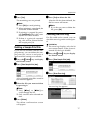
A Press the {Printer}} key to display
E Press [Yes] to delete the file.
After the file has been deleted, the
file list screen will return.
Note
❒ If you do not want to delete the
file, press [No].
Checking the Error Log
3
If a file could not be stored, you can
check the error log on the control panel.
Limitation
❒ The error log displays only the 20
most recent entries. If the power is
turned off, the log is deleted.
A Press the {Printer}} key to display
the Printer screen.
B Press [View Sample Print jobs].
the Printer screen.
B Press [View Sample Print jobs].
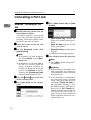
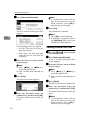
C Press [Show Error Log].
A list of sample print files stored in
the machine appears.
C Select the file you want to delete
by pressing it.
An error log list appears.
Note
❒ Press [U
UPrev.] or [T
TNext.] to
scroll through the list.
❒ Only one file can be selected at a
time.
D Press [Delete].
The delete confirmation screen
will appear.
17