1
Wiring and Installing a Terminal Block
If you are planning to use an optional terminal block with your plug-in modules, refer to the instructions
below to connect your external wiring and install a terminal block.
Wiring a Terminal Block
Before you begin this task, make sure you have disconnected power from all external
field wiring you will be connecting to the terminal block.
For plug-in module pinout diagrams and additional information, refer to the 34980A
User’s Guide, which is shipped with your 34980A mainframe.
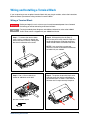
Step 1. To remove the terminal block
cover, insert a screwdriver through the
hole in the cover as shown. Gently push
the tab in the direction of the arrow.
Step 2. While pushing the tab (Step 1),
lift the clear plastic cover from the edge near
the D-sub connectors. Slide the cover from
under the tab holders and remove the cover.
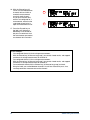
NOTE: If you are wiring to screw-type
terminals, use the small flathead screwdriver
included with your 34980A.
Step 3. Use a 2.5 mm cable tie as
shown for additional strain relief.
Step 4. To replace the terminal block cover,
slide the cover tabs into the tab holders on
the terminal block as shown. Press down on
the cover until it snaps securely into place.
Wire Size: 20 AWG Typical
6 mm
34980A Getting Started Guide
7