1
For optimal functioning of the Web interface, enable JavaScript®
for your Web browser.
In addition, the InRow RC management interface cannot work with a proxy server.
Therefore, before you can use a Web browser to access the InRow RC Web interface,
you must do one of the following:
InRow RC ACRC100 Series
USER’S GUIDE
• Configure the Web browser to disable the use of a proxy server for the InRow RC.
• Configure the proxy server so that it does not proxy the specific IP address of the
InRow RC.
URL address formats
Type the DNS name or IP address of the InRow RC in the Web browser’s URL address
field, and press ENTER. When you specify a non-default Web server port in Internet
Explorer, you must include http:// or https:// in the URL.
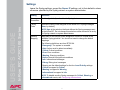
Common browser error messages at login.
Cause of the
Error
Browser
Error Message
Someone else
is logged on.
Internet Explorer,
Netscape, Firefox
“You are not authorized to view this page” or “Someone
is currently logged in...”
Web access is
disabled, or the
URL was not
correct
Netscape
“The connection was refused...”
Internet Explorer
“This page cannot be displayed.”
Firefox
“Unable to connect.”
• For a DNS name of Web1, the entry would be one of the following:
– http://Web1 if HTTP is your access mode
– https://Web1 if HTTPS is your access mode
16