1
RADIUS
Use this option to do the following:
• Display a list of RADIUS servers identified as being available to the InRow RC and
the time-out period for each server (the number of seconds the InRow RC will wait for
a reply from the server before the request fails).
InRow RC ACRC100 Series
USER’S GUIDE
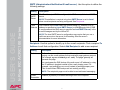
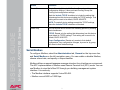
• Add a server to the list of identified RADIUS servers. Click Add Server, and
configure the following parameters for authentication by the new server:
RADIUS Setting
Definition
RADIUS Server
The server name or IP address of the RADIUS server.
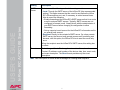
NOTE: RADIUS servers use port 1812 by default to
authenticate users. To use a different port, add a colon
followed by the new port number to the end of the
RADIUS server name or IP address.
Secret
The shared secret between the RADIUS server and the
InRow RC.
Reply Timeout
The time in seconds that the InRow RC waits for a
response from the RADIUS server.
Test Settings
Enter the Administrator user name and password to test
the RADIUS server path that you have configured.
Skip Test and Apply
Do not test the RADIUS server path.
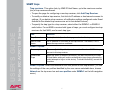
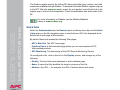
Configuring the RADIUS Server
You must configure your RADIUS server to work with the InRow RC. The following
procedure summarizes the steps to perform.
For examples of the file entries needed to configure a RADIUS server
for use with an InRow RC, see the Security Handbook, available on
the Utility CD or from the APC Web site, www.apc.com.
38