1
P u t t i n g
t h e
s y s t e m
i n t o
o p e r a t i o n
3.3
Earthing of the system
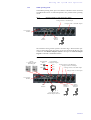
For EMC reasons an earthing via the earthing screw of the system must be carried out in either case.
ATTENTION Earthing
A lacking earthing can cause functional deficiencies within the unit.
!
3.4
Operating elements on the front side
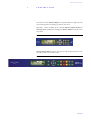
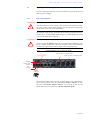
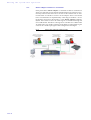
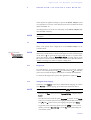
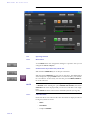
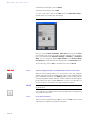
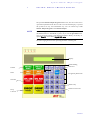
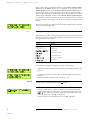
The system has an illuminated graphical display with a resolution of 160 x 32
Pixels and 21 operating buttons.
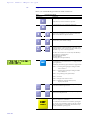
On the right next to the display there are two softkeys whose current functions are indicated on the display. In the middle there are two buttons for navigation (selection upwards/downwards), two buttons for accepting/dropping calls as well as an OK button. The numerical pad supports in addition to
the numericals 0...9 also the ’*’and ’#’button. For entering text the numerical
pad can also be used as a normal keypad.
The operation is similar to standard mobile phones.
FIG. 4
OPERATING ELEMENTS ON THE MAGIC TH2PLUS FRONT SIDE
Initiate call/
Accept call
Graphical
display
Softkeys
Cursor
keys
Drop/
Lock Line/
Main Menu
Keypad for dialling/
Text entry
Confirm
entry/
Status window
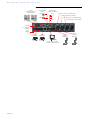
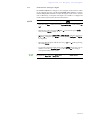
FIG. 5
OPERATING ELEMENTS ON THE MAGIC TH2PLUS RM FRONT SIDE
Initiate call/
Accept call
Graphical
display
Softkeys
Drop/
Lock Line/
Main Menu
Cursor
keys
Confirm
entry/
Status window
PAGE 20
Channel
Shift
Operating buttons for line 1 and 2
(only available in „Shared Mode“)
Keypad for dialling/
Text entry
Channel
Shift