1
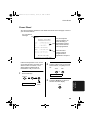
MODEL
FO-781
FACSIMILE
OPERATION MANUAL
1. Installation
2. Sending Documents
3. Receiving Documents
4. Making Copies
5. Making Telephone Calls
6. Answering Machine Connection
7. Special Functions
8. Option Settings
9. Printing Reports and Lists
10. Maintenance
11. Troubleshooting
all_fo781a.book
Page 1
Thursday, January 11, 2001
12:06 PM
WARRANTY
Facsimile Products
Congratulations on Your Purchase!
This Sharp product is warranted against manufacturing defects for a period of twelve (12) months from
the date of original purchase.
In the event of any defect arising in the equipment during the warranty period, such repairs should only
be carried out by the Dealer from which the unit was originally purchased or a Service Centre approved
by Sharp to service this type of equipment. These repairs would be carried out at no charge to the
owner, subject to the conditions specified herein.
The owner is responsible for any transportation and insurance costs if the product has to be returned
for repair.
This warranty does not extend to accessories or defects or injuries caused by or resulting from causes
not attributable to faulty parts or the manufacture of the product, including but not limited to, defect or
injury caused by or resulting from misuse, abuse, neglect, accidental damage, improper voltage, liquid
spillage, vermin infestation, software, use of consumables other than those approved by Sharp, or any
alterations made to the product which are not authorised by Sharp.
Please retain your sales documentation, as this should be produced to validate a warranty claim.
This warranty is in addition to and in no way limits, varies or excludes any express and implied rights
and remedies under any relevant legislation in the country of sale. However, to the extent permitted by
such legislation, Sharp excludes any liability for any indirect or consequential damages arising from the
purchase or use of the product.
To the extent permitted by law, Sharp excludes all implied warranties and conditions and where the
product is one that is not normally required for personal, domestic or household use, Sharp limits its
liability to the repair or replacement (at Sharp's option) of materials or workmanship which are found by
Sharp to be defective.
For your reference, please enter the particulars of your purchase below and retain, with your purchase
documentation.
Model No.
Serial No.
Date of Purchase
Place of Purchase
SPform046 (2Sept97)
FOR LOCATION ENQUIRIES WITHIN
PURCHASED IN
REGARDING YOUR LOCAL
SHARP APPROVED SERVICE CENTRE
NEW ZEALAND
CALL THE
SHARP SERVICE REFERRAL CENTRE
FREECALL: 1 300 15 50 22
FACSIMILE: (02) 9672 1210
DURING NORMAL BUSINESS HOURS
SHARP CORPORATION OF AUSTRALIA PTY. LIMITED
A.C.N. 003 039 405
1 Huntingwood Drive, Huntingwood NSW 2148
1
FOR THE SERVICING OF PRODUCTS
AUSTRALIA
CONTACT YOUR SELLING DEALER/RETAILER
OR FOR REFERRAL TO A
SERVICE CENTRE,
CALL SHARP CUSTOMER SERVICES
TELEPHONE: 09 634 7699
FACSIMILE: 09 636 6972
SHARP CORPORATION OF NEW ZEALAND LIMITED
Cnr Mahunga Drive & Hastie Avenue,
Mangere, AUCKLAND
Important Notice: This warranty applies only to products sold in Australia & New Zealand
all_fo781a.book
Page 1
Thursday, January 11, 2001
12:06 PM
Introduction
Welcome, and thank you for
choosing a Sharp facsimile! The
features and specifications of
your new Sharp fax are shown
below.
Automatic dialling
Rapid Key Dialling: 8 numbers
Speed Dialling: 80 numbers
Imaging film
Initial starter film (included with fax machine):
10 m roll (approx. 30 A4 pages)
Replacement film:
FO-3CR 30 m roll (two rolls in package,
one roll yields approx. 95 A4 pages)
Automatic document
feeder
10 sheets max.
Memory size*:
512 KB (approx. 30 average pages)
Modem speed
9600 bps with automatic fallback to 7200,
4800, or 2400 bps
Transmission time*
Approx. 15 seconds (Sharp special mode)
Reception modes
FAX, TEL, TEL/FAX, A.M.
Resolution
Horizontal:
8 lines/mm
Vertical:
Standard: 3.85 lines/mm
Fine/Halftone: 7.7 lines/mm
Super fine:15.4 lines/mm
* Based on ITU-T Test Chart #1 at standard resolution in Sharp special mode,
excluding time for protocol signals (i.e., ITU-T phase C time only).
1
all_fo781a.book
Page 2
Thursday, January 11, 2001
12:06 PM
Display
16-digit LCD display
Recording system
Thermal transfer recording
Halftone (greyscale)
64 levels (When sending)
Applicable telephone line Public switched telephone network
2
Compatibility
ITU-T (CCITT) G3 mode
Compression scheme
MH, MR, Sharp
Scanning method
Sheet-feeder CIS (Contact Image Sensor)
Effective printing width
204 mm max.
Input document size
Automatic feeding:
Width: 148 to 216 mm
Length: 140 to 297 mm
Manual feeding:
Width: 148 to 216 mm
Length: 140 to 600 mm
Effective scanning width
210 mm max.
Contrast control
Automatic/Dark selectable
Copy function
Standard
Telephone function
Standard (Cannot be used for incoming/
outgoing if power fails)
Power requirements
230-240 V AC, 50 Hz
Operating temperature
5 to 35°C
Humidity
Maximum: 85 %
Power consumption
Stand-by: 2.3 W
Maximum: 115 W
all_fo781a.book
Page 3
Thursday, January 11, 2001
12:06 PM
Dimensions
Width: 343 mm
Depth: 313 mm
Height: 312 mm
Weight
Approx. 3.4 kg
As a part of our policy of continuous improvement, SHARP reserves the right to
make design and specification changes for product improvement without prior
notice. The performance specification figures indicated are nominal values of
production units. There may be some deviations from these values in individual
units.
Important safety information
For your safety, if any of your equipment is not operating properly or should any
physical damage occur to the equipment where internal parts may become
exposed, the equipment should be immediately disconnected from the phone line
and then the power line and returned to a SHARP authorised Service Centre for
inspection, repair, or disposal.
In Australia, installing or modifying telephone lines should only be done by an ACA
licensed serviceman. In New Zealand, installing or modifying telephone lines should
be done in accordance with Telecom wiring practices.
Do not disassemble this machine or attempt any procedures not described in this
manual. Refer all servicing to qualified service personnel.
This machine must only be connected to a 230-240 V, 50 Hz, earthed (3-prong)
outlet. Connecting it to any other kind of outlet may damage the machine.
Do not install or use the machine near water, or when you are wet. Take care not to
spill any liquids on the machine.
Unplug the machine from the telephone socket and then the power outlet and
consult a qualified service representative if any of the following situations occur:
- Liquid has been spilled into the machine or the machine has been exposed to rain
or water.
- The machine produces odors, smoke, or unusual noises.
- The power cord is frayed or damaged.
- The machine has been dropped or the housing damaged.
Do not allow anything to rest on the power cord, and do not install the machine
where people may walk on the power cord.
3
all_fo781a.book
Page 4
Thursday, January 11, 2001
12:06 PM
Never insert objects of any kind into slots or openings on the machine. This could
create a risk of fire or electric shock. If an object falls into the machine that you
cannot safely remove, unplug the machine and consult a qualified service
representative.
Do not place this machine on an unstable cart, stand or table. The machine could be
seriously damaged if it falls.
Never install telephone wiring during a lightning storm.
Never install telephone sockets in wet locations unless the socket is specifically
designed for wet locations.
Never touch uninsulated telephone wires or terminals unless the telephone line has
been disconnected at the network interface.
Use caution when installing or modifying telephone lines.
Avoid using a telephone (other than a cordless type) during an electrical storm.
There may be a remote risk of electric shock from lightning.
Do not use a telephone to report a gas leak in the vicinity of the leak.
The socket-outlet must be installed near the equipment and must be easily
accessible.
Important:
♦This facsimile machine is not designed for use on a line which has call waiting,
call forwarding, or certain other special services offered by your telephone
company. If you attempt to use the fax machine on a telephone line using any of
these services, you may experience errors during transmission and reception of
facsimile messages.
♦This facsimile machine is not compatible with digital telephone systems.
♦This facsimile machine is designed to operate in Australia and New Zealand only.
4
all_fo781a.book
Page 5
Thursday, January 11, 2001
12:06 PM
WARNING NOTICE:
NO calls can be made to or from this fax during a mains power failure.
WARNING - Australian Communications Authority (ACA) regulations state that no
unauthorised changes or modifications to this equipment are permitted.
Note: Complies with ACA and NZ TELECOM standard AS/NZS3548 regarding
emission of electromagnetic interference.
These limits are designed to provide reasonable protection against interference in
an installation. This equipment generates, uses and can radiate radio frequency
energy and, if not installed and used in accordance with the instructions, may cause
interference. However, there is no guarantee that interference will not occur in a
particular installation.
If this equipment does cause interference to radio or television reception, which can
be determined by turning the equipment off and on, the user is encouraged to try to
correct the interference by one or more of the following measures:
- Reorient or relocate the receiving antenna.
- Increase the separation between the equipment and the receiver.
- Connect the equipment to an outlet on a different circuit to that which the receiver
is connected.
- Consult the dealer or an experienced radio/TV technician for help.
For Australia: The Ringer Equivalence Number (REN) for this equipment is written
on the back of the machine.The sum of all the Ringer Equivalence Numbers (REN's)
on your telephone line should not exceed 3 to assure correct service from your
telephone company.
5
all_fo781a.book
Page 6
Thursday, January 11, 2001
12:06 PM
IMPORTANT NOTICE FOR NEW ZEALAND USERS
Please note:
The grant of a Telepermit for any item of terminal equipment indicates only that
Telecom has accepted that the item complies with the minimum conditions for
connection to its network.
It indicates no endorsement of the product by Telecom, nor does it provide any sort
of warranty. Above all, it provides no assurance that any item will work correctly in
all respects with another item of Telepermitted equipment of a different make or
model, nor does it imply that any product is compatible with all of Telecom's network
services.
This equipment shall not be set up to make automatic calls to the Telecom '111'
Emergency Service.
To avoid telephone charges for local calls, be sure to store numbers without area
code in your rapid or speed dial locations.
This equipment may not provide for the effective hand-over of a call to another
device connected to the same line.
6
all_fo781a.book
Page 7
Thursday, January 11, 2001
12:06 PM
Table of Contents
Introduction
1
Important safety information . . . . . . . . . . . . . . . . . . . . . . . . . . . . . . . . 3
Table of Contents
7
1. Installation
9
Unpacking Checklist . . . . . . . . . . . . . . . . . . . . . . . . . . . . . . . . . . . . . . 9
A Look at the Operation Panel . . . . . . . . . . . . . . . . . . . . . . . . . . . . . 10
Connections . . . . . . . . . . . . . . . . . . . . . . . . . . . . . . . . . . . . . . . . . . . 12
Loading the Imaging Film . . . . . . . . . . . . . . . . . . . . . . . . . . . . . . . . . 15
Loading Printing Paper . . . . . . . . . . . . . . . . . . . . . . . . . . . . . . . . . . 19
Entering Your Name and Fax Number . . . . . . . . . . . . . . . . . . . . . . 21
Setting the Date and Time . . . . . . . . . . . . . . . . . . . . . . . . . . . . . . . . 24
Selecting the Reception Mode . . . . . . . . . . . . . . . . . . . . . . . . . . . . . 26
Volume Adjustment . . . . . . . . . . . . . . . . . . . . . . . . . . . . . . . . . . . . . 27
2. Sending Documents
Transmittable Documents. . . . . . . . . . . . . . . . . . . . . . . . . . . . . . . . .
Loading the Document . . . . . . . . . . . . . . . . . . . . . . . . . . . . . . . . . .
Resolution and Contrast . . . . . . . . . . . . . . . . . . . . . . . . . . . . . . . . .
Sending a Fax by Normal Dialling . . . . . . . . . . . . . . . . . . . . . . . . . .
Sending a Fax by Automatic Dialling . . . . . . . . . . . . . . . . . . . . . . . .
3. Receiving Documents
Using TEL/FAX Mode. . . . . . . . . . . . . . . . . . . . . . . . . . . . . . . . . . . .
Using FAX Mode . . . . . . . . . . . . . . . . . . . . . . . . . . . . . . . . . . . . . . .
Using A.M. Mode . . . . . . . . . . . . . . . . . . . . . . . . . . . . . . . . . . . . . . .
Using TEL Mode. . . . . . . . . . . . . . . . . . . . . . . . . . . . . . . . . . . . . . . .
Substitute Reception to Memory . . . . . . . . . . . . . . . . . . . . . . . . . . .
29
29
30
32
34
36
44
44
45
46
47
51
4. Making Copies
52
5. MakingTelephone Calls
54
7
all_fo781a.book
Page 8
Thursday, January 11, 2001
12:06 PM
Table of Contents
6. Answering Machine Connection
56
Connecting an Answering Machine . . . . . . . . . . . . . . . . . . . . . . . . . 56
Activating the answering machine connection . . . . . . . . . . . . . . . . . 58
7. Special Functions
59
Caller ID . . . . . . . . . . . . . . . . . . . . . . . . . . . . . . . . . . . . . . . . . . . . . . 59
Distinctive Ring . . . . . . . . . . . . . . . . . . . . . . . . . . . . . . . . . . . . . . . . 63
Broadcasting . . . . . . . . . . . . . . . . . . . . . . . . . . . . . . . . . . . . . . . . . . 64
Cover Sheet . . . . . . . . . . . . . . . . . . . . . . . . . . . . . . . . . . . . . . . . . . . 65
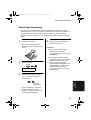
Batch Page Numbering . . . . . . . . . . . . . . . . . . . . . . . . . . . . . . . . . . 67
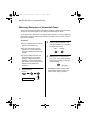
Blocking Reception of Unwanted Faxes . . . . . . . . . . . . . . . . . . . . . 68
Sending Documents From Memory . . . . . . . . . . . . . . . . . . . . . . . . . 70
Polling (Requesting a Fax Transmission) . . . . . . . . . . . . . . . . . . . . 72
Timer Operations . . . . . . . . . . . . . . . . . . . . . . . . . . . . . . . . . . . . . . . 75
8. OptionSettings
77
9. Printing Reports and Lists
84
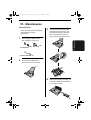
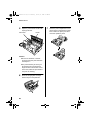
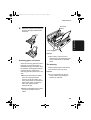
10. Maintenance
87
11. Troubleshooting
90
Problems and Solutions . . . . . . . . . . . . . . . . . . . . . . . . . . . . . . . . . . 90
Answering machine connection . . . . . . . . . . . . . . . . . . . . . . . . . . . . 90
Messages and Signals . . . . . . . . . . . . . . . . . . . . . . . . . . . . . . . . . . . 95
Clearing Paper Jams . . . . . . . . . . . . . . . . . . . . . . . . . . . . . . . . . . . . 98
Quick Reference Guide
100
Index
102
8
Page 9
Thursday, January 11, 2001
12:06 PM
1. Installation
all_fo781a.book
1. Installation
Unpacking Checklist
If any are missing,
contact your dealer
or retailer.
Before setting up, make
sure you have all of the
following items.
Paper tray
extension
Original
document
support
Rapid key Operation
manual
labels
Telephone
line cord
Imaging film
cartridge
Adapter
(for New
Zealand)
Handset
lead
Gears (4)
Imaging film
(initial starter
roll)
Adapter
(for
Australia)
Handset
Points to keep in mind when setting up
Do not place the
machine in direct
sunlight.
Do not place the
machine near
heaters or air
conditioners.
Keep dust away from
the machine.
Keep the area
around the
machine clear.
About condensation
If the machine is moved from a cold to a warm place, it is possible that condensation
may form on the scanning glass, preventing proper scanning of documents for
transmission. To remove the condensation, turn on the power and wait
approximately two hours before using the machine.
9
all_fo781a.book
Page 10 Thursday, January 11, 2001
12:06 PM
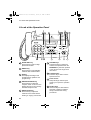
A Look at the Operation Panel
A Look at the Operation Panel
1
5
4
3
2
6
7
8
FACE DOWN
(MAX 10 SHEETS)
TEL FAX
TEL/FAX A.M.
ABC
1
GHI
2
JKL
4
PQRS
SPEED
DIAL
DEF
MNO
5
RESOLUTION
REDIAL
VOLUME
DOWN
UP
FUNCTION
6
WXYZ
TUV
7
RECEPTION
MODE
3
8
9
HOLD/
SEARCH
01
02
COPY/HELP
03
STOP
SPEAKER
04
05
06
07
08/POLL
0
START/MEMORY
9
1 SPEED DIAL key
Press this key to dial a 2-digit
Speed Dial number.
2 REDIAL key
Press this key to automatically
redial the last number dialled.
3 Display
This displays messages and
prompts during operation and
programming.
4 RECEPTION MODE key
Press this key to select the
reception mode. An arrow in the
display will point to the currently
selected reception mode.
5 RESOLUTION key
Press this key to adjust the
resolution and contrast before
sending or copying a document.
10
10 11
12
13
14
15
6 VOLUME keys
Press these keys to adjust the
volume of the speaker when the
SPEAKER key has been pressed,
or the volume of the ringer at all
other times.
7 FUNCTION key
Press this key to select various
special functions.
8 Panel release
Grasp this finger hold and pull
toward you to open the operation
panel.
9 Number keys
Use these keys to dial numbers,
and enter numbers and letters
during number/name storing
procedures.
Page 11 Thursday, January 11, 2001
12:06 PM
A Look at the Operation Panel
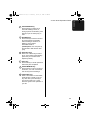
10 HOLD/SEARCH key
Press this key to search for an
automatic dialling number, or,
during a phone conversation, press
this key to put the other party on
hold.
11 SPEAKER key
Press this key to hear the line and
fax tones through the speaker
before sending a document, or
dialling a voice number.
Note: This is not a
speakerphone. You must pick up
the handset to talk with the other
party.
12 Rapid Dial keys
Press one of these keys to dial a
fax or voice number automatically.
(Note that you must attach the
Rapid Key labels.)
13 STOP key
Press this key to cancel operations
before they are completed.
14 START/MEMORY key
Press this key to send or receive a
document, or to scan a document
into memory before sending it.
15 COPY/HELP key
When a document is in the feeder,
press this key to make a copy. At
any other time, press this key to
print out the Help List, a quick
reference guide to the operation of
your fax.
11
1. Installation
all_fo781a.book
all_fo781a.book
Page 12 Thursday, January 11, 2001
12:06 PM
Connections
Connections
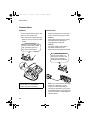
Handset
Power lead
Connect the handset as shown and
place it on the handset rest.
Plug the power lead into a 230-240 V,
50 Hz, earthed (3-prong) AC outlet.
♦The ends of the handset lead are
identical, so they will go into either
socket.
Caution:
When disconnecting the fax, unplug
the telephone line cord before
unplugging the power lead.
Make sure the handset cord
goes into the socket marked
with a handset symbol on
the side of the machine!
Caution:
The mains outlet (socket outlet)
should be installed near the
equipment and be easily accessable.
The machine does not have
a power on/off switch, so
the power is turned on and
off by simply plugging or
unplugging the power lead.
Use the handset to make ordinary
phone calls, or to transmit and
receive documents manually.
12
Note: If your area experiences a high
incidence of lightning or power
surges, we recommend that you
install surge protectors for the power
and telephone lines. Surge protectors
can be purchased at most telephone
specialty stores.
Page 13 Thursday, January 11, 2001
12:06 PM
Connections
Moving your fax and
reconnecting
Should it be necessary to move your
fax to a new location, first disconnect
the telephone line cord before
disconnecting the power lead. When
reconnecting, it is necessary to
connect the power lead before
connecting the telephone line cord.
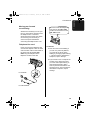
Be sure to insert the telephone
line cord into the TEL. LINE
socket. Do not insert it into the
TEL. SET socket.
Telephone line cord
Insert one end of the telephone line
cord into the adapter. Insert the other
end of the line cord into the socket on
the back of the fax marked TEL.
LINE. Plug the adapter into the
telephone socket on the wall.
Comments:
♦Your fax is set for tone dialling. If
you are on a pulse only dial line,
you must set the fax for pulse
dialling by changing Option Setting
7. This procedure is described in
Chapter 8, Option Settings.
♦If you intend to use a computer fax
For Australia
TE
SEL. T
T EL
LI .
N
E
modem on the same phone line,
you must reset Option Setting 12
(Fax Signal Receive) to NO in
order to prevent transmission and
reception errors. This procedure is
described in Chapter 8, Option
Settings.
For New Zealand
13
1. Installation
all_fo781a.book
all_fo781a.book
Page 14 Thursday, January 11, 2001
12:06 PM
Connections
Trays
Extension phone (optional)
Attach the paper tray extension.
If desired, you can connect an
extension phone to the TEL. SET
socket on the fax.
♦Pull the paper release plate
forward. Insert the paper tray
extension horizontally into the
notches in the paper tray. Rotate
the paper tray extension up until it
snaps into place.
♦To connect an answering machine
to your fax, see Chapter 6,
Answering Machine Connection.
1
Remove the seal covering the TEL.
SET socket.
2
Connect the extension phone line
to the TEL. SET socket.
Attach the original document support.
TE
SEL. T
T EL
LIN .
E
Note: The original document support
has a top side and a bottom side. If
you cannot insert the tabs on the
support into the holes, turn the
support over.
14
Important:
In New Zealand, not all standard
telephones and answering machines
will respond to incoming ringing when
connected to the extension socket of
the equipment.
Page 15 Thursday, January 11, 2001
12:06 PM
Loading the Imaging Film
Loading the Imaging Film
Your fax uses a roll of imaging film to create printed text and images. The print head
in the fax applies heat to the imaging film to transfer ink to the paper. Follow the
steps below to load or replace the film.
The initial starter roll of imaging film
included with your fax can print about
30 A4 pages.
Note: If there is paper in the paper
tray, pull the paper release plate
forward and remove the paper before
loading the imaging film.
1
When replacing the film, use a roll of
Sharp FO-3CR imaging film. One roll
can print about 95 A4 pages.
2
Pull the green release on the right
side of the machine forward, and
open the print compartment cover.
Open the operation panel by
grasping the finger hold and pulling
up.
If you are installing the imaging film
for the first time, go to Step 6.
15
1. Installation
all_fo781a.book
all_fo781a.book
Page 16 Thursday, January 11, 2001
12:06 PM
Loading the Imaging Film
3
Remove the imaging film cartridge
from the print compartment (grasp
the handle at the front of the
cartridge) and turn it over.
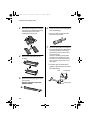
6
Remove the new roll of imaging film
from its packaging.
• Do not yet remove the band that
holds the rolls together.
7
4
Remove the used film from the
cartridge.
Insert the large gear into the green
end of the empty spool. Make sure
the two protrusions on the large
gear fit firmly into the slots in the
end of the spool.
Insert the remaining three gears
into the spools, making sure the
protrusion on each gear fits firmly
into one of the slots in the end of
each spool.
• If needed, pull the spools apart
slightly to allow the gears to fit (the
band will stretch).
Slot
5
16
Remove the four green gears from
the used film.
DO NOT DISCARD THE FOUR
GREEN GEARS!
Protrusion
Large gear
Page 17 Thursday, January 11, 2001
12:06 PM
Loading the Imaging Film
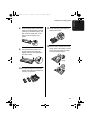
8
Insert the large gear into the large
holder on the imaging film cartridge
(make sure it clicks into place), and
then insert the small gear on the
other end of the spool into its
holder.
11 Rotate the large gear toward you
until the film is taut.
12 Close the print compartment cover
9
Cut the band that holds the two
spools together. Unroll the film
slightly and insert the small gears
into their holders.
(press down on both sides to make
sure it clicks into place), and then
close the operation panel.
Click!
10 Turn the cartridge over, grasp the
handle, and insert the cartridge into
the print compartment.
17
1. Installation
all_fo781a.book
all_fo781a.book
Page 18 Thursday, January 11, 2001
Loading the Imaging Film
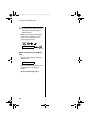
13 Load paper in the paper tray and
then press the following keys to
initialize the film.
Note: Paper must be loaded before
the film can be initialized. To load
paper, see the following section,
Loading Printing Paper.
FUNCTION
6
INITIALIZE FILM
START/MEMORY
When to replace the imaging
film
Replace the imaging film when the
display shows:
FILM END
Use the following imaging film, which
is available from your dealer or
retailer:
Sharp FO-3CR Imaging Film
18
12:06 PM
Page 19 Thursday, January 11, 2001
12:06 PM
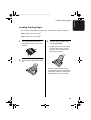
Loading Printing Paper
Loading Printing Paper
You can load A4 size paper in the paper tray. The maximum number of sheets is:
♦60 for paper from 60 to 75 g/m2
♦50 for paper from 75 to 90 g/m2
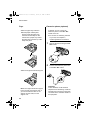
1
Fan the paper, and then tap the
edge against a flat surface to even
the stack.
3
Insert the stack of paper into the
tray, print side down.
• If paper remains in the tray, take it
out and combine it into a single
stack with the new paper before
adding the new paper.
2
Pull the paper release plate toward
you.
Be sure to load the paper so that
printing takes place on the print side
of the paper. Printing on the reverse
side will result in poor print quality.
19
1. Installation
all_fo781a.book
all_fo781a.book
Page 20 Thursday, January 11, 2001
12:06 PM
Loading Printing Paper
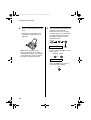
4
Push the paper release plate back
down.
• If the paper release plate is not
pushed down, paper feed errors
will result.
5
Your fax has been set at the factory
to print at normal contrast.
Depending on the type of paper
you have loaded, you may find that
you obtain better print quality by
changing the setting to LIGHT.
Press these keys:
FUNCTION
6
Press
twice
PRINT CONTRAST
Note: When receiving faxes or
copying documents, do not allow a
large number of pages to accumulate
in the output tray. This may obstruct
the outlet and cause paper jams.
Press 1 to select NORMAL or 2 to
select LIGHT.
NORMAL LIGHT
1
or
2
COPY CUT-OFF
Press the STOP key to return to
the date and time display.
STOP
20
Page 21 Thursday, January 11, 2001
12:06 PM
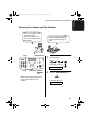
Entering Your Name and Fax Number
Entering Your Name and Fax Number
Before you can begin using
your fax, you need to enter
your name and the
telephone number of your
fax. You also need to set the
date and time.
3 key
FUNCTION key
Once you enter this information,
it will automatically appear at
the top of each fax page you
send.
1
Press these keys:
FUNCTION
1
2
3
4
5
6
8
9
7
3
The display will show:
0
OWN NUMBER SET
# key
STOP key
START/
MEMORY
key
Note: The imaging film and printing
paper must be loaded before your
name and fax number can be
entered.
2
Press
twice
Press the START/MEMORY key.
START/MEMORY
The display will show:
ENTER FAX #
21
1. Installation
all_fo781a.book
all_fo781a.book
Page 22 Thursday, January 11, 2001
12:06 PM
Entering Your Name and Fax Number
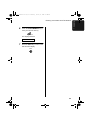
3
Enter your fax number by pressing
the number keys. Up to 20 digits
can be entered.
3
1
4
5
2
4
2
4
4
1
Example:
SHARP = 77777 444 22 7777
77
1
(Example)
• To insert a space between digits,
press the # key. To insert a "+",
press the * key.
SPACE =
J=
T=
A=
K=
U=
B=
C=
D=
E=
F=
• If you make a mistake, press the
HOLD/SEARCH key to move the
cursor back to the mistake and
then enter the correct number. The
new number will replace the old
number.
4
Enter your name by pressing the
number keys as shown in the
following chart. Up to 24 characters
can be entered.
Press the START/MEMORY key to
enter the fax number in memory.
START/MEMORY
The display will show:
ENTER YOUR NAME
G=
L=
V=
M=
W=
N=
X=
O=
Y=
P=
Z=
Q=
H=
R=
I=
S=
SPEAKER
SPEAKER
move
=
move
=
HOLD/
SEARCH
♦To enter two letters in succession
that require the same key, press
the SPEAKER key after entering
the first letter.
(The SPEAKER key moves the
cursor forward, and the HOLD/
SEARCH key moves the cursor
backward.)
♦To clear a mistake, press the
SPEED DIAL key.
♦To change case, press the
REDIAL key.
♦To enter one of the following
symbols, press the # key or the *
key repeatedly:
./!"#$%&’()++,-:;<=>?
@[¥]^_'{|}→←
Cursor: A dark square mark in the
display that indicates where a
number or letter will be entered.
22
Page 23 Thursday, January 11, 2001
12:06 PM
Entering Your Name and Fax Number
6
Press the START/MEMORY key to
save your name in memory.
START/MEMORY
The display will show:
SECURITY SELECT
7
Press the STOP key to return to the
date and time display.
STOP
23
1. Installation
all_fo781a.book
all_fo781a.book
Page 24 Thursday, January 11, 2001
12:06 PM
Setting the Date and Time
Setting the Date and Time
The date and time appear in
the display and reports, and
are printed at the top of every
page you fax.
3 key
1
2
3
4
5
6
8
9
7
FUNCTION key
3
0
• To correct a mistake, press the
STOP key
SPEED DIAL key to move the
cursor back to the mistake, and
then enter the correct number.
START/
MEMORY
key
Note: The imaging film and printing
paper must be loaded before the date
and time can be set.
1
5
Example: the 5th
0
* key
Enter a two-digit number for the day
("01" to "31").
4
Enter a two-digit number for the
month ("01" for January, "02" for
February, "12" for December, etc.).
0
Press these keys:
1
Example: January
FUNCTION
3
5
The display will show:
DATE & TIME SET
Press 3
times
Enter the year (four digits).
2
0
0
1
Example: 2001
2
Press the START/MEMORY key.
START/MEMORY
• The currently set date will appear
in the display.
24
Page 25 Thursday, January 11, 2001
12:06 PM
Setting the Date and Time
6
Enter a two-digit number for the
hour ("00" to "23") and a two-digit
number for the minute ("00" to
"59").
0
9
2
5
Example: 9:25
7
Press the START/MEMORY key to
start the clock.
START/MEMORY
The display will show:
STORE JUNK #
8
Press the STOP key to return to the
date and time display.
STOP
25
1. Installation
all_fo781a.book
all_fo781a.book
Page 26 Thursday, January 11, 2001
12:06 PM
Selecting the Reception Mode
Selecting the Reception Mode
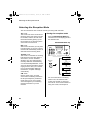
Your fax machine has four modes for receiving incoming calls and faxes:
TEL mode:
This mode is the most convenient for
receiving phone calls. Faxes can also
be received; however, all calls must
first be answered by picking up the
fax's handset or an extension phone
connected to the same line.
FAX mode:
Select this mode when you only want
to receive faxes on your line. The fax
machine will automatically answer all
calls and receive incoming faxes.
TEL/FAX mode:
This mode is convenient for receiving
both faxes and voice calls. When a
call comes in, the fax will detect
whether it is a voice call (including
manually dialled fax transmissions),
or an automatically dialled fax. If it is a
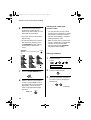
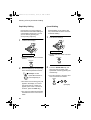
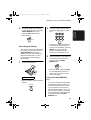
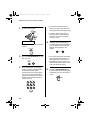
voice call, the fax will make a special
ringing sound to alert you to answer.
If it is an automatically dialled fax
transmission, reception will begin
automatically.
Setting the reception mode
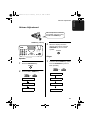
Press the RECEPTION MODE key
until the arrow in the display points to
the desired mode.
RECEPTION MODE key
1
2
3
4
5
6
8
9
7
0
TEL
TEL/FAX A.M.
RECEPTION
MODE
TEL
26
FAX
14 FEB 10:30
TEL/FAX A.M.
TEL
FAX
14 FEB 10:30
TEL/FAX A.M.
TEL
A.M. mode:
Use this mode only if you have
connected an answering machine to
the fax (see Chapter 6). Select this
mode when you go out to receive
voice messages in your answering
machine and faxes on your fax
machine.
FAX
14 FEB 10:30
FAX
14 FEB 10:30
TEL/FAX A.M.
For more information on receiving
faxes in TEL, TEL/FAX and FAX
modes, see Chapter 3, Receiving
Documents. For more information on
using A.M. mode, see Chapter 6.
Page 27 Thursday, January 11, 2001
12:06 PM
Volume Adjustment
Volume Adjustment
You can adjust the volume of
the speaker and ringer using
the UP and DOWN keys.
DOWN key UP key
1
2
3
4
5
6
7
8
9
3
When the display shows the
desired volume level, press the
SPEAKER key to turn off the
speaker.
SPEAKER
0
Ringer
Speaker
1
1
Press the SPEAKER key.
SPEAKER
Press the UP or DOWN key. (Make
sure the SPEAKER key has not
been pressed.)
UP
DOWN
or
2
Press the UP or DOWN key.
RINGER: HIGH
UP
DOWN
or
SPEAKER: HIGH
RINGER: MIDDLE
SPEAKER: MIDDLE
RINGER: LOW
SPEAKER: LOW
RINGER: OFF OK?
27
1. Installation
all_fo781a.book
all_fo781a.book
Page 28 Thursday, January 11, 2001
Volume Adjustment
• The ringer will ring once at the
selected level, then the date and
time will reappear in the display.
2
If you selected RINGER:OFF OK ?,
press the START/MEMORY key.
START/MEMORY
Silent ring fax detection
system
You can also set your fax machine to
receive faxes silently, but ring to alert
you to a voice call. To do so, set the
ringer volume to OFF and set the
reception mode to TEL/FAX. When a
voice call comes in, a special ringer
on the fax will ring. Note that
extension telephones will not ring.
Note: During intial ringing before the
fax picks up the call, the fax will be
silent but extension telephones will
ring.
28
12:06 PM
all_fo781a.book
Page 29 Thursday, January 11, 2001
12:06 PM
2. Sending Documents
Size and weight
The size and weight of documents
that you can load in the document
feeder depend on whether you load
one page at a time or several pages
at once.
Note: Letters or graphics on the
edges of a document will not be
scanned.
Letters in
the shaded
area will not
be scanned.
5 mm
Loading one page at a time:
Minimum size
Maximum size
148 mm
216 mm
4 mm
4 mm
140 mm
600 mm
5 mm
Other restrictions
Minimum weight
Maximum weight
♦The scanner cannot recognise
52 g/m²
yellow, greenish yellow, or light
blue ink.
157 g/m²
♦Ink, glue, and correcting fluid on
documents must be dry before they
pass through the document feeder.
Loading several pages at once:
Minimum size
Maximum size
216 mm
148 mm
140 mm
297 mm
♦All clips, staples, and pins must be
removed from documents before
loading in the feeder. If these are
not removed, they may damage the
machine.
♦Documents which are patched,
Minimum weight
Maximum weight
52 g/m²
80 g/m²
taped, torn, smaller than the
minimum size, carbon backed,
easily smudged, or have a slippery
coated surface should be
photocopied, and the copy loaded
in the feeder.
29
2. Sending
Documents
Transmittable Documents
all_fo781a.book
Page 30 Thursday, January 11, 2001
12:06 PM
Loading the Document
Loading the Document
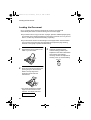
Up to 10 pages can be placed in the feeder at one time. The pages will
automatically feed into the machine starting from the bottom page.
♦If you need to send or copy more than 10 pages, place the additional pages gently
and carefully in the feeder just before the last page is scanned. Do not try to force
them in, as this may cause double-feeding or jamming.
♦If your document consists of several large or thick pages which must be loaded
one at a time, insert each page into the feeder as the previous page is being
scanned. Insert gently to prevent double-feeding.
1
Adjust the document guides to the
width of your document.
3
Adjust the resolution and/or
contrast setting (if desired) as
explained in the section Resolution
and Contrast, then dial the
receiving machine as explained in
Sending a Fax by Normal Dialling.
RESOLUTION
2
Place the document face down and
push it gently into the document
feeder. The top edge of the
document should enter the
machine first.
• The feeder will draw the leading
edge of the document into the
machine. The display will show:
READY TO SEND
30
all_fo781a.book
Page 31 Thursday, January 11, 2001
12:06 PM
Loading the Document
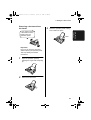
If you need to remove
a document from the
feeder, open the
operation panel.
3
Close the operation panel, making
sure it clicks into place.
2. Sending
Documents
Removing a document from
the feeder
Click!
Important!
Do not try to remove a document
without opening the operation panel.
This may damage the feeder
mechanism.
1
Open the operation panel by
grasping the finger hold and pulling
up.
2
Remove the document.
31
all_fo781a.book
Page 32 Thursday, January 11, 2001
12:06 PM
Resolution and Contrast
Resolution and Contrast
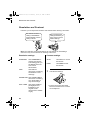
If desired, you can adjust the resolution and contrast before sending a document.
The default resolution
setting is STANDARD
and the default contrast
setting is AUTO.
You must adjust the
settings each time you
don't want to use the
default settings.
Note: The resolution and contrast settings are only effective for transmitting a
document. They are not effective for receiving a document.
Resolution settings
Contrast settings
STANDARD
Use STANDARD for
ordinary documents.
This setting gives you
the fastest and most
economical
transmission.
AUTO
Use AUTO for normal
documents.
DARK
Use DARK for faint
documents.
Use FINE for
documents containing
small letters or fine
drawings.
1
FINE
Load the document(s).
SUPER FINE Use SUPER FINE for
documents containing
very small letters or
very fine drawings.
HALF TONE
32
Use HALF TONE for
photographs and
illustrations. The
original will be
reproduced in shades
of grey.
• The document must be loaded
before the resolution and contrast
can be adjusted.
all_fo781a.book
Page 33 Thursday, January 11, 2001
12:06 PM
Resolution and Contrast
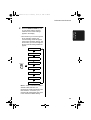
Press the RESOLUTION key one
or more times until the desired
resolution and contrast settings
appear in the display.
2. Sending
Documents
2
• The first time you move through the
list of resolution settings, the
contrast setting AUTO will appear
next to each resolution setting. The
second time you move through the
list, the contrast setting DARK will
appear.
STANDARD
FINE
:AUTO
:AUTO
SUPER FINE :AUTO
RESOLUTION
HALF TONE
:AUTO
STANDARD
:DARK
FINE
:DARK
SUPER FINE :DARK
HALF TONE
:DARK
Note: In order to transmit in FINE or
SUPER FINE resolution, the
receiving fax machine must also have
that resolution. If it doesn't, your
machine will automatically step down
to the next best available setting.
33
all_fo781a.book
Page 34 Thursday, January 11, 2001
12:06 PM
Sending a Fax by Normal Dialling
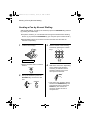
Sending a Fax by Normal Dialling
With Normal Dialling, you pick up the handset (or press the SPEAKER key) and dial
by pressing the number keys.
♦If a person answers, you can talk with them through the handset before sending
the fax. (If you pressed the SPEAKER key, you must pick up the handset to talk.)
♦Normal Dialling allows you to listen to the line and make sure the other fax
machine is responding.
1
Load the document(s).
3
Dial the number of the receiving
machine by pressing the numeric
keys.
ABC
DEF
1
GHI
4
PQRS
7
2
JKL
3
MNO
5
TUV
6
WXYZ
8
9
READY TO SEND
• Set the resolution and/or contrast if
desired.
RESOLUTION
2
Pick up the handset or press the
SPEAKER key. Listen for the dial
tone.
SPEAKER
or
34
4
Wait for the connection. Depending
on the setting of the receiving
machine, you will either hear a
facsimile reception tone or the
other person will answer.
Beep
• If the other party answers, (lift the
handset if the SPEAKER key was
pressed) ask them to press their
START key. This causes the
receiving machine to issue a
reception tone.
all_fo781a.book
Page 35 Thursday, January 11, 2001
12:06 PM
Sending a Fax by Normal Dialling
When you hear the reception tone,
press the START/MEMORY key.
Replace the handset if you used it.
2. Sending
Documents
5
START/MEMORY
• When transmission is completed,
the fax will beep once.
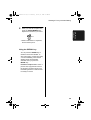
Using the REDIAL key
You can press the REDIAL key to
redial the last number dialled. To
send a document, proceed from Step
4 of Normal Dialling. Note that the
speaker will be automatically
activated when you press the
REDIAL key.
Facsimile reception tone: This is a
pronounced, high-pitched tone that
the receiving machine sends to the
transmitting machine to indicate that
it is ready to receive.
35
all_fo781a.book
Page 36 Thursday, January 11, 2001
12:06 PM
Sending a Fax by Automatic Dialling
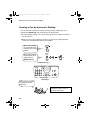
Sending a Fax by Automatic Dialling
You can dial a fax or telephone number by simply pressing a Rapid Key, or by
pressing the SPEED DIAL key and entering a two-digit number.
♦To use Automatic Dialling, you must first store the full fax or telephone number in
your fax machine.
♦When you store a fax or telephone number, you select a two-digit Speed Dial
number for it. 88 Speed Dial numbers are available.
Speed Dial numbers
01 through 08 are for
Rapid Key (one-touch)
Dialling.
01
SPEED
DIAL
Speed Dial numbers
09 through 88 are for
dialling with the
SPEED DIAL key.
1
1
START/MEMORY
SPEED DIAL key
1
2
3
4
5
6
8
9
7
0
Rapid Keys
Attach the strip of Rapid
Key labels above the
Rapid Keys.
When you store a number in a
Rapid Key, write the name of
the party on the label.
36
all_fo781a.book
Page 37 Thursday, January 11, 2001
12:06 PM
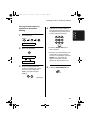
Storing fax and telephone
numbers for Automatic
Dialling
1
4
Press these keys:
Enter the fax or voice number by
pressing the number keys (max. of
32 digits including pauses). (Note:
A space cannot be entered.)
ABC
1
GHI
FUNCTION
4
3
PQRS
7
DEF
3
2
JKL
MNO
6
5
TUV
WXYZ
8
9
FAX/TEL # MODE
2
• Press the SPEED DIAL key to
Press 1 to select SET.
clear a mistake.
• If a pause is required between any
1
of the digits to access a special
service or an outside line, press the
REDIAL key. The pause will
appear as a hyphen. Several
pauses can be entered in a row.
FAX/TEL # SET
ENTER SPEED #
3
Enter a two-digit Speed Dial
number by pressing the number
keys (01 to 08 for Rapid Key
Dialling, 09 to 88 for Speed
Dialling).
0
5
Press the START/MEMORY key.
START/MEMORY
1
(Example)
37
2. Sending
Documents
Sending a Fax by Automatic Dialling
all_fo781a.book
Page 38 Thursday, January 11, 2001
12:06 PM
Sending a Fax by Automatic Dialling
6
Enter the name of the party by
pressing the number keys as
shown in the chart below. Up to 20
characters can be entered.
Storing area codes and
access codes
You can also store an area code or
access code in a Rapid Key or Speed
Dial number. To use this number to
dial, see Chain Dialling in Chapter 5,
Making Telephone Calls.
• If you don't want to enter a name,
skip this step.
• To enter two letters in succession
Note: An area code or access code
stored in a Rapid Key or Speed Dial
number can only be used if the
handset is lifted or the SPEAKER
key pressed before dialling.
that require the same key, press
the SPEAKER key after entering
the first letter to advance the
cursor.
Example:
SHARP = 77777 444 22 7777
77
SPACE =
J=
T=
A=
K=
U=
B=
L=
V=
M=
W=
N=
X=
O=
Y=
P=
Z=
C=
D=
E=
F=
G=
R=
I=
S=
7
Clearing numbers
1
Press these keys:
FUNCTION
3
Q=
H=
SPEAKER
SPEAKER
move
=
move
=
FAX/TEL # MODE
HOLD/
SEARCH
Press the START/MEMORY key.
2
Press 2 to select CLEAR.
2
3
START/MEMORY
8
Return to Step 3 to store another
number, or press STOP to exit. If
the number will be used for Rapid
Key Dialling, you can write the
name on the appropriate Rapid
Key label.
STOP
Step 3 or
38
Enter the Speed Dial number that
you want to clear by pressing the
number keys.
0
1
(Example)
all_fo781a.book
Page 39 Thursday, January 11, 2001
12:06 PM
Sending a Fax by Automatic Dialling
Press the START/MEMORY key.
2. Sending
Documents
4
START/MEMORY
5
Return to Step 3 to clear another
number, or press STOP to exit.
Step 3 or
STOP
Making changes
To make changes in a number
previously stored, repeat the storing
procedure. Select the Speed Dial
number for which you want to make
changes in Step 3, and then change
the number and/or name when they
appear in the display (Steps 4 and 6,
respectively).
♦A lithium battery keeps
automatic dialling numbers in
memory
The machine uses a lithium battery
to keep automatic dialling numbers
and other programmed data in
memory when the power is turned
off. Battery power is consumed
primarily when the power is off.
With the power kept continuously
off, the life of the battery is about 5
years. If the battery dies, have your
dealer or retailer replace it. Do not
try to replace it yourself.
39
all_fo781a.book
Page 40 Thursday, January 11, 2001
12:06 PM
Sending a Fax by Automatic Dialling
Rapid Key Dialling
If the number you want to dial has
been stored for Automatic Dialling as
a Speed Dial number from 01 to 08,
you can dial it by pressing the
corresponding Rapid Key.
1
Speed Dialling
Speed Dialling can be used to dial
any number that has been stored for
Automatic Dialling.
1
Load the document(s).
Load the document(s).
READY TO SEND
• Set the resolution and/or contrast if
READY TO SEND
desired.
• Set the resolution and/or contrast if
RESOLUTION
desired.
RESOLUTION
2
2
Press the Rapid Key corresponding
to the desired Speed Dial number.
01
Example: To dial
Speed Dial number 01,
press Rapid Key 01.
Press the SPEED DIAL key and
then enter the two digits of the
Speed Dial number by pressing the
number keys.
• To enter numbers 1 through 9, first
enter 0 and then the number.
SPEED
DIAL
• The name of the receiving party will
appear in the display. If no name
was stored, the fax number will
appear. (If the name or number is
incorrect, press the STOP key.)
• The document will be automatically
transmitted once the connection is
made.
40
2
0
(Example)
all_fo781a.book
Page 41 Thursday, January 11, 2001
12:06 PM
3
Check the display. If the name or
number shown is correct, press the
START/MEMORY key. (If not,
press the STOP key and then
repeat Step 2.)
2
Enter the number of the receiving
machine by pressing the numeric
ABC
DEF
keys.
1
GHI
4
PQRS
7
START/MEMORY
3
2
JKL
MNO
6
5
TUV
WXYZ
8
9
• If a pause is required between any
Direct Keypad Dialling
You can also enter a full number with
the number keys and then press the
START/MEMORY key to begin
dialling. You can use this method to
dial a full number when you don't
need to speak to the other party
before faxing.
1
of the digits to access a special
service or an outside line, press the
REDIAL key. The pause will
appear as a hyphen. Several
pauses can be entered in a row.
3
Check the display. If the number of
the receiving machine shown is
correct, press the START/
MEMORY key.
Load the document(s).
START/MEMORY
• If it is not correct, press the STOP
key to backspace and clear one
digit at a time, and then re-enter
the correct digit(s).
READY TO SEND
• Set the resolution and/or contrast if
desired.
RESOLUTION
Using the HOLD/SEARCH
key
If you don't remember the Rapid Key
or Speed Dial number in which you
have stored a particular fax number,
you can search for the number by
following the steps below. Once you
have found the number, you can dial
it and transmit the loaded document
by simply pressing the START/
MEMORY key.
41
2. Sending
Documents
Sending a Fax by Automatic Dialling
all_fo781a.book
Page 42 Thursday, January 11, 2001
12:06 PM
Sending a Fax by Automatic Dialling
1
• If you don't remember the first
Load the document(s).
letter, go to Step 4 (you will scroll
through the list from the beginning).
• If a name wasn't stored for the
number, press 0. This will cause
numbers, not names, to appear
when you scroll.
4
READY TO SEND
• Set the resolution and/or contrast if
desired.
RESOLUTION
Press the # key or the * key to
scroll through the names (numbers
if you pressed 0). Stop when the
desired name appears in the
display.
or
2
• If no names have been stored that
Press the HOLD/SEARCH key and
then the 1 key.
begin with the entered letter, you
will scroll from the next name, in
alphabetical order, in the list. If no
names/numbers have been stored
at all, NO DATA will appear.
HOLD/
SEARCH
1
3
Enter the first letter of the stored
name by pressing the appropriate
number key (the key which
corresponds to the required letter)
one or more times until the letter
appears in the display. If the name
begins with a special character or
number, press 1.
ABC
1
GHI
4
PQRS
7
42
2
JKL
5
TUV
8
DEF
3
MNO
6
WXYZ
9
5
Press the START/MEMORY key.
The document will be automatically
transmitted once the connection is
made.
START/MEMORY
all_fo781a.book
Page 43 Thursday, January 11, 2001
12:06 PM
Sending a Fax by Automatic Dialling
Automatic redialling
2. Sending
Documents
If you use automatic dialling
(including Direct Keypad Dialling) and
the line is busy, the machine will
automatically redial the number. Up to
2 redialling attempts will be made at
intervals of 5 minutes.
♦To stop automatic redialling, press
the STOP key.
43
all_fo781a.book
Page 44 Thursday, January 11, 2001
12:06 PM
3. Receiving Documents
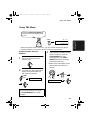
Using TEL/FAX Mode
Press the RECEPTION
MODE key until the
arrow in the display
points to TEL/FAX.
RECEPTION
MODE
TEL
FAX
TEL/FAX
A.M.
When the reception mode is set to TEL/FAX, your fax automatically answers all
calls on 2 rings. After answering, your fax monitors the line for about 5 seconds to
see if a fax tone is being sent.
♦If your fax detects a fax tone (this means that the call is an automatically dialled
fax), it will automatically begin reception of the incoming document.
♦If your fax doesn't detect a fax tone (this means that the call is a voice call or
manually dialled fax), it will make a ringing sound (called pseudo ringing) for 15
seconds to alert you to answer. If you don't answer within this time, your fax will
send a fax tone to the other machine to allow the calling party to send a fax
manually if they desire.
Comments:
♦Only the fax will alert you to voice calls or manually dialled faxes by pseudo
ringing. An extension phone connected to the same line will not ring after the
connection has been made.
♦The duration of pseudo ringing can be adjusted with Option Setting 8. See
Chapter 8, Option Settings.
♦You can change the number of rings on which the machine answers calls by
changing Option Setting 2. (See Chapter 8, Option Settings.)
44
all_fo781a.book
Page 45 Thursday, January 11, 2001
12:06 PM
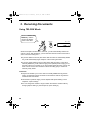
Using FAX Mode
Using FAX Mode
Press the RECEPTION MODE key
until the arrow in the display points
to FAX.
TEL
FAX
3. Receiving
Documents
RECEPTION
MODE
TEL/FAX A.M.
When the reception mode is set to FAX, the machine will automatically answer all
calls on 2 rings and receive incoming faxes.
2 rings
Fax reception
♦You can change the number of rings on which the machine answers calls by
changing Option Setting 2. (See Chapter 8, Option Settings.)
♦If you pick up the handset before the machine answers, you can talk to the other
party and/or receive a document as described in Using TEL mode.
45
all_fo781a.book
Page 46 Thursday, January 11, 2001
12:06 PM
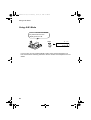
Using A.M. Mode
Using A.M. Mode
Press the RECEPTION MODE
key until the arrow in the
display points to A.M.
RECEPTION
MODE
TEL
FAX
TEL/FAX A.M.
In A.M. mode, your fax will automatically receive voice and fax messages if you
have connected an answering machine to the fax machine. See Chapter 6 for more
details.
46
all_fo781a.book
Page 47 Thursday, January 11, 2001
12:06 PM
Using TEL Mode
Using TEL Mode
Press the RECEPTION MODE key
until the arrow in the display points
to TEL.
TEL
FAX
3. Receiving
Documents
RECEPTION
MODE
TEL/FAX A.M.
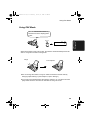
When the reception mode is set to TEL, you must answer all calls using the fax
machine's handset or an extension phone connected to the same line.
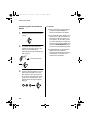
Answering with the fax's
handset
1
Pick up the handset when the
machine rings.
3
If the other party first talks and then
wants to send a fax, press the
START/MEMORY key after
speaking (press your START/
MEMORY key before the sender
presses their Start key).
• Make sure that the display shows
RECEIVING, then replace the
handset.
2
If you hear a fax tone, wait until the
display shows RECEIVING and
then replace the handset.
START/MEMORY
Beep
RECEIVING
RECEIVING
Note: If you have set Option Setting
12 (Fax signal receive) to NO, press
the START/MEMORY key to begin
reception.
47
all_fo781a.book
Page 48 Thursday, January 11, 2001
12:06 PM
Using TEL Mode
Answering with an extension
phone
1
2
Answer the extension phone when
it rings.
If you hear a fax tone when you
answer the extension phone, wait
until your fax answers (the
extension phone will go dead), and
then hang up.
Phone goes dead
If the fax doesn't respond, or if the
other party first talks to you and
then wants to send a fax, press 5,
*, and * on the extension phone
(only on a tone dial phone). This
signals the fax to begin reception.
Hang up.
5
48
♦Your fax will not accept the signal
to begin reception (5**) if a
document is loaded in its feeder.
Beep
3
Comments:
♦If you have set Option Setting 12 to
NO and hear a fax tone when you
answer the extension phone, you
must press 5, *, and * if you are
on a tone dial phone, or walk over
to the fax, pick up the handset, and
press the START/MEMORY key if
you are on a pulse dial only phone.
♦In New Zealand, not all standard
telephones and answering
machines will respond to incoming
ringing when connected to the
socket of the equipment.
all_fo781a.book
Page 49 Thursday, January 11, 2001
12:06 PM
Using TEL Mode
Reception Ratio
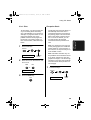
To save paper, you can have the size
of your incoming faxes reduced by
55%. This will allow you to receive, for
example, a 2-page document on one
page (note that this may not be
possible if the document pages are
longer than your printing paper). To
turn on this function, follow the steps
below.
1
The fax has been set at the factory to
automatically reduce the size of
received documents to fit the size of
the printing paper. This ensures that
data on the edges of the document
are not cut off. If desired, you can
turn this function off and have
received documents printed at full
size.
Note: If a document is too long to fit
on the printing paper, the remainder
will be printed on a second page. In
this case, the cut-off point may occur
in the middle of a line.
Press these keys:
FUNCTION
6
2
Press 1 to turn on the function, or 2
to turn it off.
YES
1
NO
or
2
PRINT CONTRAST
3
Note: Automatic reduction may not
be possible if the received document
is too large, contains too many fine
graphics or images, or is sent at high
resolution. In this case, the remainder
of the document will be printed on a
second page.
Press 3
times
2 IN 1 PRINT
1
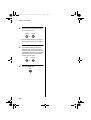
Press these keys:
FUNCTION
6
Press the STOP key.
STOP
RECEPTION RATIO
Press
twice
49
3. Receiving
Documents
2 in 1 Print
all_fo781a.book
Page 50 Thursday, January 11, 2001
Using TEL Mode
2
Press 1 to turn automatic reduction
on, or 2 to turn it off.
AUTO
1
100%
or
2
• If you selected AUTO, go to Step 3.
If you selected 100%, go to Step 4.
3
If you selected AUTO, select the
reception ratio to be used in the
event that the memory becomes full
(automatic reduction is not possible
when the memory is full). Press 1
for 93% or 2 for 100%.
93%
1
4
100%
or
Press the STOP key.
STOP
50
2
12:06 PM
all_fo781a.book
Page 51 Thursday, January 11, 2001
12:06 PM
Substitute Reception to Memory
Substitute Reception to Memory
In situations where printing is not possible, such as when your fax runs out of paper,
the imaging film needs replacement, or the paper jams, incoming faxes will be
received to memory.
♦If you received documents in memory because the fax ran out of paper, be sure to
add paper which is the same size as the paper previously used. If not, the
document print-out size may not match the size of the printing paper.
Caution!
♦When documents are stored in memory, do not turn the power off. This will erase
all of the contents.
♦If documents received in memory are lost due to a power failure or other
interruption of the power supply, a CLEAR REPORT will be printed out when the
power is restored. This gives information about the receptions lost, including the
fax numbers of the transmitting machines if they are available.
51
3. Receiving
Documents
When you have received a document in memory, FAX RX IN MEMORY will appear
in the display, alternating with OUT OF PAPER, FILM END, or PAPER JAMMED.
When you add paper, replace the imaging film, or clear the jam, the stored
documents will automatically print out.
all_fo781a.book
Page 52 Thursday, January 11, 2001
12:06 PM
4. Making Copies
Your fax can also be used to make copies. Single and multiple copies (up to 99 per
original) can be made, enabling your fax to double as a convenience office copier.
1
♦If you are only making one copy of
Load the document(s) face down.
(Maximum of 10 pages.)
the original (or of each original) and
don't want to make a reduction or
enlargement setting, press the
START/MEMORY key twice.
Copying will begin.
♦If you are only making one copy of
the original (or of each original) and
want to make an enlargement or
reduction setting, press the
START/MEMORY key and go to
Step 5.
READY TO SEND
• Set the resolution and/or contrast if
desired. (The default setting for
copying is SUPER FINE.)
RESOLUTION
2
3
Press 1 (MULTI COPY) if you do
not want the copies sorted. Press 2
(SORT COPY) if you want the
copies sorted.
MULTI
Press the COPY/HELP key.
1
SORT
or
2
COPY/HELP
A
B
C
Not sorted (MULTI COPY)
Sorted (SORT COPY)
COPY MODE
1: MULTI COPY
2: SORT COPY
START: COPY
52
A
B C
A
B
C
A
Originals
B C
A
A A
B
B
B
C
C
C
Example of three copies
each of three originals
ENTER # (01-99)
all_fo781a.book
Page 53 Thursday, January 11, 2001
12:06 PM
Making Copies
4
Copy Cut-off
If you are making one copy per
original, press the START/
MEMORY key. If you are making
multiple copies per original, enter
the number of copies per original (if
the number is less than 10, enter a
"0" before the number).
0
When making a copy of a document
that is longer than the printing paper,
use the copy cut-off setting to select
whether the remaining part of the
document will be cut off or printed on
a second page. The intial setting is
YES (cut off the remainder). To
change the setting, follow the steps
below.
3
Example: Nine
copies per original
1
COPY RATIO
Press these keys:
FUNCTION
Set the amount of reduction or
enlargement by entering a number
from 1 to 5 as shown below (or
press the START/MEMORY key to
automatically select 100%).
Copying will begin.
1: AUTO (automatic size
adjustment to match the size of
the printing paper)
2: 50%
3: 100% (no reduction or
enlargement)
4: 125%
5: 135%
2
6
COPY CUT-OFF
2
YES
1
Example: 50%
Note: If you place a large number of
originals in the feeder, the memory
may become full before all of them
can be scanned (MEMORY IS FULL
will appear in the display). If this
happens, press the START/
MEMORY key to copy the originals
which have been scanned, and then
repeat the copy procedure for the
remaining originals, including the
original which was being scanned
when the memory became full.
Press 1 to set copy cut-off to YES
(the remaining part of the
document will not be printed), or 2
to set copy cut-off to NO (the
remaining part will be printed on a
second page).
NO
or
2
INITIALIZE FILM
3
Press the STOP key to return to
the date and time display.
STOP
53
4. Making
Copies
5
all_fo781a.book
Page 54 Thursday, January 11, 2001
12:06 PM
5. MakingTelephone Calls
Your fax can be used like a regular telephone to make and receive voice calls.
♦To make or receive a phone call, the power must be on.
1
Pick up the handset or press the
SPEAKER key. Listen for the dial
tone.
SPEAKER
3
Speak with the other party when
they answer.
• If you pressed the SPEAKER key,
pick up the handset to talk.
or
2
Dial the number using one of the
following methods:
• Normal Dialling: Enter the full
telephone number with the numeric
keys.
• Rapid Key Dialling: Press the
appropriate Rapid Key.
• Speed Dialling: Press the SPEED
DIAL key, and enter the 2-digit
Speed Dial number with the
numeric keys.
01
Example: Press
Rapid Key 01
54
Comments:
♦While the handset of the fax is lifted
(off hook), an extension phone
connected directly to the fax cannot
be used to speak with the other
party.
♦The fax may interrupt a voice call
received on an extension phone if
the reception mode is set to A.M.
and there is a period of silence
during the conversation. If you are
on a tone dial phone, you can
prevent this by pressing any three
keys on the phone immediately
after you answer. (Note: Do not
enter the code to activate fax
reception: 5, *, *.)
all_fo781a.book
Page 55 Thursday, January 11, 2001
12:06 PM
Making Telephone Calls
Chain Dialling
After lifting the handset, you can dial
any combination of Normal Dialling,
Rapid Key Dialling and Speed Dialling
numbers. For example, if you have
stored an area code or an access
code for a special service in a Rapid
Key, you can press the Rapid Key for
that area code or access code, then
dial the remainder of the number by
pressing a Rapid Key, pressing
number keys, or pressing the SPEED
DIAL key and entering a two-digit
Speed Dial number.
Hold
You can put the other party on hold
during a conversation by pressing the
HOLD/SEARCH key. When this is
done, they cannot hear you. You can
put the handset back in the cradle
without breaking the connection.
When you are ready to speak with
them again, pick up the handset. If
you did not put the handset back in
the cradle, press the HOLD/
SEARCH key again to resume
conversation.
Using the HOLD/SEARCH key
5. Making
Phone Calls
You can use the HOLD/SEARCH key
to search for a Rapid Key or Speed
Dial number. First search for the
number as described in Using the
HOLD/SEARCH key in Sending a Fax
by Automatic Dialling in Chapter 2,
then pick up the handset or press the
SPEAKER key. The number will be
dialled automatically (do not press the
START/MEMORY key).
Redial
The last number called can be
redialled by pressing the REDIAL key
(it is not necessary to pick up the
handset or press the SPEAKER key).
When the other party answers, pick
up the handset to talk.
55
all_fo781a.book
Page 56 Thursday, January 11, 2001
12:06 PM
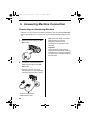
6. Answering Machine Connection
Connecting an Answering Machine
If desired, you can connect an answering machine to your fax machine's TEL. SET
socket. This will allow you to receive both voice messages and faxes when you are
out.
1
Remove the seal covering the TEL.
SET socket.
Note: When Fax Ability or Fax Duet
(distinctive ring) is used, the
answering machine may be
connected to any extension of the
same line.
Important:
In New Zealand, not all standard
telephones and answering machines
will respond to incoming ringing when
connected to the extension socket of
the equipment.
2
Connect the answering machine's
telephone line socket to the TEL.
SET socket.
• If desired, you can connect an
extension phone to your answering
machine's extension phone socket.
TEL.
SET TE
L.
LIN
E
To answering machine's
telephone line socket
56
all_fo781a.book
Page 57 Thursday, January 11, 2001
12:06 PM
Connecting an Answering Machine
Changing the outgoing
message
The outgoing message (OGM) of your
answering machine should be
changed to inform callers who want to
send a fax to press their Start key.
For example, your message might go
as follows:
"Hello. You've reached the ABC
company. No one is available to take
your call right now. Please leave a
message after the beep or press your
facsimile Start key to send a fax.
Thank you for calling."
Comments:
♦It is advisable to keep the length of
the message under 10 seconds. If it
is too long, you may have difficulty
receiving faxes sent by automatic
dialling.
♦If your outgoing message must be
6. Answering
Machine
longer than 10 seconds, leave a
pause of about four seconds at the
beginning of the message. This will
give your fax a chance to detect fax
tones sent when automatic dialling
is used.
57
anua.fm
Page 58 Thursday, January 11, 2001
2:01 PM
Activating the answering machine connection
Activating the answering machine connection
Before you go out, activate the answering machine connection as follows:
1
Set the reception mode to A.M.
RECEPTION
MODE
TEL
FAX
TEL/FAX A.M.
2
Set your answering machine to
auto answer.
How answering machine
mode operates
While you are out, all of your
incoming calls will be answered by
the answering machine and its
outgoing message will play. Voice
callers can leave a message. During
this time, your fax will quietly monitor
the line. If your fax detects a fax tone
or a duration of silence greater than
four seconds, it will take over the line
and begin reception.
• Your answering machine must be
set to answer on a maximum of two
rings. If not, you may not be able to
receive faxes sent by automatic
dialling.
• If your answering machine has a
toll saver function, make sure that it
will answer by the fourth ring.
58
When you return and turn off
your answering machine, be
sure to change the reception
mode back to FAX, TEL, or
TEL/FAX!
all_fo781a.book
Page 59 Thursday, January 11, 2001
12:06 PM
7. Special Functions
Caller ID
If you subscribe to a caller identification service from your telephone company, you
can set your fax to display the name and number of the caller while the fax rings.
Important:
♦To use this function, you must
3
subscribe to a caller
identification service from your
telephone company.
Australia
1
♦Your fax may not be compatible
with some caller identification
services.
1
Press these keys:
4
New Zealand
or
2
COVER SHEET
4
FUNCTION
Press 1 if you are in Australia or 2 if
you are in New Zealand.
Press the STOP key to return to
the date and time display.
STOP
Press 3
times
CALLER-ID
Press 1 to turn on Caller ID, or 2 to
turn it off.
YES
1
NO
or
2
7. Special
Functions
2
59
all_fo781a.book
Page 60 Thursday, January 11, 2001
12:06 PM
Caller ID
How Caller ID operates
When you receive a call, the name
and/or phone number of the caller
will alternately appear in the display,
beginning just before the second ring.
The information will continue to be
displayed until you pick up the
handset, or until the fax answers
automatically if it is in FAX mode.
Note: Some caller ID services may
not provide the name of the caller. In
this case, only the phone number will
appear.
Display example
Caller’s name
DOE JOHN
Caller’s number
444-555-6666
Display messages
One of the following messages will
appear while the fax rings if caller
information is not available.
NO SERVICE No caller information
was received from
your telephone
company. Make sure
that the telephone
company has
activated your service.
CALLER-ID
ERROR
60
Noise on the
telephone line
prevented reception of
caller information.
UNAVAILABLE
(OUT OF
AREA in New
Zealand)
The call was made
from an area which
does not have a caller
identification service,
or the caller's service
is not compatible with
that of your local
phone company.
PRIVATE
Caller information was
(ANONYMOUS not provided by the
in New
telephone company at
Zealand)
the caller's request.
Viewing the Caller ID list
If you subscribe to a Caller ID service
and have turned on the Caller ID
function, your fax machine will keep
information on the most recent 20
calls and faxes you have received.
You can view this information, which
consists of the name and number of
each caller, in the Caller ID List.
Note: For all units installed in New
Zealand, the direct use of the
displayed number for call back does
not operate properly and must not be
used. It is necessary to manually
enter the verified correct number for
the party called. This will often
require the addition or deletion of
leading digits from the number shown
on the display when dialling
manually.
♦After you have received 20 calls,
each new call will delete the oldest
call.
Follow the steps below to view the
Caller ID List in the display. If
desired, you can immediately dial a
number when it appears.
all_fo781a.book
Page 61 Thursday, January 11, 2001
12:06 PM
Caller ID
To print out the list, see Chapter 9,
Printing Reports and Lists.
1
To delete calls from the caller
list
If you want to delete a single call from
the caller list, press the "0" key while
the call appears in the display. If you
want to delete all calls from the list,
hold the "0" key down for at least 3
seconds while you are viewing any
number in the list.
Press these keys:
HOLD/
SEARCH
2
REVIEWING CALLS
2
Press the * key to scroll through
the list from the most recent call, or
the # key to scroll through the list
from the oldest call.
Priority Call
If desired, you can set your fax to
make a special ringing sound when
you receive a call from a designated
phone number. This lets you know
immediately who is calling without
having to look at the display. To use
this function, enter the desired phone
number by following the steps below
(only one phone number can be
entered).
or
3
If you want to dial one of the
numbers in the list, scroll through
the list until the number appears in
the display.
• If you want to send a fax, load the
1
document and then press the
START/MEMORY key.
Press these keys:
FUNCTION
3
PRIORITY CALL #
START/MEMORY
pick up the handset or press the
SPEAKER key. Dialing will begin
automatically. (If you pressed the
SPEAKER key, pick up the handset
when the other party answers.)
4
2
Press 1 to enter a number, or 2 to
clear a number. (If you pressed 2,
go to Step 4.)
1
or
2
Press the STOP key when you
have finished viewing the list.
STOP
61
7. Special
Functions
• If you want to make a voice call,
all_fo781a.book
Page 62 Thursday, January 11, 2001
12:06 PM
Caller ID
3
Blocking voice calls
Enter the phone number, including
the area code, by pressing the
number keys (max. of 20 digits).
ABC
1
JKL
GHI
4
7
4
3
MNO
6
5
TUV
PQRS
DEF
2
WXYZ
8
9
Press the START/MEMORY key
and then the STOP key.
STOP
START/MEMORY
With Caller ID turned on, you can use
the Anti Junk Fax function described
in Blocking Reception of Unwanted
Faxes in this chapter to prevent voice
calls as well as fax receptions (the
Anti Junk Fax function can normally
only prevent faxes).
In this case when a voice call or a fax
transmission comes in from a number
you have specified as a "Junk
Number", your fax will terminate the
call as soon as it receives the calling
phone number from the caller ID
service. The caller will hear a 3
second high pitch tone to signal the
calls termination. In Australia the call
will not break off until the caller has
hung up.
To use this function, set Option
Setting 13 to YES as described in
Chapter 8, Option Settings, and then
enter the number in the Anti Junk
Number List as explained in Blocking
Reception of Unwanted Faxes in this
chapter.
Note: This function cannot be used if
you are using Distinctive Ring.
62
all_fo781a.book
Page 63 Thursday, January 11, 2001
12:06 PM
Distinctive Ring
Distinctive Ring
If you subscribe to a distinctive ring service from your telephone company, you will
need to turn on the distinctive ring function. When this is done, your fax machine will
signal voice calls by the normal ring pattern, and fax transmissions by a special ring
pattern. In the case of a fax transmission, your fax machine will automatically
answer the call and receive the fax.
The distinctive ring function is used with the reception mode set to FAX. When your
fax number is dialled, your fax machine will signal the call with a special ringing
sound, then answer automatically and begin reception after the number of rings set
with Option Setting 2 (the factory setting is 2 rings). When your voice number is
dialled, the fax machine will signal the call with the normal ringing sound to let you
know that you must answer personally.
The factory setting is "NO". If set to "YES", both Australian (Fax Duet) and New
Zealand (FaxAbility) Distinctive Ring are supported.
Important:
♦The distinctive ring function can only be used if you subscribe to a distinctive ring
service from your telephone company. Do not turn on distinctive ring if you are on
a normal line, as the fax machine will not operate properly.
♦If you turn on distinctive ring, the fax will not operate in TEL/FAX reception mode.
1
3
Press these keys:
Press the STOP key.
STOP
FUNCTION
4
FAX SIGNAL RX
4
2
Press 1 (YES) to turn on distinctive
ring, or 2 (NO) to turn it off.
YES
1
NO
or
Set the reception mode to FAX.
RECEPTION
MODE
TEL
FAX
TEL/FAX A.M.
2
63
7. Special
Functions
Press 7
times
DISTINCTIVE RING
all_fo781a.book
Page 64 Thursday, January 11, 2001
12:06 PM
Broadcasting
Broadcasting
This function allows you to send the same document to as many as 20 different
locations with just one operation. First store the document in memory, then enter the
numbers of the receiving machines. The document will be transmitted to each
location.
♦You can only use Rapid Keys or Speed Dial numbers to dial the numbers of the
receiving machines.
1
4
Load the document(s).
Press the START/MEMORY key.
START/MEMORY
• Set the resolution and/or contrast if
desired.
RESOLUTION
READY TO SEND
2
Press the START/MEMORY key
and then 2.
2
5
Press the START/MEMORY key.
Transmission will begin.
START/MEMORY
3
Dial the receiving machines by
using one or both of the following
methods. (a maximum of 20
stations can be selected).
• Enter one or more Speed Dial
numbers by pressing the numeric
keys.
2
2
• Press one or more Rapid Keys.
04
64
01
02
03
05
06
07
08
START/MEMORY
• A Transaction Report is
automatically printed out after
Broadcasting is completed. Check
the "Note" column of the report to
see if any of the locations are
marked "Busy" or have a
communication error code. If so,
send the document to those
locations again.
all_fo781a.book
Page 65 Thursday, January 11, 2001
12:06 PM
Cover Sheet
Cover Sheet
You can have the fax generate a cover sheet and send it as the last page of each of
your fax transmissions.
You can select a
message.
For the recipient's
name to appear, you
must dial using a
Speed Dial or Rapid
Key number with the
name programmed.
Your name and
number must be
programmed as
explained in Chapter 1.
Follow the steps below to turn on the
cover sheet function. Once the cover
sheet function is turned on, cover
sheets will be included with all
tranmissions until you turn it off.
Press 1 (YES) to turn on the cover
sheet function, or 2 (NO) to turn it
off.
YES
NO
1
or
2
Press these keys:
AUTO PRINT OUT
FUNCTION
4
3
COVER SHEET
Press
twice
Press the STOP key to return to
the date and time display.
7. Special
Functions
1
2
STOP
65
all_fo781a.book
Page 66 Thursday, January 11, 2001
12:06 PM
Cover Sheet
Selecting a header message
(optional)
3
When the cover sheet function is
turned on, you can also select a
message which will appear as a
header at the top of the cover sheet.
Note that the message selection is
only effective for one transmission.
1
1
(Example)
before a message can be selected.
• The cover sheet function must be
turned on.
Press these keys:
FUNCTION
5
COVER SHEET HEAD
66
1: URGENT
2: IMPORTANT
3: CONFIDENTIAL
4: PLS. DISTRIBUTE
Load the document(s).
• The document must be loaded
2
Select a message by entering a
number from 1 to 4:
4
Dial the receiving machine and
transmit the document.
Note: To cancel a cover sheet
header setting, press the STOP key
or remove the document from the
feeder.
all_fo781a.book
Page 67 Thursday, January 11, 2001
12:06 PM
Batch Page Numbering
Batch Page Numbering
You can change the page numbering of the transmitted document from simple
numbering ("P.01", "P.02", etc.) to batch numbering, which means that a slash and
the total number of pages being sent are added after each page number (for
example, "P. 01/05", "P.02/05", etc.). This allows the receiver to check for missing
pages.
1
Load the document(s).
• The document must be loaded
before batch page numbering can
be set.
4
Dial the receiving machine and
transmit the document.
Comments:
♦If you need to cancel a batch
number entry, remove the
document from the feeder or press
the STOP key.
♦If the number of pages actually
Press these keys:
FUNCTION
PAGE COUNTER SET
3
Enter the total number of pages
("01" to "99") by pressing the
number keys.
0
8
7. Special
Functions
2
transmitted does not coincide with
the batch number entered, the
alarm will sound and PAGE
COUNT ERROR will appear in the
display. PAGE E. will also appear
in the NOTE column of the
Transaction Report if it has been
set to print out.
Example:
Eight pages
• If you are sending a cover sheet,
do not include it in the total
number of pages (the number will
be adjusted automatically).
67
all_fo781a.book
Page 68 Thursday, January 11, 2001
12:06 PM
Blocking Reception of Unwanted Faxes
Blocking Reception of Unwanted Faxes
The Anti Junk Fax function allows you to block reception of faxes from parties which
you specify. This saves paper by not printing out unwanted "junk" faxes.
To use this function, first turn it on by setting Option Setting 13 to YES as explained
in Chapter 8, and then enter the fax numbers from which you do not want to receive
faxes as shown below.
Comments:
♦Up to 5 numbers can be entered in
2
the Anti Junk Number List.
♦The Anti Junk function will not
SET
operate for a number which has
also been stored as a Priority Call
number.
♦To clear a number from the Anti
Junk Number List, you need to
know the 1-digit number which
identifies it. If you have forgotten
this number, print out the Anti Junk
Number List as explained in
Chapter 9.
1
FUNCTION
3
68
1
3
CLEAR
or
2
Storing: Enter a 1-digit number
from 1 to 5. This number identifies
the fax/voice number you will store
in the next step.
1
(Example)
Clearing: Enter the number which
identifies the fax/voice number you
want to clear, and go to Step 5.
Press these keys:
STORE JUNK #
Press 1 to store a number in the
Anti Junk Number List, or 2 to clear
a number from the list.
Press
twice
all_fo781a.book
Page 69 Thursday, January 11, 2001
12:06 PM
Blocking Reception of Unwanted Faxes
4
Enter the full number you want to
block (max. of 20 digits).
ABC
1
GHI
4
PQRS
7
5
2
JKL
5
TUV
8
DEF
3
MNO
6
WXYZ
9
Press the START/MEMORY key.
START/MEMORY
Return to Step 3 to enter (or clear)
another number, or press STOP to
exit.
STOP
Step 3 or
7. Special
Functions
6
69
all_fo781a.book
Page 70 Thursday, January 11, 2001
12:06 PM
Sending Documents From Memory
Sending Documents From Memory
With this function, the original document is scanned immediately, stored in memory,
and then transmitted once the connection to the receiving machine is made. This is
convenient when transmitting to places where the line is often busy, as it saves you
from waiting to pick up the original document and frees the feeder for other
operations. After transmission, the document will be cleared from memory.
♦Only one memory transmission can be set at a time.
♦The amount of memory currently occupied appears as a percentage in the display
while the document is being scanned.
1
Load the document(s).
2
Press the START/MEMORY key
and then 1.
1
START/MEMORY
ENTER STATION #
READY TO SEND
• Set the resolution and/or contrast if
desired.
3
Enter the number of the receiving
machine using one of the following
methods:
• Press a Rapid Key.
RESOLUTION
• Press the SPEED DIAL key and
enter a Speed Dial number.
• Enter a full telephone number by
pressing the number keys.
01
02
03
(Example)
70
all_fo781a.book
Page 71 Thursday, January 11, 2001
12:06 PM
Sending Documents From Memory
4
Press the START/MEMORY key if
you entered a Speed Dial number
or a full number.
START/MEMORY
• The document will be scanned and
stored in memory. Your fax will
then dial the receiving machine and
transmit the document (redialling
will be done automatically if
necessary).
If the memory becomes full...
If the memory becomes full while the
document is being scanned,
MEMORY IS FULL will appear in the
display.
• Press the START/MEMORY key if
7. Special
Functions
you want to transmit the pages
which have been stored up to that
point in memory. The remaining
pages will be ejected from the
feeder. After transmission, the
memory will be cleared and you
can transmit the remaining pages.
You will also need to transmit the
page which was being scanned
when the memory filled up.
• Press the STOP key if you want to
cancel the entire transmission.
71
all_fo781a.book
Page 72 Thursday, January 11, 2001
12:06 PM
Polling (Requesting a Fax Transmission)
Polling (Requesting a Fax Transmission)
Polling allows you to call another fax machine and have it send a document
(previously loaded in its feeder) to your machine without operator assistance. In
other words, the receiving fax machine, not the transmitting fax machine, initiates
the transmission. You can use your machine to both poll and be polled by others.
To use the polling function, you must first set Rapid Key 08/POLL for use as a
polling key. This is done by changing Option Setting 14, as described in Chapter 8,
Option Settings. (Note that when Rapid Key 08/POLL is set as a polling key, it
cannot be used for Rapid Key Dialling.)
Requesting transmission
1
2
Dial the fax machine you want to
poll using one of the following
methods:
• Pick up the handset (or press the
Press Rapid Key 08/POLL.
• If you used the handset, replace it
when POLLING appears in the
display. Reception will begin.
08/POLL
SPEAKER key) and press a Rapid
key. Wait for the fax answerback
tone.
• Pick up the handset (or press the
SPEAKER key) and dial the full
number. Wait for the fax
answerback tone.
• Press the SPEED DIAL key and
enter a 2-digit Speed Dial number.
• Enter the full number using the
numeric keys.
ABC
1
2
JKL
GHI
4
5
TUV
PQRS
7
8
DEF
3
MNO
6
WXYZ
9
(Example)
72
Being polled (polling
standby)
To let another fax machine poll your
machine, simply set the reception
mode to FAX, and load the
document(s) to be sent.
Transmission will take place when
the other fax machine calls your
machine and activates polling.
Automatic reception is possible whilst
your fax is on polling standby.
all_fo781a.book
Page 73 Thursday, January 11, 2001
12:06 PM
Polling (Requesting a Fax Transmission)
Polling Security allows you to prevent
unauthorized polling of your machine.
When this function is turned on,
polling will only take place when the
fax number of the polling fax machine
has been entered in your machine's
list of permitted fax numbers (called
"passcode numbers"). The number of
the polling fax must also be correctly
programmed into itself for
identification.
Storing and clearing fax
numbers for polling
permission
You can store up to 10 fax numbers
in your machine's list of permitted
numbers.
1
FUNCTION
3
To use Polling Security, follow the
steps below to turn the function on,
and then enter permitted numbers as
shown on the following page.
1
FUNCTION
3
Press 1 to store a number, or 2 to
clear a number.
1
Press 3
times
SECURITY SELECT
2
Press 1 to turn polling security on,
or 2 to turn it off.
1
or
2
3
Press the START/MEMORY key
and then the STOP key.
2
or
Storing: Enter a 2-digit number
from 01 to 10. This number
identifies the fax number you will
store in the next step.
Clearing: Enter the number which
identifies the fax number you want
to clear, and go to Step 6.
0
3
Press 4
times
PASSCODE # MODE
2
Press these keys:
Press these keys:
1
(Example)
STOP
START/MEMORY
73
7. Special
Functions
Polling security
all_fo781a.book
Page 74 Thursday, January 11, 2001
12:06 PM
Polling (Requesting a Fax Transmission)
4
Enter the fax number (max. of 20
digits).
ABC
2
1
GHI
JKL
4
PQRS
5
TUV
7
5
8
DEF
3
MNO
6
WXYZ
9
Press the START/MEMORY key.
START/MEMORY
6
Return to Step 3 to enter (or clear)
another number, or press STOP to
exit.
STOP
Step 3 or
74
all_fo781a.book
Page 75 Thursday, January 11, 2001
12:06 PM
Timer Operations
Timer Operations
The Timer function allows you to set a transmission and/or polling operation to be
performed automatically at a time you specify. One transmission operation and one
polling operation can be set at the same time, and the times they will be performed
can be specified up to 24 hours in advance.
As an example, you can use this function to take advantage of off-peak telephone
rates without having to be there when the operation is performed.
Note: Only a Speed Dial number can be used to dial the receiving machine.
Setting a timer operation
1
5
Press the START/MEMORY key.
Press these keys:
START/MEMORY
FUNCTION
1
6
TIMER MODE
2
• If this is a polling operation, go to
Step 9.
Press # to set a transmission
operation (SEND MODE), or * to
set a polling operation (POLLING
MODE).
or
3
Enter the Speed Dial number of the
receiving fax machine.
0
5
(Example)
7
Press the START/MEMORY key.
Press 1 to select SET.
START/MEMORY
1
Enter the time at which you want
the operation to take place in 24hour format (2 digits for the hour
and 2 digits for the minute).
0
9
2
7. Special
Functions
4
5
Example: 9:25
75
all_fo781a.book
Page 76 Thursday, January 11, 2001
12:06 PM
Timer Operations
8
Adjust the resolution and/or
contrast if desired (skip to the next
step if you don't want to change
settings).
2
Press # to cancel a transmission
operation, or * to cancel a polling
operation.
or
RESOLUTION
9
3
Press the START/MEMORY key
and then the STOP key. If this is a
transmission operation, load the
document in the feeder sometime
before the specified time of
transmission.
Press 2 to select CLEAR.
2
4
Press the START/MEMORY key
and then the STOP key.
STOP
STOP
START/MEMORY
START/MEMORY
To cancel an operation
If you need to cancel an operation
after it has been set, follow the steps
below.
1
Press these keys:
FUNCTION
1
TIMER MODE
76
Page 77 Thursday, January 11, 2001
12:06 PM
8. Option
Setting
all_fo781a.book
8. OptionSettings
The option settings let you customise your fax to better suit your needs. An initial
setting has been made for each option at the factory. You can change a setting by
following the steps described for each option below.
First press FUNCTION
and 4, then press # or * to
scroll through the options.
FUNCTION
4
or
Setting 1: FINE RESOLUTION PRIORITY
This option sets the default resolution (the resolution used if a setting is not made
with the RESOLUTION key) for transmitting documents. Press 1 (YES) to set the
default resolution to FINE, or 2 (NO) to set it to STANDARD.
♦Initial setting: 2
FUNCTION
4
YES
Display
will show:
FINE PRIORITY
NO
STOP
1
or
NUMBER OF RINGS
2
Setting 2: NUMBER OF RINGS TO ANSWER
This sets the number of rings the fax machine waits before answering an incoming
call in FAX and TEL/FAX reception modes. Enter any number from 2 to 4.
♦Initial setting: 2
FUNCTION
4
Enter a number
from 2 to 4
Press
until display
shows:
NUMBER OF RINGS
STOP
4 RINGS TEL ANS.
77
all_fo781a.book
Page 78 Thursday, January 11, 2001
12:06 PM
Option Settings
Setting 3: 4 RINGS TEL ANSWER
Press 1 (YES) to have the fax machine answer a call after 4 rings when it is in TEL
reception mode. Press 2 (NO) to turn the function off.
♦Initial setting: 2
FUNCTION
4
YES
Press
until display
shows:
4 RINGS TEL ANS.
NO
STOP
1
or
TEL/FAX REMOTE #
2
Setting 4: TEL/FAX REMOTE NUMBER (TRANSFER CODE)
If you hear a fax tone when you answer a call on a tone dial extension phone
connected to the same line as the fax, you can make the fax begin reception by
pressing 5, *, and * on the phone. Use this setting if you want to use a number
other than 5 to begin fax reception. You can enter any number from 0 to 9.
♦Initial setting: 5
FUNCTION
4
Enter a number
from 0 to 9
Press
until display
shows:
TEL/FAX REMOTE #
STOP
REMOTE RECEPTION
Setting 5: REMOTE RECEPTION SELECT
If you don't intend to use the above TEL/FAX REMOTE NUMBER, you can turn
detection of the number off. This will ensure that the fax never mistakenly attempts
to begin reception if it detects a signal similar to the TEL/FAX REMOTE NUMBER
while you are talking on an extension phone. Press 1 to turn detection on, or 2 to
turn detection off.
♦Initial setting: 1
FUNCTION
4
YES
Press
until display
shows:
NO
STOP
1
78
or
2
TRANSACTION LIST
REMOTE RECEPTION
all_fo781a.book
Page 79 Thursday, January 11, 2001
12:06 PM
Setting 6: TRANSACTION REPORT PRINT SELECT
This sets the condition for printing out a Transaction Report. Enter a number from 1
to 5 as follows:
1 (ALWAYS PRINT):
A report will be printed after each transmission,
reception, or error.
2 (ERR/TIMER/MEM):
A report will be printed after an error, timer
operation, or memory operation.
3 (SEND ONLY):
A report will be printed only after a transmission.
4 (NEVER PRINT):
A report will never be printed.
5 (ERROR ONLY):
A report will be printed only after an error occurs.
♦Initial setting: 5
FUNCTION
4
Enter a number
from 1 to 5
Press
until display
shows:
TRANSACTION LIST
STOP
DIAL MODE
Setting 7: DIAL MODE
This sets the mode of dialling. Press 1 if you are on a tone dial line, or 2 if you are on
a pulse dial line.
♦Initial setting: 1
FUNCTION
4
TONE
Press
until display
shows:
DIAL MODE
PULSE
STOP
1
or
2
PSEUDO RING DUR.
Note: For all units installed in New Zealand, select "1" for tone dialling. The pulse
setting "2" will not operate correctly and must not be used.
79
8. Option
Setting
Option Settings
all_fo781a.book
Page 80 Thursday, January 11, 2001
12:06 PM
Option Settings
Setting 8: PSEUDO RINGING DURATION
This sets the duration of pseudo ringing in TEL/FAX reception mode. Press 1 for 15
seconds or 2 for 30 seconds.
♦Initial setting: 1
FUNCTION
4
15
Press
until display
shows:
PSEUDO RING DUR.
30
STOP
1
or
QUIET DETECT TM.
2
Setting 9: QUIET DETECT TIME
When an answering machine is connected to the fax, the fax will take over the line
and begin reception if it detects a certain duration of silence after the answering
machine answers a call. This sets the duration of silence (in seconds). Enter a
number from 01 to 10, or enter 00 to turn off the function.
♦Initial setting: 04
FUNCTION
4
Enter a number
from 00 to 10
Press
until display
shows:
QUIET DETECT TM.
STOP
FAX RX A.M. FAILS
Setting 10: FAX RX A.M. FAILS
Press 1 (YES) to have the fax answer a call if an answering machine connected to
the fax does not answer within 5 rings. Press 2 (NO) to turn the function off.
♦Initial setting: 2
FUNCTION
4
YES
Press
until display
shows:
NO
STOP
1
80
or
2
DISTINCTIVE RING
FAX RX A.M. FAILS
all_fo781a.book
Page 81 Thursday, January 11, 2001
12:06 PM
Setting 11: DISTINCTIVE RING
If you subscribe to a distinctive ring service from your telephone company, press 1
to have your fax signal voice calls and fax transmissions by different ring patterns.
Press 2 to turn the function off. (This setting is described in more detail in Distinctive
Ring in Chapter 7.)
♦Initial setting: 2
FUNCTION
4
YES
Press
until display
shows:
DISTINCTIVE RING
NO
STOP
1
or
FAX SIGNAL RX
2
Setting 12: FAX SIGNAL RECEIVE
Your fax will automatically begin reception if you hear a high-pitched fax tone after
answering a call. If you use a computer fax modem on the same line, you must turn
this function off in order to prevent your fax from mistakenly attempting to receive
documents sent from the computer fax modem. Press 1 to turn the function on, or 2
to turn it off.
♦Initial setting: 1
FUNCTION
4
YES
Press
until display
shows:
FAX SIGNAL RX
NO
STOP
1
or
JUNK # CHECK
2
Setting 13: JUNK FAX NUMBER CHECK
Press 1 to prevent reception from fax numbers entered in the Anti Junk Fax List.
Press 2 to allow reception from all numbers.
♦Initial setting: 2
FUNCTION
4
YES
Press
until display
shows:
JUNK # CHECK
NO
STOP
1
or
2
POLLING
81
8. Option
Setting
Option Settings
all_fo781a.book
Page 82 Thursday, January 11, 2001
12:06 PM
Option Settings
Setting 14: POLLING
Press 1 if you want to use Rapid Key 08/POLL as a polling key. Press 2 if you want
to use it as a regular Rapid Key.
♦Initial setting: 2
FUNCTION
4
YES
until display
shows:
Press
POLLING
NO
STOP
1
or
2
CALLER-ID
Setting 15: CALLER ID
If you subscribe to a caller ID service and want to use the Caller ID function, press
1. To turn Caller ID off, press 2. (Caller ID is explained in more detail in Caller ID in
Chapter 7.)
♦Initial setting: 2
FUNCTION
4
YES
until display
shows:
Press
CALLER-ID
AUSTRALIA NEW ZEALAND
NO
STOP
1
or
1
2
or
2
COVER SHEET
Setting 16: AUTO COVER SHEET
Press 1 (YES) to have the fax automatically generate a cover sheet and send it as
the last page of each transmission. Press 2 (NO) to turn the function off.
♦Initial setting: 2
FUNCTION
4
YES
Press
until display
shows:
NO
STOP
1
82
or
2
AUTO PRINT OUT
COVER SHEET
all_fo781a.book
Page 83 Thursday, January 11, 2001
12:06 PM
Setting 17: ACTIVITY REPORT AUTO PRINT OUT
Press 1 to have your fax automatically print out an Activity Report once every 30
operations. (The list can still be printed out on demand when desired.) Press 2 to
turn automatic print-out off.
♦Initial setting: 2
FUNCTION
4
YES
Press
Display will
show:
AUTO PRINT OUT
NO
STOP
1
or
2
FINE PRIORITY
83
8. Option
Setting
Option Settings
all_fo781a.book
Page 84 Thursday, January 11, 2001
12:06 PM
9. Printing Reports and Lists
You can print out lists showing settings and information entered in the fax. You can
also have the fax automatically print out a report on transactions after they are
made. The lists and the report are described below.
Printing a list
1
Activity Report
Press these keys:
FUNCTION
2
LISTING MODE
2
Press the # key or the * key until
the desired list appears in the
display.
or
3
Press the START/MEMORY key.
START/MEMORY
84
This report shows information on
your most recently performed send
and receive operations (a combined
maximum of 30 operations can
appear). The report is divided into
two parts: the TRANSMISSIONS
ACTIVITY REPORT, which shows
information on transmissions, and the
RECEPTIONS ACTIVITY REPORT,
which shows information on
receptions.
♦If Option Setting 17 (Auto Print
Out) is set to YES, a report will be
automatically printed out whenever
information on 30 operations has
accumulated. (A report can still be
printed on demand at any time.)
♦All information is erased after a
report is printed out. If automatic
print-out is disabled and print-out
has not been performed manually
for 30 operations, the information
on the oldest operation will be
overwritten each time a new
operation is performed.
all_fo781a.book
Page 85 Thursday, January 11, 2001
12:06 PM
Printing Lists
SENDER/
RECEIVER
The fax number of the other machine involved in the
transaction. In the case of a transmission, the number
dialled appears. In the case of a reception, the
programmed ID of the sending machine appears. If this
machine does not have an ID function, the
communication mode will appear (for example, "G3").
PAGES
Number of pages transmitted or received.
NOTE
OK - Transmission/reception was normal.
P.FAIL - A power failure occurred. If you have power and
the problem persists, try a different outlet. If necessary,
have an electrician check your power lines.
JAM - A problem with the paper or original document
occurred. Make sure the paper or document is loaded
properly. Make sure the operation panel is shut securely.
NO PAPER - You ran out of paper during reception.
COM.E-0 to COM.E-7 - A telephone line error prevented
the transaction. See Line Error in Chapter 11.
CANCEL - Transmission was cancelled because the
STOP key was pressed, no document was in the feeder,
or the other machine requested transmission using a
function which your fax does not have. If you were
attempting to fax, make sure a document is in the feeder.
If you were receiving, contact the faxing party to see how
they are trying to send to you.
85
9. Printing
Lists
Explanation of headings
all_fo781a.book
Page 86 Thursday, January 11, 2001
12:06 PM
Printing Lists
Timer List
This list shows the timer operations
which are currently set.
Telephone Number List
This list shows the fax and voice
numbers which have been stored for
automatic dialling.
Passcode List
This list shows settings made for
polling security, your name and fax/
telephone number as entered in the
machine, and a sample of the header
printed at the top of every page you
transmit (HEADER PRINT).
Option Setting List
This list shows the current status of
the option settings.
Anti Junk Number List
This list shows the numbers that are
blocked by the Anti Junk function.
Caller ID List
This list shows information about
your most recent calls (maximum of
20 calls). (This list is only available if
you are using the Caller ID function.)
86
Print Setup List
This list shows the current status of
the printing settings accessed by
pressing the FUNCTION key and the
6 key.
Transaction Report
This report is printed out
automatically after an operation is
completed to allow you to check the
result. Your fax is set at the factory to
print out the report only when an error
occurs. If desired, you can change
the setting to have it printed out
under a variety of other conditions.
This is done by changing Option
Setting 6 (Transaction Report Print
Select) as described in Chapter 8.
♦The same headings appear in the
Transaction Report as in the
Activity Report. See Activity Report
in this chapter for an explanation of
the headings.
♦The Transaction report cannot be
printed out manually.
all_fo781a.book
Page 87 Thursday, January 11, 2001
12:06 PM
10. Maintenance
Fax print head
Clean the printing head frequently to
assure optimum printing
performance.
Open the operation panel (grasp
the finger hold and pull up), and
then pull the release on the right
side of the machine forward to
open the print compartment cover.
4
Take the imaging film cartridge out
of the print compartment and place
it on a sheet of paper.
First unplug the telephone line,
then unplug the power cord.
10. Maintenance
1
3
For Australia
For New Zealand
2
Pull the paper release plate
forward and remove the paper.
87
all_fo781a.book
Page 88 Thursday, January 11, 2001
12:06 PM
Maintenance
5
Wipe the print head and roller with
isopropyl alcohol.
Roller
Print head
Caution!
♦Do not use benzene or thinner.
Avoid touching the print head with
hard objects.
♦The print head may be hot if your
fax machine has just received a
large number of documents. If this
is the case, allow the print head to
cool prior to cleaning.
6
88
Place the imaging film cartridge
back in the print compartment.
7
Close the print compartment cover
(press down on both sides to make
sure it clicks into place), and then
close the operation panel.
all_fo781a.book
Page 89 Thursday, January 11, 2001
12:06 PM
Maintenance
Document
rollers
Reinsert the paper in the paper tray
and push the paper release plate
back down.
10. Maintenance
8
Scanning glass
Caution!
♦When wiping, take care not to
Scanning glass and rollers
Clean the scanning glass and rollers
frequently to ensure the quality of
transmitted images and copies. Open
the operation panel (grasp the finger
hold and pull up), and wipe the
scanning glass and rollers with a soft
cloth.
♦Make sure that all dirt and stains
(such as correcting fluid) are
removed, as dirt and stains will
cause vertical lines on transmitted
images and copies. If necessary,
use a cloth moistened with
isopropyl alcohol.
damage any of the protruding parts
on the underside of the operation
panel.
The housing
Wipe the external parts and surface
of the machine with a dry cloth.
Caution!
♦Do not use benzene or thinner.
These solvents may damage or
discolor the machine.
♦Adhesive cellophane tape is useful
for removal of debris from the
rollers.
89
all_fo781a.book
Page 90 Thursday, January 11, 2001
12:06 PM
11. Troubleshooting
Problems and Solutions
Answering machine connection
Problem
The answering machine
connection does not
operate properly.
Check and remedy
• Make sure your fax machine's reception mode is set
to A.M.
• Make sure your fax machine's TEL. LINE socket is
connected to the wall socket.Make sure your fax
machine's TEL. SET socket is connected to your
answering machine's telephone line socket (not the
answering machine's extension phone socket).
• Make sure your answering machine's outgoing
message is under 10 seconds.
• Make sure that Option Setting 9 (Quiet Detect Time)
is set to three or four seconds (see Chapter 8).
• Make sure that the Distinctive Ring function is turned
off (see Distinctive Ring in Chapter 7).
90
all_fo781a.book
Page 91 Thursday, January 11, 2001
12:06 PM
Answering machine connection
Line error
Problem
LINE ERROR appears in
the display and/or a
transaction report is printed
out with COM. E- and a
number from 0 to 1, 2, 3, 4,
5, 6, or 7 in the NOTE
column.
Check and remedy
• Try the transaction again. If the error persists, check
the following:
• Check the connection. The cord from the TEL. LINE
socket to the wall socket should be no longer than two
meters.
• Make sure there are no modem devices sharing the
same telephone line.
• Have your telephone line checked for line noise.
• Try connecting your fax to a different telephone line.
• If the problem still occurs, your fax machine may need
service.
Dialing and transmission problems
Problem
Check and remedy
No dial tone when you
pick up the handset or
press the SPEAKER key.
• Make sure the handset cord is connected to the
correct socket. See Handset in Connections in
Chapter 1.
Dialling is not possible.
• Make sure the power cord is properly plugged into a
power outlet.
• Make sure that the telephone line is properly
connected to both the TEL. LINE socket and the wall
socket.
• Make sure that the fax is set to the correct dialling
mode for your telephone line. See Option Setting 7 in
Chapter 8.
91
11. Troubleshooting
• Check with the other party to make sure their fax
machine is functioning properly.
all_fo781a.book
Page 92 Thursday, January 11, 2001
12:06 PM
Answering machine connection
The power is on, but no
transmission takes place.
• Make sure that the receiving machine has fax paper.
• Make sure that the telephone line cord is plugged into
the TEL. LINE socket, and not the TEL. SET socket.
• If the receiving machine is in manual mode with no
attendant, reception will not be possible.
• If the receiving machine is not a Sharp model, make
sure it is G3 compatible.
• Check the display for error messages.
• Pick up the handset and check for a dial tone. Call the
receiving machine by normal (manual) dialling, and
confirm its response.
Nothing is printed at the
receiving end.
• Make sure that the document for transmission is
placed face down in the feeder.
A distorted image is
received at the other end.
• Noise on the telephone line may cause distortion. Try
sending the document again.
• Make a copy of the document on your fax. If the copy
is also distorted, your fax may have a problem. If the
problem persists, call for service.
Reception and copying problems
Problem
Check and remedy
The power is on, but no
reception takes place.
• Make sure the wall socket is connected to the TEL.
LINE socket, and not the TEL. SET socket.
The printing paper comes
out blank when you try to
receive a document.
• Make sure that the document is loaded properly in the
feeder of the transmitting machine. Make a copy to
confirm the printing ability of your machine.
92
all_fo781a.book
Page 93 Thursday, January 11, 2001
12:06 PM
Answering machine connection
General print quality is
poor.
• It is important to select a paper that is appropriate for
the thermal transfer printer in your fax. We
recommend using laser quality paper that has a very
smooth finish. Copier paper will work, but it
sometimes tends to yield a lighter print quality.
The received document is
faint.
• Ask the other party to send higher contrast
documents. If the contrast is still too low, your fax may
have a problem. Make a copy to check it.
Received images are
distorted.
• Noise on the telephone line may cause distortion.
Have the other party try sending the document again.
• Make a copy of another document on your fax. If the
copy is also distorted, your fax may have a problem. If
the problem persists, call for service.
The quality of copies is
poor and/or black spots
appear.
• Any dirt or material on the scanning glass will cause
spots to appear on copies and transmitted faxes.
Clean the fax print head and the scanning glass as
explained in Chapter 10.
Reception/copying is
interrupted.
• If reception or copying takes place continuously for a
long time, the print head may overheat. Turn off the
power and let it cool down.
A received document or
copy prints out in strips.
• Make sure the operation panel and the printer
compartment cover under the operation panel are
completely closed (press down on both sides of
each). (To close the printer compartment cover, grasp
the top of the operation panel and pull to open it, and
then press down on both sides of the printer
compartment cover.)
93
11. Troubleshooting
• The print head may be dirty. See Fax print head in
Chapter 10.
all_fo781a.book
Page 94 Thursday, January 11, 2001
12:06 PM
Answering machine connection
General problems
Problem
Check and remedy
Information cannot be
programmed in the fax.
• Make sure the fax is plugged in and the imaging film
and paper have been loaded. (Programming is not
possible if the imaging film and printing paper have
not been loaded.) See Loading the Imaging Film and
Loading Printing Paper in Chapter 1.
Nothing appears in the
display.
• Make sure the power cord is properly plugged into a
power outlet.
• Connect another electrical appliance to the outlet to
confirm that it has power.
The machine does not
respond when you press
any of its keys.
• If a beep sound is not made when you press the
keys, unplug the power cord and then plug it back in
several seconds later.
Automatic document
feeding does not work for
transmission or copying.
• Check the size and weight of the document (see
Transmittable documents in Chapter 2).
Voice calls taken on an
extension phone are
interrupted by the fax.
• The fax may interrupt during a voice call if the
reception mode is set to A.M.. To prevent interruption
on a tone dial extension phone, press any three keys
on the extension phone after answering. (Note: Do
not enter the code to activate fax reception.)
No reception occurs when
polling is attempted.
• Make sure you have not run out of paper.
• Make sure the transmitting machine is in automatic
reception mode.
• If the transmitting machine has polling security, make
sure that your fax number has been entered both in
your machine and in the transmitting machine.
Bell Tinkle
(New Zealand)
94
• The operation of this equipment on the same line as
the telephone or other equipment with audible
warning devices or automatic ring detectors will give
rise to bell tinkle or noise and may cause false
tripping of the ring detector. Should such a problem
occur, contact your authorised Sharp Service Centre
for information.
all_fo781a.book
Page 95 Thursday, January 11, 2001
12:06 PM
Messages and Signals
Messages and Signals
Display messages
A.M. OFF HOOK
When the fax is in A.M. reception mode, this message
appears when the handset of an answering machine (or
extension phone) connected to the fax has been lifted.
CHECK PAPER SIZE
An incorrect size of paper has been loaded in the paper
tray. Remove the paper and load A4-size paper.
COVER OPEN
The print compartment cover (under the operation panel)
is open. Open the operation panel (grasp the top and
pull toward you), and then press down firmly on both
sides of the print compartment cover to close it.
DOCUMENT JAMMED
The original document is jammed. See the following
section, Clearing Paper Jams.
FAX RX IN MEMORY
A fax has been received in memory because the imaging
film needs replacement, you have run out of printing
paper, or the paper is jammed. The fax will print out
automatically when the problem is fixed.
FILM END
The imaging film may need replacement. Check the film
and replace if necessary.
FUNCTION MODE
The FUNCTION key has been pressed.
HOLD
The HOLD/SEARCH key has been pressed to put the
other party on hold during a phone conversation. Press
the HOLD/SEARCH again to take the other party off
hold.
LINE ERROR
Transmission or reception was not successful. Press
STOP to clear the message, and then try again. If the
error persists, see Line Error in Problems and Solutions
in this chapter.
95
11. Troubleshooting
Note: If you have turned on the Caller ID function, see Caller ID in Chapter 7 for
display messages related to Caller ID.
all_fo781a.book
Page 96 Thursday, January 11, 2001
12:06 PM
Messages and Signals
LINE IS IN USE
An extension phone connected to the fax is being used.
Do not lift the fax's handset or attempt transmission at
this time, as this will interrupt the conversation on the
extension phone.
MEMORY IS FULL
The memory is full. This may occur during fax reception
if too much data is received before the pages can be
printed out. If faxes have been received to memory
because printing is not possible (an additional message
will indicate the problem), resolve the problem so that
printing can continue (see Substitute Reception to
Memory in Chapter 3). If you are attempting to transmit
from memory, see Sending Documents from Memory in
Chapter 7.
MEMORY PRINTING
The fax is preparing or printing out a document from
memory.
NO DATA
This appears if you attempt to search for an automatic
dialling number when none have been stored.
NO # STORED
You have tried to dial or clear a Rapid Key or Speed Dial
number that hasn't been programmed (a full number
hasn't been assigned to it).
OUT OF PAPER
You are out of printing paper (or the paper release plate
is open). Load paper as described in Loading Printing
Paper in Chapter 1.
ON HOOK DIAL
The SPEAKER key has been pressed and the fax is
waiting for you to dial. (To return to the date and time
display, press the SPEAKER key again.)
OVER HEAT
The print head has overheated. Operation may be
continued once it cools.
PAPER JAMMED
The printing paper is jammed. See the following section,
Clearing Paper Jams.
READY TO SEND
A document has been loaded and the fax is waiting for
transmission or copying instructions.
96
all_fo781a.book
Page 97 Thursday, January 11, 2001
12:06 PM
Messages and Signals
This appears if you attempt to send a fax by automatic
dialling and the line is busy or the receiving fax machine
does not answer. Your fax machine will automatically
reattempt the call. (See Automatic Redialling in Sending
a Fax by Automatic Dialling in Chapter 2.)
SEARCH DIAL
The HOLD/SEARCH key has been pressed. Press # or
* to search for an automatic dialling number, or press
STOP to return to the data and time display. (See Using
the HOLD/SEARCH key in Sending a Fax by Automatic
Dialling in Chapter 2.)
TOTAL PAGE(S) 01
Number of pages transmitted, received, or copied.
11. Troubleshooting
RECALLING
Audible signals
Continuous tone
3 seconds
Indicates the end of transmission,
reception, or copying.
Intermittent tone
(3 beeps)
5 seconds
(1 second on,
1 second off)
Indicates incomplete transmission,
reception, or copying.
Rapid intermittent
tone
35 seconds
(0.7 seconds on,
0.3 seconds off)
Indicates that the handset is off hook.
97
all_fo781a.book
Page 98 Thursday, January 11, 2001
12:06 PM
Clearing Paper Jams
Clearing Paper Jams
Clearing a jammed document
3
If the original document doesn't feed
properly during transmission or
copying, or DOCUMENT JAMMED
appears in the display, first try
pressing the START/MEMORY key. If
it doesn't feed out, remove it as
follows:
Important:
Do not try to remove a document
without opening the operation panel.
This may damage the feeder
mechanism.
1
2
98
Open the operation panel by
grasping the finger hold and pulling
up.
Remove the document.
Close the operation panel, making
sure it clicks into place.
Click!
Clearing jammed printing
paper
1
Pull the paper release plate
forward and remove the paper.
all_fo781a.book
Page 99 Thursday, January 11, 2001
12:06 PM
Clearing Paper Jams
Open the operation panel (grasp
the finger hold and pull up), and
then pull the release on the right
side of the machine forward to
open the print compartment cover.
4
Close the print compartment cover
(press down on both sides to make
sure it clicks into place), and then
close the operation panel.
5
Reinsert the paper in the paper tray
and push the paper release plate
back down.
11. Troubleshooting
2
3
Gently pull the jammed paper out of
the machine, making sure no torn
pieces of paper remain in the print
compartment or rollers.
99
all_fo781a.book
Page 100 Thursday, January 11, 2001
12:06 PM
Quick Reference Guide
INSTALLATION
ENTERING YOUR NAME AND
NUMBER
2
1
Note: Imaging film and paper must be loaded
to perform the following operation.
1. Press:
TEL.
SET
TEL.
LIN
E
FUNCTION
3
Display shows:
3
OWN NUMBER SET
2. Press:
START/MEMORY
3. Enter your fax number (max. of 20 digits) by
pressing the number keys.
1. Connect the handset as shown.
• If you make a mistake, press the HOLD/
SEARCH key to move the cursor back to
the mistake, then enter the correct number
or letter.
2. Plug the power cord into a grounded, 230240 V outlet.
3. Plug one end of the telephone line into the
TEL. LINE socket on the rear of the fax and
the other end into the adapter. Plug the
adapter into a telephone wall socket.
4. Press:
START/MEMORY
5. Enter your name by pressing the appropriate
number keys as shown below.
• To enter two letters in succession that
Connecting an answering machine and/or
extension telephone
require the same key, press the SPEAKER
key after entering the first letter.
SPACE =
J=
T=
A=
K=
U=
B=
C=
D=
E=
TEL.
SET TE
L.
LINE
F=
G=
1. Remove the seal covering the TEL. SET
socket on the rear of the fax. Connect an
extension telephone or answering machine
to the TEL. SET socket.
L=
V=
M=
W=
N=
X=
O=
Y=
P=
Z=
Q=
H=
R=
I=
S=
ABC
DEF
GHI
JKL
MNO
PQRS
TUV
WXYZ
SYMBOLS
SPEAKER
move
=
move
=
HOLD/
SEARCH
SPEED
DIAL
REDIAL
HOLD/
SEARCH
SPEAKER
2. If desired, connect an extension phone to
the answering machine.
Deletes highlighted letter.
Upper/lower case
shift key.
Moves cursor to
the left.
Moves cursor to
the right.
Press either key one or more times to select
and enter a symbol.
STOP
6. When finished, press:
START/MEMORY
100
all_fo781a.book
Page 101 Thursday, January 11, 2001
12:06 PM
Quick Reference Guide
SETTING THE DATE AND TIME
SENDING DOCUMENTS
Note: Imaging film and paper must be loaded
to perform the following operation.
Place your document (up
to 10 pages) face down in
the document feeder.
Press:
FUNCTION
3
Display shows: DATE & TIME SET
Press the START/MEMORY key:
START/MEMORY
Enter two digits for the Day (01 through 31).
Enter two digits for the Month (01 through 12).
Enter four digits for the Year (Ex: 2001).
Enter two digits for the Hour (01 through 23).
Enter two digits for the Minute (00 through 59).
STOP
When finished, press:
START/MEMORY
Normal Dialling
SPEAKER
1. Lift the handset or press
2. Dial the fax number.
3. Wait for the reception tone (if a person
answers, ask them to press their Start key)
4. Press:
START/MEMORY
Rapid Key Dialling
Press the appropriate Rapid Key. Transmission
will begin automatically.
Speed Dialling
1. Press:
STORING AND CLEARING
NUMBERS FOR AUTO DIALING
Note: Imaging film and paper must be loaded
to perform the following operation.
1. Press:
FUNCTION
SPEED
DIAL
2. Enter 2-digit Speed Dial number.
3. Press:
START/MEMORY
RECEIVING DOCUMENTS
3
TEL
Display shows:
FAX/TEL # MODE
2. Press 1 to store a number or 2 to clear a
number.
3. Enter a 2-digit Speed Dial number (from 01
to 08 for Rapid Key Dialling, or 09 to 88 for
Speed Dialling). (If you are clearing a number, go to Step 7.
4. Enter the full telephone/fax number.
FAX
14 FEB 10:30
TEL/FAX A.M.
RECEPTION
MODE
TEL
FAX
14 FEB 10:30
Press:
TEL/FAX A.M.
TEL
FAX
14 FEB 10:30
TEL/FAX A.M.
TEL
FAX
14 FEB 10:30
TEL/FAX A.M.
FAX mode: The fax automatically answers on
two rings and receives the incoming document.
TEL mode:
Fax
tone
5. Press:
START/MEMORY
START/MEMORY
6. Enter the name of the location by pressing
number keys (max. of 20 characters). (Refer
to the letter entry table in ENTERING YOUR
NAME AND NUMBER.)
STOP
7. Press:
START/MEMORY
RECEIVING
TEL/FAX mode:
The fax machine automatically answers on two
rings and receives faxes. Voice calls (including
manually dialled fax transmissions) are
signalled by a special ringing sound.
A.M. mode: Select this mode when an
answering machine is connected to the fax and
the answering machine is turned on.
101
all_fo781a.book
Page 102 Thursday, January 11, 2001
12:06 PM
Index
A
A.M. reception mode, 26, 58
Activity Report, 84
Automatic printing, 83
Answering machine hookup
Activating, 58
Connecting, 56
Fax Reception When A.M. Fails, 80
Quiet Detect Time, 80
Troubleshooting, 90
Anti junk fax, 68, 81
Anti junk Number List, 86
Audible signals, 97
Auto cover sheet, 82
Automatic dialling, 40
Automatic dialling, storing numbers, 37
Search, 41, 55
Speed, 40, 54
Direct Keypad Dialling, 41
Display, 10
Display messages, 95
Distinctive Ring, 63
Document feeder, 30
Document guides, 30
Document restrictions, 29
Document sizes, 29
Document, maximum scanning size, 29
E
Extension telephone
Connecting, 14
Using, 48
B
F
Batch page numbering, 67
Broadcasting, 64
Fax Ability (Distinctive Ring), 63
Fax Duet (Distinctive Ring), 63
FAX reception mode, 26, 45
Fine Resolution Priority, 77
Four rings TEL answer, 78
Function key, 10
C
Caller ID, 59
Caller ID list, 60, 86
Chain Dialling, 55
Cleaning, 87, 89
Contrast, 32
Copies, 52
Copy cut-off setting, 53
Copy/Help key, 11, 52
Cover sheet, 82
H
Halftone, 32
Handset, 12
Hold, 55
Hold/Search key, 11, 55
Housing, cleaning, 89
D
I
Date, setting, 24
Dial mode, 79
Dialling
Direct Keypad, 41
Normal, 34, 54
Rapid Key, 40, 54
Imaging film, loading and replacing, 15
102
J
Jams, clearing, 98
Junk fax number check, 81
allIX.fm Page 103 Thursday, January 11, 2001
2:29 PM
Index
Memory
Sending documents from, 70
Substitute reception to, 51
TEL/FAX mode, 26, 44
Reception mode key, 10, 26
Reception Ratio setting, 49
Redial key, 10, 55
Redialling, 35, 43, 55
Remote Reception Select, 78
Removing original document, 31
Resolution, 32
Resolution key, 10
Ringer volume, 27
Rollers,cleaning, 89
N
S
Normal Dialling, 34, 54
Number keys, 10
Number of rings in FAX and TEL/FAX
reception modes, 77
Scanning glass, cleaning, 89
Search Dialling, 41, 55
Sender’s name and number, entering, 21
Speaker key, 11, 27, 34, 54
Speaker volume, 27
Speed Dial key, 10, 40, 54
Speed Dialling, 40, 54
START/MEMORY key, 11
Stop key, 11
L
Letters, entering, 22
Line error, 91
Loading printing paper, 19
Loading the document, 30
M
O
Option Setting List, 86
P
Panel release, 10
Paper jams, clearing, 98
Passcode List, 86
Pauses in automatic dialling, 41
Polling, 72 - 73
Polling key, setting, 82
Print contrast setting, 20
Print head, cleaning, 87
Print Setup List, 86
Priority Call, 61
Pseudo ringing duration, 80
R
Rapid Dial keys, 11
Rapid Key Dialling, 40, 54
Reception mode
A.M. mode, 26, 58
FAX mode, 26, 45
Setting, 26
TEL mode, 26, 47
T
TEL reception mode, 26, 47
TEL. LINE socket, 13
TEL. SET socket, 14, 56
TEL/FAX reception mode, 26, 44
Tel/Fax Remote Number, 78
Telephone Number List, 86
Telephone, using as, 54
Time, setting, 24
Timer List, 86
Timer operations, 75
Transaction Report, 86
Transaction Report Print Select, 79
Two-in-one printing, 49
V
Volume keys, 10, 27
103
all_fo781a.book
Page 104 Thursday, January 11, 2001
12:06 PM
all_fo781a.book
Page 104 Thursday, January 11, 2001
12:06 PM
SHARP CORPORATION OF AUSTRALIA PTY.LTD.
A.C.N. 003 039 405
1 Huntingwood Drive, Huntingwood, Blacktown, N.S.W., 2148
SHARP CORPORATION OF NEW ZEALAND LIMITED.
Cnr Mahunga Drive & Hastie Ave. Mangere Bridge, Auckland
New Zealand
SHARP CORPORATION
PRINTED IN THAILAND
(TINSE4210XHTZ)